
Documentation Index
Fetch the complete documentation index at: https://developers.authlete.com/llms.txt
Use this file to discover all available pages before exploring further.
This page is for Authlete 2.x. For current (3.0) documentation, see this page.
Preface
A section of RFC 8705, “2. Mutual TLS for OAuth Client Authentication” defines how authorization servers authenticate clients using mutual TLS. Authlete has a feature for authorization servers to authenticate their clients with TLS client certificate. This article describes overview of the feature and instructions to enable it.How TLS client authentication works in Authlete
The TLS client authentication feature of Authlete employs “client ID” and “subject name” (subject distinguished name / subject alternative name) to authenticate clients. On processing token requests, an authorization server is responsible to provide those two properties to Authlete. Client ID is included in content of a token request by a client, so an authorization server doesn’t have to care. “Subject name” is not in the content but in a client certificate, that can be obtained from a mutual TLS connection between a client and an authorization server. On Authlete’s side, you have to enable “TLS_CLIENT_AUTH” client authentication method and register the client’s ”subject name.”
Service settings
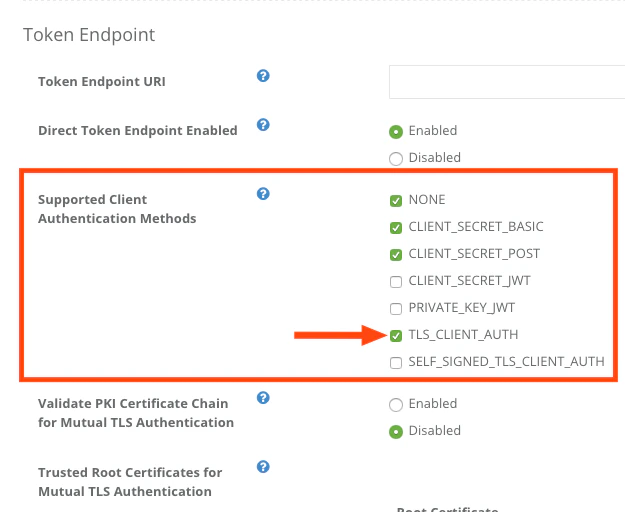
Log in to Authlete’s Service Owner Console, click “Edit” button in the bottom of the page to make settings editable, and go to Authorization tab. There should be Token Endpoint section. Check the box next to “TLS_CLIENT_AUTH” at Supported Client Authentication Methods and click “Update” button in the bottom of the page. Press “OK” in a dialog for confirmation.| Tab | Item | Value |
|---|---|---|
| Authorization | Supported Client Authentication Methods | TLS_CLIENT_AUTH |
Client settings
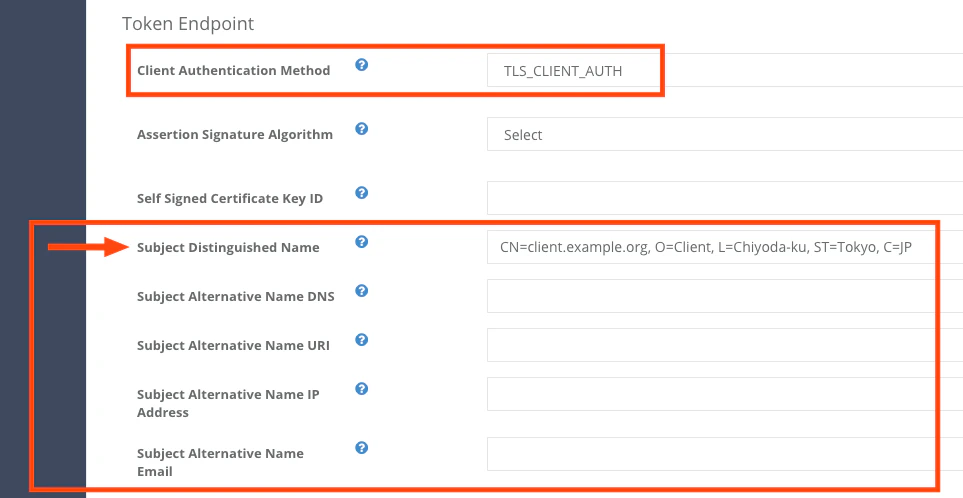
Log in to Developer Console for the service and configure the client’s settings in Authorization tab as follows.This example uses Subject Distinguished Name (Subject DN) as a type of “subject name” though, Authlete in fact supports other various types of Subject Alternative Name (SAN) in addition to Subject DN.
Tab Item Value Authorization Client Authentication Method TLS_CLIENT_AUTH Authorization Subject Distinguished Name (e.g. CN=client.example.org, O=Client, L=Chiyoda-ku, ST=Tokyo, C=JP)
Example
The following is an example of a request to POST /auth/token (folded for readability). An authorization server establishes a mutual TLS connection with a client, obtains the client’s certificate from the connection, and makes the request to the API. Content of a token request, that includes a client ID (client_id), is specified as a value of “parameters,” and a client certificate as a value of “clientCertificate”.See Also
This article describes basics of client authentication configuration in Authlete.
This article describes setup instructions for Authlete to use “Mutual-TLS certificate-bound access tokens,” defined in “RFC 8705 OAuth 2.0 Mutual-TLS Client Authentication and Certificate-Bound Access Tokens.”
This video is one of the sessions at “Financial APIs Workshop 2018 ”, held on July 24th, 2018 in Tokyo. Justin Richer from Authlete talks about comparison of Authlete’s unique semi-hosted approach and traditional approaches for deploying OAuth infrastructure, and how Authlete has extended its client authentication functions and supported mutual TLS to implement Financial-grade API (FAPI).