Documentation Index
Fetch the complete documentation index at: https://developers.authlete.com/llms.txt
Use this file to discover all available pages before exploring further.
This page is for Authlete 2.x. For current (3.0) documentation, see this page. Preface
This article describes setup instructions for Authlete to use “Mutual-TLS certificate-bound access tokens,” defined in “RFC 8705 OAuth 2.0 Mutual-TLS Client Authentication and Certificate-Bound Access Tokens.”
“Mutual-TLS certificate-bound access tokens” works independently of the “mutual-TLS client authentication.” Check out the following article on the client authentication method.
How it works
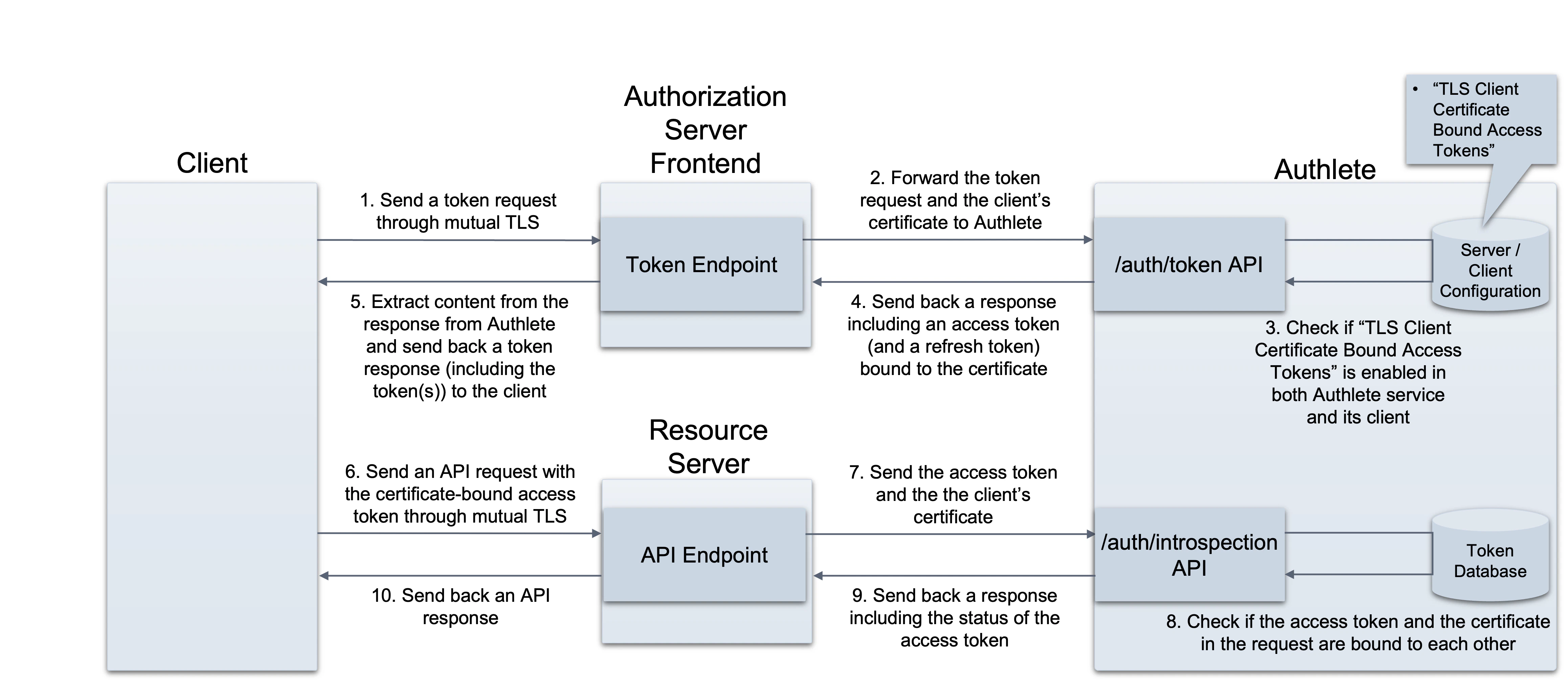 Authlete APIs work as follows, once the “Mutual-TLS certificate-bound access tokens” settings have been enabled:
-
POST /auth/token API
- It receives a client certificate (clientCertificate) as a request parameter and binds it with an access token to be issued.
- If using JWT-formatted access tokens is enabled, the API includes a thumbprint of the client certificate into an access token to be issued.
-
POST /auth/introspection API
- It receives an access token and a client certificate as request parameters and checks if both are bound to each other.
-
POST /auth/introspection/standard API
- It receives an access token (token) as a value included in one of request parameters (parameters) and provides a thumbprint of the client certificate bound to the token.
With these APIs, only the clients that can submit their client certificates through mutual TLS connection are able to prove their possession of access tokens and use the tokens for API requests. In other words, the tokens are no longer useful for other clients.
Configuration
Service settings for access token configuration
Log into Authlete’s Service Owner Console
, click “Edit” button in the bottom of the page to make settings editable, and go to Token tab. There should be Access Token section. Choose the following option for TLS Client Certificate Bound Access Tokens.
| Item | Value |
|---|
| TLS Client Certificate Bound Access Tokens | Choose “Supported” |
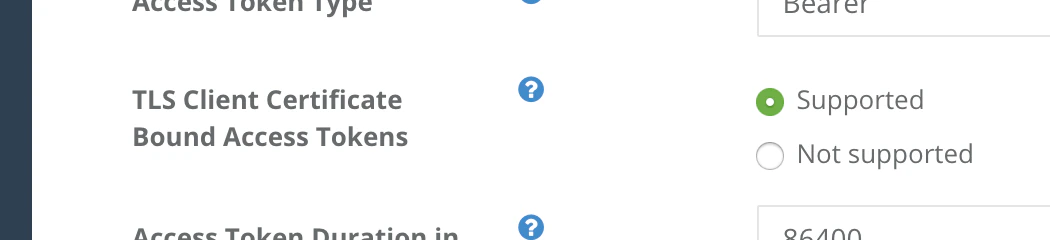 TLS Client Certificate Bound Access Tokens in Service Owner Console
Client settings for access token configuration
Log into Developer Console for the service, click a link to the client, click “Edit” button in the bottom of the page to make settings editable, and go to Basic tab. Choose the following option for TLS Client Certificate Bound Access Tokens.
| Item | Value |
|---|
| TLS Client Certificate Bound Access Tokens | Choose “Enabled” |
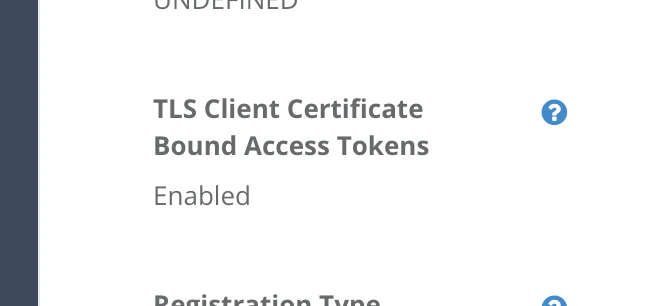 TLS Client Certificate Bound Access Tokens in Developer Console
With these configuration, “Mutual-TLS certificate-bound access tokens” are ready for use.
TLS Client Certificate Bound Access Tokens in Developer Console
With these configuration, “Mutual-TLS certificate-bound access tokens” are ready for use.
Examples
The following examples are requests and responses of the APIs. (folded for readability)
/auth/token API
Request
An authorization server establishes a mutual TLS connection with a client, extracts the client’s certificate from the connection, and make a request to Authlete using the certificate as a value of “clientCertificate.”
$ curl -s -X POST https://api.authlete.com/api/auth/token \
 -u ...:... \
 -H 'Content-type: application/json' \
 -d '{'\
    **'"clientCertificate":"-----BEGIN CERTIFICATE-----\n
MIIDPDCCAiQCCQDfkemtGUyxAjANBgkqhkiG9w0BAQsFADBgMQswCQYDVQQGEwJK\n
UDEOMAwGA1UECAwFVG9reW8xEzARBgNVBAcMCkNoaXlvZGEta3UxDzANBgNVBAoM\n
BkNsaWVudDEbMBkGA1UEAwwSY2xpZW50LmV4YW1wbGUub3JnMB4XDTIwMDUxMTEx\n
MDcyM1oXDTIxMDUxMTExMDcyM1owYDELMAkGA1UEBhMCSlAxDjAMBgNVBAgMBVRv\n
a3lvMRMwEQYDVQQHDApDaGl5b2RhLWt1MQ8wDQYDVQQKDAZDbGllbnQxGzAZBgNV\n
BAMMEmNsaWVudC5leGFtcGxlLm9yZzCCASIwDQYJKoZIhvcNAQEBBQADggEPADCC\n
AQoCggEBAMu7V2QyQk4iLPry0OsykR/8WO2aNOBNoVZYDexF1TsFv9s2S4PEDFEt\n
1BZrEmBe5HWpGb1iuDGG6wjAanEkea8AIUgslMsOOB0rQnbJA3nI5wktjCG2VzWo\n
zrmxAAaBM7ixaLPcJT1K0FSu4fzse3X9gtA2rtNGwk1JEMNIBpFghxw7zzUZBduS\n
lkVPPcQ3gPGVutiWfNPNPAqb4eMKwtuTPXbZSJ4RO9xGKMIuoaBWO9xPS6rNy+Kr\n
vOckNEsR+8PBYh9vzbmF0mDlk+BMd9sOGyylYBARFdqukMJnSbVcRvr+Gcaf+QSg\n
FRHkVGWXHXtMRI+MsCvOXrhmlJhxbdMCAwEAATANBgkqhkiG9w0BAQsFAAOCAQEA\n
JfEyXTEGdjchre2dFCa/WLdH5PZBqB+E0Umm+/I+puA+aUpkRaOfmIUPNaCZ1Lgg\n
mOo8BGuEG0oXpOSBoRkxf46d1bxJk5YSe+TgSxS6YX/mE6Lt1Aj7HjojlCuNFGS6\n
vzyEugQSsOjuoIPS32PvqmZ+80jzVNUsMD76xGl32ZsVeJmDnogVPZ4NlolQcmH2\n
bYjK00uPXaUU30IVu+UTrEBhe30My/aW31NbT2I7Ct52wwu67pyP3QOKmuLxMd6N\n
+KkxfIY23zla4herq9vWZejgfBfkAwOapeIIHGYtY7IFxm6nqufb4h71vjeoouOt\n
31J7bEcAU9WRP1Pr/X4hLA==\n-----END CERTIFICATE-----\n",'\**'"parameters"':\
'"redirect_uri=https://client.example.org/cb/example.com'\
'&client_id=...'\
'&grant_type=authorization_code'\
'&code=smA...Gp4"'\
'}'
Response
Authlete issues an access token bound with the client certificate.
{
  "type": "tokenResponse",
  "resultCode": "A050001",
  "resultMessage": "[A050001] The token request (grant_type=authorization_code) was processed successfully.",
  **"accessToken": "AHu...MMs"**,  "accessTokenDuration": 86400,
  "accessTokenExpiresAt": 1591935416474,
  "action": "OK",
  "clientId": 17566160603766,
  "clientIdAliasUsed": false,
  "grantType": "AUTHORIZATION_CODE",
  "refreshToken": "_zkZeqy6pLdFerpwqJPh0S0gEZsSj9EbmwVsN92WNsE",
  "refreshTokenDuration": 864000,
  "refreshTokenExpiresAt": 1592713016474,
  "responseContent": "{\**"access_token\":\"AHu...MMs\",**    \"refresh_token\":\"_zk...NsE\",
    \"scope\":null,
    \"token_type\":\"Bearer\",
    \"expires_in\":86400}",
  "subject": "testuser01"
}
eyJraWQiOiIxIiwiYWxnIjoiRVMyNTYifQ.
eyJzdWIiOiJ0ZXN0dXNlcjAxIiwic2NvcGUiOm51bGwsImlzcyI6Imh0dHBzOi8v
YXMuZXhhbXBsZS5jb20iLCJjbmYiOnsieDV0I1MyNTYiOiJPSURfU2MyeVJlVER4
OVFTN2YxU01Vek54c2g3a2hKWW1hSXdxWHc4WXV3In0sImV4cCI6MTU5MTkzOTMy
NiwiaWF0IjoxNTkxODUyOTI2LCJjbGllbnRfaWQiOiIxNzU2NjE2MDYwMzc2NiIs
Imp0aSI6InN6dDVnV0ZTb3ZGSVU1Ti13amRMeUZELUVpUzNyZEcyS1IzMTFCMkY2
RmMifQ.
Pw3IntOrXDqW3Z5eoGSeeJaPG5n1aKEVokgbUh_BJpqzuZ6F6GDDLhj98XBvjii
x9oAmaTpy39ijl1vcq3r1BA
{
   "sub": "testuser01",
   "scope": null,
   "iss": "https://as.example.com",
   **"cnf": {
       "x5t#S256": "OID\_Sc2yReTDx9QS7f1SMUzNxsh7khJYmaIwqXw8Yuw"
   },**   "exp": 1591939326,
   "iat": 1591852926,
   "client_id": "17566160603766",
   "jti": "szt5gWFSovFIU5N-wjdLyFD-EiS3rdG2KR311B2F6Fc"
}
/auth/introspection API
Request
An authorization server establishes a mutual TLS connection with a client, extracts the client’s certificate from the connection, and make a request to Authlete using the certificate as a value of “clientCertificate.”
A resource server establishes a mutual TLS connection with a client, extracts the client’s certificate from the connection, and make a request to Authlete using the certificate as a value of “clientCertificate.”
curl -s -X POST https://api.authlete.com/api/auth/introspection \
-u ...:... \
-H 'Content-type: application/json' \
-d '{
  **"token": "AHu...MMs",
  "clientCertificate": "-----BEGIN CERTIFICATE-----\n
  MIIDPDCCAiQCCQDfkemtGUyxAjANBgkqhkiG9w0BAQsFADBgMQswCQYDVQQGEwJK\n
  UDEOMAwGA1UECAwFVG9reW8xEzARBgNVBAcMCkNoaXlvZGEta3UxDzANBgNVBAoM\n
  BkNsaWVudDEbMBkGA1UEAwwSY2xpZW50LmV4YW1wbGUub3JnMB4XDTIwMDUxMTEx\n
  MDcyM1oXDTIxMDUxMTExMDcyM1owYDELMAkGA1UEBhMCSlAxDjAMBgNVBAgMBVRv\n
  a3lvMRMwEQYDVQQHDApDaGl5b2RhLWt1MQ8wDQYDVQQKDAZDbGllbnQxGzAZBgNV\n
  BAMMEmNsaWVudC5leGFtcGxlLm9yZzCCASIwDQYJKoZIhvcNAQEBBQADggEPADCC\n
  AQoCggEBAMu7V2QyQk4iLPry0OsykR/8WO2aNOBNoVZYDexF1TsFv9s2S4PEDFEt\n
  1BZrEmBe5HWpGb1iuDGG6wjAanEkea8AIUgslMsOOB0rQnbJA3nI5wktjCG2VzWo\n
  zrmxAAaBM7ixaLPcJT1K0FSu4fzse3X9gtA2rtNGwk1JEMNIBpFghxw7zzUZBduS\n
  lkVPPcQ3gPGVutiWfNPNPAqb4eMKwtuTPXbZSJ4RO9xGKMIuoaBWO9xPS6rNy+Kr\n
  vOckNEsR+8PBYh9vzbmF0mDlk+BMd9sOGyylYBARFdqukMJnSbVcRvr+Gcaf+QSg\n
  FRHkVGWXHXtMRI+MsCvOXrhmlJhxbdMCAwEAATANBgkqhkiG9w0BAQsFAAOCAQEA\n
  JfEyXTEGdjchre2dFCa/WLdH5PZBqB+E0Umm+/I+puA+aUpkRaOfmIUPNaCZ1Lgg\n
  mOo8BGuEG0oXpOSBoRkxf46d1bxJk5YSe+TgSxS6YX/mE6Lt1Aj7HjojlCuNFGS6\n
  vzyEugQSsOjuoIPS32PvqmZ+80jzVNUsMD76xGl32ZsVeJmDnogVPZ4NlolQcmH2\n
  bYjK00uPXaUU30IVu+UTrEBhe30My/aW31NbT2I7Ct52wwu67pyP3QOKmuLxMd6N\n
  +KkxfIY23zla4herq9vWZejgfBfkAwOapeIIHGYtY7IFxm6nqufb4h71vjeoouOt\n
  31J7bEcAU9WRP1Pr/X4hLA==\n-----END CERTIFICATE-----"**}'
Response
If it is confirmed that the access token (token) is bound with the client certificate (clientCertificate), Authlete sends the following response. It includes a value of thumbprint of the client certificate (certificateThumbprint).
{
    "type": "introspectionResponse",
    "resultCode": "A056001",
    "resultMessage": "[A056001] The access token is valid.",
    "action": "OK",
    **"certificateThumbprint": "OID_Sc2yReTDx9QS7f1SMUzNxsh7khJYmaIwqXw8Yuw",**    "clientId": ...,
    "clientIdAliasUsed": false,
    "existent": true,
    "expiresAt": 1591936228000,
    "refreshable": true,
    "responseContent": "Bearer error=\"invalid_request\"",
    "subject": "testuser01",
    "sufficient": true,
    "usable": true
}
/auth/introspection/standard API
Request
A resource server send the access token in question, to an authorization server’s token introspection endpoint. The authorization server forwards the request content to Authlete.
$ curl -s -X POST https://api.authlete.com/api/auth/introspection/standard \
-u ...:... \
-H 'Content-type: application/json' \
-d '{ "parameters":"**token=AHu...MMs**" }'
Response
If it is confirmed that the access token (token) is bound with the client certificate (clientCertificate), Authlete sends the following response. It includes a value of thumbprint of the client certificate (certificateThumbprint).
If it is confirmed that the access token is bound with a client certificate, Authlete sends responseContent including a thumbprint of the certificate. The authorization server sends the content back to the resource server as a response from its token introspection endpoint.
{
    "type": "standardIntrospectionResponse",
    "resultCode": "A145001",
    "resultMessage": "[A145001] Introspection was performed successfully (type=access_token, active=true).",
    "action": "OK",
    "responseContent": {
        "sub": "testuser01",
        "scope": null,
        "iss": "https://as.example.com",
        "active": true,
        **"cnf": {
            "x5t#S256": "OID_Sc2yReTDx9QS7f1SMUzNxsh7khJYmaIwqXw8Yuw"
        },**        "token_type": "Bearer",
        "exp": 1591936228,
        "client_id": "17566160603766"
    }
}
