
Migrating using the Configuration Migrator (Dedicated and Self-Managed)
Downloading the Configuration Migrator
Steps 1 to 4 below are performed on the Authlete Shared environment (console.authlete.com), not on the destination environment. The organization and token you create there are used only to pull the image, and are separate from the destination environment’s credentials in the
Preparation section below.1. Create an Organization
- Log in to the Authlete Management Console.
- Create an organization for your company.
- Note down the Organization ID.
 Organization creation page
2. Request Access
- Share the Organization ID and Organization Name with Authlete Support.
- Authlete will authorize registry access for your organization.
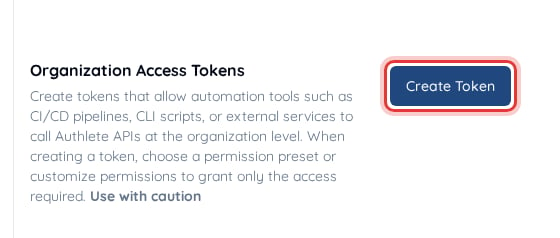
3. Generate a Registry Access Token
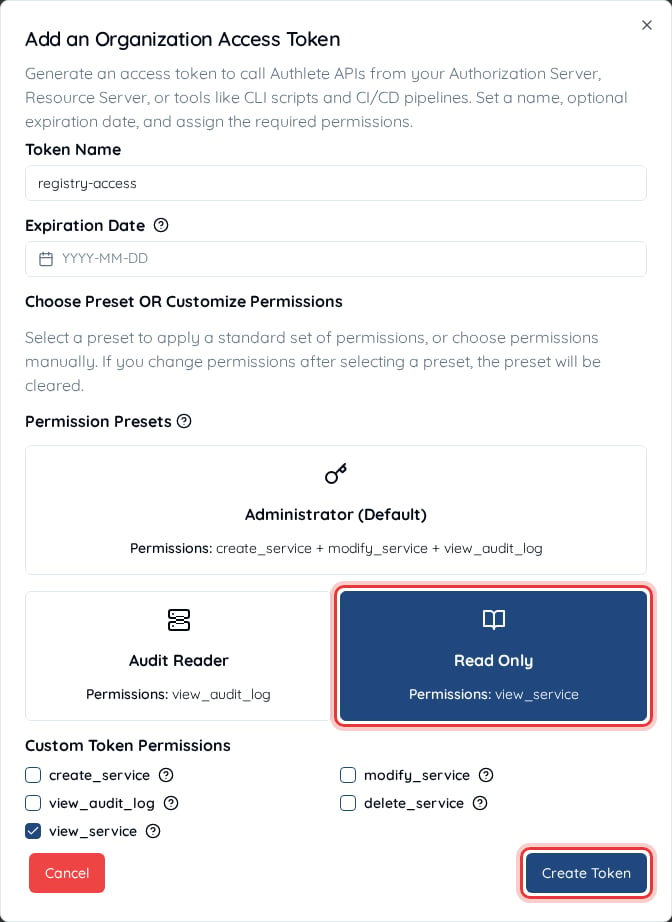
- In the Authlete Management Console, generate a Token for your organization with the Read Only permission preset.
- This token is used only for
docker login. Do not use it as theV3_ORG_ACCESS_TOKENenvironment variable of the configuration migrator. - Keep the Organization ID and Token handy for authentication.
4. Authenticate and Pull Images
Log in to the Authlete registry with the Organization ID and the registry access token, then pull the image:Preparation
In order to begin migrating service and client configuration, you will need a running 2.2/2.3 source environment, and another running Authlete 3.0 destination environment. Each value below is set in the configuration migrator as the environment variable named next to it (see Migration Settings). From your 2.2/2.3 source environment:- The API URL of the environment (e.g.
https://api.source-environment): used forV2_API_URL - Your Service Owner
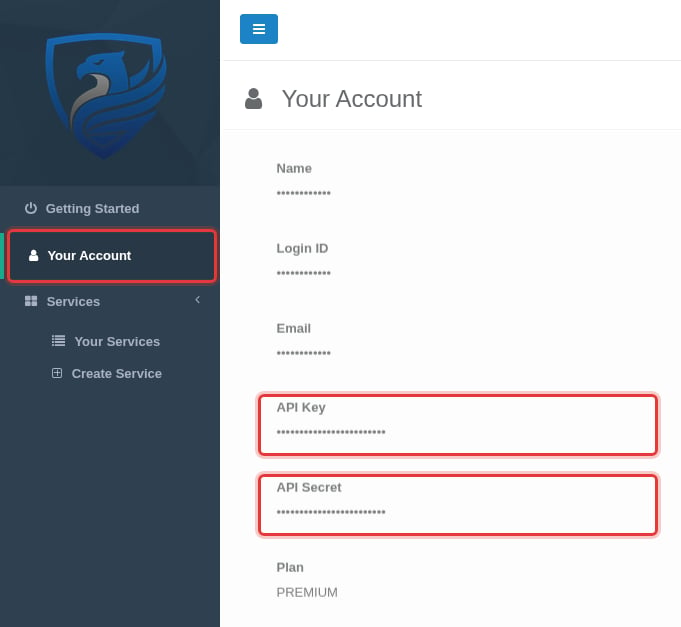
API Key, found in theYour Accountpage in the Service Owner Console: used forV2_SO_API_KEY - Your Service Owner
API Secret, found in theYour Accountpage in the Service Owner Console: used forV2_SO_API_SECRET
-
The API URL of the environment (e.g.
https://api.destination-environment): used forV3_API_URL -
The API server ID of the server that the services and clients will be imported in, and the ID of the organization that they will be created in: used for
V3_API_SERVER_IDandV3_ORG_ID- Select the cluster from the cluster drop-down in the console navigation bar. The page then shows the API server ID as
Cluster IDunderCluster Information, and the organization ID asOrganization IDunderOrganization Overview

- Select the cluster from the cluster drop-down in the console navigation bar. The page then shows the API server ID as
-
Your IdP URL (e.g.
https://login.destination-environment): used forV3_IDP_URL -
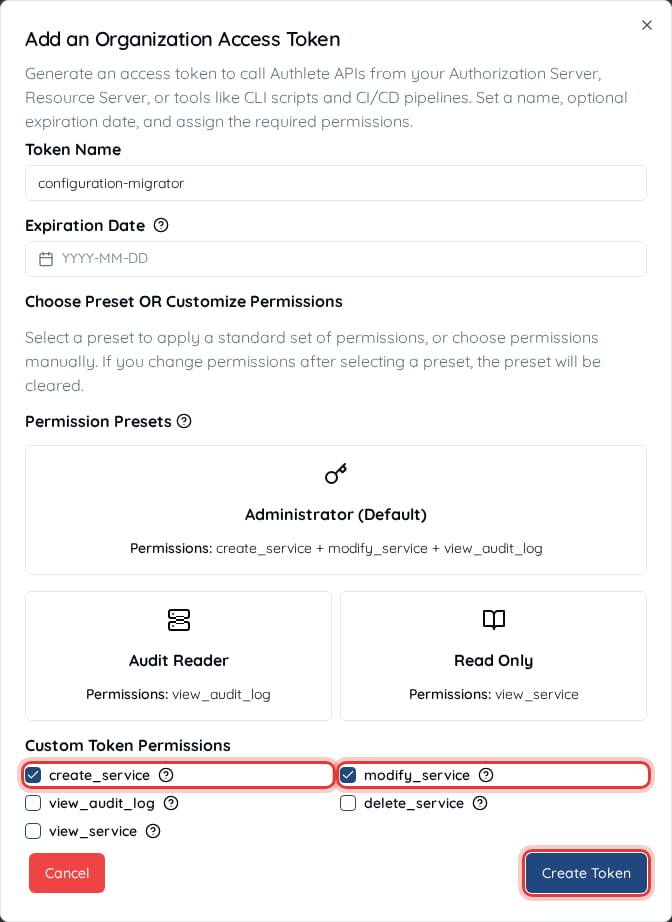
Your Organization Access Token for the organization that the services and clients will be created in: used for
V3_ORG_ACCESS_TOKEN- Can be issued from the
Organization Settingspage under theGeneraltab of the 3.0 destination environment’s console and must be created with thecreate_serviceandmodify_servicepermissions - It is a different token from the registry access token used to pull the image
- Can be issued from the
Prerequisites for Migrating Dynamically Registered Clients
- For 2.2 source environments - Version
2.2.65+must be deployed and the feature flagDCR_RAT_ENDPOINTmust be enabled - For 2.3 source environments - LTS Version
2.3.51+must be deployed and the feature flagDCR_RAT_ENDPOINTmust be enabled - For 3.0 destination environments - Version
3.0.36+must be deployed and the feature flagMIGRATE_CLIENT_DCR_ENDPOINTmust be enabled
How the Configuration Migrator Works
When it runs, theconfiguration-migrator performs the following steps:
- It will fetch services/clients from the 2.2/2.3 source environment
- For each of the services, it will check if the service already exists, and if not will create a service in the 3.0 environment via the IdP
- For each client within the service, it will check whether the client already exists, and if not will create the client in the 3.0 environment
- (If client secret migration is enabled) Whether the client was newly created or not, it will check and align the client secret credential, updating the 3.0 environment with the client secret value from the 2.2/2.3 source environment
- (If dynamically registered client migration is enabled and the source client is a dynamically registered client) If the matching destination client is not already configured as a dynamically registered client, then it will finalize the client’s configuration and set their registration access token from the 2.2/2.3 source client
- (If client deletion is enabled) It will delete destination clients that no longer exist in the 2.2/2.3 source environment
Migration Settings
Once the 3.0 destination environment is running, theconfiguration-migrator can be used to move service and client configuration from your 2.2/2.3 source environment to your 3.0 destination environment. If you migrate dynamically registered clients, first deploy the Authlete versions and enable the feature flags listed in Prerequisites for Migrating Dynamically Registered Clients.
The configuration-migrator performs this migration entirely through the Authlete APIs, so it will require environment endpoint and API credentials in order to successfully migrate the service and client configuration.
Available Settings
Required Settings
Optional Settings
When
CONTINUOUS_SYNC is enabled, the migrator repeats steps 1–6 of How the Configuration Migrator Works in a loop, waiting SYNC_INTERVAL_SECONDS between cycles. Each cycle only creates services and clients that are new in the source environment, and checks that existing clients’ secrets and dynamic client registration configuration are correctly configured (when the corresponding settings are enabled). If SYNC_CLIENT_DELETION is enabled, each cycle also deletes destination clients that no longer exist in the source environment. The migrator keeps running until you stop the container (see Running the Migration).CONTINUOUS_SYNC, SYNC_CLIENT_DELETION, SYNC_INTERVAL_SECONDS and CLIENT_LIST_REQUEST_COUNT are available in configuration-migrator 1.1 or later.Migration Steps
We recommend running the migration in dry run mode first to confirm the expected migration changes and then run again with dry run mode disabled to perform the migration.1. Confirm Environments Are Set Up and Running
Confirm that the 2.2/2.3 source environment and 3.0 destination environment APIs are available from theconfiguration-migrator’s environment.
2. Set Up the Configuration Migrator
Using the tables outlined above, configure theconfiguration-migrator with the appropriate properties, including the correct endpoints, credentials and service/organization IDs.
Below is a sample Docker Compose configuration with dry run enabled (DRY_RUN=true). In dry run mode the migrator reads from both environments and logs what it would do, but does not perform any creation or write operations.
The sample reads each setting from an environment variable of the same name, such as V2_API_URL and V3_ORG_ACCESS_TOKEN. Set them in your shell or in a .env file next to the Compose file before running it.
Please note that the mounted
volumes directory will be used to write output summary files. The container runs as UID 1000 so the host directory must be writable by that user.3. Running in Dry Run Mode
Run the migrator withDRY_RUN=true and capture the log output:
CONTINUOUS_SYNC disabled for the dry run so that the migrator runs once and exits. Once execution is complete, review the log output. No services or clients have been migrated at this point, but the logs show what will be created, updated and deleted when the migrator is run with dry run disabled. If you plan to enable SYNC_CLIENT_DELETION, enable it for the dry run as well and check the logs for [DRY RUN] Removed destination client … lines, which list the clients that would be deleted.
4. Running the Migration
When you are ready to perform the real migration, setDRY_RUN=false in the Docker Compose file and run the migrator again, capturing the log output:
SYNC_CLIENT_DELETION is enabled, it also deletes destination clients that do not exist in the source environment.
If CONTINUOUS_SYNC is enabled, the migrator does not exit after the first cycle. Stop the container (for example, with docker compose stop) once you are sure no further clients are being registered in the source environment. If SYNC_CLIENT_DELETION is also enabled, stop it before any clients are registered in the destination environment, for example before you switch your applications to the 3.0 environment; otherwise each cycle deletes those clients. The migrator prints the full summary when it stops.
5. Checking the Result
The main indicator confirming that the migration was completed successfully is theErrors count being set to 0.
The migrator logs each operation while it runs and prints a summary for each service at the end, followed by an overall summary. The summary shows the status of each service (serviceStatus), the number of services processed, clients created, dynamically registered clients updated, client secrets updated and the number of clients deleted (if client deletion is enabled). Errors for individual services or clients appear in the log above the summary.
You can safely rerun the migrator, for example if it stopped unexpectedly because of network issues: services and clients that already exist in the destination are not created again, and client secrets are realigned. If SYNC_CLIENT_DELETION is enabled, a rerun also deletes destination clients that do not exist in the source environment. You can also rerun the migrator after a successful migration to confirm that everything was migrated correctly.
The sample output below shows an example service summary and overall migration summary for two services:
- My Service (
apiKey=309958490093)- A newly created service (denoted by
serviceStatus=created) - With a total of
1241clients created and migrated 612of the total1241clients were dynamically registered clients, so they also were successfully updated further as part of the dynamically registered client migration path- Since all clients are new, all of their client secrets are updated (
Client secrets synced: 1241) - As the service is new, there are no destination clients to delete (
Clients deleted: 0)
- A newly created service (denoted by
- Another Service (
apiKey=309958490091)- An existing service (
serviceStatus=already_exists) 121new clients were detected in this service and migrated to the destination environment5of the total121clients were dynamically registered clients, so they also were successfully updated further as part of the dynamically registered client migration path- All clients were new, so all of their secrets were updated (
Client secrets synced: 121) 3clients existed in the destination environment but not in the source environment, so they were deleted (Clients deleted: 3)
- An existing service (
CONTINUOUS_SYNC is enabled, the migrator also prints a one-line iteration summary for each service at the end of every cycle. When the container is stopped, it prints the full summary covering every cycle run up to that point. In this mode the overall migration summary also shows an Iteration count, and lists only the total for each event, without the attempted, skipped and failed counts shown in the sample above.
An output sample of the iteration logs is below containing the event metrics for operations performed within the previous iteration of the migration:
- 10 clients created, all with their secrets updated; 5 of them were DCR clients
- 3 clients deleted within the same iteration
Token Migration (Dedicated and Self-Managed)
Tokens are migrated separately by the Token Migrator. See Migrating Tokens to Authlete 3.0.Migrating using the Authlete Management Console (Shared environment only)
In the case of migrating an account residing on one of the Authlete Shared environments, the migration will be done through the Authlete Management Console UI. The general upgrade path is as follows:- Log in to the Authlete Management Console of the new Authlete 3.0 environment
- Create and configure the amount of Organization(s) that are needed for the migration
- Service and Client Migration (Refer to below section) - Using the
Import/Migratefeature, import the appropriate service(s) and client(s) into this organization - Token Migration - Optional, if existing tokens need to be available in the new 3.0 environment
- Update OAuth Server / Applications
If you use the zero downtime (parallel cutover) approach, deploy the changes to your authorization server before step 3.
The Token Migrator only has read access to the source DB and is therefore unable to alter data of any kind.
Service & Client Migration
- Log into the Authlete Management Console, and go to
Organization Settings > Basic Settings > Import/Migrate - Log into the Authlete 2.x Service Owner Console, and copy/paste the Service Owner API Key and API Secret from your account (can be found in the
Your Accountpage)
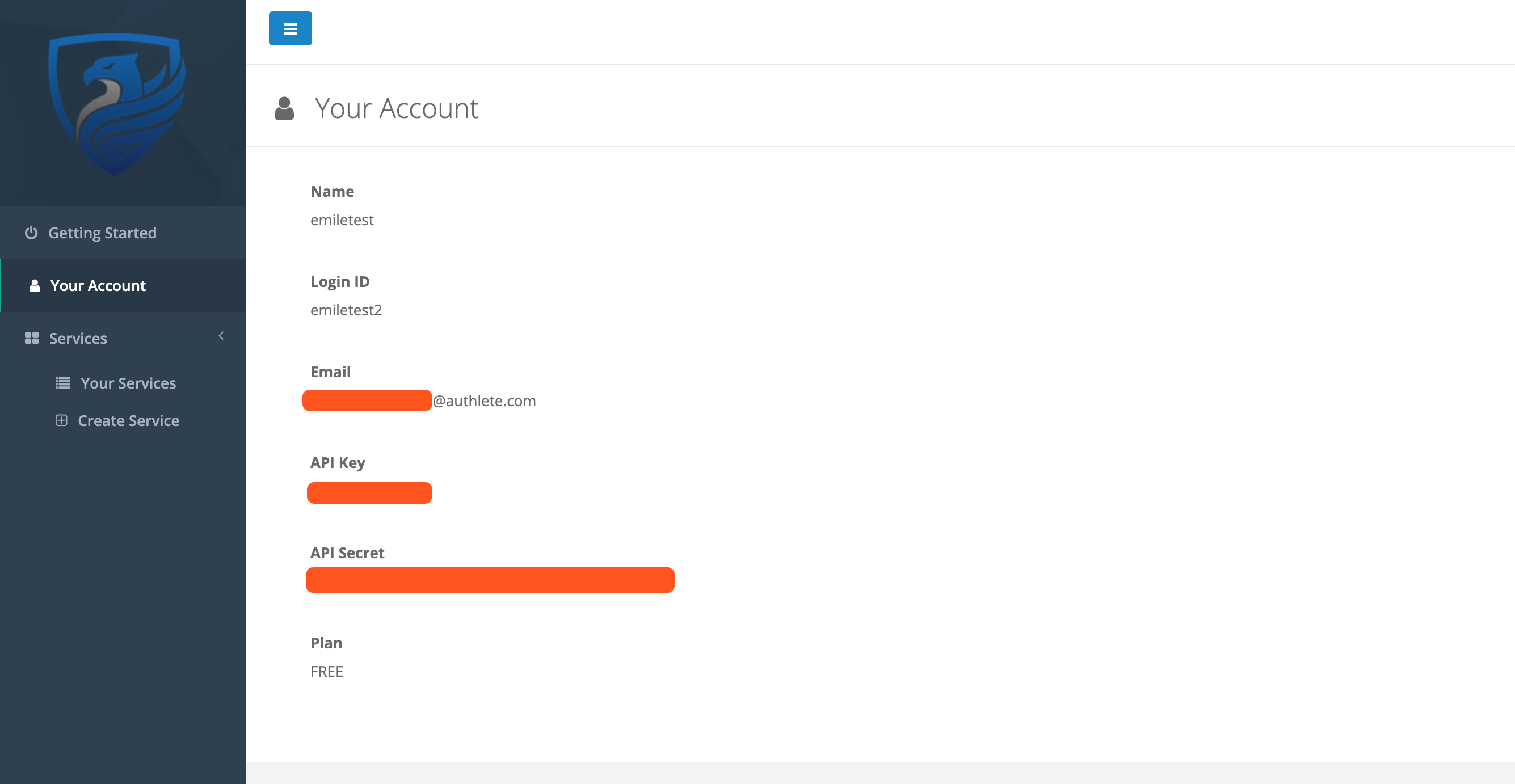 Your Account page in the Authlete 2.x Service Owner Console
- Enter the Authlete API URL for your cluster
- Enter one of the corresponding URLs below:
- US : https://api.authlete.com
- Japan : https://tokyo.authlete.com
- Brazil : https://latam.authlete.com
- Click
Continue
 Service migration form
- The API should return a list of services that are attached to that account
- Tick the checkbox next to the services you would like to migrate
- If you plan to use the Token Migrator, tick the
Synchronize Client TokensandMigrate Client Secretscheckboxes. This will ensure clients belonging to the service are detected, and their tokens and/or secrets are migrated to the 3.0 environment. This property can also be updated individually per client after the import, underClient Settings > Basic Settings > Advanced > Migration Settings. - Click on the
Select clusterdropdown to choose a cluster under which to migrate services
 Service selection
- Click
Continue - Click
Importon the confirmation screen - The services (and attached clients) should now appear inside the Authlete Management Console navigation
 Migration confirmation