
1. Path
The only constraint imposed by the OAuth 2.0 specfication on the authorization endpoint’s URL path is that “The endpoint URI MUST NOT include a fragment component”. (see 3.1 Authorization Endpoint). As long as this requirement is satisfied, a service can name its authorization endpoint freely. For instance,/auth/authorization is a valid authorization endpoint path. An example of an entire URI with the path is https://example.com/auth/authorization.
2. Security
OAuth 2.0 requires that the authorization endpoint use TLS (Transport Layer Security).3. HTTP methods
According to section 3.1. Authorization Endpoint of the OAuth 2.0 specification, the authorization endpoint must support the HTTPGET method; the HTTP POST method is optional. However, OpenID Connect Core 1.0, 3.1.2.1. Authentication Request requires that the authorization endpoint supports the HTTP POST method. In the case of POST, the request parameters must be formatted as application/x-www-form-urlencoded.
Authorization Endpoint HTTP Methods
4. Authorization Request Parameters
OAuth 2.0 defines 4 grant types (flows to get an access token) in 1.3. Authorization Grant. Among the four, Authorization Code Grant (a.k.a. Authorization Code Flow) and Implicit Grant (a.k.a. Implicit Flow) access the authorization endpoint. Both grant types take the same request parameters, shown in the table below: OAuth 2.0 Authorization Request Parameters
OpenID Connect adds many more authorization request parameters and values to the set defined by OAuth 2.0. Most of them are described in OpenID Connect Core 1.0, 3.1.2.1. Authentication Request. Here is a combined list of the request parameters defined in OAuth 2.0, OpenID Connect and other specifications.
OpenID Connect Request Parameters
Authorization Response
1. Response Parameters
OAuth 2.0 specifies that a successful authorization results in the authorization endpoint issuing either an authorization code or an access token. OpenID Connect adds another parameter that may be returned from the authorization endpoint (and/or the token endpoint): the ID token. OpenID Connect Core 1.0 explains, “The primary extension that OpenID Connect makes to OAuth 2.0 to enable End-Users to be Authenticated is the ID Token data structure.” (see “OpenID Connect Core 1.0, 2. ID Token”). Authorization Response Parameters
Before OpenID Connect, the authorization endpoint could return either an authorization code or an access token, but not both. However, with OpenID Connect, the authorization endpoint can return all three objects depending on the value of the
response_type request parameter:
response_type and Response Parameters
In a response from the authorization endpoint, an authorization code, an access token and an ID token are embedded using the code key, access_token key and id_token key, respectively. For example, code=SplxlOBe in a response means that the value of the authorization code is SplxlOBe.
The following response parameters may be returned from the authorization endpoint:
Authorization Endpoint Response Parameters
2. Response Format
For both Authorization Code Flow and Implicit Flow, OAuth 2.0 specifies that a successful response from the authorization endpoint is HTTP status “302 Found”, redirecting the user agent (the end-user’s web browser) to another location. In OAuth 2.0, the destination location is called redirect URI. Response parameters are returned to the client application as a part of the redirect URI. For example, for an Authorization Code Flow with redirect URIhttps://client.example.org/callback and authorization code ap8uacb2, the response from the authorization endpoint to the client application will look like:
pqb8u3t, the response will look like:
response_type and the response parameters’ location.
response_type And Response Parameter Location
OpenID Connect, specifically the OAuth 2.0 Form Post Response Mode, is more complex. It introduces a mechanism to control the response format and adds “200 OK” with an HTML as a new response format. This format is used when an authorization request includes the
response_mode parameter with a value of form_post. Here’s an example from the specification (line breaks added for clarity).
action attribute in the form tag; the response parameters are included in the form as hidden fields, state and id_token. (In this example, neither code nor access_token is embedded.)
After the HTML above is loaded by the user agent, the JavaScript written in the onload attribute of the body tag is executed. As a result, the browser is redirected to the redirect URI.
The table below illustrates the relationship between combinations of response_type & response_mode and the HTTP status & response parameters’ location. Note that the query component is not usable when an access token and/or an ID token are contained in the response.
response_type/response_mode Combinations And HTTP Status/Response Parameters’ Location
3. Error Response
When an error occurs while a service is processing an authorization request, the service returns an error response to the client application. If the redirect URI to which the error should be reported had been determined before the error occurred, the redirect URI can be used. When a redirect URI can be used, theerror response parameter is always embedded. In addition, the error_description response parameter and the error_uri response parameter may optionally be embedded. For example, an error response looks like the following:
4. Returning Errors when the Redirect URI is Unavailable
Errors may occur before the redirect URI is determined. For example, if the specified client ID (client_id) is invalid, it is impossible to check whether the specified redirect URI (redirect_uri) has been registered or not, so the error cannot be reported to the redirect URI.
Section 3.1.2.4. Invalid Endpoint of the OAuth 2.0 specification says:
If an authorization request fails validation due to a missing, invalid, or mismatching redirection URI, the authorization server SHOULD inform the resource owner of the error and MUST NOT automatically redirect the user-agent to the invalid redirection URI.but the mechanism with which to inform the resource owner (end-user) of the error is not described anywhere. The authorization endpoint behavior is, therefore, determined by its implementer. Some candidate response formats:
Considering that OpenID Connect has added a use case (
prompt=none) where no user interaction is performed, application/json might be better.
Authorization Interaction
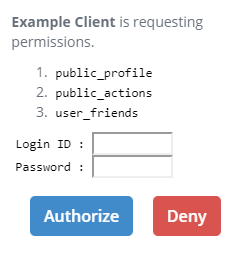
1. Purpose Of Authorization Endpoint
The primary task of an authorization endpoint is to let an end-user grant authorization to a client application. In the normal case, this is achieved by displaying one or more HTML pages that- Show information about the client application and the requested permissions (scopes).
- Provide a login form to authenticate the end-user.
- Include buttons for the end-user to decide to “authorize” or “deny” the authorization request.
2. prompt Request Parameter
The optional prompt request parameter specifies “whether the Authorization Server prompts the End-User for reauthentication and consent”. (OpenID Connect Core 1.0, 3.1.2.1. Authentication Request)
Its value none or a space-delimited combination of login, consent and select_account:
The simplest implementation for a combination of
login, consent and select_account is to always display a form having input fields for login ID and password. However, this is not appropriate if the authentication method at the authorization endpoint is different from the typical ID & password mechanism, for example, biometric authentication by fingerprints.
3. Authentication Context Class Reference
Authentication Context Class Reference, which is also referred to as ACR in OpenID Connect specifications, is a string representing a set of context, level and/or other attributes of an authentication method. For example,urn:oasis:names:tc:SAML:2.0:ac:classes:PasswordProtectedTransport represents the authentication method which is performed by presenting a password over a protected (i.e. TLS) session. (This example is an excerpt from Authentication Context for the OASIS Security Assertion Markup Language (SAML) V2.0.)
OpenID Connect Core 1.0 does not specify any concrete ACR values other than “0”. Instead, it just states that parties using ACR values (i.e. the OAuth server and the client application) “need to agree upon the meanings of the values used”. (OpenID Connect Core 1.0, 2. ID Token, acr)
3.1 acr_values Request Parameter
An authorization request can include the acr_values request parameter (OpenID Connect Core 1.0, 3.1.2.1. Authentication Request, acr_values) to specify a list of ACRs in a preferred order. When this request parameter is present, the authorization endpoint implementation should satisfy one of them in authenticating the end-user.
3.2 acr Claim In claims Request Parameter
Another way to present a list of ACRs is by including the acr claim in the value of the claims request parameter. The following JSON is an example of a value of the claims request parameter (excerpt from OpenID Connect Core 1.0, 5.5. Requesting Claims using the “claims” Request Parameter):
claims request parameter.
acr claim is requested as essential, one of the ACRs listed in values must be satisfied. If none of them can be satisfied, the authorization endpoint implementation must return an error response to the client application. See OpenID Connect Core 1.0, 5.5.1.1. Requesting the “acr” Claim for details.
3.3 acr Claim In ID Token
The acr claim is an optional claim that may be embedded in an ID token. See “OpenID Connect Core 1.0, 2. ID Token, acr” for details.
3.4 Supported ACRs
“OpenID Connect Discovery 1.0, 3. OpenID Provider Metadata” lists attributes of an OpenID provider. Among them, theacr_values_supported metadata contains a list of ACRs supported by the OpenID provider. In Authlete, the equivalent is the supportedAcrs property of Service.
3.5 Default ACRs
“OpenID Connect Dynamic Client Registration 1.0, 2. Client Metadata” lists attributes of a client application. Among them, thedefault_acr_values metadata contains a list of the default ACRs of the client application that should be used when an authorization request from the client application does not have ACR values explicitly (by the acr_values request parameter or by the values of the acr claim in the claims request parameter). In Authlete, the equivalent is the defaultAcrs property of Client.
4 Maximum Authentication Age
Maximum Authentication Age is “the allowable elapsed time in seconds since the last time the End-User was actively authenticated” (OpenID Connect Core 1.0, 3.1.2.1. Authentication Request, max_age). If the elapsed time is greater than the maximum authentication age, the end-user must be re-authenticated even if he/she has already logged in.4.1 max_age Request Parameter
An authorization request can include the max_age request parameter to specify the maximum authentication age.
4.2 Default Maximum Authentication Age
Thedefault_max_age attribute listed in “OpenID Connect Dynamic Client Registration 1.0, 2. Client Metadata” is the maximum authentication age which is used when an authorization request from the client application does not have the max_age request parameter. In Authlete, the equivalent is the defaultMaxAge property of Client.
5. sub claim
A client application can request a specific subject (an end-user identifier assigned by the service) from whom the client application wants to be granted authorization by specifying the value for the sub claim. The following is an example of a value of the claims request parameter that contains the sub claim with a value:
6. login_hint Request Parameter
A client application can give a hint about the login identifier to the authorization endpoint by using the login_hint request parameter. For example, an email address may be specified as the value.
7. id_token_hint Request Parameter
A client application can make an authorization request with the id_token_hint request parameter whose value is the ID token previously issued by the authorization server. The authorization server should return an error response when the end-user identified by the ID token is different from the end-user who is authenticated already or as a result of the request.
8. No Interaction
OpenID Connect introduced a mechanism for the authorization endpoint to return a response without user interaction. A client application can request it by includingprompt=none in the authorization request.
An authorization request with prompt=none can be processed successfully only when all the following conditions are satisfied:
- The end-user has already logged in.
- If the maximum authentication age is specified by either the
max_agerequest parameter or thedefault_max_ageproperty of the client metadata, the elapsed time since the last authentication of the end-user does not exceed the maximum authentication age. - If a specific subject is requested by the
subclaim in the value of theclaimsrequest parameter, the login ID of the end-user matches the subject. - If the
acrclaim is marked as essential in the value of theclaimsrequest parameter, the authentication method satisfies one of the authentication context class references which are listed in the values property of theacrclaim). - If
claimsare requested, the end-user has consented to them in advance. (Means to obtain consent are beyond the specification of OpenID Connect.)