
Preface
On replacing existing authorization server system (old system) to Authlete, you might have to consider how to manage access tokens which are issued by the old system.If you want Authlete to verify both old and new access tokens coming from resource servers (i.e. resource servers don’t distinguish between old and new ones), both kinds of tokens must be managed by Authlete. This article explains practice to migrate the access tokens issued by other system to Authlete.
How to migrate
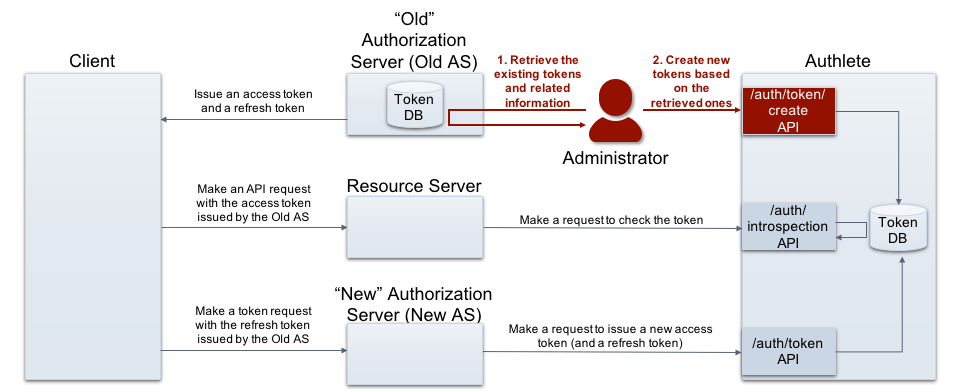
Example
Creating tokens
An administrator, who has information of previously issued tokens, makes a request to /auth/token/create API to create new tokens with the old values. (folded for readability)- Request
- Response
Introspection
On receiving an API request with “the previously issued access token,” a resource server attempts to verify the token and obtain its related information. The following example shows these operations using Authlete’s /auth/introspection API . (folded for readability)If you are using JWT-formatted access tokens , resource servers are responsible to verify the tokens and extract the related information.
- Request
- Response
Refreshing tokens
On receiving a refresh token request with “the previously issued refresh token,” an authorization server attempts to process the token request by calling Authlete’s /auth/introspection API . (folded for readability)- Request
- Response
For migrating enormous tokens
If you are going to migrate tokens enormously, it might by appropriate to take another method; dump token information from the old system, and then transform and import them to Authlete. Please ask Authlete support representative for details.Supplemental information
- New Architecture of OAuth 2.0 and OpenID Connect Implementation
Authlete’s /api/auth/token/create API is an example. By using the API, developers can create access tokens without user interaction.