
Documentation Index
Fetch the complete documentation index at: https://developers.authlete.com/llms.txt
Use this file to discover all available pages before exploring further.
This page is for Authlete 2.x. For current (3.0) documentation, see this page.
Preface
This article describes instructions on how to configure access/refresh token duration per client. See How Authlete determines token duration for details on token duration.This feature is available since Authlete 2.1.
Configuration
Only service owners can configure the following settings.Here are steps to configure access/refresh token duration per client.
- Go to the client developer console and log in as a service owner (i.e. using the pair of API key and secret of the service as login credentials).
- Open the client edit page and click “Extension” tab so that you can see token duration settings. Enter values for “Access Token Duration In seconds” and “Refresh Token Duration In seconds” fields.
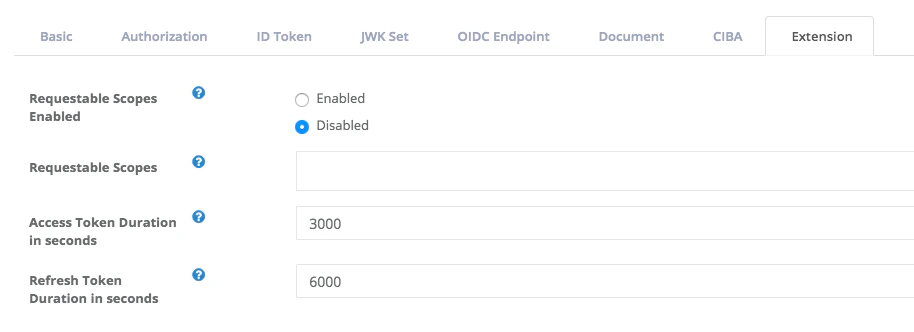
Example
Assume there are a service and two clients registered with it. Values of access token duration are set to some of the entities as follows.| Entity | Access token duration (seconds) |
|---|---|
| Service | 86,400 |
| Client 1 | (not set) |
| Client 2 | 3,000 |