Documentation Index
Fetch the complete documentation index at: https://developers.authlete.com/llms.txt
Use this file to discover all available pages before exploring further.
This page is for Authlete 2.x. For current (3.0) documentation, see this page. Managing the stack
Having a Terraform project for managing just the Service and another one for Clients might not be the best solution in all cases. In some cases, your CI/CD pipeline will be simpler if you group the service definition and required clients
in a single Terraform module.
In this sample we will demo how grouping the objects with conjunction of workspace can be used to organize the workflow
of the change management process.
Declaring the stack objects
The services and clients objects dependent but they are not required be declared in different projects or modules. That
will be required only if you need to bootstrap the project from an existing Authlete configuration, see more detail in
Bootstraping project from configuration.
If you have seen the service and client management notes, you might have already noticed how you can declare the services
and the clients in a single module, but the source code is available under stack_management folder of
Authlete Terraform Samples.
We start the example by declaring the required provider under provider.tf and initializing the workspace. You can follow
the steps for that in the section Declaring the dependency on Creating a project from scratch.
The Authlete Service and Client can be found in the main.tf source code shown below. The authlete_service resource
declares a service as and the authlete_client resource declares an OAuth client dependent on the as service via
service_api_key and service_api_secret properties.
When Terraform evaluate the execution plan, it identifies the dependencies and provisions in the proper order. First it
creates the service and after resolving the api key and secret, it creates the OAuth client on the service just created.
% cat main.tf
provider "authlete" {
}

resource "authlete_service" "as" {
   issuer = "https://as.mydomain.com"
   service_name = "MyDomainAS_${terraform.workspace}"
   description = "A terraform based service for managing the ${terraform.workspace} Authlete based OAuth server"
   supported_grant_types = ["AUTHORIZATION_CODE"]
   #supported_grant_types = ["AUTHORIZATION_CODE", "CLIENT_CREDENTIALS"]
   supported_response_types = ["CODE"]
}

resource "authlete_client" "portal" {
   service_api_key = authlete_service.as.id
   service_api_secret = authlete_service.as.api_secret
   developer = "mydomain"
   client_id_alias = "portal_client"
   client_id_alias_enabled = false
   client_type = "CONFIDENTIAL"
   redirect_uris = concat([ "https://${terraform.workspace}.mydomain.com/cb",],
      var.portal_client_additional_redirects )
   response_types = [ "CODE" ]
   grant_types = [ "AUTHORIZATION_CODE", "REFRESH_TOKEN"]
   client_name = "Customer Portal client - ${terraform.workspace}"
   requestable_scopes = ["openid", "profile"]
   access_token_duration = 30
   refresh_token_duration = 14400
}
terraform.workspace in the service_name and description of the service and
redirect_uris and client_name of the client. That will allow easy identification of the services in the console and
segregation of configuration by runtime.
Using workspace for managing environment
The workspace mechanism of Terraform fits the purpose of managing the different environments required for software development.
In the section below, we declare a service that has the workspace name in its name and a client with that same info in the redirect
uris.
Let’s check how this mechanism can be used for managing a development, a test, and a production configuration. We start with
creating a development env and creating the resources for development using the commands below:
% terraform workspace new dev
Created and switched to workspace "dev"!

You're now on a new, empty workspace. Workspaces isolate their state,
so if you run "terraform plan" Terraform will not see any existing state
for this configuration.

% terraform apply --auto-approve

Terraform used the selected providers to generate the following execution plan. Resource actions are indicated with the following symbols:
+ create

Terraform will perform the following actions:

# authlete_client.portal will be created
+ resource "authlete_client" "portal" {
    + access_token_duration                            = 30
    + apikey                                           = (known after apply)
    + apisecret                                        = (sensitive value)
    + application_type                                 = (known after apply)
    + auth_time_required                               = (known after apply)
    + authorization_sign_alg                           = (known after apply)
    + bc_delivery_mode                                 = (known after apply)
    + bc_request_sign_alg                              = (known after apply)
    + bc_user_code_required                            = (known after apply)
    + client_id                                        = (known after apply)
    + client_id_alias                                  = "portal_client"
    + client_id_alias_enabled                          = false
    + client_name                                      = "Customer Portal client - dev"
    + client_secret                                    = (sensitive value)
    + client_type                                      = "CONFIDENTIAL"
    + created_at                                       = (known after apply)
    + derived_sector_identifier                        = (known after apply)
    + developer                                        = "mydomain"
    + dynamically_registered                           = (known after apply)
    + front_channel_request_object_encryption_required = (known after apply)
    + grant_types                                      = [
        + "AUTHORIZATION_CODE",
        + "REFRESH_TOKEN",
          ]
    + id                                               = (known after apply)
    + id_token_sign_alg                                = (known after apply)
    + modified_at                                      = (known after apply)
    + par_required                                     = (known after apply)
    + redirect_uris                                    = [
        + "https://dev.mydomain.com/cb",
          ]
    + refresh_token_duration                           = 14400
    + request_object_encryption_alg_match_required     = (known after apply)
    + request_object_encryption_enc_match_required     = (known after apply)
    + request_object_required                          = (known after apply)
    + request_sign_alg                                 = (known after apply)
    + requestable_scopes                               = [
        + "openid",
        + "profile",
          ]
    + requestable_scopes_enabled                       = (known after apply)
    + response_types                                   = [
        + "CODE",
          ]
    + subject_type                                     = (known after apply)
    + tls_client_certificate_bound_access_tokens       = (known after apply)
    + token_auth_method                                = (known after apply)
    + token_auth_sign_alg                              = (known after apply)
    + user_info_sign_alg                               = (known after apply)
      }

# authlete_service.as will be created
+ resource "authlete_service" "as" {
    + access_token_type                     = (known after apply)
    + api_secret                            = (known after apply)
    + client_id_alias_enabled               = false
    + dcr_scope_used_as_requestable         = (known after apply)
    + description                           = "A terraform based service for managing the dev Authlete based OAuth server"
    + direct_authorization_endpoint_enabled = false
    + direct_introspection_endpoint_enabled = (known after apply)
    + direct_jwks_endpoint_enabled          = false
    + direct_revocation_endpoint_enabled    = (known after apply)
    + direct_token_endpoint_enabled         = (known after apply)
    + direct_user_info_endpoint_enabled     = false
    + id                                    = (known after apply)
    + ignore_port_loopback_redirect         = (known after apply)
    + issuer                                = "https://as.mydomain.com"
    + service_name                          = "MyDomainAS_dev"
    + single_access_token_per_subject       = (known after apply)
    + supported_claim_types                 = (known after apply)
    + supported_displays                    = (known after apply)
    + supported_grant_types                 = [
        + "AUTHORIZATION_CODE",
          ]
    + supported_introspection_auth_methods  = (known after apply)
    + supported_response_types              = [
        + "CODE",
          ]
    + supported_revocation_auth_methods     = (known after apply)
    + supported_token_auth_methods          = (known after apply)
      }

Plan: 2 to add, 0 to change, 0 to destroy.

Changes to Outputs:
+ api_key       = (known after apply)
+ api_secret    = (sensitive value)
+ client_id     = (known after apply)
+ client_secret = (sensitive value)
  authlete_service.as: Creating...
  authlete_service.as: Creation complete after 6s [id=7976331828884]
  authlete_client.portal: Creating...
  authlete_client.portal: Creation complete after 1s [id=6212183744127375]

Apply complete! Resources: 2 added, 0 changed, 0 destroyed.

Outputs:

api_key = "7976331828884"
api_secret = <sensitive>
client_id = "6212183744127375"
client_secret = <sensitive>
https://dev.mydomain.com/cb (probably resolving to 127.0.0.1).
When the development reaches a stage where the test env is available, the administrator can run the sequence of
command below:
% terraform workspace new test
Created and switched to workspace "test"!

You're now on a new, empty workspace. Workspaces isolate their state,
so if you run "terraform plan" Terraform will not see any existing state
for this configuration.

% terraform apply --auto-approve

Terraform used the selected providers to generate the following execution plan. Resource actions are indicated with the following symbols:
  + create

Terraform will perform the following actions:

  # authlete_client.portal will be created
  + resource "authlete_client" "portal" {
      + access_token_duration                            = 30
      + apikey                                           = (known after apply)
      + apisecret                                        = (sensitive value)
      + application_type                                 = (known after apply)
      + auth_time_required                               = (known after apply)
      + authorization_sign_alg                           = (known after apply)
      + bc_delivery_mode                                 = (known after apply)
      + bc_request_sign_alg                              = (known after apply)
      + bc_user_code_required                            = (known after apply)
      + client_id                                        = (known after apply)
      + client_id_alias                                  = "portal_client"
      + client_id_alias_enabled                          = false
      + client_name                                      = "Customer Portal client - test"
      + client_secret                                    = (sensitive value)
      + client_type                                      = "CONFIDENTIAL"
      + created_at                                       = (known after apply)
      + derived_sector_identifier                        = (known after apply)
      + developer                                        = "mydomain"
      + dynamically_registered                           = (known after apply)
      + front_channel_request_object_encryption_required = (known after apply)
      + grant_types                                      = [
          + "AUTHORIZATION_CODE",
          + "REFRESH_TOKEN",
        ]
      + id                                               = (known after apply)
      + id_token_sign_alg                                = (known after apply)
      + modified_at                                      = (known after apply)
      + par_required                                     = (known after apply)
      + redirect_uris                                    = [
          + "https://test.mydomain.com/cb",
        ]
      + refresh_token_duration                           = 14400
      + request_object_encryption_alg_match_required     = (known after apply)
      + request_object_encryption_enc_match_required     = (known after apply)
      + request_object_required                          = (known after apply)
      + request_sign_alg                                 = (known after apply)
      + requestable_scopes                               = [
          + "openid",
          + "profile",
        ]
      + requestable_scopes_enabled                       = (known after apply)
      + response_types                                   = [
          + "CODE",
        ]
      + subject_type                                     = (known after apply)
      + tls_client_certificate_bound_access_tokens       = (known after apply)
      + token_auth_method                                = (known after apply)
      + token_auth_sign_alg                              = (known after apply)
      + user_info_sign_alg                               = (known after apply)
    }

  # authlete_service.as will be created
  + resource "authlete_service" "as" {
      + access_token_type                     = (known after apply)
      + api_secret                            = (known after apply)
      + client_id_alias_enabled               = false
      + dcr_scope_used_as_requestable         = (known after apply)
      + description                           = "A terraform based service for managing the test Authlete based OAuth server"
      + direct_authorization_endpoint_enabled = false
      + direct_introspection_endpoint_enabled = (known after apply)
      + direct_jwks_endpoint_enabled          = false
      + direct_revocation_endpoint_enabled    = (known after apply)
      + direct_token_endpoint_enabled         = (known after apply)
      + direct_user_info_endpoint_enabled     = false
      + id                                    = (known after apply)
      + ignore_port_loopback_redirect         = (known after apply)
      + issuer                                = "https://as.mydomain.com"
      + service_name                          = "MyDomainAS_test"
      + single_access_token_per_subject       = (known after apply)
      + supported_claim_types                 = (known after apply)
      + supported_displays                    = (known after apply)
      + supported_grant_types                 = [
          + "AUTHORIZATION_CODE",
        ]
      + supported_introspection_auth_methods  = (known after apply)
      + supported_response_types              = [
          + "CODE",
        ]
      + supported_revocation_auth_methods     = (known after apply)
      + supported_token_auth_methods          = (known after apply)
    }

Plan: 2 to add, 0 to change, 0 to destroy.

Changes to Outputs:
  + api_key       = (known after apply)
  + api_secret    = (sensitive value)
  + client_id     = (known after apply)
  + client_secret = (sensitive value)
authlete_service.as: Creating...
authlete_service.as: Creation complete after 7s [id=8022405976815]
authlete_client.portal: Creating...
authlete_client.portal: Creation complete after 0s [id=6212196073089961]

Apply complete! Resources: 2 added, 0 changed, 0 destroyed.

Outputs:

api_key = "8022405976815"
api_secret = <sensitive>
client_id = "6212196073089961"
client_secret = <sensitive>
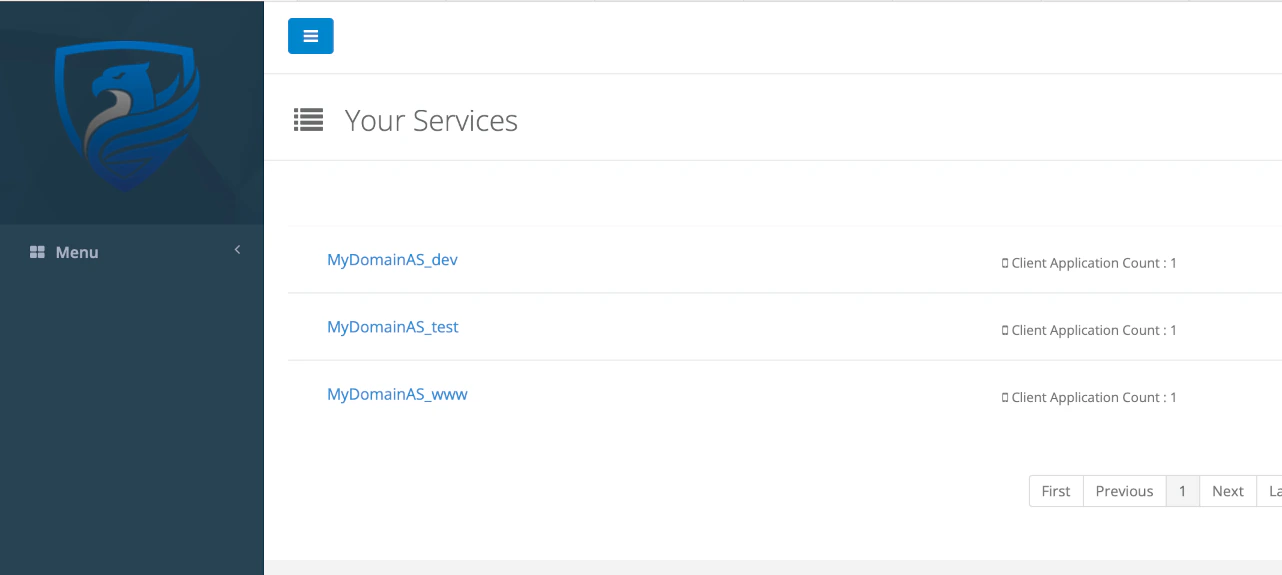 Using the Terraform workspace approach on a CI/CD pipeline can be very handy and remove some of the manual configuration
tasks that might cause the services to diverge. Please note that some tools for CI/CD already have the Terraform
workspace managed, like Gitlab CI/CD.
Check out the next section about generating and maintaining the cryptographic keys of services and clients, where the CI/CD
pipelines can create a much higher value to your organization.
Next Step
Using the Terraform workspace approach on a CI/CD pipeline can be very handy and remove some of the manual configuration
tasks that might cause the services to diverge. Please note that some tools for CI/CD already have the Terraform
workspace managed, like Gitlab CI/CD.
Check out the next section about generating and maintaining the cryptographic keys of services and clients, where the CI/CD
pipelines can create a much higher value to your organization.
Next Step