Documentation Index
Fetch the complete documentation index at: https://developers.authlete.com/llms.txt
Use this file to discover all available pages before exploring further.
This page is for Authlete 2.x. For current (3.0) documentation, see this page. Managing OAuth clients with Terraform
Before we dig into the matter, a contextualization is required here as client management on the OAuth/OpenID Connect world has multiple angles and scenarios.
The scenarios and use cases for the Authlete provider for Terraform is managing the clients that are structurally required on the Authorization Server. For example: clients that will be used by a web portal or API server, mobile apps of the company domain, or clients that are required to be transposed between environments.
Support for Authlete Client
As with the support for services, Authlete provider allows creating, changing, and deleting OAuth clients on services, but as the clients exists within a service, that service needs to be configured either on the provider or in the client configuration, as we will see on this document.
To represent an Authlete OAuth client, an authlete_client Terraform resource is defined and the supported properties of the object can be found on the provider documentation page and is comprised all the properties available on the Authlete Developer Console.
Configuring the provider
If you don’t need to provision clients off two or more different services in one workspace, or simplistically one single execution of the apply command (which should be a rare case), the simplest approach for configuring the provider is to use the environment variables AUTHLETE_API_KEY and AUTHLETE_API_SECRET. That will set the service to be used when provisioning the client.
The examples here require that you have a service created on Authlete, it can be the service from simple_service example or the service created for you when your Authlete account was created.
In case you continue from simple_service, go ahead and take note of the output of the terraform output commands.
$ terraform output api_key
"6505525048617"
$ terraform output api_secret
"RtkKFbVqXXXXXXXXXXXXXXXXG6CNITo"
API Key and API Secret on the service detail page.
 After taking note of the key and secret, run the commands like below:
% export AUTHLETE_API_KEY="XXXXXXXXXXXXXX"
% export AUTHLETE_API_SECRET="XXXXXXXXXXXXXXXXXXXXXXXXXXXXXX"
% export AUTHLETE_API_SERVER="https://api.authlete.com"
Declaring the clients and provisioning
As we have done for service, we start by declaring the dependency to the Authlete Provider and initializing the working env.
You can check the section Declaring the dependency on Creating a project from scratch.
The source of this example can be found on https://github.com/authlete/authlete-terraform-samples under
client_management directory.
After the initialization, create a main.tf file with the content as below:
% cat main.tf
provider "authlete" {

}

resource "authlete_client" "portal" {
   developer = "mydomain"
   client_id_alias = "portal_client"
   client_id_alias_enabled = false
   client_type = "CONFIDENTIAL"
   redirect_uris = [ "https://www.mydomain.com/cb" ]
   response_types = [ "CODE" ]
   grant_types = [ "AUTHORIZATION_CODE"]
   client_name = "Customer Portal client"
   requestable_scopes = ["openid", "profile"]
}


output "client_id" {
   value = authlete_client.portal.id
}

output "client_secret" {
   value = authlete_client.portal.client_secret
   sensitive = true
}
portal identifier in Terraform and some
properties for a client like those that a Web Portal OIDC client would use.
The third and fourth blocks are declaring output variables that refer to OAuth client attributes. The sensitive attribute of
the client_secret instructs Terraform to never echo its value in the logs, but make it available when queried.
To create that client, run the command below in the same directory.
% terraform apply --auto-approve

Terraform used the selected providers to generate the following execution plan. Resource actions are indicated with the following symbols:
+ create

Terraform will perform the following actions:

# authlete_client.portal will be created
+ resource "authlete_client" "portal" {
    + application_type                                 = (known after apply)
    + auth_time_required                               = (known after apply)
    + authorization_sign_alg                           = (known after apply)
    + bc_delivery_mode                                 = (known after apply)
    + bc_request_sign_alg                              = (known after apply)
    + bc_user_code_required                            = (known after apply)
    + client_id                                        = (known after apply)
    + client_id_alias                                  = "portal_client"
    + client_id_alias_enabled                          = false
    + client_name                                      = "Customer Portal client"
    + client_secret                                    = (sensitive value)
    + client_type                                      = "CONFIDENTIAL"
    + created_at                                       = (known after apply)
    + derived_sector_identifier                        = (known after apply)
    + developer                                        = "mydomain"
    + dynamically_registered                           = (known after apply)
    + front_channel_request_object_encryption_required = (known after apply)
    + grant_types                                      = [
        + "AUTHORIZATION_CODE",
          ]
    + id                                               = (known after apply)
    + id_token_sign_alg                                = (known after apply)
    + modified_at                                      = (known after apply)
    + par_required                                     = (known after apply)
    + redirect_uris                                    = [
        + "https://www.mydomain.com/cb",
          ]
    + request_object_encryption_alg_match_required     = (known after apply)
    + request_object_encryption_enc_match_required     = (known after apply)
    + request_object_required                          = (known after apply)
    + request_sign_alg                                 = (known after apply)
    + requestable_scopes                               = [
        + "openid",
        + "profile",
          ]
    + requestable_scopes_enabled                       = (known after apply)
    + response_types                                   = [
        + "CODE",
          ]
    + subject_type                                     = (known after apply)
    + tls_client_certificate_bound_access_tokens       = (known after apply)
    + token_auth_method                                = (known after apply)
    + token_auth_sign_alg                              = (known after apply)
    + user_info_sign_alg                               = (known after apply)
      }

Plan: 1 to add, 0 to change, 0 to destroy.

Changes to Outputs:
+ client_id     = (known after apply)
+ client_secret = (sensitive value)
  authlete_client.portal: Creating...
  authlete_client.portal: Creation complete after 3s [id=6199126380453008]

Apply complete! Resources: 1 added, 0 changed, 0 destroyed.

Outputs:

client_id = "6199126380453008"
client_secret = <sensitive>
client_id_alias_enabled and some are
populated by the server, like user_info_sign_alg or token_auth_method. The attributes that are only server-side generated
are: id, client_id, and client_secret.
After the creation of the client, you can validate the creation on the Developer Console and/or query its client_id and
secret via output commands like below:
% terraform output client_id
"6199126380453008"
% terraform output client_secret
"97w_XXXXXXXXXXXXXXXXXXXXXXXXXXXXX-XXXXXXXXX_XXXXXXXXXX-XXXXXXXw8nNhg"
Changes on Client definition
Now any changes done on the client definition can be applied to Authlete by the provider. Challenged by requirements
changes of refresh tokens for the portal client, for instance, you can go ahead and change the client definition to match
the content like below:
% cat main.tf
provider "authlete" {

}

resource "authlete_client" "portal" {
   developer = "mydomain"
   client_id_alias = "portal_client"
   client_id_alias_enabled = false
   client_type = "CONFIDENTIAL"
   redirect_uris = [ "https://www.mydomain.com/cb" ]
   response_types = [ "CODE" ]
   grant_types = [ "AUTHORIZATION_CODE", "REFRESH_TOKEN"]
   client_name = "Customer Portal client"
   requestable_scopes = ["openid", "profile"]
   access_token_duration = 30
   refresh_token_duration = 14400
}


output "client_id" {
   value = authlete_client.portal.id
}

output "client_secret" {
   value = authlete_client.portal.client_secret
   sensitive = true
}
terraform apply command as below:
% terraform apply
authlete_client.portal: Refreshing state... [id=6199126380453008]

Terraform used the selected providers to generate the following execution plan. Resource actions are indicated with the following symbols:
  ~ update in-place

Terraform will perform the following actions:

  # authlete_client.portal will be updated in-place
  ~ resource "authlete_client" "portal" {
      ~ access_token_duration                            = 0 -> 30
      ~ grant_types                                      = [
            "AUTHORIZATION_CODE",
          + "REFRESH_TOKEN",
        ]
        id                                               = "6199126380453008"
      ~ refresh_token_duration                           = 0 -> 14400
      ~ requestable_scopes                               = [
          + "openid",
          + "profile",
        ]
        # (30 unchanged attributes hidden)
    }

Plan: 0 to add, 1 to change, 0 to destroy.

Do you want to perform these actions?
  Terraform will perform the actions described above.
  Only 'yes' will be accepted to approve.

  Enter a value: yes

authlete_client.portal: Modifying... [id=6199126380453008]
authlete_client.portal: Modifications complete after 1s [id=6199126380453008]

Apply complete! Resources: 0 added, 1 changed, 0 destroyed.

Outputs:

client_id = "6199126380453008"
client_secret = <sensitive>
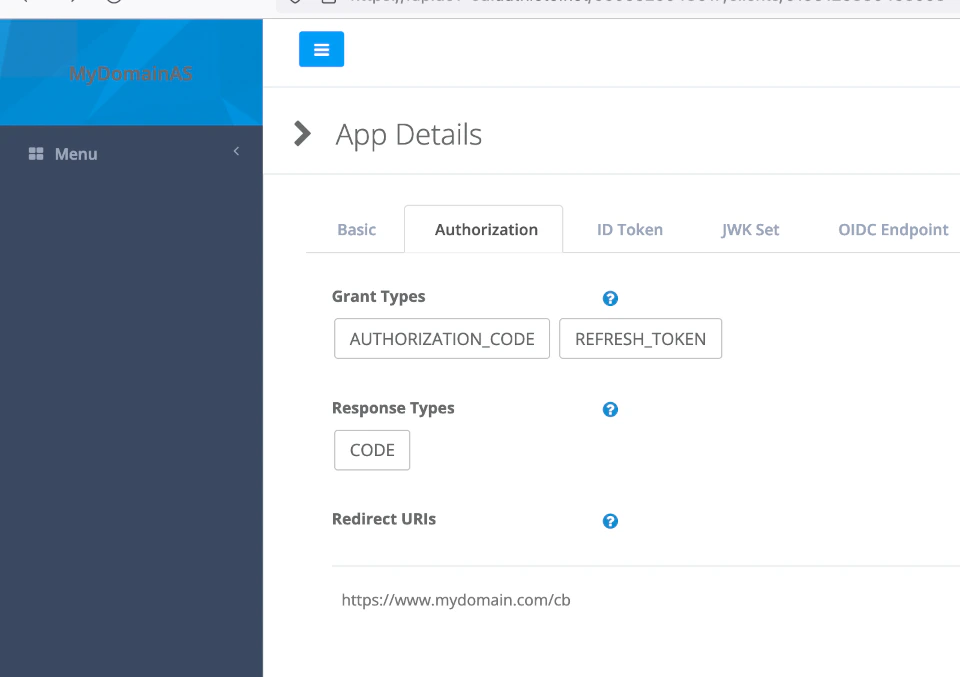 Note that Terraform has a copy of the state of the client locally and the checking for differences to be changed on the server is done
locally, which means that if you change the client definition on the server, the changes might be overwritten by
Terraform when updating the client.
Note that Terraform has a copy of the state of the client locally and the checking for differences to be changed on the server is done
locally, which means that if you change the client definition on the server, the changes might be overwritten by
Terraform when updating the client.
Configuring service on the client
If you need to manage clients of different Authlete services in the same workspace, you can specify the service’s API key and
API secret on the client resource itself. This can be done using references to variables or other resources objects.
As an example, we will use the same portal client from previous section and declare it for test and production services and
the api key and secret will be references to variables. You can check the source of the example on https://github.com/authlete/authlete-terraform-samples under
client_services folder.
The input variables are defined, by convention, in a variables.tf file using a structure as below. Keep in mind that
this variable approach is used extensively on Terraform projects that are multi modules, so it can be a powerful mechanism
for defining very large deployments with multiple components.
variable "authlete_service_test_api_key" {
  type = string
  description = "The api key of the Authlete test service"
  nullable = false
}

variable "authlete_service_test_api_secret" {
  type = string
  description = "The api secret of the Authlete test service"
  sensitive = true
  nullable = false
}

variable "authlete_service_production_api_key" {
  type = string
  description = "The api key of the Authlete production service"
  nullable = false
}

variable "authlete_service_production_api_secret" {
  type = string
  description = "The api secret of the Authlete production service"
  sensitive = true
  nullable = false
}
service_api_key and service_api_secret
properties’ values are prefixed with a var. to scope the reference to input variables.
resource "authlete_client" "test_portal" {
   service_api_key = var.authlete_service_test_api_key
   service_api_secret = var.authlete_service_test_api_secret
   developer = "mydomain"
   client_id_alias = "portal_client"
   client_id_alias_enabled = false
   client_type = "CONFIDENTIAL"
   redirect_uris = [ "https://test.mydomain.com/cb",
      "http://localhost:3000/cb" ]
   response_types = [ "CODE" ]
   grant_types = [ "AUTHORIZATION_CODE", "REFRESH_TOKEN"]
   client_name = "Customer Portal client"
   requestable_scopes = ["openid", "profile"]
   access_token_duration = 30
   refresh_token_duration = 14400
}

resource "authlete_client" "prod_portal" {
   service_api_key = var.authlete_service_production_api_key
   service_api_secret = var.authlete_service_production_api_secret
   developer = "mydomain"
   client_id_alias = "portal_client"
   client_id_alias_enabled = false
   client_type = "CONFIDENTIAL"
   redirect_uris = [ "https://www.mydomain.com/cb" ]
   response_types = [ "CODE" ]
   grant_types = [ "AUTHORIZATION_CODE", "REFRESH_TOKEN"]
   client_name = "Customer Portal client"
   requestable_scopes = ["openid", "profile"]
   access_token_duration = 30
   refresh_token_duration = 14400
}
localhost:3000 for debugging purpose, while the production
client can redirect only to the production portal.
To run this example, you can define a variables file and provide it on command line when applying, as in the execution shown below:
% cat services.tfvars
authlete_service_test_api_key = "6505525048617"
authlete_service_test_api_secret = "nXXXXXXXXXXXXXXXXXXXXXXXXXXXXXXXXXXXXXXXA"
authlete_service_production_api_key = "6509917760277"
authlete_service_production_api_secret = "BXXXXXXXXXXXXXXXXXXXXXXXXXXXXXXXXXXXXXXXXXs"
% terraform  apply -var-file="services.tfvars" --auto-approve

Terraform used the selected providers to generate the following execution plan. Resource actions are indicated with the following symbols:
  + create

Terraform will perform the following actions:

  # authlete_client.prod_portal will be created
  + resource "authlete_client" "prod_portal" {
      + access_token_duration                            = 30
      + service_api_key                                  = "6509917760277"
      + service_api_secret                               = (sensitive value)
      + application_type                                 = (known after apply)
      + auth_time_required                               = (known after apply)
      + authorization_sign_alg                           = (known after apply)
      + bc_delivery_mode                                 = (known after apply)
      + bc_request_sign_alg                              = (known after apply)
      + bc_user_code_required                            = (known after apply)
      + client_id                                        = (known after apply)
      + client_id_alias                                  = "portal_client"
      + client_id_alias_enabled                          = false
      + client_name                                      = "Customer Portal client"
      + client_secret                                    = (sensitive value)
      + client_type                                      = "CONFIDENTIAL"
      + created_at                                       = (known after apply)
      + derived_sector_identifier                        = (known after apply)
      + developer                                        = "mydomain"
      + dynamically_registered                           = (known after apply)
      + front_channel_request_object_encryption_required = (known after apply)
      + grant_types                                      = [
          + "AUTHORIZATION_CODE",
          + "REFRESH_TOKEN",
        ]
      + id                                               = (known after apply)
      + id_token_sign_alg                                = (known after apply)
      + modified_at                                      = (known after apply)
      + par_required                                     = (known after apply)
      + redirect_uris                                    = [
          + "https://www.mydomain.com/cb",
        ]
      + refresh_token_duration                           = 14400
      + request_object_encryption_alg_match_required     = (known after apply)
      + request_object_encryption_enc_match_required     = (known after apply)
      + request_object_required                          = (known after apply)
      + request_sign_alg                                 = (known after apply)
      + requestable_scopes                               = [
          + "openid",
          + "profile",
        ]
      + requestable_scopes_enabled                       = (known after apply)
      + response_types                                   = [
          + "CODE",
        ]
      + subject_type                                     = (known after apply)
      + tls_client_certificate_bound_access_tokens       = (known after apply)
      + token_auth_method                                = (known after apply)
      + token_auth_sign_alg                              = (known after apply)
      + user_info_sign_alg                               = (known after apply)
    }

  # authlete_client.test_portal will be created
  + resource "authlete_client" "test_portal" {
      + access_token_duration                            = 30
      + service_api_key                                  = "6505525048617"
      + service_api_secret                               = (sensitive value)
      + application_type                                 = (known after apply)
      + auth_time_required                               = (known after apply)
      + authorization_sign_alg                           = (known after apply)
      + bc_delivery_mode                                 = (known after apply)
      + bc_request_sign_alg                              = (known after apply)
      + bc_user_code_required                            = (known after apply)
      + client_id                                        = (known after apply)
      + client_id_alias                                  = "portal_client"
      + client_id_alias_enabled                          = false
      + client_name                                      = "Customer Portal client"
      + client_secret                                    = (sensitive value)
      + client_type                                      = "CONFIDENTIAL"
      + created_at                                       = (known after apply)
      + derived_sector_identifier                        = (known after apply)
      + developer                                        = "mydomain"
      + dynamically_registered                           = (known after apply)
      + front_channel_request_object_encryption_required = (known after apply)
      + grant_types                                      = [
          + "AUTHORIZATION_CODE",
          + "REFRESH_TOKEN",
        ]
      + id                                               = (known after apply)
      + id_token_sign_alg                                = (known after apply)
      + modified_at                                      = (known after apply)
      + par_required                                     = (known after apply)
      + redirect_uris                                    = [
          + "https://test.mydomain.com/cb",
          + "http://localhost:3000/cb",
        ]
      + refresh_token_duration                           = 14400
      + request_object_encryption_alg_match_required     = (known after apply)
      + request_object_encryption_enc_match_required     = (known after apply)
      + request_object_required                          = (known after apply)
      + request_sign_alg                                 = (known after apply)
      + requestable_scopes                               = [
          + "openid",
          + "profile",
        ]
      + requestable_scopes_enabled                       = (known after apply)
      + response_types                                   = [
          + "CODE",
        ]
      + subject_type                                     = (known after apply)
      + tls_client_certificate_bound_access_tokens       = (known after apply)
      + token_auth_method                                = (known after apply)
      + token_auth_sign_alg                              = (known after apply)
      + user_info_sign_alg                               = (known after apply)
    }

Plan: 2 to add, 0 to change, 0 to destroy.

Changes to Outputs:
  + prod_portal_client_id     = (known after apply)
  + prod_portal_client_secret = (sensitive value)
  + test_client_secret        = (sensitive value)
  + test_portal_client_id     = (known after apply)
authlete_client.prod_portal: Creating...
authlete_client.test_portal: Creating...
authlete_client.test_portal: Creation complete after 1s [id=6203275126999388]
authlete_client.prod_portal: Creation complete after 1s [id=6203280133550227]

Apply complete! Resources: 2 added, 0 changed, 0 destroyed.

Outputs:

prod_portal_client_id = 6203280133550227
prod_portal_client_secret = <sensitive>
test_client_secret = <sensitive>
test_portal_client_id = 6203275126999388
