Documentation Index
Fetch the complete documentation index at: https://developers.authlete.com/llms.txt
Use this file to discover all available pages before exploring further.
Preface
This document is a tutorial to describe basic usage of Authlete 2.x APIs (api.authlete.com) in order to implement an OAuth 2.0 authorization server that supports the authorization code grant flow.
Components
In this tutorial, we assume the following components. Only Authlete’s consoles and APIs are up and running, while an authorization server and a resource server don’t actually exist.
Instead, you will use curl to simulate how these servers make API requests to Authlete when they receive authorization requests, token requests, and token introspection requests from clients.
The authorization server and the client don’t exist as stated above, but their FQDNs are at least needed to explain the OAuth flow.
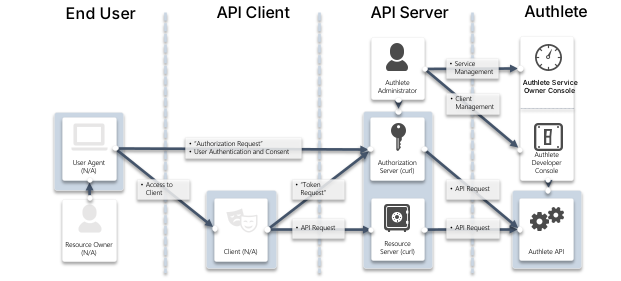 FQDNs for each component are as follows:
| Component | FQDN |
|---|
| Authlete API | api.authlete.com |
| Service Owner Console | so.authlete.com |
| Developer Console | cd.authlete.com |
| Authorization Server | as.example.com |
| Client | client.example.org |
| Resource Server | N/A |
Environment setup
Consult instructions “Sign-up to Authlete and Creating a Service“ to create a new Authlete API service and register a client to the service.
In this tutorial, we assume the following properties are generated or specified.
| Item | Value |
|---|
| Client ID | Auto-generated e.g. 12818600553323 |
| Client Secret | Auto-generated e.g. -olDIKD9BihRfB8O1JxobUEKBZ7PIV5Z6oaqxAshmoUtUZgB-wjmmxTYDiDV6vM_Mgl267PeNrRftq8cWplvmg |
| Client Type | CONFIDENTIAL |
| Redirect URIs | https://client.example.org/cb/example.com |
| Client Authentication Method | CLIENT_SECRET_BASIC |
Walk-through
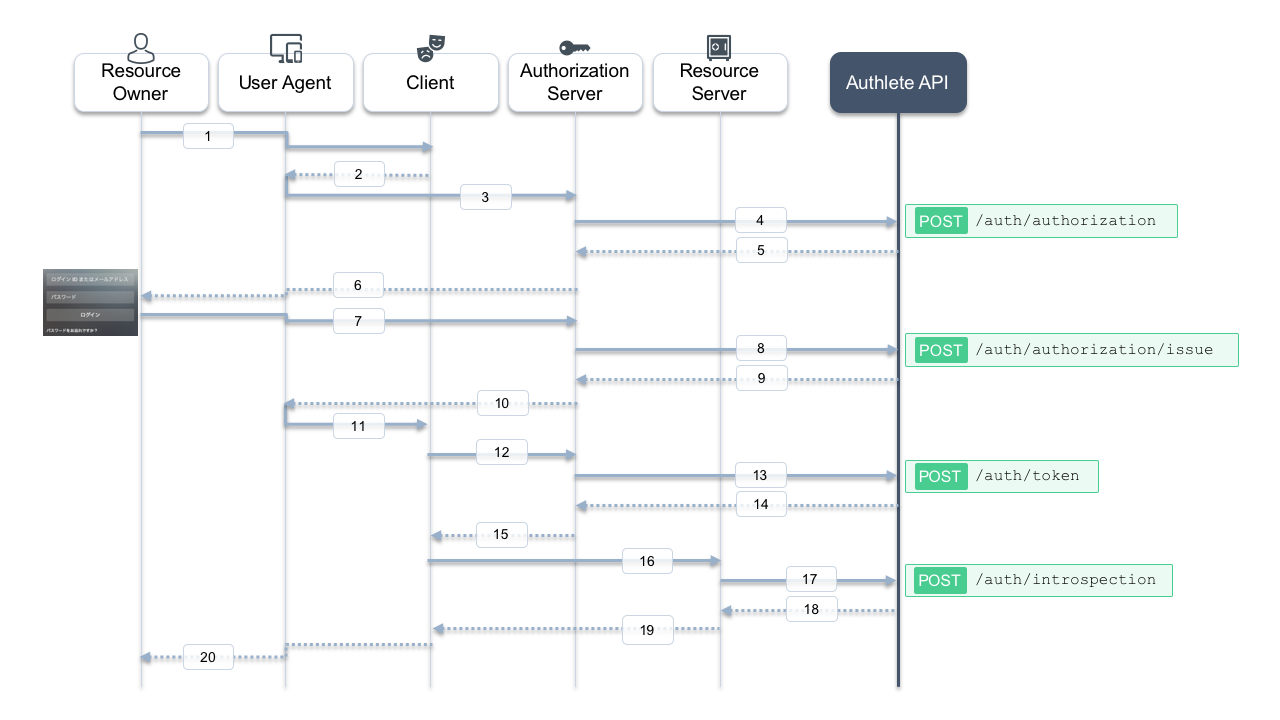
Here is a sequence diagram for this tutorial. Message numbers in the diagram help you follow the steps below.
1. Authorization request from the client to the authorization server
The client makes an authorization request to the authorization server via a user agent (messages #2 and #3). In this tutorial, suppose the following parameters are used:
| Item | Value |
|---|
client_id | 12818600553323 |
response_type | code |
redirect_uri | https://client.example.org/cb/example.com |
redirect_uri=https://client.example.org/cb/example.com \
  &response_type=code \
  &client_id=12818600553323
- Whether a client associated with
client_id = 12818600553323 has been registered.
- Whether the
redirect_uri matches one of the client’s registered redirect URIs.
- Whether other parameters such as
response_type and scope are allowed for this client.
Authlete’s POST /auth/authorization API performs this evaluation on behalf of the authorization server. Let’s call this API, acting as the authorization server.
Linux/Mac
curl -s -X POST https://api.authlete.com/api/auth/authorization \
  -u '<API Key e.g. 10738933707579>:<API Secret e.g. Xg6jVpJCvsaXvy2ks8R5WzjdMYlvQqOym3slDX0wNhQ>' \
  -H 'Content-Type: application/json' \
  -d '{ "parameters": "redirect_uri=https://client.example.org/cb/example.com&response_type=code&client_id=<Client ID e.g. 12818600553323>" }'
Windows (PowerShell)
curl.exe -s -X POST https://api.authlete.com/api/auth/authorization `
  -u '<API Key e.g. 10723797812772>:<API Secret e.g. ekYoYTI84qZcpe6bXGzDwduQ1fGBYxJT8K8Tnwd7poc>' `
  -H 'Content-Type: application/json' `
  -d '{\"parameters\" : \"redirect_uri=https://client.example.org/cb/example.com&response_type=code&client_id=<Client ID e.g. 12800697055611>\"}'
{
  "resultMessage": "[A004001] Authlete has successfully issued a ticket to the service (API Key = 10738933707579) for the authorization request from the client (ID = 12818600553323). [response_type=code, openid=false]",
  "type": "authorizationResponse",
  "resultCode": "A004001",
  "client": { /* ... */ },
  "ticket": "cA0xUty6I64PnFTjer2g-iM5KIfGpssUHqkfDoMr0xk",
  "action": "INTERACTION",
  "service": {
    "supportedClaims": [ /* ... */ ],
    "supportedScopes": [ /* ... */ ]
  }
}
resultMessage: Human-readable result.action: What the authorization server should do next (INTERACTION here).ticket: Used in the next step when issuing an authorization code.
Authlete also returns service and client information that the authorization server can use when asking the resource owner for consent.
2. User authentication and confirmation of granting access
Actual interaction between the resource owner and the authorization server is out of scope here. Typically, the authorization server:
- Authenticates the user (e.g., ID/password).
- Determines the user’s roles and privileges.
- Asks whether the user authorizes the client to access resources.
Assume that authentication and consent succeed, and the subject identifier for the user is testuser01.
3. Issuing an authorization code
After successful authentication and consent, the authorization server issues an authorization code by calling POST /auth/authorization/issue, passing the ticket from step 1 and the subject (testuser01).
Linux/Mac
curl -s -X POST https://api.authlete.com/api/auth/authorization/issue \
  -u '<API Key e.g. 10723797812772>:<API Secret e.g. ekYoYTI84qZcpe6bXGzDwduQ1fGBYxJT8K8Tnwd7poc>' \
  -H 'Content-Type: application/json' \
  -d '{ "ticket": "<Ticket e.g. bi2Kxe2WW5mK_GZ_fDFOpK1bnY6xTy40Ap_8nxf-7AU>", "subject": "testuser01" }'
Windows (PowerShell)
curl.exe -s -X POST https://api.authlete.com/api/auth/authorization/issue `
  -u '<API Key e.g. 10723797812772>:<API Secret e.g. ekYoYTI84qZcpe6bXGzDwduQ1fGBYxJT8K8Tnwd7poc>' `
  -H 'Content-Type: application/json' `
  -d '{ \"ticket\": \"<Ticket e.g. bi2Kxe2WW5mK_GZ_fDFOpK1bnY6xTy40Ap_8nxf-7AU>\", \"subject\": \"testuser01\" }'
{
  "responseContent": "https://client.example.org/cb/example.com?code=3GIJORjvgaEdu2u4KHyaQdGxfHDFsiViwGyZUxeBVrM",
  "authorizationCode": "3GIJORjvgaEdu2u4KHyaQdGxfHDFsiViwGyZUxeBVrM",
  "action": "LOCATION",
  "accessTokenDuration": 0,
  "resultMessage": "[A040001] The authorization request was processed successfully.",
  "type": "authorizationIssueResponse",
  "resultCode": "A040001",
  "accessTokenExpiresAt": 0
}
resultMessage: Human-readable result.action: LOCATION, meaning the authorization server should redirect the user agent.responseContent: The redirect URI with the code parameter.
The authorization server responds to the user agent like:
HTTP/1.1 302 Found
Location: https://client.example.org/cb/example.com?code=3GIJORjvgaEdu2u4KHyaQdGxfHDFsiViwGyZUxeBVrM
4. Token request
After receiving the authorization code via the redirect, the client sends a token request to the authorization server (message #12). For example:
POST /token HTTP/1.1
Host: as.example.com
Authorization: Basic base64(12818600553323:-olDIKD9BihRfB8O1JxobUEKBZ7PIV5Z6oaqxAshmoUtUZgB-wjmmxTYDiDV6vM_Mgl267PeNrRftq8cWplvmg)
Content-Type: application/x-www-form-urlencoded

grant_type=authorization_code
 &code=3GIJORjvgaEdu2u4KHyaQdGxfHDFsiViwGyZUxeBVrM
 &redirect_uri=https://client.example.org/cb/example.com
Linux/Mac
curl -s -X POST https://api.authlete.com/api/auth/token \
  -u '<API Key e.g. 10723797812772>:<API Secret e.g. ekYoYTI84qZcpe6bXGzDwduQ1fGBYxJT8K8Tnwd7poc>' \
  -H 'Content-Type: application/json' \
  -d '{ "clientId": "<Client ID e.g. 12800697055611>", "clientSecret": "<Client Secret e.g. dcDHEXr_tXNi7QdIMXLSXpXAy_j7Cr4C4LT2xAukQcW_09E2Ag1jTBdwpQrG-HBxflPF4Bz_Nb9Zd_ySAxOs6A>", "parameters": "grant_type=authorization_code&code=<Code e.g. GrYz5vtk6VaF0jxfnDrB2yvmk4deIrnMkrGT07JdM5U>&redirect_uri=https://client.example.org/cb/example.com" }'
Windows (PowerShell)
curl.exe -s -X POST https://api.authlete.com/api/auth/token `
  -u '<API Key e.g. 10723797812772>:<API Secret e.g. ekYoYTI84qZcpe6bXGzDwduQ1fGBYxJT8K8Tnwd7poc>' `
  -H 'Content-Type: application/json' `
  -d '{ \"clientId\": \"<Client ID e.g. 12800697055611>\", \"clientSecret\": \"<Client Secret e.g. dcDHEXr_tXNi7QdIMXLSXpXAy_j7Cr4C4LT2xAukQcW_09E2Ag1jTBdwpQrG-HBxflPF4Bz_Nb9Zd_ySAxOs6A>\", \"parameters\": \"grant_type=authorization_code&code=<Code e.g. GrYz5vtk6VaF0jxfnDrB2yvmk4deIrnMkrGT07JdM5U>&redirect_uri=https://client.example.org/cb/example.com\" }'
{
  "accessTokenExpiresAt": 1558627889220,
  "refreshTokenDuration": 864000,
  "clientId": 12818600553323,
  "accessToken": "-g5ZJDAfpTQAqR9mdnAfhv0zuCe3SUrKJ2_859zI1Ow",
  "refreshToken": "4PwVTovcwMgnNJbsH-BzeQj5a8nelOi0iEIswex-ueE",
  "accessTokenDuration": 86400,
  "clientIdAliasUsed": false,
  "refreshTokenExpiresAt": 1559405489220,
  "grantType": "AUTHORIZATION_CODE",
  "subject": "testuser01",
  "action": "OK",
  "responseContent": "{\"access_token\":\"-g5ZJDAfpTQAqR9mdnAfhv0zuCe3SUrKJ2_859zI1Ow\",\"refresh_token\":\"4PwVTovcwMgnNJbsH-BzeQj5a8nelOi0iEIswex-ueE\",\"scope\":null,\"token_type\":\"Bearer\",\"expires_in\":86400}",
  "resultCode": "A050001",
  "type": "tokenResponse",
  "resultMessage": "[A050001] The token request (grant_type=authorization_code) was processed successfully."
}
resultMessage: Human-readable result.action: OK, meaning the authorization server should return a normal token response.responseContent: JSON body of the token response to send back to the client.
The authorization server would respond:
HTTP/1.1 200 OK
Content-Type: application/json

{
  "access_token":"-g5ZJDAfpTQAqR9mdnAfhv0zuCe3SUrKJ2_859zI1Ow",
  "refresh_token":"4PwVTovcwMgnNJbsH-BzeQj5a8nelOi0iEIswex-ueE",
  "scope":null,
  "token_type":"Bearer",
  "expires_in":86400
}
5. API request (access token introspection)
Typically, the client then calls APIs on a resource server using the access token (message #16). The resource server must:
- Check whether the token is valid and not expired.
- Retrieve information about the user (
subject) and client (clientId).
- Decide how to handle the API request.
Authlete provides the /auth/introspection API for this purpose.
Make sure to replace <API Key>, <API Secret>, and <Token> with your own values.
Linux/Mac
curl -s -X POST https://api.authlete.com/api/auth/introspection \
  -u '<API Key e.g. 10723797812772>:<API Secret e.g. ekYoYTI84qZcpe6bXGzDwduQ1fGBYxJT8K8Tnwd7poc>' \
  -H 'Content-Type: application/json' \
  -d '{ "token": "<Token e.g. 7FfwOnGjVHwxXhs2Wr67XV1-ZhQaoy3ctKcGkLyKxuY>" }'
Windows (PowerShell)
curl.exe -s -X POST https://api.authlete.com/api/auth/introspection `
  -u '<API Key e.g. 10723797812772>:<API Secret e.g. ekYoYTI84qZcpe6bXGzDwduQ1fGBYxJT8K8Tnwd7poc>' `
  -H 'Content-Type: application/json' `
  -d '{ \"token\": \"<Token e.g. 7FfwOnGjVHwxXhs2Wr67XV1-ZhQaoy3ctKcGkLyKxuY>\" }'
{
  "resultMessage": "[A056001] The access token is valid.",
  "refreshable": true,
  "clientIdAliasUsed": false,
  "existent": true,
  "resultCode": "A056001",
  "expiresAt": 1558627889000,
  "responseContent": "Bearer error=\"invalid_request\"",
  "clientId": 12818600553323,
  "action": "OK",
  "usable": true,
  "sufficient": true,
  "subject": "testuser01",
  "type": "introspectionResponse"
}
- Whether the token is valid (
usable, sufficient, expiresAt).
- Which user (
subject) and client (clientId) it belongs to.
Based on that, the resource server decides how to respond to the API request (message #19).
Conclusion
In this tutorial, we have seen how to use Authlete 2.x APIs to implement the OAuth 2.0 authorization code grant flow in an authorization server, using /auth/authorization, /auth/authorization/issue, /auth/token, and /auth/introspection.
Next steps
