Documentation Index
Fetch the complete documentation index at: https://developers.authlete.com/llms.txt
Use this file to discover all available pages before exploring further.
Preface
JARM (JWT Secured Authorization Response Mode for OAuth 2.0) is a response mode to encode authorization responses to JWTs. It allows authorization servers to provide secure authorization responses with signature, encryption, sender authentication, audience restriction etc. This article describes instructions to enable JARM.Registering a JWK set to an Authlete service
This article assumes that you have registered a set of JWK to your Authlete service. See the related article for the registration. The following screenshot is an example showing the registered JWK set.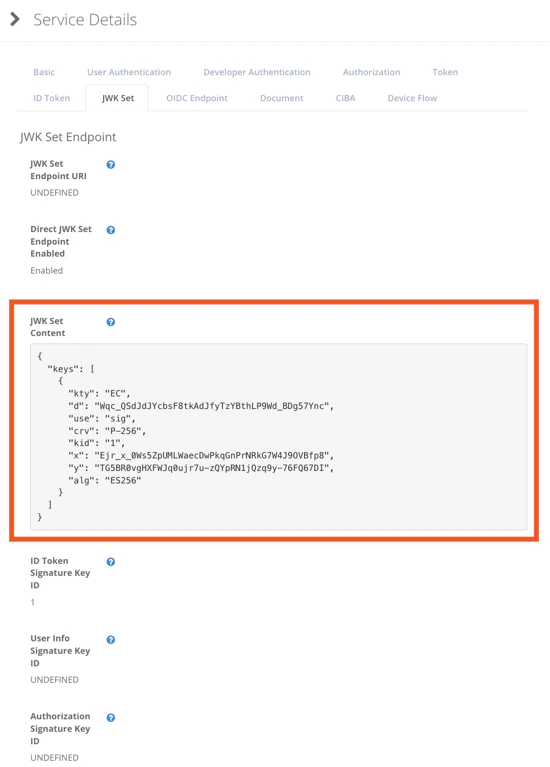
Enabling signing for authorization responses to a client
Log in to Developer Console that corresponds to the service above, and you will see “Your Apps” page that includes a list of clients of the service. Click “Edit” button of the client that may ask the service to create JARM compliant authorization responses. Your Apps
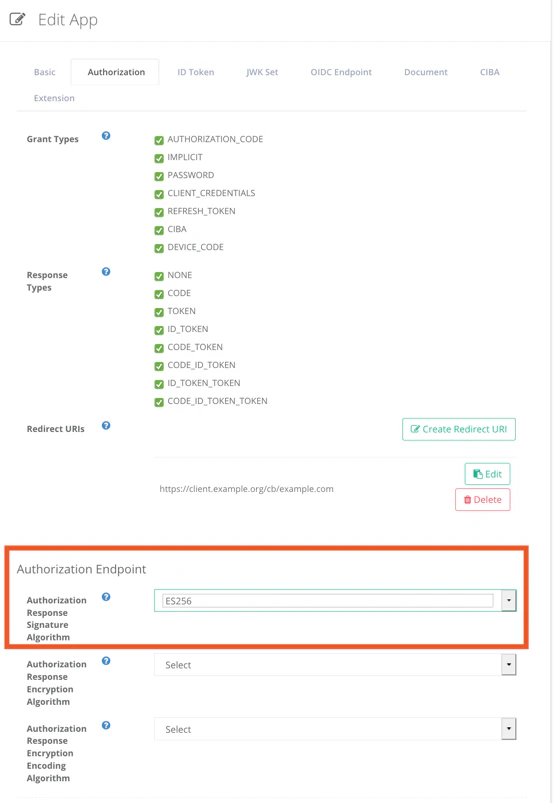
Go to Authorization tab and you will see “Authorization Response Signature Algorithm” in Authorization Endpoint section. Choose an appropriate algorithm that matches to the one of keys. For example, in this article, “ES256” has been selected because it is the only algorithm registered to the service. \
Your Apps
Go to Authorization tab and you will see “Authorization Response Signature Algorithm” in Authorization Endpoint section. Choose an appropriate algorithm that matches to the one of keys. For example, in this article, “ES256” has been selected because it is the only algorithm registered to the service. \