Documentation Index
Fetch the complete documentation index at: https://developers.authlete.com/llms.txt
Use this file to discover all available pages before exploring further.
Overview
This document describes overview of **Authorization Code Flow in **FAPI 2.0 Security Profile
and instruction on how to configure Authlete services and clients to make them comply with it.
FAPI 2.0 Security Profile feature is available since Authlete 2.3.
Introduction
The below is a diagram that roughly describes Authorization Code Flow in FAPI 2.0 Security Profile.\
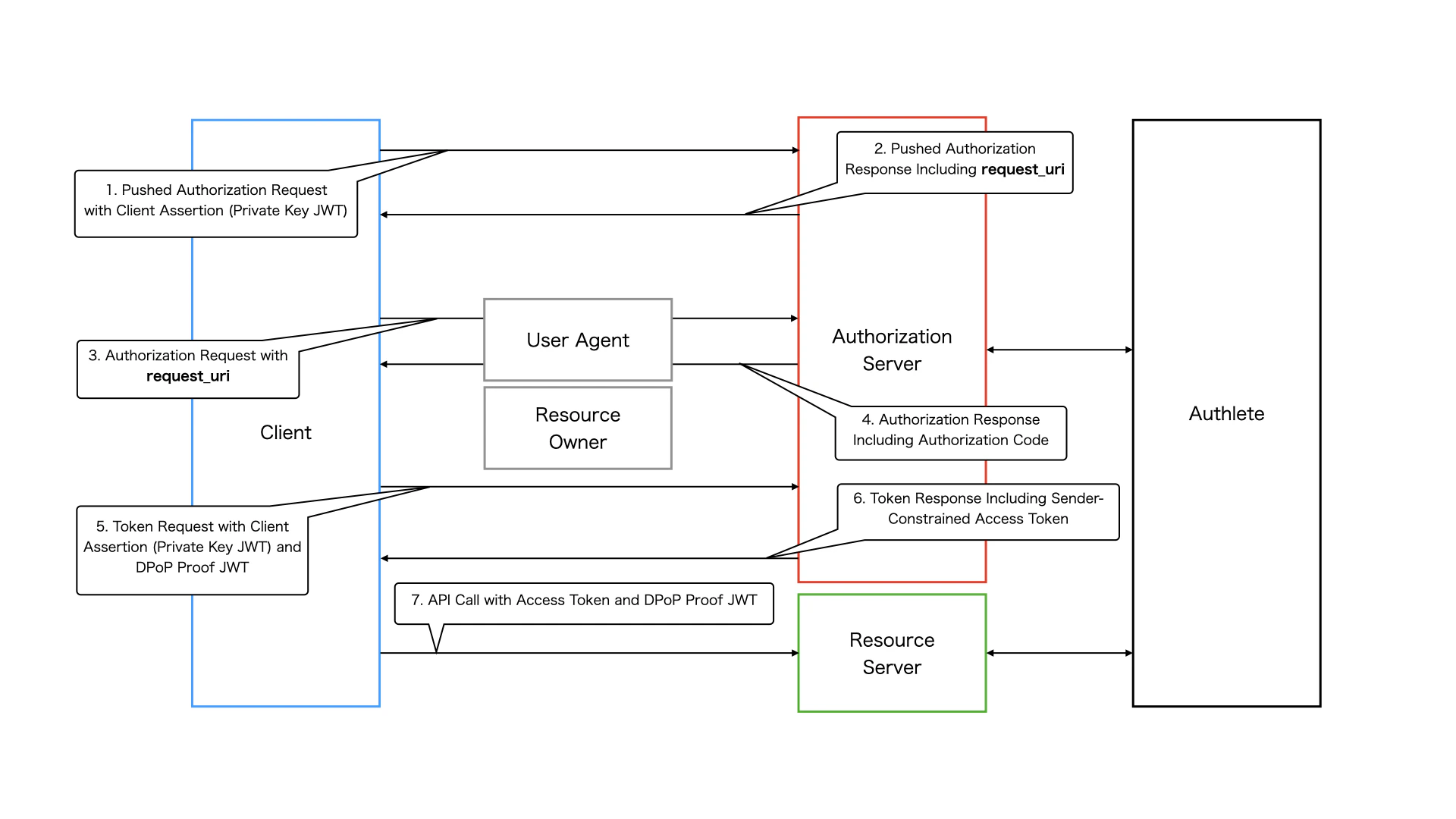 Authorization Code Flow in FAPI 2.0 Security Profile
1. Pushed Authorization Request
A client sends a request to the pushed authorization request endpoint of the authorization server to register authorization request parameters. FAPI 2.0 Security Profile imposes some requirements on authorization request parameters such as response_type. It also requires the client to be authenticated with mutual TLS authentication
or private_key_jwt
. In this document, we use private_key_jwt for client authentication.
2. Pushed Authorization Response
If the request is processed successfully, the pushed authorization request endpoint makes a response that contains a request_uri.
3. Authorization Request
The client sends an authorization request including the request_uri to the authorization endpoint of the authorization server. This is done via the user agent.
4. Authorization Response
If the request is processed successfully, the authorization endpoint makes a response that contains an authorization code and the user agent redirects to the client’s redirect URI.
5. Token Request
The client sends a token request to the token endpoint of the authorization server with the authorization code. The token endpoint needs to issue an access token that is **sender-constrained with mutual TLS or **DPoP
based on FAPI 2.0 Security Profile. In this document, we use DPoP as a sender-constrained access token mechanism. Note that private_key_jwt is used for client authentication at the token endpoint as well as at the pushed authorization request endpoint.
6. Token Response
If the request is processed successfully, the token endpoint makes a response that contains a sender-constrained access token.
7. API Request
The client sends a request to a resource endpoint with the access token along with a proof-of-possession for the access token (a DPoP proof JWT in this document).
Setting up a FAPI Service
Scope Attribute
Since Authlete 2.3, a new scope attribute has been introduced, specifically reserved for the FAPI 2.0 Security Profile. The attribute is defined as follows:
| Attribute Key | Attribute Value |
|---|
fapi2 | sp |
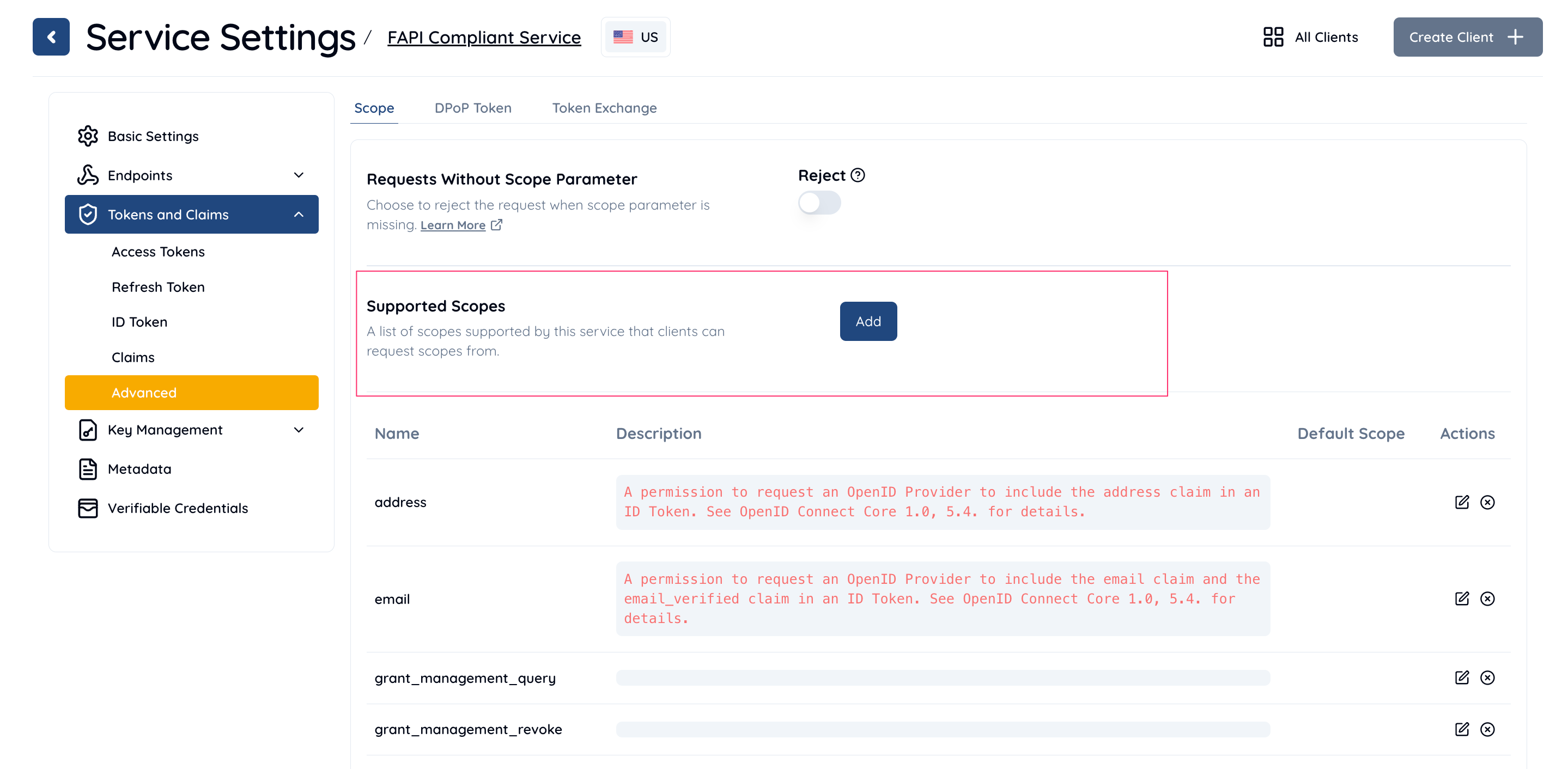
- Open Service Settings in the Management Console.
- Navigate to Tokens & Claims > Advanced > Scope.
- In the Supported Scopes section, click the Add button.
- In the Add/Edit Supported Scope dialog:
- Enter a name and description for your custom scope.
- Under the Scope Attributes section, click Add.
- Set the following:
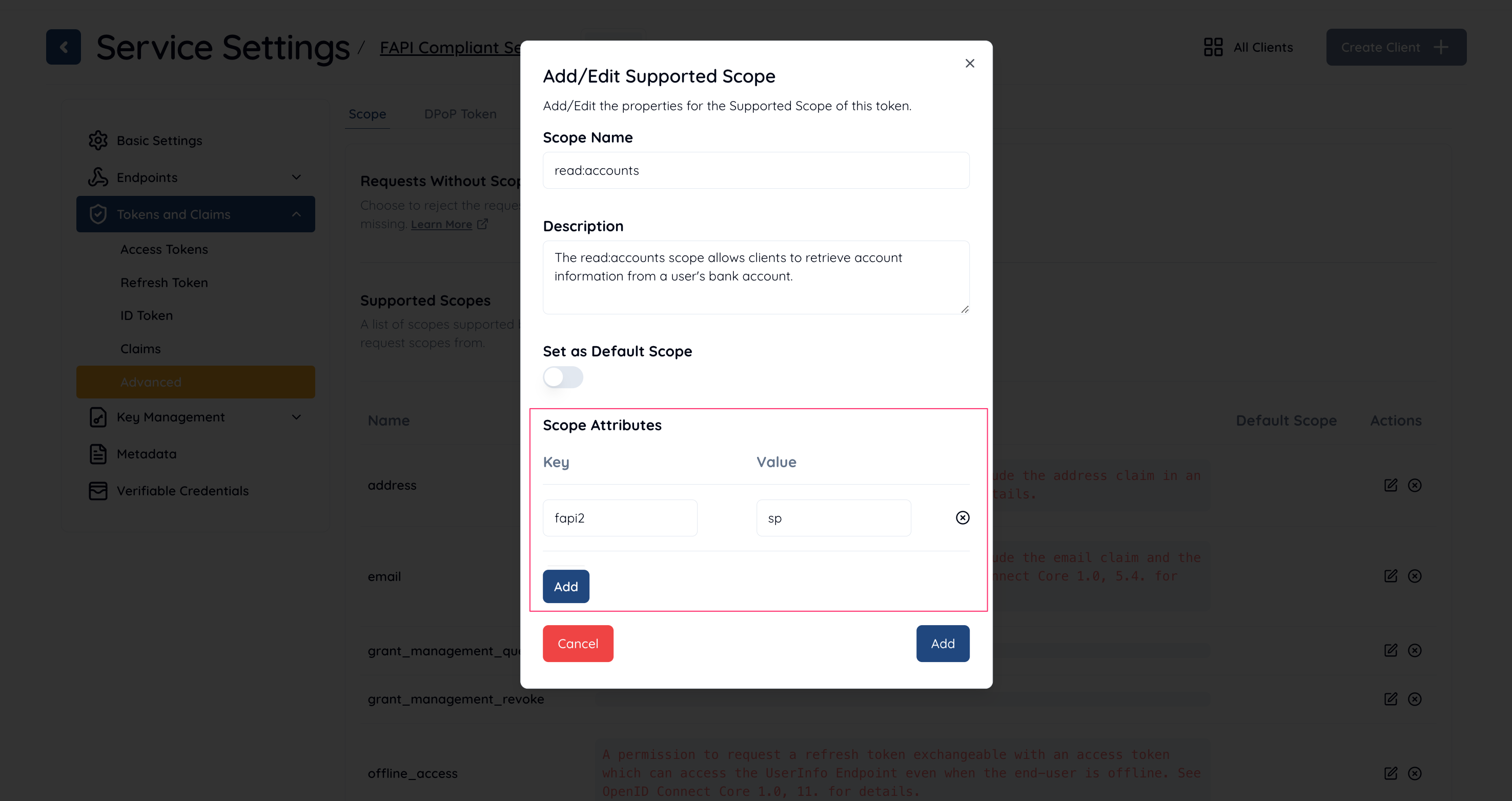 By following these steps, you can configure a scope that complies with the FAPI 2.0 Security Profile.
Service Configuration
Configure your service as follows to make it comply with FAPI 2.0 Security Profile.
| Property | Description |
|---|
| Supported Grant Types | Include AUTHORIZATION_CODE. |
| Supported Response Types | Include CODE. |
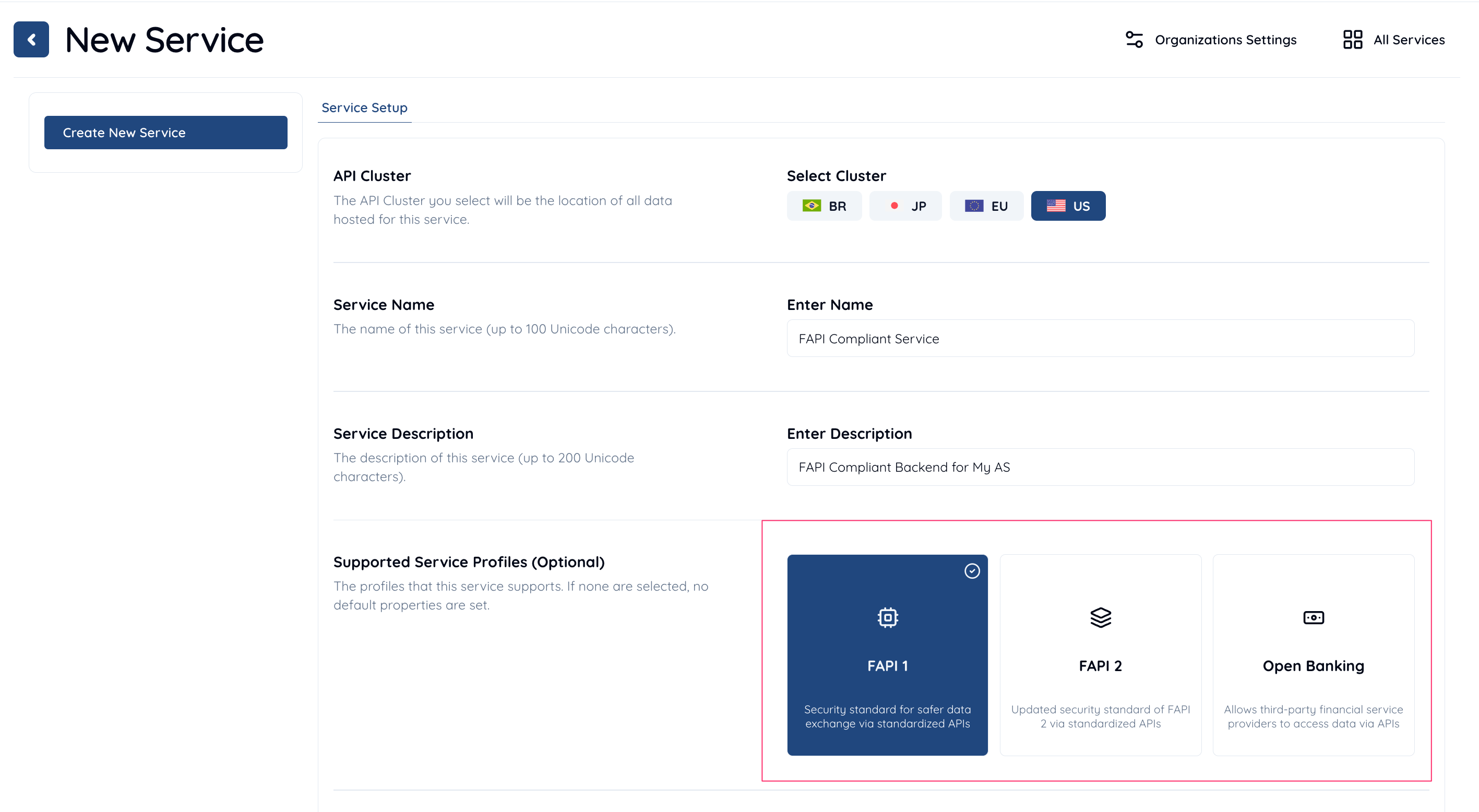
| Supported Service Profiles | Include FAPI. |
| iss Response Parameter | Select Included. |
| Token Endpoint URI | Set your authorization server’s token endpoint URI. |
| Supported Client Authentication Methods | Select PRIVATE_KEY_JWT. |
| nbf Claim | Select Required. |
| Audience Validation | Select Perform. |
| Access Token Signature Algorithm | NOTE: This configuration is only required if “JWT Access Token” is used.Select PS256, ES256 or EdDSA. |
| Supported Scopes | Include a FAPI 2.0 Security Profile scope. |
| JWK Set | NOTE: This configuration is only required if “JWK Set” is used.Set a JWK set containing required JWKs (e.g. JWT access token sign key). |
| JWK Set Endpoint URI | NOTE: This configuration is only required if “JWK Set Endpoint URI” is used.Set a URI that starts with https. The URI needs to point to a JWK set containing required JWKs (e.g. JWT access token sign key). |
Client Configuration
Configure your service as follows to make it comply with FAPI 2.0 Security Profile.
| Property | Description |
|---|
| Client Type | Select CONFIDENTIAL. |
| Grant Types | Include AUTHORIZATION_CODE. |
| Response Types | Include CODE. |
| Redirect URIs | Create at least one redirect URI. |
| Client Authentication Method | Select PRIVATE_KEY_JWT. |
| Assertion Signature Algorithm | Select PS256, ES256 or EdDSA. |
| ID Token Signature Algorithm | Note: This configuration is only required if ID tokens are issued and signed.Select an encryption algorithm other than NONE. |
| ID Token Encryption Algorithm | Note: This configuration is only required if ID tokens are issued and encrypted.Select an encryption algorithm other than RSA1_5. |
| JWK Set Content | NOTE: This configuration is only required if “JWK Set Content” is used.Set a JWK set containing required JWKs (e.g. client assertion sign key). |
| JWK Set URI | NOTE: This configuration is only required if “JWK Set URI” is used.Set a URI that starts with https. The URI needs to point to a JWK set containing required JWKs (e.g. client assertion sign key). |
API call test
In this section, we simulate API calls that the authorization server makes against Authlete APIs in the context of Authorization Code Flow in FAPI 2.0 Security Profile.
1. /pushed_auth_req API
Let’s assume the client sends a valid request to the pushed authorization request endpoint of authorization server in the context of Authorization Code Flow in FAPI 2.0 Security Profile. According to FAPI 2.0 Security Profile, Requirements for Clients
, the request would be like below.
POST /par HTTP/1.1
Host: server.example.com
Content-Type: application/x-www-form-urlencoded
client_assertion_type=urn%3Aietf%3Aparams%3Aoauth%3Aclient-assertion-type%3Ajwt-bearer&
client_assertion=eyJraWQiOiJjbGllbnQtYXNzZXJ0aW9uLWtleSIsImFsZyI6IkVTMjU2In0.eyJqdGkiOiIyZTQ3MzhkMjNjOWM5YjYyZGNjZCIsInN1YiI6IjEzNDQ2NzM2NDE4IiwiaXNzIjoiMTM0NDY3MzY0MTgiLCJhdWQiOiJodHRwczovL2F1dGhsZXRlLmNvbSIsImlhdCI6MTY1OTk1MDIwNywiZXhwIjoxNjU5OTUzMjA3fQ.VdPzRZ42v62Q2gUfZ-r6aGUL27pY4y5uUkJZRWU9taDHN8z7GtqyyhmmDLfmSuGKglvhmuQvQuv6nJeuQZk5wQ&
client_id=13446736418&
response_type=code&
redirect_uri=https%3A%2F%2Fclient.example.org%2Fcb&
scope=read:accounts&
code_challenge=E9Melhoa2OwvFrEMTJguCHaoeK1t8URWbuGJSstw-cM&
code_challenge_method=S256
- the scope parameter is assigned to “read:accounts”, which is a FAPI 2.0 Security Profile scope and
- the client is authenticated with private_key_jwt.
After the authorization server receives the request from the client, the authorization server calls Authlete /pushed_auth_req API. The following is a curl command that simulates a request from the authorization server to Authlete /pushed_auth_req API.
curl -s -X POST https://us.authlete.com/api/${your_service_id}/pushed_auth_req \
-H 'Authorization: Bearer ${SERVICE_ACCESS_TOKEN}' \
-H 'Content-type: application/json' \
-d '{
    "parameters": "client_assertion_type=urn:ietf:params:oauth:client-assertion-type:jwt-bearer&\
    client_assertion=eyJraWQiOiJjbGllbnQtYXNzZXJ0aW9uLWtleSIsImFsZyI6IkVTMjU2In0.eyJqdGkiOiJmNDE2ODVlZWY0ZWYzOGJjMzkwNiIsInN1YiI6IjEzNDQ2NzM2NDE4IiwiaXNzIjoiMTM0NDY3MzY0MTgiLCJhdWQiOiJodHRwczovL2F1dGhsZXRlLmNvbSIsImlhdCI6MTY2MDE0Mjc2NCwiZXhwIjoxNjYwMTQ1NzY0fQ.vagMXCXtrM9cai6ZID6Y3SyCw6FixAY2MGWkzx2-inwKcxpP1KHDX9iSiDiK75vF0cItwxGAALtcdfyoxWaw3A&\
    client_id=13446736418&response_type=code&redirect_uri=https%3A%2F%2Fclient.example.com%2Fcb&\
    scope=read:accounts&code_challenge=E9Melhoa2OwvFrEMTJguCHaoeK1t8URWbuGJSstw-cM&\
    code_challenge_method=S256"
    }'
{
  "resultCode": "A245001",
  "resultMessage": "[A245001] Successfully registered a request object for client (13446736418),
  URI is urn:ietf:params:oauth:request_uri:QbGjdHSfZi_m6W_ldrqjZhmYjQo3QcQOd3Hx2RcGODg.",
  "action": "CREATED",
  "requestUri": "urn:ietf:params:oauth:request_uri:QbGjdHSfZi_m6W_ldrqjZhmYjQo3QcQOd3Hx2RcGODg",
  "responseContent": "{\"expires_in\":600,\"request_uri\":\"urn:ietf:params:oauth:request_uri:QbGjdHSfZi_m6W_ldrqjZhmYjQo3QcQOd3Hx2RcGODg\"}"
}
2. /auth/authorization API
After obtaining a request URI from the pushed authorization request endpoint, the client sends an authorization request including the request URI to the authorization endpoint of the authorization server like below.
GET /authorization?client_id=13446736418&
request_uri=urn%3Aietf%3Aparams%3Aoauth%3Arequest_uri%3AQbGjdHSfZi_m6W_ldrqjZhmYjQo3QcQOd3Hx2RcGODg HTTP/1.1
Host: server.example.com
curl -s -X POST https://us.authlete.com/api/${your_service_id}/auth/authorization \
-H 'Authorization: Bearer ${SERVICE_ACCESS_TOKEN}' \
-H 'Content-type: application/json' \
-d '{"parameters":"client_id=13446736418
      &request_uri=urn%3Aietf%3Aparams%3Aoauth%3Arequest_uri%3AQbGjdHSfZi_m6W_ldrqjZhmYjQo3QcQOd3Hx2RcGODg"}'
{
  "resultCode": "A004001",
  "resultMessage": "[A004001] Authlete has successfully issued a ticket to the service (API Key = 20699248885) for the authorization request from the client (ID = 13446736418). [response_type=code, openid=false]",
  "ticket": "CBKnPeMOf9xfv0sV-srVzbZv_dtFh01Zc0VkQ2nQKFg"
}
3. /auth/authorization/issue API
After the authorization server receives a successful response from /auth/authorization API, the end-user authorizes/denies the client on the browser, the authorization result is conveyed to the authorization server and the authorization server calls Authlete /auth/authorization/issue API with the result. The following is a curl command that simulates a request from the authorization server to Authlete /auth/authorization/issue API.
curl -s -X POST https://us.authlete.com/api/${your_service_id}/auth/authorization/issue \
-H 'Authorization: Bearer ${SERVICE_ACCESS_TOKEN}' \
-H 'Content-type: application/json' \
-d '{"ticket":"CBKnPeMOf9xfv0sV-srVzbZv_dtFh01Zc0VkQ2nQKFg",
     "subject":"john",
     "result":"AUTHORIZED"
  }'
{
  "resultCode": "A040001",
  "resultMessage": "[A040001] The authorization request was processed successfully.",
  "authorizationCode": "xY1Vd-rjb-Yj84sXGgkr424VR9JbVGQw2wgVbudSXGU",
  ...
}
4. /auth/token API
After the client receives a successful response containing an authorization code from the authorization endpoint, the client sends a token request to the token endpoint of the authorization server as below.
POST /token HTTP/1.1
Host: server.example.com
Content-Type: application/x-www-form-urlencoded
DPoP: eyJ0eXAiOiJkcG9wK2p3dCIsImFsZyI6IkVTMjU2IiwiandrIjp7Imt0eSI6IkVDIiwidXNlIjoic2lnIiwiY3J2IjoiUC0yNTYiLCJ4IjoiRk4xYk81cnBVY0ZNeU9ncE9iQ1BTaGZkcldJ
TFN1RVBBTmZKUWl4cU16ayIsInkiOiJYY3RYc0xXY1YzMkJMVVZCMDhqVjJ4d2VFU2FTY0xULVNKUEl6TlVoSHRvIiwiYWxnIjoiRVMyNTYifX0.eyJqdGkiOiI0OWE1YWU0ZTA5NTZiNDJkMjEwMyIsImh0bSI6IlBPU1QiLCJodHUiOiJodHRwczovL3NlcnZlci5leGFtcGxlLmNvbS90b2tlbiIsImlhdCI6MTY2MDE0Mjk2N30.codEOIUYuytFacobXDn4-Jx7xr6oRaw83lorgPbOS1y5pMyDCfUf08SA9tCUWMMUctgGdt7D9wf7hDCip6lgTA
client_assertion_type=urn%3Aietf%3Aparams%3Aoauth%3Aclient-assertion-type%3Ajwt-bearer
&client_assertion=eyJraWQiOiJjbGllbnQtYXNzZXJ0aW9uLWtleSIsImFsZyI6IkVTMjU2In0.eyJqdGkiOiJmYzRkMDRlMTI0MTRjNzU5OGNlNyIsInN1YiI6IjEzNDQ2NzM2NDE4IiwiaXNzIjoiMTM0NDY3MzY0MTgiLCJhdWQiOiJodHRwczovL2F1dGhsZXRlLmNvbSIsImlhdCI6MTY2MDE0Mjk2NCwiZXhwIjoxNjYwMTQ1OTY0fQ.-Gn4X3d_ymujjhSh8ZLWdtOzq2-TcgvwGzU-NEjVDaJSLN8kpOVHguOytSDXqJW5QJcsH8J_bkTaVZV7Nyl2IA
&client_id=13446736418
&code=xY1Vd-rjb-Yj84sXGgkr424VR9JbVGQw2wgVbudSXGU
&redirect_uri=https%3A%2F%2Fclient.example.org%2Fcb
&grant_type=authorization_code
&code_verifier=dBjftJeZ4CVP-mB92K27uhbUJU1p1r_wW1gFWFOEjXk
- be authenticated with private key JWT and
- present a DPoP proof JWT for the authorization server to issue a sender-constrained access token. (DPoP proof JWT must be signed with PS256, ES256 or EdDSA.)
After the token endpoint receives a request from the client, the authorization server calls Authlete /auth/token API. The following is a curl command that simulates a request from the authorization server to Authlete /auth/token API.
curl -s -X POST https://api.authlete.com/auth/token \
  -H 'Authorization: Bearer ${SERVICE_ACCESS_TOKEN}' \
  -H 'Content-type: application/json' \
  -d {"parameters":"client_assertion_type=urn:ietf:params:oauth:client-assertion-type:jwt-bearer
      &client_assertion=eyJraWQiOiJjbGllbnQtYXNzZXJ0aW9uLWtleSIsImFsZyI6IkVTMjU2In0.eyJqdGkiOiJmYzRkMDRlMTI0MTRjNzU5OGNlNyIsInN1YiI6IjEzNDQ2NzM2NDE4IiwiaXNzIjoiMTM0NDY3MzY0MTgiLCJhdWQiOiJodHRwczovL2F1dGhsZXRlLmNvbSIsImlhdCI6MTY2MDE0Mjk2NCwiZXhwIjoxNjYwMTQ1OTY0fQ.-Gn4X3d_ymujjhSh8ZLWdtOzq2-TcgvwGzU-NEjVDaJSLN8kpOVHguOytSDXqJW5QJcsH8J_bkTaVZV7Nyl2IA
      &client_id=13446736418
      &code=xY1Vd-rjb-Yj84sXGgkr424VR9JbVGQw2wgVbudSXGU
      &redirect_uri=h...
{
    "resultCode": "A050001",
    "resultMessage": "[A050001] The token request (grant_type=authorization_code) was processed successfully.",
    "accessToken": "7i9xPkbkKCmcmkZIvSGci5PKf4HO9TUAefwsABMrbTQ",
    ...
}
5. /auth/introspection API
Through all the steps above, the client gets an access token and it can access a resource server’s endpoint with the access token like below.
GET /api/sample HTTP/1.1
Authorization: DPoP 7i9xPkbkKCmcmkZIvSGci5PKf4HO9TUAefwsABMrbTQ
DPoP: eyJ0eXAiOiJkcG9wK2p3dCIsImFsZyI6IkVTMjU2IiwiandrIjp7Imt0eSI6IkVDIiwidXNlIjoic2lnIiwiY3J2IjoiUC0yNTYiLCJ4IjoiRk4xYk81cnBVY0ZNeU9ncE9iQ1BTaGZkcldJTFN1RVBBTmZKUWl4cU16ayIsInkiOiJYY3RYc0xXY1YzMkJMVVZCMDhqVjJ4d2VFU2FTY0xULVNKUEl6TlVoSHRvIiwiYWxnIjoiRVMyNTYifX0.eyJqdGkiOiI5YWMwYTRjYWM1ODA4MmZlYzQxOSIsImh0bSI6IkdFVCIsImh0dSI6Imh0dHBzOi8vcmVzb3VyY2UuZXhhbXBsZS5jb20vYXBpL3NhbXBsZSIsImlhdCI6MTY2MDE0MzAzMiwiYXRoIjoiaDdacFQ2VnJCU3JpaGdYSDA1ZE5tM3VvQ0x5TmVXYWNfZHFkOUhOOUktbyJ9.avJW2u8Gasm2wpXi4XlxJ2Z4A4WsgXm5jFscbN893vRzcxqZU4AwK0J5Tosk4T1d9WmL5wnZKnAEy2Gb9L2_pQ
Host: resource.example.com
curl -s -X POST https://us.authlete.com/api/${your_service_id}/auth/introspection \
-H 'Authorization: Bearer ${SERVICE_ACCESS_TOKEN}' \
-H 'Content-type: application/json' \
-d {"token":"7i9xPkbkKCmcmkZIvSGci5PKf4HO9TUAefwsABMrbTQ",
    "dpop":"eyJ0eXAiOiJkcG9wK2p3dCIsImFsZyI6IkVTMjU2IiwiandrIjp7Imt0eSI6IkVDIiwidXNlIjoic2lnIiwiY3J2IjoiUC0yNTYiLCJ4IjoiRk4xYk81cnBVY0ZNeU9ncE9iQ1BTaGZkcldJTFN1RVBBTmZKUWl4cU16ayIsInkiOiJYY3RYc0xXY1YzMkJMVVZCMDhqVjJ4d2VFU2FTY0xULVNKUEl6TlVoSHRvIiwiYWxnIjoiRVMyNTYifX0.eyJqdGkiOiI5NmYzNDc4OWFjNWFmZDNkMzhhNiIsImh0bSI6IkdFVCIsImh0dSI6Imh0dHBzOi8vcmVzb3VyY2UuZXhhbXBsZS5jb20vYXBpL3NhbXBsZSIsImlhdCI6MTY1OTk1MDUyNywiYXRoIjoidmdDa3JDWEhIYTQ3VVpVazdJNVk4QmFKdWxWek9KMFhEMVNzZGdWdHVKSSJ9.ysI4w__vdqVPOjjVhUidhHoletEOmvSMJD6TdqUIM49KIGcjxjgVpaVA-D5yKnEs_4aRGkt_tsRiSsHUNam9KA",
    "htm":"GET",
    "htu":"https://resource.example.com/api/sample"
  }'
{
    "resultCode": "A056001",
    "resultMessage": "[A056001] The access token is valid.",
    "action": "OK",
    ...
}