
Documentation Index
Fetch the complete documentation index at: https://developers.authlete.com/llms.txt
Use this file to discover all available pages before exploring further.
Introduction
In authorization requests defined in RFC 6749: The OAuth 2.0 Authorization Framework, the client application (“client” hereafter) must specify its identifier (“client ID” hereafter) using theclient_id request parameter. In addition, the
authorization server must verify that the redirect_uri specified in the
request is one that has been registered for the client (i.e., that the
redirect URI is included in the client’s redirect_uris metadata).
Given these requirements, it follows that before the client sends a request
to the authorization server, the client’s identifier and metadata must already
be registered with the authorization server.
There are several standard specifications for pre-registering clients, such as
OpenID Connect Dynamic Client Registration 1.0 (DCR),
RFC 7591 OAuth 2.0 Dynamic Client Registration Protocol (DCR), and
Explicit Registration of OpenID Federation 1.0
(explanatory document). Support for these specifications by
an authorization server is optional.
Even when an authorization server supports the standards mentioned above,
it is common for its implementation to provide proprietary client registration
methods as well, such as static configuration files or a web console. Authlete
also supports client registration through its web console and the
/client/create API, in addition to these standard
specifications.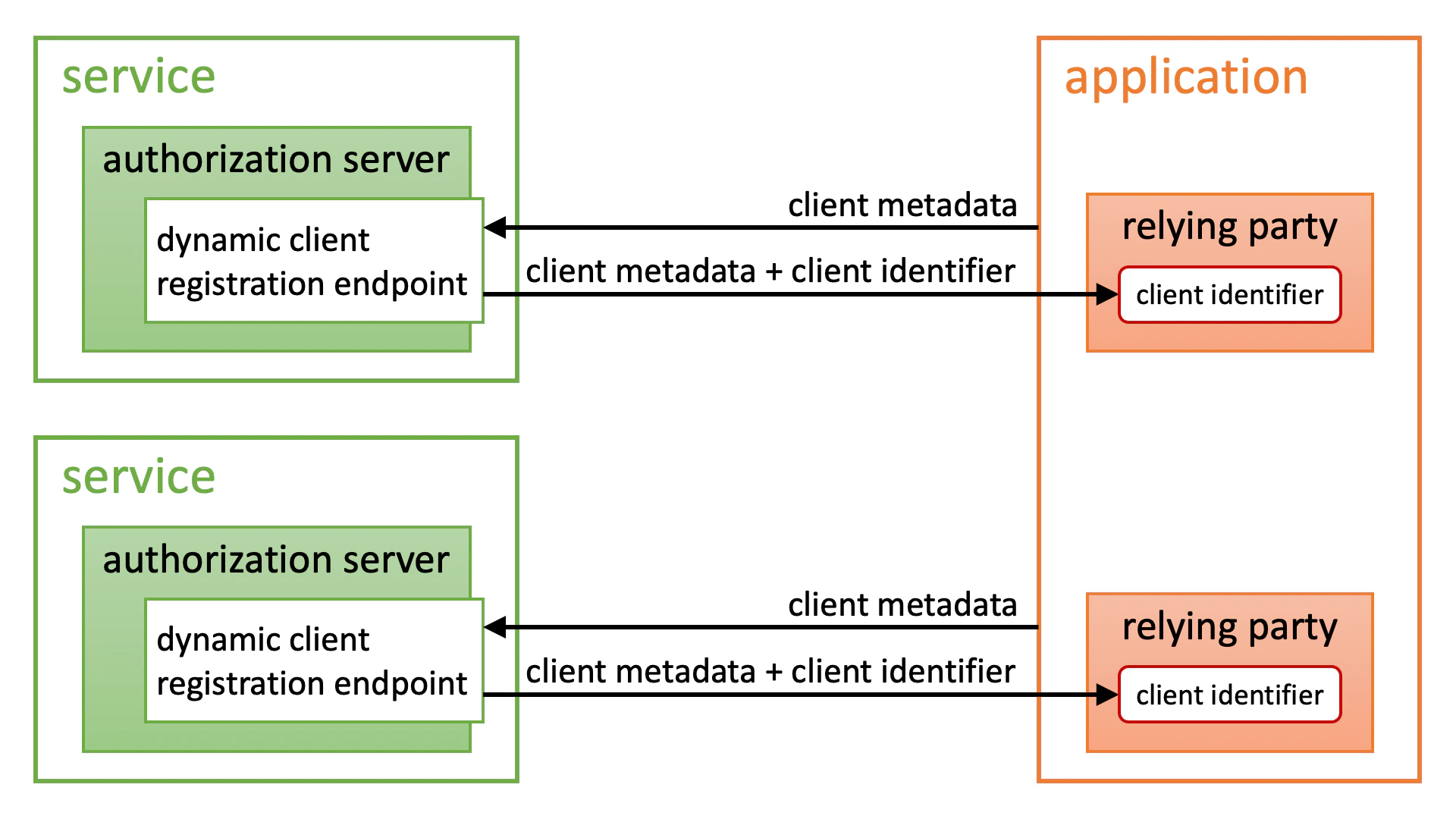
https://. The client’s
metadata is then provided at the location obtained by appending
/.well-known/openid-federation to that URL
(the figure below is an excerpt from the explanatory document).
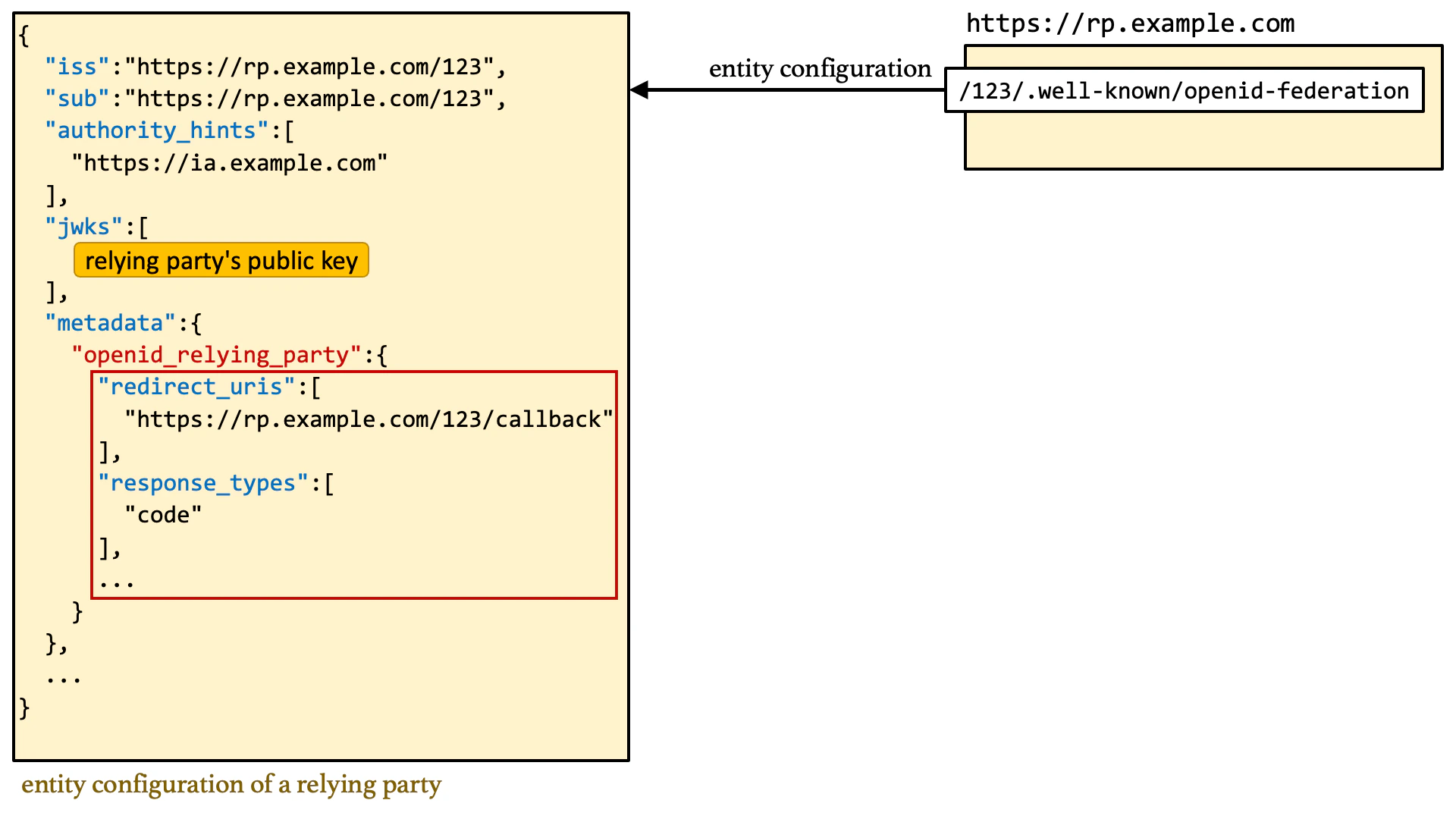
client_id parameter refers to an
unregistered client and that identifier is a URL starting with https://,
automatically fetch the client metadata from the location obtained by appending
/.well-known/openid-federation to that URL and
register the client (this is called Automatic Registration).
After that, the authorization server simply continues processing the
authorization request as if nothing unusual had happened.
Because trust chain verification and metadata policy enforcement are involved,
the process of deriving client metadata is actually quite complex. Please refer
to the explanatory document for details.
https://, and the client metadata is provided from the location indicated by
that URL.
Compared to OpenID Federation 1.0, CIMD is a much simpler
specification. This simplicity makes implementation easier for both clients and
servers. However, in exchange for that simplicity, the CIMD
specification does not define any method for verifying whether a client is a
trustworthy communication partner. As a result, unless an authorization server’s
implementation imposes some kind of proprietary restriction, anyone can freely
register a client with an authorization server that supports CIMD. This
stands in stark contrast to OpenID Federation 1.0, which clearly
defines how to build trust relationships between entities using trust chains.
In this article, we describe the CIMD specification and
Authlete-specific features that complement it.
Specification
Overview
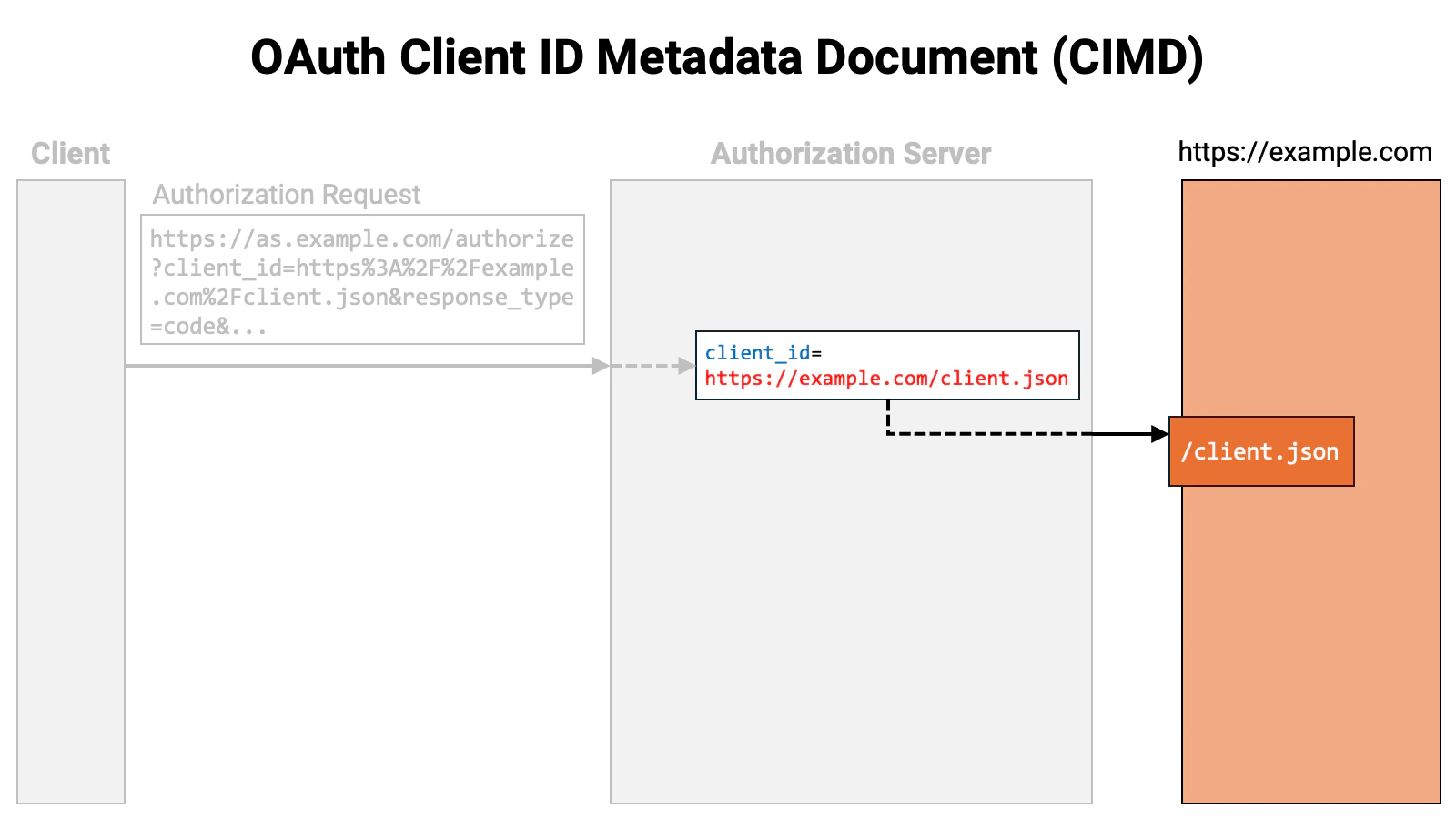
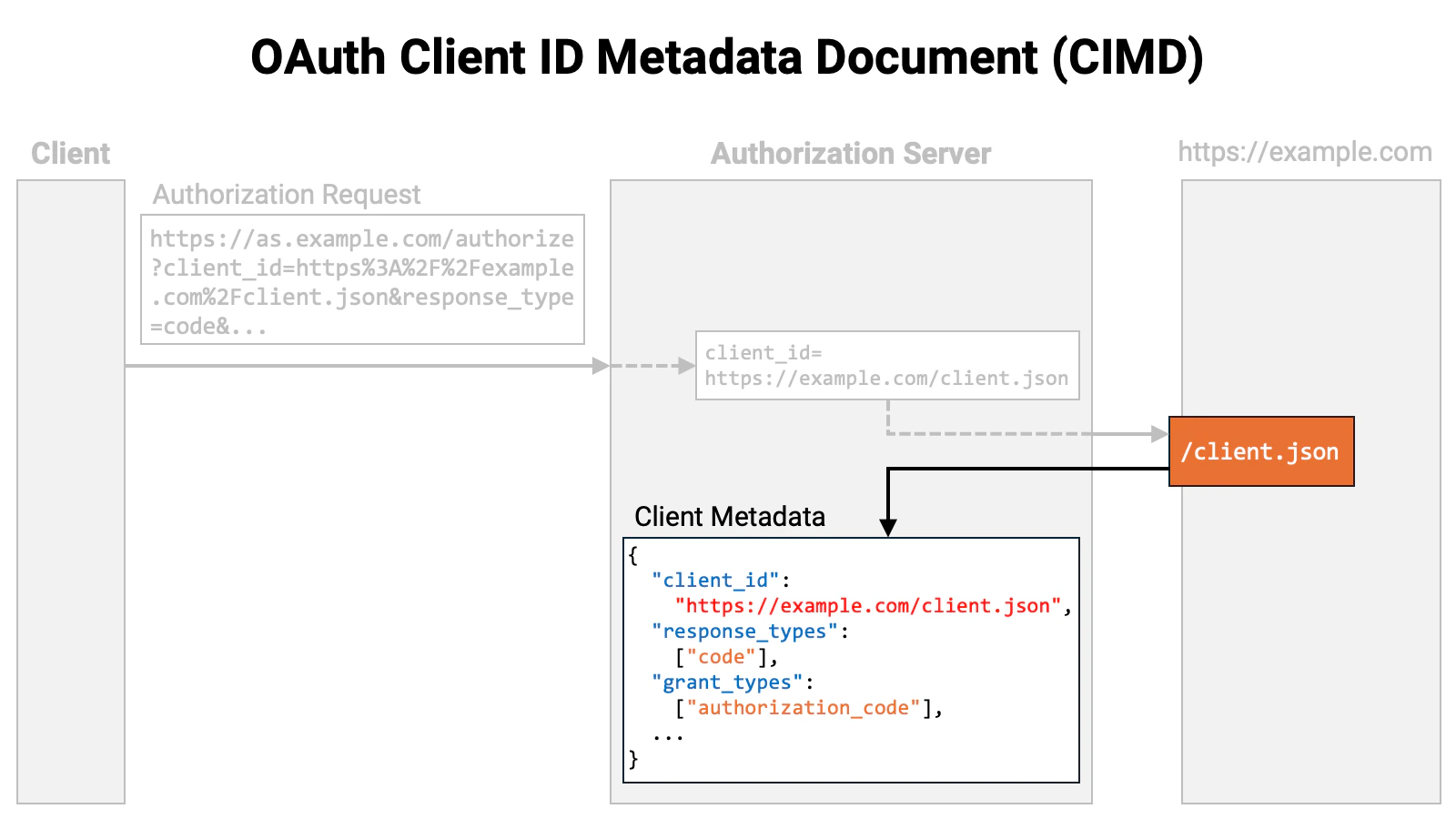
Put simply, the CIMD specification says: “Use a URL beginning withhttps:// as the client identifier. Retrieve the client metadata from the
location pointed to by that URL.”
Let’s walk through the flow. First, the client sends an authorization request
to the authorization server. The authorization request includes the client_id
request parameter, and the value of that parameter is a URL beginning with
https://.
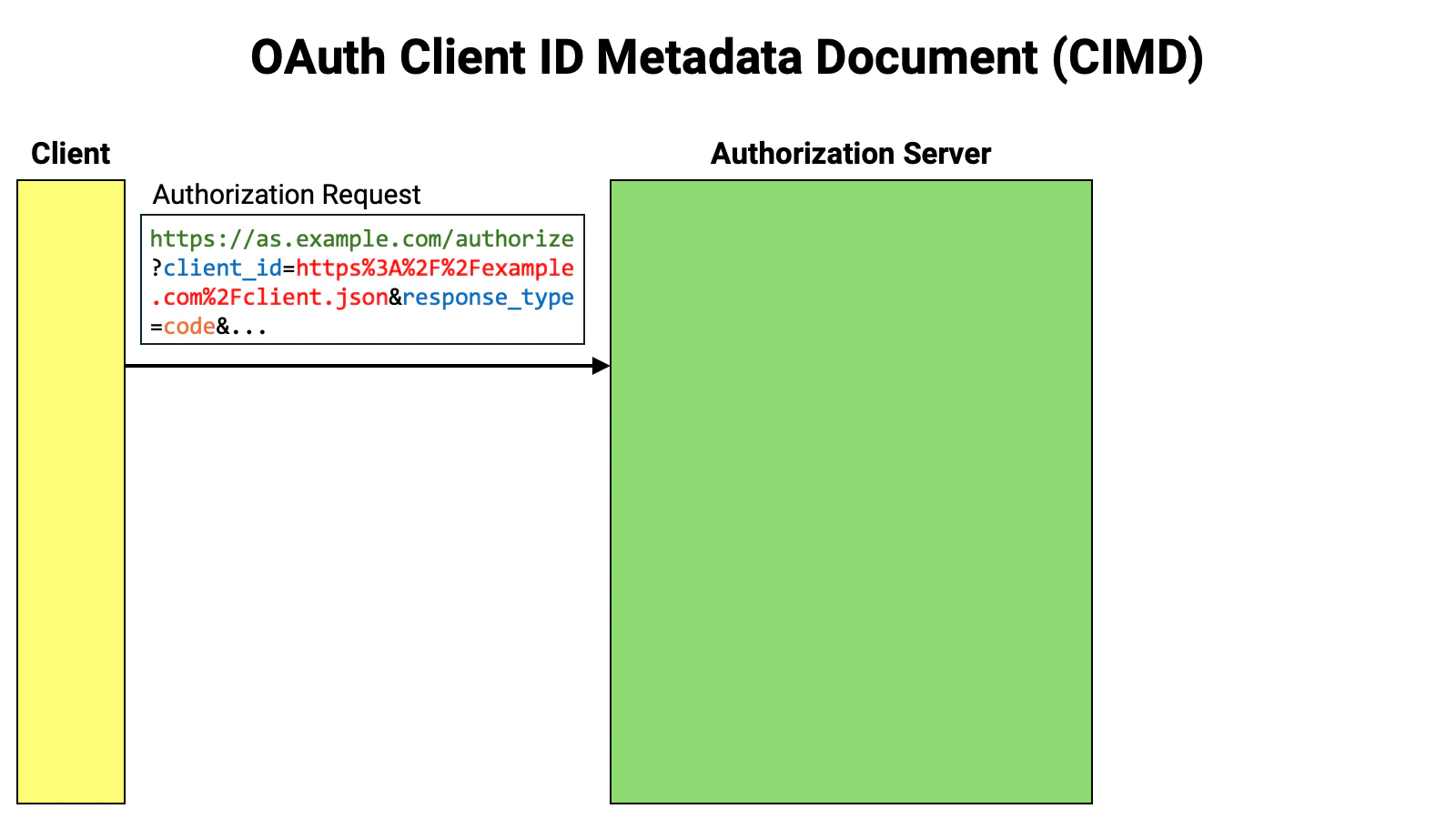
https://.
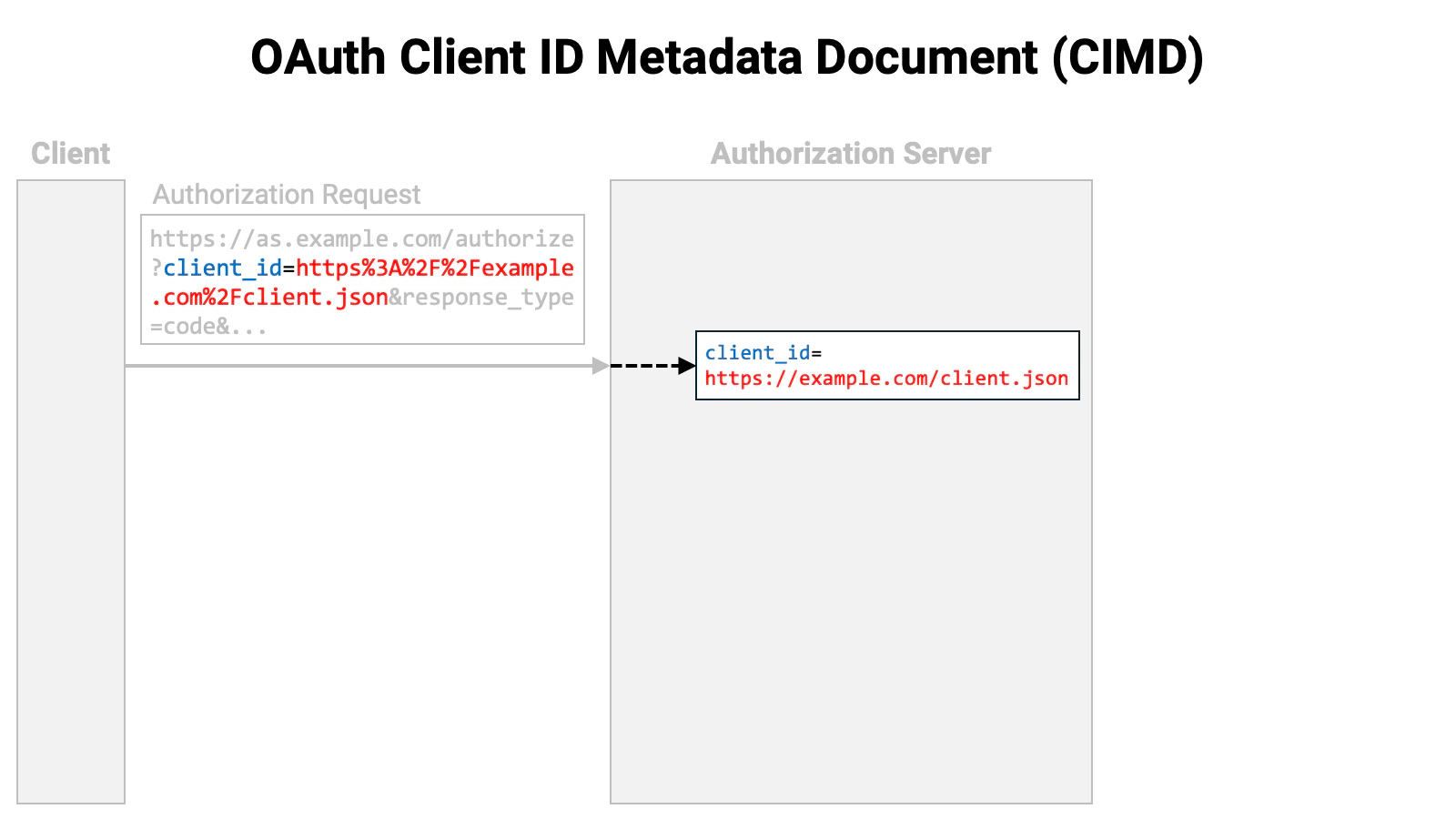

Client ID Requirements
- The scheme must be
https - A path component is required
- The path must not contain path segments
.or.. - A fragment component must not be included
- A username or password must not be included
- A query component should not be included
Client Metadata Restriction
- The URL of the metadata and the
client_idvalue in the metadata must match. - Symmetric key client authentication methods such as
client_secret_basic,client_secret_post, andclient_secret_jwtmust not be specified intoken_endpoint_auth_method. client_secretandclient_secret_expires_atmust not be used.
Service Settings
Authlete has supported CIMD since version 3.0.22. In this section, we introduce the properties added to the Service to support CIMD, as well as the related API request parameters.clientIdMetadataDocumentSupported Property
A new boolean property,clientIdMetadataDocumentSupported,
has been added to the Service to indicate whether CIMD is supported.
The default value of this property is false, so if you want to use
CIMD, you need to explicitly set it to true.
clientIdMetadataDocumentSupported property
corresponds to the client_id_metadata_document_supported
server metadata defined in the CIMD specification. When
clientIdMetadataDocumentSupported is set to
true, the discovery document (OpenID Connect Discovery 1.0)
generated by Authlete’s /service/configuration API will
include the following entry:
Metadata Policy
A configuration that controls how client metadata retrieved via CIMD (Client ID Metadata Document) is processed and validated before being used. When enabled, the policy defined here is applied to metadata fetched from the client ID URI, and the resulting metadata is stored as the client registration. This feature is enabled by setting thecimdMetadataPolicyEnabled property to true and providing a JSON policy definition in the cimdMetadataPolicy property.
The metadata policy follows the OpenID Federation 1.0 specification (Section 6.1 – Metadata Policy) and supports operators such as add, subset_of, superset_of, one_of, default, value, and essential.
Example configuration
Service API payload example
When the Metadata Policy is enabled, the Service API payload contains the policy as a JSON-encoded string.Behavior
WhencimdMetadataPolicyEnabled is set to true, Authlete applies the defined policy to metadata obtained through CIMD before storing it as the client registration. The policy can add values, restrict options, set defaults, or validate metadata fields according to the OpenID Federation 1.0 metadata policy grammar.
If the policy is disabled, retrieved client metadata is stored without modification.
Allowlist
You can restrict the URLs allowed as client IDs using an allowlist. The allowlist is specified in the Service’scimdAllowlist
property. To enable restriction based on the allowlist, set the
cimdAllowlistEnabled property to true.
If the
cimdAllowlistEnabled property remains
false, anyone can freely register clients without restriction.cimdAllowlist property is an array of
strings, and each element must be a valid URL.
A client ID is considered valid if it matches any one of the URLs in the
allowlist. The match is not determined by a simple string comparison, but
is performed according to the following rules:
| Component | Comparison | |
|---|---|---|
| 1 | Scheme | The schemes must match. |
| 2 | Authority | The authorities must match (simple string comparison; the default port is not considered). |
| 3 | Path | The path of the client ID must fully include the path of the URL in the allowlist. |
| 4 | Query | If the URL in the allowlist includes a query component, the query components must match. |
https://example.com/a/b,
then https://example.com/a/b/c is considered a
valid client ID, whereas https://example.com/a or
https://example.com/a/bb are considered invalid.
Always Retrieved
The authorization server caches the retrieved client metadata for a certain period. Until that period expires, it does not re-retrieve the metadata and continues to reference the cached version. This behavior is generally desirable, but there are times when you may want the authorization server to re-retrieve the client metadata before the cache expires — for example, when the client metadata is being changed frequently during client application development. If you have experience in web content creation, you may have found the browser’s Super Reload feature useful. The forced re-retrieval functionality for client metadata is, in a sense, like a Super Reload. In OpenID Federation 1.0, thetrust_chain request parameter allows
you to prompt the authorization server to update the client metadata before the
cache expires. CIMD, on the other hand, does not provide such a
mechanism. Therefore, I proposed standardizing a way to prompt the re-retrieval
of client metadata (CIMD ISSUE 59). However, since there was
little chance of gaining consensus, I decided to implement an Authlete-specific
mechanism.
If the Service’s cimdAlwaysRetrieved property is set to
true, Authlete will always re-retrieve the client metadata. More precisely,
the re-retrieval occurs in the initiating request of an authorization flow.
“Initiating request of an authorization flow” refers to the following cases:
- In the authorization code flow (and other flows initiated at the authorization endpoint), re-retrieval is performed during the authorization request, but not during the subsequent token request.
- In client credentials flow (and other flows initiated at the token endpoint), the token request itself is the initiating request, so re-retrieval occurs at the time of the token request.
- In the CIBA flow (CIBA Core), re-retrieval is performed during the backchannel authentication request, but not during the subsequent token request.
- In the device flow (RFC 8628), re-retrieval is performed during the device authorization request, but not during the subsequent token request.
cimdAlwaysRetrieved property to false.
That said, there may still be circumstances where you want to force a
re-retrieval even after the system has stabilized. To accommodate this, several
Authlete APIs —specifically the ones listed below— accept the
request parameter cimdOptions.alwaysRetrieved. If
this parameter is set to true, the client metadata will be re-retrieved
regardless of the cache status, even if the Service’s
cimdAlwaysRetrieved setting is false.
| API | Description |
|---|---|
/api/{service-id}/auth/authorization | Processes authorization requests |
/api/{service-id}/auth/token | Processes token requests |
/api/{service-id}/backchannel/authentication | Processes backchannel authentication requests |
/api/{service-id}/device/authorization | Processes device authorization requests |
HTTP Permitted
In the CIMD specification, the scheme of the URL representing the client ID must behttps.
However, if the Service’s cimdHttpPermitted flag is set
to true, Authlete will also allow the http scheme. Enabling this feature
allows you to use a web server without TLS protection as a server hosting
client metadata. This feature is intended for use during development.
Just as the cimdOptions.alwaysRetrieved request
parameter corresponds to the cimdAlwaysRetrieved property,
there is also a cimdOptions.httpPermitted request
parameter corresponding to the cimdHttpPermitted property.
Query Permitted
In the CIMD specification, the URL representing the client ID SHOULD NOT have a query component. By default, Authlete does not accept URLs with a query component as CIMD client IDs. To allow Authlete to accept URLs with a query component as CIMD client IDs, you need to set the Service’scimdQueryPermitted
property to true.
This property also has a corresponding request parameter:
cimdOptions.queryPermitted.
HTTP Alias Prohibited
Authlete internally assigns a numeric identifier to each client. In addition, there is a feature called “Client ID Alias”, which allows developers to assign an arbitrary name to a client. Until Authlete 2.3, this feature could be turned on or off, but due to historical reasons, in Authlete 3.0 the feature is always enabled and cannot be disabled. Since arbitrary names can be assigned, for example, a URL with anhttps
scheme can be set as a client identifier. However, such a client identifier,
while appearing similar to a client ID in OpenID Federation 1.0 or
CIMD, is actually just an alias and does not trigger the automatic
client metadata update process.
To prevent potential confusion, Authlete has introduced a new Service property,
httpAliasProhibited, which prevents strings starting
with https:// or http:// from being set as aliases.
For backward compatibility, the default value of this
httpAliasProhibited property is false, but it is
recommended to set it to true whenever possible.
When Authlete searches for a client corresponding to a client ID included in
an authorization request (or other standard protocol messages), it does so in
the following order of priority: numeric internal identifier → alias
→ OpenID Federation 1.0 entity ID → CIMD client metadata document URL.Therefore, if the client ID matches an alias, the CIMD functionality will not
be triggered for that client ID.
Metadata Policy
Authlete provides a feature that applies a metadata policy to retrieved client metadata and adjusts it before storing the metadata in the database. This feature applies the metadata policy defined in Section 6.1, “Metadata Policy,” of OpenID Federation 1.0 to CIMD.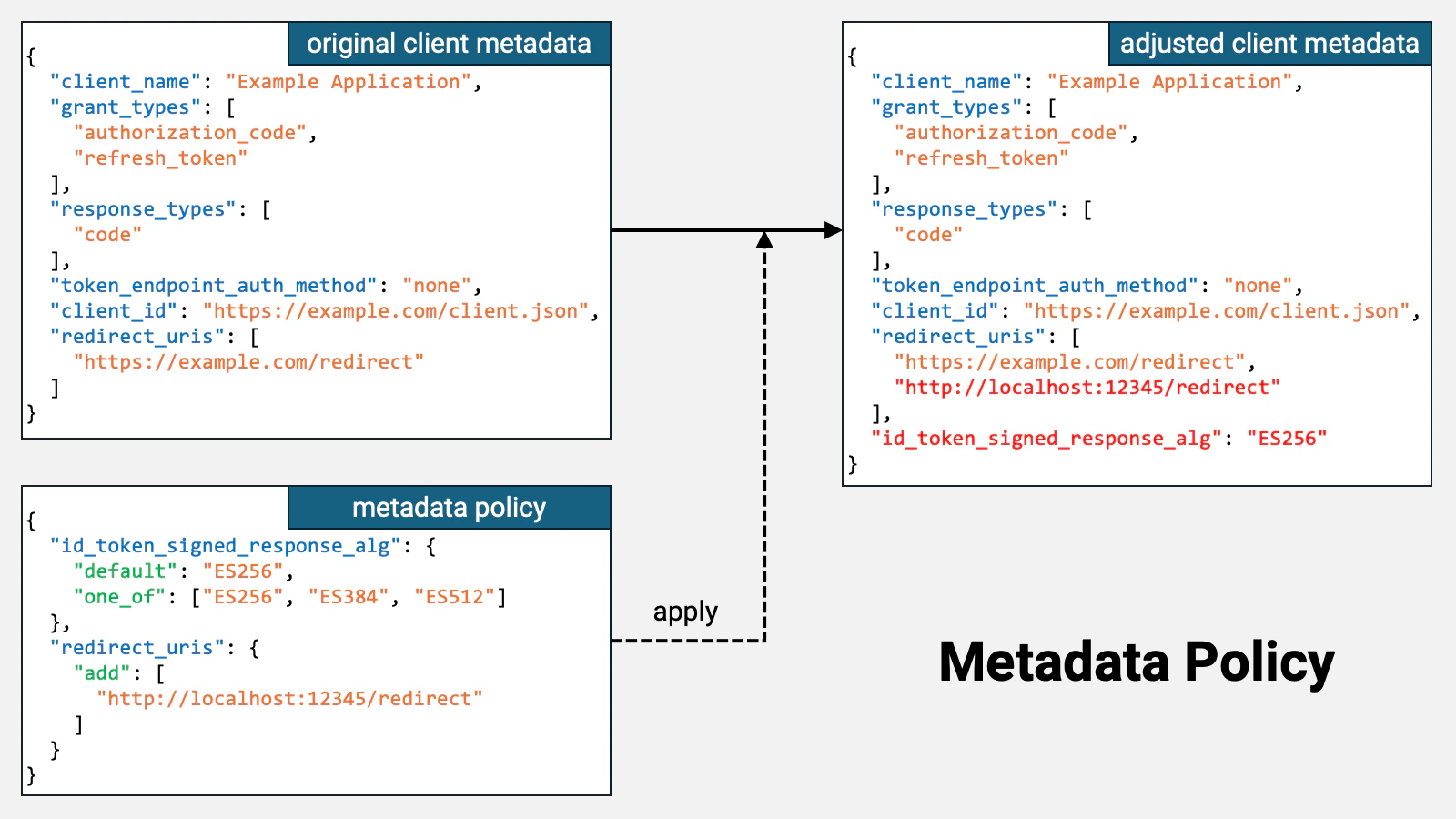
http://localhost:12345/redirect has been added to
redirect_uris, and that a new
id_token_signed_response_alg property with
the value ES256 has been added.
The OpenID
Connect Dynamic Client Registration 1.0 specification defines the default value
of the
id_token_signed_response_alg property as
RS256. Therefore, if this property is not explicitly included, its
value defaults to RS256, and as a result, the ID token is signed using
RS256.However, if a metadata policy like the one shown above is prepared and applied,
the value of this property becomes ES256, and consequently, the ID
token is signed using ES256.cimdMetadataPolicyEnabled
property to true and configure the metadata policy in the
cimdMetadataPolicy property.
Client Properties
When Authlete communicates client information outside of Authlete via the Authlete APIs, it uses a data structure called Client. To support CIMD, the following properties have been added to this data structure:| Property | Description |
|---|---|
metadataDocumentLocation | The location of client metadata |
metadataDocumentExpiresAt | The expiration time of client metadata (in milliseconds elapsed since the Unix epoch) |
metadataDocumentUpdatedAt | The last update time of client metadata (in milliseconds elapsed since the Unix epoch) |
discoveredByMetadataDocument | The boolean flag indicating whether the client has been registered using CIMD |
metadataDocumentExpiresAt property indicates
the time when this validity period expires.
If the web server hosting the client metadata forgets to set cache-related
parameters such as max-age, or sets an excessively long lifetime, the
calculated validity period of the client metadata could far exceed the
expected client metadata update interval. If such an unexpectedly long
validity period is applied, updates to the client metadata may not be
detected at the appropriate intervals. To prevent this, the current Authlete
implementation caps the validity period at 86,400 seconds (1 day), regardless
of the calculated value.
For special cases where customers using the on-premises version of Authlete
or Authlete’s internal developers run both the Authlete server and the web
server hosting client metadata on the same local machine during development,
the maximum validity period of client metadata is set to 600 seconds (10
minutes) if the host part of the client ID points to the local machine —
specifically, in any of the following cases. Note that this behavior may
change in the future.
localhost
127.0.0.1
::1
host.docker.internal
host.minikube.internal| Property | Type | Specification | Description |
|---|---|---|---|
clientId | Number | The numeric client identifier | |
clientIdAlias | String | The client ID alias | |
clientIdAliasEnabled | Boolean | Whether the Client ID Alias feature is enabled (Always true in Authlete 3.0) | |
dynamicallyRegistered | Boolean | DCR | Whether the client has been registered using DCR |
entityId | String | OIDFED | The entity ID |
automaticallyRegistered | Boolean | OIDFED | Whether the client has been registered using Automatic Registration |
explicitlyRegistered | Boolean | OIDFED | Whether the client has been registered using Explicit Registration |
metadataDocumentLocation | String | CIMD | The location of client metadata |
metadataDocumentExpiresAt | Number | CIMD | The expiration time of client metadata |
metadataDocumentUpdatedAt | Number | CIMD | The last update time of client metadata |
discoveredByMetadataDocument | Boolean | CIMD | Whether the client has been registered using CIMD |
dynamicallyRegistered,
automaticallyRegistered, explicitlyRegistered,
and discoveredByMetadataDocument. These flags are
mutually exclusive, meaning that more than one flag cannot be true at the
same time.
Having separate mutually exclusive flags is cumbersome, so starting from
Authlete version 3.0.22, the Authlete API responses also include a string
property called clientSource in addition to these flags.
This property can take the following values:
| Value | Description |
|---|---|
DYNAMIC_REGISTRATION | Registration using DCR |
AUTOMATIC_REGISTRATION | Registration using OpenID Federation 1.0’s Automatic Registration |
EXPLICIT_REGISTRATION | Registration using OpenID Federation 1.0’s Explicit Registration |
METADATA_DOCUMENT | Registration using CIMD |
STATIC_REGISTRATION | Others (static registration) |
Response Parameters
The responses of several Authlete APIs, such as/api/{service-id}/auth/authorization, include
information about the origin of the client ID used in the request.
| Parameter | Type | Specification | Description |
|---|---|---|---|
clientIdAliasUsed | Boolean | The alias was used as the client ID | |
clientIdAlias | String | The alias | |
clientEntityIdUsed | Boolean | OIDFED | The entity ID was used as the client ID |
clientEntityId | String | OIDFED | The entity ID |
metadataDocumentUsed | Boolean | CIMD | The location of client metadata was used as the client ID |
metadataDocumentLocation | String | CIMD | The location of client metadata |
Conclusion
In the 2025-11-25 edition of the MCP (Model Context Protocol) specification, CIMD was incorporated as part of the standard (MCP 2025-11-25 Authorization). Authlete completed the implementation of the CIMD specification in November 2025, and as introduced in this article, also implemented the following Authlete-specific features:- Allowlist (
cimdAllowlist,cimdAllowlistEnabled) - Always Retrieved (
cimdAlwaysRetrieved|cimdOptions.alwaysRetrieved) - HTTP Permitted (
cimdHttpPermitted|cimdOptions.httpPermitted) - Query Permitted (
cimdQueryPermitted|cimdOptions.queryPermitted) - Metadata Policy (
cimdMetadataPolicy,cimdMetadataPolicyEnabled)