Documentation Index
Fetch the complete documentation index at: https://developers.authlete.com/llms.txt
Use this file to discover all available pages before exploring further.
Introduction
Authlete supports “parameterized scopes” so that you can use a scope string with a dynamic value as a part of it. This article describes how to configure and use the feature.
This feature is available since Authlete 2.2.
Configuring parameterized scopes
A parameterized scope can be defined by specifying a scope attribute for a static scope. The instructions are as follows.1. Open the scope attribute setting window. (See “Scope Attributes
” for detailed instructions) 2. Enter “regex” (a special value for parameterized scopes) in the “key” field of the scope attribute. 3. Enter a regular expression in the “value” field of the scope attribute. The expression must match a scope string that may include dynamic values.
The example below specifies a regular expression “^consent:.+*$” for a static scope “consent” to configure Authlete to accept scope values that match the expression (e.g. “consent:urn:bancoex:C1DD33123”) as well as the static value “consent.”
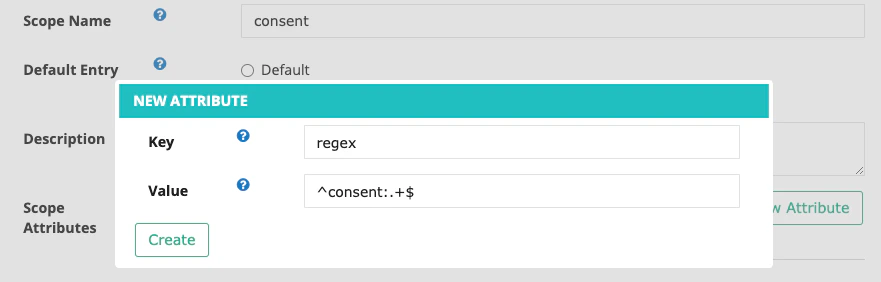 Example of setting up a parameterized scope for a “consent” scope.
Example of parameterized scopes
Authorization request
The following request/response example using curl shows how Authlete’s /auth/authorization API
processes an authorization request that includes a dynamic value in its “scope” parameter.
$ curl -s -X POST https://api.authlete.com/api/auth/authorization \
 -u ...:... \
 -H 'Content-type: application/json' \
 -d '{"parameters":
  "redirect_uri=...
   &client_id=...
   &response_type=code
   &**scope=email+consent:urn:bancoex:C1DD33123"}**'
{
  "type": "authorizationResponse",
  "resultCode": "A004001",
  "resultMessage":
    "[A004001] Authlete has successfully issued a ticket
     to the service (API Key = 2407...) for the
     authorization request from the client (ID = 2614...).
     [response_type=code, openid=false]",
  "action": "INTERACTION",
  "dynamicScopes": [
    {
      "name": "consent",
      "value": "consent:urn:bancoex:C1DD33123"
    }**  ],
  "scopes": [
    {
      "defaultEntry": false,
      "description": "A permission to request an OpenID Provider to include the email claim and the email_verified claim in an ID Token. See OpenID Connect Core 1.0, 5.4. for details.",
      ...
      "name": "email"
    }
  ],
...
Introspection
You can check if an access token has specific “parameterized scopes” in the same way as the checking for static scopes. The following is an example of /auth/introspection API request/response using curl.
curl -s -X POST .../auth/introspection \
   -u ...:... \
   -H 'Content-type: application/json' \
   -d '{"token":"L2sOx9...","scopes":**["email","consent:urn:bancoex:C1DD33123"]}'
{
    "type": "introspectionResponse",
    "resultCode": "A056001",
    "resultMessage": "[A056001] The access token is valid.",
    "action": "OK",
    "clientId": ...,
    "expiresAt": ...,
    "responseContent": "Bearer error=\"invalid_request\"",
    "scopes": [
        "email",**        "consent:urn:bancoex:C1DD33123"    ],
    "subject": "testuser01",
    ...
}
Discovery Document
Only the scope name will be shown in a discovery document even if “parameterized scopes” feature is enabled. The following is an example of /service/configuration API response.
{
   "issuer": "...",
   "authorization_endpoint": "...",
   "token_endpoint": "...",
   "userinfo_endpoint": "...",
   "jwks_uri": "...",
   "scopes_supported": [
     "address",
     "email",
     "openid",
     "offline_access",
     "phone",
     "profile",
     "consent"   ],
   ...
}
See also
