Documentation Index
Fetch the complete documentation index at: https://developers.authlete.com/llms.txt
Use this file to discover all available pages before exploring further.
Scope attributes are arbitrary key-value pairs associated with a scope. Each scope can have multiple attributes, which can be used for making authorization decisions or other processing in your authorization server. Authlete also provides predefined scope attributes for system settings.
The key and value of a scope attribute are strings, and multiple attributes can be assigned to a single scope.
This feature is available since Authlete 2.0.
How to Create Scope Attributes
To create scope attributes for a service:
- Log in to the Authlete Management Console.
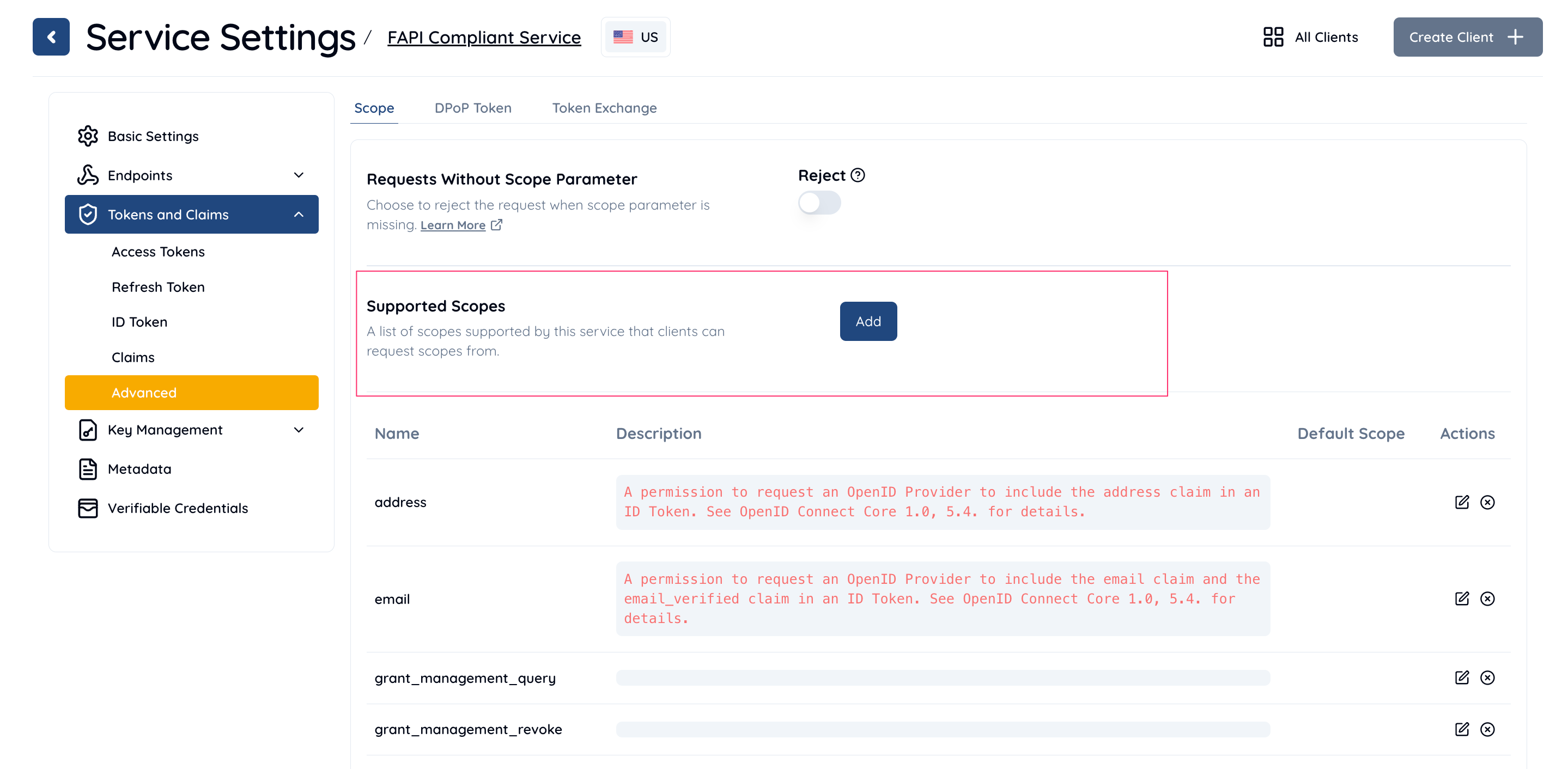
- Navigate to Service Settings > Tokens and Claims > Advanced > Scope.
- In the Supported Scopes section, click the Add button.
- In the Add/Edit Supported Scope dialog:
- Enter a Scope Name and Description.
- In the Scope Attributes section, click Add.
- Enter the Key and Value for the scope attribute.
- Example: Key =
attr_key1, Value = attr_value1.
- Click Add to save the attribute.

- Click Save Changes to apply the changes.
Predefined Scope Attributes
The following scope attributes are predefined by Authlete for special purposes:
| Attribute Key | Attribute Value | Description |
|---|
access_token.duration | number | Configures access token duration for each scope. |
refresh_token.duration | number | Configures refresh token duration for each scope. |
fapi | r | Enables the FAPI read-only API profile. |
fapi | rw | Enables the FAPI read-and-write API profile. |
regex | regular expression | Enables a scope string with a dynamic value as part of it. |
fapi2 | sp | Enables the FAPI 2.0 Security Profile. |
fapi2 | ms-authreq | Enables the FAPI 2.0 Message Signing profile for Authorization Requests. |
fapi2 | ms-authres | Enables the FAPI 2.0 Message Signing profile for Authorization Responses. |
How to Use Scope Attributes
Scope attributes can be utilized for various use cases, such as tagging risk levels to scopes or specifying required ACRs for granting a scope. In addition to custom use cases, you can leverage the predefined scope attributes provided by Authlete for specific system-level functionality.
The authorization response
The authorization response from Authlete from /auth/authorization endpoint
includes the scope attributes as the response body below
{
    "type": "authorizationResponse",
    "resultCode": "...",
    "resultMessage": "...",
    "acrEssential": false,
    "action": "...",
    "client": {...},
    "clientIdAliasUsed": false,
    "maxAge": 0,
    "responseContent": "...",
    "scopes": [
        {
            "defaultEntry": false,
            "description": "A permission to request an OpenID Provider to issue an ID Token. See OpenID Connect Core 1.0, 3.1.2.1. for details.",
            "name": "openid"
        },
        {
            "defaultEntry": false,
            "name": "payment"
        }
    ],
    "service": {
        ...
        "supportedScopes": [
            {
                "defaultEntry": false,
                "description": "A permission to request an OpenID Provider to issue an ID Token. See OpenID Connect Core 1.0, 3.1.2.1. for details.",
                "name": "openid"
            },
            {
                "attributes": [
                    { "key": "meta", "value": "this profile requires a second factor authentication" },
                    { "key": "fapi", "value": "rw" }
                ],**                "defaultEntry": false,
                "name": "payment"
            },
            ...
        ],
        ...
    }
}
Using Java Authlete library
The following code snippet of an authorization server is an example using
Authlete’s
/auth/authorization for
parsing an authorization request from a client, and doing something based on
attributes of scopes included in the request.
// Call Authlete /api/authorization API.
AuthorizationResponse res = callAuthorizationAPI();

// Get scopes contained in the original authorization request.
Scope[] scopes = res.getScopes();

if (scopes == null || scopes.length() == 0) {
    return;
}

// Check each scope's attributes.
for (Scope scp in scopes) {
    // Get the scope attributes of the scope.
    Pair[] attributes = scp.getAttributes();

    if (attributes == null || attributes.length() == 0) {
        continue;
    }

    // Check each attributes.
    for (Pair attr in attributes) {
        // The key of the attribute.
        String key = attr.getKey();

        // The value of the attirbute.
        String value = attr.getValue();

        // If the key is the target one.
        if ("targetkey".equals(key)) {
            // Do something with the value.
            doSomething(value);
        }
    }
}
