
Documentation Index
Fetch the complete documentation index at: https://developers.authlete.com/llms.txt
Use this file to discover all available pages before exploring further.
For Authlete 2.x documentation, see 2.x version.
Preface
private_key_jwt is one of client authentication methods defined in OpenID Connect Core 1.0, 9. Client Authentication . On a token request, a client crafts a digitally signed JWT assertion and includes it to the request. Then an authorization server authenticates the client by verifying the signature and payload of the assertion. Authlete supportsprivate_key_jwt as a client authentication method so that authorization servers can enable it. This article describes overview of the method and setup instructions with Authlete.\
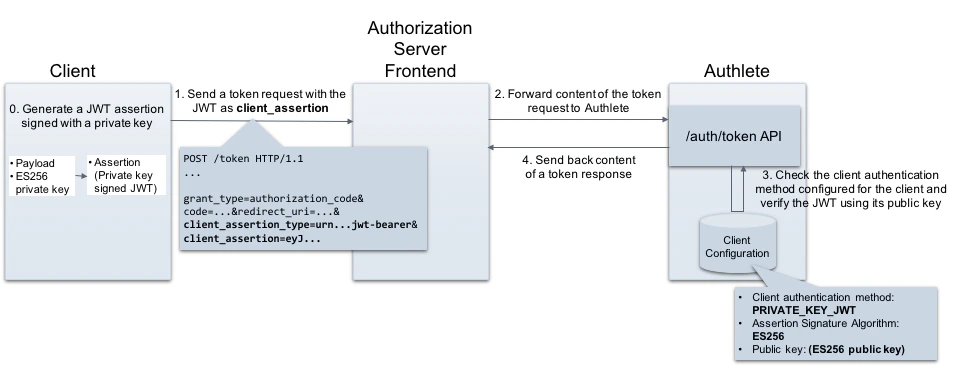
Requirements for private_key_jwt
The following section describes details on both client and authorization server side.Client
A client must include the following parameters in a token request when using the private_key_jwt method.| Parameter | Description |
|---|---|
| client_assertion_type | A type of client_assertion. Its value must be “urn:ietf:params:oauth:client-assertion-type:jwt-bearer”. |
| client_assertion | A JWT that contains information for client authentication. It must be digitally signed using a private key. See below for details. |
Payload
A JWT assertion must contain the REQUIRED claims listed below.| Claim | Description |
|---|---|
| iss | [REQUIRED] Issuer. This must contain the client_id of the OAuth client. |
| sub | [REQUIRED] Subject. This must contain the client_id of the OAuth client. |
| aud | [REQUIRED] Audience. A value that identifies the authorization server as an intended audience. The authorization server must verify that it is an intended audience for the token. The audience should be the URL of the authorization server’s token endpoint. |
| jti | [REQUIRED] JWT ID. A unique identifier for the token, which can be used to prevent reuse of the token. These tokens must only be used once unless conditions for reuse were negotiated between the parties; any such negotiation is beyond the scope of this specification. |
| exp | [REQUIRED] Expiration time on or after which the JWT must not be accepted for processing. |
| iat | [OPTIONAL] Time at which the JWT was issued. |
Signature
- A JWT assertion must be digitally signed using a private key in asymmetric cryptography (e.g. RS256).
- A client using the authentication method has to register its public key to an authorization server in advance so that the server can verify the assertion.
Authorization server
An authorization server must process a token request as per the specifications listed below. The details are omitted here because you can offload these operations from your authorization server to Authlete.- JSON Web Token (JWT) Profile for OAuth 2.0 Client Authentication and Authorization Grants (RFC7523)
- Assertion Framework for OAuth 2.0 Client Authentication and Authorization Grants (RFC7521)
Configuration settings
This section explains settings for enabling the private_key_jwt method. You have to configure both Authlete service and its client to be authenticated with the method.Service settings
Log in to the Authlete Management Console and navigate to Service Settings > Endpoints > Token. Under the Supported Client Authentication Methods section, enable thePRIVATE_KEY_JWT checkbox.

Client settings
| Tab | Key | Value |
|---|---|---|
| Basic Settings | Client Type | CONFIDENTIAL |
| Endpoints > Token | Client Authentication Method | PRIVATE_KEY_JWT |
| Endpoints > Token | Assertion Signature Algorithm | RS256, RS384, RS512,ES256, ES384, ES512,PS256, PS384, or PS512 |
| Key Management > JWK Set | JWK Set Content | A JWK set including a public key used for verifying the client’s JWT assertion |
PRIVATE_KEY_JWT and select ES256 as the Assertion Signature Algorithm.
Click Save Changes to apply the updates.
 Navigate to Key Management > JWK Set. Under the JWK Set Content section, enter your JWK Set.
Click Save Changes to apply the updates.
Navigate to Key Management > JWK Set. Under the JWK Set Content section, enter your JWK Set.
Click Save Changes to apply the updates.

Example
This example shows client authentication usingprivate_key_jwt at the token endpoint of the authorization server.
Generating a JWT assertion
Let’s generate a JWT that will be used as a value of the client_assertion in a token request.Preparing a JWT payload
First, create a JSON formatted payload and save it as “payload.json”.Preparing a JWK set
Then, prepare a JWK set for signing and verification. Here we use mkjwk.org to generate a JWK set.\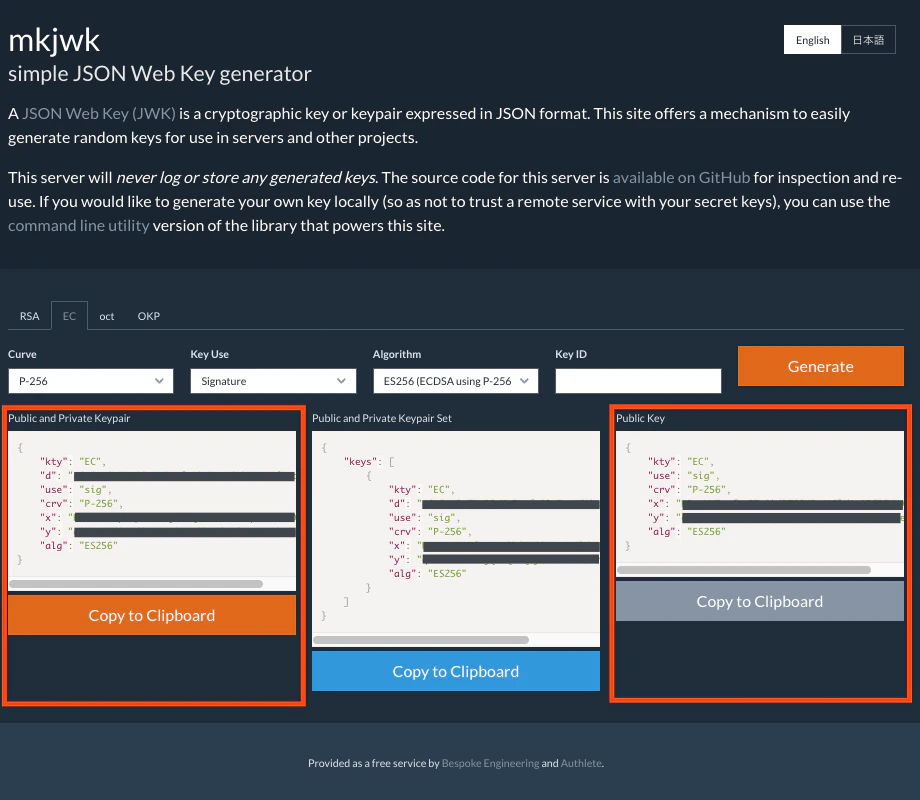
ES256 algorithm, and saved the public and private key pair as a file “key_pair.jwk”.
Make sure to register the public key (the latter one) to Authlete and configure Client Authentication Method (PRIVATE_KEY_JWT) and Client Assertion Algorithm (ES256). These settings can be done via Client Developer Console, as described in the previous section.
- Public and private key pair
- Public key (to be registered to Authlete via Client Developer Console)
Generating a JWT
Generate a JWT assertion including the payload and signed with the private key. The example below is an instruction using an authlete-jose library . Or you can use mkjose.org website to do that.client_assertion, to be used by the client on making a token request.
Token request and response
Token request from the client to the authorization server
Assume the client that has the assertion makes a token request to the authorization server. (folded for readability)API request from the authorization server to Authlete
The authorization server forwards the request content to Authlete’s /auth/token. (folded for readability)API response from Authlete to the authorization server
Authlete processes the request and sends back an API response to the authorization server as follows. (folded for readability)Token response from the authorization server to the client
The authorization server extracts the value of “responseContent” and sends it back to the client as a token response (details omitted).See Also
This article describes basics of client authentication configuration in Authlete.
Authlete supports client_secret_jwt as a client authentication method so authorization servers can enable it. This article describes overview of the method and setup instructions with Authlete.
This article explains “OAuth 2.0 client authentication”. In addition to the client authentication methods described in RFC 6749 , this article explains methods that utilize a client assertion and a client certificate.