
Overview
This article explains how to support FAPI 2.0 Message Signing Profile: Signing Authorization Requests (hereinafter referred to as FAPI2 authorization request signing) and in Authlete.Preconditions
- This document uses Authorization Code Flow compliant with FAPI2 authorization request signing as an example.
private_key_jwtis used for client authentication.- DPoP is used for sender-constrained access tokens.

Service Settings
Configure your service as follows.☑️ Basic Settings > Issuer Identifier

☑️ Basic Settings > FAPI Profile

☑️ Endpoints > Global Settings > Supported Grant Types

AUTHORIZATION_CODE.
☑️ Endpoints > Global Settings > Supported Response Types

CODE.
☑️ Endpoints > Authorization > Authorization Endpoint URL

☑️ Endpoints > Authorization > Issuer Identification Response Parameter

“FAPI 2.0 Security Profile, 5.3.2. Requirements for authorization servers, 5.3.2.2. Authorization endpoint flows”7. shall return an
issparameter in the authorization response according to [RFC9207];
☑️ Endpoints > Authorization > Loopback Redirection URI

“FAPI 2.0 Security Profile, 5.3.2. Requirements for authorization servers, 5.3.2.2. Authorization endpoint flows”8. shall not transmit authorization responses over unencrypted network connections, and, to this end, shall not allow redirect URIs that use the “http” scheme except for native clients that use loopback interface Redirection as described in Section 7.3 of [RFC8252];
☑️ Endpoints > Authorization > Request Object > nbf Claim

“FAPI2 Message Signing profile, 5.3.1. Requirements for Authorization Servers” Authorization servers implementing FAPI2 authorization request signing3. shall require the request object to contain an nbf claim that is no longer than 60 minutes in the past;
☑️ Endpoints > Token > Token Endpoint URI

☑️ Endpoints > Token > Supported Client Authentication Methods

PRIVATE_KEY_JWT.
“FAPI 2.0 Security Profile, 5.3.2. Requirements for authorization servers, 5.3.2.1. General requirements”6. shall authenticate clients using one of the following methods:
- MTLS as specified in Section 2 of [RFC8705], or
private_key_jwtas specified in Section 9 of [OIDC];
☑️ Endpoints > Token > Assertion Audience Mode

“FAPI 2.0 Security Profile, 5.3.2. Requirements for authorization servers, 5.3.2.1. General requirements”8. shall only accept its issuer identifier value (as defined in [RFC8414]) as a string in the aud claim received in client authentication assertions;
☑️ Endpoints > General > Pushed Authorization Request (PAR)

- Set PAR Endpoint URL.
- Set PAR Endpoint Duration (the expiration time for request URIs). The duration value must be less than 600 seconds.
“FAPI 2.0 Security Profile, 5.3.2. Requirements for authorization servers, 5.3.2.2. Authorization endpoint flows”12. shall issue pushed authorization requests request_uri with expires_in values of less than 600 seconds;
☑️ Tokens and Claims > Refresh Token > Refresh Token Rotation

“FAPI 2.0 Security Profile, 5.3.2. Requirements for authorization servers, 5.3.2.1. General requirements”9. shall not use refresh token rotation except in extraordinary circumstances (see Note 1 below);
… NOTE 1: The use of refresh token rotation does not provide security benefits when used with confidential clients and sender-constrained access tokens. This specification prohibits the use of refresh token rotation for security reasons as it causes user experience degradation and operational issues whenever the client fails to store or receive the new refresh token and has no option to retry. However, as refresh token rotation may be required from time to time for infrastructure migration or similar extraordinary circumstances, this specification allows it, provided that authorization servers offer clients the time-limited option to retry with the old refresh token in case of failure. Implementers need to consider a secure mechanism for clients to recover from a loss of a new refresh token on issue. The details of this mechanism are outside the scope of this specification.
☑️ Tokens and Claims > ID Token

“FAPI 2.0 Security Profile, 5.3.2. Requirements for authorization servers, 5.3.2.1. General requirements”13. to accommodate clock offsets, shall accept JWTs with an iat or nbf timestamp between 0 and 10 seconds in the future but shall reject JWTs with an iat or nbf timestamp greater than 60 seconds in the future. See Note 3 for further details and rationale;
… NOTE 3: Clock skew is a cause of many interoperability issues. Even a few hundred milliseconds of clock skew can cause JWTs to be rejected for being “issued in the future”. The DPoP specification [RFC9449] suggests that JWTs are accepted in the reasonably near future (on the order of seconds or minutes). This document goes further by requiring authorization servers to accept JWTs that have timestamps up to 10 seconds in the future. 10 seconds was chosen as a value that does not affect security while greatly increasing interoperability. Implementers are free to accept JWTs with a timestamp of up to 60 seconds in the future. Some ecosystems have found that the value of 30 seconds is needed to fully eliminate clock skew issues. To prevent implementations switching off iat and nbf checks completely this document imposes a maximum timestamp in the future of 60 seconds.
☑️ Tokens and Claims > Advanced > Supported Scopes

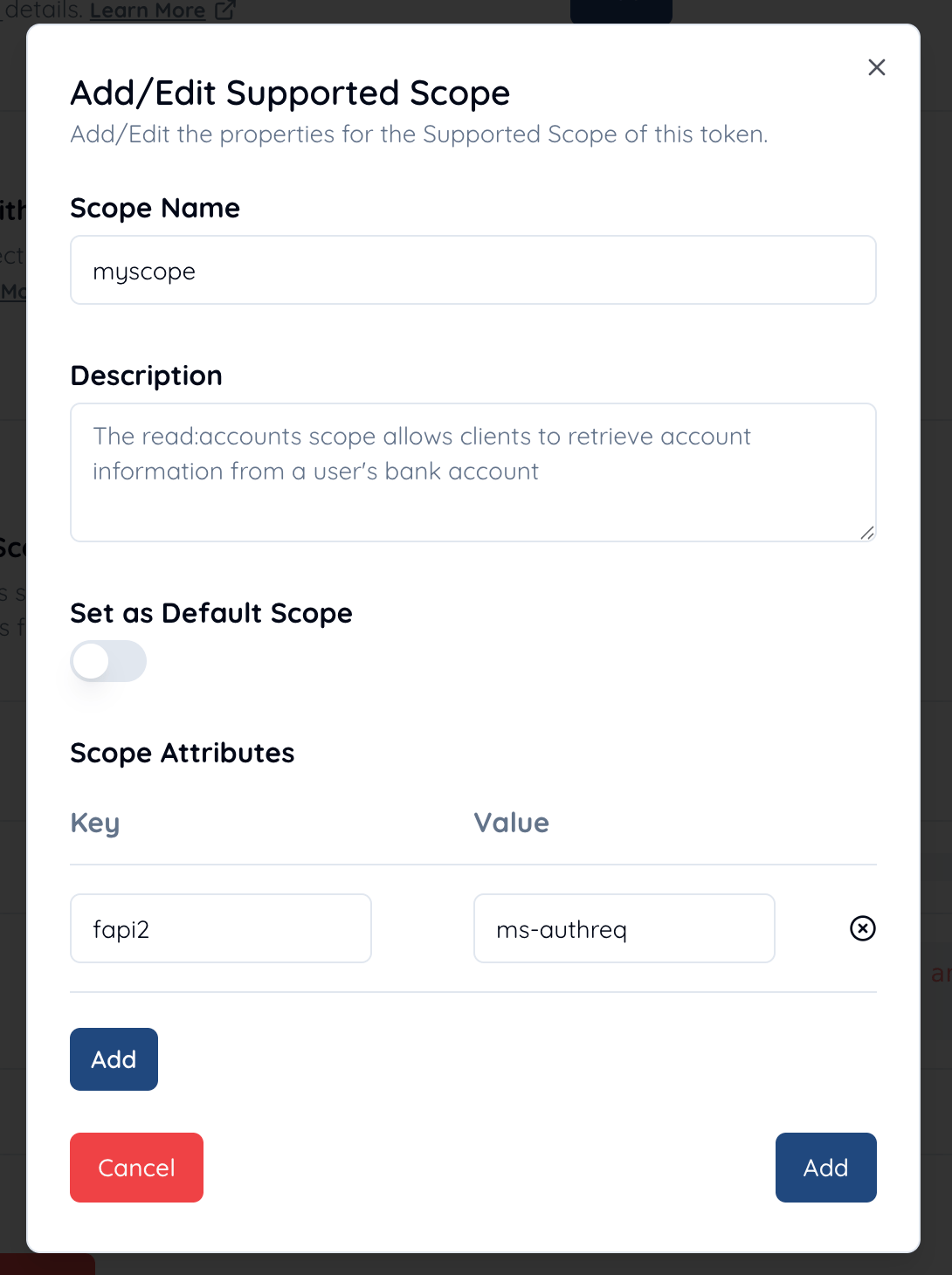
myscope and add a scope attribute with the key fapi2 and the value ms-authreq.
Client Configurations
Configure your client as follows.☑️ Basic Settings > Client Type

CONFIDENTIAL.
☑️ Endpoints > Global Settings > Supported Grant Types

AUTHORIZATION_CODE.
☑️ Endpoints > Global Settings > Supported Response Types

CODE.
☑️ Endpoints > Global Settings > Redirect URIs

https.
☑️ Endpoints > Token > Client Authentication Method

PRIVATE_KEY_JWT.
“FAPI 2.0 Security Profile, 5.3.3. Requirements for clients, 5.3.3.1. General requirements”2. shall support client authentication using one or both of the following methods:
- MTLS as specified in Section 2 of [RFC8705],
private_key_jwtas specified in Section 9 of [OIDC];
☑️ Endpoints > Token > Assertion Signature Algorithm

ES256.
“FAPI 2.0 Security Profile, 5.4. Cryptography and secrets, 5.4.1. General requirements”1. Authorization servers, clients, and resource servers when creating or processing JWTs shall
- adhere to [RFC8725];
- use
PS256,ES256, orEdDSA(using theEd25519variant) algorithms; and- not use or accept the none algorithm.
☑️ Key Management > JWK Set > JWK Set Content

private_key_jwt for client authentication, the JWK set must include a client assertion signing key. Note that keys contained in the JWK set must satisfy the following requirements.
“FAPI 2.0 Security Profile, 5.4. Cryptography and secrets, 5.4.1. General requirements”2. RSA keys shall have a minimum length of 2048 bits.
3. Elliptic curve keys shall have a minimum length of 224 bits.
Demonstration
This section demonstrates Authorization Code Flow in FAPI2 authorization request signing by using Authlete APIs.1. Pushed Authorization Request & Response

☑️ Client Authentication
The client usesprivate_key_jwt for client authentication at the pushed authentication request endpoint (as configured above).
☑️ Request Object
The request object in the request (, which is the value of therequest parameter,) must be a signed JWT.
“FAPI2 Message Signing profile, 5.3. Signing authorization requests, 5.3.1. Requirements for Authorization Servers” Authorization servers implementing FAPI2 authorization request signing1. shall support, require use of, and verify signed request objects according to JAR [RFC9101] at the PAR endpoint [RFC9126];
“FAPI2 Message Signing profile, 5.3. Signing authorization requests, 5.3.2. Requirements for Clients” Clients implementing FAPI2 authorization request signingClaims in the request object must meet the following requirements:1. shall send all authorization parameters to the PAR endpoint [RFC9126] in a JAR [RFC9101] signed requested object;
iss claim
The iss claim must be the client ID.
“RFC 9126, 3. The “request” Request Parameter” The authorization server MUST take the following steps beyond the processing rules defined in Section 2.1: …3. If the client has authentication credentials established with the authorization server, reject the request if the authenticated client_id does not match the client_id claim in the Request Object. Additionally, requiring the iss claim to match the client_id is at the discretion of the authorization server.
response_type claim
The response_type claim must be set to code.
scope claim
The scope claim must be set to myscope, which is linked to an attribute fapi2=ms-authreq as configured above.
code_challenge claim & code_challenge_method claim
The code_challenge claim must be set to an appropriate value and the code_challenge_method claim must be set to S256.
“FAPI 2.0 Security Profile, 5.3.3. Requirements for clients, 5.3.3.2. Authorization code flow”3. shall use PKCE [RFC7636] with
S256as the code challenge method
redirect_uri claim
The redirect_uri claim must be set and it must be a URI starting with https. In this demonstration, we use the redirect URI registered in the client settings.
“FAPI2 Security Profile, 5.3.2. Requirements for authorization servers, 5.3.2.2. Authorization endpoint flows”6. shall require the
redirect_uriparameter in pushed authorization requests8. shall not transmit authorization responses over unencrypted network connections, and, to this end, shall not allow redirect URIs that use the “http” scheme except for native clients that use loopback interface Redirection as described in Section 7.3 of [RFC8252];
aud claim
The aud claim must be the authorization server’s Issuer Identifier URL or an array containing it.
“FAPI2 Message Signing profile, 5.3. Signing authorization requests, 5.3.1. Requirements for Authorization Servers” Authorization servers implementing FAPI2 authorization request signing2. shall require the aud claim in the request object to be, or to be an array containing, the authorization server’s issuer identifier URL;
“FAPI2 Message Signing profile, 5.3. Signing authorization requests, 5.3.2. Requirements for Clients” Clients implementing FAPI2 authorization request signing2. shall send the aud claim in the request object as the authorization server’s issuer identifier URL;
nbf claim & exp claim
The nbf claim must be included and must be no longer than 60 minutes in the past.
“FAPI2 Message Signing profile, 5.3. Signing authorization requests, 5.3.1. Requirements for Authorization Servers” Authorization servers implementing FAPI2 authorization request signing3. shall require the request object to contain an nbf claim that is no longer than 60 minutes in the past;
“FAPI2 Message Signing profile, 5.3. Signing authorization requests, 5.3.2. Requirements for Clients” Clients implementing FAPI2 authorization request signingAdditionally, the lifetime of the request object (3. shall send a nbf claim in the request object;
exp - nbf) is no longer than 60 minutes.
“FAPI2 Message Signing profile, 5.3. Signing authorization requests, 5.3.1. Requirements for Authorization Servers” Authorization servers implementing FAPI2 authorization request signing4. shall require the request object to contain an exp claim that has a lifetime of no longer than 60 minutes after the nbf claim;
“FAPI2 Message Signing profile, 5.3. Signing authorization requests, 5.3.2. Requirements for Clients” Clients implementing FAPI2 authorization request signingTaking all of the requirements above into account, a request that the client send to the pushed authorization endpoint would be like below.4. shall send an exp claim in the request object that has a lifetime of no longer than 60 minutes;
/pushed_auth_req API including the received parameters.
Below is a curl command that simulates a request from the authorization server to Authlete /pushed_auth_req API.
2. Authorization Request & Response
After obtaining a request URI in step 1, the client sends an authorization request, including the request URI, to the authorization endpoint of the authorization server. The request appears as below./auth/authorization API.
Below is a curl command that simulates a request from the authorization server to Authlete /auth/authorization API.
/auth/authorization API, the end-user authorizes/denies the client’s request in the browser. The authorization result is then conveyed to the authorization server and the authorization server calls Authlete /auth/authorization/issue API with the result.
Below is a curl command that simulates a request from the authorization server to Authlete /auth/authorization/issue API.
3. Token Request & Response

private_key_jwt. Also, we assume that the authorization server issues access tokens that are sender-constrained with DPoP based on the following requirements:
“FAPI 2.0 Security Profile, 5.3.2. Requirements for authorization servers, 5.3.2.1. General requirements”4. shall only issue sender-constrained access tokens,
5. shall use one of the following methods for sender-constrained access tokens:
- MTLS as described in [RFC8705],
- DPoP as described in [RFC9449];
“FAPI 2.0 Security Profile, 5.3.3. Requirements for clients, 5.3.3.1. General requirements”Therefore, the client must present a DPoP proof JWT for the authorization server to obtain a sender-constrained access token. Note that DPoP proof JWTs must be signed with1. shall support sender-constrained access tokens using one or both of the following methods:
- MTLS as described in [RFC8705],
- DPoP as described in [RFC9449];
PS256, ES256 or EdDSA.
“FAPI 2.0 Security Profile, 5.4. Cryptography and secrets, 5.4.1. General requirements”Taking the requirements above into account, a request to the token endpoint would look like as below.1. Authorization servers, clients, and resource servers when creating or processing JWTs shall
- adhere to [RFC8725];
- use
PS256,ES256, orEdDSA(using theEd25519variant) algorithms; and- not use or accept the none algorithm.
/auth/token API.
Below is a curl command that simulates a request from the authorization server to Authlete /auth/token API.
4. Protected Resource

/auth/introspection API to verify the access token.
Below is a curl command that simulates a request from the resource server to Authlete /auth/introspection API.