
Documentation Index
Fetch the complete documentation index at: https://developers.authlete.com/llms.txt
Use this file to discover all available pages before exploring further.
Introduction
“Amazon Cognito user pools implements ID, access, and refresh tokens as defined by the OpenID Connect (OIDC) open standard” --- excerpted from “Using Tokens with UserPools” However, because the OIDC implementation of Cognito is very limited and inflexible, it is common that Cognito’s OIDC implementation cannot satisfy requirements of your system. For example, the signature algorithm of ID tokens issued by Cognito isRS256 and there is no way to change it although the algorithm is prohibited by Financial-grade API (FAPI) for security reasons.
This tutorial explains how to use Cognito just as a user database and delegate OAuth/OIDC-related tasks to Authlete so that your system can continue to use Cognito and at the same time support the latest OAuth/OIDC specifications such as Financial-grade API (cf. Authlete Spec Sheet).
Architecture
In the OAuth 2.0 context, a server that issues access tokens (and optionally refresh tokens) is called authorization server. On the other hand, in the OpenID Connect context, a server that issues ID tokens is called OpenID Provider (IdP). Because OIDC has been defined intentionally on top of OAuth 2.0, it is common that one server has both the roles. Therefore, the same server may be differently called “authorization server” or “IdP” depending on contexts. This tutorial refers to the server as “authorization server” uniformly. To support the authorization code flow (RFC 6749 Section 4.1), which is the most common flow in OAuth/OIDC, an authorization server has to implement two endpoints. They are called authorization endpoint (RFC 6749 Section 3.1) and token endpoint (RFC 6749 Section 3.2). Cognito User Pool provides implementations of the two endpoints, but you need to implement your own custom endpoints when Cognito’s OIDC implementation is not satisfactory. The diagram below illustrates the relationship among components in the authorization code flow when Cognito and Authlete are used combinedly.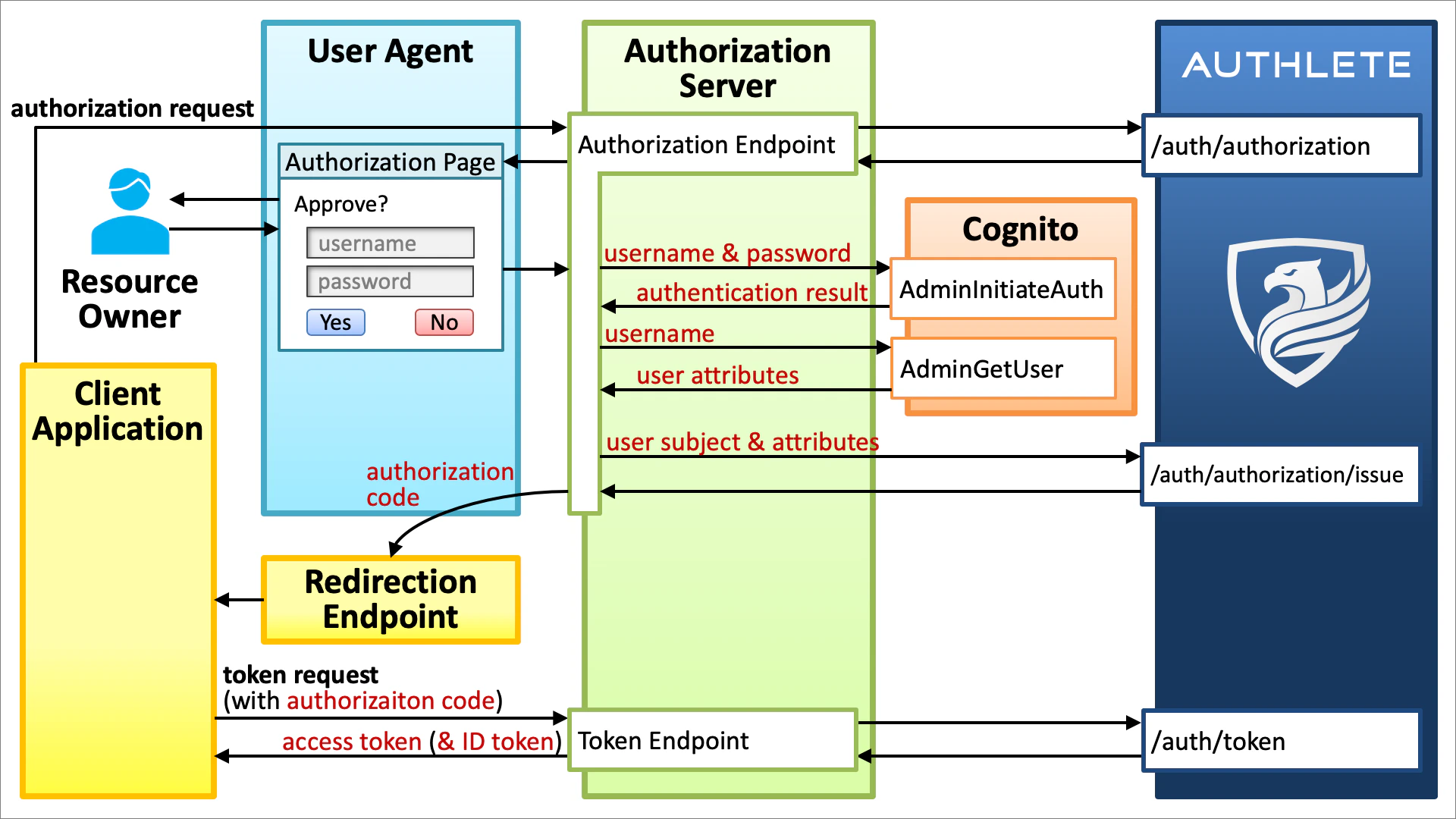
Authorization Endpoint
The authorization endpoint in the sample authorization server:- accepts an authorization request (RFC 6749 Section 4.1.1) from a client application via a web browser,
- extracts the query parameters of the authorization request,
- passes the extracted query parameters to Authlete’s /api/auth/authorization API,
- builds an authorization page based on the information returned from the Authlete API,
- sends the authorization page back to the web browser,
- gets the user’s username and password from the user via the login form embedded in the authorization page,
- passes the username and password to Cognito’s AdminInitiateAuth API to authenticate the user,
- passes the username to Cognito’s AdminGetUser API to get user attributes,
- passes the user’s subject (unique identifier) and user attributes to Authlete’s /api/auth/authorization/issue API,
- builds an authorization response (RFC 6749 Section 4.1.2) based on the information returned from the Authlete API, and
- sends the authorization response to the web browser.
The authorization response will be delivered to the redirection endpoint (and in turn to the client application) because the HTTP status code of the authorization response is “
302 Found” (unless response_mode=form_post is used).Cognito’s AdminInitiateAuth API issues an access token, an ID token and a refresh token. However, they are not used. Instead, the tokens are issued by Authlete.
Token Endpoint
The token endpoint in the sample authorization server:- accepts a token request (RFC 6749 Section 4.1.3) from a client application,
- extracts the form parameters of the token request,
- passes the extracted form parameters to Authlete’s /api/auth/token API,
- builds a token response (RFC 6749 Section 4.1.4) based on the information returned from the Authlete API, and
- sends the token response to the client application.
Implementation
The architecture explained above is implemented in django-oauth-server, which is an open-source authorization server written in Python with the Django web framework. To run the server, follow the steps below.Setup Cognito
- Create a Cognito user pool. Make sure that the
emailattribute is included because we will use the attribute later for testing. - Add a client to the Cognito user pool and enable
ALLOW_ADMIN_USER_PASSWORD_AUTHin the “Auth Flows Configuration” section of the client configuration so that the client can use the “Server-Side Authentication Flow”. - Add a user to the Cognito user pool.
- Make sure that your AWS account has permissions neccesary to call Cognito’s AdminInitiateAuth API and AdminGetUser API.
Setup Authorization Server
Install necessary Python libraries.authlete.ini) to access Authlete APIs.
django_oauth_server/settings.py),
backends.CognitoBackend to AUTHENTICATION_BACKENDS. See “Specifying authentication backends” in “Customizing authentication in Django” for details about Django authentication backends.
COGNITO_USER_POOL_ID and COGNITO_CLIENT_ID in the same file properly.
[cognito_backend.py][COGNITO_BACKEND_PY].
Start Authorization Server
To start the authorization server, type the command below.make run” does the same thing.
authlete.ini) is correct is to access the discovery endpoint (http://localhost:8000/.well-known/openid-configuration) and see if it returns JSON conforming to OpenID Connect Discovery 1.0.
| Endpoint | URL |
|---|---|
| Authorization Endpoint | http://localhost:8000/api/authorization |
| Token Endpoint | http://localhost:8000/api/token |
| Discovery Endpoint | http://localhost:8000/.well-known/openid-configuration |
Test
We have done all preparation. Let’s get an access token and an ID token by the authorization code flow.Authorization Request
In the authorization code flow, the first step is to send an authorization request to the authorization endpoint of the authorization server via a web browser. In this tutorial, the authorization endpoint ishttp://localhost:8000/api/authorization hosted on django-oauth-server. Replace CLIENT_ID and REDIRECT_URI in the URL below (which represents an authorization request) properly and access the URL with your web browser.
Note that
CLIENT_ID in the authorization request is NOT the client ID of the Cognito client. Instead, it must be a client ID issued by Authlete.If you have not changed the redirection endpoint of the client, the default value “
https://api.authlete.com/api/mock/redirection/SERVICE_API_KEY” can be used as the value of REDIRECT_URI. Don’t forget to replace SERVICE_API_KEY properly in the default redirection endpoint when you use it as the value of REDIRECT_URI.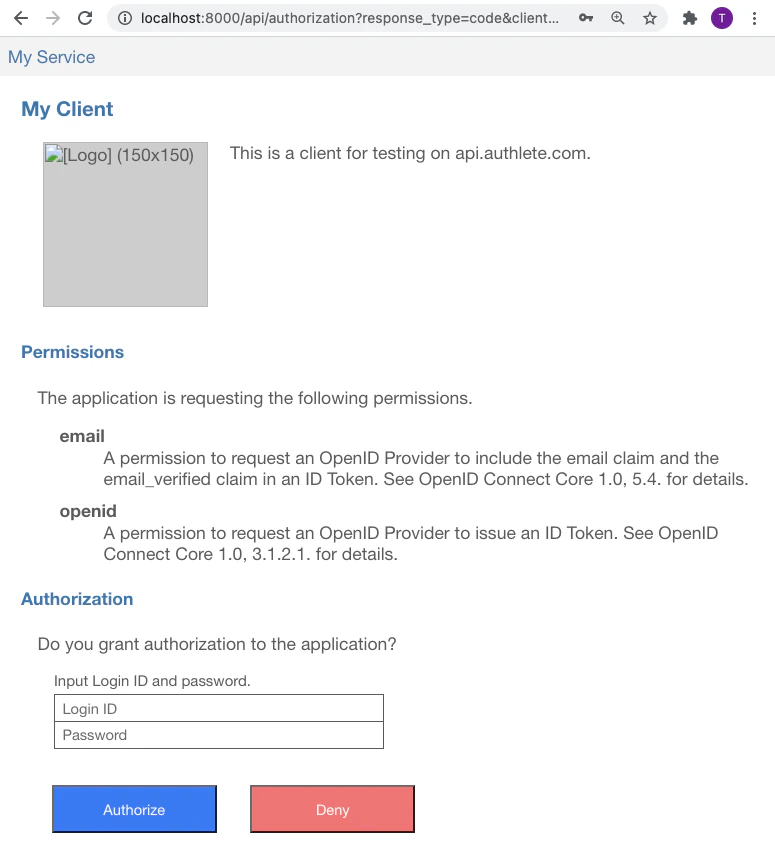
code response parameter like below.
code response parameter is the authorization code which has been issued from the authorization server to your client application. The authorization code is needed when your client application makes a token request.
Token Request
After getting an authorization code, the client application sends a token request to the token endpoint of the authorization server. In this tutorial, the token endpoint ishttp://localhost:8000/api/token hosted on django-oauth-server.
A token request can be made by curl command in a shell terminal. Below is an example of token request. Don’t forget to replace CLIENT_ID, REDIRECT_URI and CODE with the actual values before typing.
| Argument | Description |
|---|---|
http://localhost:8000/api/token | The URL of the token endpoint. |
-d grant_type=authorization_code | indicates that the flow is the authorization code flow. |
-d client_id=CLIENT_ID | specifies the client ID. Replace CLIENT_ID with the actual client ID of your client application. |
-d redirect_uri=REDIRECT_URI | specifies the redirect URI. Replace REDIRECT_URI with the same value given in the authorization request. |
-d code=CODE | specifies the authorization code. Replace CODE with the actual authorization code. |
The lifetime of an authorization code is short. The default value is 10 minutes. A token request must be made before the authorization code expires.
access_token and id_token like below.
access_token is the issued access token. Likewise, the value of id_token is the issued ID token.
The payload part of the issued ID token in this tutorial is decoded as follows. We can confirm that the authorization server has communicated with the Congnito user pool successfully by checking whether the value of email in the payload matches the email attribute of the user in the Cognito user pool.