
Preface
On receiving API requests (with access tokens) from clients, resource servers determine if the requests are allowed, and how to process them, by referring information associated with the tokens. Typical kinds of information include the following: status of the token (active / expired), who (resource owner) granted what access (scope) to whom (client). In some cases, the resource servers need to obtain other related information from an authorization server. Authlete enables an authorization server to associate arbitrary properties with either an access token or authorization code. The authorization server can easily share the properties with resource servers so that they can consume such information for its authorization enforcement as well as making a response. You can prevent unnecessary information disclosure as the sharing of properties can be achieved by not using clients as an intermediary.Use cases
1. Controlling a money transfer API
Let’s assume you would like to develop a money transfer API that can process specific transaction like “send $50 to ABC shop.” You could implement such function by creating a “send-50dollar-to-abcshop” scope, but it hardly works as you would have to prepare a lot of scopes that are multiplied with recipients and amounts. With the properties feature of Authlete, The authorization server can associate the money transfer information (or its handle, if database manages the actual information) with an access token to be issued to a client. The resource server, which hosts the money transfer API, receives an API request with the access token from the client, asks Authlete’s introspection API to provide the properties along with details of the token, and then determines if the money transfer request is allowed to proceed.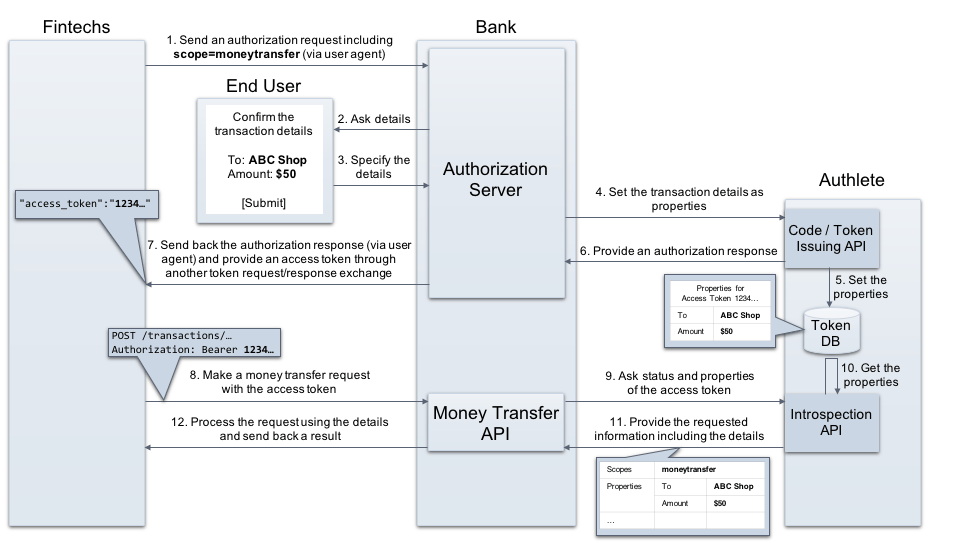
2. Role based access control
When a resource server receives an API request with an access token, it would like to know details of the token, not only user identifier but also groups and roles of the user. A simple solution is, that the resource server makes an introspection request to Authlete, gets the user identifier (“subject”) and makes a query to another database to find such groups/roles information. Again, Authlete’s properties feature makes the implementation simpler. The authorization server can associate the groups/roles with the access token to be provided to the client, and the resource server can find the values from the access token included in an API request from the client. The resource server doesn’t need to communicate with the database.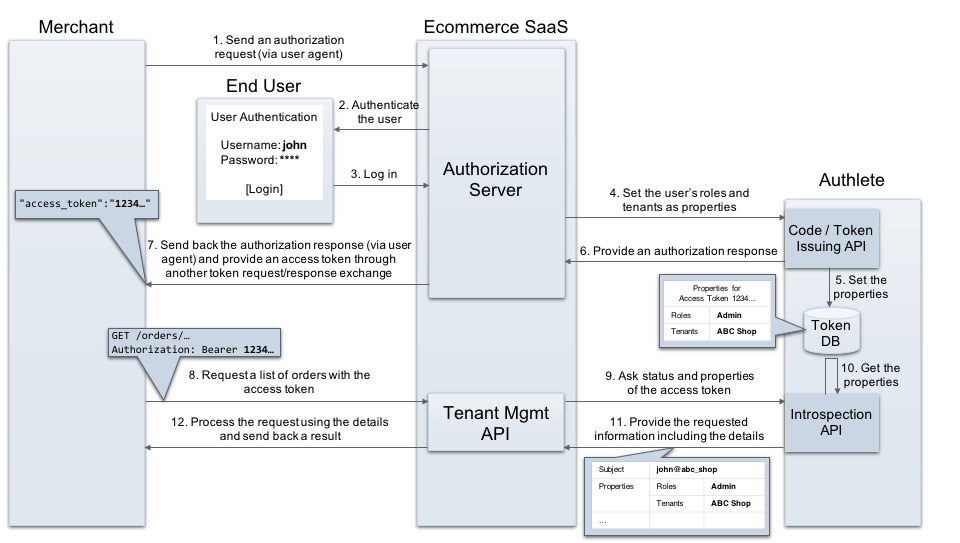
How it works
This section describes examples on how to set and get properties.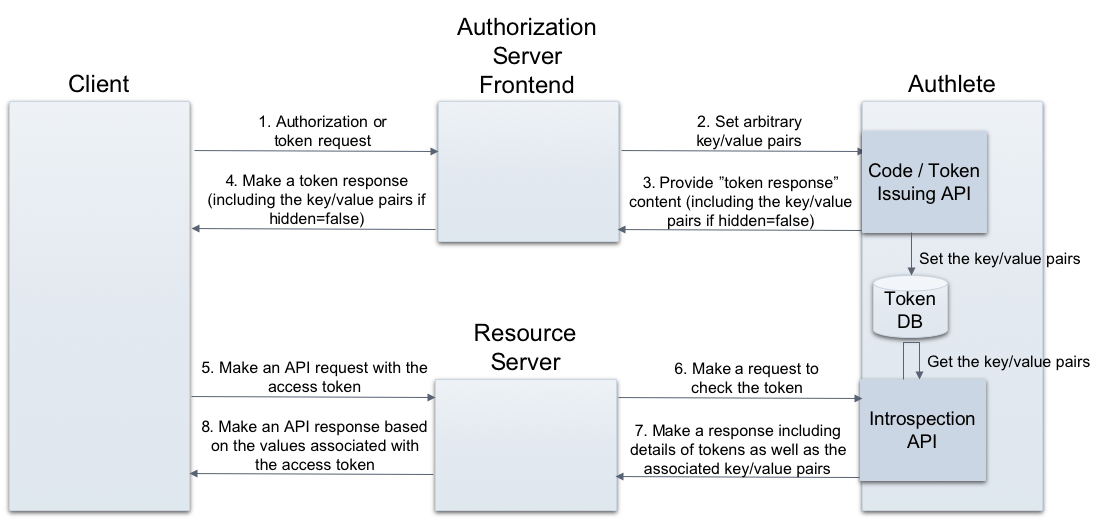
“Property” data type
Authlete defines Property data type that represents an arbitrary set of attributes associated with either an access token or an authorization code. The Property data type is a JSON object that contains the following entries.- true: hidden from clients
- false: not hidden from clients i.e. they can see the content |
Associating properties
Associating properties with an access token and/or an authorization code will be done by an authorization server at the following steps.Providing an authorization code and/or an access token through its authorization endpoint
An authorization server sets properties to a request to Authlete’s /auth/authorization/issue API. Authlete associates the properties with the new authorization code / the access token and provide content of a token response including the code / the token. The following is an example using curl. (folded for readability)- Request
- Response
Providing an access token through a token endpoint
An authorization server sets properties to a request to Authlete’s /auth/token API. Authlete associates the properties with the new access token and provide content of a token response including the token. The following is an example using curl. (folded for readability)- Request
- Response
Obtaining properties
By sending an access token (extracted from an API request from a client) to Authlete’s /auth/introspection API, an resource server receives a response that would contain properties. The following is an example using curl. (folded for readability)- Request
- Response
Examples by flow
Where properties are set depends on the grant flow, because different flows issue the token from different Authlete APIs. The walkthroughs below show the API call that takes theproperties parameter in each flow, and what the client and the resource server see as a result.
The examples use example_parameter=example_value as the property, ${SERVICE_API_KEY} as the service ID, and a service access token as the bearer credential.
Authorization code flow
-
Pass the authorization request from the client to the /auth/authorization API. The response carries
action: INTERACTIONand aticket, which the next call consumes. -
Issue the authorization code with the /auth/authorization/issue API, passing the properties to associate with it. They end up on the access token that the authorization code is later exchanged for.
action: LOCATIONmeans the authorization server should answer the client with302 Foundand useresponseContentas theLocationheader. -
Exchange the authorization code at the /auth/token API. Properties can be added here as well; they are merged with the ones given at step 2, and a key given in both places takes the value passed to
/auth/token.action: OKmeans the authorization server should answer the client with200 OKand useresponseContentas the response body. Both properties reach the client, because neither was markedhidden.
Implicit flow
The access token is issued from the authorization endpoint, so/auth/authorization/issue is the only place that takes properties.
-
Pass the authorization request, this time with
response_type=token, to the/auth/authorizationAPI and take theticketfrom the response. -
Issue the access token with
/auth/authorization/issue, passing the properties.The property travels to the client as a fragment parameter of the redirect URI, next toaccess_token.
Client credentials flow
There is no authorization endpoint step, so the properties go to/auth/token together with the token request.
Resource owner password credentials flow
The token is issued in two steps, and only the second one takes properties.-
Pass the token request to
/auth/token. The response carriesaction: PASSWORDtogether with theusernameandpasswordthe client sent, which the authorization server authenticates the user with.Properties passed to/auth/tokenare discarded whengrant_typeispassword. Pass them to/auth/token/issueinstead. -
Once the user is authenticated, issue the access token with the /auth/token/issue API, passing the identified user as
subjectand the properties to associate.
Refresh token flow
Properties passed to/auth/token with grant_type=refresh_token are merged into the properties already carried by the access token that the refresh token belongs to — new keys are added, and a key that already exists takes the value passed here. The refresh token below is the one issued by the authorization code flow above, whose access token already has example_parameter and additional_parameter.
Notes
Reserved values for “key”
The following values are not applicable for “key” of properties, as RFC 6749 and OpenID Connect Core 1.0 have reserved the names for parameters which may be included in a response from an authorization server. Authlete discards them if they are specified.- access_token
- token_type
- expires_in
- refresh_token
- scope
- error
- error_description
- error_uri
- id_token
Type of “value”
String is the only allowed type of “value.” Neither boolean nor array can be specified.Size of properties
Size of properties is limited. Properties are saved into the database on the server side after going through the steps described below.- Converted to a two-dimensional array (e.g. [[“example_parameter”,“example_value”,null]]). The value of hidden is converted to either null or an empty string. They mean false and true, respectively.
- Converted to JSON (e.g. ”[[“example_parameter”:“example_value”,null]]”)
- Encrypted by AES/CBC/PKCS5Padding
- Encoded by base64url
- If the length of the resultant base64url string generated by the above steps exceeds 65535, an error occurs.