
For Authlete 2.x documentation, see 2.x version.
Preface
This article provides an overview of the fundamental aspects of configuring client authentication in Authlete.How Client Authentication Works in Authlete
Authlete performs client authentication during token requests processing (/auth/token) by using both pre-configured information and information obtained at runtime.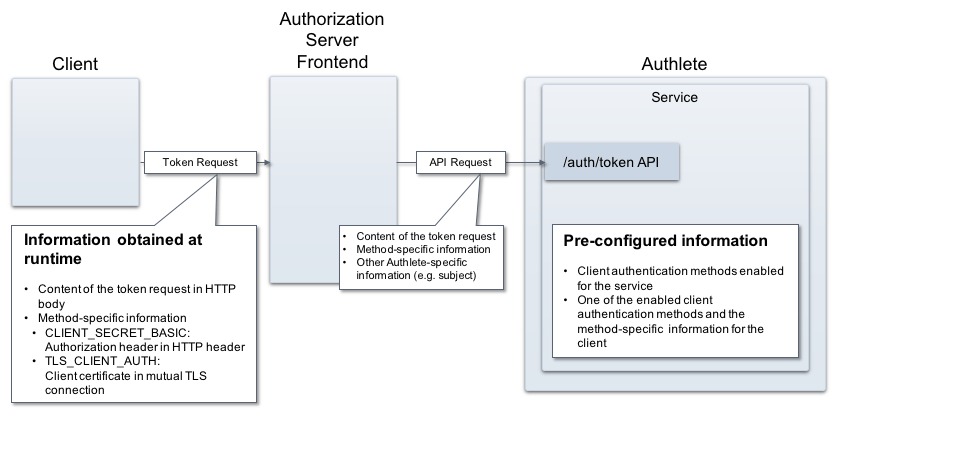
Pre-configured Information
You will configure both an Authlete Service (an API instance acting as a backend of an authorization server) and a client in the service.- Authlete service
- Client
Information obtained at runtime
On receiving a token request from a client, an authorization server passes the content of the request to Authlete’s /auth/token API that processes it. Authlete parses the content, detects the identity of the client, determines the pre-specified authentication method, and fulfills client authentication. Some client authentication methods require additional information such as a value of Authorization header in HTTP request from the client to the authorization server, the client’s certificate used in mutual TLS connection between the parties. In such cases, the authorization server extracts those information from the HTTP request or the mutual TLS, and sends it to Authlete, along with the content of the token request.Configuration example
This section shows an example to use CLIENT_SECRET_BASIC method to authenticate a client (ID: 1257…) and fulfill a token request.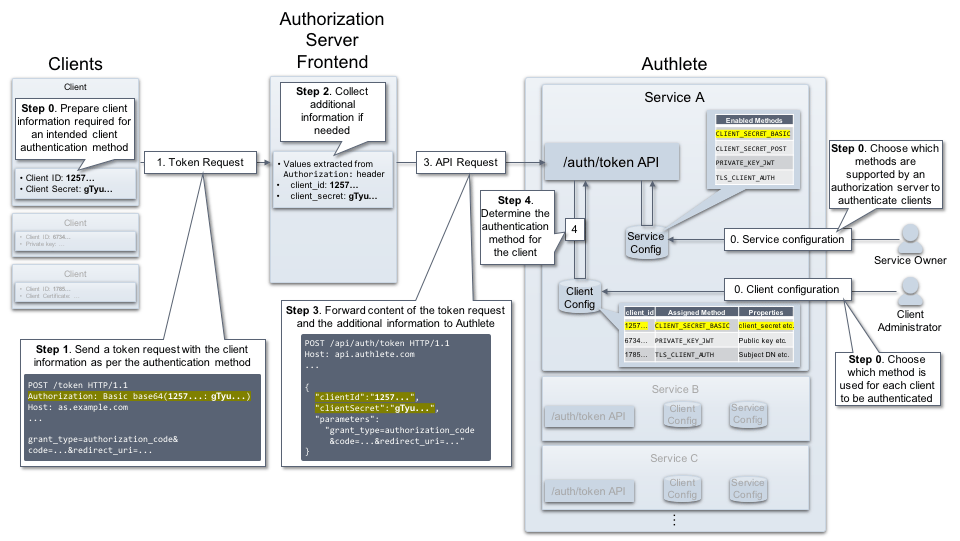
Service Settings
The following settings are done in the pre-configuration. To enable theCLIENT_SECRET_BASIC method in your service:
- Log in to the Authlete Management Console
- Click on your Organization name and choose your Service.
- Navigate to Service Settings > Endpoints > Token
- Under the Supported Client Authentication Methods section, select the
CLIENT_SECRET_BASICcheckbox. - Click Save Changes to apply the updates.

Client Settings
To enable theCLIENT_SECRET_BASIC method for your client:
- Navigate to Client Settings > Endpoints > Token > General
- Under the Client Authentication Method section, open the dropdown menu and select
CLIENT_SECRET_BASIC - Click Save Changes to apply the updates.

Client ID and Client Secret in Client Basic Settings
CLIENT_SECRET_BASIC requires only “client ID” and “client secret” to authenticate the client. In Authlete, these values are automatically generated (“1257…” and “gTyu…” respectively in this example). The client administrator sets the auto-generated values to the client. To view your Client ID and Client Secret in the Authlete Management Console:- Log in to the Authlete Management Console
- Click on your Organization name and choose your Service.
- Navigate to Client Settings > Basic Settings > General

Client Request Flow from Start to Finish
Here are flows from a token request by the client to fulfillment by Authlete. Step 1 The client prepares a token request. The request will be sent to the authorization server with information needed for client authentication. In this case, the client sets its client ID (1257…) and secret (gTyu…) to Authorization header of the HTTP request.
Step 3
The authorization server makes a request to Authlete’s /auth/token API. The request contains the values that have been obtained in the step 2; the content of the token request and the client’s ID and secret, as “parameters”, “clientId”, “clientSecret” respectively.