
This page is for Authlete 2.x. For current (3.0) documentation, see this page.
Preface
client_secret_jwt is one of client authentication methods defined in OpenID Connect Core 1.0, 9. Client Authentication . On a token request, a client crafts a JWT assertion that contains a message authentication code (MAC) in its signature part, and includes it to the request. Then an authorization server authenticates the client by verifying the signature and payload of the assertion. Authlete supports client_secret_jwt as a client authentication method so that authorization servers can enable it. This article describes overview of the method and setup instructions with Authlete.\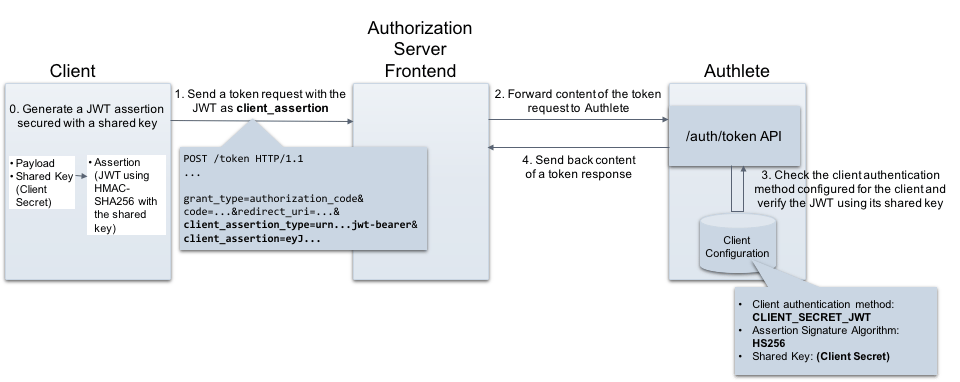
Requirements for client_secret_jwt
The following section describes details on both client and authorization server side.Client
A client must include the following parameters in a token request when using the client_secret_jwt method.
The value of client_assertion must satisfy the following requirements on its JWT payload and JWT signature. You can find an example JWT in the “Generating a JWT assertion
” section.
Payload
A JWT assertion must contain the REQUIRED claims listed below.Signature
- The signature of the JWT must be calculated using HMAC-SHA algorithm e.g. HS256.
- Client secret must be used as a shared key on calculating the signature.
Authorization server
An authorization server must process a token request as per the specifications listed below. The details are omitted here because you can offload these operations from your authorization server to Authlete.- JSON Web Token (JWT) Profile for OAuth 2.0 Client Authentication and Authorization Grants (RFC7523)
- Assertion Framework for OAuth 2.0 Client Authentication and Authorization Grants (RFC7521)
Configuration settings
This section explains settings for enabling the client_secret_jwt method. You have to configure both Authlete service and its client to be authenticated with the method.Authlete service
Configure the following setting in Service Owner Console.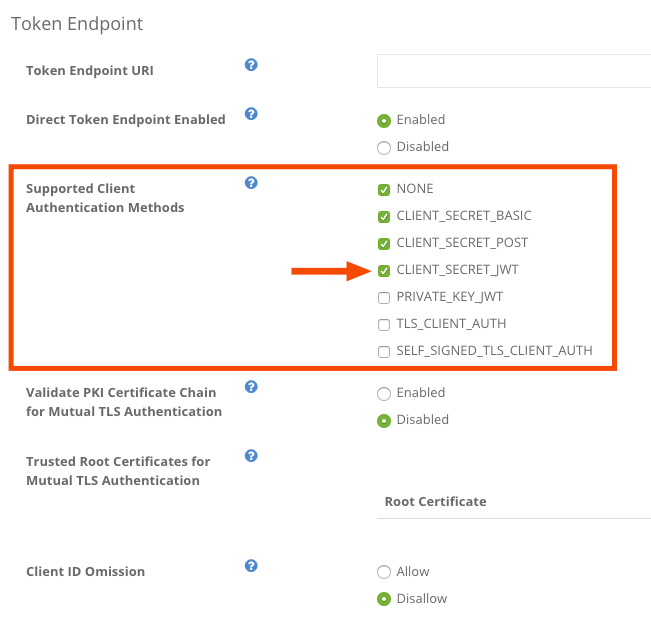
Client of the service
Configure the following setting in Client Developer Console.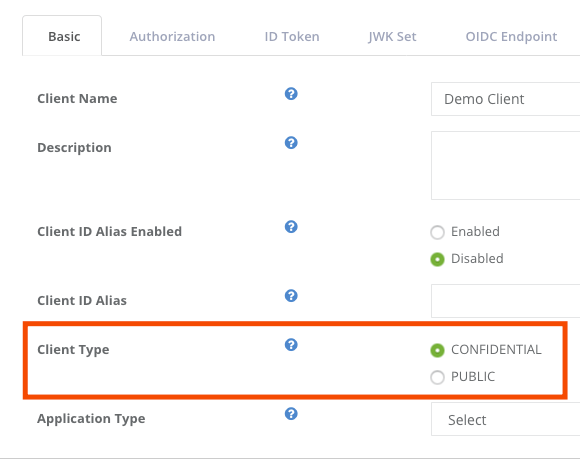
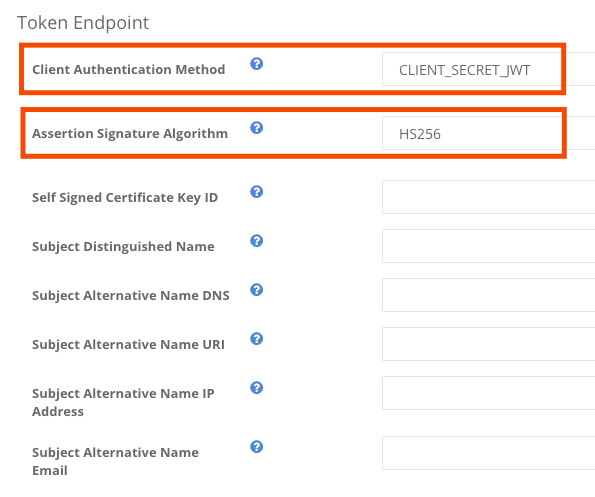
Example
This example shows client authentication using client_secret_jwt at the token endpoint of the authorization server.Generating a JWT assertion
Let’s generate a JWT that will be used as a value of the client_assertion in a token request.Preparing a JWT payload
First, create a JSON formatted payload and save it as “payload.json”.Generating a JWT
Generate a JWT assertion including the payload, and a MAC using the client’s shared key (client secret). The example below is an instruction using an authlete-jose library . Or you can use mkjose.org website to do that.Token request and response
Token request from the client to the authorization server
Assume the client that has the assertion makes a token request to the authorization server. (folded for readability)API request from the authorization server to Authlete
The authorization server forwards the request content to Authlete’s /auth/token. (folded for readability)API response from Authlete to the authorization server
Authlete processes the request and send back an API response to the authorization server as follows. (folded for readability)Token response from the authorization server to the client
The authorization server extracts the value of “responseContent” and send it back to the client as a token response (details omitted).See Also
This article describes basics of client authentication configuration in Authlete.
Authlete supports client_secret_jwt as a client authentication method so authorization servers can enable it. This article describes overview of the method and setup instructions with Authlete.
This article explains “OAuth 2.0 client authentication”. In addition to the client authentication methods described in RFC 6749 , this article explains methods that utilize a client assertion and a client certificate.