
This page is for Authlete 2.x. For current (3.0) documentation, see this page.
First Steps
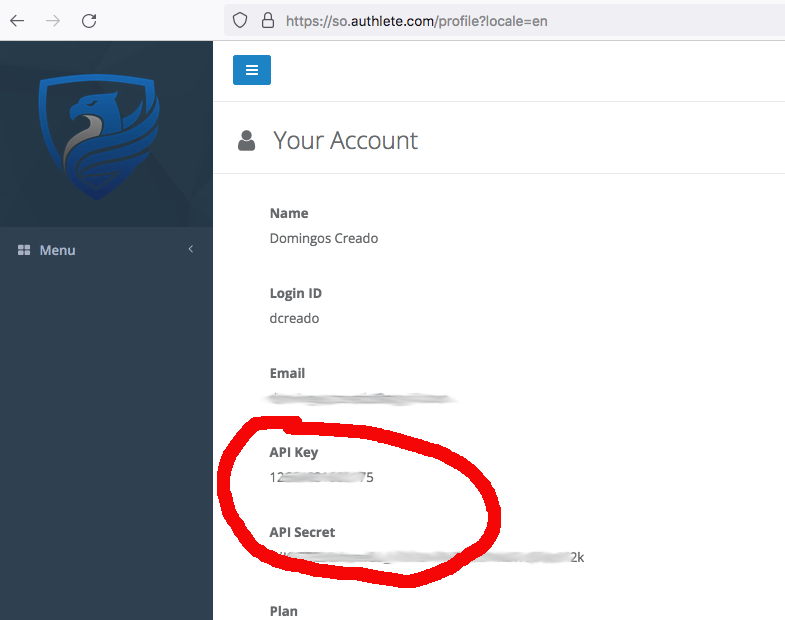
The Terraform provider does not support creating the service owner account, so the first step is to retrieve the Service Owner API Key and Secret. You can try it on Authlete’s Shared Cloud by first creating a test account on the signup page, head to Your account page link and take note ofAPI Key and API Secret.
If you are using a dedicated setup, update the url to your Authlete SO console.
Creating the project
To get started let’s create a simple project with one Authlete service. You can find the source code onhttps://github.com/authlete/authlete-terraform-samples under simple_service directory.
Keep in mind that Terraform projects have very loose structure requirements and are guided by conventions, so there is no hard requirement on the file structure.
This sample shows a minimal configuration required for managing a service on Authlete using Terraform provider.
Creating an Authlete account and setting your environment
In this sample, we will use environment variables to configure the Authlete Terraform plugin. To get started, head to your profile page and take note ofAPI Key and API Secret.
After taking note, go to command line and run the command line below:
Declaring the dependency to the provider and downloading it
The Authlete provider should be included in your project as a dependency and Terraform will take care of downloading it and making available to you. The providers dependencies are declared in a fileprovider.tf, by convention, and the structure is as below:
Declaring the service resource
In Terraform vocabulary, the Authlete Services and Clients are resources. So we need to declare a resource with the Authlete-specific type in order to have it created. Go ahead and create amain.tf as the content below:
authlete_service with id as in the project. That name is specific to Terraform
and it is not applied to the server-side configuration of Authlete. The properties in that block are straight forward: we are declaring
an OAuth server that will accept only authorization code flow and the name on the server side will be MyDomainAS.
The last 2 blocks are the instructions to Terraform to make available the id (which is the api_key) and the api_secret that you
will use for configuring your AS and accessing that specific service in Authlete.
To create that OAuth server backend on Authlete, go to command line and run the command below:
Managing the configuration
With the service created, as there will be requirements changes, a change management process needs to be established. Keep in mind that Terraform has the concept of workspaces and that can be handy for managing Test, Preproduction and Production configurations of services on Authlete. Regardless of how are you managing the state changes and version control of the scripts, the approach for changing the Authlete Service is to change the resource in the.tf file and apply those changes.
Let’s use the service created in the previous section and include support for the client credentials grant type. So we change the
main.tf that we have created to be like below and apply those changes using the terraform apply command:
CLIENT_CREDENTIALS grant type and Terraform is asking for your approval to change the service definition.
After confirming the change the provider will fetch the status of that service from server and apply that specifically change.
terraform import.
Next Step