> ## Documentation Index
> Fetch the complete documentation index at: https://developers.authlete.com/llms.txt
> Use this file to discover all available pages before exploring further.
# OpenID for Verifiable Credential Issuance
> Explanation about OpenID for Verifiable Credential Issuance and how Authlete supports the specification.
## 1. Introduction
This document explains the "**[OpenID for Verifiable Credential Issuance][OID4VCI]**" (**OID4VCI**) specification and how Authlete supports the specification.
This document elaborately explains overviews and details of various concepts, using well over 100 diagrams. All the explanations carefully avoid assuming prior knowledge of concepts not yet explained, allowing readers to understand the content without the need to navigate back and forth within the document. Additionally, the document refrains from delving into excessive details while presenting the overall picture to prevent readers from getting disoriented. These considerations make this document significantly more readable than the specification itself. Therefore, reading this document beforehand will be a great help when you read the specification.
\| Revision History |
\| Date | Changes |
\| 2023-10-22 | The initial version was published. |
\| 2023-10-27 | Some subsections were added to the "OID4VCI Implementation" section. |
\| 2023-11-15 | Some explanations and diagrams were updated to align with the specification changes below.
The type of the credentials\_supported credential issuer
metadata has been changed from a JSON array to a JSON object.
The type of elements in the credentials array in a credential
offer has been restricted to "string" only. JSON objects are no longer accepted.
The elements in the credentials array in a credential offer
reference the "keys" in the credentials\_supported object,
not the values of the scope property of elements in the
credentials\_supported object. |
\| 2023-11-24 | The "OID4VCI Demo" section was added.
Some explanations and diagrams were updated to align with the specification change below.
The draft 01 of the SD-JWT VC
specification has renamed the type claim to vct,
which means "verifiable credential type". |
\| 2023-12-30 | A section for mdoc demo was added.
Some explanations and diagrams were updated to align with the specification changes below.
The credentials property in a credential offer has been renamed to
credential\_configurations.
The user\_pin\_required boolean property in a credential offer
has been replaced with the tx\_code JSON object.
The user\_pin parameter in a token request has been replaced with
tx\_code.
The credentials\_supported credential issuer metadata has been
renamed to credential\_configurations\_supported.
A RAR object with the type openid\_credential requires the
credential\_configuration\_id property as mandatory.
The format property is no longer required.
The proof\_types\_supported parameter in a credential
issuer metadata has been renamed to proof\_types.
The three properties related to credential response encryption
(credential\_encryption\_jwk,
credential\_response\_encryption\_alg, and
credential\_response\_encryption\_enc)
in a credential request have been packed into one JSON object,
credential\_response\_encryption.
Data Integrity Proof has been added as a method of key proof.
The specification of the SD-JWT VC format has been incorporated into the OID4VCI specification.
The credential\_definition property, present in the RAR object,
credential request, and metadata for the vc+sd-jwt, has been removed.
Consequently, the vct property and the claims property,
formerly nested within the credential\_definition property,
have been moved up one level.
/.well-known/jwt-issuer has been renamed to
/.well-known/jwt-vc-issuer.
The \_sd\_hash claim in the key binding JWT of an SD-JWT has been
renamed to sd\_hash. |
\| 2024-01-31 | Updated to align with the specification changes below.
The metadata related to credential response encryption has been packed into
one JSON object, credential\_response\_encryption.
The format property has been removed from credential responses.
The format property in a RAR object has resurrected. A RAR object
with the openid\_credential type must include either the
credential\_configuration\_id property of the
format property.
The credential\_configurations property in a credential offer
has been renamed to credential\_configuration\_ids. |
\| 2024-02-03 | Updated to align with the specification changes below.
The cryptographic\_suites\_supported property in a
credential configuration has been renamed to
credential\_signing\_alg\_values\_supported.
The proof\_types property in a credential configuration
has been renamed to proof\_types\_supported, and its
type has been changed from a string array to a JSON object containing
nested JSON objects. |
\| 2024-05-11 | Added the "POTENTIAL Interop Event / Track 1 / Light Profile" section under
the "OID4VCI Demo" section. |
\| 2024-06-05 | Updated the "POTENTIAL Interop Event / Track 1 / Light Profile" section
to reflect a bug fix for the mdoc payload.
(cf. [authlete/cbor PR 10](https://github.com/authlete/cbor/pull/10)) |
\| 2024-06-06 | Added the "POTENTIAL Interop Event / Track 2 / Light Profile" section under
the "OID4VCI Demo" section. |
\| 2024-06-11 | Updated the "4.3.2.5. Step 5 : CWT Key Proof" section to reflect a bug fix
in the format of COSE\_Key. |
\| 2024-06-28 | Added the "POTENTIAL Interop Event / Track 2 / Full Profile" section under
the "OID4VCI Demo" section. |
## 2. OID4VCI Specification
The OID4VCI specification defines rules for **issuance** of verifiable credentials.
### 2.1. Core Technical Terms
#### 2.1.1. Verifiable Credential
"**Verifiable credential**" is a key technical term in the OID4VCI specification.
"Credential" in the term represents a collection of data about a user or users (or any identifiable entities). Given name, family name, and birthdate are examples of data about a user.
"Verifiable" in the term indicates that it is possible to verify that the data collection has not been tampered with. Technically speaking, it means that the data collection is digitally signed.
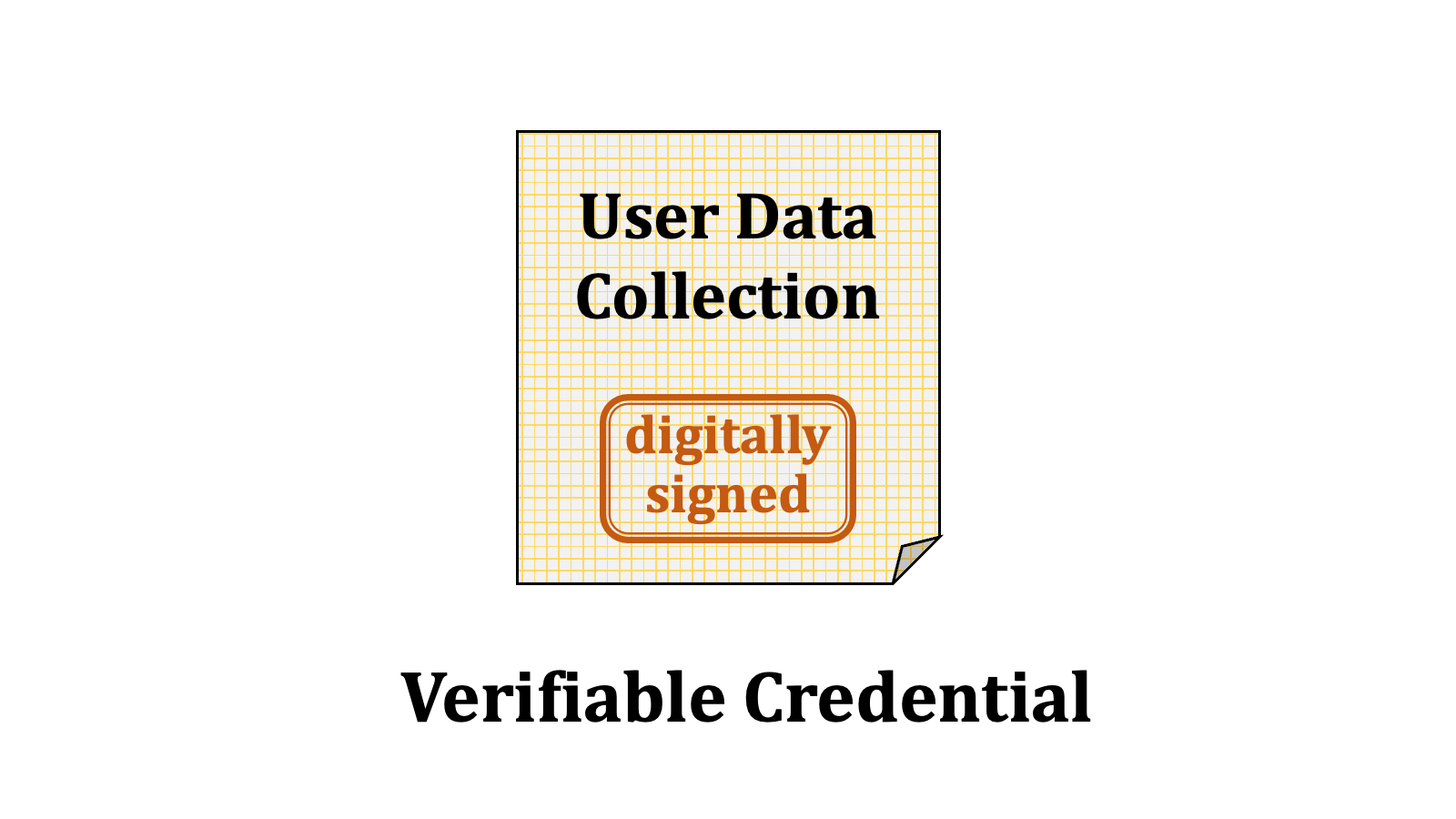 Digital driving licenses or health insurance cards stored on a mobile device are examples of verifiable credentials.
#### 2.1.2. Credential Issuer
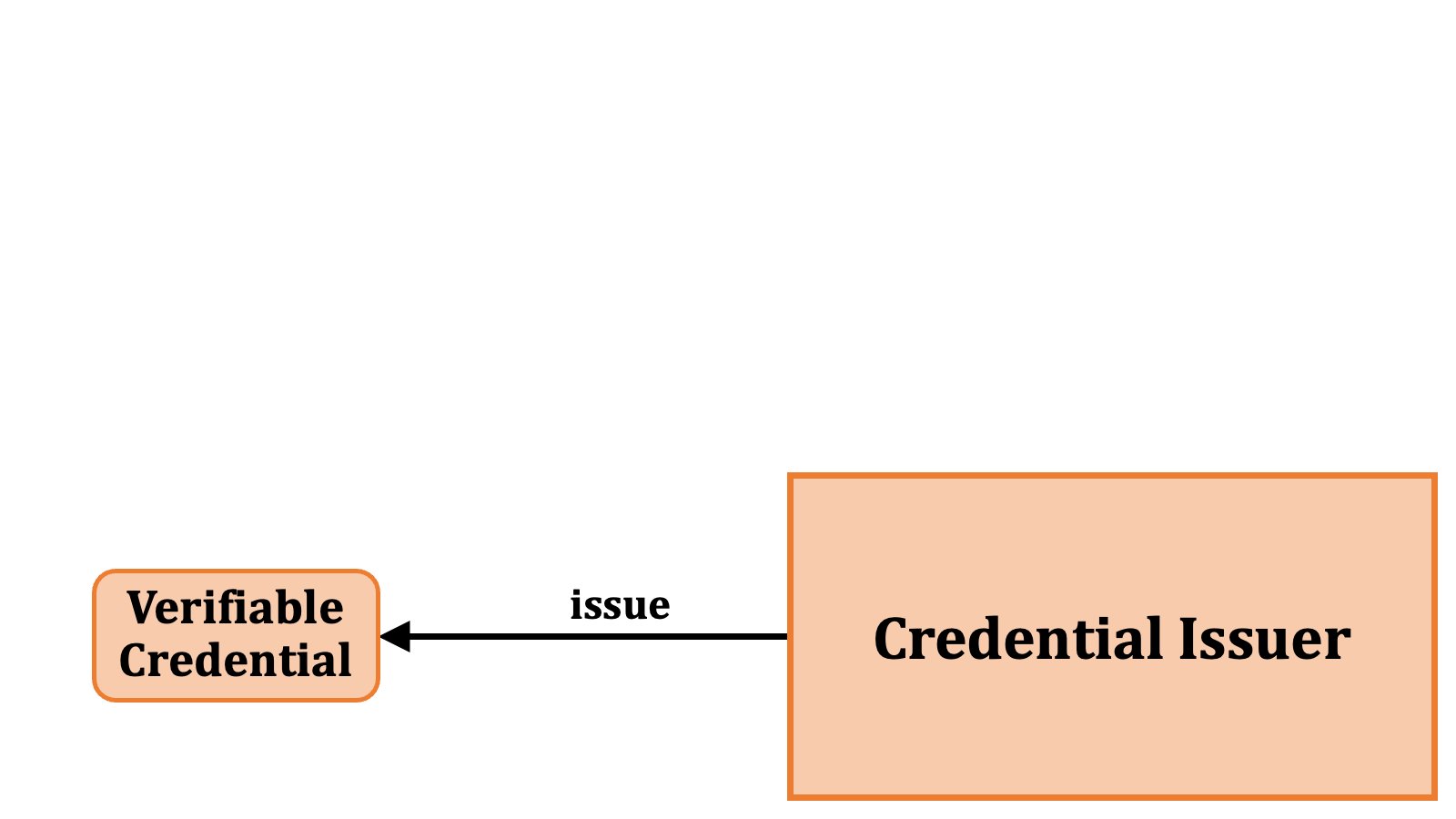
Verifiable credentials are issued by a "**credential issuer**". Credential issuer is also a technical term. The specification describes behaviors of a credential issuer.
Digital driving licenses or health insurance cards stored on a mobile device are examples of verifiable credentials.
#### 2.1.2. Credential Issuer
Verifiable credentials are issued by a "**credential issuer**". Credential issuer is also a technical term. The specification describes behaviors of a credential issuer.
 #### 2.1.3. Access Token
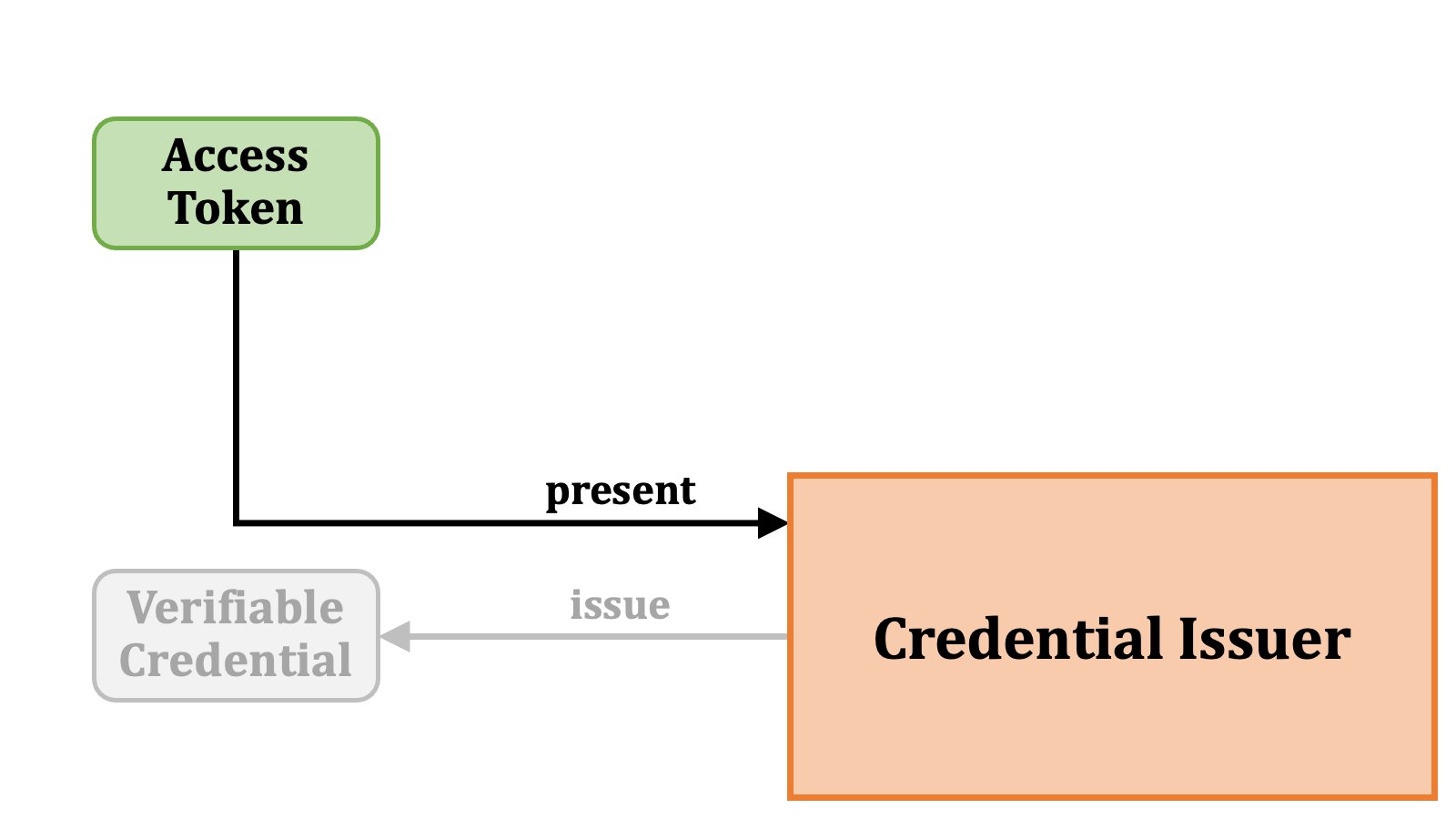
To obtain a verifiable credential from a credential issuer, the requester of the issuance must present an "**access token**" to the credential issuer. The access token here is the one defined in [RFC 6749][RFC_6749], which is the core specification of **OAuth 2.0**.
#### 2.1.3. Access Token
To obtain a verifiable credential from a credential issuer, the requester of the issuance must present an "**access token**" to the credential issuer. The access token here is the one defined in [RFC 6749][RFC_6749], which is the core specification of **OAuth 2.0**.
 #### 2.1.4. Authorization Server
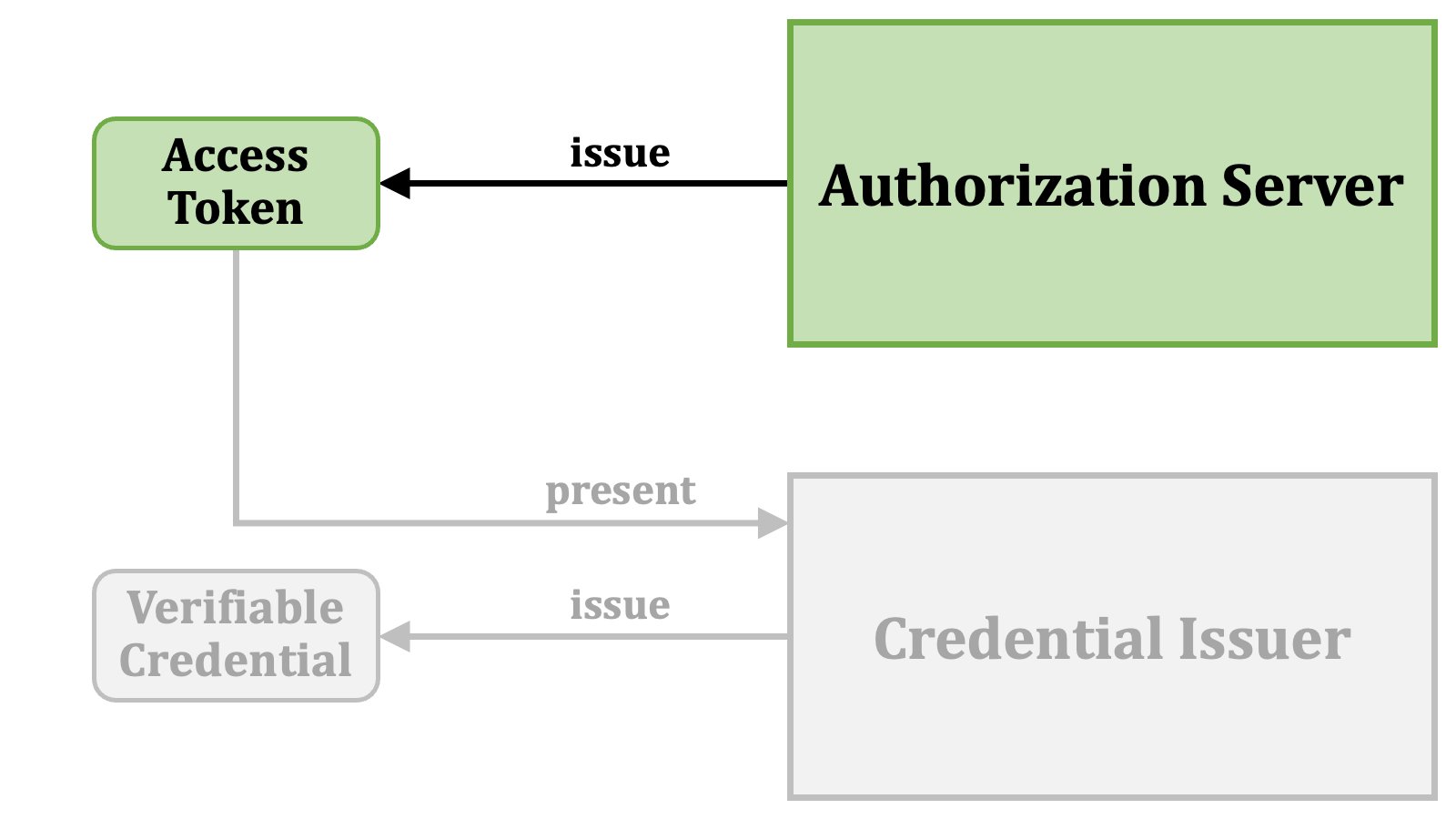
Access tokens are issued by an "**authorization server**". The fundamental behaviors of an authorization server are defined in [RFC 6749][RFC_6749], and there are many other standard specifications around RFC 6749 that add extra functionalities to an authorization server. The OID4VCI specification also defines additional requirements for an authorization server so that an authorization server can issue access tokens that can be used for the issuance of verifiable credentials.
#### 2.1.4. Authorization Server
Access tokens are issued by an "**authorization server**". The fundamental behaviors of an authorization server are defined in [RFC 6749][RFC_6749], and there are many other standard specifications around RFC 6749 that add extra functionalities to an authorization server. The OID4VCI specification also defines additional requirements for an authorization server so that an authorization server can issue access tokens that can be used for the issuance of verifiable credentials.
 #### 2.1.5. Wallet
In the OID4VCI specification, a software application that communicates with an authorization server and a credential issuer to obtain a verifiable credential is referred to as a "**wallet**". Technically speaking, within the context of issuing verifiable credentials, a wallet acts as a "**client application**" of OAuth 2.0. Thus, from a technical perspective, the terms wallet and client application are interchangeable in the context of the OID4VCI specification.
#### 2.1.5. Wallet
In the OID4VCI specification, a software application that communicates with an authorization server and a credential issuer to obtain a verifiable credential is referred to as a "**wallet**". Technically speaking, within the context of issuing verifiable credentials, a wallet acts as a "**client application**" of OAuth 2.0. Thus, from a technical perspective, the terms wallet and client application are interchangeable in the context of the OID4VCI specification.
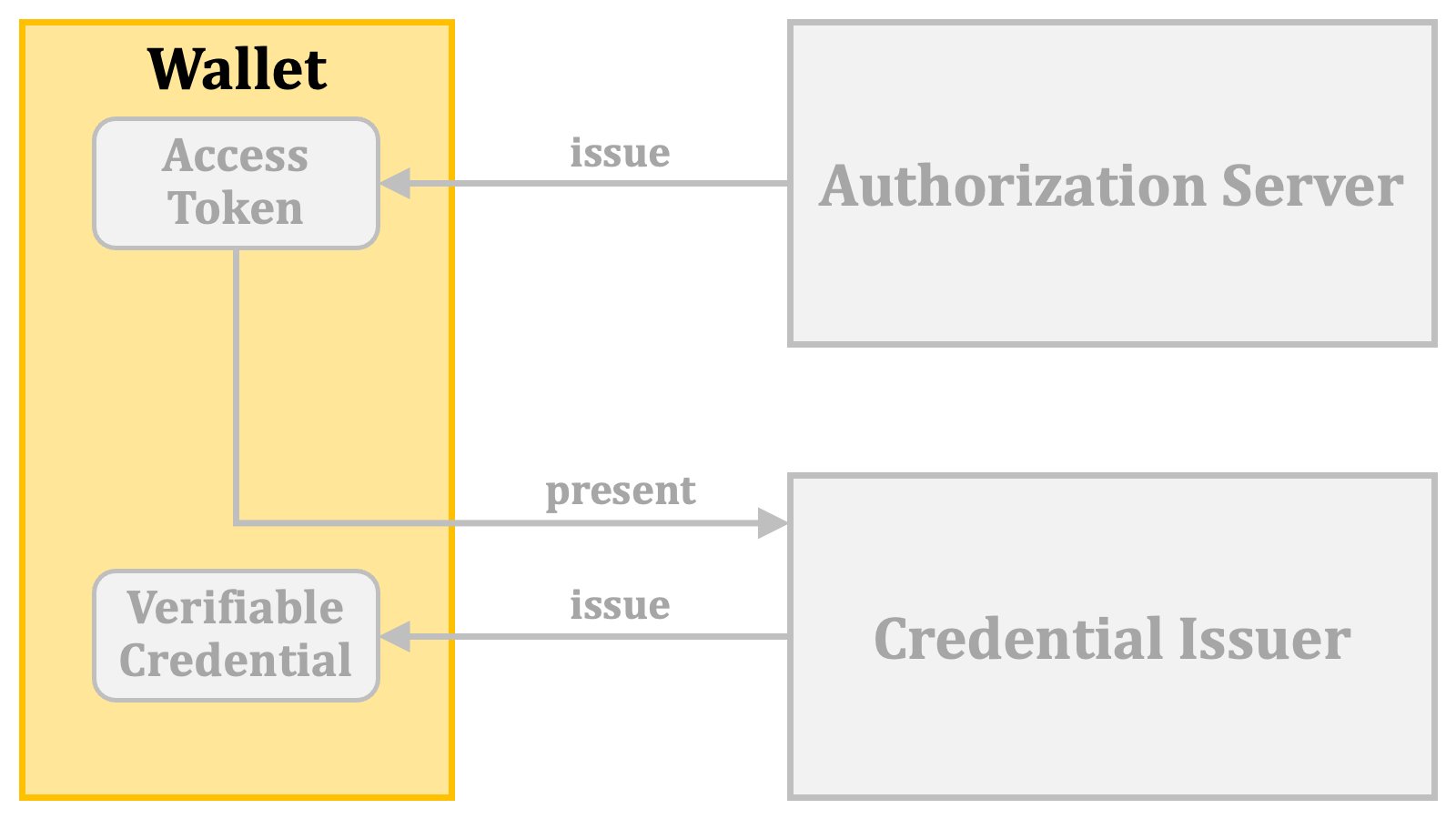 However, please note that in the context of "OpenID for Verifiable Presentations", which this document does not explain, a wallet acts as a server, not as a client application.
#### 2.1.6. Relationship
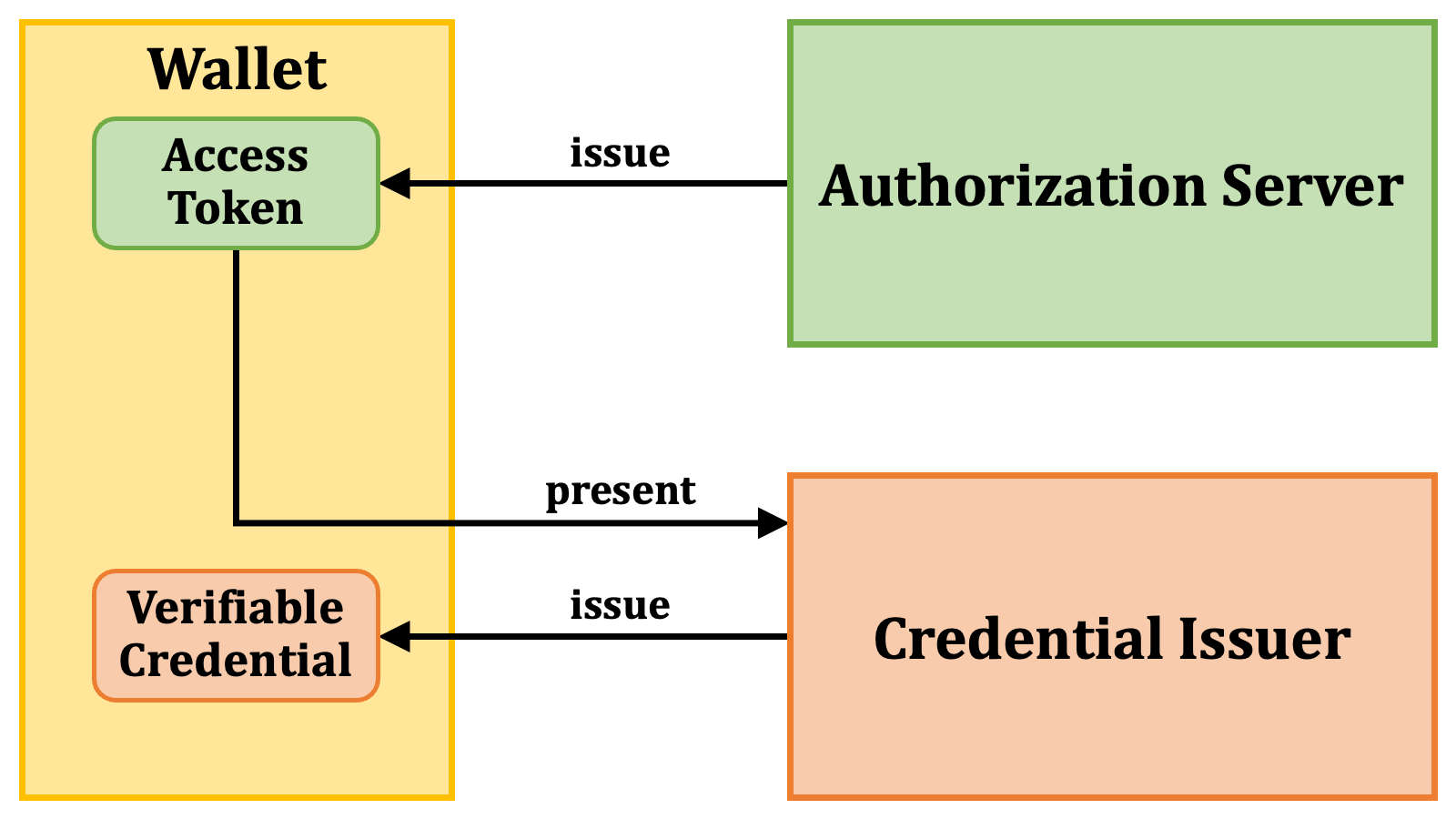
The following diagram illustrates the relationship among the core technical terms.
However, please note that in the context of "OpenID for Verifiable Presentations", which this document does not explain, a wallet acts as a server, not as a client application.
#### 2.1.6. Relationship
The following diagram illustrates the relationship among the core technical terms.
 ### 2.2. Access Token Issuance Overview
#### 2.2.1. Pre-Authorized Code Flow
The specification defines multiple methods for issuing access tokens that are usable for the issuance of verifiable credentials.
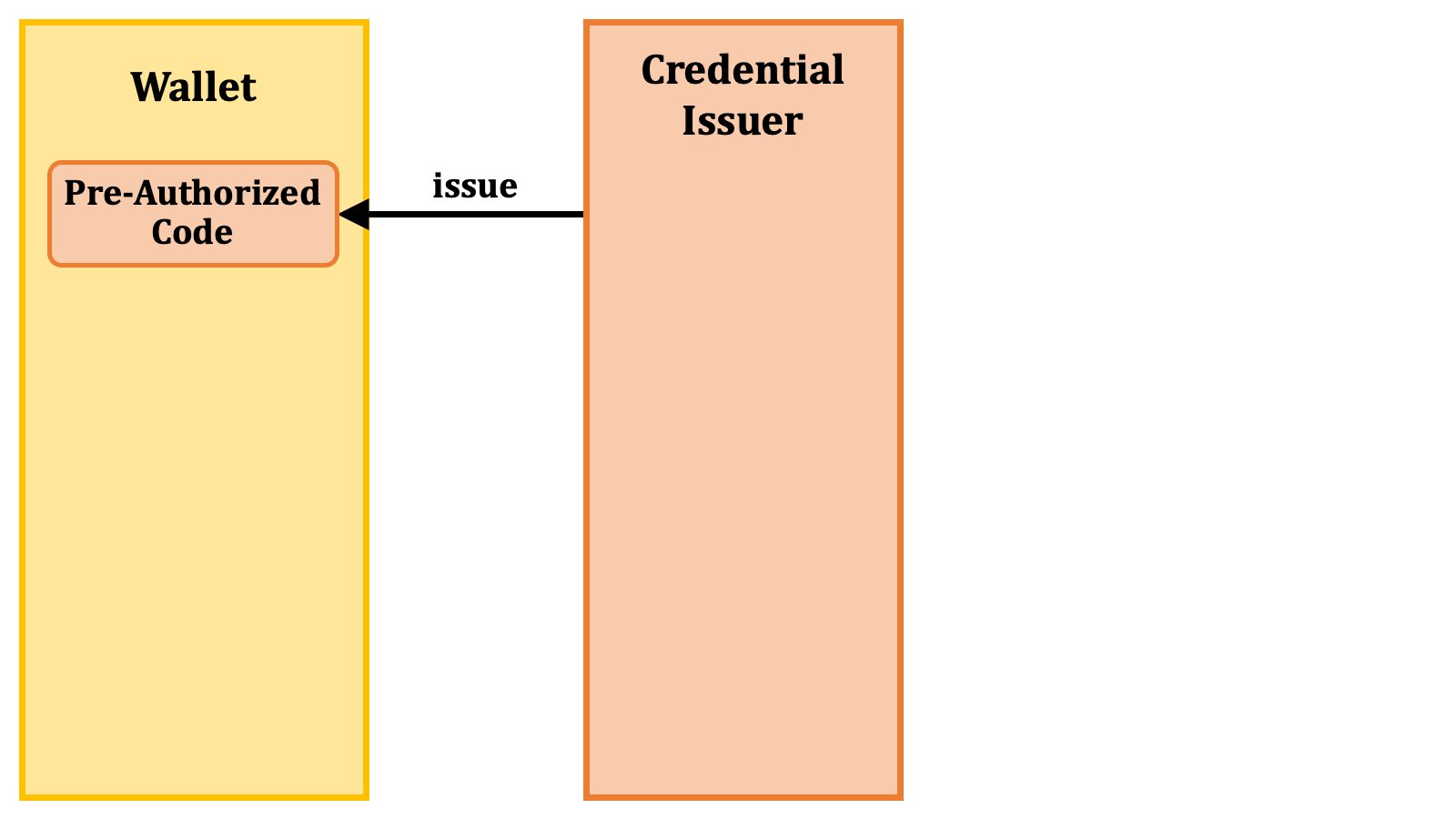
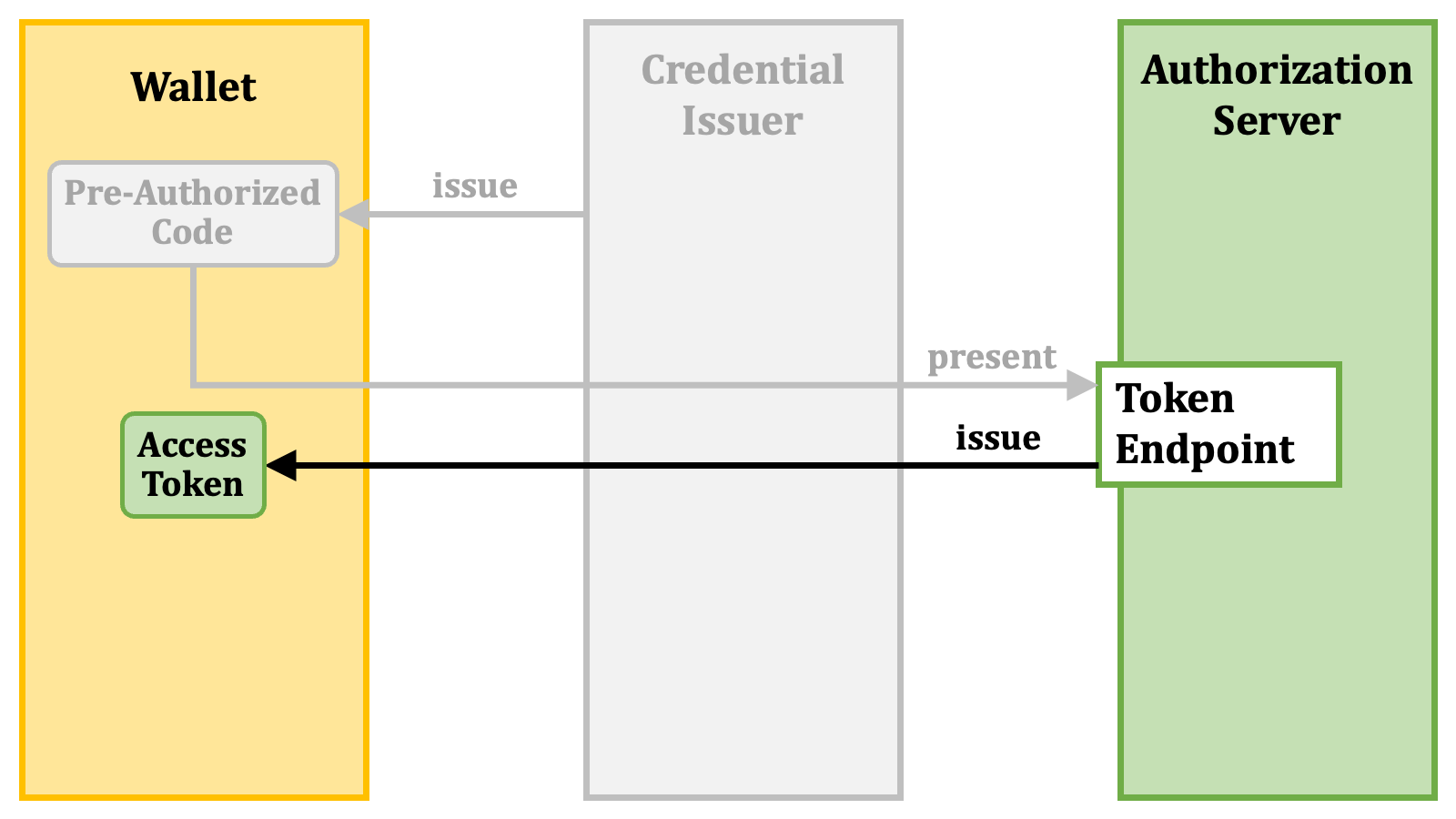
One of these methods is entirely new. The new one is referred to as the "**pre-authorized code flow**". In the flow, as the first step, a wallet obtains a "**pre-authorized code**" from a credential issuer.
### 2.2. Access Token Issuance Overview
#### 2.2.1. Pre-Authorized Code Flow
The specification defines multiple methods for issuing access tokens that are usable for the issuance of verifiable credentials.
One of these methods is entirely new. The new one is referred to as the "**pre-authorized code flow**". In the flow, as the first step, a wallet obtains a "**pre-authorized code**" from a credential issuer.
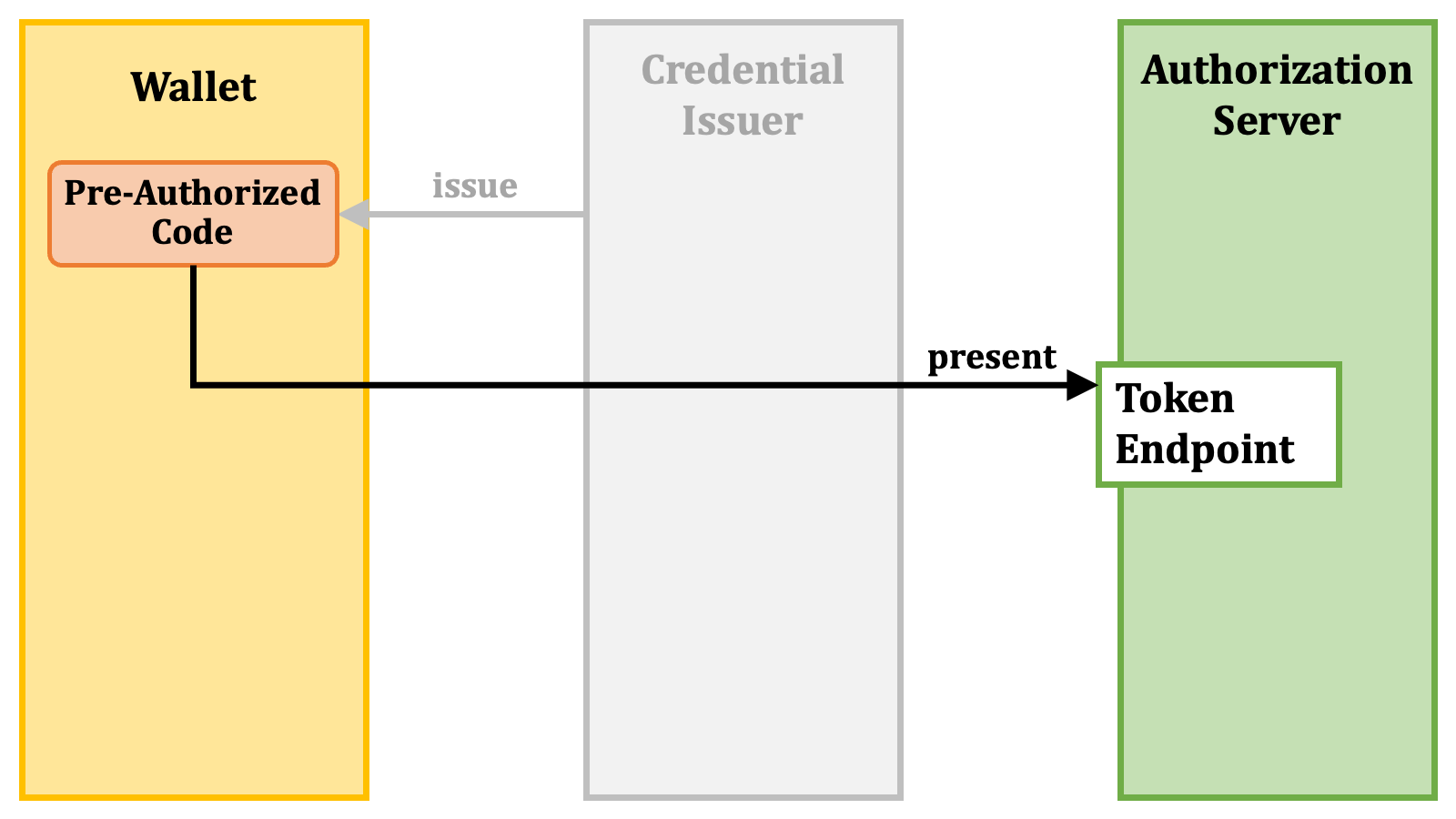
 Then, the wallet presents the pre-authorized code at the "**token endpoint**" ([RFC 6749][RFC_6749], [3.2. Token Endpoint][RFC_6749_3_2]) of an authorization server.
 In return, the wallet receives an access token.
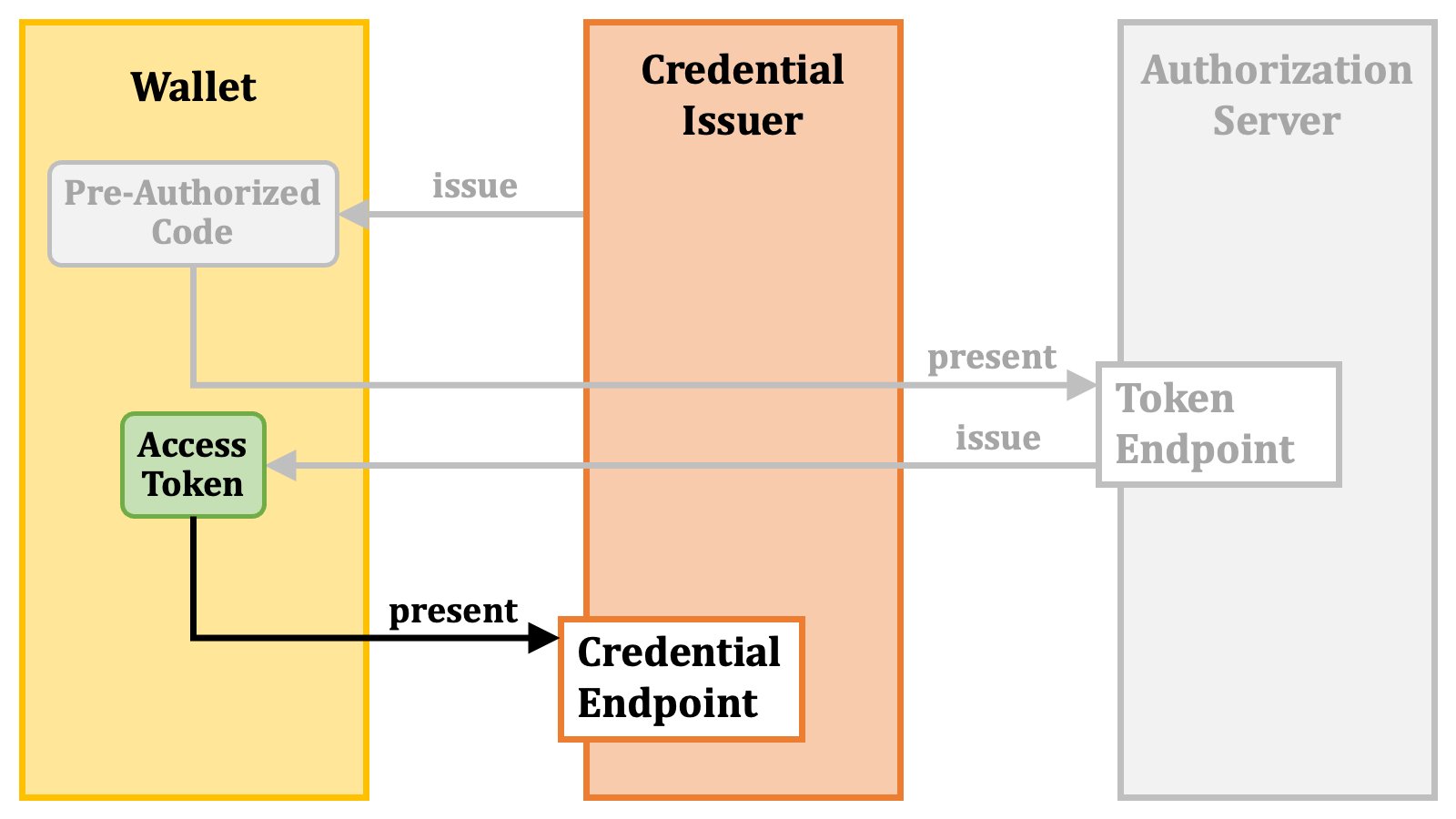
 As explained in the previous section, the wallet presents the access token to the credential issuer. To be specific, the wallet presents the access token at the "**credential endpoint**" of the credential issuer.
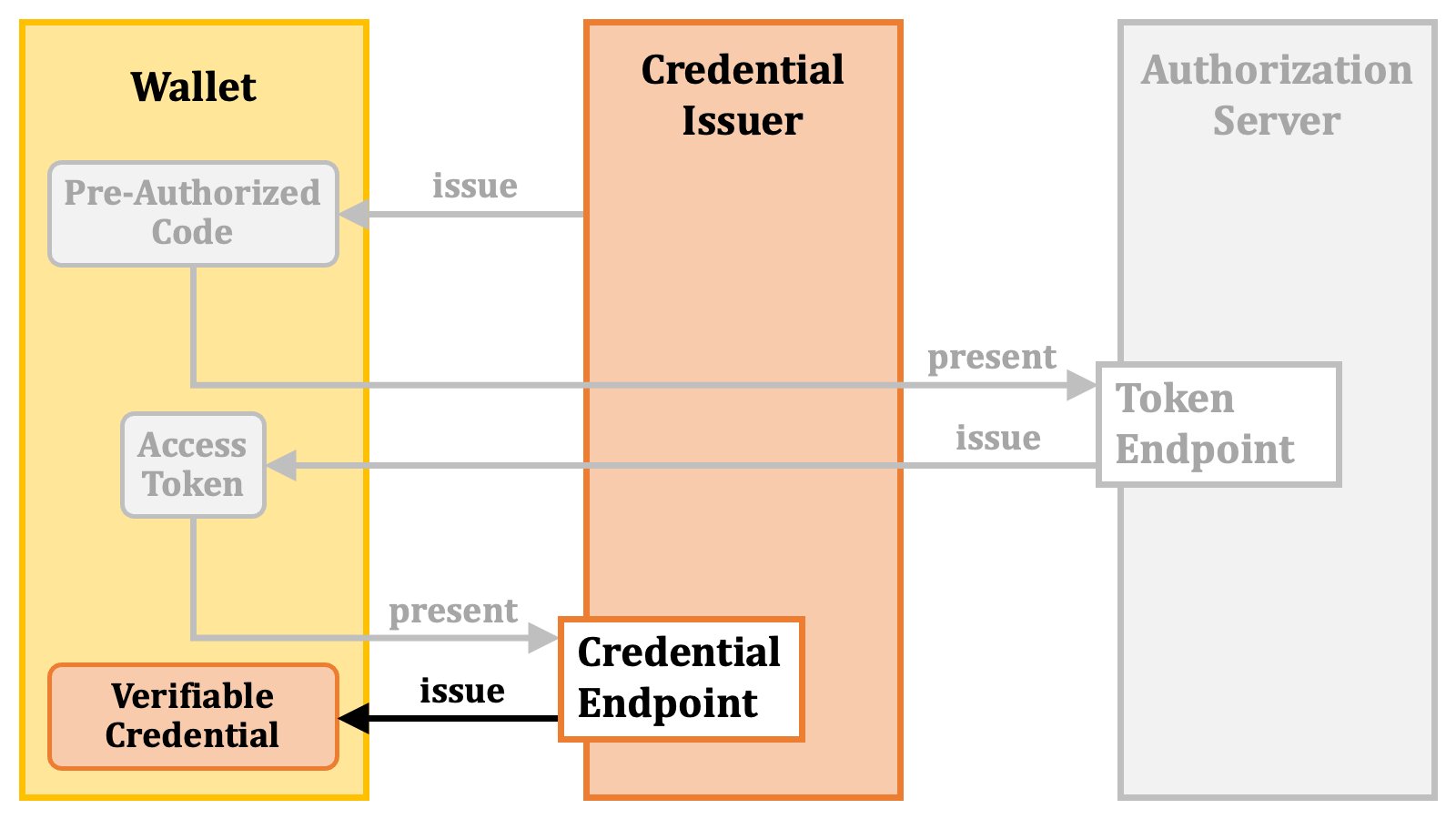
 In return, the wallet receives a verifiable credential.
 The diagram below is an overview of the pre-authorized code flow.
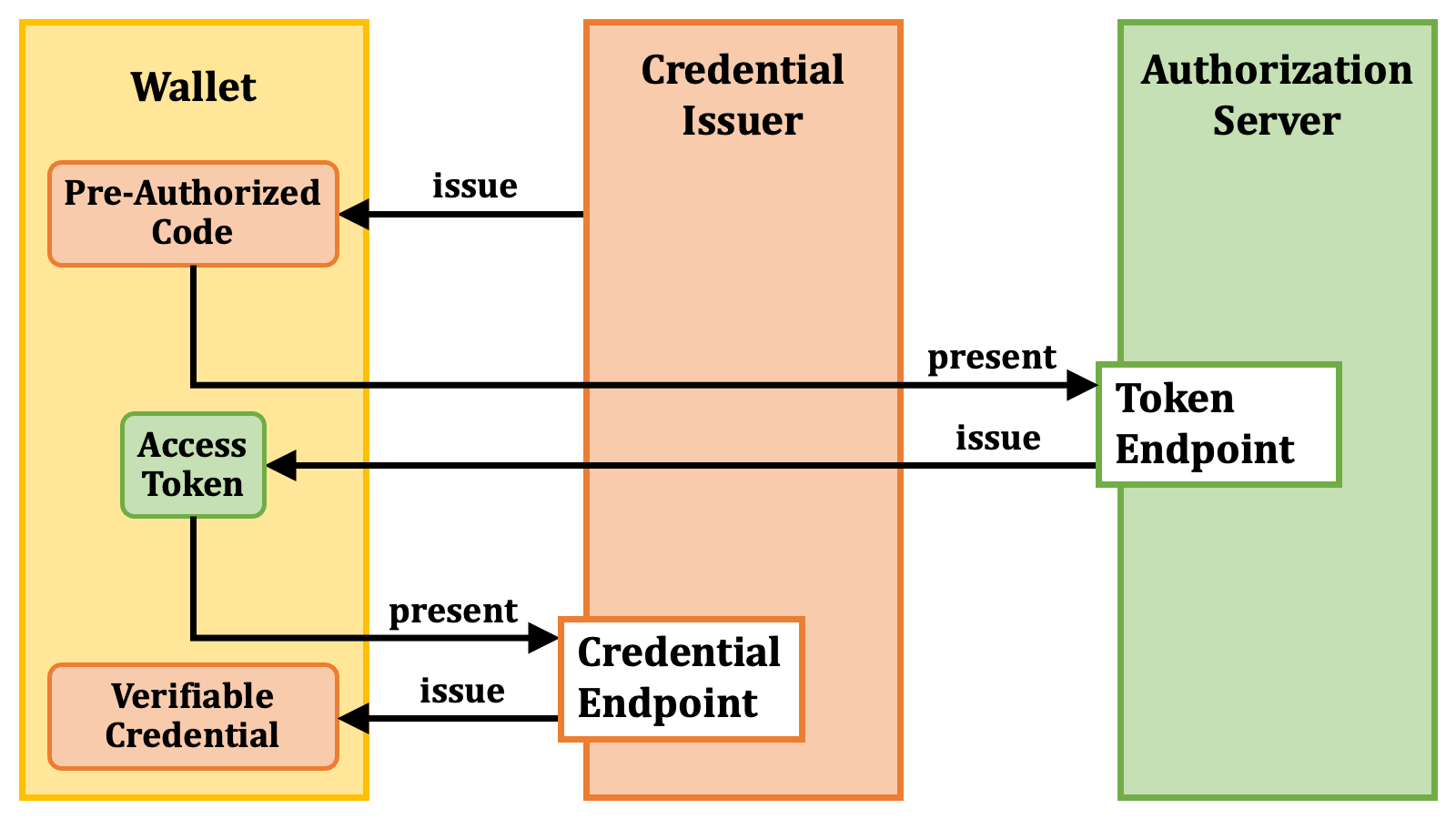 #### 2.2.2. Authorization Code Flow
The other methods than the pre-authorized code flow are extensions of the traditional "**authorization code flow**" ([RFC 6749][RFC_6749], [4.1. Authorization Code Grant][RFC_6749_4_1]).
Let's review the flow.
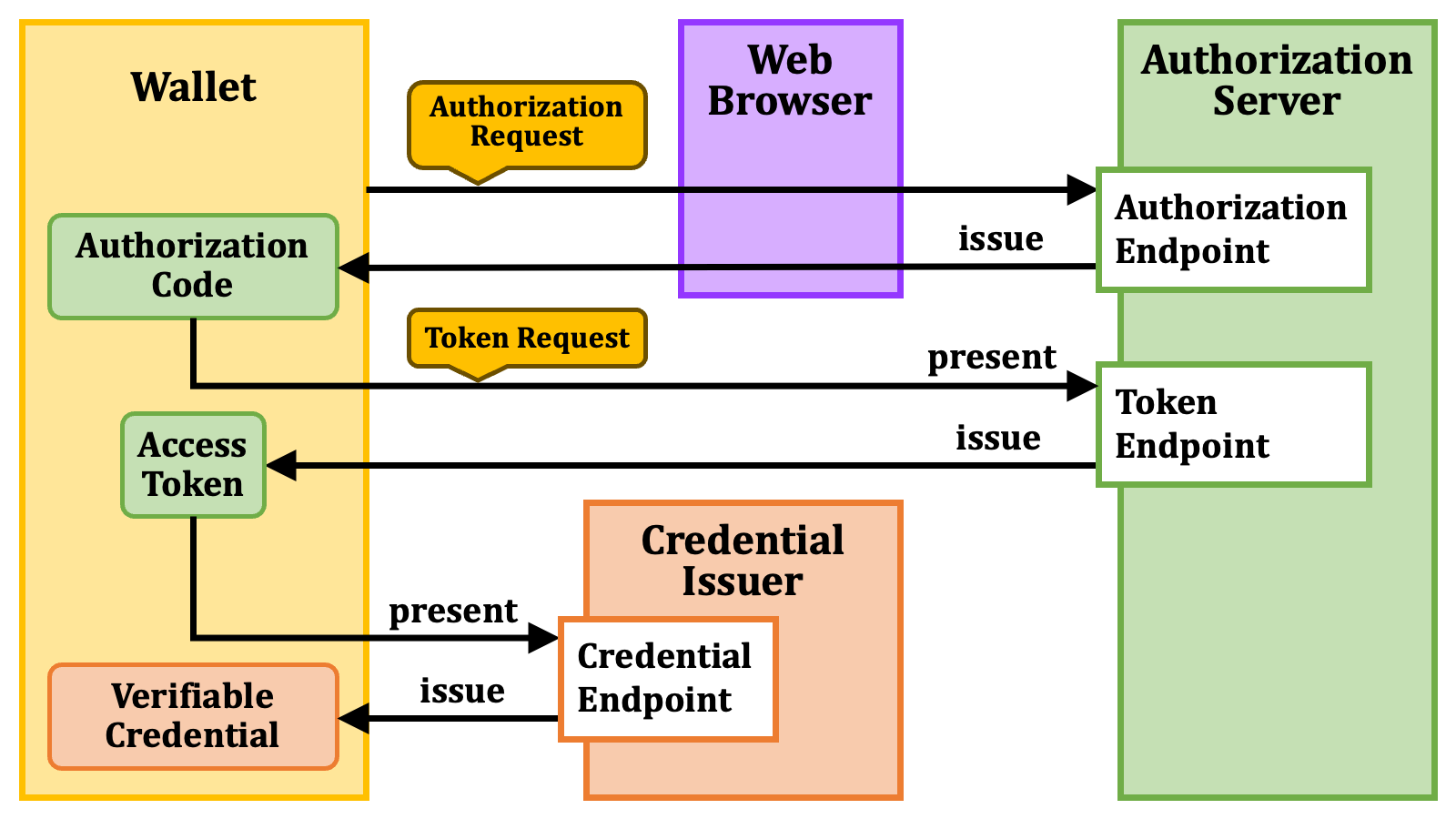
In the authorization code flow, as the first step, a client application (which is a wallet in the OID4VCI context) sends an "**authorization request**" to the "**authorization endpoint**" ([RFC 6749][RFC_6749], [3.1. Authorization Endpoint][RFC_6749_3_1]) of an authorization server via a web browser.
#### 2.2.2. Authorization Code Flow
The other methods than the pre-authorized code flow are extensions of the traditional "**authorization code flow**" ([RFC 6749][RFC_6749], [4.1. Authorization Code Grant][RFC_6749_4_1]).
Let's review the flow.
In the authorization code flow, as the first step, a client application (which is a wallet in the OID4VCI context) sends an "**authorization request**" to the "**authorization endpoint**" ([RFC 6749][RFC_6749], [3.1. Authorization Endpoint][RFC_6749_3_1]) of an authorization server via a web browser.
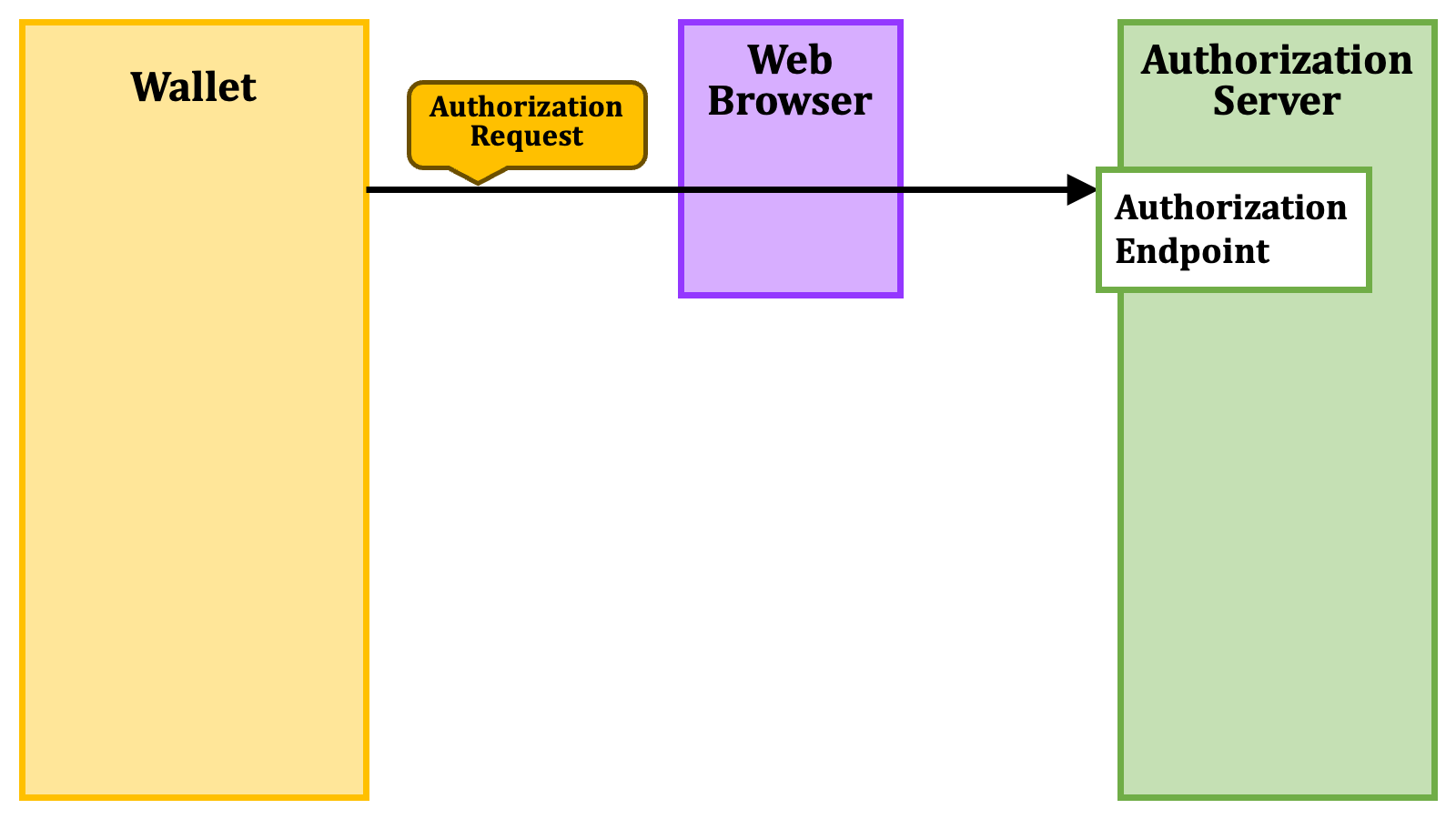 On receiving the authorization request, the authorization server begins communicating with a user via the web browser. After obtaining consent from the user, the authorization server issues an "**authorization code**" to the client application.
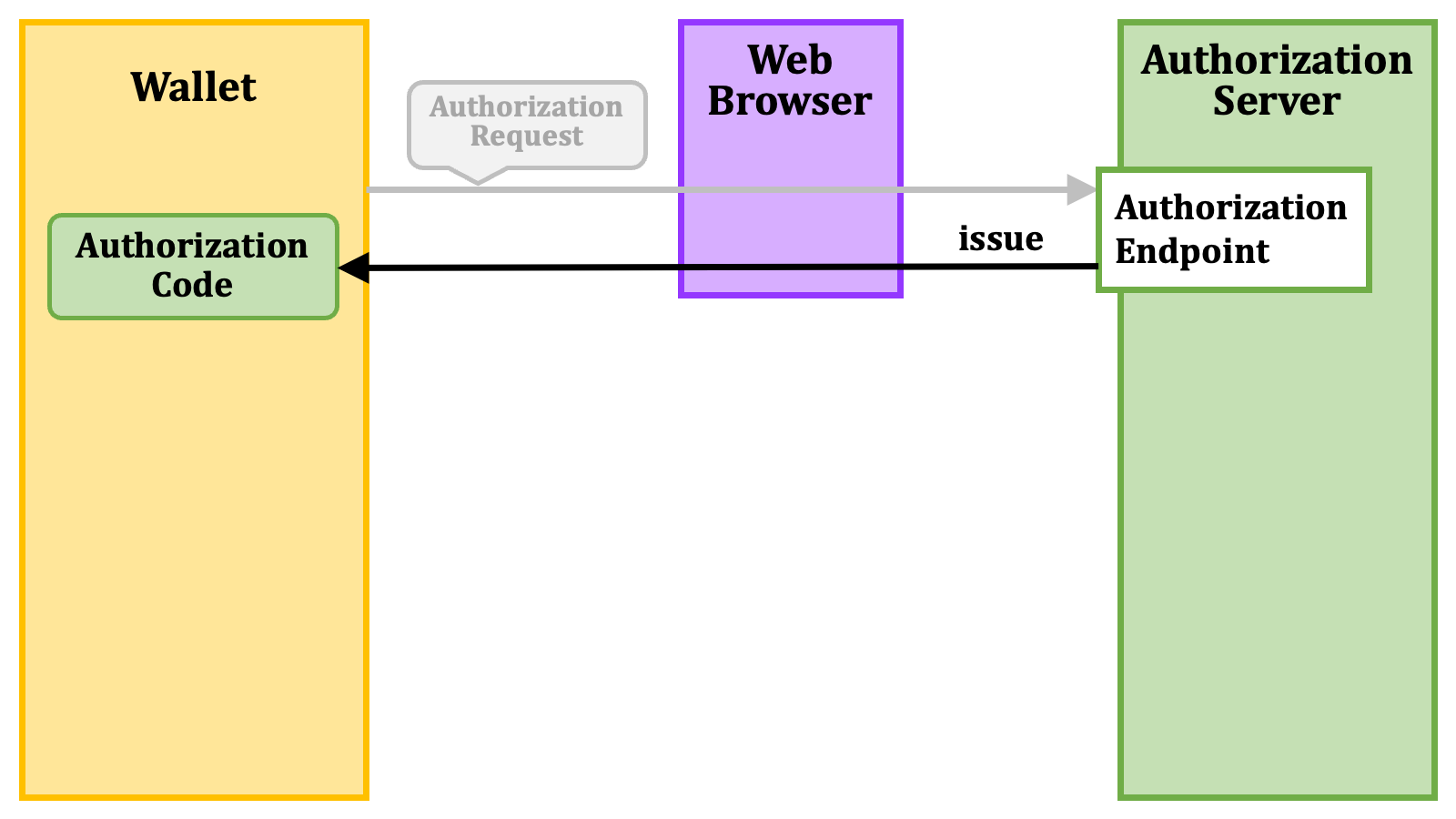 Then, the client application sends a "**token request**" including the authorization code to the token endpoint of the authorization server.
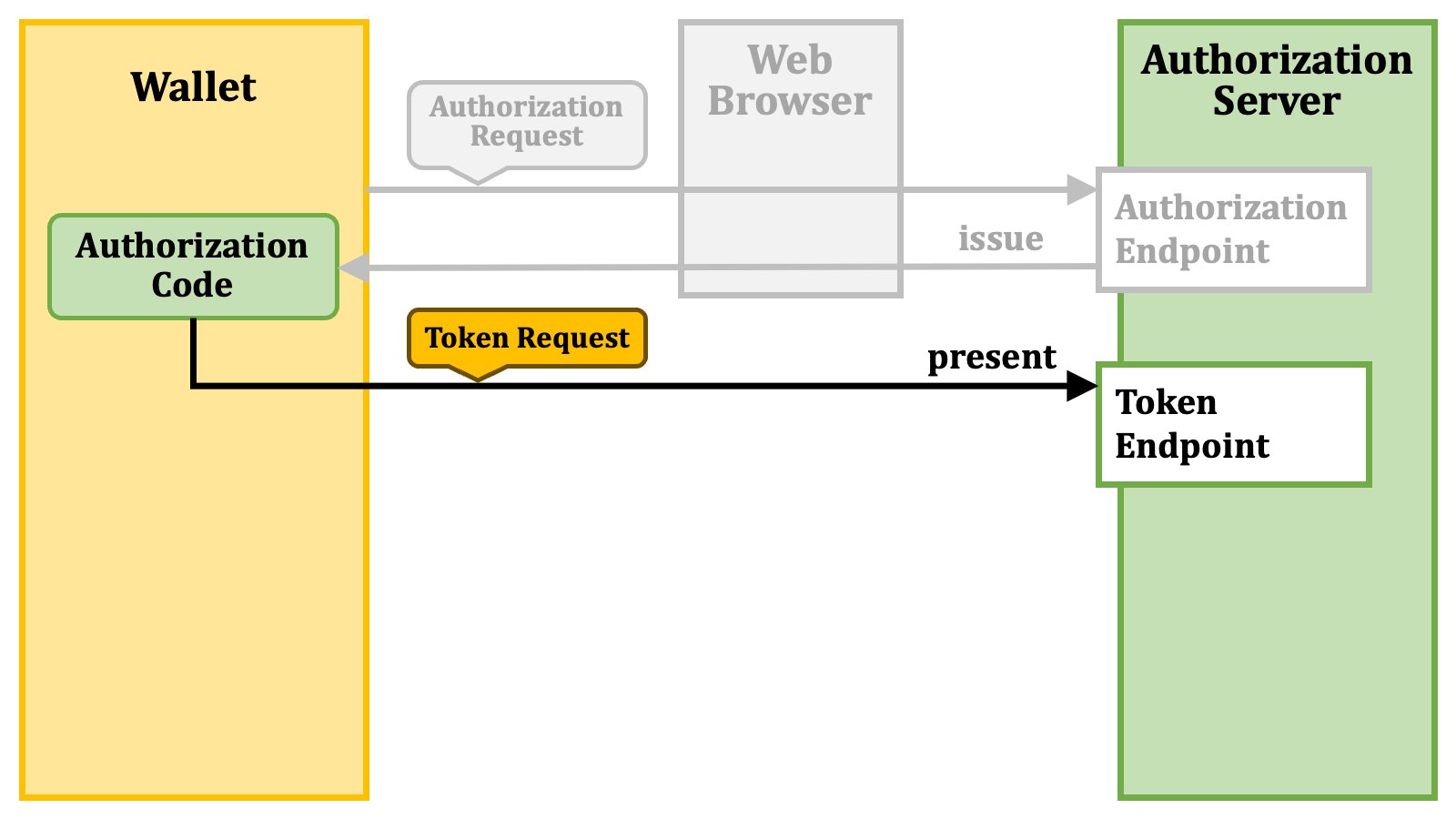 In return, the client application receives an access token.
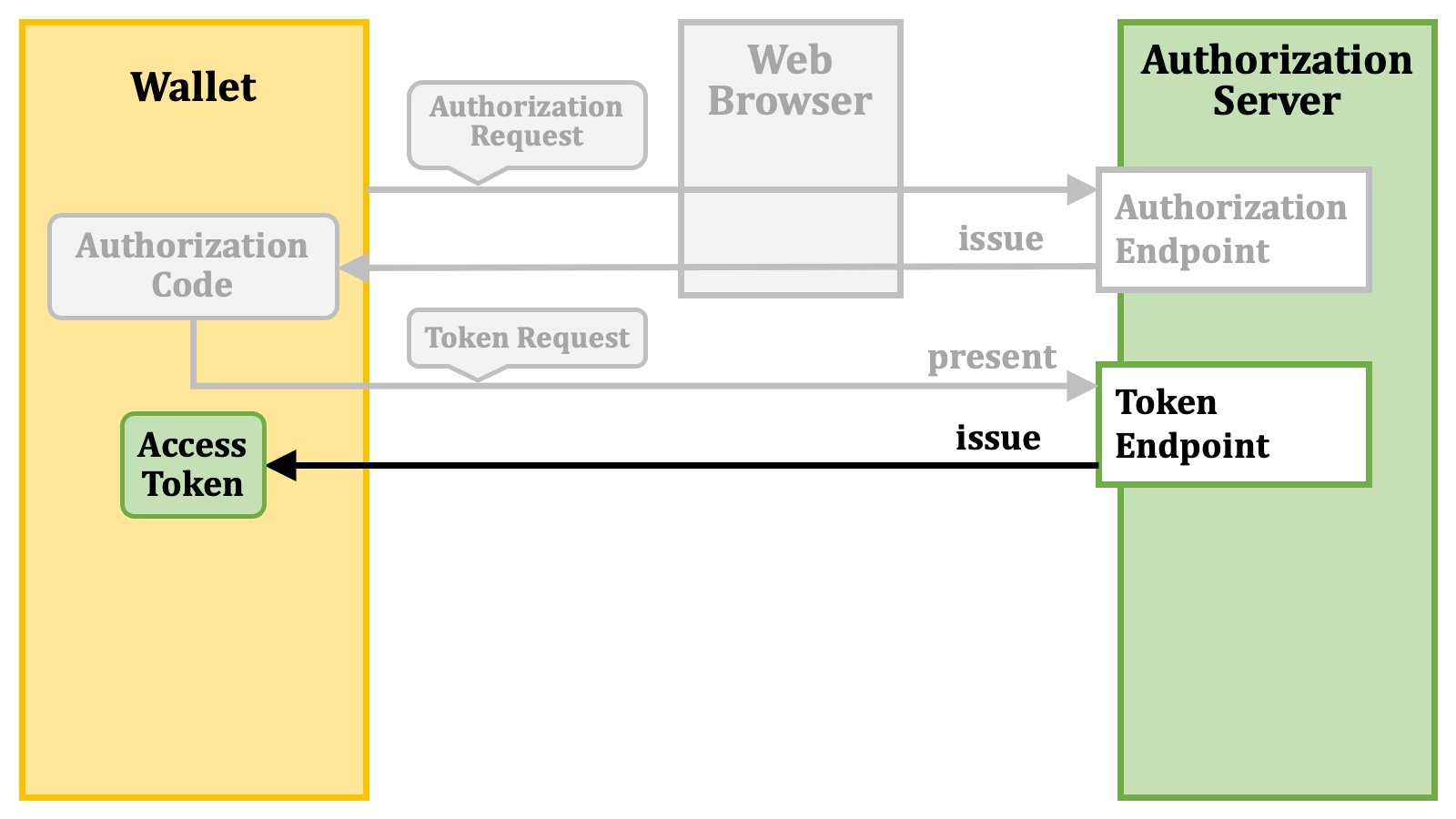 The process after getting an access token is the same as the one of the pre-authorized code flow. The client application presents the access token at the credential endpoint of the credential issuer.
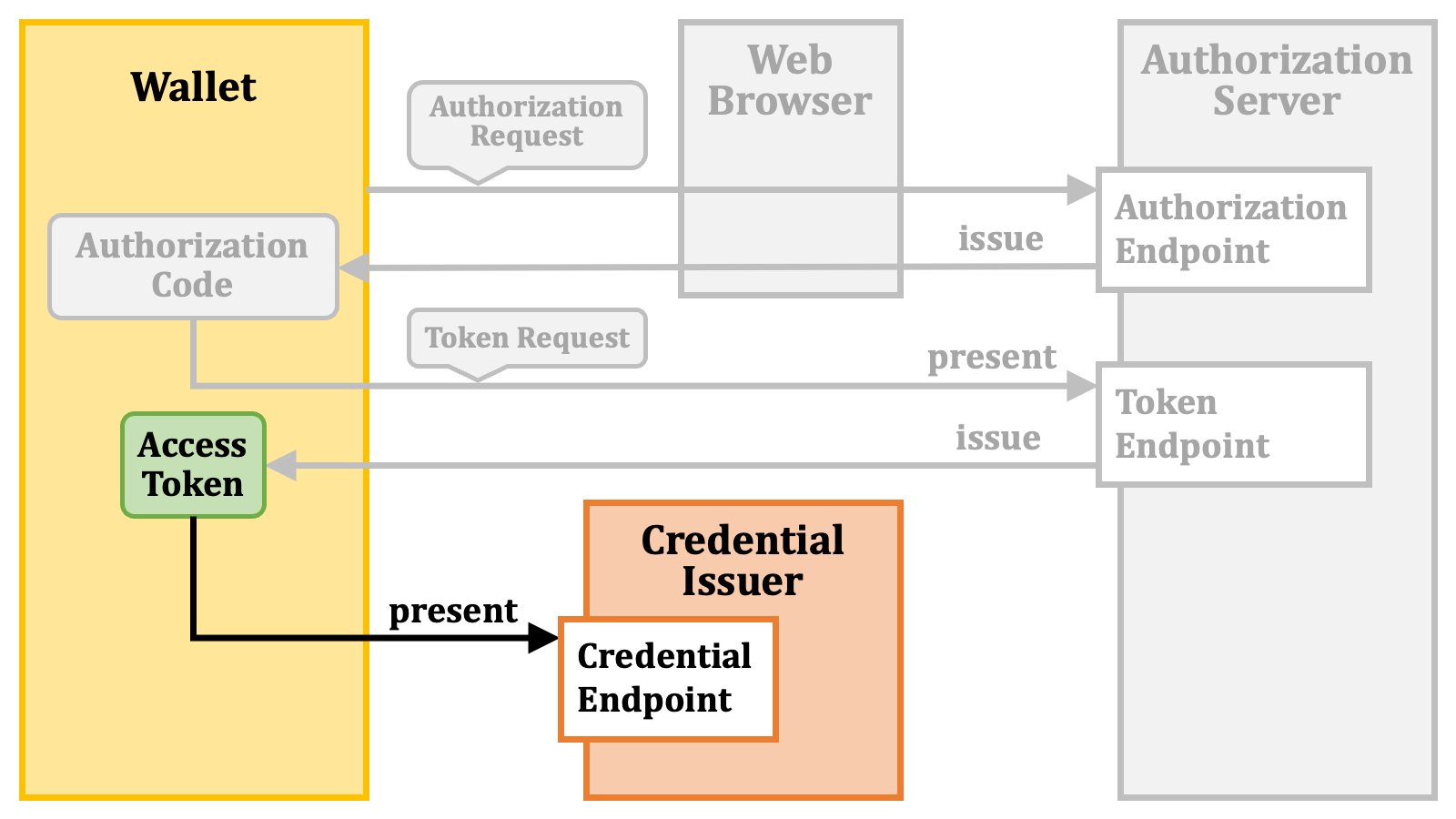 In return, the client application receives a verifiable credential.
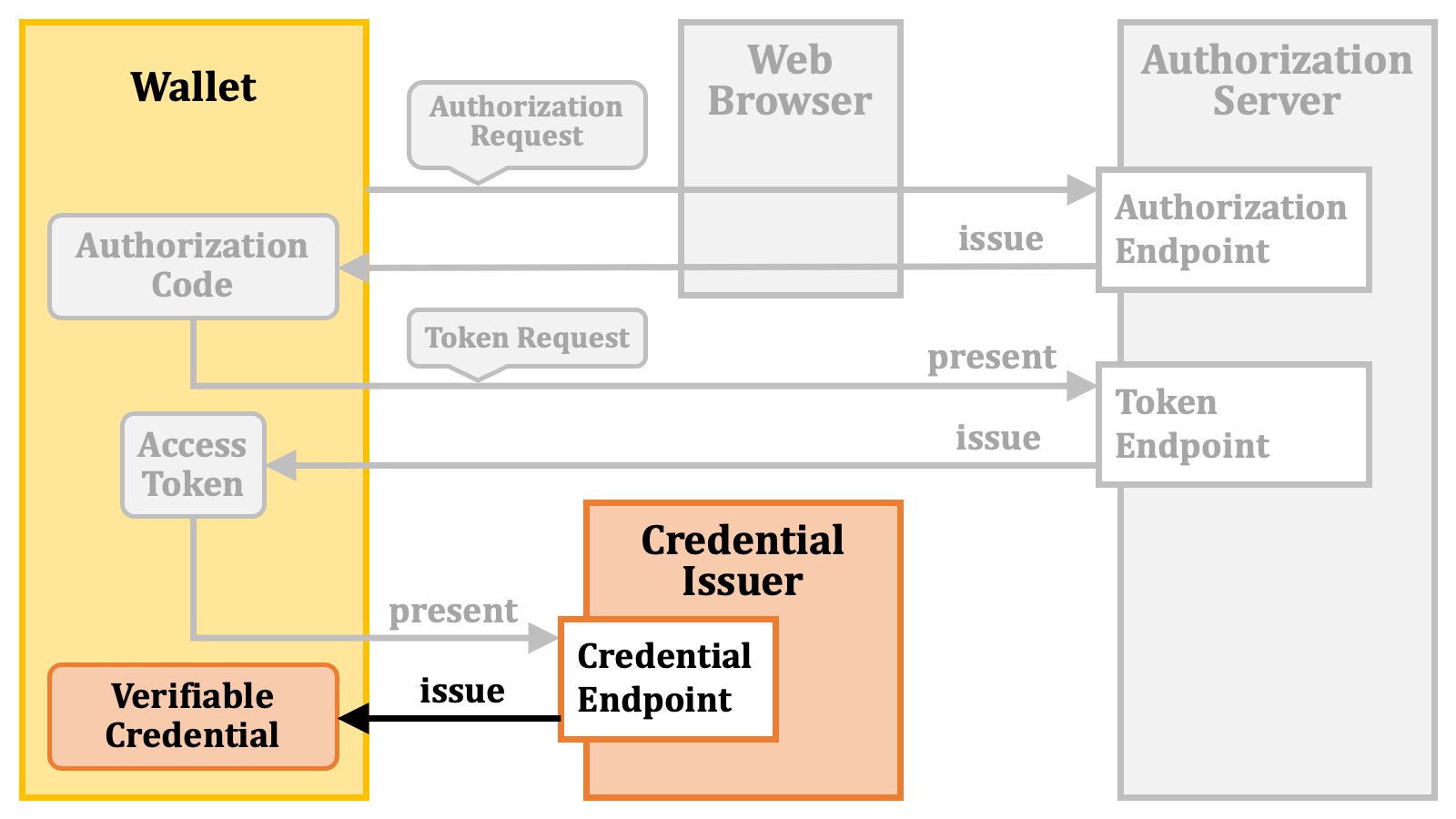 The diagram below illustrates the authorization code flow followed by the credential issuance.
 The OID4VCI specification extends the authorization request in the authorization code flow. To be specific, the specification utilizes the following request parameters of an authorization request.
1. The `issuer_state` request parameter.
2. The `authorization_details` request parameter.
3. The `scope` request parameter.
The OID4VCI specification extends the authorization request in the authorization code flow. To be specific, the specification utilizes the following request parameters of an authorization request.
1. The `issuer_state` request parameter.
2. The `authorization_details` request parameter.
3. The `scope` request parameter.
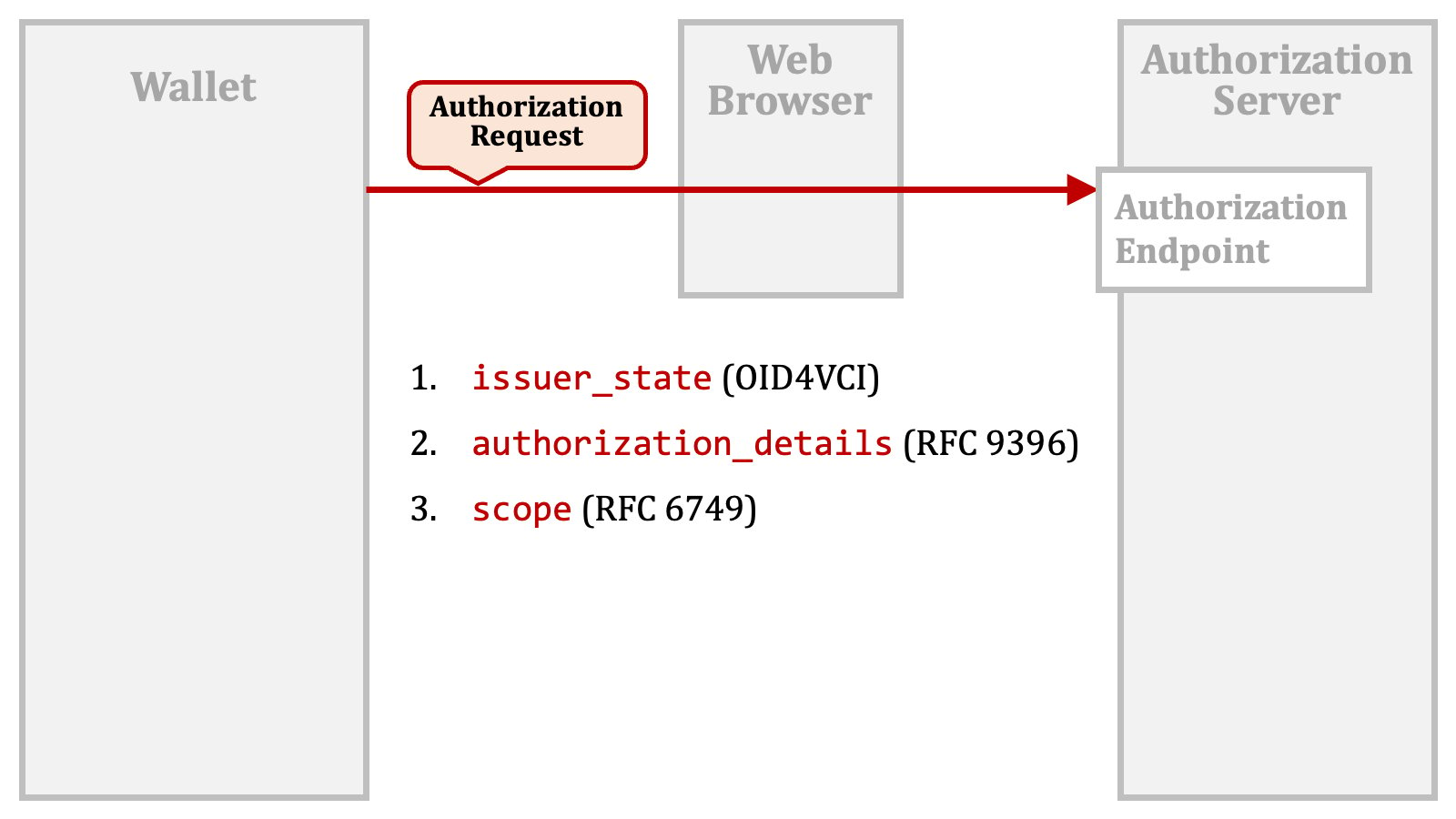 The `issuer_state` request parameter is a new one defined by the OID4VCI specification.
The `authorization_details` request parameter is defined in "[RFC 9396 OAuth 2.0 Rich Authorization Requests][RFC_9396]", a.k.a. "**RAR**".
The `scope` request parameter is a traditional one defined in "[RFC 6749 The OAuth 2.0 Authorization Framework][RFC_6749]".
As of this writing, the OID4VCI specification does not address the cases in which the above request parameters are used in combination. It remains uncertain whether the mechanisms using these request parameters are mutually exclusive or can coexist.
Authlete's current implementation considers all these mechanisms and generates an access token that can be used for the issuance of all the verifiable credentials requested via the request parameters.
#### 2.2.3. Authorization Code Flow + issuer\_state
The `issuer_state` request parameter is defined in the OID4VCI specification. To use the request parameter, a wallet needs to obtain an "**issuer state**" from a credential issuer before making an authorization request.
The `issuer_state` request parameter is a new one defined by the OID4VCI specification.
The `authorization_details` request parameter is defined in "[RFC 9396 OAuth 2.0 Rich Authorization Requests][RFC_9396]", a.k.a. "**RAR**".
The `scope` request parameter is a traditional one defined in "[RFC 6749 The OAuth 2.0 Authorization Framework][RFC_6749]".
As of this writing, the OID4VCI specification does not address the cases in which the above request parameters are used in combination. It remains uncertain whether the mechanisms using these request parameters are mutually exclusive or can coexist.
Authlete's current implementation considers all these mechanisms and generates an access token that can be used for the issuance of all the verifiable credentials requested via the request parameters.
#### 2.2.3. Authorization Code Flow + issuer\_state
The `issuer_state` request parameter is defined in the OID4VCI specification. To use the request parameter, a wallet needs to obtain an "**issuer state**" from a credential issuer before making an authorization request.
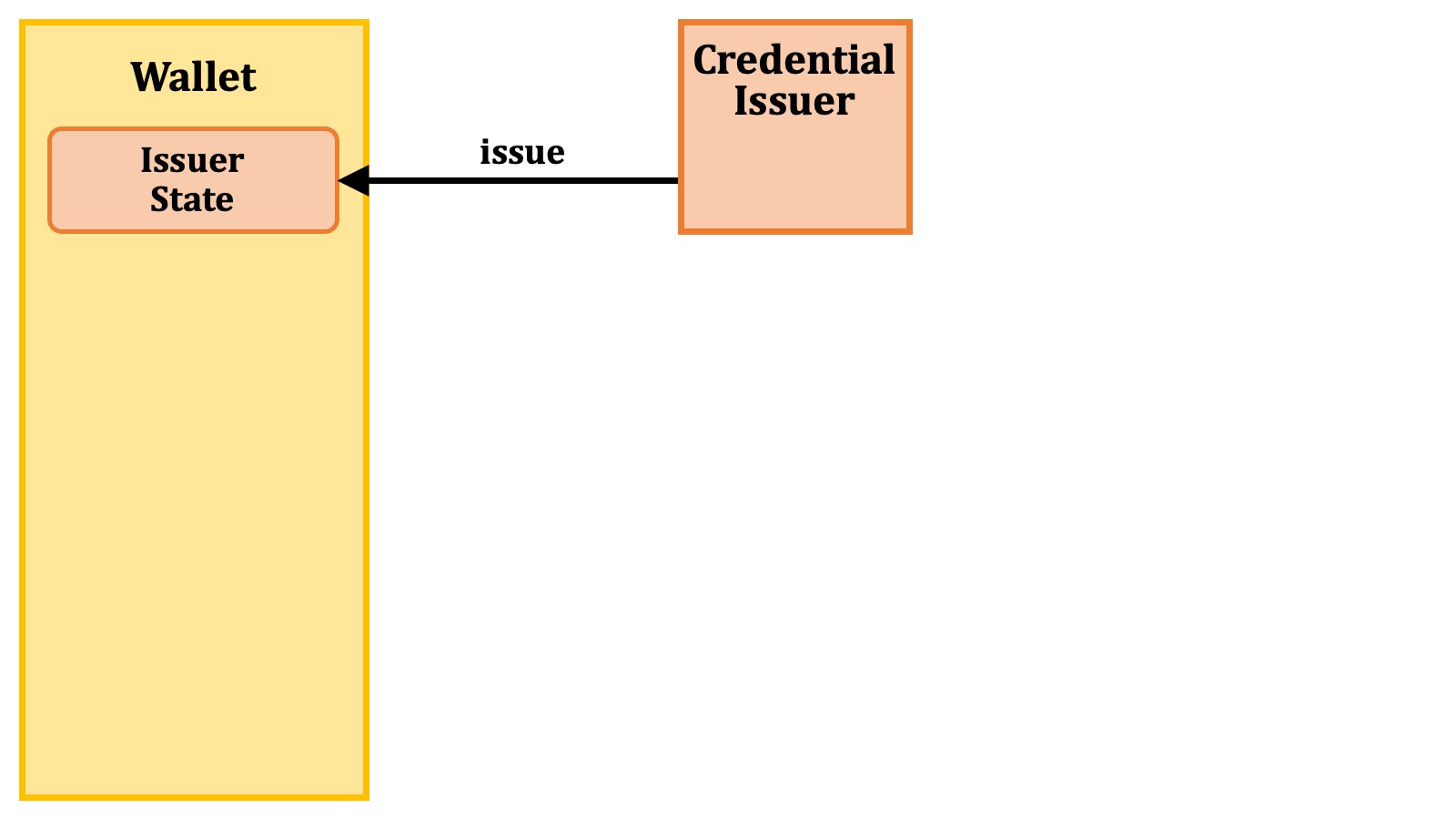 Then, the wallet makes an authorization request with the issuer state included as the value of the `issuer_state` request parameter.
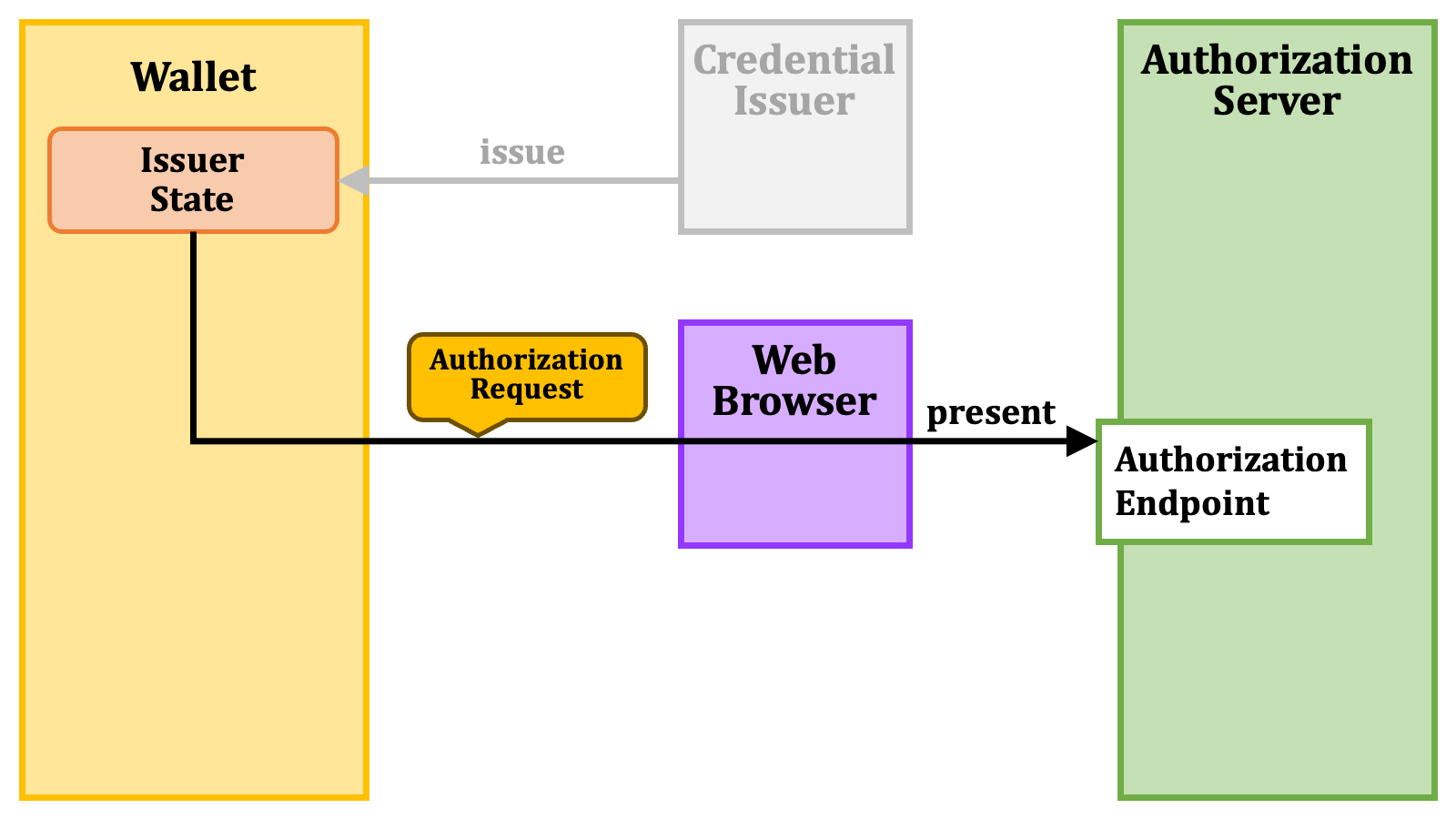 The remaining part after the authorization request is the same as that of the normal authorization code flow.
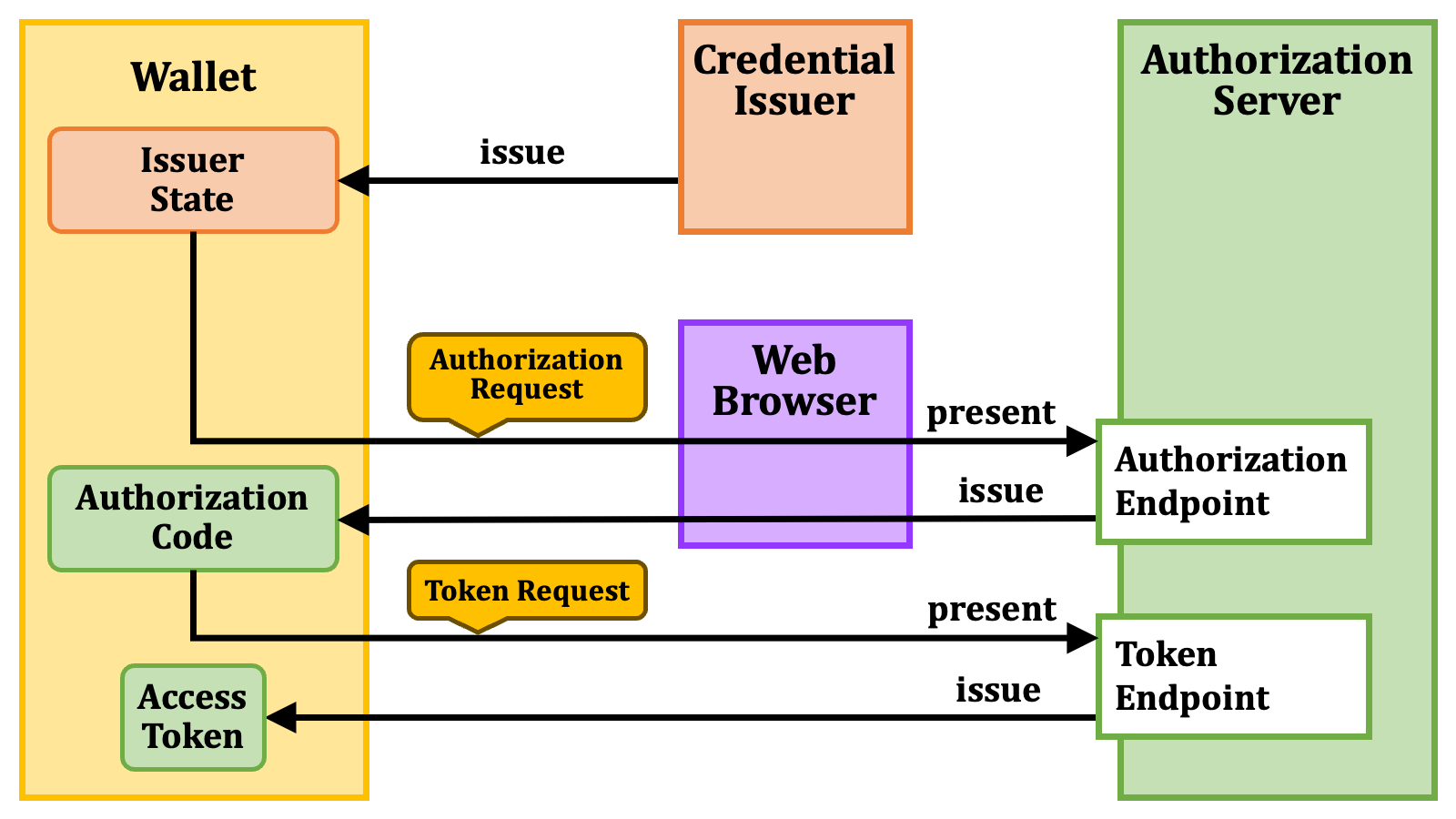
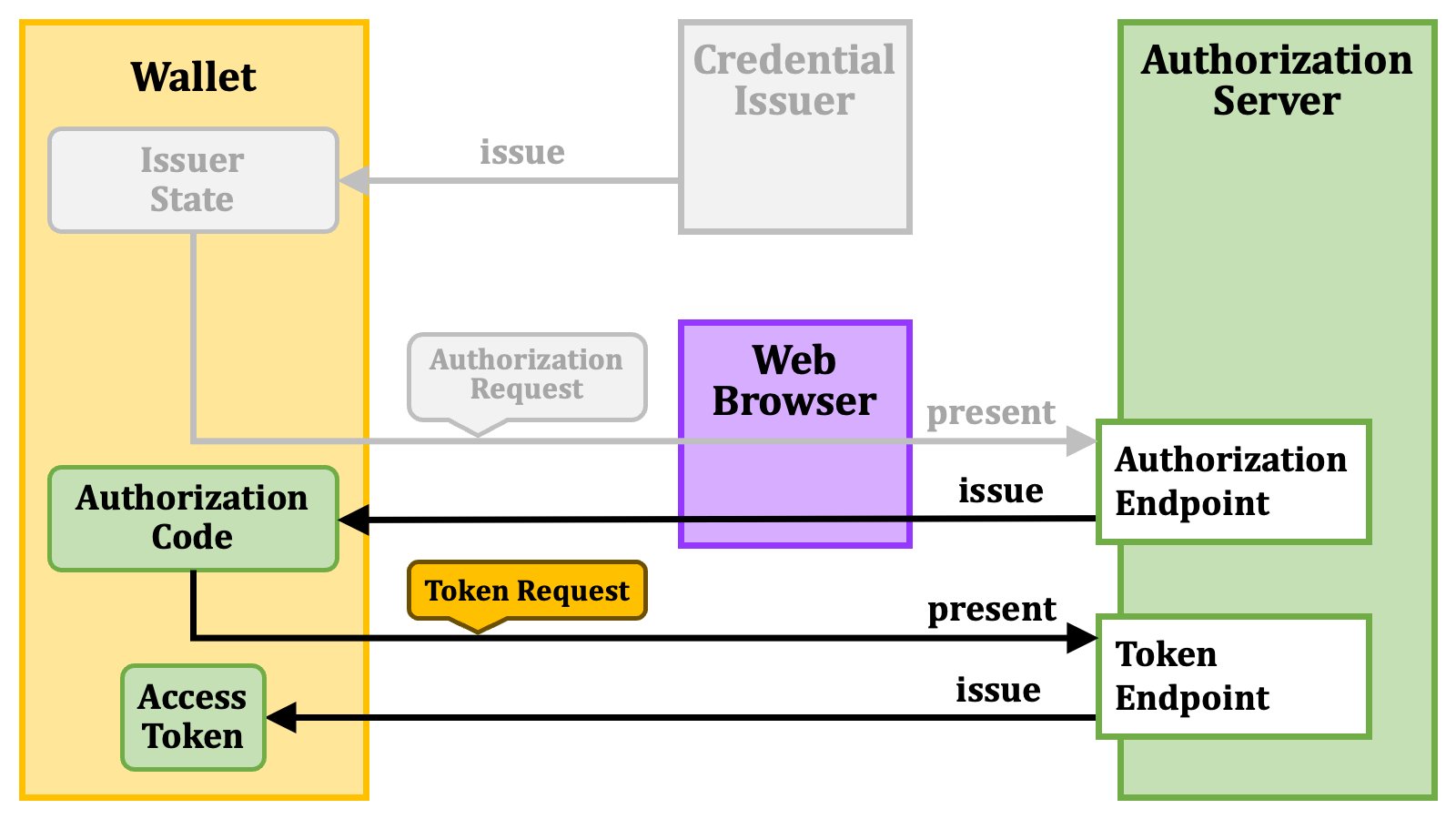 The diagram below illustrates the authorization code flow with an issuer state.
 #### 2.2.4. Authorization Code Flow + authorization\_details
The RAR specification ([RFC 9396][RFC_9396]) defines the `authorization_details` parameter as a general-purpose parameter that conveys detailed information about authorization. It is up to deployments how to use the parameter.
The value of the parameter is a JSON array, and each element of the array is a JSON object. We call the object "**RAR object**".
#### 2.2.4. Authorization Code Flow + authorization\_details
The RAR specification ([RFC 9396][RFC_9396]) defines the `authorization_details` parameter as a general-purpose parameter that conveys detailed information about authorization. It is up to deployments how to use the parameter.
The value of the parameter is a JSON array, and each element of the array is a JSON object. We call the object "**RAR object**".
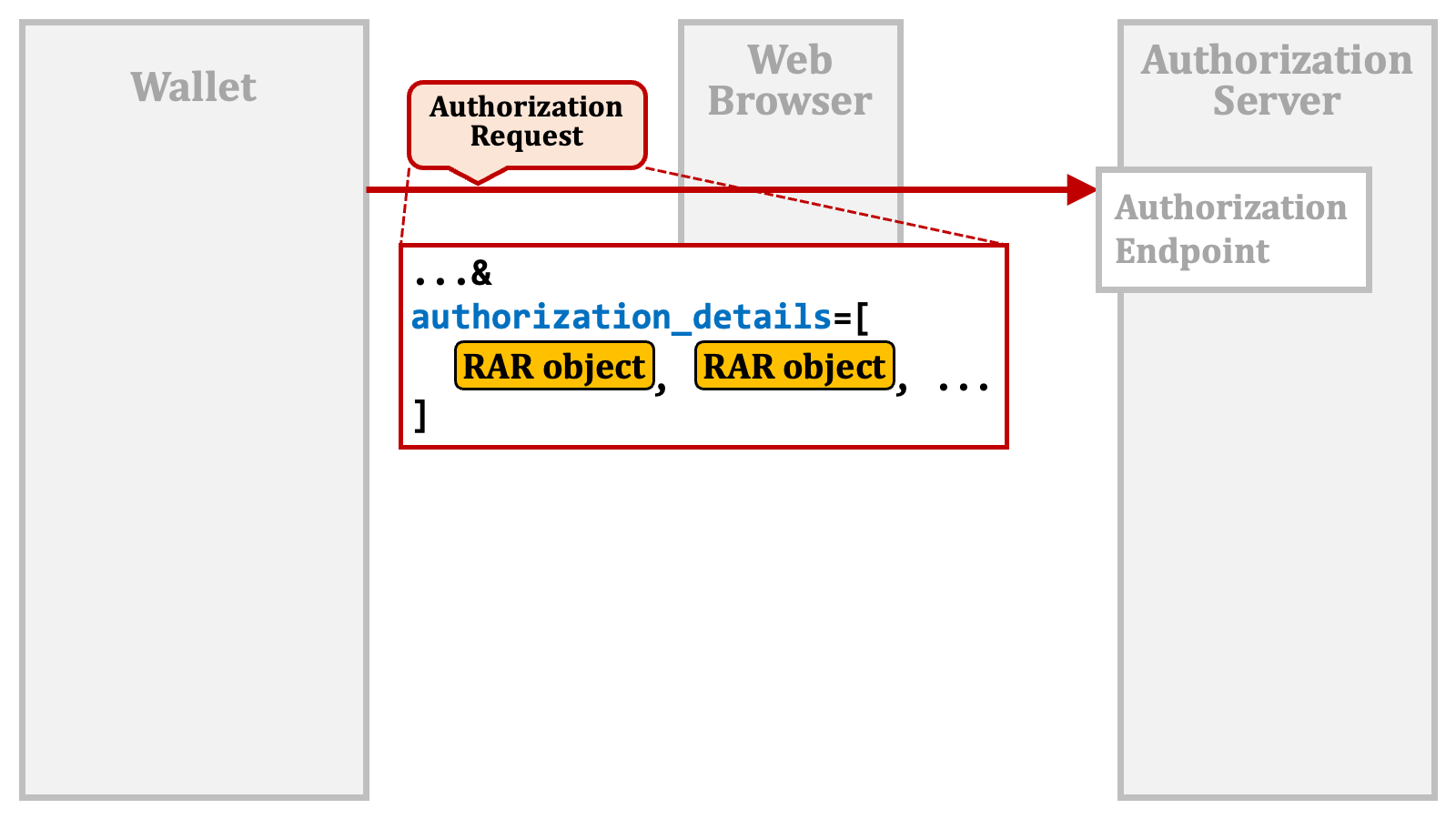 The RAR object is flexible. Any properties can be put in the object. However, the RAR specification predefines several properties that are expected to be commonly used across the foreseeable use cases.
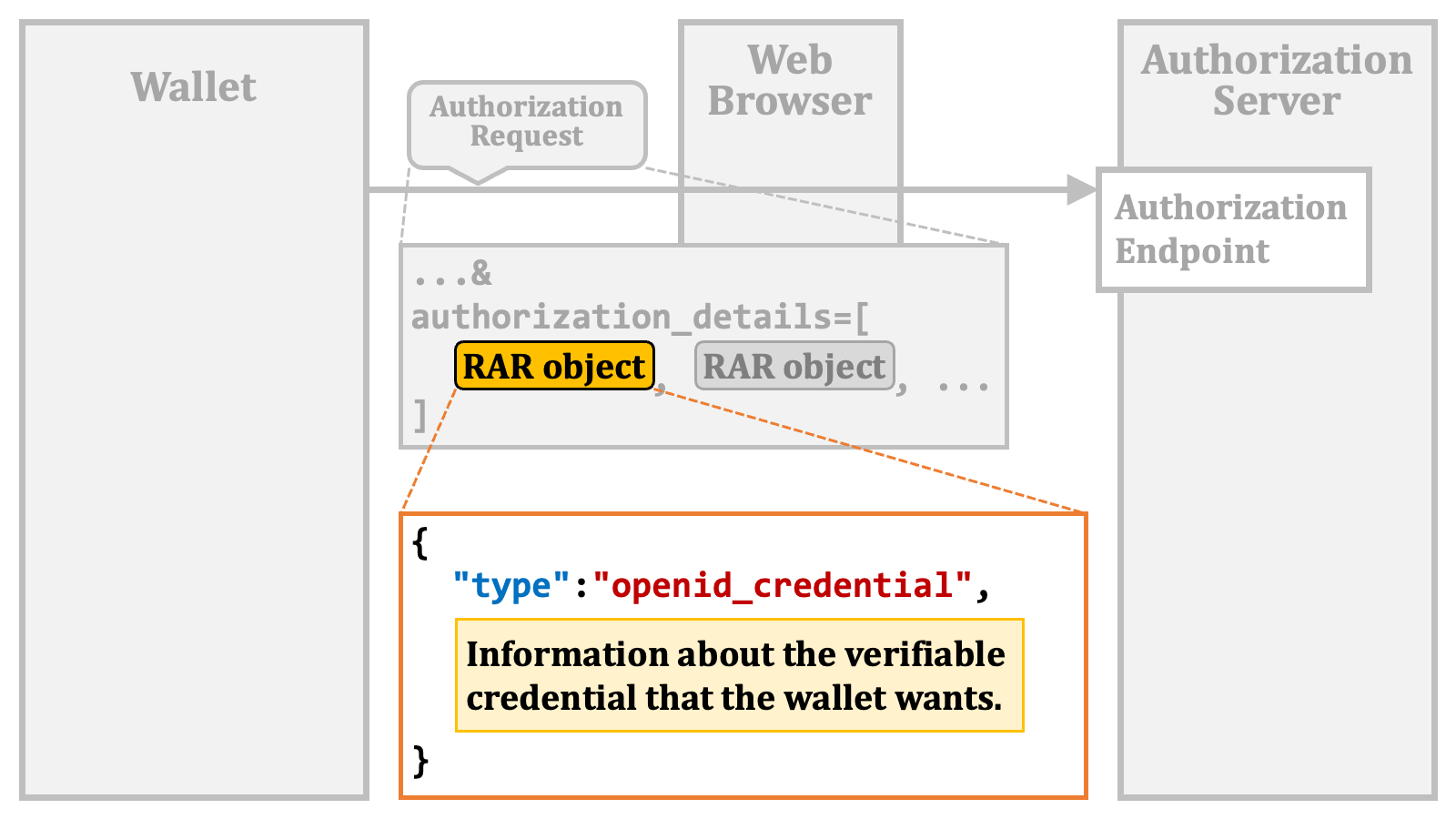
Among such predefined properties, the `"type"` property is the only mandatory property. The property indicates what the RAR object represents.
And, the OID4VCI specification defines a special value, `"openid_credential"`, for the `"type"` property in order to indicate that the RAR object conveys information about the verifiable credential that the wallet wants.
The RAR object is flexible. Any properties can be put in the object. However, the RAR specification predefines several properties that are expected to be commonly used across the foreseeable use cases.
Among such predefined properties, the `"type"` property is the only mandatory property. The property indicates what the RAR object represents.
And, the OID4VCI specification defines a special value, `"openid_credential"`, for the `"type"` property in order to indicate that the RAR object conveys information about the verifiable credential that the wallet wants.
 #### 2.2.5. Authorization Code Flow + scope
The `scope` request parameter is one of the traditional ones defined in the core specification of OAuth 2.0 ([RFC 6749][RFC_6749]). Its original usage is to list permissions that the client application wants. If the user approves the request, the authorization server issues an access token that has the requested permissions.
#### 2.2.5. Authorization Code Flow + scope
The `scope` request parameter is one of the traditional ones defined in the core specification of OAuth 2.0 ([RFC 6749][RFC_6749]). Its original usage is to list permissions that the client application wants. If the user approves the request, the authorization server issues an access token that has the requested permissions.
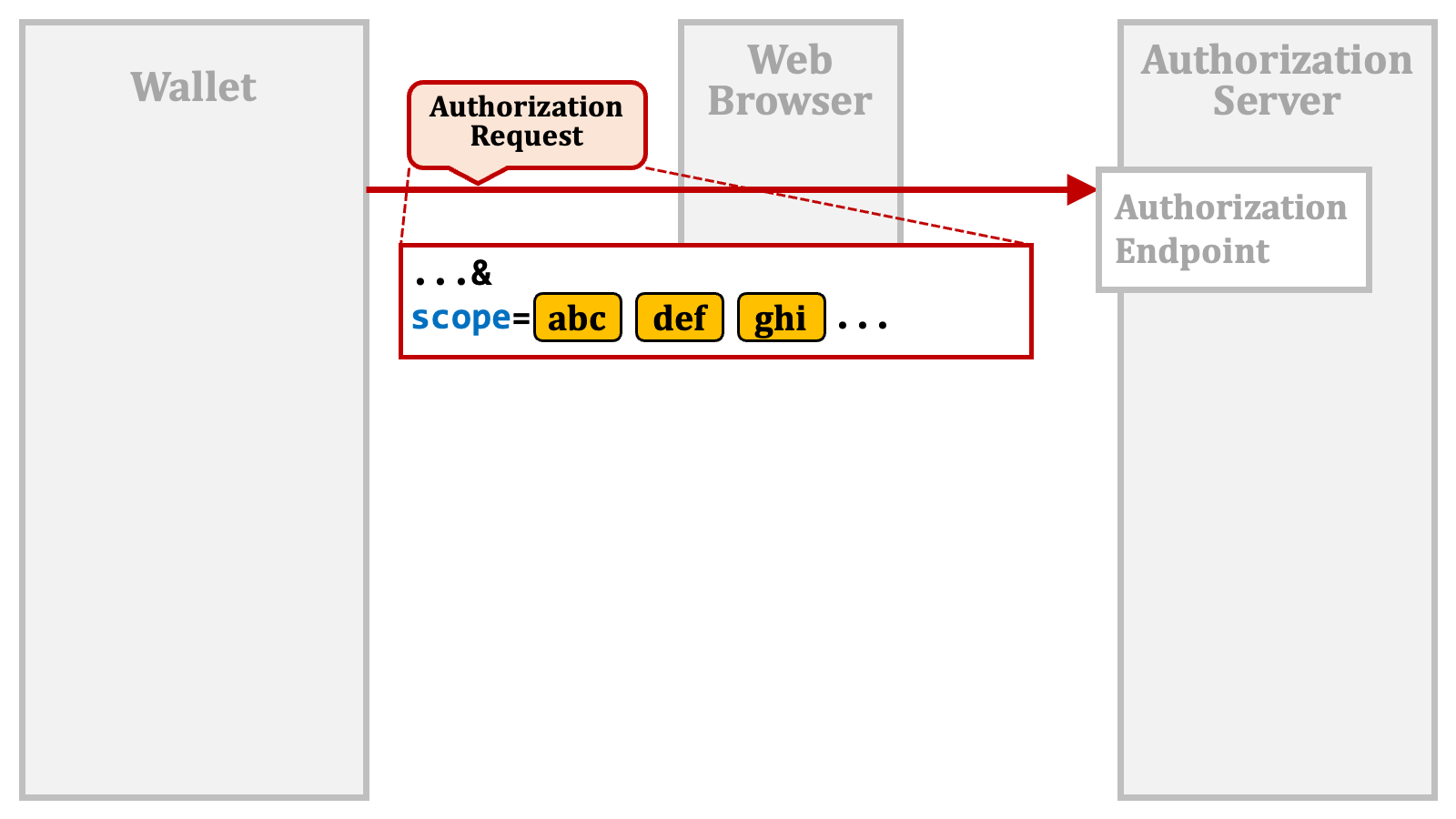 Historically, the `scope` request parameter has been used for purposes beyond its original intent, and the OID4VCI specification has similarly extended the use of the `scope` request parameter.
A credential issuer manages the types of verifiable credentials it can issue as "**credential configurations**", and publishes the list of the credential configurations at a certain place. Each credential configuration may have a `"scope"` property.
Historically, the `scope` request parameter has been used for purposes beyond its original intent, and the OID4VCI specification has similarly extended the use of the `scope` request parameter.
A credential issuer manages the types of verifiable credentials it can issue as "**credential configurations**", and publishes the list of the credential configurations at a certain place. Each credential configuration may have a `"scope"` property.
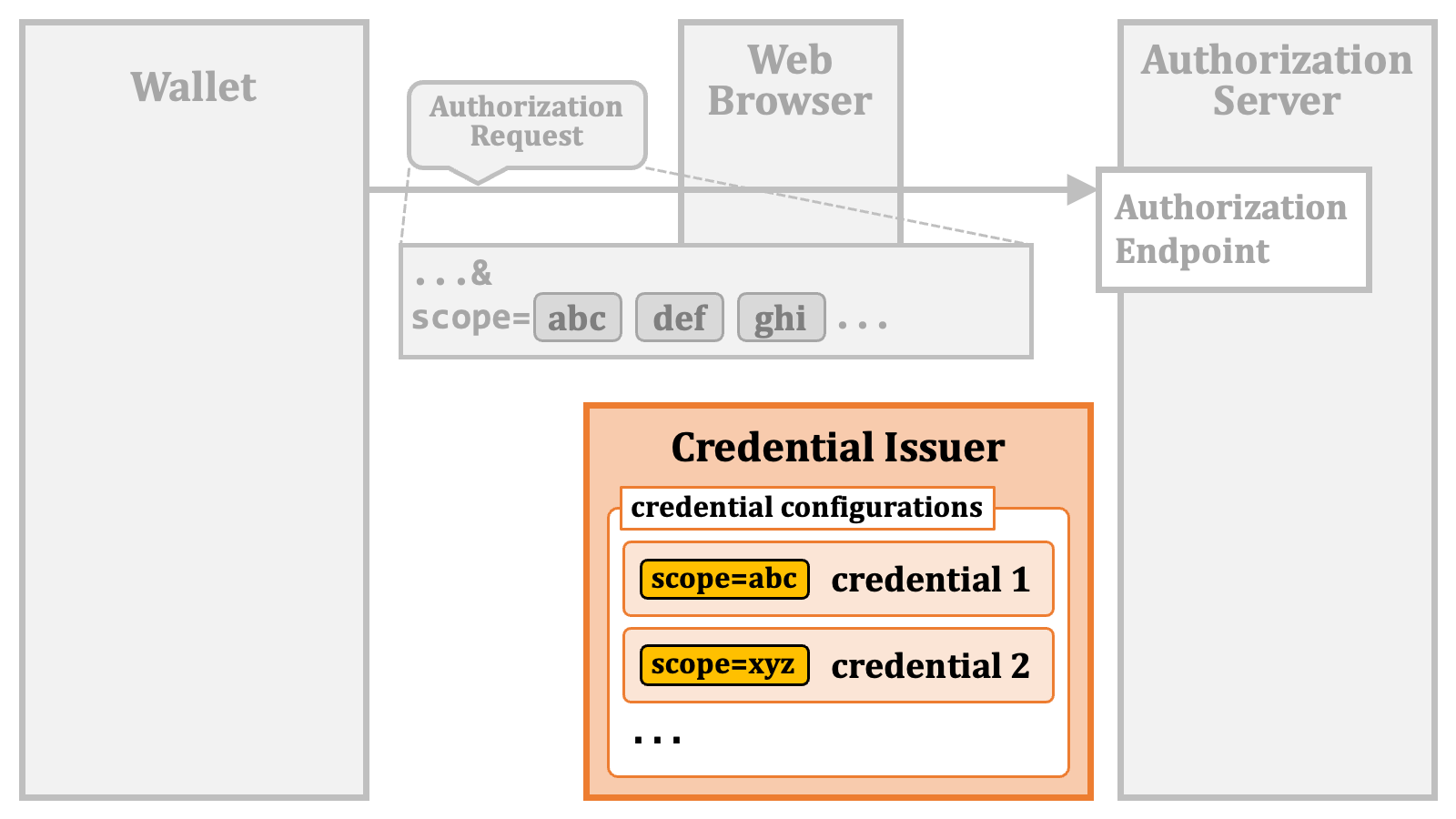 A wallet may include values of the `"scope"` property in the `scope` request parameter to indicate which type of verifiable credentials it wants.
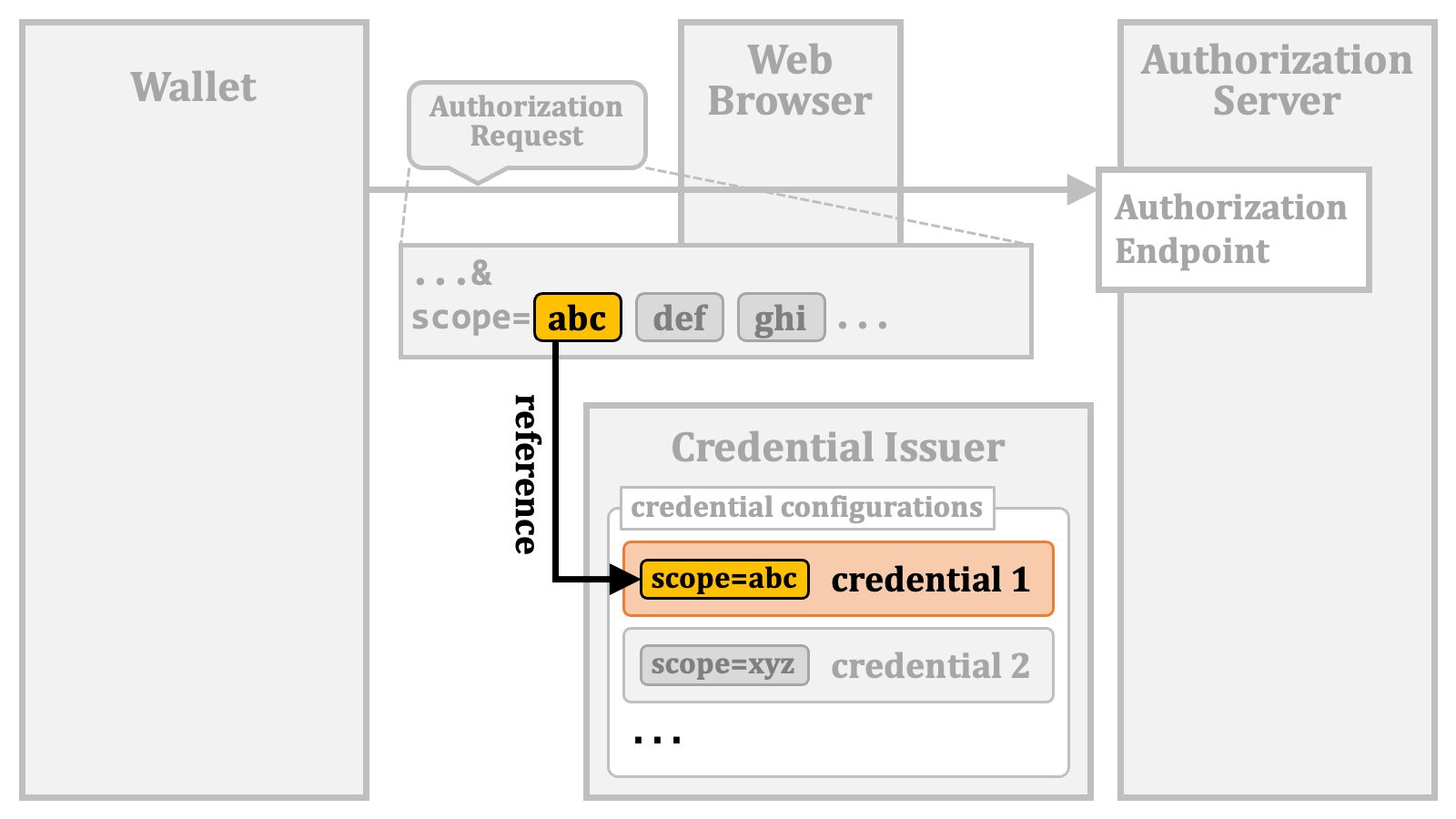 Multiple credential configurations may have the same value for the `"scope"` property.
Because the core specification of OAuth 2.0 ([RFC 6749](https://www.rfc-editor.org/rfc/rfc6749.html)) requires that authorization servers ignore unknown `scope` values, it is likely that you need to explicitly pre-register the values of the `"scope"` property of the supported credentials as supported scope values with your authorization server.
In addition, if [OpenID Federation](https://openid.net/specs/openid-federation-1_0.html) is employed, cares need to be taken to prevent metadata policies from dropping `scope` values for verifiable credential issuance unintentionally.
### 2.3. Credential Issuance Overview
Once a wallet obtains an access token from an authorization server, the wallet can request a credential issuer to issue a verifiable credential by presenting the access token.
In the foundational procedure, the wallet sends a credential request with an access token to the credential endpoint of the credential issuer.
Multiple credential configurations may have the same value for the `"scope"` property.
Because the core specification of OAuth 2.0 ([RFC 6749](https://www.rfc-editor.org/rfc/rfc6749.html)) requires that authorization servers ignore unknown `scope` values, it is likely that you need to explicitly pre-register the values of the `"scope"` property of the supported credentials as supported scope values with your authorization server.
In addition, if [OpenID Federation](https://openid.net/specs/openid-federation-1_0.html) is employed, cares need to be taken to prevent metadata policies from dropping `scope` values for verifiable credential issuance unintentionally.
### 2.3. Credential Issuance Overview
Once a wallet obtains an access token from an authorization server, the wallet can request a credential issuer to issue a verifiable credential by presenting the access token.
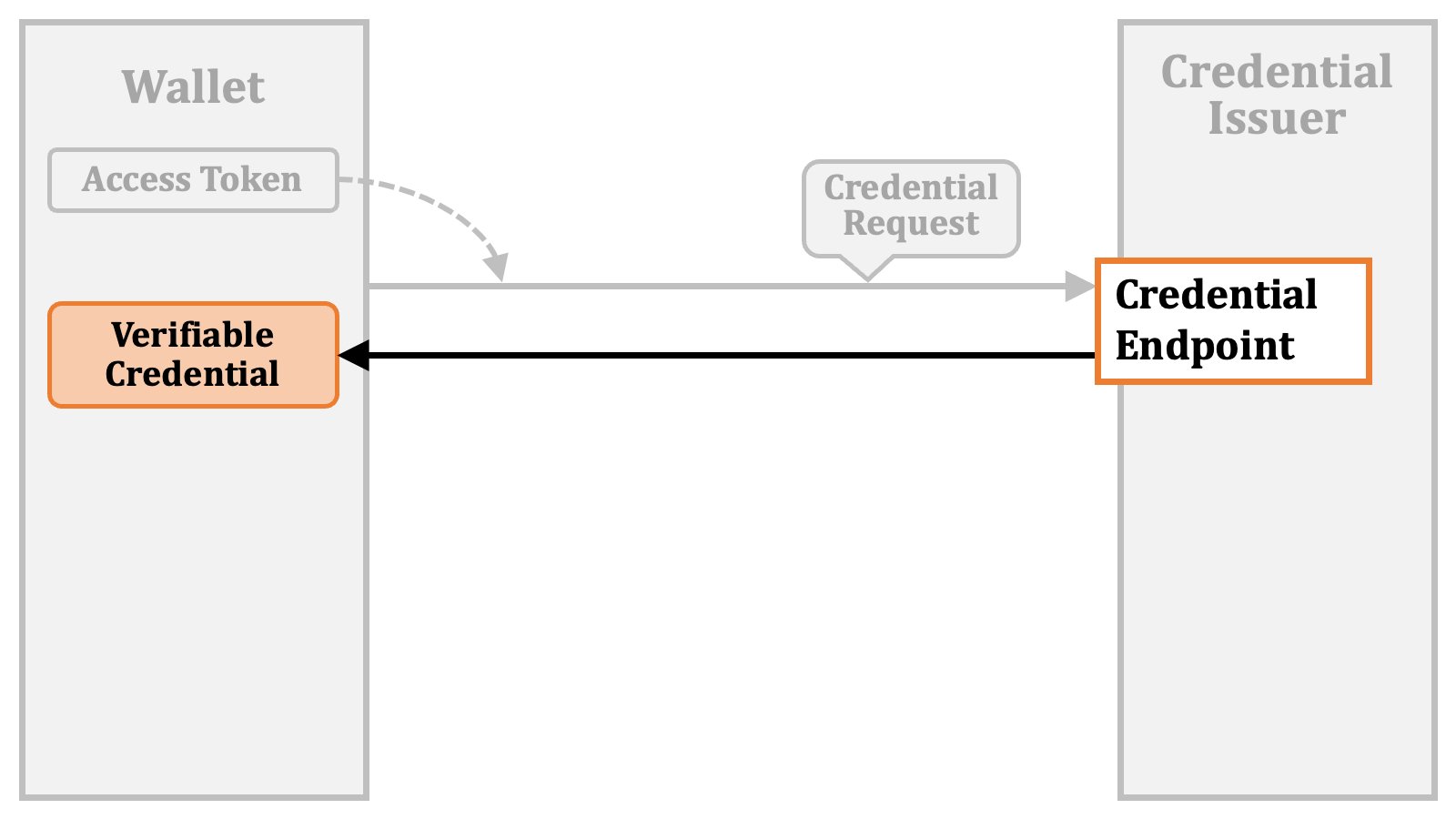
In the foundational procedure, the wallet sends a credential request with an access token to the credential endpoint of the credential issuer.
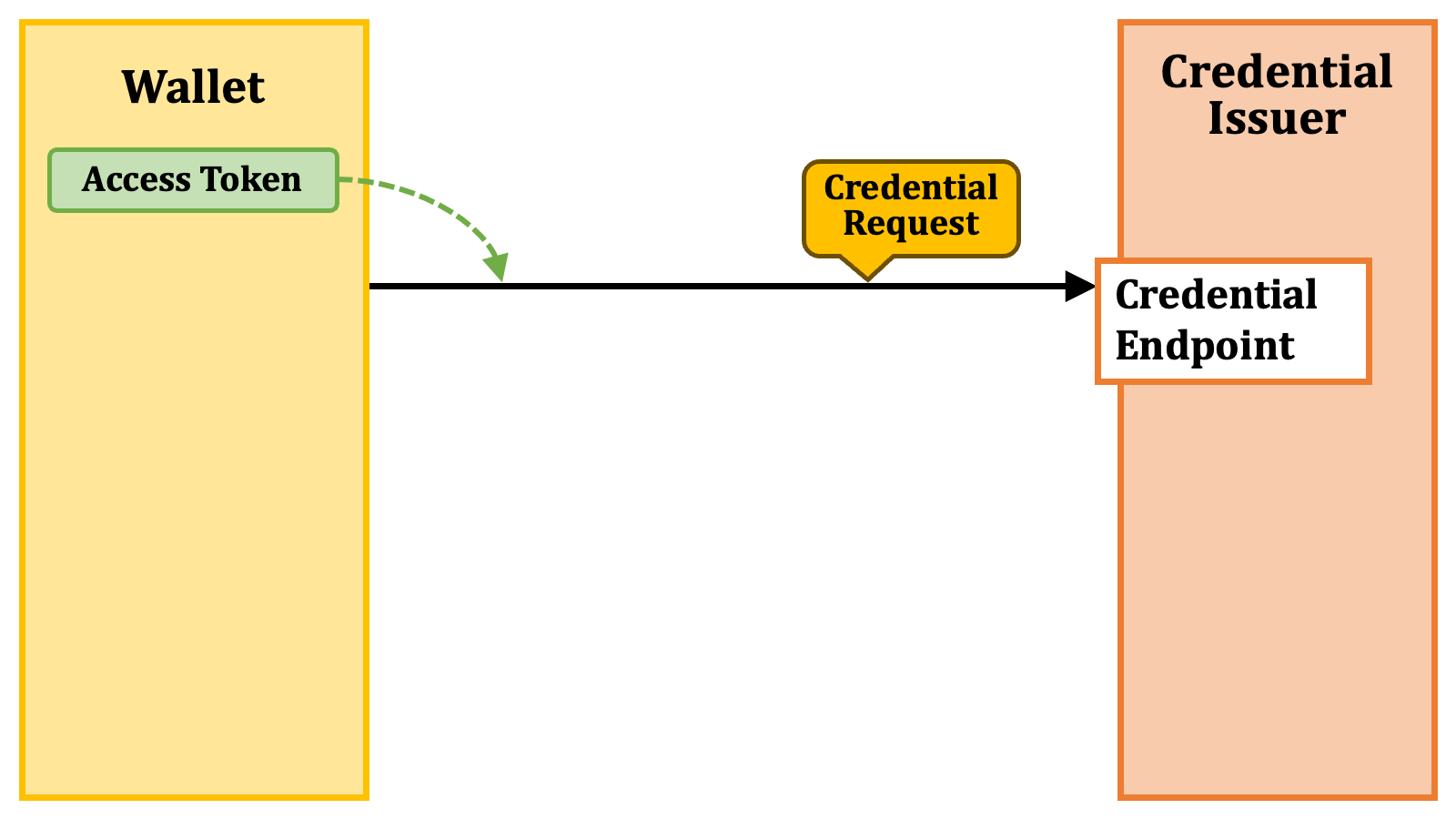 The credential issuer issues the requested verifiable credential as a response.
 #### 2.3.1. Deferred Credential Issuance
However, it is possible that the verifiable credential is not yet available when requested. For example, there might be time-consuming offline processes happening in the background.
In such a case, the credential issuer issues a "**transaction ID**" instead.
#### 2.3.1. Deferred Credential Issuance
However, it is possible that the verifiable credential is not yet available when requested. For example, there might be time-consuming offline processes happening in the background.
In such a case, the credential issuer issues a "**transaction ID**" instead.
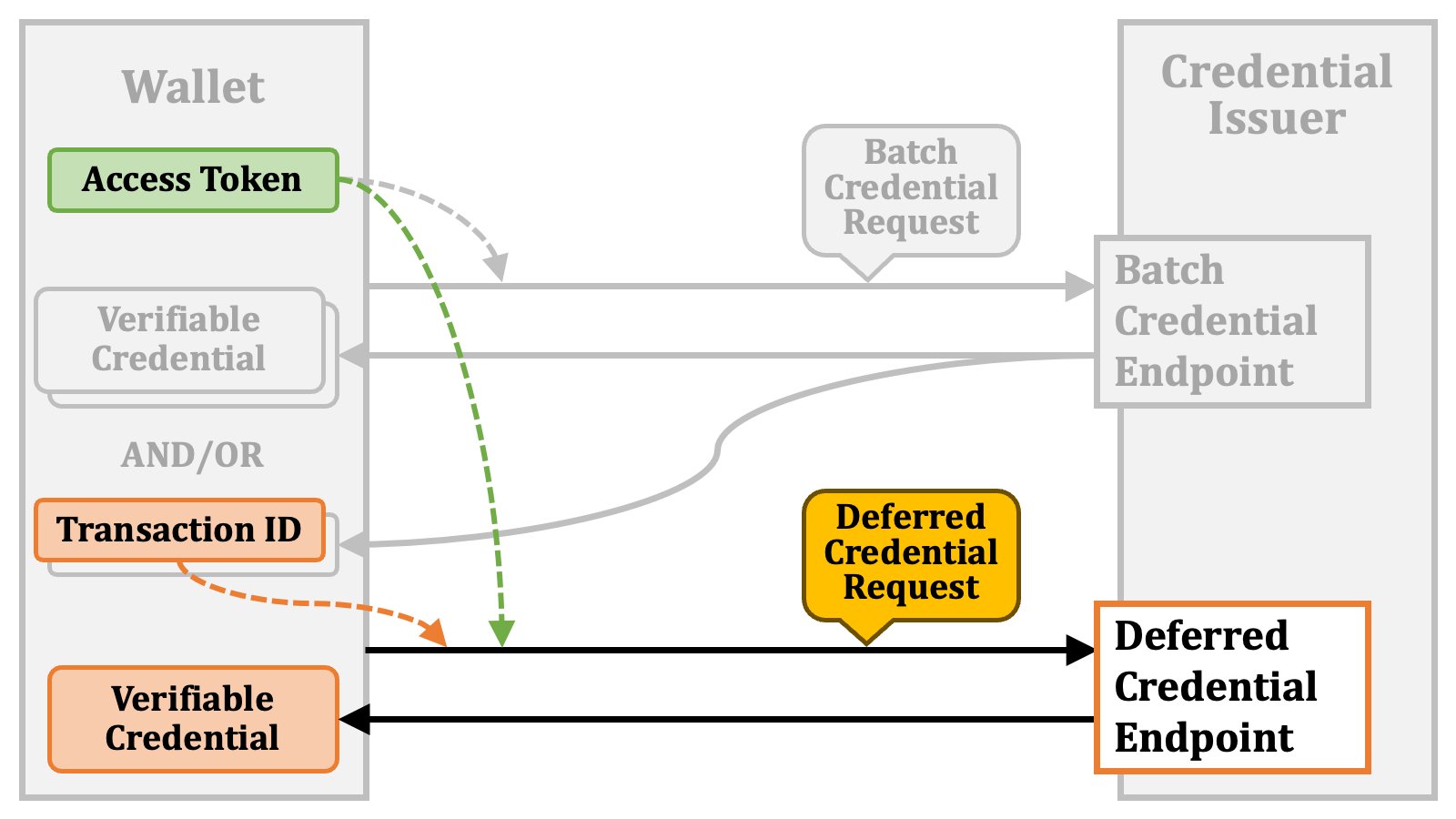
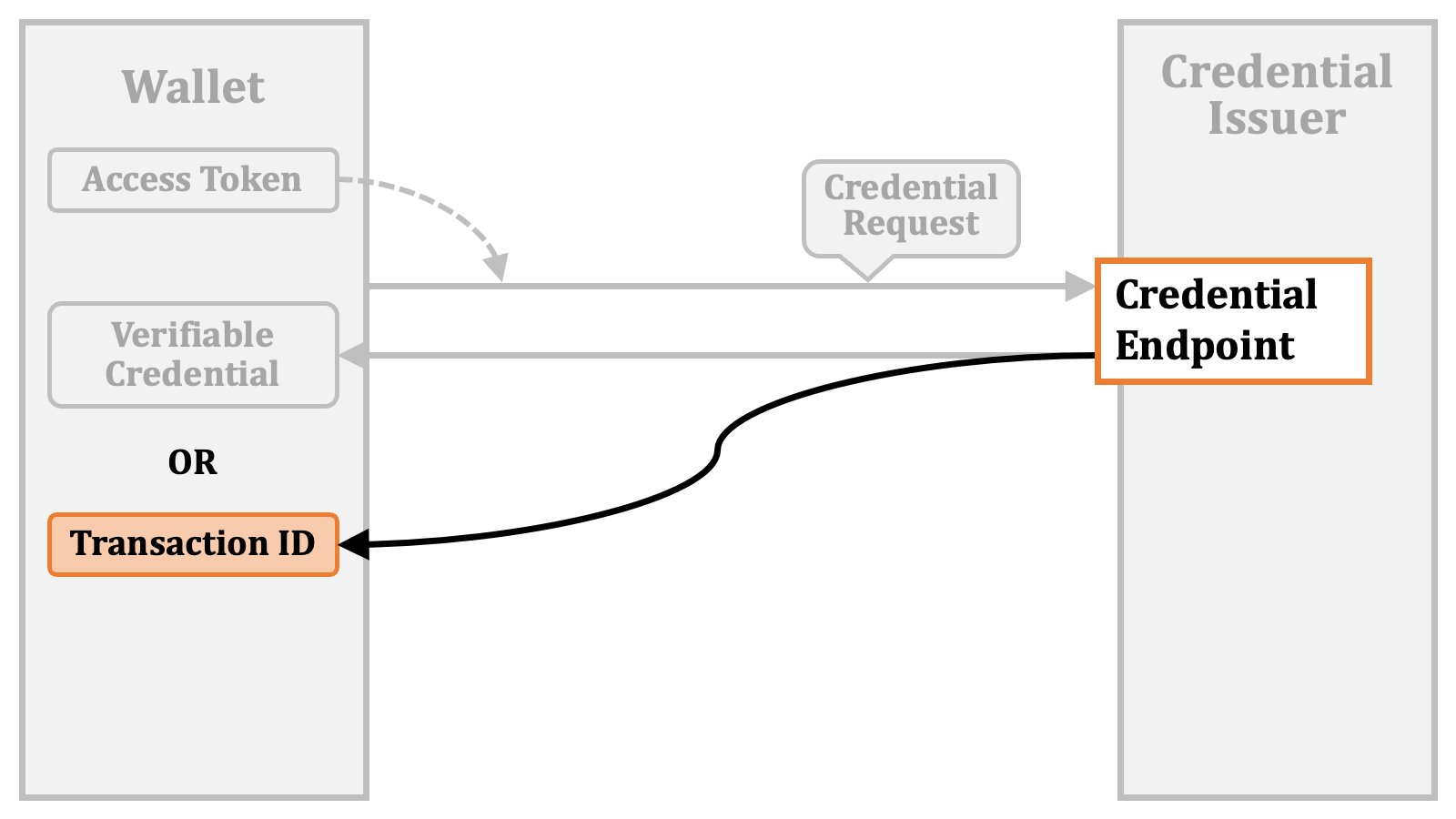 In this case, the wallet waits until the verifiable credential issuance is ready. Then, it presents the previously received transaction ID and access token to the "**deferred credential endpoint**".
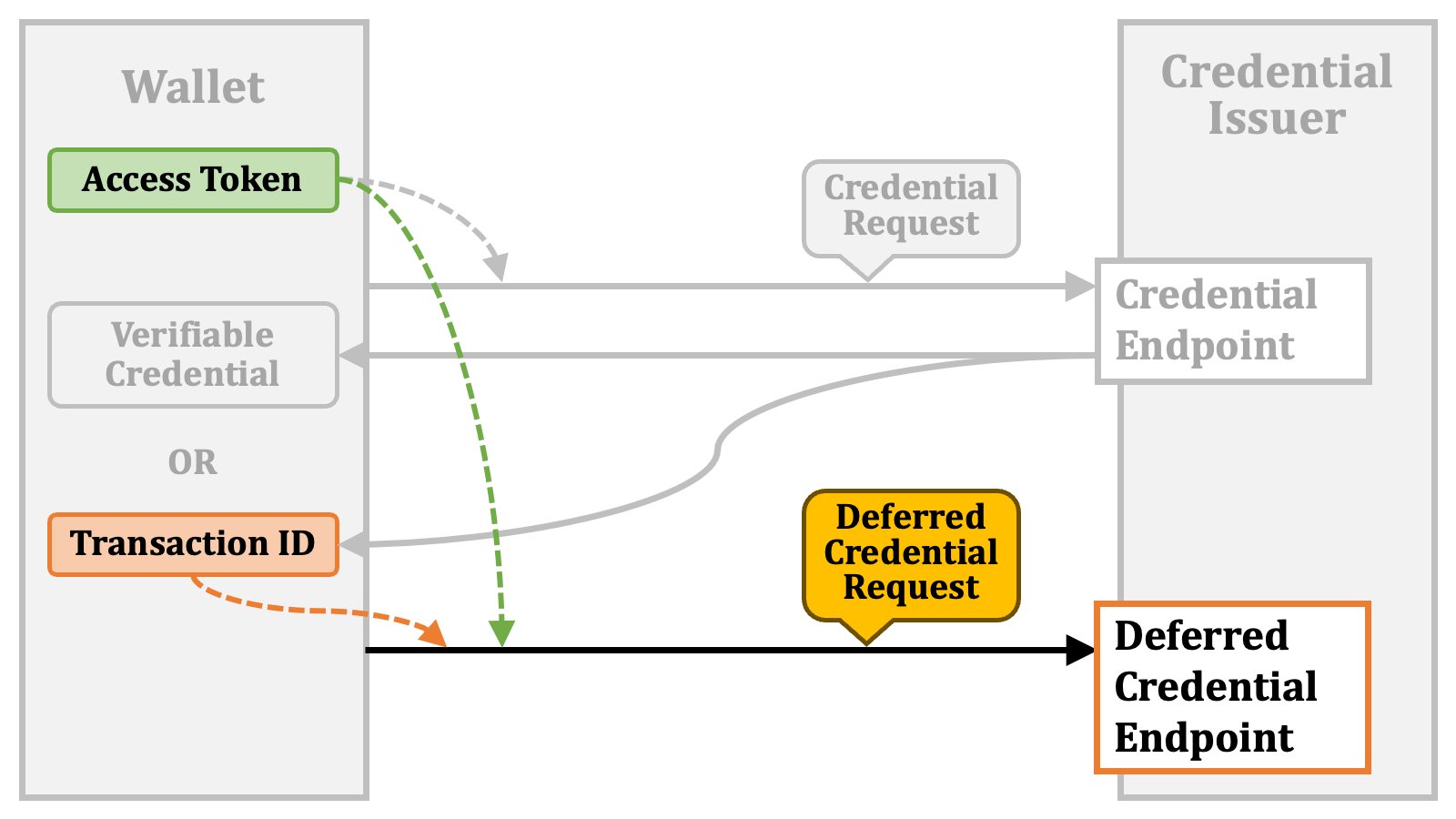 The credential issuer issues the requested verifiable credential as a response.
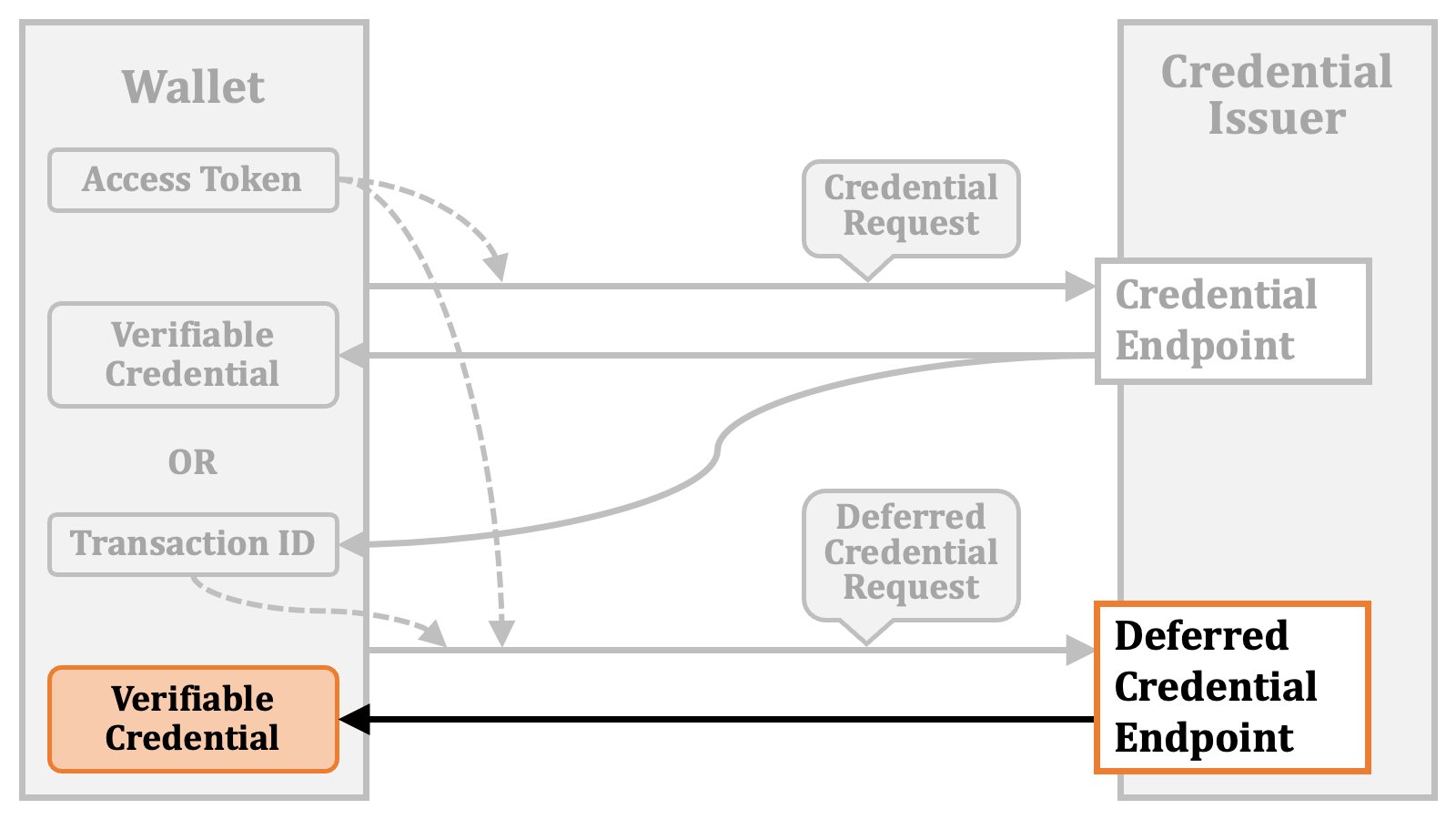 If the verifiable credential is still not ready, the deferred credential endpoint will return an error indicating it (e.g., `"error":"issuance_pending"`). In this case, the wallet will make a "**deferred credential request**" again later.
#### 2.3.2. Batch Credential Issuance
The wallet may want to obtain multiple verifiable credentials at a time. For such use cases, there is a "**batch credential endpoint**".
The wallet sends a "**batch credential request**" with an access token to the batch credential endpoint.
If the verifiable credential is still not ready, the deferred credential endpoint will return an error indicating it (e.g., `"error":"issuance_pending"`). In this case, the wallet will make a "**deferred credential request**" again later.
#### 2.3.2. Batch Credential Issuance
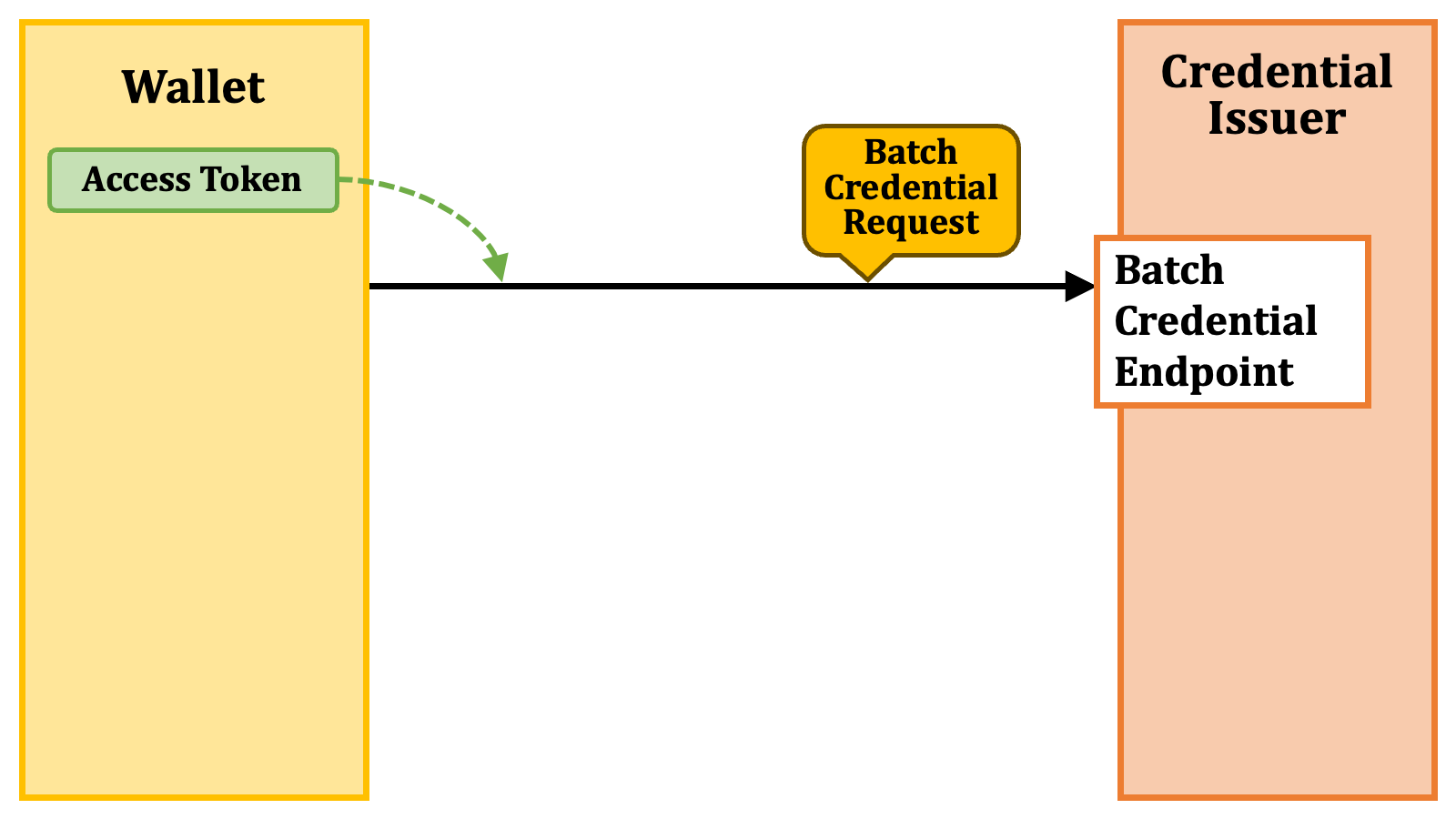
The wallet may want to obtain multiple verifiable credentials at a time. For such use cases, there is a "**batch credential endpoint**".
The wallet sends a "**batch credential request**" with an access token to the batch credential endpoint.
 The endpoint returns multiple verifiable credentials and/or transaction IDs.
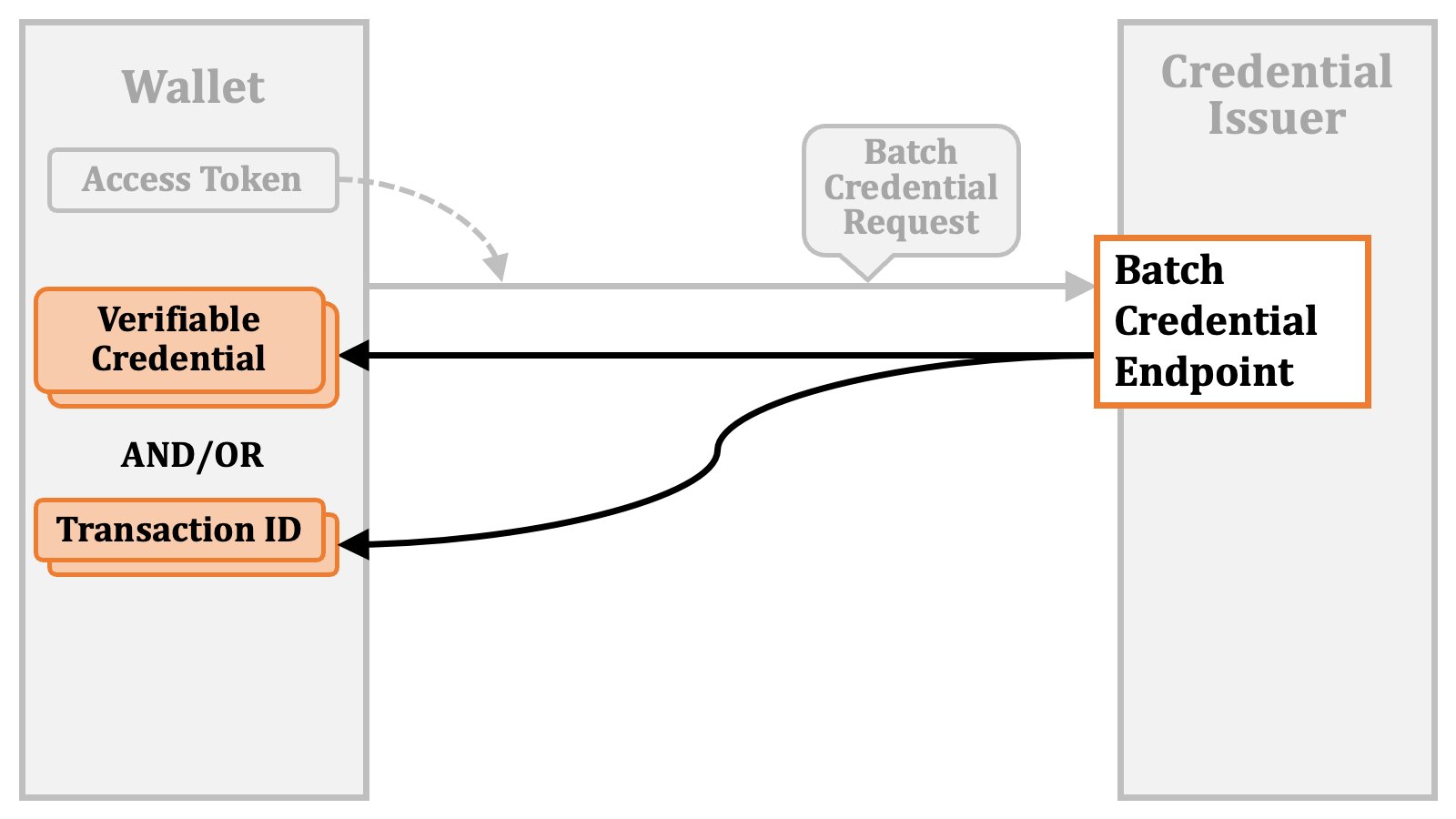 Each transaction ID can be used to obtain a verifiable credential from the deferred credential endpoint.
 ### 2.4. Access Token Issuance Details
In the previous sections, we've provided an overview of access token issuance and credential issuance. In this section, we will delve into the technical details of access token issuance.
#### 2.4.1. Credential Offer
When a credential issuer issues a pre-authorized code, it provides a "**credential offer**" that includes the pre-authorized code instead of issuing it directly.
### 2.4. Access Token Issuance Details
In the previous sections, we've provided an overview of access token issuance and credential issuance. In this section, we will delve into the technical details of access token issuance.
#### 2.4.1. Credential Offer
When a credential issuer issues a pre-authorized code, it provides a "**credential offer**" that includes the pre-authorized code instead of issuing it directly.
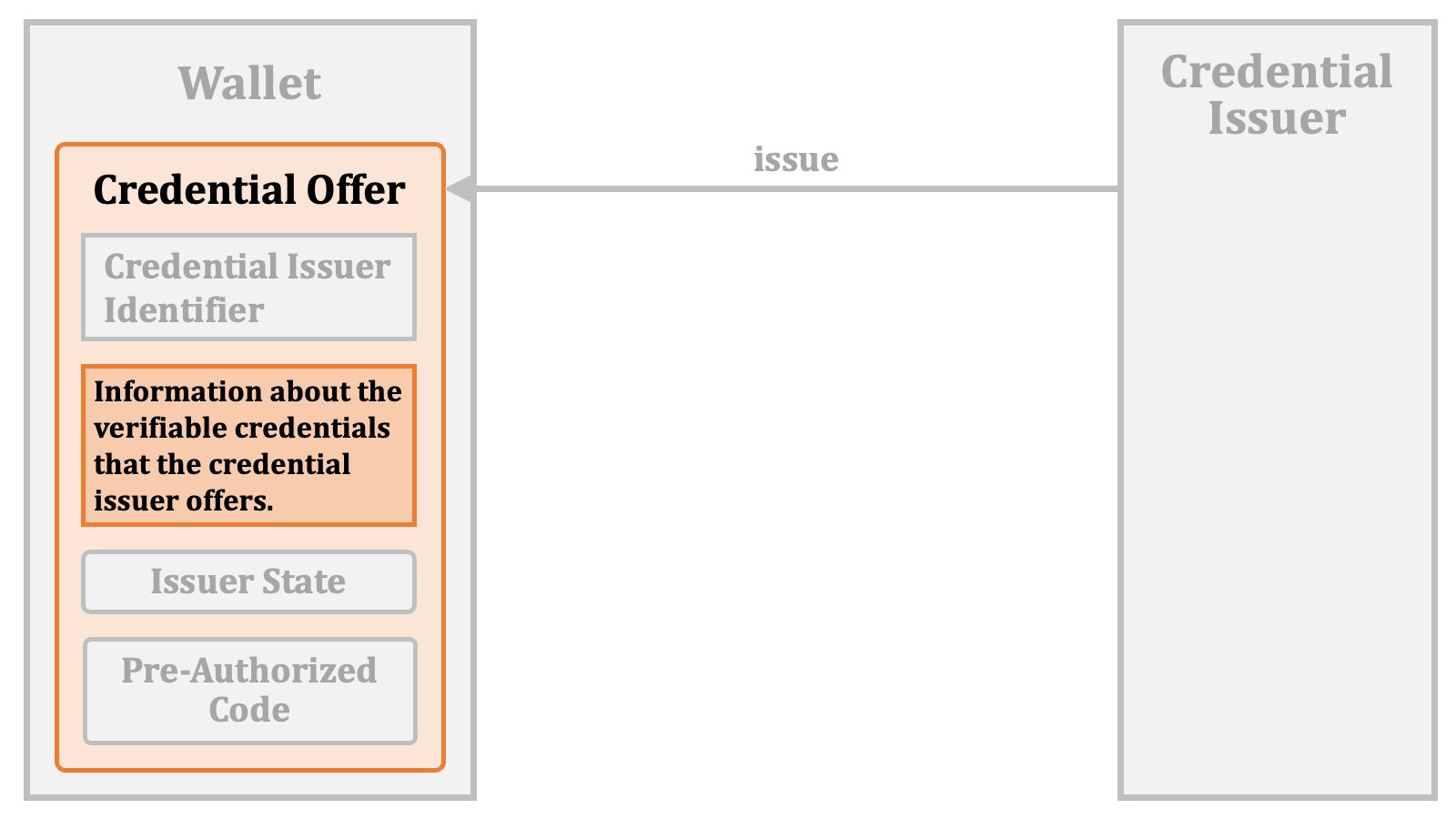
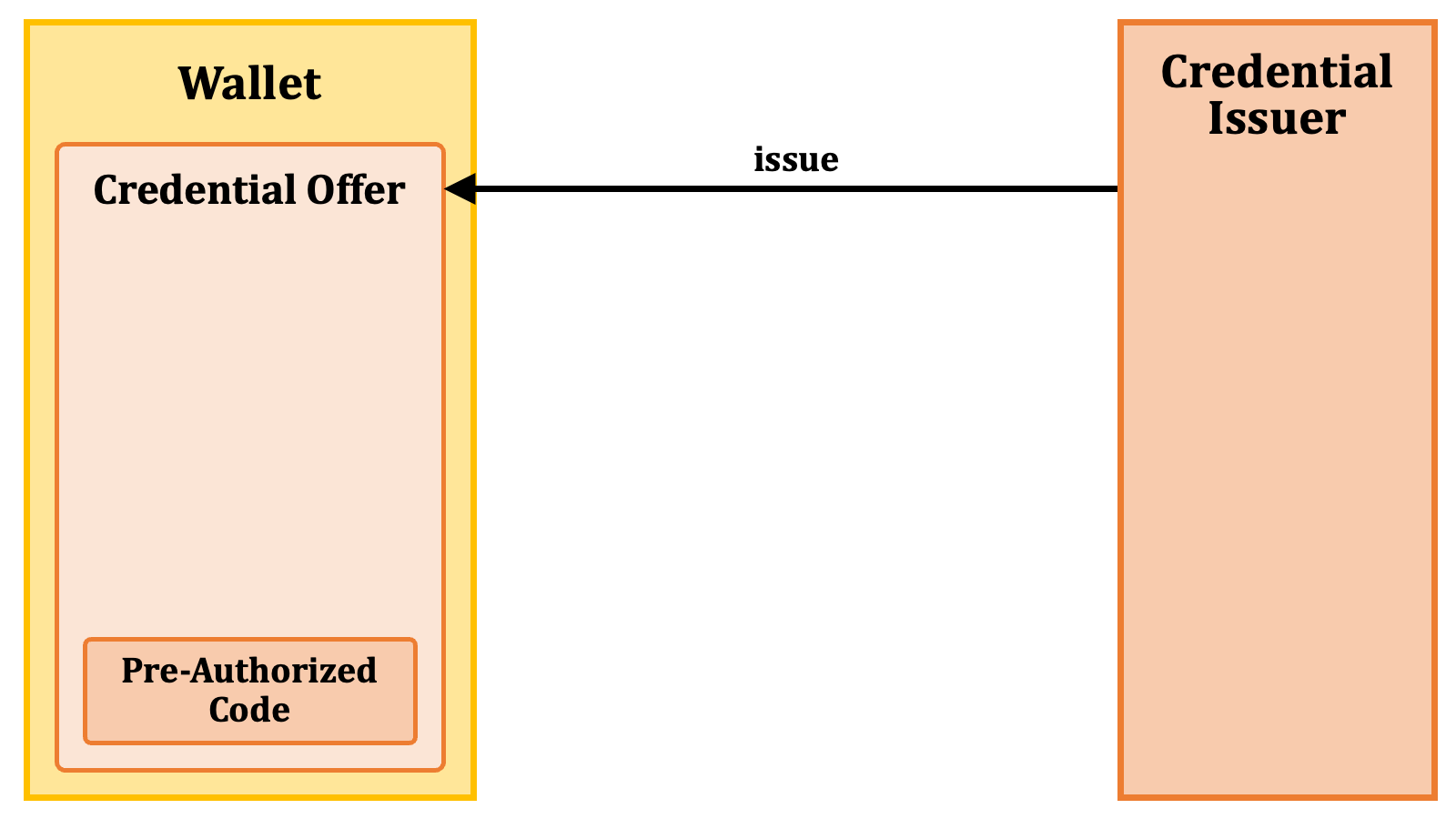 Likewise, an issuer state is also included as part of a credential offer. A credential offer may contain either a pre-authorized code, an issuer state, or both.
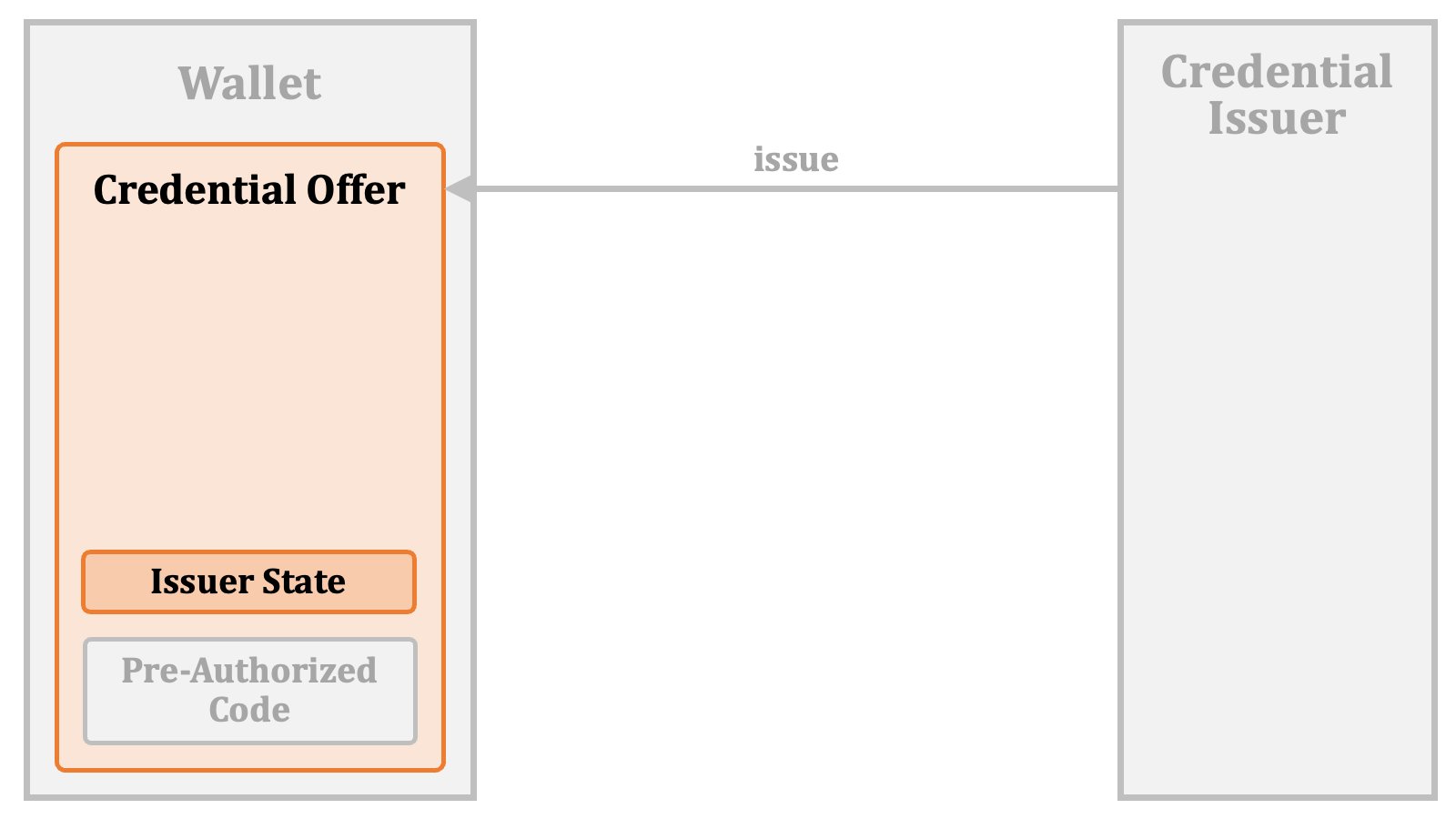 A credential offer contains other information, too. It always contains the identifier of the credential issuer.
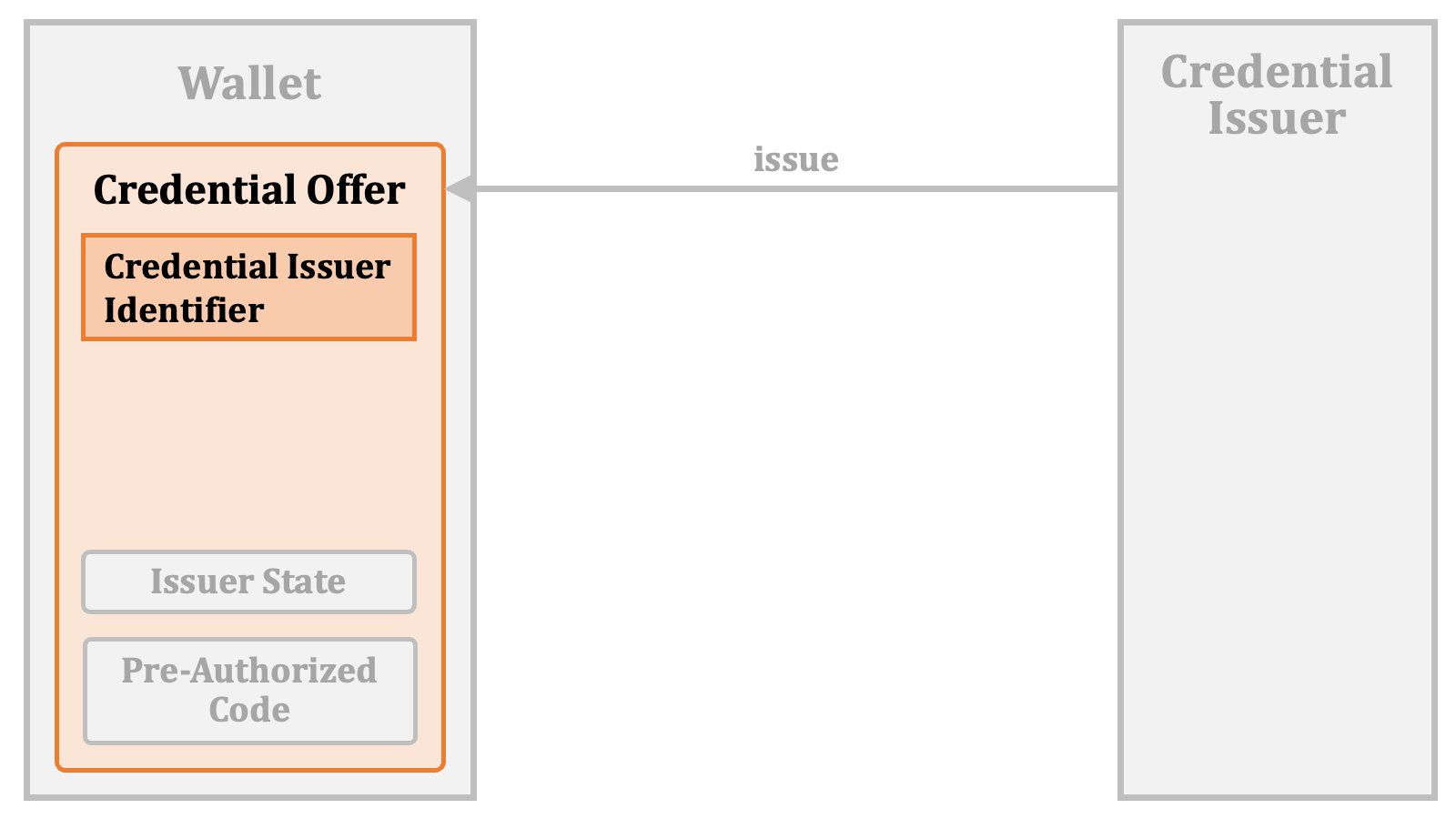 Also, a credential offer contains information about the verifiable credentials that the credential issuer offers.
 ##### 2.4.1.1. Credential Offer Issuance by Value
To transmit the credential offer to the wallet, a URL is employed. This URL is a "**credential offer endpoint**" with a query parameter `credential_offer`. The value of the query parameter is the content of the credential offer.
##### 2.4.1.1. Credential Offer Issuance by Value
To transmit the credential offer to the wallet, a URL is employed. This URL is a "**credential offer endpoint**" with a query parameter `credential_offer`. The value of the query parameter is the content of the credential offer.
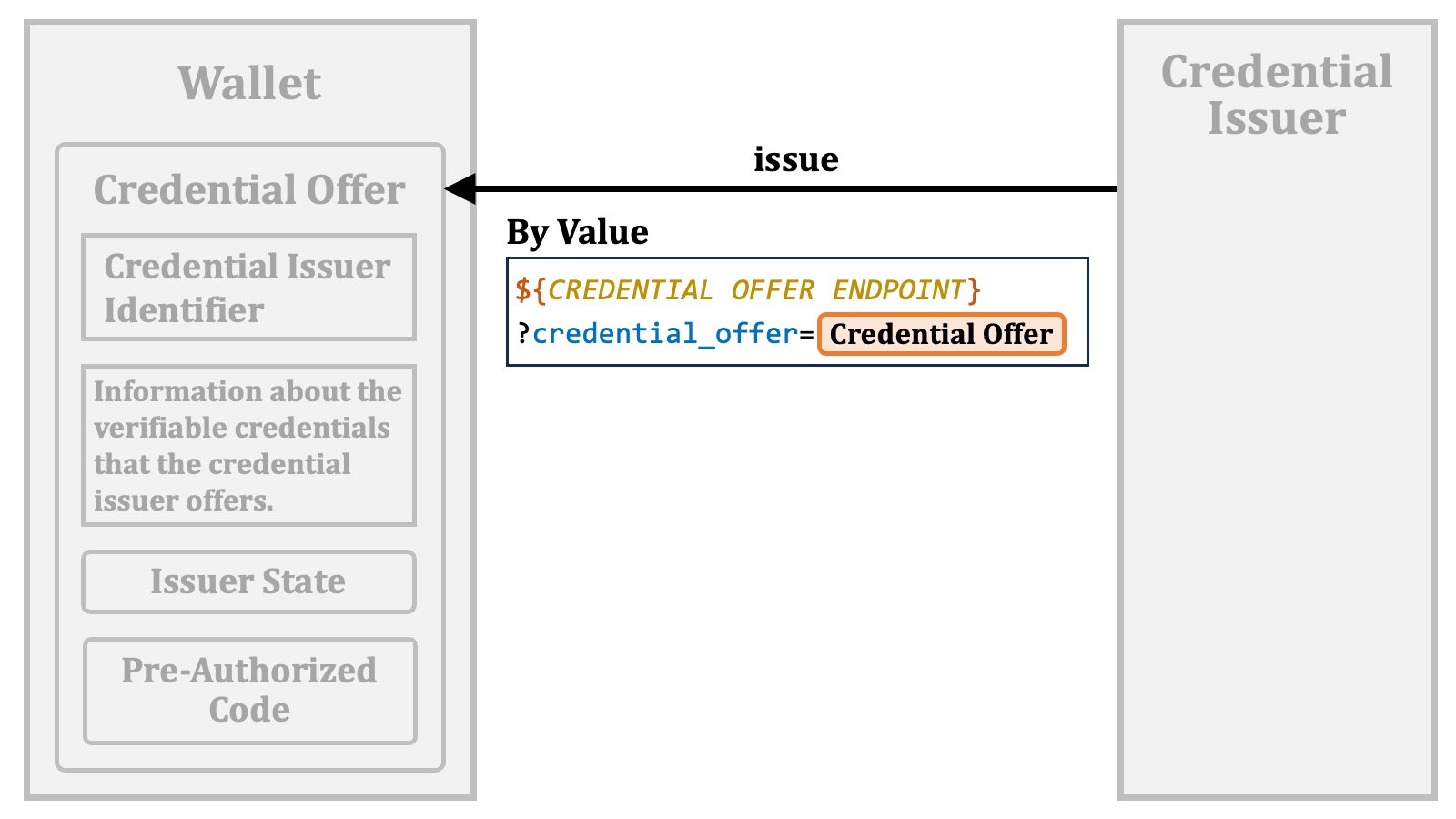 If the URL is accessed in some way and the access can be processed by the wallet, the wallet can receive the credential offer.
However, a key issue here is how to trigger the access. The OID4VCI specification anticipates an HTTP GET request or HTTP redirection initiated by the credential issuer, but it does not define how the credential issuer and the wallet should agree upon the method of triggering the access.
Another issue is that the credential issuer will not be able to know the value of the credential offer endpoint when providing a credential offer. The specification defines a client metadata called `credential_offer_endpoint`, which represents the wallet's credential offer endpoint. However, especially in cases where a QR code representing the URL is used as suggested by the specification, the credential issuer do not have access to the wallet's metadata because the credential issuer cannot know for which wallet it is going to provide a credential offer. For such cases, `openid-credential-offer://` is defined as the fallback credential offer endpoint.
If the URL is accessed in some way and the access can be processed by the wallet, the wallet can receive the credential offer.
However, a key issue here is how to trigger the access. The OID4VCI specification anticipates an HTTP GET request or HTTP redirection initiated by the credential issuer, but it does not define how the credential issuer and the wallet should agree upon the method of triggering the access.
Another issue is that the credential issuer will not be able to know the value of the credential offer endpoint when providing a credential offer. The specification defines a client metadata called `credential_offer_endpoint`, which represents the wallet's credential offer endpoint. However, especially in cases where a QR code representing the URL is used as suggested by the specification, the credential issuer do not have access to the wallet's metadata because the credential issuer cannot know for which wallet it is going to provide a credential offer. For such cases, `openid-credential-offer://` is defined as the fallback credential offer endpoint.
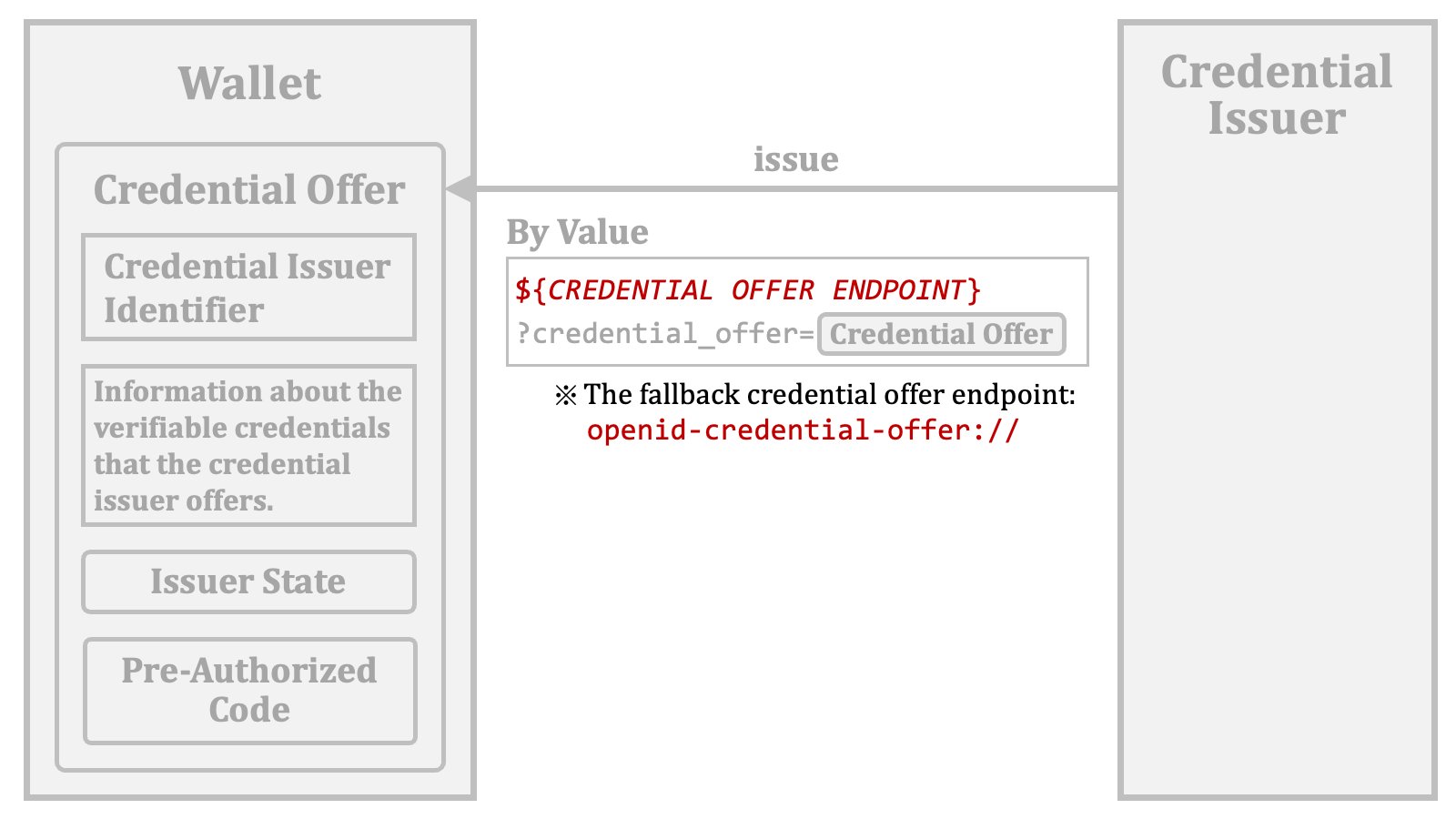 For the reasons mentioned above, credential issuers will implement the generation and transmission of the credential offer in their respective custom ways. Therefore, interoperability cannot be expected to a great extent.
##### 2.4.1.2. Credential Offer Issuance by Reference
A credential offer may be passed to the wallet by reference. To be specific, the URL may contain the location of the issued credential offer instead of its content. In that case, a `credential_offer_uri` query parameter is used to point to the location.
For the reasons mentioned above, credential issuers will implement the generation and transmission of the credential offer in their respective custom ways. Therefore, interoperability cannot be expected to a great extent.
##### 2.4.1.2. Credential Offer Issuance by Reference
A credential offer may be passed to the wallet by reference. To be specific, the URL may contain the location of the issued credential offer instead of its content. In that case, a `credential_offer_uri` query parameter is used to point to the location.
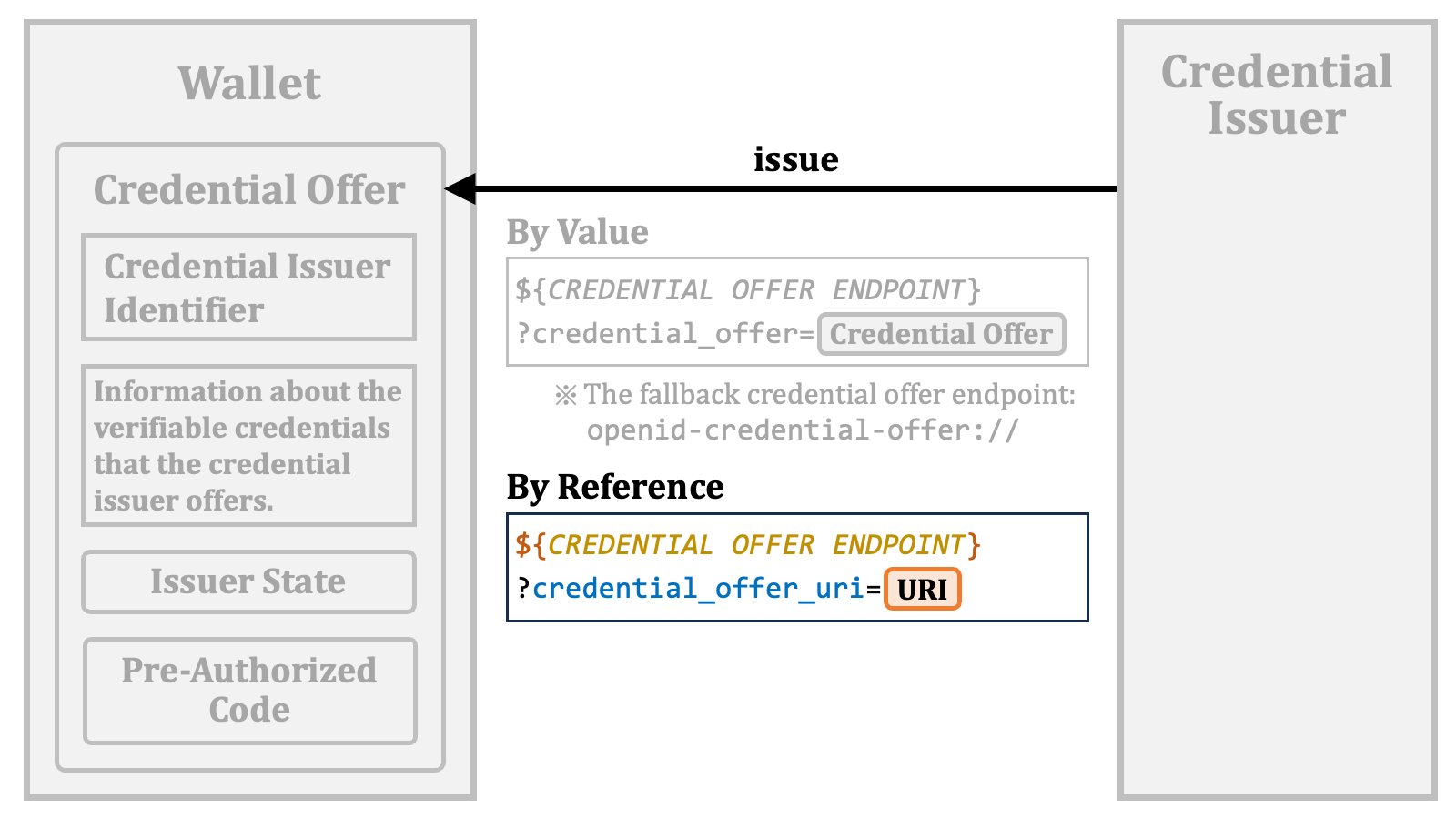 The value of the `credential_offer_uri` query parameter points to an endpoint that returns the content of the issued credential offer.
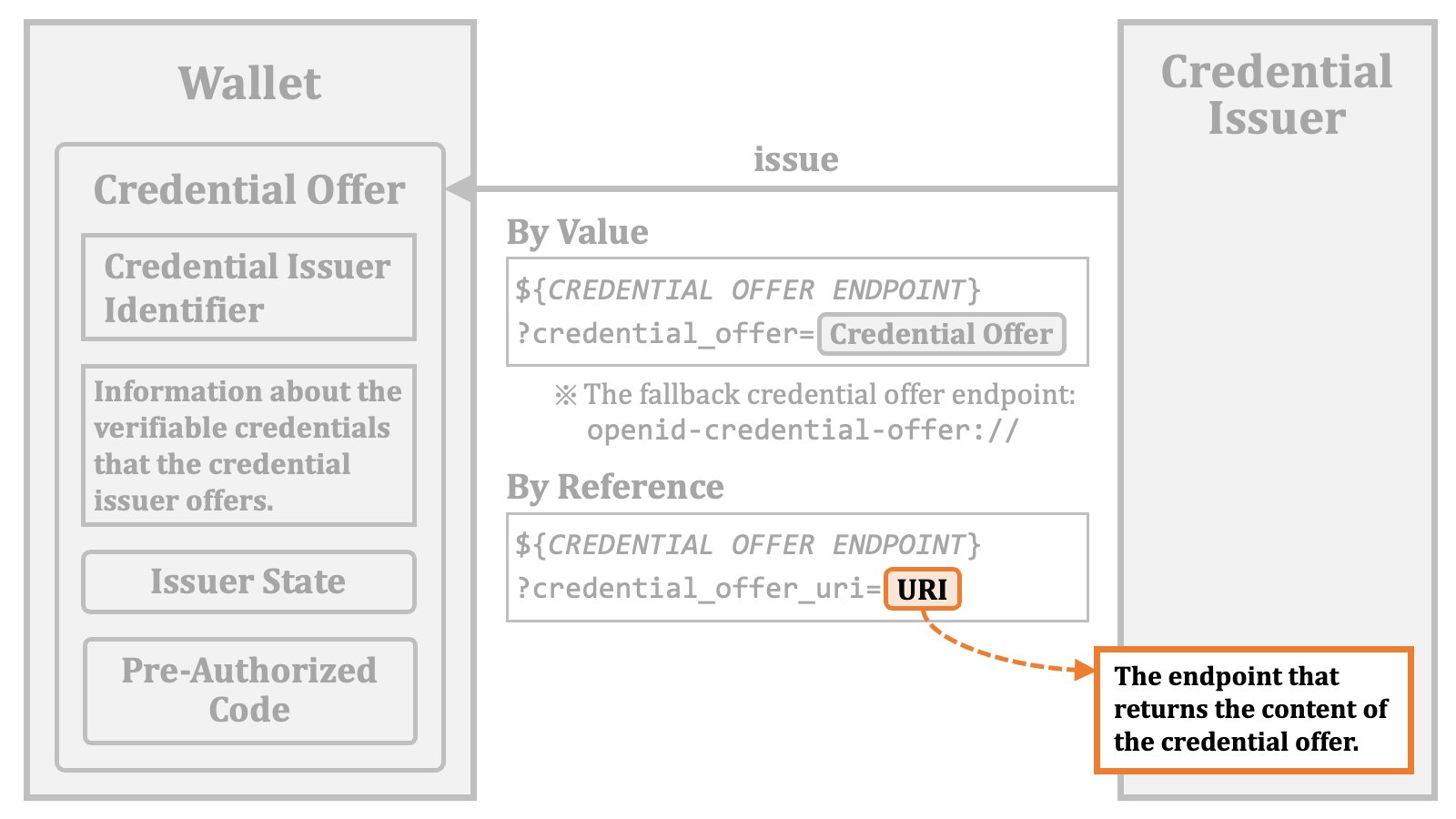 By accessing the URI,
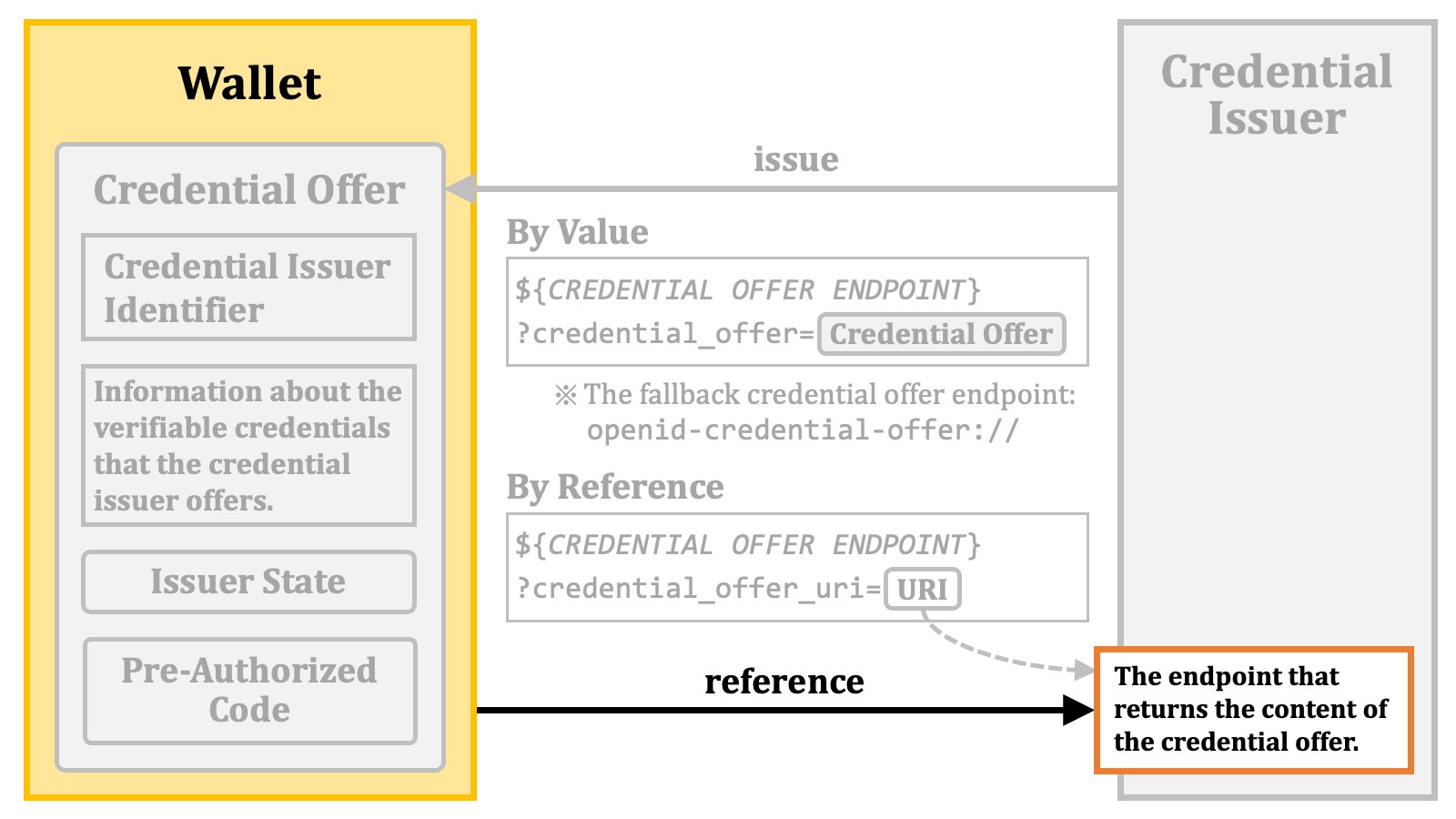 the wallet can obtain the content of the issued credential offer.
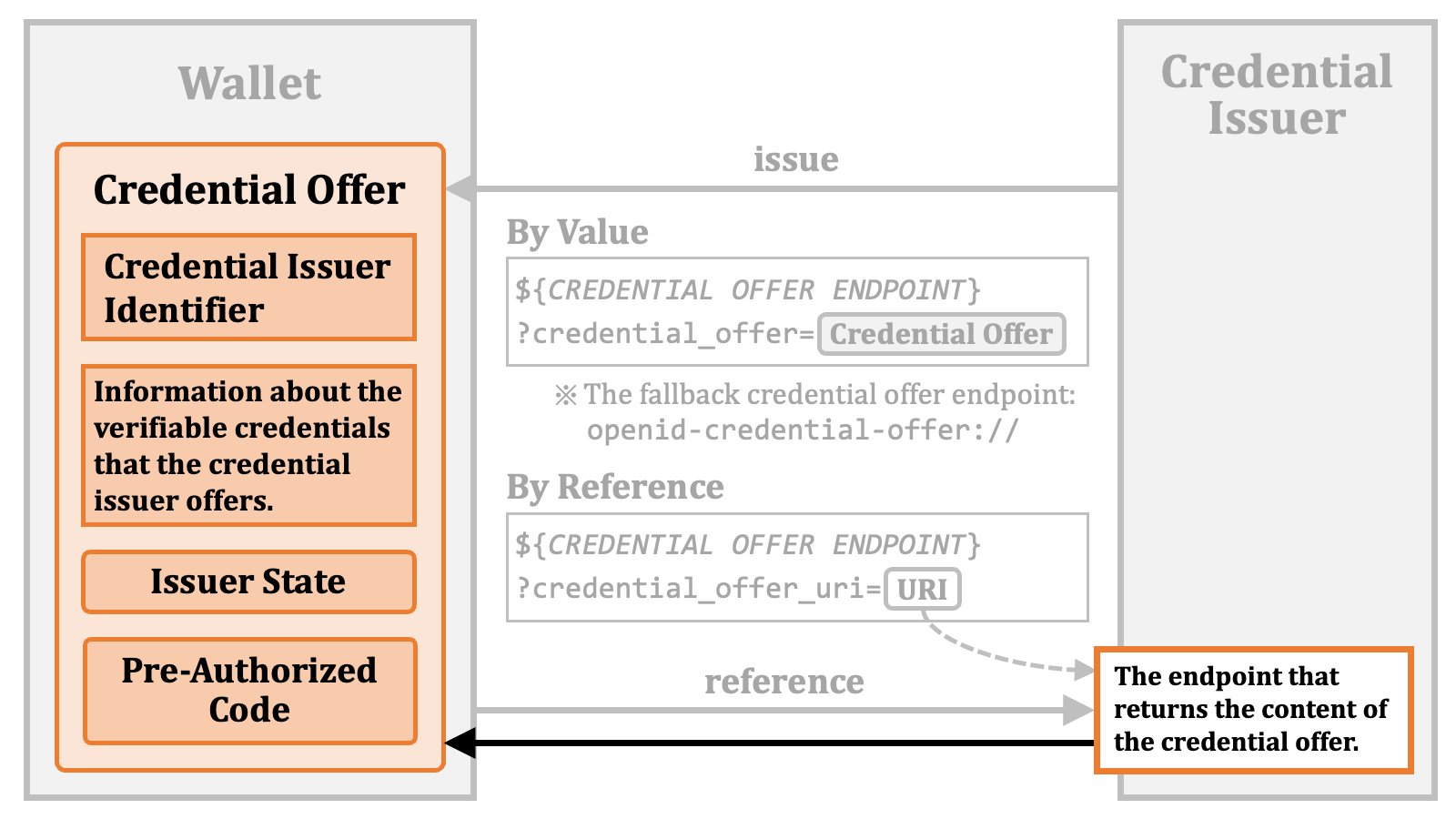 ##### 2.4.1.3. Credential Offer Content
The actual content of a credential offer is a JSON object.
##### 2.4.1.3. Credential Offer Content
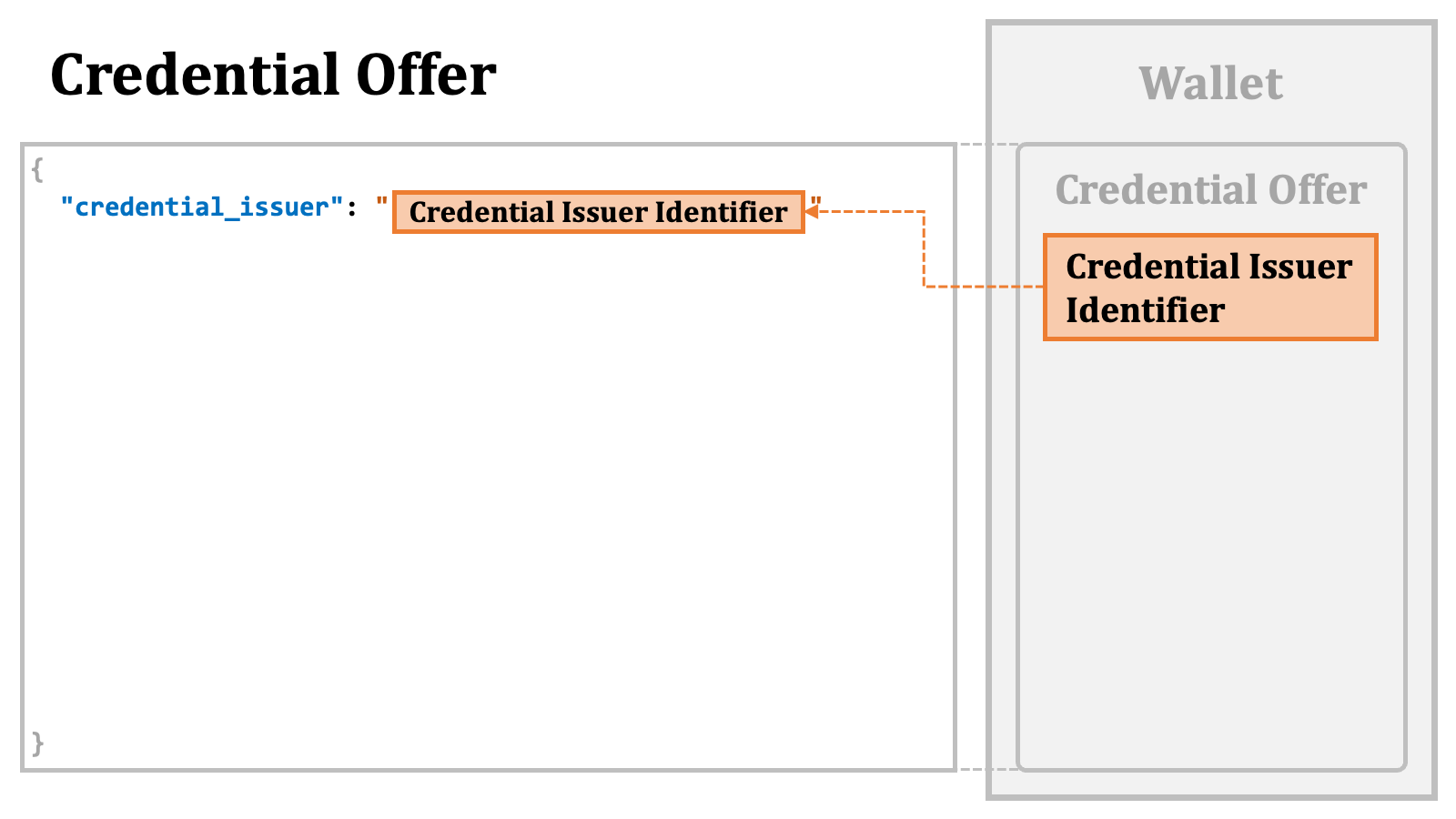
The actual content of a credential offer is a JSON object.
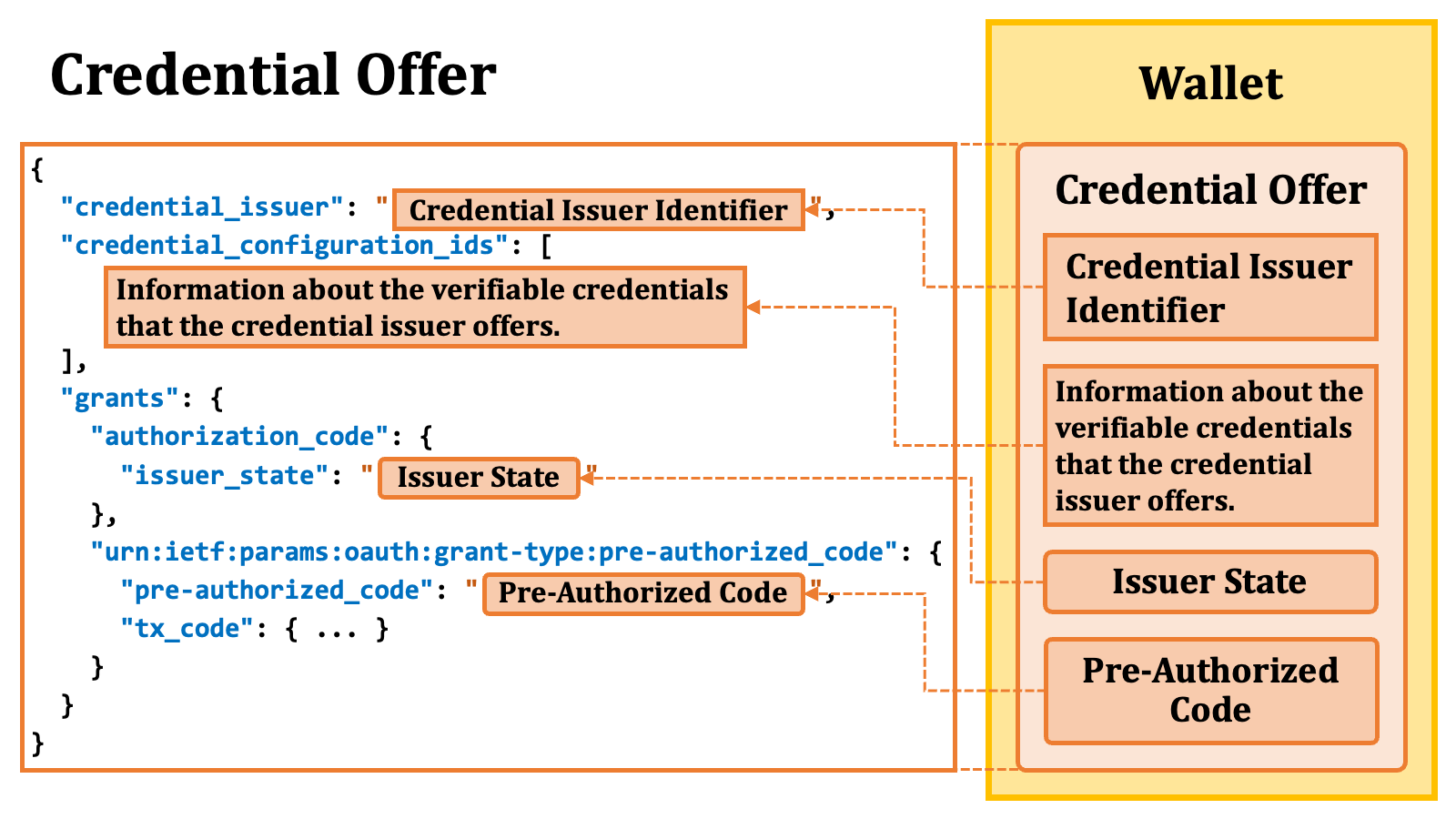
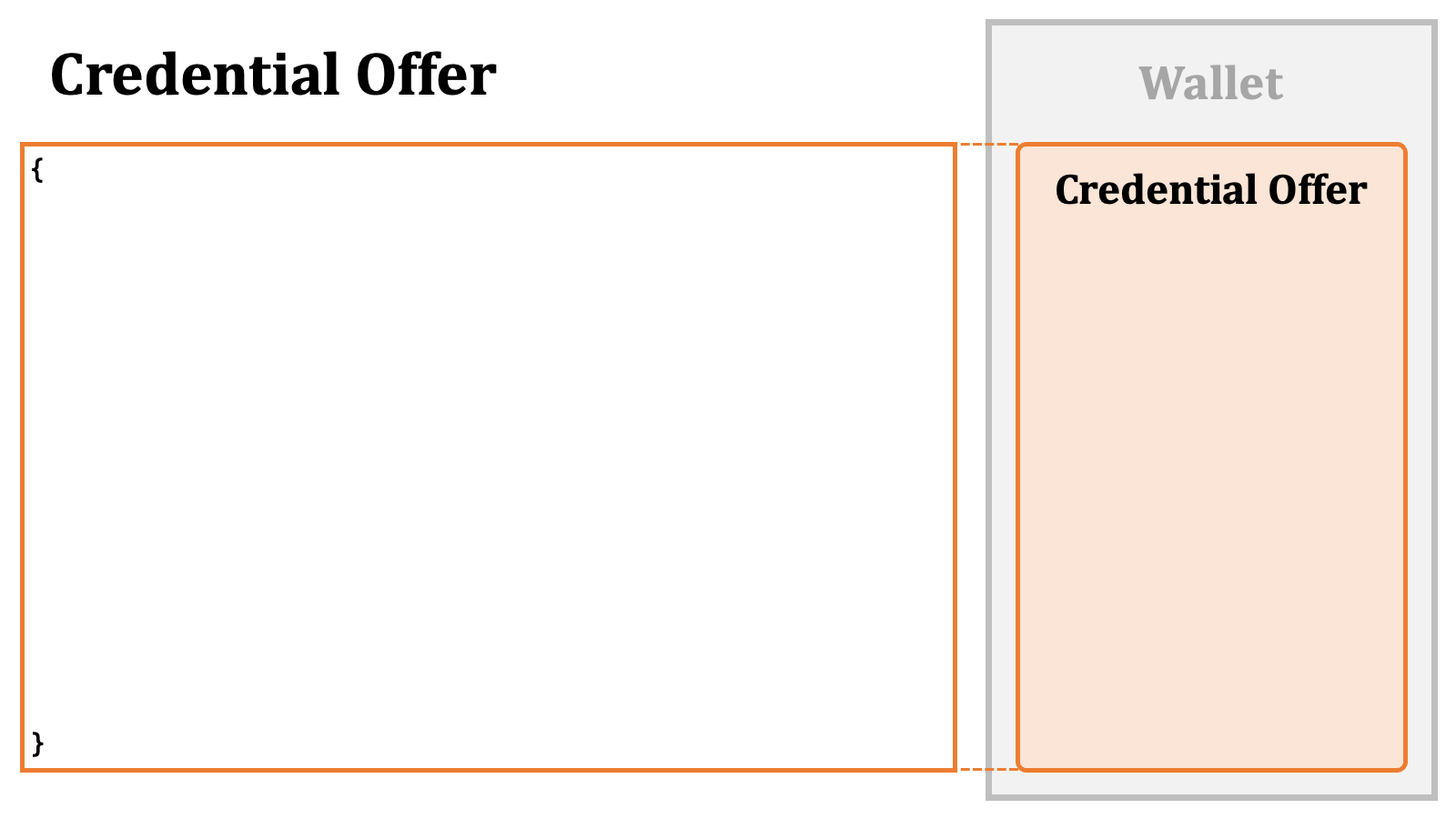 The identifier of the credential issuer is put as the value of the `"credential_issuer"` property.
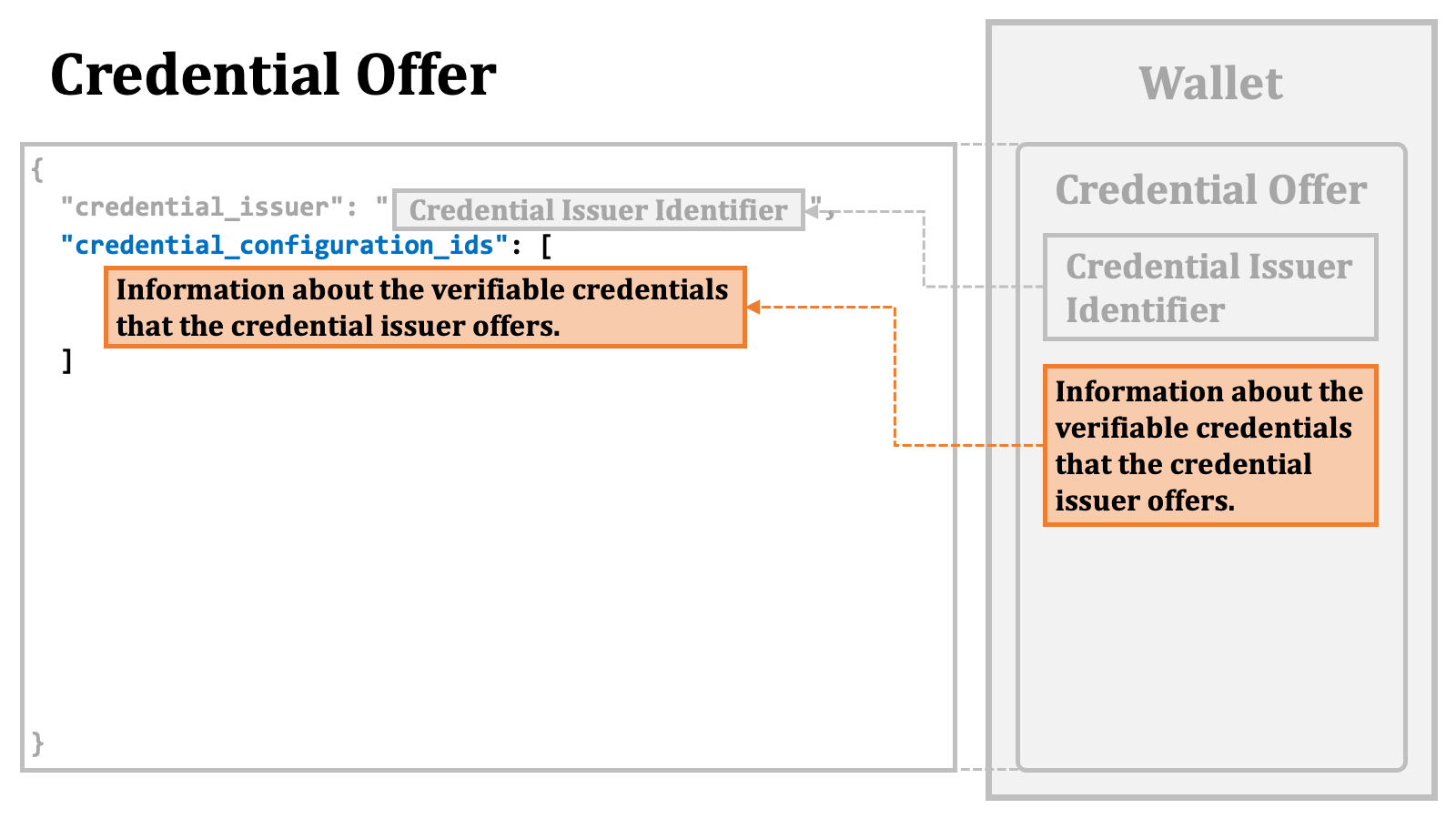
 The information about the verifiable credentials that the credential issuer
offers is put in the `"credential_configuration_ids"` array.
The specific details of the array elements are discussed later.
The information about the verifiable credentials that the credential issuer
offers is put in the `"credential_configuration_ids"` array.
The specific details of the array elements are discussed later.
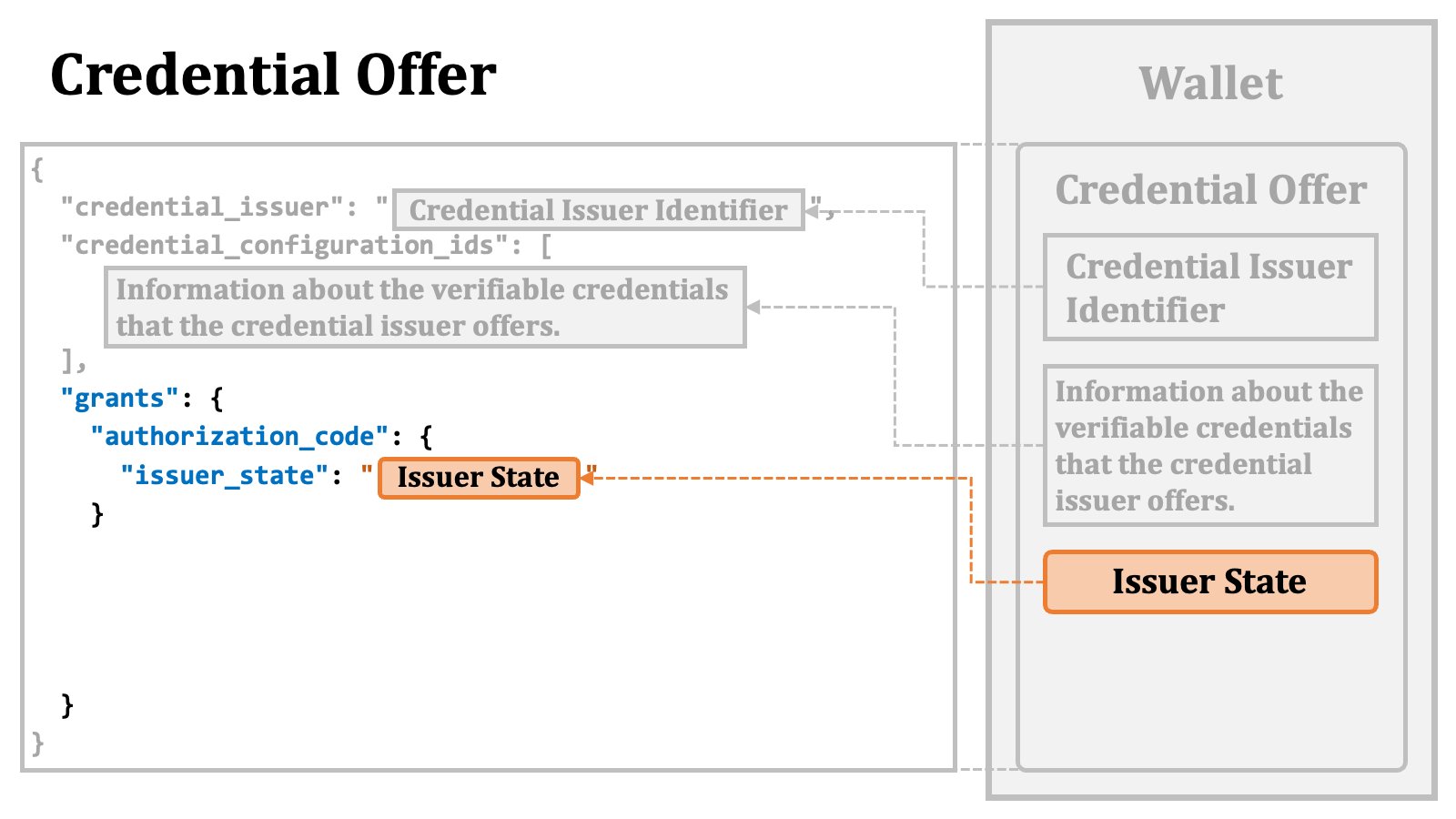
 When issued, an issuer state is placed at a somewhat nested location.
There is a `"grants"` property as a top-level property in a credential offer. The value of the `"grants"` property is a JSON object. The keys within the `"grants"` JSON object are identifiers of grant types, such as `authorization_code`.
The value of each entry in the `"grants"` JSON object is another JSON object containing properties related to the grant type represented by the corresponding key.
In the case of the issuer state, the value of the issued issuer state is placed as the value of the `"issuer_state"` property within the `"authorization_code"` JSON object, which is within the `"grants"` JSON object.
When issued, an issuer state is placed at a somewhat nested location.
There is a `"grants"` property as a top-level property in a credential offer. The value of the `"grants"` property is a JSON object. The keys within the `"grants"` JSON object are identifiers of grant types, such as `authorization_code`.
The value of each entry in the `"grants"` JSON object is another JSON object containing properties related to the grant type represented by the corresponding key.
In the case of the issuer state, the value of the issued issuer state is placed as the value of the `"issuer_state"` property within the `"authorization_code"` JSON object, which is within the `"grants"` JSON object.
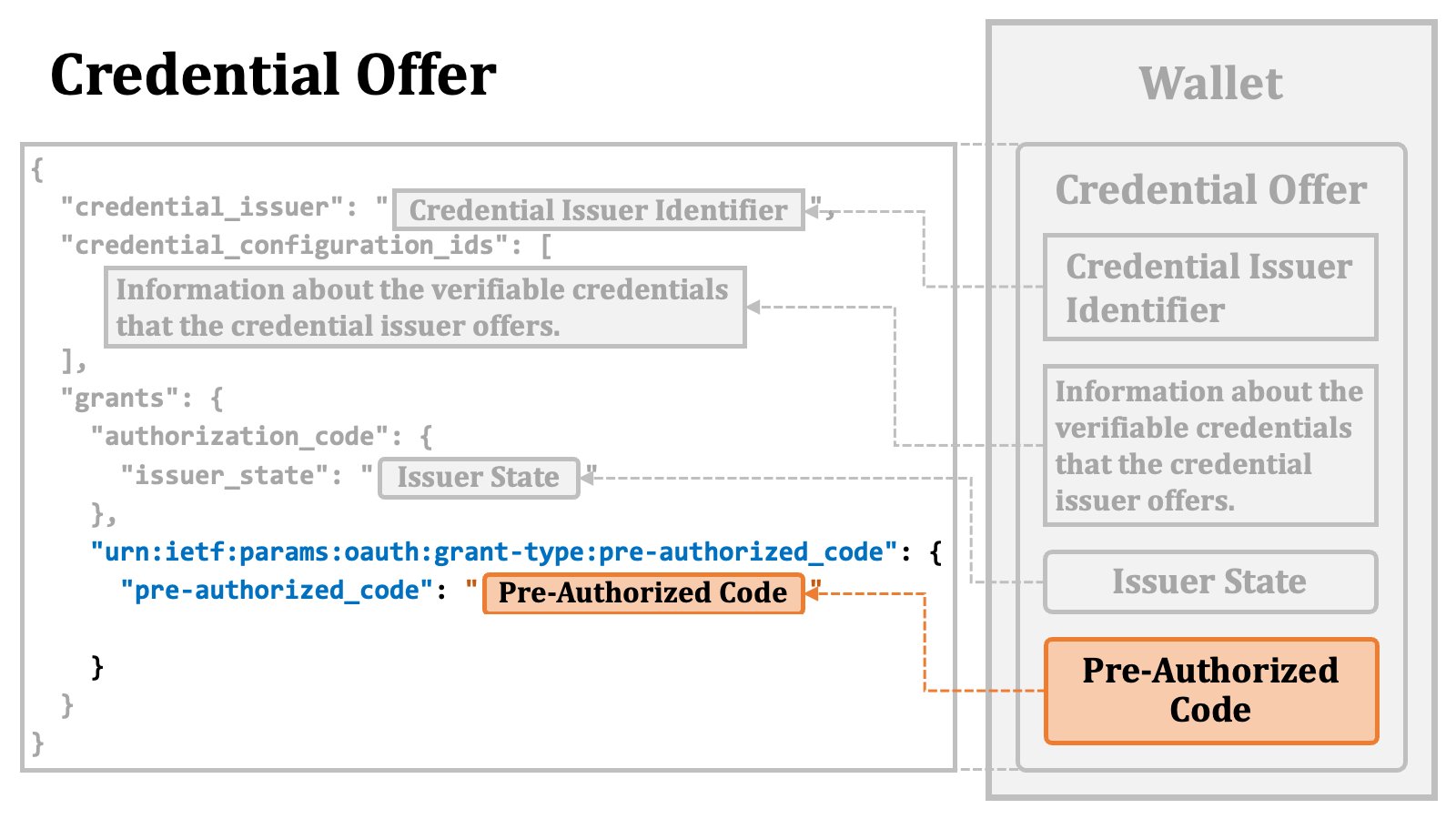
 Similarly, in the case of the pre-authorized code, the value of the issued pre-authorized code is placed as the value of the `"pre-authorized_code"` property within the `"urn:ietf:params:oauth:grant-type:pre-authorized_code"` JSON object, which is within the `"grants"` JSON object. The string `"urn:ietf:params:oauth:grant-type:pre-authorized_code"` here is the new identifier assigned to the pre-authorized code flow.
 The `"urn:ietf:params:oauth:grant-type:pre-authorized_code"` JSON object may contain a `"tx_code"` JSON object, which contains information about a "**transaction code**".
When the property is provided, the token request using the pre-authorized code will have to include a transaction code. Further details about this are described later.
The `"urn:ietf:params:oauth:grant-type:pre-authorized_code"` JSON object may contain a `"tx_code"` JSON object, which contains information about a "**transaction code**".
When the property is provided, the token request using the pre-authorized code will have to include a transaction code. Further details about this are described later.
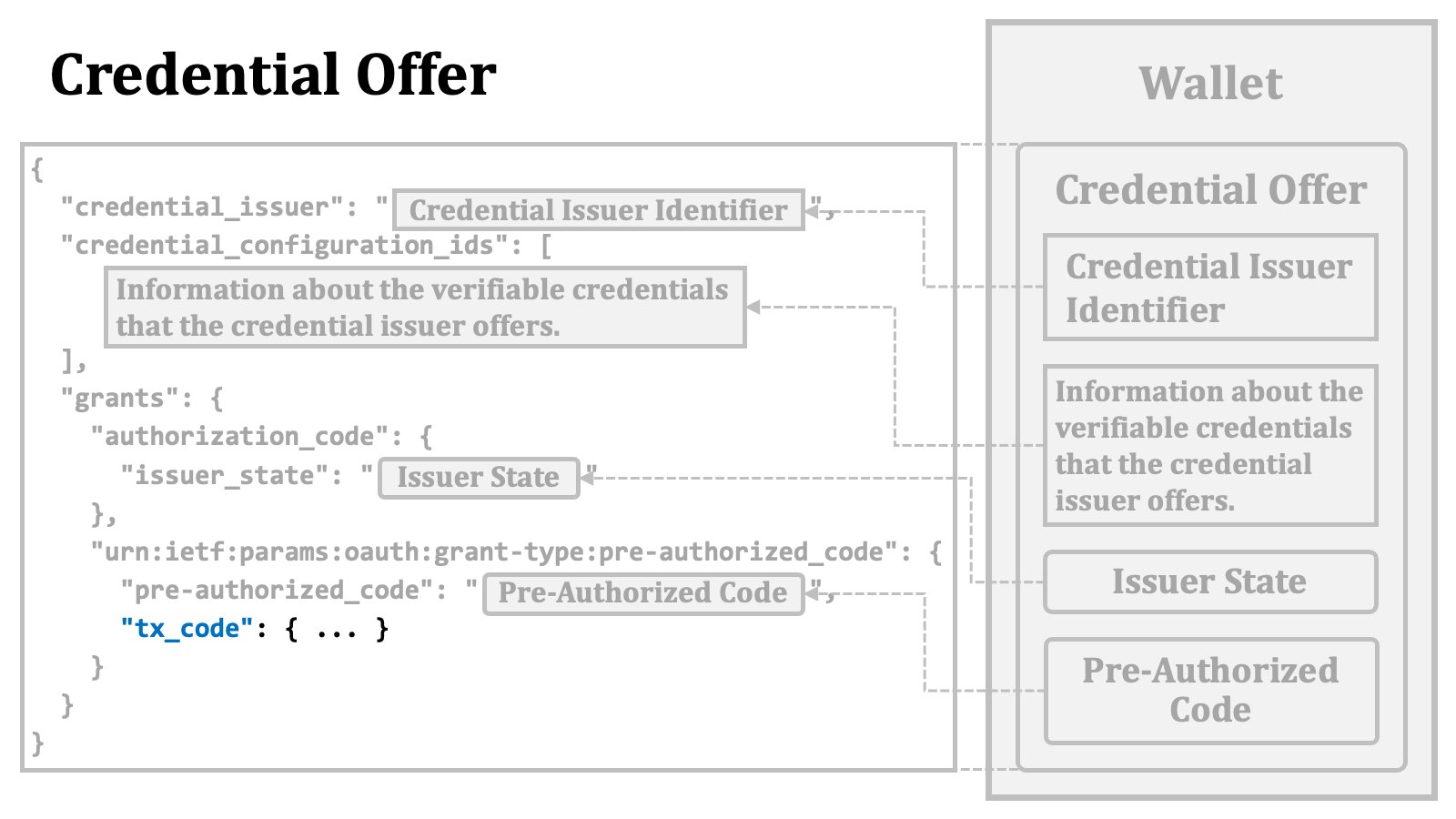 The diagram below illustrates an overview of the structure of the content of a credential offer.
 ##### 2.4.1.4. "credential\_configuration\_ids" in Credential Offer
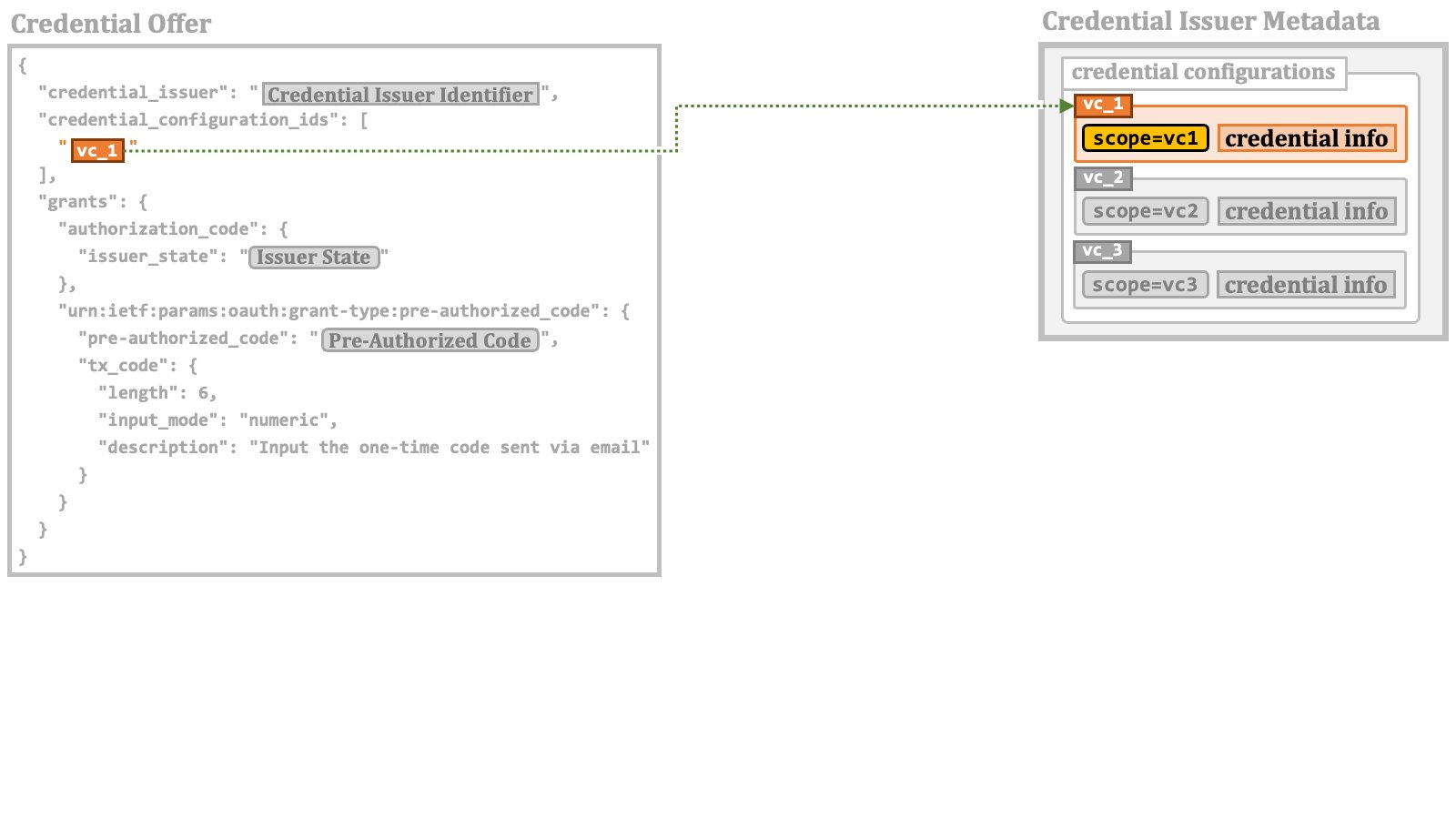
The `"credential_configuration_ids"` property in a credential offer holds information
about the verifiable credentials that the credential issuer offers.
The value of the property is a JSON array. The elements in the array
are strings.
The values of the elements are the identifiers of the credential configurations.
##### 2.4.1.4. "credential\_configuration\_ids" in Credential Offer
The `"credential_configuration_ids"` property in a credential offer holds information
about the verifiable credentials that the credential issuer offers.
The value of the property is a JSON array. The elements in the array
are strings.
The values of the elements are the identifiers of the credential configurations.
 #### 2.4.2. Pre-Authorized Code Flow Details
Once a wallet obtains a pre-authorized code, it can make a token request with the pre-authorized code.
The table below lists the request parameters required for a token request to comply with the pre-authorized code flow.
| Parameter | Description |
| :-------------------- | :------------------------------------------------------------------------------ |
| `grant_type` | The value must be `"urn:ietf:params:oauth:grant-type:pre-authorized_code"`. |
| `pre-authorized_code` | A pre-authorized code. |
| `tx_code` | A transaction code. Required if a credential offer contains a `tx_code` object. |
The `tx_code` parameter is required if the pre-authorized code has been issued
with a `tx_code` object like below. In this case, it is expected that the user
will receive a transaction code corresponding to the pre-authorized code
through some out-of-band mechanism.
```json theme={null}
{
"credential_issuer": "...",
"credential_configuration_ids": [
"..."
],
"grants": {
"urn:ietf:params:oauth:grant-type:pre-authorized_code": {
"pre-authorized_code": "...",
"tx_code": {
"length": 6,
"input_mode": "numeric",
"description": "Input the one-time code sent via email"
}
}
}
}
```
The `tx_code` object may contain the following parameters to help the wallet prepare a UI component for the user to input the transaction code.
| Parameter | Description |
| :------------ | :-------------------------------------------------------------------------------------------- |
| `length` | The length of the transaction code. |
| `input_mode` | The input mode for the transaction code. The pre-defined values are `"numeric"` and `"text"`. |
| `description` | The information regarding the transaction code, such as the delivery channel. |
Also, additional request parameters related to client authentication may be required. For example, when the `private_key_jwt` client authentication is employed, the `client_assertion` and `client_assertion_type` request parameters are required.
One ambitious attempt of the OID4VCI specification is that, depending on the configuration of the authorization server
(to be specific, when the `pre-authorized_grant_anonymous_access_supported` server
metadata is `true`), in the pre-authorized code flow, it may be permissible to make token requests that do
not contain any information to identify the client application. If such a token request were actually made, an access
token not associated with a specific client application would be issued.
The following is an example of a token request without client authentication using the pre-authorized code flow, excerpted from the OID4VCI specification.
```http theme={null}
POST /token HTTP/1.1
Host: server.example.com
Content-Type: application/x-www-form-urlencoded
grant_type=urn:ietf:params:oauth:grant-type:pre-authorized_code
&pre-authorized_code=SplxlOBeZQQYbYS6WxSbIA
&tx_code=493536
```
The token endpoint will return a response including an access token as usual. The following is an example of token response excerpted from the specification.
```http theme={null}
HTTP/1.1 200 OK
Content-Type: application/json
Cache-Control: no-store
{
"access_token": "eyJhbGciOiJSUzI1NiIsInR5cCI6Ikp..sHQ",
"token_type": "bearer",
"expires_in": 86400,
"c_nonce": "tZignsnFbp",
"c_nonce_expires_in": 86400
}
```
As the example above shows, when the issued access token can be used for
the issuance of verifiable credentials, the token response may contain
the `c_nonce` and `c_nonce_expires_in` response parameters,
in addition to the traditional response parameters (`access_token`,
`token_type` and `expires_in`) defined in the core specification of
OAuth 2.0 ([RFC 6749][RFC_6749]). Further details regarding these response
parameters will be explained later.
#### 2.4.3. Issuable Credentials
While there are multiple methods available to issue access tokens for verifiable credentials, from the perspective of access token implementation, they all converge on one common goal. That is to associate information about the types of verifiable credentials that can be issued with the access token.
In this document, we call such information "**issuable credential**". But, please keep in mind that "issuable credential" is not an official term.
Elements in the `"credential_configuration_ids"` array in a credential offer are JSON strings.
They indirectly specify issuable credentials by referencing credential configurations.
#### 2.4.2. Pre-Authorized Code Flow Details
Once a wallet obtains a pre-authorized code, it can make a token request with the pre-authorized code.
The table below lists the request parameters required for a token request to comply with the pre-authorized code flow.
| Parameter | Description |
| :-------------------- | :------------------------------------------------------------------------------ |
| `grant_type` | The value must be `"urn:ietf:params:oauth:grant-type:pre-authorized_code"`. |
| `pre-authorized_code` | A pre-authorized code. |
| `tx_code` | A transaction code. Required if a credential offer contains a `tx_code` object. |
The `tx_code` parameter is required if the pre-authorized code has been issued
with a `tx_code` object like below. In this case, it is expected that the user
will receive a transaction code corresponding to the pre-authorized code
through some out-of-band mechanism.
```json theme={null}
{
"credential_issuer": "...",
"credential_configuration_ids": [
"..."
],
"grants": {
"urn:ietf:params:oauth:grant-type:pre-authorized_code": {
"pre-authorized_code": "...",
"tx_code": {
"length": 6,
"input_mode": "numeric",
"description": "Input the one-time code sent via email"
}
}
}
}
```
The `tx_code` object may contain the following parameters to help the wallet prepare a UI component for the user to input the transaction code.
| Parameter | Description |
| :------------ | :-------------------------------------------------------------------------------------------- |
| `length` | The length of the transaction code. |
| `input_mode` | The input mode for the transaction code. The pre-defined values are `"numeric"` and `"text"`. |
| `description` | The information regarding the transaction code, such as the delivery channel. |
Also, additional request parameters related to client authentication may be required. For example, when the `private_key_jwt` client authentication is employed, the `client_assertion` and `client_assertion_type` request parameters are required.
One ambitious attempt of the OID4VCI specification is that, depending on the configuration of the authorization server
(to be specific, when the `pre-authorized_grant_anonymous_access_supported` server
metadata is `true`), in the pre-authorized code flow, it may be permissible to make token requests that do
not contain any information to identify the client application. If such a token request were actually made, an access
token not associated with a specific client application would be issued.
The following is an example of a token request without client authentication using the pre-authorized code flow, excerpted from the OID4VCI specification.
```http theme={null}
POST /token HTTP/1.1
Host: server.example.com
Content-Type: application/x-www-form-urlencoded
grant_type=urn:ietf:params:oauth:grant-type:pre-authorized_code
&pre-authorized_code=SplxlOBeZQQYbYS6WxSbIA
&tx_code=493536
```
The token endpoint will return a response including an access token as usual. The following is an example of token response excerpted from the specification.
```http theme={null}
HTTP/1.1 200 OK
Content-Type: application/json
Cache-Control: no-store
{
"access_token": "eyJhbGciOiJSUzI1NiIsInR5cCI6Ikp..sHQ",
"token_type": "bearer",
"expires_in": 86400,
"c_nonce": "tZignsnFbp",
"c_nonce_expires_in": 86400
}
```
As the example above shows, when the issued access token can be used for
the issuance of verifiable credentials, the token response may contain
the `c_nonce` and `c_nonce_expires_in` response parameters,
in addition to the traditional response parameters (`access_token`,
`token_type` and `expires_in`) defined in the core specification of
OAuth 2.0 ([RFC 6749][RFC_6749]). Further details regarding these response
parameters will be explained later.
#### 2.4.3. Issuable Credentials
While there are multiple methods available to issue access tokens for verifiable credentials, from the perspective of access token implementation, they all converge on one common goal. That is to associate information about the types of verifiable credentials that can be issued with the access token.
In this document, we call such information "**issuable credential**". But, please keep in mind that "issuable credential" is not an official term.
Elements in the `"credential_configuration_ids"` array in a credential offer are JSON strings.
They indirectly specify issuable credentials by referencing credential configurations.
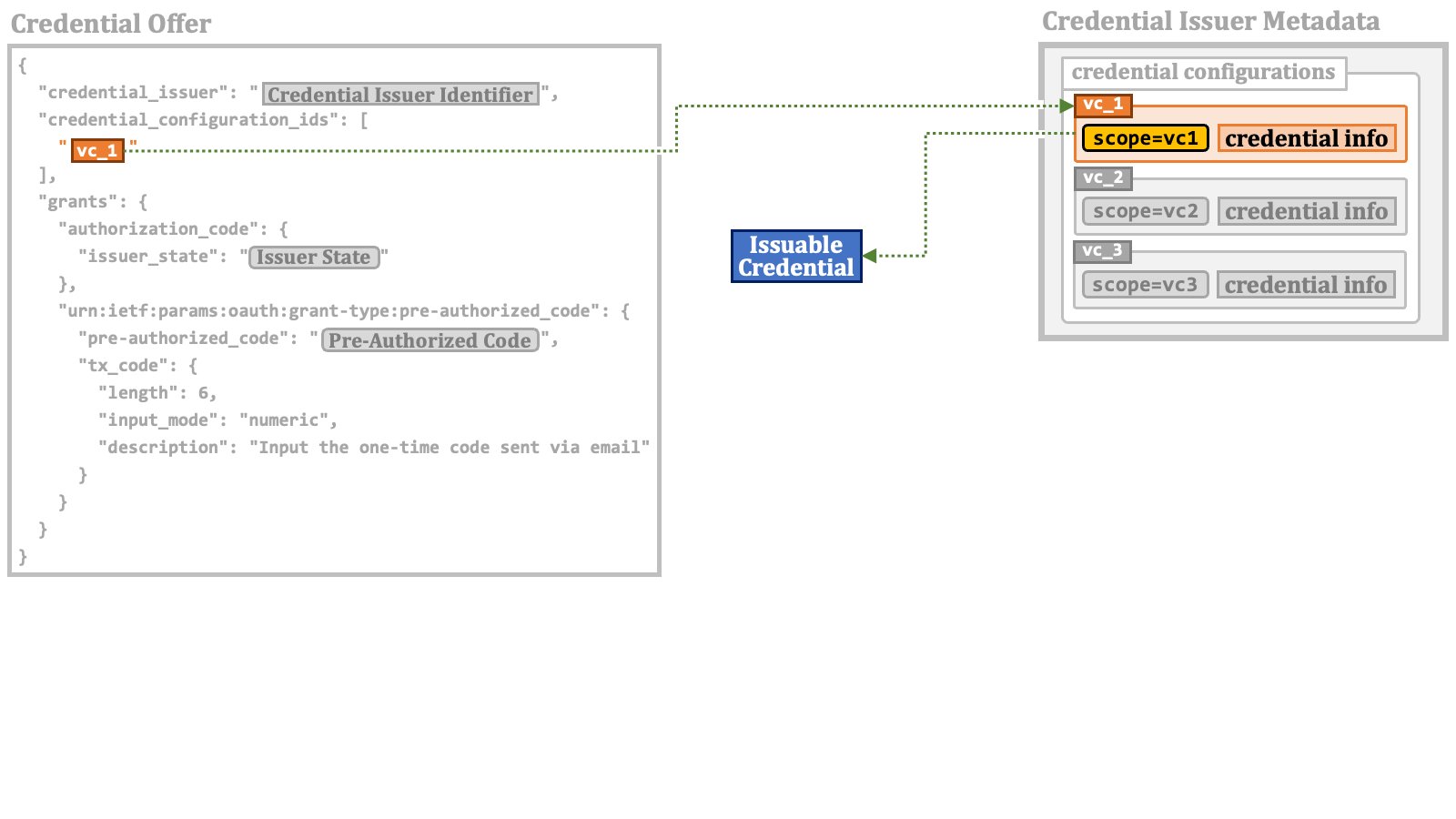 The number of elements in the `"credential_configuration_ids"` array
in this example is one, but the array may contain multiple elements.
Such elements compose the set of issuable credentials represented by the credential offer.
The number of elements in the `"credential_configuration_ids"` array
in this example is one, but the array may contain multiple elements.
Such elements compose the set of issuable credentials represented by the credential offer.
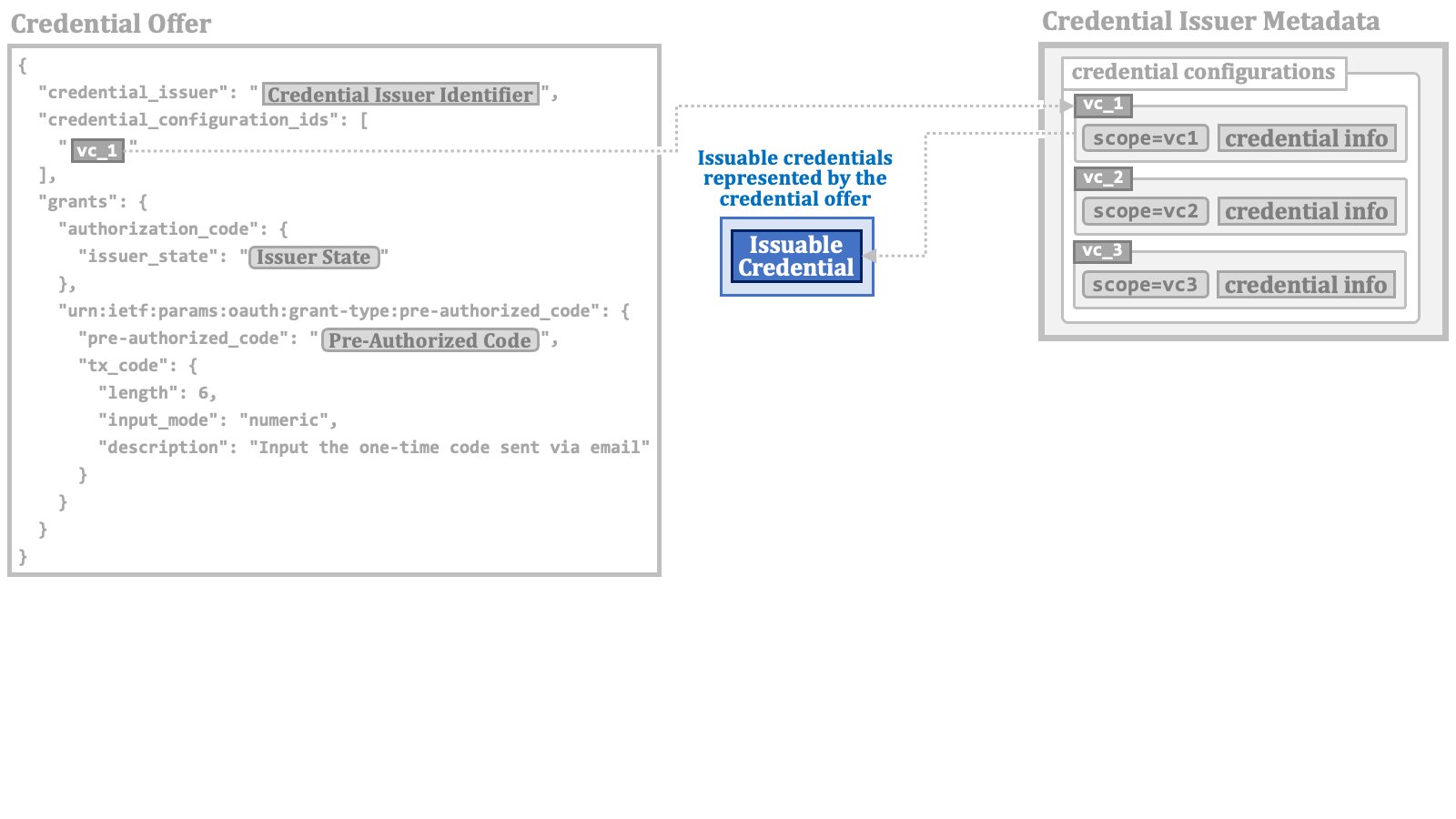 Therefore, it can be said that a token request using the pre-authorized code flow requests an access token associated with the issuable credentials specified in the credential offer that contains the pre-authorized code.
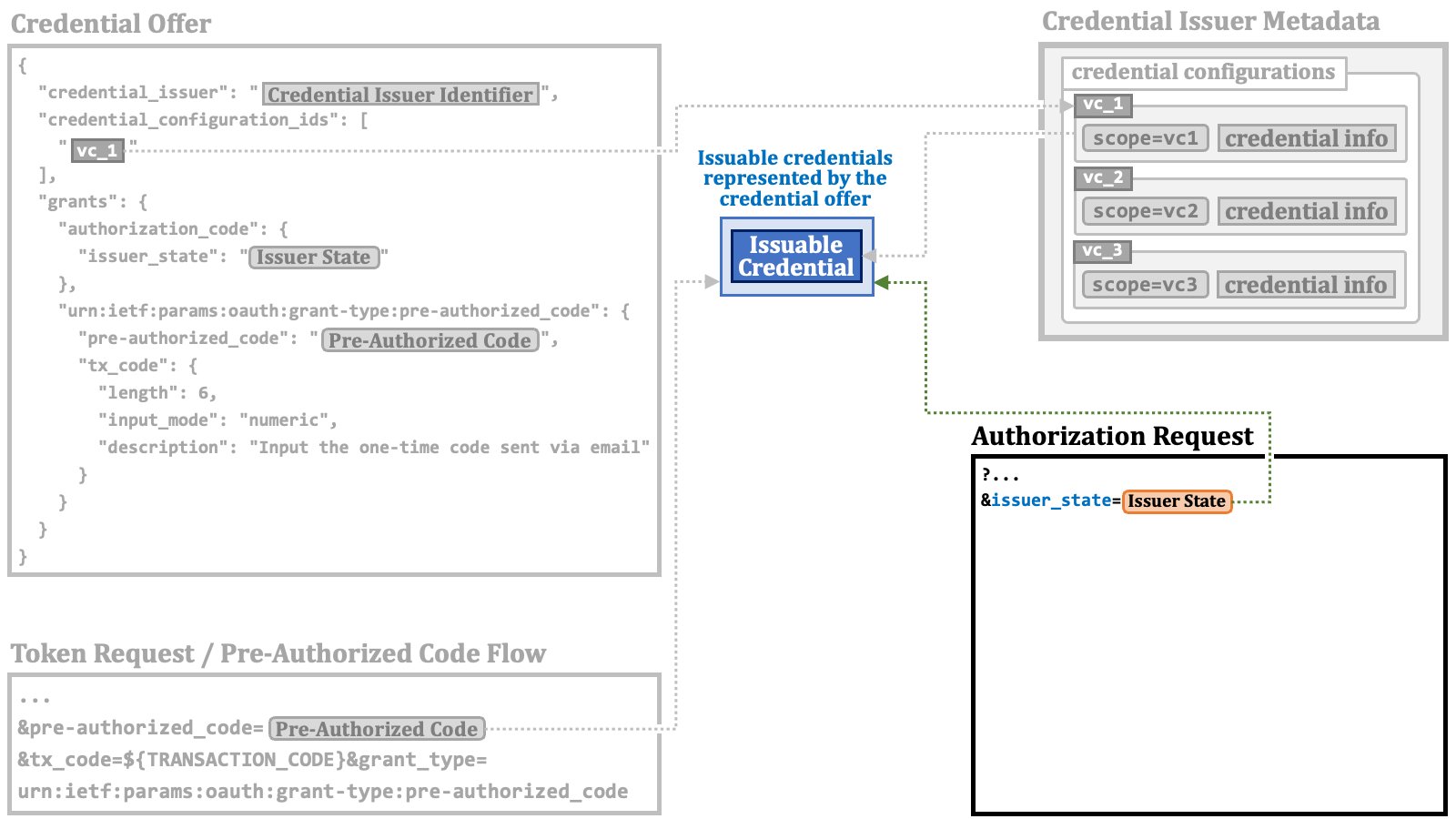
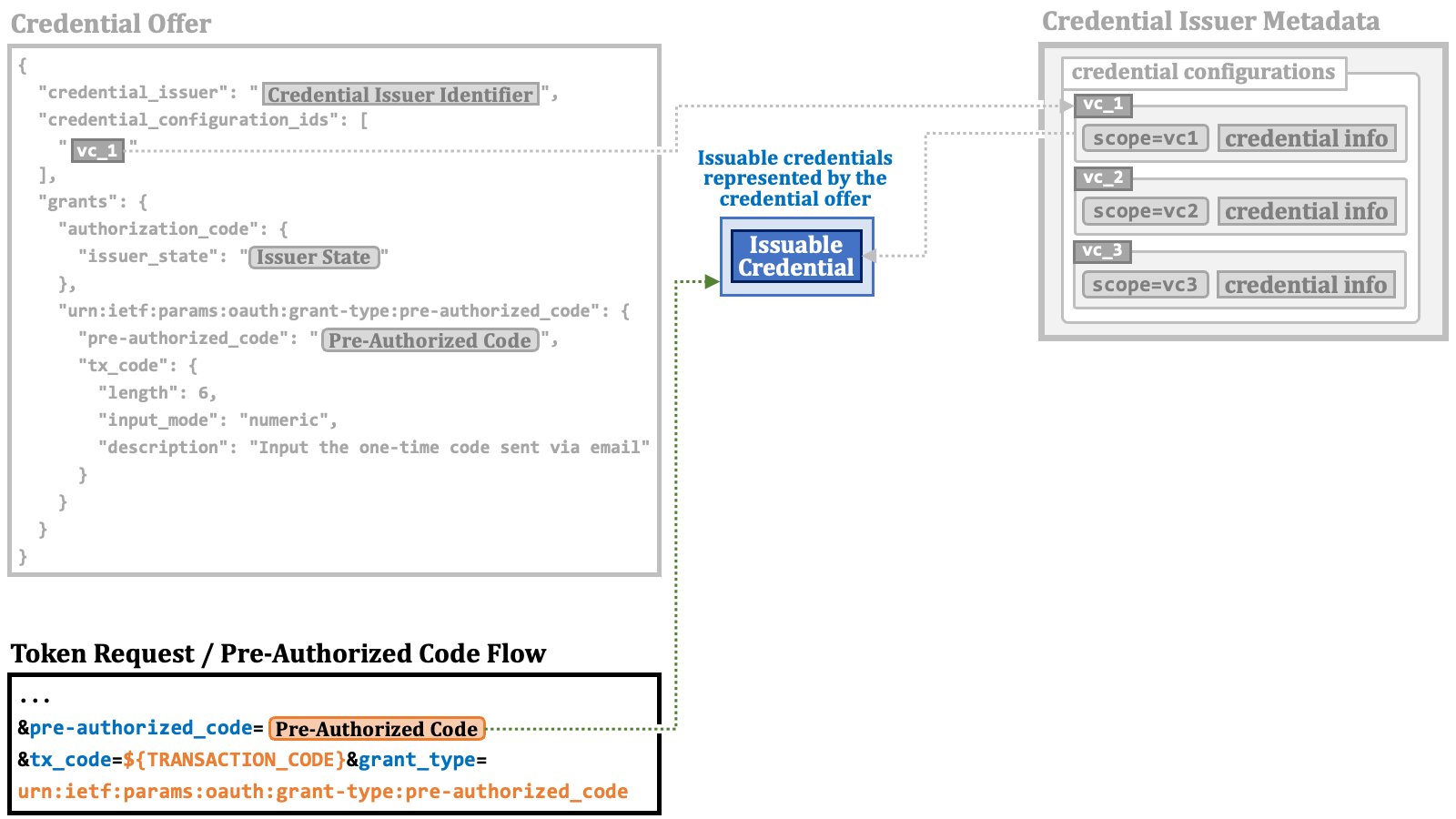 Similarly, it can be said that an authorization request with the `issuer_state` request parameter requests an access token associated with the issuable credentials specified in the credential offer that contains the issuer state.
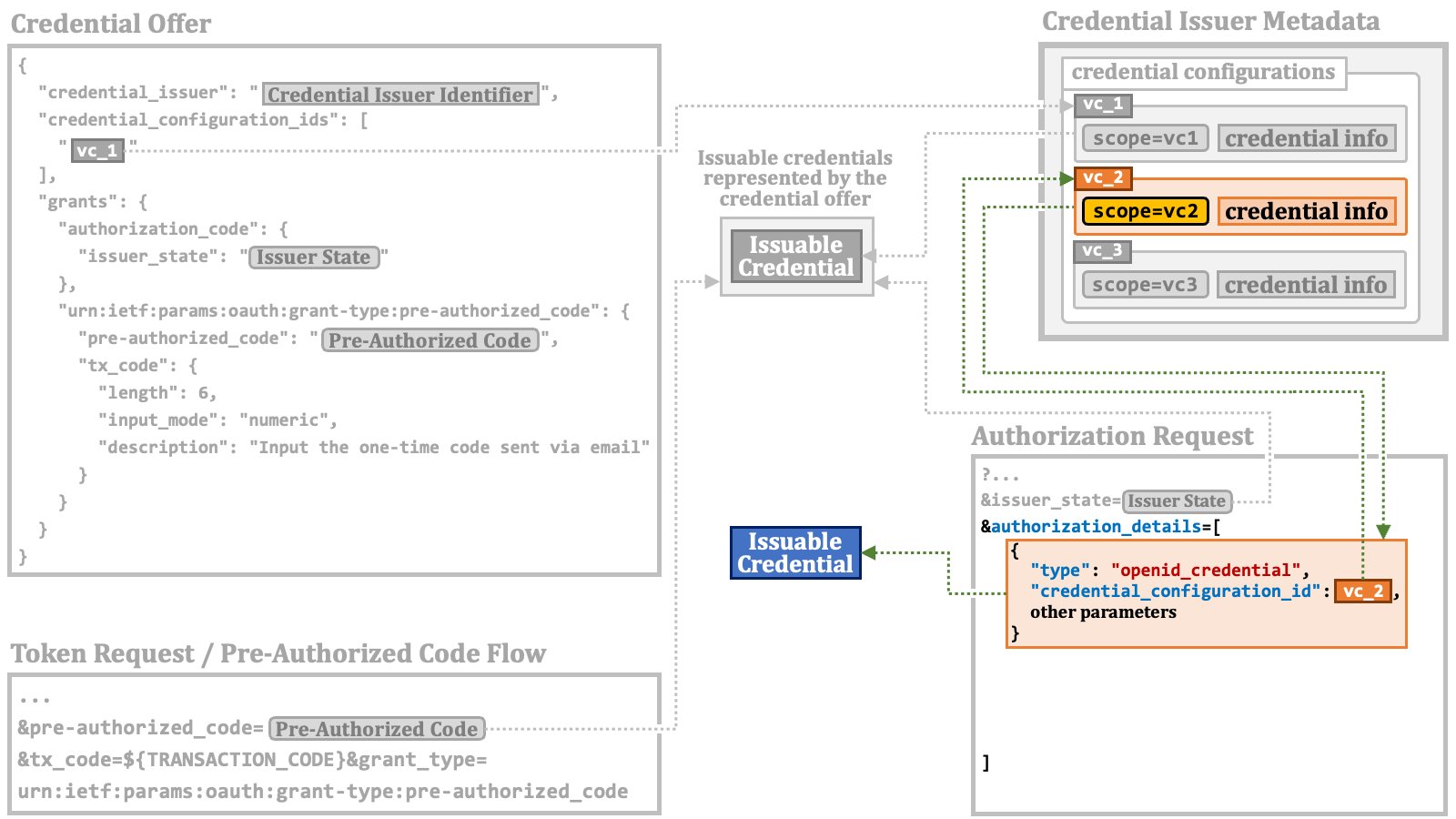
 A RAR object with `"type":"openid_credential"` may specify a credential configuration
using the `"credential_configuration_id"` property as the base
of an issuable credential.
A RAR object with `"type":"openid_credential"` may specify a credential configuration
using the `"credential_configuration_id"` property as the base
of an issuable credential.
 A RAR object with the `openid_credential` type may use the `format` property instead.
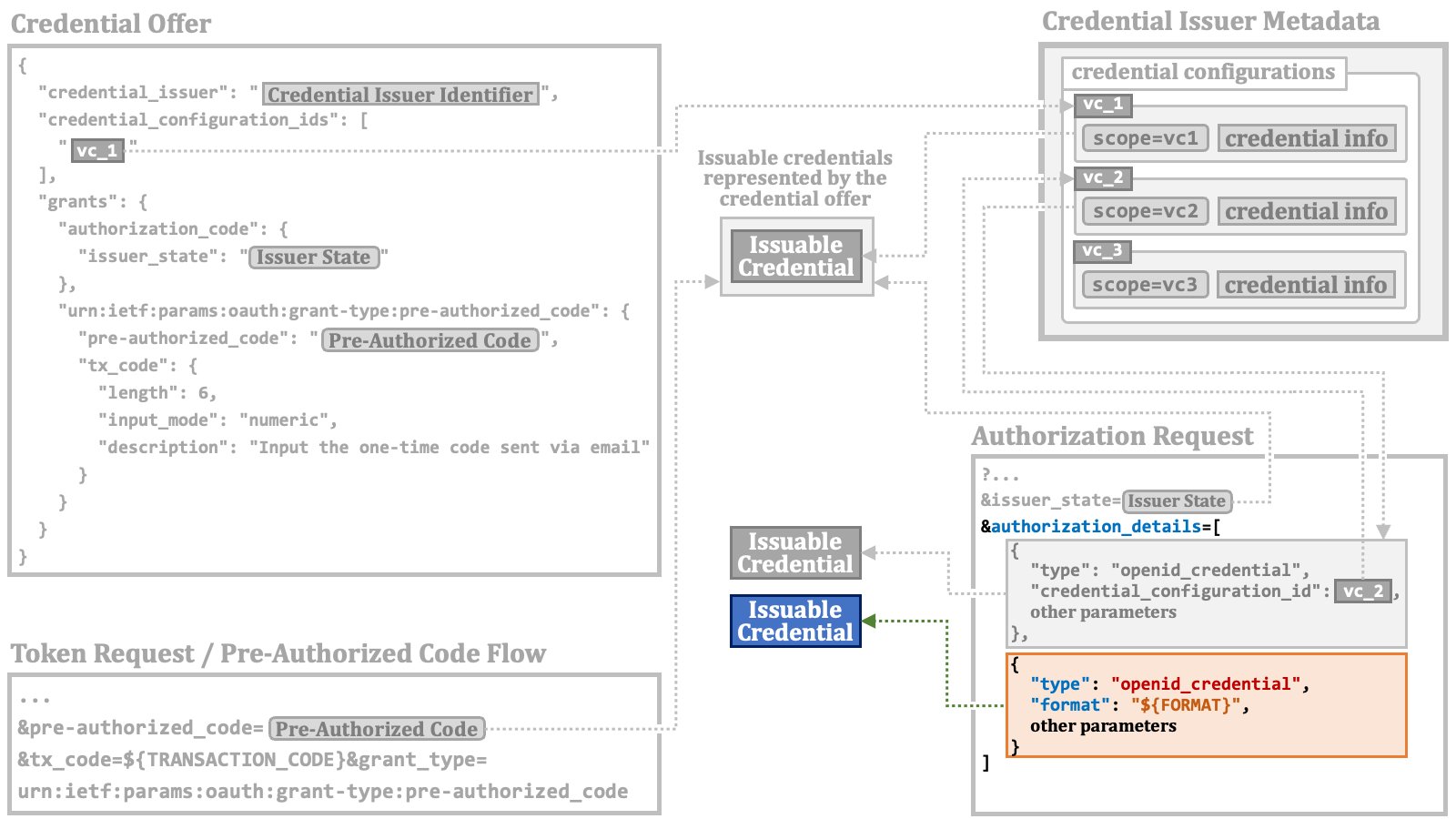 In a RAR object with the `openid_credential` type,
the `credential_configuration_id` property and
the `format` property are mutually exclusive.
Values in the `scope` request parameter may indirectly specify one or more issuable credentials
via the `"scope"` property of credential configurations.
In a RAR object with the `openid_credential` type,
the `credential_configuration_id` property and
the `format` property are mutually exclusive.
Values in the `scope` request parameter may indirectly specify one or more issuable credentials
via the `"scope"` property of credential configurations.
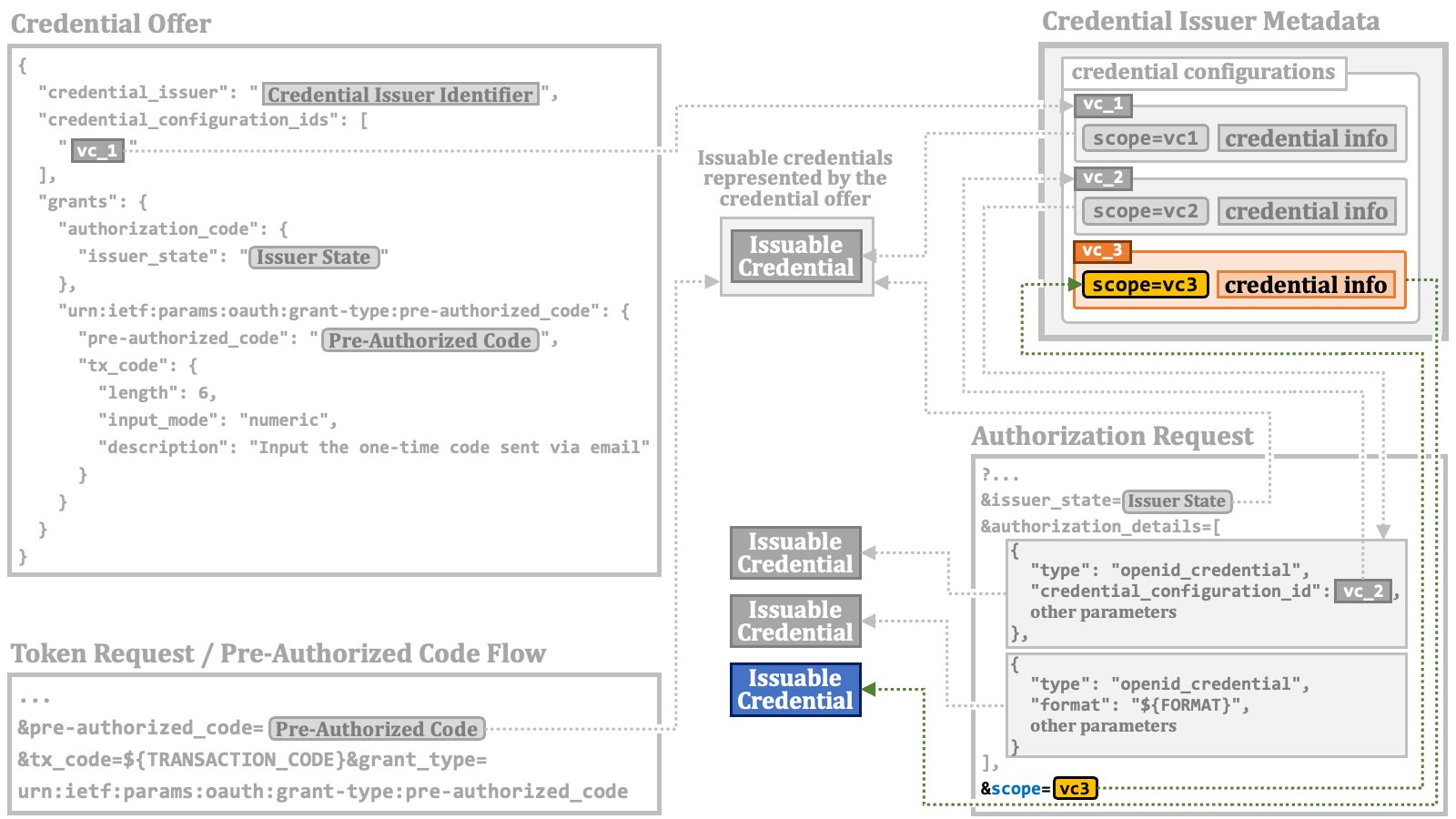 Although the current draft of the OID4VCI specification does not explicitly address the cases where these mechanisms to specify issuable credentials are used simultaneously, in our interpretation and implementation, all the issuable credentials specified by these mechanisms are combined into a single set.
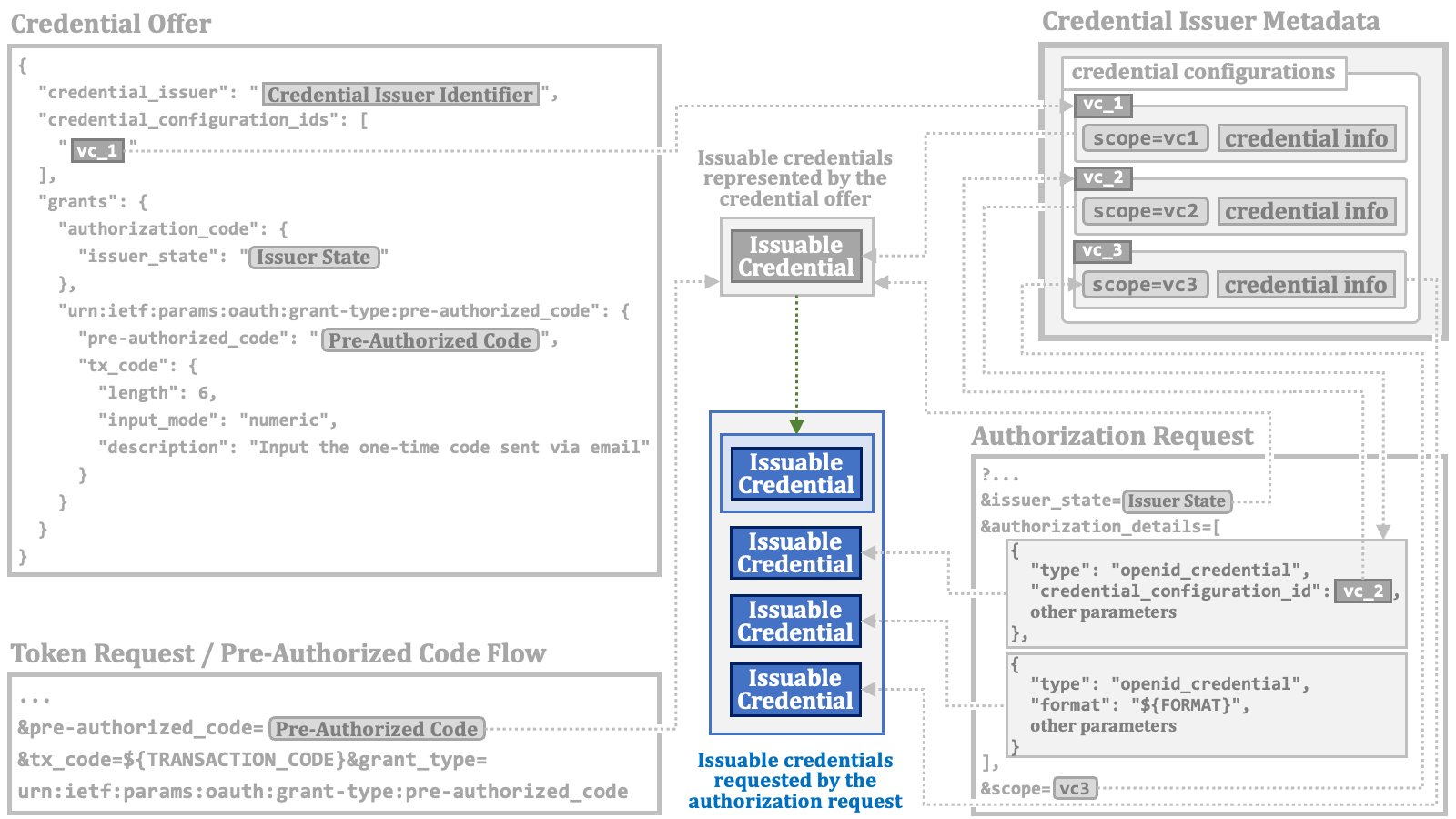 The diagram below illustrates the overall picture of the mechanisms to specify issuable credentials.
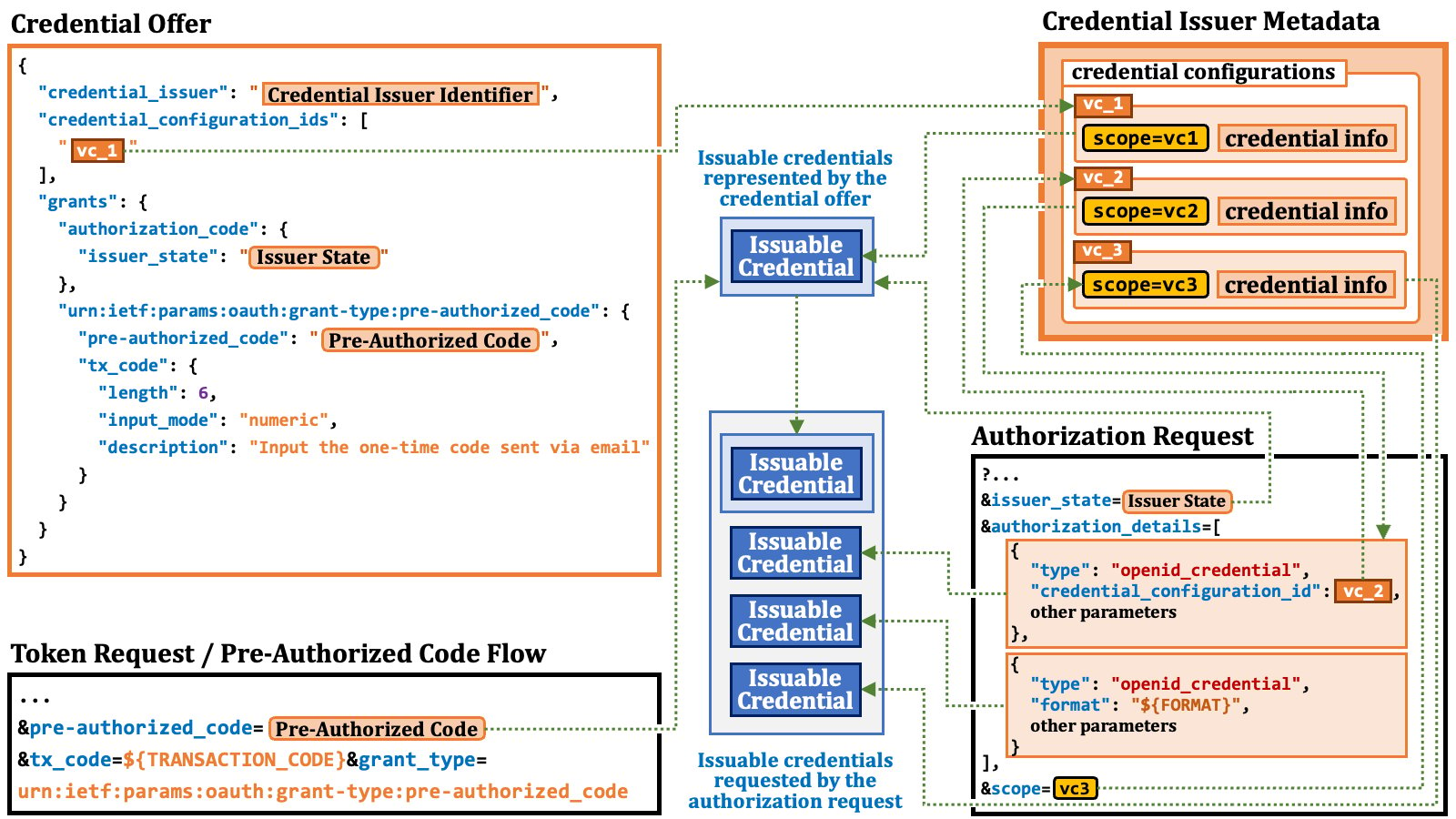 You might be curious about the structures of the credential information and the RAR object in the diagram.
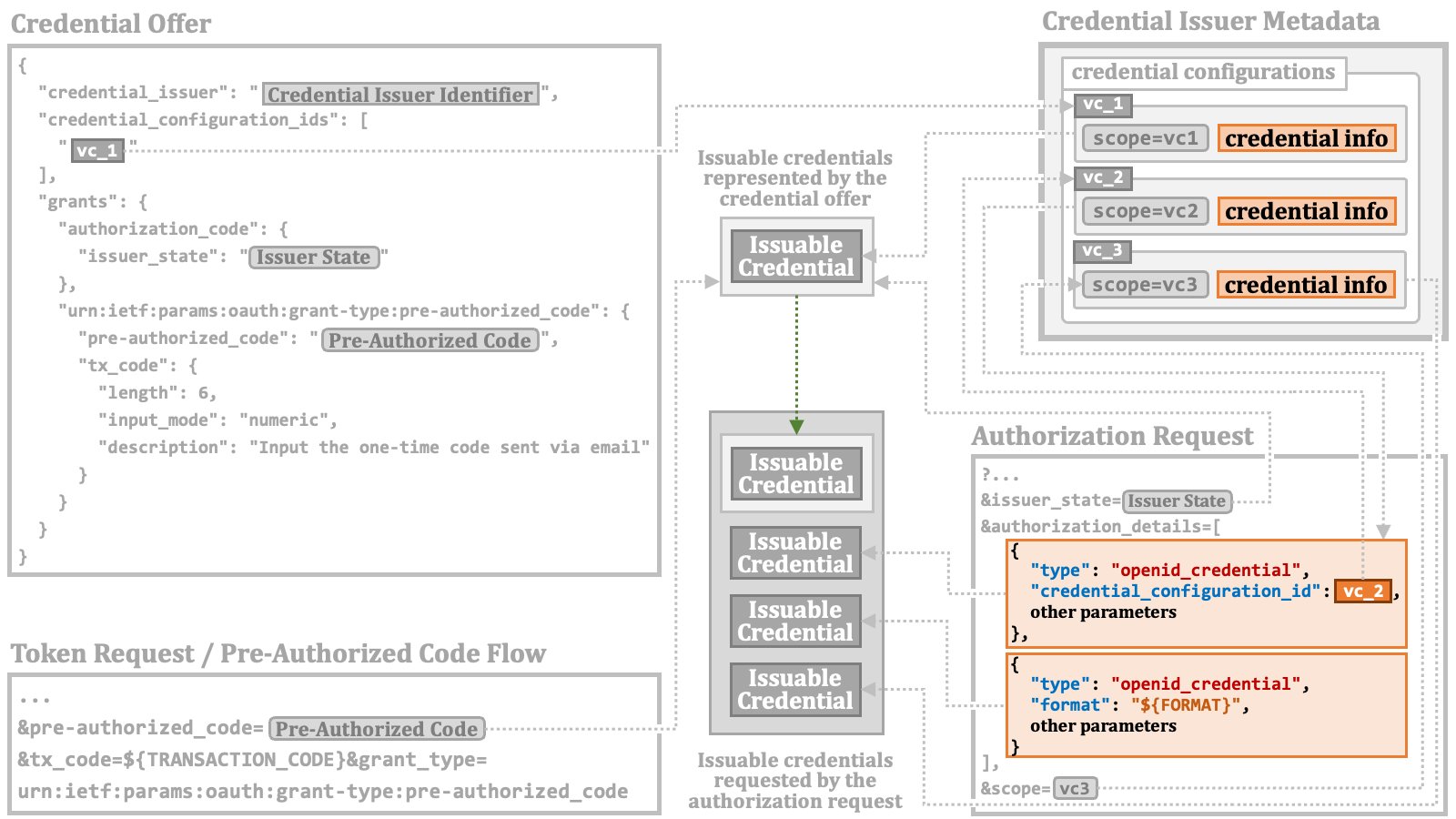 However, before delving into those specifics, we need to walk through the formats of verifiable credentials.
### 2.5. Credential Verification
In order to discuss the formats of verifiable credentials, we need to understand their intended purpose. Let's examine the verification steps of a verifiable credential, one by one.
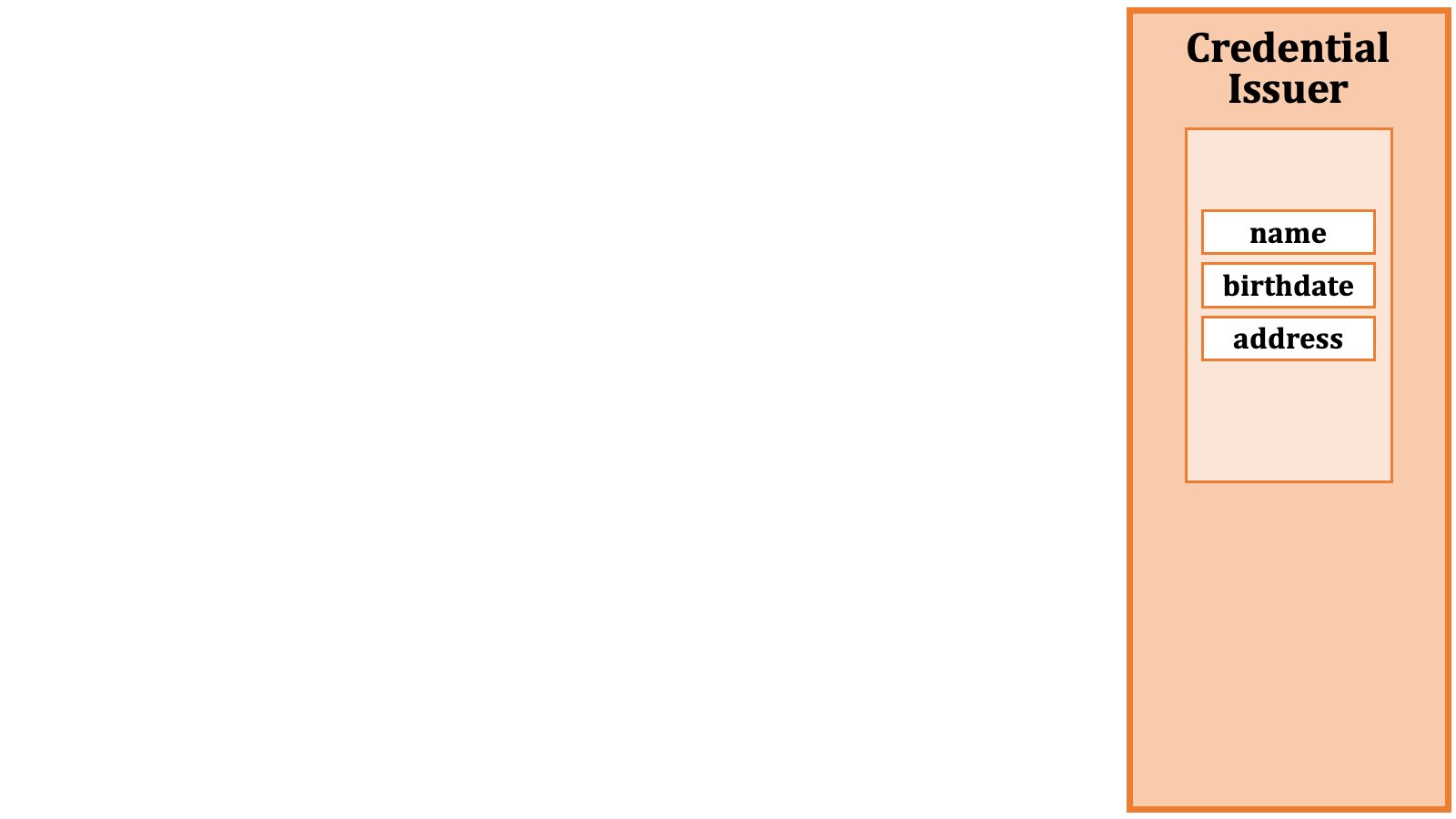
First, the credential issuer prepares data to include in a verifiable credential. In this example, we use name, birthdate, and address.
However, before delving into those specifics, we need to walk through the formats of verifiable credentials.
### 2.5. Credential Verification
In order to discuss the formats of verifiable credentials, we need to understand their intended purpose. Let's examine the verification steps of a verifiable credential, one by one.
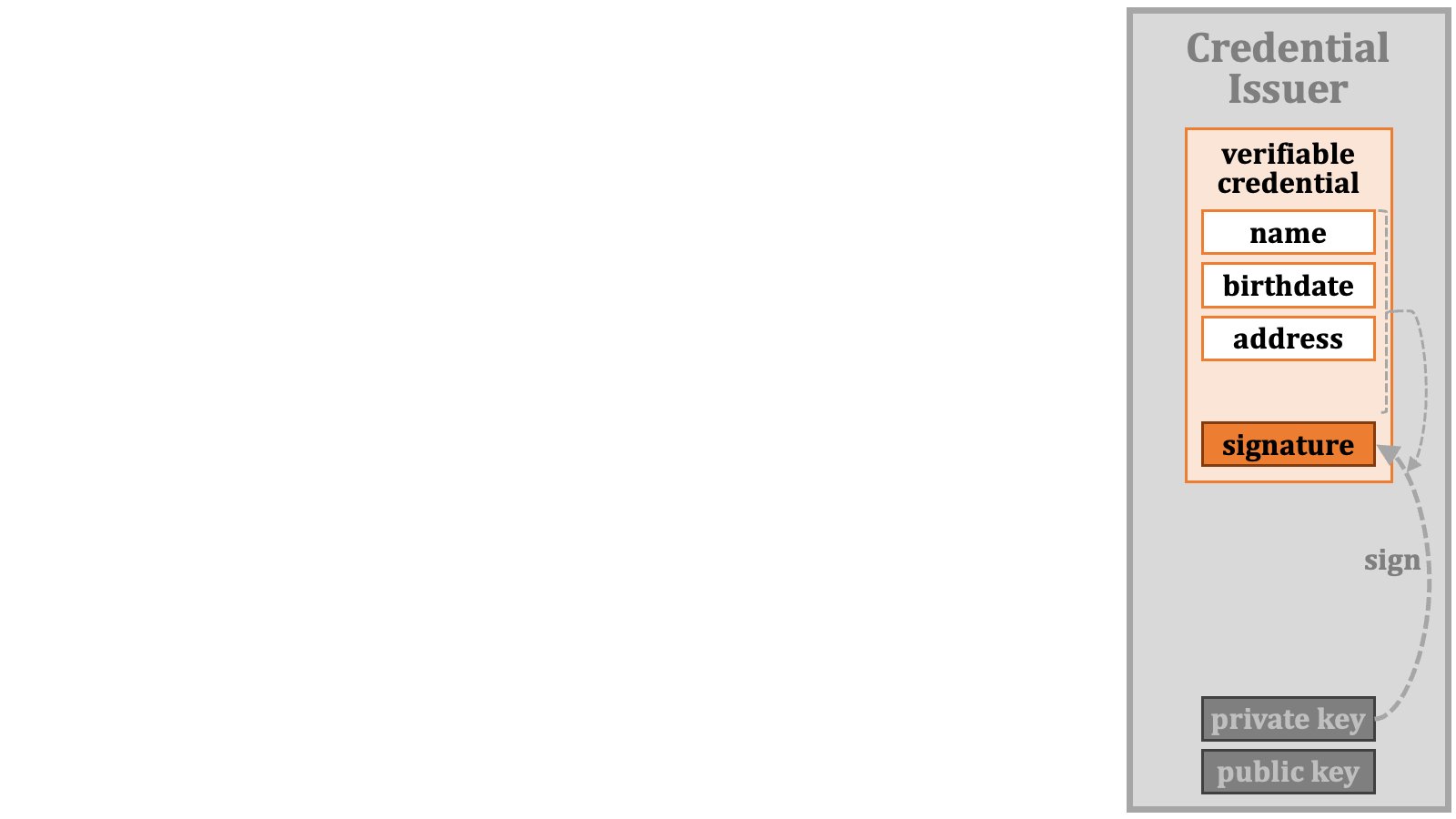
First, the credential issuer prepares data to include in a verifiable credential. In this example, we use name, birthdate, and address.
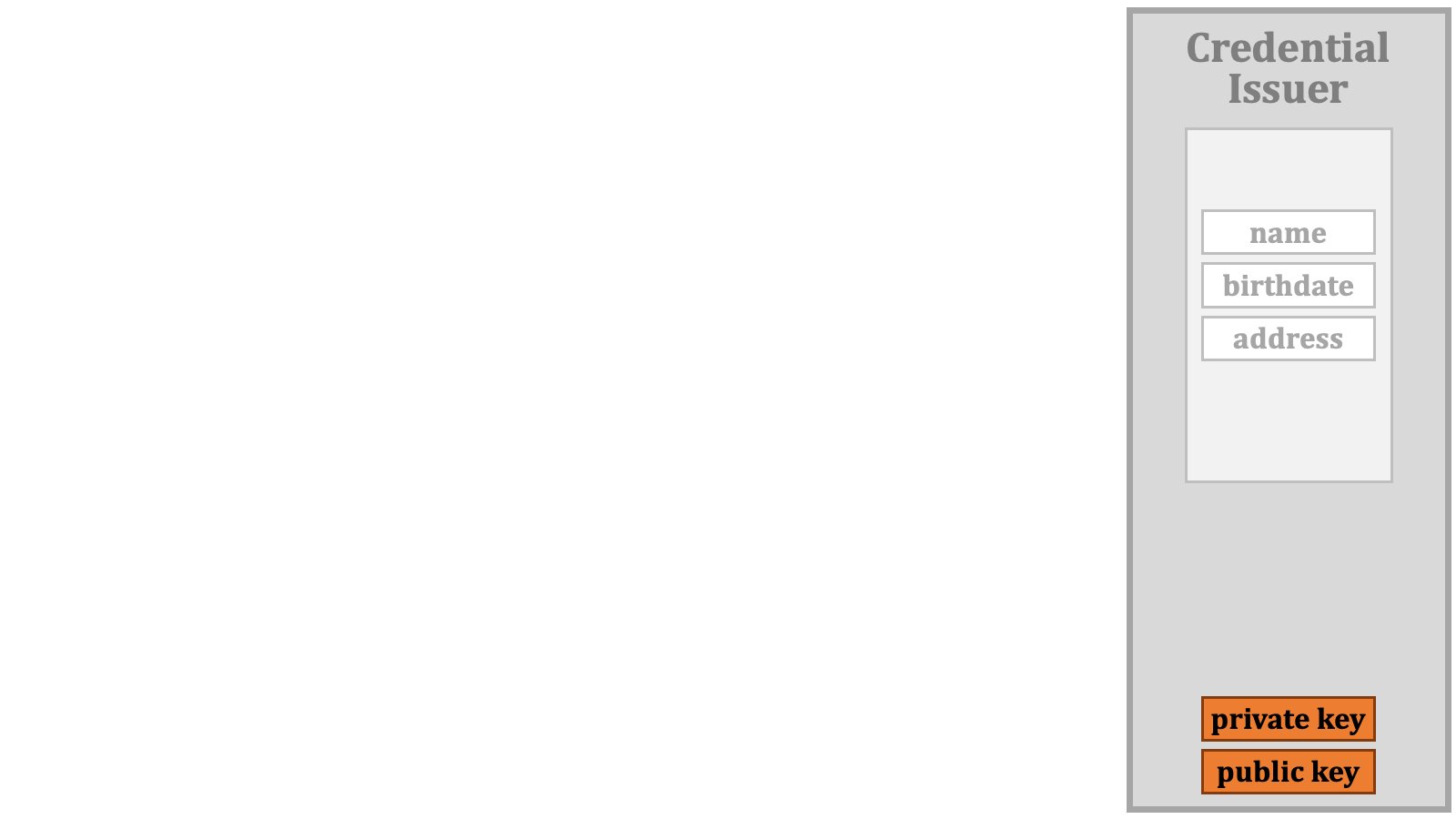
 To sign the data, the credential issuer prepares a pair of a private key and a public key.
 Then, the credential issuer signs the data with the private key. As a result, a signature is generated.
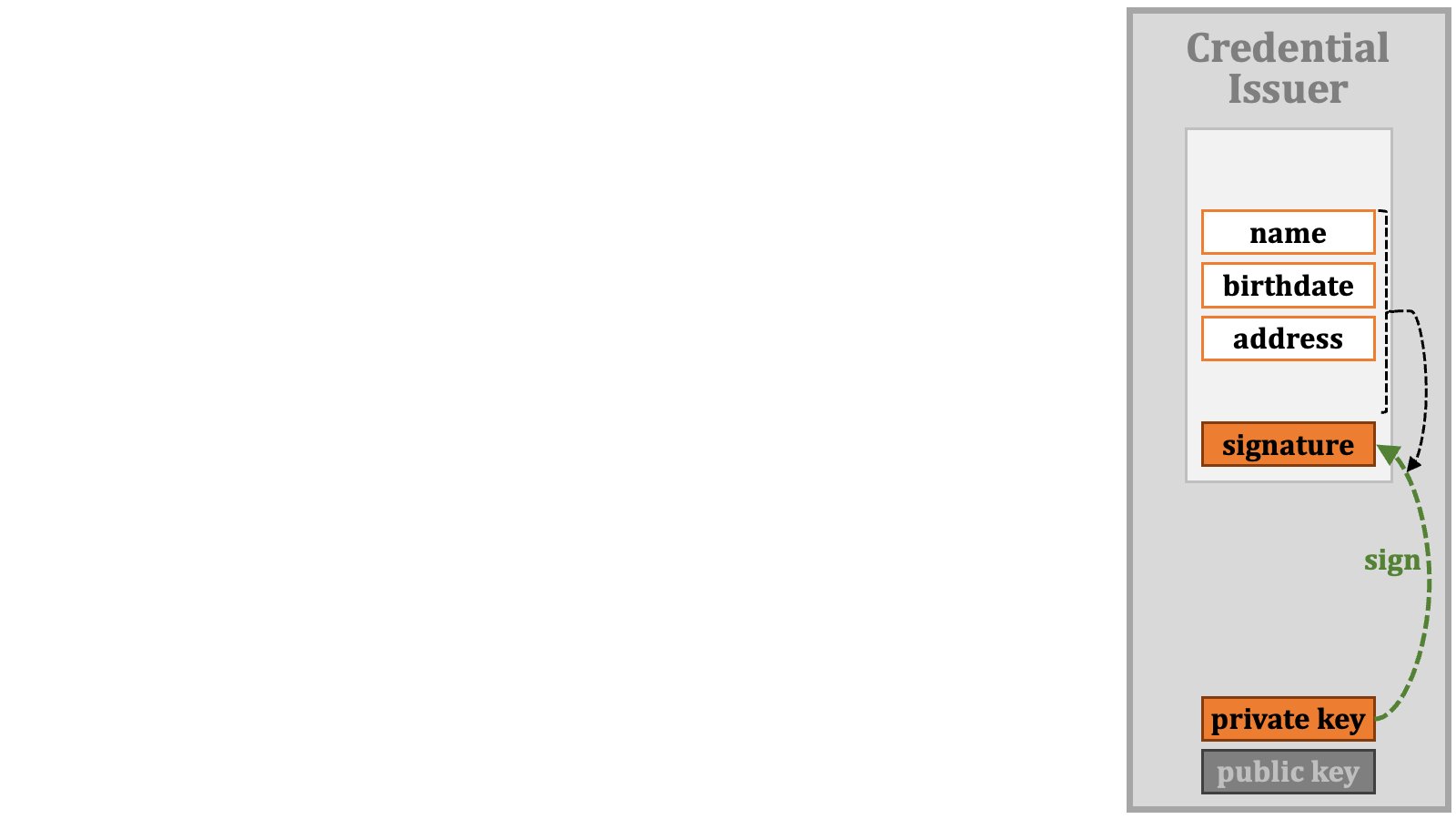 The set of the data and the signature is a verifiable credential.
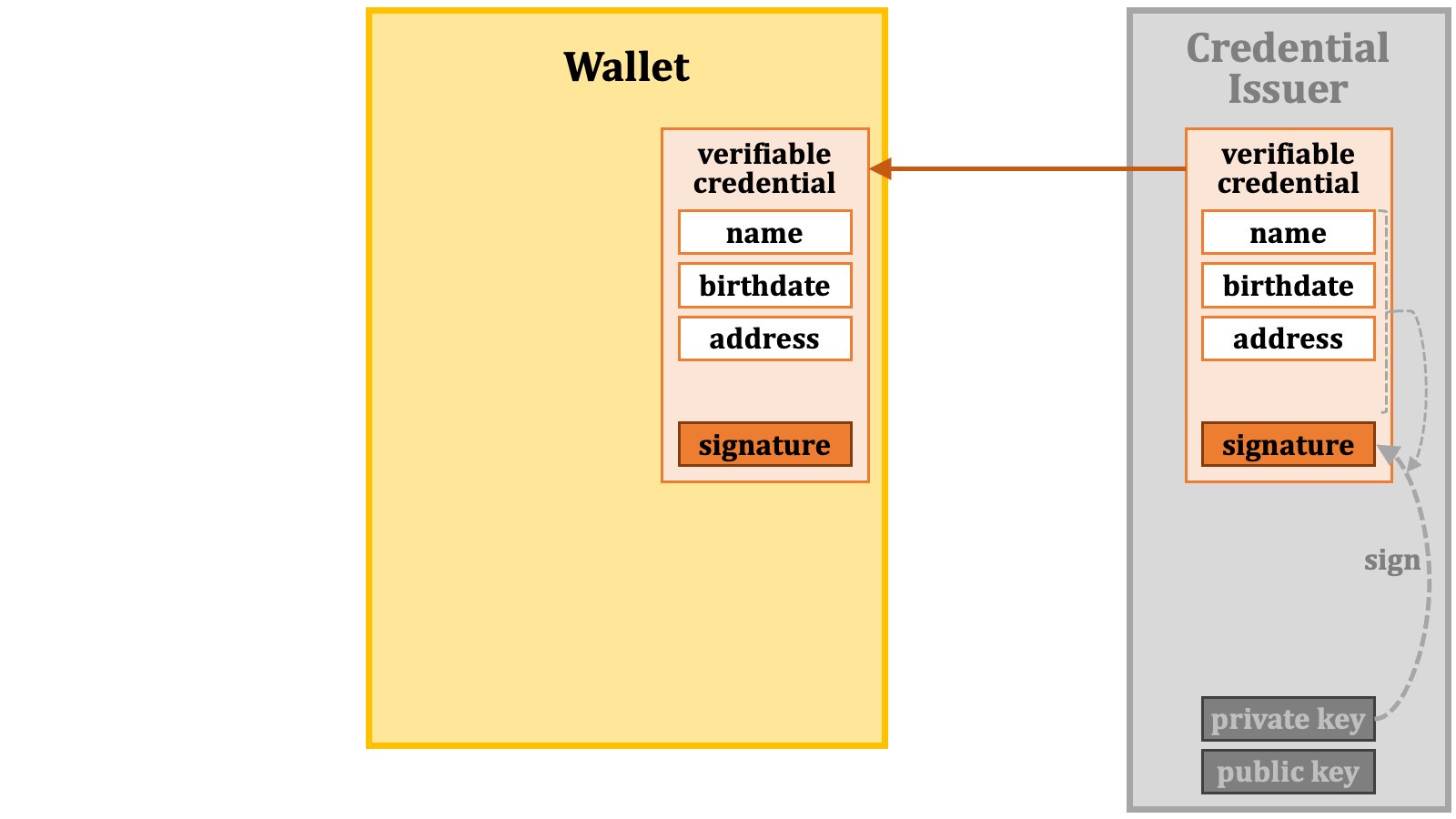
 The credential issuer passes the verifiable credential to the wallet.
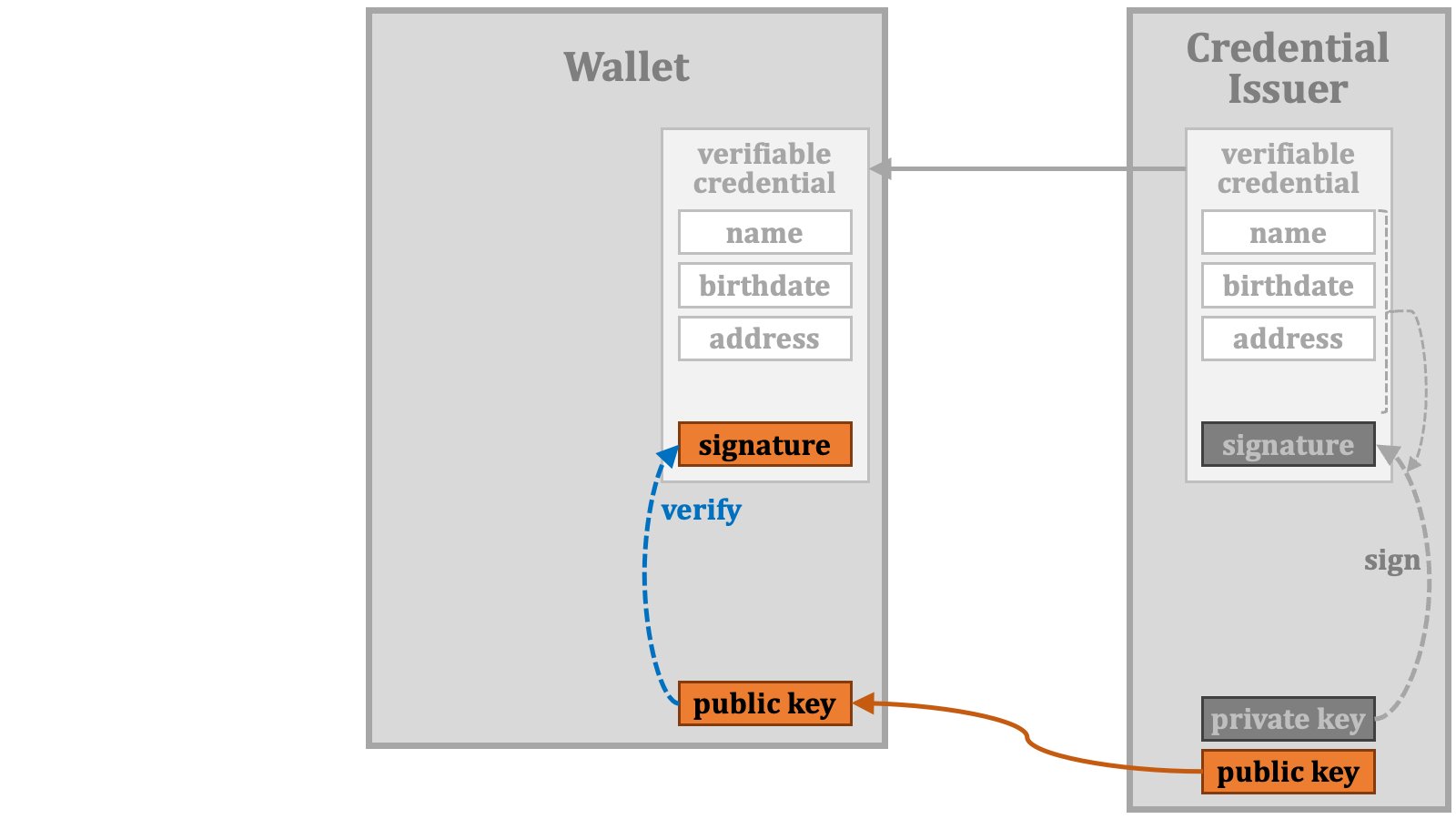
 If the wallet wants to verify the signature of the verifiable credential, it obtains the public key from the credential issuer through some means or other, and uses it to verify the signature. If the verification succeeds, it can be ensured that the verifiable credential has been issued by the legitimate credential issuer and the content has not been tampered with.
 The key distinction between the use of a verifiable credential and an ID token is that the "**holder**" of a verifiable credential may present it to others. Before presented, a verifiable credential is transformed into a "**verifiable presentation**".
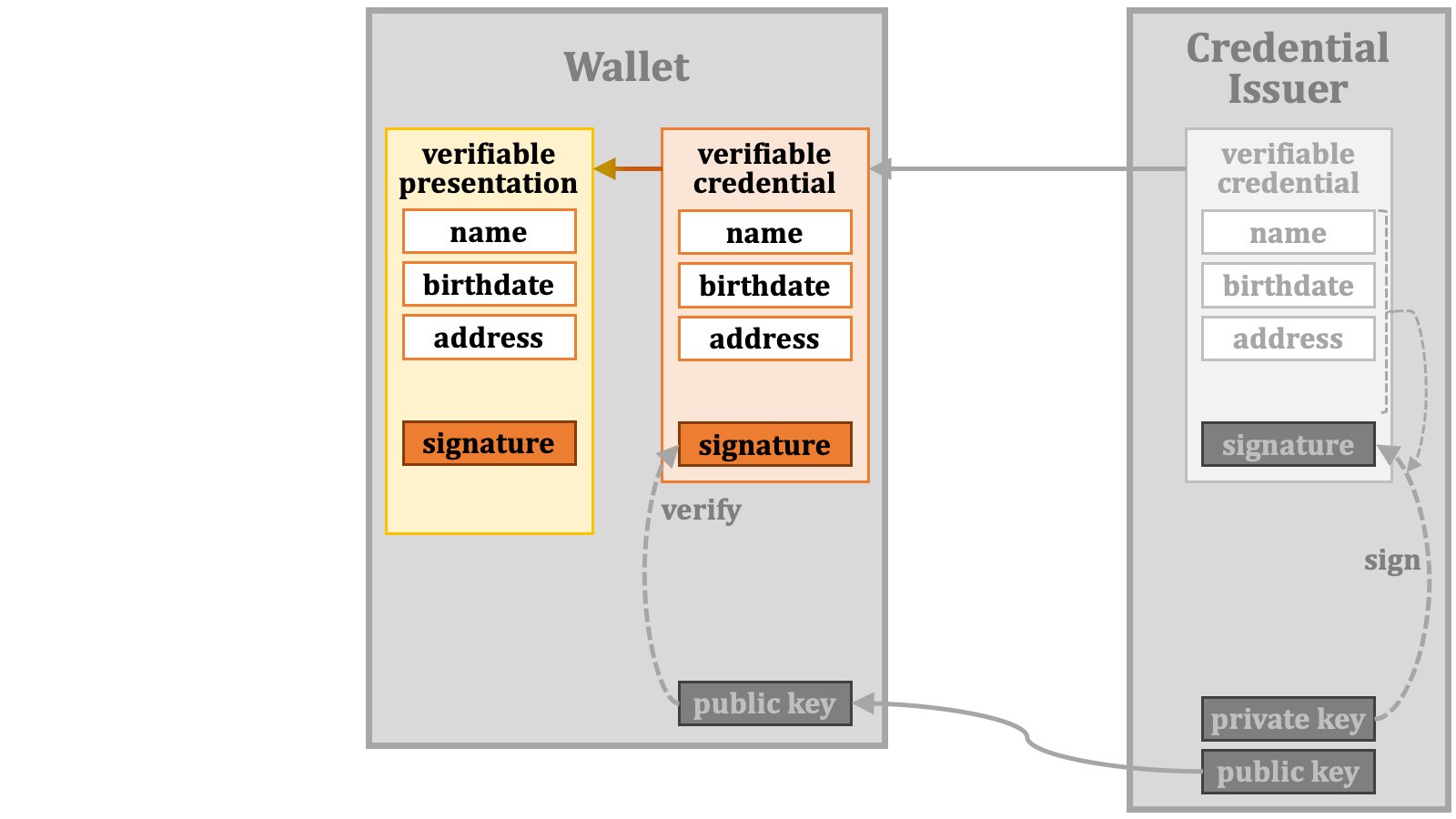 However, from a technical perspective, it is possible for a verifiable credential and its corresponding verifiable presentation to be exactly identical.
The wallet presents the verifiable presentation to others. The external entities receiving the verifiable presentation are referred to as "**verifiers**" because they are supposed to verify the verifiable presentation before providing services to the holder.
However, from a technical perspective, it is possible for a verifiable credential and its corresponding verifiable presentation to be exactly identical.
The wallet presents the verifiable presentation to others. The external entities receiving the verifiable presentation are referred to as "**verifiers**" because they are supposed to verify the verifiable presentation before providing services to the holder.
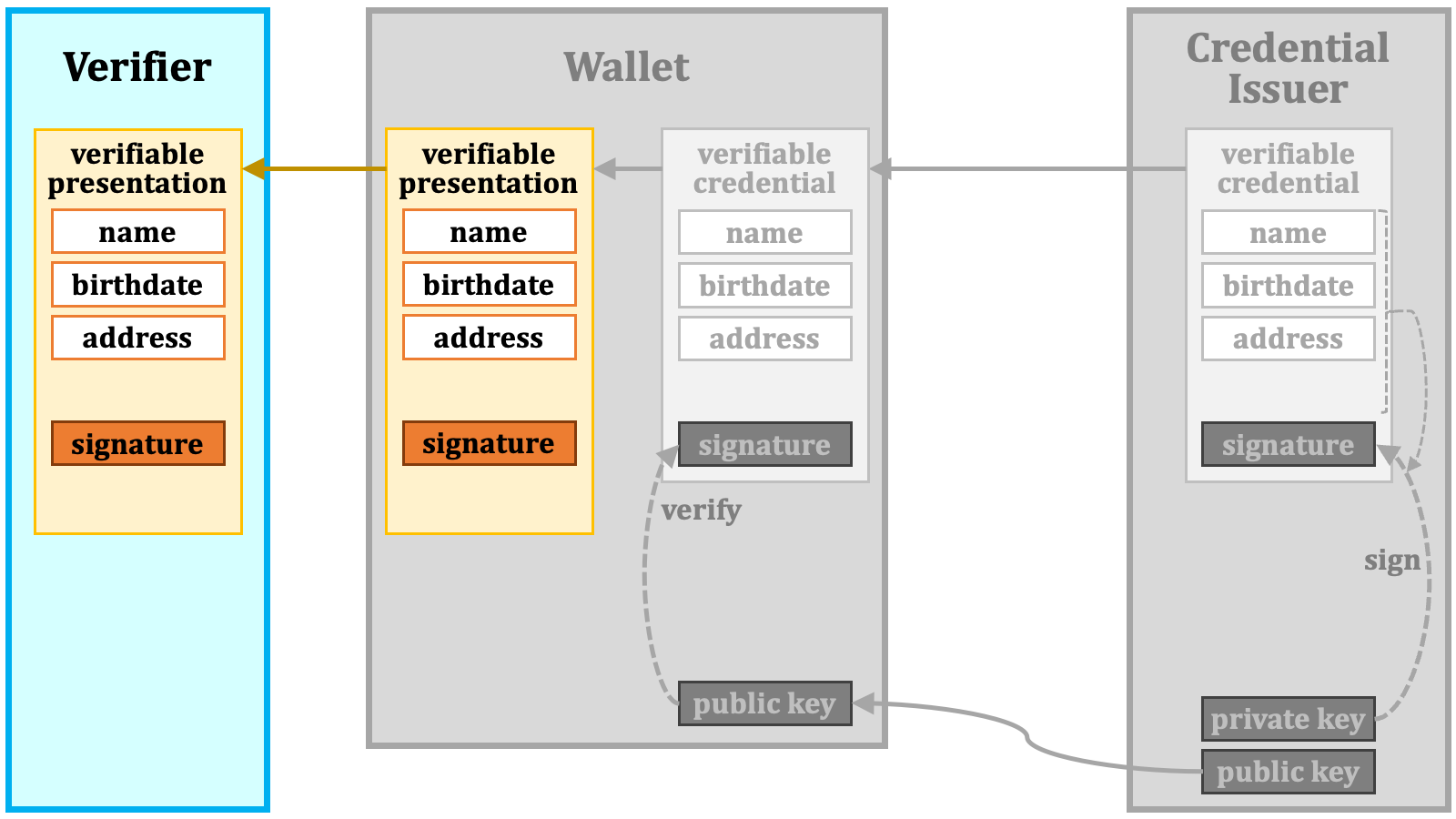 If the verifier wants to verify the signature of the verifiable presentation, it obtains the public key from the credential issuer through some means or other, and uses it to verify the signature.
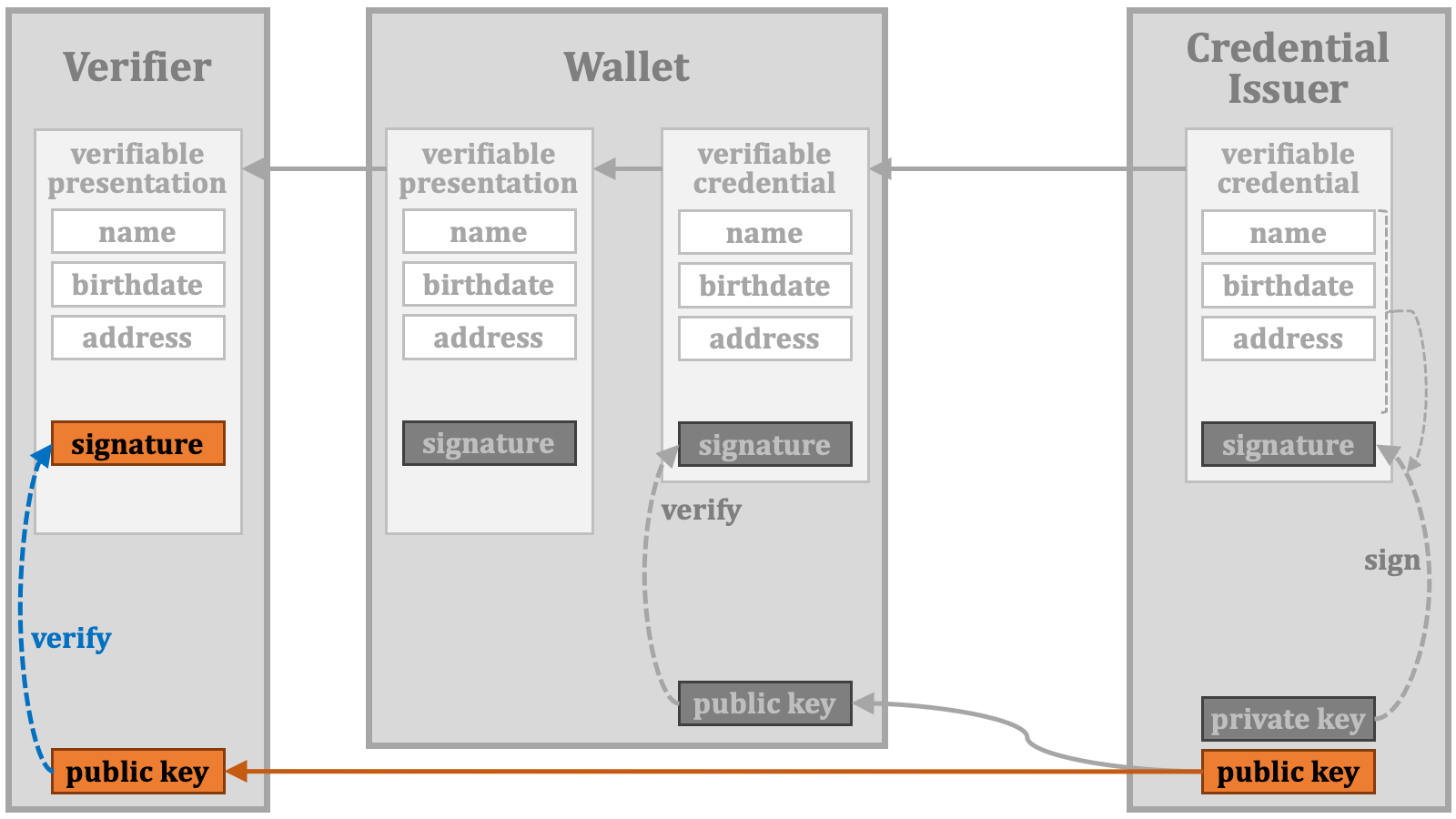 #### 2.5.1. Key Binding
By the way, how can a verifier confirm the following?
1. The verifiable presentation has been presented by the holder.
2. The verifiable credential underlying the verifiable presentation has been issued by the credential issuer to the holder.
As for the first point, it can be achieved by having the holder provide a pair of a private key and a public key,
#### 2.5.1. Key Binding
By the way, how can a verifier confirm the following?
1. The verifiable presentation has been presented by the holder.
2. The verifiable credential underlying the verifiable presentation has been issued by the credential issuer to the holder.
As for the first point, it can be achieved by having the holder provide a pair of a private key and a public key,
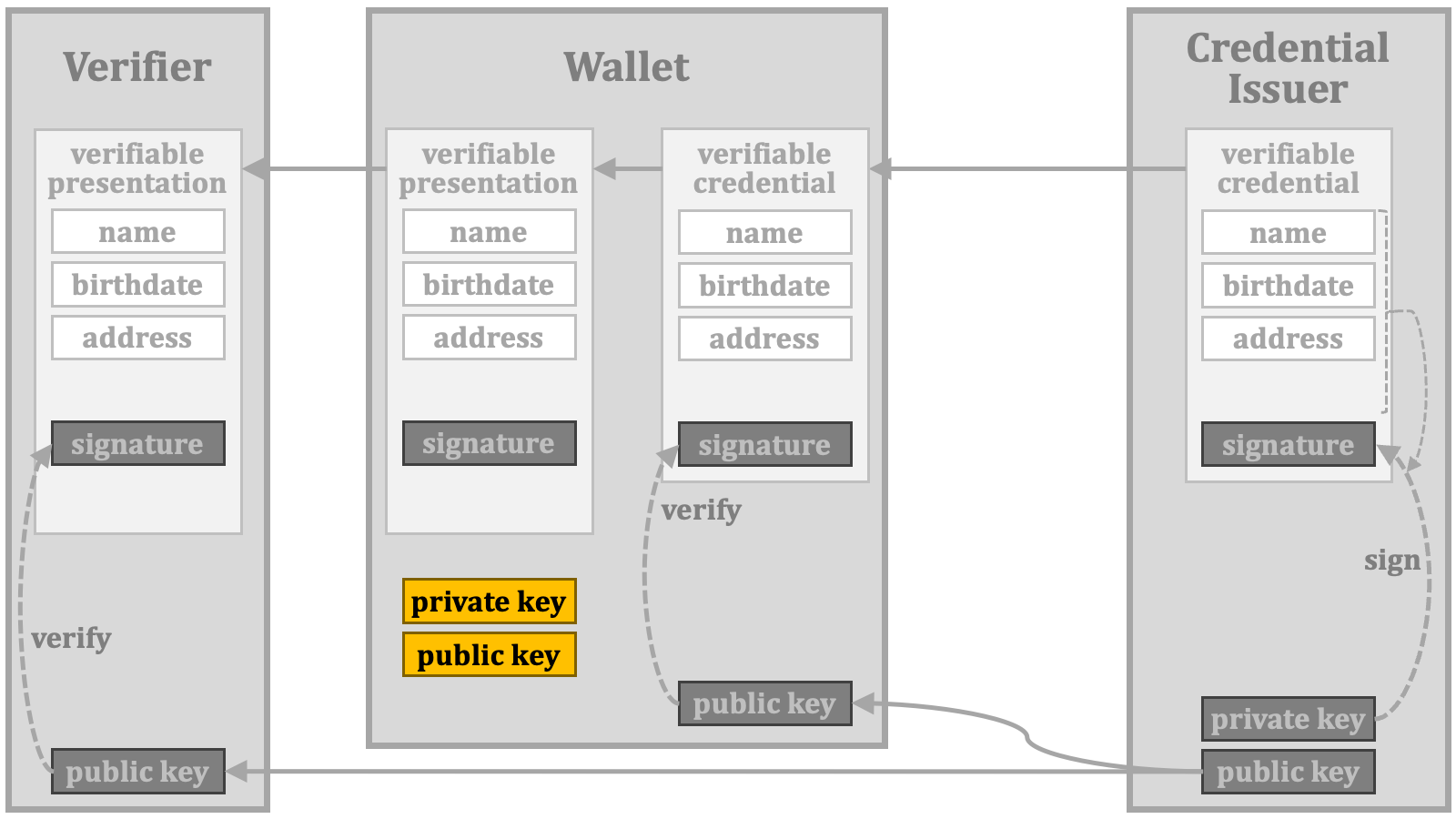 and including a signature made with the holder's private key in the verifiable presentation. The target data for the signature can be arbitrary as long as the data is presented together with the signature.
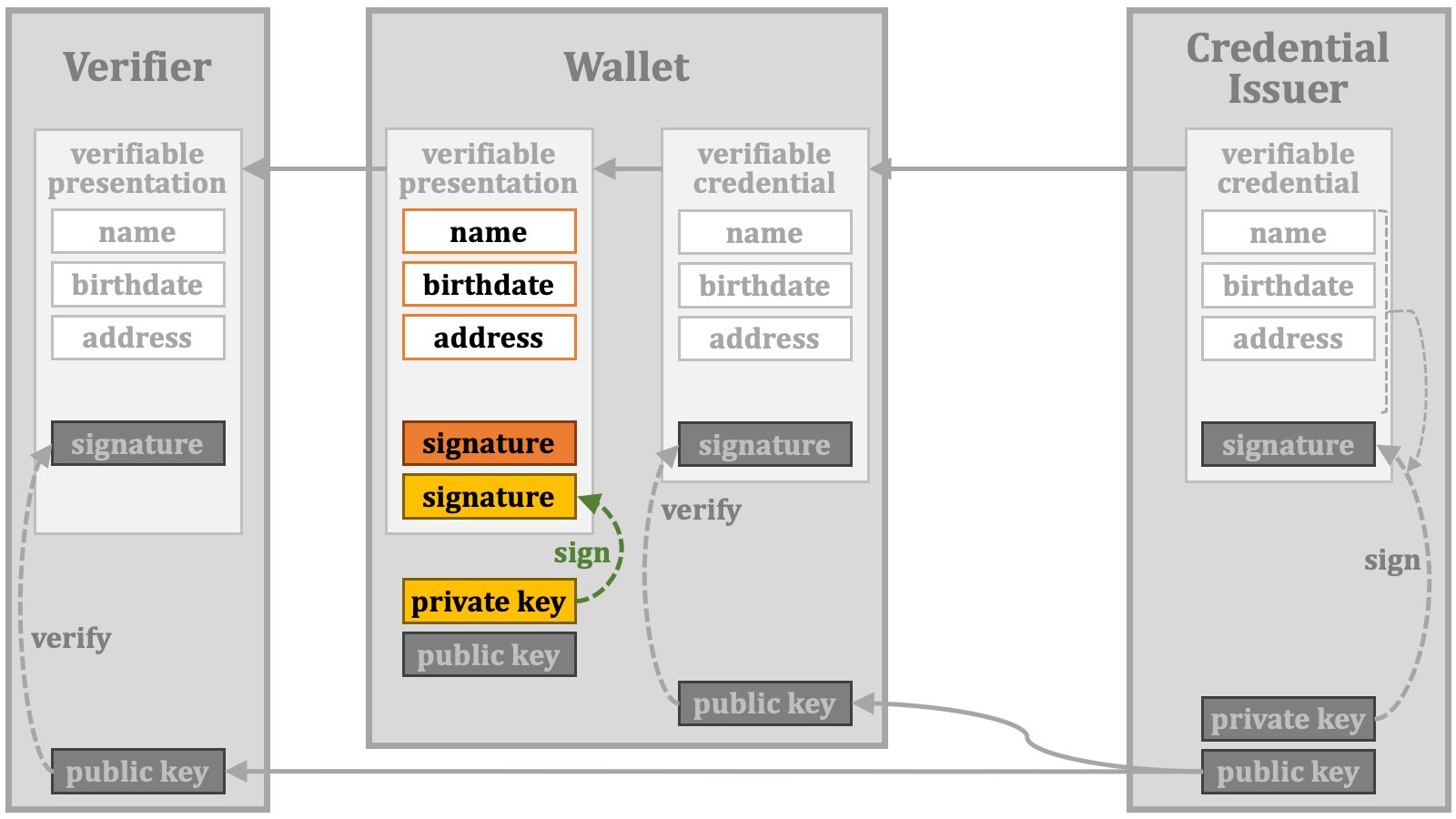 As for the second point, it can be achieved by including the holder's public key in the verifiable credential's data and having the credential issuer sign the entire data with its private key.
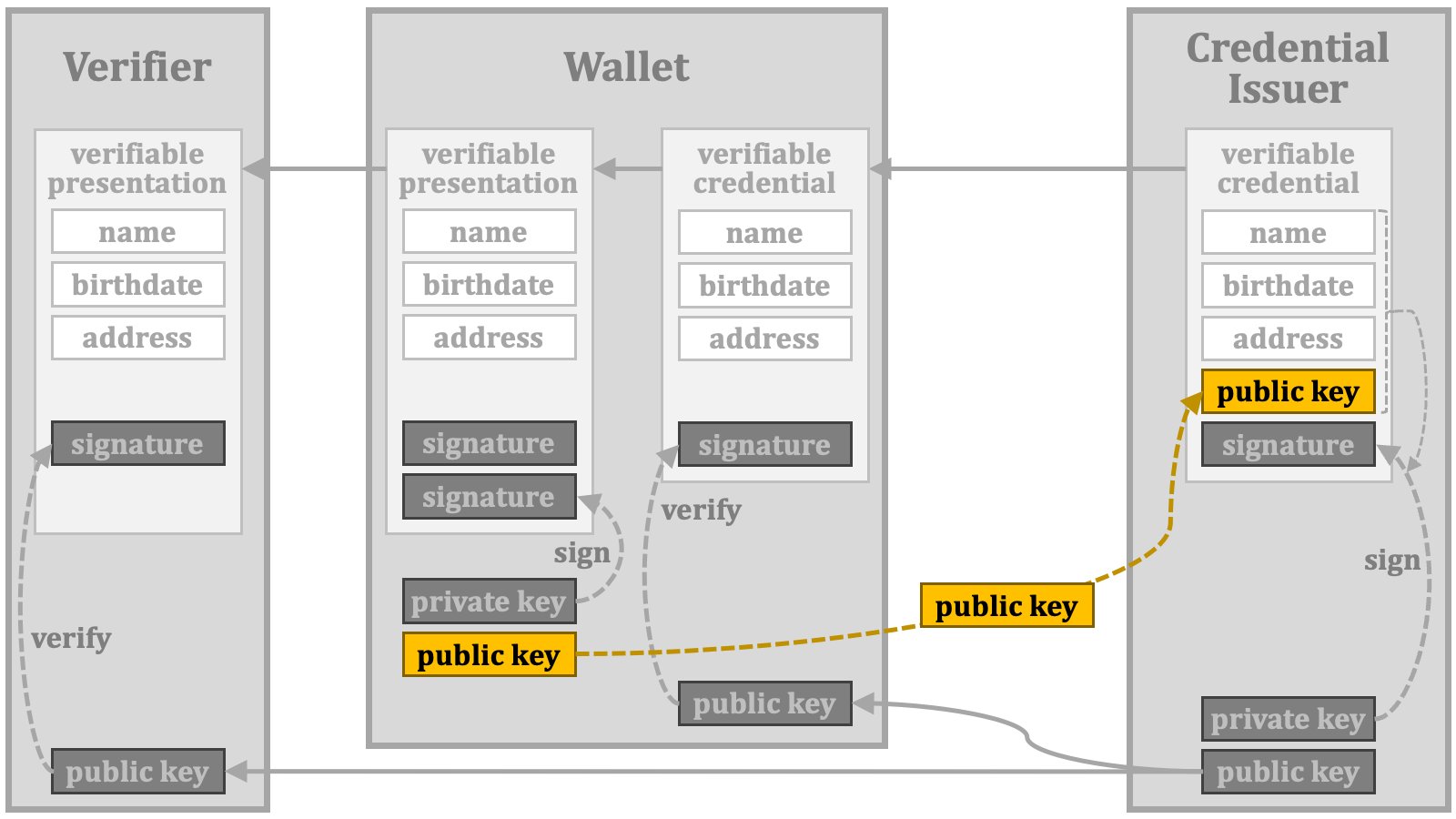 The cryptographic association between the verifiable credential and the holder in this manner is referred to as "**key binding**".
Strictly speaking, the public key used for the key binding mechanism is not always bound to the holder. Instead, it may be bound to one of the devices managed by the holder or even a device that may not be directly managed by the holder. Considering these cases, this mechanism is no longer referred to as "holder binding".
When the wallet requests a verifiable credential with cryptographic key binding, it includes the public key in the credential request. However, the credential issuer should not unconditionally accept the presented public key, as a malicious wallet could present an irrelevant public key.
Therefore, the wallet must demonstrate the legitimate ownership of the public key. To achieve this, the wallet generates a signature using the private key and presents it alongside the public key. This combination of the signature and the public key is commonly known as a "**key proof**".
The cryptographic association between the verifiable credential and the holder in this manner is referred to as "**key binding**".
Strictly speaking, the public key used for the key binding mechanism is not always bound to the holder. Instead, it may be bound to one of the devices managed by the holder or even a device that may not be directly managed by the holder. Considering these cases, this mechanism is no longer referred to as "holder binding".
When the wallet requests a verifiable credential with cryptographic key binding, it includes the public key in the credential request. However, the credential issuer should not unconditionally accept the presented public key, as a malicious wallet could present an irrelevant public key.
Therefore, the wallet must demonstrate the legitimate ownership of the public key. To achieve this, the wallet generates a signature using the private key and presents it alongside the public key. This combination of the signature and the public key is commonly known as a "**key proof**".
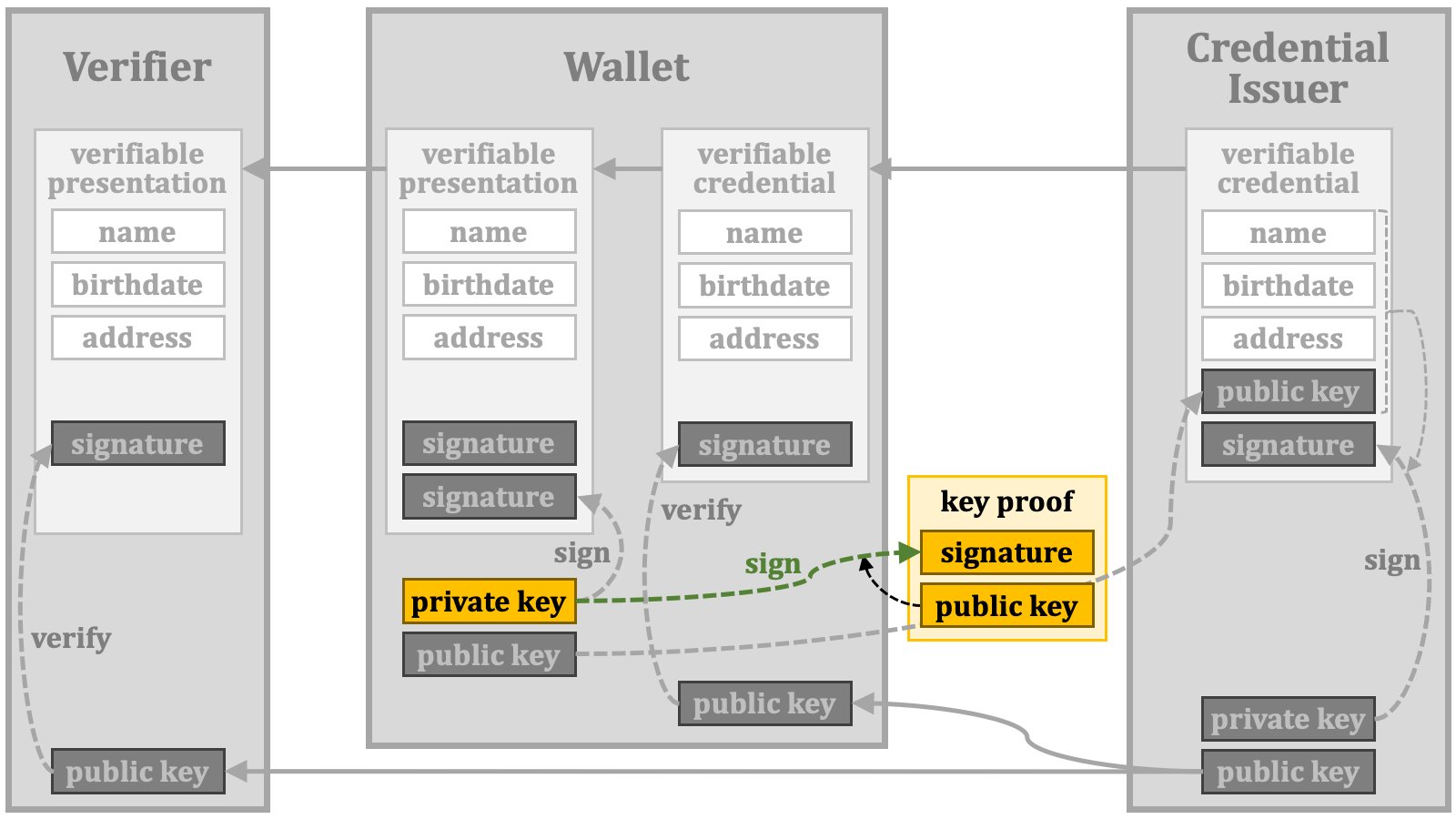 If the credential issuer can validate the presented public key, it can create a verifiable credential with key binding.
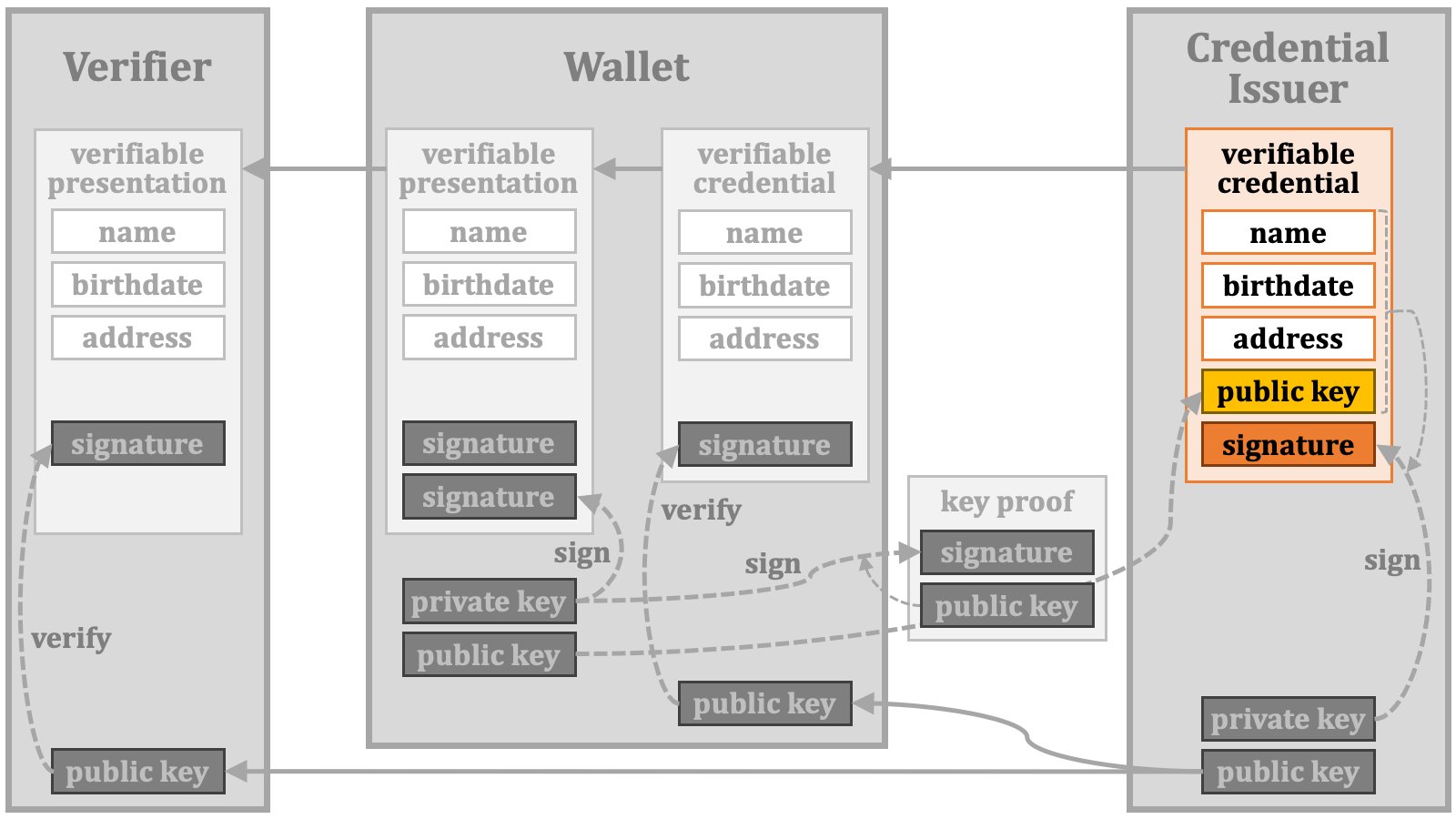 The verifiable credential is then passed to the wallet,
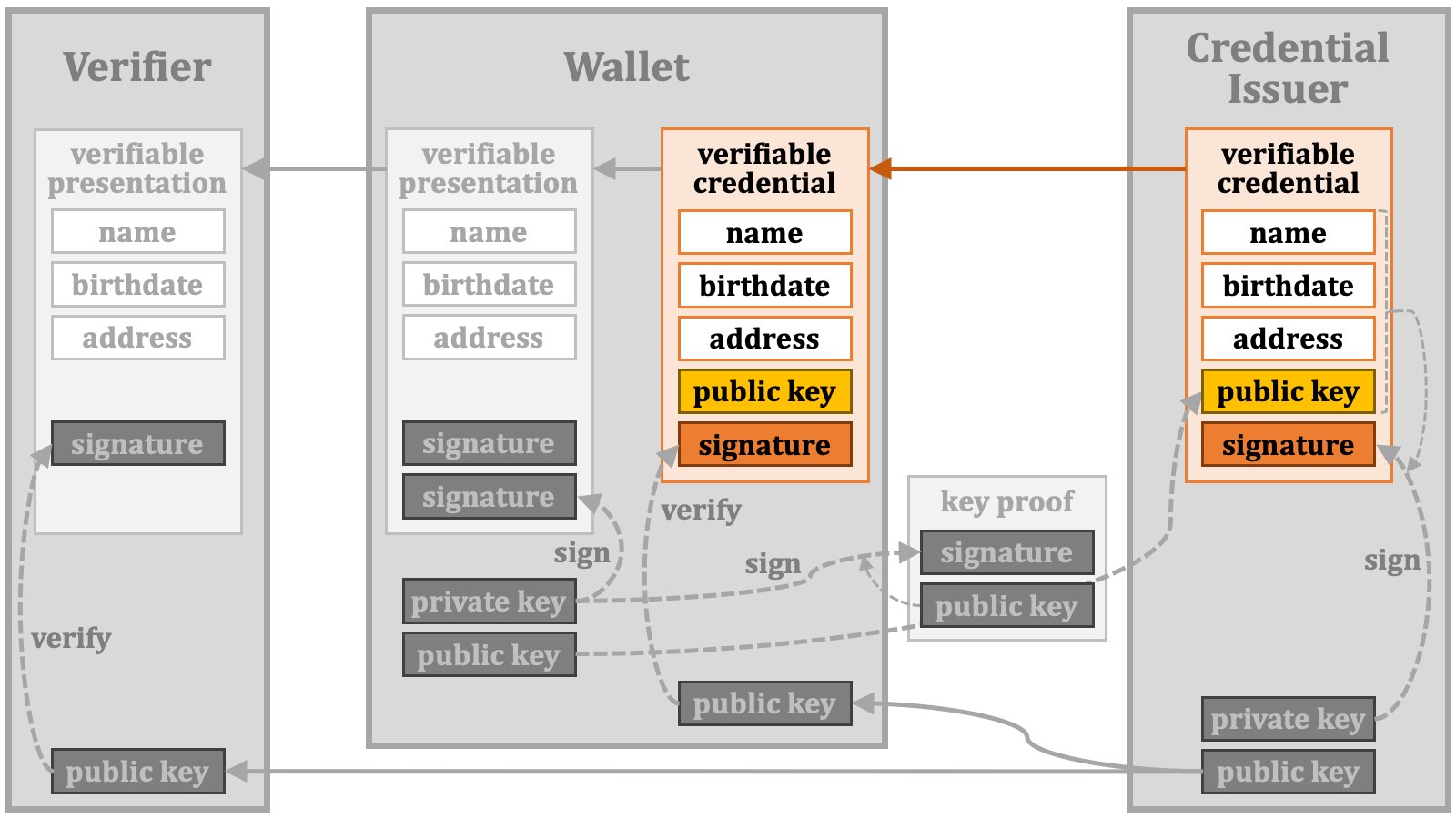 which uses it to create a verifiable presentation. The wallet includes a signature created using the private key in the verifiable presentation.
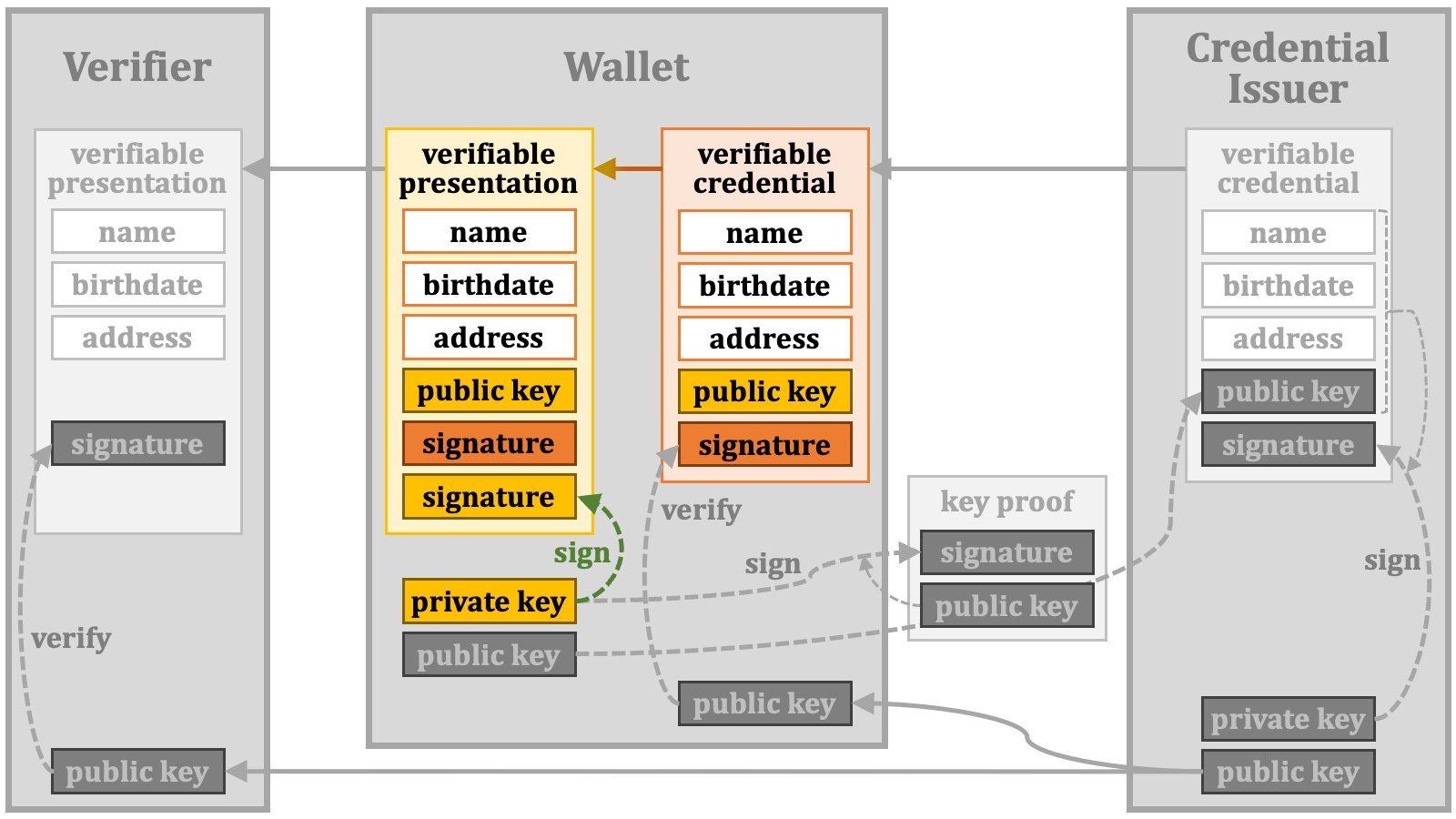 The verifiable presentation is then passed to the verifier.
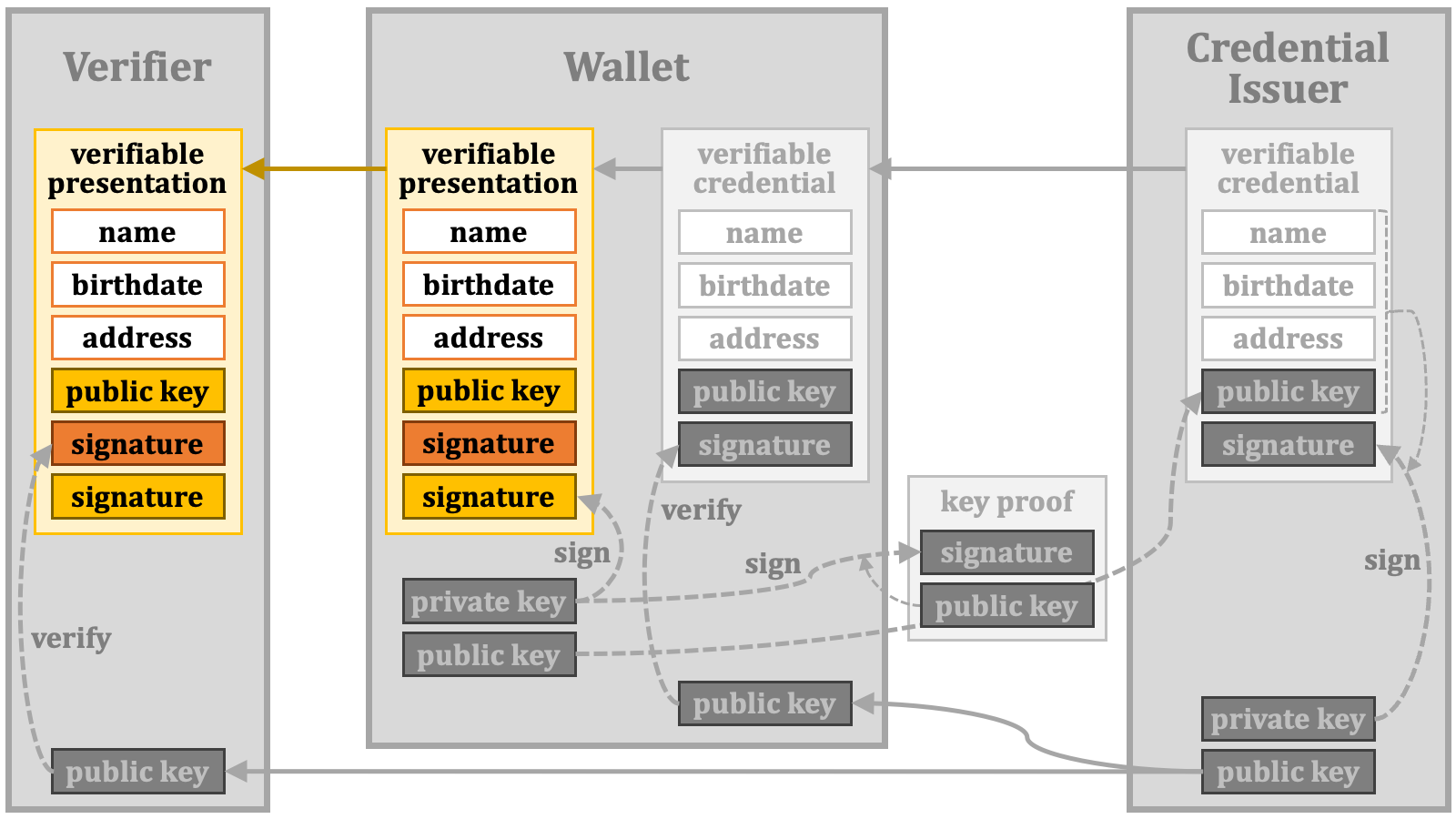 The verifier can verify the signature added by the wallet by using the public key embedded in the verifiable presentation.
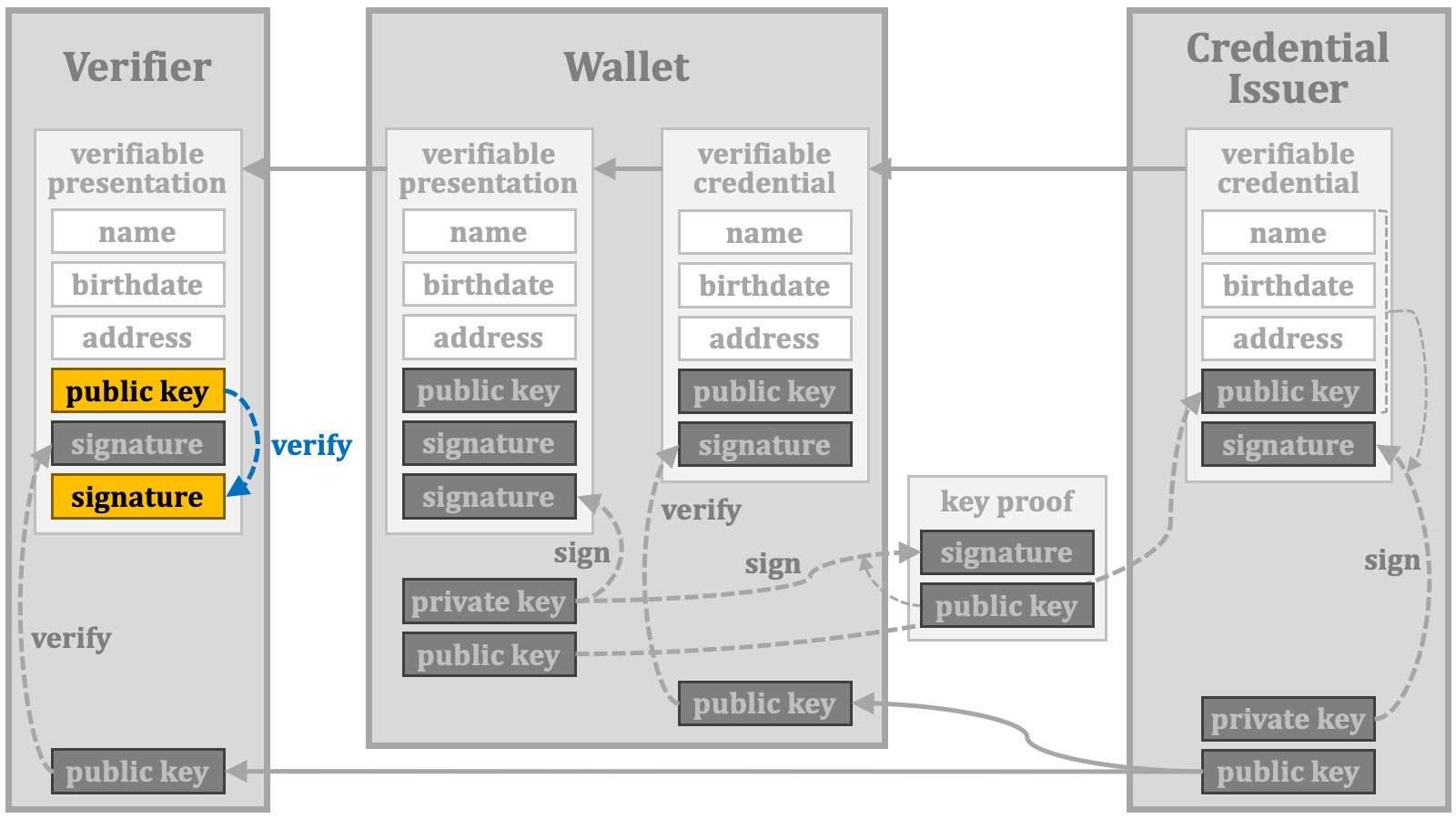 The following diagram illustrates the overall picture of the credential verification explained so far.
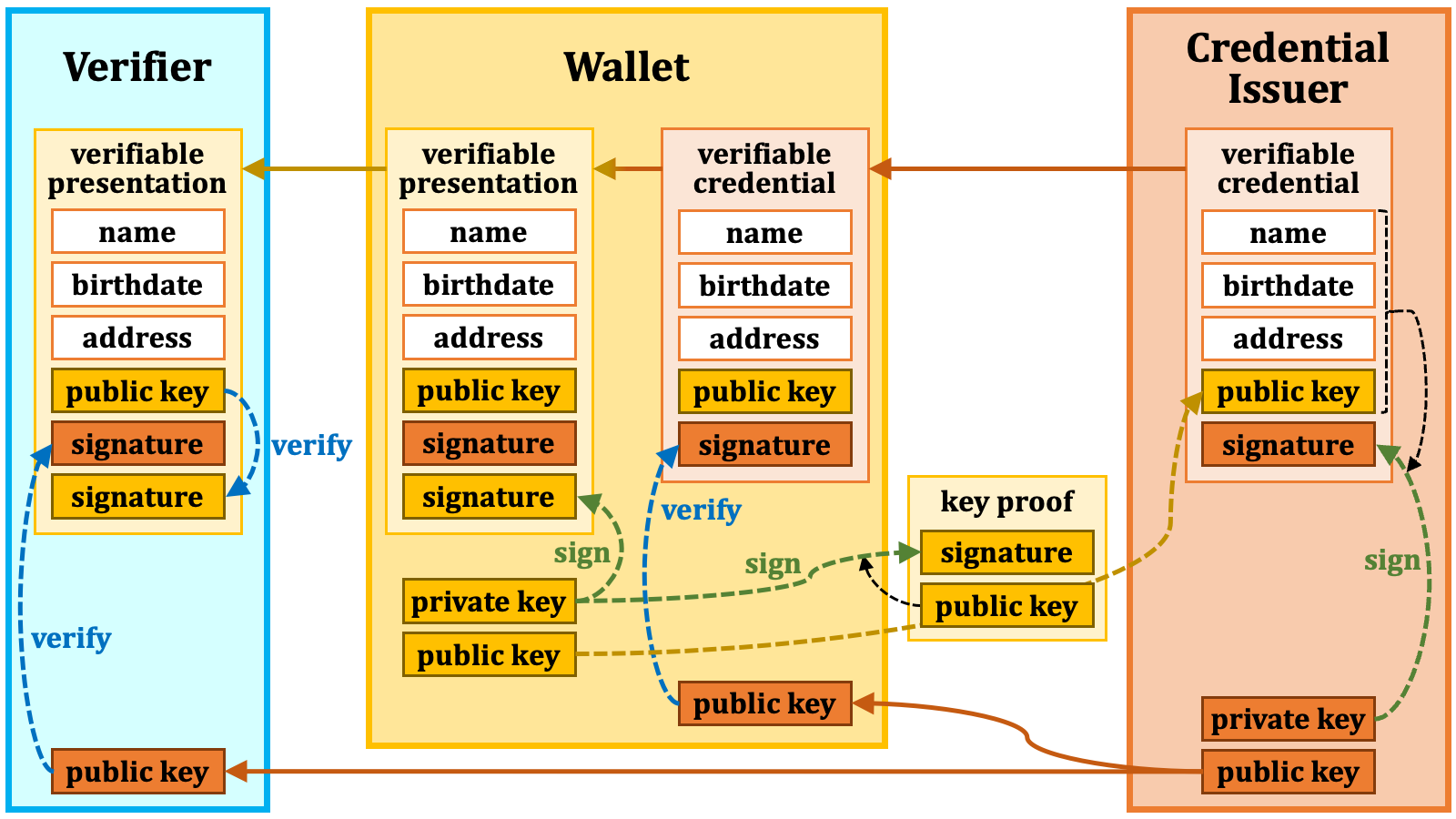 ### 2.6. Selective Disclosure
When presenting a verifiable presentation, the holder may choose to disclose only certain parts of the verifiable credential's content. For example, if the verifiable credential contains name, birthdate, and address, the holder may opt to disclose only the name and birthdate while omitting the address information.
We call the act of selectively disclosing chosen information like this "**selective disclosure**".
### 2.6. Selective Disclosure
When presenting a verifiable presentation, the holder may choose to disclose only certain parts of the verifiable credential's content. For example, if the verifiable credential contains name, birthdate, and address, the holder may opt to disclose only the name and birthdate while omitting the address information.
We call the act of selectively disclosing chosen information like this "**selective disclosure**".
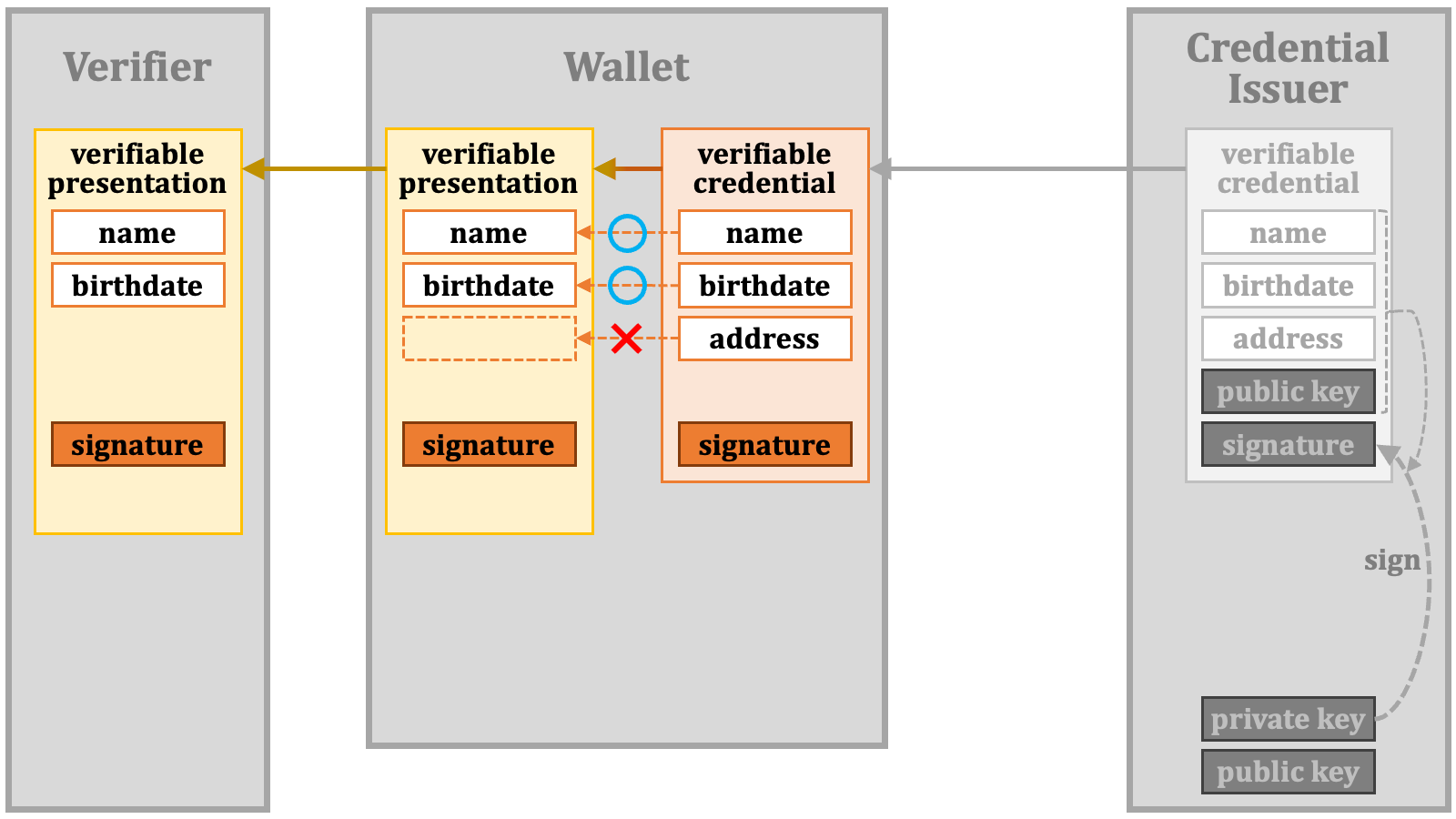 However, omitting information without special consideration will result in the failure of the signature verification. This is because the dataset targeted for signing differs from the dataset received by the verifier.
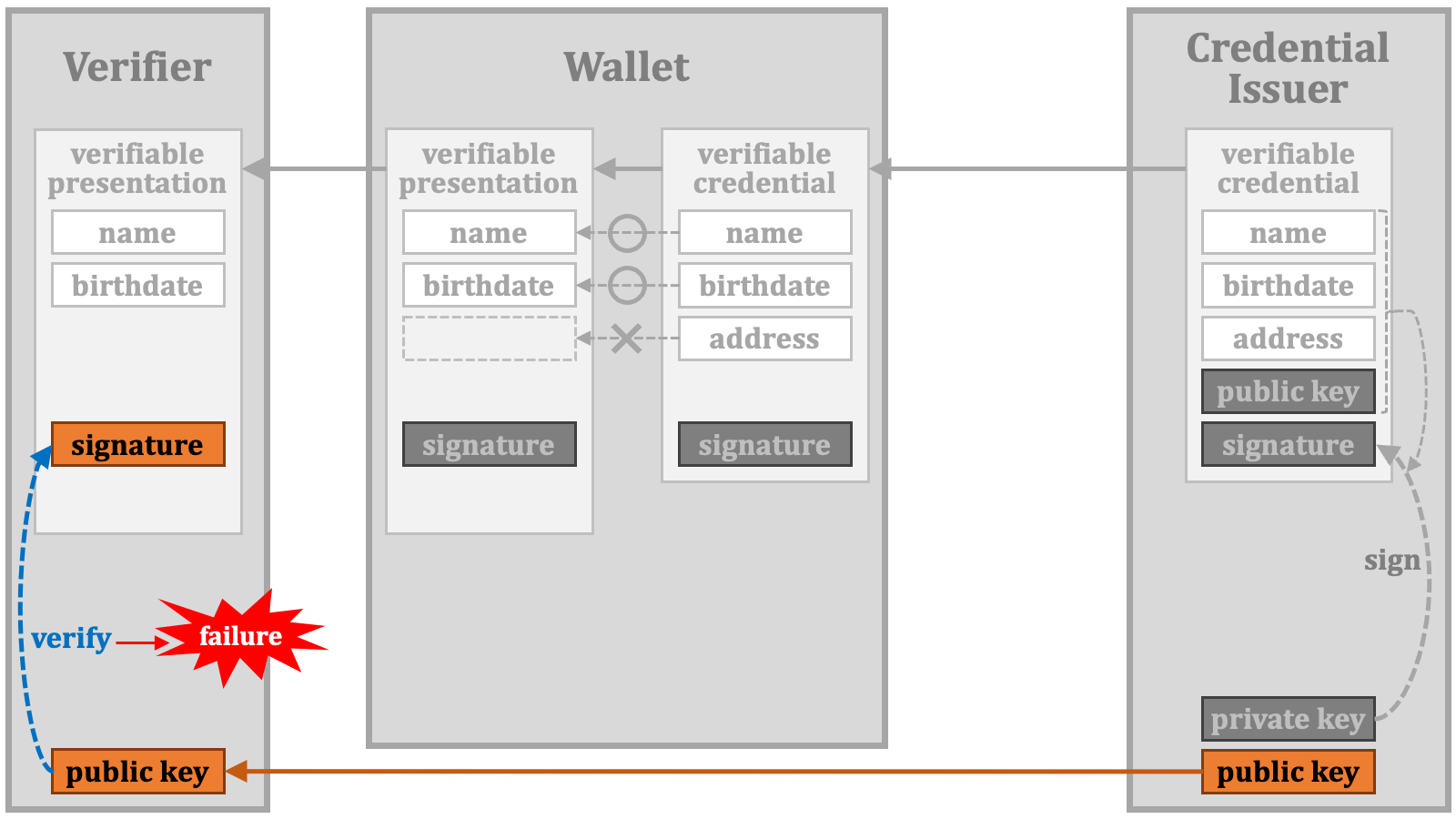 There are several methods to achieve selective disclosure without invalidating the signature. BBS+ (Boneh-Lynn-Shacham signature plus) and CL Signatures (Camenisch-Lysyanskaya Signatures) are examples and may seem promising. However, in the real world, the adoption of these methods depends on various factors, as outlined below, and it is not always the case that solutions based on academically elegant theories become widespread:
1. The complexity of the theory.
2. The ease of implementation.
3. Monetary costs for licensing.
4. Legal restrictions on usage.
5. Support from Hardware Security Module (HSM) products.
6. How much the industry believes the algorithm is robust/secure.
After thorough [comparison of credential profiles][CREDENTIAL_PROFILE_COMPARISON] and hackathons, the industry has decided to create a new format called "**[Selective Disclosure for JWTs (SD-JWT)][SD_JWT]**".
#### 2.6.1. SD-JWT
SD-JWT is a format that utilizes JWT ([RFC 7519 JSON Web Token (JWT)][RFC_7519]) to achieve selective disclosure.
The payload part of a normal JWT contains pairs of a claim name and its value.
There are several methods to achieve selective disclosure without invalidating the signature. BBS+ (Boneh-Lynn-Shacham signature plus) and CL Signatures (Camenisch-Lysyanskaya Signatures) are examples and may seem promising. However, in the real world, the adoption of these methods depends on various factors, as outlined below, and it is not always the case that solutions based on academically elegant theories become widespread:
1. The complexity of the theory.
2. The ease of implementation.
3. Monetary costs for licensing.
4. Legal restrictions on usage.
5. Support from Hardware Security Module (HSM) products.
6. How much the industry believes the algorithm is robust/secure.
After thorough [comparison of credential profiles][CREDENTIAL_PROFILE_COMPARISON] and hackathons, the industry has decided to create a new format called "**[Selective Disclosure for JWTs (SD-JWT)][SD_JWT]**".
#### 2.6.1. SD-JWT
SD-JWT is a format that utilizes JWT ([RFC 7519 JSON Web Token (JWT)][RFC_7519]) to achieve selective disclosure.
The payload part of a normal JWT contains pairs of a claim name and its value.
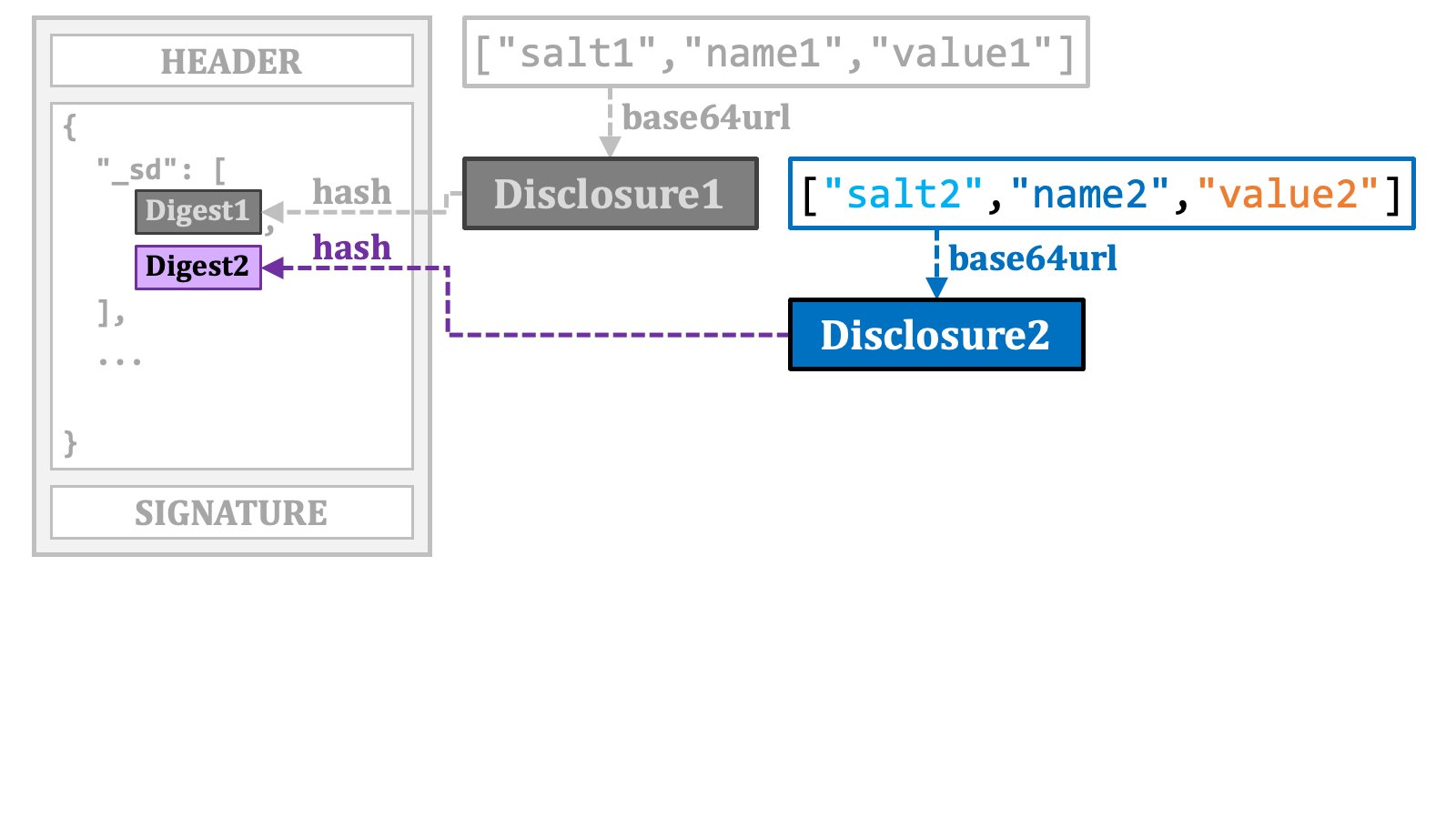
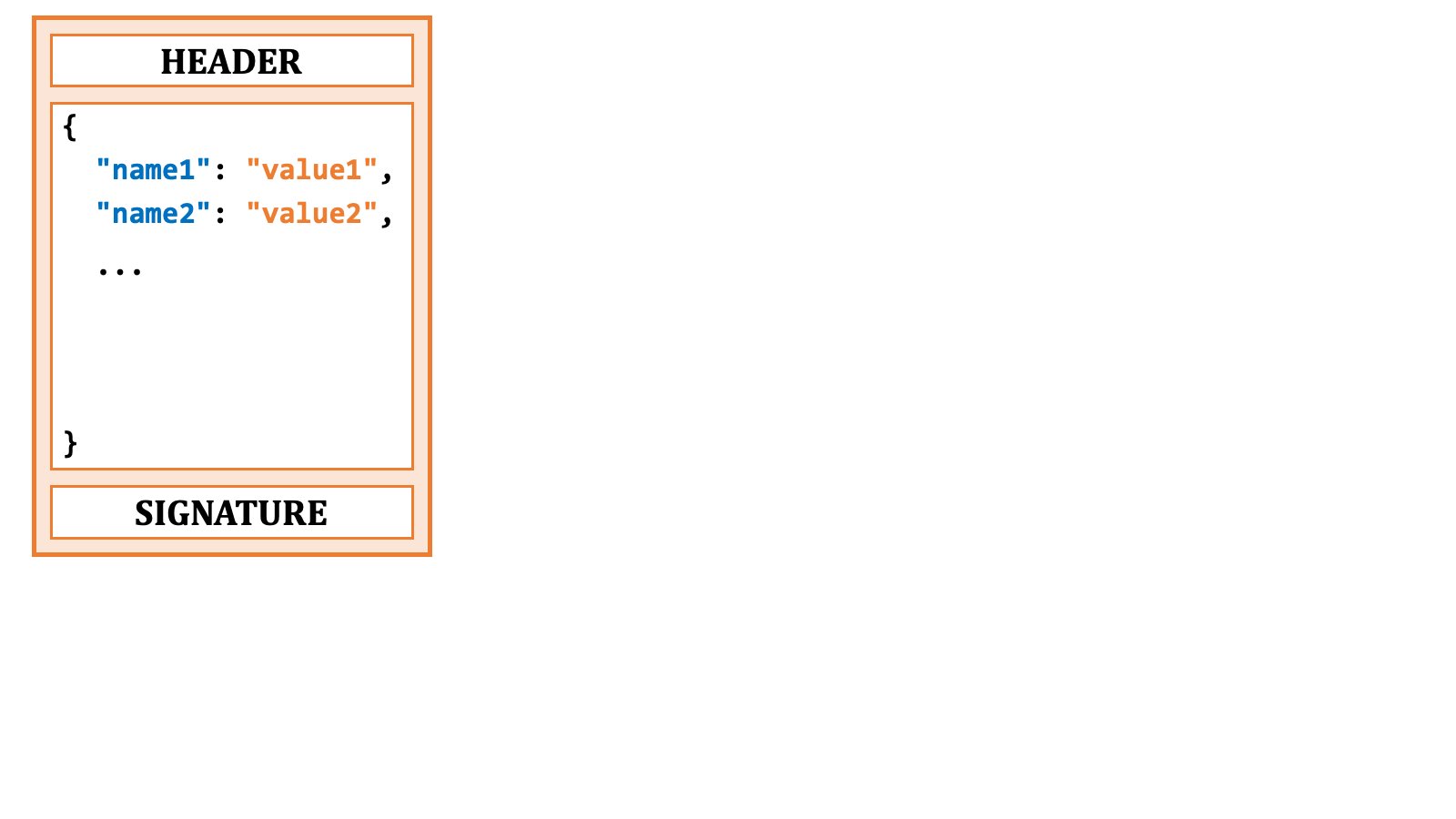 To make such a claim "selectively-disclosable" using the SD-JWT format, you first extract the claim.
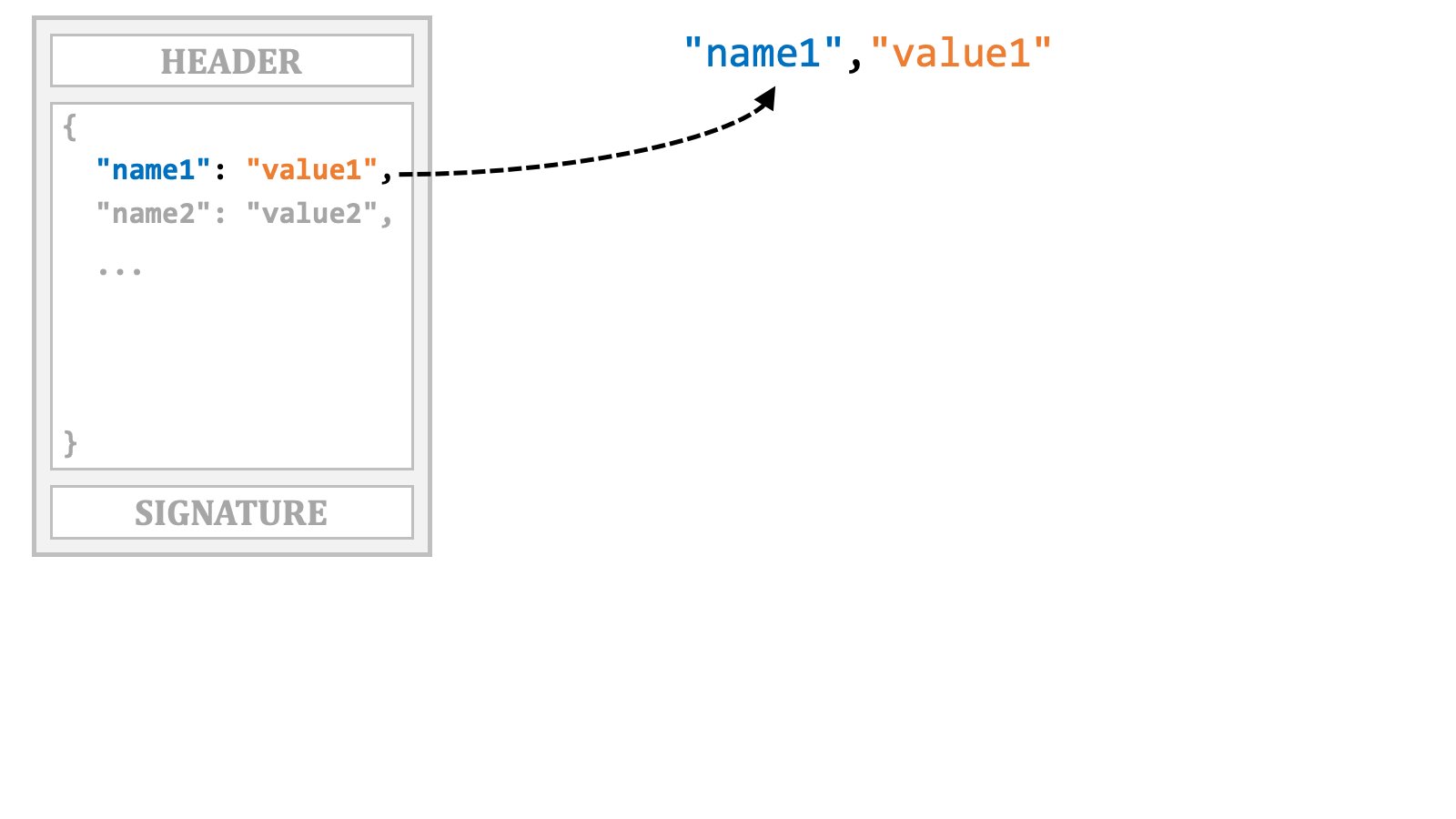 Then, you add an arbitrary salt to it,
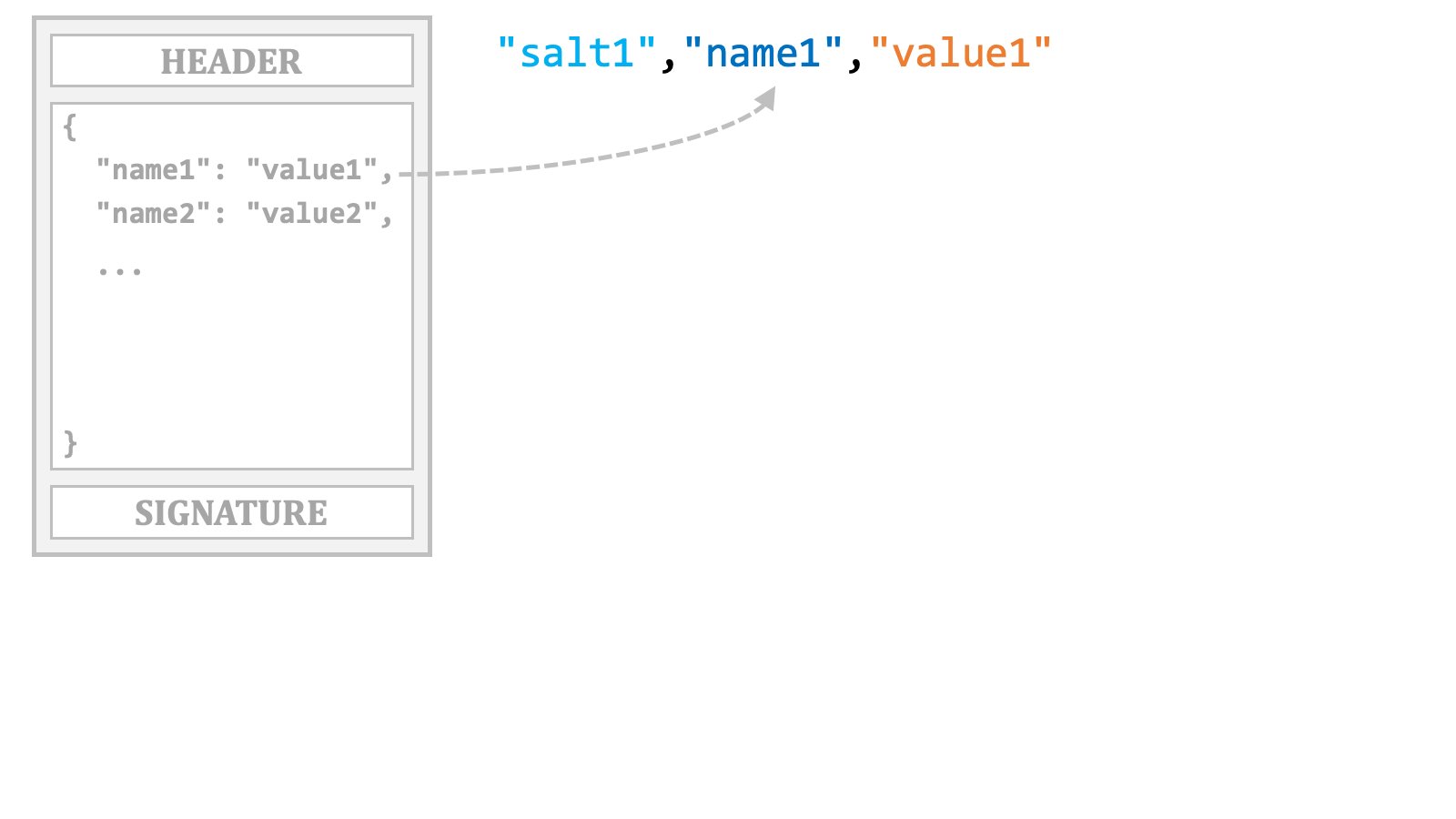 and create a JSON array including the salt, the claim name and the claim value.
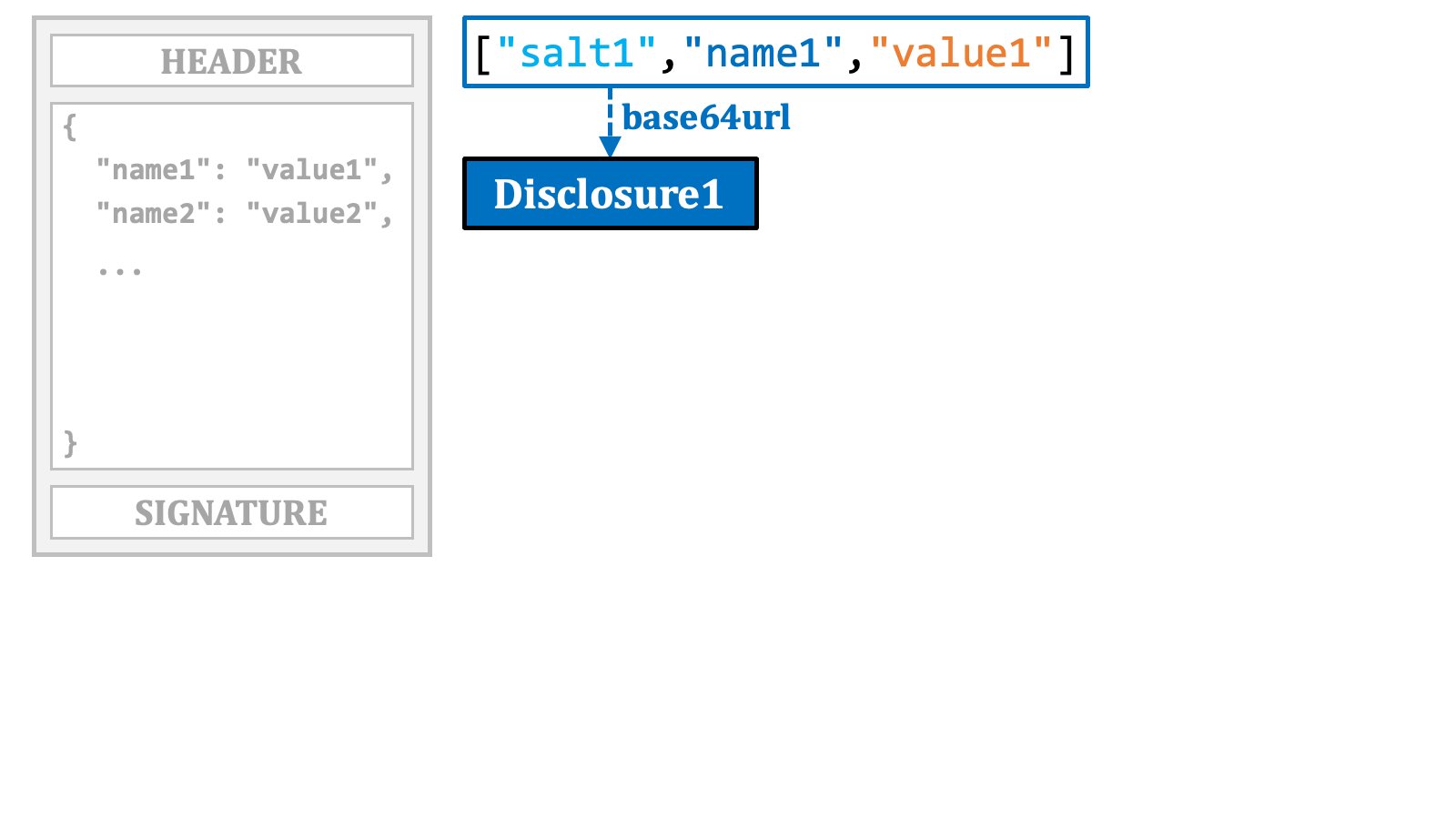
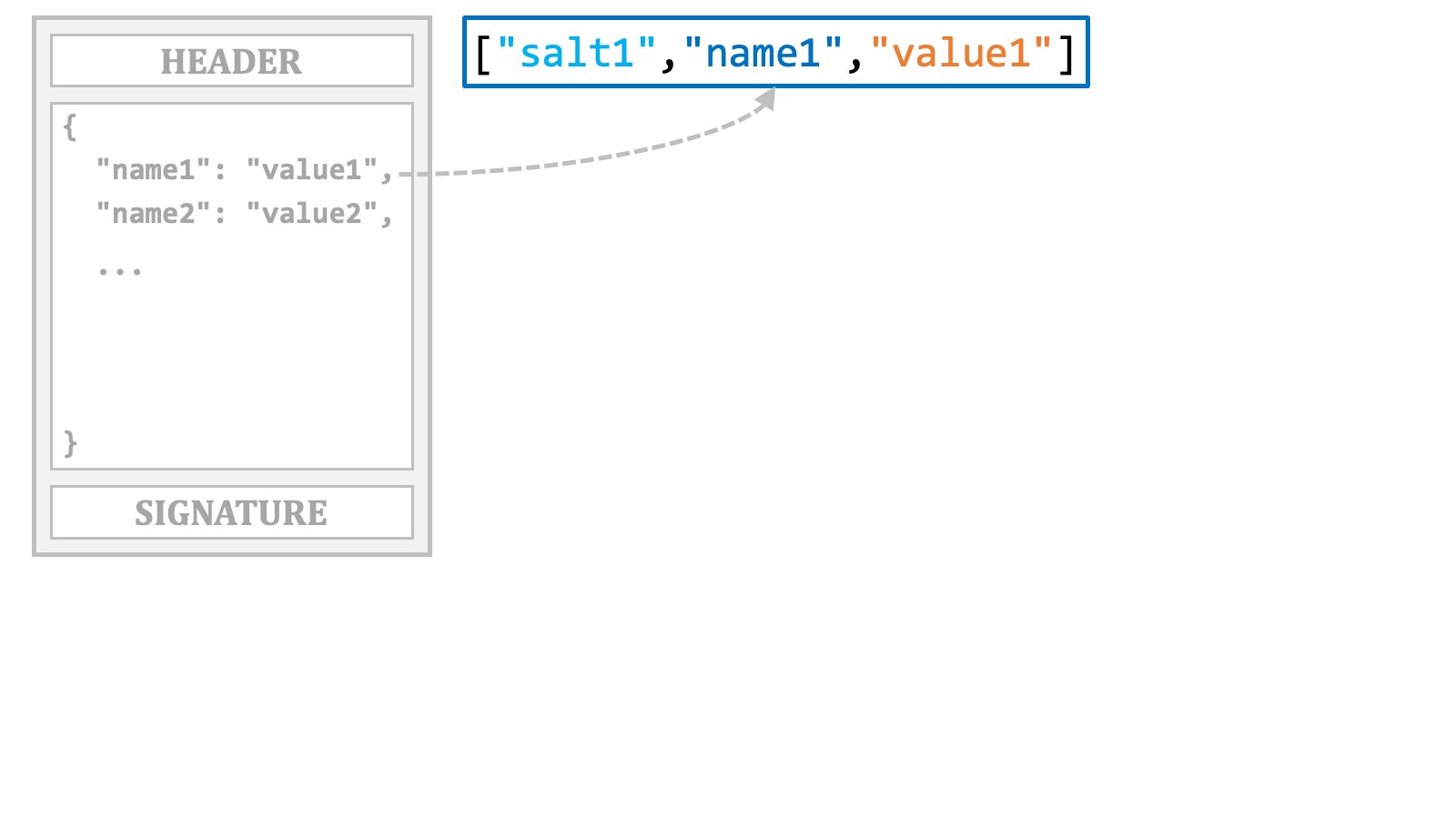 The next step is to encode that JSON array in base64url. In the SD-JWT specification, the resulting string is referred to as "**disclosure**".
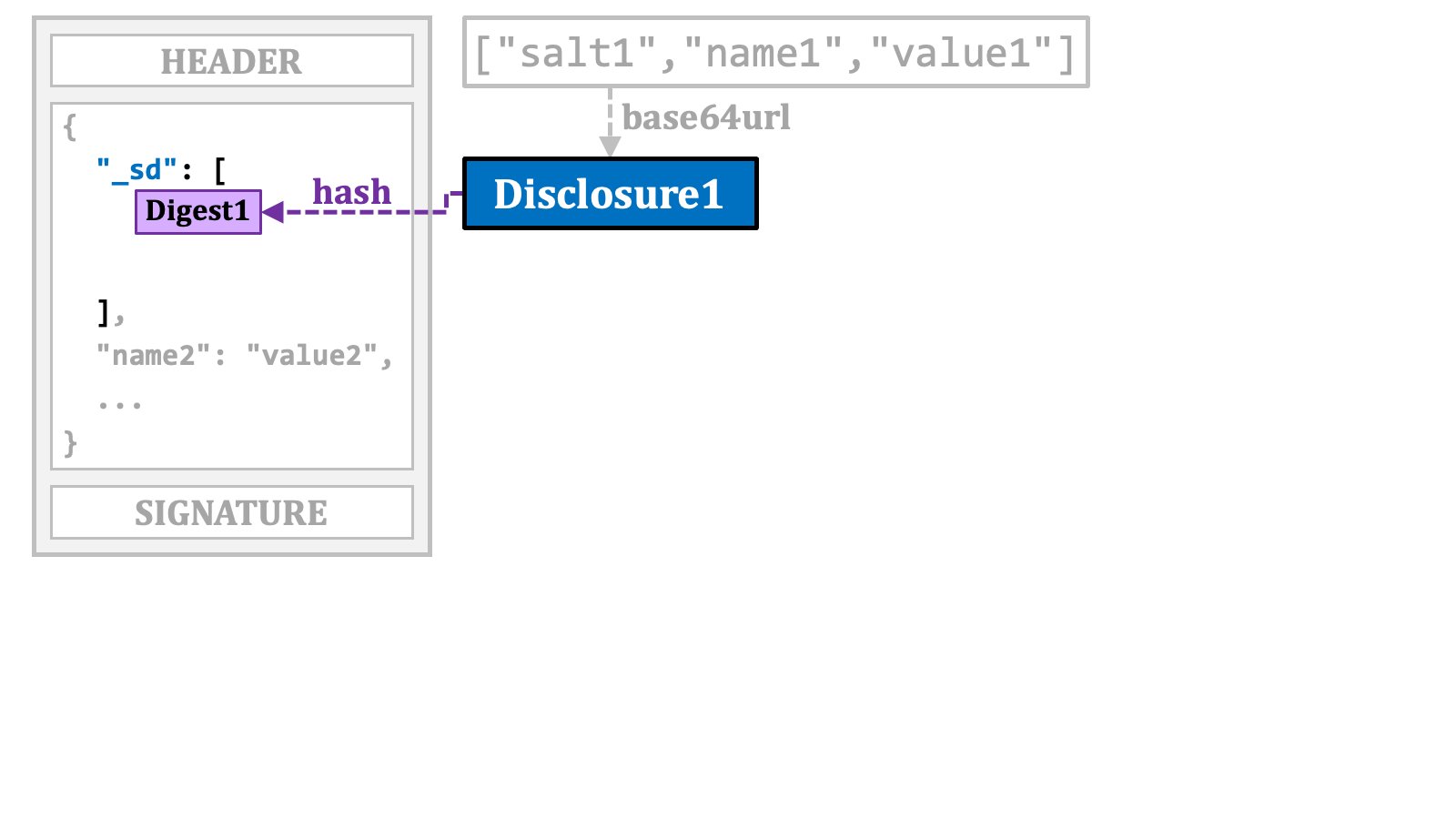
 The original claim is replaced with the digest value of the disclosure. The digest value is base64url-encoded and placed in the `"_sd"` array, which is inserted where the original claim was located.
 The same process is applied to other claims that need to be made selectively-disclosable.
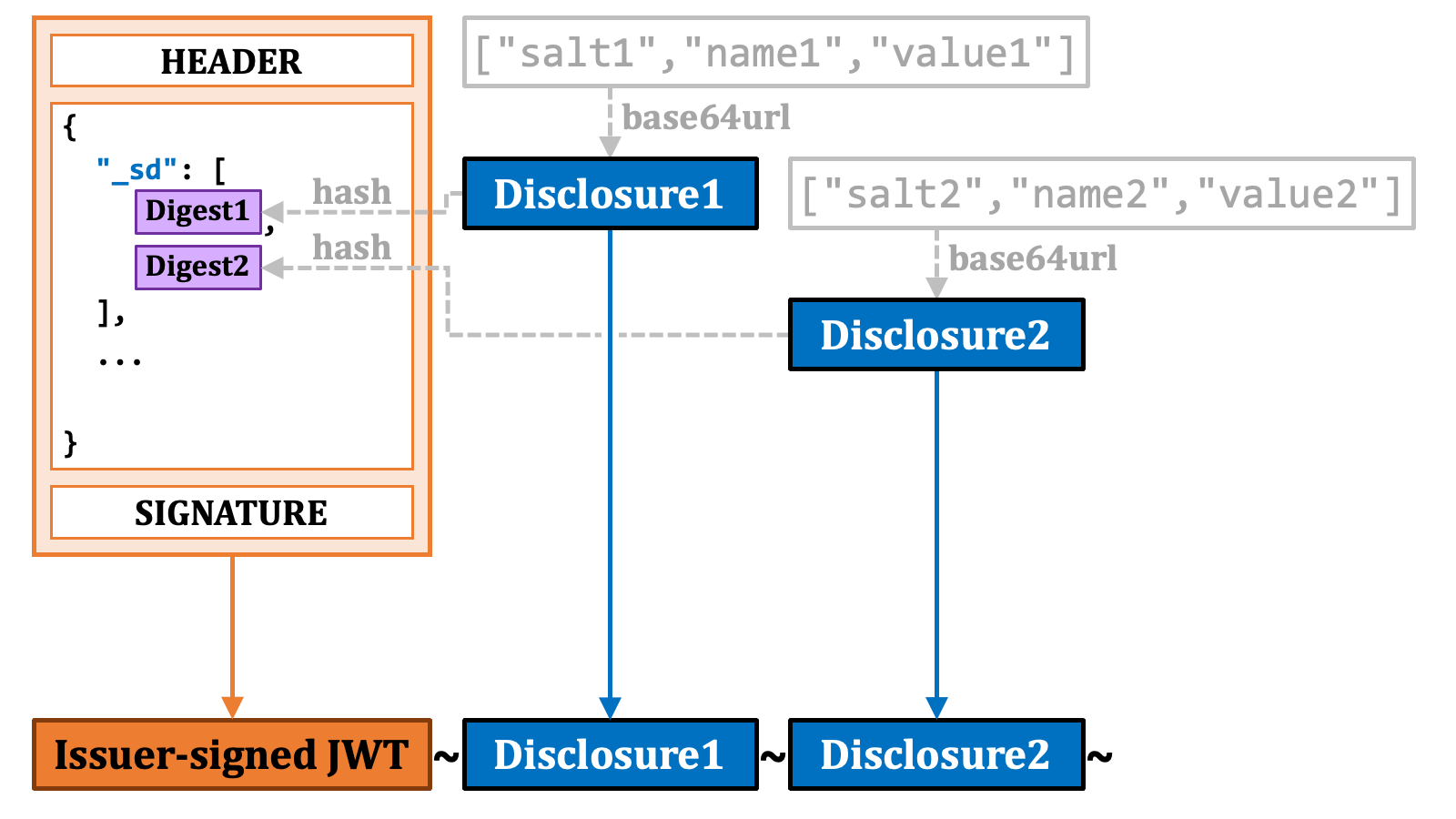
 By concatenating the "**issuer-signed JWT**" with the disclosures using tildes (`~`), a single string is formed.
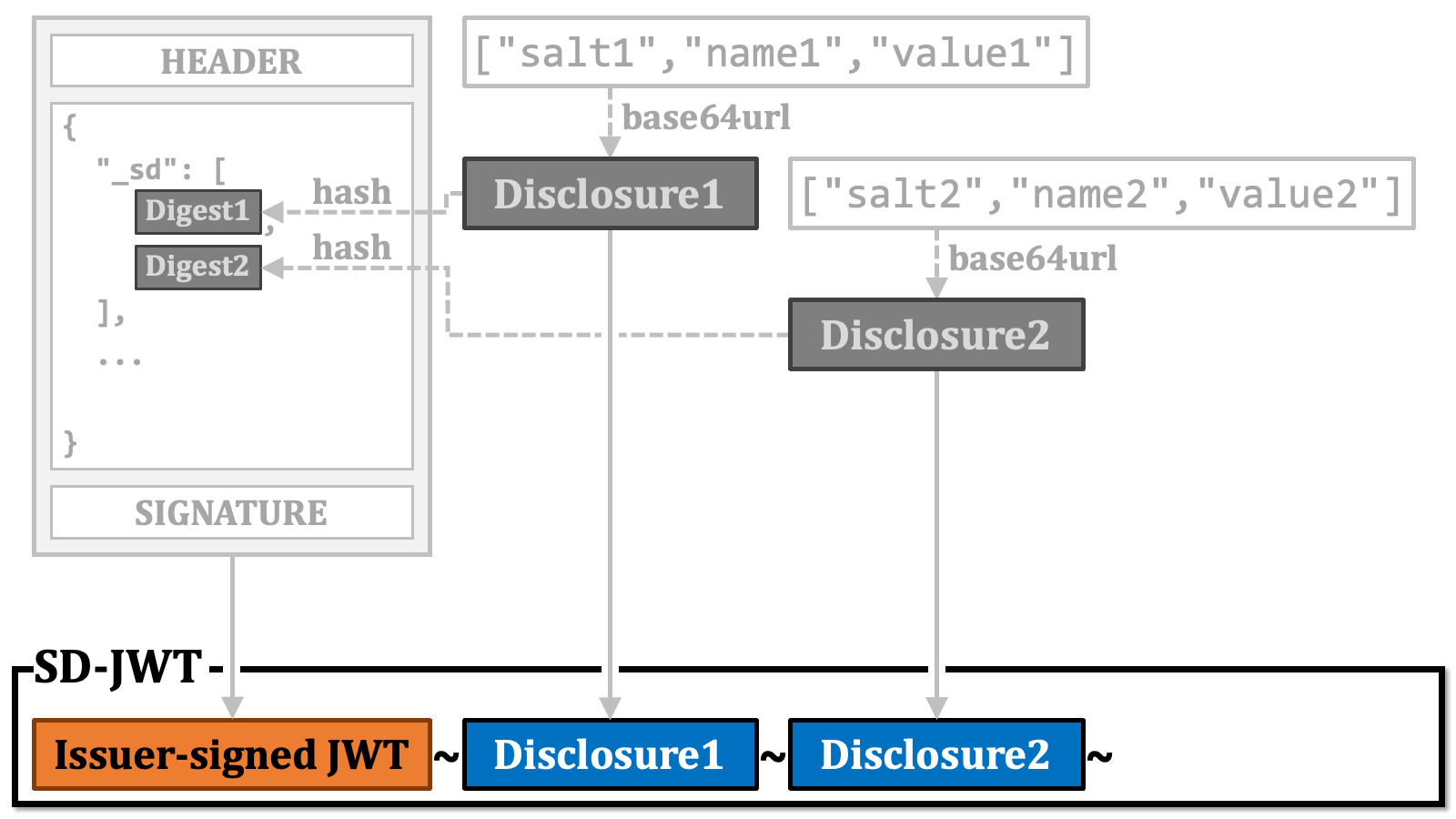
 This resulting string is an SD-JWT.
 The next step is optional, but if you want to perform key binding, please prepare a key pair.
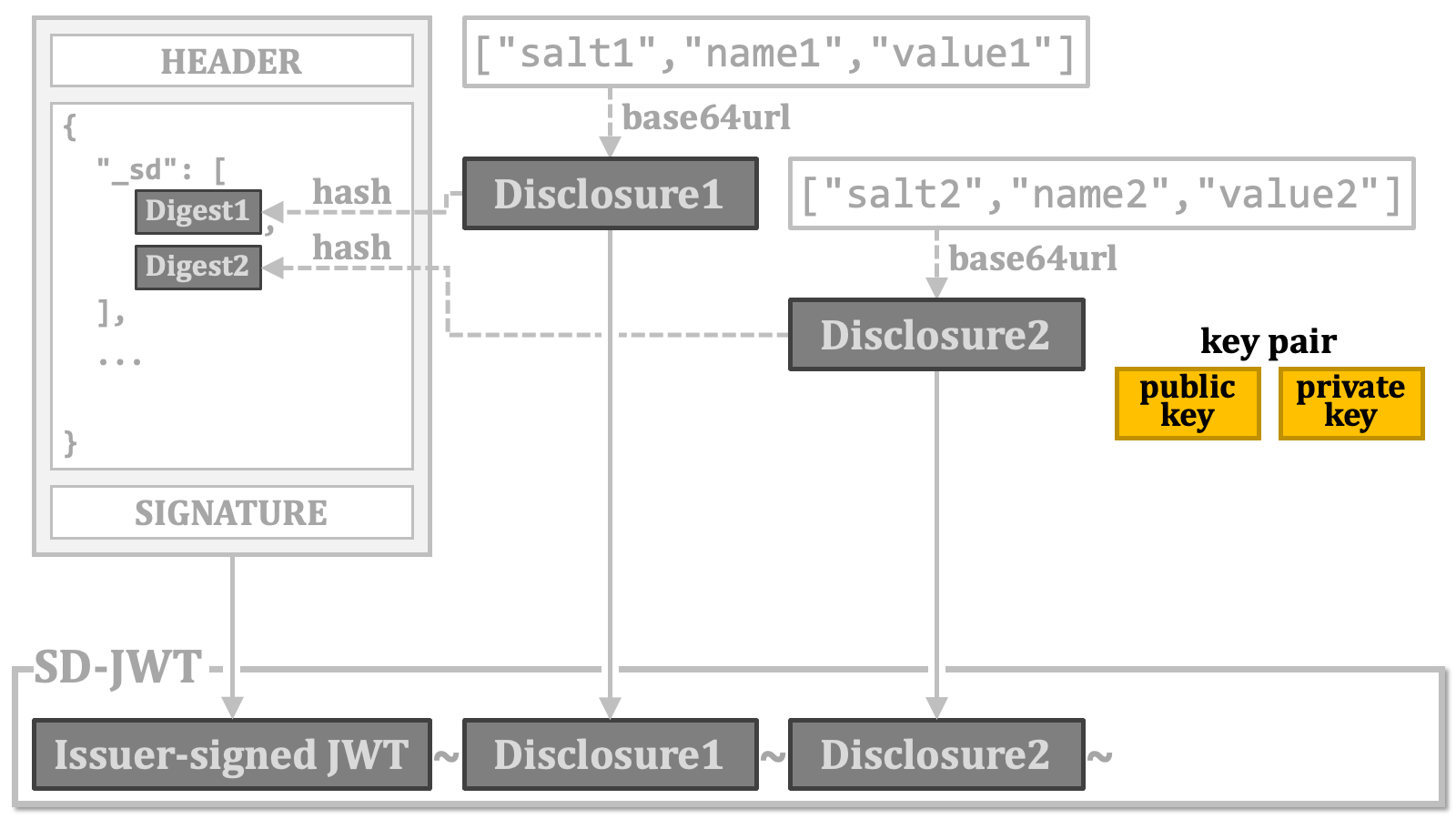 Then, embed the public key into the issuer-signed JWT,
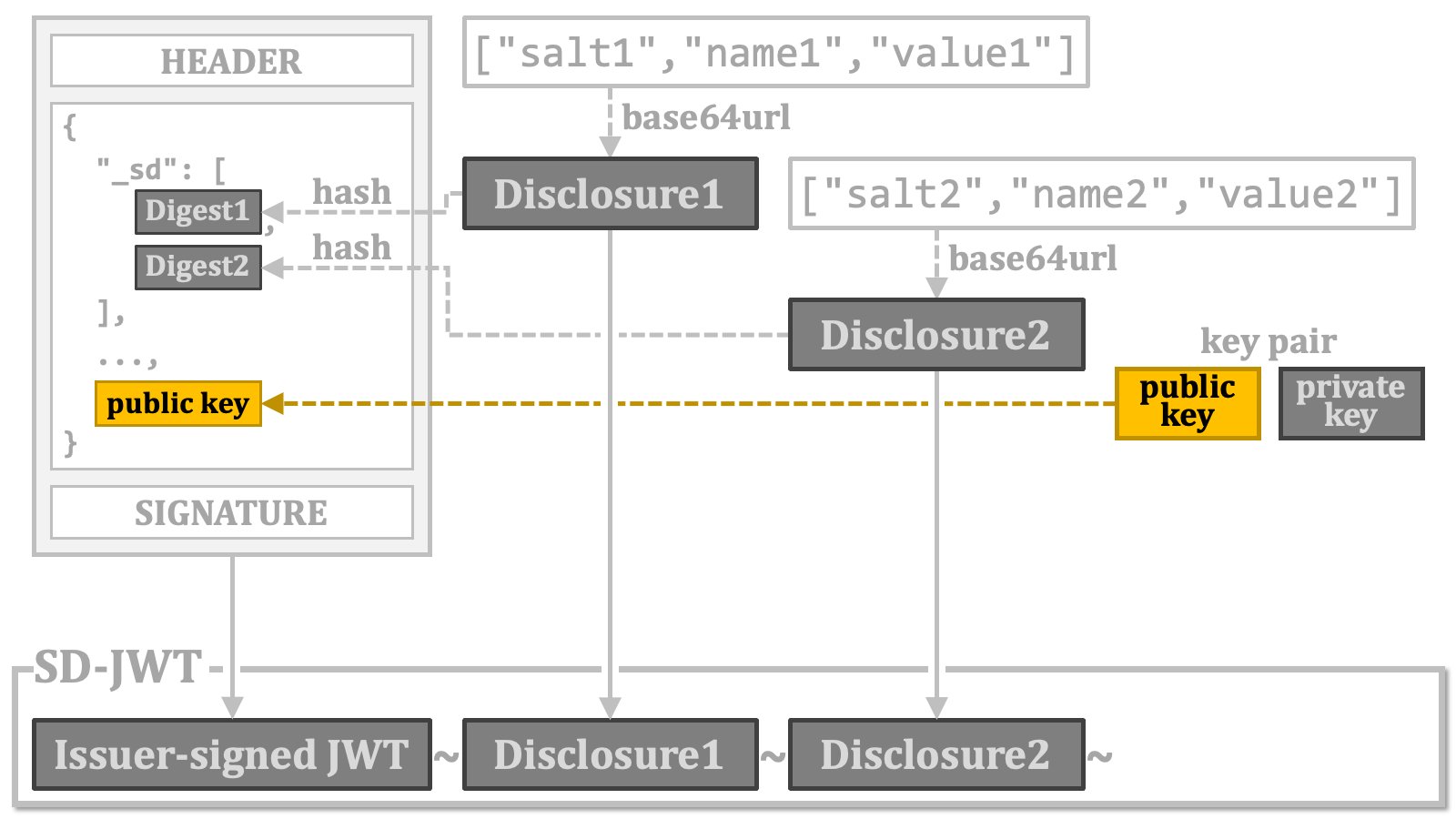 Instead of embedding the public key, a reference to it may be included.
sign a specific dataset defined in the specification, and place the resulting JWT at the end of the previously created SD-JWT. The JWT is called "**key binding JWT**".
Instead of embedding the public key, a reference to it may be included.
sign a specific dataset defined in the specification, and place the resulting JWT at the end of the previously created SD-JWT. The JWT is called "**key binding JWT**".
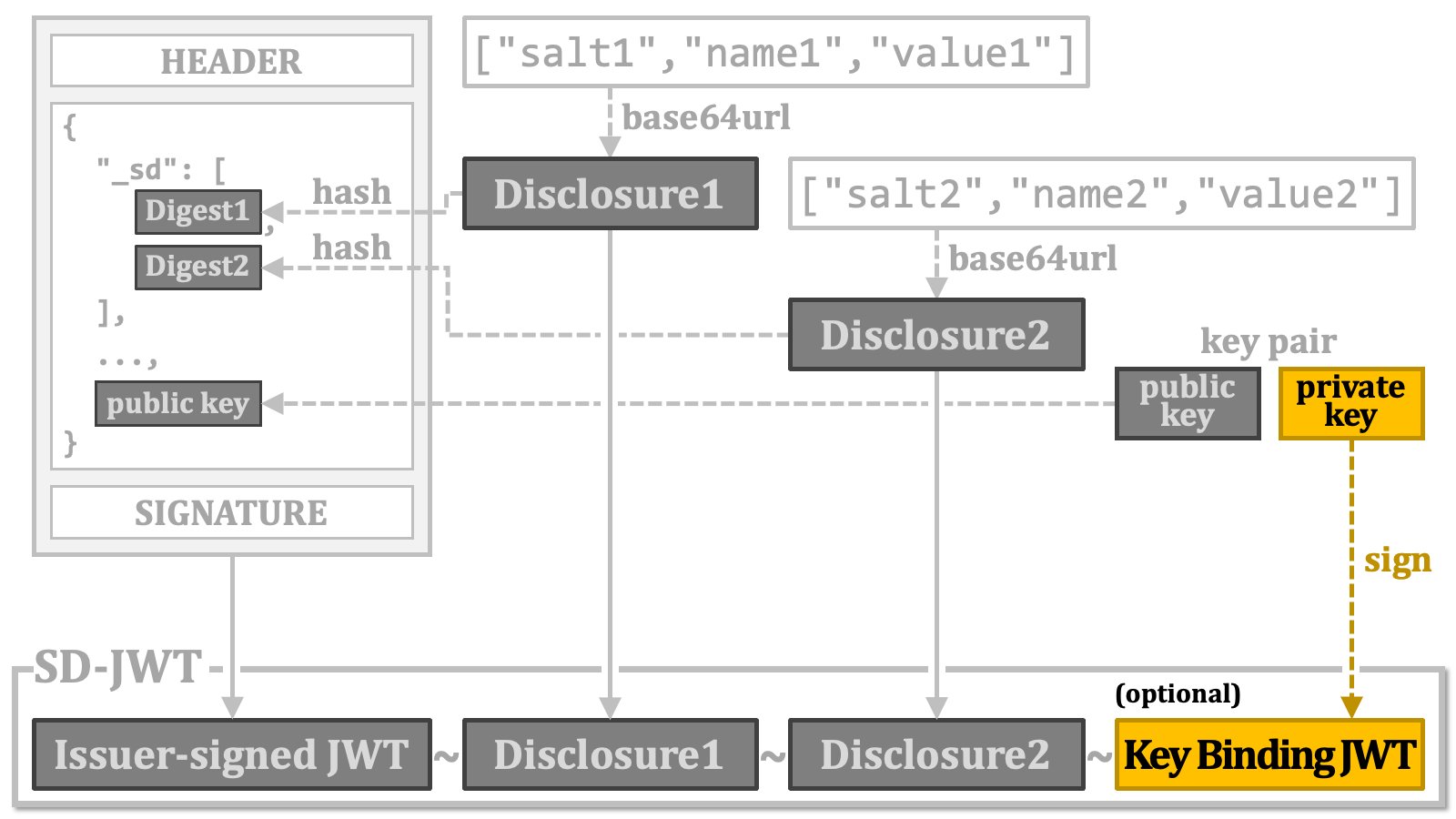 Note that the responsibility for generating a key binding JWT lies with the holder/wallet, not the credential issuer. Therefore, even if the verifiable credential format is based on SD-JWT, the verifiable credential does not include a key binding JWT when it is issued by the credential issuer.
The following diagram illustrates the overall process of generating SD-JWT that we have explained so far.
Note that the responsibility for generating a key binding JWT lies with the holder/wallet, not the credential issuer. Therefore, even if the verifiable credential format is based on SD-JWT, the verifiable credential does not include a key binding JWT when it is issued by the credential issuer.
The following diagram illustrates the overall process of generating SD-JWT that we have explained so far.
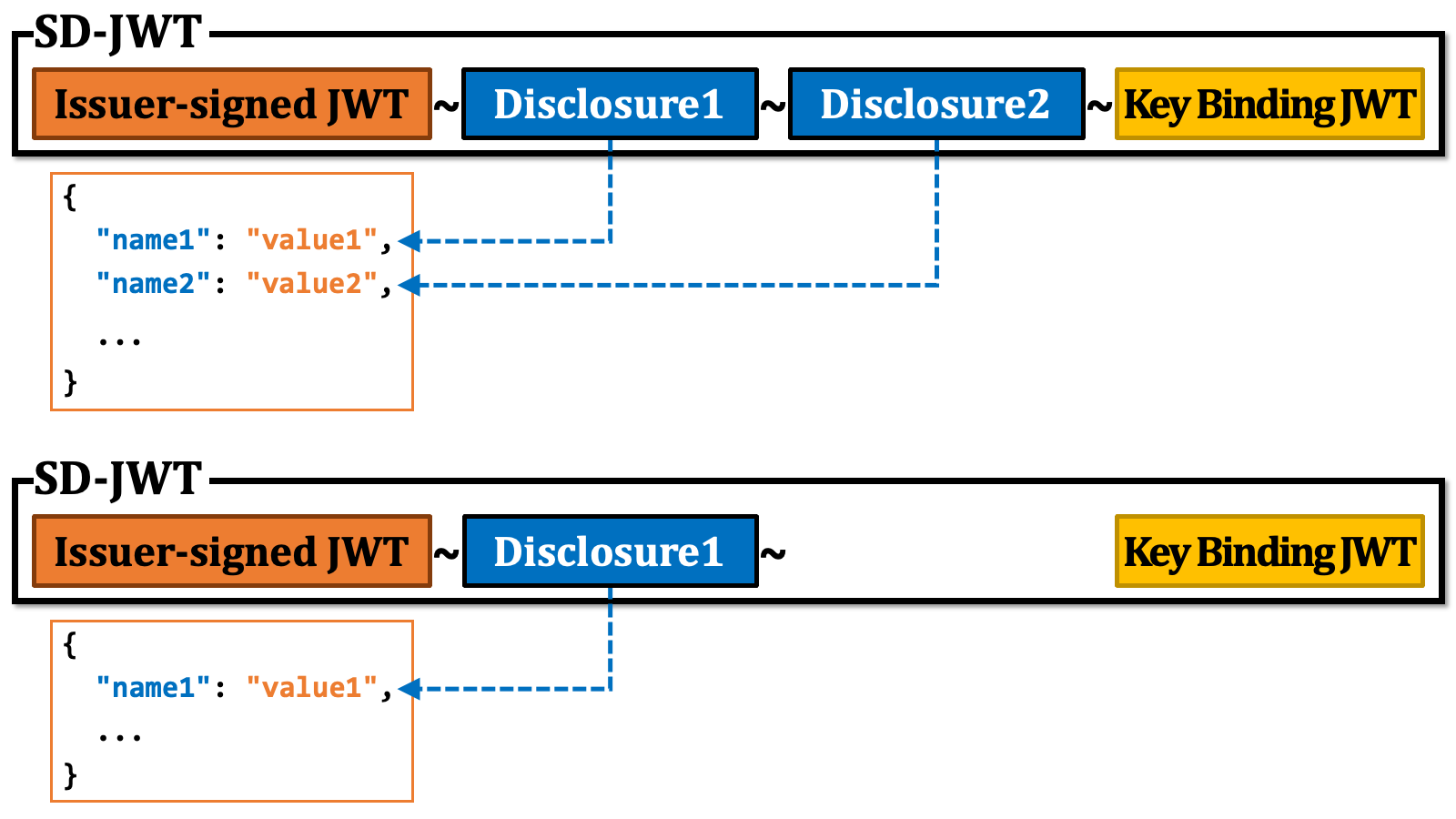
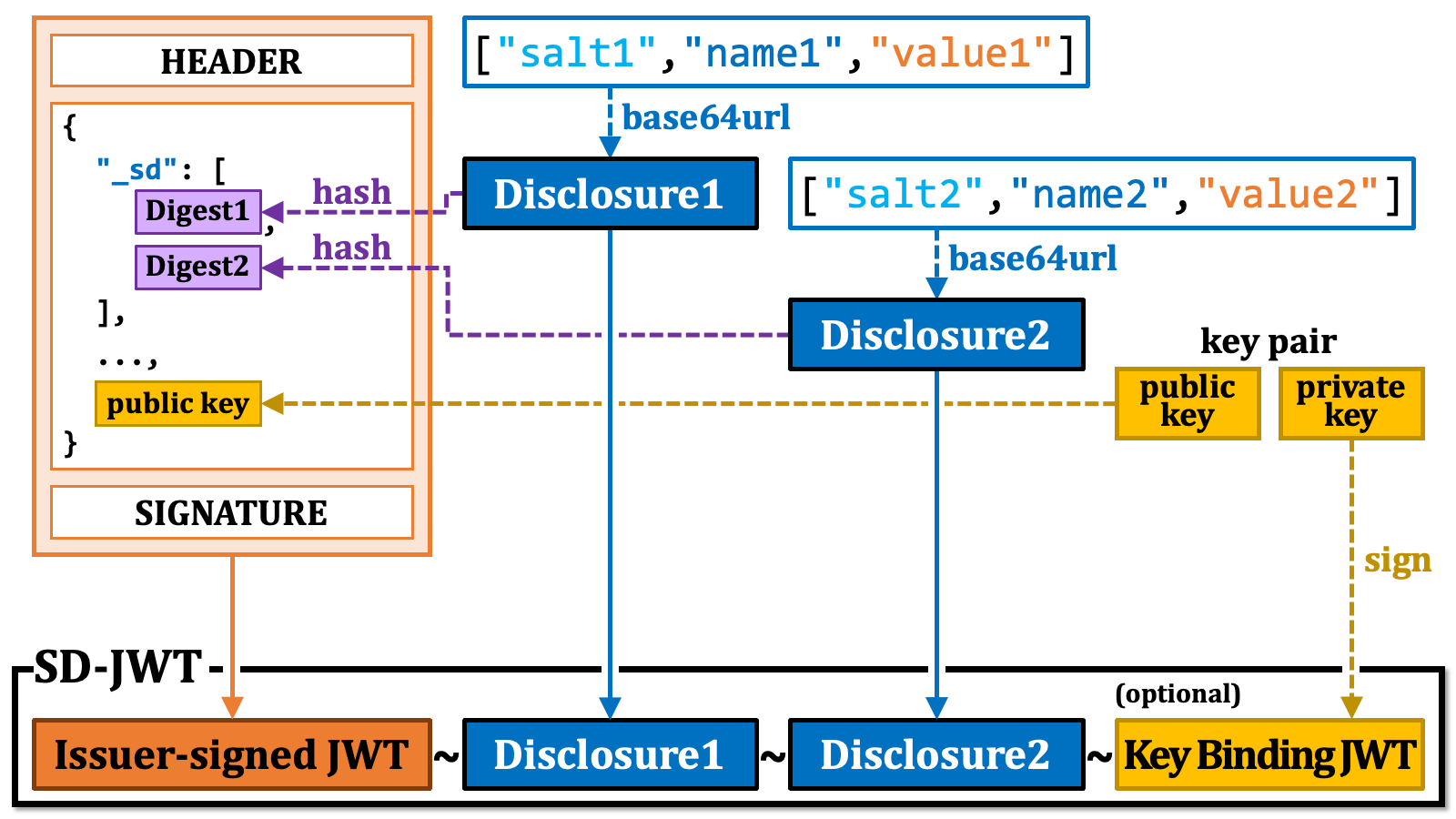 The key point is that if the recipient of an SD-JWT doesn't receive all the disclosures, they can only reconstruct claims corresponding to the received disclosures. Importantly, even in the case, the signature of the issuer-signed JWT remains valid.
 For more detailed information, please refer to [the SD-JWT specification][SD_JWT] itself. Additionally, you can find useful information in the README of the open-source SD-JWT library for the Java programming language, [authlete/sd-jwt][AUTHLETE_SD_JWT].
### 2.7. Verifiable Credential Formats
#### 2.7.1. Confusion Surrounding Verifiable Credential Formats
The confusion surrounding verifiable credential formats stems from the existence of multiple competing specifications, each with its own set of challenges, and many of which are still in development. Furthermore, the fact that organizations from various countries, regions, and industries are promoting different formats is also complicating the situation.
When it comes to verifiable credentials, many people associate them with the "**[W3C Verifiable Credentials Data Model][W3C_VCDM]**" (**W3C VCDM**). This is primarily because the document is often seen as the primary source defining the three-party Issuer-Holder-Verifier model. However, W3C VCDM itself is not flawless, and discussions are indeed ongoing. While [version 1.1][W3C_VCDM_1_1] was released on March 3, 2022, [version 2.0][W3C_VCDM_2_0] is currently under discussion.
When observed from an external perspective, what further complicates the situation is the specification titled "**[Securing Verifiable Credentials using JOSE and COSE][W3C_JOSE_COSE]**" (**[w3c/vc-jose-cose][W3C_JOSE_COSE_REPO]**). The specification states in the "Abstract" section that it *"defines how to secure credentials and presentations conforming to the VC-DATA-MODEL"*, but it conflicts with certain requirements of W3C VCDM. For instance, W3C VCDM mandates that the value of the `"typ"` header parameter must be `"JWT"`, but this requirement is not followed by w3c/vc-jose-cose. Additionally, W3C VCDM introduces the `"vc"` and `"vp"` claims as the designated places to embed verifiable credentials and verifiable presentations. However, w3c/vc-jose-cose does not utilize these `"vc"` and `"vp"` claims.
Furthermore, what adds to the confusion for newcomers is that the OID4VCI specification defines `jwt_vc_json`, `jwt_vc_json-ld`, and `ldp_vc` as credential format profiles based on W3C VCDM, but most people in the OpenID industry contributing to the specification do not seem inclined to support these credential format profiles. They are currently dedicating their efforts to the specification development and implementation of verifiable credential formats based on SD-JWT and "**[ISO/IEC 18013-5][ISO_IEC_18013_5]**" (Personal identification - ISO-compliant driving licence - Part 5: Mobile driving licence (**mDL**) application).
For those discussing OAuth and OpenID Connect, ISO/IEC 18013-5 is challenging to approach because its format is based on the less familiar binary format, "**Concise Binary Object Representation**" (**CBOR**) ([RFC 8949][RFC_8949]) and "**CBOR Object Signing and Encryption**" (**COSE**) ([RFC 9052][RFC_9052], [RFC 9053][RFC_9053]). Additionally, detailed technical articles about it are not widely available online because ISO standards must be purchased.
The public key distribution method for verifying verifiable credentials
is also a challenging issue. When a verifier receives a verifiable
credential, they cannot determine whether it was issued according to the
OID4VCI specification. Therefore, it is not ideal to force verifiers to
search for public keys starting from the metadata of credential issuers
(`/.well-known/openid-credential-issuer`).
As an alternative starting point, the well-known path
`/.well-known/jwt-issuer` was proposed in the specification
called "**[SD-JWT-based Verifiable Credentials][SD_JWT_VC]** (**SD-JWT VC**)".
The path name has been renamed to `/.well-known/jwt-vc-issuer`
later because the previous path name could easily clash with other JWT
issuer-related specifications. However, the issue remains that the path name
unnecessarily assumes that VC formats are based on JWT. Therefore, some people
are not favorable to the solution. In fact, the Italian ecosystem that
leverages [OpenID Federation][OIDFED] has opted not to use
`/.well-known/jwt-vc-issuer`.
Instead, they have chosen to define a new entity type identifier called
`openid_credential_issuer` and embed public keys for
verifiable credential verification in the
`"metadata"."openid_credential_issuer"`
object of the entity configuration.
As a related topic, a new [client authentication][CLIENT_AUTHENTICATION]
method called "**[OAuth 2.0 Attestation-Based Client Authentication][ATTESTATION_BASED_CLIENT_AUTH]**"
is currently under development. For the method, a wallet must obtain a
"**wallet attestation**" from an "**attester**" in advance because the
wallet needs to include this attestation when performing the client
authentication method. The recipient (e.g., an authorization server)
of the attestation must obtain the public key for verifying the
attestation's signature from the attester. Here, the distribution of
public keys for attestations is an issue similar to that described for
verifiable credentials above. And, here again,
`/.well-known/jwt-vc-issuer` is proposed as a
possible option. This is the very predicted concern, which makes it technically
impossible to run an attester and a credential issuer on the same server
(but whether running both on the same server is conceptually suitable or
not is a different matter). Additionally, whether the attestation format
is JWT or not is not essential.
However, a more serious issue regarding the attestation-based client
authentication is that agreement on the basic concept has not been fully
reached yet (cf. [ISSUE 61](https://github.com/vcstuff/draft-ietf-oauth-attestation-based-client-auth/issues/61)).
#### 2.7.2. Essential Functions of Verifiable Credential Formats
As mentioned in the previous section, there are many challenges related to verifiable credential formats. However, we believe that the essential functions expected from verifiable credential formats can be summarized as follows:
1. **Verifiability**
2. **Key Binding**
3. **Selective Disclosure**
In the following section, we will explain a verifiable credential format based on SD-JWT that can meet these requirements.
#### 2.7.3. SD-JWT VC
SD-JWT is a general-purpose data format and not a verifiable credential format in itself. However, by adding certain requirements, it is possible to define a verifiable credential format based on SD-JWT. "**[SD-JWT-based Verifiable Credentials][SD_JWT_VC]** (**SD-JWT VC**)" is a specification designed for this purpose.
Since an overview of SD-JWT has already been provided, we will only briefly introduce the key points of SD-JWT VC in the following table. Please refer to the SD-JWT VC specification for more details.
\| Media Type | application/vc+sd-jwt |
\| Issuer-signed JWT | Place | Name | Presence | Description |
\| Header | alg | REQUIRED | As required by the JWT specification ([RFC 7519](https://www.rfc-editor.org/rfc/rfc7519.html)). |
\| typ | REQUIRED | vc+sd-jwt |
\| Payload | iss | REQUIRED | The identifier of the credential issuer. |
\| iat | REQUIRED | The issuance time. |
\| nbf | OPTIONAL | The time before which the verifiable credential must not be accepted. |
\| exp | OPTIONAL | The expiry time. |
\| cnf | CONDITIONALLY REQUIRED | Required when cryptographic key binding is to be supported.
The "jwk" property representing the public key
should be included. (cf. [RFC 7800](https://www.rfc-editor.org/rfc/rfc7800.html)) |
\| vct | REQUIRED | The identifier of the type of the verifiable credential. |
\| status | OPTIONAL | The information on how to read the status of the verifiable credential. |
\| sub | OPTIONAL | The identifier of the subject of the verifiable credential. |
\| Key Binding JWT | Place | Name | Presence | Description |
\| Header | alg | REQUIRED | As required by the JWT specification ([RFC 7519](https://www.rfc-editor.org/rfc/rfc7519.html)). |
\| typ | REQUIRED | kb+jwt (as required by the SD-JWT specification) |
\| Payload | iat | REQUIRED | The issuance time. |
\| aud | REQUIRED | The intended recipient of the key binding JWT, which is typically the verifier. |
\| nonce | REQUIRED | A string ensuring the freshness of the signature. |
\| sd\_hash | REQUIRED | The base64url-encoded hash digest over the issuer-signed JWT and the selected disclosures. |
The actual value of the `vct` claim and additional claims specific to the credential type
in the issuer-signed JWT are determined by respective deployments, and they fall outside
the scope of the SD-JWT VC specification.
#### 2.7.4. Other Verifiable Credential Formats
This document does not describe other verifiable credential formats such as `jwt_vc_json`.
### 2.8. Credential Information for Access Token
Since we have covered verifiable credential formats, we can revisit the topic of credential information for access tokens.
#### 2.8.1. Credential Information in RAR Object
When the type of a RAR object is `"openid_credential"`, the RAR object contains
information about an issuable credential.
Such RAR object must contain either the `credential_configuration_id`
property or the `format` property. These two properties are mutually exclusive.
##### 2.8.1.1. RAR Object with The `credential_configuration_id` Property
The value of the `credential_configuration_id` property
points to an entry in the credential configurations in the credential
issuer metadata.
While not explicitly explained in the specification, the examples within it imply
that the credential configuration pointed to by the
`credential_configuration_id` property is used just as the
base for constructing an issuable credential. Put differently, the examples imply
that, unlike the credential configurations referenced in a credential offer, the
credential configuration referenced in a RAR object is used solely to gather
information about the credential format (along with other mandatory properties,
such as `vct` in the case of the `vc+sd-jwt` format and `doctype` in the case of
the `mso_mdoc` format). Consequently, the RAR object is expected to include a
list of claims that the wallet wants to get.
The method of listing claims varies depending on the format of the credential.
For example, according to the examples in the specification, the `jwt_vc_json`
format uses a `"credential_definition"` property to list up claims.
```json theme={null}
{
"type": "openid_credential",
"credential_configuration_id": "UniversityDegreeCredential",
"credential_definition": {
"credentialSubject": {
"given_name": {},
"family_name": {},
"degree": {}
}
}
}
```
On the other hand, the `mso_mdoc` format uses a `"claims"` property.
```json theme={null}
{
"type": "openid_credential",
"credential_configuration_id": "org.iso.18013.5.1.mDL",
"claims": {
"org.iso.18013.5.1": {
"given_name": {},
"family_name": {},
"birth_date": {}
},
"org.iso.18013.5.1.aamva": {
"organ_donor": {}
}
}
}
```
##### 2.8.1.2. RAR Object with The `format` Property
When the `format` property is used instead of the `credential_configuration_id`
property, the RAR object needs to contain complete information about an issuable credential.
In the example below, `mso_mdoc` is specified as the verifiable credential format.
Consequently, the `doctype` property is also included as it is mandatory for this format.
```json theme={null}
{
"type": "openid_credential",
"format": "mso_mdoc",
"doctype": "org.iso.18013.5.1.mDL",
"claims": {
"org.iso.18013.5.1": {
"given_name": {},
"family_name": {},
"birth_date": {}
},
"org.iso.18013.5.1.aamva": {
"organ_donor": {}
}
}
}
```
#### 2.8.2. Credential Information in Credential Configuration
Information about credential configurationss is described as a part of "**credential issuer metadata**".
The metadata is a JSON object. It contains a `credential_configurations_supported` JSON object.
Each of the entries in the object represents credential configuration about a verifiable
credential supported by the credential issuer.
For more detailed information, please refer to [the SD-JWT specification][SD_JWT] itself. Additionally, you can find useful information in the README of the open-source SD-JWT library for the Java programming language, [authlete/sd-jwt][AUTHLETE_SD_JWT].
### 2.7. Verifiable Credential Formats
#### 2.7.1. Confusion Surrounding Verifiable Credential Formats
The confusion surrounding verifiable credential formats stems from the existence of multiple competing specifications, each with its own set of challenges, and many of which are still in development. Furthermore, the fact that organizations from various countries, regions, and industries are promoting different formats is also complicating the situation.
When it comes to verifiable credentials, many people associate them with the "**[W3C Verifiable Credentials Data Model][W3C_VCDM]**" (**W3C VCDM**). This is primarily because the document is often seen as the primary source defining the three-party Issuer-Holder-Verifier model. However, W3C VCDM itself is not flawless, and discussions are indeed ongoing. While [version 1.1][W3C_VCDM_1_1] was released on March 3, 2022, [version 2.0][W3C_VCDM_2_0] is currently under discussion.
When observed from an external perspective, what further complicates the situation is the specification titled "**[Securing Verifiable Credentials using JOSE and COSE][W3C_JOSE_COSE]**" (**[w3c/vc-jose-cose][W3C_JOSE_COSE_REPO]**). The specification states in the "Abstract" section that it *"defines how to secure credentials and presentations conforming to the VC-DATA-MODEL"*, but it conflicts with certain requirements of W3C VCDM. For instance, W3C VCDM mandates that the value of the `"typ"` header parameter must be `"JWT"`, but this requirement is not followed by w3c/vc-jose-cose. Additionally, W3C VCDM introduces the `"vc"` and `"vp"` claims as the designated places to embed verifiable credentials and verifiable presentations. However, w3c/vc-jose-cose does not utilize these `"vc"` and `"vp"` claims.
Furthermore, what adds to the confusion for newcomers is that the OID4VCI specification defines `jwt_vc_json`, `jwt_vc_json-ld`, and `ldp_vc` as credential format profiles based on W3C VCDM, but most people in the OpenID industry contributing to the specification do not seem inclined to support these credential format profiles. They are currently dedicating their efforts to the specification development and implementation of verifiable credential formats based on SD-JWT and "**[ISO/IEC 18013-5][ISO_IEC_18013_5]**" (Personal identification - ISO-compliant driving licence - Part 5: Mobile driving licence (**mDL**) application).
For those discussing OAuth and OpenID Connect, ISO/IEC 18013-5 is challenging to approach because its format is based on the less familiar binary format, "**Concise Binary Object Representation**" (**CBOR**) ([RFC 8949][RFC_8949]) and "**CBOR Object Signing and Encryption**" (**COSE**) ([RFC 9052][RFC_9052], [RFC 9053][RFC_9053]). Additionally, detailed technical articles about it are not widely available online because ISO standards must be purchased.
The public key distribution method for verifying verifiable credentials
is also a challenging issue. When a verifier receives a verifiable
credential, they cannot determine whether it was issued according to the
OID4VCI specification. Therefore, it is not ideal to force verifiers to
search for public keys starting from the metadata of credential issuers
(`/.well-known/openid-credential-issuer`).
As an alternative starting point, the well-known path
`/.well-known/jwt-issuer` was proposed in the specification
called "**[SD-JWT-based Verifiable Credentials][SD_JWT_VC]** (**SD-JWT VC**)".
The path name has been renamed to `/.well-known/jwt-vc-issuer`
later because the previous path name could easily clash with other JWT
issuer-related specifications. However, the issue remains that the path name
unnecessarily assumes that VC formats are based on JWT. Therefore, some people
are not favorable to the solution. In fact, the Italian ecosystem that
leverages [OpenID Federation][OIDFED] has opted not to use
`/.well-known/jwt-vc-issuer`.
Instead, they have chosen to define a new entity type identifier called
`openid_credential_issuer` and embed public keys for
verifiable credential verification in the
`"metadata"."openid_credential_issuer"`
object of the entity configuration.
As a related topic, a new [client authentication][CLIENT_AUTHENTICATION]
method called "**[OAuth 2.0 Attestation-Based Client Authentication][ATTESTATION_BASED_CLIENT_AUTH]**"
is currently under development. For the method, a wallet must obtain a
"**wallet attestation**" from an "**attester**" in advance because the
wallet needs to include this attestation when performing the client
authentication method. The recipient (e.g., an authorization server)
of the attestation must obtain the public key for verifying the
attestation's signature from the attester. Here, the distribution of
public keys for attestations is an issue similar to that described for
verifiable credentials above. And, here again,
`/.well-known/jwt-vc-issuer` is proposed as a
possible option. This is the very predicted concern, which makes it technically
impossible to run an attester and a credential issuer on the same server
(but whether running both on the same server is conceptually suitable or
not is a different matter). Additionally, whether the attestation format
is JWT or not is not essential.
However, a more serious issue regarding the attestation-based client
authentication is that agreement on the basic concept has not been fully
reached yet (cf. [ISSUE 61](https://github.com/vcstuff/draft-ietf-oauth-attestation-based-client-auth/issues/61)).
#### 2.7.2. Essential Functions of Verifiable Credential Formats
As mentioned in the previous section, there are many challenges related to verifiable credential formats. However, we believe that the essential functions expected from verifiable credential formats can be summarized as follows:
1. **Verifiability**
2. **Key Binding**
3. **Selective Disclosure**
In the following section, we will explain a verifiable credential format based on SD-JWT that can meet these requirements.
#### 2.7.3. SD-JWT VC
SD-JWT is a general-purpose data format and not a verifiable credential format in itself. However, by adding certain requirements, it is possible to define a verifiable credential format based on SD-JWT. "**[SD-JWT-based Verifiable Credentials][SD_JWT_VC]** (**SD-JWT VC**)" is a specification designed for this purpose.
Since an overview of SD-JWT has already been provided, we will only briefly introduce the key points of SD-JWT VC in the following table. Please refer to the SD-JWT VC specification for more details.
\| Media Type | application/vc+sd-jwt |
\| Issuer-signed JWT | Place | Name | Presence | Description |
\| Header | alg | REQUIRED | As required by the JWT specification ([RFC 7519](https://www.rfc-editor.org/rfc/rfc7519.html)). |
\| typ | REQUIRED | vc+sd-jwt |
\| Payload | iss | REQUIRED | The identifier of the credential issuer. |
\| iat | REQUIRED | The issuance time. |
\| nbf | OPTIONAL | The time before which the verifiable credential must not be accepted. |
\| exp | OPTIONAL | The expiry time. |
\| cnf | CONDITIONALLY REQUIRED | Required when cryptographic key binding is to be supported.
The "jwk" property representing the public key
should be included. (cf. [RFC 7800](https://www.rfc-editor.org/rfc/rfc7800.html)) |
\| vct | REQUIRED | The identifier of the type of the verifiable credential. |
\| status | OPTIONAL | The information on how to read the status of the verifiable credential. |
\| sub | OPTIONAL | The identifier of the subject of the verifiable credential. |
\| Key Binding JWT | Place | Name | Presence | Description |
\| Header | alg | REQUIRED | As required by the JWT specification ([RFC 7519](https://www.rfc-editor.org/rfc/rfc7519.html)). |
\| typ | REQUIRED | kb+jwt (as required by the SD-JWT specification) |
\| Payload | iat | REQUIRED | The issuance time. |
\| aud | REQUIRED | The intended recipient of the key binding JWT, which is typically the verifier. |
\| nonce | REQUIRED | A string ensuring the freshness of the signature. |
\| sd\_hash | REQUIRED | The base64url-encoded hash digest over the issuer-signed JWT and the selected disclosures. |
The actual value of the `vct` claim and additional claims specific to the credential type
in the issuer-signed JWT are determined by respective deployments, and they fall outside
the scope of the SD-JWT VC specification.
#### 2.7.4. Other Verifiable Credential Formats
This document does not describe other verifiable credential formats such as `jwt_vc_json`.
### 2.8. Credential Information for Access Token
Since we have covered verifiable credential formats, we can revisit the topic of credential information for access tokens.
#### 2.8.1. Credential Information in RAR Object
When the type of a RAR object is `"openid_credential"`, the RAR object contains
information about an issuable credential.
Such RAR object must contain either the `credential_configuration_id`
property or the `format` property. These two properties are mutually exclusive.
##### 2.8.1.1. RAR Object with The `credential_configuration_id` Property
The value of the `credential_configuration_id` property
points to an entry in the credential configurations in the credential
issuer metadata.
While not explicitly explained in the specification, the examples within it imply
that the credential configuration pointed to by the
`credential_configuration_id` property is used just as the
base for constructing an issuable credential. Put differently, the examples imply
that, unlike the credential configurations referenced in a credential offer, the
credential configuration referenced in a RAR object is used solely to gather
information about the credential format (along with other mandatory properties,
such as `vct` in the case of the `vc+sd-jwt` format and `doctype` in the case of
the `mso_mdoc` format). Consequently, the RAR object is expected to include a
list of claims that the wallet wants to get.
The method of listing claims varies depending on the format of the credential.
For example, according to the examples in the specification, the `jwt_vc_json`
format uses a `"credential_definition"` property to list up claims.
```json theme={null}
{
"type": "openid_credential",
"credential_configuration_id": "UniversityDegreeCredential",
"credential_definition": {
"credentialSubject": {
"given_name": {},
"family_name": {},
"degree": {}
}
}
}
```
On the other hand, the `mso_mdoc` format uses a `"claims"` property.
```json theme={null}
{
"type": "openid_credential",
"credential_configuration_id": "org.iso.18013.5.1.mDL",
"claims": {
"org.iso.18013.5.1": {
"given_name": {},
"family_name": {},
"birth_date": {}
},
"org.iso.18013.5.1.aamva": {
"organ_donor": {}
}
}
}
```
##### 2.8.1.2. RAR Object with The `format` Property
When the `format` property is used instead of the `credential_configuration_id`
property, the RAR object needs to contain complete information about an issuable credential.
In the example below, `mso_mdoc` is specified as the verifiable credential format.
Consequently, the `doctype` property is also included as it is mandatory for this format.
```json theme={null}
{
"type": "openid_credential",
"format": "mso_mdoc",
"doctype": "org.iso.18013.5.1.mDL",
"claims": {
"org.iso.18013.5.1": {
"given_name": {},
"family_name": {},
"birth_date": {}
},
"org.iso.18013.5.1.aamva": {
"organ_donor": {}
}
}
}
```
#### 2.8.2. Credential Information in Credential Configuration
Information about credential configurationss is described as a part of "**credential issuer metadata**".
The metadata is a JSON object. It contains a `credential_configurations_supported` JSON object.
Each of the entries in the object represents credential configuration about a verifiable
credential supported by the credential issuer.
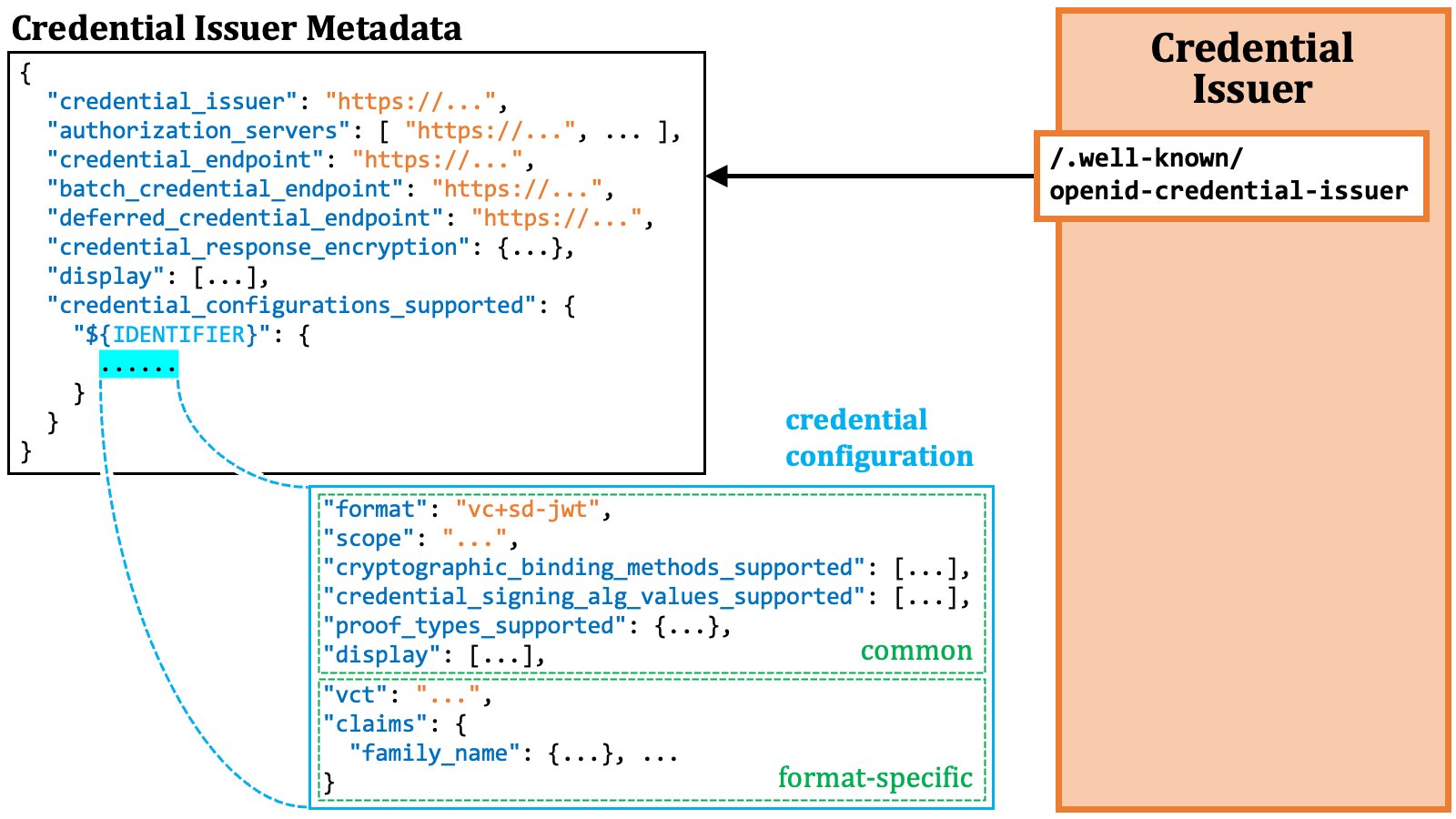 The properties within a credential configuration object are divided into
(1) those that may appear common to all credential configuration objects and
(2) those specific to the respective format.
For example, the `"format"` property always exists in every credential
configuration object, while the `claims` property is available for some
formats only.
### 2.9. Credential Issuance Details
The previous sections have covered the details about access token issuance. Next, we will delve into the details about credential issuance.
#### 2.9.1. Key Proof
As explained in the "Credential Verification" section, the wallet is expected to provide a key proof if it wishes to obtain a verifiable credential capable of key binding.
In the OID4VCI specification, three specific formats for key proof are defined.
These formats are based on JWT ([RFC 7519][RFC_7519]), CWT ([RFC 8392][RFC_8392]),
and Data Integrity ([Data Integrity][W3C_DATA_INTEGRITY]), respectively.
Additional key proof formats may be introduced in the future when the need arises.
##### 2.9.1.1. Key Proof JWT
By definition, a key proof includes a public key or a reference to the key. In the case of the key proof based on JWT, several methods are employed to include this key information as listed below. A key proof JWT must use one and only one of the methods.
1. The `jwk` header parameter ([RFC 7515, 4.1.3][RFC_7515_4_1_3])
2. The `x5c` header parameter ([RFC 7515, 4.1.6][RFC_7515_4_1_6])
3. The `kid` header parameter ([RFC 7515, 4.1.4][RFC_7515_4_1_4])
The current draft of the OID4VCI specification may give the impression that the combination of the `kid` and `trust_chain` header parameters can specify a public key for key binding. However, the combination won't work unless supplementary rules and mechanisms are introduced.
All of these methods embed the key information in the header of a key proof JWT.
The properties within a credential configuration object are divided into
(1) those that may appear common to all credential configuration objects and
(2) those specific to the respective format.
For example, the `"format"` property always exists in every credential
configuration object, while the `claims` property is available for some
formats only.
### 2.9. Credential Issuance Details
The previous sections have covered the details about access token issuance. Next, we will delve into the details about credential issuance.
#### 2.9.1. Key Proof
As explained in the "Credential Verification" section, the wallet is expected to provide a key proof if it wishes to obtain a verifiable credential capable of key binding.
In the OID4VCI specification, three specific formats for key proof are defined.
These formats are based on JWT ([RFC 7519][RFC_7519]), CWT ([RFC 8392][RFC_8392]),
and Data Integrity ([Data Integrity][W3C_DATA_INTEGRITY]), respectively.
Additional key proof formats may be introduced in the future when the need arises.
##### 2.9.1.1. Key Proof JWT
By definition, a key proof includes a public key or a reference to the key. In the case of the key proof based on JWT, several methods are employed to include this key information as listed below. A key proof JWT must use one and only one of the methods.
1. The `jwk` header parameter ([RFC 7515, 4.1.3][RFC_7515_4_1_3])
2. The `x5c` header parameter ([RFC 7515, 4.1.6][RFC_7515_4_1_6])
3. The `kid` header parameter ([RFC 7515, 4.1.4][RFC_7515_4_1_4])
The current draft of the OID4VCI specification may give the impression that the combination of the `kid` and `trust_chain` header parameters can specify a public key for key binding. However, the combination won't work unless supplementary rules and mechanisms are introduced.
All of these methods embed the key information in the header of a key proof JWT.
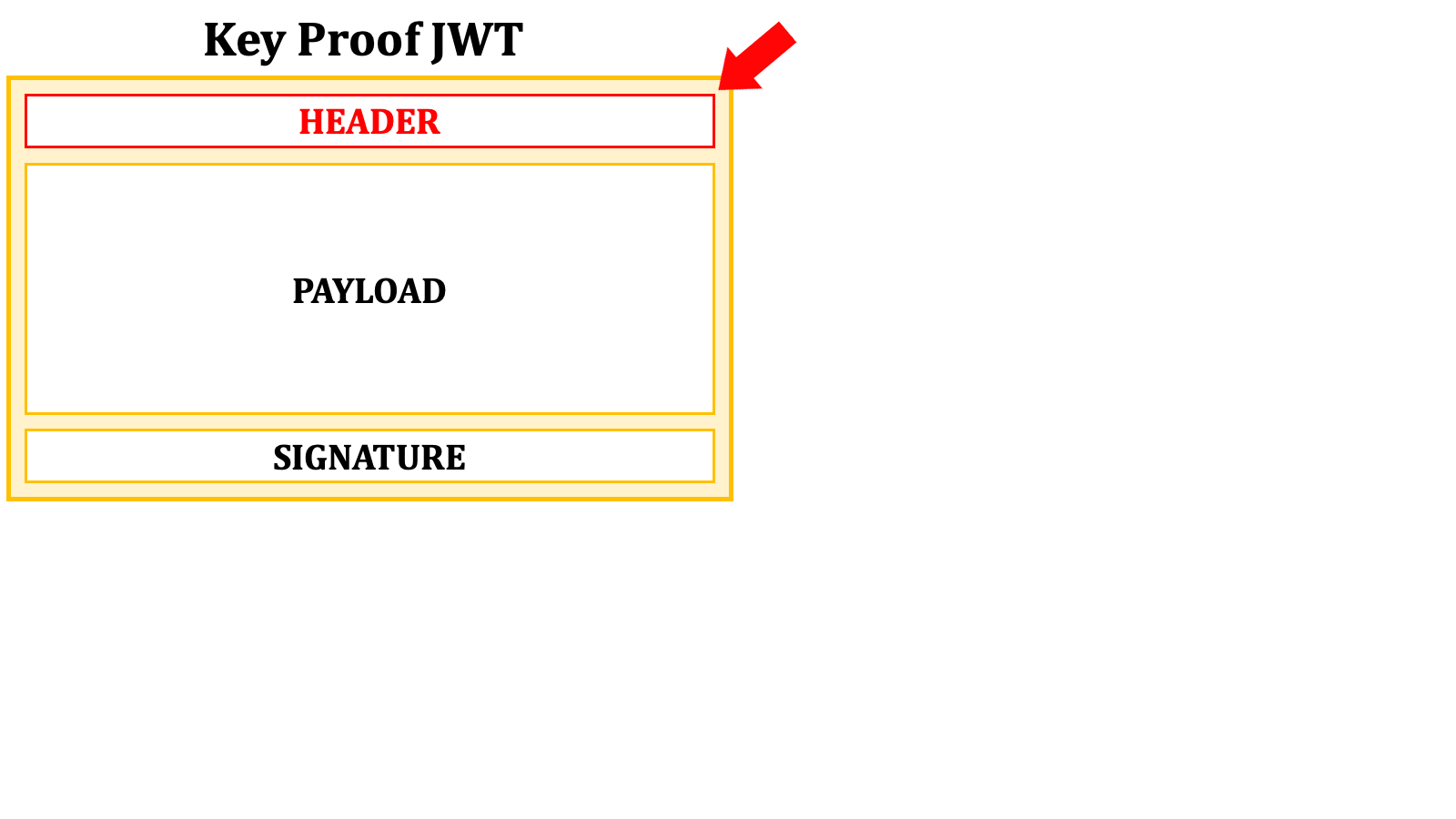 In the case of using the `jwk` header parameter, the public key is embedded in the format of "**JWK**" ([RFC 7517 JSON Web Key (JWK)][RFC_7517]).
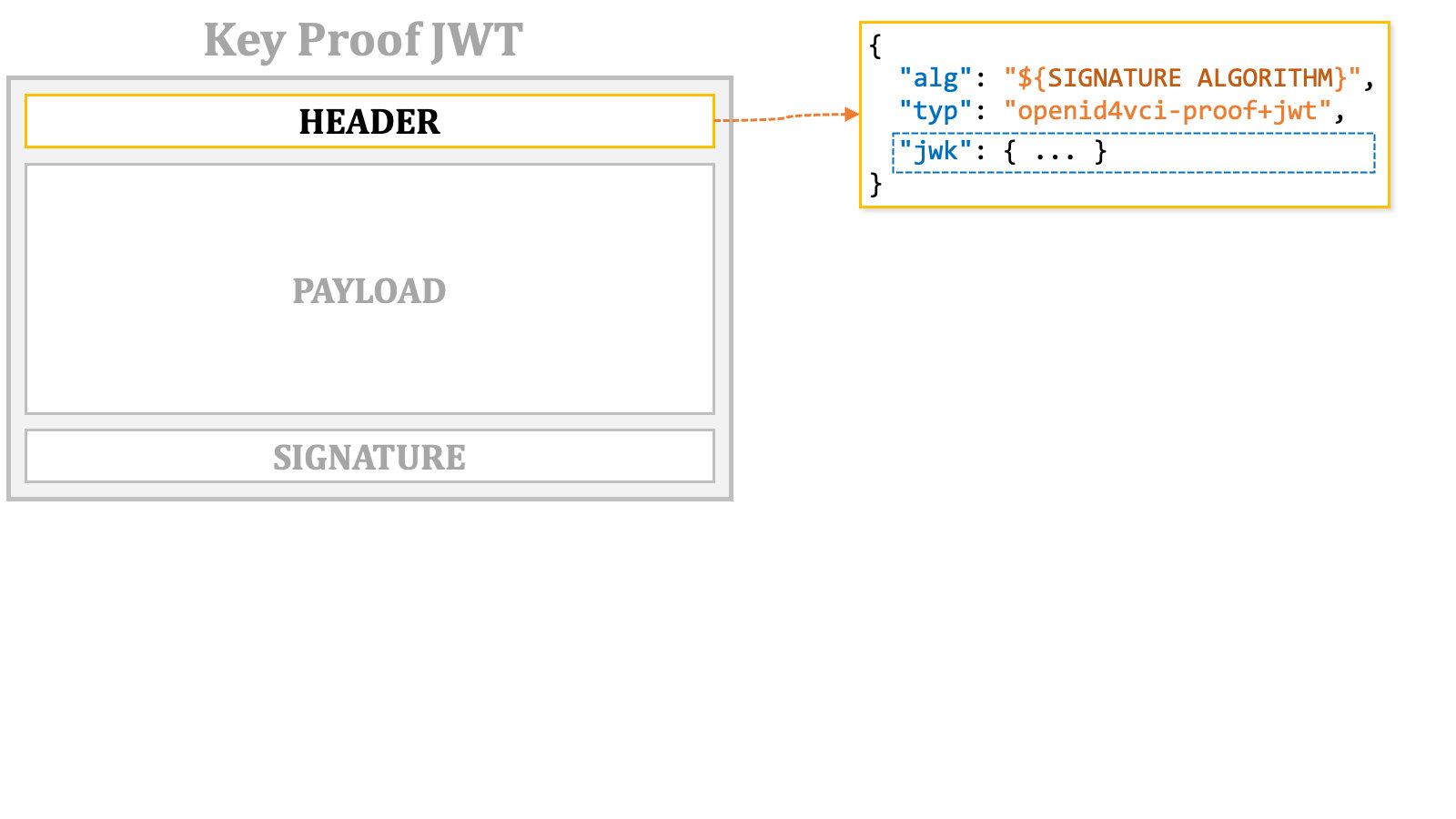 The value of the `jwk` header parameter is a JSON object representing the public key.
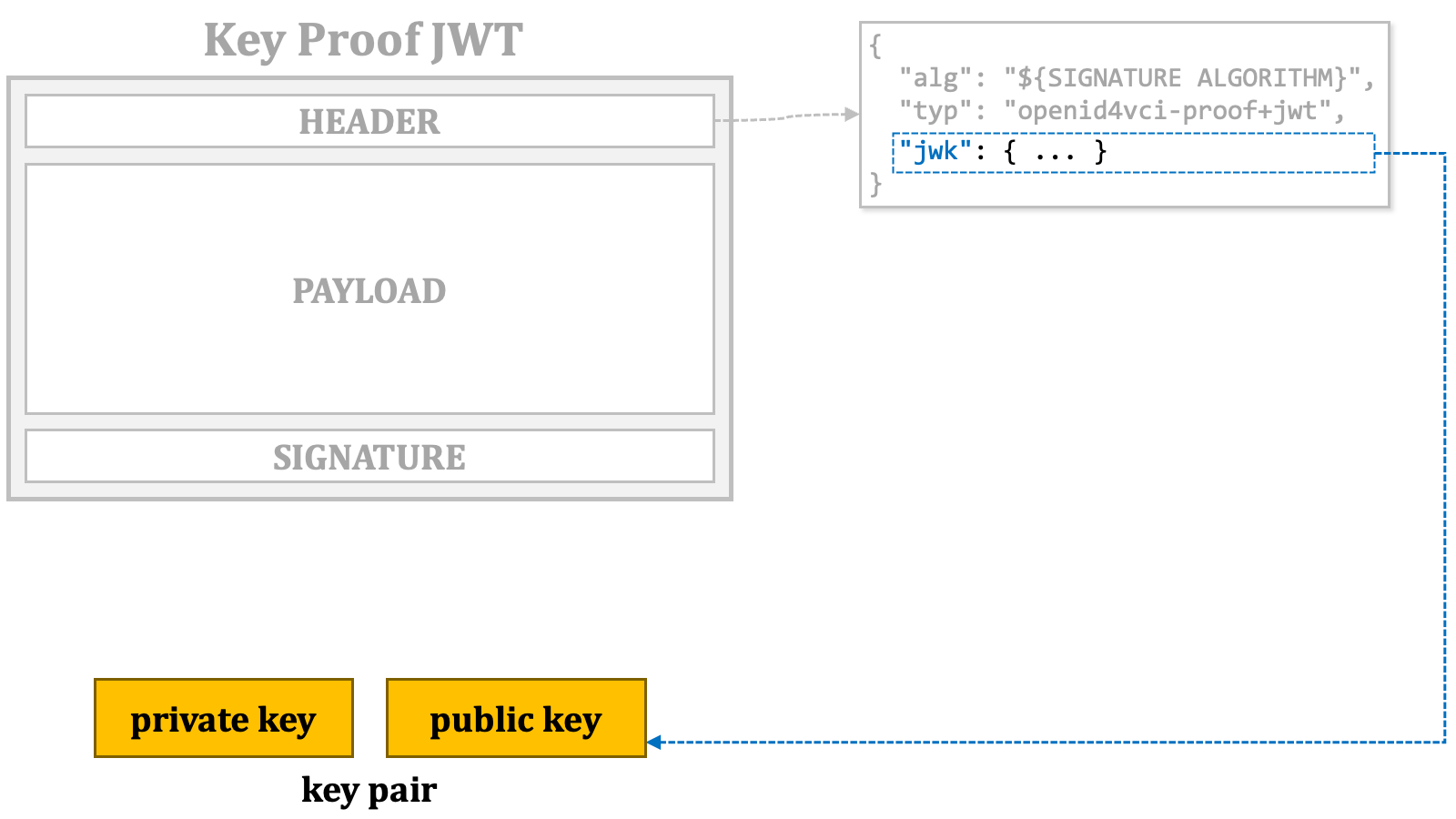 The key proof JWT itself must be signed with the private key that corresponds to the public key.
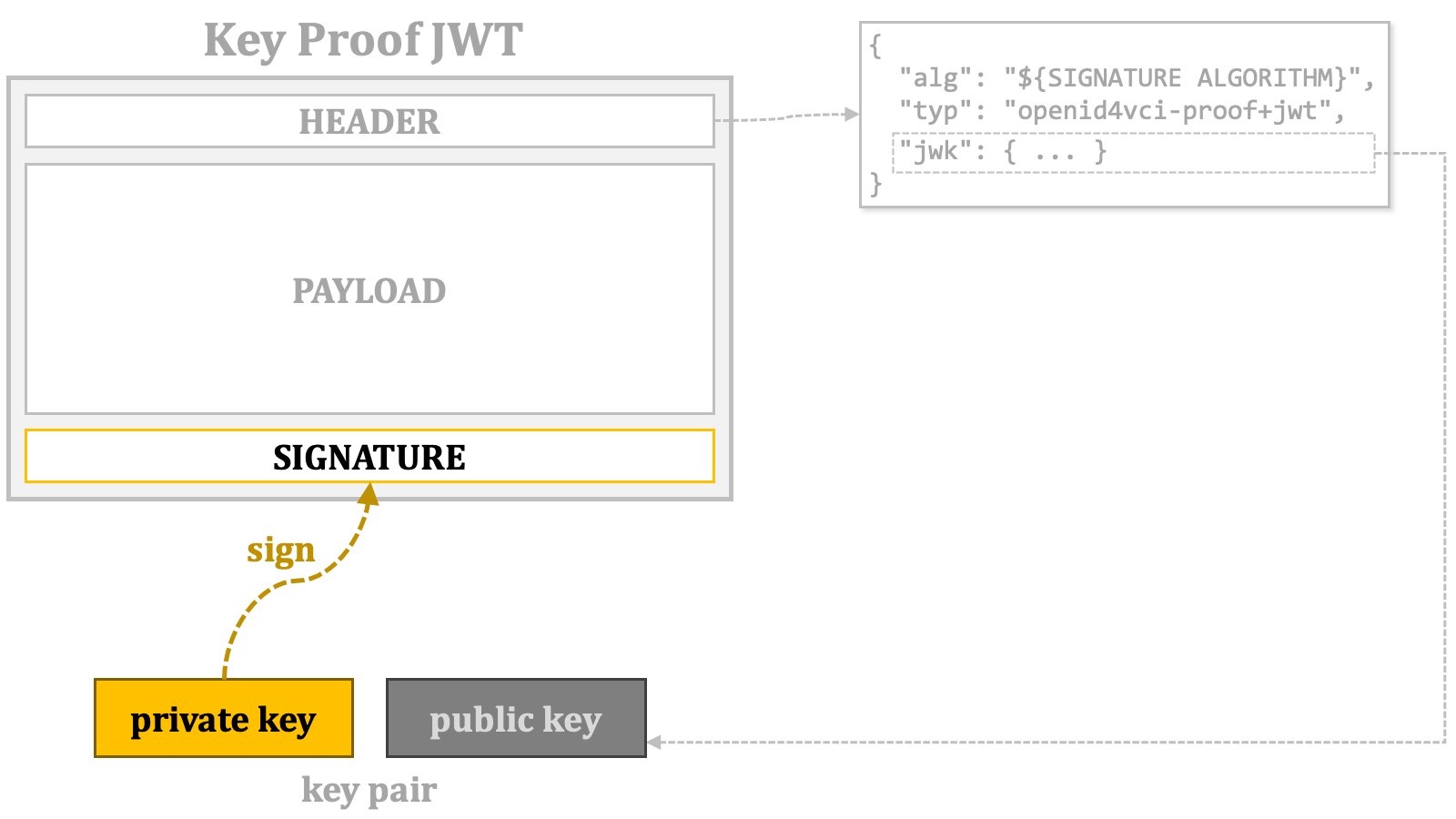 In the case of using the `x5c` header parameter, an X.509 certificate for the public key needs to be prepared. The base64 representation of the DER representation of the certificate must be included in the `x5c` JSON array as the first element. If the certificate chain of the certificate is available, the chain can be included along with the certificate. See [RFC 7515, 4.1.6. "x5c" (X.509 Certificate Chain) Header Parameter][RFC_7515_4_1_6] for the details of the format that the `x5c` parameter expects.
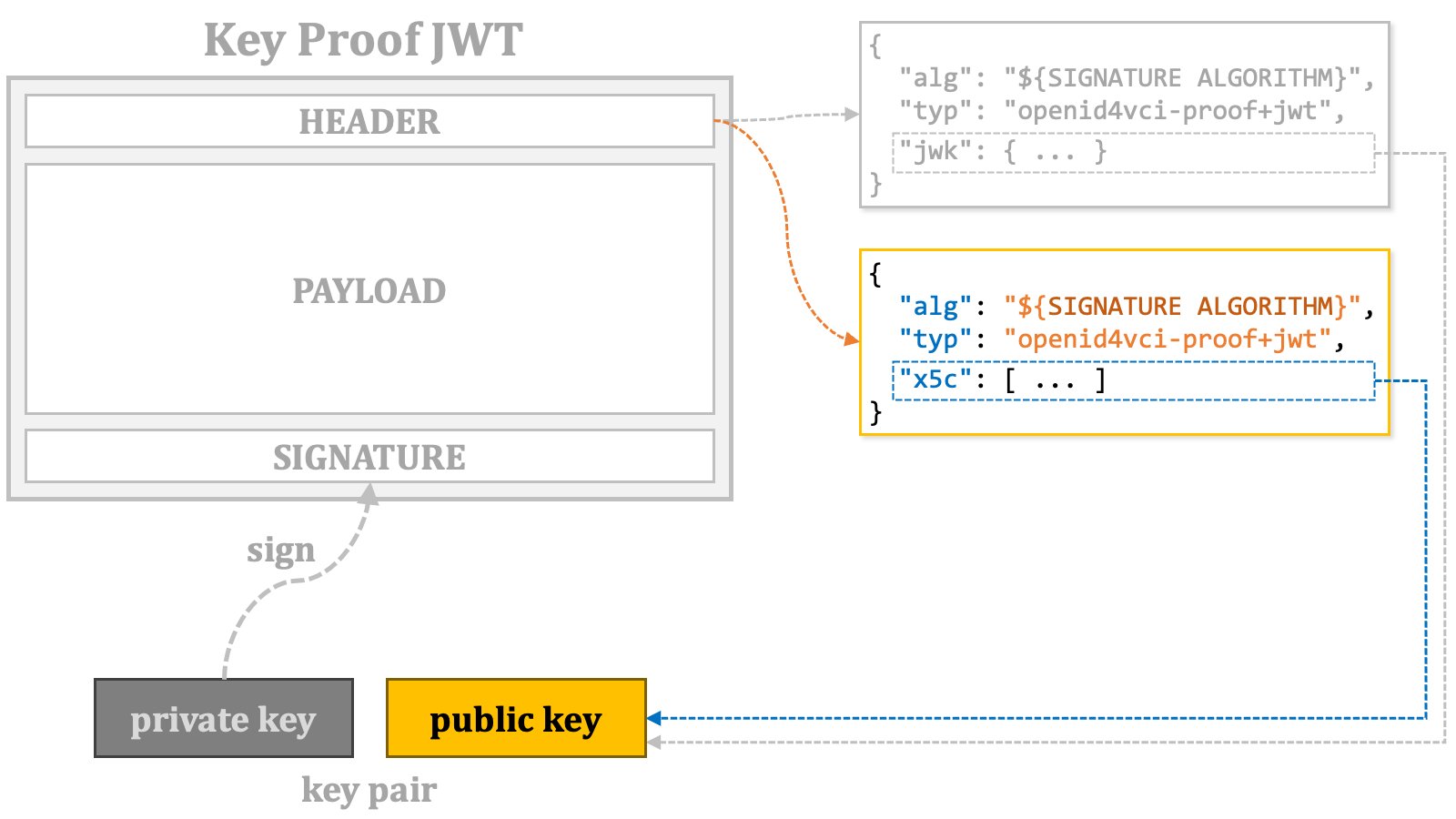 In the case of using the `kid` header parameter, its value should be a [DID URL][W3C_DID_DID_URL] that can be resolved to the public key.
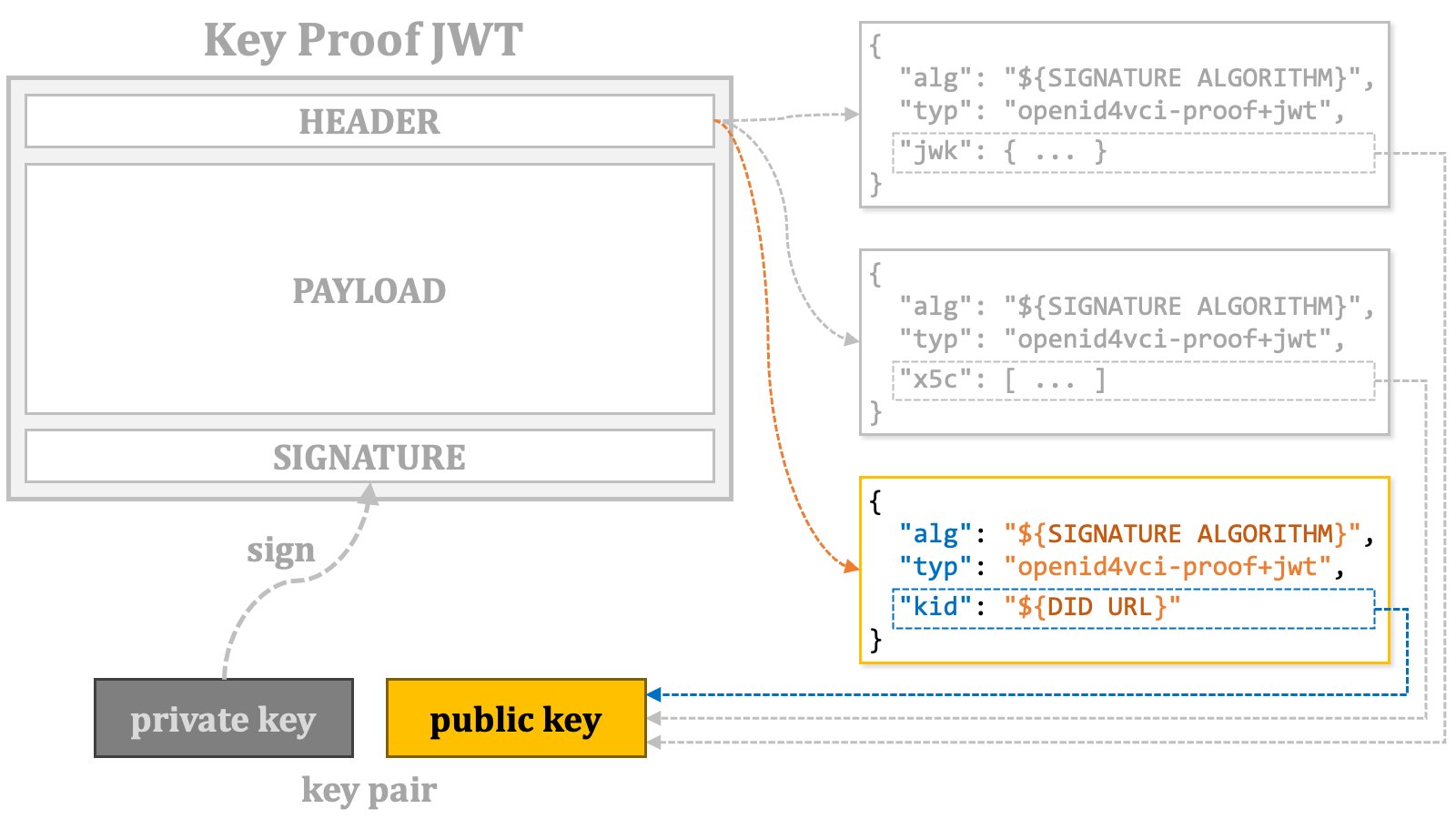 Next, let's take a look at the payload part of a key proof JWT.
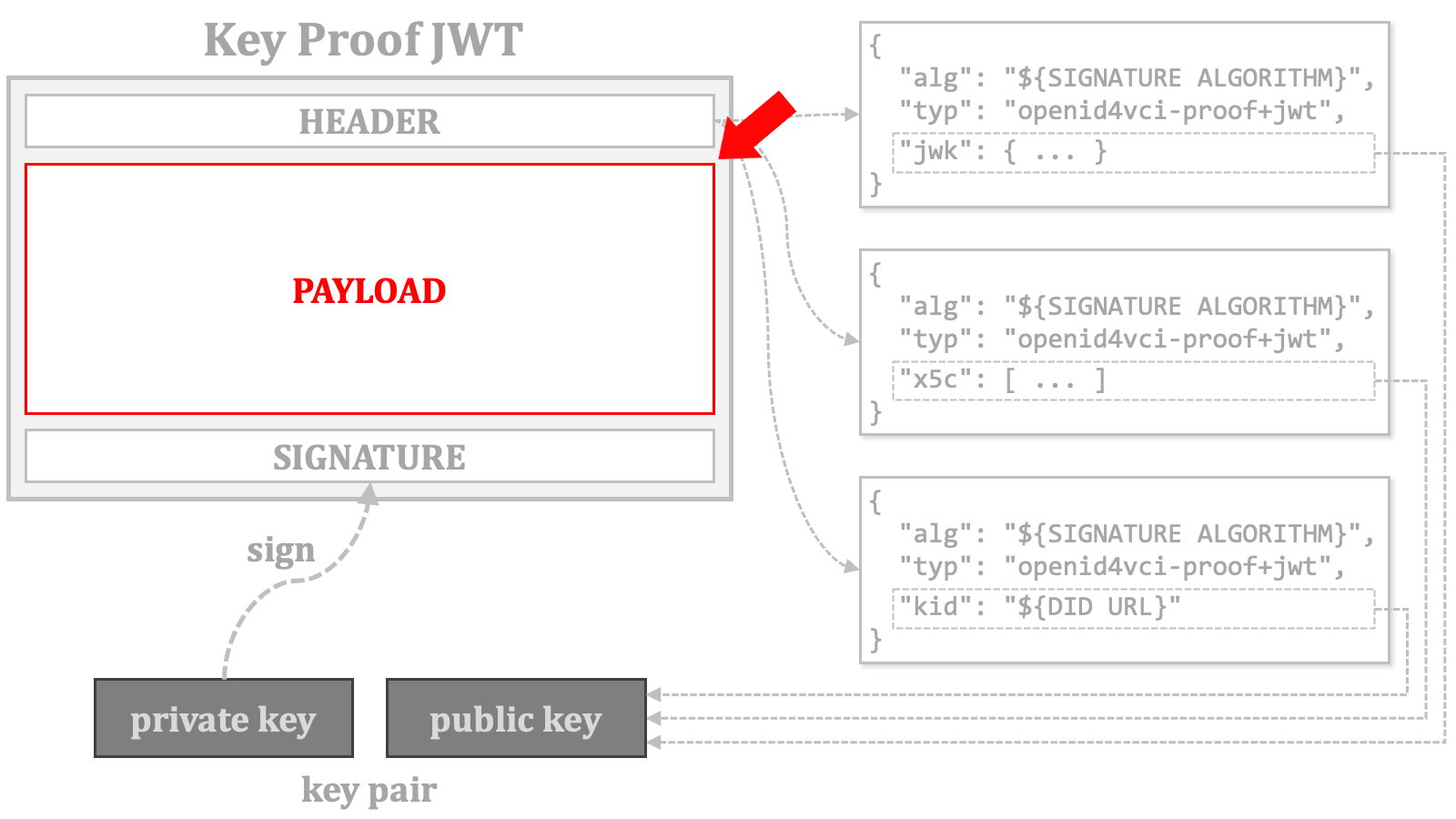 The following table lists the claims that must or may appear in the payload part of a key proof JWT.
\| Name | Presence | Description |
\| iss | CONDITIONALLY REQUIRED | The identifier of the client application (wallet). |
\| aud | REQUIRED | The identifier of the credential issuer. |
\| iat | REQUIRED | The issuance time. |
\| nonce | CONDITIONALLY REQUIERD | The server-provided c\_nonce. |
* The `iss` claim represents the identifier of the client application (wallet) and is required in most cases. The only exception is when the access token is issued using the pre-authorized code flow, and the token request for the access token doesn't include any information to identify the client application. Such token requests are allowed only if the authorization server permits anonymous access in the pre-authorized code flow. The authorization server's support for this is indicated by the boolean server metadata, `pre-authorized_grant_anonymous_access_supported`.
* The `aud` claim represents the identifier of the credential issuer and is always required.
* The `iat` claim represents the issuance time of the key proof JWT, as defined in [RFC 7519, 4.1.6. "iat" (Issued At) Claim][RFC_7519_4_1_6]. This claim is always required.
* The `nonce` claim corresponds to the `c_nonce` included in the token response and/or the credential response. It is required when the token response contains the `c_nonce` parameter. Additionally, the credential issuer may mandate the `nonce` claim, even when the token response doesn't contain the `c_nonce` parameter. More information about `c_nonce` will be provided later.
The following table lists the claims that must or may appear in the payload part of a key proof JWT.
\| Name | Presence | Description |
\| iss | CONDITIONALLY REQUIRED | The identifier of the client application (wallet). |
\| aud | REQUIRED | The identifier of the credential issuer. |
\| iat | REQUIRED | The issuance time. |
\| nonce | CONDITIONALLY REQUIERD | The server-provided c\_nonce. |
* The `iss` claim represents the identifier of the client application (wallet) and is required in most cases. The only exception is when the access token is issued using the pre-authorized code flow, and the token request for the access token doesn't include any information to identify the client application. Such token requests are allowed only if the authorization server permits anonymous access in the pre-authorized code flow. The authorization server's support for this is indicated by the boolean server metadata, `pre-authorized_grant_anonymous_access_supported`.
* The `aud` claim represents the identifier of the credential issuer and is always required.
* The `iat` claim represents the issuance time of the key proof JWT, as defined in [RFC 7519, 4.1.6. "iat" (Issued At) Claim][RFC_7519_4_1_6]. This claim is always required.
* The `nonce` claim corresponds to the `c_nonce` included in the token response and/or the credential response. It is required when the token response contains the `c_nonce` parameter. Additionally, the credential issuer may mandate the `nonce` claim, even when the token response doesn't contain the `c_nonce` parameter. More information about `c_nonce` will be provided later.
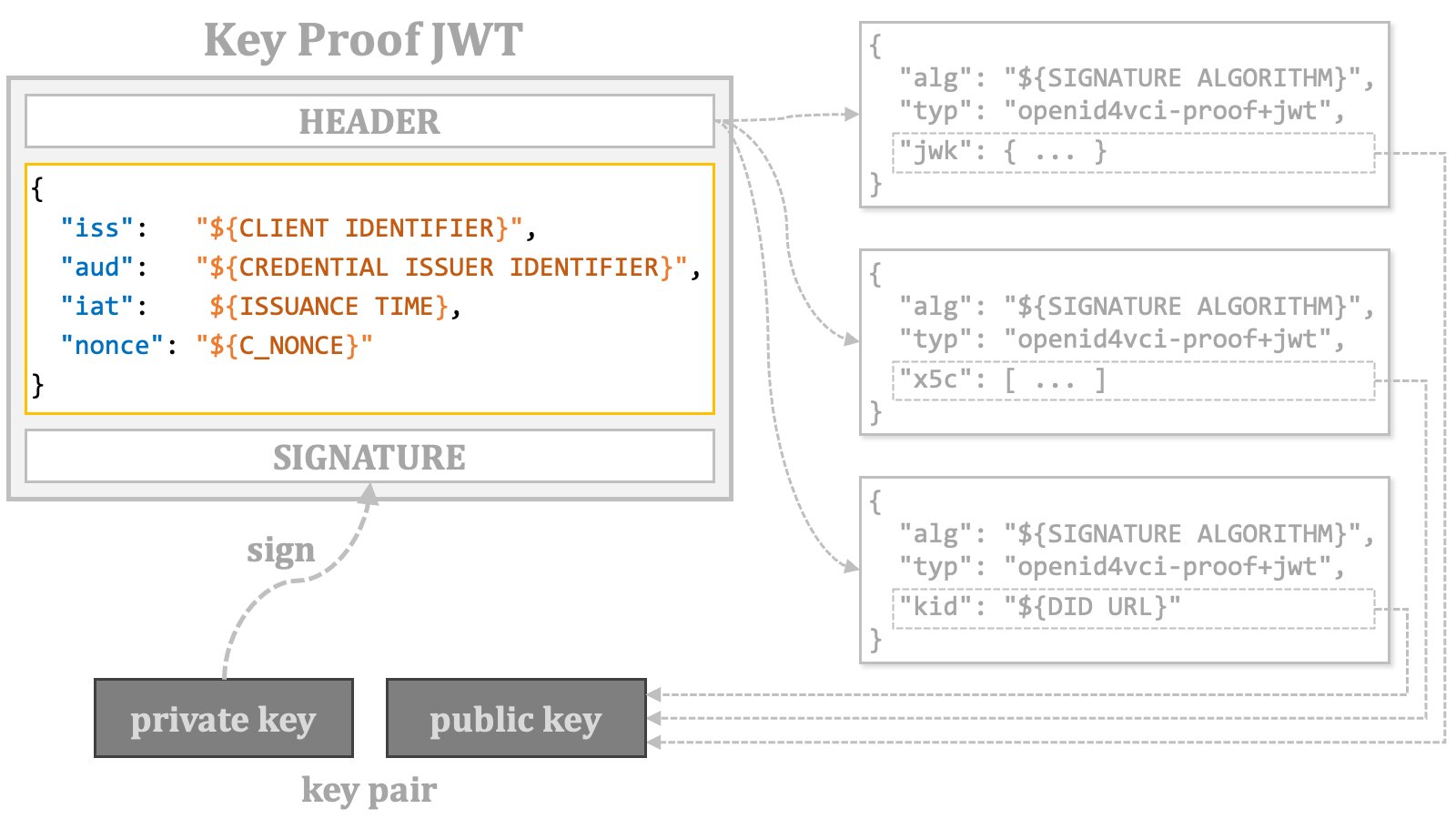 The following table summarizes the requirements for a key proof JWT.
\| Key Proof JWT | Place | Name | Presence | Description |
\| Header | alg | REQUIRED | As required by the JWT specification ([RFC 7519](https://www.rfc-editor.org/rfc/rfc7519.html)). |
\| typ | REQUIRED | openid4vci-proof+jwt |
\| jwk | CONDITIONALLY REQUIRED | Exactly one of these header parameters must be included,
representing a public key or the reference to a public key. |
\| x5c |
\| kid |
\| Payload | iss | CONDITIONALLY REQUIRED | The identifier of the client application (wallet). |
\| aud | REQUIRED | The identifier of the credential issuer. |
\| iat | REQUIRED | The issuance time. |
\| nonce | CONDITIONALLY REQUIRED | The server-provided c\_nonce. |
The following is an example of key proof JWT.
```text theme={null}
eyJ0eXAiOiJvcGVuaWQ0dmNpLXByb29mK2p3dCIsImFsZyI6IkVTMjU2IiwiandrIjp7Imt0eSI6IkVDIiwiY3J2IjoiUC0yNTYiLCJraWQiOiJHVURvZFB1SURJYllocmdmMHZsT3RNd1otczNiaVpFT3hWMFRTRjBKN3R3IiwieCI6InJjdU1FT1BYbVBJRlotc0Jvbkxyb1VvaTVYdGZ4NktWeFlFR09YMi1UbGsiLCJ5IjoiNUw1SUZrUFpNT0doTVpsNHRaSk9ISjdtckZQbnJSeV9RSURUOXRWZF9obyIsImFsZyI6IkVTMjU2In19.eyJpc3MiOiJodHRwczovL3dhbGxldC5leGFtcGxlLmNvbSIsImF1ZCI6Imh0dHBzOi8vaXNzdWVyLmV4YW1wbGUuY29tIiwiaWF0IjoxNjk3MjM0NzcwLCJub25jZSI6IjZhMzA3YjU1LWM4ZTEtNDg4YS05NjFlLTI1MzQ4ZmYzZTlkYSJ9.Vvo_X_fZyanUZ-y5X0yYtY7d70bbjMKUKqAoDiCBmP3NT4xNfTEpuYl9eu7vxc2fLf67ZdbSfw4rwEp8qvvWpA
```
The header and payload of the key proof JWT example are decoded into the following JSONs, respectively.
```json theme={null}
{
"alg": "ES256",
"typ": "openid4vci-proof+jwt",
"jwk": {
"kty": "EC",
"alg": "ES256",
"crv": "P-256",
"x": "rcuMEOPXmPIFZ-sBonLroUoi5Xtfx6KVxYEGOX2-Tlk",
"y": "5L5IFkPZMOGhMZl4tZJOHJ7mrFPnrRy_QIDT9tVd_ho",
"kid": "GUDodPuIDIbYhrgf0vlOtMwZ-s3biZEOxV0TSF0J7tw"
}
}
```
```json theme={null}
{
"iss": "https://wallet.example.com",
"aud": "https://issuer.example.com",
"iat": 1697234770,
"nonce": "6a307b55-c8e1-488a-961e-25348ff3e9da"
}
```
##### 2.9.1.2. Other Key Proofs
This document does not explain other key proofs such as CWT-based key proof.
Please refer to the OID4VCI specification for them.
#### 2.9.2. c\_nonce
As the primary countermeasure against key proof replay, the credential issuer may require the inclusion of the `nonce` claim in the key proof. The value of this claim is provided as a `c_nonce` response parameter from the authorization server or the credential issuer.
A token response from the authorization server may include the `c_nonce` response parameter along with the `c_nonce_expires_in` response parameter, which indicates the lifetime of the `c_nonce` in seconds.
The following table summarizes the requirements for a key proof JWT.
\| Key Proof JWT | Place | Name | Presence | Description |
\| Header | alg | REQUIRED | As required by the JWT specification ([RFC 7519](https://www.rfc-editor.org/rfc/rfc7519.html)). |
\| typ | REQUIRED | openid4vci-proof+jwt |
\| jwk | CONDITIONALLY REQUIRED | Exactly one of these header parameters must be included,
representing a public key or the reference to a public key. |
\| x5c |
\| kid |
\| Payload | iss | CONDITIONALLY REQUIRED | The identifier of the client application (wallet). |
\| aud | REQUIRED | The identifier of the credential issuer. |
\| iat | REQUIRED | The issuance time. |
\| nonce | CONDITIONALLY REQUIRED | The server-provided c\_nonce. |
The following is an example of key proof JWT.
```text theme={null}
eyJ0eXAiOiJvcGVuaWQ0dmNpLXByb29mK2p3dCIsImFsZyI6IkVTMjU2IiwiandrIjp7Imt0eSI6IkVDIiwiY3J2IjoiUC0yNTYiLCJraWQiOiJHVURvZFB1SURJYllocmdmMHZsT3RNd1otczNiaVpFT3hWMFRTRjBKN3R3IiwieCI6InJjdU1FT1BYbVBJRlotc0Jvbkxyb1VvaTVYdGZ4NktWeFlFR09YMi1UbGsiLCJ5IjoiNUw1SUZrUFpNT0doTVpsNHRaSk9ISjdtckZQbnJSeV9RSURUOXRWZF9obyIsImFsZyI6IkVTMjU2In19.eyJpc3MiOiJodHRwczovL3dhbGxldC5leGFtcGxlLmNvbSIsImF1ZCI6Imh0dHBzOi8vaXNzdWVyLmV4YW1wbGUuY29tIiwiaWF0IjoxNjk3MjM0NzcwLCJub25jZSI6IjZhMzA3YjU1LWM4ZTEtNDg4YS05NjFlLTI1MzQ4ZmYzZTlkYSJ9.Vvo_X_fZyanUZ-y5X0yYtY7d70bbjMKUKqAoDiCBmP3NT4xNfTEpuYl9eu7vxc2fLf67ZdbSfw4rwEp8qvvWpA
```
The header and payload of the key proof JWT example are decoded into the following JSONs, respectively.
```json theme={null}
{
"alg": "ES256",
"typ": "openid4vci-proof+jwt",
"jwk": {
"kty": "EC",
"alg": "ES256",
"crv": "P-256",
"x": "rcuMEOPXmPIFZ-sBonLroUoi5Xtfx6KVxYEGOX2-Tlk",
"y": "5L5IFkPZMOGhMZl4tZJOHJ7mrFPnrRy_QIDT9tVd_ho",
"kid": "GUDodPuIDIbYhrgf0vlOtMwZ-s3biZEOxV0TSF0J7tw"
}
}
```
```json theme={null}
{
"iss": "https://wallet.example.com",
"aud": "https://issuer.example.com",
"iat": 1697234770,
"nonce": "6a307b55-c8e1-488a-961e-25348ff3e9da"
}
```
##### 2.9.1.2. Other Key Proofs
This document does not explain other key proofs such as CWT-based key proof.
Please refer to the OID4VCI specification for them.
#### 2.9.2. c\_nonce
As the primary countermeasure against key proof replay, the credential issuer may require the inclusion of the `nonce` claim in the key proof. The value of this claim is provided as a `c_nonce` response parameter from the authorization server or the credential issuer.
A token response from the authorization server may include the `c_nonce` response parameter along with the `c_nonce_expires_in` response parameter, which indicates the lifetime of the `c_nonce` in seconds.
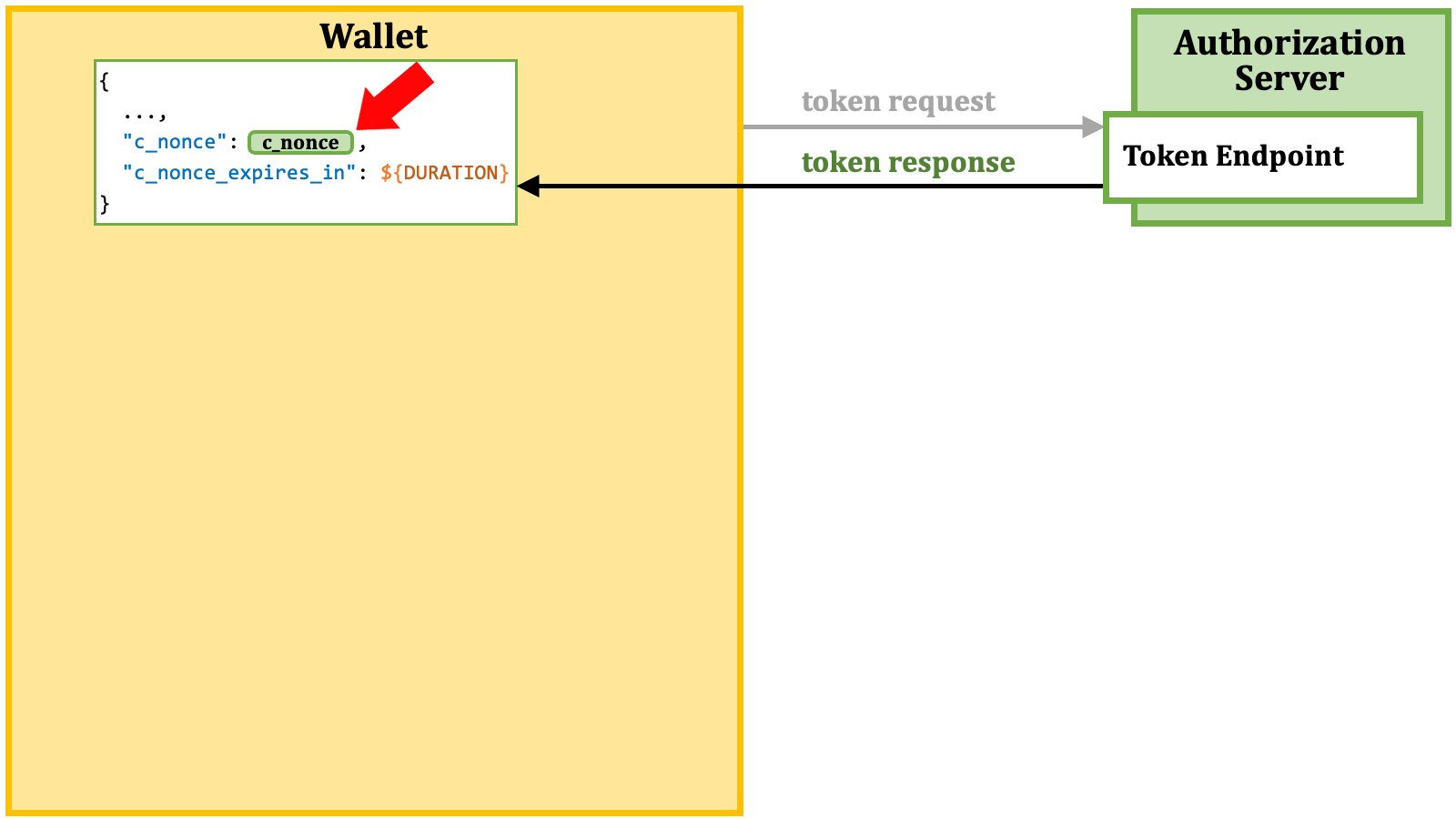 The wallet uses the value of the `c_nonce` response parameter as the value of the `nonce` claim in a key proof JWT.
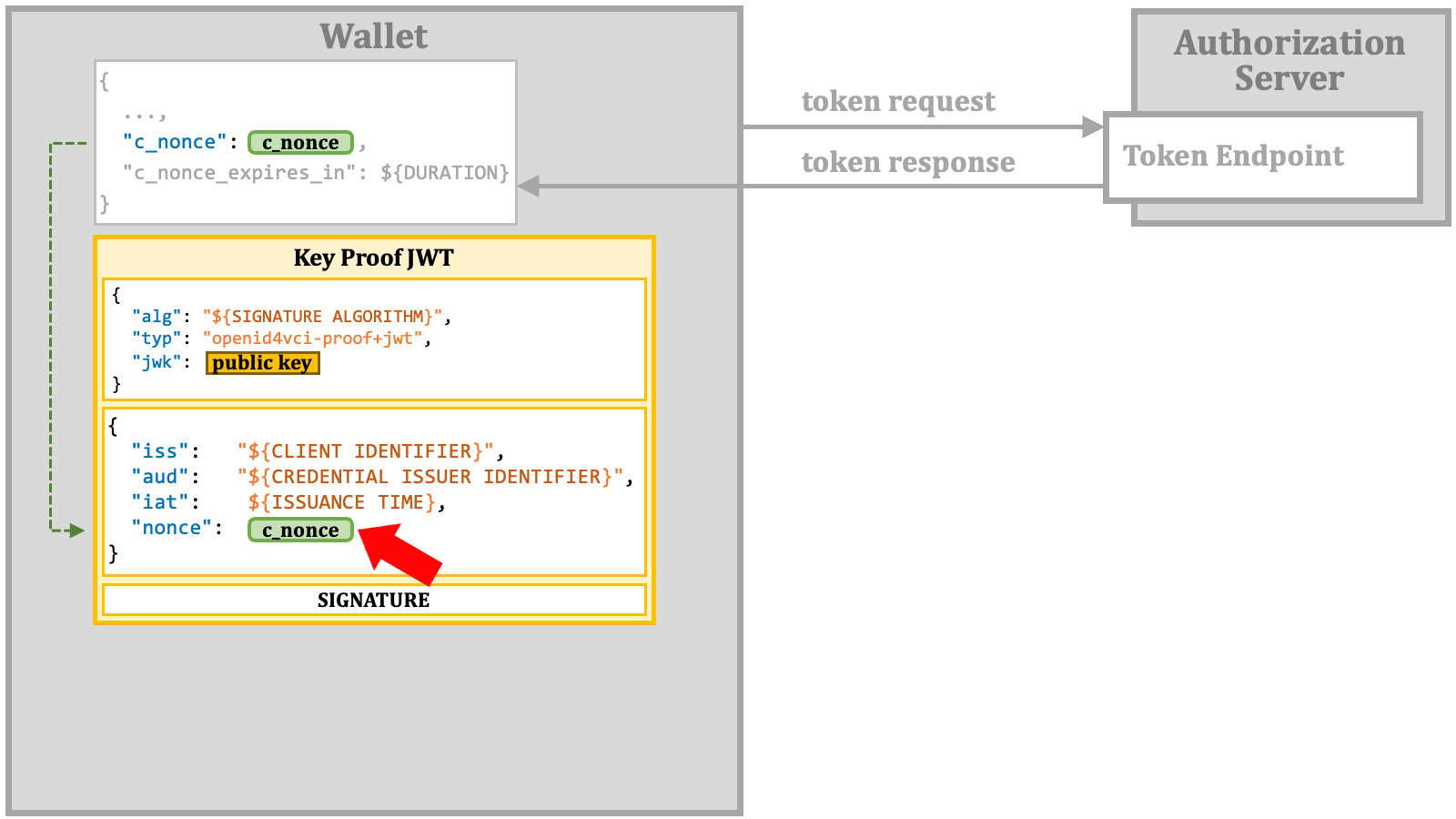 The wallet includes the key proof JWT in a credential request.
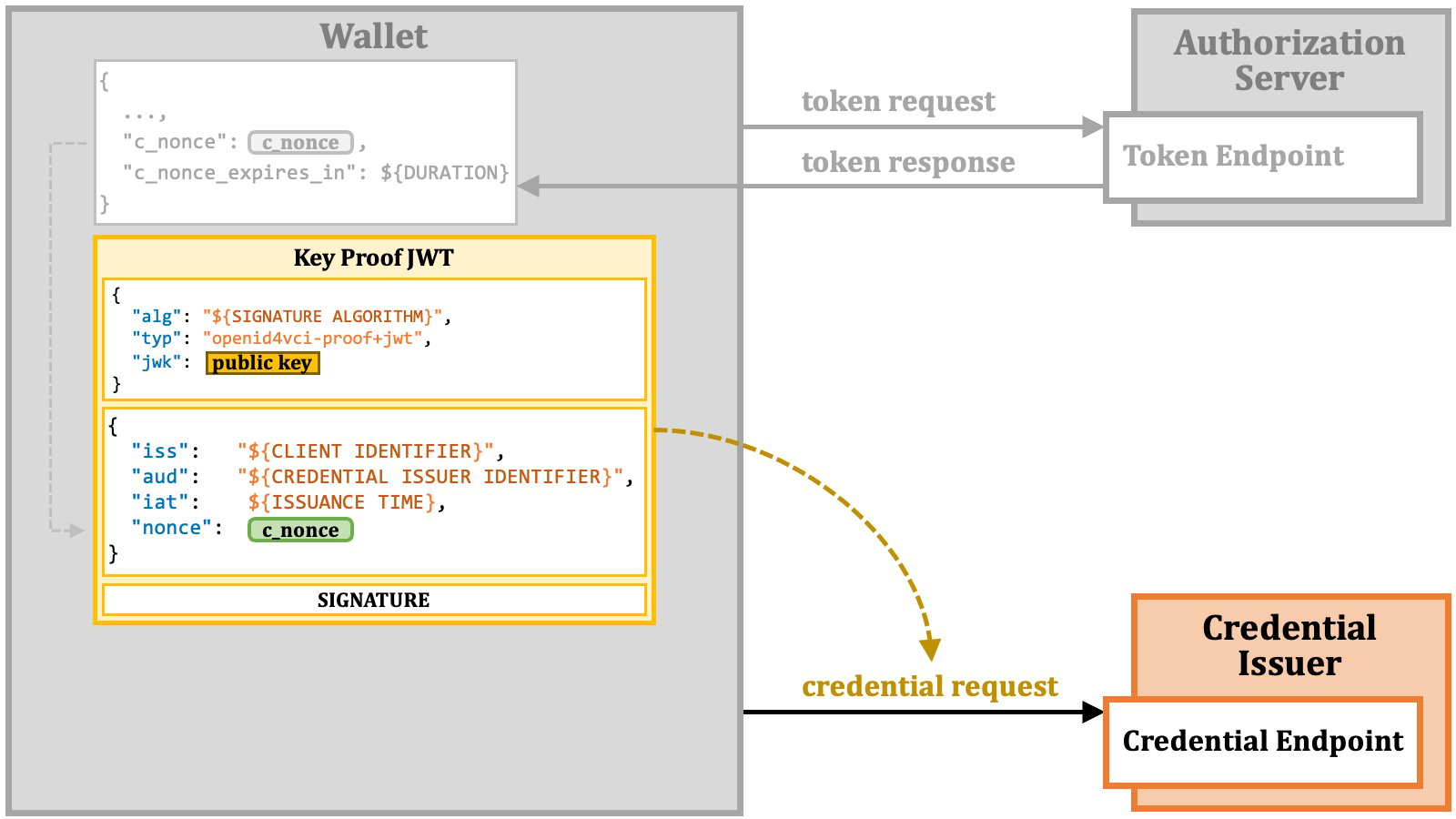 If the `nonce` claim is missing, although the credential issuer requires it, or if the specified `nonce` value has expired, the credential endpoint will return an error response. This error response includes either the expected `c_nonce` value or a fresh `c_nonce` value. Additionally, even when a valid `nonce` value is provided, the credential response may still include `c_nonce` for future use. In either case, `c_nonce` is included in a credential response if the credential issuer requires key proofs include the `nonce` claim.
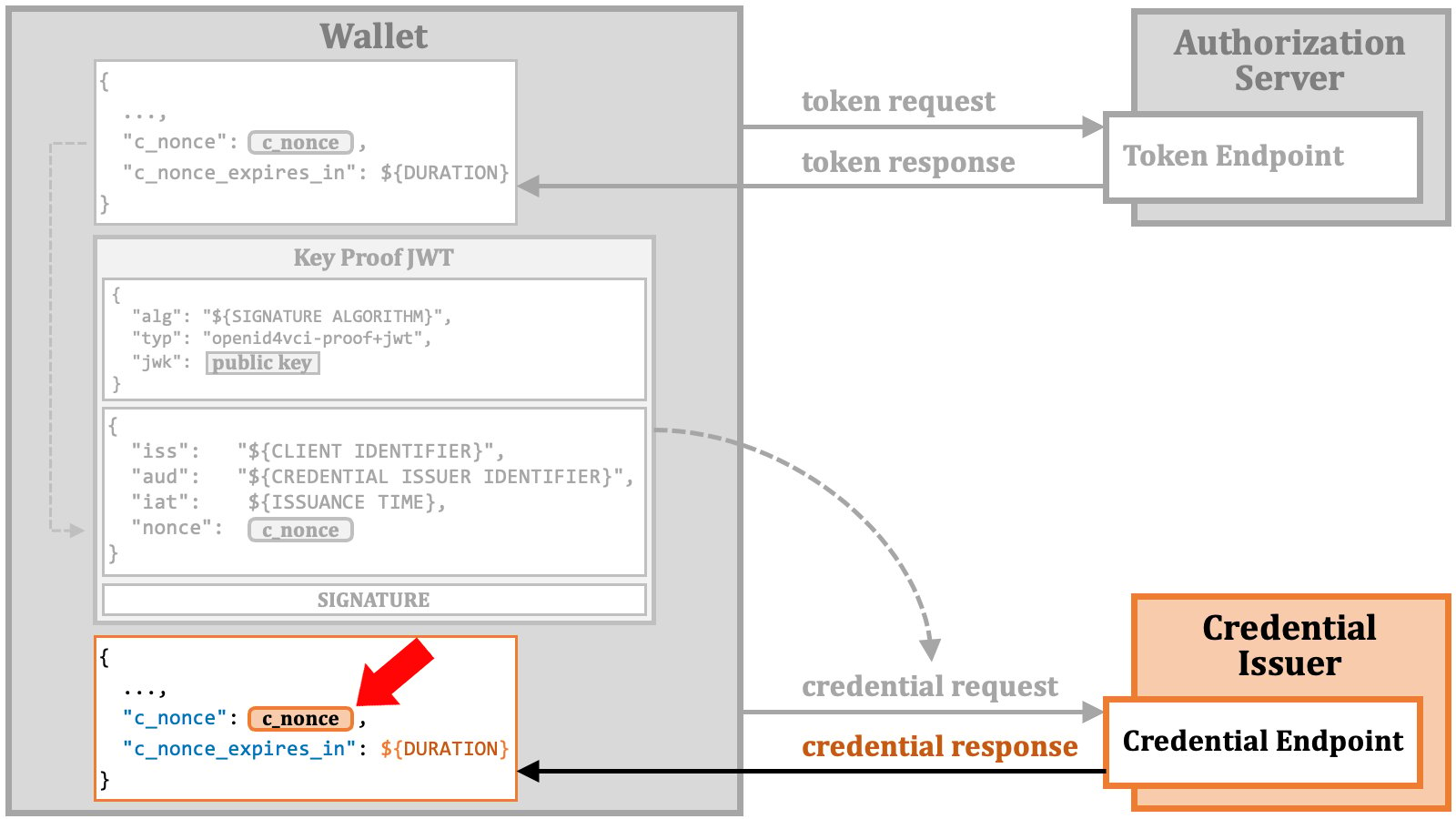 If necessary, the wallet can regenerate a new key proof using the `c_nonce` value provided by the credential endpoint and make a credential request again with the fresh key proof.
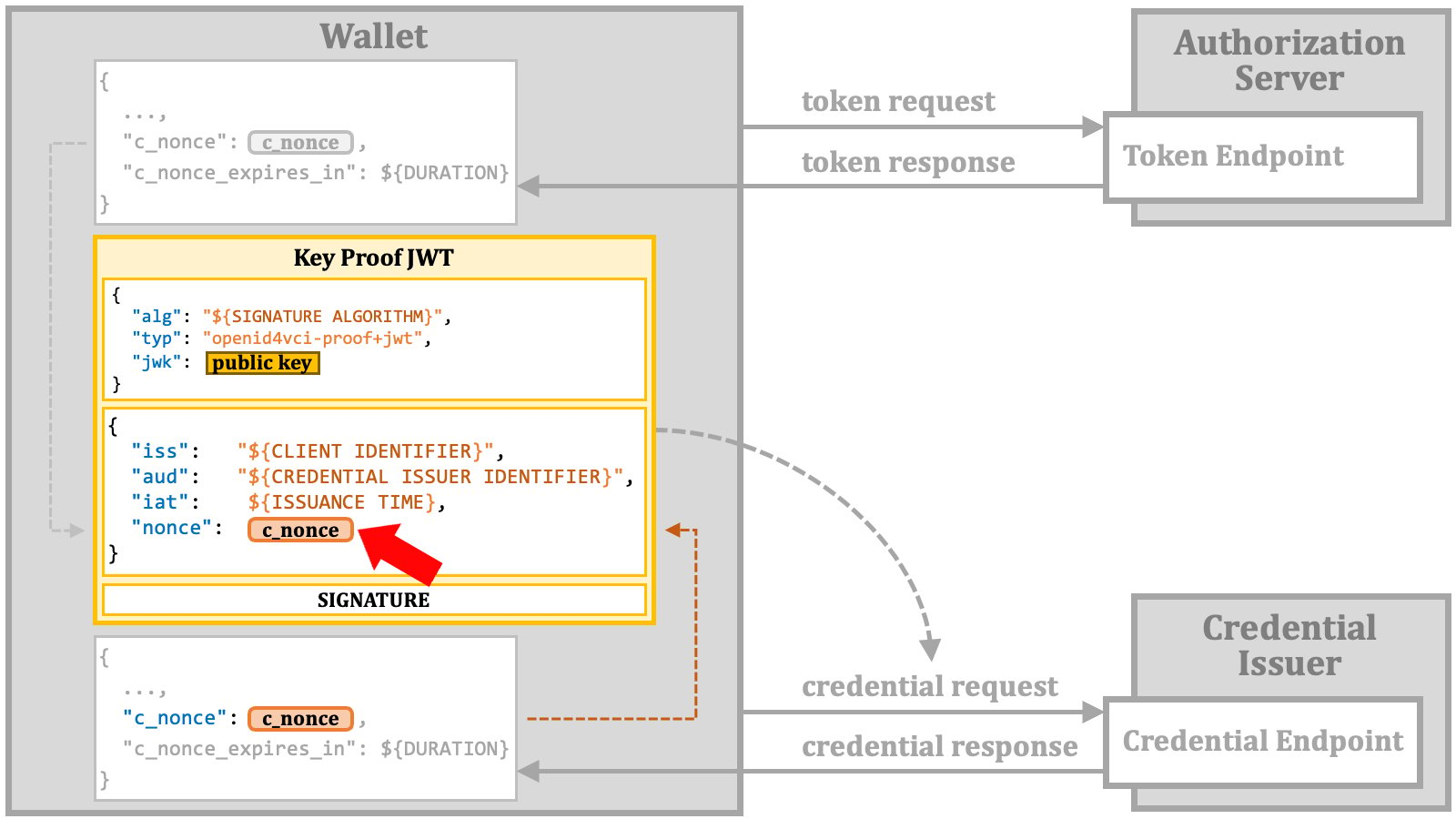 The diagram below provides an overview of `c_nonce`.
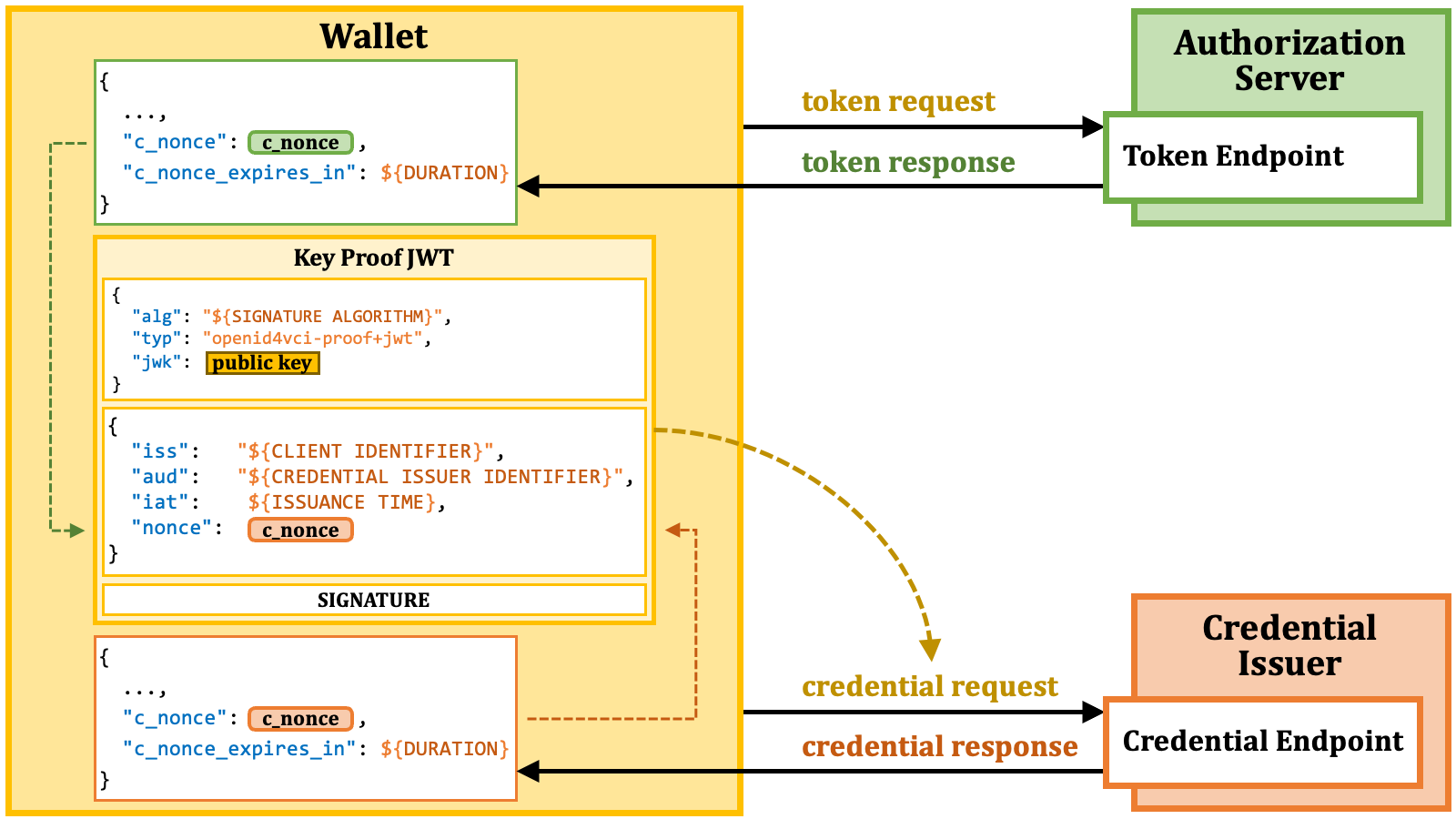 #### 2.9.3. Credential Request
A credential request is an HTTP POST request with an access token and a JSON-formatted payload. This payload contains credential information and may include an optional key proof.
#### 2.9.3. Credential Request
A credential request is an HTTP POST request with an access token and a JSON-formatted payload. This payload contains credential information and may include an optional key proof.
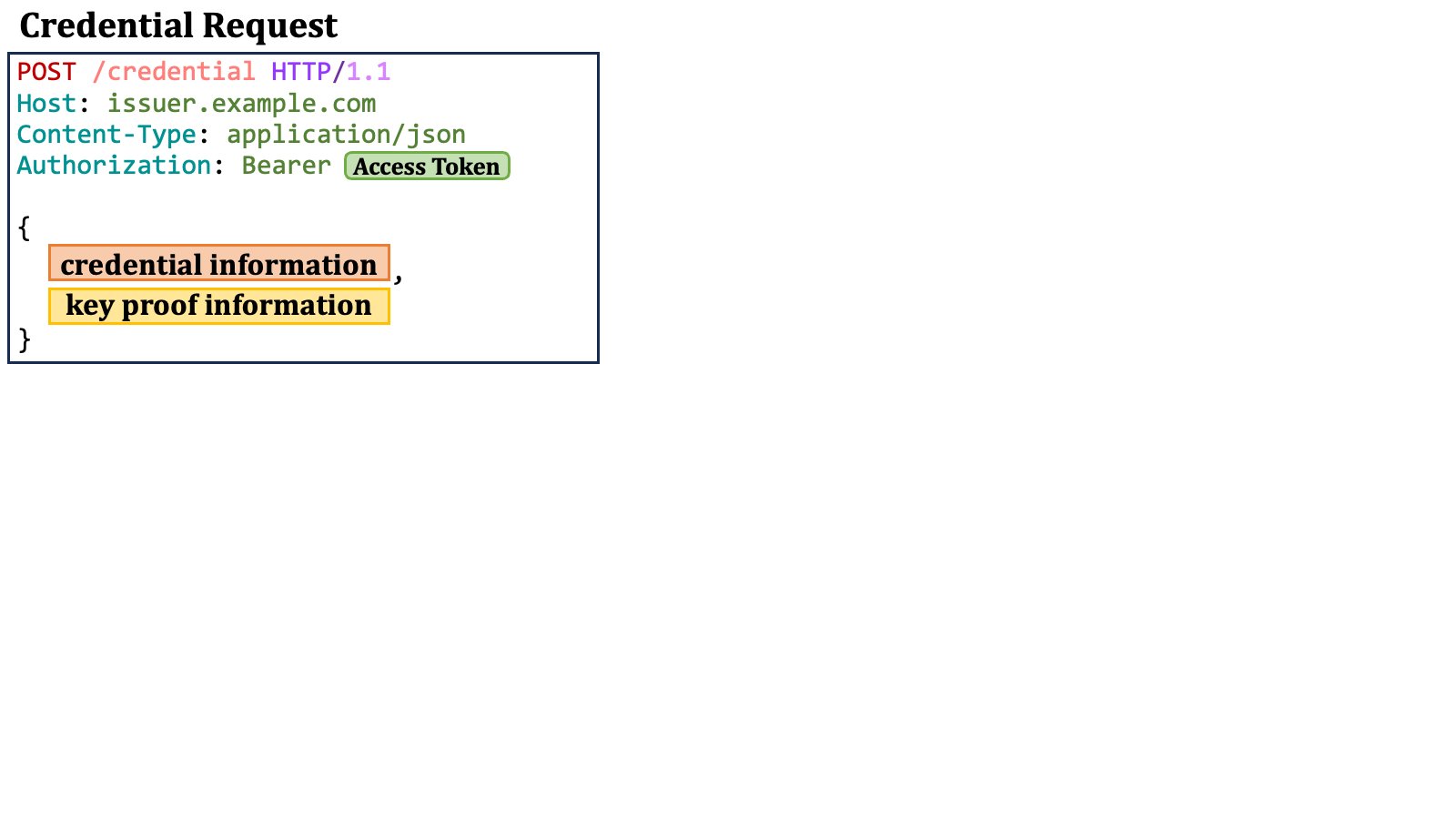 A `credential_response_encryption` JSON object may be present
for credential response encryption, but it is not discussed here.
##### 2.9.3.1. Credential Information in Credential Request
Credential information in a credential request includes a mandatory `"format"` property and additional format-specific properties. For example, when the value of the `"format"` property is `"jwt_vc_json"`, an accompanying `"credential_definition"` property is expected.
A `credential_response_encryption` JSON object may be present
for credential response encryption, but it is not discussed here.
##### 2.9.3.1. Credential Information in Credential Request
Credential information in a credential request includes a mandatory `"format"` property and additional format-specific properties. For example, when the value of the `"format"` property is `"jwt_vc_json"`, an accompanying `"credential_definition"` property is expected.
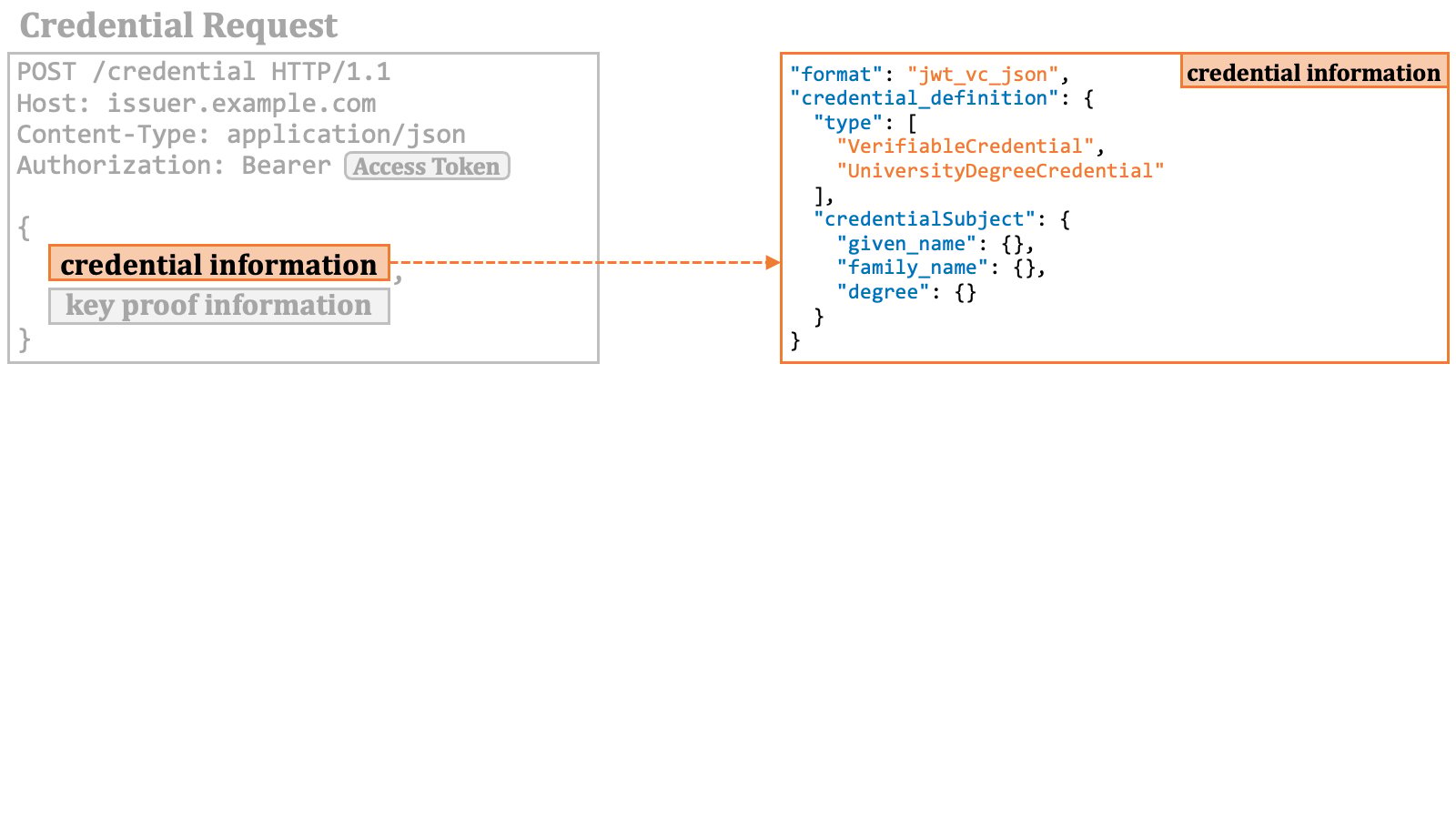 The credential information is a description about the verifiable credential that the wallet wants to obtain. As implied by the example in the diagram above, taken from the OID4VCI specification, this description goes beyond merely identifying an issuable credential from among the issuable credentials associated with the access token. For instance, the intention of the example credential request is to request a verifiable credential in the format of `jwt_vc_json` that includes the `given_name`, `family_name` and `degree` claims only.
However, there are the following issues here:
1. It's not easy to determine which of the issuable credentials meet the specified conditions.
2. There's a possibility that multiple issuable credentials may satisfy the conditions.
3. Minor differences in conditions can lead to the selection of a different issuable credential.
4. It's not easy to confirm whether the presented access token has the permission to request verifiable credentials that meet the specified conditions.
Simply put, this specification lacks considerations for implementations.
The problem reported by [Issue 175](https://github.com/openid/OpenID4VCI/issues/175)
is an example that can be caused by the flaw in this specification.
Therefore, unless the specification is improved, it is likely that
**credential issuer implementations will issue verifiable credentials with fixed structures,
ignoring finer conditions specified at runtime (in access token requests or credential requests)**.
The OID4VCI has recently introduced the `credential_identifier` parameter
that is mutually exclusive with the `format` parameter. However, such
credential instance identifiers become available (if the credential issuer supports
the mechanism) only when RAR objects of type `openid_credential` are used,
and the specification says that the credential instance identifiers cannot be used
when the `scope` parameter is used. The `credential_identifier`
parameter is a solution designed solely for a specific use case and does not serve
as a resolution for the issue mentioned above.
See [Issue 197](https://github.com/openid/OpenID4VCI/issues/197)
for further discussions.
##### 2.9.3.2. Key Proof Information in Credential Request
Key proof information in a credential request is represented by a `"proof"` property. The value of the property is a JSON object.
The credential information is a description about the verifiable credential that the wallet wants to obtain. As implied by the example in the diagram above, taken from the OID4VCI specification, this description goes beyond merely identifying an issuable credential from among the issuable credentials associated with the access token. For instance, the intention of the example credential request is to request a verifiable credential in the format of `jwt_vc_json` that includes the `given_name`, `family_name` and `degree` claims only.
However, there are the following issues here:
1. It's not easy to determine which of the issuable credentials meet the specified conditions.
2. There's a possibility that multiple issuable credentials may satisfy the conditions.
3. Minor differences in conditions can lead to the selection of a different issuable credential.
4. It's not easy to confirm whether the presented access token has the permission to request verifiable credentials that meet the specified conditions.
Simply put, this specification lacks considerations for implementations.
The problem reported by [Issue 175](https://github.com/openid/OpenID4VCI/issues/175)
is an example that can be caused by the flaw in this specification.
Therefore, unless the specification is improved, it is likely that
**credential issuer implementations will issue verifiable credentials with fixed structures,
ignoring finer conditions specified at runtime (in access token requests or credential requests)**.
The OID4VCI has recently introduced the `credential_identifier` parameter
that is mutually exclusive with the `format` parameter. However, such
credential instance identifiers become available (if the credential issuer supports
the mechanism) only when RAR objects of type `openid_credential` are used,
and the specification says that the credential instance identifiers cannot be used
when the `scope` parameter is used. The `credential_identifier`
parameter is a solution designed solely for a specific use case and does not serve
as a resolution for the issue mentioned above.
See [Issue 197](https://github.com/openid/OpenID4VCI/issues/197)
for further discussions.
##### 2.9.3.2. Key Proof Information in Credential Request
Key proof information in a credential request is represented by a `"proof"` property. The value of the property is a JSON object.
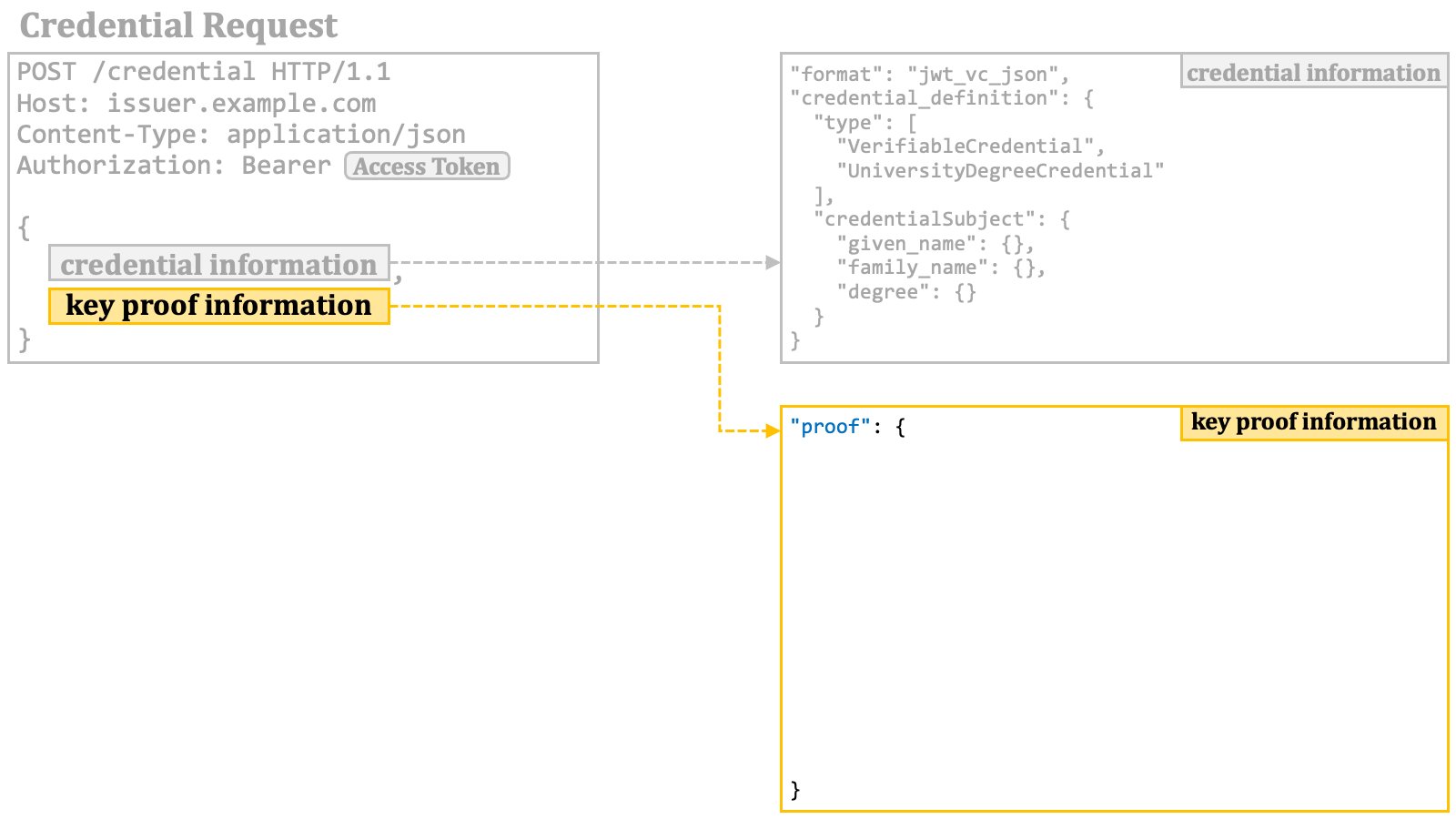 The `"proof"` object contains a mandatory `"proof_type"` property that indicates the format of the key proof.
When the value of the `"proof_type"` property is `"jwt"`, a JWT is used as a key proof. In this case, the `"proof"` object contains a `"jwt"` property. The value of the `"jwt"` property is a JWT that conforms to the specification of the key proof JWT.
The `"proof"` object contains a mandatory `"proof_type"` property that indicates the format of the key proof.
When the value of the `"proof_type"` property is `"jwt"`, a JWT is used as a key proof. In this case, the `"proof"` object contains a `"jwt"` property. The value of the `"jwt"` property is a JWT that conforms to the specification of the key proof JWT.
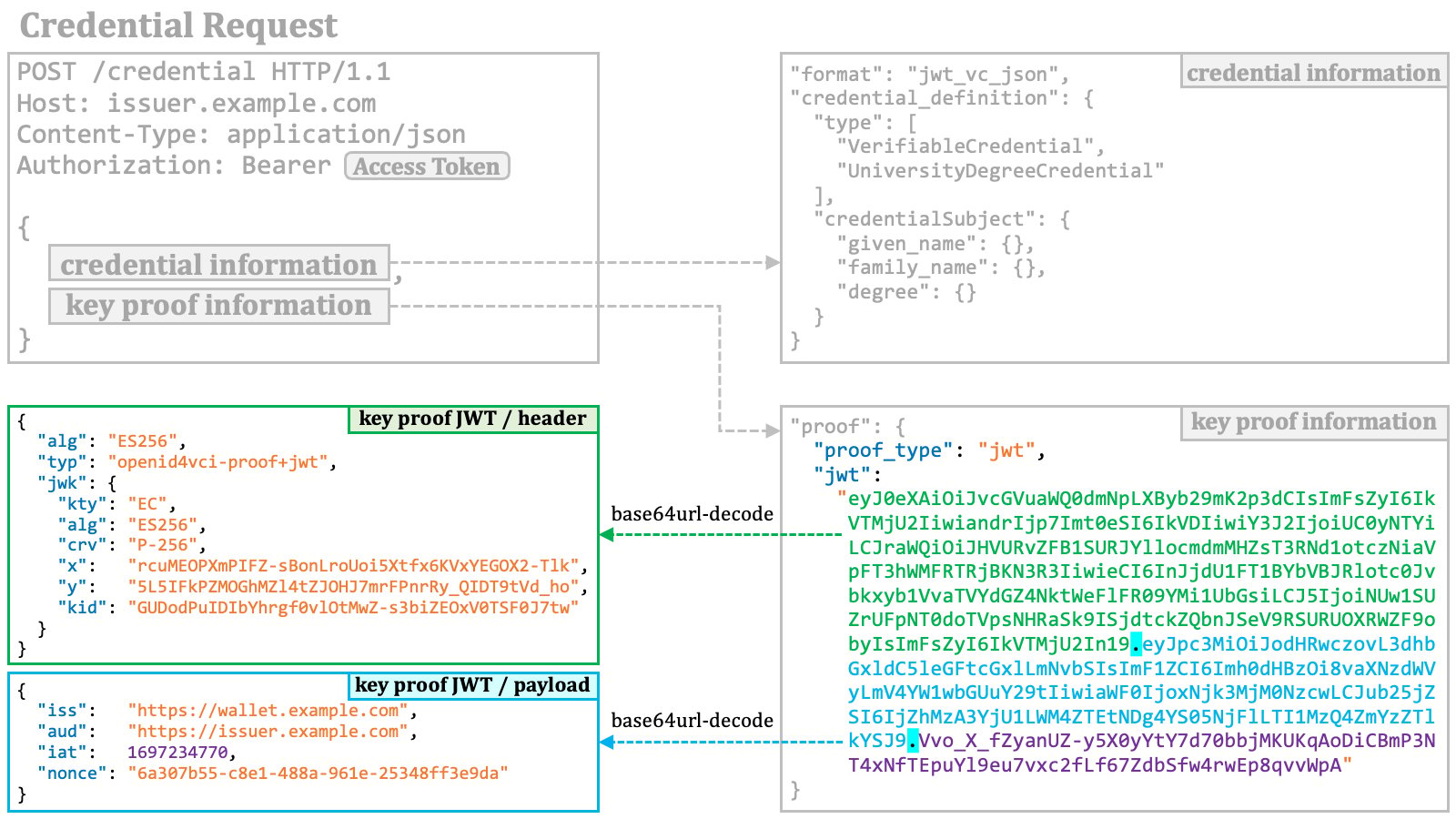 The diagram below is an overview of a credential request.
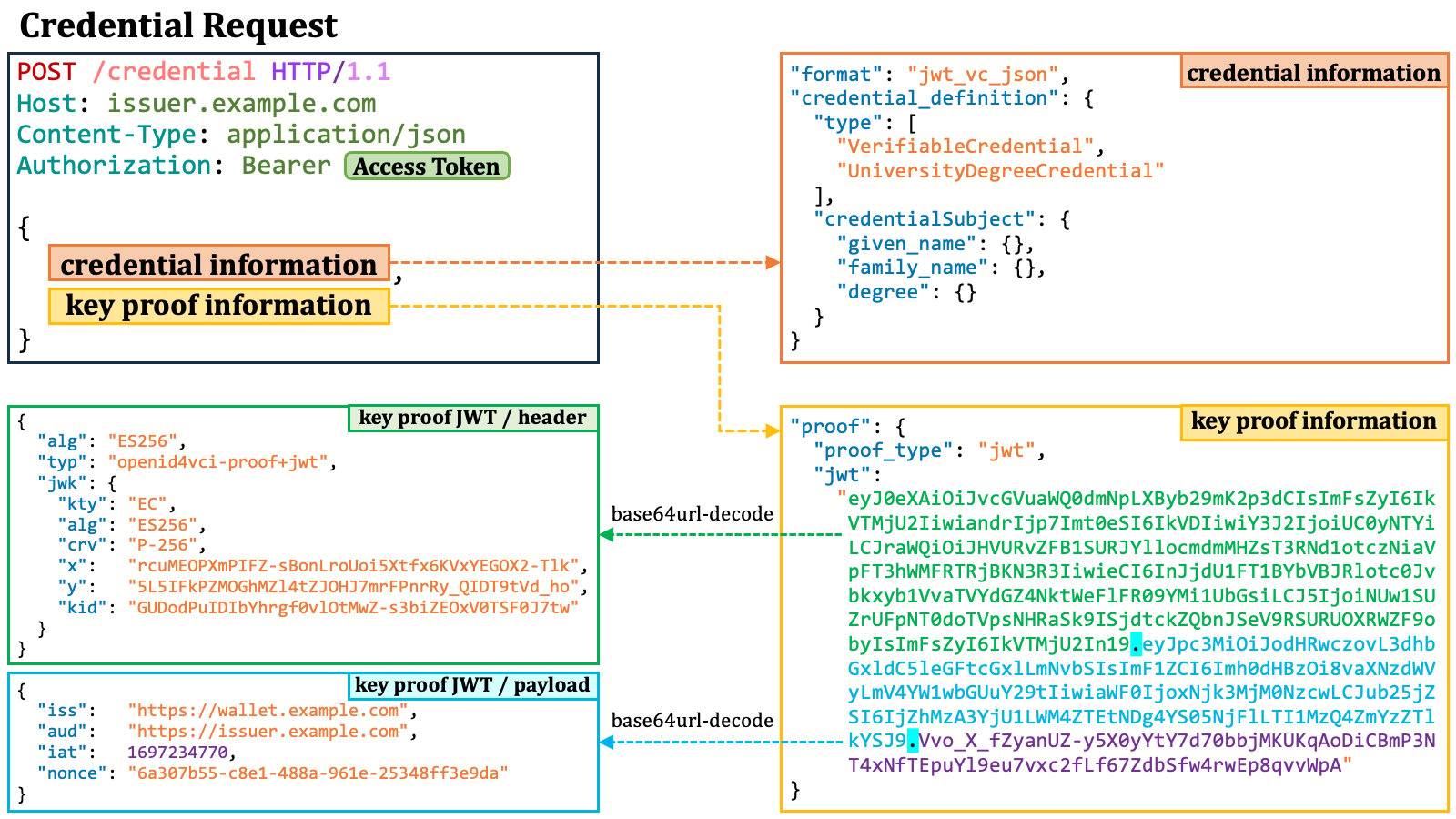 #### 2.9.4. Credential Response
A credential response is an HTTP response containing JSON.
##### 2.9.4.1. Credential Response with Verifiable Credential
When a verifiable credential is successfully issued, it is placed in the JSON as the value of the `"credential"` property.
#### 2.9.4. Credential Response
A credential response is an HTTP response containing JSON.
##### 2.9.4.1. Credential Response with Verifiable Credential
When a verifiable credential is successfully issued, it is placed in the JSON as the value of the `"credential"` property.
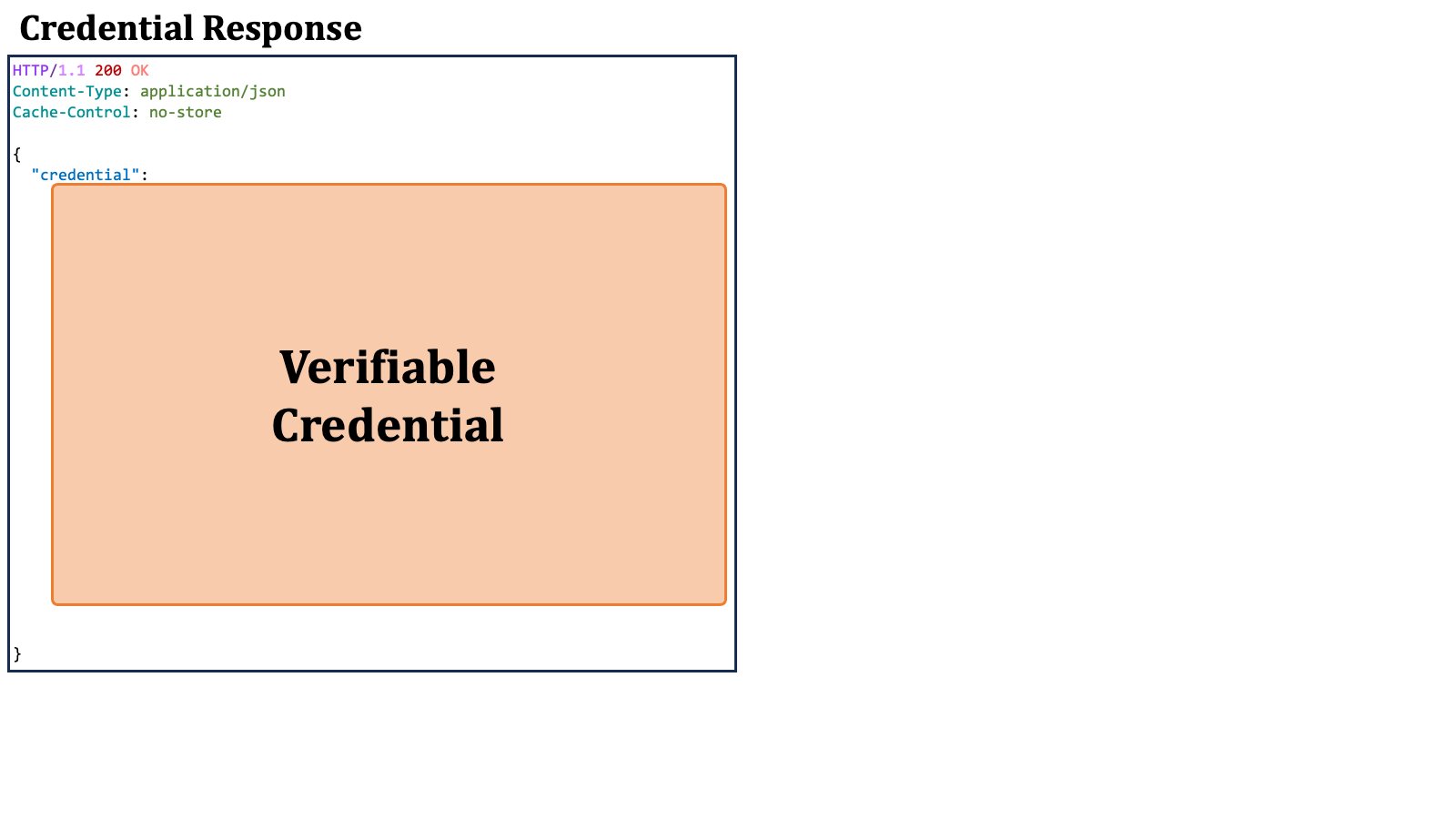 For instance, in the case of SD-JWT-based verifiable credentials conforming to [SD-JWT VC][SD_JWT_VC], the `"credential"` property is a JSON string in the format of SD-JWT.
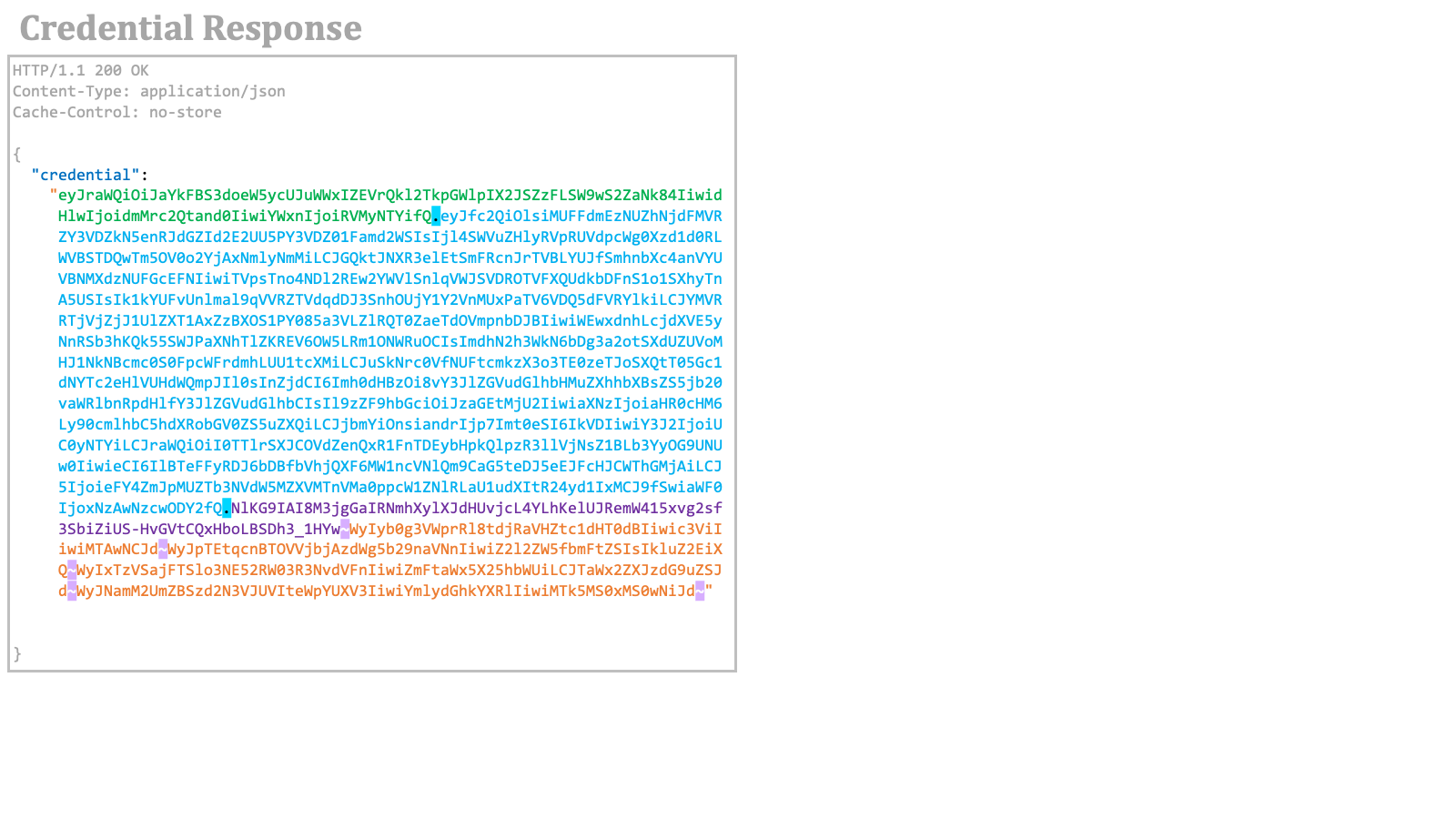 In addition, the credential response may contain the `c_nonce` and `c_nonce_expires_in` response parameters, as explained previously.
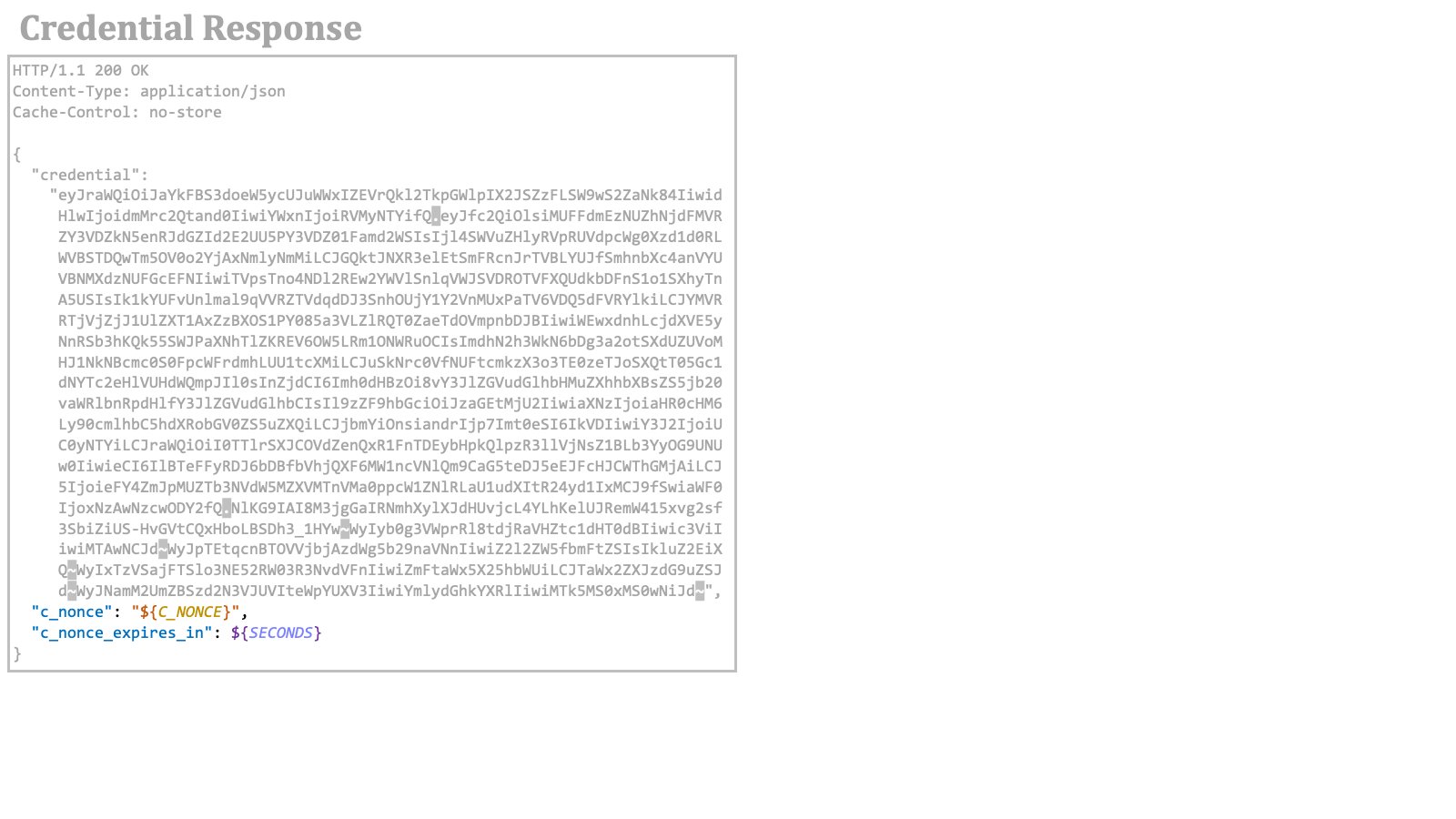 Let's dive into some details of an SD-JWT-based verifiable credential.
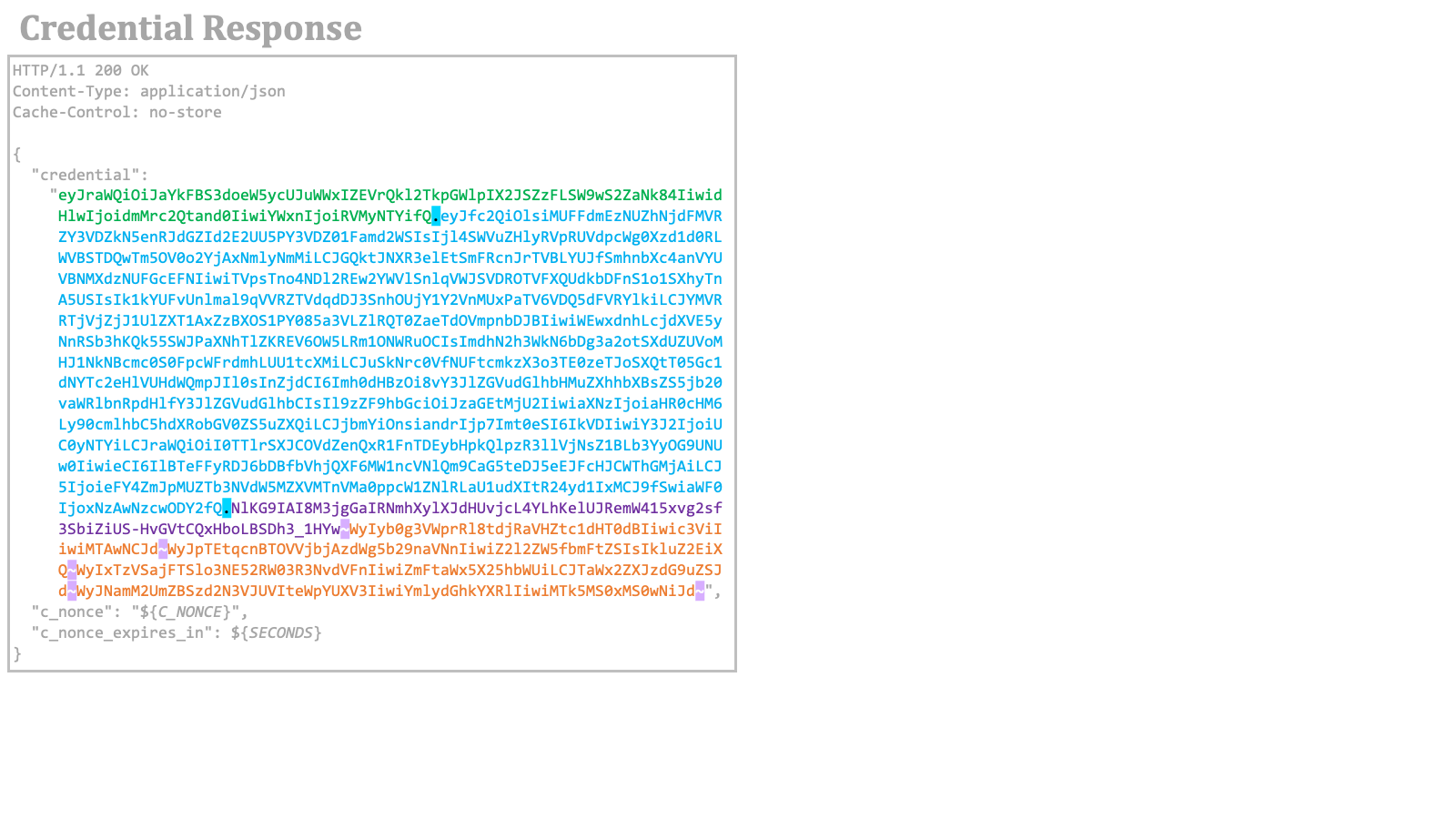 An SD-JWT consists of an issuer-signed JWT, zero or more disclosures, and an optional key binding JWT. Tildes (`~`) are used as delimiters between the components. Note that because a key binding JWT is generated by a wallet, verifiable credentials do not have a key binding JWT when they are issued by a credential issuer.
```
~...~
```
The first component in an SD-JWT is an issuer-signed JWT. As a standard JWT, the header and payload of the issuer-signed JWT can be base64url-decoded.
An SD-JWT consists of an issuer-signed JWT, zero or more disclosures, and an optional key binding JWT. Tildes (`~`) are used as delimiters between the components. Note that because a key binding JWT is generated by a wallet, verifiable credentials do not have a key binding JWT when they are issued by a credential issuer.
```
~...~
```
The first component in an SD-JWT is an issuer-signed JWT. As a standard JWT, the header and payload of the issuer-signed JWT can be base64url-decoded.
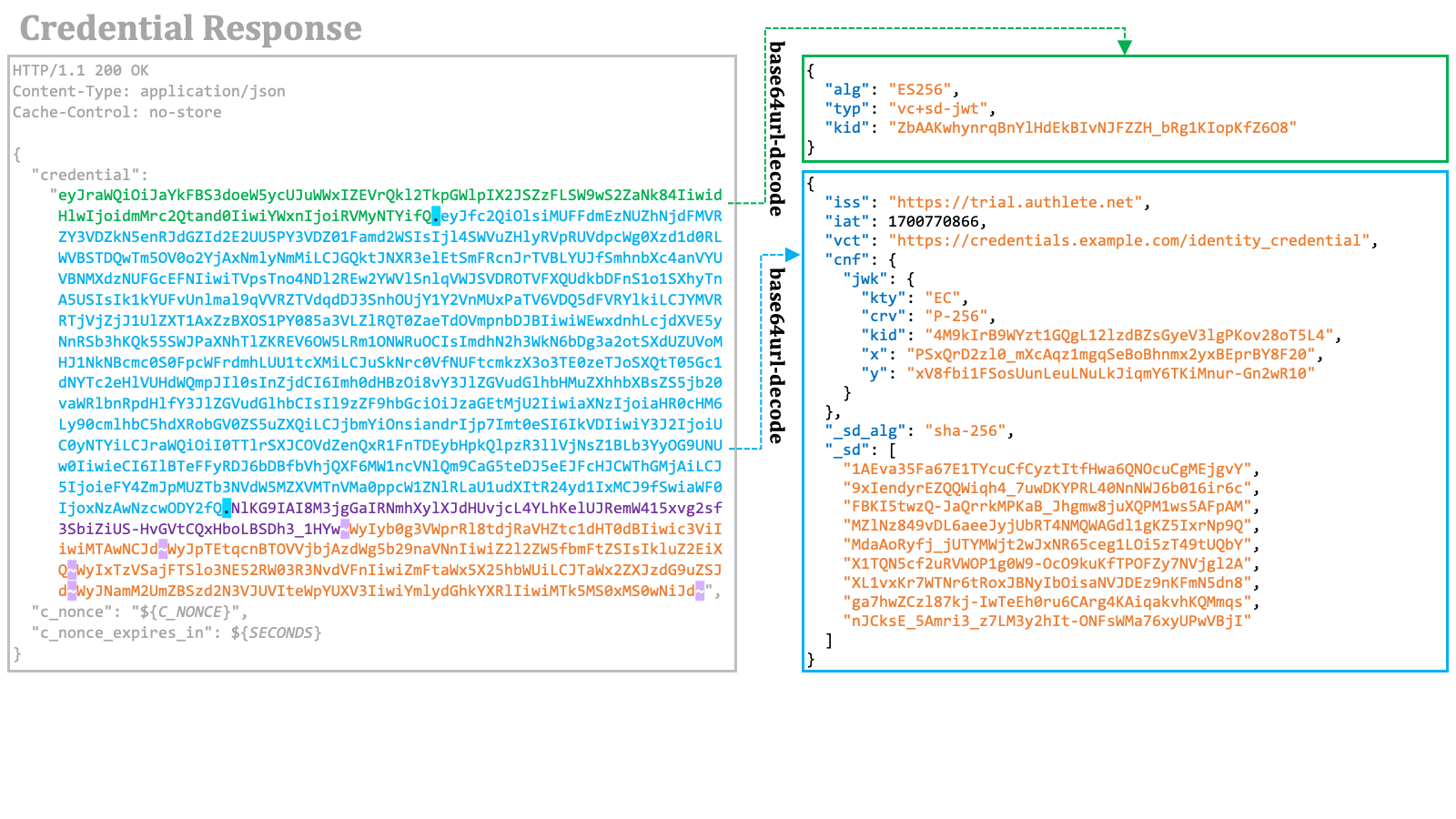 The following are important points to note.
1. The value of the `typ` header parameter is `"vc+sd-jwt"`.
2. The payload contains `"cnf"."jwk"` for key binding.
3. The payload contains the `"_sd_alg"` property, which indicates the hash algorithm used for disclosures.
4. The payload does not contain user claims like `"given_name"`. Instead, it contains the `"_sd"` array, which holds digest values of disclosures for user claims.
The example of SD-JWT-based verifiable credential contains four disclosures.
The following are important points to note.
1. The value of the `typ` header parameter is `"vc+sd-jwt"`.
2. The payload contains `"cnf"."jwk"` for key binding.
3. The payload contains the `"_sd_alg"` property, which indicates the hash algorithm used for disclosures.
4. The payload does not contain user claims like `"given_name"`. Instead, it contains the `"_sd"` array, which holds digest values of disclosures for user claims.
The example of SD-JWT-based verifiable credential contains four disclosures.
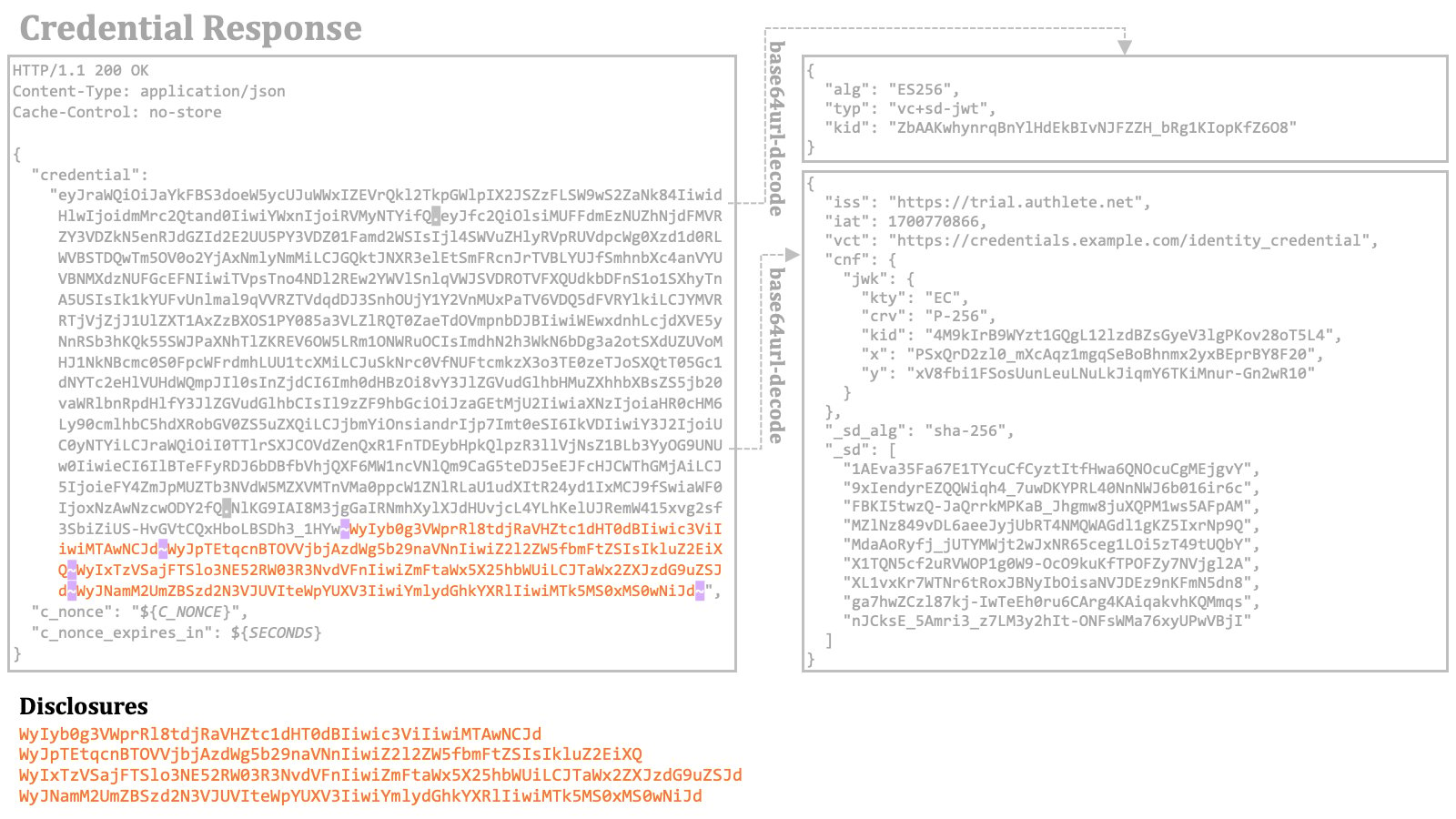 By base64url-decoding the disclosures, the original JSON arrays will appear.
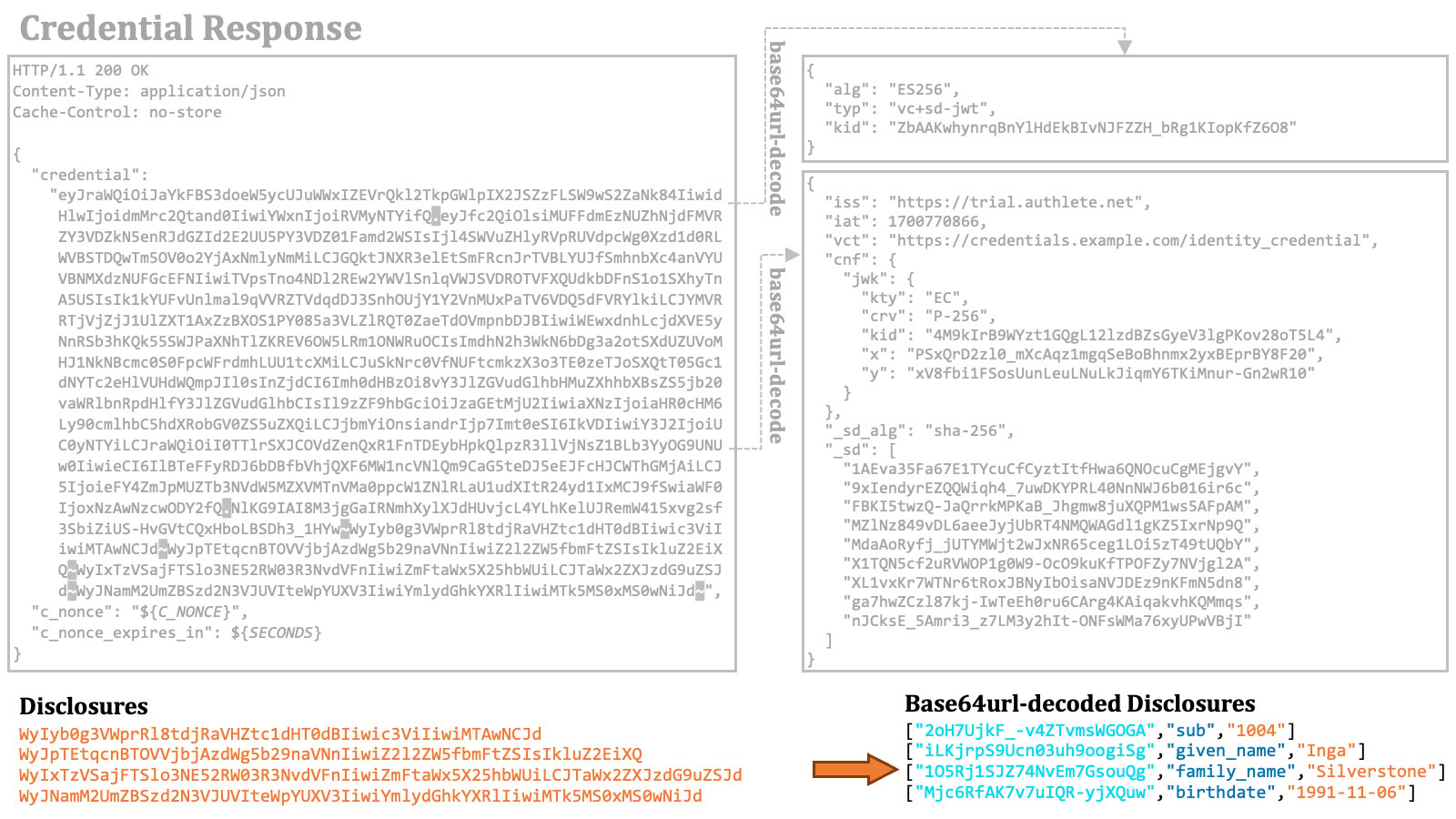 The digest values of the disclosures are computed using the hash algorithm indicated by the `"_sd_alg"` property and are listed in the `"_sd"` array. The order of the digest values in the array must be independent of the order of the disclosures in the SD-JWT. In this example, the digest values are listed in ASCII-code order.
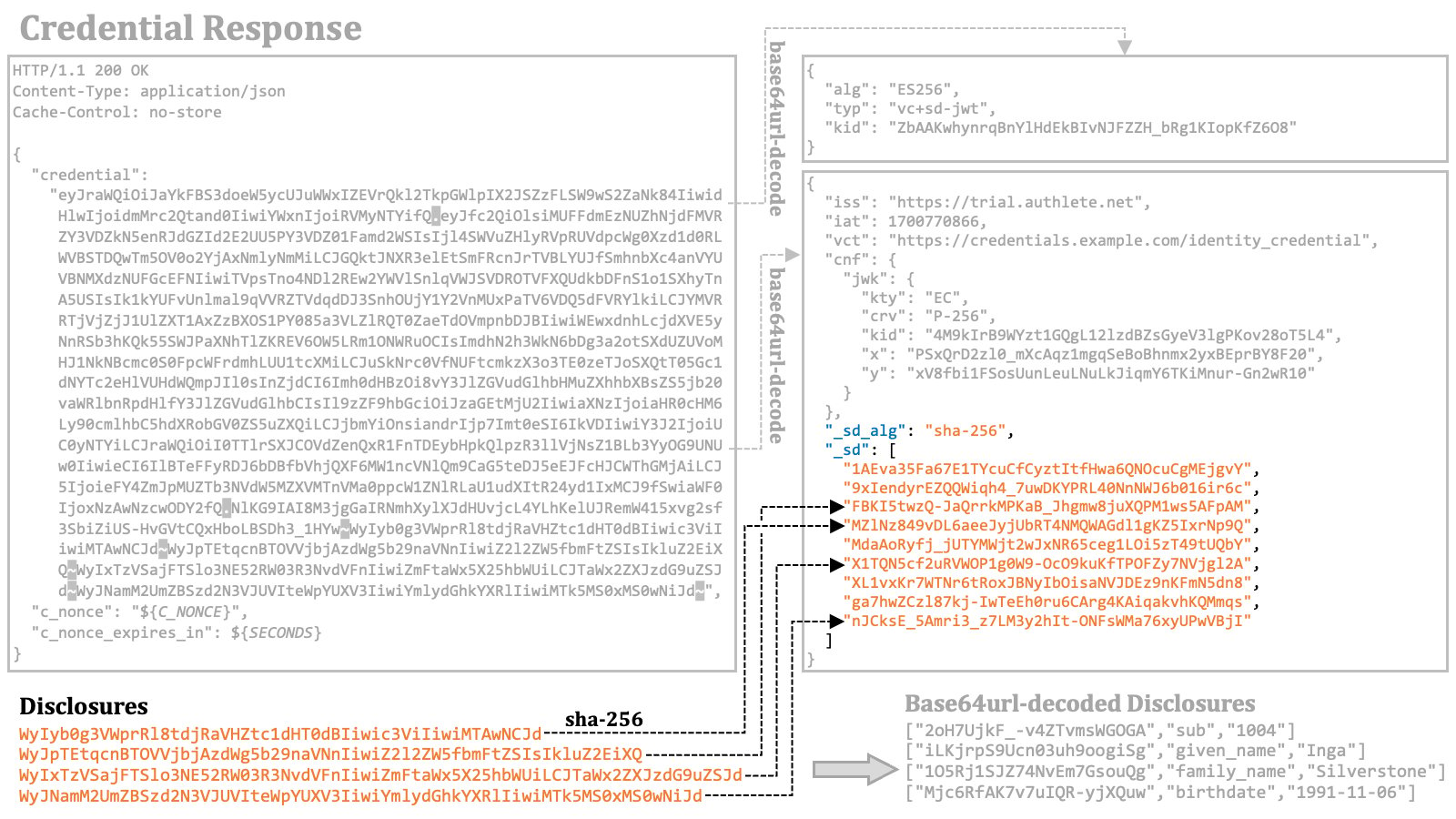 The diagram below is an overview of a credential response with an SD-JWT-based verifiable credential.
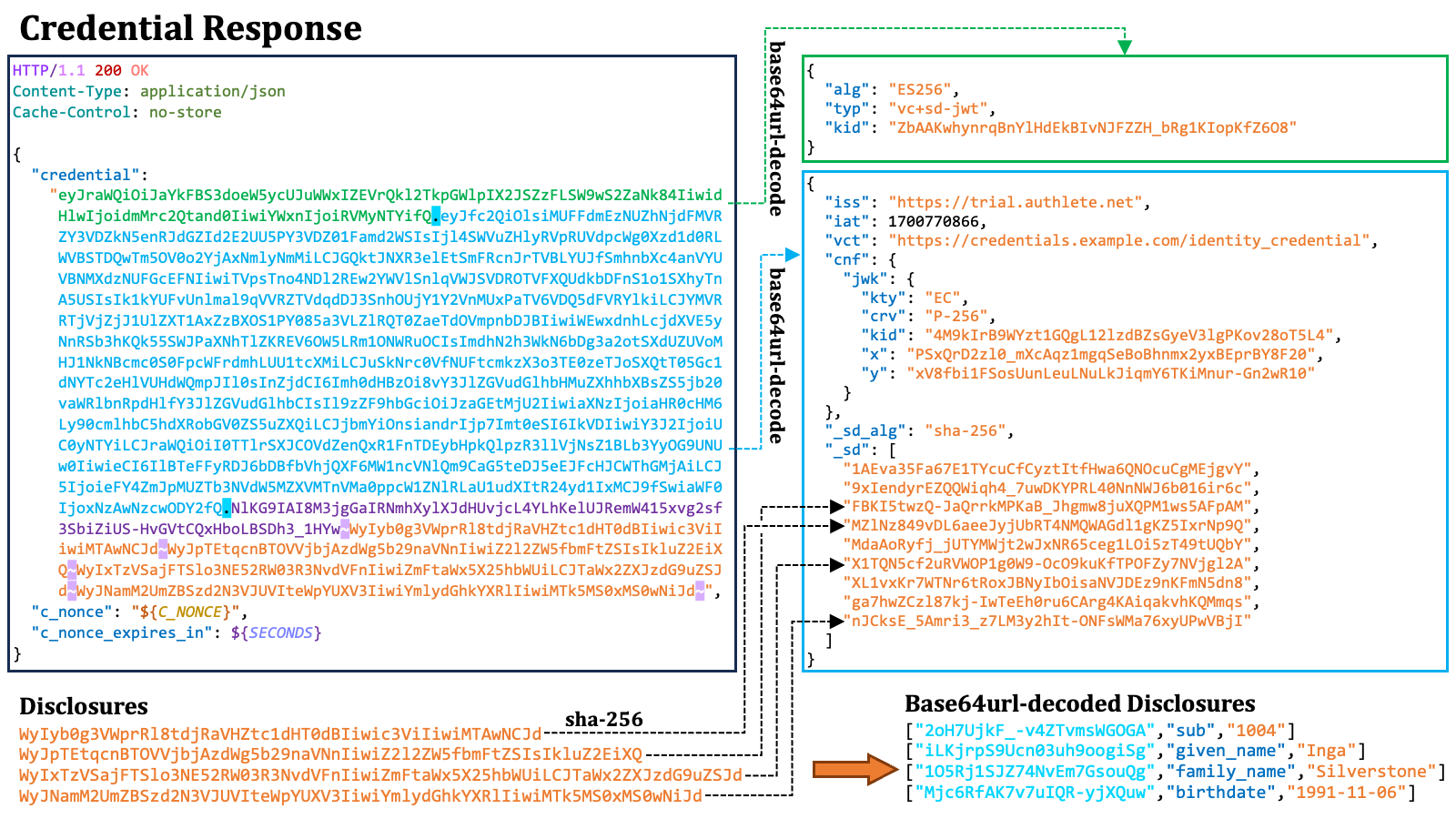 ##### 2.9.4.2. Credential Response with Transaction ID
When the requested verifiable credential is not ready, the credential endpoint returns a transaction ID instead of a verifiable credential. The transaction ID is included in the credential response as the value of the `"transaction_id"` response parameter. The following is an example from the OID4VCI specification.
```http theme={null}
HTTP/1.1 202 Accepted
Content-Type: application/json
Cache-Control: no-store
{
"transaction_id": "8xLOxBtZp8",
"c_nonce": "wlbQc6pCJp",
"c_nonce_expires_in": 86400
}
```
The transaction ID is intended to be used later when the wallet sends a deferred credential request to the deferred credential endpoint of the credential issuer.
##### 2.9.4.3. Credential Response with Error
If the credential request cannot be processed successfully, the credential endpoint will return an error response, with the type of error reflected in the value of the `"error"` response parameter. Below is a sample error excerpt from the specification.
```http theme={null}
HTTP/1.1 400 Bad Request
Content-Type: application/json
Cache-Control: no-store
{
"error": "invalid_request"
}
```
If a required key proof is missing or incorrect due to reasons like the `nonce` claim's absence or expiration, the error code `"invalid_proof"` is used. Here is an example from the specification in such a case.
```http theme={null}
HTTP/1.1 400 Bad Request
Content-Type: application/json
Cache-Control: no-store
{
"error": "invalid_proof",
"error_description":
"Credential Issuer requires key proof to be bound to a Credential Issuer provided nonce.",
"c_nonce": "8YE9hCnyV2",
"c_nonce_expires_in": 86400
}
```
#### 2.9.5. Deferred Credential Request
The wallet can send a request to the deferred credential endpoint using a transaction ID. This request should be an HTTP POST request containing JSON with a `"transaction_id"` property holding the transaction ID.
```http theme={null}
POST /deferred_credential HTTP/1.1
Host: issuer.example.com
Content-Type: application/json
Authorization: Bearer czZCaGRSa3F0MzpnWDFmQmF0M2JW
{
"transaction_id": "8xLOxBtZp8"
}
```
#### 2.9.6. Deferred Credential Response
The deferred credential endpoint will respond with an HTTP response containing JSON. If a verifiable credential has been issued successfully, this JSON includes the `"credential"` response parameter, representing the verifiable credential.
```http theme={null}
HTTP/1.1 200 OK
Content-Type: application/json
Cache-Control: no-store
{
"credential": "eyJ......CJd~"
}
```
In the event of an unsuccessful issuance, an error response will be returned with the `"error"` parameter. Particularly, when the requested verifiable credential is not yet ready, the error code `"issuance_pending"` is used.
```http theme={null}
HTTP/1.1 400 Bad Request
Content-Type: application/json
Cache-Control: no-store
{
"error": "issuance_pending"
}
```
#### 2.9.7. Batch Credential Request
A wallet can request multiple verifiable credentials at a time by sending a batch credential request to the batch credential endpoint of the credential issuer.
A batch credential request is an HTTP POST request containing JSON, which includes a `"credential_requests"` JSON array. The array is a list of JSON objects, each of which represents a credential request.
##### 2.9.4.2. Credential Response with Transaction ID
When the requested verifiable credential is not ready, the credential endpoint returns a transaction ID instead of a verifiable credential. The transaction ID is included in the credential response as the value of the `"transaction_id"` response parameter. The following is an example from the OID4VCI specification.
```http theme={null}
HTTP/1.1 202 Accepted
Content-Type: application/json
Cache-Control: no-store
{
"transaction_id": "8xLOxBtZp8",
"c_nonce": "wlbQc6pCJp",
"c_nonce_expires_in": 86400
}
```
The transaction ID is intended to be used later when the wallet sends a deferred credential request to the deferred credential endpoint of the credential issuer.
##### 2.9.4.3. Credential Response with Error
If the credential request cannot be processed successfully, the credential endpoint will return an error response, with the type of error reflected in the value of the `"error"` response parameter. Below is a sample error excerpt from the specification.
```http theme={null}
HTTP/1.1 400 Bad Request
Content-Type: application/json
Cache-Control: no-store
{
"error": "invalid_request"
}
```
If a required key proof is missing or incorrect due to reasons like the `nonce` claim's absence or expiration, the error code `"invalid_proof"` is used. Here is an example from the specification in such a case.
```http theme={null}
HTTP/1.1 400 Bad Request
Content-Type: application/json
Cache-Control: no-store
{
"error": "invalid_proof",
"error_description":
"Credential Issuer requires key proof to be bound to a Credential Issuer provided nonce.",
"c_nonce": "8YE9hCnyV2",
"c_nonce_expires_in": 86400
}
```
#### 2.9.5. Deferred Credential Request
The wallet can send a request to the deferred credential endpoint using a transaction ID. This request should be an HTTP POST request containing JSON with a `"transaction_id"` property holding the transaction ID.
```http theme={null}
POST /deferred_credential HTTP/1.1
Host: issuer.example.com
Content-Type: application/json
Authorization: Bearer czZCaGRSa3F0MzpnWDFmQmF0M2JW
{
"transaction_id": "8xLOxBtZp8"
}
```
#### 2.9.6. Deferred Credential Response
The deferred credential endpoint will respond with an HTTP response containing JSON. If a verifiable credential has been issued successfully, this JSON includes the `"credential"` response parameter, representing the verifiable credential.
```http theme={null}
HTTP/1.1 200 OK
Content-Type: application/json
Cache-Control: no-store
{
"credential": "eyJ......CJd~"
}
```
In the event of an unsuccessful issuance, an error response will be returned with the `"error"` parameter. Particularly, when the requested verifiable credential is not yet ready, the error code `"issuance_pending"` is used.
```http theme={null}
HTTP/1.1 400 Bad Request
Content-Type: application/json
Cache-Control: no-store
{
"error": "issuance_pending"
}
```
#### 2.9.7. Batch Credential Request
A wallet can request multiple verifiable credentials at a time by sending a batch credential request to the batch credential endpoint of the credential issuer.
A batch credential request is an HTTP POST request containing JSON, which includes a `"credential_requests"` JSON array. The array is a list of JSON objects, each of which represents a credential request.
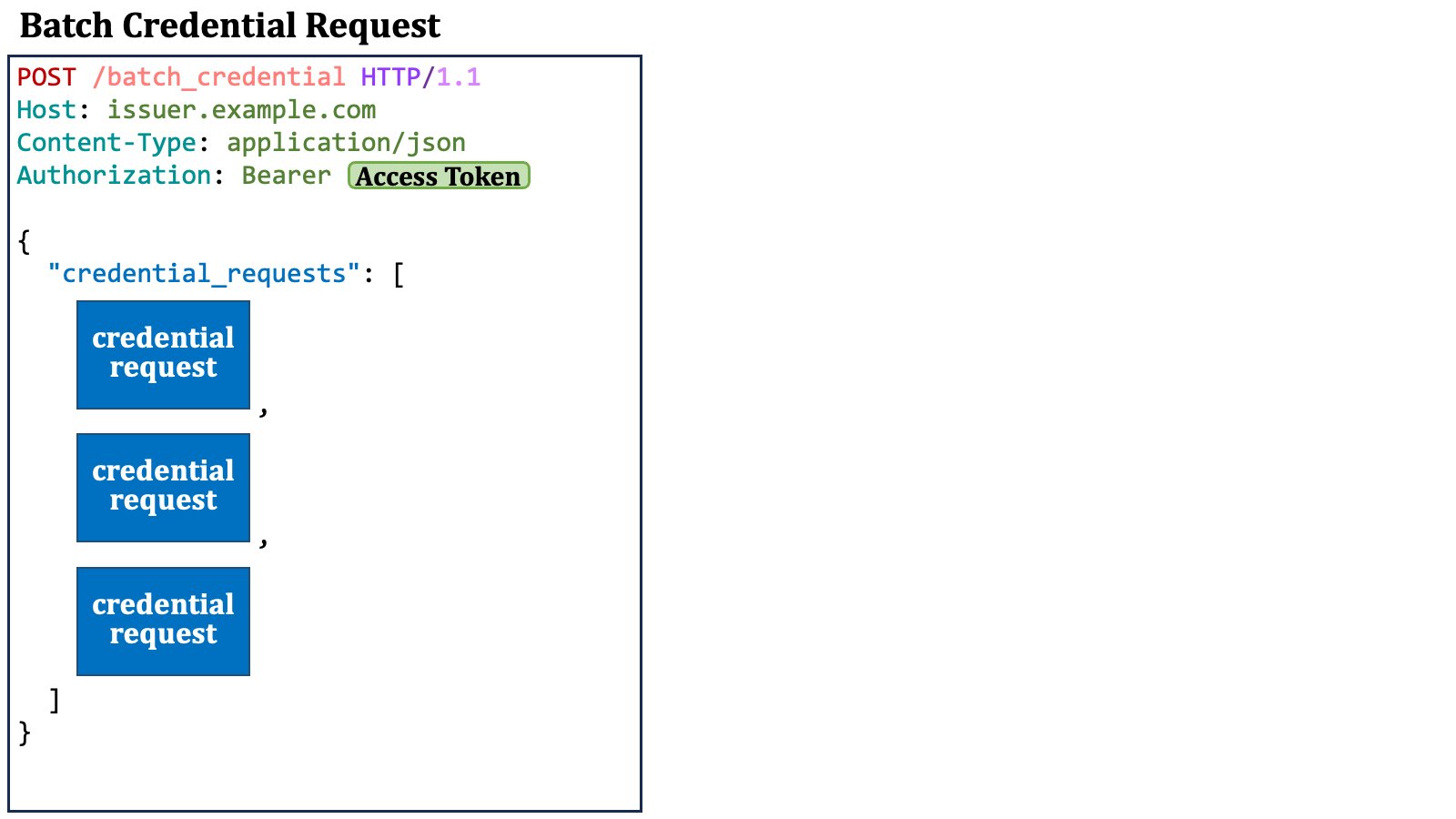 Each credential request contains credential information and may contain an optional key proof.
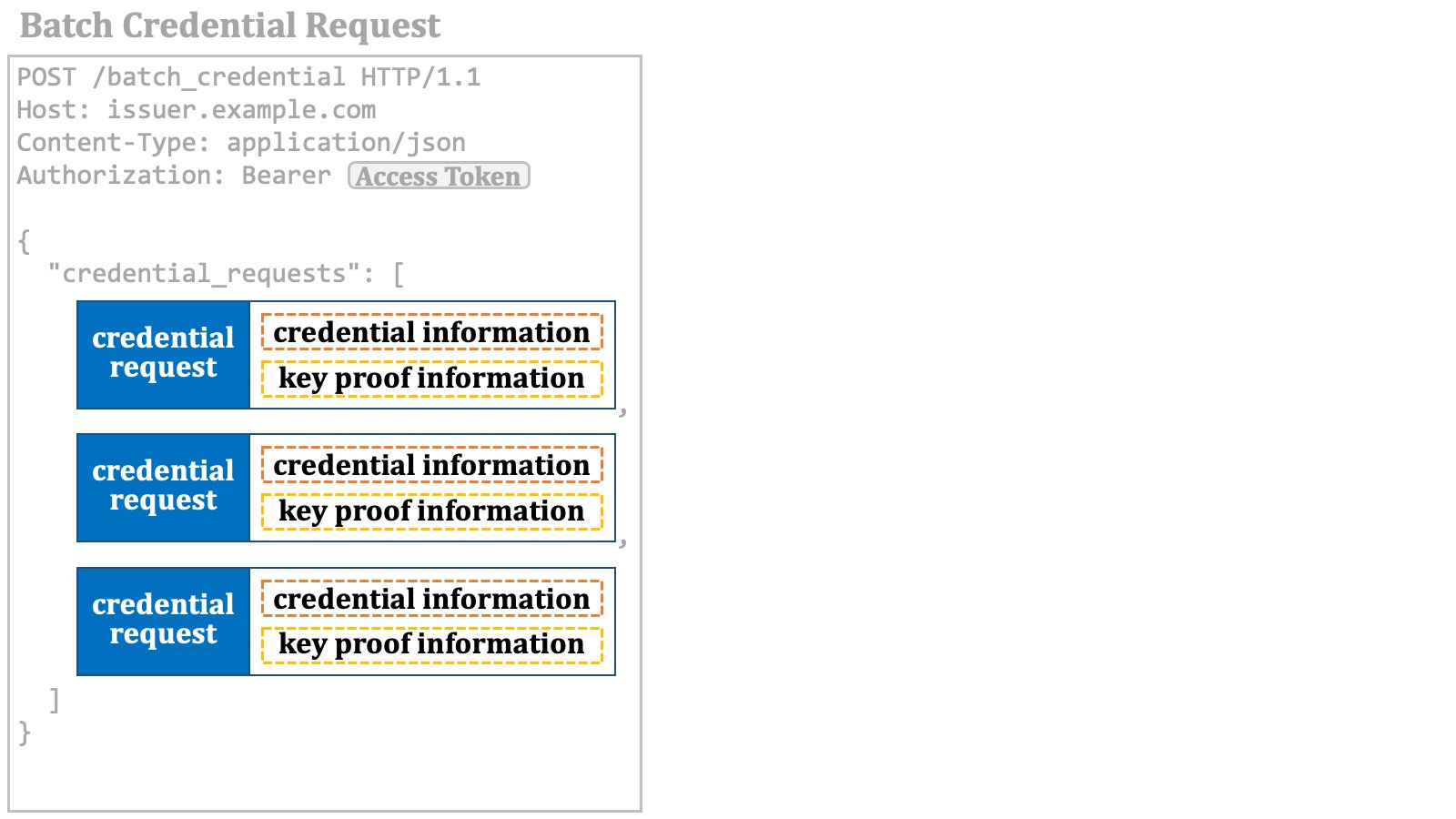 It is allowed for credential requests in a batch credential request to specify different credential formats and have different key proofs. The opposite is also true. The credential requests may specify the same credential format and have the same key proof.
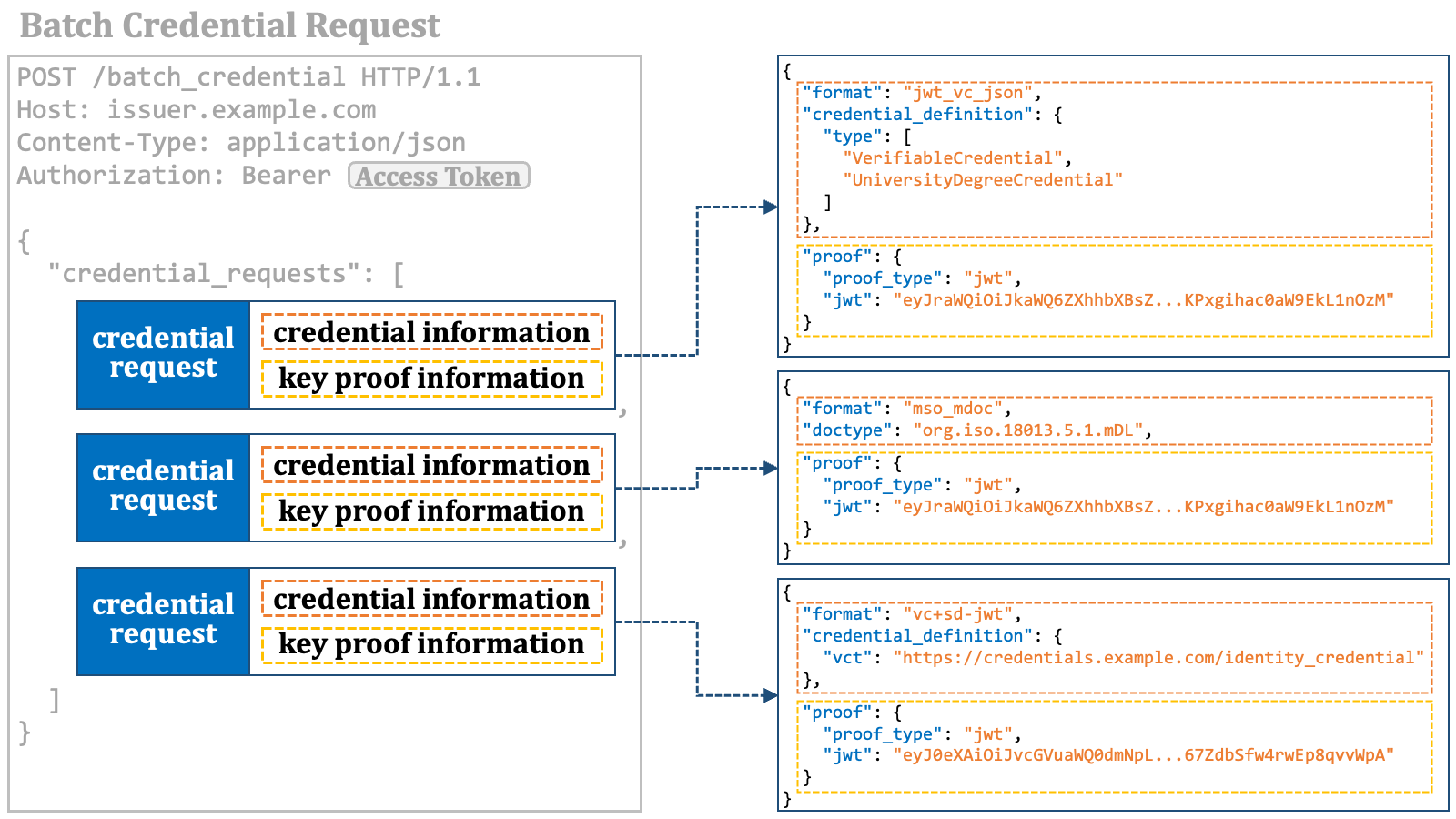 The diagram below is an overview of a batch credential request.
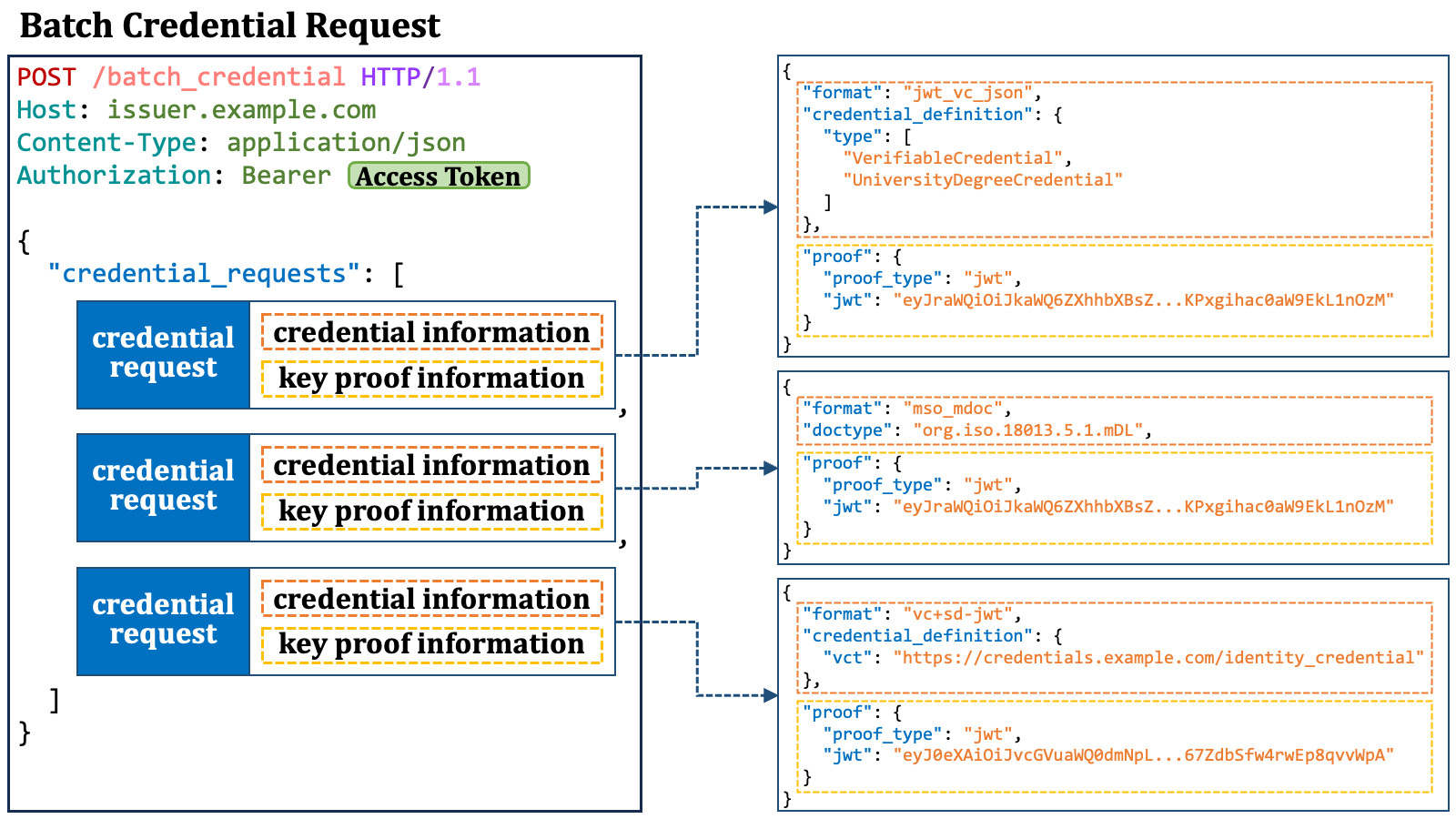 #### 2.9.8. Batch Credential Response
A batch credential response is an HTTP response containing JSON, which includes a `"credential_responses"` JSON array. The array is a list of JSON objects, each of which represents a credential response. The elements in the array correspond to the elements in the `"credential_requests"` array in the preceding batch credential request.
#### 2.9.8. Batch Credential Response
A batch credential response is an HTTP response containing JSON, which includes a `"credential_responses"` JSON array. The array is a list of JSON objects, each of which represents a credential response. The elements in the array correspond to the elements in the `"credential_requests"` array in the preceding batch credential request.
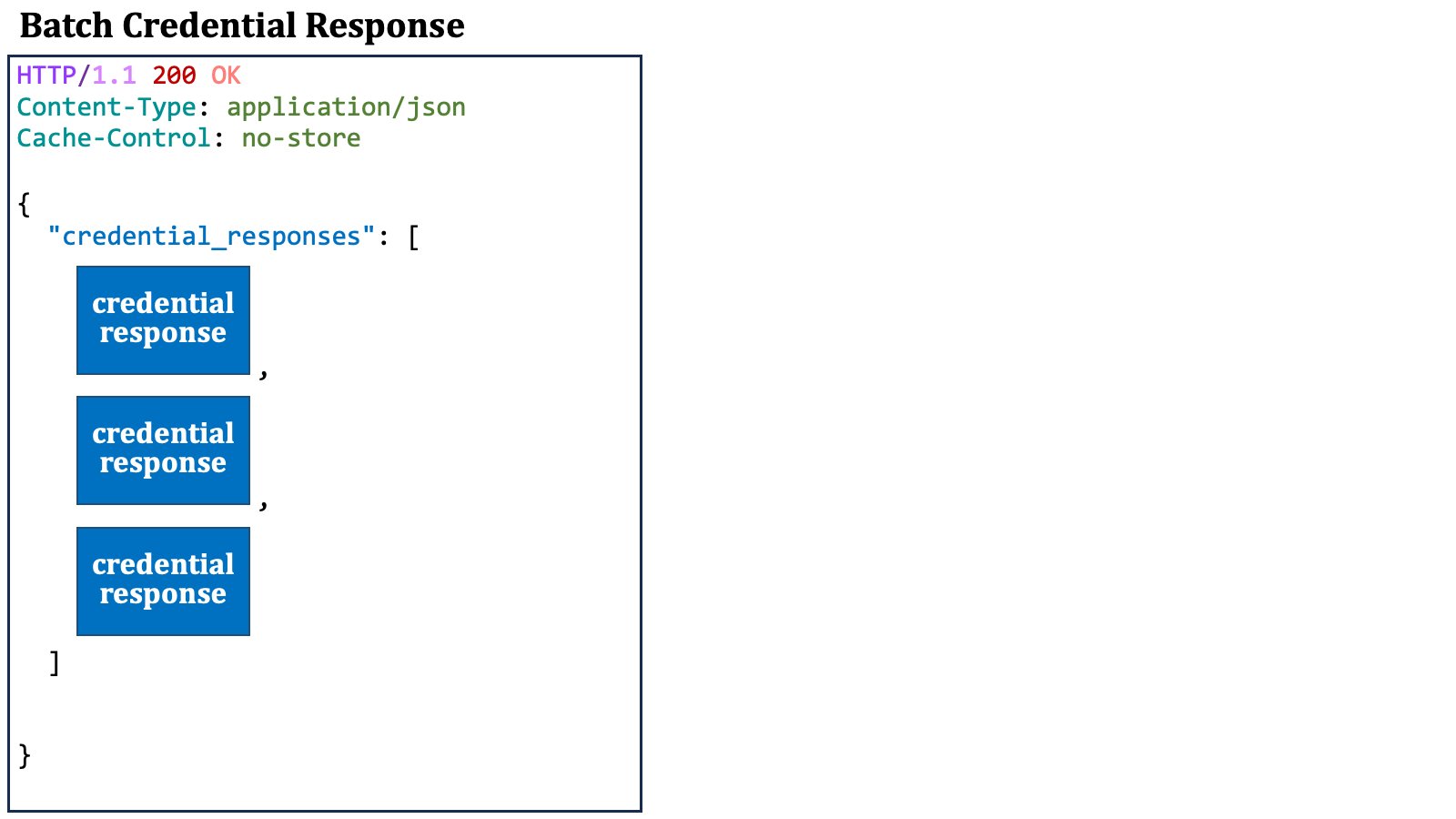 Each credential response contains either a verifiable credential or a transaction ID.
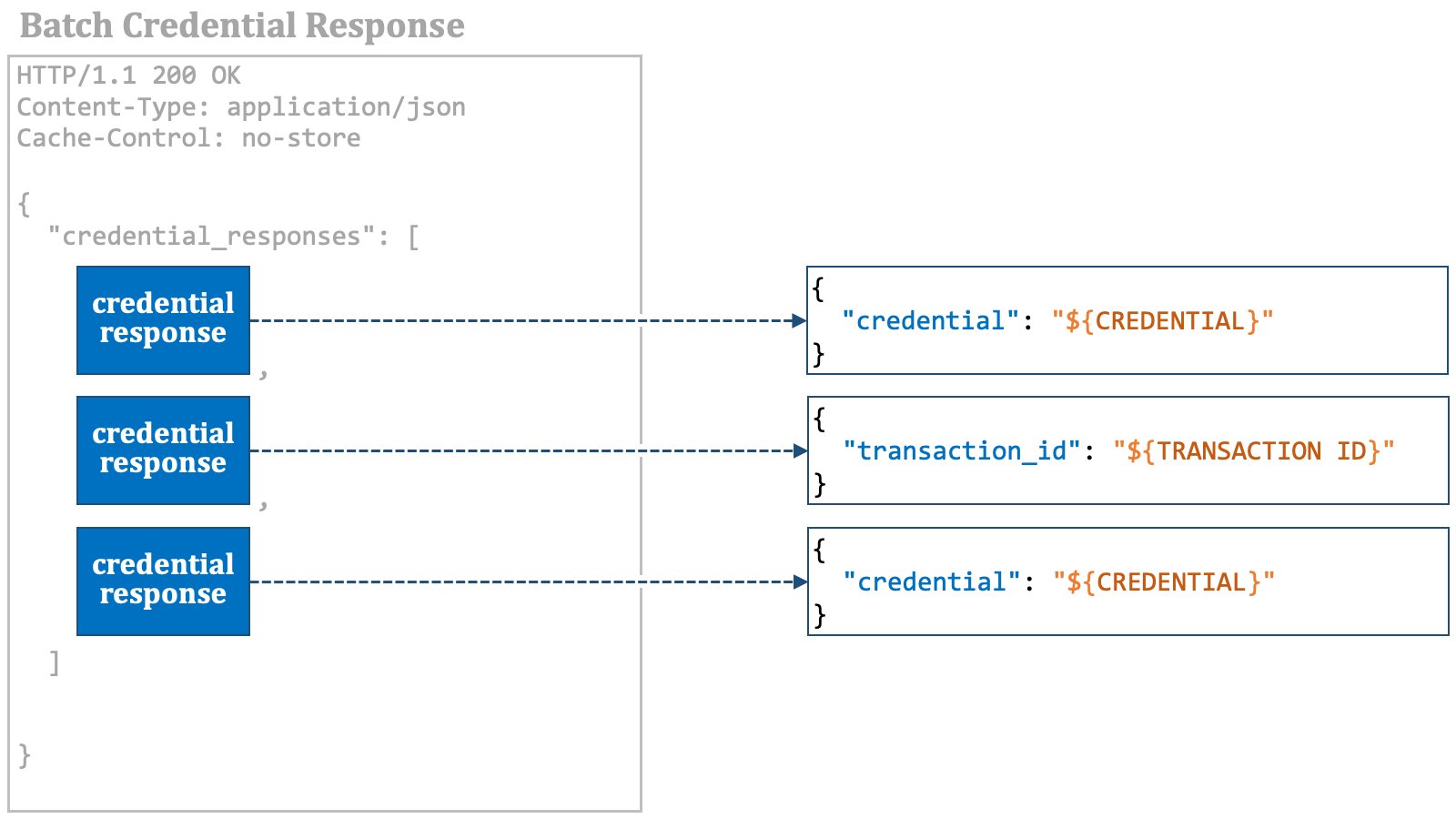 In addition, a batch credential response may contain `c_nonce` and `c_nonce_expires_in` as top-level properties for cases where the wallet sends a credential request or a batch credential request with a key proof in the future.
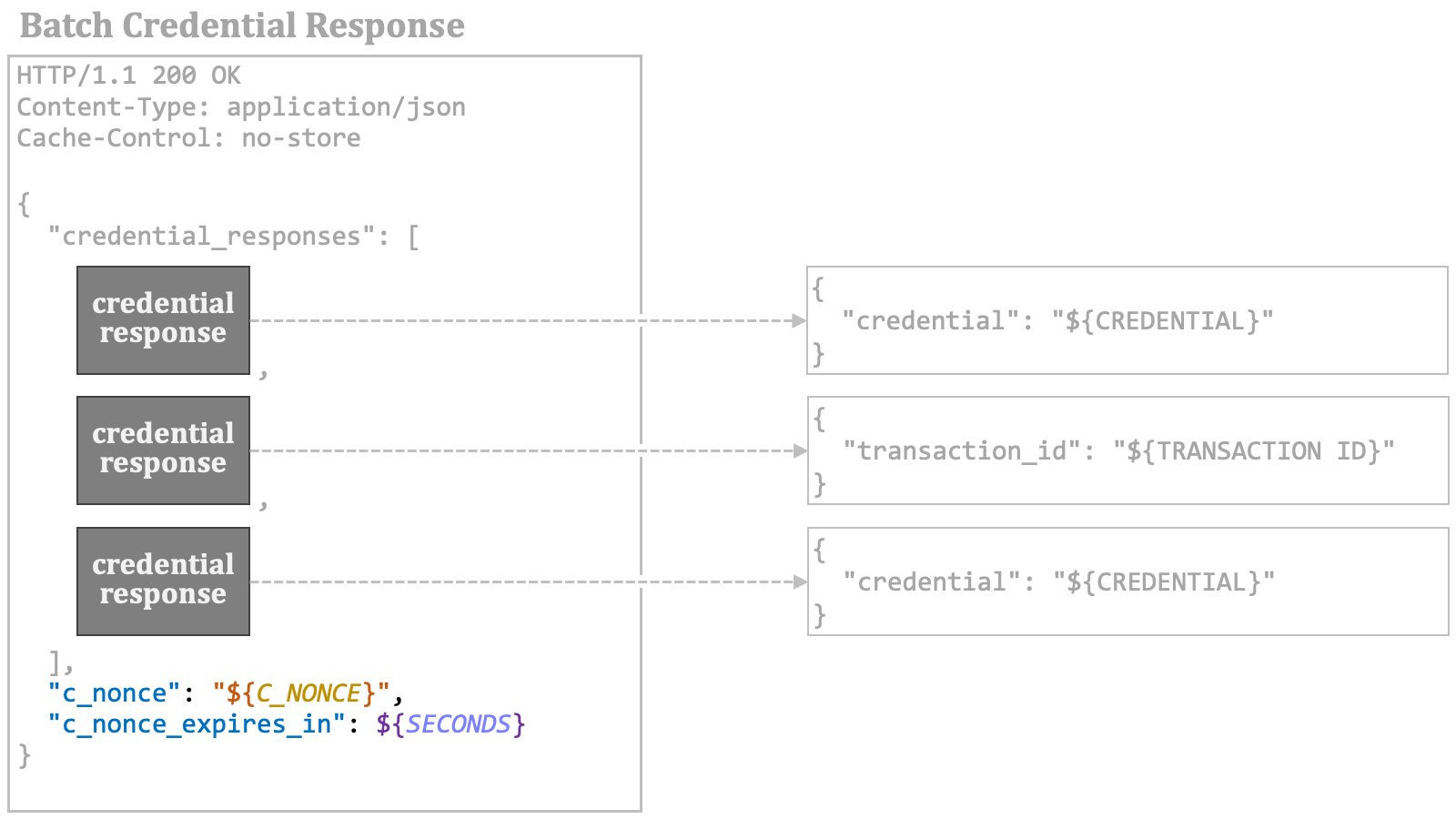 The diagram below is an overview of a batch credential response.
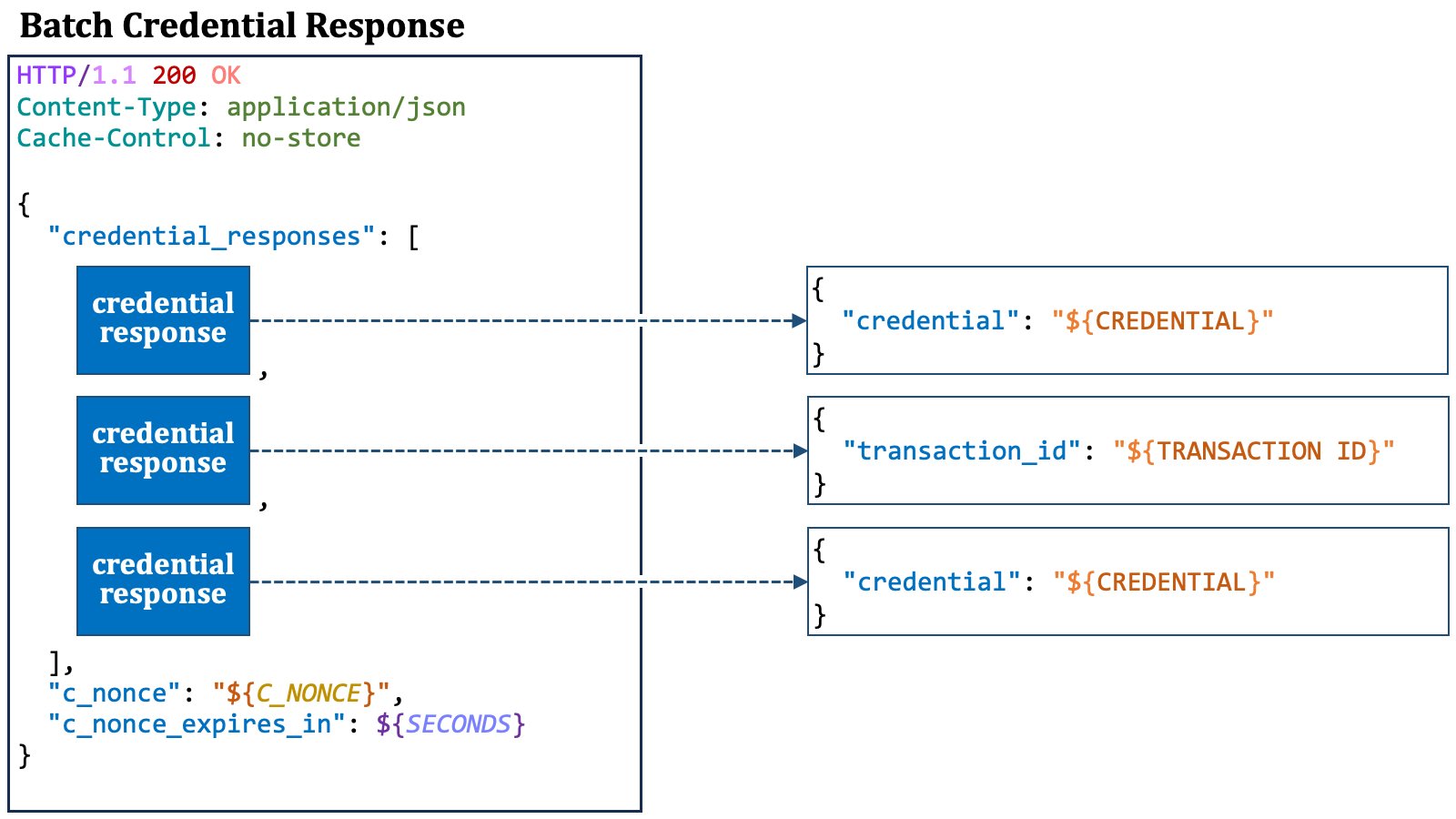 ### 2.10. Public Key Distribution
To verify the signature of a verifiable credential or a verifiable presentation, verifiers need to obtain the public key that corresponds to the private key which the credential issuer used to sign the verifiable credential.
How to distribute public keys for verifying the signatures of verifiable credentials is outside the scope of the OID4VCI specification. However, here we describe a few proposed methods.
#### 2.10.1. Embedding X.509 Certificate
One method for public key distribution is to embed an X.509 certificate for the public key within the verifiable credential.
In the case of JWT-based verifiable credentials, it is likely that the `"x5c"` header parameter ([RFC 7515, 4.1.6][RFC_7515_4_1_6]) will be used for that purpose.
#### 2.10.2. Embedding within Entity Configuration
Another method utilizes the [OpenID Federation][OIDFED] specification and embeds the public key within the entity configuration of the credential issuer.
The Italian ecosystem has defined `openid_credential_issuer`
as a new entity type identifier, which represents a credential issuer,
and the ecosystem uses the `"jwks"` metadata to place the credential
issuer's public keys within.
### 2.10. Public Key Distribution
To verify the signature of a verifiable credential or a verifiable presentation, verifiers need to obtain the public key that corresponds to the private key which the credential issuer used to sign the verifiable credential.
How to distribute public keys for verifying the signatures of verifiable credentials is outside the scope of the OID4VCI specification. However, here we describe a few proposed methods.
#### 2.10.1. Embedding X.509 Certificate
One method for public key distribution is to embed an X.509 certificate for the public key within the verifiable credential.
In the case of JWT-based verifiable credentials, it is likely that the `"x5c"` header parameter ([RFC 7515, 4.1.6][RFC_7515_4_1_6]) will be used for that purpose.
#### 2.10.2. Embedding within Entity Configuration
Another method utilizes the [OpenID Federation][OIDFED] specification and embeds the public key within the entity configuration of the credential issuer.
The Italian ecosystem has defined `openid_credential_issuer`
as a new entity type identifier, which represents a credential issuer,
and the ecosystem uses the `"jwks"` metadata to place the credential
issuer's public keys within.
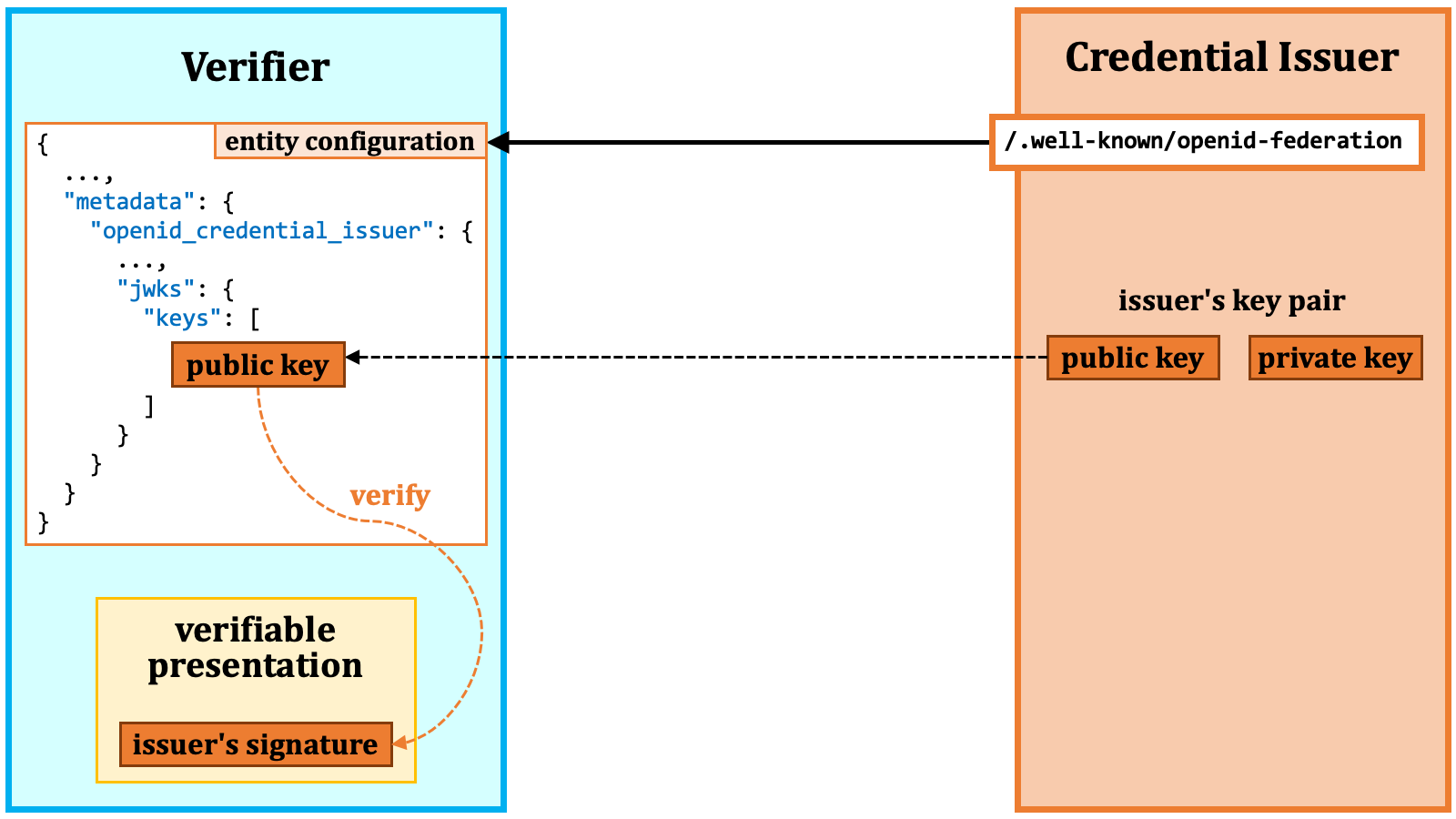 At the time of this writing, `"jwks"`, `"jwks_uri"`, and `"signed_jwks_uri"` have not been defined as credential issuer metadata.
#### 2.10.3. jwt-vc-issuer
Another proposal for public key distribution is `/.well-known/jwt-vc-issuer`.
The new well-known path is intended to serve as the starting point for searching for the public key.
At the time of this writing, `"jwks"`, `"jwks_uri"`, and `"signed_jwks_uri"` have not been defined as credential issuer metadata.
#### 2.10.3. jwt-vc-issuer
Another proposal for public key distribution is `/.well-known/jwt-vc-issuer`.
The new well-known path is intended to serve as the starting point for searching for the public key.
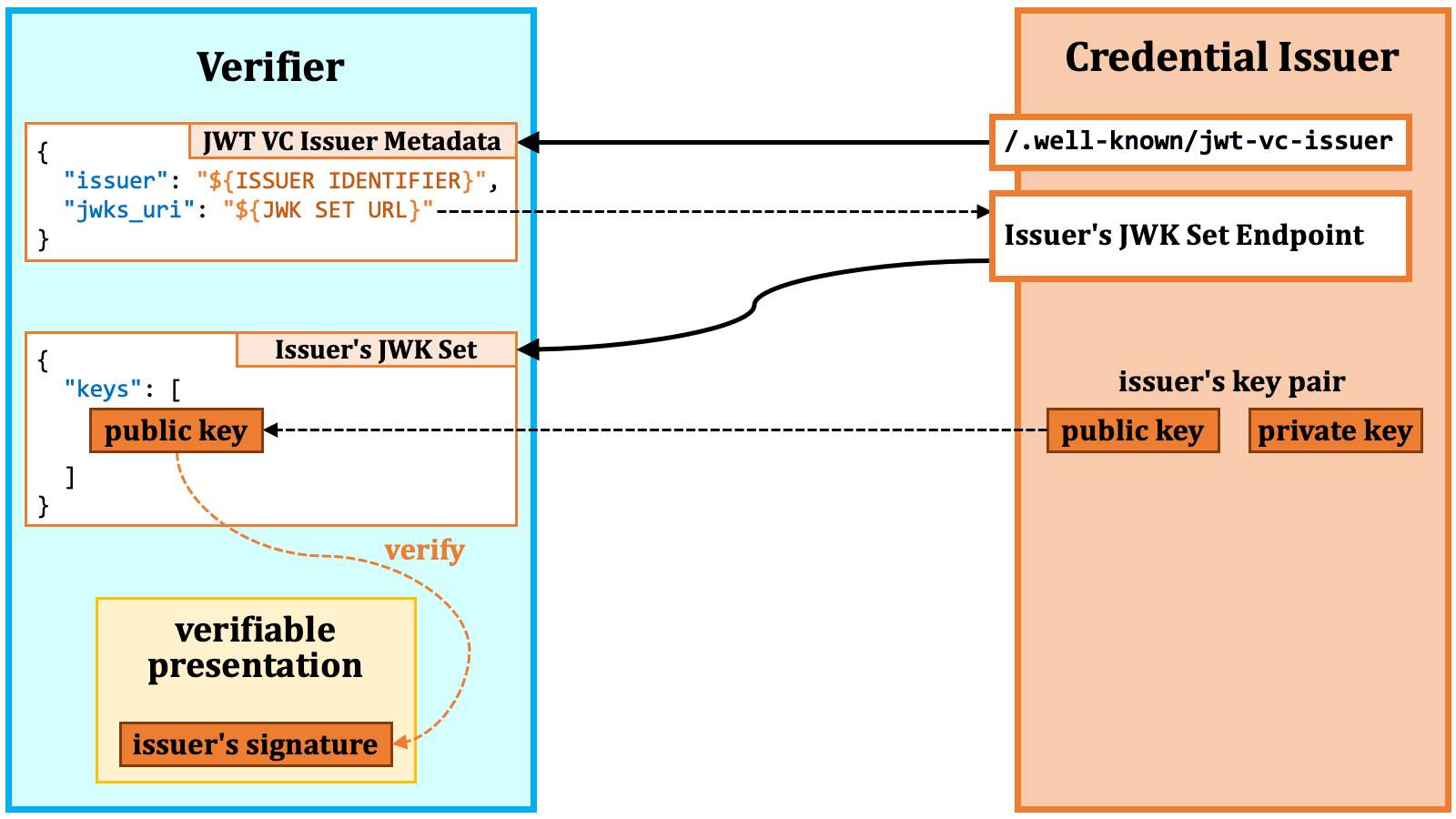 The well-known path returns JSON containing the JWT VC issuer's metadata.
The `"jwks_uri"` property in the JSON points to the location of the JWK Set of the issuer.
Verifiers can find the target public key in the JWK Set.
The JWT VC issuer metadata may contain the `"jwks"` property
rather than the `"jwks_uri"` property. This can happen when
the JWT VC issuer has a difficulty in providing a separate endpoint for
its JWK Set for various reasons.
### 2.11. Specification Summary
The OID4VCI specification defines rules for the issuance of verifiable credentials. The two major topics in the specification are "access token issuance" and "credential issuance".
For access token issuance, the specification defines several methods for
specifying issuable credentials, which include,
(1) using the pre-authorized code in a credential offer,
(2) using the issuer state in a credential offer,
(3) using RAR objects with `"type":"openid_credential"`, and
(4) using `scope` values referencing entries in the `credential_configurations_supported` metadata.
For credential issuance, the specification introduces three endpoints, namely, (1) the credential endpoint, (2) the batch credential endpoint, and (3) the deferred credential endpoint.
Pieces of credential information appear at some locations such as (1) the
`credential_configurations_supported` issuer metadata,
(2) RAR objects, (3) credential
requests, and (4) batch credential requests. Due to the lack of consistency
and identifiability among them, the specification may not fully achieve its
intended goal. However, in exchange for sacrificing full interoperability,
real-world ecosystems will be able to issue verifiable credential for their
specific needs based on the specification along with their supplementary
specifications.
The specification does not go into the specifics of verifiable credential formats,
but it does establish rules related to the `jwt_vc_json`, `jwt_vc_json-ld`,
`ldp_vc`, `mso_mdoc`, and `vc+sd-jwt` formats. Among them, the formats that
have recently been garnering the most attention are "SD-JWT VC" and "mdoc"
([ISO/IEC 18013-5:2021][ISO_IEC_18013_5]). eIDAS 2.0 mandates support for
SD-JWT-based and mdoc-based formats.
Public key distribution is also not covered in the specification. Some
recognized proposals for public key distribution include (1) embedding
an X.509 certificate in the verifiable credential itself, (2) using
`"openid_credential_issuer"."jwks"` in
the entity configuration of the credential issuer, and (3) using
`/.well-known/jwt-vc-issuer`.
While the OID4VCI specification still has room for improvements, real-world
ecosystems can leverage it for their specific needs with practical compromises
and local supplementary specifications.
## 3. OID4VCI Implementation
### 3.1. Authlete Overview
Developers can build their own credential issuers and authorization servers /
OpenID providers conforming to the OID4VCI specification by utilizing Authlete.
While most vendors directly provide implementations of frontend servers such as
an authorization server, Authlete takes a different approach. Authlete provides
a set of Web APIs with which developers themselves can implement their own
frontend servers. Authlete sits behind such frontend servers and is invisible
from end users.
The well-known path returns JSON containing the JWT VC issuer's metadata.
The `"jwks_uri"` property in the JSON points to the location of the JWK Set of the issuer.
Verifiers can find the target public key in the JWK Set.
The JWT VC issuer metadata may contain the `"jwks"` property
rather than the `"jwks_uri"` property. This can happen when
the JWT VC issuer has a difficulty in providing a separate endpoint for
its JWK Set for various reasons.
### 2.11. Specification Summary
The OID4VCI specification defines rules for the issuance of verifiable credentials. The two major topics in the specification are "access token issuance" and "credential issuance".
For access token issuance, the specification defines several methods for
specifying issuable credentials, which include,
(1) using the pre-authorized code in a credential offer,
(2) using the issuer state in a credential offer,
(3) using RAR objects with `"type":"openid_credential"`, and
(4) using `scope` values referencing entries in the `credential_configurations_supported` metadata.
For credential issuance, the specification introduces three endpoints, namely, (1) the credential endpoint, (2) the batch credential endpoint, and (3) the deferred credential endpoint.
Pieces of credential information appear at some locations such as (1) the
`credential_configurations_supported` issuer metadata,
(2) RAR objects, (3) credential
requests, and (4) batch credential requests. Due to the lack of consistency
and identifiability among them, the specification may not fully achieve its
intended goal. However, in exchange for sacrificing full interoperability,
real-world ecosystems will be able to issue verifiable credential for their
specific needs based on the specification along with their supplementary
specifications.
The specification does not go into the specifics of verifiable credential formats,
but it does establish rules related to the `jwt_vc_json`, `jwt_vc_json-ld`,
`ldp_vc`, `mso_mdoc`, and `vc+sd-jwt` formats. Among them, the formats that
have recently been garnering the most attention are "SD-JWT VC" and "mdoc"
([ISO/IEC 18013-5:2021][ISO_IEC_18013_5]). eIDAS 2.0 mandates support for
SD-JWT-based and mdoc-based formats.
Public key distribution is also not covered in the specification. Some
recognized proposals for public key distribution include (1) embedding
an X.509 certificate in the verifiable credential itself, (2) using
`"openid_credential_issuer"."jwks"` in
the entity configuration of the credential issuer, and (3) using
`/.well-known/jwt-vc-issuer`.
While the OID4VCI specification still has room for improvements, real-world
ecosystems can leverage it for their specific needs with practical compromises
and local supplementary specifications.
## 3. OID4VCI Implementation
### 3.1. Authlete Overview
Developers can build their own credential issuers and authorization servers /
OpenID providers conforming to the OID4VCI specification by utilizing Authlete.
While most vendors directly provide implementations of frontend servers such as
an authorization server, Authlete takes a different approach. Authlete provides
a set of Web APIs with which developers themselves can implement their own
frontend servers. Authlete sits behind such frontend servers and is invisible
from end users.
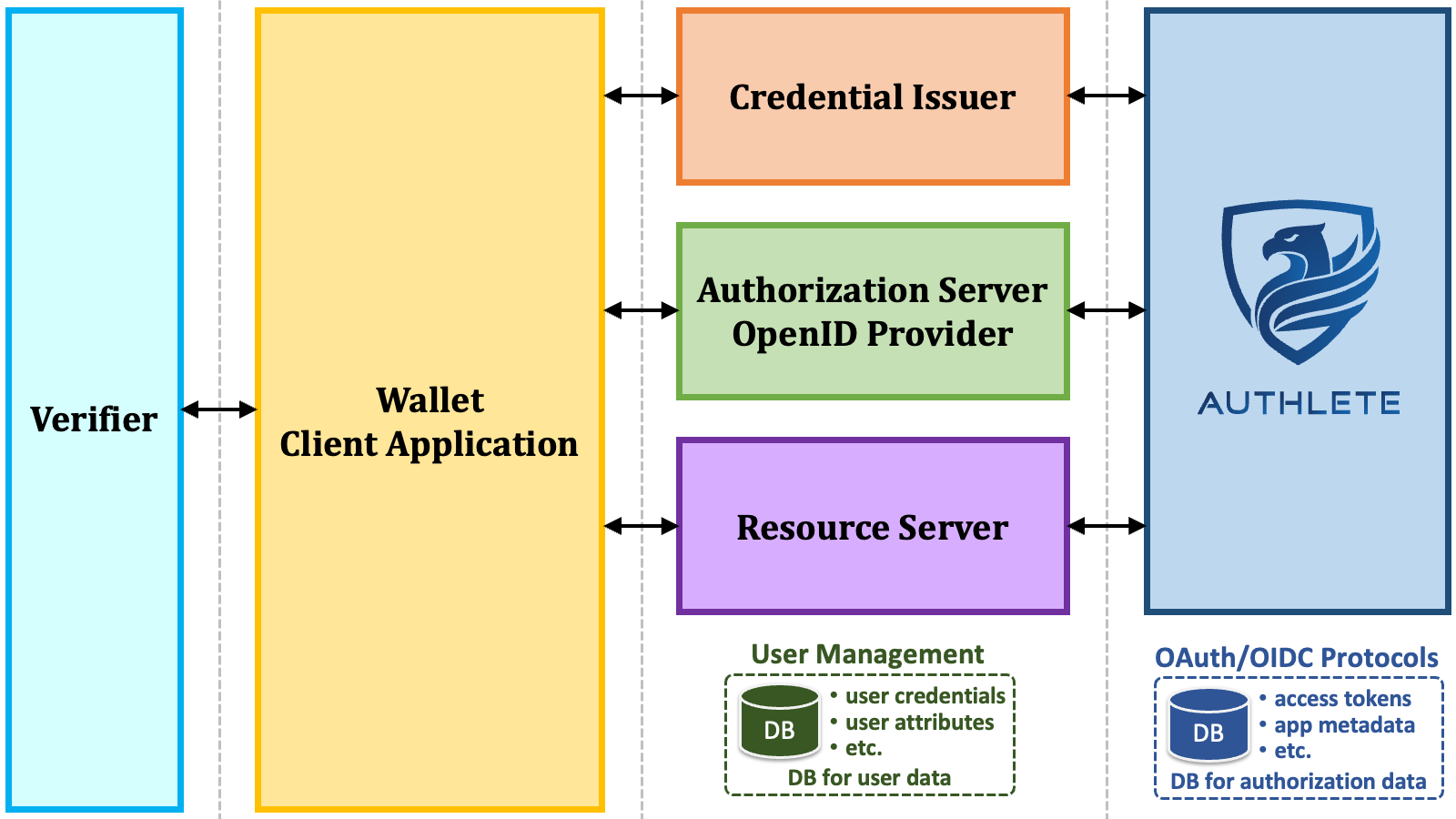 The Authlete architecture inevitably requires developers to build frontend servers,
but in return, developers receive the following benefits.
1. **Any technical components of developer's choice**
* User authentication method
* User management system
* API gateway
* Programming language
* Web framework
* Cloud service
2. **Full control over user data**
* No need to upload user data to the OAuth/OIDC vendor's server.
* Manageable compliance with various regulations for the protection of user data.
3. **Full control over end-user facing frontend servers**
* Corporate brand management across all aspects of UI/UX.
4. **Enforced proper layer separation in system design**
* API authorization is separated from user management and user authentication.
* OAuth/OIDC protocol processing is separated from API gateway and frontend servers.
Architects in enterprises have begun to realize that they need full control over
user identity management and the Web APIs of their services for the success of
their business and recognize that the "OAuth/OIDC component as a Service"
approach offered by Authlete is the ideal solution. Please watch
"**[Security Offered as
Components Empowering Enterprises to Gain Control](https://www.youtube.com/watch?v=hK7ORyfTpvI)**", a panel discussion
on this topic held at EIC 2023.
### 3.2. Authlete Configuration
#### 3.2.1. Authlete Version
The OID4VCI specification is supported from Authlete 3.0, which is scheduled
to be released around April 2024. Until then, a trial server is available for
customers and business partners. If you are interested in trying OID4VCI,
please [contact us][CONTACT_US].
The Authlete architecture inevitably requires developers to build frontend servers,
but in return, developers receive the following benefits.
1. **Any technical components of developer's choice**
* User authentication method
* User management system
* API gateway
* Programming language
* Web framework
* Cloud service
2. **Full control over user data**
* No need to upload user data to the OAuth/OIDC vendor's server.
* Manageable compliance with various regulations for the protection of user data.
3. **Full control over end-user facing frontend servers**
* Corporate brand management across all aspects of UI/UX.
4. **Enforced proper layer separation in system design**
* API authorization is separated from user management and user authentication.
* OAuth/OIDC protocol processing is separated from API gateway and frontend servers.
Architects in enterprises have begun to realize that they need full control over
user identity management and the Web APIs of their services for the success of
their business and recognize that the "OAuth/OIDC component as a Service"
approach offered by Authlete is the ideal solution. Please watch
"**[Security Offered as
Components Empowering Enterprises to Gain Control](https://www.youtube.com/watch?v=hK7ORyfTpvI)**", a panel discussion
on this topic held at EIC 2023.
### 3.2. Authlete Configuration
#### 3.2.1. Authlete Version
The OID4VCI specification is supported from Authlete 3.0, which is scheduled
to be released around April 2024. Until then, a trial server is available for
customers and business partners. If you are interested in trying OID4VCI,
please [contact us][CONTACT_US].
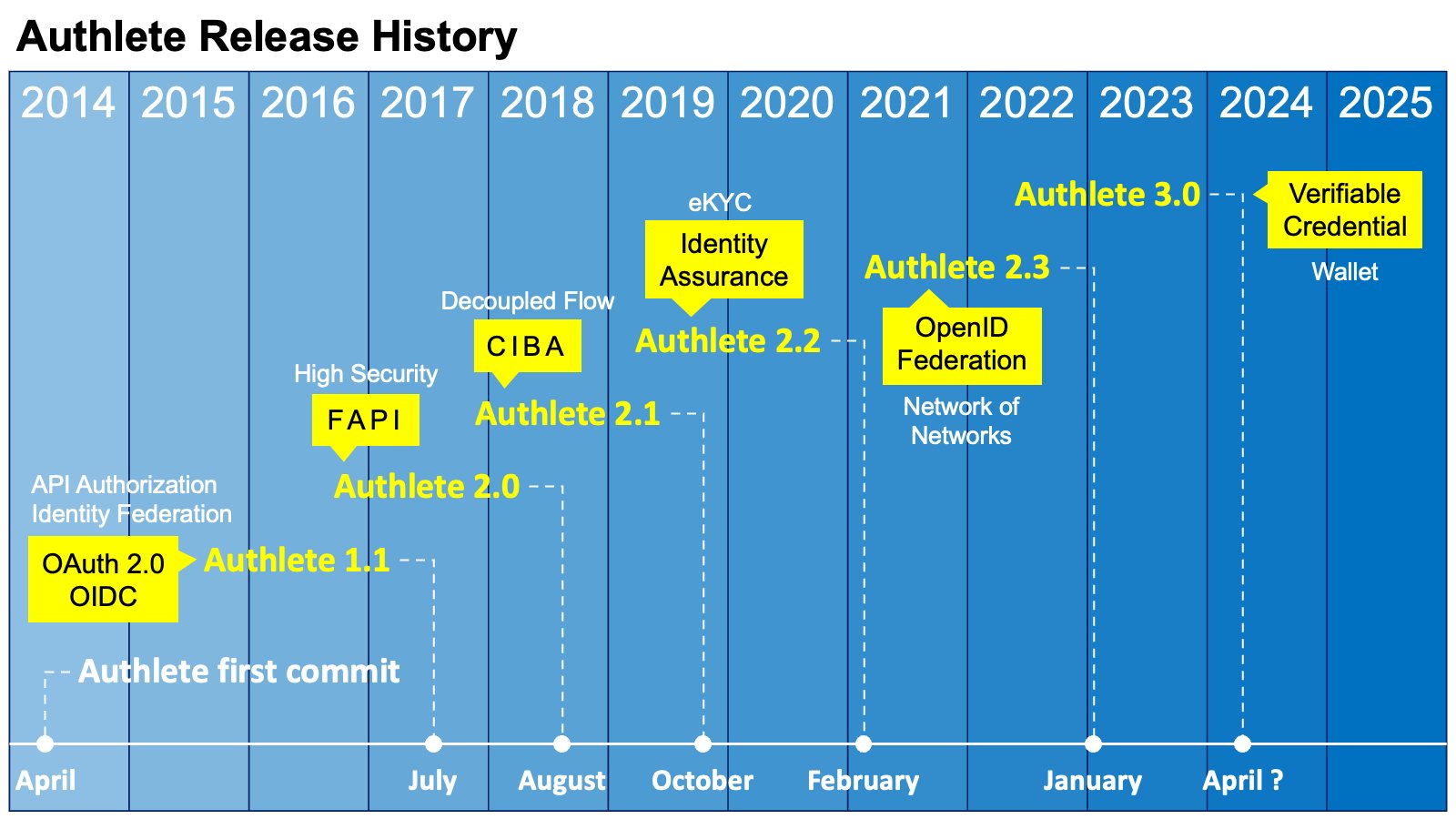 #### 3.2.2. Authlete Server Configuration
The "**Verifiable Credentials**" feature must be enabled on the Authlete server.
If you are using the on-premises version of Authlete, please confirm that the
configuration file (`authlete-server.properties`) includes the
following line to enable this feature.
```java-properties theme={null}
feature.verifiable_credentials.enabled=true
```
#### 3.2.3. Authlete Service Configuration
\| Property | Type | Description |
\| verifiableCredentialsEnabled | boolean | This flag controls availability of features related to Verifiable Credentials
such as support of the OID4VCI specification. |
\| credentialIssuerMetadata | credentialIssuer | string | The identifier of the credential issuer when this service acts
as a credential issuer. This property corresponds to the
credential\_issuer metadata defined in the OID4VCI
specification.
The value must be a valid URL with the https scheme and without
the query part and the fragment part. In addition, Authlete limits the value
to ASCII only and a maximum length of 200 characters.
To act as a credential issuer, this property must be set. |
\| authorizationServers | stringarray | The identifiers of the authorization servers the credential issuer
relies on for authorization when this service acts as a credential issuer.
This property corresponds to the authorization\_servers
metadata defined in the OID4VCI specification.
The values must be HTTP-accessible URLs. |
\| credentialEndpoint | string | The URL of the credential endpoint when this service acts as a credential
issuer. This property corresponds to the credential\_endpoint
metadata defined in the OID4VCI specification.
The value must be a valid URL with the https scheme and without
the fragment part. In addition, Authlete limits the value to ASCII only and
a maximum length of 200 characters.
To act as a credential issuer, this property must be set. |
\| batchCredentialEndpoint | string | The URL of the batch credential endpoint when this service acts as a
credential issuer. This property corresponds to the
batch\_credential\_endpoint metadata defined in the
OID4VCI specification.
The value must be a valid URL with the https scheme and without
the fragment part. In addition, Authlete limits the value to ASCII only and
a maximum length of 200 characters.
It is optional whether to implement the batch credential endpoint. |
\| deferredCredentialEndpoint | string | The URL of the deferred credential endpoint when this service acts as
a credential issuer. This property corresponds to the
deferred\_credential\_endpoint metadata defined in the
OID4VCI specification.
The value must be a valid URL with the https scheme and without
the fragment part. In addition, Authlete limits the value to ASCII only and
a maximum length of 200 characters.
If the credential endpoint and/or the batch credential endpoint of your
credential issuer may issue transaction IDs, you must implement the deferred
credential endpoint. |
\| credentialResponseEncryptionAlgValuesSupported | stringarray | The JWE alg algorithms supported for credential response
encryption. This property corresponds to the
credential\_response\_encryption.alg\_values\_supported
metadata defined in the OID4VCI specification.
The valid values are the names of JWEAlg enum entries such as "ECDH\_ES".
Only asymmetric algorithms are accepted. |
\| credentialResponseEncryptionEncValuesSupported | stringarray | The JWE enc algorithms supported for credential response
encryption. This property corresponds to the
credential\_response\_encryption.enc\_values\_supported
metadata defined in the OID4VCI specification.
The valid values are the names of JWEEnc enum entries such as "A256GCM". |
\| requireCredentialEncryptionResponse | boolean | The flag indicating whether to always encrypt credential responses.
This property corresponds to the
credential\_response\_encryption.encryption\_required
metadata defined in the OID4VCI specification.
If this property is set to true, every credential request is required
to include the credential\_response\_encryption
JSON object. |
\| credentialsSupported | string | Credentials supported by the credential issuer when this service acts as
a credential issuer. This property corresponds to the
credential\_configurations\_supported metadata defined
in the OID4VCI specification.
The value must be a JSON object. Non-ASCII characters may be contained,
but Authlete limits the maximum number of characters to 16383.
To act as a credential issuer, this property must be set.
For backward compatibility, the name of this property remains
credentialsSupported and will not be renamed to
credentialConfigurationsSupported. |
\| credentialOfferDuration | integer | The default duration of credential offers in seconds.
When an API to the /vci/offer/create API does not contain
the duration request parameter or the value of the parameter
is 0 or negative, the value of this property is used as the default value.
If the value of this property is 0 or negative, the default value per
Authlete server is used as the default value. |
\| preAuthorizedGrantAnonymousAccessSupported | boolean | This property indicates whether token requests using the pre-authorized
code flow by unidentifiable client applications are allowed.
This property corresponds to the
pre-authorized\_grant\_anonymous\_access\_supported
metadata defined in the OID4VCI specification. |
\| cnonceDuration | integer | The duration of c\_nonce in seconds.
When the token endpoint of the authorization server issues an access
token usable for verifiable credential issuance, it also issues a
c\_nonce alongside the access token. In addition, the
credential endpoint and the batch credential endpoint of the credential
issuer issue a new c\_nonce when the presented
c\_nonce has already expired. This property is used as
the lifetime of such c\_nonces.
If the value of this property is 0 or negative, the default value per
Authlete server is used. |
\| credentialTransactionDuration | integer | The default duration of transaction IDs in seconds that may be issued
as a result of a credential request or a batch credential request.
If the value of this property is 0 or negative, the default value per
Authlete server is used. |
\| credentialDuration | integer | The default duration of verifiable credentials in seconds.
Some Authlete APIs such as the /vci/single/issue API and
the /vci/batch/issue API may issue one or more verifiable
credentials. The value of this property specifies the default duration
of such verifiable credentials.
The value 0 indicates that verifiable credentials will not expire.
In the case, verifiable credentials will not have a property that
indicates the expiration time. For example, JWT-based verifiable
credentials will not contain the exp claim
(RFC 7519,
Section 4.1.4).
Authlete APIs that may issue verifiable credentials recognize a request
parameter that can override the duration. For example, a request to the
/vci/single/issue API contains an order object
that has a credentialDuration parameter that can override
the default duration. |
\| credentialJwks | string | The JWK Set document containing private keys that are used to sign
verifiable credentials.
Some Authlete APIs such as the /vci/single/issue API and
the /vci/batch/issue API may issue one or more verifiable
credentials. The content of this property is referred to by such APIs.
Authlete APIs that may issue verifiable credentials recognize a request
parameter that can specify the key ID of a private key that should be
used for signing. For example, a request to the /vci/single/issue
API contains an order object that has a
signingKeyId parameter that can specify the key
ID of a private key to be used for signing. When a key ID is not specified,
Authlete will select a private key automatically.
If JWKs in the JWK Set do not contain the kid property
(RFC 7517,
Section 4.5) when this credentialJwks property
is updated, Authlete will automatically insert the kid
property into such JWKs. The JWK thumbprint
(RFC 7638)
computed with the SHA-256 hash algorithm is used as the value of the
kid property. |
\| credentialJwksUri | string | The URL at which the JWK Set document of the credential issuer is exposed.
This URL is used as the value of the jwks\_uri property in the
JWT issuer metadata. The metadata itself is published at
/.well-known/jwt-issuer. See
SD-JWT-based Verifiable Credentials (SD-JWT VC) for details about the
JWT issuer metadata. |
### 3.3. Authlete APIs
#### 3.3.1. Overall Picture of Authlete APIs for OID4VCI
The following diagram illustrates the relationship between the endpoints of
the frontend servers (the credential issuer and the authorization server) and
Authlete APIs. The details of the Authlete APIs are explained in the following
sections.
#### 3.2.2. Authlete Server Configuration
The "**Verifiable Credentials**" feature must be enabled on the Authlete server.
If you are using the on-premises version of Authlete, please confirm that the
configuration file (`authlete-server.properties`) includes the
following line to enable this feature.
```java-properties theme={null}
feature.verifiable_credentials.enabled=true
```
#### 3.2.3. Authlete Service Configuration
\| Property | Type | Description |
\| verifiableCredentialsEnabled | boolean | This flag controls availability of features related to Verifiable Credentials
such as support of the OID4VCI specification. |
\| credentialIssuerMetadata | credentialIssuer | string | The identifier of the credential issuer when this service acts
as a credential issuer. This property corresponds to the
credential\_issuer metadata defined in the OID4VCI
specification.
The value must be a valid URL with the https scheme and without
the query part and the fragment part. In addition, Authlete limits the value
to ASCII only and a maximum length of 200 characters.
To act as a credential issuer, this property must be set. |
\| authorizationServers | stringarray | The identifiers of the authorization servers the credential issuer
relies on for authorization when this service acts as a credential issuer.
This property corresponds to the authorization\_servers
metadata defined in the OID4VCI specification.
The values must be HTTP-accessible URLs. |
\| credentialEndpoint | string | The URL of the credential endpoint when this service acts as a credential
issuer. This property corresponds to the credential\_endpoint
metadata defined in the OID4VCI specification.
The value must be a valid URL with the https scheme and without
the fragment part. In addition, Authlete limits the value to ASCII only and
a maximum length of 200 characters.
To act as a credential issuer, this property must be set. |
\| batchCredentialEndpoint | string | The URL of the batch credential endpoint when this service acts as a
credential issuer. This property corresponds to the
batch\_credential\_endpoint metadata defined in the
OID4VCI specification.
The value must be a valid URL with the https scheme and without
the fragment part. In addition, Authlete limits the value to ASCII only and
a maximum length of 200 characters.
It is optional whether to implement the batch credential endpoint. |
\| deferredCredentialEndpoint | string | The URL of the deferred credential endpoint when this service acts as
a credential issuer. This property corresponds to the
deferred\_credential\_endpoint metadata defined in the
OID4VCI specification.
The value must be a valid URL with the https scheme and without
the fragment part. In addition, Authlete limits the value to ASCII only and
a maximum length of 200 characters.
If the credential endpoint and/or the batch credential endpoint of your
credential issuer may issue transaction IDs, you must implement the deferred
credential endpoint. |
\| credentialResponseEncryptionAlgValuesSupported | stringarray | The JWE alg algorithms supported for credential response
encryption. This property corresponds to the
credential\_response\_encryption.alg\_values\_supported
metadata defined in the OID4VCI specification.
The valid values are the names of JWEAlg enum entries such as "ECDH\_ES".
Only asymmetric algorithms are accepted. |
\| credentialResponseEncryptionEncValuesSupported | stringarray | The JWE enc algorithms supported for credential response
encryption. This property corresponds to the
credential\_response\_encryption.enc\_values\_supported
metadata defined in the OID4VCI specification.
The valid values are the names of JWEEnc enum entries such as "A256GCM". |
\| requireCredentialEncryptionResponse | boolean | The flag indicating whether to always encrypt credential responses.
This property corresponds to the
credential\_response\_encryption.encryption\_required
metadata defined in the OID4VCI specification.
If this property is set to true, every credential request is required
to include the credential\_response\_encryption
JSON object. |
\| credentialsSupported | string | Credentials supported by the credential issuer when this service acts as
a credential issuer. This property corresponds to the
credential\_configurations\_supported metadata defined
in the OID4VCI specification.
The value must be a JSON object. Non-ASCII characters may be contained,
but Authlete limits the maximum number of characters to 16383.
To act as a credential issuer, this property must be set.
For backward compatibility, the name of this property remains
credentialsSupported and will not be renamed to
credentialConfigurationsSupported. |
\| credentialOfferDuration | integer | The default duration of credential offers in seconds.
When an API to the /vci/offer/create API does not contain
the duration request parameter or the value of the parameter
is 0 or negative, the value of this property is used as the default value.
If the value of this property is 0 or negative, the default value per
Authlete server is used as the default value. |
\| preAuthorizedGrantAnonymousAccessSupported | boolean | This property indicates whether token requests using the pre-authorized
code flow by unidentifiable client applications are allowed.
This property corresponds to the
pre-authorized\_grant\_anonymous\_access\_supported
metadata defined in the OID4VCI specification. |
\| cnonceDuration | integer | The duration of c\_nonce in seconds.
When the token endpoint of the authorization server issues an access
token usable for verifiable credential issuance, it also issues a
c\_nonce alongside the access token. In addition, the
credential endpoint and the batch credential endpoint of the credential
issuer issue a new c\_nonce when the presented
c\_nonce has already expired. This property is used as
the lifetime of such c\_nonces.
If the value of this property is 0 or negative, the default value per
Authlete server is used. |
\| credentialTransactionDuration | integer | The default duration of transaction IDs in seconds that may be issued
as a result of a credential request or a batch credential request.
If the value of this property is 0 or negative, the default value per
Authlete server is used. |
\| credentialDuration | integer | The default duration of verifiable credentials in seconds.
Some Authlete APIs such as the /vci/single/issue API and
the /vci/batch/issue API may issue one or more verifiable
credentials. The value of this property specifies the default duration
of such verifiable credentials.
The value 0 indicates that verifiable credentials will not expire.
In the case, verifiable credentials will not have a property that
indicates the expiration time. For example, JWT-based verifiable
credentials will not contain the exp claim
(RFC 7519,
Section 4.1.4).
Authlete APIs that may issue verifiable credentials recognize a request
parameter that can override the duration. For example, a request to the
/vci/single/issue API contains an order object
that has a credentialDuration parameter that can override
the default duration. |
\| credentialJwks | string | The JWK Set document containing private keys that are used to sign
verifiable credentials.
Some Authlete APIs such as the /vci/single/issue API and
the /vci/batch/issue API may issue one or more verifiable
credentials. The content of this property is referred to by such APIs.
Authlete APIs that may issue verifiable credentials recognize a request
parameter that can specify the key ID of a private key that should be
used for signing. For example, a request to the /vci/single/issue
API contains an order object that has a
signingKeyId parameter that can specify the key
ID of a private key to be used for signing. When a key ID is not specified,
Authlete will select a private key automatically.
If JWKs in the JWK Set do not contain the kid property
(RFC 7517,
Section 4.5) when this credentialJwks property
is updated, Authlete will automatically insert the kid
property into such JWKs. The JWK thumbprint
(RFC 7638)
computed with the SHA-256 hash algorithm is used as the value of the
kid property. |
\| credentialJwksUri | string | The URL at which the JWK Set document of the credential issuer is exposed.
This URL is used as the value of the jwks\_uri property in the
JWT issuer metadata. The metadata itself is published at
/.well-known/jwt-issuer. See
SD-JWT-based Verifiable Credentials (SD-JWT VC) for details about the
JWT issuer metadata. |
### 3.3. Authlete APIs
#### 3.3.1. Overall Picture of Authlete APIs for OID4VCI
The following diagram illustrates the relationship between the endpoints of
the frontend servers (the credential issuer and the authorization server) and
Authlete APIs. The details of the Authlete APIs are explained in the following
sections.
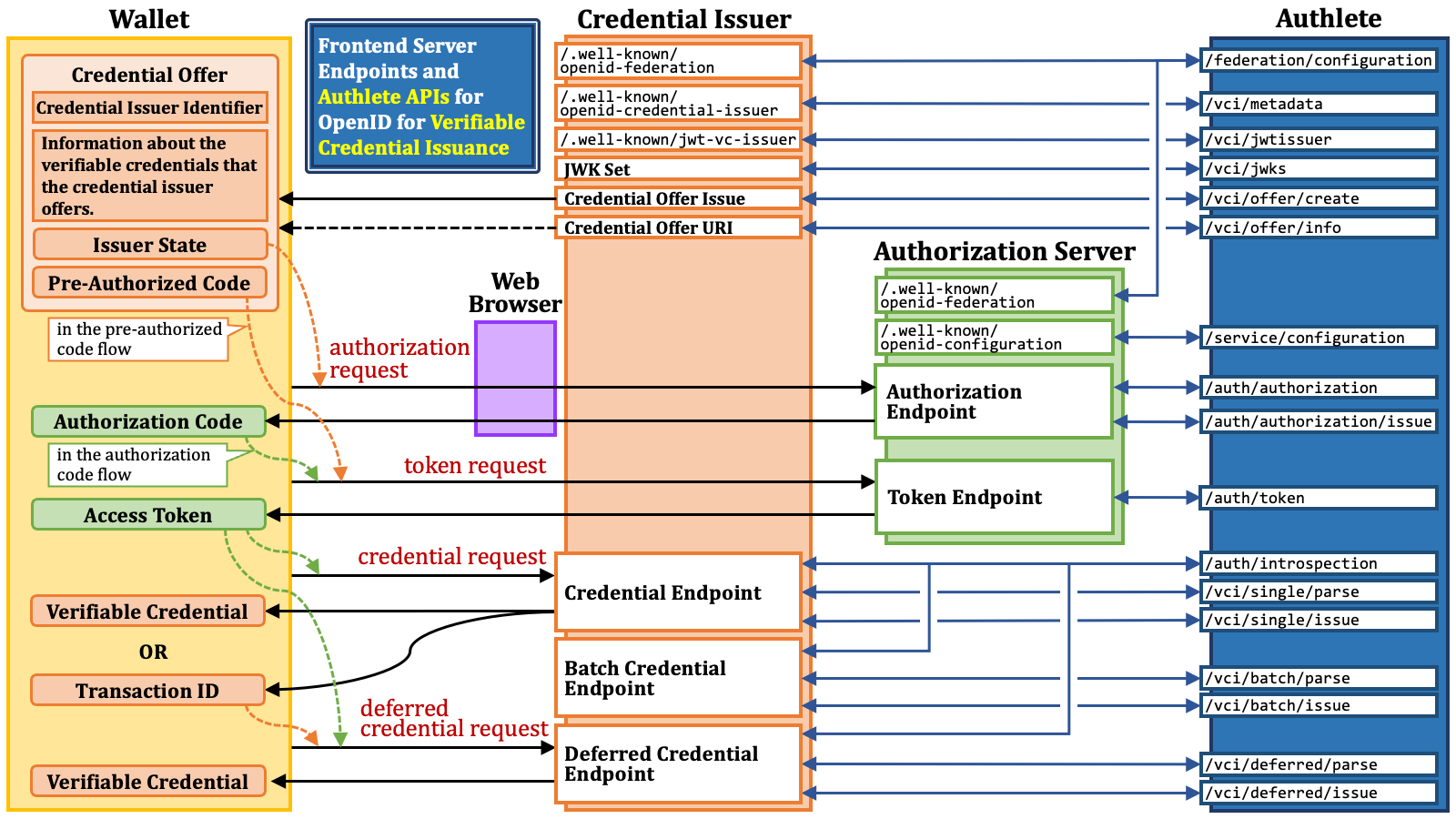 #### 3.3.2. Authlete API Call
A significant difference between Authlete 2.x and Authlete 3.0 is how to call
Authlete APIs.
In Authlete 2.x and older versions, developers call Authlete APIs using a pair
of an API key and an API secret (e.g., a service API key and a service API secret).
In Authlete 3.0, on the other hand, developers call Authlete APIs with an access token.
Developers can obtain access tokens for Authlete APIs using the new Web console,
which is significantly different from the previous ones. In Authlete 2.x and
older versions, there are two separate Web consoles: the service owner console
(for managing services corresponding to authorization servers and OpenID providers)
and the developer console (for managing client applications). In Authlete 3.0,
however, a single Web console is provided, and its appearance and functionality
change based to on the privileges of the presented access token.
| | Authlete 2.x | Authlete 3.0 |
| :---------- | :-------------------------------------------------- | :--------------- |
| Protection | API key & API secret | Access token |
| Web Console | The service owner console and the developer console | A single console |
Another difference is found in the path component of Authlete APIs. In Authlete 3.0, most Authlete APIs include a service ID as part of the path, such as `/api/`*`{ServiceID}`*`/auth/authorization`, where *`{ServiceID}`* represents the identifier of a service (i.e., the service API key in Authlete 2.x).
| Authlete Version | API Path Example |
| :--------------- | :------------------------------------------ |
| Authlete 2.x | `/api/auth/authorization` |
| Authlete 3.0 | `/api/`*`{ServiceID}`*`/auth/authorization` |
In this document, as well as in other documents, the prefix `/api/{ServiceID}` for API paths is omitted.
These changes are not insignificant, but their impact on programs can be
minimized by absorbing the differences at the library layer. For instance,
developers using the sample authorization server written in Java
([authlete/java-oauth-server][JAVA_OAUTH_SERVER]) and switching from
Authlete 2.x to Authlete 3.0 only need to modify the content of the
configuration file (`authlete.properties`) from:
```java-properties theme={null}
# For Authlete 2.x
base_url = ...
service.api_key = ..
service.api_secret = ...
```
to:
```java-properties theme={null}
# For Authlete 3.0
api_version = V3
base_url = ...
service.api_key = ...
service.access_token = ...
```
### 3.4. Credential Offer Issuance
As mentioned before, the process of issuing credential offers varies among
credential issuers.
For example, after interacting with a user via a web browser, the credential
issuer may display a QR code like below:
#### 3.3.2. Authlete API Call
A significant difference between Authlete 2.x and Authlete 3.0 is how to call
Authlete APIs.
In Authlete 2.x and older versions, developers call Authlete APIs using a pair
of an API key and an API secret (e.g., a service API key and a service API secret).
In Authlete 3.0, on the other hand, developers call Authlete APIs with an access token.
Developers can obtain access tokens for Authlete APIs using the new Web console,
which is significantly different from the previous ones. In Authlete 2.x and
older versions, there are two separate Web consoles: the service owner console
(for managing services corresponding to authorization servers and OpenID providers)
and the developer console (for managing client applications). In Authlete 3.0,
however, a single Web console is provided, and its appearance and functionality
change based to on the privileges of the presented access token.
| | Authlete 2.x | Authlete 3.0 |
| :---------- | :-------------------------------------------------- | :--------------- |
| Protection | API key & API secret | Access token |
| Web Console | The service owner console and the developer console | A single console |
Another difference is found in the path component of Authlete APIs. In Authlete 3.0, most Authlete APIs include a service ID as part of the path, such as `/api/`*`{ServiceID}`*`/auth/authorization`, where *`{ServiceID}`* represents the identifier of a service (i.e., the service API key in Authlete 2.x).
| Authlete Version | API Path Example |
| :--------------- | :------------------------------------------ |
| Authlete 2.x | `/api/auth/authorization` |
| Authlete 3.0 | `/api/`*`{ServiceID}`*`/auth/authorization` |
In this document, as well as in other documents, the prefix `/api/{ServiceID}` for API paths is omitted.
These changes are not insignificant, but their impact on programs can be
minimized by absorbing the differences at the library layer. For instance,
developers using the sample authorization server written in Java
([authlete/java-oauth-server][JAVA_OAUTH_SERVER]) and switching from
Authlete 2.x to Authlete 3.0 only need to modify the content of the
configuration file (`authlete.properties`) from:
```java-properties theme={null}
# For Authlete 2.x
base_url = ...
service.api_key = ..
service.api_secret = ...
```
to:
```java-properties theme={null}
# For Authlete 3.0
api_version = V3
base_url = ...
service.api_key = ...
service.access_token = ...
```
### 3.4. Credential Offer Issuance
As mentioned before, the process of issuing credential offers varies among
credential issuers.
For example, after interacting with a user via a web browser, the credential
issuer may display a QR code like below:
 that represents "`openid-credential-offer://?credential_offer={CredentialOffer}`"
where *`{CredentialOffer}`* holds the following credential offer.
```json theme={null}
{
"credential_issuer": "https://trial.authlete.net",
"credential_configuration_ids": [
"IdentityCredential",
"org.iso.18013.5.1.mDL"
],
"grants": {
"urn:ietf:params:oauth:grant-type:pre-authorized_code": {
"pre-authorized_code": "NH9udMon5pTuuvbsNsHUNWf8tpU__9wt-gsO9LeYthc"
}
}
}
```
The credential issuer may instead show a hyperlink like below:
* `openid-credential-offer://?credential_offer_uri=`*`{CredentialOfferUri}`*
where *`{CredentialOfferUri}`* holds a URL-encoded URL like
`https%3A%2F%2Ftrial.authlete.net%2Fapi%2Foffer%2FTctoiNm9lYASTBT6XRGb8RQsrClKczCxDtqLY1jLvpk`.
#### 3.4.1. The `/vci/offer/create` API
Regardless, credential issuers supporting credential offers must be able to
create them. For the functionality, Authlete provides the `/vci/offer/create`
API. The following table summarizes the API.
\| Request to the /vci/offer/create API |
\| HTTP Method andContent-Type | GET | (query parameters) |
\| POST | application/json |
\| POST | application/x-www-form-urlencoded |
\| Request Parameters | credentialConfigurationIds | A string array, which will be used as the value of
the "credential\_configuration\_ids" property of a credential offer.
This request parameter is mandatory. |
\| authorizationCodeGrantIncluded | A boolean value (true or false) indicating
whether to include the "authorization\_code" object in the
"grants" object. |
\| issuerStateIncluded | A boolean value (true or false) indicating
whether to include the "issuer\_state" property in the
"authorization\_code" object in the "grants"
object.
When this parameter is true, Authlete generates an issuer
state and puts it in the "authorization\_code" object as
the value of the "issuer\_state" property. |
\| preAuthorizedCodeGrantIncluded | A boolean value (true or false) indicating
whether to include the
"urn:ietf:params:oauth:grant-type:pre-authorized\_code"
object in the "grants" object.
When this parameter is true, Authlete generates a
pre-authorized code and puts it in the
"urn:ietf:params:oauth:grant-type:pre-authorized\_code"
object as the value of the "pre-authorized\_code" property. |
\| txCode | A transaction code that should be associated with the pre-authorized code.
If this parameter is not empty, a tx\_code object will be
embedded in the
"urn:ietf:params:oauth:grant-type:pre-authorized\_code"
object. Consequently, the token request using the pre-authorized code
will have to include the tx\_code request parameter with
the value specified by this parameter. |
\| txCodeInputMode | The input mode of the transaction code. The value specified by this
parameter will be used as the value of the input\_mode
property in the tx\_code object.
The predefined values listed in the OID4VCI specification are
"numeric" and "text" only, but the
/vci/offer/create API accepts other values
for the future extension in addition to the predefined ones. |
\| txCodeDescription | The description of the transaction code. The value specified by this
parameter will be used as the value of the description
property in the tx\_code object. |
\| subject | The subject (the unique identifier) of the user associated with
the credential offer.
This parameter is mandatory. |
\| duration | The duration of the credential offer in seconds.
If this parameter holds a positive integer, the value is used as the
duration of the credential offer being issued. Otherwise, the value
of the credentialOfferDuration property of the
service is used. |
\| context | The general-purpose arbitrary string associated with the credential
offer.
Developers can utilize this parameter as they like. Authlete does not
care about the content of this parameter. |
\| properties | The extra properties associated with the credential offer, which are
general-purpose key-value pairs.
The extra properties will be eventually associated with an access token
which will be created based on the credential offer. |
\| jwtAtClaims | The additional claims in JSON object format that are added to the payload
part of the JWT access token.
This parameter has a meaning only when the format of access tokens issued
by the service is JWT. In other words, it has a meaning only when the
accessTokenSignAlg property of the service
holds a non-null value.
The additional claims will be eventually associated with an access token
which will be created based on the credential offer. |
\| authTime | The time when the user authentication was performed during the course
of issuing the credential offer.
The time is represented as seconds since the Unix epoch. |
\| acr | The Authentication Context Class Reference of the user authentication
performed during the course of issuing the credential offer. |
For example, the following command lines create a credential offer.
```shell theme={null}
$ BASE_URL=https://nextdev-api.authlete.net
$ SERVICE_ID=986126671
$ ACCESS_TOKEN=${YOUR_ACCESS_TOKEN}
$ curl -s ${BASE_URL}/api/${SERVICE_ID}/vci/offer/create \
-H "Authorization: Bearer ${ACCESS_TOKEN}" \
-H "Content-Type: application/json" \
--data '
{
"credentialConfigurationIds": [ "IdentityCredential" ],
"preAuthorizedCodeGrantIncluded": true,
"txCode": "123456",
"txCodeInputMode": "numeric",
"subject": "1001"
}
'
```
The `/vci/offer/create` API returns JSON like below.
```json theme={null}
{
"type": "credentialOfferCreateResponse",
"resultCode": "A366001",
"resultMessage": "[A366001] A credential offer was created successfully.",
"action": "CREATED",
"info": {
"authTime": 0,
"authorizationCodeGrantIncluded": false,
"credentialConfigurationIds": [
"IdentityCredential"
],
"credentialIssuer": "https://trial.authlete.net",
"credentialOffer": "{\"credential_issuer\":\"https://trial.authlete.net\",\"credential_configuration_ids\":[\"IdentityCredential\"],\"grants\":{\"urn:ietf:params:oauth:grant-type:pre-authorized_code\":{\"pre-authorized_code\":\"rS8D7asTTL8MaXM5yLjQvaAMmPmierRW6oeK-4JP4Uk\",\"tx_code\":{\"length\":6,\"input_mode\":\"numeric\"}}}}",
"expiresAt": 1703929674224,
"identifier": "9gjVvas8Q5BkkrkSfZv-DbsBYJvlw6ZPMK-TeCkQDEc",
"issuerStateIncluded": false,
"preAuthorizedCode": "rS8D7asTTL8MaXM5yLjQvaAMmPmierRW6oeK-4JP4Uk",
"preAuthorizedCodeGrantIncluded": true,
"subject": "1001",
"txCode": "123456",
"txCodeInputMode": "numeric"
}
}
```
The `"info"` object in the API response contains information about the created
credential offer. The `"credentialOffer"` property in the `"info"` object is a
string representing the created credential offer. The value of the
`"credentialOffer"` property in the above example looks like the following when
formatted in a human-readable manner.
```json theme={null}
{
"credential_issuer": "https://trial.authlete.net",
"credential_configuration_ids": [
"IdentityCredential"
],
"grants": {
"urn:ietf:params:oauth:grant-type:pre-authorized_code": {
"pre-authorized_code": "rS8D7asTTL8MaXM5yLjQvaAMmPmierRW6oeK-4JP4Uk",
"tx_code": {
"length": 6,
"input_mode": "numeric"
}
}
}
}
```
With the value of the `"credentialOffer"` property, you can construct a URL
by concatenating the following components:
1. A credential offer endpoint. For example, `openid-credential-offer://`.
2. `?credential_offer=`.
3. URL-encoded `"credentialOffer"` value.
```text theme={null}
openid-credential-offer://?credential_offer=%7B%22credential_issuer%22%3A%22https%3A%2F%2Ftrial.authlete.net%22%2C%22credential_configuration_ids%22%3A%5B%22IdentityCredential%22%5D%2C%22grants%22%3A%7B%22urn%3Aietf%3Aparams%3Aoauth%3Agrant-type%3Apre-authorized_code%22%3A%7B%22pre-authorized_code%22%3A%22rS8D7asTTL8MaXM5yLjQvaAMmPmierRW6oeK-4JP4Uk%22%2C%22tx_code%22%3A%7B%22length%22%3A6%2C%22input_mode%22%3A%22numeric%22%7D%7D%7D%7D
```
The request to and the response from the `/vci/offer/create` API are represented
by the `CredentialOfferCreateRequest` and
`CredentialOfferCreateResponse` Java
classes in the [authlete-java-common][AUTHLETE_JAVA_COMMON] library, respectively.
Please refer to the library's [JavaDoc][AUTHLETE_JAVA_COMMON_JAVADOC] for details.
#### 3.4.2. The `/vci/offer/info` API
The `/vci/offer/info` API returns information about a credential offer.
This API accepts the `identifier` request parameter that specifies the
identifier of a credential offer.
\| Request to the /vci/offer/info API |
\| HTTP Method andContent-Type | GET | (path parameters) |
\| POST | application/json |
\| POST | application/x-www-form-urlencoded |
\| Request Parameters | identifier | The identifier of a credential offer. When the API call is an HTTP GET
request, the identifier is specified as the last path component like
/vci/offer/info/{identifier}. |
The identifier is included in the response from the `/vci/offer/create` API.
The value of the `"identifier"` property in the `"info"` object is the identifier.
In the example in the previous section, its value is
`9gjVvas8Q5BkkrkSfZv-DbsBYJvlw6ZPMK-TeCkQDEc`.
The following command lines query information about the credential offer
created in the previous section.
```shell theme={null}
$ CREDENTIAL_OFFER_IDENTIFIER=9gjVvas8Q5BkkrkSfZv-DbsBYJvlw6ZPMK-TeCkQDEc
$ curl -s ${BASE_URL}/api/${SERVICE_ID}/vci/offer/info/${CREDENTIAL_OFFER_IDENTIFIER} \
-H "Authorization: Bearer ${ACCESS_TOKEN}"
```
The `/vci/offer/info` API returns JSON like below, which is almost the same
as the response from the `/vci/offer/create` API.
```json theme={null}
{
"type": "credentialOfferInfoResponse",
"resultCode": "A368001",
"resultMessage": "[A368001] Information about the credential offer was obtained successfully.",
"action": "OK",
"info": {
"authTime": 0,
"authorizationCodeGrantIncluded": false,
"credentialConfigurationIds": [
"IdentityCredential"
],
"credentialIssuer": "https://trial.authlete.net",
"credentialOffer": "{\"credential_issuer\":\"https://trial.authlete.net\",\"credential_configuration_ids\":[\"IdentityCredential\"],\"grants\":{\"urn:ietf:params:oauth:grant-type:pre-authorized_code\":{\"pre-authorized_code\":\"rS8D7asTTL8MaXM5yLjQvaAMmPmierRW6oeK-4JP4Uk\",\"tx_code\":{\"length\":6,\"input_mode\":\"numeric\"}}}}",
"expiresAt": 1703929674000,
"identifier": "9gjVvas8Q5BkkrkSfZv-DbsBYJvlw6ZPMK-TeCkQDEc",
"issuerStateIncluded": false,
"preAuthorizedCode": "rS8D7asTTL8MaXM5yLjQvaAMmPmierRW6oeK-4JP4Uk",
"preAuthorizedCodeGrantIncluded": true,
"subject": "1001",
"txCode": "123456",
"txCodeInputMode": "numeric"
}
}
```
The main purpose of the `/vci/offer/info` API is to assist developers in
implementing an endpoint on their credential issuer that provides information
about a credential offer when queried by a wallet.
If such endpoint is available, you can construct a URL by concatenating the
following components:
1. A credential offer endpoint. For example, `openid-credential-offer://`.
2. `?credential_offer_uri=`.
3. URL-encoded URL of the endpoint including the identifier of the credential offer. For example, `https://trial.authlete.net/api/offer/9gjVvas8Q5BkkrkSfZv-DbsBYJvlw6ZPMK-TeCkQDEc`.
```text theme={null}
openid-credential-offer://?credential_offer_uri=https%3A%2F%2Ftrial.authlete.net%2Fapi%2Foffer%2F9gjVvas8Q5BkkrkSfZv-DbsBYJvlw6ZPMK-TeCkQDEc
```
#### 3.4.3. Credential Offer Issuance Example
The sample authorization server implementation written in Java,
[authlete/java-oauth-server][JAVA_OAUTH_SERVER], can function as a credential
issuer. Its `/api/offer/issue` endpoint provides an HTML page for developers
to create custom credential offers. A java-oauth-server instance using
Authlete 3.0 is currently running at [https://trial.authlete.net](https://trial.authlete.net), and the
endpoint is active for trial purposes at [https://trial.authlete.net/api/offer/issue](https://trial.authlete.net/api/offer/issue).
that represents "`openid-credential-offer://?credential_offer={CredentialOffer}`"
where *`{CredentialOffer}`* holds the following credential offer.
```json theme={null}
{
"credential_issuer": "https://trial.authlete.net",
"credential_configuration_ids": [
"IdentityCredential",
"org.iso.18013.5.1.mDL"
],
"grants": {
"urn:ietf:params:oauth:grant-type:pre-authorized_code": {
"pre-authorized_code": "NH9udMon5pTuuvbsNsHUNWf8tpU__9wt-gsO9LeYthc"
}
}
}
```
The credential issuer may instead show a hyperlink like below:
* `openid-credential-offer://?credential_offer_uri=`*`{CredentialOfferUri}`*
where *`{CredentialOfferUri}`* holds a URL-encoded URL like
`https%3A%2F%2Ftrial.authlete.net%2Fapi%2Foffer%2FTctoiNm9lYASTBT6XRGb8RQsrClKczCxDtqLY1jLvpk`.
#### 3.4.1. The `/vci/offer/create` API
Regardless, credential issuers supporting credential offers must be able to
create them. For the functionality, Authlete provides the `/vci/offer/create`
API. The following table summarizes the API.
\| Request to the /vci/offer/create API |
\| HTTP Method andContent-Type | GET | (query parameters) |
\| POST | application/json |
\| POST | application/x-www-form-urlencoded |
\| Request Parameters | credentialConfigurationIds | A string array, which will be used as the value of
the "credential\_configuration\_ids" property of a credential offer.
This request parameter is mandatory. |
\| authorizationCodeGrantIncluded | A boolean value (true or false) indicating
whether to include the "authorization\_code" object in the
"grants" object. |
\| issuerStateIncluded | A boolean value (true or false) indicating
whether to include the "issuer\_state" property in the
"authorization\_code" object in the "grants"
object.
When this parameter is true, Authlete generates an issuer
state and puts it in the "authorization\_code" object as
the value of the "issuer\_state" property. |
\| preAuthorizedCodeGrantIncluded | A boolean value (true or false) indicating
whether to include the
"urn:ietf:params:oauth:grant-type:pre-authorized\_code"
object in the "grants" object.
When this parameter is true, Authlete generates a
pre-authorized code and puts it in the
"urn:ietf:params:oauth:grant-type:pre-authorized\_code"
object as the value of the "pre-authorized\_code" property. |
\| txCode | A transaction code that should be associated with the pre-authorized code.
If this parameter is not empty, a tx\_code object will be
embedded in the
"urn:ietf:params:oauth:grant-type:pre-authorized\_code"
object. Consequently, the token request using the pre-authorized code
will have to include the tx\_code request parameter with
the value specified by this parameter. |
\| txCodeInputMode | The input mode of the transaction code. The value specified by this
parameter will be used as the value of the input\_mode
property in the tx\_code object.
The predefined values listed in the OID4VCI specification are
"numeric" and "text" only, but the
/vci/offer/create API accepts other values
for the future extension in addition to the predefined ones. |
\| txCodeDescription | The description of the transaction code. The value specified by this
parameter will be used as the value of the description
property in the tx\_code object. |
\| subject | The subject (the unique identifier) of the user associated with
the credential offer.
This parameter is mandatory. |
\| duration | The duration of the credential offer in seconds.
If this parameter holds a positive integer, the value is used as the
duration of the credential offer being issued. Otherwise, the value
of the credentialOfferDuration property of the
service is used. |
\| context | The general-purpose arbitrary string associated with the credential
offer.
Developers can utilize this parameter as they like. Authlete does not
care about the content of this parameter. |
\| properties | The extra properties associated with the credential offer, which are
general-purpose key-value pairs.
The extra properties will be eventually associated with an access token
which will be created based on the credential offer. |
\| jwtAtClaims | The additional claims in JSON object format that are added to the payload
part of the JWT access token.
This parameter has a meaning only when the format of access tokens issued
by the service is JWT. In other words, it has a meaning only when the
accessTokenSignAlg property of the service
holds a non-null value.
The additional claims will be eventually associated with an access token
which will be created based on the credential offer. |
\| authTime | The time when the user authentication was performed during the course
of issuing the credential offer.
The time is represented as seconds since the Unix epoch. |
\| acr | The Authentication Context Class Reference of the user authentication
performed during the course of issuing the credential offer. |
For example, the following command lines create a credential offer.
```shell theme={null}
$ BASE_URL=https://nextdev-api.authlete.net
$ SERVICE_ID=986126671
$ ACCESS_TOKEN=${YOUR_ACCESS_TOKEN}
$ curl -s ${BASE_URL}/api/${SERVICE_ID}/vci/offer/create \
-H "Authorization: Bearer ${ACCESS_TOKEN}" \
-H "Content-Type: application/json" \
--data '
{
"credentialConfigurationIds": [ "IdentityCredential" ],
"preAuthorizedCodeGrantIncluded": true,
"txCode": "123456",
"txCodeInputMode": "numeric",
"subject": "1001"
}
'
```
The `/vci/offer/create` API returns JSON like below.
```json theme={null}
{
"type": "credentialOfferCreateResponse",
"resultCode": "A366001",
"resultMessage": "[A366001] A credential offer was created successfully.",
"action": "CREATED",
"info": {
"authTime": 0,
"authorizationCodeGrantIncluded": false,
"credentialConfigurationIds": [
"IdentityCredential"
],
"credentialIssuer": "https://trial.authlete.net",
"credentialOffer": "{\"credential_issuer\":\"https://trial.authlete.net\",\"credential_configuration_ids\":[\"IdentityCredential\"],\"grants\":{\"urn:ietf:params:oauth:grant-type:pre-authorized_code\":{\"pre-authorized_code\":\"rS8D7asTTL8MaXM5yLjQvaAMmPmierRW6oeK-4JP4Uk\",\"tx_code\":{\"length\":6,\"input_mode\":\"numeric\"}}}}",
"expiresAt": 1703929674224,
"identifier": "9gjVvas8Q5BkkrkSfZv-DbsBYJvlw6ZPMK-TeCkQDEc",
"issuerStateIncluded": false,
"preAuthorizedCode": "rS8D7asTTL8MaXM5yLjQvaAMmPmierRW6oeK-4JP4Uk",
"preAuthorizedCodeGrantIncluded": true,
"subject": "1001",
"txCode": "123456",
"txCodeInputMode": "numeric"
}
}
```
The `"info"` object in the API response contains information about the created
credential offer. The `"credentialOffer"` property in the `"info"` object is a
string representing the created credential offer. The value of the
`"credentialOffer"` property in the above example looks like the following when
formatted in a human-readable manner.
```json theme={null}
{
"credential_issuer": "https://trial.authlete.net",
"credential_configuration_ids": [
"IdentityCredential"
],
"grants": {
"urn:ietf:params:oauth:grant-type:pre-authorized_code": {
"pre-authorized_code": "rS8D7asTTL8MaXM5yLjQvaAMmPmierRW6oeK-4JP4Uk",
"tx_code": {
"length": 6,
"input_mode": "numeric"
}
}
}
}
```
With the value of the `"credentialOffer"` property, you can construct a URL
by concatenating the following components:
1. A credential offer endpoint. For example, `openid-credential-offer://`.
2. `?credential_offer=`.
3. URL-encoded `"credentialOffer"` value.
```text theme={null}
openid-credential-offer://?credential_offer=%7B%22credential_issuer%22%3A%22https%3A%2F%2Ftrial.authlete.net%22%2C%22credential_configuration_ids%22%3A%5B%22IdentityCredential%22%5D%2C%22grants%22%3A%7B%22urn%3Aietf%3Aparams%3Aoauth%3Agrant-type%3Apre-authorized_code%22%3A%7B%22pre-authorized_code%22%3A%22rS8D7asTTL8MaXM5yLjQvaAMmPmierRW6oeK-4JP4Uk%22%2C%22tx_code%22%3A%7B%22length%22%3A6%2C%22input_mode%22%3A%22numeric%22%7D%7D%7D%7D
```
The request to and the response from the `/vci/offer/create` API are represented
by the `CredentialOfferCreateRequest` and
`CredentialOfferCreateResponse` Java
classes in the [authlete-java-common][AUTHLETE_JAVA_COMMON] library, respectively.
Please refer to the library's [JavaDoc][AUTHLETE_JAVA_COMMON_JAVADOC] for details.
#### 3.4.2. The `/vci/offer/info` API
The `/vci/offer/info` API returns information about a credential offer.
This API accepts the `identifier` request parameter that specifies the
identifier of a credential offer.
\| Request to the /vci/offer/info API |
\| HTTP Method andContent-Type | GET | (path parameters) |
\| POST | application/json |
\| POST | application/x-www-form-urlencoded |
\| Request Parameters | identifier | The identifier of a credential offer. When the API call is an HTTP GET
request, the identifier is specified as the last path component like
/vci/offer/info/{identifier}. |
The identifier is included in the response from the `/vci/offer/create` API.
The value of the `"identifier"` property in the `"info"` object is the identifier.
In the example in the previous section, its value is
`9gjVvas8Q5BkkrkSfZv-DbsBYJvlw6ZPMK-TeCkQDEc`.
The following command lines query information about the credential offer
created in the previous section.
```shell theme={null}
$ CREDENTIAL_OFFER_IDENTIFIER=9gjVvas8Q5BkkrkSfZv-DbsBYJvlw6ZPMK-TeCkQDEc
$ curl -s ${BASE_URL}/api/${SERVICE_ID}/vci/offer/info/${CREDENTIAL_OFFER_IDENTIFIER} \
-H "Authorization: Bearer ${ACCESS_TOKEN}"
```
The `/vci/offer/info` API returns JSON like below, which is almost the same
as the response from the `/vci/offer/create` API.
```json theme={null}
{
"type": "credentialOfferInfoResponse",
"resultCode": "A368001",
"resultMessage": "[A368001] Information about the credential offer was obtained successfully.",
"action": "OK",
"info": {
"authTime": 0,
"authorizationCodeGrantIncluded": false,
"credentialConfigurationIds": [
"IdentityCredential"
],
"credentialIssuer": "https://trial.authlete.net",
"credentialOffer": "{\"credential_issuer\":\"https://trial.authlete.net\",\"credential_configuration_ids\":[\"IdentityCredential\"],\"grants\":{\"urn:ietf:params:oauth:grant-type:pre-authorized_code\":{\"pre-authorized_code\":\"rS8D7asTTL8MaXM5yLjQvaAMmPmierRW6oeK-4JP4Uk\",\"tx_code\":{\"length\":6,\"input_mode\":\"numeric\"}}}}",
"expiresAt": 1703929674000,
"identifier": "9gjVvas8Q5BkkrkSfZv-DbsBYJvlw6ZPMK-TeCkQDEc",
"issuerStateIncluded": false,
"preAuthorizedCode": "rS8D7asTTL8MaXM5yLjQvaAMmPmierRW6oeK-4JP4Uk",
"preAuthorizedCodeGrantIncluded": true,
"subject": "1001",
"txCode": "123456",
"txCodeInputMode": "numeric"
}
}
```
The main purpose of the `/vci/offer/info` API is to assist developers in
implementing an endpoint on their credential issuer that provides information
about a credential offer when queried by a wallet.
If such endpoint is available, you can construct a URL by concatenating the
following components:
1. A credential offer endpoint. For example, `openid-credential-offer://`.
2. `?credential_offer_uri=`.
3. URL-encoded URL of the endpoint including the identifier of the credential offer. For example, `https://trial.authlete.net/api/offer/9gjVvas8Q5BkkrkSfZv-DbsBYJvlw6ZPMK-TeCkQDEc`.
```text theme={null}
openid-credential-offer://?credential_offer_uri=https%3A%2F%2Ftrial.authlete.net%2Fapi%2Foffer%2F9gjVvas8Q5BkkrkSfZv-DbsBYJvlw6ZPMK-TeCkQDEc
```
#### 3.4.3. Credential Offer Issuance Example
The sample authorization server implementation written in Java,
[authlete/java-oauth-server][JAVA_OAUTH_SERVER], can function as a credential
issuer. Its `/api/offer/issue` endpoint provides an HTML page for developers
to create custom credential offers. A java-oauth-server instance using
Authlete 3.0 is currently running at [https://trial.authlete.net](https://trial.authlete.net), and the
endpoint is active for trial purposes at [https://trial.authlete.net/api/offer/issue](https://trial.authlete.net/api/offer/issue).
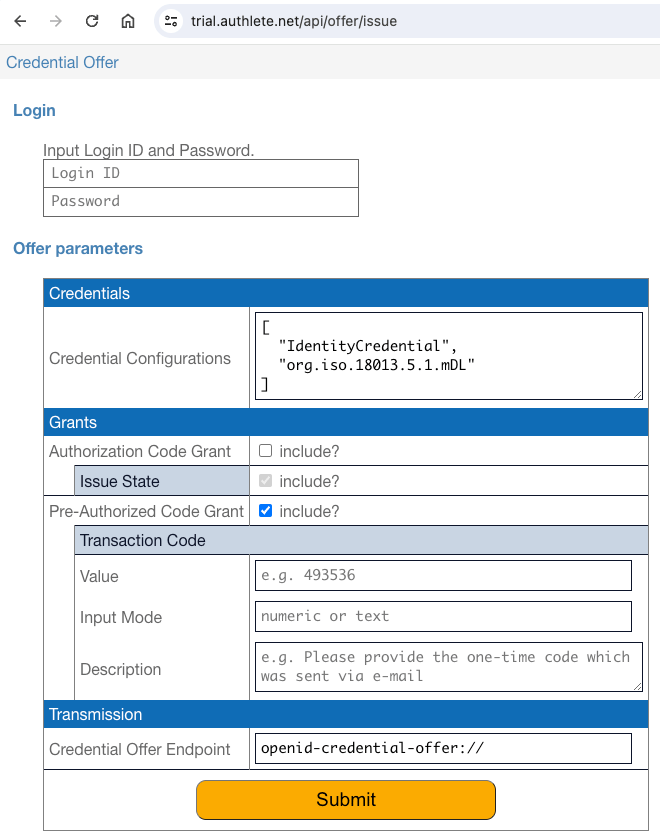 The HTML page requires user authentication. The test accounts embedded in
java-oauth-server can be used. However, if you want to issue an mdoc-based
VC, please use `inga`.
| Subject | Login ID | Password |
| :-----: | :------: | :------: |
| 1001 | `john` | `john` |
| 1002 | `jane` | `jane` |
| 1003 | `max` | `max` |
| 1004 | `inga` | `inga` |
### 3.5. Credential Endpoint Implementation
The credential endpoint can be implemented using the following Authlete APIs.
| | Authlete API | Description |
| :- | :--------------------------------- | :-------------------------------------------------------------------------------------------------------------- |
| 1 | `/auth/introspection` | validates the presented access token, and returns the information about the access token. |
| 2 | `/vci/single/parse` | parses and validates the received credential request, and returns the information about the credential request. |
| 3 | `/vci/single/issue` | issues a verifiable credential or a transaction ID, and prepares the credential response. |
Let's go through the processing steps within a credential endpoint implementation.
As the first step, the implementation of the credential endpoint receives
a credential request from a wallet.
The HTML page requires user authentication. The test accounts embedded in
java-oauth-server can be used. However, if you want to issue an mdoc-based
VC, please use `inga`.
| Subject | Login ID | Password |
| :-----: | :------: | :------: |
| 1001 | `john` | `john` |
| 1002 | `jane` | `jane` |
| 1003 | `max` | `max` |
| 1004 | `inga` | `inga` |
### 3.5. Credential Endpoint Implementation
The credential endpoint can be implemented using the following Authlete APIs.
| | Authlete API | Description |
| :- | :--------------------------------- | :-------------------------------------------------------------------------------------------------------------- |
| 1 | `/auth/introspection` | validates the presented access token, and returns the information about the access token. |
| 2 | `/vci/single/parse` | parses and validates the received credential request, and returns the information about the credential request. |
| 3 | `/vci/single/issue` | issues a verifiable credential or a transaction ID, and prepares the credential response. |
Let's go through the processing steps within a credential endpoint implementation.
As the first step, the implementation of the credential endpoint receives
a credential request from a wallet.
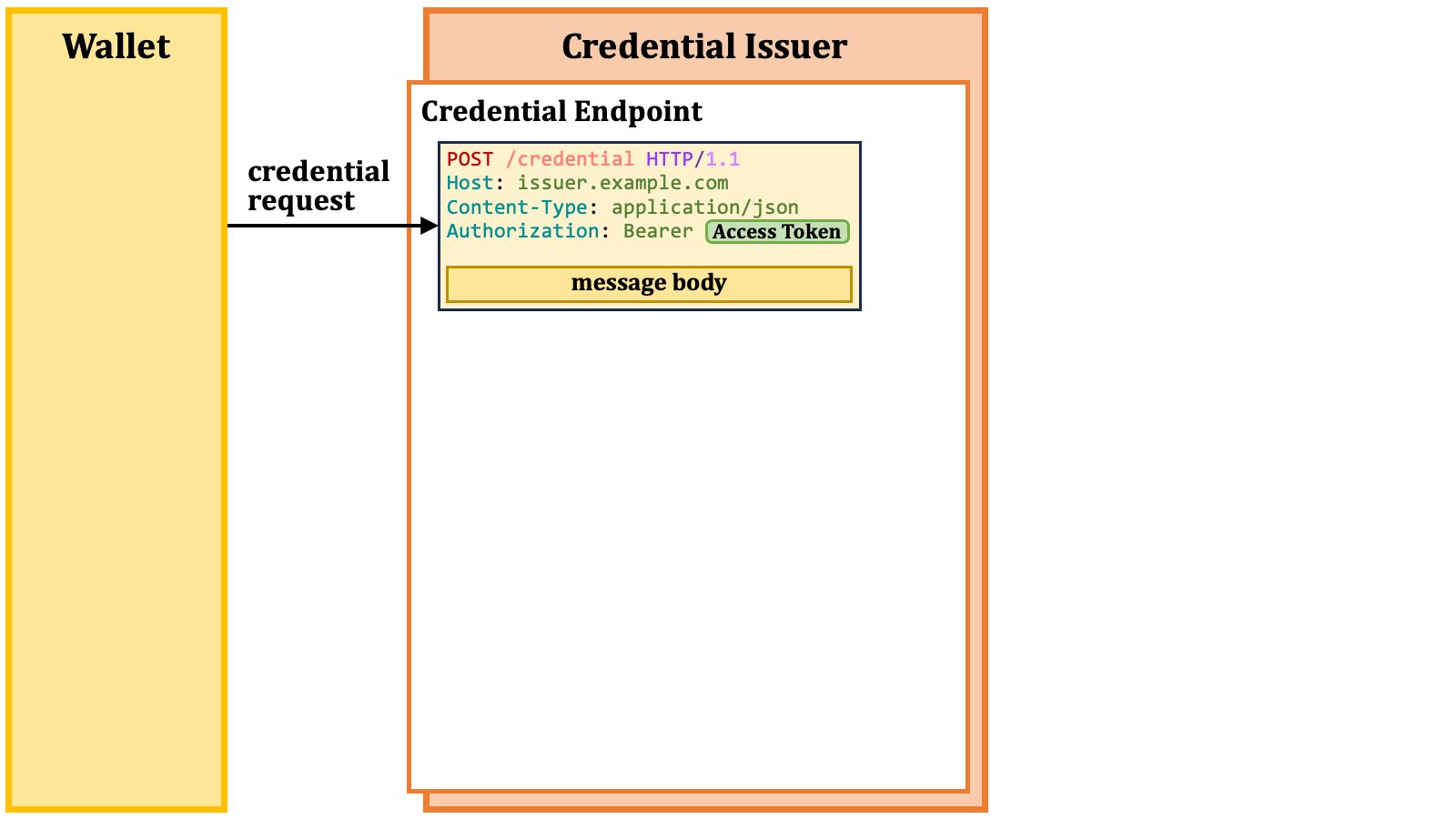 The implementation extracts the access token from the credential request and
passes it to Authlete's `/auth/introspection` API.
The implementation extracts the access token from the credential request and
passes it to Authlete's `/auth/introspection` API.
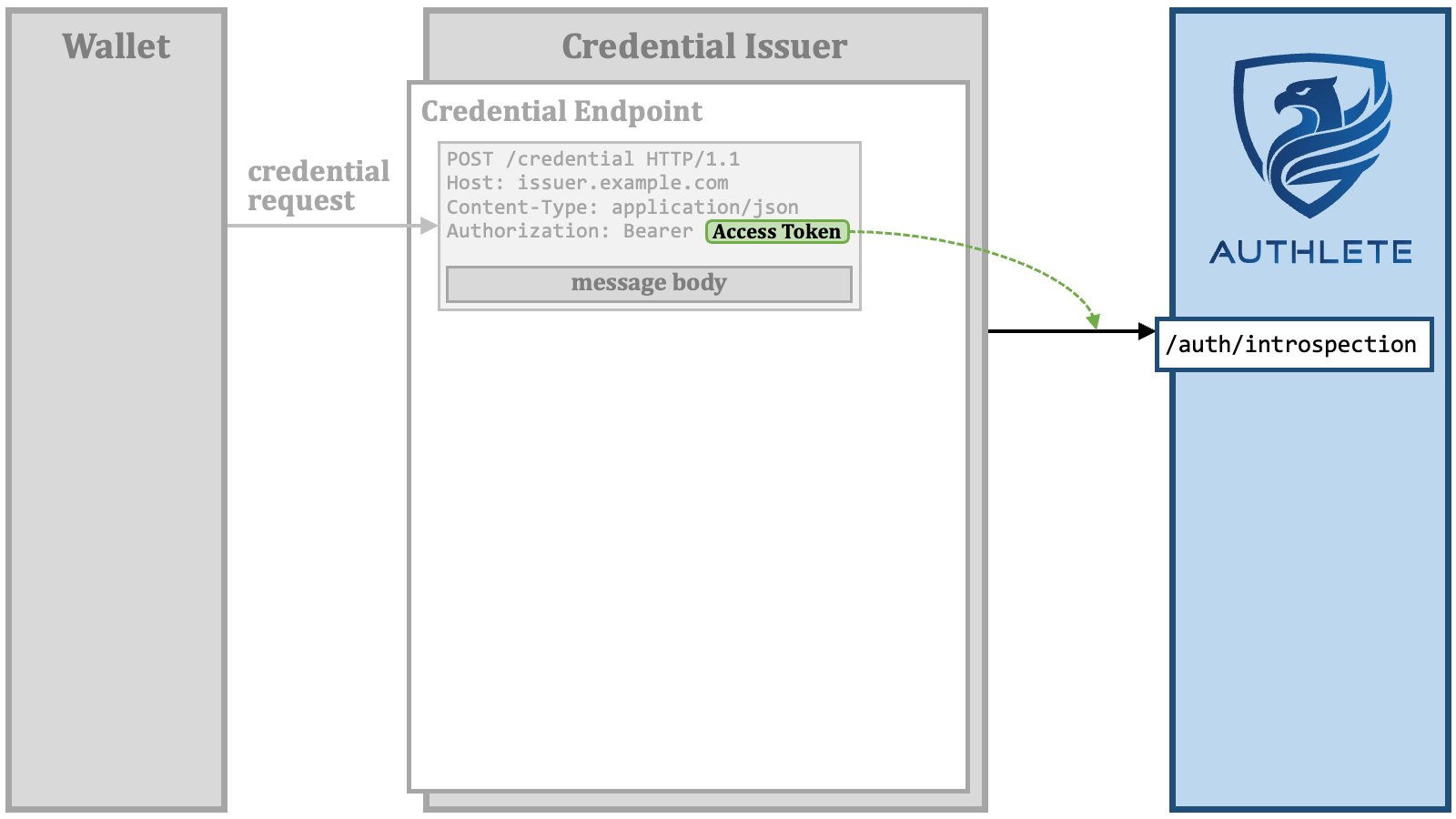 The `/auth/introspection` API validates the access token, and returns
information about the access token.
The `/auth/introspection` API validates the access token, and returns
information about the access token.
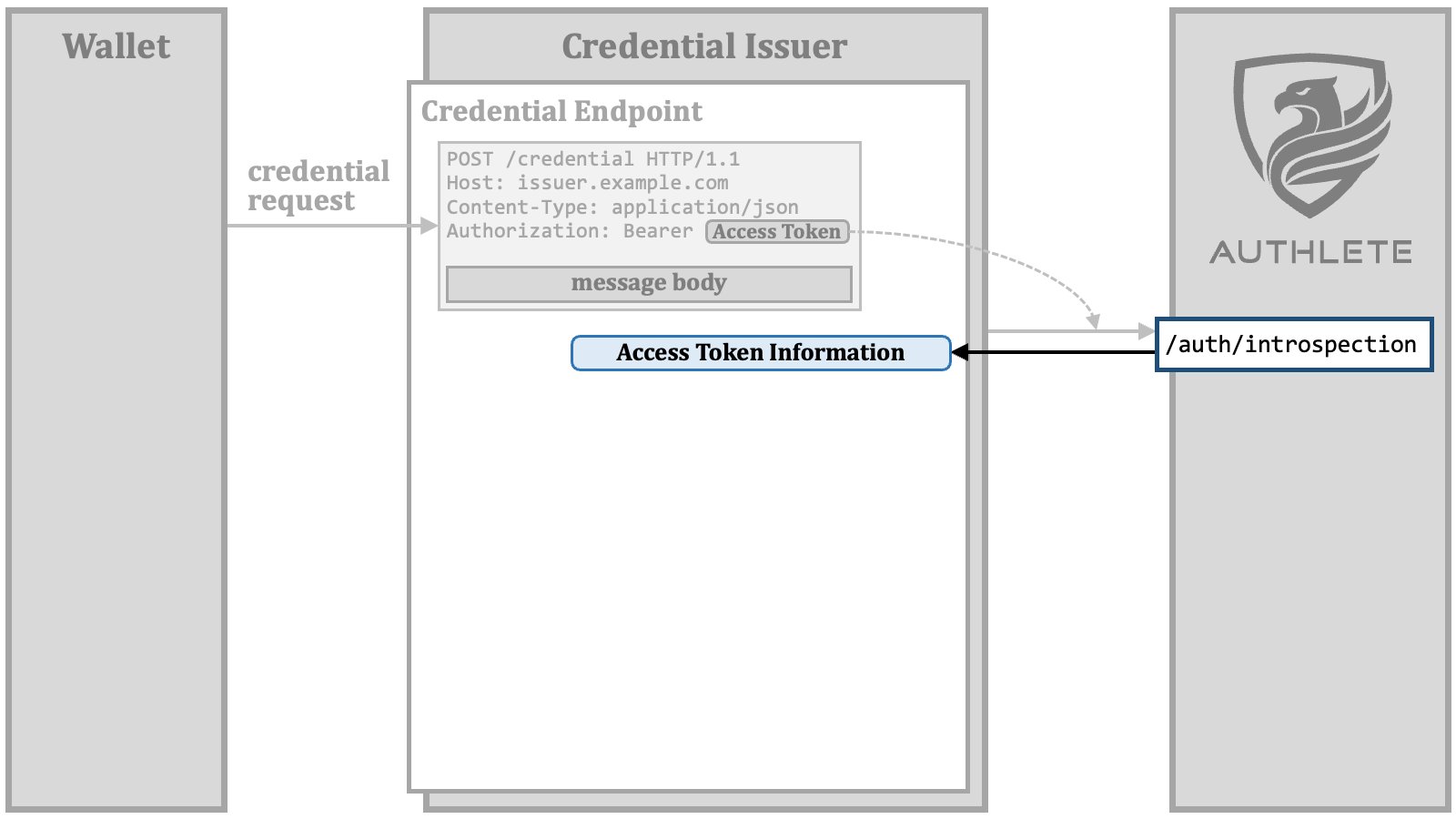 If the access token is valid, the endpoint implementation sends the
access token and the message body of the credential request to the
`/vci/single/parse` API.
If the access token is valid, the endpoint implementation sends the
access token and the message body of the credential request to the
`/vci/single/parse` API.
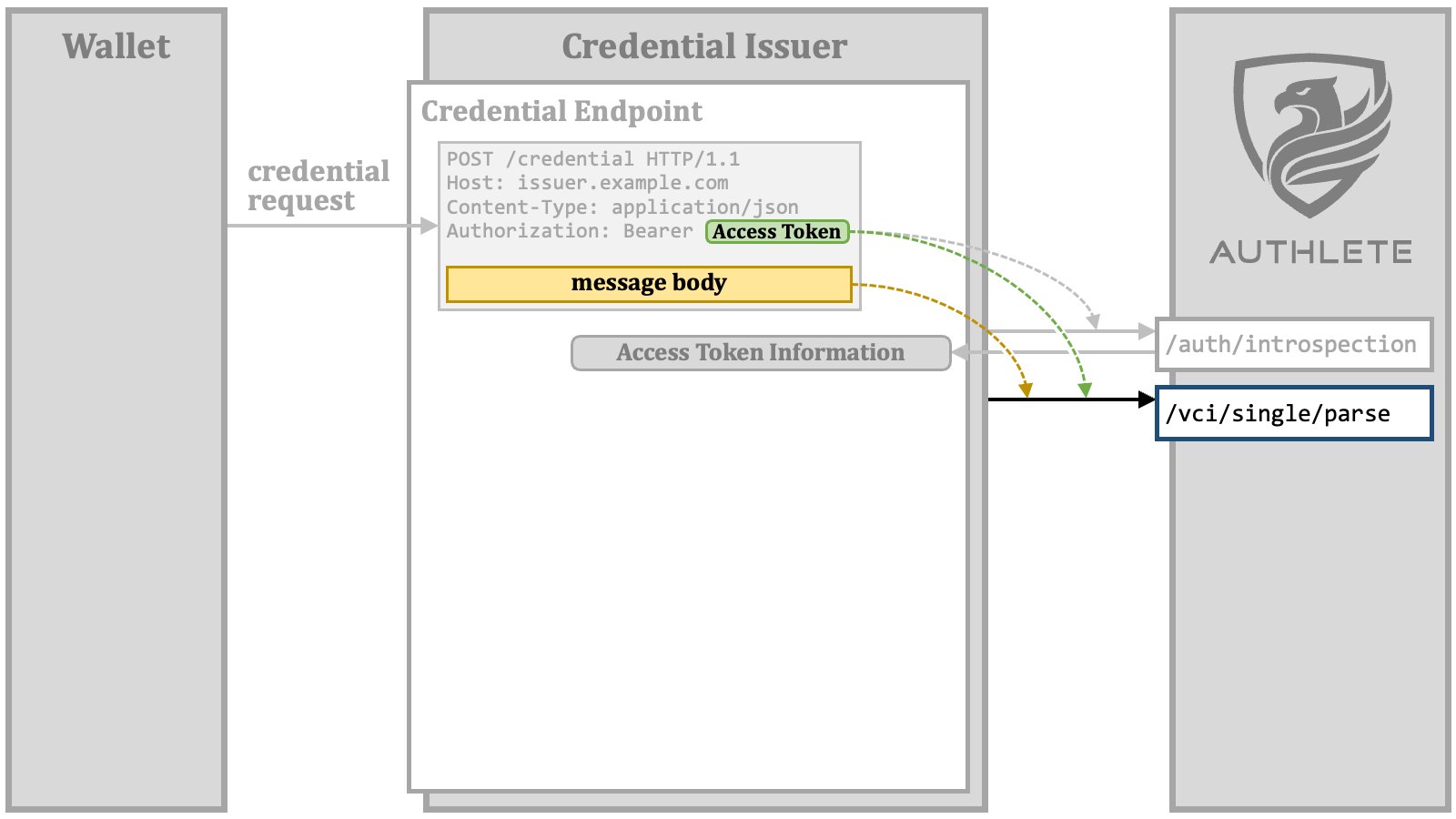 You might wonder why the access token is sent to the `/vci/single/parse` API,
even though its validation has already been completed. The reason for this is that,
in Authlete's implementation, `c_nonce` is associated with an access token.
To validate the `nonce` claim in a key proof that may be included in the
credential request, Authlete needs to know the value of `c_nonce` associated
with the access token.
The `/vci/single/parse` API parses and validates the credential request, and returns the information about the credential request.
You might wonder why the access token is sent to the `/vci/single/parse` API,
even though its validation has already been completed. The reason for this is that,
in Authlete's implementation, `c_nonce` is associated with an access token.
To validate the `nonce` claim in a key proof that may be included in the
credential request, Authlete needs to know the value of `c_nonce` associated
with the access token.
The `/vci/single/parse` API parses and validates the credential request, and returns the information about the credential request.
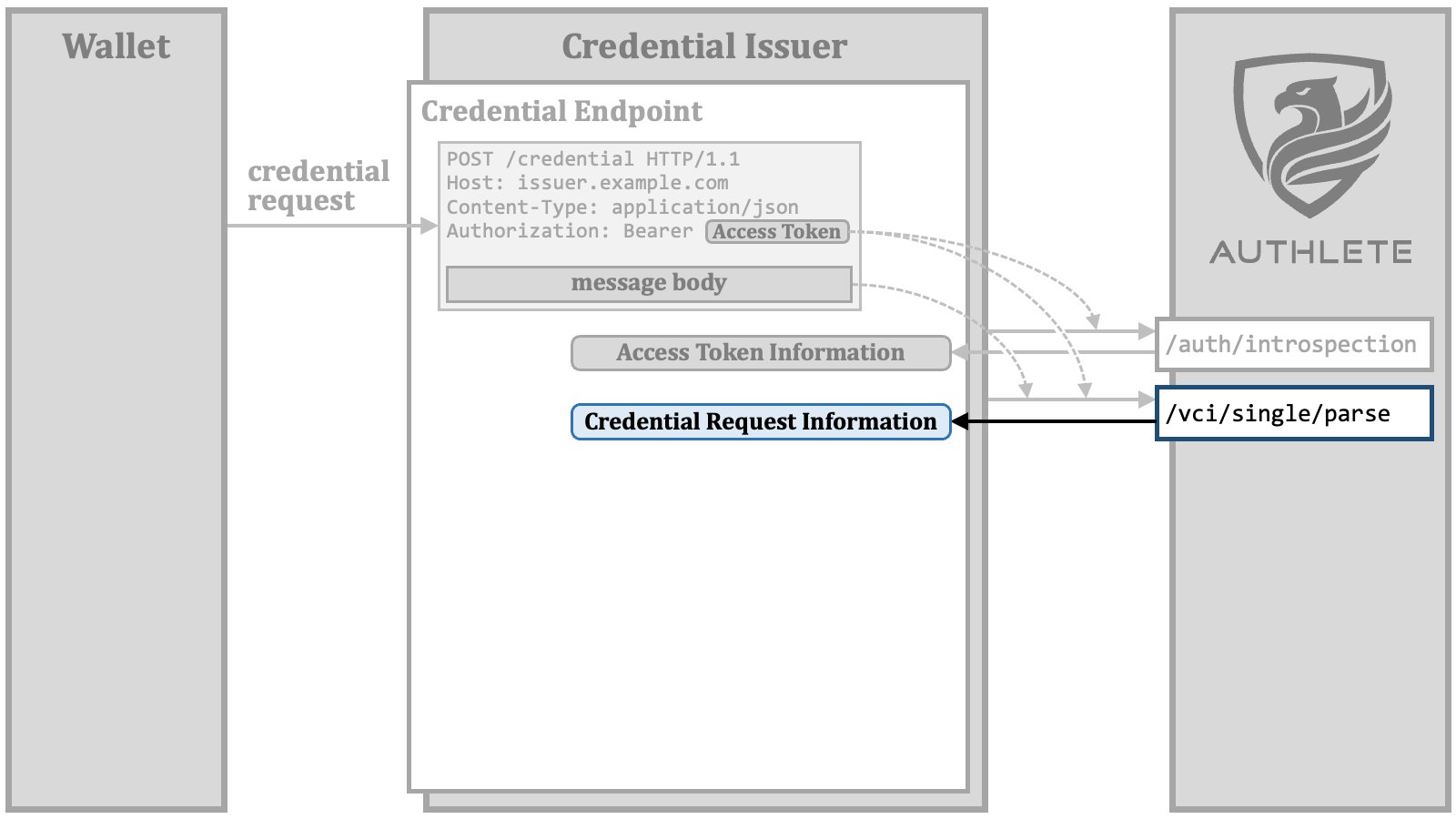 The endpoint implementation prepares a "**credential issuance order**", which
contains necessary information for Authlete to issue a verifiable credential.
The details about this preparation will be discussed later.
The endpoint implementation prepares a "**credential issuance order**", which
contains necessary information for Authlete to issue a verifiable credential.
The details about this preparation will be discussed later.
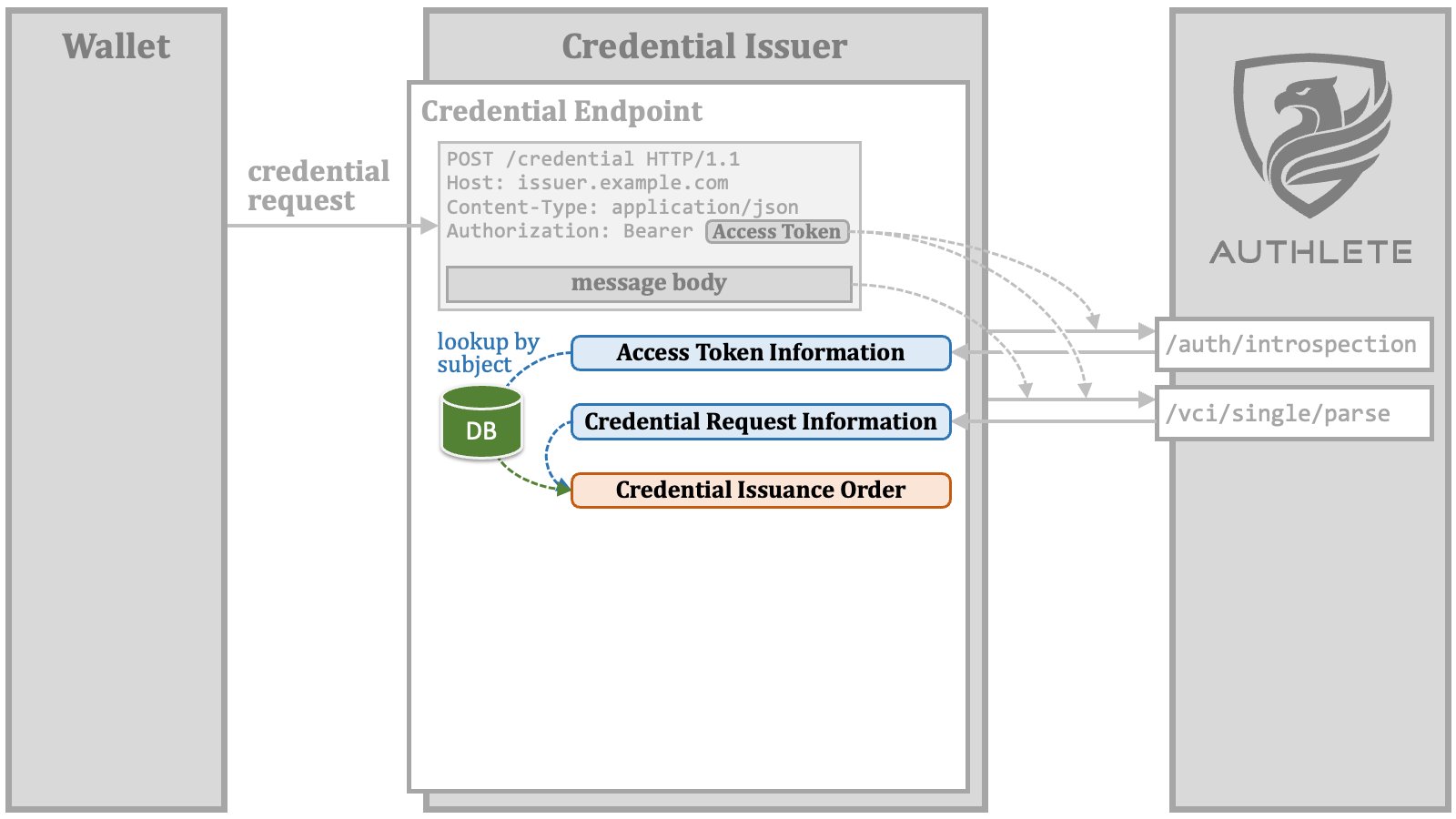 The endpoint implementation sends the credential issuance order and the access
token to the `/vci/single/issue` API.
The endpoint implementation sends the credential issuance order and the access
token to the `/vci/single/issue` API.
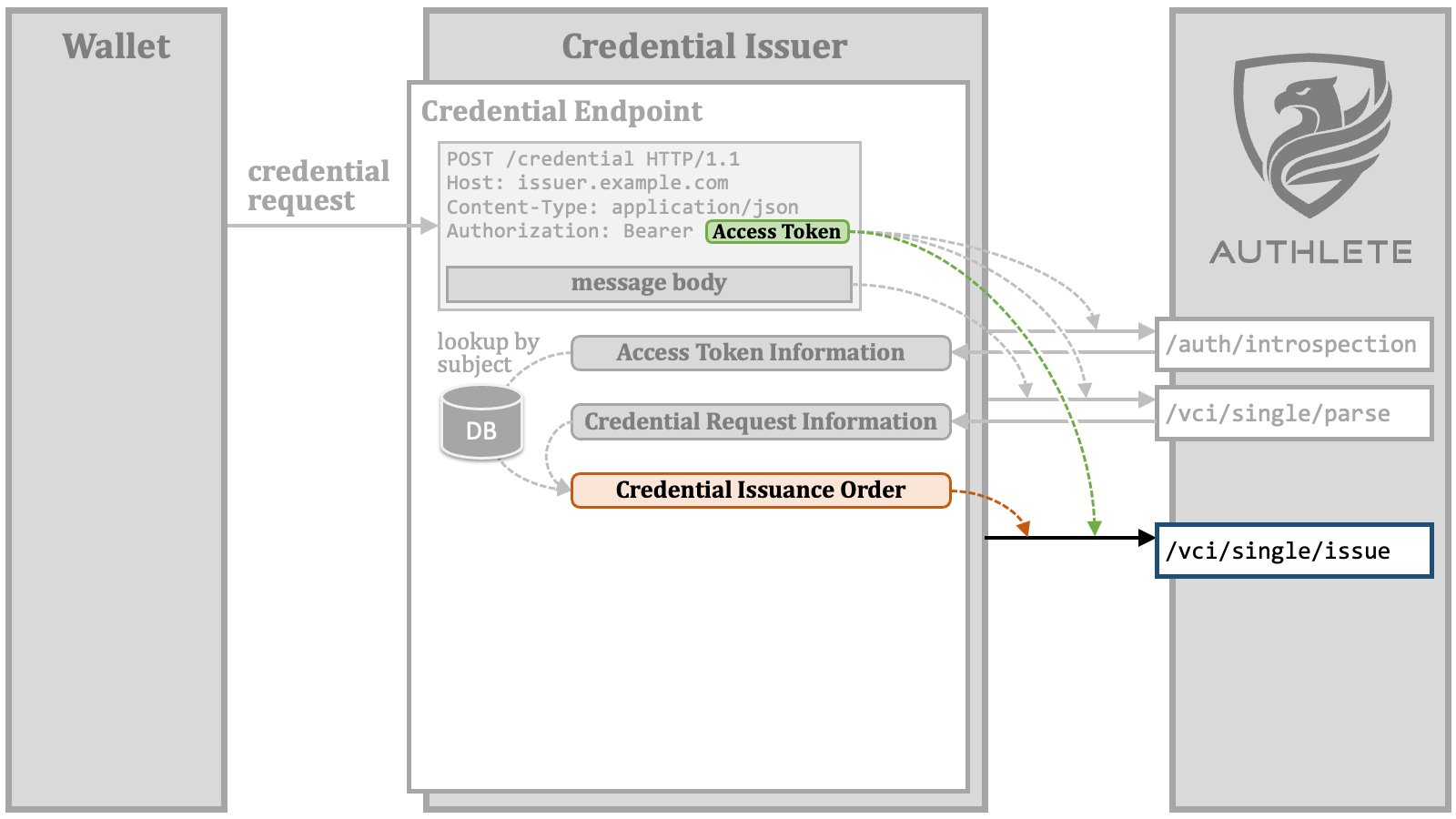 The reason for sending the access token to Authlete again is the need to refresh
the `c_nonce` value associated with the access token in case it has expired.
The `/vci/single/issue` API issues a verifiable credential or a transaction ID
according to the credential issuance order, and prepares the content of the
credential response.
The reason for sending the access token to Authlete again is the need to refresh
the `c_nonce` value associated with the access token in case it has expired.
The `/vci/single/issue` API issues a verifiable credential or a transaction ID
according to the credential issuance order, and prepares the content of the
credential response.
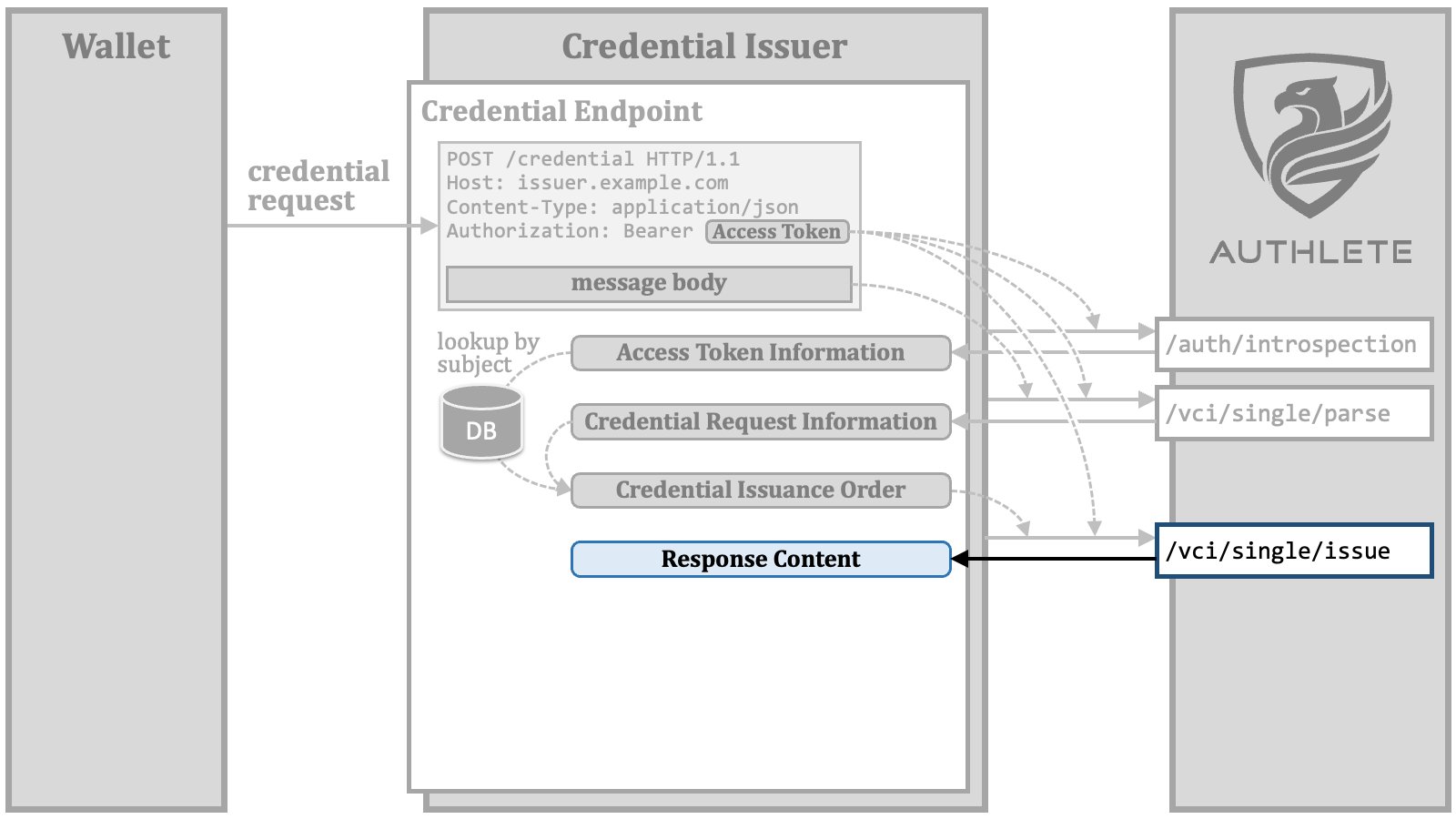 The endpoint implementation builds an HTTP response that represents the credential
response from the endpoint to the wallet. The response content prepared by the
`/vci/single/issue` API can be used as the message body of the credential
response.
The endpoint implementation builds an HTTP response that represents the credential
response from the endpoint to the wallet. The response content prepared by the
`/vci/single/issue` API can be used as the message body of the credential
response.
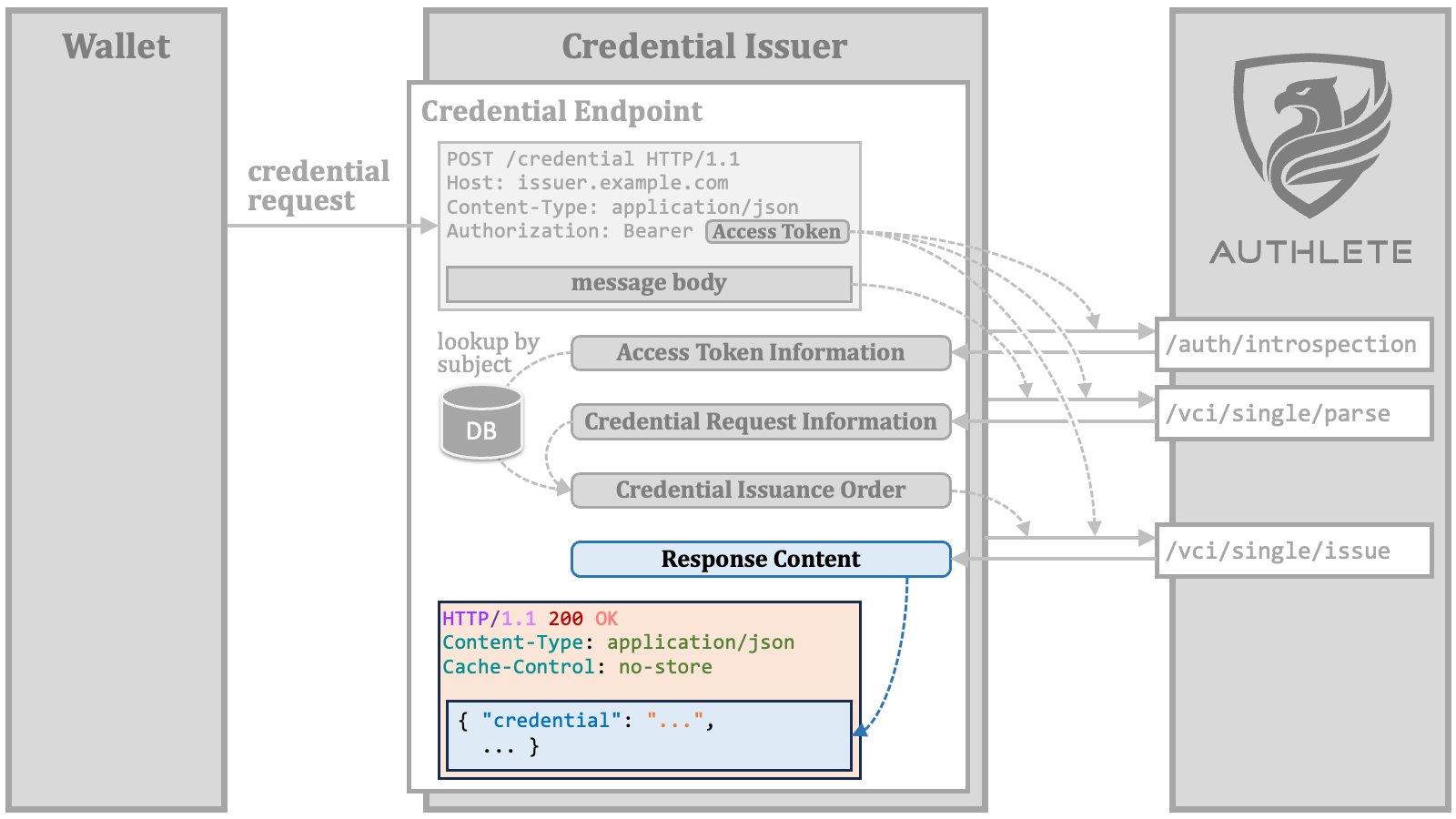 Finally, the credential endpoint returns the credential response to the wallet.
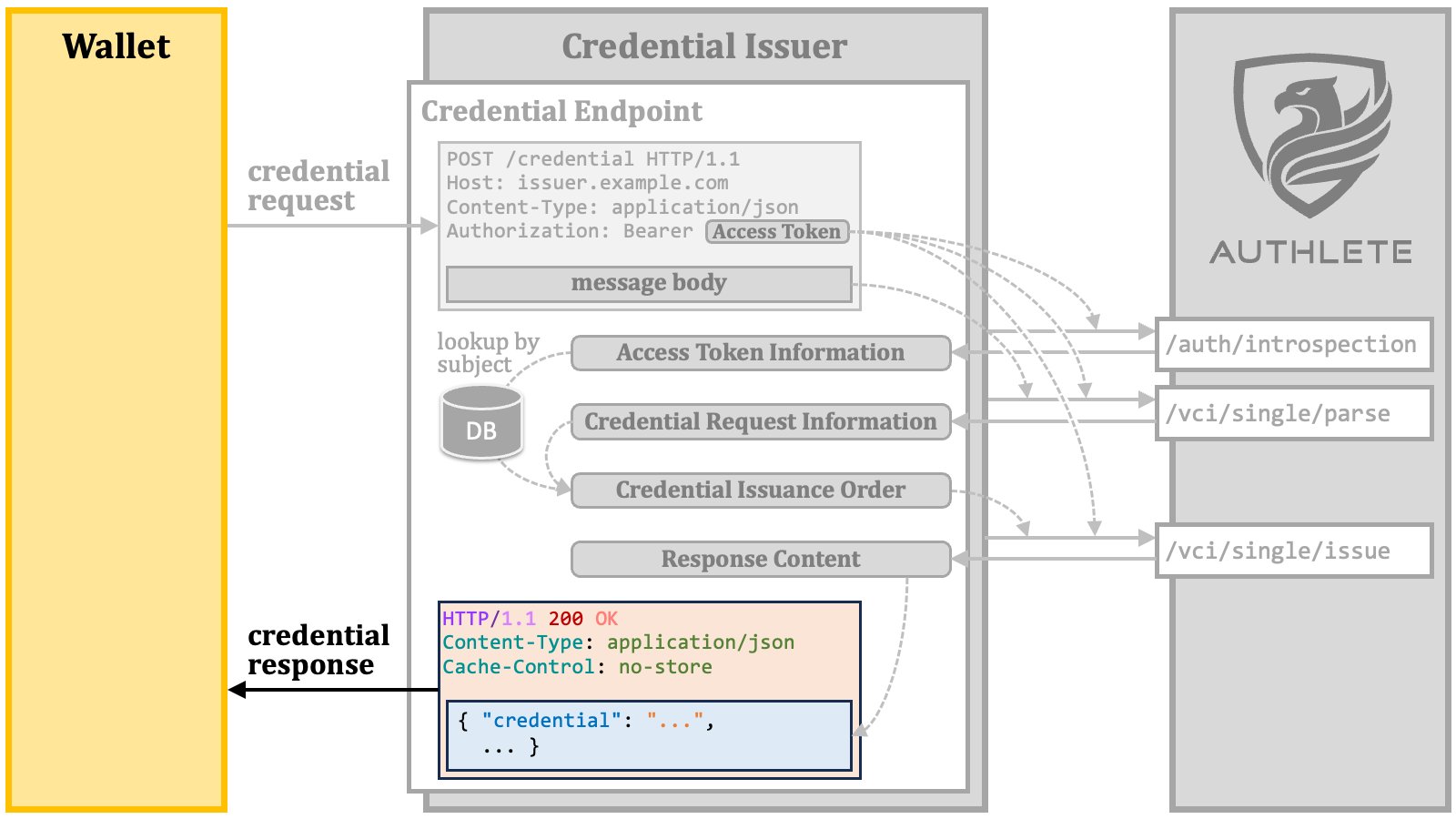 The following diagram illustrates the processing steps within a credential
endpoint implementation.
The following diagram illustrates the processing steps within a credential
endpoint implementation.
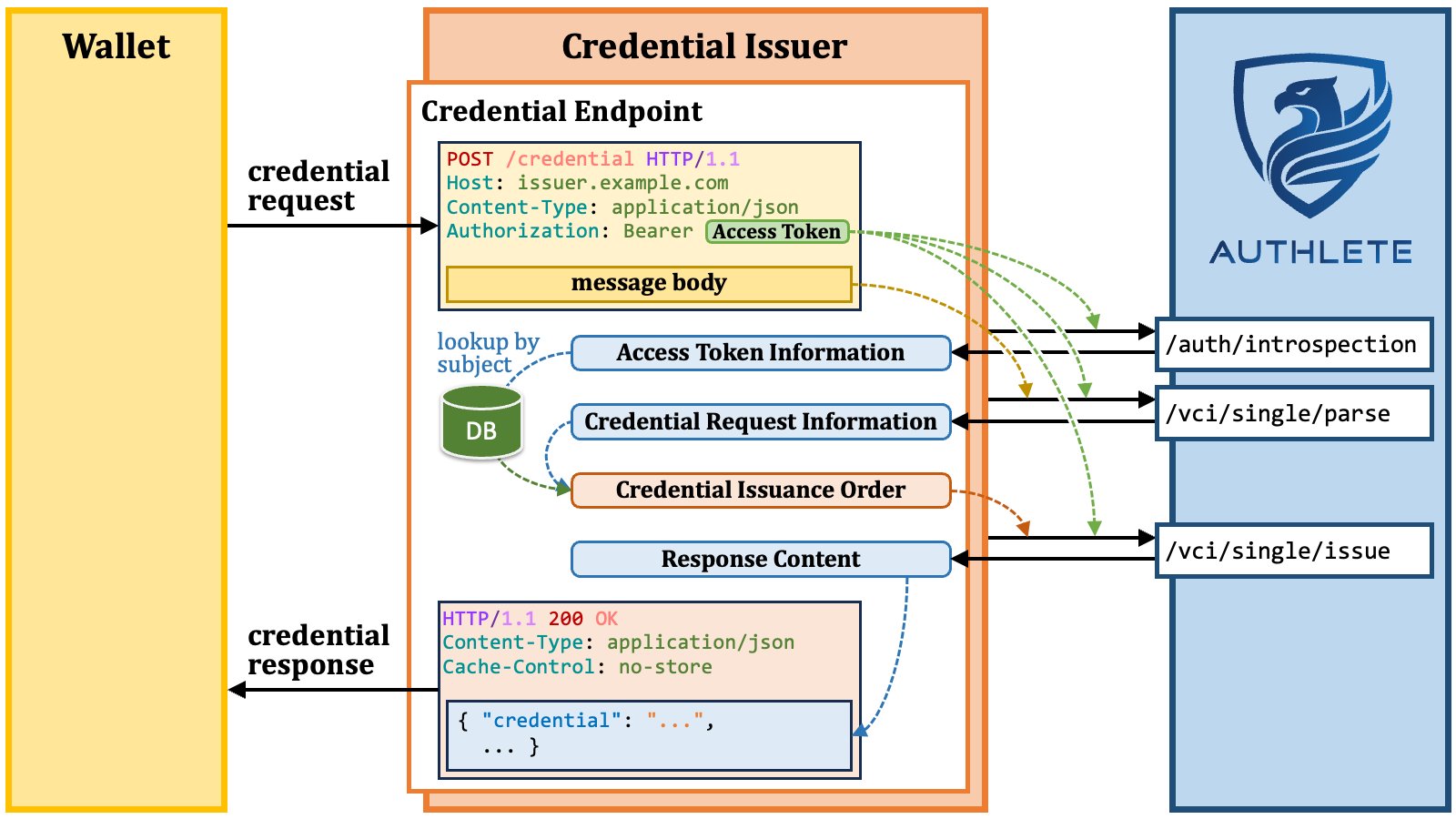 #### 3.5.1. Credential Issuance Order
The steps to prepare a credential issuance order are as follows.
##### 3.5.1.1. Credential Issuance Order Step 1
Get the subject (= unique identifier) of the user associated with the access
token from the access token information. The `"subject"` property in the response
from the `/auth/introspection` API (cf. [IntrospectionResponse][IntrospectionResponse])
holds the value of the subject.
#### 3.5.1. Credential Issuance Order
The steps to prepare a credential issuance order are as follows.
##### 3.5.1.1. Credential Issuance Order Step 1
Get the subject (= unique identifier) of the user associated with the access
token from the access token information. The `"subject"` property in the response
from the `/auth/introspection` API (cf. [IntrospectionResponse][IntrospectionResponse])
holds the value of the subject.
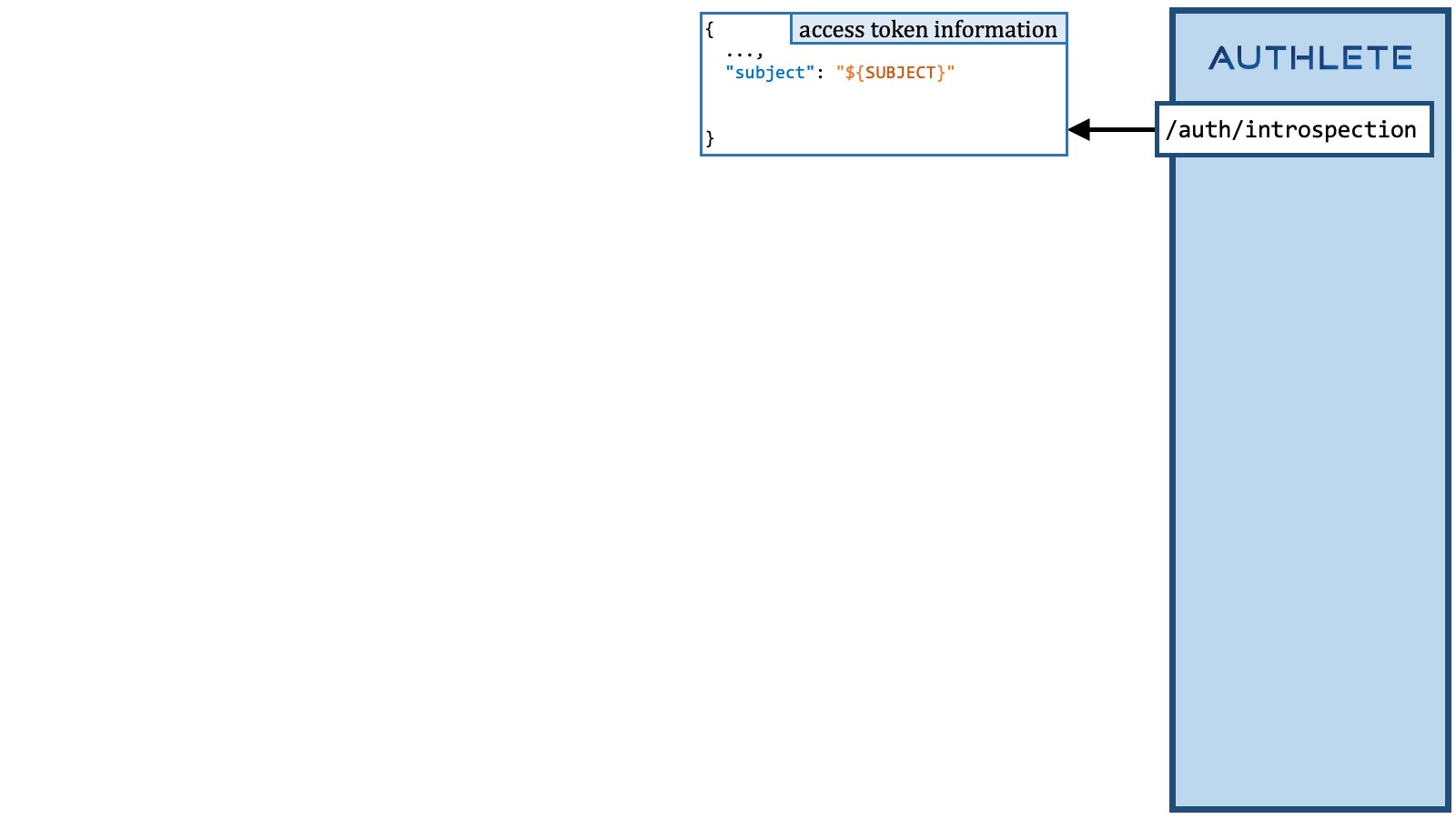 ##### 3.5.1.2. Credential Issuance Order Step 2
Retrieve information about the user identified by the subject from the user database.
##### 3.5.1.2. Credential Issuance Order Step 2
Retrieve information about the user identified by the subject from the user database.
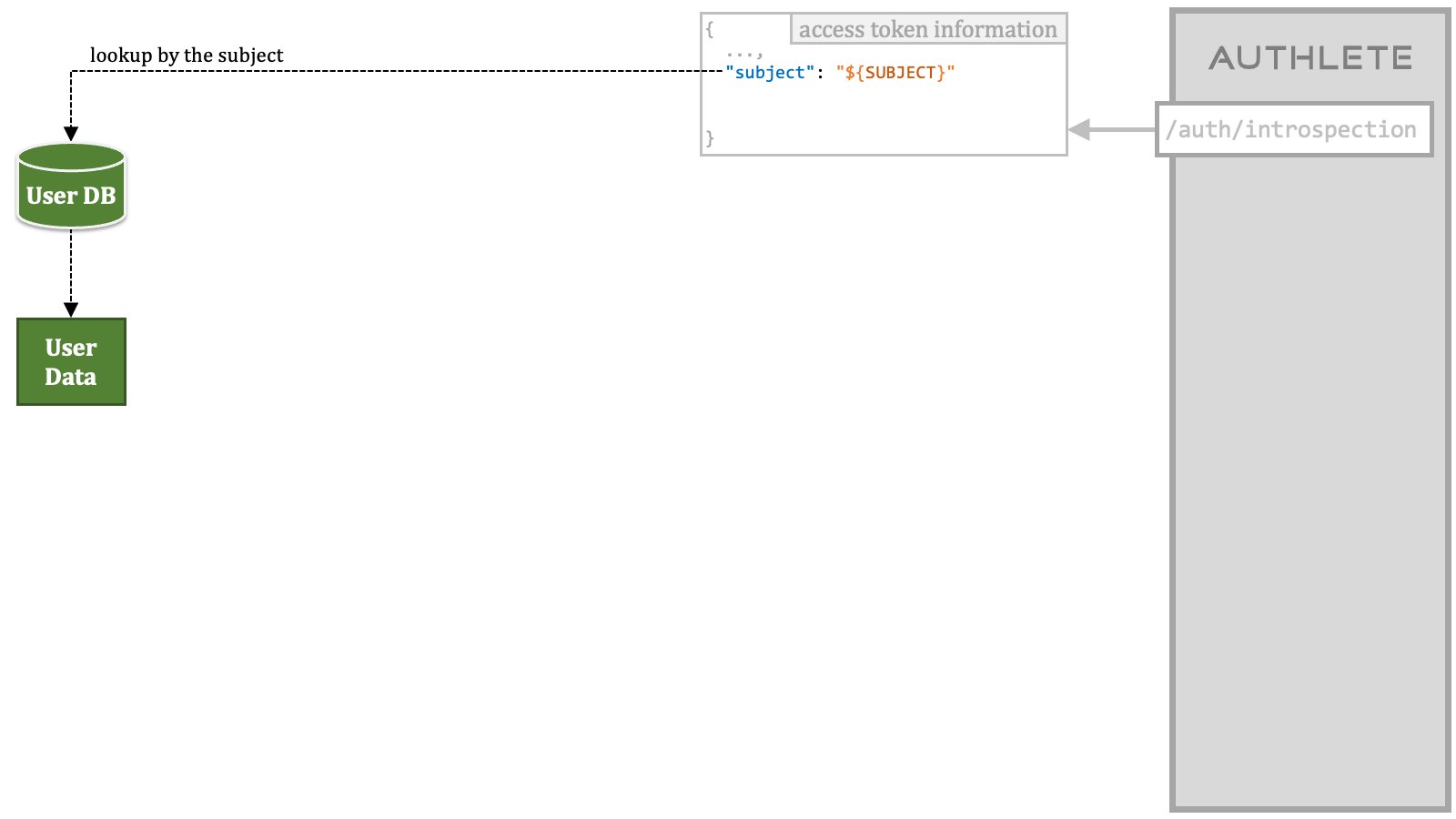 ##### 3.5.1.3. Credential Issuance Order Step 3
Get the information about the issuable credentials associated with the access
token from the access token information. The `"issuableCredentials"` property in
the response from the `/auth/introspection` API holds the information as a string.
This string needs to be parsed as a JSON array.
##### 3.5.1.3. Credential Issuance Order Step 3
Get the information about the issuable credentials associated with the access
token from the access token information. The `"issuableCredentials"` property in
the response from the `/auth/introspection` API holds the information as a string.
This string needs to be parsed as a JSON array.
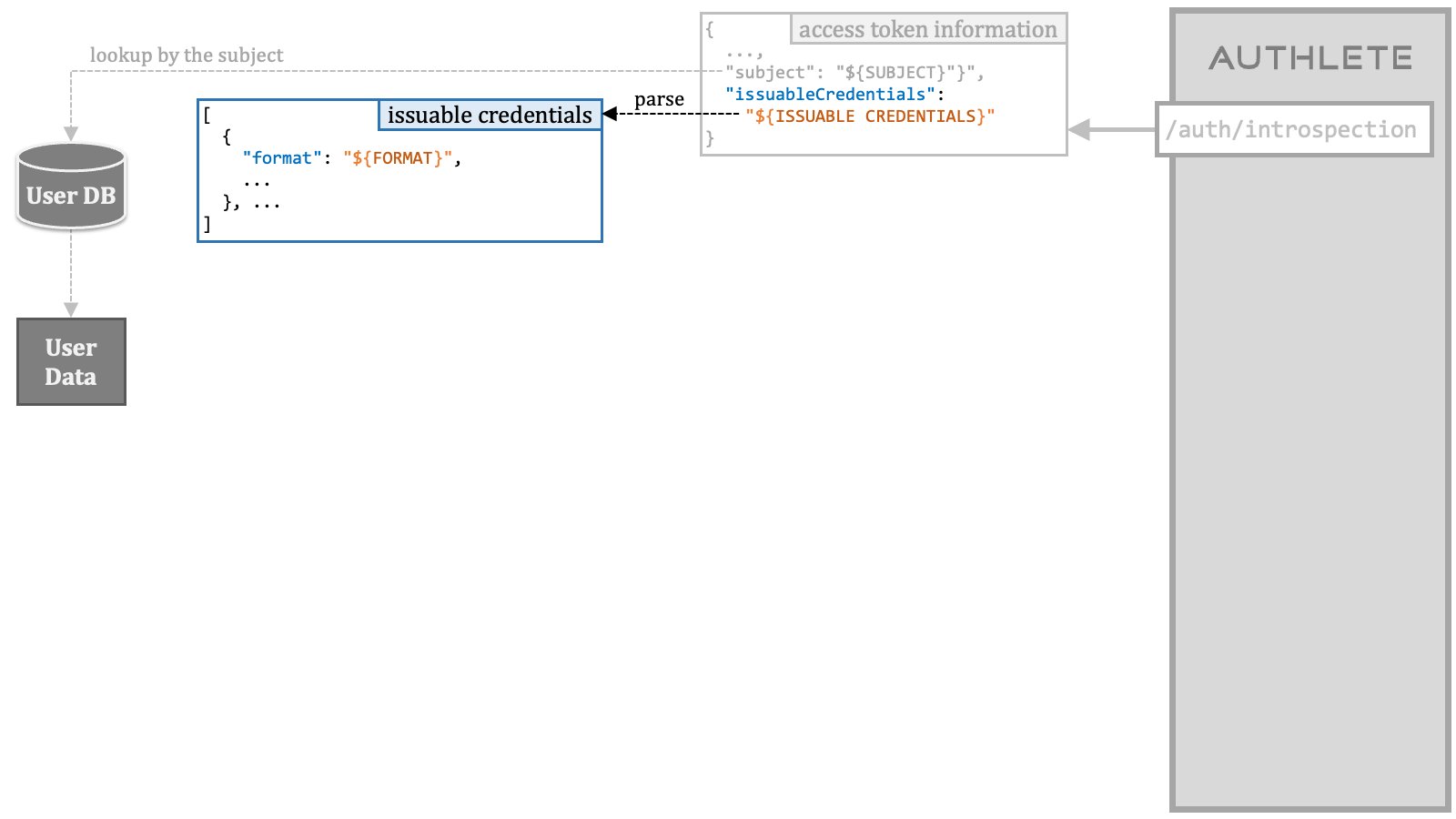 ##### 3.5.1.4. Credential Issuance Order Step 4
Get the credential information included in the credential request from the credential
request information. The `"info"` object in the response from the `/vci/single/parse`
API (cf. [CredentialSingleParseResponse][CredentialSingleParseResponse]) holds
various information about the credential request. The combination of the `"format"`
property and the `"details"` property in the `"info"` object represent the
credential information.
##### 3.5.1.4. Credential Issuance Order Step 4
Get the credential information included in the credential request from the credential
request information. The `"info"` object in the response from the `/vci/single/parse`
API (cf. [CredentialSingleParseResponse][CredentialSingleParseResponse]) holds
various information about the credential request. The combination of the `"format"`
property and the `"details"` property in the `"info"` object represent the
credential information.
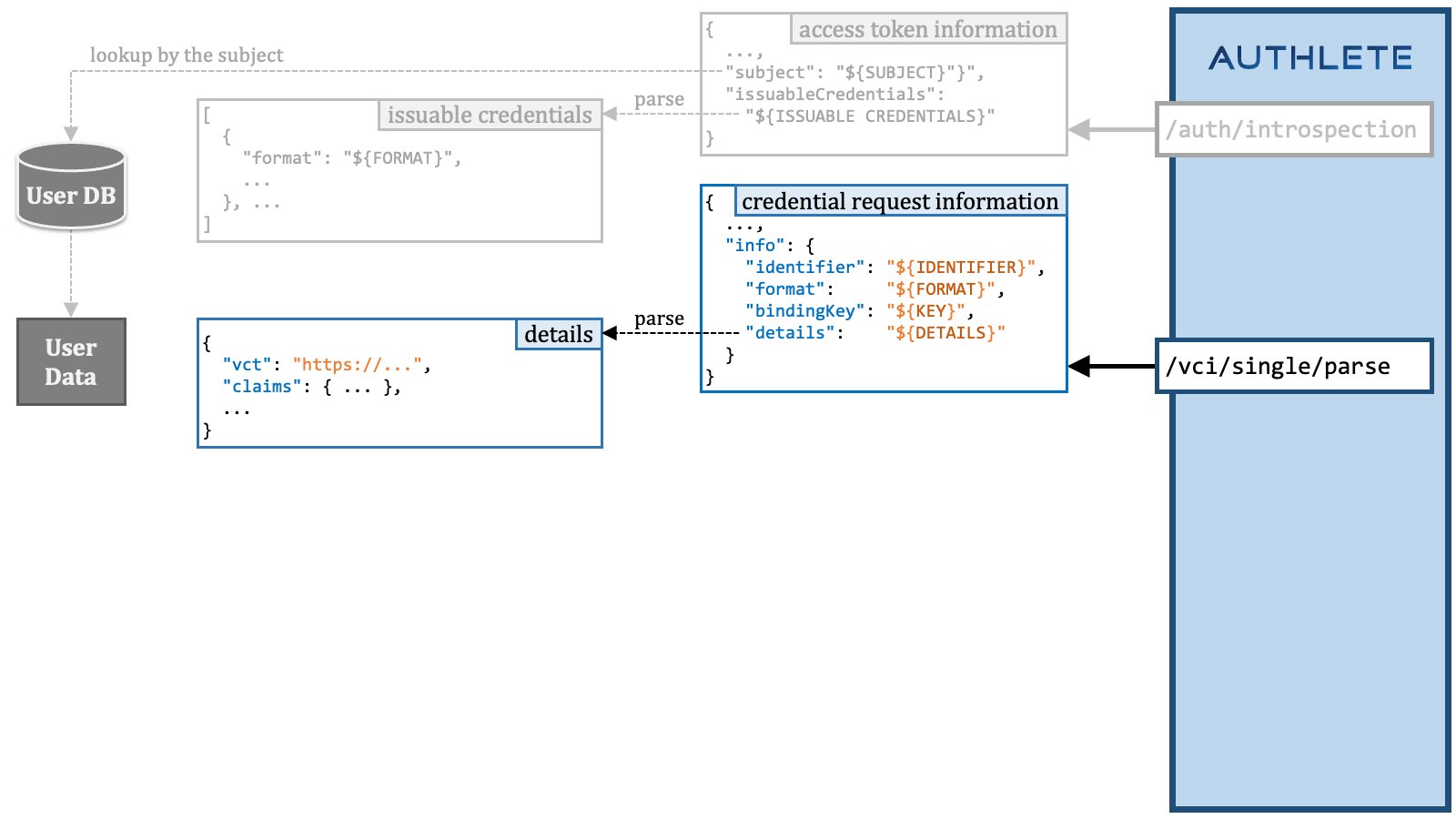 The value of the `"details"` property is a string. The string needs to be parsed
as a JSON object. The content of the JSON object is almost the same as the
credential request except that it does not contain the `"format"` parameter,
the `"proof"` parameter, and the `"credential_response_encryption"`
parameter.
##### 3.5.1.5. Credential Issuance Order Step 5
Confirm that the access token has the necessary permissions for the
credential request by checking if the credential information is a subset
of any issuable credentials.
The value of the `"details"` property is a string. The string needs to be parsed
as a JSON object. The content of the JSON object is almost the same as the
credential request except that it does not contain the `"format"` parameter,
the `"proof"` parameter, and the `"credential_response_encryption"`
parameter.
##### 3.5.1.5. Credential Issuance Order Step 5
Confirm that the access token has the necessary permissions for the
credential request by checking if the credential information is a subset
of any issuable credentials.
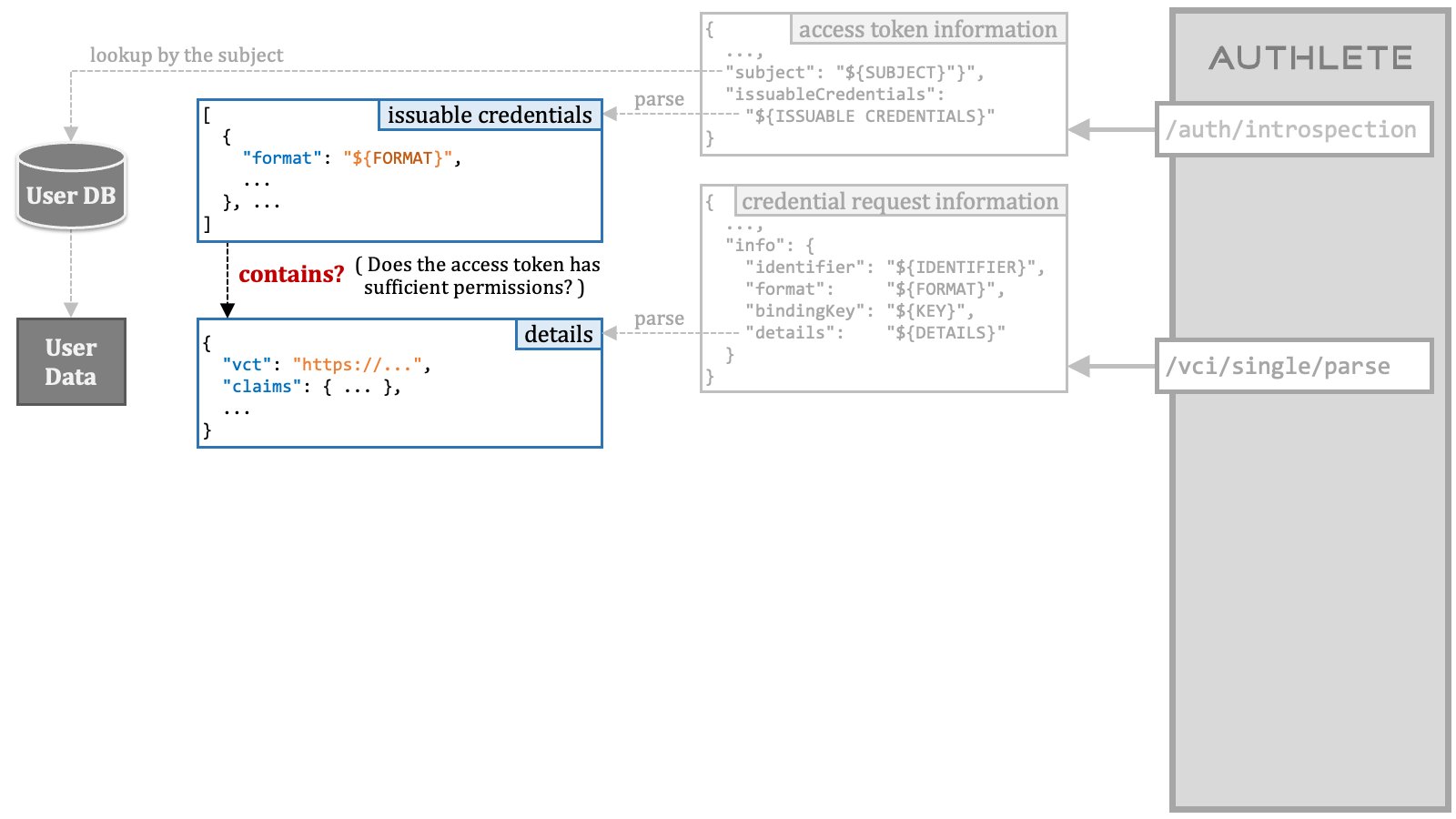 However, if you are a programmer, you can understand that the current OID4VCI
specification makes it challenging to implement this step. Furthermore, in the
case of SD-JWT VC, there is a proposal to make `vct` determine the set of
claims and eliminate the need to specify individual claims one by one.
The proposal makes it impossible to check the access token's
permissions only by mechanically seeing the inclusion relationship between
JSON objects.
Therefore, the confirmation of whether the access token has sufficient
permissions is left to be implemented by each credential issuer according to
their respective policies. While permission checks based on inclusion
relationships are implemented in Authlete, they have been disabled.
##### 3.5.1.6. Credential Issuance Order Step 6
Determine the set of user claims to embed in the VC being issued based on
the credential information, and get the values of the user claims from the
dataset retrieved from the user database.
However, if you are a programmer, you can understand that the current OID4VCI
specification makes it challenging to implement this step. Furthermore, in the
case of SD-JWT VC, there is a proposal to make `vct` determine the set of
claims and eliminate the need to specify individual claims one by one.
The proposal makes it impossible to check the access token's
permissions only by mechanically seeing the inclusion relationship between
JSON objects.
Therefore, the confirmation of whether the access token has sufficient
permissions is left to be implemented by each credential issuer according to
their respective policies. While permission checks based on inclusion
relationships are implemented in Authlete, they have been disabled.
##### 3.5.1.6. Credential Issuance Order Step 6
Determine the set of user claims to embed in the VC being issued based on
the credential information, and get the values of the user claims from the
dataset retrieved from the user database.
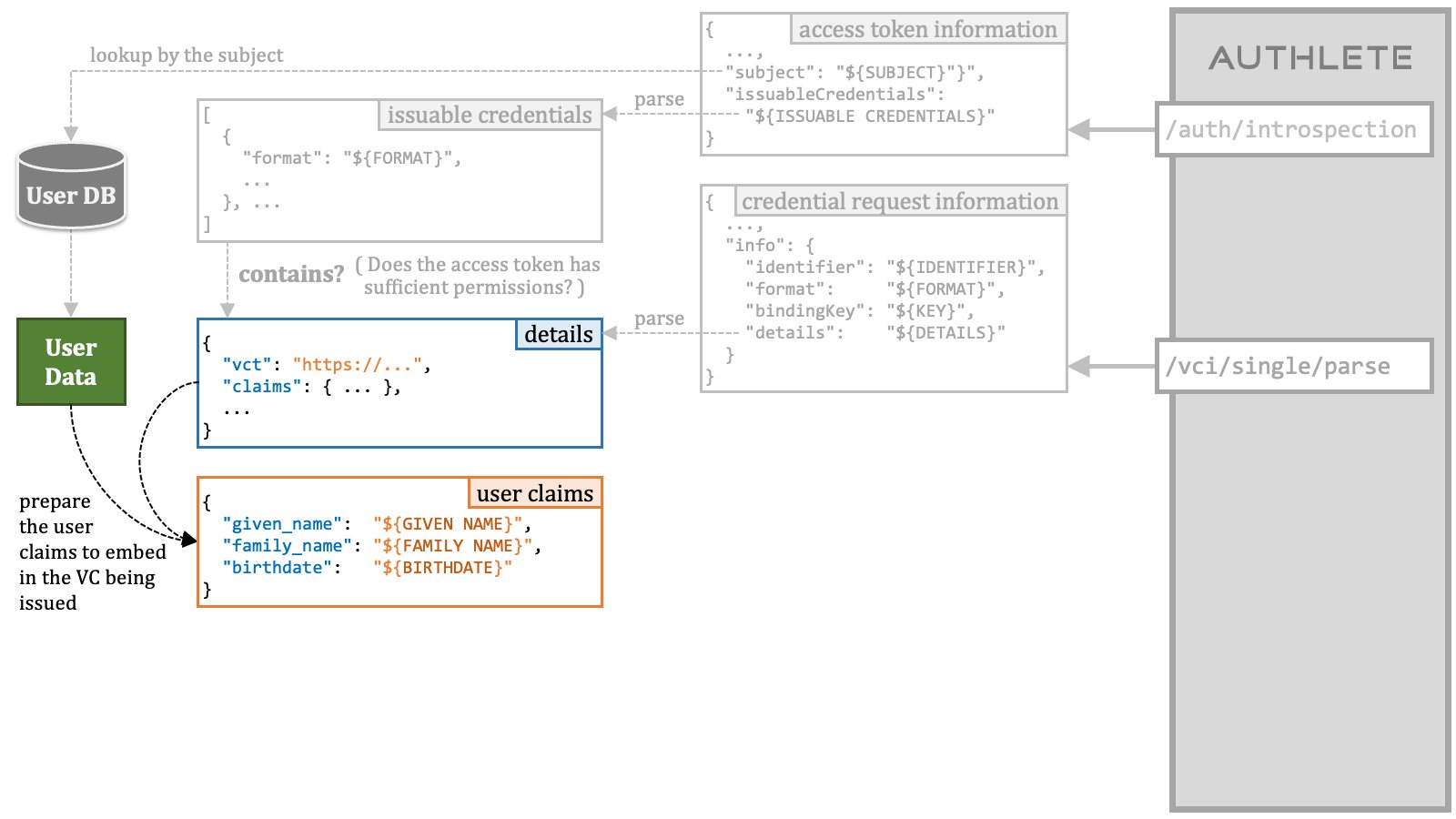 ##### 3.5.1.7. Credential Issuance Order Step 7
Build a credential issuance order using the collected data.
##### 3.5.1.7. Credential Issuance Order Step 7
Build a credential issuance order using the collected data.
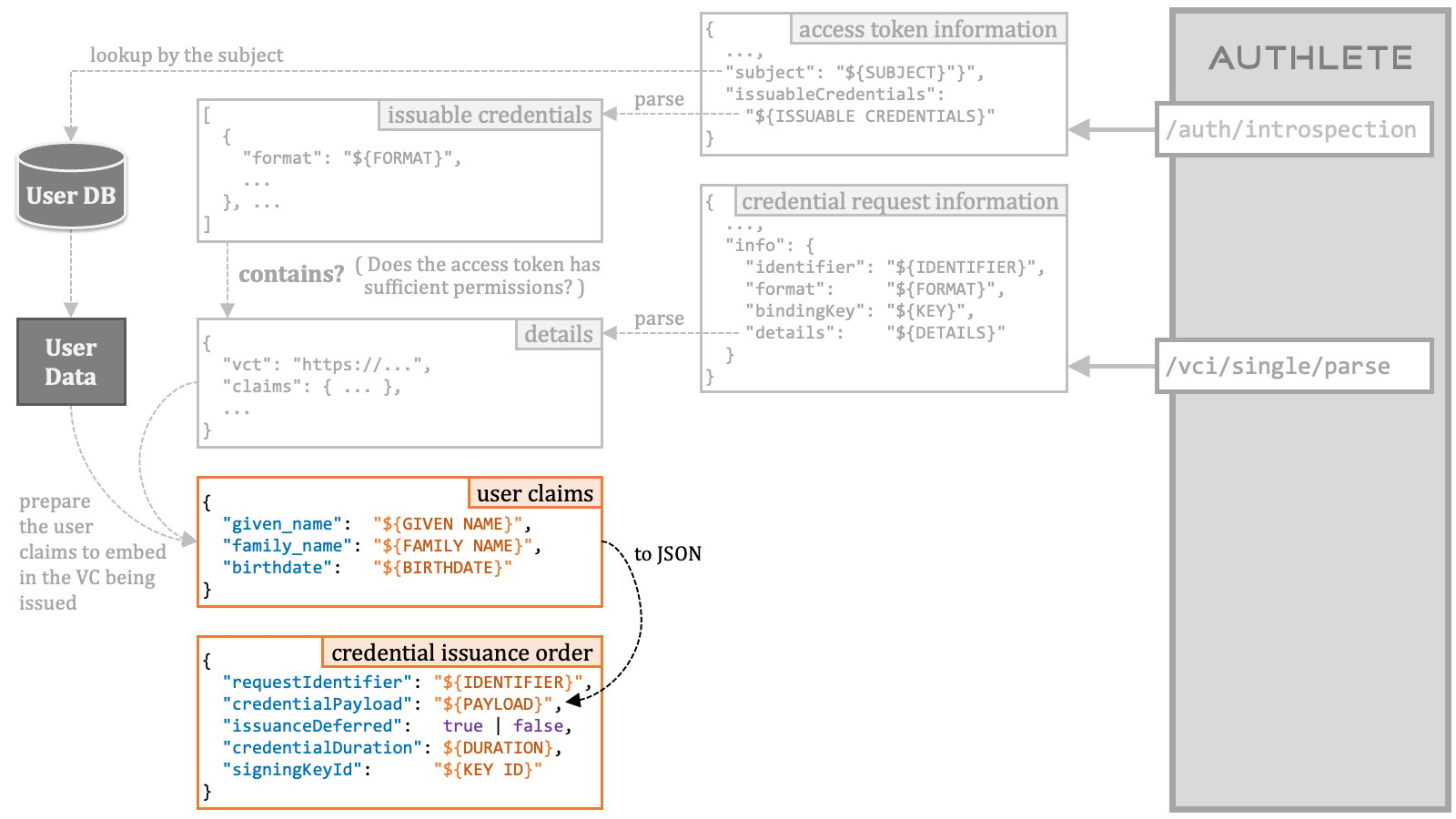 A credential issuance order is a JSON object that has the properties listed
in the following table.
| Property | Type | Description |
| :------------------- | :------ | :-------------------------------------------------------------------------------------------------------------------------------------------------------------------------------------------------------------------------------------------------------------------- |
| `requestIdentifier` | string | The identifier of the credential request which has been assigned by Authlete. The `info.identifier` property in the response from the `/vci/single/parse` API is the identifier. This property is mandatory. |
| `credentialPayload` | string | The additional payload added to the VC being issued. The format of this string must be a JSON object. The set of the user claims should be converted into JSON and set to this property. This parameter is optional. |
| `issuanceDeferred` | boolean | The flag indicating whether to defer the credential issuance. When this property is `true`, the `/vci/single/issue` API issues a transaction ID instead of a VC. |
| `credentialDuration` | integer | The duration of the VC in seconds. If the value of this property is a positive number, the value is used as the duration. If the value is 0, the default duration of the service is used. If the value is a negative number, the VC will not have an expiration time. |
| `signingKeyId` | string | The key ID of the private key that should be used for signing the VC being issued. If omitted, Authlete will select a key automatically. |
##### 3.5.1.8. Credential Issuance Order Step 8
Prepare a request to the `/vci/single/issue` API (cf. [CredentialSingleIssueRequest][CredentialSingleIssueRequest]).
A credential issuance order is a JSON object that has the properties listed
in the following table.
| Property | Type | Description |
| :------------------- | :------ | :-------------------------------------------------------------------------------------------------------------------------------------------------------------------------------------------------------------------------------------------------------------------- |
| `requestIdentifier` | string | The identifier of the credential request which has been assigned by Authlete. The `info.identifier` property in the response from the `/vci/single/parse` API is the identifier. This property is mandatory. |
| `credentialPayload` | string | The additional payload added to the VC being issued. The format of this string must be a JSON object. The set of the user claims should be converted into JSON and set to this property. This parameter is optional. |
| `issuanceDeferred` | boolean | The flag indicating whether to defer the credential issuance. When this property is `true`, the `/vci/single/issue` API issues a transaction ID instead of a VC. |
| `credentialDuration` | integer | The duration of the VC in seconds. If the value of this property is a positive number, the value is used as the duration. If the value is 0, the default duration of the service is used. If the value is a negative number, the VC will not have an expiration time. |
| `signingKeyId` | string | The key ID of the private key that should be used for signing the VC being issued. If omitted, Authlete will select a key automatically. |
##### 3.5.1.8. Credential Issuance Order Step 8
Prepare a request to the `/vci/single/issue` API (cf. [CredentialSingleIssueRequest][CredentialSingleIssueRequest]).
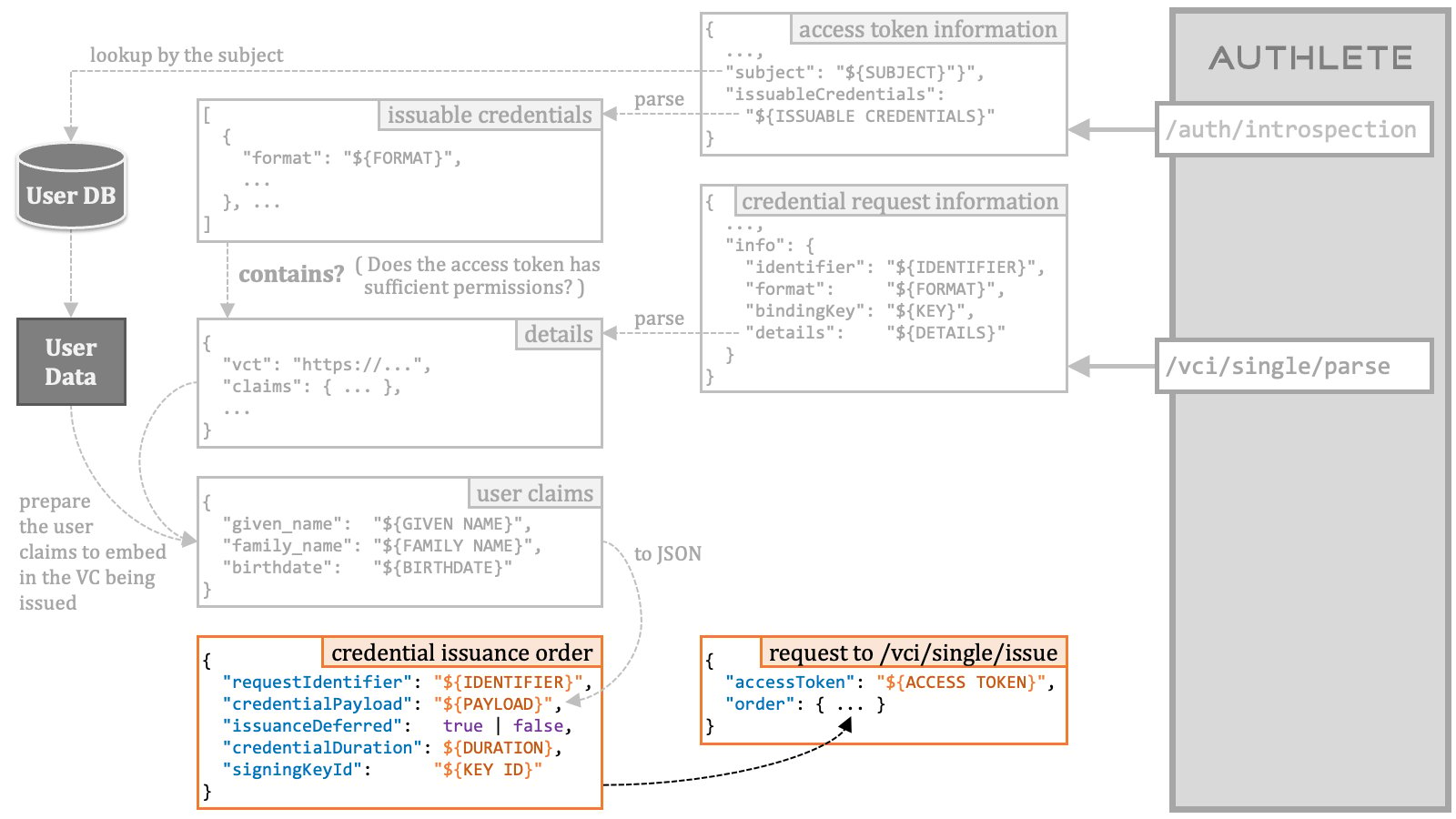 \| Request to the /vci/single/issue API |
\| HTTP Method and Content-Type | POST | application/json |
\| Request Parameters | accessToken | The access token presented at the credential endpoint. |
\| order | A credential issuance order that provides an instruction for issuing
a verifiable credential or a transaction ID. |
##### 3.5.1.9. Credential Issuance Order Step 9
Send the prepared request to the `/vci/single/issue` API.
\| Request to the /vci/single/issue API |
\| HTTP Method and Content-Type | POST | application/json |
\| Request Parameters | accessToken | The access token presented at the credential endpoint. |
\| order | A credential issuance order that provides an instruction for issuing
a verifiable credential or a transaction ID. |
##### 3.5.1.9. Credential Issuance Order Step 9
Send the prepared request to the `/vci/single/issue` API.
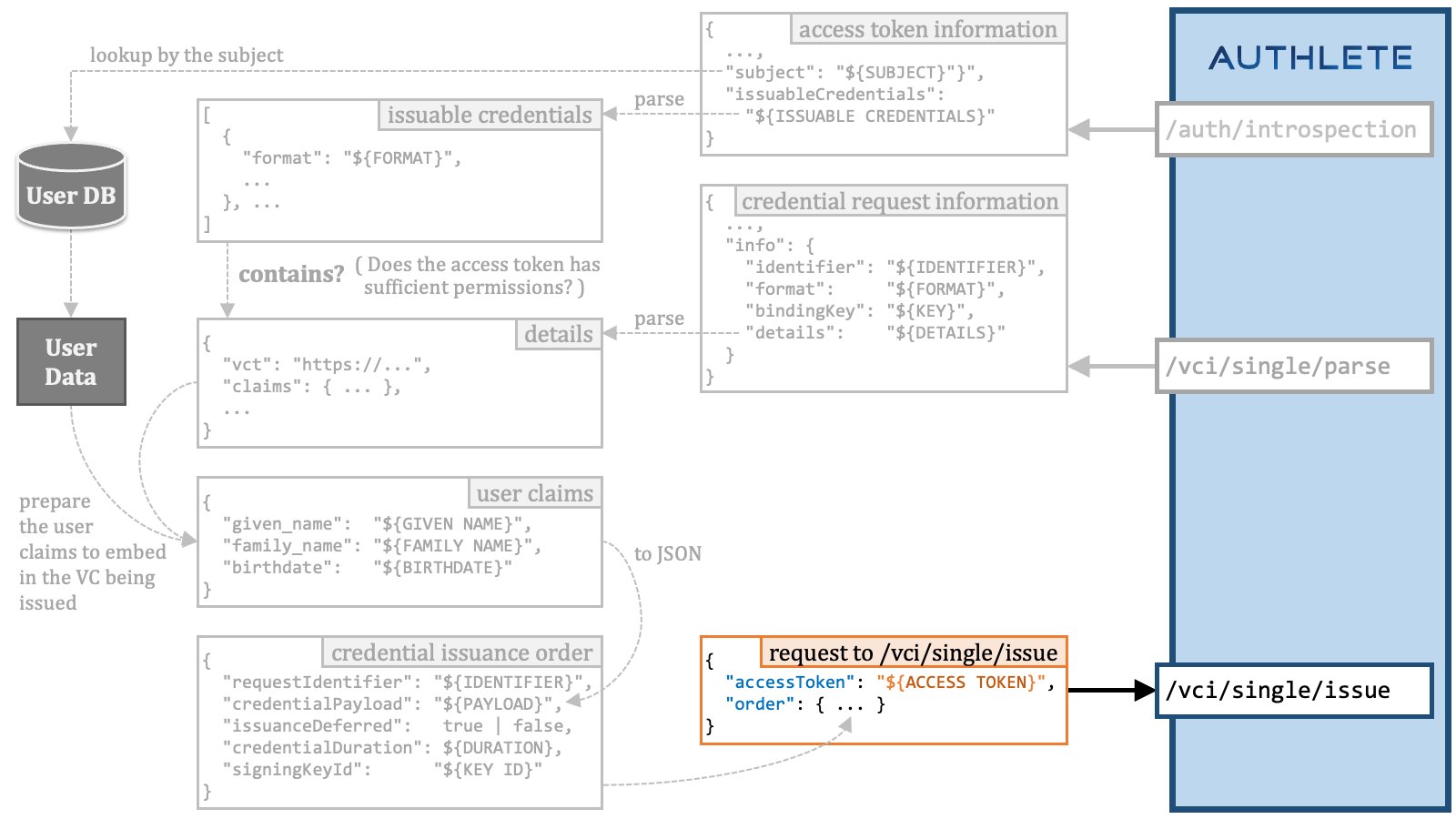 ##### 3.5.1.10. Credential Issuance Order Steps Summary
The following diagram is a summary of the steps for preparing a credential issuance order.
##### 3.5.1.10. Credential Issuance Order Steps Summary
The following diagram is a summary of the steps for preparing a credential issuance order.
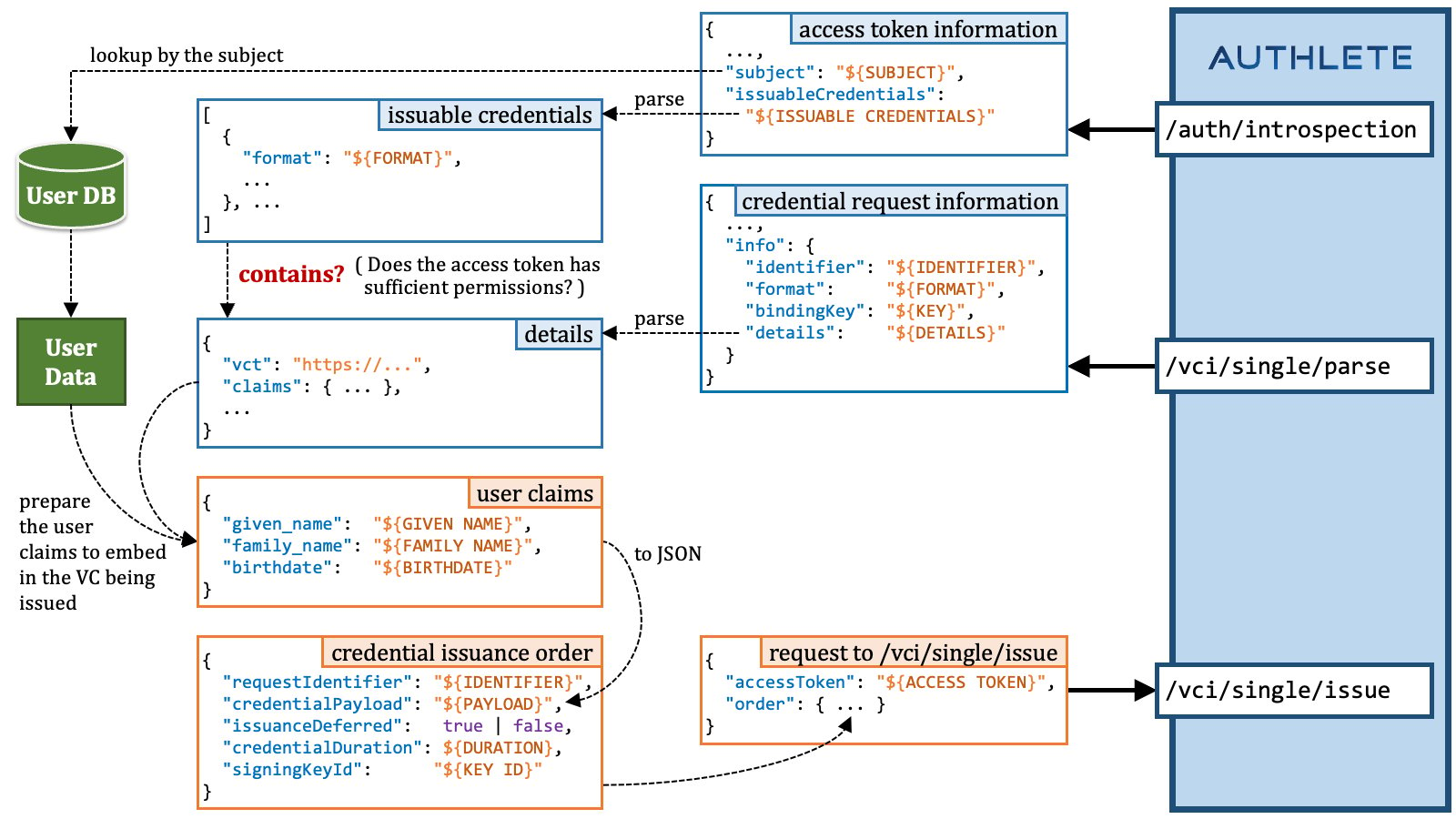 ### 3.6. Batch Credential Endpoint Implementation
To be written.
## 4. OID4VCI Demo
### 4.1. Pre-Authorized Code Flow + Key Proof + SD-JWT VC
#### 4.1.1. Setup
Download the resources used in this demo.
```shell theme={null}
git clone git@github.com:authlete/oid4vci-demo.git
cd oid4vci-demo
```
Set up some shell variables for this demo.
```shell theme={null}
CLIENT_ID=218232426
TOKEN_ENDPOINT=https://trial.authlete.net/api/token
CREDENTIAL_ISSUER=https://trial.authlete.net
CREDENTIAL_ENDPOINT=https://trial.authlete.net/api/credential
```
#### 4.1.2. Pre-Authorized Code
Access [https://trial.authlete.net/api/offer/issue](https://trial.authlete.net/api/offer/issue) to generate a
"**credential offer**" that contains a "**pre-authorized code**".
The page displayed at the URL provides a form to create an arbitrary
credential offer for demo purposes. If "Pre-authorized code grant included"
in the form is checked, a pre-authorized code will be included in the
credential offer being issued.
Input `inga` and `inga` in the "Login ID" field and the "Password" field,
confirm that "Pre-authorized code grant included" is checked, and press
the "Submit" button. You will see a result page displayed.
### 3.6. Batch Credential Endpoint Implementation
To be written.
## 4. OID4VCI Demo
### 4.1. Pre-Authorized Code Flow + Key Proof + SD-JWT VC
#### 4.1.1. Setup
Download the resources used in this demo.
```shell theme={null}
git clone git@github.com:authlete/oid4vci-demo.git
cd oid4vci-demo
```
Set up some shell variables for this demo.
```shell theme={null}
CLIENT_ID=218232426
TOKEN_ENDPOINT=https://trial.authlete.net/api/token
CREDENTIAL_ISSUER=https://trial.authlete.net
CREDENTIAL_ENDPOINT=https://trial.authlete.net/api/credential
```
#### 4.1.2. Pre-Authorized Code
Access [https://trial.authlete.net/api/offer/issue](https://trial.authlete.net/api/offer/issue) to generate a
"**credential offer**" that contains a "**pre-authorized code**".
The page displayed at the URL provides a form to create an arbitrary
credential offer for demo purposes. If "Pre-authorized code grant included"
in the form is checked, a pre-authorized code will be included in the
credential offer being issued.
Input `inga` and `inga` in the "Login ID" field and the "Password" field,
confirm that "Pre-authorized code grant included" is checked, and press
the "Submit" button. You will see a result page displayed.
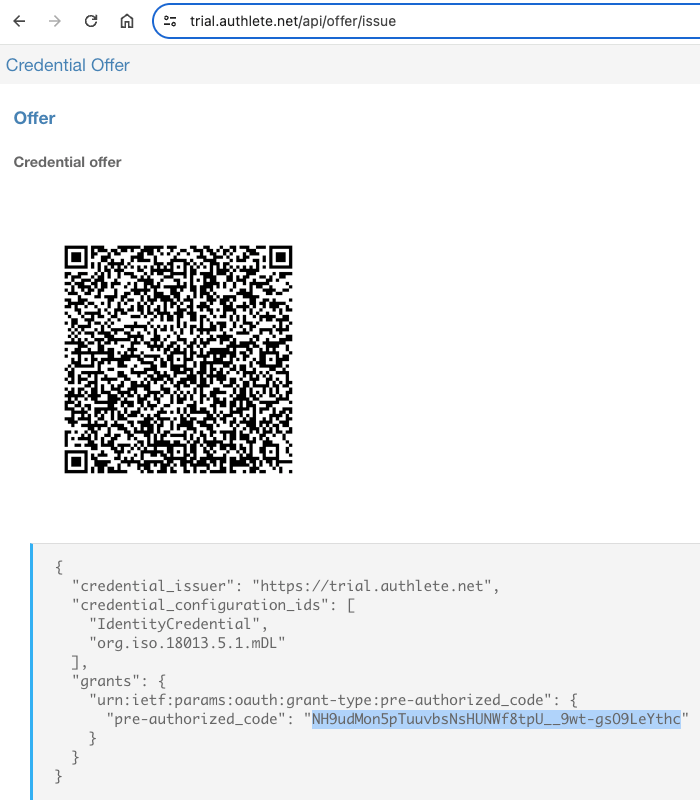 The result page will show a QR code which represents a URL including a
credential offer. The content of the credential offer is shown in the
JSON placed under the QR code. The value of the `pre-authorized_code`
property in the JSON is the issued pre-authorized code.
Set the issued pre-authorized code to shell variable `PRE_AUTHORIZED_CODE`
to use it in the next step.
```shell theme={null}
PRE_AUTHORIZED_CODE=NH9udMon5pTuuvbsNsHUNWf8tpU__9wt-gsO9LeYthc
```
#### 4.1.3. Access Token
Send a **token request** using the pre-authorized code flow.
The client for this demo is a public client, so client authentication is not required.
That is, it's not necessary to add request parameters related to client authentication.
```shell theme={null}
curl -s $TOKEN_ENDPOINT \
-d client_id=$CLIENT_ID \
-d grant_type=urn:ietf:params:oauth:grant-type:pre-authorized_code \
-d pre-authorized_code=$PRE_AUTHORIZED_CODE
```
The token endpoint will return a response like below.
```json theme={null}
{
"access_token": "xj2YRmSV-_e15n7mTXSvkCH-Yw-XklRagEHF5WXE7R4",
"token_type": "Bearer",
"expires_in": 86400,
"scope": null,
"refresh_token": "Oq7H2GsuES4Z6d_63Dn7rWhJ9rCpgzmzwQ-BYtGR1yE",
"c_nonce": "EhTC8LA6kVrrO6_XiC7N6N_wXdma2Zs1LHAQBZ5E0T0",
"c_nonce_expires_in": 86400
}
```
The response will contain the `access_token` parameter and the `c_nonce` parameter.
Set the values of the response parameters to shell variables for later use.
```shell theme={null}
ACCESS_TOKEN=xj2YRmSV-_e15n7mTXSvkCH-Yw-XklRagEHF5WXE7R4
C_NONCE=EhTC8LA6kVrrO6_XiC7N6N_wXdma2Zs1LHAQBZ5E0T0
```
#### 4.1.4. Key Proof
Generate a "**key proof JWT**" using the holder key `holder.jwk` and the
`generate-key-proof` script. The JWK file and the script are contained in the
[oid4vci-demo repository][AUTHLETE_OID4VCI_DEMO].
```shell theme={null}
./generate-key-proof \
-i $CREDENTIAL_ISSUER \
-k holder.jwk \
-c $CLIENT_ID \
-n $C_NONCE
```
The `generate-key-proof` script will generate a key proof JWT like below.
```text theme={null}
eyJ0eXAiOiJvcGVuaWQ0dmNpLXByb29mK2p3dCIsImFsZyI6IkVTMjU2IiwiandrIjp7ImNydiI6IlAtMjU2Iiwia3R5IjoiRUMiLCJ4IjoiUFN4UXJEMnpsMF9tWGNBcXoxbWdxU2VCb0Jobm14Mnl4QkVwckJZOEYyMCIsInkiOiJ4VjhmYmkxRlNvc1V1bkxldUxOdUxrSmlxbVk2VEtpTW51ci1HbjJ3UjEwIn19.eyJpc3MiOiIyMTgyMzI0MjYiLCJhdWQiOiJodHRwczovL3RyaWFsLmF1dGhsZXRlLm5ldCIsImlhdCI6MTcwMzg0NzM3Niwibm9uY2UiOiJFaFRDOExBNmtWcnJPNl9YaUM3TjZOX3dYZG1hMlpzMUxIQVFCWjVFMFQwIn0.6l8QnPTclDUoWH5PsVsZQDauA_HcIVDGxU9-TfezflIIAzTFgeC5nTr5rLBkEIgcfUvkUOwKqlM06LdVVwTZlw
```
Decoding the header and the payload of the key proof JWT by base64url will show the following JSONs.
```json theme={null}
{
"typ": "openid4vci-proof+jwt",
"alg": "ES256",
"jwk": {
"crv": "P-256",
"kty": "EC",
"x": "PSxQrD2zl0_mXcAqz1mgqSeBoBhnmx2yxBEprBY8F20",
"y": "xV8fbi1FSosUunLeuLNuLkJiqmY6TKiMnur-Gn2wR10"
}
}
```
```json theme={null}
{
"iss": "218232426",
"aud": "https://trial.authlete.net",
"iat": 1703847376,
"nonce": "EhTC8LA6kVrrO6_XiC7N6N_wXdma2Zs1LHAQBZ5E0T0"
}
```
The result of executing the `generate-key-proof` script can be directly set to
the shell variable `KEY_PROOF_JWT` by doing the following.
```shell theme={null}
KEY_PROOF_JWT=`./generate-key-proof -i $CREDENTIAL_ISSUER -k holder.jwk -c $CLIENT_ID -n $C_NONCE`
```
#### 4.1.5. SD-JWT VC
Send a "**credential request**" with the generated key proof JWT to the "**credential endpoint**".
```shell theme={null}
curl -s $CREDENTIAL_ENDPOINT \
-H "Authorization: Bearer $ACCESS_TOKEN" \
-H "Content-Type: application/json" \
--data '{
"format": "vc+sd-jwt",
"vct": "https://credentials.example.com/identity_credential",
"proof": {
"proof_type": "jwt",
"jwt":"'${KEY_PROOF_JWT}'"
}
}'
```
The credential endpoint will return a response like below.
```json theme={null}
{
"credential": "eyJraWQiOiJKMUZ3SlA4N0M2LVFOX1dTSU9tSkFRYzZuNUNRX2JaZGFGSjVHRG5XMVJrIiwidHlwIjoidmMrc2Qtand0IiwiYWxnIjoiRVMyNTYifQ.eyJfc2QiOlsiMERFMXBjUHo3LURtYlc5NlRLaFlHUFlENi05dnNtUzFra21EWVQ4NnF1NCIsIjdXeHNTejhXSWtBaHdLZmQ0aUVXRFBrOUhuMFdqZ1V6N0pHX3hqekVwTjQiLCJCVVdOQlh2bkJwZ1ZWaUpaLVdPTWFxZHhiOTRfSUR1OEhNaEZnUjU2aXd3IiwiR1BqSG1lOFhaS2JvWFhLMllPU2Y4cE10QXNzSGlKQU5QdW91WkI1QTZuNCIsIklhN3FqdVNDSmdGWDRiX09uS2p4dWJsU0tTWmRWcUhFdEpVRHZHRWtEWVEiLCJQenUtUEVqUlE5bF9vNkVEUmp0QnBpaWZqUVNMV0RNZ2ExM2VscTZpRW44IiwiVTRQWHdKMDMtenlEeUtpZFlPQWsxUkMzNWNZT2FCdnZ5bG9BQnM3bXZ1RSIsImxrT1BCTm9qNFk0OGE4a1F4VmlTSkJlQWdieE5YTEdSaEI5dkliejJCdjgiLCJuUDdMcmk2QmlqVHF0VVI2cTRfakwxTzlyWnd2OE9sdGlEX1lUWGlTa2ZrIiwidF9WbWxQQmxNcENiRG5NUjhzYUdDX2ZqMVZCb3FCLVUyZk1NYWZNbVRNayJdLCJ2Y3QiOiJodHRwczovL2NyZWRlbnRpYWxzLmV4YW1wbGUuY29tL2lkZW50aXR5X2NyZWRlbnRpYWwiLCJfc2RfYWxnIjoic2hhLTI1NiIsImlzcyI6Imh0dHBzOi8vdHJpYWwuYXV0aGxldGUubmV0IiwiY25mIjp7Imp3ayI6eyJrdHkiOiJFQyIsImNydiI6IlAtMjU2Iiwia2lkIjoiNE05a0lyQjlXWXp0MUdRZ0wxMmx6ZEJac0d5ZVYzbGdQS292MjhvVDVMNCIsIngiOiJQU3hRckQyemwwX21YY0FxejFtZ3FTZUJvQmhubXgyeXhCRXByQlk4RjIwIiwieSI6InhWOGZiaTFGU29zVXVuTGV1TE51TGtKaXFtWTZUS2lNbnVyLUduMndSMTAifX0sImlhdCI6MTcwMzg0NzYwNX0.2k4JTf61BOs461fLToA9VwZbY64i9TIfchZVasC0OCx2rDJYodeRc6uVjYuHBOZUHlMJ1WdTjCFfKuxE5juxMA~WyIxMjBTWFZhTzZKTWxoc0dIZUdVdktRIiwic3ViIiwiMTAwNCJd~WyJVUl9MTU5ocGFLUUVpbEQ1TXc5RnB3IiwiZ2l2ZW5fbmFtZSIsIkluZ2EiXQ~WyJhT2huYjgySmFMbjZ0OHRZZXpGanl3IiwiZmFtaWx5X25hbWUiLCJTaWx2ZXJzdG9uZSJd~WyJGNzE0ZktfRFpSMm83ajFWRkpIUW5BIiwiYmlydGhkYXRlIiwiMTk5MS0xMS0wNiJd~",
"c_nonce": "EhTC8LA6kVrrO6_XiC7N6N_wXdma2Zs1LHAQBZ5E0T0",
"c_nonce_expires_in": 85956
}
```
The value of the `credential` parameter in the response is the issued SD-JWT VC.
If the SD-JWT VC is set to the shell variable `SD_JWT`, the content of the SD-JWT VC
can be decoded by invoking the `decode-sd-jwt` script as follows.
```shell theme={null}
./decode-sd-jwt $SD_JWT
```
The result will look like below.
```json theme={null}
{
"kid": "J1FwJP87C6-QN_WSIOmJAQc6n5CQ_bZdaFJ5GDnW1Rk",
"typ": "vc+sd-jwt",
"alg": "ES256"
}
{
"_sd": [
"0DE1pcPz7-DmbW96TKhYGPYD6-9vsmS1kkmDYT86qu4",
"7WxsSz8WIkAhwKfd4iEWDPk9Hn0WjgUz7JG_xjzEpN4",
"BUWNBXvnBpgVViJZ-WOMaqdxb94_IDu8HMhFgR56iww",
"GPjHme8XZKboXXK2YOSf8pMtAssHiJANPuouZB5A6n4",
"Ia7qjuSCJgFX4b_OnKjxublSKSZdVqHEtJUDvGEkDYQ",
"Pzu-PEjRQ9l_o6EDRjtBpiifjQSLWDMga13elq6iEn8",
"U4PXwJ03-zyDyKidYOAk1RC35cYOaBvvyloABs7mvuE",
"lkOPBNoj4Y48a8kQxViSJBeAgbxNXLGRhB9vIbz2Bv8",
"nP7Lri6BijTqtUR6q4_jL1O9rZwv8OltiD_YTXiSkfk",
"t_VmlPBlMpCbDnMR8saGC_fj1VBoqB-U2fMMafMmTMk"
],
"vct": "https://credentials.example.com/identity_credential",
"_sd_alg": "sha-256",
"iss": "https://trial.authlete.net",
"cnf": {
"jwk": {
"kty": "EC",
"crv": "P-256",
"kid": "4M9kIrB9WYzt1GQgL12lzdBZsGyeV3lgPKov28oT5L4",
"x": "PSxQrD2zl0_mXcAqz1mgqSeBoBhnmx2yxBEprBY8F20",
"y": "xV8fbi1FSosUunLeuLNuLkJiqmY6TKiMnur-Gn2wR10"
}
},
"iat": 1703847605
}
{
"digest": "lkOPBNoj4Y48a8kQxViSJBeAgbxNXLGRhB9vIbz2Bv8",
"WyIxMjBTWFZhTzZKTWxoc0dIZUdVdktRIiwic3ViIiwiMTAwNCJd": [
"120SXVaO6JMlhsGHeGUvKQ",
"sub",
"1004"
]
}
{
"digest": "0DE1pcPz7-DmbW96TKhYGPYD6-9vsmS1kkmDYT86qu4",
"WyJVUl9MTU5ocGFLUUVpbEQ1TXc5RnB3IiwiZ2l2ZW5fbmFtZSIsIkluZ2EiXQ": [
"UR_LMNhpaKQEilD5Mw9Fpw",
"given_name",
"Inga"
]
}
{
"digest": "nP7Lri6BijTqtUR6q4_jL1O9rZwv8OltiD_YTXiSkfk",
"WyJhT2huYjgySmFMbjZ0OHRZZXpGanl3IiwiZmFtaWx5X25hbWUiLCJTaWx2ZXJzdG9uZSJd": [
"aOhnb82JaLn6t8tYezFjyw",
"family_name",
"Silverstone"
]
}
{
"digest": "U4PXwJ03-zyDyKidYOAk1RC35cYOaBvvyloABs7mvuE",
"WyJGNzE0ZktfRFpSMm83ajFWRkpIUW5BIiwiYmlydGhkYXRlIiwiMTk5MS0xMS0wNiJd": [
"F714fK_DZR2o7j1VFJHQnA",
"birthdate",
"1991-11-06"
]
}
```
### 4.2. Authorization Code Flow + PAR + DPoP + mdoc
#### 4.2.1. Setup
Download the resources used in this demo.
```shell theme={null}
git clone git@github.com:authlete/oid4vci-demo.git
cd oid4vci-demo
```
Set up some shell variables for this demo.
```shell theme={null}
CLIENT_ID=218232426
TOKEN_ENDPOINT=https://trial.authlete.net/api/token
CREDENTIAL_ISSUER=https://trial.authlete.net
CREDENTIAL_ENDPOINT=https://trial.authlete.net/api/credential
PAR_ENDPOINT=https://trial.authlete.net/api/par
```
#### 4.2.2. Request URI
Generate a "**DPoP proof JWT**" ([RFC 9449][RFC_9449]) using `dpop.jwk`, a private key for DPoP,
and the `generate-dpop-proof` script.
```shell theme={null}
DPOP_PROOF_JWT=`./generate-dpop-proof -k dpop.jwk -m POST -u $PAR_ENDPOINT`
```
The `generate-dpop-proof` script will generate a DPoP proof JWT like below.
```text theme={null}
eyJ0eXAiOiJkcG9wK2p3dCIsImFsZyI6IkVTMjU2IiwiandrIjp7ImNydiI6IlAtMjU2Iiwia3R5IjoiRUMiLCJ4IjoiaEdmcXpHWGdhbzFRZ1ZJVFk2a2lIWU9LYmFMWEJ4VHFQSmE0RU9pbXhoSSIsInkiOiJFMUtpQV9mQTJ4OElycnlzb0dkbkJUTUI1LW8zRUpUX01nUUFfSG1HdTlNIn19.eyJqdGkiOiJoRm9HQkFBN3ZXTHExbWJ6IiwiaHRtIjoiUE9TVCIsImh0dSI6Imh0dHBzOi8vdHJpYWwuYXV0aGxldGUubmV0L2FwaS9wYXIiLCJpYXQiOjE3MDM4NjQ5ODR9.9VZtrwjASCEeO6v0SuGqEttYtoHORtGMNn95mSx4uNv04oA8hSDDBo4CoPQiaGsEjunJ_d_zKR7VsrF9M8BBZA
```
Decoding the header and the payload of the DPoP proof JWT by base64url will
show the following JSONs. Note that the `htu` claim in the payload holds the
URL of the PAR endpoint.
```json theme={null}
{
"typ": "dpop+jwt",
"alg": "ES256",
"jwk": {
"crv": "P-256",
"kty": "EC",
"x": "hGfqzGXgao1QgVITY6kiHYOKbaLXBxTqPJa4EOimxhI",
"y": "E1KiA_fA2x8IrrysoGdnBTMB5-o3EJT_MgQA_HmGu9M"
}
}
```
```json theme={null}
{
"jti": "hFoGBAA7vWLq1mbz",
"htm": "POST",
"htu": "https://trial.authlete.net/api/par",
"iat": 1703864984
}
```
Send a **PAR request** to the PAR endpoint. The points here are (1) that the PAR
request contains the `DPoP` header and (2) that the `scope` parameter contains
`org.iso.18013.5.1.mDL`.
```shell theme={null}
curl -s $PAR_ENDPOINT \
-H "DPoP: $DPOP_PROOF_JWT" \
-d client_id=$CLIENT_ID \
-d response_type=code \
-d scope=org.iso.18013.5.1.mDL
```
This `scope` value assumes that the `credential_configurations_supported`
JSON object in the credential issuer metadata contains at least one credential configuration
whose `scope` property holds `org.iso.18013.5.1.mDL`.
```json theme={null}
{
"credential_configurations_supported": {
"org.iso.18013.5.1.mDL": {
"format": "mso_mdoc",
"doctype": "org.iso.18013.5.1.mDL",
"scope": "org.iso.18013.5.1.mDL",
"claims": {
"org.iso.18013.5.1": {
"family_name": {},
...
}
}
}
},
...
}
```
The PAR endpoint will return a response like below. The value of the
`request_uri` parameter in the response is the issued **request URI**.
It will be used in the next step.
```json theme={null}
{
"expires_in": 600,
"request_uri": "urn:ietf:params:oauth:request_uri:du-ptCtuukbVDi2MgOjYwwb99cl-ho0bzzLb0X0u1n0"
}
```
#### 4.2.3. Authorization Code
Send an **authorization request** to the authorization endpoint using a web browser.
Don't forget to replace `$REQUEST_URI` in the URL with the actual request URI
you received from the PAR endpoint in the previous step.
```
https://trial.authlete.net/api/authorization?client_id=218232426&request_uri=$REQUEST_URI
```
The authorization page will be displayed. Input `inga` and `inga` in the
"Login ID" field and the "Password" field there, and press the "Authorize"
button.
The result page will show a QR code which represents a URL including a
credential offer. The content of the credential offer is shown in the
JSON placed under the QR code. The value of the `pre-authorized_code`
property in the JSON is the issued pre-authorized code.
Set the issued pre-authorized code to shell variable `PRE_AUTHORIZED_CODE`
to use it in the next step.
```shell theme={null}
PRE_AUTHORIZED_CODE=NH9udMon5pTuuvbsNsHUNWf8tpU__9wt-gsO9LeYthc
```
#### 4.1.3. Access Token
Send a **token request** using the pre-authorized code flow.
The client for this demo is a public client, so client authentication is not required.
That is, it's not necessary to add request parameters related to client authentication.
```shell theme={null}
curl -s $TOKEN_ENDPOINT \
-d client_id=$CLIENT_ID \
-d grant_type=urn:ietf:params:oauth:grant-type:pre-authorized_code \
-d pre-authorized_code=$PRE_AUTHORIZED_CODE
```
The token endpoint will return a response like below.
```json theme={null}
{
"access_token": "xj2YRmSV-_e15n7mTXSvkCH-Yw-XklRagEHF5WXE7R4",
"token_type": "Bearer",
"expires_in": 86400,
"scope": null,
"refresh_token": "Oq7H2GsuES4Z6d_63Dn7rWhJ9rCpgzmzwQ-BYtGR1yE",
"c_nonce": "EhTC8LA6kVrrO6_XiC7N6N_wXdma2Zs1LHAQBZ5E0T0",
"c_nonce_expires_in": 86400
}
```
The response will contain the `access_token` parameter and the `c_nonce` parameter.
Set the values of the response parameters to shell variables for later use.
```shell theme={null}
ACCESS_TOKEN=xj2YRmSV-_e15n7mTXSvkCH-Yw-XklRagEHF5WXE7R4
C_NONCE=EhTC8LA6kVrrO6_XiC7N6N_wXdma2Zs1LHAQBZ5E0T0
```
#### 4.1.4. Key Proof
Generate a "**key proof JWT**" using the holder key `holder.jwk` and the
`generate-key-proof` script. The JWK file and the script are contained in the
[oid4vci-demo repository][AUTHLETE_OID4VCI_DEMO].
```shell theme={null}
./generate-key-proof \
-i $CREDENTIAL_ISSUER \
-k holder.jwk \
-c $CLIENT_ID \
-n $C_NONCE
```
The `generate-key-proof` script will generate a key proof JWT like below.
```text theme={null}
eyJ0eXAiOiJvcGVuaWQ0dmNpLXByb29mK2p3dCIsImFsZyI6IkVTMjU2IiwiandrIjp7ImNydiI6IlAtMjU2Iiwia3R5IjoiRUMiLCJ4IjoiUFN4UXJEMnpsMF9tWGNBcXoxbWdxU2VCb0Jobm14Mnl4QkVwckJZOEYyMCIsInkiOiJ4VjhmYmkxRlNvc1V1bkxldUxOdUxrSmlxbVk2VEtpTW51ci1HbjJ3UjEwIn19.eyJpc3MiOiIyMTgyMzI0MjYiLCJhdWQiOiJodHRwczovL3RyaWFsLmF1dGhsZXRlLm5ldCIsImlhdCI6MTcwMzg0NzM3Niwibm9uY2UiOiJFaFRDOExBNmtWcnJPNl9YaUM3TjZOX3dYZG1hMlpzMUxIQVFCWjVFMFQwIn0.6l8QnPTclDUoWH5PsVsZQDauA_HcIVDGxU9-TfezflIIAzTFgeC5nTr5rLBkEIgcfUvkUOwKqlM06LdVVwTZlw
```
Decoding the header and the payload of the key proof JWT by base64url will show the following JSONs.
```json theme={null}
{
"typ": "openid4vci-proof+jwt",
"alg": "ES256",
"jwk": {
"crv": "P-256",
"kty": "EC",
"x": "PSxQrD2zl0_mXcAqz1mgqSeBoBhnmx2yxBEprBY8F20",
"y": "xV8fbi1FSosUunLeuLNuLkJiqmY6TKiMnur-Gn2wR10"
}
}
```
```json theme={null}
{
"iss": "218232426",
"aud": "https://trial.authlete.net",
"iat": 1703847376,
"nonce": "EhTC8LA6kVrrO6_XiC7N6N_wXdma2Zs1LHAQBZ5E0T0"
}
```
The result of executing the `generate-key-proof` script can be directly set to
the shell variable `KEY_PROOF_JWT` by doing the following.
```shell theme={null}
KEY_PROOF_JWT=`./generate-key-proof -i $CREDENTIAL_ISSUER -k holder.jwk -c $CLIENT_ID -n $C_NONCE`
```
#### 4.1.5. SD-JWT VC
Send a "**credential request**" with the generated key proof JWT to the "**credential endpoint**".
```shell theme={null}
curl -s $CREDENTIAL_ENDPOINT \
-H "Authorization: Bearer $ACCESS_TOKEN" \
-H "Content-Type: application/json" \
--data '{
"format": "vc+sd-jwt",
"vct": "https://credentials.example.com/identity_credential",
"proof": {
"proof_type": "jwt",
"jwt":"'${KEY_PROOF_JWT}'"
}
}'
```
The credential endpoint will return a response like below.
```json theme={null}
{
"credential": "eyJraWQiOiJKMUZ3SlA4N0M2LVFOX1dTSU9tSkFRYzZuNUNRX2JaZGFGSjVHRG5XMVJrIiwidHlwIjoidmMrc2Qtand0IiwiYWxnIjoiRVMyNTYifQ.eyJfc2QiOlsiMERFMXBjUHo3LURtYlc5NlRLaFlHUFlENi05dnNtUzFra21EWVQ4NnF1NCIsIjdXeHNTejhXSWtBaHdLZmQ0aUVXRFBrOUhuMFdqZ1V6N0pHX3hqekVwTjQiLCJCVVdOQlh2bkJwZ1ZWaUpaLVdPTWFxZHhiOTRfSUR1OEhNaEZnUjU2aXd3IiwiR1BqSG1lOFhaS2JvWFhLMllPU2Y4cE10QXNzSGlKQU5QdW91WkI1QTZuNCIsIklhN3FqdVNDSmdGWDRiX09uS2p4dWJsU0tTWmRWcUhFdEpVRHZHRWtEWVEiLCJQenUtUEVqUlE5bF9vNkVEUmp0QnBpaWZqUVNMV0RNZ2ExM2VscTZpRW44IiwiVTRQWHdKMDMtenlEeUtpZFlPQWsxUkMzNWNZT2FCdnZ5bG9BQnM3bXZ1RSIsImxrT1BCTm9qNFk0OGE4a1F4VmlTSkJlQWdieE5YTEdSaEI5dkliejJCdjgiLCJuUDdMcmk2QmlqVHF0VVI2cTRfakwxTzlyWnd2OE9sdGlEX1lUWGlTa2ZrIiwidF9WbWxQQmxNcENiRG5NUjhzYUdDX2ZqMVZCb3FCLVUyZk1NYWZNbVRNayJdLCJ2Y3QiOiJodHRwczovL2NyZWRlbnRpYWxzLmV4YW1wbGUuY29tL2lkZW50aXR5X2NyZWRlbnRpYWwiLCJfc2RfYWxnIjoic2hhLTI1NiIsImlzcyI6Imh0dHBzOi8vdHJpYWwuYXV0aGxldGUubmV0IiwiY25mIjp7Imp3ayI6eyJrdHkiOiJFQyIsImNydiI6IlAtMjU2Iiwia2lkIjoiNE05a0lyQjlXWXp0MUdRZ0wxMmx6ZEJac0d5ZVYzbGdQS292MjhvVDVMNCIsIngiOiJQU3hRckQyemwwX21YY0FxejFtZ3FTZUJvQmhubXgyeXhCRXByQlk4RjIwIiwieSI6InhWOGZiaTFGU29zVXVuTGV1TE51TGtKaXFtWTZUS2lNbnVyLUduMndSMTAifX0sImlhdCI6MTcwMzg0NzYwNX0.2k4JTf61BOs461fLToA9VwZbY64i9TIfchZVasC0OCx2rDJYodeRc6uVjYuHBOZUHlMJ1WdTjCFfKuxE5juxMA~WyIxMjBTWFZhTzZKTWxoc0dIZUdVdktRIiwic3ViIiwiMTAwNCJd~WyJVUl9MTU5ocGFLUUVpbEQ1TXc5RnB3IiwiZ2l2ZW5fbmFtZSIsIkluZ2EiXQ~WyJhT2huYjgySmFMbjZ0OHRZZXpGanl3IiwiZmFtaWx5X25hbWUiLCJTaWx2ZXJzdG9uZSJd~WyJGNzE0ZktfRFpSMm83ajFWRkpIUW5BIiwiYmlydGhkYXRlIiwiMTk5MS0xMS0wNiJd~",
"c_nonce": "EhTC8LA6kVrrO6_XiC7N6N_wXdma2Zs1LHAQBZ5E0T0",
"c_nonce_expires_in": 85956
}
```
The value of the `credential` parameter in the response is the issued SD-JWT VC.
If the SD-JWT VC is set to the shell variable `SD_JWT`, the content of the SD-JWT VC
can be decoded by invoking the `decode-sd-jwt` script as follows.
```shell theme={null}
./decode-sd-jwt $SD_JWT
```
The result will look like below.
```json theme={null}
{
"kid": "J1FwJP87C6-QN_WSIOmJAQc6n5CQ_bZdaFJ5GDnW1Rk",
"typ": "vc+sd-jwt",
"alg": "ES256"
}
{
"_sd": [
"0DE1pcPz7-DmbW96TKhYGPYD6-9vsmS1kkmDYT86qu4",
"7WxsSz8WIkAhwKfd4iEWDPk9Hn0WjgUz7JG_xjzEpN4",
"BUWNBXvnBpgVViJZ-WOMaqdxb94_IDu8HMhFgR56iww",
"GPjHme8XZKboXXK2YOSf8pMtAssHiJANPuouZB5A6n4",
"Ia7qjuSCJgFX4b_OnKjxublSKSZdVqHEtJUDvGEkDYQ",
"Pzu-PEjRQ9l_o6EDRjtBpiifjQSLWDMga13elq6iEn8",
"U4PXwJ03-zyDyKidYOAk1RC35cYOaBvvyloABs7mvuE",
"lkOPBNoj4Y48a8kQxViSJBeAgbxNXLGRhB9vIbz2Bv8",
"nP7Lri6BijTqtUR6q4_jL1O9rZwv8OltiD_YTXiSkfk",
"t_VmlPBlMpCbDnMR8saGC_fj1VBoqB-U2fMMafMmTMk"
],
"vct": "https://credentials.example.com/identity_credential",
"_sd_alg": "sha-256",
"iss": "https://trial.authlete.net",
"cnf": {
"jwk": {
"kty": "EC",
"crv": "P-256",
"kid": "4M9kIrB9WYzt1GQgL12lzdBZsGyeV3lgPKov28oT5L4",
"x": "PSxQrD2zl0_mXcAqz1mgqSeBoBhnmx2yxBEprBY8F20",
"y": "xV8fbi1FSosUunLeuLNuLkJiqmY6TKiMnur-Gn2wR10"
}
},
"iat": 1703847605
}
{
"digest": "lkOPBNoj4Y48a8kQxViSJBeAgbxNXLGRhB9vIbz2Bv8",
"WyIxMjBTWFZhTzZKTWxoc0dIZUdVdktRIiwic3ViIiwiMTAwNCJd": [
"120SXVaO6JMlhsGHeGUvKQ",
"sub",
"1004"
]
}
{
"digest": "0DE1pcPz7-DmbW96TKhYGPYD6-9vsmS1kkmDYT86qu4",
"WyJVUl9MTU5ocGFLUUVpbEQ1TXc5RnB3IiwiZ2l2ZW5fbmFtZSIsIkluZ2EiXQ": [
"UR_LMNhpaKQEilD5Mw9Fpw",
"given_name",
"Inga"
]
}
{
"digest": "nP7Lri6BijTqtUR6q4_jL1O9rZwv8OltiD_YTXiSkfk",
"WyJhT2huYjgySmFMbjZ0OHRZZXpGanl3IiwiZmFtaWx5X25hbWUiLCJTaWx2ZXJzdG9uZSJd": [
"aOhnb82JaLn6t8tYezFjyw",
"family_name",
"Silverstone"
]
}
{
"digest": "U4PXwJ03-zyDyKidYOAk1RC35cYOaBvvyloABs7mvuE",
"WyJGNzE0ZktfRFpSMm83ajFWRkpIUW5BIiwiYmlydGhkYXRlIiwiMTk5MS0xMS0wNiJd": [
"F714fK_DZR2o7j1VFJHQnA",
"birthdate",
"1991-11-06"
]
}
```
### 4.2. Authorization Code Flow + PAR + DPoP + mdoc
#### 4.2.1. Setup
Download the resources used in this demo.
```shell theme={null}
git clone git@github.com:authlete/oid4vci-demo.git
cd oid4vci-demo
```
Set up some shell variables for this demo.
```shell theme={null}
CLIENT_ID=218232426
TOKEN_ENDPOINT=https://trial.authlete.net/api/token
CREDENTIAL_ISSUER=https://trial.authlete.net
CREDENTIAL_ENDPOINT=https://trial.authlete.net/api/credential
PAR_ENDPOINT=https://trial.authlete.net/api/par
```
#### 4.2.2. Request URI
Generate a "**DPoP proof JWT**" ([RFC 9449][RFC_9449]) using `dpop.jwk`, a private key for DPoP,
and the `generate-dpop-proof` script.
```shell theme={null}
DPOP_PROOF_JWT=`./generate-dpop-proof -k dpop.jwk -m POST -u $PAR_ENDPOINT`
```
The `generate-dpop-proof` script will generate a DPoP proof JWT like below.
```text theme={null}
eyJ0eXAiOiJkcG9wK2p3dCIsImFsZyI6IkVTMjU2IiwiandrIjp7ImNydiI6IlAtMjU2Iiwia3R5IjoiRUMiLCJ4IjoiaEdmcXpHWGdhbzFRZ1ZJVFk2a2lIWU9LYmFMWEJ4VHFQSmE0RU9pbXhoSSIsInkiOiJFMUtpQV9mQTJ4OElycnlzb0dkbkJUTUI1LW8zRUpUX01nUUFfSG1HdTlNIn19.eyJqdGkiOiJoRm9HQkFBN3ZXTHExbWJ6IiwiaHRtIjoiUE9TVCIsImh0dSI6Imh0dHBzOi8vdHJpYWwuYXV0aGxldGUubmV0L2FwaS9wYXIiLCJpYXQiOjE3MDM4NjQ5ODR9.9VZtrwjASCEeO6v0SuGqEttYtoHORtGMNn95mSx4uNv04oA8hSDDBo4CoPQiaGsEjunJ_d_zKR7VsrF9M8BBZA
```
Decoding the header and the payload of the DPoP proof JWT by base64url will
show the following JSONs. Note that the `htu` claim in the payload holds the
URL of the PAR endpoint.
```json theme={null}
{
"typ": "dpop+jwt",
"alg": "ES256",
"jwk": {
"crv": "P-256",
"kty": "EC",
"x": "hGfqzGXgao1QgVITY6kiHYOKbaLXBxTqPJa4EOimxhI",
"y": "E1KiA_fA2x8IrrysoGdnBTMB5-o3EJT_MgQA_HmGu9M"
}
}
```
```json theme={null}
{
"jti": "hFoGBAA7vWLq1mbz",
"htm": "POST",
"htu": "https://trial.authlete.net/api/par",
"iat": 1703864984
}
```
Send a **PAR request** to the PAR endpoint. The points here are (1) that the PAR
request contains the `DPoP` header and (2) that the `scope` parameter contains
`org.iso.18013.5.1.mDL`.
```shell theme={null}
curl -s $PAR_ENDPOINT \
-H "DPoP: $DPOP_PROOF_JWT" \
-d client_id=$CLIENT_ID \
-d response_type=code \
-d scope=org.iso.18013.5.1.mDL
```
This `scope` value assumes that the `credential_configurations_supported`
JSON object in the credential issuer metadata contains at least one credential configuration
whose `scope` property holds `org.iso.18013.5.1.mDL`.
```json theme={null}
{
"credential_configurations_supported": {
"org.iso.18013.5.1.mDL": {
"format": "mso_mdoc",
"doctype": "org.iso.18013.5.1.mDL",
"scope": "org.iso.18013.5.1.mDL",
"claims": {
"org.iso.18013.5.1": {
"family_name": {},
...
}
}
}
},
...
}
```
The PAR endpoint will return a response like below. The value of the
`request_uri` parameter in the response is the issued **request URI**.
It will be used in the next step.
```json theme={null}
{
"expires_in": 600,
"request_uri": "urn:ietf:params:oauth:request_uri:du-ptCtuukbVDi2MgOjYwwb99cl-ho0bzzLb0X0u1n0"
}
```
#### 4.2.3. Authorization Code
Send an **authorization request** to the authorization endpoint using a web browser.
Don't forget to replace `$REQUEST_URI` in the URL with the actual request URI
you received from the PAR endpoint in the previous step.
```
https://trial.authlete.net/api/authorization?client_id=218232426&request_uri=$REQUEST_URI
```
The authorization page will be displayed. Input `inga` and `inga` in the
"Login ID" field and the "Password" field there, and press the "Authorize"
button.
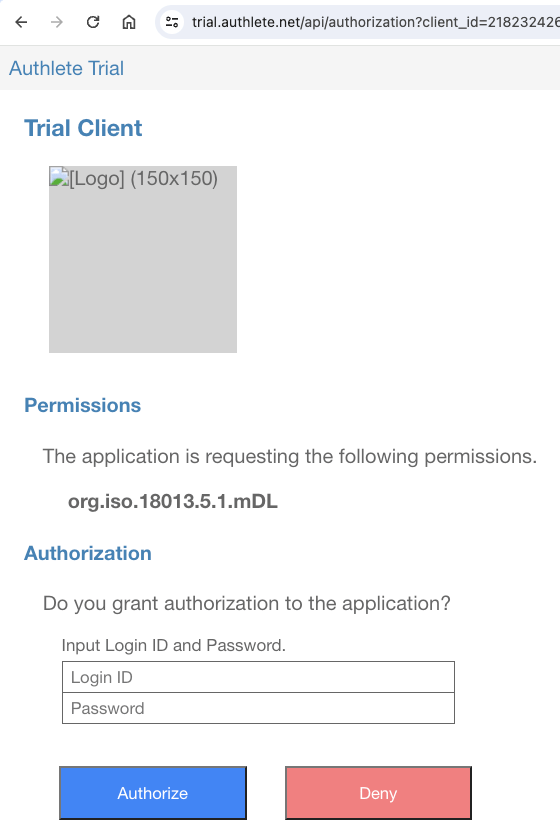 You will be redirected to the redirection endpoint.
The page displayed at this endpoint will show you the value of the issued
**authorization code**. It will be used in the next step.
You will be redirected to the redirection endpoint.
The page displayed at this endpoint will show you the value of the issued
**authorization code**. It will be used in the next step.
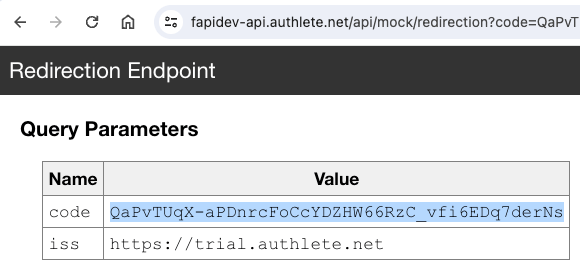 #### 4.2.4. Access Token
Generate a DPoP proof JWT to access the token endpoint. Make sure that the argument
given to the `-u` option of the `generate-dpop-proof` script is `$TOKEN_ENDPOINT`
(not `$PAR_ENDPOINT`).
```shell theme={null}
DPOP_PROOF_JWT=`./generate-dpop-proof -k dpop.jwk -m POST -u $TOKEN_ENDPOINT`
```
Decoding the header and the payload of the DPoP proof JWT by base64url will
show the following JSONs. The `htu` claim in the payload should hold the
URL of the token endpoint.
```json theme={null}
{
"typ": "dpop+jwt",
"alg": "ES256",
"jwk": {
"crv": "P-256",
"kty": "EC",
"x": "hGfqzGXgao1QgVITY6kiHYOKbaLXBxTqPJa4EOimxhI",
"y": "E1KiA_fA2x8IrrysoGdnBTMB5-o3EJT_MgQA_HmGu9M"
}
}
```
```json theme={null}
{
"jti": "KHV6KaCjtqwfnb8r",
"htm": "POST",
"htu": "https://trial.authlete.net/api/token",
"iat": 1703865524
}
```
Send a **token request** using the authorization code flow to the token endpoint.
Don't forget to set the authorization code issued in the previous step to the shell
variable `AUTHORIZATION_CODE` before executing the following command.
```shell theme={null}
AUTHORIZATION_CODE=QaPvTUqX-aPDnrcFoCcYDZHW66RzC_vfi6EDq7derNs
```
```shell theme={null}
curl -s $TOKEN_ENDPOINT \
-H "DPoP: $DPOP_PROOF_JWT" \
-d client_id=$CLIENT_ID \
-d grant_type=authorization_code \
-d code=$AUTHORIZATION_CODE
```
The token endpoint will return a response like below.
```json theme={null}
{
"access_token": "T01u7-43MOA17hB8DqW-dEaBqUpStWtitYoVW1ewlH4",
"token_type": "DPoP",
"expires_in": 86400,
"scope": "org.iso.18013.5.1.mDL",
"refresh_token": "17on7yghEeGPbaXmjTEMgEGPG8S79DweIBtCq0MZOHE",
"c_nonce": "LQwqEX7sT1uJkzzTdULvLsHcUvXfUaT79bkzLWEi7jw",
"c_nonce_expires_in": 86400
}
```
The response will contain the `access_token` parameter. Please set the value
of the parameter to the shell variable `ACCESS_TOKEN` for the next step.
```shell theme={null}
ACCESS_TOKEN=T01u7-43MOA17hB8DqW-dEaBqUpStWtitYoVW1ewlH4
```
#### 4.2.5. mdoc
Generate a DPoP proof JWT to access the credential endpoint. Make sure that (1)
the argument given to the `-u` option of the `generate-dpop-proof` script is
`$CREDENTIAL_ENDPOINT` and (2) the `-a` option must be given to embed the
`ath` claim in the DPoP proof JWT.
```shell theme={null}
DPOP_PROOF_JWT=`./generate-dpop-proof -k dpop.jwk -m POST -u $CREDENTIAL_ENDPOINT -a $ACCESS_TOKEN`
```
Decoding the header and the payload of the DPoP proof JWT by base64url will
show the following JSONs. The payload contains the `ath` claim.
```json theme={null}
{
"typ": "dpop+jwt",
"alg": "ES256",
"jwk": {
"crv": "P-256",
"kty": "EC",
"x": "hGfqzGXgao1QgVITY6kiHYOKbaLXBxTqPJa4EOimxhI",
"y": "E1KiA_fA2x8IrrysoGdnBTMB5-o3EJT_MgQA_HmGu9M"
}
}
```
```json theme={null}
{
"jti": "caK7sLDiAF9HbOi2",
"htm": "POST",
"htu": "https://trial.authlete.net/api/credential",
"iat": 1703865668,
"ath": "DUuszLa1NHTMoREsPQE0gB9znn1BRKYPUpOwBpVcLJo"
}
```
Send a "**credential request**" with the DPoP proof JWT and the access token
to the "**credential endpoint**".
```shell theme={null}
curl -s $CREDENTIAL_ENDPOINT \
-H "DPoP: $DPOP_PROOF_JWT" \
-H "Authorization: DPoP $ACCESS_TOKEN" \
-H "Content-Type: application/json" \
--data '{
"format": "mso_mdoc",
"doctype": "org.iso.18013.5.1.mDL",
"claims": {
"org.iso.18013.5.1": {
"family_name": {},
"given_name": {},
"birth_date": {},
"issue_date": {},
"expiry_date": {},
"issuing_country": {},
"document_number": {},
"driving_privileges": {}
}
}
}'
```
The credential endpoint will return a response like below.
```json theme={null}
{
"credential": "omdkb2NUeXBldW9yZy5pc28uMTgwMTMuNS4xLm1ETGxpc3N1ZXJTaWduZWSiam5hbWVTcGFjZXOhcW9yZy5pc28uMTgwMTMuNS4xiNgYWFukaGRpZ2VzdElEAWZyYW5kb21QJ6e6efO1W1kaYmdXHjpSY3FlbGVtZW50SWRlbnRpZmllcmppc3N1ZV9kYXRlbGVsZW1lbnRWYWx1ZdkD7GoyMDIzLTEyLTI52BhYXKRoZGlnZXN0SUQCZnJhbmRvbVBlLj1uVWnDyBHmzifHfxjhcWVsZW1lbnRJZGVudGlmaWVya2V4cGlyeV9kYXRlbGVsZW1lbnRWYWx1ZdkD7GoyMDI0LTEyLTI52BhYWqRoZGlnZXN0SUQDZnJhbmRvbVAMR8e_GTnz4n7RFXKXgrAQcWVsZW1lbnRJZGVudGlmaWVya2ZhbWlseV9uYW1lbGVsZW1lbnRWYWx1ZWtTaWx2ZXJzdG9uZdgYWFKkaGRpZ2VzdElEBGZyYW5kb21QCHsjtktJ-PkSnEpzHOOCnHFlbGVtZW50SWRlbnRpZmllcmpnaXZlbl9uYW1lbGVsZW1lbnRWYWx1ZWRJbmdh2BhYW6RoZGlnZXN0SUQFZnJhbmRvbVAj-grPYzaQs1Np8Jom4yNpcWVsZW1lbnRJZGVudGlmaWVyamJpcnRoX2RhdGVsZWxlbWVudFZhbHVl2QPsajE5OTEtMTEtMDbYGFhVpGhkaWdlc3RJRAZmcmFuZG9tUByAlsGIDKRVgTjKy9AgNMxxZWxlbWVudElkZW50aWZpZXJvaXNzdWluZ19jb3VudHJ5bGVsZW1lbnRWYWx1ZWJVU9gYWFukaGRpZ2VzdElEB2ZyYW5kb21QpIldNj4zHUGw0vcfVFMsDXFlbGVtZW50SWRlbnRpZmllcm9kb2N1bWVudF9udW1iZXJsZWxlbWVudFZhbHVlaDEyMzQ1Njc42BhYoqRoZGlnZXN0SUQIZnJhbmRvbVByP2ESVgTLndyQCDgw1khMcWVsZW1lbnRJZGVudGlmaWVycmRyaXZpbmdfcHJpdmlsZWdlc2xlbGVtZW50VmFsdWWBo3V2ZWhpY2xlX2NhdGVnb3J5X2NvZGVhQWppc3N1ZV9kYXRl2QPsajIwMjMtMDEtMDFrZXhwaXJ5X2RhdGXZA-xqMjA0My0wMS0wMWppc3N1ZXJBdXRohEOhASahGCFZAWEwggFdMIIBBKADAgECAgYBjJHZwhkwCgYIKoZIzj0EAwIwNjE0MDIGA1UEAwwrSjFGd0pQODdDNi1RTl9XU0lPbUpBUWM2bjVDUV9iWmRhRko1R0RuVzFSazAeFw0yMzEyMjIxNDA2NTZaFw0yNDEwMTcxNDA2NTZaMDYxNDAyBgNVBAMMK0oxRndKUDg3QzYtUU5fV1NJT21KQVFjNm41Q1FfYlpkYUZKNUdEblcxUmswWTATBgcqhkjOPQIBBggqhkjOPQMBBwNCAAQCilV5ugmlhHJzDVgqSRE5d8KkoQqX1jVg8WE4aPjFODZQ66fFPFIhWRP3ioVUi67WGQSgTY3F6Vmjf7JMVQ4MMAoGCCqGSM49BAMCA0cAMEQCIGcWNJwFy8RGV4uMwK7k1vEkqQ2xr-BCGRdN8OZur5PeAiBVrNuxV1C9mCW5z2clhDFaXNdP2Lp_7CBQrHQoJhuPcNgYWQHopWd2ZXJzaW9uYzEuMG9kaWdlc3RBbGdvcml0aG1nU0hBLTI1Nmx2YWx1ZURpZ2VzdHOhcW9yZy5pc28uMTgwMTMuNS4xqAFYIKroraryzIKijf6A0qMLKKEXhO4JkfgeofLS35R-tV-CAlggA1kTuTcqhUUzLu689TY7XaXTKDTQTy-X0CTtJbOgqJsDWCA9I2CynkOK1sgi3P7ZmCZJENPGQl8QsWImdXSNXsqEEARYIJ7fk0E18dWrB3R_X0NGXdshFSplLC2WiMGrqotXnbOVBVggs4p4mEragqpfssdgOpeGrmxeBq8kDp7rpVf-8mngGV4GWCAAGjwiUCuOj0CnVGknOCa217wUJthsqNS8CoxZ5BWQEQdYIDwygoPCSFXyutize7ktwCSKY5T7V4mWpizCFoVSkBy7CFggTWvL8cD_12lYMvje8i2T6YLEwNJNfje5lG6jfeS5I31nZG9jVHlwZXVvcmcuaXNvLjE4MDEzLjUuMS5tRExsdmFsaWRpdHlJbmZvo2ZzaWduZWTAdDIwMjMtMTItMjlUMTY6MDE6NTdaaXZhbGlkRnJvbcB0MjAyMy0xMi0yOVQxNjowMTo1N1pqdmFsaWRVbnRpbMB0MjAyNC0xMi0yOVQxNjowMTo1N1pYQPJyDU5h4tDesMtjRzbxcm77l-np35iKtKAKQj67Vh0XRHJsNxKoX_QJRLPrL1u58HuJDbwyA6c1ewBulm4AUAM",
"c_nonce": "LQwqEX7sT1uJkzzTdULvLsHcUvXfUaT79bkzLWEi7jw",
"c_nonce_expires_in": 86256
}
```
The value of the `credential` parameter in the response is the issued mdoc.
The website "**CBOR Zone**" ([https://cbor.zone/](https://cbor.zone/)) can be used to decode the mdoc.
Copy the value of the `credential` parameter, paste it to the textarea of
the "Input" section in the CBOR Zone, choose the `base64url` radio button, and
press the "Generate" button. You'll see the content of the mdoc in the CBOR
Diagnostic Notation ([RFC 8949, 8. Diagnostic Notation][RFC_8949_8],
[RFC 8610, Appendix G. Extended Diagnostic Notation][RFC_8610_G]).
#### 4.2.4. Access Token
Generate a DPoP proof JWT to access the token endpoint. Make sure that the argument
given to the `-u` option of the `generate-dpop-proof` script is `$TOKEN_ENDPOINT`
(not `$PAR_ENDPOINT`).
```shell theme={null}
DPOP_PROOF_JWT=`./generate-dpop-proof -k dpop.jwk -m POST -u $TOKEN_ENDPOINT`
```
Decoding the header and the payload of the DPoP proof JWT by base64url will
show the following JSONs. The `htu` claim in the payload should hold the
URL of the token endpoint.
```json theme={null}
{
"typ": "dpop+jwt",
"alg": "ES256",
"jwk": {
"crv": "P-256",
"kty": "EC",
"x": "hGfqzGXgao1QgVITY6kiHYOKbaLXBxTqPJa4EOimxhI",
"y": "E1KiA_fA2x8IrrysoGdnBTMB5-o3EJT_MgQA_HmGu9M"
}
}
```
```json theme={null}
{
"jti": "KHV6KaCjtqwfnb8r",
"htm": "POST",
"htu": "https://trial.authlete.net/api/token",
"iat": 1703865524
}
```
Send a **token request** using the authorization code flow to the token endpoint.
Don't forget to set the authorization code issued in the previous step to the shell
variable `AUTHORIZATION_CODE` before executing the following command.
```shell theme={null}
AUTHORIZATION_CODE=QaPvTUqX-aPDnrcFoCcYDZHW66RzC_vfi6EDq7derNs
```
```shell theme={null}
curl -s $TOKEN_ENDPOINT \
-H "DPoP: $DPOP_PROOF_JWT" \
-d client_id=$CLIENT_ID \
-d grant_type=authorization_code \
-d code=$AUTHORIZATION_CODE
```
The token endpoint will return a response like below.
```json theme={null}
{
"access_token": "T01u7-43MOA17hB8DqW-dEaBqUpStWtitYoVW1ewlH4",
"token_type": "DPoP",
"expires_in": 86400,
"scope": "org.iso.18013.5.1.mDL",
"refresh_token": "17on7yghEeGPbaXmjTEMgEGPG8S79DweIBtCq0MZOHE",
"c_nonce": "LQwqEX7sT1uJkzzTdULvLsHcUvXfUaT79bkzLWEi7jw",
"c_nonce_expires_in": 86400
}
```
The response will contain the `access_token` parameter. Please set the value
of the parameter to the shell variable `ACCESS_TOKEN` for the next step.
```shell theme={null}
ACCESS_TOKEN=T01u7-43MOA17hB8DqW-dEaBqUpStWtitYoVW1ewlH4
```
#### 4.2.5. mdoc
Generate a DPoP proof JWT to access the credential endpoint. Make sure that (1)
the argument given to the `-u` option of the `generate-dpop-proof` script is
`$CREDENTIAL_ENDPOINT` and (2) the `-a` option must be given to embed the
`ath` claim in the DPoP proof JWT.
```shell theme={null}
DPOP_PROOF_JWT=`./generate-dpop-proof -k dpop.jwk -m POST -u $CREDENTIAL_ENDPOINT -a $ACCESS_TOKEN`
```
Decoding the header and the payload of the DPoP proof JWT by base64url will
show the following JSONs. The payload contains the `ath` claim.
```json theme={null}
{
"typ": "dpop+jwt",
"alg": "ES256",
"jwk": {
"crv": "P-256",
"kty": "EC",
"x": "hGfqzGXgao1QgVITY6kiHYOKbaLXBxTqPJa4EOimxhI",
"y": "E1KiA_fA2x8IrrysoGdnBTMB5-o3EJT_MgQA_HmGu9M"
}
}
```
```json theme={null}
{
"jti": "caK7sLDiAF9HbOi2",
"htm": "POST",
"htu": "https://trial.authlete.net/api/credential",
"iat": 1703865668,
"ath": "DUuszLa1NHTMoREsPQE0gB9znn1BRKYPUpOwBpVcLJo"
}
```
Send a "**credential request**" with the DPoP proof JWT and the access token
to the "**credential endpoint**".
```shell theme={null}
curl -s $CREDENTIAL_ENDPOINT \
-H "DPoP: $DPOP_PROOF_JWT" \
-H "Authorization: DPoP $ACCESS_TOKEN" \
-H "Content-Type: application/json" \
--data '{
"format": "mso_mdoc",
"doctype": "org.iso.18013.5.1.mDL",
"claims": {
"org.iso.18013.5.1": {
"family_name": {},
"given_name": {},
"birth_date": {},
"issue_date": {},
"expiry_date": {},
"issuing_country": {},
"document_number": {},
"driving_privileges": {}
}
}
}'
```
The credential endpoint will return a response like below.
```json theme={null}
{
"credential": "omdkb2NUeXBldW9yZy5pc28uMTgwMTMuNS4xLm1ETGxpc3N1ZXJTaWduZWSiam5hbWVTcGFjZXOhcW9yZy5pc28uMTgwMTMuNS4xiNgYWFukaGRpZ2VzdElEAWZyYW5kb21QJ6e6efO1W1kaYmdXHjpSY3FlbGVtZW50SWRlbnRpZmllcmppc3N1ZV9kYXRlbGVsZW1lbnRWYWx1ZdkD7GoyMDIzLTEyLTI52BhYXKRoZGlnZXN0SUQCZnJhbmRvbVBlLj1uVWnDyBHmzifHfxjhcWVsZW1lbnRJZGVudGlmaWVya2V4cGlyeV9kYXRlbGVsZW1lbnRWYWx1ZdkD7GoyMDI0LTEyLTI52BhYWqRoZGlnZXN0SUQDZnJhbmRvbVAMR8e_GTnz4n7RFXKXgrAQcWVsZW1lbnRJZGVudGlmaWVya2ZhbWlseV9uYW1lbGVsZW1lbnRWYWx1ZWtTaWx2ZXJzdG9uZdgYWFKkaGRpZ2VzdElEBGZyYW5kb21QCHsjtktJ-PkSnEpzHOOCnHFlbGVtZW50SWRlbnRpZmllcmpnaXZlbl9uYW1lbGVsZW1lbnRWYWx1ZWRJbmdh2BhYW6RoZGlnZXN0SUQFZnJhbmRvbVAj-grPYzaQs1Np8Jom4yNpcWVsZW1lbnRJZGVudGlmaWVyamJpcnRoX2RhdGVsZWxlbWVudFZhbHVl2QPsajE5OTEtMTEtMDbYGFhVpGhkaWdlc3RJRAZmcmFuZG9tUByAlsGIDKRVgTjKy9AgNMxxZWxlbWVudElkZW50aWZpZXJvaXNzdWluZ19jb3VudHJ5bGVsZW1lbnRWYWx1ZWJVU9gYWFukaGRpZ2VzdElEB2ZyYW5kb21QpIldNj4zHUGw0vcfVFMsDXFlbGVtZW50SWRlbnRpZmllcm9kb2N1bWVudF9udW1iZXJsZWxlbWVudFZhbHVlaDEyMzQ1Njc42BhYoqRoZGlnZXN0SUQIZnJhbmRvbVByP2ESVgTLndyQCDgw1khMcWVsZW1lbnRJZGVudGlmaWVycmRyaXZpbmdfcHJpdmlsZWdlc2xlbGVtZW50VmFsdWWBo3V2ZWhpY2xlX2NhdGVnb3J5X2NvZGVhQWppc3N1ZV9kYXRl2QPsajIwMjMtMDEtMDFrZXhwaXJ5X2RhdGXZA-xqMjA0My0wMS0wMWppc3N1ZXJBdXRohEOhASahGCFZAWEwggFdMIIBBKADAgECAgYBjJHZwhkwCgYIKoZIzj0EAwIwNjE0MDIGA1UEAwwrSjFGd0pQODdDNi1RTl9XU0lPbUpBUWM2bjVDUV9iWmRhRko1R0RuVzFSazAeFw0yMzEyMjIxNDA2NTZaFw0yNDEwMTcxNDA2NTZaMDYxNDAyBgNVBAMMK0oxRndKUDg3QzYtUU5fV1NJT21KQVFjNm41Q1FfYlpkYUZKNUdEblcxUmswWTATBgcqhkjOPQIBBggqhkjOPQMBBwNCAAQCilV5ugmlhHJzDVgqSRE5d8KkoQqX1jVg8WE4aPjFODZQ66fFPFIhWRP3ioVUi67WGQSgTY3F6Vmjf7JMVQ4MMAoGCCqGSM49BAMCA0cAMEQCIGcWNJwFy8RGV4uMwK7k1vEkqQ2xr-BCGRdN8OZur5PeAiBVrNuxV1C9mCW5z2clhDFaXNdP2Lp_7CBQrHQoJhuPcNgYWQHopWd2ZXJzaW9uYzEuMG9kaWdlc3RBbGdvcml0aG1nU0hBLTI1Nmx2YWx1ZURpZ2VzdHOhcW9yZy5pc28uMTgwMTMuNS4xqAFYIKroraryzIKijf6A0qMLKKEXhO4JkfgeofLS35R-tV-CAlggA1kTuTcqhUUzLu689TY7XaXTKDTQTy-X0CTtJbOgqJsDWCA9I2CynkOK1sgi3P7ZmCZJENPGQl8QsWImdXSNXsqEEARYIJ7fk0E18dWrB3R_X0NGXdshFSplLC2WiMGrqotXnbOVBVggs4p4mEragqpfssdgOpeGrmxeBq8kDp7rpVf-8mngGV4GWCAAGjwiUCuOj0CnVGknOCa217wUJthsqNS8CoxZ5BWQEQdYIDwygoPCSFXyutize7ktwCSKY5T7V4mWpizCFoVSkBy7CFggTWvL8cD_12lYMvje8i2T6YLEwNJNfje5lG6jfeS5I31nZG9jVHlwZXVvcmcuaXNvLjE4MDEzLjUuMS5tRExsdmFsaWRpdHlJbmZvo2ZzaWduZWTAdDIwMjMtMTItMjlUMTY6MDE6NTdaaXZhbGlkRnJvbcB0MjAyMy0xMi0yOVQxNjowMTo1N1pqdmFsaWRVbnRpbMB0MjAyNC0xMi0yOVQxNjowMTo1N1pYQPJyDU5h4tDesMtjRzbxcm77l-np35iKtKAKQj67Vh0XRHJsNxKoX_QJRLPrL1u58HuJDbwyA6c1ewBulm4AUAM",
"c_nonce": "LQwqEX7sT1uJkzzTdULvLsHcUvXfUaT79bkzLWEi7jw",
"c_nonce_expires_in": 86256
}
```
The value of the `credential` parameter in the response is the issued mdoc.
The website "**CBOR Zone**" ([https://cbor.zone/](https://cbor.zone/)) can be used to decode the mdoc.
Copy the value of the `credential` parameter, paste it to the textarea of
the "Input" section in the CBOR Zone, choose the `base64url` radio button, and
press the "Generate" button. You'll see the content of the mdoc in the CBOR
Diagnostic Notation ([RFC 8949, 8. Diagnostic Notation][RFC_8949_8],
[RFC 8610, Appendix G. Extended Diagnostic Notation][RFC_8610_G]).
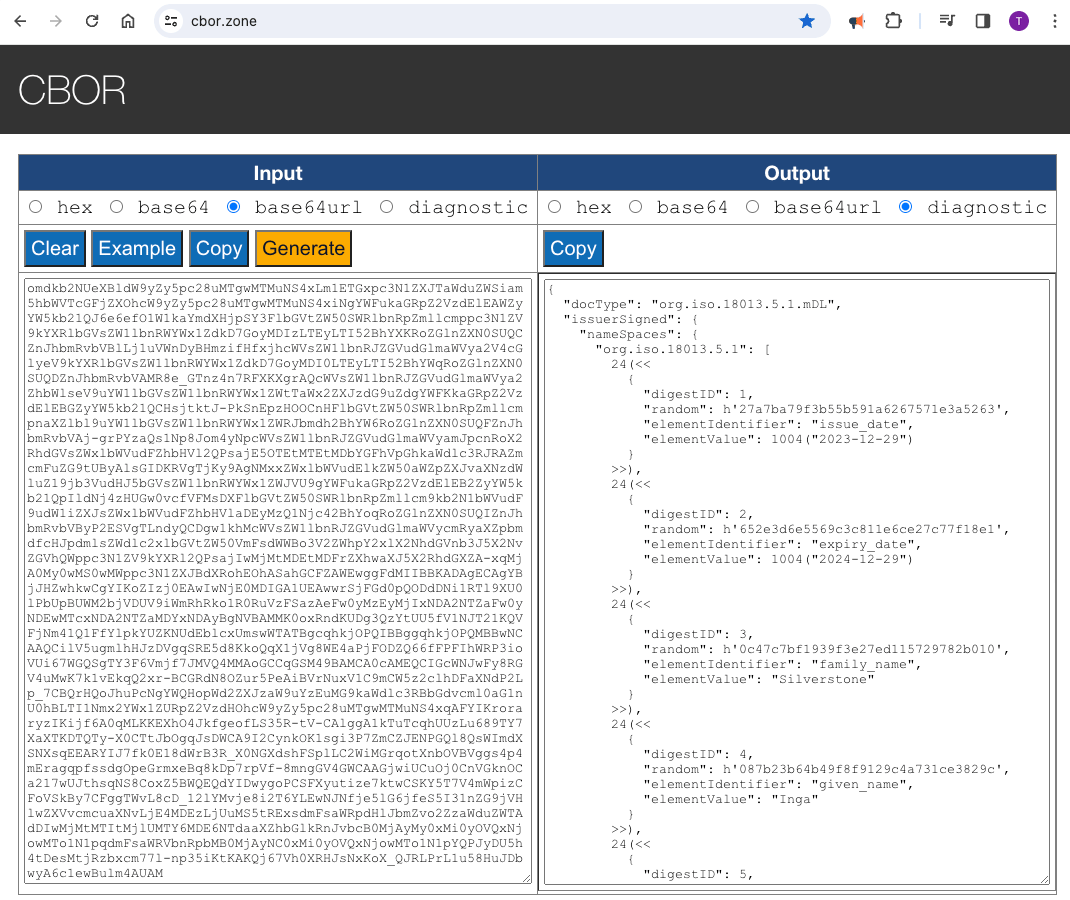 ```
{
"docType": "org.iso.18013.5.1.mDL",
"issuerSigned": {
"nameSpaces": {
"org.iso.18013.5.1": [
24(<<
{
"digestID": 1,
"random": h'27a7ba79f3b55b591a6267571e3a5263',
"elementIdentifier": "issue_date",
"elementValue": 1004("2023-12-29")
}
>>),
24(<<
{
"digestID": 2,
"random": h'652e3d6e5569c3c811e6ce27c77f18e1',
"elementIdentifier": "expiry_date",
"elementValue": 1004("2024-12-29")
}
>>),
24(<<
{
"digestID": 3,
"random": h'0c47c7bf1939f3e27ed115729782b010',
"elementIdentifier": "family_name",
"elementValue": "Silverstone"
}
>>),
24(<<
{
"digestID": 4,
"random": h'087b23b64b49f8f9129c4a731ce3829c',
"elementIdentifier": "given_name",
"elementValue": "Inga"
}
>>),
24(<<
{
"digestID": 5,
"random": h'23fa0acf633690b35369f09a26e32369',
"elementIdentifier": "birth_date",
"elementValue": 1004("1991-11-06")
}
>>),
24(<<
{
"digestID": 6,
"random": h'1c8096c1880ca4558138cacbd02034cc',
"elementIdentifier": "issuing_country",
"elementValue": "US"
}
>>),
24(<<
{
"digestID": 7,
"random": h'a4895d363e331d41b0d2f71f54532c0d',
"elementIdentifier": "document_number",
"elementValue": "12345678"
}
>>),
24(<<
{
"digestID": 8,
"random": h'723f61125604cb9ddc90083830d6484c',
"elementIdentifier": "driving_privileges",
"elementValue": [
{
"vehicle_category_code": "A",
"issue_date": 1004("2023-01-01"),
"expiry_date": 1004("2043-01-01")
}
]
}
>>)
]
},
"issuerAuth": [
h'a10126',
{
33: h'3082015d30820104a0030201020206018c91d9c219300a06082a8648ce3d04030230363134303206035504030c2b4a3146774a50383743362d514e5f5753494f6d4a415163366e3543515f625a6461464a3547446e5731526b301e170d3233313232323134303635365a170d3234313031373134303635365a30363134303206035504030c2b4a3146774a50383743362d514e5f5753494f6d4a415163366e3543515f625a6461464a3547446e5731526b3059301306072a8648ce3d020106082a8648ce3d03010703420004028a5579ba09a58472730d582a49113977c2a4a10a97d63560f1613868f8c5383650eba7c53c52215913f78a85548baed61904a04d8dc5e959a37fb24c550e0c300a06082a8648ce3d040302034700304402206716349c05cbc446578b8cc0aee4d6f124a90db1afe04219174df0e66eaf93de022055acdbb15750bd9825b9cf672584315a5cd74fd8ba7fec2050ac7428261b8f70'
},
24(<<
{
"version": "1.0",
"digestAlgorithm": "SHA-256",
"valueDigests": {
"org.iso.18013.5.1": {
1: h'aae8adaaf2cc82a28dfe80d2a30b28a11784ee0991f81ea1f2d2df947eb55f82',
2: h'035913b9372a8545332eeebcf5363b5da5d32834d04f2f97d024ed25b3a0a89b',
3: h'3d2360b29e438ad6c822dcfed998264910d3c6425f10b1622675748d5eca8410',
4: h'9edf934135f1d5ab07747f5f43465ddb21152a652c2d9688c1abaa8b579db395',
5: h'b38a78984ada82aa5fb2c7603a9786ae6c5e06af240e9eeba557fef269e0195e',
6: h'001a3c22502b8e8f40a75469273826b6d7bc1426d86ca8d4bc0a8c59e4159011',
7: h'3c328283c24855f2bad8b37bb92dc0248a6394fb578996a62cc2168552901cbb',
8: h'4d6bcbf1c0ffd7695832f8def22d93e982c4c0d24d7e37b9946ea37de4b9237d'
}
},
"docType": "org.iso.18013.5.1.mDL",
"validityInfo": {
"signed": 0("2023-12-29T16:01:57Z"),
"validFrom": 0("2023-12-29T16:01:57Z"),
"validUntil": 0("2024-12-29T16:01:57Z")
}
}
>>),
h'f2720d4e61e2d0deb0cb634736f1726efb97e9e9df988ab4a00a423ebb561d1744726c3712a85ff40944b3eb2f5bb9f07b890dbc3203a7357b006e966e005003'
]
}
}
```
### 4.3. POTENTIAL Interop Event / Track 1 / Light Profile
[POTENTIAL][POTENTIAL] is a European organization dedicated to European Digital Identity.
The organization has been hosting an interoperability event since spring 2024. The event
is divided into six tracks. Tracks 1 and 2 are designated for testing the inteoperability
of credential issuers. In Track 1, mdoc is used as the format for verifiable credentials,
while SD-JWT VC is used in Track 2.
Track 1 defines two profiles. One is called the "light" profile. The other is called the
"full" profile. This section explains the steps for the light profile.
#### 4.3.1. Settings
##### 4.3.1.1. Authorization Server Settings
| Parameter | Value |
| :--------------------- | :--------------------------------------------------------------------------------------------------------------------------- |
| Issuer Identifier | `https://trial.authlete.net` |
| Authorization Endpoint | `https://trial.authlete.net/api/authorization` |
| Token Endpoint | `https://trial.authlete.net/api/token` |
| Discovery Endpoint | `[https://trial.authlete.net/.well-known/openid-configuration](https://trial.authlete.net/.well-known/openid-configuration)` |
| Entity Configuration | `[https://trial.authlete.net/.well-known/openid-federation](https://trial.authlete.net/.well-known/openid-federation)` |
The source code of the **authorization server** is available at
[https://github.com/authlete/java-oauth-server](https://github.com/authlete/java-oauth-server). Note that this implementation
is a sample and is not intended for commercial use.
##### 4.3.1.2. Credential Issuer Settings
| Parameter | Value |
| :------------------- | :----------------------------------------------------------------------------------------------------------------------------------- |
| Issuer Identifier | `https://trial.authlete.net` |
| Credential Endpoint | `https://trial.authlete.net/api/credential` |
| Metadata Endpoint | `[https://trial.authlete.net/.well-known/openid-credential-issuer](https://trial.authlete.net/.well-known/openid-credential-issuer)` |
| Entity Configuration | `[https://trial.authlete.net/.well-known/openid-federation](https://trial.authlete.net/.well-known/openid-federation)` |
The source code of the **credential issuer** is the same as that of the
authorization server.
##### 4.3.1.3. Client Settings
| Parameter | Value |
| :------------ | :-------------------------------------------------------------------------------------------------------------- |
| Client ID | `track1_light` |
| Client Type | public (= [client authentication][CLIENT_AUTHENTICATION] is not required) |
| Redirect URIs |
```
{
"docType": "org.iso.18013.5.1.mDL",
"issuerSigned": {
"nameSpaces": {
"org.iso.18013.5.1": [
24(<<
{
"digestID": 1,
"random": h'27a7ba79f3b55b591a6267571e3a5263',
"elementIdentifier": "issue_date",
"elementValue": 1004("2023-12-29")
}
>>),
24(<<
{
"digestID": 2,
"random": h'652e3d6e5569c3c811e6ce27c77f18e1',
"elementIdentifier": "expiry_date",
"elementValue": 1004("2024-12-29")
}
>>),
24(<<
{
"digestID": 3,
"random": h'0c47c7bf1939f3e27ed115729782b010',
"elementIdentifier": "family_name",
"elementValue": "Silverstone"
}
>>),
24(<<
{
"digestID": 4,
"random": h'087b23b64b49f8f9129c4a731ce3829c',
"elementIdentifier": "given_name",
"elementValue": "Inga"
}
>>),
24(<<
{
"digestID": 5,
"random": h'23fa0acf633690b35369f09a26e32369',
"elementIdentifier": "birth_date",
"elementValue": 1004("1991-11-06")
}
>>),
24(<<
{
"digestID": 6,
"random": h'1c8096c1880ca4558138cacbd02034cc',
"elementIdentifier": "issuing_country",
"elementValue": "US"
}
>>),
24(<<
{
"digestID": 7,
"random": h'a4895d363e331d41b0d2f71f54532c0d',
"elementIdentifier": "document_number",
"elementValue": "12345678"
}
>>),
24(<<
{
"digestID": 8,
"random": h'723f61125604cb9ddc90083830d6484c',
"elementIdentifier": "driving_privileges",
"elementValue": [
{
"vehicle_category_code": "A",
"issue_date": 1004("2023-01-01"),
"expiry_date": 1004("2043-01-01")
}
]
}
>>)
]
},
"issuerAuth": [
h'a10126',
{
33: h'3082015d30820104a0030201020206018c91d9c219300a06082a8648ce3d04030230363134303206035504030c2b4a3146774a50383743362d514e5f5753494f6d4a415163366e3543515f625a6461464a3547446e5731526b301e170d3233313232323134303635365a170d3234313031373134303635365a30363134303206035504030c2b4a3146774a50383743362d514e5f5753494f6d4a415163366e3543515f625a6461464a3547446e5731526b3059301306072a8648ce3d020106082a8648ce3d03010703420004028a5579ba09a58472730d582a49113977c2a4a10a97d63560f1613868f8c5383650eba7c53c52215913f78a85548baed61904a04d8dc5e959a37fb24c550e0c300a06082a8648ce3d040302034700304402206716349c05cbc446578b8cc0aee4d6f124a90db1afe04219174df0e66eaf93de022055acdbb15750bd9825b9cf672584315a5cd74fd8ba7fec2050ac7428261b8f70'
},
24(<<
{
"version": "1.0",
"digestAlgorithm": "SHA-256",
"valueDigests": {
"org.iso.18013.5.1": {
1: h'aae8adaaf2cc82a28dfe80d2a30b28a11784ee0991f81ea1f2d2df947eb55f82',
2: h'035913b9372a8545332eeebcf5363b5da5d32834d04f2f97d024ed25b3a0a89b',
3: h'3d2360b29e438ad6c822dcfed998264910d3c6425f10b1622675748d5eca8410',
4: h'9edf934135f1d5ab07747f5f43465ddb21152a652c2d9688c1abaa8b579db395',
5: h'b38a78984ada82aa5fb2c7603a9786ae6c5e06af240e9eeba557fef269e0195e',
6: h'001a3c22502b8e8f40a75469273826b6d7bc1426d86ca8d4bc0a8c59e4159011',
7: h'3c328283c24855f2bad8b37bb92dc0248a6394fb578996a62cc2168552901cbb',
8: h'4d6bcbf1c0ffd7695832f8def22d93e982c4c0d24d7e37b9946ea37de4b9237d'
}
},
"docType": "org.iso.18013.5.1.mDL",
"validityInfo": {
"signed": 0("2023-12-29T16:01:57Z"),
"validFrom": 0("2023-12-29T16:01:57Z"),
"validUntil": 0("2024-12-29T16:01:57Z")
}
}
>>),
h'f2720d4e61e2d0deb0cb634736f1726efb97e9e9df988ab4a00a423ebb561d1744726c3712a85ff40944b3eb2f5bb9f07b890dbc3203a7357b006e966e005003'
]
}
}
```
### 4.3. POTENTIAL Interop Event / Track 1 / Light Profile
[POTENTIAL][POTENTIAL] is a European organization dedicated to European Digital Identity.
The organization has been hosting an interoperability event since spring 2024. The event
is divided into six tracks. Tracks 1 and 2 are designated for testing the inteoperability
of credential issuers. In Track 1, mdoc is used as the format for verifiable credentials,
while SD-JWT VC is used in Track 2.
Track 1 defines two profiles. One is called the "light" profile. The other is called the
"full" profile. This section explains the steps for the light profile.
#### 4.3.1. Settings
##### 4.3.1.1. Authorization Server Settings
| Parameter | Value |
| :--------------------- | :--------------------------------------------------------------------------------------------------------------------------- |
| Issuer Identifier | `https://trial.authlete.net` |
| Authorization Endpoint | `https://trial.authlete.net/api/authorization` |
| Token Endpoint | `https://trial.authlete.net/api/token` |
| Discovery Endpoint | `[https://trial.authlete.net/.well-known/openid-configuration](https://trial.authlete.net/.well-known/openid-configuration)` |
| Entity Configuration | `[https://trial.authlete.net/.well-known/openid-federation](https://trial.authlete.net/.well-known/openid-federation)` |
The source code of the **authorization server** is available at
[https://github.com/authlete/java-oauth-server](https://github.com/authlete/java-oauth-server). Note that this implementation
is a sample and is not intended for commercial use.
##### 4.3.1.2. Credential Issuer Settings
| Parameter | Value |
| :------------------- | :----------------------------------------------------------------------------------------------------------------------------------- |
| Issuer Identifier | `https://trial.authlete.net` |
| Credential Endpoint | `https://trial.authlete.net/api/credential` |
| Metadata Endpoint | `[https://trial.authlete.net/.well-known/openid-credential-issuer](https://trial.authlete.net/.well-known/openid-credential-issuer)` |
| Entity Configuration | `[https://trial.authlete.net/.well-known/openid-federation](https://trial.authlete.net/.well-known/openid-federation)` |
The source code of the **credential issuer** is the same as that of the
authorization server.
##### 4.3.1.3. Client Settings
| Parameter | Value |
| :------------ | :-------------------------------------------------------------------------------------------------------------- |
| Client ID | `track1_light` |
| Client Type | public (= [client authentication][CLIENT_AUTHENTICATION] is not required) |
| Redirect URIs | - `https://nextdev-api.authlete.net/api/mock/redirection`
- `eudi-openid4ci://authorize/`
|
If you need to register additional redirect URIs to this client, or if you need
an independent client dedicated to your use, please [contact us][CONTACT_US].
To Authlete members: New clients should be created under
"Trial" (organization=283415) /
"NextDev" (server=2704222) /
"Authlete Trial" (service=986126671).
#### 4.3.2. Demo Steps
##### 4.3.2.1. Step 1 : Credential Offer
The sample implementation of credential issuer provides a web page where
developers can generate an arbitrary **credential offer** for testing.
The URL of the page is [https://trial.authlete.net/api/offer/issue](https://trial.authlete.net/api/offer/issue).
Accessing the web page, you will find a form to configure the content of
a credential offer.
Edit the form as instructed below.
1. Input `inga` and `inga` into the "Login ID" field and the "Password" field.
2. Edit the "Credential Configuration IDs". The value should be a JSON array containing the string `potential.light.profile`.
3. Check the "include?" checkbox next to "Authorization Code Grant".
4. Uncheck the "include?" checkbox next to "Pre-Authorized Code Grant".
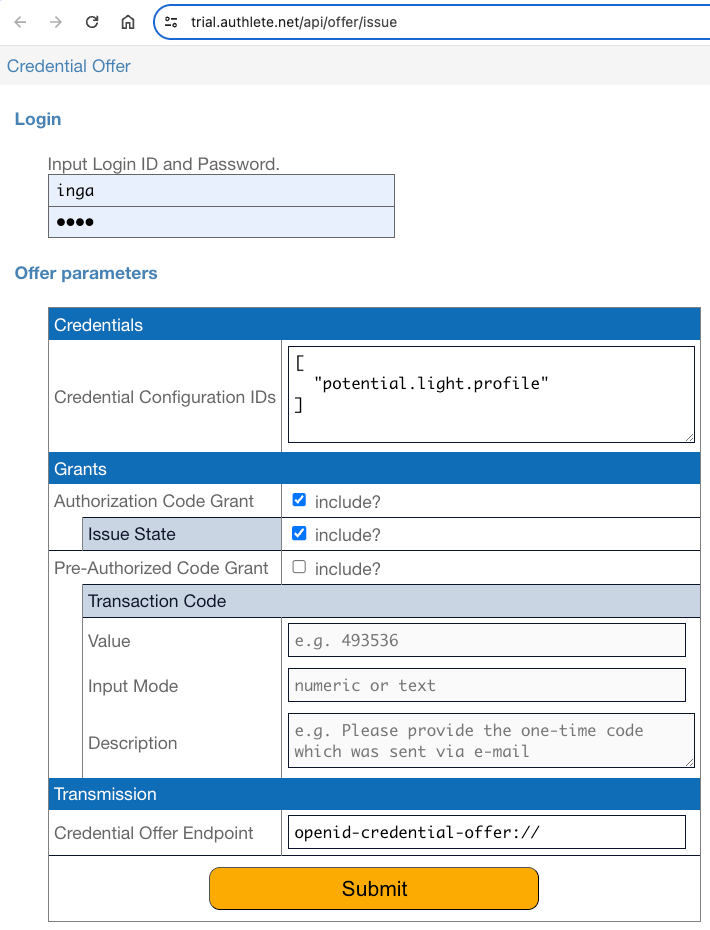 Press the "Submit" button after editing the form, and you will find a QR code
that represents a URL containing the generated credential offer.
Press the "Submit" button after editing the form, and you will find a QR code
that represents a URL containing the generated credential offer.
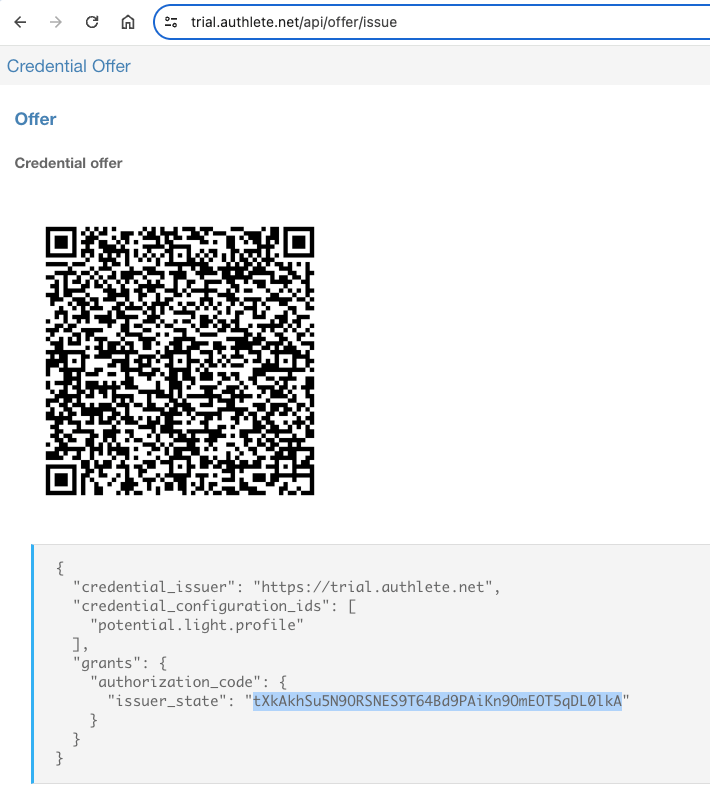 The JSON under the QR code represents the content of the credential offer.
The value of the `issuer_state` property in the JSON is the issued
**issuer state**. In the above example, the value of the issuer state is
`tXkAkhSu5N9ORSNES9T64Bd9PAiKn9OmEOT5qDL0lkA`.
The issuer state is to be included in the **authorization request** you will
make later.
##### 4.3.2.2. Step 2 : Code Verifier and Code Challenge
Generate a **code verifier** and compute the corresponding **code challenge**
(cf. [RFC 7636][RFC_7636]) by using the `pkce` command
```shell theme={null}
git clone git@github.com:authlete/oid4vci-demo.git
cd oid4vci-demo
./pkce
```
The `pkce` command will print a generated code verifier and the computed code
challenge like below.
```shell theme={null}
CODE_VERIFIER=gzRNlV7DLS_HyKMQKQMrzgYQ8aY3H2rVJ3iIlYK0cjE
CODE_CHALLENGE=j_4gpG9Kr3M7ilMO-MRoSROP-W3h2EZem0KSEU-RAhM
```
The computed code challenge is to be included in the **authorization request**
in the next step, and the generated code verifier is to be included in the
**token request** that will be made after the authorization request.
##### 4.3.2.3. Step 3 : Authorization Request
Make an **authorization request** using the **authorization code flow**
(cf. [RFC 6749, 4.1][RFC_6749_4_1]) by inputting the following URL in the
address bar of your web browser. Don't forget to replace `${ISSUER_STATE}` and
`${CODE_CHALLENGE}` in the URL with the actual values of the issuer state and
the code challenge you have created in the previous steps.
```
https://trial.authlete.net/api/authorization?client_id=track1_light&response_type=code&issuer_state=${ISSUER_STATE}&redirect_uri=https://nextdev-api.authlete.net/api/mock/redirection&code_challenge=${CODE_CHALLENGE}&code_challenge_method=S256&prompt=login
```
Accessing the URL will show you an **authorization page**. The page contains
a login form. Input `inga` and `inga` into the Login ID field and the Password
field in the login form, and press the "Authorize" button.
The JSON under the QR code represents the content of the credential offer.
The value of the `issuer_state` property in the JSON is the issued
**issuer state**. In the above example, the value of the issuer state is
`tXkAkhSu5N9ORSNES9T64Bd9PAiKn9OmEOT5qDL0lkA`.
The issuer state is to be included in the **authorization request** you will
make later.
##### 4.3.2.2. Step 2 : Code Verifier and Code Challenge
Generate a **code verifier** and compute the corresponding **code challenge**
(cf. [RFC 7636][RFC_7636]) by using the `pkce` command
```shell theme={null}
git clone git@github.com:authlete/oid4vci-demo.git
cd oid4vci-demo
./pkce
```
The `pkce` command will print a generated code verifier and the computed code
challenge like below.
```shell theme={null}
CODE_VERIFIER=gzRNlV7DLS_HyKMQKQMrzgYQ8aY3H2rVJ3iIlYK0cjE
CODE_CHALLENGE=j_4gpG9Kr3M7ilMO-MRoSROP-W3h2EZem0KSEU-RAhM
```
The computed code challenge is to be included in the **authorization request**
in the next step, and the generated code verifier is to be included in the
**token request** that will be made after the authorization request.
##### 4.3.2.3. Step 3 : Authorization Request
Make an **authorization request** using the **authorization code flow**
(cf. [RFC 6749, 4.1][RFC_6749_4_1]) by inputting the following URL in the
address bar of your web browser. Don't forget to replace `${ISSUER_STATE}` and
`${CODE_CHALLENGE}` in the URL with the actual values of the issuer state and
the code challenge you have created in the previous steps.
```
https://trial.authlete.net/api/authorization?client_id=track1_light&response_type=code&issuer_state=${ISSUER_STATE}&redirect_uri=https://nextdev-api.authlete.net/api/mock/redirection&code_challenge=${CODE_CHALLENGE}&code_challenge_method=S256&prompt=login
```
Accessing the URL will show you an **authorization page**. The page contains
a login form. Input `inga` and `inga` into the Login ID field and the Password
field in the login form, and press the "Authorize" button.
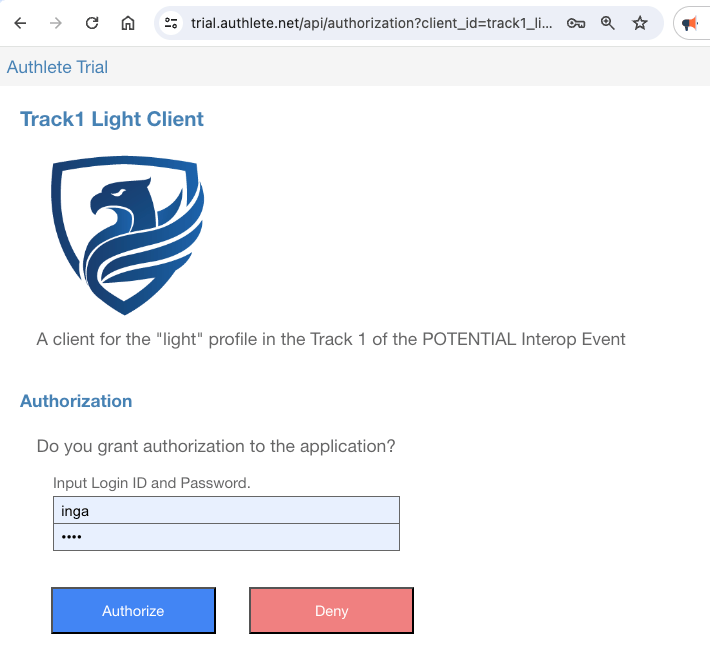 You will be redirected to the **redirection endpoint** (cf.
[RFC 6749, 3.1.2][RFC_6749_3_1_2]).
You will be redirected to the **redirection endpoint** (cf.
[RFC 6749, 3.1.2][RFC_6749_3_1_2]).
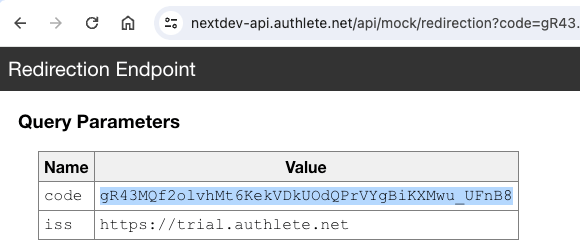 This redirection endpoint displays key-value pairs that it has received.
The value of the `code` parameter displayed there is the issued
**authorization code**. In this example, the value of the authorization code is
`gR43MQf2olvhMt6KekVDkUOdQPrVYgBiKXMwu_UFnB8`.
The authorization code is to be used in the token request in the next section.
Note that the authorization code will expire in 10 minutes, so you have to make
a token request promptly.
##### 4.3.2.4. Step 4 : Token Request
Make a **token request** using the authorization code flow. Don't forget to
replace `${AUTHORIZATION_CODE}` and `${CODE_VERIFIER}` in the `curl` command
below with the actual values you have obtained in the previous steps.
```shell theme={null}
curl -s https://trial.authlete.net/api/token \
-d client_id=track1_light \
-d grant_type=authorization_code \
-d code=${AUTHORIZATION_CODE} \
-d redirect_uri=https://nextdev-api.authlete.net/api/mock/redirection \
-d code_verifier=${CODE_VERIFIER}
```
If the token request is valid, the token endpoint returns JSON like below.
```json theme={null}
{
"access_token": "tNR1stglRuBVUtS2sZ7tiThPcpNDENxY0LniVpRdp0E",
"token_type": "Bearer",
"expires_in": 86400,
"scope": null,
"refresh_token": "nt3ba0H42UqMBw8FMY2keDgGAF65pBHY45-kydZFmSE",
"c_nonce": "v-1b-n82kEJGbHROSekGsmR-xEuamCxY_T0tXtQN-dY",
"c_nonce_expires_in": 86400
}
```
The value of the `access_token` property in the JSON is the issued
**access token**. It needs to be presented when you make a **credential request**.
The value of the `c_nonce` property is a nonce that must be included in a
**key proof**.
##### 4.3.2.5. Step 5 : CWT Key Proof
The [authlete/cbor][AUTHLETE_CBOR] library contains a utility class,
`CWTKeyProofBuilder`, that can generate a **CWT key proof**. The shell script,
`bin/generate-cwt-key-proof`, which is included in the repository of the
library, is a wrapper to invoke the utility class from the command line.
A CWT key proof can be generated as shown below. Don't forget to replace
`${NONCE}` in the command line with the actual value of `c_nonce` that has
been issued from the token endpoint in the previous step, and to replace
`${PRIVATE_KEY_FILE}` with the actual path of a file containing a private
key in the JWK format (cf. [RFC 7517][RFC_7517]). The file, `holder.jwk`, in
the [authlete/oid4vci-demo][AUTHLETE_OID4VCI_DEMO] repository can be used
for the purpose.
```shell theme={null}
git clone git@github.com:authlete/cbor.git
cd cbor
mvn compile
./bin/generate-cwt-key-proof \
--issuer https://trial.authlete.net \
--key ${PRIVATE_KEY_FILE} \
--client track1_light \
--nonce ${NONCE}
```
The `generate-cwt-key-proof` script will print a CWT key proof like below.
```text theme={null}
2D3ShFifowEmA3RvcGVuaWQ0dmNpLXByb29mK2N3dGhDT1NFX0tleVh7pgECAlgrMWU1QVk5RXlCMDFYblV6YTZMcEp6azAybjZZX0FtbW5TYjBGQmVOVlZyVQMmIAEhWCA9LFCsPbOXT-ZdwCrPWaCpJ4GgGGebHbLEESmsFjwXbSJYIMVfH24tRUqLFLpy3rizbi5CYqpmOkyojJ7q_hp9sEddoFhgpAFsdHJhY2sxX2xpZ2h0A3gaaHR0cHM6Ly90cmlhbC5hdXRobGV0ZS5uZXQGGmZf3KsKWCt2LTFiLW44MmtFSkdiSFJPU2VrR3NtUi14RXVhbUN4WV9UMHRYdFFOLWRZWEDVVsA-MQ9dAiaIRThTJ5JgmND4RZuhxcIiNx04TZ7fSqlQYJlRW9AyNqXeJHIEl1KqQs_yZtlPd98kRbvziTEi
```
The following is the result of decoding the CWT key proof above using [CBOR Zone][CBOR_ZONE].
```
61(18(/ COSE_Sign1 / [
/ protected / <<
{
1: -7,
3: "openid4vci-proof+cwt",
"COSE_Key": h'a6010202582b3165354159394579423031586e557a61364c704a7a6b30326e36595f416d6d6e5362304642654e56567255032620012158203d2c50ac3db3974fe65dc02acf59a0a92781a018679b1db2c41129ac163c176d225820c55f1f6e2d454a8b14ba72deb8b36e2e4262aa663a4ca88c9eeafe1a7db0475d'
}
>>,
/ unprotected / {
},
h'a4016c747261636b315f6c6967687403781a68747470733a2f2f747269616c2e617574686c6574652e6e6574061a665fdcab0a582b762d31622d6e38326b454a476248524f53656b47736d522d784575616d4378595f5430745874514e2d6459',
h'd556c03e310f5d02268845385327926098d0f8459ba1c5c222371d384d9edf4aa9506099515bd03236a5de2472049752aa42cff266d94f77df2445bbf3893122'
]))
```
The value of `COSE_Key` in the protected header is a CBOR byte string, which
wraps the COSE key. The content of the byte string is decoded as follows:
```
{
1: 2,
2: h'3165354159394579423031586e557a61364c704a7a6b30326e36595f416d6d6e5362304642654e56567255',
3: -7,
-1: 1,
-2: h'3d2c50ac3db3974fe65dc02acf59a0a92781a018679b1db2c41129ac163c176d',
-3: h'c55f1f6e2d454a8b14ba72deb8b36e2e4262aa663a4ca88c9eeafe1a7db0475d'
}
```
##### 4.3.2.6. Step 6 : Credential Request
Make a **credential request** with the access token and the CWT key proof.
Don't forget to replace `${ACCESS_TOKEN}` and `${CWT_KEY_PROOF}` in the
command line with the actual values.
```shell theme={null}
curl -s https://trial.authlete.net/api/credential \
-H "Authorization: Bearer ${ACCESS_TOKEN}" \
-H "Content-Type: application/json" \
--data '{
"format": "mso_mdoc",
"doctype": "org.iso.18013.5.1.mDL",
"claims": {
"org.iso.18013.5.1": {
"family_name": {},
"given_name": {},
"birth_date": {},
"issue_date": {},
"expiry_date": {},
"issuing_country": {},
"document_number": {},
"driving_privileges": {}
}
},
"proof": {
"proof_type": "cwt",
"cwt":"'${CWT_KEY_PROOF}'"
}
}'
```
If the credential request is valid, the credential endpoint returns JSON
like below. The value of the `credential` property in the JSON is the
issued **verifiable credential**.
```json theme={null}
{
"credential": "ompuYW1lU3BhY2VzoXFvcmcuaXNvLjE4MDEzLjUuMYjYGFhbpGhkaWdlc3RJRAFmcmFuZG9tUEJDfxiBFQGMwsBY7jE6mkdxZWxlbWVudElkZW50aWZpZXJqaXNzdWVfZGF0ZWxlbGVtZW50VmFsdWXZA-xqMjAyNC0wNi0wNdgYWFykaGRpZ2VzdElEAmZyYW5kb21QuWRGth4zjRXOJN_iGNTy0nFlbGVtZW50SWRlbnRpZmllcmtleHBpcnlfZGF0ZWxlbGVtZW50VmFsdWXZA-xqMjAyNS0wNi0wNdgYWFqkaGRpZ2VzdElEA2ZyYW5kb21Q7Zx7xYZtB0D02nL-x0UGFXFlbGVtZW50SWRlbnRpZmllcmtmYW1pbHlfbmFtZWxlbGVtZW50VmFsdWVrU2lsdmVyc3RvbmXYGFhSpGhkaWdlc3RJRARmcmFuZG9tUPMV5L8B03Uuj0GRMFZvWpJxZWxlbWVudElkZW50aWZpZXJqZ2l2ZW5fbmFtZWxlbGVtZW50VmFsdWVkSW5nYdgYWFukaGRpZ2VzdElEBWZyYW5kb21Q3fLHe4K4bUMJDFsSYKJ513FlbGVtZW50SWRlbnRpZmllcmpiaXJ0aF9kYXRlbGVsZW1lbnRWYWx1ZdkD7GoxOTkxLTExLTA22BhYVaRoZGlnZXN0SUQGZnJhbmRvbVDIzuaMNAe24KBZ3QQpP5o8cWVsZW1lbnRJZGVudGlmaWVyb2lzc3VpbmdfY291bnRyeWxlbGVtZW50VmFsdWViVVPYGFhbpGhkaWdlc3RJRAdmcmFuZG9tUJV-wSoCvKEqVh_g3844LmdxZWxlbWVudElkZW50aWZpZXJvZG9jdW1lbnRfbnVtYmVybGVsZW1lbnRWYWx1ZWgxMjM0NTY3ONgYWKKkaGRpZ2VzdElECGZyYW5kb21QZHMJeAleAPyXtFA-TiWBD3FlbGVtZW50SWRlbnRpZmllcnJkcml2aW5nX3ByaXZpbGVnZXNsZWxlbWVudFZhbHVlgaN1dmVoaWNsZV9jYXRlZ29yeV9jb2RlYUFqaXNzdWVfZGF0ZdkD7GoyMDIzLTAxLTAxa2V4cGlyeV9kYXRl2QPsajIwNDMtMDEtMDFqaXNzdWVyQXV0aIRDoQEmoRghWQFhMIIBXTCCAQSgAwIBAgIGAYyR2cIZMAoGCCqGSM49BAMCMDYxNDAyBgNVBAMMK0oxRndKUDg3QzYtUU5fV1NJT21KQVFjNm41Q1FfYlpkYUZKNUdEblcxUmswHhcNMjMxMjIyMTQwNjU2WhcNMjQxMDE3MTQwNjU2WjA2MTQwMgYDVQQDDCtKMUZ3SlA4N0M2LVFOX1dTSU9tSkFRYzZuNUNRX2JaZGFGSjVHRG5XMVJrMFkwEwYHKoZIzj0CAQYIKoZIzj0DAQcDQgAEAopVeboJpYRycw1YKkkROXfCpKEKl9Y1YPFhOGj4xTg2UOunxTxSIVkT94qFVIuu1hkEoE2NxelZo3-yTFUODDAKBggqhkjOPQQDAgNHADBEAiBnFjScBcvERleLjMCu5NbxJKkNsa_gQhkXTfDmbq-T3gIgVazbsVdQvZgluc9nJYQxWlzXT9i6f-wgUKx0KCYbj3BZArLYGFkCraZndmVyc2lvbmMxLjBvZGlnZXN0QWxnb3JpdGhtZ1NIQS0yNTZsdmFsdWVEaWdlc3RzoXFvcmcuaXNvLjE4MDEzLjUuMagBWCBtyGKRLbYNCtXpIqSixji4RYcXb4Vf7IDoQta4QfRWsAJYIJVrdxQWwcfqiFi75y5R3Saj8YpA8miZxmeoQL_JtB5-A1ggnoXpxMgIsgiIr8HlJ9JzfalESFVLgFxmES9SqSIsIG0EWCD-4Mo98S8qg8SJ8R-PMO7oCHW3wbdCfU8GGS0nG7VahwVYIE9yvCITC8M8p7-m2M4A5MwokXN3oS97uLkhk2AIj6GRBlgg8IaPGI_7Tp2rf2fLhEq0dDzm71FmTZUPc16BdJsCDgkHWCAKnWjJaTmwvgq1Yon8cLwPaPS1-lOEVASldrxYkeKLcwhYIEXVTVGxIhP9R64iPFGseCD_adyfhYZdCw-eOO8ckRjzbWRldmljZUtleUluZm-iaWRldmljZUtleaYBAgJYKzFlNUFZOUV5QjAxWG5VemE2THBKemswMm42WV9BbW1uU2IwRkJlTlZWclUDJiABIVggPSxQrD2zl0_mXcAqz1mgqSeBoBhnmx2yxBEprBY8F20iWCDFXx9uLUVKixS6ct64s24uQmKqZjpMqIye6v4afbBHXXFrZXlBdXRob3JpemF0aW9uc6FqbmFtZVNwYWNlc4Fxb3JnLmlzby4xODAxMy41LjFnZG9jVHlwZXVvcmcuaXNvLjE4MDEzLjUuMS5tRExsdmFsaWRpdHlJbmZvo2ZzaWduZWTAdDIwMjQtMDYtMDVUMDM6MzU6MTRaaXZhbGlkRnJvbcB0MjAyNC0wNi0wNVQwMzozNToxNFpqdmFsaWRVbnRpbMB0MjAyNS0wNi0wNVQwMzozNToxNFpYQAs0d0MAErcaA1auodhHxivYcqiSXdQW9KtG9HpZoxo_oEPfkf7_dRQm_Z-ffhZn2qbLTc2Op3x0a1R-gif9Mtg",
"c_nonce": "v-1b-n82kEJGbHROSekGsmR-xEuamCxY_T0tXtQN-dY",
"c_nonce_expires_in": 86205
}
```
#### 4.3.3. Verifiable Credential Format
The CBOR Diagnostic Notation representation of the verifiable credential in
the previous section is as follows.
```
{
"nameSpaces": {
"org.iso.18013.5.1": [
24(<<
{
"digestID": 1,
"random": h'42437f188115018cc2c058ee313a9a47',
"elementIdentifier": "issue_date",
"elementValue": 1004("2024-06-05")
}
>>),
24(<<
{
"digestID": 2,
"random": h'b96446b61e338d15ce24dfe218d4f2d2',
"elementIdentifier": "expiry_date",
"elementValue": 1004("2025-06-05")
}
>>),
24(<<
{
"digestID": 3,
"random": h'ed9c7bc5866d0740f4da72fec7450615',
"elementIdentifier": "family_name",
"elementValue": "Silverstone"
}
>>),
24(<<
{
"digestID": 4,
"random": h'f315e4bf01d3752e8f419130566f5a92',
"elementIdentifier": "given_name",
"elementValue": "Inga"
}
>>),
24(<<
{
"digestID": 5,
"random": h'ddf2c77b82b86d43090c5b1260a279d7',
"elementIdentifier": "birth_date",
"elementValue": 1004("1991-11-06")
}
>>),
24(<<
{
"digestID": 6,
"random": h'c8cee68c3407b6e0a059dd04293f9a3c',
"elementIdentifier": "issuing_country",
"elementValue": "US"
}
>>),
24(<<
{
"digestID": 7,
"random": h'957ec12a02bca12a561fe0dfce382e67',
"elementIdentifier": "document_number",
"elementValue": "12345678"
}
>>),
24(<<
{
"digestID": 8,
"random": h'64730978095e00fc97b4503e4e25810f',
"elementIdentifier": "driving_privileges",
"elementValue": [
{
"vehicle_category_code": "A",
"issue_date": 1004("2023-01-01"),
"expiry_date": 1004("2043-01-01")
}
]
}
>>)
]
},
"issuerAuth": [
h'a10126',
{
33: h'3082015d30820104a0030201020206018c91d9c219300a06082a8648ce3d04030230363134303206035504030c2b4a3146774a50383743362d514e5f5753494f6d4a415163366e3543515f625a6461464a3547446e5731526b301e170d3233313232323134303635365a170d3234313031373134303635365a30363134303206035504030c2b4a3146774a50383743362d514e5f5753494f6d4a415163366e3543515f625a6461464a3547446e5731526b3059301306072a8648ce3d020106082a8648ce3d03010703420004028a5579ba09a58472730d582a49113977c2a4a10a97d63560f1613868f8c5383650eba7c53c52215913f78a85548baed61904a04d8dc5e959a37fb24c550e0c300a06082a8648ce3d040302034700304402206716349c05cbc446578b8cc0aee4d6f124a90db1afe04219174df0e66eaf93de022055acdbb15750bd9825b9cf672584315a5cd74fd8ba7fec2050ac7428261b8f70'
},
h'd8185902ada66776657273696f6e63312e306f646967657374416c676f726974686d675348412d3235366c76616c756544696765737473a1716f72672e69736f2e31383031332e352e31a80158206dc862912db60d0ad5e922a4a2c638b84587176f855fec80e842d6b841f456b0025820956b771416c1c7ea8858bbe72e51dd26a3f18a40f26899c667a840bfc9b41e7e0358209e85e9c4c808b20888afc1e527d2737da94448554b805c66112f52a9222c206d045820fee0ca3df12f2a83c489f11f8f30eee80875b7c1b7427d4f06192d271bb55a870558204f72bc22130bc33ca7bfa6d8ce00e4cc28917377a12f7bb8b9219360088fa191065820f0868f188ffb4e9dab7f67cb844ab4743ce6ef51664d950f735e81749b020e090758200a9d68c96939b0be0ab56289fc70bc0f68f4b5fa53845404a576bc5891e28b7308582045d54d51b12213fd47ae223c51ac7820ff69dc9f85865d0b0f9e38ef1c9118f36d6465766963654b6579496e666fa2696465766963654b6579a6010202582b3165354159394579423031586e557a61364c704a7a6b30326e36595f416d6d6e5362304642654e56567255032620012158203d2c50ac3db3974fe65dc02acf59a0a92781a018679b1db2c41129ac163c176d225820c55f1f6e2d454a8b14ba72deb8b36e2e4262aa663a4ca88c9eeafe1a7db0475d716b6579417574686f72697a6174696f6e73a16a6e616d6553706163657381716f72672e69736f2e31383031332e352e3167646f6354797065756f72672e69736f2e31383031332e352e312e6d444c6c76616c6964697479496e666fa3667369676e6564c074323032342d30362d30355430333a33353a31345a6976616c696446726f6dc074323032342d30362d30355430333a33353a31345a6a76616c6964556e74696cc074323032352d30362d30355430333a33353a31345a',
h'0b3477430012b71a0356aea1d847c62bd872a8925dd416f4ab46f47a59a31a3fa043df91feff751426fd9f9f7e1667daa6cb4dcd8ea77c746b547e8227fd32d8'
]
}
```
In this example, the verifiable credential represents the `IssuerSigned` structure,
which is defined in the "8.3.2.1.2.2 Device retrieval mdoc response" section of
[ISO/IEC 18013-5:2021][ISO_IEC_18013_5] as below.
```
IssuerSigned = {
? "nameSpaces" : IssuerNameSpaces,
"issuerAuth" : IssuerAuth
}
```
Unexpectedly, the OID4VCI specification does not specify which CBOR structure
the value of the `credential` property represents when the format
is `mso_mdoc`. This is unlikely to be intentional and is simply a
specification flaw.
Due to this ambiguity, in the previous implementation of Authlete, the
`Document` structure was used instead of the `IssuerSigned`
structure. Interestingly, it appears that the implementation of EUDI Wallet
expects neither the `IssuerSigned` structure nor the `Document`
structure. Instead, it seems to expect the `DeviceResponse` structure.
The reason for changing the implementation of Authlete to use the
`IssuerSigned` structure is because the document for POTENTIAL
Interop Event Track 1 explicitly states that the `IssuerSigned`
structure should be used.
And, the `IssuerAuth` structure and some other relevant structures are defined
as below.
```
IssuerAuth = COSE_Sign1 ; The payload is MobileSecurityObjectBytes
MobileSecurityObjectBytes = #6.24(bstr .cbor MobileSecurityObject)
MobileSecurityObject = {
"version" : tstr, ; Version of the MobileSecurityObject
"digestAlgorithm" : tstr, ; Message digest algorithm used
"valueDigests" : ValueDigests, ; Digests of all data elements per namespace
"deviceKeyInfo" : DeviceKeyInfo,
"docType" : tstr, ; docType as used in Documents
"validityInfo" : ValidityInfo
}
DeviceKeyInfo = {
"deviceKey" : DeviceKey
? "keyAuthorizations" : KeyAuthorizations,
? "keyInfo" : KeyInfo
}
DeviceKey = COSE_Key
```
The definitions of `IssuerAuth` and `MobileSecurityObjectBytes`
give the impression that `MobileSecurityObjectBytes`
(which starts with a CBOR tag) is directly used as the payload of `COSE_Sign1`.
However, it is necessary to further convert `MobileSecurityObjectBytes`
into a byte string.
Therefore, the third element in the `"issuerAuth"` array, which starts with
`h'd81859`, represents a byte string containing
`MobileSecurityObjectBytes`.
You can see the following CBOR structure by decoding that byte string.
```
24(<<
{
"version": "1.0",
"digestAlgorithm": "SHA-256",
"valueDigests": {
"org.iso.18013.5.1": {
1: h'6dc862912db60d0ad5e922a4a2c638b84587176f855fec80e842d6b841f456b0',
2: h'956b771416c1c7ea8858bbe72e51dd26a3f18a40f26899c667a840bfc9b41e7e',
3: h'9e85e9c4c808b20888afc1e527d2737da94448554b805c66112f52a9222c206d',
4: h'fee0ca3df12f2a83c489f11f8f30eee80875b7c1b7427d4f06192d271bb55a87',
5: h'4f72bc22130bc33ca7bfa6d8ce00e4cc28917377a12f7bb8b9219360088fa191',
6: h'f0868f188ffb4e9dab7f67cb844ab4743ce6ef51664d950f735e81749b020e09',
7: h'0a9d68c96939b0be0ab56289fc70bc0f68f4b5fa53845404a576bc5891e28b73',
8: h'45d54d51b12213fd47ae223c51ac7820ff69dc9f85865d0b0f9e38ef1c9118f3'
}
},
"deviceKeyInfo": {
"deviceKey": {
1: 2,
2: h'3165354159394579423031586e557a61364c704a7a6b30326e36595f416d6d6e5362304642654e56567255',
3: -7,
-1: 1,
-2: h'3d2c50ac3db3974fe65dc02acf59a0a92781a018679b1db2c41129ac163c176d',
-3: h'c55f1f6e2d454a8b14ba72deb8b36e2e4262aa663a4ca88c9eeafe1a7db0475d'
},
"keyAuthorizations": {
"nameSpaces": [
"org.iso.18013.5.1"
]
}
},
"docType": "org.iso.18013.5.1.mDL",
"validityInfo": {
"signed": 0("2024-06-05T03:35:14Z"),
"validFrom": 0("2024-06-05T03:35:14Z"),
"validUntil": 0("2025-06-05T03:35:14Z")
}
}
>>)
```
The point to note is that the public key embedded in the CWT key proof
appears in the verifiable credential as the value of `deviceKey`. Please
confirm that the value of `COSE_Key` in the CWT key proof is identical
to the value of `deviceKey` in the VC. Both hold the following COSE Key.
```
{
/ kty / 1: 2 / EC2 /,
/ kid / 2: h'3165354159394579423031586e557a61364c704a7a6b30326e36595f416d6d6e5362304642654e56567255',
/ alg / 3: -7 / ES256 /,
/ crv / -1: 1 / P-256 /,
/ x / -2: h'3d2c50ac3db3974fe65dc02acf59a0a92781a018679b1db2c41129ac163c176d',
/ y / -3: h'c55f1f6e2d454a8b14ba72deb8b36e2e4262aa663a4ca88c9eeafe1a7db0475d'
}
```
Refer to [IANA: CBOR Object Signing and Encryption (COSE)][IANA_COSE] for the
meanings of the integer labels and integer values in the COSE Key.
### 4.4. POTENTIAL Interop Event / Track 2 / Light Profile
[POTENTIAL][POTENTIAL] is a European organization dedicated to European Digital Identity.
The organization has been hosting an interoperability event since spring 2024. The event
is divided into six tracks. Tracks 1 and 2 are designated for testing the inteoperability
of credential issuers. In Track 1, mdoc is used as the format for verifiable credentials,
while SD-JWT VC is used in Track 2.
Track 2 defines two profiles. One is called the "light" profile. The other is called the
"full" profile. This section explains the steps for the light profile.
#### 4.4.1. Settings
##### 4.4.1.1. Authorization Server Settings
| Parameter | Value |
| :--------------------- | :--------------------------------------------------------------------------------------------------------------------------- |
| Issuer Identifier | `https://trial.authlete.net` |
| Authorization Endpoint | `https://trial.authlete.net/api/authorization` |
| Token Endpoint | `https://trial.authlete.net/api/token` |
| Discovery Endpoint | `[https://trial.authlete.net/.well-known/openid-configuration](https://trial.authlete.net/.well-known/openid-configuration)` |
| Entity Configuration | `[https://trial.authlete.net/.well-known/openid-federation](https://trial.authlete.net/.well-known/openid-federation)` |
The source code of the **authorization server** is available at
[https://github.com/authlete/java-oauth-server](https://github.com/authlete/java-oauth-server). Note that this implementation
is a sample and is not intended for commercial use.
##### 4.4.1.2. Credential Issuer Settings
| Parameter | Value |
| :------------------- | :----------------------------------------------------------------------------------------------------------------------------------- |
| Issuer Identifier | `https://trial.authlete.net` |
| Credential Endpoint | `https://trial.authlete.net/api/credential` |
| Metadata Endpoint | `[https://trial.authlete.net/.well-known/openid-credential-issuer](https://trial.authlete.net/.well-known/openid-credential-issuer)` |
| Entity Configuration | `[https://trial.authlete.net/.well-known/openid-federation](https://trial.authlete.net/.well-known/openid-federation)` |
The source code of the **credential issuer** is the same as that of the
authorization server.
##### 4.4.1.3. Client Settings
| Parameter | Value |
| :------------ | :-------------------------------------------------------------------------------------------------------------- |
| Client ID | `track2_light` |
| Client Type | public (= [client authentication][CLIENT_AUTHENTICATION] is not required) |
| Redirect URIs |
This redirection endpoint displays key-value pairs that it has received.
The value of the `code` parameter displayed there is the issued
**authorization code**. In this example, the value of the authorization code is
`gR43MQf2olvhMt6KekVDkUOdQPrVYgBiKXMwu_UFnB8`.
The authorization code is to be used in the token request in the next section.
Note that the authorization code will expire in 10 minutes, so you have to make
a token request promptly.
##### 4.3.2.4. Step 4 : Token Request
Make a **token request** using the authorization code flow. Don't forget to
replace `${AUTHORIZATION_CODE}` and `${CODE_VERIFIER}` in the `curl` command
below with the actual values you have obtained in the previous steps.
```shell theme={null}
curl -s https://trial.authlete.net/api/token \
-d client_id=track1_light \
-d grant_type=authorization_code \
-d code=${AUTHORIZATION_CODE} \
-d redirect_uri=https://nextdev-api.authlete.net/api/mock/redirection \
-d code_verifier=${CODE_VERIFIER}
```
If the token request is valid, the token endpoint returns JSON like below.
```json theme={null}
{
"access_token": "tNR1stglRuBVUtS2sZ7tiThPcpNDENxY0LniVpRdp0E",
"token_type": "Bearer",
"expires_in": 86400,
"scope": null,
"refresh_token": "nt3ba0H42UqMBw8FMY2keDgGAF65pBHY45-kydZFmSE",
"c_nonce": "v-1b-n82kEJGbHROSekGsmR-xEuamCxY_T0tXtQN-dY",
"c_nonce_expires_in": 86400
}
```
The value of the `access_token` property in the JSON is the issued
**access token**. It needs to be presented when you make a **credential request**.
The value of the `c_nonce` property is a nonce that must be included in a
**key proof**.
##### 4.3.2.5. Step 5 : CWT Key Proof
The [authlete/cbor][AUTHLETE_CBOR] library contains a utility class,
`CWTKeyProofBuilder`, that can generate a **CWT key proof**. The shell script,
`bin/generate-cwt-key-proof`, which is included in the repository of the
library, is a wrapper to invoke the utility class from the command line.
A CWT key proof can be generated as shown below. Don't forget to replace
`${NONCE}` in the command line with the actual value of `c_nonce` that has
been issued from the token endpoint in the previous step, and to replace
`${PRIVATE_KEY_FILE}` with the actual path of a file containing a private
key in the JWK format (cf. [RFC 7517][RFC_7517]). The file, `holder.jwk`, in
the [authlete/oid4vci-demo][AUTHLETE_OID4VCI_DEMO] repository can be used
for the purpose.
```shell theme={null}
git clone git@github.com:authlete/cbor.git
cd cbor
mvn compile
./bin/generate-cwt-key-proof \
--issuer https://trial.authlete.net \
--key ${PRIVATE_KEY_FILE} \
--client track1_light \
--nonce ${NONCE}
```
The `generate-cwt-key-proof` script will print a CWT key proof like below.
```text theme={null}
2D3ShFifowEmA3RvcGVuaWQ0dmNpLXByb29mK2N3dGhDT1NFX0tleVh7pgECAlgrMWU1QVk5RXlCMDFYblV6YTZMcEp6azAybjZZX0FtbW5TYjBGQmVOVlZyVQMmIAEhWCA9LFCsPbOXT-ZdwCrPWaCpJ4GgGGebHbLEESmsFjwXbSJYIMVfH24tRUqLFLpy3rizbi5CYqpmOkyojJ7q_hp9sEddoFhgpAFsdHJhY2sxX2xpZ2h0A3gaaHR0cHM6Ly90cmlhbC5hdXRobGV0ZS5uZXQGGmZf3KsKWCt2LTFiLW44MmtFSkdiSFJPU2VrR3NtUi14RXVhbUN4WV9UMHRYdFFOLWRZWEDVVsA-MQ9dAiaIRThTJ5JgmND4RZuhxcIiNx04TZ7fSqlQYJlRW9AyNqXeJHIEl1KqQs_yZtlPd98kRbvziTEi
```
The following is the result of decoding the CWT key proof above using [CBOR Zone][CBOR_ZONE].
```
61(18(/ COSE_Sign1 / [
/ protected / <<
{
1: -7,
3: "openid4vci-proof+cwt",
"COSE_Key": h'a6010202582b3165354159394579423031586e557a61364c704a7a6b30326e36595f416d6d6e5362304642654e56567255032620012158203d2c50ac3db3974fe65dc02acf59a0a92781a018679b1db2c41129ac163c176d225820c55f1f6e2d454a8b14ba72deb8b36e2e4262aa663a4ca88c9eeafe1a7db0475d'
}
>>,
/ unprotected / {
},
h'a4016c747261636b315f6c6967687403781a68747470733a2f2f747269616c2e617574686c6574652e6e6574061a665fdcab0a582b762d31622d6e38326b454a476248524f53656b47736d522d784575616d4378595f5430745874514e2d6459',
h'd556c03e310f5d02268845385327926098d0f8459ba1c5c222371d384d9edf4aa9506099515bd03236a5de2472049752aa42cff266d94f77df2445bbf3893122'
]))
```
The value of `COSE_Key` in the protected header is a CBOR byte string, which
wraps the COSE key. The content of the byte string is decoded as follows:
```
{
1: 2,
2: h'3165354159394579423031586e557a61364c704a7a6b30326e36595f416d6d6e5362304642654e56567255',
3: -7,
-1: 1,
-2: h'3d2c50ac3db3974fe65dc02acf59a0a92781a018679b1db2c41129ac163c176d',
-3: h'c55f1f6e2d454a8b14ba72deb8b36e2e4262aa663a4ca88c9eeafe1a7db0475d'
}
```
##### 4.3.2.6. Step 6 : Credential Request
Make a **credential request** with the access token and the CWT key proof.
Don't forget to replace `${ACCESS_TOKEN}` and `${CWT_KEY_PROOF}` in the
command line with the actual values.
```shell theme={null}
curl -s https://trial.authlete.net/api/credential \
-H "Authorization: Bearer ${ACCESS_TOKEN}" \
-H "Content-Type: application/json" \
--data '{
"format": "mso_mdoc",
"doctype": "org.iso.18013.5.1.mDL",
"claims": {
"org.iso.18013.5.1": {
"family_name": {},
"given_name": {},
"birth_date": {},
"issue_date": {},
"expiry_date": {},
"issuing_country": {},
"document_number": {},
"driving_privileges": {}
}
},
"proof": {
"proof_type": "cwt",
"cwt":"'${CWT_KEY_PROOF}'"
}
}'
```
If the credential request is valid, the credential endpoint returns JSON
like below. The value of the `credential` property in the JSON is the
issued **verifiable credential**.
```json theme={null}
{
"credential": "ompuYW1lU3BhY2VzoXFvcmcuaXNvLjE4MDEzLjUuMYjYGFhbpGhkaWdlc3RJRAFmcmFuZG9tUEJDfxiBFQGMwsBY7jE6mkdxZWxlbWVudElkZW50aWZpZXJqaXNzdWVfZGF0ZWxlbGVtZW50VmFsdWXZA-xqMjAyNC0wNi0wNdgYWFykaGRpZ2VzdElEAmZyYW5kb21QuWRGth4zjRXOJN_iGNTy0nFlbGVtZW50SWRlbnRpZmllcmtleHBpcnlfZGF0ZWxlbGVtZW50VmFsdWXZA-xqMjAyNS0wNi0wNdgYWFqkaGRpZ2VzdElEA2ZyYW5kb21Q7Zx7xYZtB0D02nL-x0UGFXFlbGVtZW50SWRlbnRpZmllcmtmYW1pbHlfbmFtZWxlbGVtZW50VmFsdWVrU2lsdmVyc3RvbmXYGFhSpGhkaWdlc3RJRARmcmFuZG9tUPMV5L8B03Uuj0GRMFZvWpJxZWxlbWVudElkZW50aWZpZXJqZ2l2ZW5fbmFtZWxlbGVtZW50VmFsdWVkSW5nYdgYWFukaGRpZ2VzdElEBWZyYW5kb21Q3fLHe4K4bUMJDFsSYKJ513FlbGVtZW50SWRlbnRpZmllcmpiaXJ0aF9kYXRlbGVsZW1lbnRWYWx1ZdkD7GoxOTkxLTExLTA22BhYVaRoZGlnZXN0SUQGZnJhbmRvbVDIzuaMNAe24KBZ3QQpP5o8cWVsZW1lbnRJZGVudGlmaWVyb2lzc3VpbmdfY291bnRyeWxlbGVtZW50VmFsdWViVVPYGFhbpGhkaWdlc3RJRAdmcmFuZG9tUJV-wSoCvKEqVh_g3844LmdxZWxlbWVudElkZW50aWZpZXJvZG9jdW1lbnRfbnVtYmVybGVsZW1lbnRWYWx1ZWgxMjM0NTY3ONgYWKKkaGRpZ2VzdElECGZyYW5kb21QZHMJeAleAPyXtFA-TiWBD3FlbGVtZW50SWRlbnRpZmllcnJkcml2aW5nX3ByaXZpbGVnZXNsZWxlbWVudFZhbHVlgaN1dmVoaWNsZV9jYXRlZ29yeV9jb2RlYUFqaXNzdWVfZGF0ZdkD7GoyMDIzLTAxLTAxa2V4cGlyeV9kYXRl2QPsajIwNDMtMDEtMDFqaXNzdWVyQXV0aIRDoQEmoRghWQFhMIIBXTCCAQSgAwIBAgIGAYyR2cIZMAoGCCqGSM49BAMCMDYxNDAyBgNVBAMMK0oxRndKUDg3QzYtUU5fV1NJT21KQVFjNm41Q1FfYlpkYUZKNUdEblcxUmswHhcNMjMxMjIyMTQwNjU2WhcNMjQxMDE3MTQwNjU2WjA2MTQwMgYDVQQDDCtKMUZ3SlA4N0M2LVFOX1dTSU9tSkFRYzZuNUNRX2JaZGFGSjVHRG5XMVJrMFkwEwYHKoZIzj0CAQYIKoZIzj0DAQcDQgAEAopVeboJpYRycw1YKkkROXfCpKEKl9Y1YPFhOGj4xTg2UOunxTxSIVkT94qFVIuu1hkEoE2NxelZo3-yTFUODDAKBggqhkjOPQQDAgNHADBEAiBnFjScBcvERleLjMCu5NbxJKkNsa_gQhkXTfDmbq-T3gIgVazbsVdQvZgluc9nJYQxWlzXT9i6f-wgUKx0KCYbj3BZArLYGFkCraZndmVyc2lvbmMxLjBvZGlnZXN0QWxnb3JpdGhtZ1NIQS0yNTZsdmFsdWVEaWdlc3RzoXFvcmcuaXNvLjE4MDEzLjUuMagBWCBtyGKRLbYNCtXpIqSixji4RYcXb4Vf7IDoQta4QfRWsAJYIJVrdxQWwcfqiFi75y5R3Saj8YpA8miZxmeoQL_JtB5-A1ggnoXpxMgIsgiIr8HlJ9JzfalESFVLgFxmES9SqSIsIG0EWCD-4Mo98S8qg8SJ8R-PMO7oCHW3wbdCfU8GGS0nG7VahwVYIE9yvCITC8M8p7-m2M4A5MwokXN3oS97uLkhk2AIj6GRBlgg8IaPGI_7Tp2rf2fLhEq0dDzm71FmTZUPc16BdJsCDgkHWCAKnWjJaTmwvgq1Yon8cLwPaPS1-lOEVASldrxYkeKLcwhYIEXVTVGxIhP9R64iPFGseCD_adyfhYZdCw-eOO8ckRjzbWRldmljZUtleUluZm-iaWRldmljZUtleaYBAgJYKzFlNUFZOUV5QjAxWG5VemE2THBKemswMm42WV9BbW1uU2IwRkJlTlZWclUDJiABIVggPSxQrD2zl0_mXcAqz1mgqSeBoBhnmx2yxBEprBY8F20iWCDFXx9uLUVKixS6ct64s24uQmKqZjpMqIye6v4afbBHXXFrZXlBdXRob3JpemF0aW9uc6FqbmFtZVNwYWNlc4Fxb3JnLmlzby4xODAxMy41LjFnZG9jVHlwZXVvcmcuaXNvLjE4MDEzLjUuMS5tRExsdmFsaWRpdHlJbmZvo2ZzaWduZWTAdDIwMjQtMDYtMDVUMDM6MzU6MTRaaXZhbGlkRnJvbcB0MjAyNC0wNi0wNVQwMzozNToxNFpqdmFsaWRVbnRpbMB0MjAyNS0wNi0wNVQwMzozNToxNFpYQAs0d0MAErcaA1auodhHxivYcqiSXdQW9KtG9HpZoxo_oEPfkf7_dRQm_Z-ffhZn2qbLTc2Op3x0a1R-gif9Mtg",
"c_nonce": "v-1b-n82kEJGbHROSekGsmR-xEuamCxY_T0tXtQN-dY",
"c_nonce_expires_in": 86205
}
```
#### 4.3.3. Verifiable Credential Format
The CBOR Diagnostic Notation representation of the verifiable credential in
the previous section is as follows.
```
{
"nameSpaces": {
"org.iso.18013.5.1": [
24(<<
{
"digestID": 1,
"random": h'42437f188115018cc2c058ee313a9a47',
"elementIdentifier": "issue_date",
"elementValue": 1004("2024-06-05")
}
>>),
24(<<
{
"digestID": 2,
"random": h'b96446b61e338d15ce24dfe218d4f2d2',
"elementIdentifier": "expiry_date",
"elementValue": 1004("2025-06-05")
}
>>),
24(<<
{
"digestID": 3,
"random": h'ed9c7bc5866d0740f4da72fec7450615',
"elementIdentifier": "family_name",
"elementValue": "Silverstone"
}
>>),
24(<<
{
"digestID": 4,
"random": h'f315e4bf01d3752e8f419130566f5a92',
"elementIdentifier": "given_name",
"elementValue": "Inga"
}
>>),
24(<<
{
"digestID": 5,
"random": h'ddf2c77b82b86d43090c5b1260a279d7',
"elementIdentifier": "birth_date",
"elementValue": 1004("1991-11-06")
}
>>),
24(<<
{
"digestID": 6,
"random": h'c8cee68c3407b6e0a059dd04293f9a3c',
"elementIdentifier": "issuing_country",
"elementValue": "US"
}
>>),
24(<<
{
"digestID": 7,
"random": h'957ec12a02bca12a561fe0dfce382e67',
"elementIdentifier": "document_number",
"elementValue": "12345678"
}
>>),
24(<<
{
"digestID": 8,
"random": h'64730978095e00fc97b4503e4e25810f',
"elementIdentifier": "driving_privileges",
"elementValue": [
{
"vehicle_category_code": "A",
"issue_date": 1004("2023-01-01"),
"expiry_date": 1004("2043-01-01")
}
]
}
>>)
]
},
"issuerAuth": [
h'a10126',
{
33: h'3082015d30820104a0030201020206018c91d9c219300a06082a8648ce3d04030230363134303206035504030c2b4a3146774a50383743362d514e5f5753494f6d4a415163366e3543515f625a6461464a3547446e5731526b301e170d3233313232323134303635365a170d3234313031373134303635365a30363134303206035504030c2b4a3146774a50383743362d514e5f5753494f6d4a415163366e3543515f625a6461464a3547446e5731526b3059301306072a8648ce3d020106082a8648ce3d03010703420004028a5579ba09a58472730d582a49113977c2a4a10a97d63560f1613868f8c5383650eba7c53c52215913f78a85548baed61904a04d8dc5e959a37fb24c550e0c300a06082a8648ce3d040302034700304402206716349c05cbc446578b8cc0aee4d6f124a90db1afe04219174df0e66eaf93de022055acdbb15750bd9825b9cf672584315a5cd74fd8ba7fec2050ac7428261b8f70'
},
h'd8185902ada66776657273696f6e63312e306f646967657374416c676f726974686d675348412d3235366c76616c756544696765737473a1716f72672e69736f2e31383031332e352e31a80158206dc862912db60d0ad5e922a4a2c638b84587176f855fec80e842d6b841f456b0025820956b771416c1c7ea8858bbe72e51dd26a3f18a40f26899c667a840bfc9b41e7e0358209e85e9c4c808b20888afc1e527d2737da94448554b805c66112f52a9222c206d045820fee0ca3df12f2a83c489f11f8f30eee80875b7c1b7427d4f06192d271bb55a870558204f72bc22130bc33ca7bfa6d8ce00e4cc28917377a12f7bb8b9219360088fa191065820f0868f188ffb4e9dab7f67cb844ab4743ce6ef51664d950f735e81749b020e090758200a9d68c96939b0be0ab56289fc70bc0f68f4b5fa53845404a576bc5891e28b7308582045d54d51b12213fd47ae223c51ac7820ff69dc9f85865d0b0f9e38ef1c9118f36d6465766963654b6579496e666fa2696465766963654b6579a6010202582b3165354159394579423031586e557a61364c704a7a6b30326e36595f416d6d6e5362304642654e56567255032620012158203d2c50ac3db3974fe65dc02acf59a0a92781a018679b1db2c41129ac163c176d225820c55f1f6e2d454a8b14ba72deb8b36e2e4262aa663a4ca88c9eeafe1a7db0475d716b6579417574686f72697a6174696f6e73a16a6e616d6553706163657381716f72672e69736f2e31383031332e352e3167646f6354797065756f72672e69736f2e31383031332e352e312e6d444c6c76616c6964697479496e666fa3667369676e6564c074323032342d30362d30355430333a33353a31345a6976616c696446726f6dc074323032342d30362d30355430333a33353a31345a6a76616c6964556e74696cc074323032352d30362d30355430333a33353a31345a',
h'0b3477430012b71a0356aea1d847c62bd872a8925dd416f4ab46f47a59a31a3fa043df91feff751426fd9f9f7e1667daa6cb4dcd8ea77c746b547e8227fd32d8'
]
}
```
In this example, the verifiable credential represents the `IssuerSigned` structure,
which is defined in the "8.3.2.1.2.2 Device retrieval mdoc response" section of
[ISO/IEC 18013-5:2021][ISO_IEC_18013_5] as below.
```
IssuerSigned = {
? "nameSpaces" : IssuerNameSpaces,
"issuerAuth" : IssuerAuth
}
```
Unexpectedly, the OID4VCI specification does not specify which CBOR structure
the value of the `credential` property represents when the format
is `mso_mdoc`. This is unlikely to be intentional and is simply a
specification flaw.
Due to this ambiguity, in the previous implementation of Authlete, the
`Document` structure was used instead of the `IssuerSigned`
structure. Interestingly, it appears that the implementation of EUDI Wallet
expects neither the `IssuerSigned` structure nor the `Document`
structure. Instead, it seems to expect the `DeviceResponse` structure.
The reason for changing the implementation of Authlete to use the
`IssuerSigned` structure is because the document for POTENTIAL
Interop Event Track 1 explicitly states that the `IssuerSigned`
structure should be used.
And, the `IssuerAuth` structure and some other relevant structures are defined
as below.
```
IssuerAuth = COSE_Sign1 ; The payload is MobileSecurityObjectBytes
MobileSecurityObjectBytes = #6.24(bstr .cbor MobileSecurityObject)
MobileSecurityObject = {
"version" : tstr, ; Version of the MobileSecurityObject
"digestAlgorithm" : tstr, ; Message digest algorithm used
"valueDigests" : ValueDigests, ; Digests of all data elements per namespace
"deviceKeyInfo" : DeviceKeyInfo,
"docType" : tstr, ; docType as used in Documents
"validityInfo" : ValidityInfo
}
DeviceKeyInfo = {
"deviceKey" : DeviceKey
? "keyAuthorizations" : KeyAuthorizations,
? "keyInfo" : KeyInfo
}
DeviceKey = COSE_Key
```
The definitions of `IssuerAuth` and `MobileSecurityObjectBytes`
give the impression that `MobileSecurityObjectBytes`
(which starts with a CBOR tag) is directly used as the payload of `COSE_Sign1`.
However, it is necessary to further convert `MobileSecurityObjectBytes`
into a byte string.
Therefore, the third element in the `"issuerAuth"` array, which starts with
`h'd81859`, represents a byte string containing
`MobileSecurityObjectBytes`.
You can see the following CBOR structure by decoding that byte string.
```
24(<<
{
"version": "1.0",
"digestAlgorithm": "SHA-256",
"valueDigests": {
"org.iso.18013.5.1": {
1: h'6dc862912db60d0ad5e922a4a2c638b84587176f855fec80e842d6b841f456b0',
2: h'956b771416c1c7ea8858bbe72e51dd26a3f18a40f26899c667a840bfc9b41e7e',
3: h'9e85e9c4c808b20888afc1e527d2737da94448554b805c66112f52a9222c206d',
4: h'fee0ca3df12f2a83c489f11f8f30eee80875b7c1b7427d4f06192d271bb55a87',
5: h'4f72bc22130bc33ca7bfa6d8ce00e4cc28917377a12f7bb8b9219360088fa191',
6: h'f0868f188ffb4e9dab7f67cb844ab4743ce6ef51664d950f735e81749b020e09',
7: h'0a9d68c96939b0be0ab56289fc70bc0f68f4b5fa53845404a576bc5891e28b73',
8: h'45d54d51b12213fd47ae223c51ac7820ff69dc9f85865d0b0f9e38ef1c9118f3'
}
},
"deviceKeyInfo": {
"deviceKey": {
1: 2,
2: h'3165354159394579423031586e557a61364c704a7a6b30326e36595f416d6d6e5362304642654e56567255',
3: -7,
-1: 1,
-2: h'3d2c50ac3db3974fe65dc02acf59a0a92781a018679b1db2c41129ac163c176d',
-3: h'c55f1f6e2d454a8b14ba72deb8b36e2e4262aa663a4ca88c9eeafe1a7db0475d'
},
"keyAuthorizations": {
"nameSpaces": [
"org.iso.18013.5.1"
]
}
},
"docType": "org.iso.18013.5.1.mDL",
"validityInfo": {
"signed": 0("2024-06-05T03:35:14Z"),
"validFrom": 0("2024-06-05T03:35:14Z"),
"validUntil": 0("2025-06-05T03:35:14Z")
}
}
>>)
```
The point to note is that the public key embedded in the CWT key proof
appears in the verifiable credential as the value of `deviceKey`. Please
confirm that the value of `COSE_Key` in the CWT key proof is identical
to the value of `deviceKey` in the VC. Both hold the following COSE Key.
```
{
/ kty / 1: 2 / EC2 /,
/ kid / 2: h'3165354159394579423031586e557a61364c704a7a6b30326e36595f416d6d6e5362304642654e56567255',
/ alg / 3: -7 / ES256 /,
/ crv / -1: 1 / P-256 /,
/ x / -2: h'3d2c50ac3db3974fe65dc02acf59a0a92781a018679b1db2c41129ac163c176d',
/ y / -3: h'c55f1f6e2d454a8b14ba72deb8b36e2e4262aa663a4ca88c9eeafe1a7db0475d'
}
```
Refer to [IANA: CBOR Object Signing and Encryption (COSE)][IANA_COSE] for the
meanings of the integer labels and integer values in the COSE Key.
### 4.4. POTENTIAL Interop Event / Track 2 / Light Profile
[POTENTIAL][POTENTIAL] is a European organization dedicated to European Digital Identity.
The organization has been hosting an interoperability event since spring 2024. The event
is divided into six tracks. Tracks 1 and 2 are designated for testing the inteoperability
of credential issuers. In Track 1, mdoc is used as the format for verifiable credentials,
while SD-JWT VC is used in Track 2.
Track 2 defines two profiles. One is called the "light" profile. The other is called the
"full" profile. This section explains the steps for the light profile.
#### 4.4.1. Settings
##### 4.4.1.1. Authorization Server Settings
| Parameter | Value |
| :--------------------- | :--------------------------------------------------------------------------------------------------------------------------- |
| Issuer Identifier | `https://trial.authlete.net` |
| Authorization Endpoint | `https://trial.authlete.net/api/authorization` |
| Token Endpoint | `https://trial.authlete.net/api/token` |
| Discovery Endpoint | `[https://trial.authlete.net/.well-known/openid-configuration](https://trial.authlete.net/.well-known/openid-configuration)` |
| Entity Configuration | `[https://trial.authlete.net/.well-known/openid-federation](https://trial.authlete.net/.well-known/openid-federation)` |
The source code of the **authorization server** is available at
[https://github.com/authlete/java-oauth-server](https://github.com/authlete/java-oauth-server). Note that this implementation
is a sample and is not intended for commercial use.
##### 4.4.1.2. Credential Issuer Settings
| Parameter | Value |
| :------------------- | :----------------------------------------------------------------------------------------------------------------------------------- |
| Issuer Identifier | `https://trial.authlete.net` |
| Credential Endpoint | `https://trial.authlete.net/api/credential` |
| Metadata Endpoint | `[https://trial.authlete.net/.well-known/openid-credential-issuer](https://trial.authlete.net/.well-known/openid-credential-issuer)` |
| Entity Configuration | `[https://trial.authlete.net/.well-known/openid-federation](https://trial.authlete.net/.well-known/openid-federation)` |
The source code of the **credential issuer** is the same as that of the
authorization server.
##### 4.4.1.3. Client Settings
| Parameter | Value |
| :------------ | :-------------------------------------------------------------------------------------------------------------- |
| Client ID | `track2_light` |
| Client Type | public (= [client authentication][CLIENT_AUTHENTICATION] is not required) |
| Redirect URIs | - `https://nextdev-api.authlete.net/api/mock/redirection`
- `eudi-openid4ci://authorize/`
|
If you need to register additional redirect URIs to this client, or if you need
an independent client dedicated to your use, please [contact us][CONTACT_US].
To Authlete members: New clients should be created under
"Trial" (organization=283415) /
"NextDev" (server=2704222) /
"Authlete Trial" (service=986126671).
#### 4.4.2. Demo Steps
##### 4.4.2.1. Step 1 : Code Verifier and Code Challenge
Generate a **code verifier** and compute the corresponding **code challenge**
(cf. [RFC 7636][RFC_7636]) by using the `pkce` command
```shell theme={null}
git clone git@github.com:authlete/oid4vci-demo.git
cd oid4vci-demo
./pkce
```
The `pkce` command will print a generated code verifier and the computed code
challenge like below.
```shell theme={null}
CODE_VERIFIER=gzRNlV7DLS_HyKMQKQMrzgYQ8aY3H2rVJ3iIlYK0cjE
CODE_CHALLENGE=j_4gpG9Kr3M7ilMO-MRoSROP-W3h2EZem0KSEU-RAhM
```
The computed code challenge is to be included in the **authorization request**
in the next step, and the generated code verifier is to be included in the
**token request** that will be made after the authorization request.
##### 4.4.2.2. Step 2 : Authorization Request
Make an **authorization request** using the **authorization code flow**
(cf. [RFC 6749, 4.1][RFC_6749_4_1]) by inputting the following URL in the
address bar of your web browser. Don't forget to replace `${CODE_CHALLENGE}`
in the URL with the actual value of the code challenge you have created in
the previous step.
```
https://trial.authlete.net/api/authorization?client_id=track2_light&response_type=code&scope=potential.track2.light.profile&redirect_uri=https://nextdev-api.authlete.net/api/mock/redirection&code_challenge=${CODE_CHALLENGE}&code_challenge_method=S256&prompt=login
```
Accessing the URL will show you an **authorization page**. The page contains
a login form. Input `inga` and `inga` into the Login ID field and the Password
field in the login form, and press the "Authorize" button.
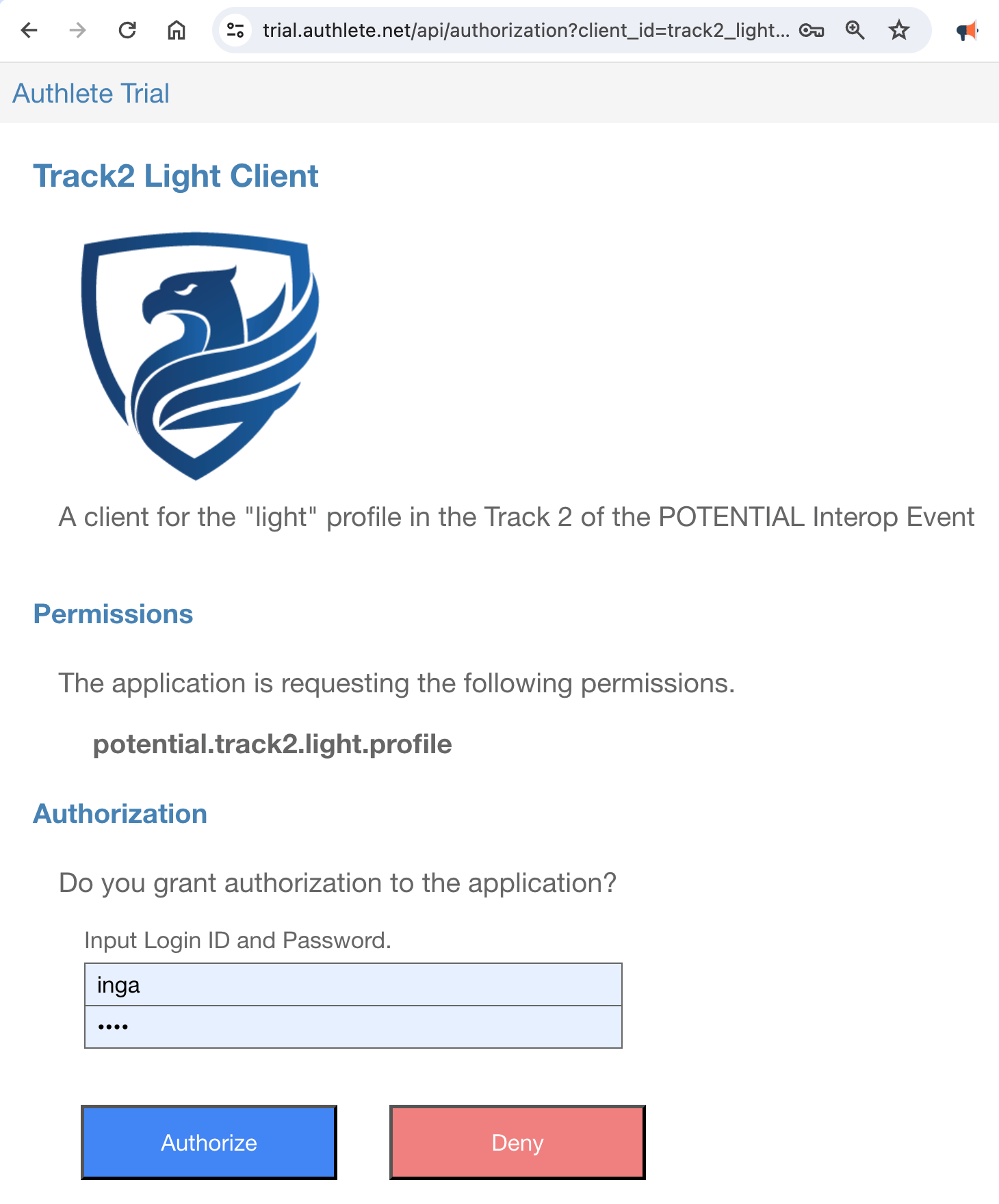 You will be redirected to the **redirection endpoint** (cf.
[RFC 6749, 3.1.2][RFC_6749_3_1_2]).
This redirection endpoint displays key-value pairs that it has received.
The value of the `code` parameter displayed there is the issued
**authorization code**. In this example, the value of the authorization code is
`gR43MQf2olvhMt6KekVDkUOdQPrVYgBiKXMwu_UFnB8`.
The authorization code is to be used in the token request in the next section.
Note that the authorization code will expire in 10 minutes, so you have to make
a token request promptly.
##### 4.4.2.3. Step 3 : Token Request
Make a **token request** using the authorization code flow. Don't forget to
replace `${AUTHORIZATION_CODE}` and `${CODE_VERIFIER}` in the `curl` command
below with the actual values you have obtained in the previous steps.
```shell theme={null}
curl -s https://trial.authlete.net/api/token \
-d client_id=track2_light \
-d grant_type=authorization_code \
-d code=${AUTHORIZATION_CODE} \
-d redirect_uri=https://nextdev-api.authlete.net/api/mock/redirection \
-d code_verifier=${CODE_VERIFIER}
```
If the token request is valid, the token endpoint returns JSON like below.
```json theme={null}
{
"access_token": "FvF1eeUbbWwteF5v0nfsO6vb0jlWifgsP5U666qKSGs",
"token_type": "Bearer",
"expires_in": 86400,
"scope": "potential.track2.light.profile",
"refresh_token": "WUCNjsuU02XhOMWN5qHRkKKbZDX5g2HjJx52GWC_1Gw",
"c_nonce": "rvw3Mo_ZHyEgYOoWQ9GEotemwFbhRvVVdI6e5Z0lhEs",
"c_nonce_expires_in": 86400
}
```
The value of the `access_token` property in the JSON is the issued
**access token**. It needs to be presented when you make a **credential request**.
The value of the `c_nonce` property is a nonce that must be included in a
**key proof**.
##### 4.4.2.4. Step 4 : JWT Key Proof
Generate a **JWT Key Proof** using the holder key `holder.jwk` and the `generate-key-proof` script.
The JWK file and the script are contained in the [oid4vci-demo repository][AUTHLETE_OID4VCI_DEMO].
Don't forget to replace `$C_NONCE` in the following command line with the actual value of the
`c_nonce` property in the token response you received in the previous step.
```shell theme={null}
./generate-key-proof \
-i https://trial.authlete.net \
-k holder.jwk \
-c track2_light \
-n $C_NONCE
```
The `generate-key-proof` script will generate a JWT Key Proof like below.
```text theme={null}
eyJ0eXAiOiJvcGVuaWQ0dmNpLXByb29mK2p3dCIsImFsZyI6IkVTMjU2IiwiandrIjp7ImNydiI6IlAtMjU2Iiwia3R5IjoiRUMiLCJ4IjoiUFN4UXJEMnpsMF9tWGNBcXoxbWdxU2VCb0Jobm14Mnl4QkVwckJZOEYyMCIsInkiOiJ4VjhmYmkxRlNvc1V1bkxldUxOdUxrSmlxbVk2VEtpTW51ci1HbjJ3UjEwIn19.eyJpc3MiOiJ0cmFjazJfbGlnaHQiLCJhdWQiOiJodHRwczovL3RyaWFsLmF1dGhsZXRlLm5ldCIsImlhdCI6MTcxNzYxNzk1Nywibm9uY2UiOiJydnczTW9fWkh5RWdZT29XUTlHRW90ZW13RmJoUnZWVmRJNmU1WjBsaEVzIn0.E-9pdaSW2oaFqI2V0N1aRiSRI3LzOxwQFNR5tewaLXxP8R7ZHrU9-M7TLuqP5OmWRecdFrJ9yQAM83kbc4f5-A
```
Decoding the header and the payload of the JWT Key Proof by base64url will show the following JSONs.
```json theme={null}
{
"typ": "openid4vci-proof+jwt",
"alg": "ES256",
"jwk": {
"crv": "P-256",
"kty": "EC",
"x": "PSxQrD2zl0_mXcAqz1mgqSeBoBhnmx2yxBEprBY8F20",
"y": "xV8fbi1FSosUunLeuLNuLkJiqmY6TKiMnur-Gn2wR10"
}
}
```
```json theme={null}
{
"iss": "track2_light",
"aud": "https://trial.authlete.net",
"iat": 1717617957,
"nonce": "rvw3Mo_ZHyEgYOoWQ9GEotemwFbhRvVVdI6e5Z0lhEs"
}
```
The result of executing the `generate-key-proof` script can be directly set to
the shell variable `JWT_KEY_PROOF` by doing the following.
```shell theme={null}
JWT_KEY_PROOF=`./generate-key-proof -i https://trial.authlete.net -k holder.jwk -c track2_light -n $C_NONCE`
```
##### 4.4.2.5. Step 5 : Credential Request
Make a **credential request** with the access token and the JWT key proof.
Don't forget to replace `${ACCESS_TOKEN}` and `${JWT_KEY_PROOF}` in the
command line with the actual values.
```shell theme={null}
curl -s https://trial.authlete.net/api/credential \
-H "Authorization: Bearer ${ACCESS_TOKEN}" \
-H "Content-Type: application/json" \
--data '{
"format": "vc+sd-jwt",
"vct": "urn:eu.europa.ec.eudi:pid:1",
"proof": {
"proof_type": "jwt",
"jwt":"'${JWT_KEY_PROOF}'"
}
}'
```
If the credential request is valid, the credential endpoint returns JSON
like below. The value of the `credential` property in the JSON is the
issued **verifiable credential**.
```json theme={null}
{
"credential": "eyJraWQiOiJKMUZ3SlA4N0M2LVFOX1dTSU9tSkFRYzZuNUNRX2JaZGFGSjVHRG5XMVJrIiwidHlwIjoidmMrc2Qtand0IiwiYWxnIjoiRVMyNTYifQ.eyJwbGFjZV9vZl9iaXJ0aCI6eyJfc2QiOlsiRUFiQW1SN1owN1dpMVczczZLSVROMFdhamFzUTlObEJmYm9ocjgtU3hfcyIsImJCZ19NSWlKNnJhTU9jZ0dEd2ZtSUFMSEpFU2NJTEMyRjhCTmpOVW1MdG8iXX0sIl9zZCI6WyIxQThmRmJKMVlhM3RmQ3ZEUXpLNHNMSUhMRFJERWJEYk1oUEVmcF9TRzVVIiwiMjhqTDd3SFV0cTBuMXdaQUpmY1doTDVOWkt5QmtMMFRVM3NpaVNPbGV6WSIsIjJjcl9FNTM2cU1RMDB3Z1BTMURfbHZyZUFhc21tc3B4YU52T1Ffd3ZtTEEiLCI1dXE2ei13QWhaZUJEMkt3VjFONU5lcURqSWpXVHpqQi0xVU91anZOUllZIiwiNndhVlRLelZpMWZoMUxQc0ZfbURKdWJrcmFhZGpnUEtYTUdJN1B6blYwZyIsIjc4cmN0UnNtRWFuV1oybnZPVFdyNVlvWEZ5eW50ZklxMU1OOGp1bXJCOG8iLCI4OHZ3c1VVbHI1RmFiUGhPNVhhY3dIdG5nTXVTdjREVmFfa0E5OUUxa3lzIiwiOUd6YU4xZWc1NlczVEN4aGxwOWZLU093SFNfbmhEeEYxVnJTbEg3Z3ExRSIsIkJ3WkZRVENqVk0xRW5Ic1VIeXQzZ3JjdGhWMlJIVnFkTGJUdjMtLUVrOGciLCJFZDdVbFhYS0sydXdsblJNdHpSZHRnOFQwbVduUXhBOVVOblBldEt1T3VjIiwiRk56eFdmSGRhN0hXcEdkQWpJM1R3WnhXeE5YR0xwNHdqcEd1X0NqR0FYYyIsIkduSUZGOFg5TlpCbVRKQ2E5OUx4UFFST0c1YzZYUWsyemJ1NG9jbG45SWsiLCJMc2ZscHFUTFg4T0pYYk53eTdxcDU3MHRKY0I5T0dQeE9qTUxEU21BUTJJIiwiZHNKVjBHZ2JfZlVjeGlPalRvVUlDaEpGR1F5aFJMZHp2WWltQmNlSTN6YyIsImgydlN3UVN0SV9LcGtxU1djN011TG44VlB5a0VjelJFWjNEZ1hUd3QzM1EiLCJqQ0l4Z0lkY2JOUnVDbUJDeF9DQVQwZ2FvZURCU29VQnl4XzdfRFUxQmRvIiwia3RlSGlZdlhfbWphR0s0YkU4YjYyRktnUnZ2bFRCTVNxLXhpVlJQZTB6USIsInB5dXJrNU9zeGtYS2FoZ2lkbXdrTU56NTBUaWtGLV8zRkY0WG9SYlg0bDQiLCJ2VHc5VlpSOFpNQW0zWkhxZGJxNVBxSVBBZ0M2bVlyWGF4YmFkekFQOGpZIl0sImFkZHJlc3MiOnsiX3NkIjpbIjBXYUJrS3U4Q1lPV1NldjFDTThsYVNwS3VCbTZSTW1odktSR3kyWWRjaWMiLCJNbTdWX1dXRThVSk1TSHV0aV8xd0Nhb0puLUxKcTdaWG5FSDY1dXUxRTlrIiwiUFZKYmFmZjVzWmJCYm1HY2dkRWdOOXZsTWRndU9aal8yMjVYUk0xTHR3RSIsImlRT1pBN2RXQWVUaTg1RE1RQ1N0UmkySnVzSHB6YVJEN0FVRXZPQTJWN1UiLCJtMGVhYlEyTDViTEVPY3UwYjRRTkZQeWNvTHluUDAzYkxoRm9zTVdLeXRRIiwibXV0TU9aLVgxQlRoenM2OXdxQ3E3RFRieHFKNjRnWG9Yb2xHbnpyOUlmZyIsIm5LaXRPS3dBNW9oZ0QtNnVPNERIMW8wQnRoN0tWSndJaXlVSUhfcmJLLUUiLCJyQk15UlR6TFZkQV9uY291bDNLenN1cVluYWxLX0lnYWFMV0Z3aS14MjdzIiwidTgyUXhEemxyRVlsQWlSNUV1bGJ3ZWJSaFNnYWVaZ0o5dkEyRmd4M3ZvVSJdfSwidmN0IjoidXJuOmV1LmV1cm9wYS5lYy5ldWRpOnBpZDoxIiwiX3NkX2FsZyI6InNoYS0yNTYiLCJpc3MiOiJodHRwczovL3RyaWFsLmF1dGhsZXRlLm5ldCIsImNuZiI6eyJqd2siOnsia3R5IjoiRUMiLCJjcnYiOiJQLTI1NiIsImtpZCI6IjRNOWtJckI5V1l6dDFHUWdMMTJsemRCWnNHeWVWM2xnUEtvdjI4b1Q1TDQiLCJ4IjoiUFN4UXJEMnpsMF9tWGNBcXoxbWdxU2VCb0Jobm14Mnl4QkVwckJZOEYyMCIsInkiOiJ4VjhmYmkxRlNvc1V1bkxldUxOdUxrSmlxbVk2VEtpTW51ci1HbjJ3UjEwIn19LCJpYXQiOjE3MTc2MTg2NjEsImFnZV9lcXVhbF9vcl9vdmVyIjp7Il9zZCI6WyIzZGo2NXpOMTMzS2haN1QwV1RidHczSVhialh4VHRIZUtoMlRWOWJVMzRjIiwiRFJUNi0tU2YtNDU4bGNaOEdobGd5TU5TZUVyNHRya3R1ZVhkNXNzNGtPRSJdfX0.EaUDXo2hWBNOqsdYBDAWpuHDYfGm9xNepZJn7rafTGAb3kHVxNJoSZTvOvLhk_sy30GpK2kLFWvVlR1nzxSMVg~WyJyeHR0ck5MbXUwNWc5cjVZVmc3bUtnIiwic3ViIiwiMTAwNCJd~WyJaR2lyT3Y3dUdLVXZOWUpVcFZ0QXJBIiwiZmFtaWx5X25hbWUiLCJTaWx2ZXJzdG9uZSJd~WyIwcGt4eEVwVmIwdW5mQUQ1R1VsZXVnIiwiZ2l2ZW5fbmFtZSIsIkluZ2EiXQ~WyI2RWtWSGN2U0lIZ215akE0VW5fZlNRIiwiYmlydGhkYXRlIiwiMTk5MS0xMS0wNiJd~WyJhUzhNbVlFWHVWR1A5ODYwQV9lZDZRIiwiMTgiLHRydWVd~WyJMX1JRdm00Mll0XzdESHVjTi1IUHRRIiwibG9jYWxpdHkiLCJTaG9zaG9uZSJd~WyJmQmpkVWRTV0NBX0o4NXF2anlmcXVBIiwiZm9ybWF0dGVkIiwiMTE0IE9sZCBTdGF0ZSBId3kgMTI3LCBTaG9zaG9uZSwgQ0EgOTIzODQsIFVTQSJd~WyJIOGVpZ0UxckQ2d3o3RDA3b0pnNjl3Iiwic3RyZWV0X2FkZHJlc3MiLCIxMTQgT2xkIFN0YXRlIEh3eSAxMjciXQ~WyIxdngwVjJmTUVrTTBXNnVCYWg5VjRBIiwibG9jYWxpdHkiLCJTaG9zaG9uZSJd~WyJHVnZfZWV0VElPLW93NTgzRTRMSDBBIiwicG9zdGFsX2NvZGUiLCJDQSA5MjM4NCJd~WyJrYjJYUkhsMTQxazFyZG1xeGdDM2xRIiwiY291bnRyeSIsIlVTQSJd~WyJLU0VlbEV0dU5qbzZHQWR6NTFqSG93IiwiaXNzdWluZ19hdXRob3JpdHkiLCJVUyJd~WyJ0ZzBZQ3RNeHNPSW54aW9pUExDNV93IiwiaXNzdWluZ19jb3VudHJ5IiwiVVMiXQ~",
"c_nonce": "rvw3Mo_ZHyEgYOoWQ9GEotemwFbhRvVVdI6e5Z0lhEs",
"c_nonce_expires_in": 83596
}
```
#### 4.4.3. Verifiable Credential Format
The value of the `credential` parameter in the response is the issued SD-JWT VC.
If the SD-JWT VC is set to the shell variable `SD_JWT`, the content of the SD-JWT VC
can be decoded by invoking the `decode-sd-jwt` script as follows.
```shell theme={null}
./decode-sd-jwt $SD_JWT
```
The result will look like below.
```json theme={null}
{
"kid": "J1FwJP87C6-QN_WSIOmJAQc6n5CQ_bZdaFJ5GDnW1Rk",
"typ": "vc+sd-jwt",
"alg": "ES256"
}
{
"place_of_birth": {
"_sd": [
"EAbAmR7Z07Wi1W3s6KITN0WajasQ9NlBfbohr8-Sx_s",
"bBg_MIiJ6raMOcgGDwfmIALHJEScILC2F8BNjNUmLto"
]
},
"_sd": [
"1A8fFbJ1Ya3tfCvDQzK4sLIHLDRDEbDbMhPEfp_SG5U",
"28jL7wHUtq0n1wZAJfcWhL5NZKyBkL0TU3siiSOlezY",
"2cr_E536qMQ00wgPS1D_lvreAasmmspxaNvOQ_wvmLA",
"5uq6z-wAhZeBD2KwV1N5NeqDjIjWTzjB-1UOujvNRYY",
"6waVTKzVi1fh1LPsF_mDJubkraadjgPKXMGI7PznV0g",
"78rctRsmEanWZ2nvOTWr5YoXFyyntfIq1MN8jumrB8o",
"88vwsUUlr5FabPhO5XacwHtngMuSv4DVa_kA99E1kys",
"9GzaN1eg56W3TCxhlp9fKSOwHS_nhDxF1VrSlH7gq1E",
"BwZFQTCjVM1EnHsUHyt3grcthV2RHVqdLbTv3--Ek8g",
"Ed7UlXXKK2uwlnRMtzRdtg8T0mWnQxA9UNnPetKuOuc",
"FNzxWfHda7HWpGdAjI3TwZxWxNXGLp4wjpGu_CjGAXc",
"GnIFF8X9NZBmTJCa99LxPQROG5c6XQk2zbu4ocln9Ik",
"LsflpqTLX8OJXbNwy7qp570tJcB9OGPxOjMLDSmAQ2I",
"dsJV0Ggb_fUcxiOjToUIChJFGQyhRLdzvYimBceI3zc",
"h2vSwQStI_KpkqSWc7MuLn8VPykEczREZ3DgXTwt33Q",
"jCIxgIdcbNRuCmBCx_CAT0gaoeDBSoUByx_7_DU1Bdo",
"kteHiYvX_mjaGK4bE8b62FKgRvvlTBMSq-xiVRPe0zQ",
"pyurk5OsxkXKahgidmwkMNz50TikF-_3FF4XoRbX4l4",
"vTw9VZR8ZMAm3ZHqdbq5PqIPAgC6mYrXaxbadzAP8jY"
],
"address": {
"_sd": [
"0WaBkKu8CYOWSev1CM8laSpKuBm6RMmhvKRGy2Ydcic",
"Mm7V_WWE8UJMSHuti_1wCaoJn-LJq7ZXnEH65uu1E9k",
"PVJbaff5sZbBbmGcgdEgN9vlMdguOZj_225XRM1LtwE",
"iQOZA7dWAeTi85DMQCStRi2JusHpzaRD7AUEvOA2V7U",
"m0eabQ2L5bLEOcu0b4QNFPycoLynP03bLhFosMWKytQ",
"mutMOZ-X1BThzs69wqCq7DTbxqJ64gXoXolGnzr9Ifg",
"nKitOKwA5ohgD-6uO4DH1o0Bth7KVJwIiyUIH_rbK-E",
"rBMyRTzLVdA_ncoul3KzsuqYnalK_IgaaLWFwi-x27s",
"u82QxDzlrEYlAiR5EulbwebRhSgaeZgJ9vA2Fgx3voU"
]
},
"vct": "urn:eu.europa.ec.eudi:pid:1",
"_sd_alg": "sha-256",
"iss": "https://trial.authlete.net",
"cnf": {
"jwk": {
"kty": "EC",
"crv": "P-256",
"kid": "4M9kIrB9WYzt1GQgL12lzdBZsGyeV3lgPKov28oT5L4",
"x": "PSxQrD2zl0_mXcAqz1mgqSeBoBhnmx2yxBEprBY8F20",
"y": "xV8fbi1FSosUunLeuLNuLkJiqmY6TKiMnur-Gn2wR10"
}
},
"iat": 1717618661,
"age_equal_or_over": {
"_sd": [
"3dj65zN133KhZ7T0WTbtw3IXbjXxTtHeKh2TV9bU34c",
"DRT6--Sf-458lcZ8GhlgyMNSeEr4trktueXd5ss4kOE"
]
}
}
{
"digest": "GnIFF8X9NZBmTJCa99LxPQROG5c6XQk2zbu4ocln9Ik",
"WyJyeHR0ck5MbXUwNWc5cjVZVmc3bUtnIiwic3ViIiwiMTAwNCJd": [
"rxttrNLmu05g9r5YVg7mKg",
"sub",
"1004"
]
}
{
"digest": "jCIxgIdcbNRuCmBCx_CAT0gaoeDBSoUByx_7_DU1Bdo",
"WyJaR2lyT3Y3dUdLVXZOWUpVcFZ0QXJBIiwiZmFtaWx5X25hbWUiLCJTaWx2ZXJzdG9uZSJd": [
"ZGirOv7uGKUvNYJUpVtArA",
"family_name",
"Silverstone"
]
}
{
"digest": "h2vSwQStI_KpkqSWc7MuLn8VPykEczREZ3DgXTwt33Q",
"WyIwcGt4eEVwVmIwdW5mQUQ1R1VsZXVnIiwiZ2l2ZW5fbmFtZSIsIkluZ2EiXQ": [
"0pkxxEpVb0unfAD5GUleug",
"given_name",
"Inga"
]
}
{
"digest": "dsJV0Ggb_fUcxiOjToUIChJFGQyhRLdzvYimBceI3zc",
"WyI2RWtWSGN2U0lIZ215akE0VW5fZlNRIiwiYmlydGhkYXRlIiwiMTk5MS0xMS0wNiJd": [
"6EkVHcvSIHgmyjA4Un_fSQ",
"birthdate",
"1991-11-06"
]
}
{
"digest": "DRT6--Sf-458lcZ8GhlgyMNSeEr4trktueXd5ss4kOE",
"WyJhUzhNbVlFWHVWR1A5ODYwQV9lZDZRIiwiMTgiLHRydWVd": [
"aS8MmYEXuVGP9860A_ed6Q",
"18",
true
]
}
{
"digest": "EAbAmR7Z07Wi1W3s6KITN0WajasQ9NlBfbohr8-Sx_s",
"WyJMX1JRdm00Mll0XzdESHVjTi1IUHRRIiwibG9jYWxpdHkiLCJTaG9zaG9uZSJd": [
"L_RQvm42Yt_7DHucN-HPtQ",
"locality",
"Shoshone"
]
}
{
"digest": "rBMyRTzLVdA_ncoul3KzsuqYnalK_IgaaLWFwi-x27s",
"WyJmQmpkVWRTV0NBX0o4NXF2anlmcXVBIiwiZm9ybWF0dGVkIiwiMTE0IE9sZCBTdGF0ZSBId3kgMTI3LCBTaG9zaG9uZSwgQ0EgOTIzODQsIFVTQSJd": [
"fBjdUdSWCA_J85qvjyfquA",
"formatted",
"114 Old State Hwy 127, Shoshone, CA 92384, USA"
]
}
{
"digest": "iQOZA7dWAeTi85DMQCStRi2JusHpzaRD7AUEvOA2V7U",
"WyJIOGVpZ0UxckQ2d3o3RDA3b0pnNjl3Iiwic3RyZWV0X2FkZHJlc3MiLCIxMTQgT2xkIFN0YXRlIEh3eSAxMjciXQ": [
"H8eigE1rD6wz7D07oJg69w",
"street_address",
"114 Old State Hwy 127"
]
}
{
"digest": "Mm7V_WWE8UJMSHuti_1wCaoJn-LJq7ZXnEH65uu1E9k",
"WyIxdngwVjJmTUVrTTBXNnVCYWg5VjRBIiwibG9jYWxpdHkiLCJTaG9zaG9uZSJd": [
"1vx0V2fMEkM0W6uBah9V4A",
"locality",
"Shoshone"
]
}
{
"digest": "PVJbaff5sZbBbmGcgdEgN9vlMdguOZj_225XRM1LtwE",
"WyJHVnZfZWV0VElPLW93NTgzRTRMSDBBIiwicG9zdGFsX2NvZGUiLCJDQSA5MjM4NCJd": [
"GVv_eetTIO-ow583E4LH0A",
"postal_code",
"CA 92384"
]
}
{
"digest": "m0eabQ2L5bLEOcu0b4QNFPycoLynP03bLhFosMWKytQ",
"WyJrYjJYUkhsMTQxazFyZG1xeGdDM2xRIiwiY291bnRyeSIsIlVTQSJd": [
"kb2XRHl141k1rdmqxgC3lQ",
"country",
"USA"
]
}
{
"digest": "88vwsUUlr5FabPhO5XacwHtngMuSv4DVa_kA99E1kys",
"WyJLU0VlbEV0dU5qbzZHQWR6NTFqSG93IiwiaXNzdWluZ19hdXRob3JpdHkiLCJVUyJd": [
"KSEelEtuNjo6GAdz51jHow",
"issuing_authority",
"US"
]
}
{
"digest": "kteHiYvX_mjaGK4bE8b62FKgRvvlTBMSq-xiVRPe0zQ",
"WyJ0ZzBZQ3RNeHNPSW54aW9pUExDNV93IiwiaXNzdWluZ19jb3VudHJ5IiwiVVMiXQ": [
"tg0YCtMxsOInxioiPLC5_w",
"issuing_country",
"US"
]
}
```
### 4.5. POTENTIAL Interop Event / Track 2 / Full Profile
[POTENTIAL][POTENTIAL] is a European organization dedicated to European Digital Identity.
The organization has been hosting an interoperability event since spring 2024. The event
is divided into six tracks. Tracks 1 and 2 are designated for testing the inteoperability
of credential issuers. In Track 1, mdoc is used as the format for verifiable credentials,
while SD-JWT VC is used in Track 2.
Track 2 defines two profiles. One is called the "light" profile. The other is called the
"full" profile. This section explains the steps for the full profile.
#### 4.5.1. Settings
##### 4.5.1.1. Authorization Server Settings
| Parameter | Value |
| :--------------------- | :--------------------------------------------------------------------------------------------------------------------------- |
| Issuer Identifier | `https://trial.authlete.net` |
| Authorization Endpoint | `https://trial.authlete.net/api/authorization` |
| Token Endpoint | `https://trial.authlete.net/api/token` |
| PAR Endpoint | `https://trial.authlete.net/api/par` |
| Discovery Endpoint | `[https://trial.authlete.net/.well-known/openid-configuration](https://trial.authlete.net/.well-known/openid-configuration)` |
| Entity Configuration | `[https://trial.authlete.net/.well-known/openid-federation](https://trial.authlete.net/.well-known/openid-federation)` |
The source code of the **authorization server** is available at
[https://github.com/authlete/java-oauth-server](https://github.com/authlete/java-oauth-server). Note that this implementation
is a sample and is not intended for commercial use.
##### 4.5.1.2. Credential Issuer Settings
| Parameter | Value |
| :------------------- | :----------------------------------------------------------------------------------------------------------------------------------- |
| Issuer Identifier | `https://trial.authlete.net` |
| Credential Endpoint | `https://trial.authlete.net/api/credential` |
| Metadata Endpoint | `[https://trial.authlete.net/.well-known/openid-credential-issuer](https://trial.authlete.net/.well-known/openid-credential-issuer)` |
| Entity Configuration | `[https://trial.authlete.net/.well-known/openid-federation](https://trial.authlete.net/.well-known/openid-federation)` |
The source code of the **credential issuer** is the same as that of the
authorization server.
##### 4.5.1.3. Client Settings
| Parameter | Value |
| :--------------------------- | :-------------------------------------------------------------------------------------------------------------- |
| Client ID | `track2_full` |
| Client Type | confidential |
| Client Authentication Method | `attest_jwt_client_auth` |
| Redirect URIs |
You will be redirected to the **redirection endpoint** (cf.
[RFC 6749, 3.1.2][RFC_6749_3_1_2]).
This redirection endpoint displays key-value pairs that it has received.
The value of the `code` parameter displayed there is the issued
**authorization code**. In this example, the value of the authorization code is
`gR43MQf2olvhMt6KekVDkUOdQPrVYgBiKXMwu_UFnB8`.
The authorization code is to be used in the token request in the next section.
Note that the authorization code will expire in 10 minutes, so you have to make
a token request promptly.
##### 4.4.2.3. Step 3 : Token Request
Make a **token request** using the authorization code flow. Don't forget to
replace `${AUTHORIZATION_CODE}` and `${CODE_VERIFIER}` in the `curl` command
below with the actual values you have obtained in the previous steps.
```shell theme={null}
curl -s https://trial.authlete.net/api/token \
-d client_id=track2_light \
-d grant_type=authorization_code \
-d code=${AUTHORIZATION_CODE} \
-d redirect_uri=https://nextdev-api.authlete.net/api/mock/redirection \
-d code_verifier=${CODE_VERIFIER}
```
If the token request is valid, the token endpoint returns JSON like below.
```json theme={null}
{
"access_token": "FvF1eeUbbWwteF5v0nfsO6vb0jlWifgsP5U666qKSGs",
"token_type": "Bearer",
"expires_in": 86400,
"scope": "potential.track2.light.profile",
"refresh_token": "WUCNjsuU02XhOMWN5qHRkKKbZDX5g2HjJx52GWC_1Gw",
"c_nonce": "rvw3Mo_ZHyEgYOoWQ9GEotemwFbhRvVVdI6e5Z0lhEs",
"c_nonce_expires_in": 86400
}
```
The value of the `access_token` property in the JSON is the issued
**access token**. It needs to be presented when you make a **credential request**.
The value of the `c_nonce` property is a nonce that must be included in a
**key proof**.
##### 4.4.2.4. Step 4 : JWT Key Proof
Generate a **JWT Key Proof** using the holder key `holder.jwk` and the `generate-key-proof` script.
The JWK file and the script are contained in the [oid4vci-demo repository][AUTHLETE_OID4VCI_DEMO].
Don't forget to replace `$C_NONCE` in the following command line with the actual value of the
`c_nonce` property in the token response you received in the previous step.
```shell theme={null}
./generate-key-proof \
-i https://trial.authlete.net \
-k holder.jwk \
-c track2_light \
-n $C_NONCE
```
The `generate-key-proof` script will generate a JWT Key Proof like below.
```text theme={null}
eyJ0eXAiOiJvcGVuaWQ0dmNpLXByb29mK2p3dCIsImFsZyI6IkVTMjU2IiwiandrIjp7ImNydiI6IlAtMjU2Iiwia3R5IjoiRUMiLCJ4IjoiUFN4UXJEMnpsMF9tWGNBcXoxbWdxU2VCb0Jobm14Mnl4QkVwckJZOEYyMCIsInkiOiJ4VjhmYmkxRlNvc1V1bkxldUxOdUxrSmlxbVk2VEtpTW51ci1HbjJ3UjEwIn19.eyJpc3MiOiJ0cmFjazJfbGlnaHQiLCJhdWQiOiJodHRwczovL3RyaWFsLmF1dGhsZXRlLm5ldCIsImlhdCI6MTcxNzYxNzk1Nywibm9uY2UiOiJydnczTW9fWkh5RWdZT29XUTlHRW90ZW13RmJoUnZWVmRJNmU1WjBsaEVzIn0.E-9pdaSW2oaFqI2V0N1aRiSRI3LzOxwQFNR5tewaLXxP8R7ZHrU9-M7TLuqP5OmWRecdFrJ9yQAM83kbc4f5-A
```
Decoding the header and the payload of the JWT Key Proof by base64url will show the following JSONs.
```json theme={null}
{
"typ": "openid4vci-proof+jwt",
"alg": "ES256",
"jwk": {
"crv": "P-256",
"kty": "EC",
"x": "PSxQrD2zl0_mXcAqz1mgqSeBoBhnmx2yxBEprBY8F20",
"y": "xV8fbi1FSosUunLeuLNuLkJiqmY6TKiMnur-Gn2wR10"
}
}
```
```json theme={null}
{
"iss": "track2_light",
"aud": "https://trial.authlete.net",
"iat": 1717617957,
"nonce": "rvw3Mo_ZHyEgYOoWQ9GEotemwFbhRvVVdI6e5Z0lhEs"
}
```
The result of executing the `generate-key-proof` script can be directly set to
the shell variable `JWT_KEY_PROOF` by doing the following.
```shell theme={null}
JWT_KEY_PROOF=`./generate-key-proof -i https://trial.authlete.net -k holder.jwk -c track2_light -n $C_NONCE`
```
##### 4.4.2.5. Step 5 : Credential Request
Make a **credential request** with the access token and the JWT key proof.
Don't forget to replace `${ACCESS_TOKEN}` and `${JWT_KEY_PROOF}` in the
command line with the actual values.
```shell theme={null}
curl -s https://trial.authlete.net/api/credential \
-H "Authorization: Bearer ${ACCESS_TOKEN}" \
-H "Content-Type: application/json" \
--data '{
"format": "vc+sd-jwt",
"vct": "urn:eu.europa.ec.eudi:pid:1",
"proof": {
"proof_type": "jwt",
"jwt":"'${JWT_KEY_PROOF}'"
}
}'
```
If the credential request is valid, the credential endpoint returns JSON
like below. The value of the `credential` property in the JSON is the
issued **verifiable credential**.
```json theme={null}
{
"credential": "eyJraWQiOiJKMUZ3SlA4N0M2LVFOX1dTSU9tSkFRYzZuNUNRX2JaZGFGSjVHRG5XMVJrIiwidHlwIjoidmMrc2Qtand0IiwiYWxnIjoiRVMyNTYifQ.eyJwbGFjZV9vZl9iaXJ0aCI6eyJfc2QiOlsiRUFiQW1SN1owN1dpMVczczZLSVROMFdhamFzUTlObEJmYm9ocjgtU3hfcyIsImJCZ19NSWlKNnJhTU9jZ0dEd2ZtSUFMSEpFU2NJTEMyRjhCTmpOVW1MdG8iXX0sIl9zZCI6WyIxQThmRmJKMVlhM3RmQ3ZEUXpLNHNMSUhMRFJERWJEYk1oUEVmcF9TRzVVIiwiMjhqTDd3SFV0cTBuMXdaQUpmY1doTDVOWkt5QmtMMFRVM3NpaVNPbGV6WSIsIjJjcl9FNTM2cU1RMDB3Z1BTMURfbHZyZUFhc21tc3B4YU52T1Ffd3ZtTEEiLCI1dXE2ei13QWhaZUJEMkt3VjFONU5lcURqSWpXVHpqQi0xVU91anZOUllZIiwiNndhVlRLelZpMWZoMUxQc0ZfbURKdWJrcmFhZGpnUEtYTUdJN1B6blYwZyIsIjc4cmN0UnNtRWFuV1oybnZPVFdyNVlvWEZ5eW50ZklxMU1OOGp1bXJCOG8iLCI4OHZ3c1VVbHI1RmFiUGhPNVhhY3dIdG5nTXVTdjREVmFfa0E5OUUxa3lzIiwiOUd6YU4xZWc1NlczVEN4aGxwOWZLU093SFNfbmhEeEYxVnJTbEg3Z3ExRSIsIkJ3WkZRVENqVk0xRW5Ic1VIeXQzZ3JjdGhWMlJIVnFkTGJUdjMtLUVrOGciLCJFZDdVbFhYS0sydXdsblJNdHpSZHRnOFQwbVduUXhBOVVOblBldEt1T3VjIiwiRk56eFdmSGRhN0hXcEdkQWpJM1R3WnhXeE5YR0xwNHdqcEd1X0NqR0FYYyIsIkduSUZGOFg5TlpCbVRKQ2E5OUx4UFFST0c1YzZYUWsyemJ1NG9jbG45SWsiLCJMc2ZscHFUTFg4T0pYYk53eTdxcDU3MHRKY0I5T0dQeE9qTUxEU21BUTJJIiwiZHNKVjBHZ2JfZlVjeGlPalRvVUlDaEpGR1F5aFJMZHp2WWltQmNlSTN6YyIsImgydlN3UVN0SV9LcGtxU1djN011TG44VlB5a0VjelJFWjNEZ1hUd3QzM1EiLCJqQ0l4Z0lkY2JOUnVDbUJDeF9DQVQwZ2FvZURCU29VQnl4XzdfRFUxQmRvIiwia3RlSGlZdlhfbWphR0s0YkU4YjYyRktnUnZ2bFRCTVNxLXhpVlJQZTB6USIsInB5dXJrNU9zeGtYS2FoZ2lkbXdrTU56NTBUaWtGLV8zRkY0WG9SYlg0bDQiLCJ2VHc5VlpSOFpNQW0zWkhxZGJxNVBxSVBBZ0M2bVlyWGF4YmFkekFQOGpZIl0sImFkZHJlc3MiOnsiX3NkIjpbIjBXYUJrS3U4Q1lPV1NldjFDTThsYVNwS3VCbTZSTW1odktSR3kyWWRjaWMiLCJNbTdWX1dXRThVSk1TSHV0aV8xd0Nhb0puLUxKcTdaWG5FSDY1dXUxRTlrIiwiUFZKYmFmZjVzWmJCYm1HY2dkRWdOOXZsTWRndU9aal8yMjVYUk0xTHR3RSIsImlRT1pBN2RXQWVUaTg1RE1RQ1N0UmkySnVzSHB6YVJEN0FVRXZPQTJWN1UiLCJtMGVhYlEyTDViTEVPY3UwYjRRTkZQeWNvTHluUDAzYkxoRm9zTVdLeXRRIiwibXV0TU9aLVgxQlRoenM2OXdxQ3E3RFRieHFKNjRnWG9Yb2xHbnpyOUlmZyIsIm5LaXRPS3dBNW9oZ0QtNnVPNERIMW8wQnRoN0tWSndJaXlVSUhfcmJLLUUiLCJyQk15UlR6TFZkQV9uY291bDNLenN1cVluYWxLX0lnYWFMV0Z3aS14MjdzIiwidTgyUXhEemxyRVlsQWlSNUV1bGJ3ZWJSaFNnYWVaZ0o5dkEyRmd4M3ZvVSJdfSwidmN0IjoidXJuOmV1LmV1cm9wYS5lYy5ldWRpOnBpZDoxIiwiX3NkX2FsZyI6InNoYS0yNTYiLCJpc3MiOiJodHRwczovL3RyaWFsLmF1dGhsZXRlLm5ldCIsImNuZiI6eyJqd2siOnsia3R5IjoiRUMiLCJjcnYiOiJQLTI1NiIsImtpZCI6IjRNOWtJckI5V1l6dDFHUWdMMTJsemRCWnNHeWVWM2xnUEtvdjI4b1Q1TDQiLCJ4IjoiUFN4UXJEMnpsMF9tWGNBcXoxbWdxU2VCb0Jobm14Mnl4QkVwckJZOEYyMCIsInkiOiJ4VjhmYmkxRlNvc1V1bkxldUxOdUxrSmlxbVk2VEtpTW51ci1HbjJ3UjEwIn19LCJpYXQiOjE3MTc2MTg2NjEsImFnZV9lcXVhbF9vcl9vdmVyIjp7Il9zZCI6WyIzZGo2NXpOMTMzS2haN1QwV1RidHczSVhialh4VHRIZUtoMlRWOWJVMzRjIiwiRFJUNi0tU2YtNDU4bGNaOEdobGd5TU5TZUVyNHRya3R1ZVhkNXNzNGtPRSJdfX0.EaUDXo2hWBNOqsdYBDAWpuHDYfGm9xNepZJn7rafTGAb3kHVxNJoSZTvOvLhk_sy30GpK2kLFWvVlR1nzxSMVg~WyJyeHR0ck5MbXUwNWc5cjVZVmc3bUtnIiwic3ViIiwiMTAwNCJd~WyJaR2lyT3Y3dUdLVXZOWUpVcFZ0QXJBIiwiZmFtaWx5X25hbWUiLCJTaWx2ZXJzdG9uZSJd~WyIwcGt4eEVwVmIwdW5mQUQ1R1VsZXVnIiwiZ2l2ZW5fbmFtZSIsIkluZ2EiXQ~WyI2RWtWSGN2U0lIZ215akE0VW5fZlNRIiwiYmlydGhkYXRlIiwiMTk5MS0xMS0wNiJd~WyJhUzhNbVlFWHVWR1A5ODYwQV9lZDZRIiwiMTgiLHRydWVd~WyJMX1JRdm00Mll0XzdESHVjTi1IUHRRIiwibG9jYWxpdHkiLCJTaG9zaG9uZSJd~WyJmQmpkVWRTV0NBX0o4NXF2anlmcXVBIiwiZm9ybWF0dGVkIiwiMTE0IE9sZCBTdGF0ZSBId3kgMTI3LCBTaG9zaG9uZSwgQ0EgOTIzODQsIFVTQSJd~WyJIOGVpZ0UxckQ2d3o3RDA3b0pnNjl3Iiwic3RyZWV0X2FkZHJlc3MiLCIxMTQgT2xkIFN0YXRlIEh3eSAxMjciXQ~WyIxdngwVjJmTUVrTTBXNnVCYWg5VjRBIiwibG9jYWxpdHkiLCJTaG9zaG9uZSJd~WyJHVnZfZWV0VElPLW93NTgzRTRMSDBBIiwicG9zdGFsX2NvZGUiLCJDQSA5MjM4NCJd~WyJrYjJYUkhsMTQxazFyZG1xeGdDM2xRIiwiY291bnRyeSIsIlVTQSJd~WyJLU0VlbEV0dU5qbzZHQWR6NTFqSG93IiwiaXNzdWluZ19hdXRob3JpdHkiLCJVUyJd~WyJ0ZzBZQ3RNeHNPSW54aW9pUExDNV93IiwiaXNzdWluZ19jb3VudHJ5IiwiVVMiXQ~",
"c_nonce": "rvw3Mo_ZHyEgYOoWQ9GEotemwFbhRvVVdI6e5Z0lhEs",
"c_nonce_expires_in": 83596
}
```
#### 4.4.3. Verifiable Credential Format
The value of the `credential` parameter in the response is the issued SD-JWT VC.
If the SD-JWT VC is set to the shell variable `SD_JWT`, the content of the SD-JWT VC
can be decoded by invoking the `decode-sd-jwt` script as follows.
```shell theme={null}
./decode-sd-jwt $SD_JWT
```
The result will look like below.
```json theme={null}
{
"kid": "J1FwJP87C6-QN_WSIOmJAQc6n5CQ_bZdaFJ5GDnW1Rk",
"typ": "vc+sd-jwt",
"alg": "ES256"
}
{
"place_of_birth": {
"_sd": [
"EAbAmR7Z07Wi1W3s6KITN0WajasQ9NlBfbohr8-Sx_s",
"bBg_MIiJ6raMOcgGDwfmIALHJEScILC2F8BNjNUmLto"
]
},
"_sd": [
"1A8fFbJ1Ya3tfCvDQzK4sLIHLDRDEbDbMhPEfp_SG5U",
"28jL7wHUtq0n1wZAJfcWhL5NZKyBkL0TU3siiSOlezY",
"2cr_E536qMQ00wgPS1D_lvreAasmmspxaNvOQ_wvmLA",
"5uq6z-wAhZeBD2KwV1N5NeqDjIjWTzjB-1UOujvNRYY",
"6waVTKzVi1fh1LPsF_mDJubkraadjgPKXMGI7PznV0g",
"78rctRsmEanWZ2nvOTWr5YoXFyyntfIq1MN8jumrB8o",
"88vwsUUlr5FabPhO5XacwHtngMuSv4DVa_kA99E1kys",
"9GzaN1eg56W3TCxhlp9fKSOwHS_nhDxF1VrSlH7gq1E",
"BwZFQTCjVM1EnHsUHyt3grcthV2RHVqdLbTv3--Ek8g",
"Ed7UlXXKK2uwlnRMtzRdtg8T0mWnQxA9UNnPetKuOuc",
"FNzxWfHda7HWpGdAjI3TwZxWxNXGLp4wjpGu_CjGAXc",
"GnIFF8X9NZBmTJCa99LxPQROG5c6XQk2zbu4ocln9Ik",
"LsflpqTLX8OJXbNwy7qp570tJcB9OGPxOjMLDSmAQ2I",
"dsJV0Ggb_fUcxiOjToUIChJFGQyhRLdzvYimBceI3zc",
"h2vSwQStI_KpkqSWc7MuLn8VPykEczREZ3DgXTwt33Q",
"jCIxgIdcbNRuCmBCx_CAT0gaoeDBSoUByx_7_DU1Bdo",
"kteHiYvX_mjaGK4bE8b62FKgRvvlTBMSq-xiVRPe0zQ",
"pyurk5OsxkXKahgidmwkMNz50TikF-_3FF4XoRbX4l4",
"vTw9VZR8ZMAm3ZHqdbq5PqIPAgC6mYrXaxbadzAP8jY"
],
"address": {
"_sd": [
"0WaBkKu8CYOWSev1CM8laSpKuBm6RMmhvKRGy2Ydcic",
"Mm7V_WWE8UJMSHuti_1wCaoJn-LJq7ZXnEH65uu1E9k",
"PVJbaff5sZbBbmGcgdEgN9vlMdguOZj_225XRM1LtwE",
"iQOZA7dWAeTi85DMQCStRi2JusHpzaRD7AUEvOA2V7U",
"m0eabQ2L5bLEOcu0b4QNFPycoLynP03bLhFosMWKytQ",
"mutMOZ-X1BThzs69wqCq7DTbxqJ64gXoXolGnzr9Ifg",
"nKitOKwA5ohgD-6uO4DH1o0Bth7KVJwIiyUIH_rbK-E",
"rBMyRTzLVdA_ncoul3KzsuqYnalK_IgaaLWFwi-x27s",
"u82QxDzlrEYlAiR5EulbwebRhSgaeZgJ9vA2Fgx3voU"
]
},
"vct": "urn:eu.europa.ec.eudi:pid:1",
"_sd_alg": "sha-256",
"iss": "https://trial.authlete.net",
"cnf": {
"jwk": {
"kty": "EC",
"crv": "P-256",
"kid": "4M9kIrB9WYzt1GQgL12lzdBZsGyeV3lgPKov28oT5L4",
"x": "PSxQrD2zl0_mXcAqz1mgqSeBoBhnmx2yxBEprBY8F20",
"y": "xV8fbi1FSosUunLeuLNuLkJiqmY6TKiMnur-Gn2wR10"
}
},
"iat": 1717618661,
"age_equal_or_over": {
"_sd": [
"3dj65zN133KhZ7T0WTbtw3IXbjXxTtHeKh2TV9bU34c",
"DRT6--Sf-458lcZ8GhlgyMNSeEr4trktueXd5ss4kOE"
]
}
}
{
"digest": "GnIFF8X9NZBmTJCa99LxPQROG5c6XQk2zbu4ocln9Ik",
"WyJyeHR0ck5MbXUwNWc5cjVZVmc3bUtnIiwic3ViIiwiMTAwNCJd": [
"rxttrNLmu05g9r5YVg7mKg",
"sub",
"1004"
]
}
{
"digest": "jCIxgIdcbNRuCmBCx_CAT0gaoeDBSoUByx_7_DU1Bdo",
"WyJaR2lyT3Y3dUdLVXZOWUpVcFZ0QXJBIiwiZmFtaWx5X25hbWUiLCJTaWx2ZXJzdG9uZSJd": [
"ZGirOv7uGKUvNYJUpVtArA",
"family_name",
"Silverstone"
]
}
{
"digest": "h2vSwQStI_KpkqSWc7MuLn8VPykEczREZ3DgXTwt33Q",
"WyIwcGt4eEVwVmIwdW5mQUQ1R1VsZXVnIiwiZ2l2ZW5fbmFtZSIsIkluZ2EiXQ": [
"0pkxxEpVb0unfAD5GUleug",
"given_name",
"Inga"
]
}
{
"digest": "dsJV0Ggb_fUcxiOjToUIChJFGQyhRLdzvYimBceI3zc",
"WyI2RWtWSGN2U0lIZ215akE0VW5fZlNRIiwiYmlydGhkYXRlIiwiMTk5MS0xMS0wNiJd": [
"6EkVHcvSIHgmyjA4Un_fSQ",
"birthdate",
"1991-11-06"
]
}
{
"digest": "DRT6--Sf-458lcZ8GhlgyMNSeEr4trktueXd5ss4kOE",
"WyJhUzhNbVlFWHVWR1A5ODYwQV9lZDZRIiwiMTgiLHRydWVd": [
"aS8MmYEXuVGP9860A_ed6Q",
"18",
true
]
}
{
"digest": "EAbAmR7Z07Wi1W3s6KITN0WajasQ9NlBfbohr8-Sx_s",
"WyJMX1JRdm00Mll0XzdESHVjTi1IUHRRIiwibG9jYWxpdHkiLCJTaG9zaG9uZSJd": [
"L_RQvm42Yt_7DHucN-HPtQ",
"locality",
"Shoshone"
]
}
{
"digest": "rBMyRTzLVdA_ncoul3KzsuqYnalK_IgaaLWFwi-x27s",
"WyJmQmpkVWRTV0NBX0o4NXF2anlmcXVBIiwiZm9ybWF0dGVkIiwiMTE0IE9sZCBTdGF0ZSBId3kgMTI3LCBTaG9zaG9uZSwgQ0EgOTIzODQsIFVTQSJd": [
"fBjdUdSWCA_J85qvjyfquA",
"formatted",
"114 Old State Hwy 127, Shoshone, CA 92384, USA"
]
}
{
"digest": "iQOZA7dWAeTi85DMQCStRi2JusHpzaRD7AUEvOA2V7U",
"WyJIOGVpZ0UxckQ2d3o3RDA3b0pnNjl3Iiwic3RyZWV0X2FkZHJlc3MiLCIxMTQgT2xkIFN0YXRlIEh3eSAxMjciXQ": [
"H8eigE1rD6wz7D07oJg69w",
"street_address",
"114 Old State Hwy 127"
]
}
{
"digest": "Mm7V_WWE8UJMSHuti_1wCaoJn-LJq7ZXnEH65uu1E9k",
"WyIxdngwVjJmTUVrTTBXNnVCYWg5VjRBIiwibG9jYWxpdHkiLCJTaG9zaG9uZSJd": [
"1vx0V2fMEkM0W6uBah9V4A",
"locality",
"Shoshone"
]
}
{
"digest": "PVJbaff5sZbBbmGcgdEgN9vlMdguOZj_225XRM1LtwE",
"WyJHVnZfZWV0VElPLW93NTgzRTRMSDBBIiwicG9zdGFsX2NvZGUiLCJDQSA5MjM4NCJd": [
"GVv_eetTIO-ow583E4LH0A",
"postal_code",
"CA 92384"
]
}
{
"digest": "m0eabQ2L5bLEOcu0b4QNFPycoLynP03bLhFosMWKytQ",
"WyJrYjJYUkhsMTQxazFyZG1xeGdDM2xRIiwiY291bnRyeSIsIlVTQSJd": [
"kb2XRHl141k1rdmqxgC3lQ",
"country",
"USA"
]
}
{
"digest": "88vwsUUlr5FabPhO5XacwHtngMuSv4DVa_kA99E1kys",
"WyJLU0VlbEV0dU5qbzZHQWR6NTFqSG93IiwiaXNzdWluZ19hdXRob3JpdHkiLCJVUyJd": [
"KSEelEtuNjo6GAdz51jHow",
"issuing_authority",
"US"
]
}
{
"digest": "kteHiYvX_mjaGK4bE8b62FKgRvvlTBMSq-xiVRPe0zQ",
"WyJ0ZzBZQ3RNeHNPSW54aW9pUExDNV93IiwiaXNzdWluZ19jb3VudHJ5IiwiVVMiXQ": [
"tg0YCtMxsOInxioiPLC5_w",
"issuing_country",
"US"
]
}
```
### 4.5. POTENTIAL Interop Event / Track 2 / Full Profile
[POTENTIAL][POTENTIAL] is a European organization dedicated to European Digital Identity.
The organization has been hosting an interoperability event since spring 2024. The event
is divided into six tracks. Tracks 1 and 2 are designated for testing the inteoperability
of credential issuers. In Track 1, mdoc is used as the format for verifiable credentials,
while SD-JWT VC is used in Track 2.
Track 2 defines two profiles. One is called the "light" profile. The other is called the
"full" profile. This section explains the steps for the full profile.
#### 4.5.1. Settings
##### 4.5.1.1. Authorization Server Settings
| Parameter | Value |
| :--------------------- | :--------------------------------------------------------------------------------------------------------------------------- |
| Issuer Identifier | `https://trial.authlete.net` |
| Authorization Endpoint | `https://trial.authlete.net/api/authorization` |
| Token Endpoint | `https://trial.authlete.net/api/token` |
| PAR Endpoint | `https://trial.authlete.net/api/par` |
| Discovery Endpoint | `[https://trial.authlete.net/.well-known/openid-configuration](https://trial.authlete.net/.well-known/openid-configuration)` |
| Entity Configuration | `[https://trial.authlete.net/.well-known/openid-federation](https://trial.authlete.net/.well-known/openid-federation)` |
The source code of the **authorization server** is available at
[https://github.com/authlete/java-oauth-server](https://github.com/authlete/java-oauth-server). Note that this implementation
is a sample and is not intended for commercial use.
##### 4.5.1.2. Credential Issuer Settings
| Parameter | Value |
| :------------------- | :----------------------------------------------------------------------------------------------------------------------------------- |
| Issuer Identifier | `https://trial.authlete.net` |
| Credential Endpoint | `https://trial.authlete.net/api/credential` |
| Metadata Endpoint | `[https://trial.authlete.net/.well-known/openid-credential-issuer](https://trial.authlete.net/.well-known/openid-credential-issuer)` |
| Entity Configuration | `[https://trial.authlete.net/.well-known/openid-federation](https://trial.authlete.net/.well-known/openid-federation)` |
The source code of the **credential issuer** is the same as that of the
authorization server.
##### 4.5.1.3. Client Settings
| Parameter | Value |
| :--------------------------- | :-------------------------------------------------------------------------------------------------------------- |
| Client ID | `track2_full` |
| Client Type | confidential |
| Client Authentication Method | `attest_jwt_client_auth` |
| Redirect URIs | - `https://nextdev-api.authlete.net/api/mock/redirection`
- `eudi-openid4ci://authorize/`
|
If you need to register additional redirect URIs to this client, or if you need
an independent client dedicated to your use, please [contact us][CONTACT_US].
To Authlete members: New clients should be created under
"Trial" (organization=283415) /
"NextDev" (server=2704222) /
"Authlete Trial" (service=986126671).
#### 4.5.2. Demo Steps
##### 4.5.2.1. Step 1 : Code Verifier and Code Challenge
Generate a **code verifier** and compute the corresponding **code challenge**
(cf. [RFC 7636][RFC_7636]) by using the `pkce` command
```shell theme={null}
git clone git@github.com:authlete/oid4vci-demo.git
cd oid4vci-demo
./pkce
```
The `pkce` command will print a generated code verifier and the computed code
challenge like below.
```shell theme={null}
CODE_VERIFIER=gzRNlV7DLS_HyKMQKQMrzgYQ8aY3H2rVJ3iIlYK0cjE
CODE_CHALLENGE=j_4gpG9Kr3M7ilMO-MRoSROP-W3h2EZem0KSEU-RAhM
```
The computed code challenge is to be included in the **PAR request**
([RFC 9126][RFC_9126]), and the generated code verifier is to be included in
the **token request**, which will be made later.
##### 4.5.2.2. Step 2 : Client Attestation and Client Attestation PoP
In POTENTIAL's Track 2 Full Profile, a new client authentication method called
"**[OAuth 2.0 Attestation-Based Client Authentication][ATTESTATION_BASED_CLIENT_AUTH]**"
is used. For this method, two JWTs need to be prepared. The JWTs are called
"**Client Attestation**" and "**Client Attestation PoP**", respectively.
The [oid4vci-demo][AUTHLETE_OID4VCI_DEMO] repository includes two scripts,
`generate-client-attestation` and
`generate-client-attestation-pop`, for generating
the JWTs. Their usage is as follows:
```
Usage: generate-client-attestation [options]
--attester-id=ATTESTER_ID The identifier of the client attestation issuer.
--attester-key=FILE The file containing the private key of the client attestation issuer in the JWK format.
--client-id=CLIENT_ID The identifier of the client application.
--client-key=FILE The file containing the public key of the client application in the JWK format.
--duration=DURATION The duration of the client attestation in seconds. The default value is 86400.
```
```
Usage: generate-client-attestation-pop [options]
--as-id=AS_ID The identifier of the authorization server.
--client-id=CLIENT_ID The identifier of the client application.
--client-key=FILE The file containing the private key of the client application in the JWK format.
--duration=DURATION The duration of the client attestation PoP in seconds. The default value is 86400.
```
To generate a client attestation, a private key of the "**client attestation issuer**"
(hereinafter referred to as "**attester**") and a public key of the client application
are needed. The attester's key is used for signing the client attestation. The client's
key is embedded in the client attestation.
The [oid4vci-demo][AUTHLETE_OID4VCI_DEMO] repository includes an attester's private
key (`attester.jwk`) and a client's private key (`client.jwk`) for demo. With these
keys, a client attestation can be generated as follows:
```shell theme={null}
./generate-client-attestation \
--attester-id=https://attester.example.com \
--attester-key=attester.jwk \
--client-id=track2_full \
--client-key=client.jwk
```
The `generate-client-attestation` script uses only the
**public** part of the specified client key, even if a **private** key
is given. Therefore, the file containing the **private** key of the client
can be passed to the `--client-key` option directly.
The above example uses `https://attester.example.com` as the value
of the attester's identifier. Any value works because the current implementation
of Authlete does not care about the value.
Please note that the current draft ([draft 03](https://www.ietf.org/archive/id/draft-ietf-oauth-attestation-based-client-auth-03.html) as of this writing) of the "OAuth 2.0 Attestation-Based Client
Authentication" specification does not specify how to obtain the public key for
verifying the signature of a client attestation. It seems that the specification
expects ecosystems to determine their own rules for that part, respectively.
Therefore, the current implementation of Authlete does **NOT** verify the
signature of a client attestation, and so Authlete does not care about the
value of the attester's identifier. Verification of the signature of a client
attestation must be done by the implementation of your authorization server.
In the future, Authlete may provide mechanisms to aid in the verification step.
The `generate-client-attestation` script generates a
client attestation in the JWT format like below:
```text theme={null}
eyJ0eXAiOiJKV1QiLCJhbGciOiJFUzI1NiIsImtpZCI6InpYOXhiSnFCemlNV0s1dm1qWEhnWlRtaVkxNnhmblp4elNFYTBHcVk1X1EifQ.eyJpc3MiOiJodHRwczovL2F0dGVzdGVyLmV4YW1wbGUuY29tIiwic3ViIjoidHJhY2syX2Z1bGwiLCJpYXQiOjE3MTk0NzMzNTIsImV4cCI6MTcxOTU1OTc1MiwiY25mIjp7Imp3ayI6eyJjcnYiOiJQLTI1NiIsImt0eSI6IkVDIiwieCI6IjFBbVZyNEdvSGRQZ2s0OExXZFMzVDltNm0xbVA0VlRjajl1c29TQm5DUWsiLCJ5IjoidGUtV0l1VUlxMnc4dFhtWHlkbEVYNHBlOWxOZS1QQmNvekE4bjd5OFhURSJ9fX0._jNM-9vEL14AOJrfk03ipIi7YECL-SGXUvqtdSiaYKVGhq7AK15QiqzzIwBj92Lij7Y4DvrtGix-0Pf4hwhPmQ
```
The following is the base64url-decoded header and payload of the JWT.
You can see that the attester's identifier is used as the value of
the `iss` claim and the **public** key of the client is embedded
as the value of the `cnf.jwk` property.
```json theme={null}
{
"typ": "JWT",
"alg": "ES256",
"kid": "zX9xbJqBziMWK5vmjXHgZTmiY16xfnZxzSEa0GqY5_Q"
}
```
```json theme={null}
{
"iss": "https://attester.example.com",
"sub": "track2_full",
"iat": 1719473352,
"exp": 1719559752,
"cnf": {
"jwk": {
"crv": "P-256",
"kty": "EC",
"x": "1AmVr4GoHdPgk48LWdS3T9m6m1mP4VTcj9usoSBnCQk",
"y": "te-WIuUIq2w8tXmXydlEX4pe9lNe-PBcozA8n7y8XTE"
}
}
}
```
To generate a client attestation PoP, a private key of the client is needed.
The client's key is used for signing the client attestation PoP.
With the client's private key (`client.jwk`) in the
[oid4vci-demo][AUTHLETE_OID4VCI_DEMO] repository, a client attestation PoP
can be generated as follows:
```shell theme={null}
./generate-client-attestation-pop \
--as-id=https://trial.authlete.net \
--client-id=track2_full \
--client-key=client.jwk
```
The `generate-client-attestation-pop` script
generates a client attestation PoP in the JWT format like below:
```text theme={null}
eyJ0eXAiOiJKV1QiLCJhbGciOiJFUzI1NiIsImtpZCI6Ijd5TmhJSFZlYVBGSUJfMGstWXBpRkFUb21DTHB4SXYtZTJBQUZtQ1JCTEUifQ.eyJpc3MiOiJ0cmFjazJfZnVsbCIsImlhdCI6MTcxOTQ3MzUxOSwiZXhwIjoxNzE5NTU5OTE5LCJqdGkiOiJvRmJGNXhhdnZLMTBRekJhIiwiYXVkIjoiaHR0cHM6Ly90cmlhbC5hdXRobGV0ZS5uZXQifQ.TXeCcijI8tICBH1bhOcNYTof9D0vDKAlu9Y0rl21EnPkUOCcsohiI8K7B1MlP1z82oC0LlYywXpcZ_gNnAC8BQ
```
The following is the base64url-decoded header and payload of the JWT.
You can see that the client's identifier is used as the value of the
`iss` claim and the authorization server's identifier is specified
as the value of the `aud` claim.
```json theme={null}
{
"typ": "JWT",
"alg": "ES256",
"kid": "7yNhIHVeaPFIB_0k-YpiFATomCLpxIv-e2AAFmCRBLE"
}
```
```json theme={null}
{
"iss": "track2_full",
"iat": 1719473519,
"exp": 1719559919,
"jti": "oFbF5xavvK10QzBa",
"aud": "https://trial.authlete.net"
}
```
##### 4.5.2.3. Step 3 : DPoP Proof JWT for PAR Request
To generate a DPoP Proof JWT, the `generate-dpop-proof`
script in the [oid4vci-demo][AUTHLETE_OID4VCI_DEMO] repository can be used.
With the key for DPoP demo (`dpop.jwk`) in the oid4vci-demo repository,
the script can be invoked like below.
```shell theme={null}
./generate-dpop-proof -k dpop.jwk -m POST \
-u https://trial.authlete.net/api/par
```
The `-u` option (the short version of the `--htu` option)
of the `generate-dpop-proof` script specifies the value of
the `htu` claim in the DPoP Proof JWT.
Because the DPoP Proof JWT being created here is for the PAR request, the URL of
the PAR endpoint (`https://trial.authlete.net/api/par`)
is specified by the `-u` option.
The `generate-dpop-proof` script generates a DPoP Proof JWT
in the JWT format like below:
```text theme={null}
eyJ0eXAiOiJkcG9wK2p3dCIsImFsZyI6IkVTMjU2IiwiandrIjp7ImNydiI6IlAtMjU2Iiwia3R5IjoiRUMiLCJ4IjoiaEdmcXpHWGdhbzFRZ1ZJVFk2a2lIWU9LYmFMWEJ4VHFQSmE0RU9pbXhoSSIsInkiOiJFMUtpQV9mQTJ4OElycnlzb0dkbkJUTUI1LW8zRUpUX01nUUFfSG1HdTlNIn19.eyJqdGkiOiJxMWZJS21ad2FMNHlna1JQIiwiaHRtIjoiUE9TVCIsImh0dSI6Imh0dHBzOi8vdHJpYWwuYXV0aGxldGUubmV0L2FwaS9wYXIiLCJpYXQiOjE3MTk0NzQ2MzZ9.K8Mp44eK586UNCE-63bt5-m0v8B8KV840lDBe_5h2wLBcNWceS5x2fbFh9Koe7V7Rrbn6VT_hnCF8jYqkt6-dg
```
The following is the base64url-decoded header and payload of the DPoP Proof JWT.
The `htu` claim holds the URL of the PAR endpoint.
```json theme={null}
{
"typ": "dpop+jwt",
"alg": "ES256",
"jwk": {
"crv": "P-256",
"kty": "EC",
"x": "hGfqzGXgao1QgVITY6kiHYOKbaLXBxTqPJa4EOimxhI",
"y": "E1KiA_fA2x8IrrysoGdnBTMB5-o3EJT_MgQA_HmGu9M"
}
}
```
```json theme={null}
{
"jti": "q1fIKmZwaL4ygkRP",
"htm": "POST",
"htu": "https://trial.authlete.net/api/par",
"iat": 1719474636
}
```
##### 4.5.2.4. Step 4 : PAR Request
One of the advantages of the PAR endpoint over the authorization endpoint is
that the PAR endpoint can perform client authentication. In this demo, we use
attestation-based client authentication when accessing the PAR endpoint.
The client authentication method requires that two JWTs, namely, a client
attestation and a client attestation PoP, be specified by two HTTP headers,
`OAuth-Client-Attestation` and
`OAuth-Client-Attestation-PoP`.
With the client attestation and the client attestation PoP you created in Step 2,
and the DPoP Proof JWT you created in Step 3, you can make a PAR request by
executing the following command. Please replace `${CLIENT_ATTESTATION}`,
`${CLIENT_ATTESTATION_POP}`, `${DPOP_PROOF_JWT_FOR_PAR_REQUEST}` and
`${CODE_CHALLENGE}` in the command line with the actual values you created in
the previous steps.
```shell theme={null}
curl -s https://trial.authlete.net/api/par \
-H "OAuth-Client-Attestation: ${CLIENT_ATTESTATION}" \
-H "OAuth-Client-Attestation-PoP: ${CLIENT_ATTESTATION_POP}" \
-H "DPoP: ${DPOP_PROOF_JWT_FOR_PAR_REQUEST}" \
-d client_id=track2_full \
-d response_type=code \
-d redirect_uri=https://nextdev-api.authlete.net/api/mock/redirection \
-d scope=potential.track2.full.profile \
-d code_challenge=${CODE_CHALLENGE} \
-d code_challenge_method=S256
```
The PAR endpoint will return JSON as a response like below. In a successful
case, the JSON contains the `request_uri` property. The value of this property
is a **request URI** that represents the pre-registered authorization request.
```json theme={null}
{
"expires_in": 600,
"request_uri": "urn:ietf:params:oauth:request_uri:-CYpNdxTlS3S7e0PQKJVehPMnC0iiIk4pqJpD25k0Ws"
}
```
In this example, the value of the request URI is
`urn:ietf:params:oauth:request_uri:-CYpNdxTlS3S7e0PQKJVehPMnC0iiIk4pqJpD25k0Ws`.
You are expected to specify this value as the value of the `request_uri`
parameter of the authorization request that you will make in the next step.
##### 4.5.2.5. Step 5 : Authorization Request
Please input the following URL in the address bar of your web browser. This
is an authorization request to the authorization endpoint of the authorization
server. Don't forget to replace `${REQUEST_URI}` in the URL with the actual
value of the request URI you obtained in the previous step.
```
https://trial.authlete.net/api/authorization?client_id=track2_full&request_uri=${REQUEST_URI}
```
The authorization endpoint will return an authorization page like below.
In the page, input `inga` and `inga` as Login ID and Password, and then
click the "Authorize" button.
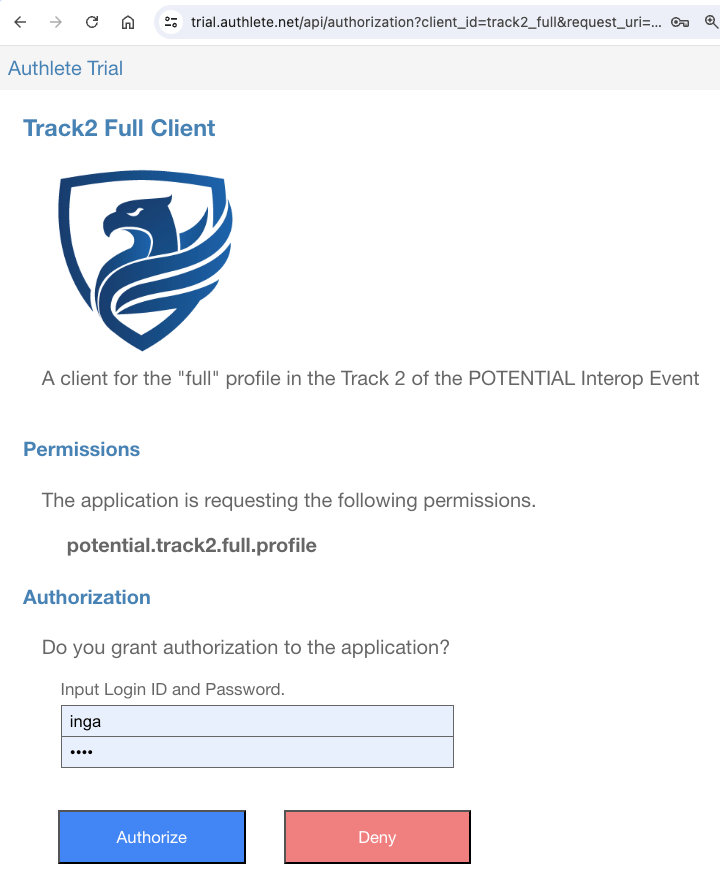 You will be redirected to the redirection endpoint (cf.
[RFC 6749, 3.1.2][RFC_6749_3_1_2]).
You will be redirected to the redirection endpoint (cf.
[RFC 6749, 3.1.2][RFC_6749_3_1_2]).
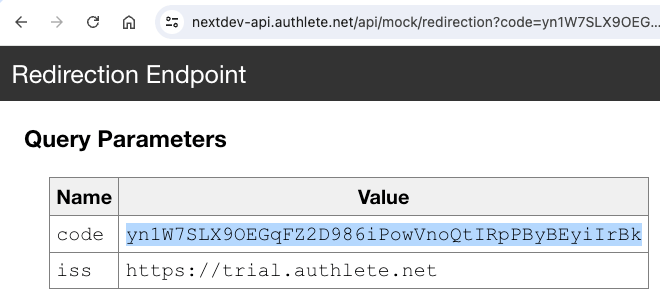 This redirection endpoint displays key-value pairs that it has received.
The value of the `code` parameter displayed there is the issued
authorization code. In this example, the value of the authorization code is
`yn1W7SLX9OEGqFZ2D986iPowVnoQtIRpPByBEyiIrBk`.
The authorization code will be used in the token request you will make later.
##### 4.5.2.6. Step 6 : DPoP Proof JWT for Token Request
You need to create a new DPoP Proof JWT to access the token endpoint. You cannot
reuse the DPoP Proof JWT you created for the PAR request.
The following command line can generate the DPoP Proof JWT. Please note that the
value of the `-u` option is the URL of the token endpoint (not the PAR endpoint).
```shell theme={null}
./generate-dpop-proof -k dpop.jwk -m POST \
-u https://trial.authlete.net/api/token
```
The `generate-dpop-proof` script will generate a JWT like below.
```text theme={null}
eyJ0eXAiOiJkcG9wK2p3dCIsImFsZyI6IkVTMjU2IiwiandrIjp7ImNydiI6IlAtMjU2Iiwia3R5IjoiRUMiLCJ4IjoiaEdmcXpHWGdhbzFRZ1ZJVFk2a2lIWU9LYmFMWEJ4VHFQSmE0RU9pbXhoSSIsInkiOiJFMUtpQV9mQTJ4OElycnlzb0dkbkJUTUI1LW8zRUpUX01nUUFfSG1HdTlNIn19.eyJqdGkiOiJFYzVhdklIcTN5Q25pUUFNIiwiaHRtIjoiUE9TVCIsImh0dSI6Imh0dHBzOi8vdHJpYWwuYXV0aGxldGUubmV0L2FwaS90b2tlbiIsImlhdCI6MTcxOTQ3NTAxNX0.0ahIcVPSpMY-g-_SfkB8C84wDhalE1FLfobyDciBoFv16W82gMIuoBw3kDIhHmGJAxxOVKOyTQFKMi25c30vlw
```
The following is the base64url-decoded header and payload of the DPoP Proof JWT.
The `htu` claim holds the URL of the token endpoint.
```json theme={null}
{
"typ": "dpop+jwt",
"alg": "ES256",
"jwk": {
"crv": "P-256",
"kty": "EC",
"x": "hGfqzGXgao1QgVITY6kiHYOKbaLXBxTqPJa4EOimxhI",
"y": "E1KiA_fA2x8IrrysoGdnBTMB5-o3EJT_MgQA_HmGu9M"
}
}
```
```json theme={null}
{
"jti": "Ec5avIHq3yCniQAM",
"htm": "POST",
"htu": "https://trial.authlete.net/api/token",
"iat": 1719475015
}
```
##### 4.5.2.7. Step 7 : Token Request
Now you have the following:
* Client Attestattion (JWT)
* Client Attestation PoP (JWT)
* DPoP Proof JWT for Token Request (JWT)
* Authorization Code
* Code Verifier
With these, you can make a token request as follows. Don't forget to replace
variables in the command line with the actual values you created in the
previous steps.
```shell theme={null}
curl -s https://trial.authlete.net/api/token \
-H "OAuth-Client-Attestation: ${CLIENT_ATTESTATION}" \
-H "OAuth-Client-Attestation-PoP: ${CLIENT_ATTESTATION_POP}" \
-H "DPoP: ${DPOP_PROOF_JWT_FOR_TOKEN_REQUEST}" \
-d client_id=track2_full \
-d grant_type=authorization_code \
-d code=${AUTHORIZATION_CODE} \
-d redirect_uri=https://nextdev-api.authlete.net/api/mock/redirection \
-d code_verifier=${CODE_VERIFIER}
```
The token endpoint will return JSON as a response like below.
```json theme={null}
{
"access_token": "_aPAJGv3bnb8UoSbkBCP9XF0tnCHoLDGBc6chbFSWkg",
"token_type": "DPoP",
"expires_in": 86400,
"scope": "potential.track2.full.profile",
"refresh_token": "NPJv7yAu5YKT7a6qeWes4mL8exDx-bPruXDQE3p8u80",
"c_nonce": "01bcC_9FtNM22wO9pnUqRkeFQuJNEE3sHA6M-oDnsHs",
"c_nonce_expires_in": 86400
}
```
The value of the `access_token` property is the issued access token. This needs
to be included in the credential request you will make later.
The value of the `c_nonce` property is the issued nonce. This value needs to be
included in the JWT Key Proofs you will create in the next step.
##### 4.5.2.8. Step 8 : JWT Key Proofs for Credential Request
In POTENTIAL's Track 2 Full Profile, a new feature introduced by
"[OpenID4VCI PR 293: rework credential and batch credential endpoint][OID4VCI_PR293]"
is used. This new feature enables a client application to request multiple
verifiable credentials in a single credential request.
To request multiple verifiable credentials, a credential request needs to
include multiple key proofs. Therefore, here we are going to generate two
JWT Key Proofs with different holder keys.
The [oid4vci-demo][AUTHLETE_OID4VCI_DEMO] repository contains two holder
keys, `holder.jwk` and `holder2.jwk`, for demo. With these keys and the
`generate-key-proof` script, you can generate JWT
Key Proofs as follows. Please replace `${C_NONCE}` in the command lines
with the actual value of the `c_nonce` property in the token response
you received in the previous step before executing the command lines.
```shell theme={null}
JWT_KEY_PROOF_1=`./generate-key-proof -i https://trial.authlete.net -k holder.jwk -c track2_full -n ${C_NONCE}`
JWT_KEY_PROOF_2=`./generate-key-proof -i https://trial.authlete.net -k holder2.jwk -c track2_full -n ${C_NONCE}`
```
The `c_nonce` property in a token response is optional, so the token
response from your authorization server may not include this property. In that case,
you cannot generate a valid key proof including `c_nonce` until you get
a valid `c_nonce` from your credential issuer.
When the `c_nonce` included in a key proof is invalid, the credential
issuer will include a valid `c_nonce` in the error response. With the
`c_nonce`, you can generate a valid key proof.
These steps described above imply that, if your authorization server does not
include `c_nonce` in a token response, your first credential request
with a key proof including a (fake) `c_nonce` inevitably fails.
Although you know the first request will fail, you need to make the request only
to get a valid `c_nonce`.
The `c_nonce` property in a token response is optional, so
authorization server implementations don't have to include the property in a
token response if they don't want to. However, there are several people in the
industry who dislike the feature that allows authorization servers to issue
`c_nonce` and are attempting to remove this feature itself from the
OID4VCI specification. If their attempt succeeded, all initial credential requests
containing a key proof with `c_nonce` worldwide would inevitably fail.
Authlete will continue to support the `c_nonce` property in a token
response for harmless backward compatibility with Implementer's Draft 1 of the
OID4VCI specification, unless the specification is revised to explicitly prohibit
including the property. However, introducing such prohibition would conflict with
[RFC 6749](https://www.rfc-editor.org/rfc/rfc6749.html), the core
specification of OAuth 2.0, which allows token responses to include arbitrary
response parameters.
The following is an example of JWT Key Proof with `holder.jwk`. Please note that
the content of the `jwk` claim in the header holds the public key corresponding
to the private key in `holder.jwk`.
```text theme={null}
eyJ0eXAiOiJvcGVuaWQ0dmNpLXByb29mK2p3dCIsImFsZyI6IkVTMjU2IiwiandrIjp7ImNydiI6IlAtMjU2Iiwia3R5IjoiRUMiLCJ4IjoiUFN4UXJEMnpsMF9tWGNBcXoxbWdxU2VCb0Jobm14Mnl4QkVwckJZOEYyMCIsInkiOiJ4VjhmYmkxRlNvc1V1bkxldUxOdUxrSmlxbVk2VEtpTW51ci1HbjJ3UjEwIn19.eyJpc3MiOiJ0cmFjazJfZnVsbCIsImF1ZCI6Imh0dHBzOi8vdHJpYWwuYXV0aGxldGUubmV0IiwiaWF0IjoxNzE5NDc2Mjg4LCJub25jZSI6IjAxYmNDXzlGdE5NMjJ3TzlwblVxUmtlRlF1Sk5FRTNzSEE2TS1vRG5zSHMifQ.lgI038MOL6DtbDnPOa8GZen0d2EoiZ-dgn_IU9hJYe5aWxL81hADNOS6v7ChJ9zxcU90sPDEJEyM12tDVm7VPQ
```
```json theme={null}
{
"typ": "openid4vci-proof+jwt",
"alg": "ES256",
"jwk": {
"crv": "P-256",
"kty": "EC",
"x": "PSxQrD2zl0_mXcAqz1mgqSeBoBhnmx2yxBEprBY8F20",
"y": "xV8fbi1FSosUunLeuLNuLkJiqmY6TKiMnur-Gn2wR10"
}
}
```
```json theme={null}
{
"iss": "track2_full",
"aud": "https://trial.authlete.net",
"iat": 1719476288,
"nonce": "01bcC_9FtNM22wO9pnUqRkeFQuJNEE3sHA6M-oDnsHs"
}
```
Likewise, the following is an example of JWT Key Proof with `holder2.jwk`.
The `jwk` claim in the header is the public key corresponding to the private
key in `holder2.jwk`.
```text theme={null}
eyJ0eXAiOiJvcGVuaWQ0dmNpLXByb29mK2p3dCIsImFsZyI6IkVTMjU2IiwiandrIjp7ImNydiI6IlAtMjU2Iiwia3R5IjoiRUMiLCJ4IjoiSkotN2YwQXNRNWZJUmRxaDJySXoxSS02SkpBTUowQjUzM1Iybm8tRmtfQSIsInkiOiJ6LTFFZnc2ZmRoZ2RLVEZISVhOSDI5bV9UTlpjWUpDLUxDSVU2WWRQdFI4In19.eyJpc3MiOiJ0cmFjazJfZnVsbCIsImF1ZCI6Imh0dHBzOi8vdHJpYWwuYXV0aGxldGUubmV0IiwiaWF0IjoxNzE5NDc2MzAwLCJub25jZSI6IjAxYmNDXzlGdE5NMjJ3TzlwblVxUmtlRlF1Sk5FRTNzSEE2TS1vRG5zSHMifQ.nNGWEYSDvH_B632TF_Z_ecG14fzmBR6QTjQS3Irjp5xiPLkHtm_XXGvKFeVLTc8erZpmWPvD_2e99DUvDsajyA
```
```json theme={null}
{
"typ": "openid4vci-proof+jwt",
"alg": "ES256",
"jwk": {
"crv": "P-256",
"kty": "EC",
"x": "JJ-7f0AsQ5fIRdqh2rIz1I-6JJAMJ0B533R2no-Fk_A",
"y": "z-1Efw6fdhgdKTFHIXNH29m_TNZcYJC-LCIU6YdPtR8"
}
}
```
```json theme={null}
{
"iss": "track2_full",
"aud": "https://trial.authlete.net",
"iat": 1719476300,
"nonce": "01bcC_9FtNM22wO9pnUqRkeFQuJNEE3sHA6M-oDnsHs"
}
```
##### 4.5.2.9. Step 9 : DPoP Proof JWT for Credential Request
You need to create another DPoP Proof JWT again to access the credential endpoint.
In addition to specifying the URL of the credential endpoint as the value of
the `-u` option, this time you need to specify the access token value using
the `-a` option (short for `--at` option). This option is necessary to include
the `ath` claim in the DPoP Proof JWT.
```shell theme={null}
./generate-dpop-proof -k dpop.jwk -m POST \
-u https://trial.authlete.net/api/credential \
-a ${ACCESS_TOKEN}
```
The following is an example of DPoP Proof JWT for a credential request.
Please note that the payload part includes the `ath` claim, which
represents the hash value of the access token.
```text theme={null}
eyJ0eXAiOiJkcG9wK2p3dCIsImFsZyI6IkVTMjU2IiwiandrIjp7ImNydiI6IlAtMjU2Iiwia3R5IjoiRUMiLCJ4IjoiaEdmcXpHWGdhbzFRZ1ZJVFk2a2lIWU9LYmFMWEJ4VHFQSmE0RU9pbXhoSSIsInkiOiJFMUtpQV9mQTJ4OElycnlzb0dkbkJUTUI1LW8zRUpUX01nUUFfSG1HdTlNIn19.eyJqdGkiOiI3Vm9zZW1YZ3ZLNUpVMVI0IiwiaHRtIjoiUE9TVCIsImh0dSI6Imh0dHBzOi8vdHJpYWwuYXV0aGxldGUubmV0L2FwaS9jcmVkZW50aWFsIiwiaWF0IjoxNzE5NDc2ODQxLCJhdGgiOiIzQWV6TzBZMTFnZzgwVm5Zd3puLUpDbXFNVnZkc2pJZXlBMTRoc1BOdHVvIn0.zDZYZdgb2jo4KKM0_OariZK0yrEcIFmPdpImX0Q-pttqw8480-nVdW-lQlQqQvcMtDKEWwZtgcNTsNExgomZ2g
```
```json theme={null}
{
"typ": "dpop+jwt",
"alg": "ES256",
"jwk": {
"crv": "P-256",
"kty": "EC",
"x": "hGfqzGXgao1QgVITY6kiHYOKbaLXBxTqPJa4EOimxhI",
"y": "E1KiA_fA2x8IrrysoGdnBTMB5-o3EJT_MgQA_HmGu9M"
}
}
```
```json theme={null}
{
"jti": "7VosemXgvK5JU1R4",
"htm": "POST",
"htu": "https://trial.authlete.net/api/credential",
"iat": 1719476841,
"ath": "3AezO0Y11gg80VnYwzn-JCmqMVvdsjIeyA14hsPNtuo"
}
```
##### 4.5.2.10. Step 10 : Credential Request
Now you have the following:
* Access Token
* DPoP Proof JWT for Credential Request (JWT)
* JWT Key Proof 1 (JWT)
* JWT Key Proof 2 (JWT)
With these, you can make a credential request as follows.
```shell theme={null}
curl -s https://trial.authlete.net/api/credential \
-H "Authorization: Bearer ${ACCESS_TOKEN}" \
-H "DPoP: ${DPOP_PROOF_JWT_FOR_CREDENTIAL_REQUEST}" \
-H "Content-Type: application/json" \
--data '{
"format": "vc+sd-jwt",
"vct": "urn:eu.europa.ec.eudi:pid:1",
"proofs": {
"jwt": [
"'${JWT_KEY_PROOF_1}'",
"'${JWT_KEY_PROOF_2}'"
]
}
}'
```
The key point here is that the message body of the credential request contains
the `proofs` property instead of the `proof` property. The `proofs` property
is a new addition introduced by [OpenID4VCI PR 293][OID4VCI_PR293], which
enables the inclusion of multiple key proofs.
The credential endpoint will return a response like below.
```json theme={null}
{
"credentials": [
"eyJraWQiOiJKMUZ3SlA4N0M2LVFOX1dTSU9tSkFRYzZuNUNRX2JaZGFGSjVHRG5XMVJrIiwidHlwIjoidmMrc2Qtand0IiwiYWxnIjoiRVMyNTYifQ.eyJwbGFjZV9vZl9iaXJ0aCI6eyJfc2QiOlsiTkVXa1ZYODhqaENvMVVFZ0ZiTktQNjYyNkVhVXp6TldCRzdId1VZOFY4VSIsIlRfaUs3UG9ISDRfalNBWkdaMVljbXc2ckl2ZE1fM1pHTFpMV0JxUTZCOTgiXX0sIl9zZCI6WyItOWNGNnJ1TkFTRzdMX09ndEdTZlhSX0pDT1VmQ3pkVmF6dVB2RFFsV3FnIiwiMXdVMDdzdHR2NnBMN2FHal95YjJ5Z0tqVUFTeVZpLVk1cUxPcWgzN3ZPQSIsIjR1TF8taHhQTUpJTzVZdTdwTm4wbU95SEJBWjVsR0cwYWNhM2pZaG84cFUiLCI3dUZXV05vQURlTUpzVzFmcnhiVDV4czlHM3h4Qy0wSWRYTGV3RE5yWGxnIiwiOV82Y3hMMXNlRzUxRVdiZjlOcjFIZklpRTVpajdnWU9ONllxRXdqOGl5SSIsIjljWkJFUURYUTY2RGhqd1JPMUhzcXZOLVBLRHRuYW5BWlk2QW03aXUxMEkiLCJBTlRHcEZkaXk2cFpiXzdvb1pXQmQtVVlGUHR3ZDRiNDRXcW5WeGUxQjFBIiwiQkJTTU03ZXdYb2t3cVdSY1lDUmlLazJzbW1pNWdrM05NU21EMlpONnlTcyIsIlA4WG0zMUNUSXN3UzVTNlFyYkstc2tfc1dTUGMtZmJuWGM2c1VfMUpDRkUiLCJUckRwYVZxcnpSVWxfM0ktejE0SWtZdmxEZndTY2djbXI5Ui1maEZjcVhFIiwiZXpPREtNdkNGWW9ER2c0bWNLRFJ1VzJPemlMaml4VjRKRkNRS0Z6QnRsTSIsIm0yYmRpOHNPcEhRZTg1NTNhamJYQTNwakNTRzN0Qjh4T3VvaUN5eVlVYmMiLCJ1dG1yaWxSWGdTRHBsblFkdW5OUzZ2Ym8xOFB2cktsNnhEa2tzVFZ3YXVZIiwieEozS3NOam5faFl6aTNMWlZITDBoRklOWVdFM3EtZVJoRUdGRWVUQlBIOCJdLCJhZGRyZXNzIjp7Il9zZCI6WyIzUTFVdk1GbGl0VFYxM0EwN016ZjI3UzZfVW1Na2JEVFBfa0N3RklkTlJnIiwiQTgzNG9MTlY1dEVPb0c2eVMtRnRFM0FhalR0UF9GV1VhUXhBOWdHVXlnWSIsIkZRdG5MLXBaVkNRUUhRQ1Y3TVl6M0hwaUpOX1JIRmZObDlVSms3SGgwTUkiLCJHVWxzcjBpcUlMTVk1QXk4TnlZMzFiczNkd1NqdkZrd09aZHQxRlR1QndnIiwiSXk1TEFhLVEtNDhkMWN2d0VDN3VxYjBEMFR5VmxWX2l0dkhzck1KZE1UdyIsIkxzYlBzTGg4N0FiU3dwellYRmdTRnZZNHNFTFdZZXB2S0JzeVNBRWxhMXciLCJVZlE0QktRR2ZmZF9wU1VCYkd1RUJQM2d6Rm9zNU9sTFNvMUlxd1k0TWxJIiwiVjQtRTc2V1NKUjBuMU1xZHdsbElTTmoxaEtnRGc4d09qdElyam5rQ2tZZyIsIlhSZkNFZTVPcy1KcFM5OVFXY1pqRF9udXQ3d0Jwc0QzX1djWjZ1amhseDAiLCJpQ05YazdMLTQ3MnZnUmo2R0RDZ0RqWE5SUVBKaXM4amJTb3lRV09KRC1BIiwibkc5LUY4RDVPZWZZNmdLQmxVSU1WdFBaZXluX0FISGhmMzZIRzNmQ2tWNCIsInBYYlJTUTFfeFNUYUhIRjRhaFEzZFZPenQ1ODI3TkYxa0ZLUmtnUEd3cVUiXX0sInZjdCI6InVybjpldS5ldXJvcGEuZWMuZXVkaTpwaWQ6MSIsIl9zZF9hbGciOiJzaGEtMjU2IiwiaXNzIjoiaHR0cHM6Ly90cmlhbC5hdXRobGV0ZS5uZXQiLCJjbmYiOnsiandrIjp7Imt0eSI6IkVDIiwiY3J2IjoiUC0yNTYiLCJraWQiOiI0TTlrSXJCOVdZenQxR1FnTDEybHpkQlpzR3llVjNsZ1BLb3YyOG9UNUw0IiwieCI6IlBTeFFyRDJ6bDBfbVhjQXF6MW1ncVNlQm9CaG5teDJ5eEJFcHJCWThGMjAiLCJ5IjoieFY4ZmJpMUZTb3NVdW5MZXVMTnVMa0ppcW1ZNlRLaU1udXItR24yd1IxMCJ9fSwiaWF0IjoxNzE5NDc2ODU1LCJhZ2VfZXF1YWxfb3Jfb3ZlciI6eyJfc2QiOlsiS1pPZzhDUENVWkI4Tl85ZC1YTVVvQ0tYQ2xTbEh3NHBiTmlFOEE4Mzk5ZyIsImZmZ2lfTmhVV0JWbVNiZ3J5WmtrMXpSdmhJNXJHQjFhd2diT2ZiRC1oZU0iXX19.dlnBVF7xd9uFbaUS0ExMHN-62uOnmzAmGSNOYJrP3jNNpV1ihmu02hdDTFEFuhhMQ2DXeKYG3mnbYZ4gjQogVw~WyJubFJHOFlwVXRyWlZybnZMaGsxVVNRIiwic3ViIiwiMTAwNCJd~WyJ1U0pTVHhqZHBKLVZKYzVJTTY3cHNnIiwiZmFtaWx5X25hbWUiLCJTaWx2ZXJzdG9uZSJd~WyJtWFg5ZHBLNHFZWC16WHRuczdnb2tnIiwiZ2l2ZW5fbmFtZSIsIkluZ2EiXQ~WyJ0Q0NxOUNvWHJRTjJSY3FoY1dUTG9nIiwiYmlydGhkYXRlIiwiMTk5MS0xMS0wNiJd~WyJlQU1BaG51QlAxQTY4Und3YU9YUU13IiwiMTgiLHRydWVd~WyJ0MVJ2YS1jeTVLQS0xT1hYQW93ZklRIiwibG9jYWxpdHkiLCJTaG9zaG9uZSJd~WyJpNXJNNDVZdjN1WHplRnZEekpxbjdnIiwiZm9ybWF0dGVkIiwiMTE0IE9sZCBTdGF0ZSBId3kgMTI3LCBTaG9zaG9uZSwgQ0EgOTIzODQsIFVTQSJd~WyJvaFhiOVdFQTdHTmc0SEVrem9yVG5BIiwic3RyZWV0X2FkZHJlc3MiLCIxMTQgT2xkIFN0YXRlIEh3eSAxMjciXQ~WyJFdmY1dkhCRFc4RmgzQk84SnZNOHR3IiwibG9jYWxpdHkiLCJTaG9zaG9uZSJd~WyIyZFJVWFBfajlIUF9nX1VFYTZRVkh3IiwicG9zdGFsX2NvZGUiLCJDQSA5MjM4NCJd~WyJSbmNCeVBRdW5NbTNtb3hDRnVaOFpRIiwiY291bnRyeSIsIlVTQSJd~WyI1NmJLM1BKcG1wZ1kzdlA4WHNUYnZnIiwiaXNzdWluZ19hdXRob3JpdHkiLCJVUyJd~WyJjdXNabVM1MHVteUk3ZWc2SGhJYWNnIiwiaXNzdWluZ19jb3VudHJ5IiwiVVMiXQ~",
"eyJraWQiOiJKMUZ3SlA4N0M2LVFOX1dTSU9tSkFRYzZuNUNRX2JaZGFGSjVHRG5XMVJrIiwidHlwIjoidmMrc2Qtand0IiwiYWxnIjoiRVMyNTYifQ.eyJwbGFjZV9vZl9iaXJ0aCI6eyJfc2QiOlsiSXdtalFNd3ROTk9nVkJ5ZW5rYWYxemRyYnNSLWlsbFptN3pHNmFvem1NVSIsIlNxU25Rb0FnbWJqS3dkVzBNMDhvVnVfdktLLWk1bVA3RHNVNnlwdzFOenMiXX0sIl9zZCI6WyIzcXlKY0luTVRFOFZtb0FQdDVNUmNtdUREYXBUTF9BSmRHbGNxUzdJRVBFIiwiNkotbGQ5S3ktQ3hUSXhqbnlGNnYzX0JLajUyR01GQ3hndF9BSnZJTnNRVSIsIjZrY3dwdkRCZ05DVkUzM2RnUmd5YjJ1cERBNW45TUZhNS1ra1phSkZzZTQiLCJEWDRJT0hGVUVoVDZvNlNqTzVoUGZieUdPb3NmcC1HVjhNdmxkZnV2aXJZIiwiRWItMG1PRkNGWWViV2VPY3VNNmtQRWFpRFh4TnZETFBqcjkzbzNROUppcyIsIklLTzl5OEZ2TllpTGRpYUVwT0hBZWpYRGFYMVdXeVRPUnRUdnY3aUlTLU0iLCJJS1QwNGRxZ1NhM1B6aUlNZWRtU0NOWTl6MjRvcEEzRmh6LWUwbTdxV0VZIiwiSXlIemhjSDdpM3NkS182S0VJSWdDaVkzRWdDOVBUaU5zY1dpd1BGS3FHayIsIkpNeXg4QzRhakxVTzNLR3NTRDJobkMxcUJpSV80SThlc2QxZDNlcnNMU2siLCJTUUMzSUJDMlphVlBCZFU0QmYyZUZIcFVDUjJaRU1uZkFQUW1OMmVraWlvIiwiWEVJVmo4X2NXSjRBV1N3cTZWMlpOblA5Z3JfaVU1cUJkcGxTQXIwdC1JOCIsIlo0NXZjM19acUk2Uk1GN0xaaE5XZVp2YlIwRVA3NUNtLXdNcUVuSkdaVkEiLCJfRjZWTE56dTN3cVNTOHBRV1p5eXpOLVRybEZWX1h5LXp1WmNRbDFWd2NRIiwiYXl2UlVTdmc4a3N5Mnk0QjhGUk16NGxoTVdyWFRkcFVZT2p0aVlnVVFEUSIsImc4UjhhZnBRVERzZVFkZjZqbXJfTGNoVUxUc2V1enJ1SWxUVWllNFRXVjAiLCJnd2lwTUJESFRDanFsMHl0b1c2djdBUGo1Vm5sbVpMTWwyUlNYZVZTRXdJIiwiaEJ4UXhqT3QwQzN4SUpZYmNPaFJwU2Y5ajZjSm0wRTNoUU5WVFNPT3oyQSIsImw1UkZ5RVJRUHRFLUx6a2RFUGhXeXo0d215dzFGLU1RSTBBdjFIZER6NEUiLCJxNHZXNHRLNGQydS1vZHkybDNtNl9qYm14NVpTUmlVTzVHN0lwMTNOSjF3IiwidVhpTzQ3WFdXbEdQRGE2cS1zSk5Qc0R6THdXTGxpMTQyN2NQNkEzQzNIVSIsInlCb1B4aURuWjVhaWdJdjVZek9VMTEyQVdHT3BVaVNDRjNKZHgydjZEdDgiLCJ6T1E2alU3X094MDdxWXFJSjdvVzIxNmJiUWRzbXlfQXlHcTBpbW5ueUFjIl0sImFkZHJlc3MiOnsiX3NkIjpbIjJDdml3VXo1eEwwUllGc1BhSFlZeFVKVXgwY09vRFhCYUlsZnNvWHJoem8iLCI1NmswNWpXTmNaLUVwZ1loaDNjUnBESjhuSkVXOC04WnFvSWNyWFVicEFNIiwiN3d5cjd4MzlvMlN6Vjd0cmJ1SUN4d0xqTVBiaXdRdnU0eHVHN09sQUxpWSIsIkpsOEJveURITXkxeVpKQWEwRHliU0JzbUJSZ1hFVU9FUTQxb2xwS29uOHciLCJLc1h4c0JIWW9fb3dVa2J4VlVRT0ZjUHRoOWVqRG5BZzhjYVNXQVd4R2FJIiwiWXpsdWY0bTRMdGFoMEVzaGszQ0Y3aVMtcTJ0Um0yaVdfVXVZaWNtTzlLcyIsIm4talZaSEU2ZDN0ODVaQ1BXYTFOQm5KTVNFdDgweU9MMUphdFF1ZVhmd28iLCJvbUF4a2xVS3JyMk9sNW9nRlk2WGdJLVhtNHY2M1VrVmIxX09XYVhra0VRIiwid1dCa1dQZU1SdUdGM2I2S0drQnhyeGdZY2tqVzNxUERET3RyOVBOd0NiRSJdfSwidmN0IjoidXJuOmV1LmV1cm9wYS5lYy5ldWRpOnBpZDoxIiwiX3NkX2FsZyI6InNoYS0yNTYiLCJpc3MiOiJodHRwczovL3RyaWFsLmF1dGhsZXRlLm5ldCIsImNuZiI6eyJqd2siOnsia3R5IjoiRUMiLCJjcnYiOiJQLTI1NiIsImtpZCI6IkI4b3M4ZE5CTTF2aU9OWU96T0hmUEtKd3AzU0dsTVlLU05BQ1NXdVpScXMiLCJ4IjoiSkotN2YwQXNRNWZJUmRxaDJySXoxSS02SkpBTUowQjUzM1Iybm8tRmtfQSIsInkiOiJ6LTFFZnc2ZmRoZ2RLVEZISVhOSDI5bV9UTlpjWUpDLUxDSVU2WWRQdFI4In19LCJpYXQiOjE3MTk0NzY4NTUsImFnZV9lcXVhbF9vcl9vdmVyIjp7Il9zZCI6WyJJOEdHR2VXQXJFRzAwUHFiNV9qZkJnMGhYRndET1k5aTRnbU9ZTGp1OS1ZIiwidUhmbDRiZ00wV2I2YTBWSHUzWWx0YU1mSGR1TXZIbzIyMVVBUUJkMDhYVSJdfX0.oI6tgincnKaRqACfYe46PweL1kvbrbjJcnwKnBtGDpUfWbvRTj2B8pn4JWVQ2XPBDEnAJaeO0tJ7B1U1infWMA~WyJBMFYzTDlwdzQ3U1BfSk5XYTVFOGhBIiwic3ViIiwiMTAwNCJd~WyJLZy1VTFN4N2JlOGRlYm5yMngyVjRnIiwiZmFtaWx5X25hbWUiLCJTaWx2ZXJzdG9uZSJd~WyJZLUVCUkw0OTJyUm54T3BGaWtUOE1BIiwiZ2l2ZW5fbmFtZSIsIkluZ2EiXQ~WyJreUFTdHg1SWNUaXVfQ3RNdTBDck5RIiwiYmlydGhkYXRlIiwiMTk5MS0xMS0wNiJd~WyI4WGJCNGRRZENZbkh6a3BuR094YU1RIiwiMTgiLHRydWVd~WyJYM0RBUHdFWTRGaEQ2UUNNSU5idXBnIiwibG9jYWxpdHkiLCJTaG9zaG9uZSJd~WyJ3SDhKTE5tc1dkcVdfZ3Q3RmtQbGpRIiwiZm9ybWF0dGVkIiwiMTE0IE9sZCBTdGF0ZSBId3kgMTI3LCBTaG9zaG9uZSwgQ0EgOTIzODQsIFVTQSJd~WyJEVUJaRXNkWVVPREhoZTJ3TUxFMnpBIiwic3RyZWV0X2FkZHJlc3MiLCIxMTQgT2xkIFN0YXRlIEh3eSAxMjciXQ~WyJ6dXQzd0pnbjN1MExCcTJRNTlXZEFRIiwibG9jYWxpdHkiLCJTaG9zaG9uZSJd~WyJsVzdXQTkxakRON1RGWkpRRzJNUi1BIiwicG9zdGFsX2NvZGUiLCJDQSA5MjM4NCJd~WyJlczdiUHpNeXdNaXJON0tzemtpMFdRIiwiY291bnRyeSIsIlVTQSJd~WyJtOEVlUUM2akhIeUlSWGVDQXhERi1nIiwiaXNzdWluZ19hdXRob3JpdHkiLCJVUyJd~WyIxMzhhaHkwMVdvNFFxekZyNFlpSld3IiwiaXNzdWluZ19jb3VudHJ5IiwiVVMiXQ~"
],
"c_nonce": "01bcC_9FtNM22wO9pnUqRkeFQuJNEE3sHA6M-oDnsHs",
"c_nonce_expires_in": 84589
}
```
In a successful case, the response contains the `credentials` property instead
of the `credential` property. Elements in the `credentials` array are issued
verifiable credentials. In this example, the `credentials` array contains two
verifiable credentials because the credential request contained two key proofs.
The format of the verifiable credentials is SD-JWT. They can be decoded using
the `decode-sd-jwt` script in the
[oid4vci-demo][AUTHLETE_OID4VCI_DEMO] repository.
The first verifiable credetial is decoded as follows:
```json theme={null}
{
"kid": "J1FwJP87C6-QN_WSIOmJAQc6n5CQ_bZdaFJ5GDnW1Rk",
"typ": "vc+sd-jwt",
"alg": "ES256"
}
{
"place_of_birth": {
"_sd": [
"NEWkVX88jhCo1UEgFbNKP6626EaUzzNWBG7HwUY8V8U",
"T_iK7PoHH4_jSAZGZ1Ycmw6rIvdM_3ZGLZLWBqQ6B98"
]
},
"_sd": [
"-9cF6ruNASG7L_OgtGSfXR_JCOUfCzdVazuPvDQlWqg",
"1wU07sttv6pL7aGj_yb2ygKjUASyVi-Y5qLOqh37vOA",
"4uL_-hxPMJIO5Yu7pNn0mOyHBAZ5lGG0aca3jYho8pU",
"7uFWWNoADeMJsW1frxbT5xs9G3xxC-0IdXLewDNrXlg",
"9_6cxL1seG51EWbf9Nr1HfIiE5ij7gYON6YqEwj8iyI",
"9cZBEQDXQ66DhjwRO1HsqvN-PKDtnanAZY6Am7iu10I",
"ANTGpFdiy6pZb_7ooZWBd-UYFPtwd4b44WqnVxe1B1A",
"BBSMM7ewXokwqWRcYCRiKk2smmi5gk3NMSmD2ZN6ySs",
"P8Xm31CTIswS5S6QrbK-sk_sWSPc-fbnXc6sU_1JCFE",
"TrDpaVqrzRUl_3I-z14IkYvlDfwScgcmr9R-fhFcqXE",
"ezODKMvCFYoDGg4mcKDRuW2OziLjixV4JFCQKFzBtlM",
"m2bdi8sOpHQe8553ajbXA3pjCSG3tB8xOuoiCyyYUbc",
"utmrilRXgSDplnQdunNS6vbo18PvrKl6xDkksTVwauY",
"xJ3KsNjn_hYzi3LZVHL0hFINYWE3q-eRhEGFEeTBPH8"
],
"address": {
"_sd": [
"3Q1UvMFlitTV13A07Mzf27S6_UmMkbDTP_kCwFIdNRg",
"A834oLNV5tEOoG6yS-FtE3AajTtP_FWUaQxA9gGUygY",
"FQtnL-pZVCQQHQCV7MYz3HpiJN_RHFfNl9UJk7Hh0MI",
"GUlsr0iqILMY5Ay8NyY31bs3dwSjvFkwOZdt1FTuBwg",
"Iy5LAa-Q-48d1cvwEC7uqb0D0TyVlV_itvHsrMJdMTw",
"LsbPsLh87AbSwpzYXFgSFvY4sELWYepvKBsySAEla1w",
"UfQ4BKQGffd_pSUBbGuEBP3gzFos5OlLSo1IqwY4MlI",
"V4-E76WSJR0n1MqdwllISNj1hKgDg8wOjtIrjnkCkYg",
"XRfCEe5Os-JpS99QWcZjD_nut7wBpsD3_WcZ6ujhlx0",
"iCNXk7L-472vgRj6GDCgDjXNRQPJis8jbSoyQWOJD-A",
"nG9-F8D5OefY6gKBlUIMVtPZeyn_AHHhf36HG3fCkV4",
"pXbRSQ1_xSTaHHF4ahQ3dVOzt5827NF1kFKRkgPGwqU"
]
},
"vct": "urn:eu.europa.ec.eudi:pid:1",
"_sd_alg": "sha-256",
"iss": "https://trial.authlete.net",
"cnf": {
"jwk": {
"kty": "EC",
"crv": "P-256",
"kid": "4M9kIrB9WYzt1GQgL12lzdBZsGyeV3lgPKov28oT5L4",
"x": "PSxQrD2zl0_mXcAqz1mgqSeBoBhnmx2yxBEprBY8F20",
"y": "xV8fbi1FSosUunLeuLNuLkJiqmY6TKiMnur-Gn2wR10"
}
},
"iat": 1719476855,
"age_equal_or_over": {
"_sd": [
"KZOg8CPCUZB8N_9d-XMUoCKXClSlHw4pbNiE8A8399g",
"ffgi_NhUWBVmSbgryZkk1zRvhI5rGB1awgbOfbD-heM"
]
}
}
{
"digest": "4uL_-hxPMJIO5Yu7pNn0mOyHBAZ5lGG0aca3jYho8pU",
"WyJubFJHOFlwVXRyWlZybnZMaGsxVVNRIiwic3ViIiwiMTAwNCJd": [
"nlRG8YpUtrZVrnvLhk1USQ",
"sub",
"1004"
]
}
{
"digest": "9_6cxL1seG51EWbf9Nr1HfIiE5ij7gYON6YqEwj8iyI",
"WyJ1U0pTVHhqZHBKLVZKYzVJTTY3cHNnIiwiZmFtaWx5X25hbWUiLCJTaWx2ZXJzdG9uZSJd": [
"uSJSTxjdpJ-VJc5IM67psg",
"family_name",
"Silverstone"
]
}
{
"digest": "m2bdi8sOpHQe8553ajbXA3pjCSG3tB8xOuoiCyyYUbc",
"WyJtWFg5ZHBLNHFZWC16WHRuczdnb2tnIiwiZ2l2ZW5fbmFtZSIsIkluZ2EiXQ": [
"mXX9dpK4qYX-zXtns7gokg",
"given_name",
"Inga"
]
}
{
"digest": "BBSMM7ewXokwqWRcYCRiKk2smmi5gk3NMSmD2ZN6ySs",
"WyJ0Q0NxOUNvWHJRTjJSY3FoY1dUTG9nIiwiYmlydGhkYXRlIiwiMTk5MS0xMS0wNiJd": [
"tCCq9CoXrQN2RcqhcWTLog",
"birthdate",
"1991-11-06"
]
}
{
"digest": "KZOg8CPCUZB8N_9d-XMUoCKXClSlHw4pbNiE8A8399g",
"WyJlQU1BaG51QlAxQTY4Und3YU9YUU13IiwiMTgiLHRydWVd": [
"eAMAhnuBP1A68RwwaOXQMw",
"18",
true
]
}
{
"digest": "T_iK7PoHH4_jSAZGZ1Ycmw6rIvdM_3ZGLZLWBqQ6B98",
"WyJ0MVJ2YS1jeTVLQS0xT1hYQW93ZklRIiwibG9jYWxpdHkiLCJTaG9zaG9uZSJd": [
"t1Rva-cy5KA-1OXXAowfIQ",
"locality",
"Shoshone"
]
}
{
"digest": "V4-E76WSJR0n1MqdwllISNj1hKgDg8wOjtIrjnkCkYg",
"WyJpNXJNNDVZdjN1WHplRnZEekpxbjdnIiwiZm9ybWF0dGVkIiwiMTE0IE9sZCBTdGF0ZSBId3kgMTI3LCBTaG9zaG9uZSwgQ0EgOTIzODQsIFVTQSJd": [
"i5rM45Yv3uXzeFvDzJqn7g",
"formatted",
"114 Old State Hwy 127, Shoshone, CA 92384, USA"
]
}
{
"digest": "nG9-F8D5OefY6gKBlUIMVtPZeyn_AHHhf36HG3fCkV4",
"WyJvaFhiOVdFQTdHTmc0SEVrem9yVG5BIiwic3RyZWV0X2FkZHJlc3MiLCIxMTQgT2xkIFN0YXRlIEh3eSAxMjciXQ": [
"ohXb9WEA7GNg4HEkzorTnA",
"street_address",
"114 Old State Hwy 127"
]
}
{
"digest": "GUlsr0iqILMY5Ay8NyY31bs3dwSjvFkwOZdt1FTuBwg",
"WyJFdmY1dkhCRFc4RmgzQk84SnZNOHR3IiwibG9jYWxpdHkiLCJTaG9zaG9uZSJd": [
"Evf5vHBDW8Fh3BO8JvM8tw",
"locality",
"Shoshone"
]
}
{
"digest": "LsbPsLh87AbSwpzYXFgSFvY4sELWYepvKBsySAEla1w",
"WyIyZFJVWFBfajlIUF9nX1VFYTZRVkh3IiwicG9zdGFsX2NvZGUiLCJDQSA5MjM4NCJd": [
"2dRUXP_j9HP_g_UEa6QVHw",
"postal_code",
"CA 92384"
]
}
{
"digest": "XRfCEe5Os-JpS99QWcZjD_nut7wBpsD3_WcZ6ujhlx0",
"WyJSbmNCeVBRdW5NbTNtb3hDRnVaOFpRIiwiY291bnRyeSIsIlVTQSJd": [
"RncByPQunMm3moxCFuZ8ZQ",
"country",
"USA"
]
}
{
"digest": "utmrilRXgSDplnQdunNS6vbo18PvrKl6xDkksTVwauY",
"WyI1NmJLM1BKcG1wZ1kzdlA4WHNUYnZnIiwiaXNzdWluZ19hdXRob3JpdHkiLCJVUyJd": [
"56bK3PJpmpgY3vP8XsTbvg",
"issuing_authority",
"US"
]
}
{
"digest": "ezODKMvCFYoDGg4mcKDRuW2OziLjixV4JFCQKFzBtlM",
"WyJjdXNabVM1MHVteUk3ZWc2SGhJYWNnIiwiaXNzdWluZ19jb3VudHJ5IiwiVVMiXQ": [
"cusZmS50umyI7eg6HhIacg",
"issuing_country",
"US"
]
}
```
The key point here is that the value of the `cnf.jwk` property matches the
public key embedded in the first key proof.
```json theme={null}
"cnf": {
"jwk": {
"kty": "EC",
"crv": "P-256",
"kid": "4M9kIrB9WYzt1GQgL12lzdBZsGyeV3lgPKov28oT5L4",
"x": "PSxQrD2zl0_mXcAqz1mgqSeBoBhnmx2yxBEprBY8F20",
"y": "xV8fbi1FSosUunLeuLNuLkJiqmY6TKiMnur-Gn2wR10"
}
}
```
Likewise, the second verifiable credential is decoded as follows:
```json theme={null}
{
"kid": "J1FwJP87C6-QN_WSIOmJAQc6n5CQ_bZdaFJ5GDnW1Rk",
"typ": "vc+sd-jwt",
"alg": "ES256"
}
{
"place_of_birth": {
"_sd": [
"IwmjQMwtNNOgVByenkaf1zdrbsR-illZm7zG6aozmMU",
"SqSnQoAgmbjKwdW0M08oVu_vKK-i5mP7DsU6ypw1Nzs"
]
},
"_sd": [
"3qyJcInMTE8VmoAPt5MRcmuDDapTL_AJdGlcqS7IEPE",
"6J-ld9Ky-CxTIxjnyF6v3_BKj52GMFCxgt_AJvINsQU",
"6kcwpvDBgNCVE33dgRgyb2upDA5n9MFa5-kkZaJFse4",
"DX4IOHFUEhT6o6SjO5hPfbyGOosfp-GV8MvldfuvirY",
"Eb-0mOFCFYebWeOcuM6kPEaiDXxNvDLPjr93o3Q9Jis",
"IKO9y8FvNYiLdiaEpOHAejXDaX1WWyTORtTvv7iIS-M",
"IKT04dqgSa3PziIMedmSCNY9z24opA3Fhz-e0m7qWEY",
"IyHzhcH7i3sdK_6KEIIgCiY3EgC9PTiNscWiwPFKqGk",
"JMyx8C4ajLUO3KGsSD2hnC1qBiI_4I8esd1d3ersLSk",
"SQC3IBC2ZaVPBdU4Bf2eFHpUCR2ZEMnfAPQmN2ekiio",
"XEIVj8_cWJ4AWSwq6V2ZNnP9gr_iU5qBdplSAr0t-I8",
"Z45vc3_ZqI6RMF7LZhNWeZvbR0EP75Cm-wMqEnJGZVA",
"_F6VLNzu3wqSS8pQWZyyzN-TrlFV_Xy-zuZcQl1VwcQ",
"ayvRUSvg8ksy2y4B8FRMz4lhMWrXTdpUYOjtiYgUQDQ",
"g8R8afpQTDseQdf6jmr_LchULTseuzruIlTUie4TWV0",
"gwipMBDHTCjql0ytoW6v7APj5VnlmZLMl2RSXeVSEwI",
"hBxQxjOt0C3xIJYbcOhRpSf9j6cJm0E3hQNVTSOOz2A",
"l5RFyERQPtE-LzkdEPhWyz4wmyw1F-MQI0Av1HdDz4E",
"q4vW4tK4d2u-ody2l3m6_jbmx5ZSRiUO5G7Ip13NJ1w",
"uXiO47XWWlGPDa6q-sJNPsDzLwWLli1427cP6A3C3HU",
"yBoPxiDnZ5aigIv5YzOU112AWGOpUiSCF3Jdx2v6Dt8",
"zOQ6jU7_Ox07qYqIJ7oW216bbQdsmy_AyGq0imnnyAc"
],
"address": {
"_sd": [
"2CviwUz5xL0RYFsPaHYYxUJUx0cOoDXBaIlfsoXrhzo",
"56k05jWNcZ-EpgYhh3cRpDJ8nJEW8-8ZqoIcrXUbpAM",
"7wyr7x39o2SzV7trbuICxwLjMPbiwQvu4xuG7OlALiY",
"Jl8BoyDHMy1yZJAa0DybSBsmBRgXEUOEQ41olpKon8w",
"KsXxsBHYo_owUkbxVUQOFcPth9ejDnAg8caSWAWxGaI",
"Yzluf4m4Ltah0Eshk3CF7iS-q2tRm2iW_UuYicmO9Ks",
"n-jVZHE6d3t85ZCPWa1NBnJMSEt80yOL1JatQueXfwo",
"omAxklUKrr2Ol5ogFY6XgI-Xm4v63UkVb1_OWaXkkEQ",
"wWBkWPeMRuGF3b6KGkBxrxgYckjW3qPDDOtr9PNwCbE"
]
},
"vct": "urn:eu.europa.ec.eudi:pid:1",
"_sd_alg": "sha-256",
"iss": "https://trial.authlete.net",
"cnf": {
"jwk": {
"kty": "EC",
"crv": "P-256",
"kid": "B8os8dNBM1viONYOzOHfPKJwp3SGlMYKSNACSWuZRqs",
"x": "JJ-7f0AsQ5fIRdqh2rIz1I-6JJAMJ0B533R2no-Fk_A",
"y": "z-1Efw6fdhgdKTFHIXNH29m_TNZcYJC-LCIU6YdPtR8"
}
},
"iat": 1719476855,
"age_equal_or_over": {
"_sd": [
"I8GGGeWArEG00Pqb5_jfBg0hXFwDOY9i4gmOYLju9-Y",
"uHfl4bgM0Wb6a0VHu3YltaMfHduMvHo221UAQBd08XU"
]
}
}
{
"digest": "l5RFyERQPtE-LzkdEPhWyz4wmyw1F-MQI0Av1HdDz4E",
"WyJBMFYzTDlwdzQ3U1BfSk5XYTVFOGhBIiwic3ViIiwiMTAwNCJd": [
"A0V3L9pw47SP_JNWa5E8hA",
"sub",
"1004"
]
}
{
"digest": "IKT04dqgSa3PziIMedmSCNY9z24opA3Fhz-e0m7qWEY",
"WyJLZy1VTFN4N2JlOGRlYm5yMngyVjRnIiwiZmFtaWx5X25hbWUiLCJTaWx2ZXJzdG9uZSJd": [
"Kg-ULSx7be8debnr2x2V4g",
"family_name",
"Silverstone"
]
}
{
"digest": "uXiO47XWWlGPDa6q-sJNPsDzLwWLli1427cP6A3C3HU",
"WyJZLUVCUkw0OTJyUm54T3BGaWtUOE1BIiwiZ2l2ZW5fbmFtZSIsIkluZ2EiXQ": [
"Y-EBRL492rRnxOpFikT8MA",
"given_name",
"Inga"
]
}
{
"digest": "zOQ6jU7_Ox07qYqIJ7oW216bbQdsmy_AyGq0imnnyAc",
"WyJreUFTdHg1SWNUaXVfQ3RNdTBDck5RIiwiYmlydGhkYXRlIiwiMTk5MS0xMS0wNiJd": [
"kyAStx5IcTiu_CtMu0CrNQ",
"birthdate",
"1991-11-06"
]
}
{
"digest": "uHfl4bgM0Wb6a0VHu3YltaMfHduMvHo221UAQBd08XU",
"WyI4WGJCNGRRZENZbkh6a3BuR094YU1RIiwiMTgiLHRydWVd": [
"8XbB4dQdCYnHzkpnGOxaMQ",
"18",
true
]
}
{
"digest": "IwmjQMwtNNOgVByenkaf1zdrbsR-illZm7zG6aozmMU",
"WyJYM0RBUHdFWTRGaEQ2UUNNSU5idXBnIiwibG9jYWxpdHkiLCJTaG9zaG9uZSJd": [
"X3DAPwEY4FhD6QCMINbupg",
"locality",
"Shoshone"
]
}
{
"digest": "7wyr7x39o2SzV7trbuICxwLjMPbiwQvu4xuG7OlALiY",
"WyJ3SDhKTE5tc1dkcVdfZ3Q3RmtQbGpRIiwiZm9ybWF0dGVkIiwiMTE0IE9sZCBTdGF0ZSBId3kgMTI3LCBTaG9zaG9uZSwgQ0EgOTIzODQsIFVTQSJd": [
"wH8JLNmsWdqW_gt7FkPljQ",
"formatted",
"114 Old State Hwy 127, Shoshone, CA 92384, USA"
]
}
{
"digest": "Jl8BoyDHMy1yZJAa0DybSBsmBRgXEUOEQ41olpKon8w",
"WyJEVUJaRXNkWVVPREhoZTJ3TUxFMnpBIiwic3RyZWV0X2FkZHJlc3MiLCIxMTQgT2xkIFN0YXRlIEh3eSAxMjciXQ": [
"DUBZEsdYUODHhe2wMLE2zA",
"street_address",
"114 Old State Hwy 127"
]
}
{
"digest": "wWBkWPeMRuGF3b6KGkBxrxgYckjW3qPDDOtr9PNwCbE",
"WyJ6dXQzd0pnbjN1MExCcTJRNTlXZEFRIiwibG9jYWxpdHkiLCJTaG9zaG9uZSJd": [
"zut3wJgn3u0LBq2Q59WdAQ",
"locality",
"Shoshone"
]
}
{
"digest": "n-jVZHE6d3t85ZCPWa1NBnJMSEt80yOL1JatQueXfwo",
"WyJsVzdXQTkxakRON1RGWkpRRzJNUi1BIiwicG9zdGFsX2NvZGUiLCJDQSA5MjM4NCJd": [
"lW7WA91jDN7TFZJQG2MR-A",
"postal_code",
"CA 92384"
]
}
{
"digest": "Yzluf4m4Ltah0Eshk3CF7iS-q2tRm2iW_UuYicmO9Ks",
"WyJlczdiUHpNeXdNaXJON0tzemtpMFdRIiwiY291bnRyeSIsIlVTQSJd": [
"es7bPzMywMirN7Kszki0WQ",
"country",
"USA"
]
}
{
"digest": "IyHzhcH7i3sdK_6KEIIgCiY3EgC9PTiNscWiwPFKqGk",
"WyJtOEVlUUM2akhIeUlSWGVDQXhERi1nIiwiaXNzdWluZ19hdXRob3JpdHkiLCJVUyJd": [
"m8EeQC6jHHyIRXeCAxDF-g",
"issuing_authority",
"US"
]
}
{
"digest": "6J-ld9Ky-CxTIxjnyF6v3_BKj52GMFCxgt_AJvINsQU",
"WyIxMzhhaHkwMVdvNFFxekZyNFlpSld3IiwiaXNzdWluZ19jb3VudHJ5IiwiVVMiXQ": [
"138ahy01Wo4QqzFr4YiJWw",
"issuing_country",
"US"
]
}
```
You can see that the `cnf.jwk` property in the second verifiable credential
matches the public key embedded in the second key proof.
```json theme={null}
"cnf": {
"jwk": {
"kty": "EC",
"crv": "P-256",
"kid": "B8os8dNBM1viONYOzOHfPKJwp3SGlMYKSNACSWuZRqs",
"x": "JJ-7f0AsQ5fIRdqh2rIz1I-6JJAMJ0B533R2no-Fk_A",
"y": "z-1Efw6fdhgdKTFHIXNH29m_TNZcYJC-LCIU6YdPtR8"
}
}
```
[RFC_6749]: https://www.rfc-editor.org/rfc/rfc6749.html
[RFC_6749_3_1]: https://www.rfc-editor.org/rfc/rfc6749.html#section-3.1
[RFC_6749_3_1_2]: https://www.rfc-editor.org/rfc/rfc6749.html#section-3.1.2
[RFC_6749_3_2]: https://www.rfc-editor.org/rfc/rfc6749.html#section-3.2
[RFC_6749_4_1]: https://www.rfc-editor.org/rfc/rfc6749.html#section-4.1
[RFC_7515_4_1_3]: https://www.rfc-editor.org/rfc/rfc7515.html#section-4.1.3
[RFC_7515_4_1_4]: https://www.rfc-editor.org/rfc/rfc7515.html#section-4.1.4
[RFC_7515_4_1_6]: https://www.rfc-editor.org/rfc/rfc7515.html#section-4.1.6
[RFC_7517]: https://www.rfc-editor.org/rfc/rfc7517.html
[RFC_7519]: https://www.rfc-editor.org/rfc/rfc7519.html
[RFC_7519_4_1_6]: https://www.rfc-editor.org/rfc/rfc7519.html#section-4.1.6
[RFC_7636]: https://www.rfc-editor.org/rfc/rfc7636.html
[RFC_8392]: https://www.rfc-editor.org/rfc/rfc8392.html
[RFC_8610_G]: https://www.rfc-editor.org/rfc/rfc8610#appendix-G
[RFC_8949]: https://www.rfc-editor.org/rfc/rfc8949.html
[RFC_8949_8]: https://www.rfc-editor.org/rfc/rfc8949#section-8
[RFC_9052]: https://www.rfc-editor.org/rfc/rfc9052.html
[RFC_9053]: https://www.rfc-editor.org/rfc/rfc9053.html
[RFC_9126]: https://www.rfc-editor.org/rfc/rfc9126.html
[RFC_9396]: https://www.rfc-editor.org/rfc/rfc9396.html
[RFC_9449]: https://www.rfc-editor.org/rfc/rfc9449.html
[W3C_DATA_INTEGRITY]: https://w3c.github.io/vc-data-integrity/
[W3C_DID_DID_URL]: https://www.w3.org/TR/did-core/#dfn-did-urls
[W3C_JOSE_COSE]: https://w3c.github.io/vc-jose-cose/
[W3C_JOSE_COSE_REPO]: https://github.com/w3c/vc-jose-cose
[W3C_VCDM]: https://www.w3.org/TR/vc-data-model/
[W3C_VCDM_1_1]: https://www.w3.org/TR/vc-data-model-1.1/
[W3C_VCDM_2_0]: https://www.w3.org/TR/vc-data-model-2.0/
[ISO_IEC_18013_5]: https://www.iso.org/standard/69084.html
[IANA_COSE]: https://www.iana.org/assignments/cose/cose.xhtml
[OID4VCI]: https://openid.github.io/OpenID4VCI/openid-4-verifiable-credential-issuance-wg-draft.html
[OID4VCI_PR293]: https://github.com/openid/OpenID4VCI/pull/293
[OIDFED]: https://openid.net/specs/openid-federation-1_0.html
[ATTESTATION_BASED_CLIENT_AUTH]: https://datatracker.ietf.org/doc/draft-ietf-oauth-attestation-based-client-auth/
[AUTHLETE_CBOR]: https://github.com/authlete/cbor
[AUTHLETE_JAVA_COMMON]: https://github.com/authlete/authlete-java-common
[AUTHLETE_JAVA_COMMON_JAVADOC]: https://authlete.github.io/authlete-java-common/
[AUTHLETE_OID4VCI_DEMO]: https://github.com/authlete/oid4vci-demo
[AUTHLETE_SD_JWT]: https://github.com/authlete/sd-jwt
[CBOR_ZONE]: https://cbor.zone/
[CLIENT_AUTHENTICATION]: https://medium.com/@darutk/oauth-2-0-client-authentication-4b5f929305d4
[CONTACT_US]: https://www.authlete.com/contact/
[CREDENTIAL_PROFILE_COMPARISON]: https://github.com/vcstuff/credential-profile-comparison
[HAIP]: https://vcstuff.github.io/oid4vc-haip-sd-jwt-vc/draft-oid4vc-haip-sd-jwt-vc.html
[JAVA_OAUTH_SERVER]: https://github.com/authlete/java-oauth-server
[POTENTIAL]: https://www.digital-identity-wallet.eu/
[SD_JWT]: https://datatracker.ietf.org/doc/draft-ietf-oauth-selective-disclosure-jwt/
[SD_JWT_VC]: https://datatracker.ietf.org/doc/draft-ietf-oauth-sd-jwt-vc/
[CredentialSingleIssueRequest]: https://authlete.github.io/authlete-java-common/com/authlete/common/dto/CredentialSingleIssueRequest.html
[CredentialSingleParseResponse]: https://authlete.github.io/authlete-java-common/com/authlete/common/dto/CredentialSingleParseResponse.html
[IntrospectionResponse]: https://authlete.github.io/authlete-java-common/com/authlete/common/dto/IntrospectionResponse.html
This redirection endpoint displays key-value pairs that it has received.
The value of the `code` parameter displayed there is the issued
authorization code. In this example, the value of the authorization code is
`yn1W7SLX9OEGqFZ2D986iPowVnoQtIRpPByBEyiIrBk`.
The authorization code will be used in the token request you will make later.
##### 4.5.2.6. Step 6 : DPoP Proof JWT for Token Request
You need to create a new DPoP Proof JWT to access the token endpoint. You cannot
reuse the DPoP Proof JWT you created for the PAR request.
The following command line can generate the DPoP Proof JWT. Please note that the
value of the `-u` option is the URL of the token endpoint (not the PAR endpoint).
```shell theme={null}
./generate-dpop-proof -k dpop.jwk -m POST \
-u https://trial.authlete.net/api/token
```
The `generate-dpop-proof` script will generate a JWT like below.
```text theme={null}
eyJ0eXAiOiJkcG9wK2p3dCIsImFsZyI6IkVTMjU2IiwiandrIjp7ImNydiI6IlAtMjU2Iiwia3R5IjoiRUMiLCJ4IjoiaEdmcXpHWGdhbzFRZ1ZJVFk2a2lIWU9LYmFMWEJ4VHFQSmE0RU9pbXhoSSIsInkiOiJFMUtpQV9mQTJ4OElycnlzb0dkbkJUTUI1LW8zRUpUX01nUUFfSG1HdTlNIn19.eyJqdGkiOiJFYzVhdklIcTN5Q25pUUFNIiwiaHRtIjoiUE9TVCIsImh0dSI6Imh0dHBzOi8vdHJpYWwuYXV0aGxldGUubmV0L2FwaS90b2tlbiIsImlhdCI6MTcxOTQ3NTAxNX0.0ahIcVPSpMY-g-_SfkB8C84wDhalE1FLfobyDciBoFv16W82gMIuoBw3kDIhHmGJAxxOVKOyTQFKMi25c30vlw
```
The following is the base64url-decoded header and payload of the DPoP Proof JWT.
The `htu` claim holds the URL of the token endpoint.
```json theme={null}
{
"typ": "dpop+jwt",
"alg": "ES256",
"jwk": {
"crv": "P-256",
"kty": "EC",
"x": "hGfqzGXgao1QgVITY6kiHYOKbaLXBxTqPJa4EOimxhI",
"y": "E1KiA_fA2x8IrrysoGdnBTMB5-o3EJT_MgQA_HmGu9M"
}
}
```
```json theme={null}
{
"jti": "Ec5avIHq3yCniQAM",
"htm": "POST",
"htu": "https://trial.authlete.net/api/token",
"iat": 1719475015
}
```
##### 4.5.2.7. Step 7 : Token Request
Now you have the following:
* Client Attestattion (JWT)
* Client Attestation PoP (JWT)
* DPoP Proof JWT for Token Request (JWT)
* Authorization Code
* Code Verifier
With these, you can make a token request as follows. Don't forget to replace
variables in the command line with the actual values you created in the
previous steps.
```shell theme={null}
curl -s https://trial.authlete.net/api/token \
-H "OAuth-Client-Attestation: ${CLIENT_ATTESTATION}" \
-H "OAuth-Client-Attestation-PoP: ${CLIENT_ATTESTATION_POP}" \
-H "DPoP: ${DPOP_PROOF_JWT_FOR_TOKEN_REQUEST}" \
-d client_id=track2_full \
-d grant_type=authorization_code \
-d code=${AUTHORIZATION_CODE} \
-d redirect_uri=https://nextdev-api.authlete.net/api/mock/redirection \
-d code_verifier=${CODE_VERIFIER}
```
The token endpoint will return JSON as a response like below.
```json theme={null}
{
"access_token": "_aPAJGv3bnb8UoSbkBCP9XF0tnCHoLDGBc6chbFSWkg",
"token_type": "DPoP",
"expires_in": 86400,
"scope": "potential.track2.full.profile",
"refresh_token": "NPJv7yAu5YKT7a6qeWes4mL8exDx-bPruXDQE3p8u80",
"c_nonce": "01bcC_9FtNM22wO9pnUqRkeFQuJNEE3sHA6M-oDnsHs",
"c_nonce_expires_in": 86400
}
```
The value of the `access_token` property is the issued access token. This needs
to be included in the credential request you will make later.
The value of the `c_nonce` property is the issued nonce. This value needs to be
included in the JWT Key Proofs you will create in the next step.
##### 4.5.2.8. Step 8 : JWT Key Proofs for Credential Request
In POTENTIAL's Track 2 Full Profile, a new feature introduced by
"[OpenID4VCI PR 293: rework credential and batch credential endpoint][OID4VCI_PR293]"
is used. This new feature enables a client application to request multiple
verifiable credentials in a single credential request.
To request multiple verifiable credentials, a credential request needs to
include multiple key proofs. Therefore, here we are going to generate two
JWT Key Proofs with different holder keys.
The [oid4vci-demo][AUTHLETE_OID4VCI_DEMO] repository contains two holder
keys, `holder.jwk` and `holder2.jwk`, for demo. With these keys and the
`generate-key-proof` script, you can generate JWT
Key Proofs as follows. Please replace `${C_NONCE}` in the command lines
with the actual value of the `c_nonce` property in the token response
you received in the previous step before executing the command lines.
```shell theme={null}
JWT_KEY_PROOF_1=`./generate-key-proof -i https://trial.authlete.net -k holder.jwk -c track2_full -n ${C_NONCE}`
JWT_KEY_PROOF_2=`./generate-key-proof -i https://trial.authlete.net -k holder2.jwk -c track2_full -n ${C_NONCE}`
```
The `c_nonce` property in a token response is optional, so the token
response from your authorization server may not include this property. In that case,
you cannot generate a valid key proof including `c_nonce` until you get
a valid `c_nonce` from your credential issuer.
When the `c_nonce` included in a key proof is invalid, the credential
issuer will include a valid `c_nonce` in the error response. With the
`c_nonce`, you can generate a valid key proof.
These steps described above imply that, if your authorization server does not
include `c_nonce` in a token response, your first credential request
with a key proof including a (fake) `c_nonce` inevitably fails.
Although you know the first request will fail, you need to make the request only
to get a valid `c_nonce`.
The `c_nonce` property in a token response is optional, so
authorization server implementations don't have to include the property in a
token response if they don't want to. However, there are several people in the
industry who dislike the feature that allows authorization servers to issue
`c_nonce` and are attempting to remove this feature itself from the
OID4VCI specification. If their attempt succeeded, all initial credential requests
containing a key proof with `c_nonce` worldwide would inevitably fail.
Authlete will continue to support the `c_nonce` property in a token
response for harmless backward compatibility with Implementer's Draft 1 of the
OID4VCI specification, unless the specification is revised to explicitly prohibit
including the property. However, introducing such prohibition would conflict with
[RFC 6749](https://www.rfc-editor.org/rfc/rfc6749.html), the core
specification of OAuth 2.0, which allows token responses to include arbitrary
response parameters.
The following is an example of JWT Key Proof with `holder.jwk`. Please note that
the content of the `jwk` claim in the header holds the public key corresponding
to the private key in `holder.jwk`.
```text theme={null}
eyJ0eXAiOiJvcGVuaWQ0dmNpLXByb29mK2p3dCIsImFsZyI6IkVTMjU2IiwiandrIjp7ImNydiI6IlAtMjU2Iiwia3R5IjoiRUMiLCJ4IjoiUFN4UXJEMnpsMF9tWGNBcXoxbWdxU2VCb0Jobm14Mnl4QkVwckJZOEYyMCIsInkiOiJ4VjhmYmkxRlNvc1V1bkxldUxOdUxrSmlxbVk2VEtpTW51ci1HbjJ3UjEwIn19.eyJpc3MiOiJ0cmFjazJfZnVsbCIsImF1ZCI6Imh0dHBzOi8vdHJpYWwuYXV0aGxldGUubmV0IiwiaWF0IjoxNzE5NDc2Mjg4LCJub25jZSI6IjAxYmNDXzlGdE5NMjJ3TzlwblVxUmtlRlF1Sk5FRTNzSEE2TS1vRG5zSHMifQ.lgI038MOL6DtbDnPOa8GZen0d2EoiZ-dgn_IU9hJYe5aWxL81hADNOS6v7ChJ9zxcU90sPDEJEyM12tDVm7VPQ
```
```json theme={null}
{
"typ": "openid4vci-proof+jwt",
"alg": "ES256",
"jwk": {
"crv": "P-256",
"kty": "EC",
"x": "PSxQrD2zl0_mXcAqz1mgqSeBoBhnmx2yxBEprBY8F20",
"y": "xV8fbi1FSosUunLeuLNuLkJiqmY6TKiMnur-Gn2wR10"
}
}
```
```json theme={null}
{
"iss": "track2_full",
"aud": "https://trial.authlete.net",
"iat": 1719476288,
"nonce": "01bcC_9FtNM22wO9pnUqRkeFQuJNEE3sHA6M-oDnsHs"
}
```
Likewise, the following is an example of JWT Key Proof with `holder2.jwk`.
The `jwk` claim in the header is the public key corresponding to the private
key in `holder2.jwk`.
```text theme={null}
eyJ0eXAiOiJvcGVuaWQ0dmNpLXByb29mK2p3dCIsImFsZyI6IkVTMjU2IiwiandrIjp7ImNydiI6IlAtMjU2Iiwia3R5IjoiRUMiLCJ4IjoiSkotN2YwQXNRNWZJUmRxaDJySXoxSS02SkpBTUowQjUzM1Iybm8tRmtfQSIsInkiOiJ6LTFFZnc2ZmRoZ2RLVEZISVhOSDI5bV9UTlpjWUpDLUxDSVU2WWRQdFI4In19.eyJpc3MiOiJ0cmFjazJfZnVsbCIsImF1ZCI6Imh0dHBzOi8vdHJpYWwuYXV0aGxldGUubmV0IiwiaWF0IjoxNzE5NDc2MzAwLCJub25jZSI6IjAxYmNDXzlGdE5NMjJ3TzlwblVxUmtlRlF1Sk5FRTNzSEE2TS1vRG5zSHMifQ.nNGWEYSDvH_B632TF_Z_ecG14fzmBR6QTjQS3Irjp5xiPLkHtm_XXGvKFeVLTc8erZpmWPvD_2e99DUvDsajyA
```
```json theme={null}
{
"typ": "openid4vci-proof+jwt",
"alg": "ES256",
"jwk": {
"crv": "P-256",
"kty": "EC",
"x": "JJ-7f0AsQ5fIRdqh2rIz1I-6JJAMJ0B533R2no-Fk_A",
"y": "z-1Efw6fdhgdKTFHIXNH29m_TNZcYJC-LCIU6YdPtR8"
}
}
```
```json theme={null}
{
"iss": "track2_full",
"aud": "https://trial.authlete.net",
"iat": 1719476300,
"nonce": "01bcC_9FtNM22wO9pnUqRkeFQuJNEE3sHA6M-oDnsHs"
}
```
##### 4.5.2.9. Step 9 : DPoP Proof JWT for Credential Request
You need to create another DPoP Proof JWT again to access the credential endpoint.
In addition to specifying the URL of the credential endpoint as the value of
the `-u` option, this time you need to specify the access token value using
the `-a` option (short for `--at` option). This option is necessary to include
the `ath` claim in the DPoP Proof JWT.
```shell theme={null}
./generate-dpop-proof -k dpop.jwk -m POST \
-u https://trial.authlete.net/api/credential \
-a ${ACCESS_TOKEN}
```
The following is an example of DPoP Proof JWT for a credential request.
Please note that the payload part includes the `ath` claim, which
represents the hash value of the access token.
```text theme={null}
eyJ0eXAiOiJkcG9wK2p3dCIsImFsZyI6IkVTMjU2IiwiandrIjp7ImNydiI6IlAtMjU2Iiwia3R5IjoiRUMiLCJ4IjoiaEdmcXpHWGdhbzFRZ1ZJVFk2a2lIWU9LYmFMWEJ4VHFQSmE0RU9pbXhoSSIsInkiOiJFMUtpQV9mQTJ4OElycnlzb0dkbkJUTUI1LW8zRUpUX01nUUFfSG1HdTlNIn19.eyJqdGkiOiI3Vm9zZW1YZ3ZLNUpVMVI0IiwiaHRtIjoiUE9TVCIsImh0dSI6Imh0dHBzOi8vdHJpYWwuYXV0aGxldGUubmV0L2FwaS9jcmVkZW50aWFsIiwiaWF0IjoxNzE5NDc2ODQxLCJhdGgiOiIzQWV6TzBZMTFnZzgwVm5Zd3puLUpDbXFNVnZkc2pJZXlBMTRoc1BOdHVvIn0.zDZYZdgb2jo4KKM0_OariZK0yrEcIFmPdpImX0Q-pttqw8480-nVdW-lQlQqQvcMtDKEWwZtgcNTsNExgomZ2g
```
```json theme={null}
{
"typ": "dpop+jwt",
"alg": "ES256",
"jwk": {
"crv": "P-256",
"kty": "EC",
"x": "hGfqzGXgao1QgVITY6kiHYOKbaLXBxTqPJa4EOimxhI",
"y": "E1KiA_fA2x8IrrysoGdnBTMB5-o3EJT_MgQA_HmGu9M"
}
}
```
```json theme={null}
{
"jti": "7VosemXgvK5JU1R4",
"htm": "POST",
"htu": "https://trial.authlete.net/api/credential",
"iat": 1719476841,
"ath": "3AezO0Y11gg80VnYwzn-JCmqMVvdsjIeyA14hsPNtuo"
}
```
##### 4.5.2.10. Step 10 : Credential Request
Now you have the following:
* Access Token
* DPoP Proof JWT for Credential Request (JWT)
* JWT Key Proof 1 (JWT)
* JWT Key Proof 2 (JWT)
With these, you can make a credential request as follows.
```shell theme={null}
curl -s https://trial.authlete.net/api/credential \
-H "Authorization: Bearer ${ACCESS_TOKEN}" \
-H "DPoP: ${DPOP_PROOF_JWT_FOR_CREDENTIAL_REQUEST}" \
-H "Content-Type: application/json" \
--data '{
"format": "vc+sd-jwt",
"vct": "urn:eu.europa.ec.eudi:pid:1",
"proofs": {
"jwt": [
"'${JWT_KEY_PROOF_1}'",
"'${JWT_KEY_PROOF_2}'"
]
}
}'
```
The key point here is that the message body of the credential request contains
the `proofs` property instead of the `proof` property. The `proofs` property
is a new addition introduced by [OpenID4VCI PR 293][OID4VCI_PR293], which
enables the inclusion of multiple key proofs.
The credential endpoint will return a response like below.
```json theme={null}
{
"credentials": [
"eyJraWQiOiJKMUZ3SlA4N0M2LVFOX1dTSU9tSkFRYzZuNUNRX2JaZGFGSjVHRG5XMVJrIiwidHlwIjoidmMrc2Qtand0IiwiYWxnIjoiRVMyNTYifQ.eyJwbGFjZV9vZl9iaXJ0aCI6eyJfc2QiOlsiTkVXa1ZYODhqaENvMVVFZ0ZiTktQNjYyNkVhVXp6TldCRzdId1VZOFY4VSIsIlRfaUs3UG9ISDRfalNBWkdaMVljbXc2ckl2ZE1fM1pHTFpMV0JxUTZCOTgiXX0sIl9zZCI6WyItOWNGNnJ1TkFTRzdMX09ndEdTZlhSX0pDT1VmQ3pkVmF6dVB2RFFsV3FnIiwiMXdVMDdzdHR2NnBMN2FHal95YjJ5Z0tqVUFTeVZpLVk1cUxPcWgzN3ZPQSIsIjR1TF8taHhQTUpJTzVZdTdwTm4wbU95SEJBWjVsR0cwYWNhM2pZaG84cFUiLCI3dUZXV05vQURlTUpzVzFmcnhiVDV4czlHM3h4Qy0wSWRYTGV3RE5yWGxnIiwiOV82Y3hMMXNlRzUxRVdiZjlOcjFIZklpRTVpajdnWU9ONllxRXdqOGl5SSIsIjljWkJFUURYUTY2RGhqd1JPMUhzcXZOLVBLRHRuYW5BWlk2QW03aXUxMEkiLCJBTlRHcEZkaXk2cFpiXzdvb1pXQmQtVVlGUHR3ZDRiNDRXcW5WeGUxQjFBIiwiQkJTTU03ZXdYb2t3cVdSY1lDUmlLazJzbW1pNWdrM05NU21EMlpONnlTcyIsIlA4WG0zMUNUSXN3UzVTNlFyYkstc2tfc1dTUGMtZmJuWGM2c1VfMUpDRkUiLCJUckRwYVZxcnpSVWxfM0ktejE0SWtZdmxEZndTY2djbXI5Ui1maEZjcVhFIiwiZXpPREtNdkNGWW9ER2c0bWNLRFJ1VzJPemlMaml4VjRKRkNRS0Z6QnRsTSIsIm0yYmRpOHNPcEhRZTg1NTNhamJYQTNwakNTRzN0Qjh4T3VvaUN5eVlVYmMiLCJ1dG1yaWxSWGdTRHBsblFkdW5OUzZ2Ym8xOFB2cktsNnhEa2tzVFZ3YXVZIiwieEozS3NOam5faFl6aTNMWlZITDBoRklOWVdFM3EtZVJoRUdGRWVUQlBIOCJdLCJhZGRyZXNzIjp7Il9zZCI6WyIzUTFVdk1GbGl0VFYxM0EwN016ZjI3UzZfVW1Na2JEVFBfa0N3RklkTlJnIiwiQTgzNG9MTlY1dEVPb0c2eVMtRnRFM0FhalR0UF9GV1VhUXhBOWdHVXlnWSIsIkZRdG5MLXBaVkNRUUhRQ1Y3TVl6M0hwaUpOX1JIRmZObDlVSms3SGgwTUkiLCJHVWxzcjBpcUlMTVk1QXk4TnlZMzFiczNkd1NqdkZrd09aZHQxRlR1QndnIiwiSXk1TEFhLVEtNDhkMWN2d0VDN3VxYjBEMFR5VmxWX2l0dkhzck1KZE1UdyIsIkxzYlBzTGg4N0FiU3dwellYRmdTRnZZNHNFTFdZZXB2S0JzeVNBRWxhMXciLCJVZlE0QktRR2ZmZF9wU1VCYkd1RUJQM2d6Rm9zNU9sTFNvMUlxd1k0TWxJIiwiVjQtRTc2V1NKUjBuMU1xZHdsbElTTmoxaEtnRGc4d09qdElyam5rQ2tZZyIsIlhSZkNFZTVPcy1KcFM5OVFXY1pqRF9udXQ3d0Jwc0QzX1djWjZ1amhseDAiLCJpQ05YazdMLTQ3MnZnUmo2R0RDZ0RqWE5SUVBKaXM4amJTb3lRV09KRC1BIiwibkc5LUY4RDVPZWZZNmdLQmxVSU1WdFBaZXluX0FISGhmMzZIRzNmQ2tWNCIsInBYYlJTUTFfeFNUYUhIRjRhaFEzZFZPenQ1ODI3TkYxa0ZLUmtnUEd3cVUiXX0sInZjdCI6InVybjpldS5ldXJvcGEuZWMuZXVkaTpwaWQ6MSIsIl9zZF9hbGciOiJzaGEtMjU2IiwiaXNzIjoiaHR0cHM6Ly90cmlhbC5hdXRobGV0ZS5uZXQiLCJjbmYiOnsiandrIjp7Imt0eSI6IkVDIiwiY3J2IjoiUC0yNTYiLCJraWQiOiI0TTlrSXJCOVdZenQxR1FnTDEybHpkQlpzR3llVjNsZ1BLb3YyOG9UNUw0IiwieCI6IlBTeFFyRDJ6bDBfbVhjQXF6MW1ncVNlQm9CaG5teDJ5eEJFcHJCWThGMjAiLCJ5IjoieFY4ZmJpMUZTb3NVdW5MZXVMTnVMa0ppcW1ZNlRLaU1udXItR24yd1IxMCJ9fSwiaWF0IjoxNzE5NDc2ODU1LCJhZ2VfZXF1YWxfb3Jfb3ZlciI6eyJfc2QiOlsiS1pPZzhDUENVWkI4Tl85ZC1YTVVvQ0tYQ2xTbEh3NHBiTmlFOEE4Mzk5ZyIsImZmZ2lfTmhVV0JWbVNiZ3J5WmtrMXpSdmhJNXJHQjFhd2diT2ZiRC1oZU0iXX19.dlnBVF7xd9uFbaUS0ExMHN-62uOnmzAmGSNOYJrP3jNNpV1ihmu02hdDTFEFuhhMQ2DXeKYG3mnbYZ4gjQogVw~WyJubFJHOFlwVXRyWlZybnZMaGsxVVNRIiwic3ViIiwiMTAwNCJd~WyJ1U0pTVHhqZHBKLVZKYzVJTTY3cHNnIiwiZmFtaWx5X25hbWUiLCJTaWx2ZXJzdG9uZSJd~WyJtWFg5ZHBLNHFZWC16WHRuczdnb2tnIiwiZ2l2ZW5fbmFtZSIsIkluZ2EiXQ~WyJ0Q0NxOUNvWHJRTjJSY3FoY1dUTG9nIiwiYmlydGhkYXRlIiwiMTk5MS0xMS0wNiJd~WyJlQU1BaG51QlAxQTY4Und3YU9YUU13IiwiMTgiLHRydWVd~WyJ0MVJ2YS1jeTVLQS0xT1hYQW93ZklRIiwibG9jYWxpdHkiLCJTaG9zaG9uZSJd~WyJpNXJNNDVZdjN1WHplRnZEekpxbjdnIiwiZm9ybWF0dGVkIiwiMTE0IE9sZCBTdGF0ZSBId3kgMTI3LCBTaG9zaG9uZSwgQ0EgOTIzODQsIFVTQSJd~WyJvaFhiOVdFQTdHTmc0SEVrem9yVG5BIiwic3RyZWV0X2FkZHJlc3MiLCIxMTQgT2xkIFN0YXRlIEh3eSAxMjciXQ~WyJFdmY1dkhCRFc4RmgzQk84SnZNOHR3IiwibG9jYWxpdHkiLCJTaG9zaG9uZSJd~WyIyZFJVWFBfajlIUF9nX1VFYTZRVkh3IiwicG9zdGFsX2NvZGUiLCJDQSA5MjM4NCJd~WyJSbmNCeVBRdW5NbTNtb3hDRnVaOFpRIiwiY291bnRyeSIsIlVTQSJd~WyI1NmJLM1BKcG1wZ1kzdlA4WHNUYnZnIiwiaXNzdWluZ19hdXRob3JpdHkiLCJVUyJd~WyJjdXNabVM1MHVteUk3ZWc2SGhJYWNnIiwiaXNzdWluZ19jb3VudHJ5IiwiVVMiXQ~",
"eyJraWQiOiJKMUZ3SlA4N0M2LVFOX1dTSU9tSkFRYzZuNUNRX2JaZGFGSjVHRG5XMVJrIiwidHlwIjoidmMrc2Qtand0IiwiYWxnIjoiRVMyNTYifQ.eyJwbGFjZV9vZl9iaXJ0aCI6eyJfc2QiOlsiSXdtalFNd3ROTk9nVkJ5ZW5rYWYxemRyYnNSLWlsbFptN3pHNmFvem1NVSIsIlNxU25Rb0FnbWJqS3dkVzBNMDhvVnVfdktLLWk1bVA3RHNVNnlwdzFOenMiXX0sIl9zZCI6WyIzcXlKY0luTVRFOFZtb0FQdDVNUmNtdUREYXBUTF9BSmRHbGNxUzdJRVBFIiwiNkotbGQ5S3ktQ3hUSXhqbnlGNnYzX0JLajUyR01GQ3hndF9BSnZJTnNRVSIsIjZrY3dwdkRCZ05DVkUzM2RnUmd5YjJ1cERBNW45TUZhNS1ra1phSkZzZTQiLCJEWDRJT0hGVUVoVDZvNlNqTzVoUGZieUdPb3NmcC1HVjhNdmxkZnV2aXJZIiwiRWItMG1PRkNGWWViV2VPY3VNNmtQRWFpRFh4TnZETFBqcjkzbzNROUppcyIsIklLTzl5OEZ2TllpTGRpYUVwT0hBZWpYRGFYMVdXeVRPUnRUdnY3aUlTLU0iLCJJS1QwNGRxZ1NhM1B6aUlNZWRtU0NOWTl6MjRvcEEzRmh6LWUwbTdxV0VZIiwiSXlIemhjSDdpM3NkS182S0VJSWdDaVkzRWdDOVBUaU5zY1dpd1BGS3FHayIsIkpNeXg4QzRhakxVTzNLR3NTRDJobkMxcUJpSV80SThlc2QxZDNlcnNMU2siLCJTUUMzSUJDMlphVlBCZFU0QmYyZUZIcFVDUjJaRU1uZkFQUW1OMmVraWlvIiwiWEVJVmo4X2NXSjRBV1N3cTZWMlpOblA5Z3JfaVU1cUJkcGxTQXIwdC1JOCIsIlo0NXZjM19acUk2Uk1GN0xaaE5XZVp2YlIwRVA3NUNtLXdNcUVuSkdaVkEiLCJfRjZWTE56dTN3cVNTOHBRV1p5eXpOLVRybEZWX1h5LXp1WmNRbDFWd2NRIiwiYXl2UlVTdmc4a3N5Mnk0QjhGUk16NGxoTVdyWFRkcFVZT2p0aVlnVVFEUSIsImc4UjhhZnBRVERzZVFkZjZqbXJfTGNoVUxUc2V1enJ1SWxUVWllNFRXVjAiLCJnd2lwTUJESFRDanFsMHl0b1c2djdBUGo1Vm5sbVpMTWwyUlNYZVZTRXdJIiwiaEJ4UXhqT3QwQzN4SUpZYmNPaFJwU2Y5ajZjSm0wRTNoUU5WVFNPT3oyQSIsImw1UkZ5RVJRUHRFLUx6a2RFUGhXeXo0d215dzFGLU1RSTBBdjFIZER6NEUiLCJxNHZXNHRLNGQydS1vZHkybDNtNl9qYm14NVpTUmlVTzVHN0lwMTNOSjF3IiwidVhpTzQ3WFdXbEdQRGE2cS1zSk5Qc0R6THdXTGxpMTQyN2NQNkEzQzNIVSIsInlCb1B4aURuWjVhaWdJdjVZek9VMTEyQVdHT3BVaVNDRjNKZHgydjZEdDgiLCJ6T1E2alU3X094MDdxWXFJSjdvVzIxNmJiUWRzbXlfQXlHcTBpbW5ueUFjIl0sImFkZHJlc3MiOnsiX3NkIjpbIjJDdml3VXo1eEwwUllGc1BhSFlZeFVKVXgwY09vRFhCYUlsZnNvWHJoem8iLCI1NmswNWpXTmNaLUVwZ1loaDNjUnBESjhuSkVXOC04WnFvSWNyWFVicEFNIiwiN3d5cjd4MzlvMlN6Vjd0cmJ1SUN4d0xqTVBiaXdRdnU0eHVHN09sQUxpWSIsIkpsOEJveURITXkxeVpKQWEwRHliU0JzbUJSZ1hFVU9FUTQxb2xwS29uOHciLCJLc1h4c0JIWW9fb3dVa2J4VlVRT0ZjUHRoOWVqRG5BZzhjYVNXQVd4R2FJIiwiWXpsdWY0bTRMdGFoMEVzaGszQ0Y3aVMtcTJ0Um0yaVdfVXVZaWNtTzlLcyIsIm4talZaSEU2ZDN0ODVaQ1BXYTFOQm5KTVNFdDgweU9MMUphdFF1ZVhmd28iLCJvbUF4a2xVS3JyMk9sNW9nRlk2WGdJLVhtNHY2M1VrVmIxX09XYVhra0VRIiwid1dCa1dQZU1SdUdGM2I2S0drQnhyeGdZY2tqVzNxUERET3RyOVBOd0NiRSJdfSwidmN0IjoidXJuOmV1LmV1cm9wYS5lYy5ldWRpOnBpZDoxIiwiX3NkX2FsZyI6InNoYS0yNTYiLCJpc3MiOiJodHRwczovL3RyaWFsLmF1dGhsZXRlLm5ldCIsImNuZiI6eyJqd2siOnsia3R5IjoiRUMiLCJjcnYiOiJQLTI1NiIsImtpZCI6IkI4b3M4ZE5CTTF2aU9OWU96T0hmUEtKd3AzU0dsTVlLU05BQ1NXdVpScXMiLCJ4IjoiSkotN2YwQXNRNWZJUmRxaDJySXoxSS02SkpBTUowQjUzM1Iybm8tRmtfQSIsInkiOiJ6LTFFZnc2ZmRoZ2RLVEZISVhOSDI5bV9UTlpjWUpDLUxDSVU2WWRQdFI4In19LCJpYXQiOjE3MTk0NzY4NTUsImFnZV9lcXVhbF9vcl9vdmVyIjp7Il9zZCI6WyJJOEdHR2VXQXJFRzAwUHFiNV9qZkJnMGhYRndET1k5aTRnbU9ZTGp1OS1ZIiwidUhmbDRiZ00wV2I2YTBWSHUzWWx0YU1mSGR1TXZIbzIyMVVBUUJkMDhYVSJdfX0.oI6tgincnKaRqACfYe46PweL1kvbrbjJcnwKnBtGDpUfWbvRTj2B8pn4JWVQ2XPBDEnAJaeO0tJ7B1U1infWMA~WyJBMFYzTDlwdzQ3U1BfSk5XYTVFOGhBIiwic3ViIiwiMTAwNCJd~WyJLZy1VTFN4N2JlOGRlYm5yMngyVjRnIiwiZmFtaWx5X25hbWUiLCJTaWx2ZXJzdG9uZSJd~WyJZLUVCUkw0OTJyUm54T3BGaWtUOE1BIiwiZ2l2ZW5fbmFtZSIsIkluZ2EiXQ~WyJreUFTdHg1SWNUaXVfQ3RNdTBDck5RIiwiYmlydGhkYXRlIiwiMTk5MS0xMS0wNiJd~WyI4WGJCNGRRZENZbkh6a3BuR094YU1RIiwiMTgiLHRydWVd~WyJYM0RBUHdFWTRGaEQ2UUNNSU5idXBnIiwibG9jYWxpdHkiLCJTaG9zaG9uZSJd~WyJ3SDhKTE5tc1dkcVdfZ3Q3RmtQbGpRIiwiZm9ybWF0dGVkIiwiMTE0IE9sZCBTdGF0ZSBId3kgMTI3LCBTaG9zaG9uZSwgQ0EgOTIzODQsIFVTQSJd~WyJEVUJaRXNkWVVPREhoZTJ3TUxFMnpBIiwic3RyZWV0X2FkZHJlc3MiLCIxMTQgT2xkIFN0YXRlIEh3eSAxMjciXQ~WyJ6dXQzd0pnbjN1MExCcTJRNTlXZEFRIiwibG9jYWxpdHkiLCJTaG9zaG9uZSJd~WyJsVzdXQTkxakRON1RGWkpRRzJNUi1BIiwicG9zdGFsX2NvZGUiLCJDQSA5MjM4NCJd~WyJlczdiUHpNeXdNaXJON0tzemtpMFdRIiwiY291bnRyeSIsIlVTQSJd~WyJtOEVlUUM2akhIeUlSWGVDQXhERi1nIiwiaXNzdWluZ19hdXRob3JpdHkiLCJVUyJd~WyIxMzhhaHkwMVdvNFFxekZyNFlpSld3IiwiaXNzdWluZ19jb3VudHJ5IiwiVVMiXQ~"
],
"c_nonce": "01bcC_9FtNM22wO9pnUqRkeFQuJNEE3sHA6M-oDnsHs",
"c_nonce_expires_in": 84589
}
```
In a successful case, the response contains the `credentials` property instead
of the `credential` property. Elements in the `credentials` array are issued
verifiable credentials. In this example, the `credentials` array contains two
verifiable credentials because the credential request contained two key proofs.
The format of the verifiable credentials is SD-JWT. They can be decoded using
the `decode-sd-jwt` script in the
[oid4vci-demo][AUTHLETE_OID4VCI_DEMO] repository.
The first verifiable credetial is decoded as follows:
```json theme={null}
{
"kid": "J1FwJP87C6-QN_WSIOmJAQc6n5CQ_bZdaFJ5GDnW1Rk",
"typ": "vc+sd-jwt",
"alg": "ES256"
}
{
"place_of_birth": {
"_sd": [
"NEWkVX88jhCo1UEgFbNKP6626EaUzzNWBG7HwUY8V8U",
"T_iK7PoHH4_jSAZGZ1Ycmw6rIvdM_3ZGLZLWBqQ6B98"
]
},
"_sd": [
"-9cF6ruNASG7L_OgtGSfXR_JCOUfCzdVazuPvDQlWqg",
"1wU07sttv6pL7aGj_yb2ygKjUASyVi-Y5qLOqh37vOA",
"4uL_-hxPMJIO5Yu7pNn0mOyHBAZ5lGG0aca3jYho8pU",
"7uFWWNoADeMJsW1frxbT5xs9G3xxC-0IdXLewDNrXlg",
"9_6cxL1seG51EWbf9Nr1HfIiE5ij7gYON6YqEwj8iyI",
"9cZBEQDXQ66DhjwRO1HsqvN-PKDtnanAZY6Am7iu10I",
"ANTGpFdiy6pZb_7ooZWBd-UYFPtwd4b44WqnVxe1B1A",
"BBSMM7ewXokwqWRcYCRiKk2smmi5gk3NMSmD2ZN6ySs",
"P8Xm31CTIswS5S6QrbK-sk_sWSPc-fbnXc6sU_1JCFE",
"TrDpaVqrzRUl_3I-z14IkYvlDfwScgcmr9R-fhFcqXE",
"ezODKMvCFYoDGg4mcKDRuW2OziLjixV4JFCQKFzBtlM",
"m2bdi8sOpHQe8553ajbXA3pjCSG3tB8xOuoiCyyYUbc",
"utmrilRXgSDplnQdunNS6vbo18PvrKl6xDkksTVwauY",
"xJ3KsNjn_hYzi3LZVHL0hFINYWE3q-eRhEGFEeTBPH8"
],
"address": {
"_sd": [
"3Q1UvMFlitTV13A07Mzf27S6_UmMkbDTP_kCwFIdNRg",
"A834oLNV5tEOoG6yS-FtE3AajTtP_FWUaQxA9gGUygY",
"FQtnL-pZVCQQHQCV7MYz3HpiJN_RHFfNl9UJk7Hh0MI",
"GUlsr0iqILMY5Ay8NyY31bs3dwSjvFkwOZdt1FTuBwg",
"Iy5LAa-Q-48d1cvwEC7uqb0D0TyVlV_itvHsrMJdMTw",
"LsbPsLh87AbSwpzYXFgSFvY4sELWYepvKBsySAEla1w",
"UfQ4BKQGffd_pSUBbGuEBP3gzFos5OlLSo1IqwY4MlI",
"V4-E76WSJR0n1MqdwllISNj1hKgDg8wOjtIrjnkCkYg",
"XRfCEe5Os-JpS99QWcZjD_nut7wBpsD3_WcZ6ujhlx0",
"iCNXk7L-472vgRj6GDCgDjXNRQPJis8jbSoyQWOJD-A",
"nG9-F8D5OefY6gKBlUIMVtPZeyn_AHHhf36HG3fCkV4",
"pXbRSQ1_xSTaHHF4ahQ3dVOzt5827NF1kFKRkgPGwqU"
]
},
"vct": "urn:eu.europa.ec.eudi:pid:1",
"_sd_alg": "sha-256",
"iss": "https://trial.authlete.net",
"cnf": {
"jwk": {
"kty": "EC",
"crv": "P-256",
"kid": "4M9kIrB9WYzt1GQgL12lzdBZsGyeV3lgPKov28oT5L4",
"x": "PSxQrD2zl0_mXcAqz1mgqSeBoBhnmx2yxBEprBY8F20",
"y": "xV8fbi1FSosUunLeuLNuLkJiqmY6TKiMnur-Gn2wR10"
}
},
"iat": 1719476855,
"age_equal_or_over": {
"_sd": [
"KZOg8CPCUZB8N_9d-XMUoCKXClSlHw4pbNiE8A8399g",
"ffgi_NhUWBVmSbgryZkk1zRvhI5rGB1awgbOfbD-heM"
]
}
}
{
"digest": "4uL_-hxPMJIO5Yu7pNn0mOyHBAZ5lGG0aca3jYho8pU",
"WyJubFJHOFlwVXRyWlZybnZMaGsxVVNRIiwic3ViIiwiMTAwNCJd": [
"nlRG8YpUtrZVrnvLhk1USQ",
"sub",
"1004"
]
}
{
"digest": "9_6cxL1seG51EWbf9Nr1HfIiE5ij7gYON6YqEwj8iyI",
"WyJ1U0pTVHhqZHBKLVZKYzVJTTY3cHNnIiwiZmFtaWx5X25hbWUiLCJTaWx2ZXJzdG9uZSJd": [
"uSJSTxjdpJ-VJc5IM67psg",
"family_name",
"Silverstone"
]
}
{
"digest": "m2bdi8sOpHQe8553ajbXA3pjCSG3tB8xOuoiCyyYUbc",
"WyJtWFg5ZHBLNHFZWC16WHRuczdnb2tnIiwiZ2l2ZW5fbmFtZSIsIkluZ2EiXQ": [
"mXX9dpK4qYX-zXtns7gokg",
"given_name",
"Inga"
]
}
{
"digest": "BBSMM7ewXokwqWRcYCRiKk2smmi5gk3NMSmD2ZN6ySs",
"WyJ0Q0NxOUNvWHJRTjJSY3FoY1dUTG9nIiwiYmlydGhkYXRlIiwiMTk5MS0xMS0wNiJd": [
"tCCq9CoXrQN2RcqhcWTLog",
"birthdate",
"1991-11-06"
]
}
{
"digest": "KZOg8CPCUZB8N_9d-XMUoCKXClSlHw4pbNiE8A8399g",
"WyJlQU1BaG51QlAxQTY4Und3YU9YUU13IiwiMTgiLHRydWVd": [
"eAMAhnuBP1A68RwwaOXQMw",
"18",
true
]
}
{
"digest": "T_iK7PoHH4_jSAZGZ1Ycmw6rIvdM_3ZGLZLWBqQ6B98",
"WyJ0MVJ2YS1jeTVLQS0xT1hYQW93ZklRIiwibG9jYWxpdHkiLCJTaG9zaG9uZSJd": [
"t1Rva-cy5KA-1OXXAowfIQ",
"locality",
"Shoshone"
]
}
{
"digest": "V4-E76WSJR0n1MqdwllISNj1hKgDg8wOjtIrjnkCkYg",
"WyJpNXJNNDVZdjN1WHplRnZEekpxbjdnIiwiZm9ybWF0dGVkIiwiMTE0IE9sZCBTdGF0ZSBId3kgMTI3LCBTaG9zaG9uZSwgQ0EgOTIzODQsIFVTQSJd": [
"i5rM45Yv3uXzeFvDzJqn7g",
"formatted",
"114 Old State Hwy 127, Shoshone, CA 92384, USA"
]
}
{
"digest": "nG9-F8D5OefY6gKBlUIMVtPZeyn_AHHhf36HG3fCkV4",
"WyJvaFhiOVdFQTdHTmc0SEVrem9yVG5BIiwic3RyZWV0X2FkZHJlc3MiLCIxMTQgT2xkIFN0YXRlIEh3eSAxMjciXQ": [
"ohXb9WEA7GNg4HEkzorTnA",
"street_address",
"114 Old State Hwy 127"
]
}
{
"digest": "GUlsr0iqILMY5Ay8NyY31bs3dwSjvFkwOZdt1FTuBwg",
"WyJFdmY1dkhCRFc4RmgzQk84SnZNOHR3IiwibG9jYWxpdHkiLCJTaG9zaG9uZSJd": [
"Evf5vHBDW8Fh3BO8JvM8tw",
"locality",
"Shoshone"
]
}
{
"digest": "LsbPsLh87AbSwpzYXFgSFvY4sELWYepvKBsySAEla1w",
"WyIyZFJVWFBfajlIUF9nX1VFYTZRVkh3IiwicG9zdGFsX2NvZGUiLCJDQSA5MjM4NCJd": [
"2dRUXP_j9HP_g_UEa6QVHw",
"postal_code",
"CA 92384"
]
}
{
"digest": "XRfCEe5Os-JpS99QWcZjD_nut7wBpsD3_WcZ6ujhlx0",
"WyJSbmNCeVBRdW5NbTNtb3hDRnVaOFpRIiwiY291bnRyeSIsIlVTQSJd": [
"RncByPQunMm3moxCFuZ8ZQ",
"country",
"USA"
]
}
{
"digest": "utmrilRXgSDplnQdunNS6vbo18PvrKl6xDkksTVwauY",
"WyI1NmJLM1BKcG1wZ1kzdlA4WHNUYnZnIiwiaXNzdWluZ19hdXRob3JpdHkiLCJVUyJd": [
"56bK3PJpmpgY3vP8XsTbvg",
"issuing_authority",
"US"
]
}
{
"digest": "ezODKMvCFYoDGg4mcKDRuW2OziLjixV4JFCQKFzBtlM",
"WyJjdXNabVM1MHVteUk3ZWc2SGhJYWNnIiwiaXNzdWluZ19jb3VudHJ5IiwiVVMiXQ": [
"cusZmS50umyI7eg6HhIacg",
"issuing_country",
"US"
]
}
```
The key point here is that the value of the `cnf.jwk` property matches the
public key embedded in the first key proof.
```json theme={null}
"cnf": {
"jwk": {
"kty": "EC",
"crv": "P-256",
"kid": "4M9kIrB9WYzt1GQgL12lzdBZsGyeV3lgPKov28oT5L4",
"x": "PSxQrD2zl0_mXcAqz1mgqSeBoBhnmx2yxBEprBY8F20",
"y": "xV8fbi1FSosUunLeuLNuLkJiqmY6TKiMnur-Gn2wR10"
}
}
```
Likewise, the second verifiable credential is decoded as follows:
```json theme={null}
{
"kid": "J1FwJP87C6-QN_WSIOmJAQc6n5CQ_bZdaFJ5GDnW1Rk",
"typ": "vc+sd-jwt",
"alg": "ES256"
}
{
"place_of_birth": {
"_sd": [
"IwmjQMwtNNOgVByenkaf1zdrbsR-illZm7zG6aozmMU",
"SqSnQoAgmbjKwdW0M08oVu_vKK-i5mP7DsU6ypw1Nzs"
]
},
"_sd": [
"3qyJcInMTE8VmoAPt5MRcmuDDapTL_AJdGlcqS7IEPE",
"6J-ld9Ky-CxTIxjnyF6v3_BKj52GMFCxgt_AJvINsQU",
"6kcwpvDBgNCVE33dgRgyb2upDA5n9MFa5-kkZaJFse4",
"DX4IOHFUEhT6o6SjO5hPfbyGOosfp-GV8MvldfuvirY",
"Eb-0mOFCFYebWeOcuM6kPEaiDXxNvDLPjr93o3Q9Jis",
"IKO9y8FvNYiLdiaEpOHAejXDaX1WWyTORtTvv7iIS-M",
"IKT04dqgSa3PziIMedmSCNY9z24opA3Fhz-e0m7qWEY",
"IyHzhcH7i3sdK_6KEIIgCiY3EgC9PTiNscWiwPFKqGk",
"JMyx8C4ajLUO3KGsSD2hnC1qBiI_4I8esd1d3ersLSk",
"SQC3IBC2ZaVPBdU4Bf2eFHpUCR2ZEMnfAPQmN2ekiio",
"XEIVj8_cWJ4AWSwq6V2ZNnP9gr_iU5qBdplSAr0t-I8",
"Z45vc3_ZqI6RMF7LZhNWeZvbR0EP75Cm-wMqEnJGZVA",
"_F6VLNzu3wqSS8pQWZyyzN-TrlFV_Xy-zuZcQl1VwcQ",
"ayvRUSvg8ksy2y4B8FRMz4lhMWrXTdpUYOjtiYgUQDQ",
"g8R8afpQTDseQdf6jmr_LchULTseuzruIlTUie4TWV0",
"gwipMBDHTCjql0ytoW6v7APj5VnlmZLMl2RSXeVSEwI",
"hBxQxjOt0C3xIJYbcOhRpSf9j6cJm0E3hQNVTSOOz2A",
"l5RFyERQPtE-LzkdEPhWyz4wmyw1F-MQI0Av1HdDz4E",
"q4vW4tK4d2u-ody2l3m6_jbmx5ZSRiUO5G7Ip13NJ1w",
"uXiO47XWWlGPDa6q-sJNPsDzLwWLli1427cP6A3C3HU",
"yBoPxiDnZ5aigIv5YzOU112AWGOpUiSCF3Jdx2v6Dt8",
"zOQ6jU7_Ox07qYqIJ7oW216bbQdsmy_AyGq0imnnyAc"
],
"address": {
"_sd": [
"2CviwUz5xL0RYFsPaHYYxUJUx0cOoDXBaIlfsoXrhzo",
"56k05jWNcZ-EpgYhh3cRpDJ8nJEW8-8ZqoIcrXUbpAM",
"7wyr7x39o2SzV7trbuICxwLjMPbiwQvu4xuG7OlALiY",
"Jl8BoyDHMy1yZJAa0DybSBsmBRgXEUOEQ41olpKon8w",
"KsXxsBHYo_owUkbxVUQOFcPth9ejDnAg8caSWAWxGaI",
"Yzluf4m4Ltah0Eshk3CF7iS-q2tRm2iW_UuYicmO9Ks",
"n-jVZHE6d3t85ZCPWa1NBnJMSEt80yOL1JatQueXfwo",
"omAxklUKrr2Ol5ogFY6XgI-Xm4v63UkVb1_OWaXkkEQ",
"wWBkWPeMRuGF3b6KGkBxrxgYckjW3qPDDOtr9PNwCbE"
]
},
"vct": "urn:eu.europa.ec.eudi:pid:1",
"_sd_alg": "sha-256",
"iss": "https://trial.authlete.net",
"cnf": {
"jwk": {
"kty": "EC",
"crv": "P-256",
"kid": "B8os8dNBM1viONYOzOHfPKJwp3SGlMYKSNACSWuZRqs",
"x": "JJ-7f0AsQ5fIRdqh2rIz1I-6JJAMJ0B533R2no-Fk_A",
"y": "z-1Efw6fdhgdKTFHIXNH29m_TNZcYJC-LCIU6YdPtR8"
}
},
"iat": 1719476855,
"age_equal_or_over": {
"_sd": [
"I8GGGeWArEG00Pqb5_jfBg0hXFwDOY9i4gmOYLju9-Y",
"uHfl4bgM0Wb6a0VHu3YltaMfHduMvHo221UAQBd08XU"
]
}
}
{
"digest": "l5RFyERQPtE-LzkdEPhWyz4wmyw1F-MQI0Av1HdDz4E",
"WyJBMFYzTDlwdzQ3U1BfSk5XYTVFOGhBIiwic3ViIiwiMTAwNCJd": [
"A0V3L9pw47SP_JNWa5E8hA",
"sub",
"1004"
]
}
{
"digest": "IKT04dqgSa3PziIMedmSCNY9z24opA3Fhz-e0m7qWEY",
"WyJLZy1VTFN4N2JlOGRlYm5yMngyVjRnIiwiZmFtaWx5X25hbWUiLCJTaWx2ZXJzdG9uZSJd": [
"Kg-ULSx7be8debnr2x2V4g",
"family_name",
"Silverstone"
]
}
{
"digest": "uXiO47XWWlGPDa6q-sJNPsDzLwWLli1427cP6A3C3HU",
"WyJZLUVCUkw0OTJyUm54T3BGaWtUOE1BIiwiZ2l2ZW5fbmFtZSIsIkluZ2EiXQ": [
"Y-EBRL492rRnxOpFikT8MA",
"given_name",
"Inga"
]
}
{
"digest": "zOQ6jU7_Ox07qYqIJ7oW216bbQdsmy_AyGq0imnnyAc",
"WyJreUFTdHg1SWNUaXVfQ3RNdTBDck5RIiwiYmlydGhkYXRlIiwiMTk5MS0xMS0wNiJd": [
"kyAStx5IcTiu_CtMu0CrNQ",
"birthdate",
"1991-11-06"
]
}
{
"digest": "uHfl4bgM0Wb6a0VHu3YltaMfHduMvHo221UAQBd08XU",
"WyI4WGJCNGRRZENZbkh6a3BuR094YU1RIiwiMTgiLHRydWVd": [
"8XbB4dQdCYnHzkpnGOxaMQ",
"18",
true
]
}
{
"digest": "IwmjQMwtNNOgVByenkaf1zdrbsR-illZm7zG6aozmMU",
"WyJYM0RBUHdFWTRGaEQ2UUNNSU5idXBnIiwibG9jYWxpdHkiLCJTaG9zaG9uZSJd": [
"X3DAPwEY4FhD6QCMINbupg",
"locality",
"Shoshone"
]
}
{
"digest": "7wyr7x39o2SzV7trbuICxwLjMPbiwQvu4xuG7OlALiY",
"WyJ3SDhKTE5tc1dkcVdfZ3Q3RmtQbGpRIiwiZm9ybWF0dGVkIiwiMTE0IE9sZCBTdGF0ZSBId3kgMTI3LCBTaG9zaG9uZSwgQ0EgOTIzODQsIFVTQSJd": [
"wH8JLNmsWdqW_gt7FkPljQ",
"formatted",
"114 Old State Hwy 127, Shoshone, CA 92384, USA"
]
}
{
"digest": "Jl8BoyDHMy1yZJAa0DybSBsmBRgXEUOEQ41olpKon8w",
"WyJEVUJaRXNkWVVPREhoZTJ3TUxFMnpBIiwic3RyZWV0X2FkZHJlc3MiLCIxMTQgT2xkIFN0YXRlIEh3eSAxMjciXQ": [
"DUBZEsdYUODHhe2wMLE2zA",
"street_address",
"114 Old State Hwy 127"
]
}
{
"digest": "wWBkWPeMRuGF3b6KGkBxrxgYckjW3qPDDOtr9PNwCbE",
"WyJ6dXQzd0pnbjN1MExCcTJRNTlXZEFRIiwibG9jYWxpdHkiLCJTaG9zaG9uZSJd": [
"zut3wJgn3u0LBq2Q59WdAQ",
"locality",
"Shoshone"
]
}
{
"digest": "n-jVZHE6d3t85ZCPWa1NBnJMSEt80yOL1JatQueXfwo",
"WyJsVzdXQTkxakRON1RGWkpRRzJNUi1BIiwicG9zdGFsX2NvZGUiLCJDQSA5MjM4NCJd": [
"lW7WA91jDN7TFZJQG2MR-A",
"postal_code",
"CA 92384"
]
}
{
"digest": "Yzluf4m4Ltah0Eshk3CF7iS-q2tRm2iW_UuYicmO9Ks",
"WyJlczdiUHpNeXdNaXJON0tzemtpMFdRIiwiY291bnRyeSIsIlVTQSJd": [
"es7bPzMywMirN7Kszki0WQ",
"country",
"USA"
]
}
{
"digest": "IyHzhcH7i3sdK_6KEIIgCiY3EgC9PTiNscWiwPFKqGk",
"WyJtOEVlUUM2akhIeUlSWGVDQXhERi1nIiwiaXNzdWluZ19hdXRob3JpdHkiLCJVUyJd": [
"m8EeQC6jHHyIRXeCAxDF-g",
"issuing_authority",
"US"
]
}
{
"digest": "6J-ld9Ky-CxTIxjnyF6v3_BKj52GMFCxgt_AJvINsQU",
"WyIxMzhhaHkwMVdvNFFxekZyNFlpSld3IiwiaXNzdWluZ19jb3VudHJ5IiwiVVMiXQ": [
"138ahy01Wo4QqzFr4YiJWw",
"issuing_country",
"US"
]
}
```
You can see that the `cnf.jwk` property in the second verifiable credential
matches the public key embedded in the second key proof.
```json theme={null}
"cnf": {
"jwk": {
"kty": "EC",
"crv": "P-256",
"kid": "B8os8dNBM1viONYOzOHfPKJwp3SGlMYKSNACSWuZRqs",
"x": "JJ-7f0AsQ5fIRdqh2rIz1I-6JJAMJ0B533R2no-Fk_A",
"y": "z-1Efw6fdhgdKTFHIXNH29m_TNZcYJC-LCIU6YdPtR8"
}
}
```
[RFC_6749]: https://www.rfc-editor.org/rfc/rfc6749.html
[RFC_6749_3_1]: https://www.rfc-editor.org/rfc/rfc6749.html#section-3.1
[RFC_6749_3_1_2]: https://www.rfc-editor.org/rfc/rfc6749.html#section-3.1.2
[RFC_6749_3_2]: https://www.rfc-editor.org/rfc/rfc6749.html#section-3.2
[RFC_6749_4_1]: https://www.rfc-editor.org/rfc/rfc6749.html#section-4.1
[RFC_7515_4_1_3]: https://www.rfc-editor.org/rfc/rfc7515.html#section-4.1.3
[RFC_7515_4_1_4]: https://www.rfc-editor.org/rfc/rfc7515.html#section-4.1.4
[RFC_7515_4_1_6]: https://www.rfc-editor.org/rfc/rfc7515.html#section-4.1.6
[RFC_7517]: https://www.rfc-editor.org/rfc/rfc7517.html
[RFC_7519]: https://www.rfc-editor.org/rfc/rfc7519.html
[RFC_7519_4_1_6]: https://www.rfc-editor.org/rfc/rfc7519.html#section-4.1.6
[RFC_7636]: https://www.rfc-editor.org/rfc/rfc7636.html
[RFC_8392]: https://www.rfc-editor.org/rfc/rfc8392.html
[RFC_8610_G]: https://www.rfc-editor.org/rfc/rfc8610#appendix-G
[RFC_8949]: https://www.rfc-editor.org/rfc/rfc8949.html
[RFC_8949_8]: https://www.rfc-editor.org/rfc/rfc8949#section-8
[RFC_9052]: https://www.rfc-editor.org/rfc/rfc9052.html
[RFC_9053]: https://www.rfc-editor.org/rfc/rfc9053.html
[RFC_9126]: https://www.rfc-editor.org/rfc/rfc9126.html
[RFC_9396]: https://www.rfc-editor.org/rfc/rfc9396.html
[RFC_9449]: https://www.rfc-editor.org/rfc/rfc9449.html
[W3C_DATA_INTEGRITY]: https://w3c.github.io/vc-data-integrity/
[W3C_DID_DID_URL]: https://www.w3.org/TR/did-core/#dfn-did-urls
[W3C_JOSE_COSE]: https://w3c.github.io/vc-jose-cose/
[W3C_JOSE_COSE_REPO]: https://github.com/w3c/vc-jose-cose
[W3C_VCDM]: https://www.w3.org/TR/vc-data-model/
[W3C_VCDM_1_1]: https://www.w3.org/TR/vc-data-model-1.1/
[W3C_VCDM_2_0]: https://www.w3.org/TR/vc-data-model-2.0/
[ISO_IEC_18013_5]: https://www.iso.org/standard/69084.html
[IANA_COSE]: https://www.iana.org/assignments/cose/cose.xhtml
[OID4VCI]: https://openid.github.io/OpenID4VCI/openid-4-verifiable-credential-issuance-wg-draft.html
[OID4VCI_PR293]: https://github.com/openid/OpenID4VCI/pull/293
[OIDFED]: https://openid.net/specs/openid-federation-1_0.html
[ATTESTATION_BASED_CLIENT_AUTH]: https://datatracker.ietf.org/doc/draft-ietf-oauth-attestation-based-client-auth/
[AUTHLETE_CBOR]: https://github.com/authlete/cbor
[AUTHLETE_JAVA_COMMON]: https://github.com/authlete/authlete-java-common
[AUTHLETE_JAVA_COMMON_JAVADOC]: https://authlete.github.io/authlete-java-common/
[AUTHLETE_OID4VCI_DEMO]: https://github.com/authlete/oid4vci-demo
[AUTHLETE_SD_JWT]: https://github.com/authlete/sd-jwt
[CBOR_ZONE]: https://cbor.zone/
[CLIENT_AUTHENTICATION]: https://medium.com/@darutk/oauth-2-0-client-authentication-4b5f929305d4
[CONTACT_US]: https://www.authlete.com/contact/
[CREDENTIAL_PROFILE_COMPARISON]: https://github.com/vcstuff/credential-profile-comparison
[HAIP]: https://vcstuff.github.io/oid4vc-haip-sd-jwt-vc/draft-oid4vc-haip-sd-jwt-vc.html
[JAVA_OAUTH_SERVER]: https://github.com/authlete/java-oauth-server
[POTENTIAL]: https://www.digital-identity-wallet.eu/
[SD_JWT]: https://datatracker.ietf.org/doc/draft-ietf-oauth-selective-disclosure-jwt/
[SD_JWT_VC]: https://datatracker.ietf.org/doc/draft-ietf-oauth-sd-jwt-vc/
[CredentialSingleIssueRequest]: https://authlete.github.io/authlete-java-common/com/authlete/common/dto/CredentialSingleIssueRequest.html
[CredentialSingleParseResponse]: https://authlete.github.io/authlete-java-common/com/authlete/common/dto/CredentialSingleParseResponse.html
[IntrospectionResponse]: https://authlete.github.io/authlete-java-common/com/authlete/common/dto/IntrospectionResponse.html