> ## Documentation Index
> Fetch the complete documentation index at: https://developers.authlete.com/llms.txt
> Use this file to discover all available pages before exploring further.
# Proof Key for Code Exchange (RFC 7636)
> This document describes PKCE for Authlete 2.x, a countermeasure against the authorization code interception attack, defined in RFC 7636.
This page is for **Authlete 2.x**. For current (3.0) documentation, see [Proof Key for Code Exchange (PKCE)](/protocols-and-flows/protocol-extensions/proof-key-for-code-exchange-pkce).
# 1. Introduction
[RFC 7636](http://tools.ietf.org/html/rfc7636) : **Proof Key for Code Exchange** (PKCE, pronounced "pixy") is a specification about a countermeasure against the **authorization code interception attack**.
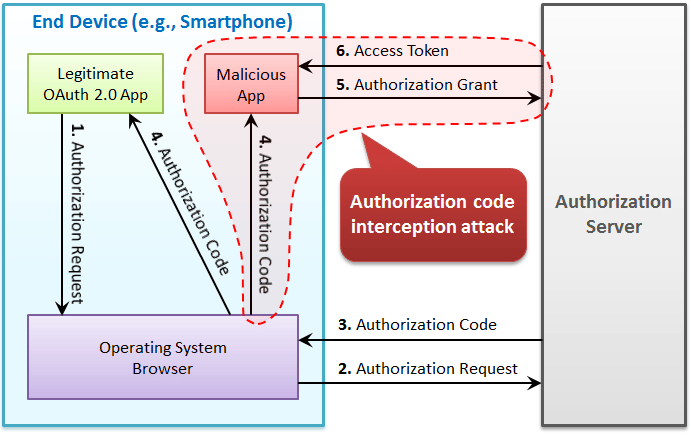 The specification was released on September, 2015. It has added:
1. `code_challenge` parameter and `code_challenge_method` parameter to authorization requests using the authorization code flow, and
2. `code_verifier` parameter to token requests that correspond to the authorization requests.
This mechanism enables an authorization server to reject a token request from a malicious application that does not have a code verifier.
# 2. PKCE Authorization Request
## 2.1 Request Parameters
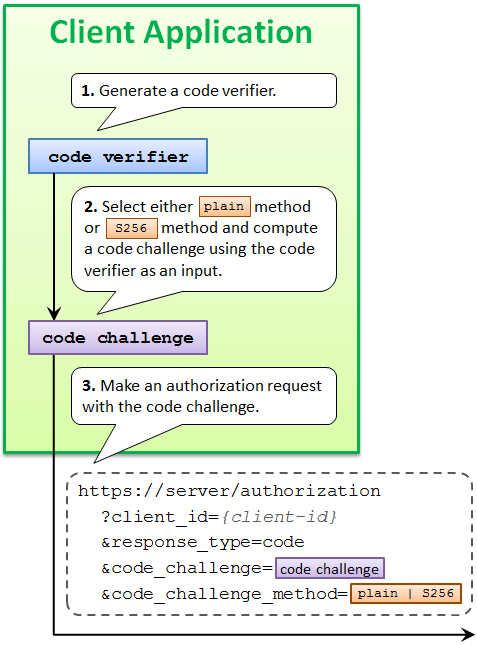
An authorization request that uses PKCE goes out with `code_challenge` parameter and optionally with `code_challenge_method` parameter.
## 2.2 Code Challenge Value
The value of code\_challenge parameter is computed by applying a code challenge method (= computation logic) to a code verifier.
## 2.3 Code Verifier Value
A code verifier itself is a random string using characters of `[A-Z] / [a-z] / [0-9] / "-" / "." / "_" / "~"`, with a minimum length of 43 characters and a maximum length of 128 characters.
The specification was released on September, 2015. It has added:
1. `code_challenge` parameter and `code_challenge_method` parameter to authorization requests using the authorization code flow, and
2. `code_verifier` parameter to token requests that correspond to the authorization requests.
This mechanism enables an authorization server to reject a token request from a malicious application that does not have a code verifier.
# 2. PKCE Authorization Request
## 2.1 Request Parameters
An authorization request that uses PKCE goes out with `code_challenge` parameter and optionally with `code_challenge_method` parameter.
## 2.2 Code Challenge Value
The value of code\_challenge parameter is computed by applying a code challenge method (= computation logic) to a code verifier.
## 2.3 Code Verifier Value
A code verifier itself is a random string using characters of `[A-Z] / [a-z] / [0-9] / "-" / "." / "_" / "~"`, with a minimum length of 43 characters and a maximum length of 128 characters.
 ## 2.4 Code Challenge Method
The defined code challenge methods are `plain` and `S256`. Respective computation logics to convert a code verifier into a code challenge are as follows.
| Method | Logic |
| ------- | ----------------------------------------------------------------- |
| `plain` | code\_challenge = code\_verifier |
| `S256` | code\_challenge = BASE64URL-ENCODE(SHA256(ASCII(code\_verifier))) |
The `plain` method does not change the input, so the value of `code_verifier` and the resultant value of `code_challenge` are equal.
The `S256` method computes the SHA-256 hash of the input and then encodes the hash value using Base64-URL. For example, when the value of `code_verifier` is dBjftJeZ4CVP-mB92K27uhbUJU1p1r\_wW1gFWFOEjXk, the value of `code_challenge` becomes E9Melhoa2OwvFrEMTJguCHaoeK1t8URWbuGJSstw-cM.
When the used code challenge method is `S256`, a client application must tell it by including `code_challenge_method=S256` parameter in an authorization request. When `code_challenge_method` parameter is omitted, an authorization server assumes `plain` as the default value.
# 3. PKCE Authorization Response
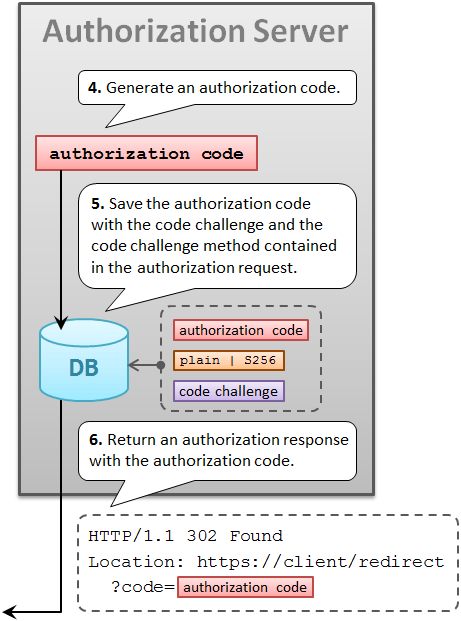
After generating an authorization code, an authorization server saves it into its DB with the code challenge and the code challenge method contained in the authorization request.
The authorization server will use the saved code challenge and the code challenge method later to verify a token request from the client application.
A response from the authorization endpoint has nothing special for PKCE. It's a normal response as usual.
## 2.4 Code Challenge Method
The defined code challenge methods are `plain` and `S256`. Respective computation logics to convert a code verifier into a code challenge are as follows.
| Method | Logic |
| ------- | ----------------------------------------------------------------- |
| `plain` | code\_challenge = code\_verifier |
| `S256` | code\_challenge = BASE64URL-ENCODE(SHA256(ASCII(code\_verifier))) |
The `plain` method does not change the input, so the value of `code_verifier` and the resultant value of `code_challenge` are equal.
The `S256` method computes the SHA-256 hash of the input and then encodes the hash value using Base64-URL. For example, when the value of `code_verifier` is dBjftJeZ4CVP-mB92K27uhbUJU1p1r\_wW1gFWFOEjXk, the value of `code_challenge` becomes E9Melhoa2OwvFrEMTJguCHaoeK1t8URWbuGJSstw-cM.
When the used code challenge method is `S256`, a client application must tell it by including `code_challenge_method=S256` parameter in an authorization request. When `code_challenge_method` parameter is omitted, an authorization server assumes `plain` as the default value.
# 3. PKCE Authorization Response
After generating an authorization code, an authorization server saves it into its DB with the code challenge and the code challenge method contained in the authorization request.
The authorization server will use the saved code challenge and the code challenge method later to verify a token request from the client application.
A response from the authorization endpoint has nothing special for PKCE. It's a normal response as usual.
 # 4. PCKE Token Request
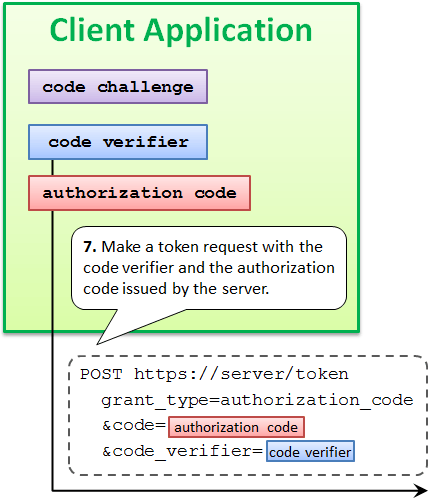
After receiving an authorization code from an authorization server, a client application makes a token request. In addition to the authorization code, the token request must include the code verifier used to compute the code challenge.
The name of the request parameter to specify a code verifier is `code_verifier`.
# 4. PCKE Token Request
After receiving an authorization code from an authorization server, a client application makes a token request. In addition to the authorization code, the token request must include the code verifier used to compute the code challenge.
The name of the request parameter to specify a code verifier is `code_verifier`.
 # 5. PKCE Token Response
## 5.1 Require Code Verifier
A token endpoint of an authorization server that supports PKCE checks whether a token request contains a valid code verifier.
Of course, this check is performed only when grant\_type is authorization\_code and the authorization code contained in the token request is associated with a code challenge.
If a token request does not contain a valid code verifier although the conditions above meet, the request is regarded as from a malicious application and the authorization server returns an error response.
## 5.2 Verify Code Verifier
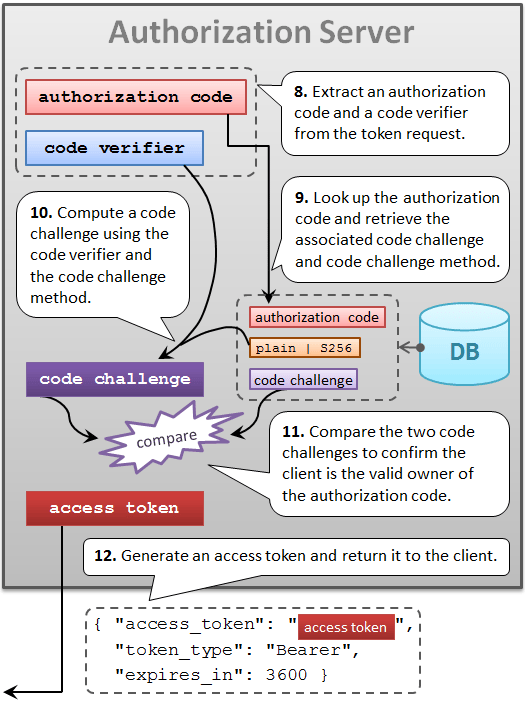
Verification is performed by comparing two code challenges.
One is what was contained in the *authorization* request and is stored in the DB. The other is what an authorization server computes using the code verifier contained in the *token* request and the code challenge method stored in the DB.
If the two code challenges are equal, the token request can be regarded as from the legitimate client application that has made the original authorization request. Otherwise, the token request must be regarded from a malicious application.
## 5.3 Issue Access Token
If a token request is verified, an authorization server issues an access token as usual.
# 5. PKCE Token Response
## 5.1 Require Code Verifier
A token endpoint of an authorization server that supports PKCE checks whether a token request contains a valid code verifier.
Of course, this check is performed only when grant\_type is authorization\_code and the authorization code contained in the token request is associated with a code challenge.
If a token request does not contain a valid code verifier although the conditions above meet, the request is regarded as from a malicious application and the authorization server returns an error response.
## 5.2 Verify Code Verifier
Verification is performed by comparing two code challenges.
One is what was contained in the *authorization* request and is stored in the DB. The other is what an authorization server computes using the code verifier contained in the *token* request and the code challenge method stored in the DB.
If the two code challenges are equal, the token request can be regarded as from the legitimate client application that has made the original authorization request. Otherwise, the token request must be regarded from a malicious application.
## 5.3 Issue Access Token
If a token request is verified, an authorization server issues an access token as usual.
 # 6. Try PKCE
## 6.1 Preparation
### 6.1.1 Sign up
If you don't have your Authlete account yet, please [sign up](https://so.authlete.com/accounts/signup) for free. It will finish in a minute.
### 6.1.2 Serve API Key and Client ID
A **service API** key and a **client ID** are needed to make an authorization request.
If you have not deleted the first authorization server and the first client application that were created automatially on account registration, you already have a service API key and a client ID.
The service API key of the first authorization server is written in the email you received after account registration. Also, you can find it in [Service Owner Console](https://www.authlete.com/developers/so_console/).
The client ID of the first client application is written in the email, too. Also, you can find it in [Developer Console](https://www.authlete.com/developers/cd_console/).
### 6.1.3 Service and Client Setting
If you have changed settings of your authorization server (= *Service* in [Service Owner Console](https://www.authlete.com/developers/so_console/)) and the client application (= *App* in [Developer Console](https://www.authlete.com/developers/cd_console/)) from the default values, adjust some setting items as described in the tables below.
Table. Settings of Service in Service Owner Console
| Tab | Parameter | Value |
| ------------- | ------------------------------------------------ | ---------------------------- |
| Authorization | Supported Grant Types | Include `AUTHORIZATION_CODE` |
| Authorization | Supported Response Types | Include `CODE` |
| Authorization | Authorization Endpoint / Direct Endpoint Enabled | Select `YES` |
| Authorization | Token Endpoint / Direct Endpoint Enabled | Select `YES` |
Table. Settings of Client in Client Developer Console
| Tab | Parameter | Value |
| ------------- | -------------- | ------------------------------------------------------------------------------------------------------------------------------ |
| Basic | Client Type | Select `PUBLIC` |
| Authorization | Grant Types | Include `AUTHORIZATION_CODE` |
| Authorization | Response Types | Include `CODE` |
| Authorization | Redirect URIs | [https://api.authlete.com/api/mock/redirection/service-api-key](https://api.authlete.com/api/mock/redirection/service-api-key) |
## 6.2. Authorization Request
### 6.2.1. Access Authorization Endpoint
Access the URL below with your web browser. Don't forget to replace *service-api-key* and *client-id* with your service API key and client ID.
```
https://api.authlete.com/api/auth/authorization/direct/service-api-key
?client_id=client-id
&response_type=code
&code_challenge=E9Melhoa2OwvFrEMTJguCHaoeK1t8URWbuGJSstw-cM
&code_challenge_method=S256
```
Note that the URL contains `code_challenge` parameter and `code_challenge_method` parameter. They are the very parameters you want to try.
### 6.2.2 Authorization Request
At the authorization endpoint, an authorization page is displayed. You can find a login form in the page. Input the API key and the API secret of the service to the login form, and then click the Authorize button.
# 6. Try PKCE
## 6.1 Preparation
### 6.1.1 Sign up
If you don't have your Authlete account yet, please [sign up](https://so.authlete.com/accounts/signup) for free. It will finish in a minute.
### 6.1.2 Serve API Key and Client ID
A **service API** key and a **client ID** are needed to make an authorization request.
If you have not deleted the first authorization server and the first client application that were created automatially on account registration, you already have a service API key and a client ID.
The service API key of the first authorization server is written in the email you received after account registration. Also, you can find it in [Service Owner Console](https://www.authlete.com/developers/so_console/).
The client ID of the first client application is written in the email, too. Also, you can find it in [Developer Console](https://www.authlete.com/developers/cd_console/).
### 6.1.3 Service and Client Setting
If you have changed settings of your authorization server (= *Service* in [Service Owner Console](https://www.authlete.com/developers/so_console/)) and the client application (= *App* in [Developer Console](https://www.authlete.com/developers/cd_console/)) from the default values, adjust some setting items as described in the tables below.
Table. Settings of Service in Service Owner Console
| Tab | Parameter | Value |
| ------------- | ------------------------------------------------ | ---------------------------- |
| Authorization | Supported Grant Types | Include `AUTHORIZATION_CODE` |
| Authorization | Supported Response Types | Include `CODE` |
| Authorization | Authorization Endpoint / Direct Endpoint Enabled | Select `YES` |
| Authorization | Token Endpoint / Direct Endpoint Enabled | Select `YES` |
Table. Settings of Client in Client Developer Console
| Tab | Parameter | Value |
| ------------- | -------------- | ------------------------------------------------------------------------------------------------------------------------------ |
| Basic | Client Type | Select `PUBLIC` |
| Authorization | Grant Types | Include `AUTHORIZATION_CODE` |
| Authorization | Response Types | Include `CODE` |
| Authorization | Redirect URIs | [https://api.authlete.com/api/mock/redirection/service-api-key](https://api.authlete.com/api/mock/redirection/service-api-key) |
## 6.2. Authorization Request
### 6.2.1. Access Authorization Endpoint
Access the URL below with your web browser. Don't forget to replace *service-api-key* and *client-id* with your service API key and client ID.
```
https://api.authlete.com/api/auth/authorization/direct/service-api-key
?client_id=client-id
&response_type=code
&code_challenge=E9Melhoa2OwvFrEMTJguCHaoeK1t8URWbuGJSstw-cM
&code_challenge_method=S256
```
Note that the URL contains `code_challenge` parameter and `code_challenge_method` parameter. They are the very parameters you want to try.
### 6.2.2 Authorization Request
At the authorization endpoint, an authorization page is displayed. You can find a login form in the page. Input the API key and the API secret of the service to the login form, and then click the Authorize button.
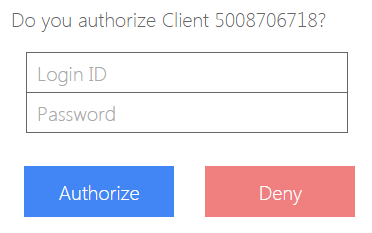 As for the reason you can use the API credentials of the service as if they were an end-user's login ID and password, read Technical Note in "[3.2. Input Credentials](https://www.authlete.com/developers/getting_started/#2-2-input-credentials)" in "[Getting Started](https://www.authlete.com/developers/getting_started/)".
### 6.2.3 Authorization Response
A response from an authorization endpoint is returned to a redirection endpoint which a client application has registered in advance. Since the configuration of the redirect URIs of the client application contains one redirect URI, `https://api.authlete.com/api/mock/redirection/service-api-key`, the response from the authorization endpoint is passed to the redirection endpoint and processed there.
The implementation of the redirection endpoint is provided just to help developers. The implementation displays parameter values it receives. For example, if an authorization response contains an authorization code, the redirection endpoint displays its value as shown below.
As for the reason you can use the API credentials of the service as if they were an end-user's login ID and password, read Technical Note in "[3.2. Input Credentials](https://www.authlete.com/developers/getting_started/#2-2-input-credentials)" in "[Getting Started](https://www.authlete.com/developers/getting_started/)".
### 6.2.3 Authorization Response
A response from an authorization endpoint is returned to a redirection endpoint which a client application has registered in advance. Since the configuration of the redirect URIs of the client application contains one redirect URI, `https://api.authlete.com/api/mock/redirection/service-api-key`, the response from the authorization endpoint is passed to the redirection endpoint and processed there.
The implementation of the redirection endpoint is provided just to help developers. The implementation displays parameter values it receives. For example, if an authorization response contains an authorization code, the redirection endpoint displays its value as shown below.
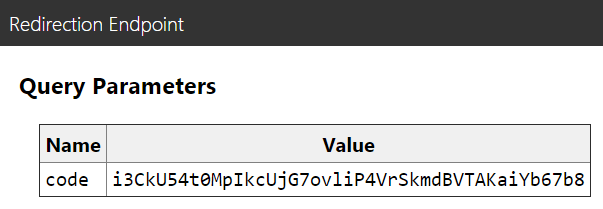 In addition, when appropriate, it deserializes a serialized ID token and shows a form to send a token request. You'll use the form in the next section.
## 6.3 Token Request
### 6.3.1 Token Request Form
As mentioned in the previous section, when an authorization response contains an authorization code, the redirection endpoint displays a form to send a token request with the authorization code.
The form has an input field for a code verifier. Input `dBjftJeZ4CVP-mB92K27uhbUJU1p1r_wW1gFWFOEjXk` there, and the form will finally look like below.
In addition, when appropriate, it deserializes a serialized ID token and shows a form to send a token request. You'll use the form in the next section.
## 6.3 Token Request
### 6.3.1 Token Request Form
As mentioned in the previous section, when an authorization response contains an authorization code, the redirection endpoint displays a form to send a token request with the authorization code.
The form has an input field for a code verifier. Input `dBjftJeZ4CVP-mB92K27uhbUJU1p1r_wW1gFWFOEjXk` there, and the form will finally look like below.
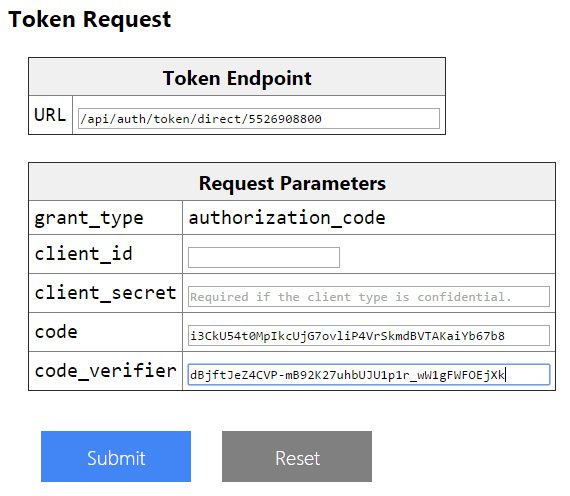 Click the Submit button to make a token request with the code verifier. Note that an authorization code will expire in 10 minutes, so don't spend longer time than 10 minutes after the redirection page is displayed.
### 6.3.2. Token Response
If the authorization code and the code verifier you entered in the form were valid, an access token is returned in the form of JSON like the following.
```
{
"access_token": "KPLXrl_wJSHqU708R9kp3bNRGi0LgKUdh0kh-CQhx9g",
"refresh_token": "YLRJXfratV4yq0_65seCT0bF6YxxgU5jKBUvhOZPrb4",
"scope": null,
"token_type": "Bearer",
"expires_in": 86400
}
```
Congratulations! You have succeeded in getting an access token using the authorization code flow secured by PKCE.
## 6.4. PKCE Configuration
Authlete provides a configuration item for PKCE. Login [Service Owner Console](https://so.authlete.com/), select a service and click the Authorization tab, and you will be able to find a boolean configuration item labeled "Proof Key for Code Exchange (RFC 7636)".
Click the Submit button to make a token request with the code verifier. Note that an authorization code will expire in 10 minutes, so don't spend longer time than 10 minutes after the redirection page is displayed.
### 6.3.2. Token Response
If the authorization code and the code verifier you entered in the form were valid, an access token is returned in the form of JSON like the following.
```
{
"access_token": "KPLXrl_wJSHqU708R9kp3bNRGi0LgKUdh0kh-CQhx9g",
"refresh_token": "YLRJXfratV4yq0_65seCT0bF6YxxgU5jKBUvhOZPrb4",
"scope": null,
"token_type": "Bearer",
"expires_in": 86400
}
```
Congratulations! You have succeeded in getting an access token using the authorization code flow secured by PKCE.
## 6.4. PKCE Configuration
Authlete provides a configuration item for PKCE. Login [Service Owner Console](https://so.authlete.com/), select a service and click the Authorization tab, and you will be able to find a boolean configuration item labeled "Proof Key for Code Exchange (RFC 7636)".
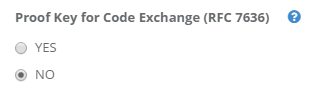 If `YES` is selected, `code_challenge` request parameter is always required for authorization requests using authorization code flow. The default value is `NO`.
Select `YES` for better security. It makes the authorization server reject any authorization request using the authorization code flow that is not accompanied with `code_challenge` request parameter.
If `YES` is selected, `code_challenge` request parameter is always required for authorization requests using authorization code flow. The default value is `NO`.
Select `YES` for better security. It makes the authorization server reject any authorization request using the authorization code flow that is not accompanied with `code_challenge` request parameter.