> ## Documentation Index
> Fetch the complete documentation index at: https://developers.authlete.com/llms.txt
> Use this file to discover all available pages before exploring further.
# RFC 9470 OAuth 2.0 Step Up Authentication Challenge Protocol
> Explanation about RFC 9470 OAuth 2.0 Step Up Authentication Challenge Protocol and how Authlete supports the specification.
This page is for **Authlete 2.x**. For current (3.0) documentation, see [this page](/protocols-and-flows/advanced-flows/oauth-2-0-step-up-authentication-challenge-protocol-rfc-9470).
# Overview
**[RFC 9470: OAuth 2.0 Step Up Authentication Challenge Protocol](https://www.rfc-editor.org/rfc/rfc9470.html)** *"introduces a mechanism for a resource server to signal to a client that the authentication event associated with the access token of the current request doesn't meet its authentication requirements and specify how to meet them."* (excerpt from "Abstract")
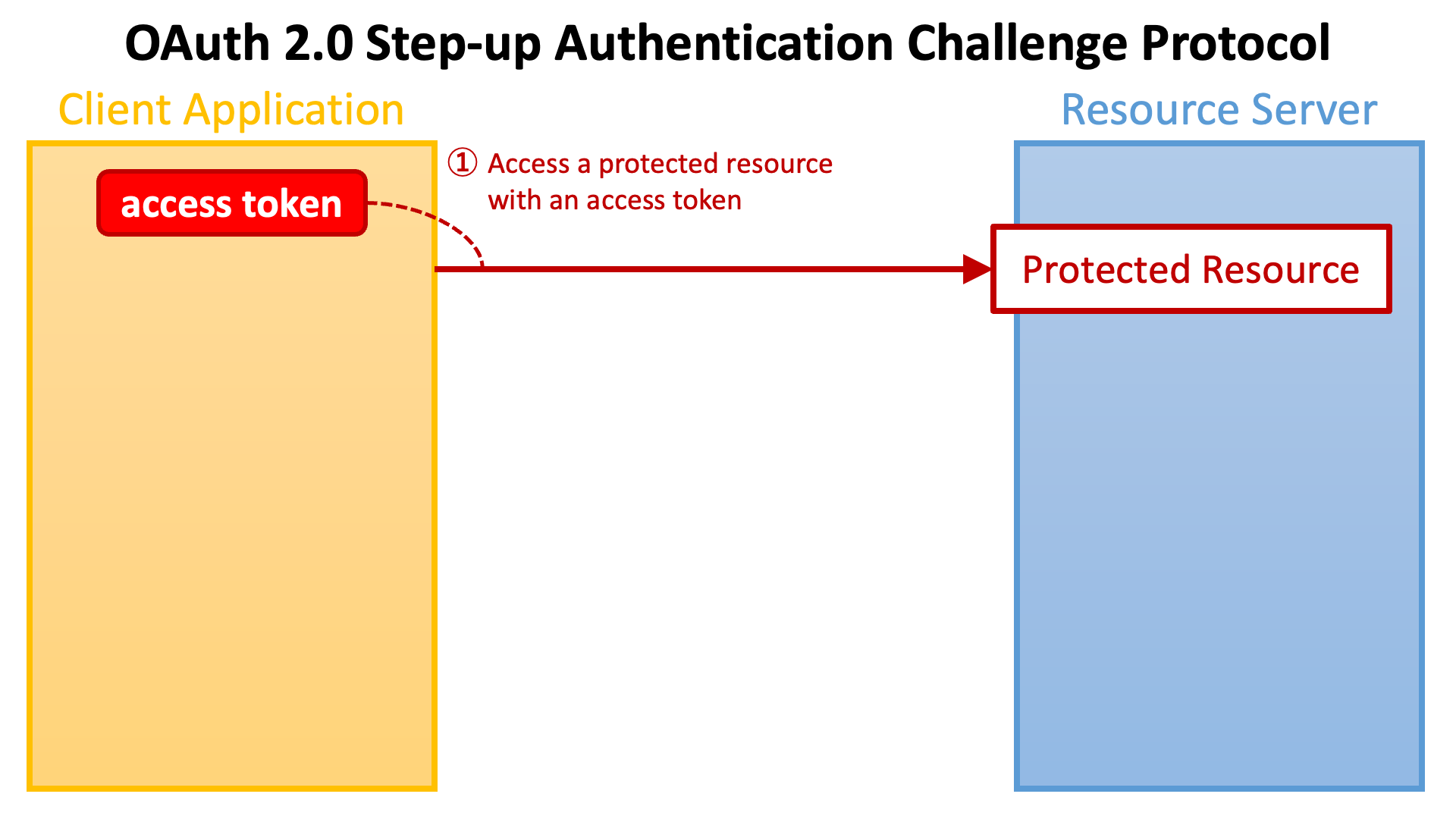
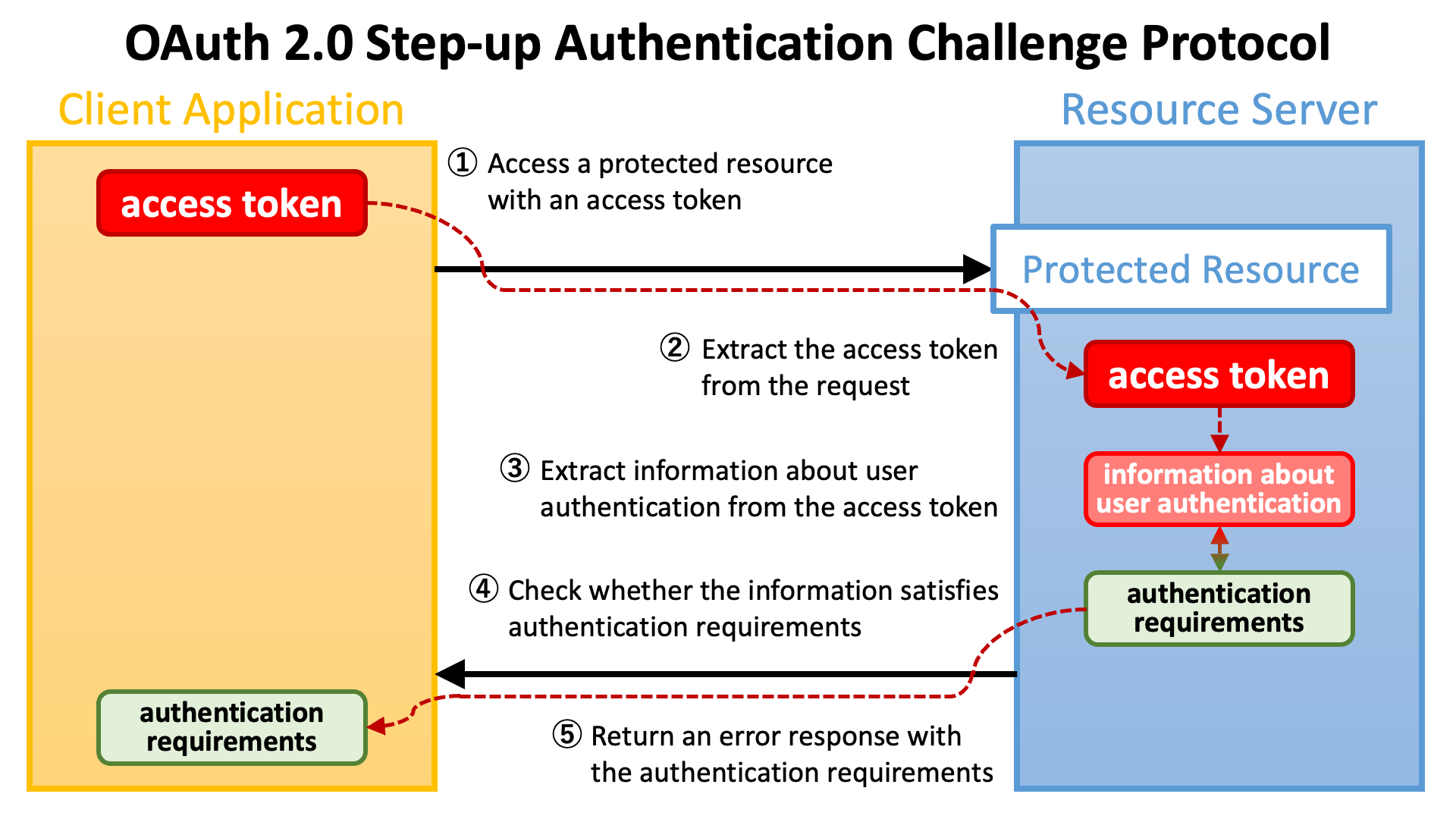
As the first step, a **client application** (a.k.a. **relying party**) accesses a **protected resource** endpoint with an **access token**.
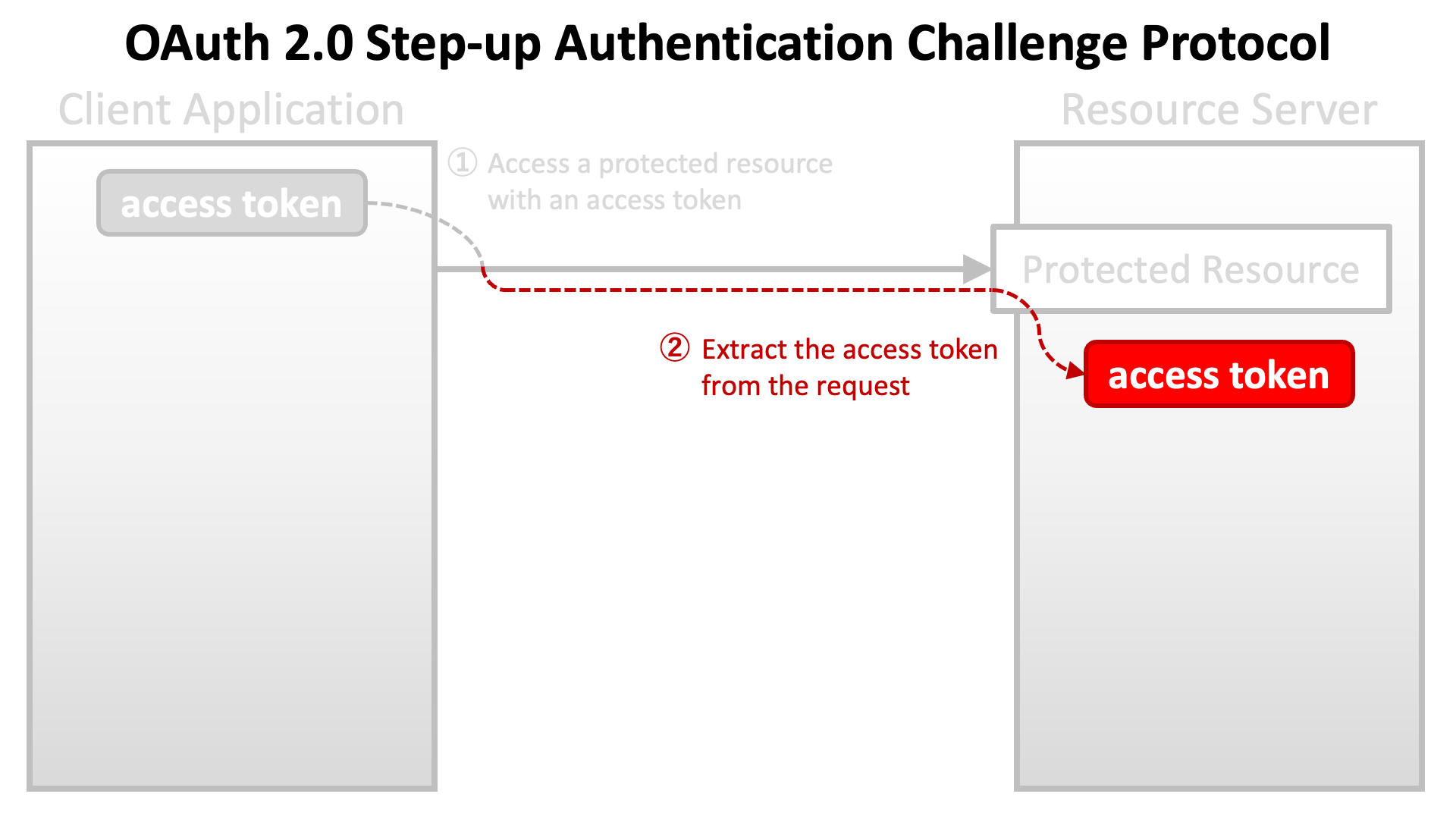
 The implementation of the endpoint extracts the access token from the request.
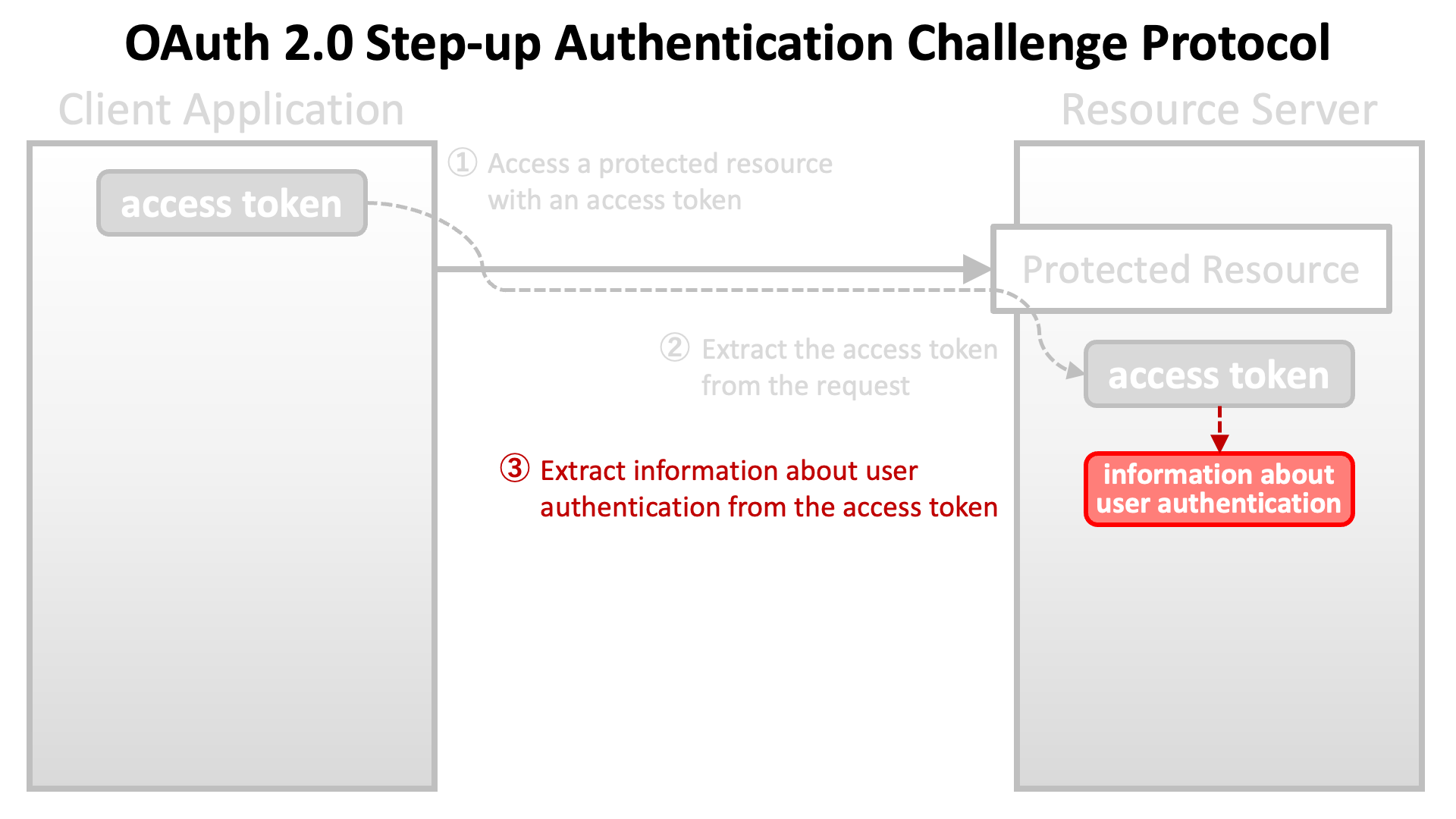
 Next, the implementation of the endpoint extracts information about **user authentication** (which the **authorization server** performed during the course of issuing the access token) from the access token.
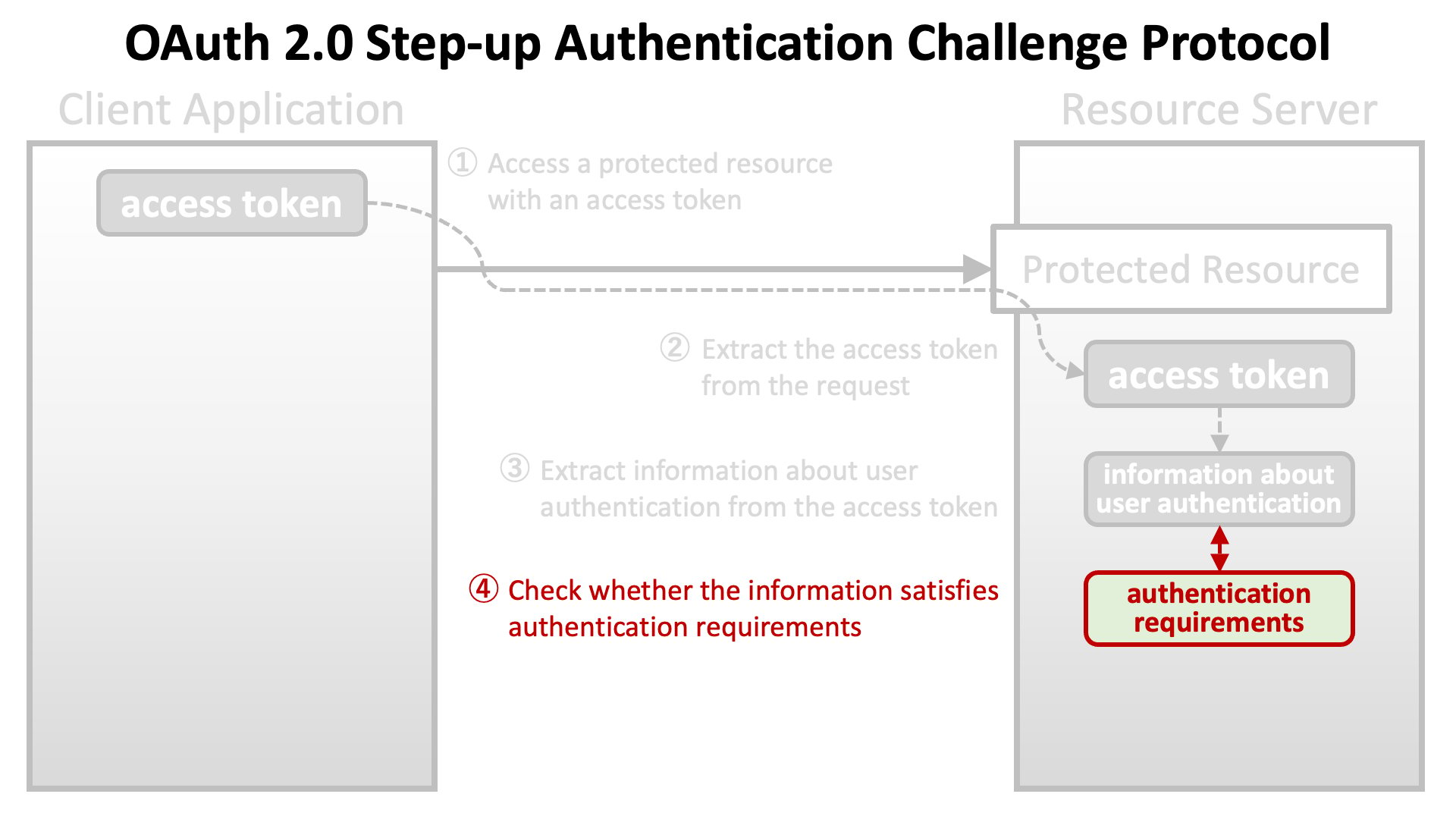
 Then, the implementation of the endpoint checks whether the information about user authentication satisfies **authentication requirements** that the endpoint imposes.
 If the requirements are not satisfied, the implementation of the endpoint returns an error response to the client application with information about the authentication requirements.
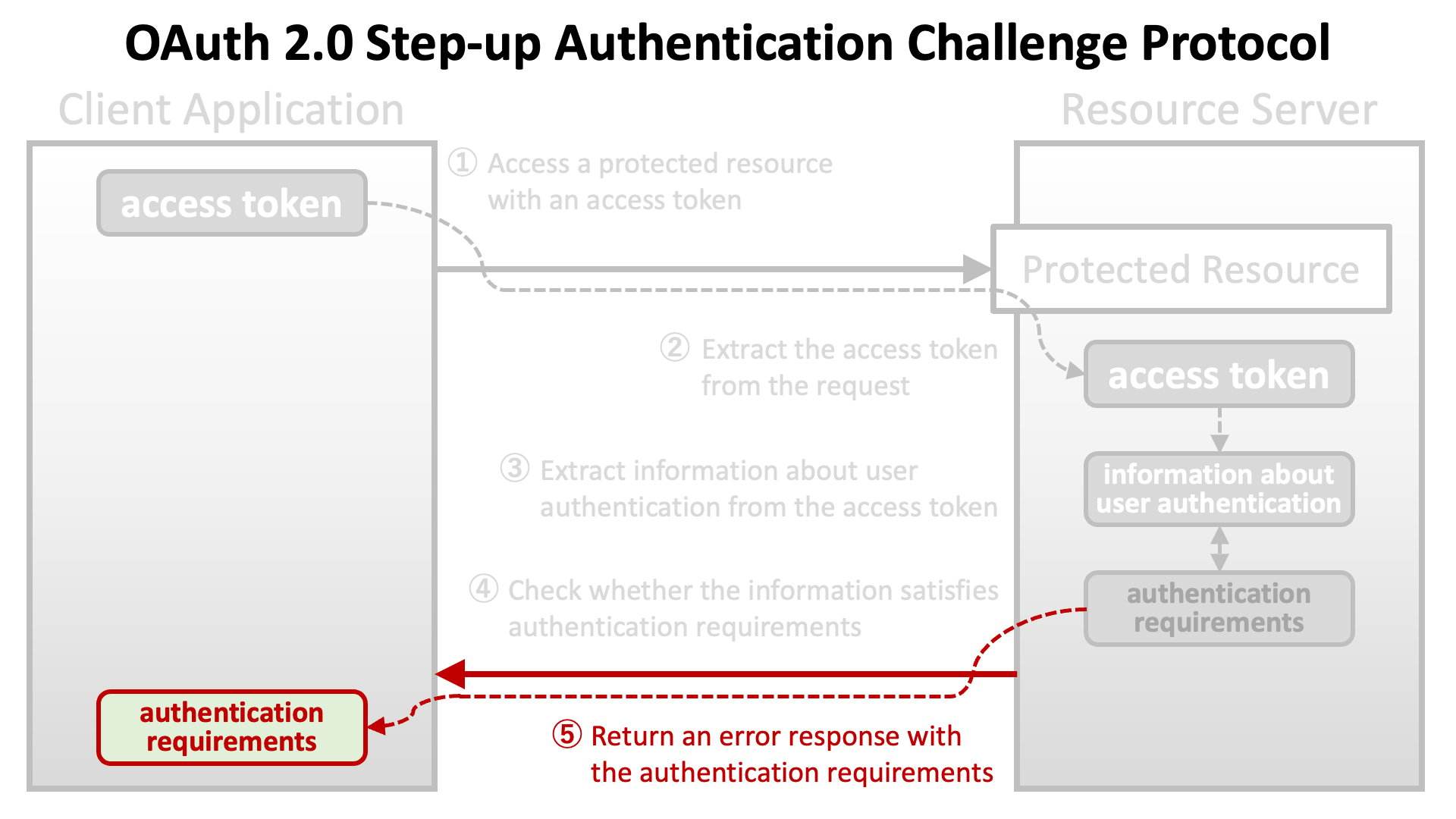 The diagram below illustrates the flow from making a request with an access token to returning an error response with authentication requirements.
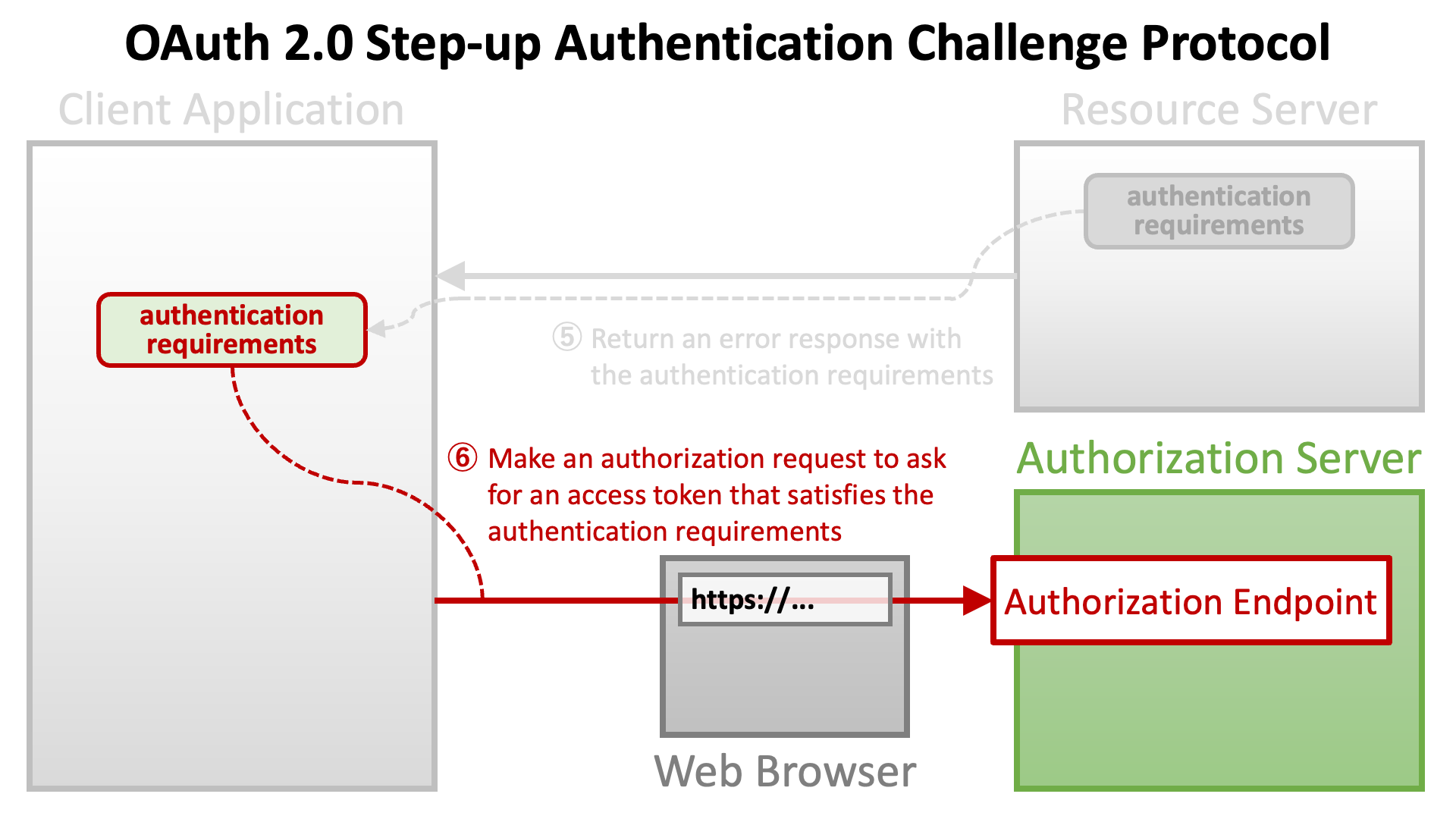
 After receiving an error response with authentication requirements, the client application will make an **authorization request** again. This time, the client application needs to ask the authorization server to issue an access token that satisfies the authentication requirements.
 # Authentication Requirements
The OAuth 2.0 Step Up Authentication Challenge Protocol specification presumes two types of authentication requirements.
One is **authentication context class reference** (a.k.a. **ACR**) of user authentication. The other is **maximum authentication age** (a.k.a. **max age**) of user authentication.
## Authentication Context Class Reference (ACR)
User authentication is performed somewhere during an authorization flow. OAuth 2.0 and OpenID Connect do not define details about how to authenticate users, but client applications can specify criteria of user authentication by including a list of ACRs in an authorization request.
The authorization server tries to perform user authentication that satisfies at least one of the specified ACRs. However, no error is reported even if the authorization server cannot perform such user authentication unless the `acr` claim is requested as "essential" (described later).
### The `acr_values` Request Parameter
There are three ways to specify a list of ACRs. The first way is to use the `acr_values` request parameter. The parameter is defined in [Section 3.1.2.1](https://openid.net/specs/openid-connect-core-1_0.html#AuthRequest) of [OpenID Connect Core 1.0](https://openid.net/specs/openid-connect-core-1_0.html) as follows.
* `acr_values`: OPTIONAL. Requested Authentication Context Class Reference values. Space-separated string that specifies the `acr` values that the Authorization Server is being requested to use for processing this Authentication Request, with the values appearing in order of preference. The Authentication Context Class satisfied by the authentication performed is returned as the `acr` Claim Value, as specified in Section 2. The `acr` Claim is requested as a Voluntary Claim by this parameter.
The value of the `acr_values` request parameter is a space-separated list of ACRs. It appears in an authorization request like the following.
```text theme={null}
https://as.example.com/authorize?acr_values=acr1+acr2+acr3&...
```
### The `claims` Request Parameter
The second way to specify a list of ACRs is to use the `claims` request parameter. The parameter is defined in [Section 5.5](https://openid.net/specs/openid-connect-core-1_0.html#ClaimsParameter) of [OpenID Connect Core 1.0](https://openid.net/specs/openid-connect-core-1_0.html). The parameter takes a JSON object as a value and the syntax of the JSON is complex.
The following JSON is an example value of the `claims` request parameter excerpted from OpenID Connect Core 1.0.
```json theme={null}
{
"userinfo":
{
"given_name": {"essential": true},
"nickname": null,
"email": {"essential": true},
"email_verified": {"essential": true},
"picture": null,
"http://example.info/claims/groups": null
},
"id_token":
{
"auth_time": {"essential": true},
"acr": {"values": ["urn:mace:incommon:iap:silver"] }
}
}
```
This example specifies a list of ACRs that has just one element, `urn:mace:incommon:iap:silver`. When an authorization request includes this JSON as the value of the `claims` request parameter, the authorization server tries to perform user authentication that satisfies criteria of `urn:mace:incommon:iap:silver`.
To make the authorization server return an error when none of the specified ACRs can be satisfied, the client application must request the `acr` as an **essential** claim. By adding `"essential":true` in the JSON object that follows a claim name, the client application can request the claim as essential. In the example below, the `auth_time` claim and the `acr` claim are requested as essential.
```json theme={null}
{
"id_token":
{
"auth_time": {
"essential": true
},
"acr": {
"values": ["urn:mace:incommon:iap:silver"],
"essential": true
}
}
}
```
The `acr_values` request parameter cannot request the `acr` claim as essential.
### The `default_acr_values` Client Metadata
The last way is to use the `default_acr_values` client metadata. The metadata is defined in [Section 2](https://openid.net/specs/openid-connect-registration-1_0.html#ClientMetadata) of [OpenID Connect Dynamic Client Registration 1.0](https://openid.net/specs/openid-connect-registration-1_0.html) as follows.
* `default_acr_values`: OPTIONAL. Default requested Authentication Context Class Reference values. Array of strings that specifies the default `acr` values that the OP is being requested to use for processing requests from this Client, with the values appearing in order of preference. The Authentication Context Class satisfied by the authentication performed is returned as the `acr` Claim Value in the issued ID Token. The `acr` Claim is requested as a Voluntary Claim by this parameter. The `acr_values_supported` discovery element contains a list of the supported `acr` values supported by this server. Values specified in the `acr_values` request parameter or an individual `acr` Claim request override these default values.
When an authorization request does not specify a list of ACRs explicitly, the value of the `default_acr_values` is, if set, used as a list of ACRs.
The `default_acr_values` client metadata cannot request the `acr` claim as essential.
### Unmet Authentication Requirements
If the `acr` claim is requested as an essential claim, the authorization server returns an error response when none of specified ACRs can be satisfied. If the authorization server supports "[OpenID Connect Core Error Code unmet\_authentication\_requirements](https://openid.net/specs/openid-connect-unmet-authentication-requirements-1_0.html)", `unmet_authentication_requirements` is used as the value of the `error` response parameter.
# Authentication Requirements
The OAuth 2.0 Step Up Authentication Challenge Protocol specification presumes two types of authentication requirements.
One is **authentication context class reference** (a.k.a. **ACR**) of user authentication. The other is **maximum authentication age** (a.k.a. **max age**) of user authentication.
## Authentication Context Class Reference (ACR)
User authentication is performed somewhere during an authorization flow. OAuth 2.0 and OpenID Connect do not define details about how to authenticate users, but client applications can specify criteria of user authentication by including a list of ACRs in an authorization request.
The authorization server tries to perform user authentication that satisfies at least one of the specified ACRs. However, no error is reported even if the authorization server cannot perform such user authentication unless the `acr` claim is requested as "essential" (described later).
### The `acr_values` Request Parameter
There are three ways to specify a list of ACRs. The first way is to use the `acr_values` request parameter. The parameter is defined in [Section 3.1.2.1](https://openid.net/specs/openid-connect-core-1_0.html#AuthRequest) of [OpenID Connect Core 1.0](https://openid.net/specs/openid-connect-core-1_0.html) as follows.
* `acr_values`: OPTIONAL. Requested Authentication Context Class Reference values. Space-separated string that specifies the `acr` values that the Authorization Server is being requested to use for processing this Authentication Request, with the values appearing in order of preference. The Authentication Context Class satisfied by the authentication performed is returned as the `acr` Claim Value, as specified in Section 2. The `acr` Claim is requested as a Voluntary Claim by this parameter.
The value of the `acr_values` request parameter is a space-separated list of ACRs. It appears in an authorization request like the following.
```text theme={null}
https://as.example.com/authorize?acr_values=acr1+acr2+acr3&...
```
### The `claims` Request Parameter
The second way to specify a list of ACRs is to use the `claims` request parameter. The parameter is defined in [Section 5.5](https://openid.net/specs/openid-connect-core-1_0.html#ClaimsParameter) of [OpenID Connect Core 1.0](https://openid.net/specs/openid-connect-core-1_0.html). The parameter takes a JSON object as a value and the syntax of the JSON is complex.
The following JSON is an example value of the `claims` request parameter excerpted from OpenID Connect Core 1.0.
```json theme={null}
{
"userinfo":
{
"given_name": {"essential": true},
"nickname": null,
"email": {"essential": true},
"email_verified": {"essential": true},
"picture": null,
"http://example.info/claims/groups": null
},
"id_token":
{
"auth_time": {"essential": true},
"acr": {"values": ["urn:mace:incommon:iap:silver"] }
}
}
```
This example specifies a list of ACRs that has just one element, `urn:mace:incommon:iap:silver`. When an authorization request includes this JSON as the value of the `claims` request parameter, the authorization server tries to perform user authentication that satisfies criteria of `urn:mace:incommon:iap:silver`.
To make the authorization server return an error when none of the specified ACRs can be satisfied, the client application must request the `acr` as an **essential** claim. By adding `"essential":true` in the JSON object that follows a claim name, the client application can request the claim as essential. In the example below, the `auth_time` claim and the `acr` claim are requested as essential.
```json theme={null}
{
"id_token":
{
"auth_time": {
"essential": true
},
"acr": {
"values": ["urn:mace:incommon:iap:silver"],
"essential": true
}
}
}
```
The `acr_values` request parameter cannot request the `acr` claim as essential.
### The `default_acr_values` Client Metadata
The last way is to use the `default_acr_values` client metadata. The metadata is defined in [Section 2](https://openid.net/specs/openid-connect-registration-1_0.html#ClientMetadata) of [OpenID Connect Dynamic Client Registration 1.0](https://openid.net/specs/openid-connect-registration-1_0.html) as follows.
* `default_acr_values`: OPTIONAL. Default requested Authentication Context Class Reference values. Array of strings that specifies the default `acr` values that the OP is being requested to use for processing requests from this Client, with the values appearing in order of preference. The Authentication Context Class satisfied by the authentication performed is returned as the `acr` Claim Value in the issued ID Token. The `acr` Claim is requested as a Voluntary Claim by this parameter. The `acr_values_supported` discovery element contains a list of the supported `acr` values supported by this server. Values specified in the `acr_values` request parameter or an individual `acr` Claim request override these default values.
When an authorization request does not specify a list of ACRs explicitly, the value of the `default_acr_values` is, if set, used as a list of ACRs.
The `default_acr_values` client metadata cannot request the `acr` claim as essential.
### Unmet Authentication Requirements
If the `acr` claim is requested as an essential claim, the authorization server returns an error response when none of specified ACRs can be satisfied. If the authorization server supports "[OpenID Connect Core Error Code unmet\_authentication\_requirements](https://openid.net/specs/openid-connect-unmet-authentication-requirements-1_0.html)", `unmet_authentication_requirements` is used as the value of the `error` response parameter.
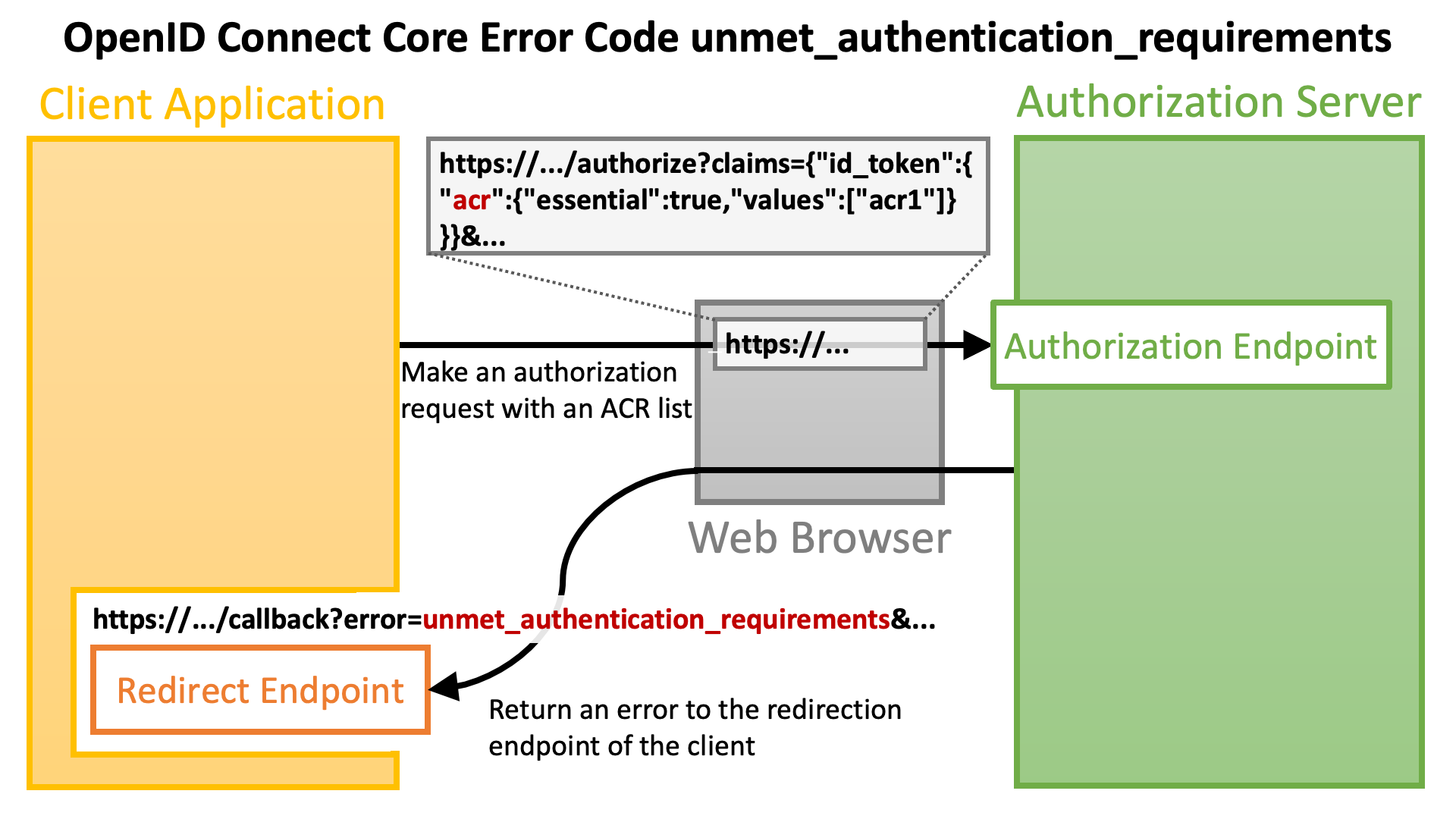 The following is the description about the error code in the specification.
* `unmet_authentication_requirements`: The Authorization Server is unable to meet the requirements of the Relying Party for the authentication of the End-User. This error code SHALL be used if the Relying Party wants the OP to conform to a certain Authentication Context Class Reference value using an essential claim `acr` claim as specified in Section 5.5.1.1. of OpenID Connect Core \[OpenID.Core] and the OP is unable to meet this requirement and MAY be used in other cases, if appropriate.
If the authorization server does not support the specification, it is up to the authorization server what error code is used.
### Unmet Authentication Requirements for Step Up Authentication
In the context of [OpenID Connect Core 1.0](https://openid.net/specs/openid-connect-core-1_0.html), no error is reported even if the authorization server cannot perform such user authentication unless the `acr` claim is requested as essential.
However, [OAuth 2.0 Step Up Authentication Challenge Protocol](https://www.rfc-editor.org/rfc/rfc9470.html) recommends that an ACR request by the `acr_values` request parameter (which requests the `acr` claim as a **voluntary** claim) be ***"treated as required"*** and the authorization server return the `unmet_authentication_requirements` error in case none of specified ACRs can be satisfied.
The recommendation slightly conflicts with the following paragraph excerpted from OpenID Connect Core 1.0.
> Note that even if the Claims are not available because the End-User did not authorize their release or they are not present, the Authorization Server **MUST NOT generate an error** when Claims are not returned, whether they are Essential or Voluntary, unless otherwise specified in the description of the specific claim.
However, in practice, the slight conflict won't be a big issue.
### Actual ACR Values
OpenID Connect Core 1.0 does not define actual ACR values. Therefore, to utilize ACR, it is necessary to define actual ACR values in a deployment-specific way. The following table shows examples of actual ACR values.
| Deployment | ACR Values |
| :------------------ | :------------------------------------------------------------ |
| UK Open Banking | `urn:openbanking:psd2:ca` / `urn:openbanking:psd2:sca` |
| AU CDR | `urn:cds:au:cdr:2` / `urn:cds:au:cdr:3` |
| Open Banking Brasil | `urn:brasil:openbanking:loa2` / `urn:brasil:openbanking:loa3` |
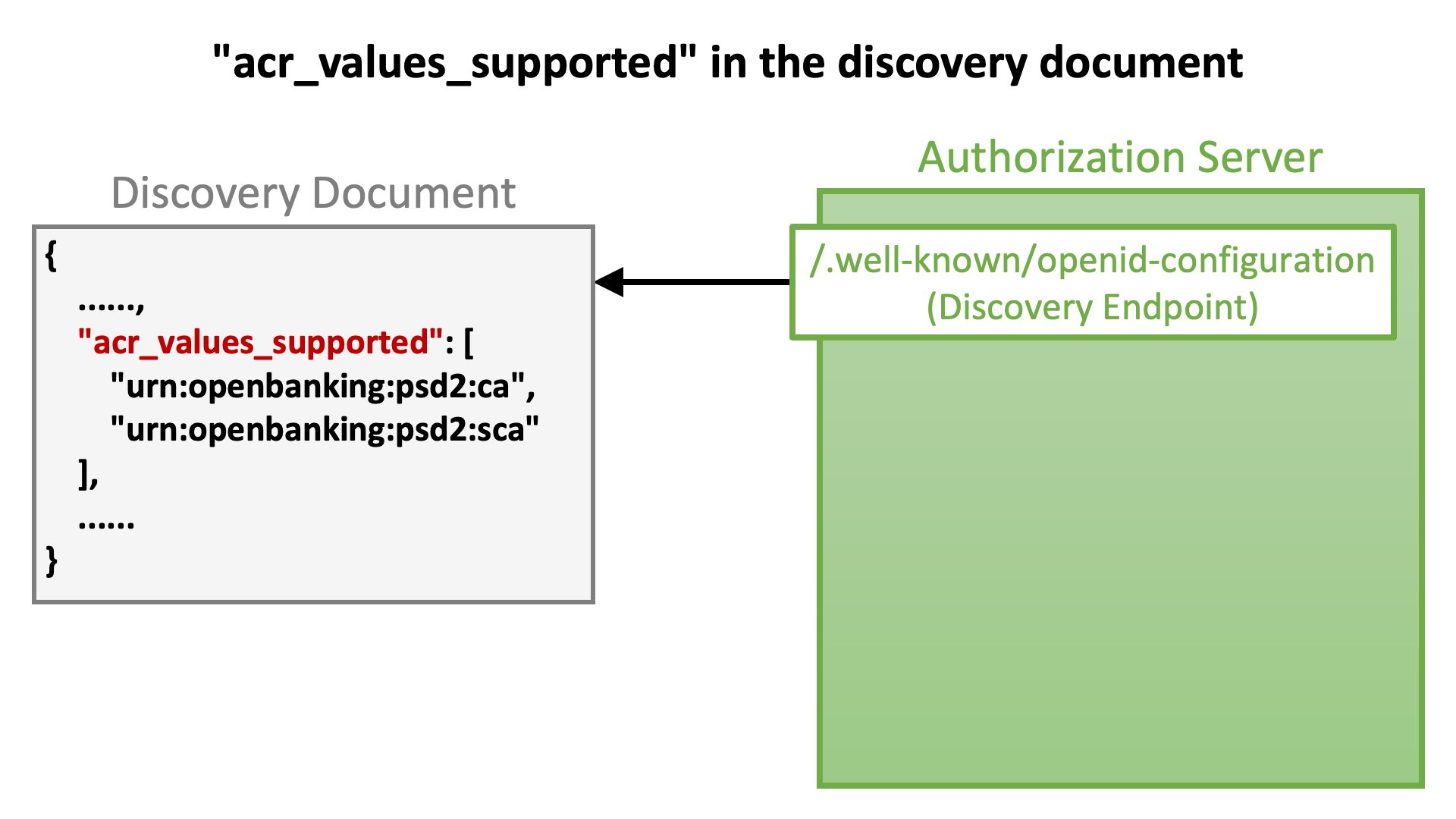
Authorization servers should advertise information about ACR values they support through their discovery documents. [OpenID Connect Discovery 1.0](https://openid.net/specs/openid-connect-discovery-1_0.html) defines the `acr_values_supported` server metadata for the purpose as follows.
* `acr_values_supported`: OPTIONAL. JSON array containing a list of the Authentication Context Class References that this OP supports.
The following is the description about the error code in the specification.
* `unmet_authentication_requirements`: The Authorization Server is unable to meet the requirements of the Relying Party for the authentication of the End-User. This error code SHALL be used if the Relying Party wants the OP to conform to a certain Authentication Context Class Reference value using an essential claim `acr` claim as specified in Section 5.5.1.1. of OpenID Connect Core \[OpenID.Core] and the OP is unable to meet this requirement and MAY be used in other cases, if appropriate.
If the authorization server does not support the specification, it is up to the authorization server what error code is used.
### Unmet Authentication Requirements for Step Up Authentication
In the context of [OpenID Connect Core 1.0](https://openid.net/specs/openid-connect-core-1_0.html), no error is reported even if the authorization server cannot perform such user authentication unless the `acr` claim is requested as essential.
However, [OAuth 2.0 Step Up Authentication Challenge Protocol](https://www.rfc-editor.org/rfc/rfc9470.html) recommends that an ACR request by the `acr_values` request parameter (which requests the `acr` claim as a **voluntary** claim) be ***"treated as required"*** and the authorization server return the `unmet_authentication_requirements` error in case none of specified ACRs can be satisfied.
The recommendation slightly conflicts with the following paragraph excerpted from OpenID Connect Core 1.0.
> Note that even if the Claims are not available because the End-User did not authorize their release or they are not present, the Authorization Server **MUST NOT generate an error** when Claims are not returned, whether they are Essential or Voluntary, unless otherwise specified in the description of the specific claim.
However, in practice, the slight conflict won't be a big issue.
### Actual ACR Values
OpenID Connect Core 1.0 does not define actual ACR values. Therefore, to utilize ACR, it is necessary to define actual ACR values in a deployment-specific way. The following table shows examples of actual ACR values.
| Deployment | ACR Values |
| :------------------ | :------------------------------------------------------------ |
| UK Open Banking | `urn:openbanking:psd2:ca` / `urn:openbanking:psd2:sca` |
| AU CDR | `urn:cds:au:cdr:2` / `urn:cds:au:cdr:3` |
| Open Banking Brasil | `urn:brasil:openbanking:loa2` / `urn:brasil:openbanking:loa3` |
Authorization servers should advertise information about ACR values they support through their discovery documents. [OpenID Connect Discovery 1.0](https://openid.net/specs/openid-connect-discovery-1_0.html) defines the `acr_values_supported` server metadata for the purpose as follows.
* `acr_values_supported`: OPTIONAL. JSON array containing a list of the Authentication Context Class References that this OP supports.
 ## Maximum Authentication Age (Max Age)
The previous section states *"User authentication is performed somewhere during an authorization flow."* at the beginning. However, in practice, the authorization server may skip the user authentication process if it detects that a user has already been authenticated (= if a user has already logged in). Therefore, the time at which an authorization request was made is not necessarily equal to the time of user authentication that was performed for the authorization request.
The amount of time that has elapsed since the last user authentication is called "**authentication age**". A client application may want to ask the authorization server to redo user authentication during an authorization flow in a case where the authentication age exceeds a particular threshold. The threshold is called "**maximum authentication age**".
### The `max_age` Request Parameter
[Section 3.1.2.1](https://openid.net/specs/openid-connect-core-1_0.html#AuthRequest) of [OpenID Connect Core 1.0](https://openid.net/specs/openid-connect-core-1_0.html) defines the request parameter `max_age` as follows in order to enable client applications to specify the maximum authentication age.
* `max_age`: OPTIONAL. Maximum Authentication Age. Specifies the allowable elapsed time in seconds since the last time the End-User was actively authenticated by the OP. If the elapsed time is greater than this value, the OP MUST attempt to actively re-authenticate the End-User. (The `max_age` request parameter corresponds to the OpenID 2.0 PAPE \[OpenID.PAPE] `max_auth_age` request parameter.) When `max_age` is used, the ID Token returned MUST include an `auth_time` Claim Value.
The value of the `max_age` is an integer that represents the maximum authentication age in seconds. It appears in an authorization request like the following.
```text theme={null}
https://as.example.com/authorize?max_age=600&...
```
### The `default_max_age` Client Metadata
If an authorization request does not contain the `max_age` request parameter but the `default_max_age` client metadata of the client is set, the value of the metadata is used as the maximum authentication age. The metadata is defined in [Section 2](https://openid.net/specs/openid-connect-registration-1_0.html#ClientMetadata) of [OpenID Connect Dynamic Client Registration 1.0](https://openid.net/specs/openid-connect-registration-1_0.html) as follows.
* `default_max_age`: OPTIONAL. Default Maximum Authentication Age. Specifies that the End-User MUST be actively authenticated if the End-User was authenticated longer ago than the specified number of seconds. The `max_age` request parameter overrides this default value. If omitted, no default Maximum Authentication Age is specified.
### The `prompt` Request Parameter
When a client application wants to ask the authorization server to perform user authentication unconditionally (regardless of whether the maximum authentication age has been reached or not) during an authorization flow, it can use the `prompt` request parameter with the `login` value included. Its use will look like the following.
```text theme={null}
https://as.example.com/authorize?prompt=login&...
```
See [Section 3.1.2.1](https://openid.net/specs/openid-connect-core-1_0.html#AuthRequest) of [OpenID Connect Core 1.0](https://openid.net/specs/openid-connect-core-1_0.html) for details about the `prompt` parameter.
# Authentication Requirements Challenge
Protected resource endpoints that utilize the OAuth 2.0 Step Up Authentication Challenge Protocol specification return an error response when the presented access token does not satisfy either or both of the authentication requirements (namely ACR and Max Age).
The diagram below illustrates the flow from returning an error response to making an authorization request asking for an access token that satisfies authentication requirements.
## Maximum Authentication Age (Max Age)
The previous section states *"User authentication is performed somewhere during an authorization flow."* at the beginning. However, in practice, the authorization server may skip the user authentication process if it detects that a user has already been authenticated (= if a user has already logged in). Therefore, the time at which an authorization request was made is not necessarily equal to the time of user authentication that was performed for the authorization request.
The amount of time that has elapsed since the last user authentication is called "**authentication age**". A client application may want to ask the authorization server to redo user authentication during an authorization flow in a case where the authentication age exceeds a particular threshold. The threshold is called "**maximum authentication age**".
### The `max_age` Request Parameter
[Section 3.1.2.1](https://openid.net/specs/openid-connect-core-1_0.html#AuthRequest) of [OpenID Connect Core 1.0](https://openid.net/specs/openid-connect-core-1_0.html) defines the request parameter `max_age` as follows in order to enable client applications to specify the maximum authentication age.
* `max_age`: OPTIONAL. Maximum Authentication Age. Specifies the allowable elapsed time in seconds since the last time the End-User was actively authenticated by the OP. If the elapsed time is greater than this value, the OP MUST attempt to actively re-authenticate the End-User. (The `max_age` request parameter corresponds to the OpenID 2.0 PAPE \[OpenID.PAPE] `max_auth_age` request parameter.) When `max_age` is used, the ID Token returned MUST include an `auth_time` Claim Value.
The value of the `max_age` is an integer that represents the maximum authentication age in seconds. It appears in an authorization request like the following.
```text theme={null}
https://as.example.com/authorize?max_age=600&...
```
### The `default_max_age` Client Metadata
If an authorization request does not contain the `max_age` request parameter but the `default_max_age` client metadata of the client is set, the value of the metadata is used as the maximum authentication age. The metadata is defined in [Section 2](https://openid.net/specs/openid-connect-registration-1_0.html#ClientMetadata) of [OpenID Connect Dynamic Client Registration 1.0](https://openid.net/specs/openid-connect-registration-1_0.html) as follows.
* `default_max_age`: OPTIONAL. Default Maximum Authentication Age. Specifies that the End-User MUST be actively authenticated if the End-User was authenticated longer ago than the specified number of seconds. The `max_age` request parameter overrides this default value. If omitted, no default Maximum Authentication Age is specified.
### The `prompt` Request Parameter
When a client application wants to ask the authorization server to perform user authentication unconditionally (regardless of whether the maximum authentication age has been reached or not) during an authorization flow, it can use the `prompt` request parameter with the `login` value included. Its use will look like the following.
```text theme={null}
https://as.example.com/authorize?prompt=login&...
```
See [Section 3.1.2.1](https://openid.net/specs/openid-connect-core-1_0.html#AuthRequest) of [OpenID Connect Core 1.0](https://openid.net/specs/openid-connect-core-1_0.html) for details about the `prompt` parameter.
# Authentication Requirements Challenge
Protected resource endpoints that utilize the OAuth 2.0 Step Up Authentication Challenge Protocol specification return an error response when the presented access token does not satisfy either or both of the authentication requirements (namely ACR and Max Age).
The diagram below illustrates the flow from returning an error response to making an authorization request asking for an access token that satisfies authentication requirements.
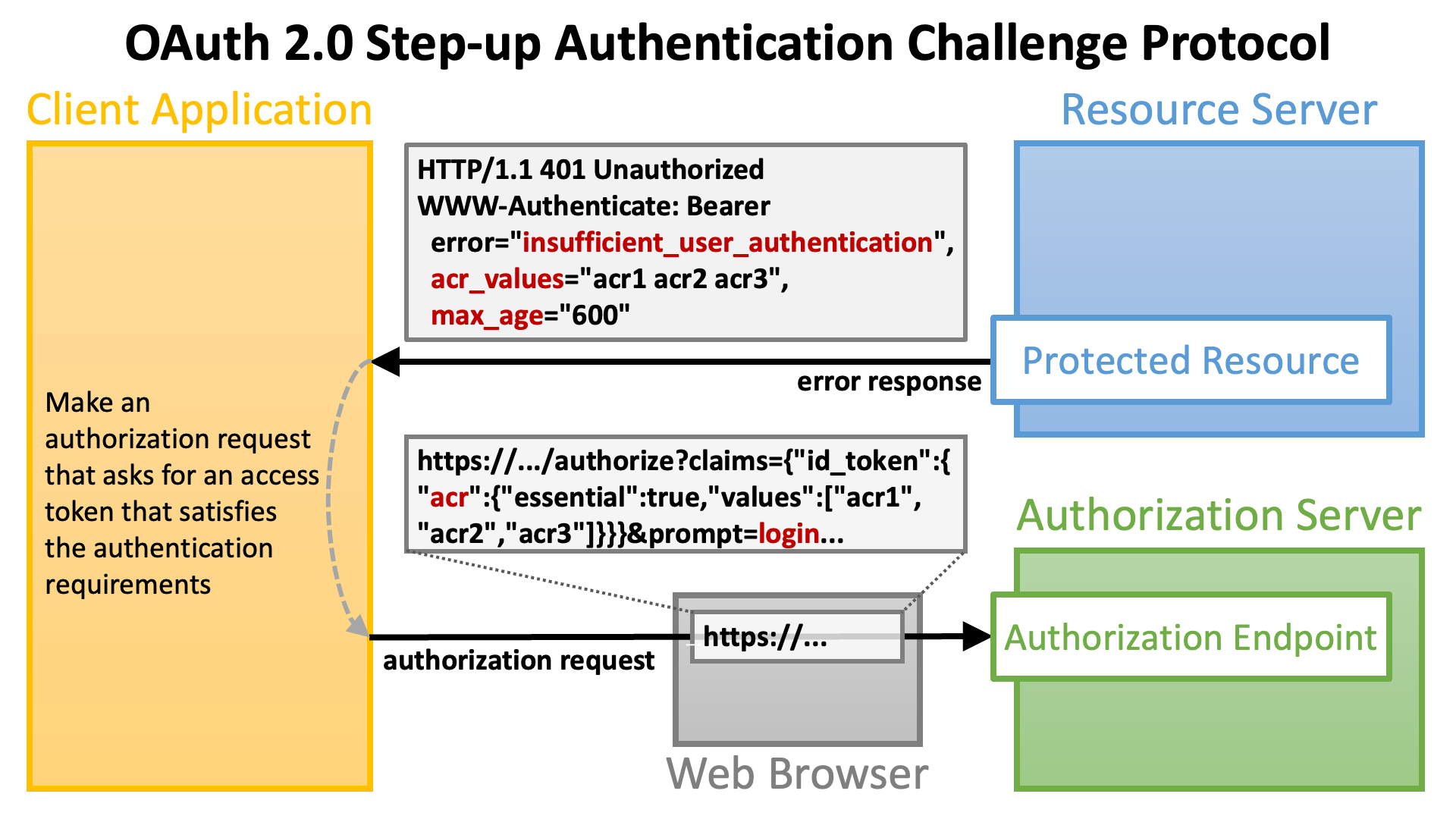 Parameters in the error response are explained in the subsequent sections.
## The `insufficient_user_authentication` Error Code
To indicate that the reason of an error response is that authentication requirements are not satisfied, the specification defines an error code `insufficient_user_authentication` as follows.
* `insufficient_user_authentication`: The authentication event associated with the access token presented with the request doesn't meet the authentication requirements of the protected resource.
The error code appears in the `WWW-Authenticate` HTTP header of an error response as shown below.
```text theme={null}
WWW-Authenticate: Bearer error="insufficient_user_authentication",...
```
## The `acr_values` Parameter
To list ACRs one of which an access token must satisfy, the specification defines a parameter `acr_values` as follows.
* `acr_values`: A space-separated string listing the authentication context class reference values, in order of preference, one of which the protected resource requires for the authentication event associated with the access token.
The parameter is used in conjunction with the error code `insufficient_user_authentication` like below (excerpt from the specification):
```text theme={null}
HTTP/1.1 401 Unauthorized
WWW-Authenticate: Bearer error="insufficient_user_authentication",
error_description="A different authentication level is required",
acr_values="myACR"
```
If a client application receives the error response above, the client application needs to make an authorization request that requests the `acr` claim as an essential with `myACR` included in `values` like below. Line-breaks in the example below are for display purposes only. An actual request does not contain line-breaks.
```text theme={null}
https://as.example.com/authorize?claims=%7B%22id_token%22%3A%7B%22acr%22%3A%7B%22essential%22%3Atrue%2C%22values%22%3A%5B%22myACR%22%5D%7D%7D%7D&...
```
(URL-encoded; decoded claims value: `{"id_token":{"acr":{"essential":true,"values":["myACR"]}}}`)
If the authorization server treats the `acr_values` request parameter in the way recommended by the OAuth 2.0 Step Up Authentication Challenge Protocol specification, `acr_values=myACR` would be enough.
## The `max_age` Parameter
To indicate the maximum authentication age which an access token must satisfy, the specification defines a parameter `max_age` as follows.
* `max_age`: Indicates the allowable elapsed time in seconds since the last active authentication event associated with the access token.
The parameter is used in conjunction with the error code `insufficient_user_authentication` like below (excerpt from the specification):
```text theme={null}
HTTP/1.1 401 Unauthorized
WWW-Authenticate: Bearer error="insufficient_user_authentication",
error_description="More recent authentication is required",
max_age="5"
```
If a client application receives the error response above, the client application needs to make an authorization request with the `prompt` request parameter with `login` included.
# Authentication Information Bound To Access Token
To enable protected resource endpoints to check whether a presented access token satisfies authentication requirements or not, the access token must hold information about the user authentication that was performed during the course of issuing the access token.
The OAuth 2.0 Step Up Authentication Challenge Protocol specification defines the following two attributes of access token that may appear in the payload part of JWT access tokens and the message body of token introspection responses (cf. [RFC 7662](https://www.rfc-editor.org/rfc/rfc7662.html)).
| Attribute | Description (excerpted from the specification) |
| :---------- | :------------------------------------------------------------------------------------------------------------------------------------------------------------------------------------------------------------ |
| `acr` | Authentication Context Class Reference. String specifying an Authentication Context Class Reference value that identifies the Authentication Context Class that the user authentication performed satisfied. |
| `auth_time` | Time when the user authentication occurred. A JSON numeric value representing the number of seconds from 1970-01-01T00:00:00Z UTC until the time of date/time of the authentication event. |
The JSON below is an example excerpted from the specification that shows how the `acr` and `auth_time` attributes appear in the payload part of JWT access tokens.
```json theme={null}
{
"active": true,
"client_id": "s6BhdRkqt3",
"scope": "purchase",
"sub": "someone@example.net",
"aud": "https://rs.example.com",
"iss": "https://as.example.net",
"exp": 1639528912,
"iat": 1618354090,
"auth_time": 1646340198,
"acr": "myACR"
}
```
# Authlete's Implementation
Authlete supports the OAuth 2.0 Step Up Authentication Challenge Protocol specification since version 2.3.
## Binding Authentication Information
Some Authlete APIs such as the `/auth/authorization/issue` API accept the `acr` request parameter and the `authTime` request parameter which are used as values of the `acr` claim and the `auth_time` claim in the payload of an **ID token** being issued (cf. [AuthorizationIssueRequest](https://authlete.github.io/authlete-java-common/com/authlete/common/dto/AuthorizationIssueRequest.html)). Authlete 2.3 onwards binds information passed by the request parameters to an access token being issued, too.
The following set of shell commands simulates the authorization code flow ([RFC 6749](https://www.rfc-editor.org/rfc/rfc6749.html) [Section 4.1](https://www.rfc-editor.org/rfc/rfc6749.html#section-4.1)) that issues an access token that holds information about ACR (`acr`) and authentication time (`auth_time`).
(1) Call the `/auth/authorization` API, which receives an authorization request as `parameters` and returns information about the request in JSON format (cf. [AuthorizationResponse](https://authlete.github.io/authlete-java-common/com/authlete/common/dto/AuthorizationResponse.html)).
```shell theme={null}
$ curl -u ${API_KEY}:${API_SECRET} ${BASE_URL}/api/auth/authorization --data-urlencode parameters="response_type=code&scope=openid&client_id=${CLIENT_ID}&redirect_uri=${REDIRECT_URI}&state=${STATE}&claims={\"id_token\":{\"acr\":{\"essential\":true,\"values\":[\"${ACR}\"]}}}" > authorization_response.json
```
The value of `${ACR}` in the command line above needs to be registered in advance as one of "Supported Authentication Context Class References" (which corresponds to the `acr_values_supported` server metadata). Otherwise, the specified ACR would be ignored.
ACR values of an authorization request are listed in the `acrs` parameter in the response from the `/auth/authorization` API regardless of where the values come from (`acr_values`, `claims` or `default_acr_values`).
In addition, when the `acr` claim is requested as essential, the boolean parameter `acrEssential` in the response from the `/auth/authorization` API holds `true`.
(2) Call the `/auth/authorization/issue` API, which receives a ticket issued by the `/auth/authorization` API as `ticket`, generates tokens (an authorization code, an access token, and/or an ID token), prepares an authorization response that conforms to related standard specifications, and returns JSON (cf. [AuthorizationIssueResponse](https://authlete.github.io/authlete-java-common/com/authlete/common/dto/AuthorizationIssueResponse.html)).
```shell theme={null}
$ TICKET=`jq -r .ticket authorization_response.json`
$ AUTH_TIME=`date +%s`
$ curl -u ${API_KEY}:${API_SECRET} ${BASE_URL}/api/auth/authorization/issue -d ticket=$TICKET -d subject=$SUBJECT -d authTime=$AUTH_TIME -d acr=$ACR > authorization_issue_response.json
```
(3) Call the `/auth/token` API, which receives a token request as `parameters`, generate tokens (an access token and optionally an ID token), prepares a token response that conforms to related standard specifications, and returns JSON (cf. [TokenResponse](https://authlete.github.io/authlete-java-common/com/authlete/common/dto/TokenResponse.html)).
```shell theme={null}
$ AUTHORIZATION_CODE=`jq -r .authorizationCode authorization_issue_response.json`
$ curl -u ${API_KEY}:${API_SECRET} ${BASE_URL}/api/auth/token --data-urlencode parameters="client_id=${CLIENT_ID}&grant_type=authorization_code&code=${AUTHORIZATION_CODE}&redirect_uri=${REDIRECT_URI}" -d clientId=${CLIENT_ID} -d clientSecret=${CLIENT_SECRET} > token_response.json
```
The API call above assumes that the client type of the client is "confidential" and the [client authentication](https://darutk.medium.com/oauth-2-0-client-authentication-4b5f929305d4) method at the token endpoint (`token_endpoint_auth_method`) is `client_secret_basic`, which is implied by use of the `clientId` request parameter and the `clientSecret` parameter of the `/auth/token` API (cf. [TokenRequest](https://authlete.github.io/authlete-java-common/com/authlete/common/dto/TokenRequest.html)).
## Unmet Authentication Requirements
Instead of calling the `/auth/authorization/issue` API, the implementation of the authorization endpoint may call the `/auth/authorization/fail` API to indicate that the authorization request in question failed.
The `/auth/authorization/fail` API requires the `reason` request parameter that indicates the reason of the error (cf. [AuthorizationFailRequest](https://authlete.github.io/authlete-java-common/com/authlete/common/dto/AuthorizationFailRequest.html)). When `[ACR_NOT_SATISFIED](https://authlete.github.io/authlete-java-common/com/authlete/common/dto/AuthorizationFailRequest.Reason.html#ACR_NOT_SATISFIED)` is specified as the value of the `reason` request parameter, Authlete 2.3 and newer versions prepare an error response whose `error` is `unmet_authentication_requirements` to conform to "[OpenID Connect Core Error Code unmet\_authentication\_requirements](https://openid.net/specs/openid-connect-unmet-authentication-requirements-1_0.html)".
```shell theme={null}
$ curl -u ${API_KEY}:${API_SECRET} ${BASE_URL}/api/auth/authorization/fail -d ticket=$TICKET -d reason=ACR_NOT_SATISFIED > authorization_fail_response.json
```
The `responseContent` parameter in the response from the `/auth/authorization/fail` API is a URL that points to the **redirection endpoint** of the client application with the `error` and other parameters (cf. [AuthorizationFailResponse](https://authlete.github.io/authlete-java-common/com/authlete/common/dto/AuthorizationFailResponse.html)).
```shell theme={null}
$ jq -r .responseContent authorization_fail_response.json
http://localhost:4000/api/mock/redirection/4803170471?error=unmet_authentication_requirements&error_description=%5BA060305%5D+The+authorization+request+requests+%27acr%27+as+essential%2C+but+the+authentication+performed+for+the+end-user+satisfies+none+of+the+requested+ACRs.&error_uri=https%3A%2F%2Fdocs.authlete.com%2F%23A060305&state=917bdc1ef38ba6f6c297b4e31ac84007&iss=https%3A%2F%2Fauthlete.com
```
The URL contains the `error_description` parameter unless the `errorDescriptionOmitted` property of the `Service` is `true` (cf. `Service.[isErrorDescriptionOmitted()](https://authlete.github.io/authlete-java-common/com/authlete/common/dto/Service.html#isErrorDescriptionOmitted--)`). The following is the URL-decoded value of the `error_description` parameter.
> \[A060305] The authorization request requests 'acr' as essential, but the authentication performed for the end-user satisfies none of the requested ACRs.
When the authorization request contains `response_mode=form_post` or `response_mode=form_post.jwt`, the value of the `responseContent` parameter in the response from the `/auth/authorization/fail` API is not URL but HTML.
## JWT Access Token
The format of access tokens issued by Authlete is configurable. When the `accessTokenSignAlg` property of `Service` is set (cf. `Service.[getAccessTokenSignAlg()](https://authlete.github.io/authlete-java-common/com/authlete/common/dto/Service.html#getAccessTokenSignAlg--)`), the format of access tokens is JWT (cf. "[Enabling JWT-based access tokens](/v2/configuration-reference/token-issuance-formats/jwt-based-access-token)"). Authlete 2.3 and newer versions embed the `acr` and `auth_time` claims into the payload of JWT access tokens as defined in the specification.
When the service is configured to generate JWT access tokens, the `jwtAccessToken` response parameter in responses from the `/auth/token` API holds a JWT access token (cf. [TokenResponse](https://authlete.github.io/authlete-java-common/com/authlete/common/dto/TokenResponse.html)).
```shell theme={null}
$ JWT_AT=`jq -r .jwtAccessToken token_response.json`
```
If you decode the payload part of the JWT access token,
```shell theme={null}
$ echo $JWT_AT | ruby -paF\\. -rbase64 -e '$_=Base64.urlsafe_decode64 $F[1]' | jq .
```
you will find that the `acr` claim and the `auth_time` claim are embedded there.
```json theme={null}
{
"sub": "taka",
"acr": "acr1",
"scope": "openid",
"auth_time": 1667321595,
"iss": "https://authlete.com",
"exp": 1667408271,
"iat": 1667321871,
"client_id": "5575687621",
"jti": "A1pURs-TMuyvueCoP2mSsntQX4-0IvYxlvectI4E2h8"
}
```
## Token Introspection (Standard)
Authlete-powered authorization servers can implement a token introspection endpoint that conforms to [RFC 7662](https://www.rfc-editor.org/rfc/rfc7662.html) by using Authlete's `/auth/introspection/standard` API. Implementations of protected resource endpoints may use the token introspection endpoint to get detailed information about access tokens.
The `/auth/introspection/standard` API receives a token introspection request as `parameters` and returns JSON (cf. [StandardIntrospectionResponse](https://authlete.github.io/authlete-java-common/com/authlete/common/dto/StandardIntrospectionResponse.html)).
```shell theme={null}
$ AT=`jq -r .accessToken token_response.json`
$ curl -u ${API_KEY}:${API_SECRET} ${BASE_URL}/api/auth/introspection/standard --data-urlencode parameters="token=${AT}" > introspection_standard_response.json
```
The JSON contains the `responseContent` parameter. The value of the parameter is a JSON string that conforms to [RFC 7662](https://www.rfc-editor.org/rfc/rfc7662.html).
The following command line extracts the value of `responseContent` and parses it as JSON.
```shell theme={null}
$ jq -r .responseContent introspection_standard_response.json | jq .
```
The result of the command line above will look like below. You can find the `acr` property and the `auth_time` property there.
```json theme={null}
{
"sub": "taka",
"acr": "acr1",
"scope": "openid",
"auth_time": 1667321595,
"iss": "https://authlete.com",
"active": true,
"token_type": "Bearer",
"exp": 1667408271,
"client_id": "5575687621"
}
```
## Token Introspection (Authlete)
Authlete provides the `/auth/introspection` API, which is also for access token introspection but different from the standard introspection endpoint.
Major advantages of the `/auth/introspection` API over the standard introspection endpoint are as follows.
1. Can perform validation that the standard introspection endpoint cannot.
2. Can prepare an error message that conforms to [RFC 6750](https://www.rfc-editor.org/rfc/rfc6750.html).
The `/auth/introspection` API accepts the following request parameters as of this writing (cf. [IntrospectionRequest](https://authlete.github.io/authlete-java-common/com/authlete/common/dto/IntrospectionRequest.html)).
| Parameter | Category | Version | Description |
| :--------------------- | :---------------------------------------------------------- | :-----: | :-------------------------------------------------------------------------------------------------------------------------------------------------------------------- |
| `token` | Common | 1.1 | An access token to introspect. |
| `scopes` | Common | 1.1 | Scopes that should be covered by the access token. |
| `subject` | Common | 1.1 | The subject (user identifier) that should be associated with the access token. |
| `clientCertificate` | [RFC 8705](https://www.rfc-editor.org/rfc/rfc8705.html) | 2.0 | The client certificate used in the mutual TLS connection established between the client application and the protected resource endpoint. |
| `dpop` | [DPoP](https://www.rfc-editor.org/rfc/rfc9449.html) | 2.2 | The value of the DPoP HTTP header. |
| `htm` | [DPoP](https://www.rfc-editor.org/rfc/rfc9449.html) | 2.2 | The HTTP method of the request to the protected resource endpoint. |
| `htu` | [DPoP](https://www.rfc-editor.org/rfc/rfc9449.html) | 2.2 | The URL of the protected resource endpoint. |
| `resources` | [RFC 8707](https://www.rfc-editor.org/rfc/rfc8707.html) | 2.2 | Resource indicators that should be covered by the access token. |
| `targetUri` | [HTTP Msg Sig](https://www.rfc-editor.org/rfc/rfc9421.html) | 2.3 | The full URL of the request. |
| `headers` | [HTTP Msg Sig](https://www.rfc-editor.org/rfc/rfc9421.html) | 2.3 | The HTTP headers to be included in processing the signature. |
| `requestBodyContained` | [HTTP Msg Sig](https://www.rfc-editor.org/rfc/rfc9421.html) | 2.3 | Whether the request contains a message body. |
| `acrValues` | [Step Up Auth](https://www.rfc-editor.org/rfc/rfc9470.html) | 2.3 | The list of Authentication Context Class Reference values one of which the user authentication performed during the course of issuing the access token must satisfy. |
| `maxAge` | [Step Up Auth](https://www.rfc-editor.org/rfc/rfc9470.html) | 2.3 | The maximum authentication age which is the maximum allowable elapsed time since the user authentication was performed during the course of issuing the access token. |
Request parameters except `token` are related to access token validation. Ones to pay attention to here are the `acrValues` request parameter and the `maxAge` request parameter.
### ACR validation
If the `acrValues` request parameter is supplied, the `/auth/introspection` API checks whether the ACR bound to the given access token is included in the `acrValues` array. If the ACR is not included, the API prepares an error response that conforms to the OAuth 2.0 Step Up Authentication Challenge Protocol specification.
The following command line lets the `/auth/introspection` API validate ACR.
```shell theme={null}
$ curl -u ${API_KEY}:${API_SECRET} ${BASE_URL}/api/auth/introspection -d token=$AT -d acrValues="acrX acrY" > introspection_response-acrValues.json
```
The `responseContent` parameter in the response from the API (cf. [IntrospectionResponse](https://authlete.github.io/authlete-java-common/com/authlete/common/dto/IntrospectionResponse.html)) holds a string that should be used as the value of the `WWW-Authenticate` HTTP header. You will see that (a) the value of `error` is `insufficient_user_authentication` and (b) `acr_values` is included.
```shell theme={null}
$ jq -r .responseContent introspection_response-acrValues.json
Bearer error="insufficient_user_authentication",error_description="[A341302] The authentication context class 'acr1' of the user authentication that the authorization server performed during the course of issuing the access token is insufficient. User authentication of an access token must satisfy one of [acrX acrY] to access the protected resource.",error_uri="https://docs.authlete.com/#A341302",acr_values="acrX acrY"
```
### Max Age Validation
If the `maxAge` request parameter is supplied, the `/auth/introspection` API checks whether the specified time has elapsed since the user authentication time bound to the given access token. If the time has elapsed, the API prepares an error response that conforms to the OAuth 2.0 Step Up Authentication Challenge Protocol specification.
The following command line lets the `/auth/introspection` API validate authentication time.
```shell theme={null}
$ curl -u ${API_KEY}:${API_SECRET} ${BASE_URL}/api/auth/introspection -d token=$AT -d maxAge=600 > introspection_response-maxAge.json
```
In this case, the string for the `WWW-Authenticate` HTTP header contains `max_age`.
```shell theme={null}
$ jq -r .responseContent introspection_response-maxAge.json
Bearer error="insufficient_user_authentication",error_description="[A340301] The time of the user authentication that the authorization server performed during the course of issuing the access token is too old, so re-authentication is needed. The maximum authentication age (max_age) required by the protected resource is 600.",error_uri="https://docs.authlete.com/#A340301",max_age="600"
```
# Finally
We released Authlete 3.0 in November 2024 ([announcement](https://www.authlete.com/news/20241106_authlete3/)). Naturally, it supports the OAuth 2.0 Step Up Authentication Challenge Protocol. Please take full advantage of it!
Parameters in the error response are explained in the subsequent sections.
## The `insufficient_user_authentication` Error Code
To indicate that the reason of an error response is that authentication requirements are not satisfied, the specification defines an error code `insufficient_user_authentication` as follows.
* `insufficient_user_authentication`: The authentication event associated with the access token presented with the request doesn't meet the authentication requirements of the protected resource.
The error code appears in the `WWW-Authenticate` HTTP header of an error response as shown below.
```text theme={null}
WWW-Authenticate: Bearer error="insufficient_user_authentication",...
```
## The `acr_values` Parameter
To list ACRs one of which an access token must satisfy, the specification defines a parameter `acr_values` as follows.
* `acr_values`: A space-separated string listing the authentication context class reference values, in order of preference, one of which the protected resource requires for the authentication event associated with the access token.
The parameter is used in conjunction with the error code `insufficient_user_authentication` like below (excerpt from the specification):
```text theme={null}
HTTP/1.1 401 Unauthorized
WWW-Authenticate: Bearer error="insufficient_user_authentication",
error_description="A different authentication level is required",
acr_values="myACR"
```
If a client application receives the error response above, the client application needs to make an authorization request that requests the `acr` claim as an essential with `myACR` included in `values` like below. Line-breaks in the example below are for display purposes only. An actual request does not contain line-breaks.
```text theme={null}
https://as.example.com/authorize?claims=%7B%22id_token%22%3A%7B%22acr%22%3A%7B%22essential%22%3Atrue%2C%22values%22%3A%5B%22myACR%22%5D%7D%7D%7D&...
```
(URL-encoded; decoded claims value: `{"id_token":{"acr":{"essential":true,"values":["myACR"]}}}`)
If the authorization server treats the `acr_values` request parameter in the way recommended by the OAuth 2.0 Step Up Authentication Challenge Protocol specification, `acr_values=myACR` would be enough.
## The `max_age` Parameter
To indicate the maximum authentication age which an access token must satisfy, the specification defines a parameter `max_age` as follows.
* `max_age`: Indicates the allowable elapsed time in seconds since the last active authentication event associated with the access token.
The parameter is used in conjunction with the error code `insufficient_user_authentication` like below (excerpt from the specification):
```text theme={null}
HTTP/1.1 401 Unauthorized
WWW-Authenticate: Bearer error="insufficient_user_authentication",
error_description="More recent authentication is required",
max_age="5"
```
If a client application receives the error response above, the client application needs to make an authorization request with the `prompt` request parameter with `login` included.
# Authentication Information Bound To Access Token
To enable protected resource endpoints to check whether a presented access token satisfies authentication requirements or not, the access token must hold information about the user authentication that was performed during the course of issuing the access token.
The OAuth 2.0 Step Up Authentication Challenge Protocol specification defines the following two attributes of access token that may appear in the payload part of JWT access tokens and the message body of token introspection responses (cf. [RFC 7662](https://www.rfc-editor.org/rfc/rfc7662.html)).
| Attribute | Description (excerpted from the specification) |
| :---------- | :------------------------------------------------------------------------------------------------------------------------------------------------------------------------------------------------------------ |
| `acr` | Authentication Context Class Reference. String specifying an Authentication Context Class Reference value that identifies the Authentication Context Class that the user authentication performed satisfied. |
| `auth_time` | Time when the user authentication occurred. A JSON numeric value representing the number of seconds from 1970-01-01T00:00:00Z UTC until the time of date/time of the authentication event. |
The JSON below is an example excerpted from the specification that shows how the `acr` and `auth_time` attributes appear in the payload part of JWT access tokens.
```json theme={null}
{
"active": true,
"client_id": "s6BhdRkqt3",
"scope": "purchase",
"sub": "someone@example.net",
"aud": "https://rs.example.com",
"iss": "https://as.example.net",
"exp": 1639528912,
"iat": 1618354090,
"auth_time": 1646340198,
"acr": "myACR"
}
```
# Authlete's Implementation
Authlete supports the OAuth 2.0 Step Up Authentication Challenge Protocol specification since version 2.3.
## Binding Authentication Information
Some Authlete APIs such as the `/auth/authorization/issue` API accept the `acr` request parameter and the `authTime` request parameter which are used as values of the `acr` claim and the `auth_time` claim in the payload of an **ID token** being issued (cf. [AuthorizationIssueRequest](https://authlete.github.io/authlete-java-common/com/authlete/common/dto/AuthorizationIssueRequest.html)). Authlete 2.3 onwards binds information passed by the request parameters to an access token being issued, too.
The following set of shell commands simulates the authorization code flow ([RFC 6749](https://www.rfc-editor.org/rfc/rfc6749.html) [Section 4.1](https://www.rfc-editor.org/rfc/rfc6749.html#section-4.1)) that issues an access token that holds information about ACR (`acr`) and authentication time (`auth_time`).
(1) Call the `/auth/authorization` API, which receives an authorization request as `parameters` and returns information about the request in JSON format (cf. [AuthorizationResponse](https://authlete.github.io/authlete-java-common/com/authlete/common/dto/AuthorizationResponse.html)).
```shell theme={null}
$ curl -u ${API_KEY}:${API_SECRET} ${BASE_URL}/api/auth/authorization --data-urlencode parameters="response_type=code&scope=openid&client_id=${CLIENT_ID}&redirect_uri=${REDIRECT_URI}&state=${STATE}&claims={\"id_token\":{\"acr\":{\"essential\":true,\"values\":[\"${ACR}\"]}}}" > authorization_response.json
```
The value of `${ACR}` in the command line above needs to be registered in advance as one of "Supported Authentication Context Class References" (which corresponds to the `acr_values_supported` server metadata). Otherwise, the specified ACR would be ignored.
ACR values of an authorization request are listed in the `acrs` parameter in the response from the `/auth/authorization` API regardless of where the values come from (`acr_values`, `claims` or `default_acr_values`).
In addition, when the `acr` claim is requested as essential, the boolean parameter `acrEssential` in the response from the `/auth/authorization` API holds `true`.
(2) Call the `/auth/authorization/issue` API, which receives a ticket issued by the `/auth/authorization` API as `ticket`, generates tokens (an authorization code, an access token, and/or an ID token), prepares an authorization response that conforms to related standard specifications, and returns JSON (cf. [AuthorizationIssueResponse](https://authlete.github.io/authlete-java-common/com/authlete/common/dto/AuthorizationIssueResponse.html)).
```shell theme={null}
$ TICKET=`jq -r .ticket authorization_response.json`
$ AUTH_TIME=`date +%s`
$ curl -u ${API_KEY}:${API_SECRET} ${BASE_URL}/api/auth/authorization/issue -d ticket=$TICKET -d subject=$SUBJECT -d authTime=$AUTH_TIME -d acr=$ACR > authorization_issue_response.json
```
(3) Call the `/auth/token` API, which receives a token request as `parameters`, generate tokens (an access token and optionally an ID token), prepares a token response that conforms to related standard specifications, and returns JSON (cf. [TokenResponse](https://authlete.github.io/authlete-java-common/com/authlete/common/dto/TokenResponse.html)).
```shell theme={null}
$ AUTHORIZATION_CODE=`jq -r .authorizationCode authorization_issue_response.json`
$ curl -u ${API_KEY}:${API_SECRET} ${BASE_URL}/api/auth/token --data-urlencode parameters="client_id=${CLIENT_ID}&grant_type=authorization_code&code=${AUTHORIZATION_CODE}&redirect_uri=${REDIRECT_URI}" -d clientId=${CLIENT_ID} -d clientSecret=${CLIENT_SECRET} > token_response.json
```
The API call above assumes that the client type of the client is "confidential" and the [client authentication](https://darutk.medium.com/oauth-2-0-client-authentication-4b5f929305d4) method at the token endpoint (`token_endpoint_auth_method`) is `client_secret_basic`, which is implied by use of the `clientId` request parameter and the `clientSecret` parameter of the `/auth/token` API (cf. [TokenRequest](https://authlete.github.io/authlete-java-common/com/authlete/common/dto/TokenRequest.html)).
## Unmet Authentication Requirements
Instead of calling the `/auth/authorization/issue` API, the implementation of the authorization endpoint may call the `/auth/authorization/fail` API to indicate that the authorization request in question failed.
The `/auth/authorization/fail` API requires the `reason` request parameter that indicates the reason of the error (cf. [AuthorizationFailRequest](https://authlete.github.io/authlete-java-common/com/authlete/common/dto/AuthorizationFailRequest.html)). When `[ACR_NOT_SATISFIED](https://authlete.github.io/authlete-java-common/com/authlete/common/dto/AuthorizationFailRequest.Reason.html#ACR_NOT_SATISFIED)` is specified as the value of the `reason` request parameter, Authlete 2.3 and newer versions prepare an error response whose `error` is `unmet_authentication_requirements` to conform to "[OpenID Connect Core Error Code unmet\_authentication\_requirements](https://openid.net/specs/openid-connect-unmet-authentication-requirements-1_0.html)".
```shell theme={null}
$ curl -u ${API_KEY}:${API_SECRET} ${BASE_URL}/api/auth/authorization/fail -d ticket=$TICKET -d reason=ACR_NOT_SATISFIED > authorization_fail_response.json
```
The `responseContent` parameter in the response from the `/auth/authorization/fail` API is a URL that points to the **redirection endpoint** of the client application with the `error` and other parameters (cf. [AuthorizationFailResponse](https://authlete.github.io/authlete-java-common/com/authlete/common/dto/AuthorizationFailResponse.html)).
```shell theme={null}
$ jq -r .responseContent authorization_fail_response.json
http://localhost:4000/api/mock/redirection/4803170471?error=unmet_authentication_requirements&error_description=%5BA060305%5D+The+authorization+request+requests+%27acr%27+as+essential%2C+but+the+authentication+performed+for+the+end-user+satisfies+none+of+the+requested+ACRs.&error_uri=https%3A%2F%2Fdocs.authlete.com%2F%23A060305&state=917bdc1ef38ba6f6c297b4e31ac84007&iss=https%3A%2F%2Fauthlete.com
```
The URL contains the `error_description` parameter unless the `errorDescriptionOmitted` property of the `Service` is `true` (cf. `Service.[isErrorDescriptionOmitted()](https://authlete.github.io/authlete-java-common/com/authlete/common/dto/Service.html#isErrorDescriptionOmitted--)`). The following is the URL-decoded value of the `error_description` parameter.
> \[A060305] The authorization request requests 'acr' as essential, but the authentication performed for the end-user satisfies none of the requested ACRs.
When the authorization request contains `response_mode=form_post` or `response_mode=form_post.jwt`, the value of the `responseContent` parameter in the response from the `/auth/authorization/fail` API is not URL but HTML.
## JWT Access Token
The format of access tokens issued by Authlete is configurable. When the `accessTokenSignAlg` property of `Service` is set (cf. `Service.[getAccessTokenSignAlg()](https://authlete.github.io/authlete-java-common/com/authlete/common/dto/Service.html#getAccessTokenSignAlg--)`), the format of access tokens is JWT (cf. "[Enabling JWT-based access tokens](/v2/configuration-reference/token-issuance-formats/jwt-based-access-token)"). Authlete 2.3 and newer versions embed the `acr` and `auth_time` claims into the payload of JWT access tokens as defined in the specification.
When the service is configured to generate JWT access tokens, the `jwtAccessToken` response parameter in responses from the `/auth/token` API holds a JWT access token (cf. [TokenResponse](https://authlete.github.io/authlete-java-common/com/authlete/common/dto/TokenResponse.html)).
```shell theme={null}
$ JWT_AT=`jq -r .jwtAccessToken token_response.json`
```
If you decode the payload part of the JWT access token,
```shell theme={null}
$ echo $JWT_AT | ruby -paF\\. -rbase64 -e '$_=Base64.urlsafe_decode64 $F[1]' | jq .
```
you will find that the `acr` claim and the `auth_time` claim are embedded there.
```json theme={null}
{
"sub": "taka",
"acr": "acr1",
"scope": "openid",
"auth_time": 1667321595,
"iss": "https://authlete.com",
"exp": 1667408271,
"iat": 1667321871,
"client_id": "5575687621",
"jti": "A1pURs-TMuyvueCoP2mSsntQX4-0IvYxlvectI4E2h8"
}
```
## Token Introspection (Standard)
Authlete-powered authorization servers can implement a token introspection endpoint that conforms to [RFC 7662](https://www.rfc-editor.org/rfc/rfc7662.html) by using Authlete's `/auth/introspection/standard` API. Implementations of protected resource endpoints may use the token introspection endpoint to get detailed information about access tokens.
The `/auth/introspection/standard` API receives a token introspection request as `parameters` and returns JSON (cf. [StandardIntrospectionResponse](https://authlete.github.io/authlete-java-common/com/authlete/common/dto/StandardIntrospectionResponse.html)).
```shell theme={null}
$ AT=`jq -r .accessToken token_response.json`
$ curl -u ${API_KEY}:${API_SECRET} ${BASE_URL}/api/auth/introspection/standard --data-urlencode parameters="token=${AT}" > introspection_standard_response.json
```
The JSON contains the `responseContent` parameter. The value of the parameter is a JSON string that conforms to [RFC 7662](https://www.rfc-editor.org/rfc/rfc7662.html).
The following command line extracts the value of `responseContent` and parses it as JSON.
```shell theme={null}
$ jq -r .responseContent introspection_standard_response.json | jq .
```
The result of the command line above will look like below. You can find the `acr` property and the `auth_time` property there.
```json theme={null}
{
"sub": "taka",
"acr": "acr1",
"scope": "openid",
"auth_time": 1667321595,
"iss": "https://authlete.com",
"active": true,
"token_type": "Bearer",
"exp": 1667408271,
"client_id": "5575687621"
}
```
## Token Introspection (Authlete)
Authlete provides the `/auth/introspection` API, which is also for access token introspection but different from the standard introspection endpoint.
Major advantages of the `/auth/introspection` API over the standard introspection endpoint are as follows.
1. Can perform validation that the standard introspection endpoint cannot.
2. Can prepare an error message that conforms to [RFC 6750](https://www.rfc-editor.org/rfc/rfc6750.html).
The `/auth/introspection` API accepts the following request parameters as of this writing (cf. [IntrospectionRequest](https://authlete.github.io/authlete-java-common/com/authlete/common/dto/IntrospectionRequest.html)).
| Parameter | Category | Version | Description |
| :--------------------- | :---------------------------------------------------------- | :-----: | :-------------------------------------------------------------------------------------------------------------------------------------------------------------------- |
| `token` | Common | 1.1 | An access token to introspect. |
| `scopes` | Common | 1.1 | Scopes that should be covered by the access token. |
| `subject` | Common | 1.1 | The subject (user identifier) that should be associated with the access token. |
| `clientCertificate` | [RFC 8705](https://www.rfc-editor.org/rfc/rfc8705.html) | 2.0 | The client certificate used in the mutual TLS connection established between the client application and the protected resource endpoint. |
| `dpop` | [DPoP](https://www.rfc-editor.org/rfc/rfc9449.html) | 2.2 | The value of the DPoP HTTP header. |
| `htm` | [DPoP](https://www.rfc-editor.org/rfc/rfc9449.html) | 2.2 | The HTTP method of the request to the protected resource endpoint. |
| `htu` | [DPoP](https://www.rfc-editor.org/rfc/rfc9449.html) | 2.2 | The URL of the protected resource endpoint. |
| `resources` | [RFC 8707](https://www.rfc-editor.org/rfc/rfc8707.html) | 2.2 | Resource indicators that should be covered by the access token. |
| `targetUri` | [HTTP Msg Sig](https://www.rfc-editor.org/rfc/rfc9421.html) | 2.3 | The full URL of the request. |
| `headers` | [HTTP Msg Sig](https://www.rfc-editor.org/rfc/rfc9421.html) | 2.3 | The HTTP headers to be included in processing the signature. |
| `requestBodyContained` | [HTTP Msg Sig](https://www.rfc-editor.org/rfc/rfc9421.html) | 2.3 | Whether the request contains a message body. |
| `acrValues` | [Step Up Auth](https://www.rfc-editor.org/rfc/rfc9470.html) | 2.3 | The list of Authentication Context Class Reference values one of which the user authentication performed during the course of issuing the access token must satisfy. |
| `maxAge` | [Step Up Auth](https://www.rfc-editor.org/rfc/rfc9470.html) | 2.3 | The maximum authentication age which is the maximum allowable elapsed time since the user authentication was performed during the course of issuing the access token. |
Request parameters except `token` are related to access token validation. Ones to pay attention to here are the `acrValues` request parameter and the `maxAge` request parameter.
### ACR validation
If the `acrValues` request parameter is supplied, the `/auth/introspection` API checks whether the ACR bound to the given access token is included in the `acrValues` array. If the ACR is not included, the API prepares an error response that conforms to the OAuth 2.0 Step Up Authentication Challenge Protocol specification.
The following command line lets the `/auth/introspection` API validate ACR.
```shell theme={null}
$ curl -u ${API_KEY}:${API_SECRET} ${BASE_URL}/api/auth/introspection -d token=$AT -d acrValues="acrX acrY" > introspection_response-acrValues.json
```
The `responseContent` parameter in the response from the API (cf. [IntrospectionResponse](https://authlete.github.io/authlete-java-common/com/authlete/common/dto/IntrospectionResponse.html)) holds a string that should be used as the value of the `WWW-Authenticate` HTTP header. You will see that (a) the value of `error` is `insufficient_user_authentication` and (b) `acr_values` is included.
```shell theme={null}
$ jq -r .responseContent introspection_response-acrValues.json
Bearer error="insufficient_user_authentication",error_description="[A341302] The authentication context class 'acr1' of the user authentication that the authorization server performed during the course of issuing the access token is insufficient. User authentication of an access token must satisfy one of [acrX acrY] to access the protected resource.",error_uri="https://docs.authlete.com/#A341302",acr_values="acrX acrY"
```
### Max Age Validation
If the `maxAge` request parameter is supplied, the `/auth/introspection` API checks whether the specified time has elapsed since the user authentication time bound to the given access token. If the time has elapsed, the API prepares an error response that conforms to the OAuth 2.0 Step Up Authentication Challenge Protocol specification.
The following command line lets the `/auth/introspection` API validate authentication time.
```shell theme={null}
$ curl -u ${API_KEY}:${API_SECRET} ${BASE_URL}/api/auth/introspection -d token=$AT -d maxAge=600 > introspection_response-maxAge.json
```
In this case, the string for the `WWW-Authenticate` HTTP header contains `max_age`.
```shell theme={null}
$ jq -r .responseContent introspection_response-maxAge.json
Bearer error="insufficient_user_authentication",error_description="[A340301] The time of the user authentication that the authorization server performed during the course of issuing the access token is too old, so re-authentication is needed. The maximum authentication age (max_age) required by the protected resource is 600.",error_uri="https://docs.authlete.com/#A340301",max_age="600"
```
# Finally
We released Authlete 3.0 in November 2024 ([announcement](https://www.authlete.com/news/20241106_authlete3/)). Naturally, it supports the OAuth 2.0 Step Up Authentication Challenge Protocol. Please take full advantage of it!