> ## Documentation Index
> Fetch the complete documentation index at: https://developers.authlete.com/llms.txt
> Use this file to discover all available pages before exploring further.
# OIDC Basics
> A tutorial to understand how OpenID Connect identity provider leverages Authlete APIs.
This page is for **Authlete 2.x**. For 3.0 content, see [OIDC Basics (3.0)](/get-started/quickstarts/oidc-basics).
# Preface
This document is a tutorial to describe basic usage of [Authlete APIs](https://docs.authlete.com/) in order to implement OpenID Connect (OIDC) identity provider server that supports authorization code flow.
# Components
In this tutorial, we assume the following components.
Note that only Authlete's consoles and APIs are up and running, while an authorization server (OIDC identity provider) and a resource server don't actually exist.
Instead you will use curl command to simulate how these servers make API requests to Authlete on receiving authorization requests, token requests and token introspection requests from clients (OIDC relying party).
In this tutorial, OIDC identity provider and relying party are described as authorization server and client respectively for convenience.
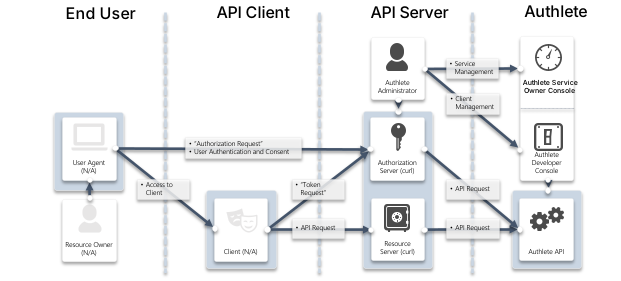
FODNs for each component are as follows. The authorization server and the client don't exist as stated above, but their FQDNs are at least needed to explain the OAuth flow.
| Component | FQDN |
| ------------------------------ | -------------------- |
| Authlete API | `api.authlete.com` |
| Authlete Service Owner Console | `so.authlete.com` |
| Authlete Developer Console | `cd.authlete.com` |
| Authorization Server | `as.example.com` |
| Client | `client.example.org` |
| Resource Server | N/A |
# Environment setup
Settings in this section are the same as described in [OAuth 2.0 Basics (2.x)](/v2/get-started/core-concepts/oauth-basics). You can skip this section if you have already done.
Consult instructions "[Sign-up to Authlete and Creating a Service](/v2/get-started/quickstarts/using-demo-authorization-server)" to create a new Authlete API service and register a client to the service.
In this tutorial, we assume the following properties are generated or specified.
| Item | Value |
| ---------------------------- | ------------------------------------------------------------------------------------------------------------ |
| Client ID | Auto-generetad e.g. `12898884596863` |
| Client Secret | Auto-generated e.g. `-olDIKD9BihRfB8O1JxobUEKBZ7PIV5Z6oaqxAshmoUtUZgB-wjmmxTYDiDV6vM_Mgl267PeNrRftq8cWplvmg` |
| Client Type | `CONFIDENTIAL` |
| Redirect URIs | `https://client.example.org/cb/example.com` |
| Client Authentication Method | `CLIENT_SECRET_BASIC` |
Let's try OIDC authorization code flow using this environment, in the next section.
# Walk-through
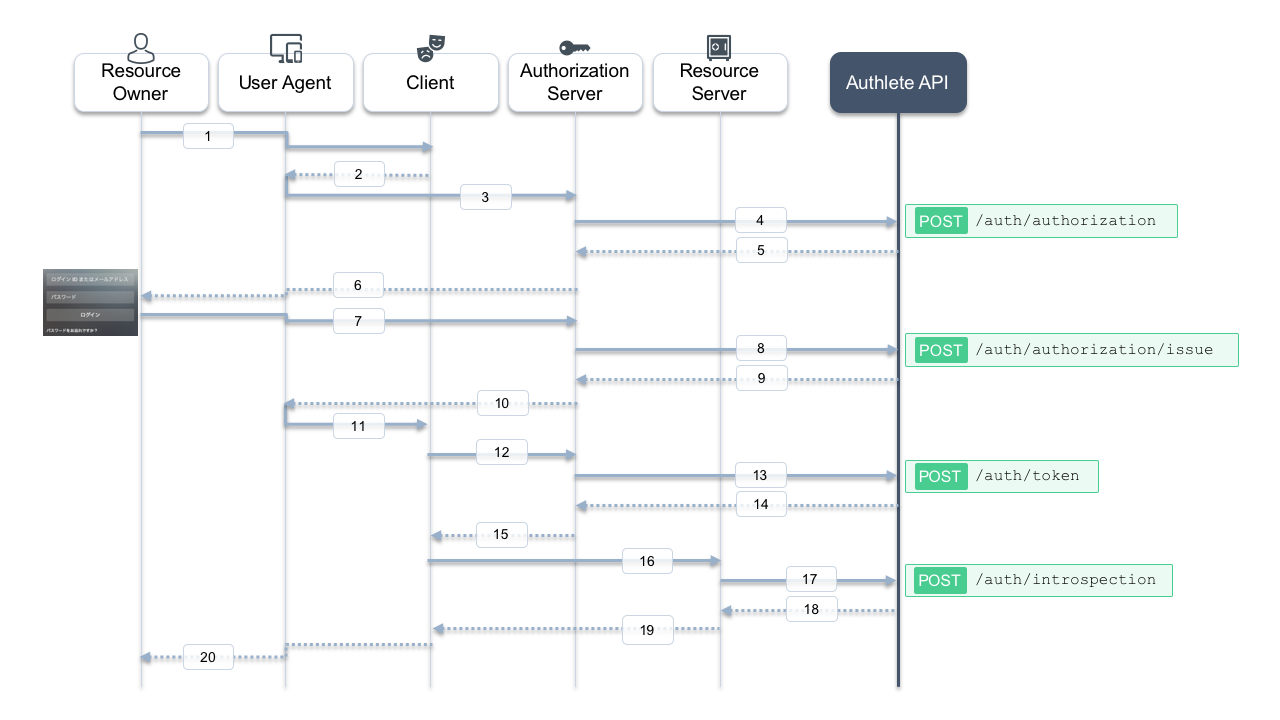
Here is a sequence diagram in this tutorial. Message numbers in the diagram might help you understand the following steps.
## Authorization request from the client to the authorization server
The client makes an OIDC authentication request (authorization request) to the authorization server via user agent (message #2, #3).
In this tutorial, let's suppose the following values are specified as paramters in the request.
| Item | Value | Description |
| -------------- | ------------------------------------------- | ------------------------------------------------------------------------------------------------------------------------------------------------ |
| client\_id | `12898884596863` | Registered client ID |
| response\_type | `code` | A value stating OIDC authorization code flow (when `scope` contains `openid`) |
| redirect\_uri | `https://client.example.org/cb/example.com` | One of registered redirect URIs |
| scope | `openid` | A value stating this request is OIDC authentication request |
| nonce | `n-0S6_WzA2Mj` | Nonce value (See [3.1.2.1. Authentication Request - OpenID Connect Core 1.0](https://openid.net/specs/openid-connect-core-1_0.html#AuthRequest)) |
The authorization server is to receive the following content (folded for readability) as HTTP GET query string from the user agent.
```shell theme={null}
redirect_uri=https://client.example.org/cb/example.com
&response_type=code
&client_id=12898884596863
&scope=openid
&nonce=n-0S6_WzA2Mj
```
The authorization server is supposed to evaluate these parameters by itself. Typical evaluation rules are shown below. After that, the authorization server is going to process OIDC authorization code flow since the values of `scope` and `response_type` are `openid` and `code` respectively.
* Whether a client associated with the client ID `12898884596863` has been registered to the authorization server. It must be an OIDC relying party because of `scope=openid`.
* Whether the value of the redirect URI `https://client.example.org/cb/example.com` matches with one of URIs registered to the client
* Whether values of other parameters such as `response_type`, `scope` are applicable for the client, i.e. permitted for the client to specify in its request
Authlete's [POST /auth/authorization](/api-reference/authorization-endpoint/process-authorization-request) API does the evaluation process on the authorization server's behalf.
Let's make a reqeust to this API by acting as the authorization server.
In this tutorial, execute curl command as follows (message #4).
Make sure to replace ``, `` and `` by your own values generated in the previous step.
```bash theme={null}
curl -s -X POST https://api.authlete.com/api/auth/authorization \
-u ':' \
-H 'Content-Type: application/json' \
-d '{ "parameters": "redirect_uri=https://client.example.org/cb/example.com&response_type=code&client_id=&scope=openid&nonce=n-0S6_WzA2Mj" }'
```
If you are using Windows 10's bundled curl.exe command via PowerShell, make sure the command is `curl.exe` instead of `curl`, escape `"` characters and use `` ` `` to break lines.
```powershell theme={null}
curl.exe -s -X POST https://api.authlete.com/api/auth/authorization `
-u ':' `
-H 'Content-Type: application/json' `
-d '{\"parameters\" : \"redirect_uri=https://client.example.org/cb/example.com&response_type=code&client_id=&scope=openid&nonce=n-0S6_WzA2Mj\"}'
```
If the request is appropriate, Authlete makes the following response (omitted for brevity) (message #5).
```json theme={null}
{
"resultMessage" : "[A004001] Authlete has successfully issued a ticket to the service (API Key = 10738933707579) for the authorization request from the client (ID = 12898884596863). [response_type=code, openid=true]",
"type" : "authorizationResponse",
"resultCode" : "A004001",
"client" : { [...] },
"ticket" : "bi2Kxe2WW5mK_GZ_fDFOpK1bnY6xTy40Ap_8nxf-7AU",
"action" : "INTERACTION",
[...]
"service" : {
[...]
"supportedClaims" : [
[...]
],
"supportedScopes" : [
[...]
],
}
}
```
Pay attention to three key/value pairs in the response; `resultMessage`, `action` and `ticket`.
* `resultMessage` provides human-readable result of the request processing (See also [Interpreting Authlete's result codes](https://kb.authlete.com/en/s/oauth-and-openid-connect/a/result-code-in-authlete)). `openid=true` indicates the request is to be processed in accordance with the OIDC protocol.
* `action` indicates what the authorization server should do next.
* `ticket` is required for the authorization server to make a request to another API in the next step.
Authlete also provides service and client information in the response. The authorization server utilizes them to ask the resource owner if he or she authorizes access for the client to the service.
## User authentication and confirmation of sharing authentication result
Actual interaction between the resource owner and the authorization server is out of scope in this tutorial. In most cases, authorization server would authenticate user with some credentials (e.g. ID/password), determine roles and privileges for the user, and ask the user if he or she authorizes to share the authentication result with the client (message #6, #7).
## Issuing an authorization code
Let's assume the auhtorization server reaches the following state after completion of the previous process:
* The authorization server has authenticated the resource owner, and determined that an identifier for the resource owner, to be shared with Authlete as a value of `subject` parameter, is `testuser01`.
* The authorization server has got consent from the resource owner.
The authorization server makes a request to Authlete's [POST /auth/authorization/issue](/api-reference/authorization-endpoint/issue-authorization-response) for issurance of an authorization code. It specifies values of `subject` and `ticket` that were a part of the response from `/auth/authorization` API, as request parameters.
Execute curl command as follows (message #8).
Make sure to replace ``, `` and `` by your own values generated in the previous step.
```bash theme={null}
curl -s -X POST https://api.authlete.com/api/auth/authorization/issue \
-u ':' \
-H 'Content-Type: application/json' \
-d '{ "ticket": "", "subject": "testuser01" }'
```
If the request is appropriate, Authlete makes the following response (message #9).
```json theme={null}
{
"action" : "LOCATION",
"resultCode" : "A040001",
"type" : "authorizationIssueResponse",
"accessTokenDuration" : 0,
"accessTokenExpiresAt" : 0,
"resultMessage" : "[A040001] The authorization request was processed successfully.",
"responseContent" : "https://client.example.org/cb/example.com?code=GrYz5vtk6VaF0jxfnDrB2yvmk4deIrnMkrGT07JdM5U",
"authorizationCode" : "GrYz5vtk6VaF0jxfnDrB2yvmk4deIrnMkrGT07JdM5U"
}
```
Pay attention to three key/value pairs in the response; `resultMessage`, `action` and `responseContent`.
* `resultMessage` provides human-readable result of the request processing. (See also [Interpreting Authlete's result codes](https://kb.authlete.com/en/s/oauth-and-openid-connect/a/result-code-in-authlete))
* `action` indicates what the authorization server should do next. The value in this response is `LOCATION`, which means the authorization server should make a redirection response back to the user agent.
* `responseContent` is supposed to be content of the response from the authorization server.
The authorization server is expected to make the following response (folded for readability) to the user agent (message #10).
```http theme={null}
HTTP/1.1 302 Found
Location: https://client.example.org/cb/example.com
?code=GrYz5vtk6VaF0jxfnDrB2yvmk4deIrnMkrGT07JdM5U
```
It would be another case where the authorization server determines
that it won't issue tokens to the client due to the result of the
previous authentication and confirmation. In that situation the
authorization server has to tell the client that the authorization
flow is terminated.
Authlete's [`/auth/authorization/fail`](/configuration-reference/error-handling-debugging/generating-error-response-using-fail-api) API supports the termination process in terms of messages to be sent to the client, and transfer method for the response.
To summarize, an authentication server usually makes a request to either `/auth/authorization/issue` or `/auth/authorization/fail` API depending on result of user authentication and consent.
## Token request
Here we assume that the user agent receives the redirection response form the authorization server. It would send the following request (folded for readability) to the client (message #11).
```http theme={null}
GET /cb/example.com?code=GrYz5vtk6VaF0jxfnDrB2yvmk4deIrnMkrGT07JdM5U HTTP/1.1
Host: client.example.org
```
The client would extract the value of the `code` parameter, craft a token request with the value and send it to the authorization server as follows (folded for readability). `https://as.example.com/token` is the token endpoint URI in this tutorial (message #12).
```http theme={null}
POST /token HTTP/1.1
Host: as.example.com
Authorization: Basic base64(12898884596863:-olDIKD9BihRfB8O1JxobUEKBZ7PIV5Z6oaqxAshmoUtUZgB-wjmmxTYDiDV6vM_Mgl267PeNrRftq8cWplvmg)
Content-Type: application/x-www-form-urlencoded
grant_type=authorization_code
&code=GrYz5vtk6VaF0jxfnDrB2yvmk4deIrnMkrGT07JdM5U
&redirect_uri=https://client.example.org/cb/example.com
```
The authorization server is supposed to evaluate parameters in the request, make a token response back to the client.
In this tutorial, let's use Authlete's [POST /auth/token](/api-reference/token-endpoint/process-token-request) API to evaluate the request and create the response.
Execute curl command as follows (message #13).
Make sure to replace ``, ``, ``, `` and `` by your own values generated in the previous step.
```bash theme={null}
curl -s -X POST https://api.authlete.com/api/auth/token \
-u ':' \
-H 'Content-Type: application/json' \
-d '{ "clientId": "", "clientSecret": "", "parameters": "grant_type=authorization_code&code=&redirect_uri=https://client.example.org/cb/example.com" }'
```
If the request is appropriate, Authlete makes the following response (message #14).
```json theme={null}
{
"resultMessage" : "[A050001] The token request (grant_type=authorization_code) was processed successfully.",
"action" : "OK",
"clientIdAliasUsed" : false,
"subject" : "testuser01",
"resultCode" : "A050001",
"refreshTokenExpiresAt" : 1559288344881,
"grantType" : "AUTHORIZATION_CODE",
"accessToken" : "7FfwOnGjVHwxXhs2Wr67XV1-ZhQaoy3ctKcGkLyKxuY",
"idToken" : "eyJhbGciOiJIUzI1NiJ9.eyJzdWIiOiJ0ZXN0dXNlcjAxIiwiYXVkIjpbIjEyODk4ODg0NTk2ODYzIl0sImlzcyI6Imh0dHBzOi8vYXV0aGxldGUuY29tIiwiZXhwIjoxNTU5MTA2ODE1LCJpYXQiOjE1NTkwMjA0MTUsIm5vbmNlIjoibi0wUzZfV3pBMk1qIn0.5uSFMTGnubyvtiExHc9l7HT9UsF8a_Qb0STtWzyclBk",
"responseContent" : "{\"access_token\":\"7FfwOnGjVHwxXhs2Wr67XV1-ZhQaoy3ctKcGkLyKxuY\",\"refresh_token\":\"T1h7fJ6k55CyipDtXNPbzN8ta3FgAAf4QKjo36OVfIE\",\"scope\":\"openid\",\"id_token\":\"eyJhbGciOiJIUzI1NiJ9.eyJzdWIiOiJ0ZXN0dXNlcjAxIiwiYXVkIjpbIjEyODk4ODg0NTk2ODYzIl0sImlzcyI6Imh0dHBzOi8vYXV0aGxldGUuY29tIiwiZXhwIjoxNTU5MTA2ODE1LCJpYXQiOjE1NTkwMjA0MTUsIm5vbmNlIjoibi0wUzZfV3pBMk1qIn0.5uSFMTGnubyvtiExHc9l7HT9UsF8a_Qb0STtWzyclBk\",\"token_type\":\"Bearer\",\"expires_in\":86400}",
"scopes" : [
"openid"
],
"accessTokenDuration" : 86400,
"type" : "tokenResponse",
"refreshToken" : "T1h7fJ6k55CyipDtXNPbzN8ta3FgAAf4QKjo36OVfIE",
"accessTokenExpiresAt" : 1558510744881,
"refreshTokenDuration" : 864000,
"clientId" : 12898884596863
}
```
Pay attention to three key/value pairs in the response; `resultMessage`, `action` and `responseContent`.
* `resultMessage` provides human-readable result of the request processing. (See also [Interpreting Authlete's result codes](https://kb.authlete.com/en/s/oauth-and-openid-connect/a/result-code-in-authlete))
* `action` indicates what the authorization server should do next. The value in this response is `OK`, which means the authorization server should make a token response back to the client.
* `responseContent` is supposed to be content of the response from the authorization server.
The authorization server is expected to make the following response to the client (message #15).
```http theme={null}
HTTP/1.1 200 OK
Content-Type: application/json
{
"access_token":"7FfwOnGjVHwxXhs2Wr67XV1-ZhQaoy3ctKcGkLyKxuY",
"refresh_token":"T1h7fJ6k55CyipDtXNPbzN8ta3FgAAf4QKjo36OVfIE",
"scope":"openid",
"id_token":"eyJhbGciOiJIUzI1NiJ9.eyJzdWIiOiJ0ZXN0dXNlcjAxIiwiYXVkIjpbIjEyODk4ODg0NTk2ODYzIl0sImlzcyI6Imh0dHBzOi8vYXV0aGxldGUuY29tIiwiZXhwIjoxNTU5MTA2ODE1LCJpYXQiOjE1NTkwMjA0MTUsIm5vbmNlIjoibi0wUzZfV3pBMk1qIn0.5uSFMTGnubyvtiExHc9l7HT9UsF8a_Qb0STtWzyclBk",
"token_type":"Bearer",
"expires_in":86400
}
```
Finally, the authorization server successfully created the tokens and provided them to the client. By leveraging Authlete APIs, the authorization server doesn't need to implement complicated logic to evaluate paramters in authorization / token request, and make appropriate responses for those requests with the correct method.
## Decoding ID token
In most cases, the client would decode the value of `id_token` in the response and verify it.
Let's try to decode the token with [Online JWT Verfier](https://kjur.github.io/jsrsasign/tool/tool_jwtveri.html).
[Online JWT Verfier (https://kjur.github.io/jsrsasign/tool/tool\_jwtveri.html)](https://kjur.github.io/jsrsasign/tool/tool_jwtveri.html)
Open the link above, and paste the value of the `id_token` to textarea in Step 1. In this tutorial, the value is: `eyJhbGciOiJIUzI1NiJ9.eyJzdWIiOiJ0ZXN0dXNlcjAxIiwiYXVkIjpbIjEyODk4ODg0NTk2ODYzIl0sImlzcyI6Imh0dHBzOi8vYXV0aGxldGUuY29tIiwiZXhwIjoxNTU5MTA2ODE1LCJpYXQiOjE1NTkwMjA0MTUsIm5vbmNlIjoibi0wUzZfV3pBMk1qIn0.5uSFMTGnubyvtiExHc9l7HT9UsF8a_Qb0STtWzyclBk`
Click Just Decode JWT button in Step 3 and see decoded content in Parsed JWT section.

The decoded results are as follows.
* Header
```json theme={null}
{
"alg": "HS256"
}
```
* Payload
```json theme={null}
{
"sub": "testuser01",
"aud": [
"12898884596863"
],
"iss": "https://authlete.com",
"exp": 1559106815,
"iat": 1559020415,
"nonce": "n-0S6_WzA2Mj"
}
```
You will see there are some points need to be improved in this ID Token.
* `iss` is `https://authlete.com`, which is the default value of Authlete. It must be `https://as.example.com`, that is the identifier of the authorization server in this tutorial.
* `sub` is the only attribute related to the user's identity. It may be better to include other user attributes for the client's convenience.
Let's fix the `iss` value and add other claims in the next section.
# Modifying ID token
## Issuer identifier
Log in to Service Owner Console [https://so.authlete.com/accounts/login](https://so.authlete.com/accounts/login) and select the service previously created during this tutorial. Click "Edit" button in the bottom of the page to make settings editable.

Note that the default value of "Token Issuer Identifier" at Basic tab is `https://authlete.com`. Change it to `https://as.example.com` and click "Update" button in the bottom of the page. Press "OK" in a dialog for confirmation.

Now that the Token Issuer Identifier `iss` has been fixed.
## Authorization Request
Let's make the same authorization request as the previous one (using the same `nonce` value for convenience) to Authlete's [POST /auth/authorization](/api-reference/authorization-endpoint/process-authorization-request) API (message #4).
Make sure to replace ``, `` and `` by your own values generated in the previous step.
```bash theme={null}
curl -s -X POST https://api.authlete.com/api/auth/authorization \
-u ':' \
-H 'Content-Type: application/json' \
-d '{ "parameters": "redirect_uri=https://client.example.org/cb/example.com&response_type=code&client_id=&scope=openid&nonce=n-0S6_WzA2Mj" }'
```
Then you will receive the following response (omitted for brevity).
```json theme={null}
{
[...]
"action" : "INTERACTION",
"resultCode" : "A004001",
"resultMessage" : "[A004001] Authlete has successfully issued a ticket to the service (API Key = 10738933707579) for the authorization request from the client (ID = 12898884596863). [response_type=code, openid=true]",
"ticket" : "JjQ_Th1UvZyU5MsdKTLIfLv3VlKwEiYnnULmW6l_d9A",
"type" : "authorizationResponse"
}
```
## Additional claims
Let's make a request to Authlete's [POST /auth/authorization/issue](/api-reference/authorization-endpoint/issue-authorization-response) for issurance of an authorization code. Make sure to replace ``, `` and `` by your own values generated in the previous step.
This time the following additional claims are included on making the request to the API.
| Item | Value |
| ---------------- | ------------------------ |
| `name` | `Test User` |
| `email` | `testuser01@example.com` |
| `email_verified` | true |
`claims` is the paramater to add claims. The request will be constructed as follows.
```bash theme={null}
curl -s -X POST https://api.authlete.com/api/auth/authorization/issue \
-u ':' \
-H 'Content-Type: application/json' \
-d '{ "ticket": "", "subject": "testuser01", "claims": "{\"name\": \"Test User\", \"email\": \"testuser01@example.com\", \"email_verified\": true}" }'
```
Then you will receive the following response (folded for readability).
```json theme={null}
{
"responseContent" : "https://client.example.org/cb/example.com?code=ILePyGjraVgeU_fzaQRfd0gv10pzxgcpHY_vHT2dsPI",
"accessTokenDuration" : 0,
"authorizationCode" : "ILePyGjraVgeU_fzaQRfd0gv10pzxgcpHY_vHT2dsPI",
"accessTokenExpiresAt" : 0,
"type" : "authorizationIssueResponse",
"resultMessage" : "[A040001] The authorization request was processed successfully.",
"resultCode" : "A040001",
"action" : "LOCATION"
}
```
We assume the authorization server makes a redirection response to the user agent, and then the user agent makes the following HTTP GET request to the client.
```shell theme={null}
GET /cb/example.com?code=ILePyGjraVgeU_fzaQRfd0gv10pzxgcpHY_vHT2dsPI HTTP/1.1
Host: client.example.org
```
## Token request
The client makes a token request (folded for readability) to the authorization server.
```http theme={null}
POST /token HTTP/1.1
Host: as.example.com
Authorization: Basic base64(12898884596863:-olDIKD9BihRfB8O1JxobUEKBZ7PIV5Z6oaqxAshmoUtUZgB-wjmmxTYDiDV6vM_Mgl267PeNrRftq8cWplvmg)
Content-Type: application/x-www-form-urlencoded
grant_type=authorization_code
&code=ILePyGjraVgeU_fzaQRfd0gv10pzxgcpHY_vHT2dsPI
&redirect_uri=https://client.example.org/cb/example.com
```
The authorization server is supposed to make a request to Authlete's [POST /auth/token](/api-reference/token-endpoint/process-token-request) API.
Make sure to replace ``, ``, ``, `` and `` by your own values generated in the previous step.
```bash theme={null}
curl -s -X POST https://api.authlete.com/api/auth/token \
-u ':' \
-H 'Content-Type: application/json' \
-d '{ "clientId": "", "clientSecret": "", "parameters": "grant_type=authorization_code&code=&redirect_uri=https://client.example.org/cb/example.com" }'
```
Authlete makes the following response.
```json theme={null}
{
"grantType" : "AUTHORIZATION_CODE",
"responseContent" : "{\"access_token\":\"R4sd3s02Y1Gj72iI5Md6ZkGapXZ6mSnIEdihTvrM_Ro\",\"refresh_token\":\"k4WqWw2tcDOHxXXo29NxOCwQJyeDOtZ6aw_Y9Ugy-6U\",\"scope\":\"openid\",\"id_token\":\"eyJhbGciOiJIUzI1NiJ9.eyJuYW1lIjoiVGVzdCBVc2VyIiwiZW1haWwiOiJ0ZXN0dXNlcjAxQGV4YW1wbGUuY29tIiwiZW1haWxfdmVyaWZpZWQiOnRydWUsImlzcyI6Imh0dHBzOi8vYXMuZXhhbXBsZS5jb20iLCJzdWIiOiJ0ZXN0dXNlcjAxIiwiYXVkIjpbIjEyODk4ODg0NTk2ODYzIl0sImV4cCI6MTU1OTEzNzMwMSwiaWF0IjoxNTU5MDUwOTAxLCJub25jZSI6Im4tMFM2X1d6QTJNaiJ9.8ngbBoGLUvHXIO4VyGN0-txJfE5Yq86xElMSxqGlLv0\",\"token_type\":\"Bearer\",\"expires_in\":86400}",
"resultMessage" : "[A050001] The token request (grant_type=authorization_code) was processed successfully.",
"accessTokenExpiresAt" : 1559115444898,
"accessToken" : "R4sd3s02Y1Gj72iI5Md6ZkGapXZ6mSnIEdihTvrM_Ro",
"type" : "tokenResponse",
"resultCode" : "A050001",
"scopes" : [
"openid"
],
"refreshTokenExpiresAt" : 1559893044898,
"subject" : "testuser01",
"action" : "OK",
"refreshTokenDuration" : 864000,
"accessTokenDuration" : 86400,
"refreshToken" : "k4WqWw2tcDOHxXXo29NxOCwQJyeDOtZ6aw_Y9Ugy-6U",
"clientIdAliasUsed" : false,
"idToken" : "eyJhbGciOiJIUzI1NiJ9.eyJuYW1lIjoiVGVzdCBVc2VyIiwiZW1haWwiOiJ0ZXN0dXNlcjAxQGV4YW1wbGUuY29tIiwiZW1haWxfdmVyaWZpZWQiOnRydWUsImlzcyI6Imh0dHBzOi8vYXMuZXhhbXBsZS5jb20iLCJzdWIiOiJ0ZXN0dXNlcjAxIiwiYXVkIjpbIjEyODk4ODg0NTk2ODYzIl0sImV4cCI6MTU1OTEzNzMwMSwiaWF0IjoxNTU5MDUwOTAxLCJub25jZSI6Im4tMFM2X1d6QTJNaiJ9.8ngbBoGLUvHXIO4VyGN0-txJfE5Yq86xElMSxqGlLv0",
"clientId" : 12898884596863
}
```
The authorization server is expected to make the following response to the client (message #15).
```http theme={null}
HTTP/1.1 200 OK
Content-Type: application/json
{
"access_token":"R4sd3s02Y1Gj72iI5Md6ZkGapXZ6mSnIEdihTvrM_Ro",
"refresh_token":"k4WqWw2tcDOHxXXo29NxOCwQJyeDOtZ6aw_Y9Ugy-6U",
"scope":"openid",
"id_token":"eyJhbGciOiJIUzI1NiJ9.eyJuYW1lIjoiVGVzdCBVc2VyIiwiZW1haWwiOiJ0ZXN0dXNlcjAxQGV4YW1wbGUuY29tIiwiZW1haWxfdmVyaWZpZWQiOnRydWUsImlzcyI6Imh0dHBzOi8vYXMuZXhhbXBsZS5jb20iLCJzdWIiOiJ0ZXN0dXNlcjAxIiwiYXVkIjpbIjEyODk4ODg0NTk2ODYzIl0sImV4cCI6MTU1OTEzNzMwMSwiaWF0IjoxNTU5MDUwOTAxLCJub25jZSI6Im4tMFM2X1d6QTJNaiJ9.8ngbBoGLUvHXIO4VyGN0-txJfE5Yq86xElMSxqGlLv0",
"token_type":"Bearer",
"expires_in":86400
}
```
As the client on receiving the response, let's try to decode the token with [Online JWT Verfier](https://kjur.github.io/jsrsasign/tool/tool_jwtveri.html) again.
[Online JWT Verfier (https://kjur.github.io/jsrsasign/tool/tool\_jwtveri.html)](https://kjur.github.io/jsrsasign/tool/tool_jwtveri.html)
Open the link above, and paste the value of the `id_token` to textarea in Step 1. In this tutorial, the value is:
`eyJhbGciOiJIUzI1NiJ9.eyJuYW1lIjoiVGVzdCBVc2VyIiwiZW1haWwiOiJ0ZXN0dXNlcjAxQGV4YW1wbGUuY29tIiwiZW1haWxfdmVyaWZpZWQiOnRydWUsImlzcyI6Imh0dHBzOi8vYXMuZXhhbXBsZS5jb20iLCJzdWIiOiJ0ZXN0dXNlcjAxIiwiYXVkIjpbIjEyODk4ODg0NTk2ODYzIl0sImV4cCI6MTU1OTEzNzMwMSwiaWF0IjoxNTU5MDUwOTAxLCJub25jZSI6Im4tMFM2X1d6QTJNaiJ9.8ngbBoGLUvHXIO4VyGN0-txJfE5Yq86xElMSxqGlLv0`
Click Just Decode JWT button in Step 3 and see decoded content in Parsed JWT section.

The decoded results are as follows.
* Header
```json theme={null}
{
"alg": "HS256"
}
```
* Payload
```json theme={null}
{
"name": "Test User",
"email": "testuser01@example.com",
"email_verified": true,
"iss": "https://as.example.com",
"sub": "testuser01",
"aud": [
"12898884596863"
],
"exp": 1559137301,
"iat": 1559050901,
"nonce": "n-0S6_WzA2Mj"
}
```
Now we can confirm the correct `iss` value exists, and find the additional claims, `name`, `email` and `email_verified` are included as expected.
# Conclusion
In this tutorial, we were able to confirm the following two operations using Authlete APIs.
* How to use Authlete APIs to implement authorization code flow into authoriazation server (OIDC identity provider)
* Fixing issuer identifier and including additional claims
# Next steps
Let's dig deeper on Authlete by playing with the following features.
* [OAuth 2.0 Basics (2.x)](/v2/get-started/core-concepts/oauth-basics) — Authorization code flow without OIDC.
* [PKCE (2.x)](/v2/protocols-and-flows/protocol-extensions/pkce) — Require PKCE for the authorization code flow.
* [POST /auth/authorization/fail](/api-reference/authorization-endpoint/fail-authorization-request) API (See [Generating error response with "fail" API](/configuration-reference/error-handling-debugging/generating-error-response-using-fail-api))
* [`/auth/userinfo`](https://docs.authlete.com/#userinfo) API (See [Access token verification in Userinfo API](/configuration-reference/endpoints/access-token-verification-in-userinfo-api))
* [Token Management](https://docs.authlete.com/#token-operations) API (See [Token Lifecycle & Policies](/configuration-reference/tokens-and-claims/managing-authorizations-issued-tokens-granted-for-a-client-by-a-user))
* [Authorization server implementations](https://github.com/authlete) (See [Using Demo Authorization Server (2.x)](/v2/get-started/quickstarts/using-demo-authorization-server))
* Signing an ID token with public key cryptography (See [Changing signing key for ID token](/configuration-reference/tokens-and-claims/changing-signing-key-for-id-tokens))