> ## Documentation Index
> Fetch the complete documentation index at: https://developers.authlete.com/llms.txt
> Use this file to discover all available pages before exploring further.
# OAuth 2.0 Basics
> A tutorial to understand how an OAuth 2.0 authorization server leverages Authlete 2.x APIs (api.authlete.com).
This page is for **Authlete 2.x**. For 3.0 content, see [OAuth 2.0 Basics (3.0)](/get-started/quickstarts/oauth-2-0-basics).
# Preface
This document is a tutorial to describe basic usage of [Authlete 2.x APIs](https://docs.authlete.com/) (api.authlete.com) in order to implement an OAuth 2.0 authorization server that supports the authorization code grant flow.
# Components
In this tutorial, we assume the following components. Only Authlete's consoles and APIs are up and running, while an authorization server and a resource server don't actually exist.
Instead, you will use `curl` to simulate how these servers make API requests to Authlete when they receive authorization requests, token requests, and token introspection requests from clients.
The authorization server and the client don't exist as stated above, but their FQDNs are at least needed to explain the OAuth flow.
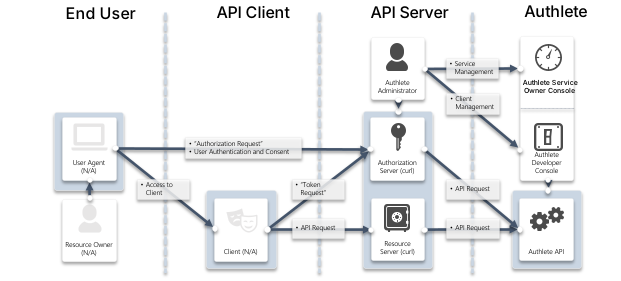
FQDNs for each component are as follows:
| Component | FQDN |
| --------------------- | -------------------- |
| Authlete API | `api.authlete.com` |
| Service Owner Console | `so.authlete.com` |
| Developer Console | `cd.authlete.com` |
| Authorization Server | `as.example.com` |
| Client | `client.example.org` |
| Resource Server | N/A |
# Environment setup
Consult instructions “[Sign-up to Authlete and Creating a Service](/v2/get-started/quickstarts/using-demo-authorization-server)“ to create a new Authlete API service and register a client to the service.
In this tutorial, we assume the following properties are generated or specified.
| Item | Value |
| ---------------------------- | ------------------------------------------------------------------------------------------------------------ |
| Client ID | Auto-generated e.g. `12818600553323` |
| Client Secret | Auto-generated e.g. `-olDIKD9BihRfB8O1JxobUEKBZ7PIV5Z6oaqxAshmoUtUZgB-wjmmxTYDiDV6vM_Mgl267PeNrRftq8cWplvmg` |
| Client Type | `CONFIDENTIAL` |
| Redirect URIs | `https://client.example.org/cb/example.com` |
| Client Authentication Method | `CLIENT_SECRET_BASIC` |
Let's try authorization code grant flow using this environment, in the next section.
# Walk-through
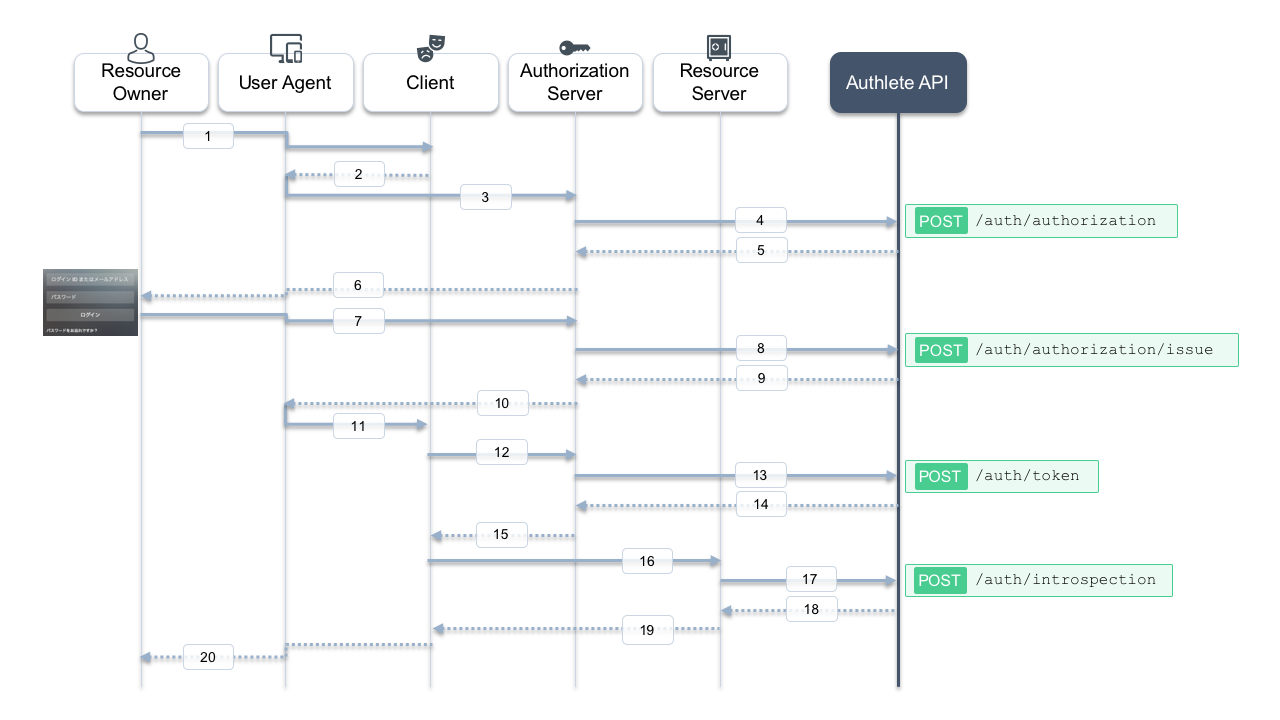
Here is a sequence diagram for this tutorial. Message numbers in the diagram help you follow the steps below.
## 1. Authorization request from the client to the authorization server
The client makes an authorization request to the authorization server via a user agent (messages #2 and #3). In this tutorial, suppose the following parameters are used:
| Item | Value |
| --------------- | ------------------------------------------- |
| `client_id` | `12818600553323` |
| `response_type` | `code` |
| `redirect_uri` | `https://client.example.org/cb/example.com` |
The authorization server receives the following HTTP GET query string from the user agent (folded for readability):
```bash theme={null}
redirect_uri=https://client.example.org/cb/example.com \
&response_type=code \
&client_id=12818600553323
```
The authorization server is supposed to evaluate these parameters itself. Typical checks include:
* Whether a client associated with `client_id = 12818600553323` has been registered.
* Whether the `redirect_uri` matches one of the client's registered redirect URIs.
* Whether other parameters such as `response_type` and `scope` are allowed for this client.
Authlete's [POST /auth/authorization](/api-reference/authorization-endpoint/process-authorization-request) API performs this evaluation on behalf of the authorization server. Let's call this API, acting as the authorization server.
### Linux/Mac
```bash theme={null}
curl -s -X POST https://api.authlete.com/api/auth/authorization \
-u ':' \
-H 'Content-Type: application/json' \
-d '{ "parameters": "redirect_uri=https://client.example.org/cb/example.com&response_type=code&client_id=" }'
```
### Windows (PowerShell)
```powershell theme={null}
curl.exe -s -X POST https://api.authlete.com/api/auth/authorization `
-u ':' `
-H 'Content-Type: application/json' `
-d '{\"parameters\" : \"redirect_uri=https://client.example.org/cb/example.com&response_type=code&client_id=\"}'
```
If the request is appropriate, Authlete returns a response like:
```json theme={null}
{
"resultMessage": "[A004001] Authlete has successfully issued a ticket to the service (API Key = 10738933707579) for the authorization request from the client (ID = 12818600553323). [response_type=code, openid=false]",
"type": "authorizationResponse",
"resultCode": "A004001",
"client": { /* ... */ },
"ticket": "cA0xUty6I64PnFTjer2g-iM5KIfGpssUHqkfDoMr0xk",
"action": "INTERACTION",
"service": {
"supportedClaims": [ /* ... */ ],
"supportedScopes": [ /* ... */ ]
}
}
```
Pay attention to:
* `resultMessage`: Human-readable result.
* `action`: What the authorization server should do next (`INTERACTION` here).
* `ticket`: Used in the next step when issuing an authorization code.
Authlete also returns service and client information that the authorization server can use when asking the resource owner for consent.
## 2. User authentication and confirmation of granting access
Actual interaction between the resource owner and the authorization server is out of scope here. Typically, the authorization server:
* Authenticates the user (e.g., ID/password).
* Determines the user's roles and privileges.
* Asks whether the user authorizes the client to access resources.
Assume that authentication and consent succeed, and the subject identifier for the user is `testuser01`.
## 3. Issuing an authorization code
After successful authentication and consent, the authorization server issues an authorization code by calling [POST /auth/authorization/issue](/api-reference/authorization-endpoint/issue-authorization-response), passing the `ticket` from step 1 and the `subject` (`testuser01`).
### Linux/Mac
```bash theme={null}
curl -s -X POST https://api.authlete.com/api/auth/authorization/issue \
-u ':' \
-H 'Content-Type: application/json' \
-d '{ "ticket": "", "subject": "testuser01" }'
```
### Windows (PowerShell)
```powershell theme={null}
curl.exe -s -X POST https://api.authlete.com/api/auth/authorization/issue `
-u ':' `
-H 'Content-Type: application/json' `
-d '{ \"ticket\": \"\", \"subject\": \"testuser01\" }'
```
If the request is appropriate, Authlete returns:
```json theme={null}
{
"responseContent": "https://client.example.org/cb/example.com?code=3GIJORjvgaEdu2u4KHyaQdGxfHDFsiViwGyZUxeBVrM",
"authorizationCode": "3GIJORjvgaEdu2u4KHyaQdGxfHDFsiViwGyZUxeBVrM",
"action": "LOCATION",
"accessTokenDuration": 0,
"resultMessage": "[A040001] The authorization request was processed successfully.",
"type": "authorizationIssueResponse",
"resultCode": "A040001",
"accessTokenExpiresAt": 0
}
```
The key fields are:
* `resultMessage`: Human-readable result.
* `action`: `LOCATION`, meaning the authorization server should redirect the user agent.
* `responseContent`: The redirect URI with the `code` parameter.
The authorization server responds to the user agent like:
```http theme={null}
HTTP/1.1 302 Found
Location: https://client.example.org/cb/example.com?code=3GIJORjvgaEdu2u4KHyaQdGxfHDFsiViwGyZUxeBVrM
```
If, instead, the authorization server decides not to issue tokens (for example, if the user denies access), it should use [POST /auth/authorization/fail](/api-reference/authorization-endpoint/fail-authorization-request) to generate an appropriate error response.
## 4. Token request
After receiving the authorization code via the redirect, the client sends a token request to the authorization server (message #12). For example:
```http theme={null}
POST /token HTTP/1.1
Host: as.example.com
Authorization: Basic base64(12818600553323:-olDIKD9BihRfB8O1JxobUEKBZ7PIV5Z6oaqxAshmoUtUZgB-wjmmxTYDiDV6vM_Mgl267PeNrRftq8cWplvmg)
Content-Type: application/x-www-form-urlencoded
grant_type=authorization_code
&code=3GIJORjvgaEdu2u4KHyaQdGxfHDFsiViwGyZUxeBVrM
&redirect_uri=https://client.example.org/cb/example.com
```
Instead of implementing all of this logic yourself, you can delegate validation and response generation to Authlete using the [POST /auth/token](/api-reference/token-endpoint/process-token-request) API.
### Linux/Mac
```bash theme={null}
curl -s -X POST https://api.authlete.com/api/auth/token \
-u ':' \
-H 'Content-Type: application/json' \
-d '{ "clientId": "", "clientSecret": "", "parameters": "grant_type=authorization_code&code=&redirect_uri=https://client.example.org/cb/example.com" }'
```
### Windows (PowerShell)
```powershell theme={null}
curl.exe -s -X POST https://api.authlete.com/api/auth/token `
-u ':' `
-H 'Content-Type: application/json' `
-d '{ \"clientId\": \"\", \"clientSecret\": \"\", \"parameters\": \"grant_type=authorization_code&code=&redirect_uri=https://client.example.org/cb/example.com\" }'
```
If the request is appropriate, Authlete returns:
```json theme={null}
{
"accessTokenExpiresAt": 1558627889220,
"refreshTokenDuration": 864000,
"clientId": 12818600553323,
"accessToken": "-g5ZJDAfpTQAqR9mdnAfhv0zuCe3SUrKJ2_859zI1Ow",
"refreshToken": "4PwVTovcwMgnNJbsH-BzeQj5a8nelOi0iEIswex-ueE",
"accessTokenDuration": 86400,
"clientIdAliasUsed": false,
"refreshTokenExpiresAt": 1559405489220,
"grantType": "AUTHORIZATION_CODE",
"subject": "testuser01",
"action": "OK",
"responseContent": "{\"access_token\":\"-g5ZJDAfpTQAqR9mdnAfhv0zuCe3SUrKJ2_859zI1Ow\",\"refresh_token\":\"4PwVTovcwMgnNJbsH-BzeQj5a8nelOi0iEIswex-ueE\",\"scope\":null,\"token_type\":\"Bearer\",\"expires_in\":86400}",
"resultCode": "A050001",
"type": "tokenResponse",
"resultMessage": "[A050001] The token request (grant_type=authorization_code) was processed successfully."
}
```
Again, the key fields are:
* `resultMessage`: Human-readable result.
* `action`: `OK`, meaning the authorization server should return a normal token response.
* `responseContent`: JSON body of the token response to send back to the client.
The authorization server would respond:
```http theme={null}
HTTP/1.1 200 OK
Content-Type: application/json
{
"access_token":"-g5ZJDAfpTQAqR9mdnAfhv0zuCe3SUrKJ2_859zI1Ow",
"refresh_token":"4PwVTovcwMgnNJbsH-BzeQj5a8nelOi0iEIswex-ueE",
"scope":null,
"token_type":"Bearer",
"expires_in":86400
}
```
By leveraging Authlete APIs, the authorization server does not need to implement complex logic for validating authorization and token requests or for building correct responses.
## 5. API request (access token introspection)
Typically, the client then calls APIs on a resource server using the access token (message #16). The resource server must:
* Check whether the token is valid and not expired.
* Retrieve information about the user (`subject`) and client (`clientId`).
* Decide how to handle the API request.
Authlete provides the [`/auth/introspection`](https://docs.authlete.com/#introspection) API for this purpose.
Make sure to replace ``, ``, and `` with your own values.
### Linux/Mac
```bash theme={null}
curl -s -X POST https://api.authlete.com/api/auth/introspection \
-u ':' \
-H 'Content-Type: application/json' \
-d '{ "token": "" }'
```
### Windows (PowerShell)
```powershell theme={null}
curl.exe -s -X POST https://api.authlete.com/api/auth/introspection `
-u ':' `
-H 'Content-Type: application/json' `
-d '{ \"token\": \"\" }'
```
If the request is appropriate, Authlete returns a response like:
```json theme={null}
{
"resultMessage": "[A056001] The access token is valid.",
"refreshable": true,
"clientIdAliasUsed": false,
"existent": true,
"resultCode": "A056001",
"expiresAt": 1558627889000,
"responseContent": "Bearer error=\"invalid_request\"",
"clientId": 12818600553323,
"action": "OK",
"usable": true,
"sufficient": true,
"subject": "testuser01",
"type": "introspectionResponse"
}
```
From this response, the resource server can determine:
* Whether the token is valid (`usable`, `sufficient`, `expiresAt`).
* Which user (`subject`) and client (`clientId`) it belongs to.
Based on that, the resource server decides how to respond to the API request (message #19).
# Conclusion
In this tutorial, we have seen how to use Authlete 2.x APIs to implement the OAuth 2.0 authorization code grant flow in an authorization server, using `/auth/authorization`, `/auth/authorization/issue`, `/auth/token`, and `/auth/introspection`.
# Next steps
* Require PKCE for authorization code flow: [PKCE (2.x)](/v2/protocols-and-flows/protocol-extensions/pkce).
* Add OpenID Connect on top of OAuth 2.0: [OIDC Basics (2.x)](/v2/get-started/core-concepts/oidc-basics).
* Learn how to handle error responses: [Generating error response with "fail" API](/configuration-reference/error-handling-debugging/generating-error-response-using-fail-api).
* Manage and revoke tokens: [Token Lifecycle & Policies](/configuration-reference/tokens-and-claims/managing-authorizations-issued-tokens-granted-for-a-client-by-a-user).
* Explore reference authorization server implementations: [Authorization server implementations](https://github.com/authlete) (See [Using Demo Authorization Server (2.x)](/v2/get-started/quickstarts/using-demo-authorization-server)).