> ## Documentation Index
> Fetch the complete documentation index at: https://developers.authlete.com/llms.txt
> Use this file to discover all available pages before exploring further.
# Token duration per client
> Instructions on configuring access/refresh token duration per client in Authlete 2.1.
This page is for **Authlete 2.x**. For current (3.0) documentation, see [this page](/configuration-reference/tokens-and-claims/token-duration-per-client).
## Preface
This article describes instructions on how to configure access/refresh token duration per client. See [How Authlete determines token duration](/configuration-reference/tokens-and-claims/how-authlete-determines-token-duration) for details on token duration.
> This feature is available since Authlete 2.1.
## Configuration
> Only service owners can configure the following settings.
Here are steps to configure access/refresh token duration per client.
1. Go to the client developer console and log in as a service owner (i.e. using the pair of API key and secret of the service as login credentials).
2. Open the client edit page and click "**Extension**" tab so that you can see token duration settings. Enter values for "Access Token Duration In seconds" and "Refresh Token Duration In seconds" fields.
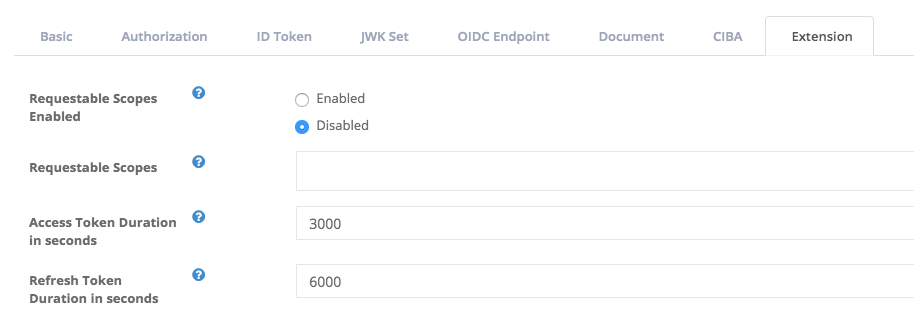 *Set token duration per client at Client Developer Console*
## Example
Assume there are a service and two clients registered with it. Values of access token duration are set to some of the entities as follows.
| Entity | Access token duration (seconds) |
| -------- | ------------------------------- |
| Service | 86,400 |
| Client 1 | (not set) |
| Client 2 | 3,000 |
Under this condition, Authlete's [POST /auth/authorization/issue](/api-reference/authorization-endpoint/issue-authorization-response) API makes the following responses to implicit grant flow authorization requests sent from each of the clients.
## 1. Response to an authorization request from Client 1
```json theme={null}
{
"type": "authorizationIssueResponse",
"accessTokenDuration": 86400,
"responseContent": "https://client.example.org/cb/example.com#access_token=1zT0XRynwLryWYRKCYSDjrwku5sD-WQTCtC1tnfExZE&token_type=Bearer&expires_in=86400&scope=openid"
}
```
\=> The access token duration for the Service is used.
## 2. Response to an authorization request from Client 2
```json theme={null}
{
"type": "authorizationIssueResponse",
"accessTokenDuration": 3000,
"responseContent": "https://client.example.org/cb/example.com#access_token=xg79MJucCq8f8QPA2_o9_q5nfzgbRQycgVwYSvMSWTY&token_type=Bearer&expires_in=3000&scope=openid"
}
```
\=> The access token duration for the Client 2 is used.
*Set token duration per client at Client Developer Console*
## Example
Assume there are a service and two clients registered with it. Values of access token duration are set to some of the entities as follows.
| Entity | Access token duration (seconds) |
| -------- | ------------------------------- |
| Service | 86,400 |
| Client 1 | (not set) |
| Client 2 | 3,000 |
Under this condition, Authlete's [POST /auth/authorization/issue](/api-reference/authorization-endpoint/issue-authorization-response) API makes the following responses to implicit grant flow authorization requests sent from each of the clients.
## 1. Response to an authorization request from Client 1
```json theme={null}
{
"type": "authorizationIssueResponse",
"accessTokenDuration": 86400,
"responseContent": "https://client.example.org/cb/example.com#access_token=1zT0XRynwLryWYRKCYSDjrwku5sD-WQTCtC1tnfExZE&token_type=Bearer&expires_in=86400&scope=openid"
}
```
\=> The access token duration for the Service is used.
## 2. Response to an authorization request from Client 2
```json theme={null}
{
"type": "authorizationIssueResponse",
"accessTokenDuration": 3000,
"responseContent": "https://client.example.org/cb/example.com#access_token=xg79MJucCq8f8QPA2_o9_q5nfzgbRQycgVwYSvMSWTY&token_type=Bearer&expires_in=3000&scope=openid"
}
```
\=> The access token duration for the Client 2 is used.