> ## Documentation Index
> Fetch the complete documentation index at: https://developers.authlete.com/llms.txt
> Use this file to discover all available pages before exploring further.
# JWK set settings for an Authlete Service
> Setting up a JWK set for an Authlete service.
This page is for **Authlete 2.x**. For current (3.0) documentation, see [this page](/configuration-reference/key-management/jwk-set-settings-for-an-authlete-service).
# JWK set settings for an Authlete Service
## Preface
This article explains how to register a JWK set for an Authlete service.\
Preparing a JWK set
***
First, this article assumes that you have prepared a JWK set in some way. The following example illustrates usage of [mkjwk.org](https://mkjwk.org/)
service to generate an ES256 key pair, and parameters specified for it.
* Key Type: **EC (Elliptic Curve)**
* Curve: **P-256**
* Key Use: **Signing**
* Algorithm: **ES256**
* Key ID: **1**
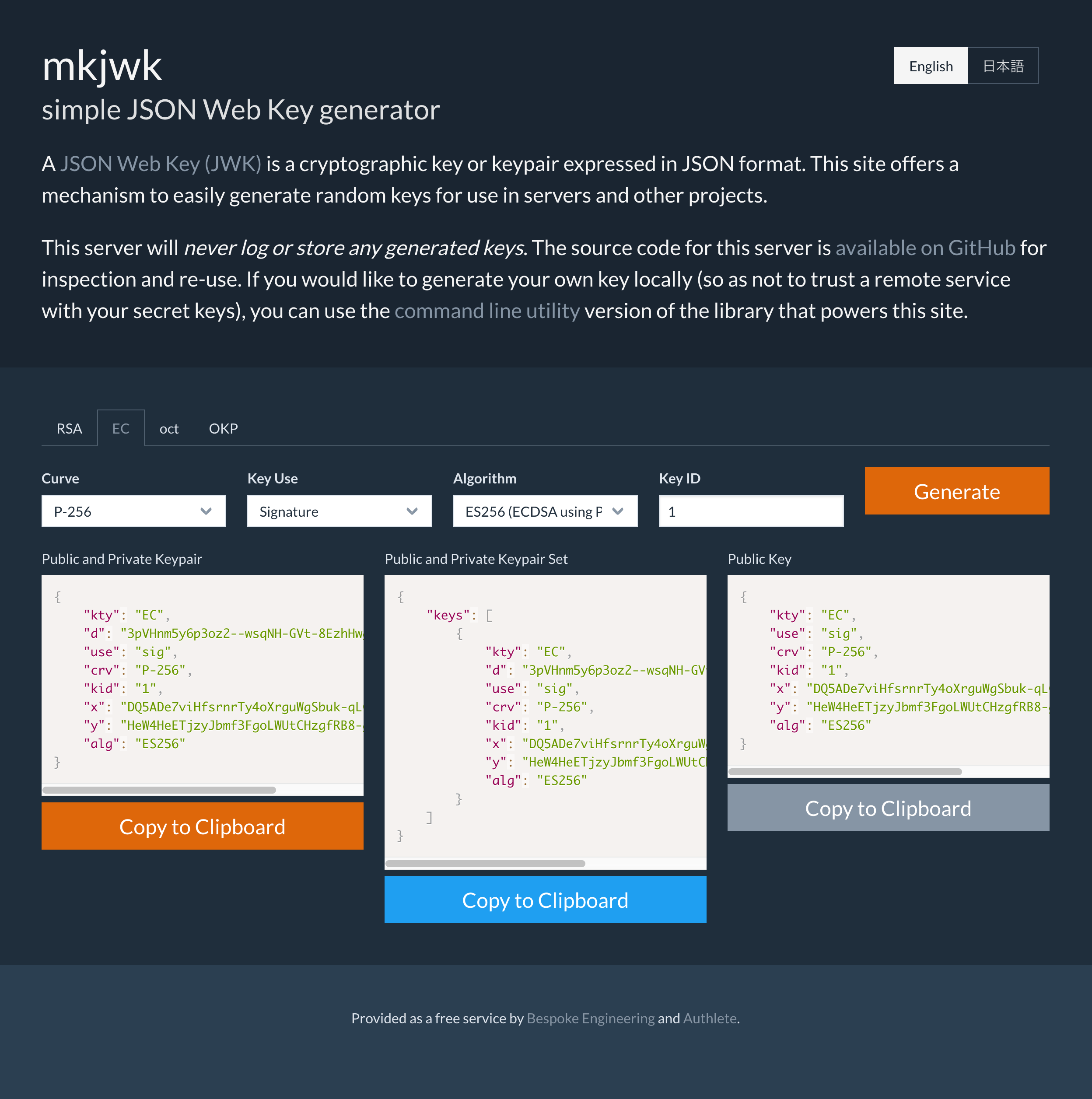 *Generating a JWK Set using mkjwk*
## Registering the JWK set via Service Owner Console
Copy the generated content in the "Public and Private Keypair Set" section, paste it to the service's "JWK Set Content" section in "JWK Set" tab and click "Update" button.
*Generating a JWK Set using mkjwk*
## Registering the JWK set via Service Owner Console
Copy the generated content in the "Public and Private Keypair Set" section, paste it to the service's "JWK Set Content" section in "JWK Set" tab and click "Update" button.
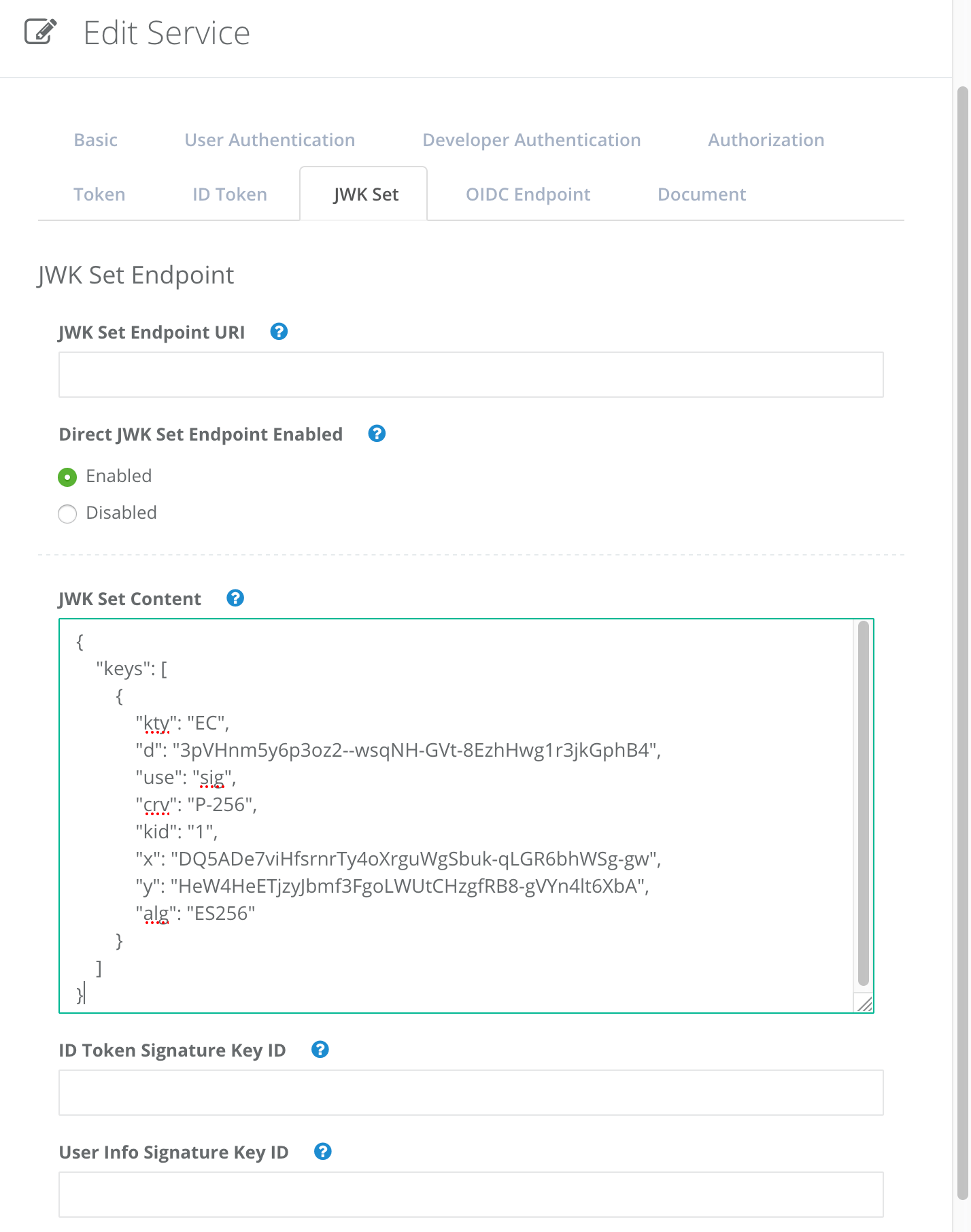 *JWK Set Content*
Now the JWK set has been registered in the service.
## Registering the JWK set via Authlete API
You can use Authlete's service management APIs to register the JWK set instead of using the Web console described above. The following example illustrates how to make a request to [/service/update API](/api-reference/service-management/update-service)
to specify the JWK set as a value of "jwks" key.
### 1. Get configuration data about the target service
Use [/service/get API](/api-reference/service-management/get-service)
to retrieve the configuration data of the service.
```
curl -s {Authlete API}/service/get/{Service API Key} \
-u {Service Owner API Key}:{Service Owner API Secret} \
-H 'Content-type: application/json' \
> service.json
```
### 2. Add a new JWK set to the data
Add the following key/value as a JWK set to the JSON formatted configuration data retrieved above and save as updated-service.json.
```
{
"jwks": {
"keys": [
{
"kty": "EC",
"d": "eb4BggIO87SUjzP1M56MeXj0NQajWBwpwiDq8yoL5n4",
"use": "sig",
"crv": "P-256",
"kid": "2019-07-25_02",
"x": "f8a6jovcRTNLDWi3_c62YcW_3ZN-GH1RkiVOZgSgIYI",
"y": "EB3R8W12a3tgZfNer1RP0DizT3qpRybGw_krfsE0JzY",
"alg": "ES256"
}
]
}
}
```
If you would like to register multiple JWKs, specify which one of the JWKs for signing. For example, add the following key/value if a JWK identified by key ID "kid":"2019-07-25\_02" is to be used for signing ID tokens. (see [Authlete API Reference](/api-reference/service-management/get-service) for details on idTokenSignatureKeyId)
```
"idTokenSignatureKeyId": "2019-07-25_02"
```
### 3. Update the service with the new configuration data
Use [/service/update API](/api-reference/service-management/update-service)
to put the new configuration data that includes the JWK set.
```
cat updated-service.json | \
curl -s -X PUT {Authlete API}/service/update/{Service API Key} \
-u {Service Owner API Key}:{Service Owner API Secret} \
-H 'Content-type: application/json' \
-d @-
```
The new "jwks" should be included in the output as follows.
```
[...]
"jwks": "{\"keys\":[
{
\"kty\":\"EC\",
\"d\":\"eb4BggIO87SUjzP1M56MeXj0NQajWBwpwiDq8yoL5n4\",
\"use\":\"sig\",
\"crv\":\"P-256\",
\"kid\":\"2019-07-25_02\",
\"x\":\"f8a6jovcRTNLDWi3_c62YcW_3ZN-GH1RkiVOZgSgIYI\",
\"y\":\"EB3R8W12a3tgZfNer1RP0DizT3qpRybGw_krfsE0JzY\",
\"alg\":\"ES256\"
}
]}"
[...]
```
*JWK Set Content*
Now the JWK set has been registered in the service.
## Registering the JWK set via Authlete API
You can use Authlete's service management APIs to register the JWK set instead of using the Web console described above. The following example illustrates how to make a request to [/service/update API](/api-reference/service-management/update-service)
to specify the JWK set as a value of "jwks" key.
### 1. Get configuration data about the target service
Use [/service/get API](/api-reference/service-management/get-service)
to retrieve the configuration data of the service.
```
curl -s {Authlete API}/service/get/{Service API Key} \
-u {Service Owner API Key}:{Service Owner API Secret} \
-H 'Content-type: application/json' \
> service.json
```
### 2. Add a new JWK set to the data
Add the following key/value as a JWK set to the JSON formatted configuration data retrieved above and save as updated-service.json.
```
{
"jwks": {
"keys": [
{
"kty": "EC",
"d": "eb4BggIO87SUjzP1M56MeXj0NQajWBwpwiDq8yoL5n4",
"use": "sig",
"crv": "P-256",
"kid": "2019-07-25_02",
"x": "f8a6jovcRTNLDWi3_c62YcW_3ZN-GH1RkiVOZgSgIYI",
"y": "EB3R8W12a3tgZfNer1RP0DizT3qpRybGw_krfsE0JzY",
"alg": "ES256"
}
]
}
}
```
If you would like to register multiple JWKs, specify which one of the JWKs for signing. For example, add the following key/value if a JWK identified by key ID "kid":"2019-07-25\_02" is to be used for signing ID tokens. (see [Authlete API Reference](/api-reference/service-management/get-service) for details on idTokenSignatureKeyId)
```
"idTokenSignatureKeyId": "2019-07-25_02"
```
### 3. Update the service with the new configuration data
Use [/service/update API](/api-reference/service-management/update-service)
to put the new configuration data that includes the JWK set.
```
cat updated-service.json | \
curl -s -X PUT {Authlete API}/service/update/{Service API Key} \
-u {Service Owner API Key}:{Service Owner API Secret} \
-H 'Content-type: application/json' \
-d @-
```
The new "jwks" should be included in the output as follows.
```
[...]
"jwks": "{\"keys\":[
{
\"kty\":\"EC\",
\"d\":\"eb4BggIO87SUjzP1M56MeXj0NQajWBwpwiDq8yoL5n4\",
\"use\":\"sig\",
\"crv\":\"P-256\",
\"kid\":\"2019-07-25_02\",
\"x\":\"f8a6jovcRTNLDWi3_c62YcW_3ZN-GH1RkiVOZgSgIYI\",
\"y\":\"EB3R8W12a3tgZfNer1RP0DizT3qpRybGw_krfsE0JzY\",
\"alg\":\"ES256\"
}
]}"
[...]
```