> ## Documentation Index
> Fetch the complete documentation index at: https://developers.authlete.com/llms.txt
> Use this file to discover all available pages before exploring further.
# Using Client ID Alias
> Technical Information about using Client ID Alias feature in Authlete for seamless migration of clients and resource servers to Authlete-based authorization server.
This page is for **Authlete 2.x**. For current (3.0) documentation, see [this page](/configuration-reference/client-management/using-client-id-alias).
# Using "Client ID Alias"
## Overview
Authlete provides “Client ID Alias” feature. You can assign an arbitrary client ID to each client, in addition to a pre-configured value that Authlete automatically generates at registration time. This feature is suitable for minimizing configuration and implementation changes in clients and resource servers when migrating from the existing authorization sever to Authlete.
***
## Client IDs in Authlete
In Authlete, a client ID (client\_id) for each client is a random numerical value that Authlete automatically generates and registers to its client configuration database. Clients use each of client IDs (hereinafter “New ID”) as one of request parameters to an authorization server.
It would become cumbersome for some circumstances. For example, assume that there are existing authorization server and clients in operation. Naturally client IDs (hereinafter “Old ID”) have been registered at both the server and the clients. In order to migrate the authorization server to an Authlete-based one, you have to update each of the clients to use the “New ID” instead of the “Old ID.” It would take much effort, depending on numbers, characteristics etc. of the clients.
Another example is on resource servers side. If they rely on system of “Old ID,” you may have to deploy some translation capability to find an “Old ID” from a “New ID” associated to an access token issued by Authlete.
***
## Aliasing client ID
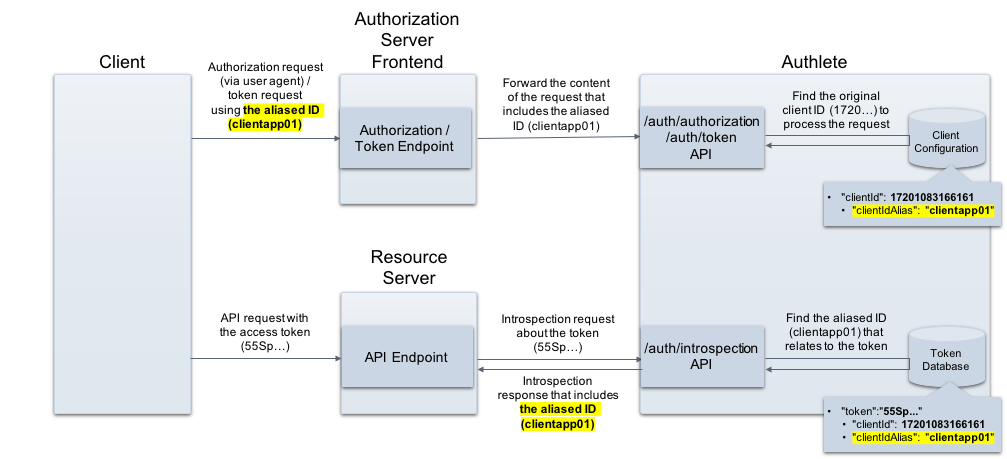
Authlete's “Client ID Alias” feature is a solution for the issues discussed in the previous section. By enabling it, you can assign the “Old ID” constituted with arbitrary strings, in addition to the automatically generated “New ID” to the client.
The feature is transparent to clients, allowing them to use “Old IDs” for many situations where client IDs are needed, such as “client\_id” request parameter in authorization requests and token requests, a part of “Authorization” header in token requests.
Authlete also provide “Old IDs” as a result of token introspection so that resource servers can process API requests from clients, based on the system of “Old ID.”\\
 ***
## Configuration
Make this parameter Enabled in both a service and its clients. This feature won't work if either one is disabled.
### Authlete service configuration
Choose “Enabled” at “Client ID Alias Enabled” section in “Basic” tab.
***
## Configuration
Make this parameter Enabled in both a service and its clients. This feature won't work if either one is disabled.
### Authlete service configuration
Choose “Enabled” at “Client ID Alias Enabled” section in “Basic” tab.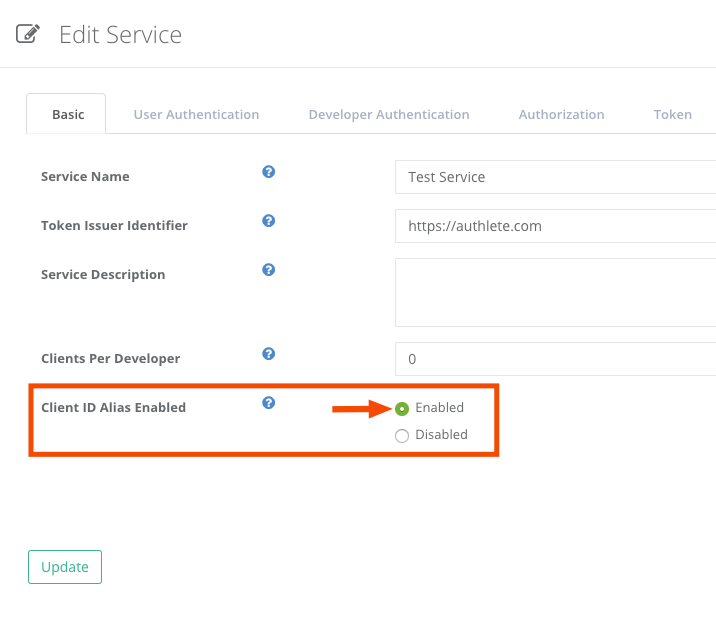 ### Client configuration
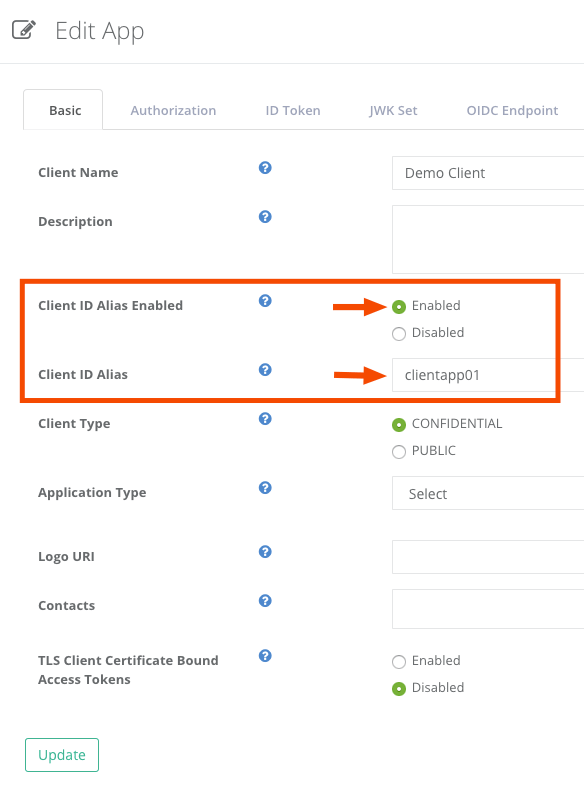
Choose “Enabled” at “Client ID Alias Enabled” section and specify a value at “Client ID Alias” section in “Basic” tab.
### Client configuration
Choose “Enabled” at “Client ID Alias Enabled” section and specify a value at “Client ID Alias” section in “Basic” tab.
 ***
## Examples
### Authorization request
The following is an example of an authorization request/response using curl (folded for readability).
The request includes an aliased client ID ("clientapp01") instead of an original one (1720...). Authlete's [POST /auth/authorization](/api-reference/authorization-endpoint/process-authorization-request) accepts the aliased client ID specified by a client and processes the request.
* Request
```
curl -s -X POST .../auth/authorization
-u $apiKey:$apiSecret
-H 'Content-type: application/json'
-d '{"parameters":
"redirect_uri=https://client.example.org/cb/example.com&client_id=clientapp01&scope=payment&response_type=code"}'
```
* Response
```
{
"type": "authorizationResponse",
"resultCode": "A004001",
"resultMessage":
"[A004001] Authlete has successfully issued a ticket
to the service (API Key = 1415...) for the
authorization request from the client (ID = 1720...).
[response_type=code, openid=false]",
"action": "INTERACTION",
"client": {
"clientId": 1720...,
"clientIdAlias": "clientapp01",
"clientIdAliasEnabled": true,...
```
### Token request
The following is an example of a token request/response using curl (folded for readability).
The request includes an aliased client ID ("clientapp01") instead of an original one (1720...) in Authorization header. Authlete's [POST /auth/token](/api-reference/token-endpoint/process-token-request) accepts the aliased client ID specified by a client and processes the request.
* Request
```
curl -s -X POST .../auth/token -u $apiKey:$apiSecret
-H 'Content-type: application/json'
-d '{"clientId":"clientapp01",
"clientSecret":"...",
"parameters":
"redirect_uri=https://client.example.org/cb/example.com
&grant_type=authorization_code
&code=6GXV..."}'
```
* Response
```
{
"type": "tokenResponse",
"resultCode": "A050001",
"resultMessage":
"[A050001] The token request (grant_type=authorization_code)
was processed successfully.",
"accessToken": "55Sp...",
"action": "OK",
"clientId": 17201083166161,
"clientIdAlias": "clientapp01",
"clientIdAliasUsed": true,
"refreshToken": "xDcV...",
"responseContent":
"{\"access_token\":\"55Sp...\",
\"refresh_token\":\"xDcV...\",
\"scope\":\"payment\",
\"token_type\":\"Bearer\",
\"expires_in\":300}",
"scopes": [
"payment"
],
"subject": "testuser01"
}
```
If you have enabled [JWT-based access token](/v2/configuration-reference/token-issuance-formats/jwt-based-access-token), the aliased client ID is included in a payload part of an access token as follows.
```
{
"sub": "testuser01",
"scope": "payment",
"iss": "https://authlete.com",
"exp": 1594...,
"iat": 1594...,
"client_id": "clientapp01",
"jti": "IRBq..."
}
```
### Token introspection
The following is an example of an introspection request/response using curl (folded for readability).
Authlete's [POST /auth/introspection](/api-reference/introspection-endpoint/process-introspection-request) API provides the aliased client ID ("clientapp01") in a response to a client that requests status and related information of an access token.
* Request
```
curl -s -X POST .../auth/introspection \
-u $apiKey:$apiSecret \
-H 'Content-type: application/json' \
-d '{"token":"55Sp..."}'
```
* Response
```
{
"type": "introspectionResponse",
"resultCode": "A056001",
"resultMessage": "[A056001] The access token is valid.",
"action": "OK",
"clientId": 1720...,
"clientIdAlias": "clientapp01",
"clientIdAliasUsed": true,
"existent": true,
"expiresAt": 1594632489000,
"refreshable": true,
"responseContent": "Bearer error=\"invalid_request\"",
"scopes": [
"payment"
],
"subject": "testuser01",
"sufficient": true,
"usable": true
}
```
***
## Examples
### Authorization request
The following is an example of an authorization request/response using curl (folded for readability).
The request includes an aliased client ID ("clientapp01") instead of an original one (1720...). Authlete's [POST /auth/authorization](/api-reference/authorization-endpoint/process-authorization-request) accepts the aliased client ID specified by a client and processes the request.
* Request
```
curl -s -X POST .../auth/authorization
-u $apiKey:$apiSecret
-H 'Content-type: application/json'
-d '{"parameters":
"redirect_uri=https://client.example.org/cb/example.com&client_id=clientapp01&scope=payment&response_type=code"}'
```
* Response
```
{
"type": "authorizationResponse",
"resultCode": "A004001",
"resultMessage":
"[A004001] Authlete has successfully issued a ticket
to the service (API Key = 1415...) for the
authorization request from the client (ID = 1720...).
[response_type=code, openid=false]",
"action": "INTERACTION",
"client": {
"clientId": 1720...,
"clientIdAlias": "clientapp01",
"clientIdAliasEnabled": true,...
```
### Token request
The following is an example of a token request/response using curl (folded for readability).
The request includes an aliased client ID ("clientapp01") instead of an original one (1720...) in Authorization header. Authlete's [POST /auth/token](/api-reference/token-endpoint/process-token-request) accepts the aliased client ID specified by a client and processes the request.
* Request
```
curl -s -X POST .../auth/token -u $apiKey:$apiSecret
-H 'Content-type: application/json'
-d '{"clientId":"clientapp01",
"clientSecret":"...",
"parameters":
"redirect_uri=https://client.example.org/cb/example.com
&grant_type=authorization_code
&code=6GXV..."}'
```
* Response
```
{
"type": "tokenResponse",
"resultCode": "A050001",
"resultMessage":
"[A050001] The token request (grant_type=authorization_code)
was processed successfully.",
"accessToken": "55Sp...",
"action": "OK",
"clientId": 17201083166161,
"clientIdAlias": "clientapp01",
"clientIdAliasUsed": true,
"refreshToken": "xDcV...",
"responseContent":
"{\"access_token\":\"55Sp...\",
\"refresh_token\":\"xDcV...\",
\"scope\":\"payment\",
\"token_type\":\"Bearer\",
\"expires_in\":300}",
"scopes": [
"payment"
],
"subject": "testuser01"
}
```
If you have enabled [JWT-based access token](/v2/configuration-reference/token-issuance-formats/jwt-based-access-token), the aliased client ID is included in a payload part of an access token as follows.
```
{
"sub": "testuser01",
"scope": "payment",
"iss": "https://authlete.com",
"exp": 1594...,
"iat": 1594...,
"client_id": "clientapp01",
"jti": "IRBq..."
}
```
### Token introspection
The following is an example of an introspection request/response using curl (folded for readability).
Authlete's [POST /auth/introspection](/api-reference/introspection-endpoint/process-introspection-request) API provides the aliased client ID ("clientapp01") in a response to a client that requests status and related information of an access token.
* Request
```
curl -s -X POST .../auth/introspection \
-u $apiKey:$apiSecret \
-H 'Content-type: application/json' \
-d '{"token":"55Sp..."}'
```
* Response
```
{
"type": "introspectionResponse",
"resultCode": "A056001",
"resultMessage": "[A056001] The access token is valid.",
"action": "OK",
"clientId": 1720...,
"clientIdAlias": "clientapp01",
"clientIdAliasUsed": true,
"existent": true,
"expiresAt": 1594632489000,
"refreshable": true,
"responseContent": "Bearer error=\"invalid_request\"",
"scopes": [
"payment"
],
"subject": "testuser01",
"sufficient": true,
"usable": true
}
```