> ## Documentation Index
> Fetch the complete documentation index at: https://developers.authlete.com/llms.txt
> Use this file to discover all available pages before exploring further.
# HAIP-compliant Verifiable Credential Issuance
> This is an explanation of the issuance procedure for Verifiable Credentials (VCs) that comply with the OpenID4VC High Assurance Interoperability Profile 1.0 (HAIP).
## Introduction
This article explains the procedure for issuing Verifiable Credentials (VCs)
that comply with the **[OpenID4VC High Assurance Interoperability Profile 1.0][HAIP]**
(hereinafter "**[HAIP][HAIP]**").
## Specification Key Points
Regarding the VC issuance procedure, HAIP can be broadly seen as a combination
of **[OpenID for Verifiable Credential Issuance 1.0][OID4VCI]** (hereinafter
"**[OID4VCI][OID4VCI]**") and the **[FAPI 2.0 Security Profile][FAPI2SP]**
(hereinafter "**[FAPI2SP][FAPI2SP]**"). However, there are some important
differences to be aware of, which are outlined below.
### Sender-Constrained Access Token
In FAPI2SP, the following mechanisms can be used to achieve
**sender-constrained access tokens**.
* **MTLS** ([RFC 8705][RFC_8705])
* **DPoP** ([RFC 9449][RFC_9449])
In contrast, HAIP permits only DPoP.
### Client Authentication
In FAPI2SP, the following **client authentication** methods are available.
* `tls_client_auth` ([RFC 8705][RFC_8705])
* `self_signed_tls_client_auth` ([RFC 8705][RFC_8705])
* `private_key_jwt` ([RFC 7523][RFC_7523])
In HAIP, in addition to these,
**[OAuth 2.0 Attestation-Based Client Authentication][ABCA]** (hereinafter
"**[ABCA][ABCA]**") is also supported.
* `attest_jwt_client_auth` ([ABCA][ABCA])
Note that when using ABCA in the context of HAIP, the client attestation must
include the `x5c` header parameter. In addition, the X.509 certificate
containing the public key for signature verification (i.e., the leaf
certificate in the certificate chain) must not be self-signed.
A literal reading of the HAIP specification suggests that client authentication
methods other than ABCA are also permitted. However, since discussions around
the HAIP specification appear to assume the use of ABCA, and the specification
may be updated to reflect this view (i.e., to allow only ABCA), this article
adopts ABCA as the client authentication method.
### Key Attestation
OID4VCI defines several formats for **Key Proofs** included in a credential
request. Among them, the **jwt Proof Type** ([OID4VCI Appendix F.1][OID4VCI_F1])
allows a Key Attestation ([OID4VCI Appendix D][OID4VCI_D]) to be specified in
the `key_attestation` header parameter. In addition, the
**attestation Proof Type** ([OID4VCI Appendix F.3][OID4VCI_F3]) allows the Key
Attestation itself to be used directly as the Key Proof.
When using a Key Attestation in the context of HAIP, it must include the `x5c`
header parameter. Furthermore, the X.509 certificate containing the public key
for signature verification (i.e., the leaf certificate in the certificate chain)
must not be self-signed.
### Scope
In general, an access token is associated with one or more scopes. In the
context of HAIP, those scopes must include at least one that refers to a
specific credential configuration.
More specifically, the access token must be associated with the value of the
`scope` property of at least one credential configuration listed in
`credential_configurations_supported` in the Credential
Issuer Metadata.
## Procedure Overview
An overview of the VC issuance procedure using the authorization code flow is
as follows:
1. PAR Request
2. Authorization Request
3. Token Request
4. Credential Request
However, since each request requires various tokens, the actual procedure
becomes more complex. The following outlines the procedure, including the
generation of those tokens.
1. PAR Request
* PKCE Token (Code Verifier and Code Challenge) Generation ([PKCE][RFC_7636])
* Client Attestation Generation ([ABCA][ABCA])
* Attestation Challenge Retrieval ([ABCA][ABCA])
* Client Attestation PoP Generation ([ABCA][ABCA])
* DPoP Proof JWT Generation ([DPoP][RFC_9449])
* PAR Request Submission ([PAR][RFC_9126])
2. Authorization Request
* Authorization Request Submission
3. Token Request
* Client Attestation Generation ([ABCA][ABCA]) (reusable)
* Attestation Challenge Retrieval ([ABCA][ABCA]) (reusable)
* Client Attestation PoP Generation ([ABCA][ABCA]) (reusable)
* DPoP Proof JWT Generation ([DPoP][RFC_9449])
* Token Request Submission
4. Credential Request
* Nonce Retrieval ([OID4VCI][OID4VCI])
* Key Attestation Generation ([OID4VCI][OID4VCI])
* Key Proof Generation ([OID4VCI][OID4VCI])
* DPoP Proof JWT Generation ([DPoP][RFC_9449])
* Credential Request Submission ([OID4VCI][OID4VCI])
## Actual Procedure
In this section, we will walk through the actual procedure.
For the scripts used to generate the various tokens, as well as the private
keys, public keys, and certificates, we use those published in
[authlete/oid4vci-demo][OID4VCI_DEMO].
### PAR Request
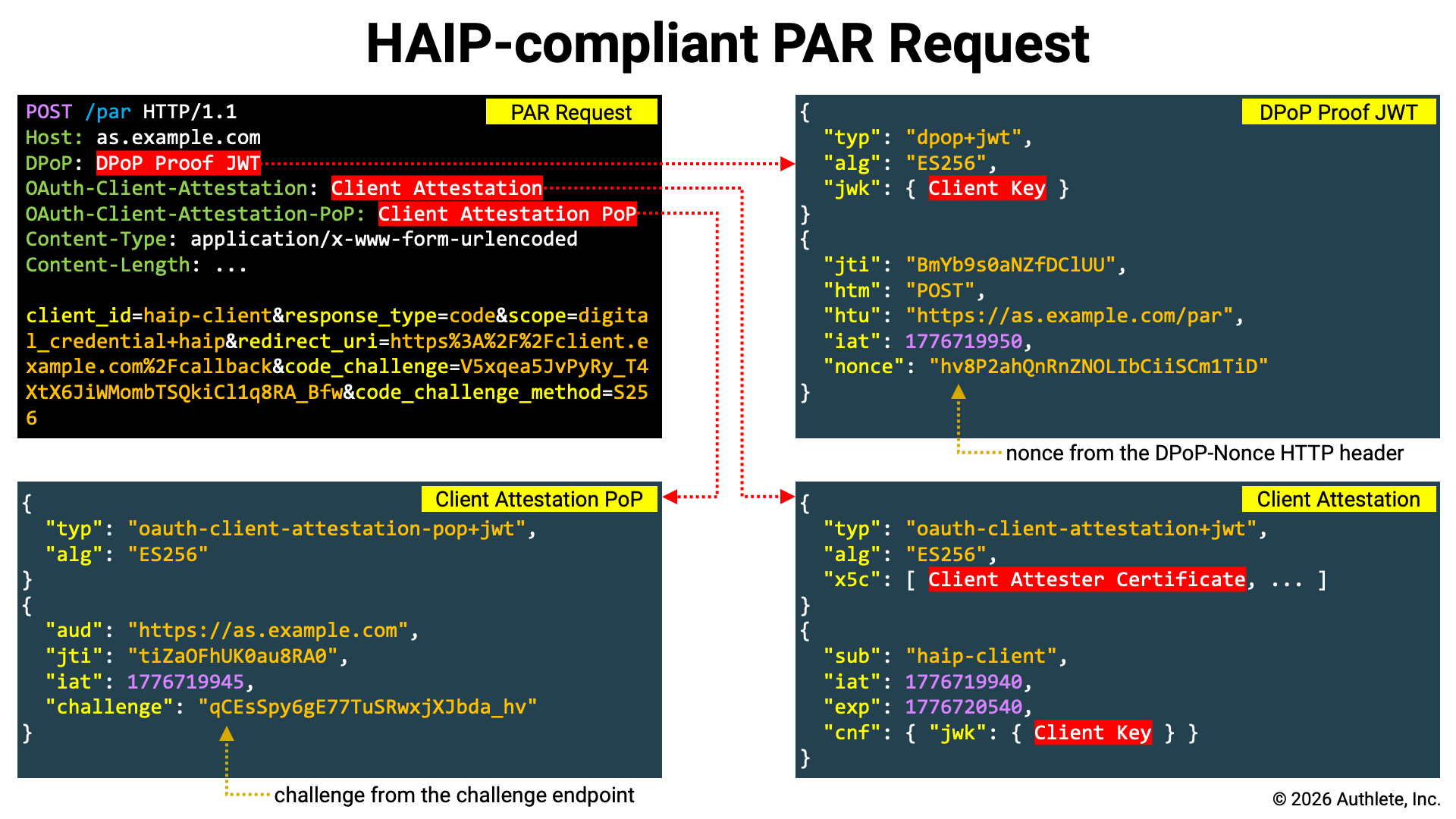 HAIP is based on FAPI2SP, and since FAPI2SP mandates the use of [PAR][RFC_9126],
PAR is also required for HAIP-compliant authorization requests. Here, we
register the authorization request at the PAR endpoint and obtain a
**request URI**.
HAIP is based on FAPI2SP, and since FAPI2SP mandates the use of [PAR][RFC_9126],
PAR is also required for HAIP-compliant authorization requests. Here, we
register the authorization request at the PAR endpoint and obtain a
**request URI**.
#### PKCE Token Generation
HAIP is based on FAPI2SP, and since FAPI2SP mandates the use of [PKCE][RFC_7636],
HAIP-compliant authorization requests must include a code challenge, and token
requests must include a code verifier. Therefore, we use the `pkce` script to
generate them.
```shell theme={null}
./pkce
```
Output:
```shell theme={null}
CODE_VERIFIER=3HlzvGOxhJz3jK2fwstAM8aV2GvqzWFpvfnyOGm53kk
CODE_CHALLENGE=elpP-j7DRK-dvxy4GBOzSr4EjnWzwRBquR-mY-ijtT8
```
By using the shell built-in command `eval` as shown below, you can directly
assign the output of the `pkce` script to shell variables.
```shell theme={null}
eval "$(./pkce)"
```
#### Client Attestation Generation
A client attestation can be generated using the
`generate-client-attestation` script. Note that in HAIP,
the `x5c` header parameter is required, so you must use the `--x5c` option to
specify the X.509 certificates to be included in the `x5c` header parameter.
The `--x5c` option can be specified multiple times, and the X.509 certificates
are added to the `x5c` header parameter in the order they are provided.
```shell theme={null}
CLIENT_ATTESTATION=`./generate-client-attestation \
--attester-key=keys/client-attester-private.jwk \
--client-id=${CLIENT_ID} \
--client-key=client.jwk \
--x5c=keys/client-attester-certificate.pem`
```
Below is an example of the header and payload of a generated Client Attestation.
```json theme={null}
{
"typ": "oauth-client-attestation+jwt",
"alg": "ES256",
"x5c": [
"MIIBnTCCAUOgAwIBAgIUZr+BYJKFUDY6CIbWubXMjo1cEH8wCgYIKoZIzj0EAwIw
HzEdMBsGA1UEAwwUQ2xpZW50IEF0dGVzdGVyIFJvb3QwIBcNMjYwNDE0MTc1OTQy
WhgPNDc2NDAzMTExNzU5NDJaMBoxGDAWBgNVBAMMD0NsaWVudCBBdHRlc3RlcjBZ
MBMGByqGSM49AgEGCCqGSM49AwEHA0IABI7riGciOegPsU1MJrSF5CnwImt7Cjzx
YIgSpcLa4woMIxPaeKzhgHf+mi3qSset92VCeQIo0YljKsn6GS057bWjYDBeMAwG
A1UdEwEB/wQCMAAwDgYDVR0PAQH/BAQDAgeAMB0GA1UdDgQWBBRwEoaaN/q/s+jX
HSE2bybFF82G3zAfBgNVHSMEGDAWgBQ5hrFgDwFhQ8FuCJQETUlyd2pj0jAKBggq
hkjOPQQDAgNIADBFAiEA2YOKXOd7UgtSMbVs0mMlss3RNXnMMK2RF2JlkrHQemIC
IAY6Qx5VxmHwovlc0PJgrCDOQZZRUOKBoedy6AoXLSYh"
],
"kid": "I6NQ3o1a3D2LW4pExAS620B3Amw4pkbNoAcxzkygYhM"
}
{
"sub": "trial_client",
"iat": 1776702629,
"exp": 1776789029,
"cnf": {
"jwk": {
"crv": "P-256",
"kty": "EC",
"x": "1AmVr4GoHdPgk48LWdS3T9m6m1mP4VTcj9usoSBnCQk",
"y": "te-WIuUIq2w8tXmXydlEX4pe9lNe-PBcozA8n7y8XTE"
}
}
}
```
Please note the following points:
* The value of the `typ` header parameter is `oauth-client-attestation+jwt`.
* The `x5c` header parameter includes the X.509 certificate for signature verification (as specified with the `--x5c` option).
* The `sub` claim is set to the client identifier (as specified with the `--client-id` option).
* The `cnf.jwk` claim contains the client's key (as specified with the `--client-key` option).
#### Attestation Challenge Retrieval
According to the [ABCA][ABCA] specification, if the authorization server
provides a **challenge endpoint**, the attestation challenge issued from
that endpoint must be embedded in the Client Attestation PoP. Whether the
authorization server provides a challenge endpoint can be determined by
checking if the `challenge_endpoint` parameter is included
in the server metadata.
The challenge endpoint accepts an HTTP POST request and returns JSON containing
an `attestation_challenge` property. Below is an example of
a request and response excerpted from the [ABCA][ABCA] specification.
Attestation Challenge Request Example:
```http theme={null}
POST /as/challenge HTTP/1.1
Host: as.example.com
Accept: application/json
```
Attestation Challenge Response Example:
```http theme={null}
HTTP/1.1 200 OK
Host: as.example.com
Content-Type: application/json
Cache-Control: no-store
{
"attestation_challenge": "AYjcyMzY3ZDhiNmJkNTZ"
}
```
If the URL of the challenge endpoint is stored in a shell variable named
`CHALLENGE_ENDPOINT`, you can assign the value of the
attestation challenge to a shell variable named `CHALLENGE` by executing
the following command.
```shell theme={null}
CHALLENGE=`curl ${CHALLENGE_ENDPOINT} \
-X POST | \
jq -r .attestation_challenge`
```
#### Client Attestation PoP Generation
A client attestation PoP can be generated using the
`generate-client-attestation-pop` script. If you need to
include a `challenge` claim, specify the `--challenge` option.
```shell theme={null}
CLIENT_ATTESTATION_POP=`./generate-client-attestation-pop \
--as-id=${AUTHORIZATION_SERVER} \
--client-key=client.jwk \
--challenge=${CHALLENGE}`
```
Below is an example of the header and payload of a generated Client Attestation
PoP.
```json theme={null}
{
"typ": "oauth-client-attestation-pop+jwt",
"alg": "ES256",
"kid": "7yNhIHVeaPFIB_0k-YpiFATomCLpxIv-e2AAFmCRBLE"
}
{
"aud": "https://trial.authlete.net",
"jti": "tiZaOFhUK0au8RA0",
"iat": 1776704669,
"exp": 1776791069,
"challenge": "HECMLA_LpoE9hSDlVP4yptT2i1zOnOdkIPnVa39rInA"
}
```
Please note the following points:
* The value of the `typ` header parameter is `oauth-client-attestation-pop+jwt`.
* The `aud` claim is set to the authorization server identifier (as specified with the `--as-id` option).
* The `challenge` claim is set to the attestation challenge (as specified with the `--challenge` option).
#### DPoP Proof JWT Generation
Since FAPI2SP states the following, the authorization code must also be
DPoP-bound.
> if using DPoP, shall support "Authorization Code Binding to DPoP Key"
> (as required by [Section 10.1][RFC_9449_10_1] of [RFC9449][RFC_9449]);
This can be achieved either by adding the `dpop_jkt` request parameter to the
request registered at the PAR endpoint, or by including a DPoP Proof JWT.
As noted in the specification, using a DPoP Proof JWT simplifies the
implementation (since the client can consistently include a DPoP Proof JWT in
all requests sent to the authorization server, regardless of the request type).
Therefore, in this article, we will generate a DPoP Proof JWT.
Use the `generate-dpop-proof` script to generate a DPoP Proof JWT by passing
the `-m POST` option (to specify the HTTP method for the PAR request), the
`-u $PAR_ENDPOINT` option (to specify the PAR endpoint URL), and the
`-k client.jwk` option (to specify the client’s key).
```shell theme={null}
DPOP_PROOF=`./generate-dpop-proof \
-m POST \
-u ${PAR_ENDPOINT} \
-k client.jwk`
```
Below is an example of the header and payload of a generated DPoP Proof JWT.
```json theme={null}
{
"typ": "dpop+jwt",
"alg": "ES256",
"jwk": {
"kty": "EC",
"alg": "ES256",
"crv": "P-256",
"x": "1AmVr4GoHdPgk48LWdS3T9m6m1mP4VTcj9usoSBnCQk",
"y": "te-WIuUIq2w8tXmXydlEX4pe9lNe-PBcozA8n7y8XTE"
}
}
{
"jti": "zrZOAIoZJvCbEQrM",
"htm": "POST",
"htu": "https://trial.authlete.net/api/par",
"iat": 1776708531
}
```
Please note the following points:
* The value of the `typ` header parameter is `dpop+jwt`.
* The `jwk` header parameter contains the client's key (as specified with the `-k` option).
* The `htm` claim is set to the HTTP method of the PAR request (as specified with the `-m` option).
* The `htu` claim is set to the URL of the PAR endpoint (as specified with the `-u` option).
Some authorization servers require the DPoP Proof JWT to include a
`nonce` claim. In such cases, generate the DPoP Proof JWT with the
`-n` option. For details on the DPoP nonce, see
"DPoP Nonce."
#### PAR Request Submission
Now that the required tokens are ready, send the PAR request.
```shell theme={null}
curl ${PAR_ENDPOINT} \
-H "OAuth-Client-Attestation: ${CLIENT_ATTESTATION}" \
-H "OAuth-Client-Attestation-PoP: ${CLIENT_ATTESTATION_POP}" \
-H "DPoP: ${DPOP_PROOF}" \
-d client_id=${CLIENT_ID} \
-d response_type=code \
-d scope=digital_credential+haip \
-d redirect_uri=${REDIRECT_URI} \
-d code_challenge=${CODE_CHALLENGE} \
-d code_challenge_method=S256
```
The key points of this request are as follows:
| Item | Description |
| :---------------------- | :-------------------------------------------------------------------------------------------------------------------------------------------------------------------------------------------------------------------------------------------------------------------------------------------------------------------------------------------------- |
| Client Authentication | When using ABCA, set the Client Attestation and the Client Attestation PoP in the `OAuth-Client-Attestation` and `OAuth-Client-Attestation-PoP` HTTP headers, respectively. |
| Sender-Constrained | Set the DPoP Proof JWT in the `DPoP` HTTP header. |
| `client_id` | The `client_id` request parameter is required in the authorization request. |
| `response_type` | In FAPI2SP, the value of the `response_type` request parameter must be `code` (no other values are allowed). |
| `scope` | To comply with the HAIP specification, the `scope` request parameter must include a scope corresponding to at least one credential configuration. In this example, it is assumed that the string `digital_credential` is configured as the `scope` property of some credential configuration. Additionally, this example includes the `haip` scope. |
| `redirect_uri` | The `redirect_uri` request parameter is required in FAPI2SP. |
| `code_challenge` | Since PKCE is mandatory in FAPI2SP, the `code_challenge` request parameter must be included. |
| `code_challenge_method` | Since FAPI2SP requires the use of `S256` as the code challenge method, `code_challenge_method=S256` must be explicitly included. |
If the PAR request is successful, the PAR endpoint returns JSON containing a
`request_uri` property. Below is an example of a PAR response
excerpted from the PAR specification.
```http theme={null}
HTTP/1.1 201 Created
Cache-Control: no-cache, no-store
Content-Type: application/json
{
"request_uri": "urn:example:bwc4JK-ESC0w8acc191e-Y1LTC2",
"expires_in": 90
}
```
The value of the `request_uri` property is the issued
**request URI**. This request URI will later be used as the value of the
`request_uri` request parameter in the authorization request.
Per FAPI2SP requirements, the lifetime of the request URI must be less than
600 seconds.
### Authorization Request
Send an authorization request to the authorization endpoint of the authorization
server via the browser. At that time, use the request URI issued by the PAR
endpoint as the value of the `request_uri` request parameter.
```
${AUTHORIZATION_ENDPOINT}?client_id=${CLIENT_ID}&request_uri=${REQUEST_URI}
```
When the user completes authentication and grants consent on the authorization
page returned by the authorization endpoint, an **authorization code** is issued.
This authorization code will later be used as the value of the `code` request
parameter in the token request.
Per FAPI2SP requirements, the authorization code has a maximum lifetime of 60
seconds. Since it expires quickly, take care when sending the token request
manually.
### Token Request
#### Tokens Generation
The Client Attestation and Client Attestation PoP are also required for the
token request; however, if they have not yet expired, those created for the
PAR request can be reused.
On the other hand, the DPoP Proof JWT cannot be reused, because the `htu` claim
must be set to the URL of the target endpoint. Therefore, you must regenerate
the DPoP Proof JWT by rerunning the `generate-dpop-proof`
script with the token endpoint URL specified via the `-u` option.
```shell theme={null}
DPOP_PROOF=`./generate-dpop-proof \
-m POST \
-u ${TOKEN_ENDPOINT} \
-k client.jwk`
```
#### Token Request Submission
After preparing the required tokens, send the token request.
```shell theme={null}
curl ${TOKEN_ENDPOINT} \
-H "OAuth-Client-Attestation: ${CLIENT_ATTESTATION}" \
-H "OAuth-Client-Attestation-PoP: ${CLIENT_ATTESTATION_POP}" \
-H "DPoP: ${DPOP_PROOF}" \
-d grant_type=authorization_code \
-d code=${AUTHORIZATION_CODE} \
-d redirect_uri=${REDIRECT_URI} \
-d code_verifier=${CODE_VERIFIER}
```
The key points of this request are as follows:
| Item | Description |
| :-------------------- | :-------------------------------------------------------------------------------------------------------------------------------------------------------------------------- |
| Client Authentication | When using ABCA, set the Client Attestation and the Client Attestation PoP in the `OAuth-Client-Attestation` and `OAuth-Client-Attestation-PoP` HTTP headers, respectively. |
| Sender-Constrained | Set the DPoP Proof JWT in the `DPoP` HTTP header. |
| `grant_type` | Set the value to `authorization_code` to indicate the authorization code flow. |
| `code` | Specify the authorization code issued as a result of the authorization request. |
| `redirect_uri` | Specify the same redirect URI that was included in the PAR request. |
| `code_verifier` | Specify the code verifier corresponding to the code challenge included in the PAR request. |
If the token request is successful, the token endpoint returns JSON containing
an `access_token` property.
```http theme={null}
HTTP/1.1 200 OK
Content-Type: application/json
Cache-Control: no-store
{
"access_token": "zdRKYNzJ0hR99ztiBgd8TTXzQhbattjhtSd-NDykt1A",
"token_type": "DPoP",
"expires_in": 86400,
"scope": "digital_credential haip",
"refresh_token": "EiHKJFol1UOm7sa9CaKvlnmDH0TP4_takv1I7iWnHI8"
}
```
The value of the `access_token` property is the issued
**access token**. This access token will later be set in the `Authorization`
HTTP header of the credential request.
### Credential Request
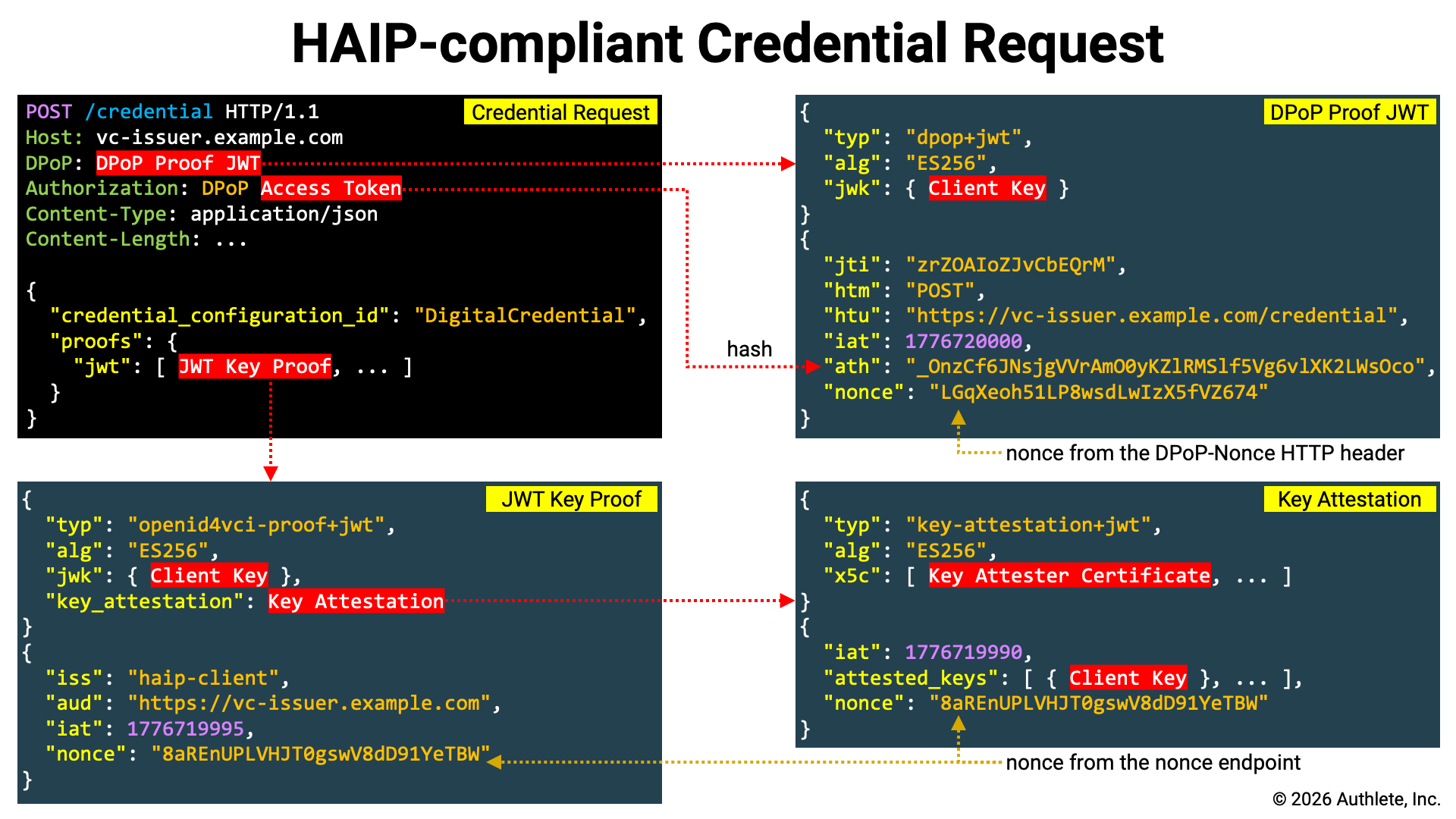 A literal interpretation of the HAIP specification suggests that it is not
strictly required to include a Key Proof in the credential request. However,
since it is difficult to imagine real-world use cases without key binding,
the credential request example shown here includes a Key Proof.
A literal interpretation of the HAIP specification suggests that it is not
strictly required to include a Key Proof in the credential request. However,
since it is difficult to imagine real-world use cases without key binding,
the credential request example shown here includes a Key Proof.
#### Nonce Retrieval
If the credential issuer provides a **nonce endpoint**, the nonce issued by
that endpoint must be included in the Key Proof and Key Attestation. Whether
the credential issuer provides a nonce endpoint can be determined by checking
whether the `nonce_endpoint` parameter is included in the
credential issuer metadata.
The nonce endpoint accepts an HTTP POST request and returns JSON containing a
`c_nonce` property. Below is an example of a request and response excerpted
from the [OID4VCI][OID4VCI] specification.
Nonce Request Example:
```http theme={null}
POST /nonce HTTP/1.1
Host: credential-issuer.example.com
Content-Length: 0
```
Nonce Response Example:
```http theme={null}
HTTP/1.1 200 OK
Content-Type: application/json
Cache-Control: no-store
DPoP-Nonce: eyJ7S_zG.eyJH0-Z.HX4w-7v
{
"c_nonce": "wKI4LT17ac15ES9bw8ac4"
}
```
If the URL of the nonce endpoint is stored in a shell variable named
`NONCE_ENDPOINT`, you can assign the value of the nonce to a
shell variable named `NONCE` by executing the following command.
```shell theme={null}
NONCE=`curl ${NONCE_ENDPOINT} \
-X POST | \
jq -r .c_nonce`
```
#### Key Attestation Generation
A Key Attestation can be generated using the
`generate-key-attestation` script. Note that in HAIP, the
`x5c` header parameter is mandatory, so you must use the `--x5c` option to
specify the X.509 certificates to be included in the `x5c` header parameter.
The `--x5c` option can be specified multiple times, and the X.509 certificates
are added to the `x5c` header parameter in the order in which they are provided.
```shell theme={null}
KEY_ATTESTATION=`./generate-key-attestation \
--attester-key=keys/key-attester-private.jwk \
--attested-key=client.jwk \
--nonce=${NONCE} \
--x5c=keys/key-attester-certificate.pem`
```
Below is an example of the header and payload of a generated Key Attestation.
```json theme={null}
{
"typ": "key-attestation+jwt",
"alg": "ES256",
"x5c": [
"MIIBmDCCAT2gAwIBAgIUTD2qHZdvCkld8qneVGlwL4l+rWAwCgYIKoZIzj0EAwIw
HDEaMBgGA1UEAwwRS2V5IEF0dGVzdGVyIFJvb3QwIBcNMjYwNDE0MTkwODQ1WhgP
NDc2NDAzMTExOTA4NDVaMBcxFTATBgNVBAMMDEtleSBBdHRlc3RlcjBZMBMGByqG
SM49AgEGCCqGSM49AwEHA0IABEj5wOUzDlQKX800+V7kanDu8wASHTw6ivrO2HOW
keWGUNXaToM14Z4EtyM/szOZYv0UOvsdXNLI1cnZAOgPp3+jYDBeMAwGA1UdEwEB
/wQCMAAwDgYDVR0PAQH/BAQDAgeAMB0GA1UdDgQWBBTCXpsU7JVvhynt3n5r5baJ
xPy21jAfBgNVHSMEGDAWgBRCjxuwwwG/DC9yI5yJ07oD04YvKzAKBggqhkjOPQQD
AgNJADBGAiEAv3aywa9hsZM5d9zV70GHVP9qmbFleq4SZbmQzIBDNHMCIQDqBvWI
G9avgr0k6TpwmzhomOTY1H0JigyGaZzuzBe9yQ=="
],
"kid": "qLgVYBf9lZ63QsEz04r9zb4NN3iZnf2-dnoc2k1GWbA"
}
{
"iat": 1776719761,
"exp": 1776806161,
"attested_keys": [
{
"crv": "P-256",
"kty": "EC",
"x": "1AmVr4GoHdPgk48LWdS3T9m6m1mP4VTcj9usoSBnCQk",
"y": "te-WIuUIq2w8tXmXydlEX4pe9lNe-PBcozA8n7y8XTE"
}
],
"nonce": "8aREnUPLVHJT0gswV8dD91YeTBWEKa4YCAd2HpXcOYw"
}
```
Please note the following points:
* The value of the `typ` header parameter is `key-attestation+jwt`.
* The `x5c` header parameter includes the X.509 certificate for signature verification (as specified with the `--x5c` option).
* The `attested_keys` claim contains the attested key(s) (as specified with the `--attested-key` option).
* The `nonce` claim is set to the nonce (as specified with the `--nonce` option).
#### Key Proof Generation
A Key Proof of the JWT Proof Type can be generated using the
`generate-key-proof` script.
```shell theme={null}
JWT_KEY_PROOF=`./generate-key-proof \
--client-id=${CLIENT_ID} \
--issuer=${CREDENTIAL_ISSUER} \
--key=client.jwk \
--nonce=${NONCE} \
--key-attestation=${KEY_ATTESTATION}`
```
Below is an example of the header and payload of a generated Key Proof.
```json theme={null}
{
"typ": "openid4vci-proof+jwt",
"alg": "ES256",
"jwk": {
"crv": "P-256",
"kty": "EC",
"x": "1AmVr4GoHdPgk48LWdS3T9m6m1mP4VTcj9usoSBnCQk",
"y": "te-WIuUIq2w8tXmXydlEX4pe9lNe-PBcozA8n7y8XTE"
},
"key_attestation":
"eyJ0eXAiOiJrZXktYXR0ZXN0YXRpb24rand0IiwiYWxnIjoiRVMyNTYiLCJ4NWMi
OlsiTUlJQm1EQ0NBVDJnQXdJQkFnSVVURDJxSFpkdkNrbGQ4cW5lVkdsd0w0bCty
V0F3Q2dZSUtvWkl6ajBFQXdJd0hERWFNQmdHQTFVRUF3d1JTMlY1SUVGMGRHVnpk
R1Z5SUZKdmIzUXdJQmNOTWpZd05ERTBNVGt3T0RRMVdoZ1BORGMyTkRBek1URXhP
VEE0TkRWYU1CY3hGVEFUQmdOVkJBTU1ERXRsZVNCQmRIUmxjM1JsY2pCWk1CTUdC
eXFHU000OUFnRUdDQ3FHU000OUF3RUhBMElBQkVqNXdPVXpEbFFLWDgwMCtWN2th
bkR1OHdBU0hUdzZpdnJPMkhPV2tlV0dVTlhhVG9NMTRaNEV0eU0vc3pPWll2MFVP
dnNkWE5MSTFjblpBT2dQcDMrallEQmVNQXdHQTFVZEV3RUIvd1FDTUFBd0RnWURW
UjBQQVFIL0JBUURBZ2VBTUIwR0ExVWREZ1FXQkJUQ1hwc1U3SlZ2aHludDNuNXI1
YmFKeFB5MjFqQWZCZ05WSFNNRUdEQVdnQlJDanh1d3d3Ry9EQzl5STV5SjA3b0Qw
NFl2S3pBS0JnZ3Foa2pPUFFRREFnTkpBREJHQWlFQXYzYXl3YTloc1pNNWQ5elY3
MEdIVlA5cW1iRmxlcTRTWmJtUXpJQkROSE1DSVFEcUJ2V0lHOWF2Z3IwazZUcHdt
emhvbU9UWTFIMEppZ3lHYVp6dXpCZTl5UT09Il0sImtpZCI6InFMZ1ZZQmY5bFo2
M1FzRXowNHI5emI0Tk4zaVpuZjItZG5vYzJrMUdXYkEifQ.eyJpYXQiOjE3NzY3M
Tk3NjEsImV4cCI6MTc3NjgwNjE2MSwiYXR0ZXN0ZWRfa2V5cyI6W3siY3J2IjoiU
C0yNTYiLCJrdHkiOiJFQyIsIngiOiIxQW1WcjRHb0hkUGdrNDhMV2RTM1Q5bTZtM
W1QNFZUY2o5dXNvU0JuQ1FrIiwieSI6InRlLVdJdVVJcTJ3OHRYbVh5ZGxFWDRwZ
TlsTmUtUEJjb3pBOG43eThYVEUifV0sIm5vbmNlIjoiOGFSRW5VUExWSEpUMGdzd
1Y4ZEQ5MVllVEJXRUthNFlDQWQySHBYY09ZdyJ9.CeDXPV9gfr2x92IHSZ5BcyFf
RuTK2M5Y4JeHFgijfZeNBytz1QICaxnLOVTZjXYu-JlL21_xkPoODrWTSiDPLg"
}
{
"iss": "trial_client",
"aud": "https://trial.authlete.net",
"iat": 1776720642,
"nonce": "8aREnUPLVHJT0gswV8dD91YeTBWEKa4YCAd2HpXcOYw"
}
```
Please note the following points:
* The value of the `typ` header parameter is `openid4vci-proof+jwt`.
* The `jwk` header parameter contains the client's key (as specified with the `--key` option).
* The `key_attestation` header parameter contains the Key Attestation (as specified with the `--key-attestation` option).
* The `iss` claim is set to the client identifier (as specified with the `--client-id` option).
* The `aud` claim is set to the credential issuer identifier (as specified with the `--issuer` option).
* The `nonce` claim is set to the nonce (as specified with the `--nonce` option).
#### DPoP Proof JWT Generation
Re-run the `generate-dpop-proof` script with the
credential endpoint URL specified via the `-u` option to regenerate the DPoP
Proof JWT.
Note that in the credential request, the DPoP Proof JWT is sent together with
the access token, so the DPoP Proof JWT must include an `ath` claim. Therefore,
when running the `generate-dpop-proof` script, add the
`-a` option.
```shell theme={null}
DPOP_PROOF=`./generate-dpop-proof \
-m POST \
-u ${CREDENTIAL_ENDPOINT} \
-k client.jwk \
-a ${ACCESS_TOKEN}`
```
#### Credential Request Submission
Now that the Key Proof has been prepared, send the credential request. In this
example, it is assumed that the identifier of the credential configuration
associated with the `digital_credential` scope is
`DigitalCredential`.
```shell theme={null}
curl ${CREDENTIAL_ENDPOINT} \
-H "Authorization: DPoP ${ACCESS_TOKEN}" \
-H "DPoP: ${DPOP_PROOF}" \
--json '{
"credential_configuration_id": "DigitalCredential",
"proofs": {
"jwt": ["'${JWT_KEY_PROOF}'"]
}
}'
```
The key points of this request are as follows:
| Item | Description |
| :---------------------------- | :--------------------------------------------------------------------------------------------------------------------------------------- |
| Access Token | Set the access token issued by the token endpoint in the `Authorization` HTTP header. Since it is DPoP-bound, the scheme must be `DPoP`. |
| Sender-Constrained | Set the DPoP Proof JWT in the `DPoP` HTTP header. |
| `credential_configuration_id` | Either `credential_configuration_id` or `credential_identifier` is required in the credential request. |
| `proofs` | Specify the Key Proof |
In the request above, a key proof using the JWT Proof Type was used, and
therefore the Key Attestation was embedded in a separate JWT.
In contrast, with a Key Proof using the Attestation Proof Type, the Key
Attestation can be used directly as the Key Proof, as shown below.
```shell theme={null}
curl ${CREDENTIAL_ENDPOINT} \
-H "Authorization: DPoP ${ACCESS_TOKEN}" \
-H "DPoP: ${DPOP_PROOF}" \
--json '{
"credential_configuration_id": "DigitalCredential",
"proofs": {
"attestation": ["'${KEY_ATTESTATION}'"]
}
}'
```
The following is an example of a credential response.
```json theme={null}
{
"credentials": [
{
"credential":
"eyJ4NWMiOlsiTUlJQ1NEQ0NBZTZnQXdJQkFnSVVLSlM1R21Ram5mY0JrM1piL2VX
K0loblFrOHN3Q2dZSUtvWkl6ajBFQXdJd1pURUxNQWtHQTFVRUJoTUNTbEF4RGpB
TUJnTlZCQWdNQlZSdmEzbHZNUkF3RGdZRFZRUUhEQWREYUdsNWIyUmhNUmN3RlFZ
RFZRUUtEQTVCZFhSb2JHVjBaU3dnU1c1akxqRWJNQmtHQTFVRUF3d1NkSEpwWVd3
dVlYVjBhR3hsZEdVdWJtVjBNQ0FYRFRJMU1ESXlOVEExTXpJME9Wb1lEekl5T1Rn
eE1qRXhNRFV6TWpRNVdqQmxNUXN3Q1FZRFZRUUdFd0pLVURFT01Bd0dBMVVFQ0F3
RlZHOXJlVzh4RURBT0JnTlZCQWNNQjBOb2FYbHZaR0V4RnpBVkJnTlZCQW9NRGtG
MWRHaHNaWFJsTENCSmJtTXVNUnN3R1FZRFZRUUREQkowY21saGJDNWhkWFJvYkdW
MFpTNXVaWFF3V1RBVEJnY3Foa2pPUFFJQkJnZ3Foa2pPUFFNQkJ3TkNBQVFPZDZU
Q3ducG5tWHFwczhSUUhxK0s5Tm9vRmJyamIxeXlGeEpsSGs3V2ZUVk9yWkR1OU5x
K0lPYzl5cm83eStHOXJUZjB6dDhPV0o1aS9XaWpqSUxUbzNvd2VEQWRCZ05WSFE0
RUZnUVVQTVlhNmZRSlA2TTZ4NHRZTTFmYmYzL0UweE13SHdZRFZSMGpCQmd3Rm9B
VVBNWWE2ZlFKUDZNNng0dFlNMWZiZjMvRTB4TXdEd1lEVlIwVEFRSC9CQVV3QXdF
Qi96QWxCZ05WSFJFRUhqQWNoaHBvZEhSd2N6b3ZMM1J5YVdGc0xtRjFkR2hzWlhS
bExtNWxkREFLQmdncWhrak9QUVFEQWdOSUFEQkZBaUVBeW8zQS9vUVgvTWU4bXlN
V0wwMjVjVEJ3L2tlY2VIRUxmU1FIbWxlNVFBRUNJQzVnL3luT210L251a3NmSEFl
TUFCZjd0bzUyelRSa1JkdXFRQ1pITzNlWSJdLCJraWQiOiJaWUdJT0hZdUE5SXBV
aWpWd1FOdWwzbkU1MzZ4MUpTV0hpT2ZkUzdzYWRnIiwidHlwIjoiZGMrc2Qtand0
IiwiYWxnIjoiRVMyNTYifQ.eyJfc2QiOlsiM005WU43VXk0RHI0OFdCNEFhNmFEQ
2NudUhxdi1lRUw2RVFITjBMb3ExbyIsIks2UVZHUmVyOVFId2tDYkpoNW1PVUNLO
UwtX0luM0pPX2o2eUlQNzVJaGMiLCJQQ1M5dFBvMXlrb2NmV09iYzd0LUVObXU1M
HdzekY3UTNxZ0MyTFN3dmhRIiwiUS1tdllZWFpfVk9SZlc2ekhXSnhaeC1fNUxwM
EtNbG1lbGJPSUQ5Z3NyNCIsIlFfTjRKOHJnTnV5QS1Oa2RTVmdNR3pvN0RVM3lrW
Dk5dk1zVEJzcklLN28iLCJYcjF6RnFETU5kdXp2UDFBZFZqWFV4WlQ5T1RJRW9kd
TlSRmZ1c2FFYUJJIiwiWVNrSUNPRXI1dzZCY3lEQmVwck5sLXhGMmdheExtOGRaZ
lp1NVRUcFpiUSIsIll4LXFYdi10a3Babnd6MkJkN1pyOXhlaDBGOE05bnJzdUkxT
DdvaGlTNEkiLCJkS1pEUDhwYzdLbXlXNkVwSER2TVIxRnd0aDNKN0xoeldNRWgyW
kh3UXRRIiwiZUFPQ1l0VmN0bVllNnF6eEJvOUh4TE9panZaSlRKSjBBR2pHblJrW
WdsTSJdLCJ2Y3QiOiJodHRwczovL2NyZWRlbnRpYWxzLmV4YW1wbGUuY29tL2RpZ
2l0YWxfY3JlZGVudGlhbCIsIl9zZF9hbGciOiJzaGEtMjU2IiwiaXNzIjoiaHR0c
HM6Ly90cmlhbC5hdXRobGV0ZS5uZXQiLCJjbmYiOnsiandrIjp7Imt0eSI6IkVDI
iwiY3J2IjoiUC0yNTYiLCJraWQiOiJPUmduOXZ5S2ZKZnI2SmljN1dtaVRFV0pCb
FRZa1QwZS1JSU9NU3l2SXRvIiwieCI6IjFBbVZyNEdvSGRQZ2s0OExXZFMzVDltN
m0xbVA0VlRjajl1c29TQm5DUWsiLCJ5IjoidGUtV0l1VUlxMnc4dFhtWHlkbEVYN
HBlOWxOZS1QQmNvekE4bjd5OFhURSJ9fSwiZXhwIjoxNzc5MzEzOTg5LCJpYXQiO
jE3NzY3MjE5ODl9.k_BY_BMZVLgNRqutBakVGgpcfq5DbbQdgGsGnTvDWRqZX4KN
wbzEJd6bHZhIC7Di5_3QS_sUvByHnDpa95NJTw~WyIwbHlrWHpiLTNZR0kwZndVa
ktMZk5BIiwic3ViIiwiMTAwNCJd~WyJ3Vi04VWk0MUp3eEpmYzN3WnQyaFRRIiwi
Z2l2ZW5fbmFtZSIsIkluZ2EiXQ~WyJFWlZRUGI0ZFJzY01xa1dheEJmel9nIiwiZ
mFtaWx5X25hbWUiLCJTaWx2ZXJzdG9uZSJd~WyJrT0ZrLVRFMzVlRlpRVzBrQnpR
V3FnIiwiYmlydGhkYXRlIiwiMTk5MS0xMS0wNiJd~"
}
]
}
```
Each element of the `credentials` array is a JSON object, and the value of its
`credential` property represents the issued VC. In this example, only one VC is
issued, and its format is [SD-JWT VC][SD_JWT_VC].
#### SD-JWT VC
Decoding the header and payload of the Issuer-signed JWT part of the issued
[SD-JWT VC][SD_JWT_VC] yields the following.
```json theme={null}
{
"x5c": [
"MIICSDCCAe6gAwIBAgIUKJS5GmQjnfcBk3Zb/eW+IhnQk8swCgYIKoZIzj0EAwIw
ZTELMAkGA1UEBhMCSlAxDjAMBgNVBAgMBVRva3lvMRAwDgYDVQQHDAdDaGl5b2Rh
MRcwFQYDVQQKDA5BdXRobGV0ZSwgSW5jLjEbMBkGA1UEAwwSdHJpYWwuYXV0aGxl
dGUubmV0MCAXDTI1MDIyNTA1MzI0OVoYDzIyOTgxMjExMDUzMjQ5WjBlMQswCQYD
VQQGEwJKUDEOMAwGA1UECAwFVG9reW8xEDAOBgNVBAcMB0NoaXlvZGExFzAVBgNV
BAoMDkF1dGhsZXRlLCBJbmMuMRswGQYDVQQDDBJ0cmlhbC5hdXRobGV0ZS5uZXQw
WTATBgcqhkjOPQIBBggqhkjOPQMBBwNCAAQOd6TCwnpnmXqps8RQHq+K9NooFbrj
b1yyFxJlHk7WfTVOrZDu9Nq+IOc9yro7y+G9rTf0zt8OWJ5i/WijjILTo3oweDAd
BgNVHQ4EFgQUPMYa6fQJP6M6x4tYM1fbf3/E0xMwHwYDVR0jBBgwFoAUPMYa6fQJ
P6M6x4tYM1fbf3/E0xMwDwYDVR0TAQH/BAUwAwEB/zAlBgNVHREEHjAchhpodHRw
czovL3RyaWFsLmF1dGhsZXRlLm5ldDAKBggqhkjOPQQDAgNIADBFAiEAyo3A/oQX
/Me8myMWL025cTBw/keceHELfSQHmle5QAECIC5g/ynOmt/nuksfHAeMABf7to52
zTRkRduqQCZHO3eY"
],
"kid": "ZYGIOHYuA9IpUijVwQNul3nE536x1JSWHiOfdS7sadg",
"typ": "dc+sd-jwt",
"alg": "ES256"
}
{
"_sd": [
"3M9YN7Uy4Dr48WB4Aa6aDCcnuHqv-eEL6EQHN0Loq1o",
"K6QVGRer9QHwkCbJh5mOUCK9L-_In3JO_j6yIP75Ihc",
"PCS9tPo1ykocfWObc7t-ENmu50wszF7Q3qgC2LSwvhQ",
"Q-mvYYXZ_VORfW6zHWJxZx-_5Lp0KMlmelbOID9gsr4",
"Q_N4J8rgNuyA-NkdSVgMGzo7DU3ykX99vMsTBsrIK7o",
"Xr1zFqDMNduzvP1AdVjXUxZT9OTIEodu9RFfusaEaBI",
"YSkICOEr5w6BcyDBeprNl-xF2gaxLm8dZfZu5TTpZbQ",
"Yx-qXv-tkpZnwz2Bd7Zr9xeh0F8M9nrsuI1L7ohiS4I",
"dKZDP8pc7KmyW6EpHDvMR1Fwth3J7LhzWMEh2ZHwQtQ",
"eAOCYtVctmYe6qzxBo9HxLOijvZJTJJ0AGjGnRkYglM"
],
"vct": "https://credentials.example.com/digital_credential",
"_sd_alg": "sha-256",
"iss": "https://trial.authlete.net",
"cnf": {
"jwk": {
"kty": "EC",
"crv": "P-256",
"kid": "ORgn9vyKfJfr6Jic7WmiTEWJBlTYkT0e-IIOMSyvIto",
"x": "1AmVr4GoHdPgk48LWdS3T9m6m1mP4VTcj9usoSBnCQk",
"y": "te-WIuUIq2w8tXmXydlEX4pe9lNe-PBcozA8n7y8XTE"
}
},
"exp": 1779313989,
"iat": 1776721989
}
```
Please note the following points:
* The value of the `typ` header parameter is `dc+sd-jwt`.
* The `_sd` claim contains a list of SHA-256 digest values of the disclosure set (note that it also includes fake digest values).
* The `_sd_alg` claim indicates the hash algorithm used to compute the disclosure digests.
* The required `vct` claim for SD-JWT VC is included.
* The `cnf.jwk` claim contains the client key specified in the Key Proof.
The following shows information about the disclosure set.
| Disclosure | `WyIwbHlrWHpiLTNZR0kwZndVaktMZk5BIiwic3ViIiwiMTAwNCJd` |
| :---------- | :----------------------------------------------------- |
| Digest | `eAOCYtVctmYe6qzxBo9HxLOijvZJTJJ0AGjGnRkYglM` |
| Salt | `"0lykXzb-3YGI0fwUjKLfNA"` |
| Claim Name | `"sub"` |
| Claim Value | `"1004"` |
| Disclosure | `WyJ3Vi04VWk0MUp3eEpmYzN3WnQyaFRRIiwiZ2l2ZW5fbmFtZSIsIkluZ2EiXQ` |
| :---------- | :--------------------------------------------------------------- |
| Digest | `3M9YN7Uy4Dr48WB4Aa6aDCcnuHqv-eEL6EQHN0Loq1o` |
| Salt | `"wV-8Ui41JwxJfc3wZt2hTQ"` |
| Claim Name | `"given_name"` |
| Claim Value | `"Inga"` |
| Disclosure | `WyJFWlZRUGI0ZFJzY01xa1dheEJmel9nIiwiZmFtaWx5X25hbWUiLCJTaWx2ZXJzdG9uZSJd` |
| :---------- | :------------------------------------------------------------------------- |
| Digest | `Q-mvYYXZ_VORfW6zHWJxZx-_5Lp0KMlmelbOID9gsr4` |
| Salt | `"EZVQPb4dRscMqkWaxBfz_g"` |
| Claim Name | `"family_name"` |
| Claim Value | `"Silverstone"` |
| Disclosure | `WyJrT0ZrLVRFMzVlRlpRVzBrQnpRV3FnIiwiYmlydGhkYXRlIiwiMTk5MS0xMS0wNiJd` |
| :---------- | :--------------------------------------------------------------------- |
| Digest | `Yx-qXv-tkpZnwz2Bd7Zr9xeh0F8M9nrsuI1L7ohiS4I` |
| Salt | `"kOFk-TE35eFZQW0kBzQWqg"` |
| Claim Name | `"birthdate"` |
| Claim Value | `"1991-11-06"` |
## Certificate Chain Validation
In HAIP, both the Client Attestation and the Key Attestation must include the
`x5c` header parameter. When an authorization server or credential issuer
receives such an attestation, it verifies that the certificate chain specified
in the `x5c` header can be traced back to one of the trusted root certificates.
However, HAIP does not define which root certificate set must be used for this
validation.
That said, given that HAIP is being developed with the EUDI Wallet in mind, it
is reasonable to expect that HAIP deployments will be required to use root
certificates designated by EU regulatory authorities. In such a context, a
general-purpose HAIP implementation should provide a mechanism to configure the
set of root certificates used for validation.
Accordingly, Authlete has introduced the following set of service properties.
| Property Name | Description |
| :--------------------------- | :--------------------------------------------------------------------------------------------------------------------------------------------------------------------------------------------------------------------------------------------------------------------------------------------------------------------------------------------------------------------------------------------------------------------------------------------------------------------------------------------------------------------------------------------------------------------------------------------------------------------------------------------------------------------------------------------------------------------------------------------------------------------------------------------------------------------------------------------------------------------------------------------------------------------------------------------------------------------------------------------------------------------------------------------------------------------------------------------------------------------------------------------------------------------------------------------------------------------------------------------------------------------------------------------------------------------------------------------------------------------------------------------------------------------------------------------------------------------------------------------------------------------------------------------------------------------------------------------------------------------------------------------------------------------------------------------------------------------------------------------------------------------------------------------------------------------------------------------------------------------------------------------------------------- |
| `clientAttesterRoots` | OAuth 2.0 Attestation-Based Client Authentication defines Client Attestation. If a Client Attestation includes the `x5c` header parameter, Authlete validates the specified certificate chain. During validation, the X.509 certificates specified in this property (`clientAttesterRoots`) are used as trusted root certificates, but only when explicitly enabled. Specifically, this occurs only when the `clientAttesterRootsEnabled` property is set to `true`.
If validation fails with the configured root certificates, validation is performed using the system-installed root certificates. However, if configured not to use the system root certificates—specifically when the `clientAttesterRootsOnly` property is set to `true`—the system root certificates are not used.
The certificate format for this property must be PEM. PEM markers (`-----BEGIN CERTIFICATE-----` and `-----END CERTIFICATE-----`) are optional. When Authlete returns the value of this property via its APIs, PEM markers are always included even if they were omitted when configured.
OAuth 2.0 Attestation-Based Client Authentication does not require the `x5c` header parameter in Client Attestation. However, OpenID4VC High Assurance Interoperability Profile 1.0 requires it, so care must be taken. If a value is set in the service's `haipVersion` property or the client's `haipVersion` property, or if a request includes a scope with the `haip` attribute, HAIP is enabled, and consequently the `x5c` header parameter in Client Attestation becomes mandatory. |
| `clientAttesterRootsEnabled` | Configure whether to use the trusted root certificates for validating the certificate chain specified in the `x5c` header parameter of Client Attestation. These certificates are defined in the `clientAttesterRoots` property. Unless this property (`clientAttesterRootsEnabled`) is explicitly enabled (set to `true`), the configured root certificates will not be used even if they are specified. |
| `clientAttesterRootsOnly` | Configure whether to validate the certificate chain specified in the `x5c` header parameter of Client Attestation using only the dedicated root certificates defined in the `clientAttesterRoots` property. When this property (`clientAttesterRootsOnly`) is enabled (set to `true`), system-installed root certificates are not used for validation. |
| `keyAttesterRoots` | OpenID for Verifiable Credential Issuance 1.0, Appendix D. Key Attestations defines Key Attestation. If a Key Attestation includes the `x5c` header parameter, Authlete validates the specified certificate chain. During validation, the X.509 certificates specified in this property (`keyAttesterRoots`) are used as trusted root certificates, but only when explicitly enabled. Specifically, this occurs only when the `keyAttesterRootsEnabled` property is set to `true`.
If validation fails with the configured root certificates, validation is performed using the system-installed root certificates. However, if configured not to use the system root certificates—specifically when the `keyAttesterRootsOnly` property is set to `true`—the system root certificates are not used.
The certificate format for this property must be PEM. PEM markers (`-----BEGIN CERTIFICATE-----` and `-----END CERTIFICATE-----`) are optional. When Authlete returns the value of this property via its APIs, PEM markers are always included even if they were omitted when configured.
OpenID for Verifiable Credential Issuance 1.0 does not require the `x5c` header parameter in Key Attestation. However, OpenID4VC High Assurance Interoperability Profile 1.0 requires it, so care must be taken. If a value is set in the service's `haipVersion` property or the client's `haipVersion` property, or if a request includes a scope with the `haip` attribute, HAIP is enabled, and consequently the `x5c` header parameter in Key Attestation becomes mandatory. |
| `keyAttesterRootsEnabled` | Configure whether to use the trusted root certificates for validating the certificate chain specified in the `x5c` header parameter of Key Attestation. These certificates are defined in the `keyAttesterRoots` property. Unless this property (`keyAttesterRootsEnabled`) is explicitly enabled (set to `true`), the configured root certificates will not be used even if they are specified. |
| `keyAttesterRootsOnly` | Configure whether to validate the certificate chain specified in the `x5c` header parameter of Key Attestation using only the dedicated root certificates defined in the `keyAttesterRoots` property. When this property (`keyAttesterRootsOnly`) is enabled (set to `true`), system-installed root certificates are not used for validation. |
The following is an example configuration of the root certificate set used to
validate the certificate chains of Client Attestations and Key Attestations.
```json theme={null}
{
"clientAttesterRoots": [
"-----BEGIN CERTIFICATE-----\n
MIIBpTCCAUugAwIBAgIUUTw+Ep5ZOdplQAjzE/68Z9IUzzgwCgYIKoZIzj0EAwIw\n
HzEdMBsGA1UEAwwUQ2xpZW50IEF0dGVzdGVyIFJvb3QwIBcNMjYwNDE0MTU0MzQ1\n
WhgPNDc2NDAzMTExNTQzNDVaMB8xHTAbBgNVBAMMFENsaWVudCBBdHRlc3RlciBS\n
b290MFkwEwYHKoZIzj0CAQYIKoZIzj0DAQcDQgAEyRlNlUPzTt6jF5s0ltIjoGHx\n
SFQu6GE+gZOMm5sOrNGmAaI6i48CSI6yrXpr/F0KV6t4IH9FcKsZWrpIA7evz6Nj\n
MGEwHQYDVR0OBBYEFDmGsWAPAWFDwW4IlARNSXJ3amPSMB8GA1UdIwQYMBaAFDmG\n
sWAPAWFDwW4IlARNSXJ3amPSMA8GA1UdEwEB/wQFMAMBAf8wDgYDVR0PAQH/BAQD\n
AgEGMAoGCCqGSM49BAMCA0gAMEUCIQCXxFHg356YWT2gEIdU0Vdm2znUMRwm7Wgb\n
Jf9GbLDvggIgK98PHmvP8WRqPfQr1cNpSSBoogDhZhLcelvm/L0coLA=\n
-----END CERTIFICATE-----"
],
"clientAttesterRootsEnabled": true,
"clientAttesterRootsOnly": false,
"keyAttesterRoots": [
"-----BEGIN CERTIFICATE-----\n
MIIBoDCCAUWgAwIBAgIUWRZNOcKwPKKFYiMHguS6ZS81IPUwCgYIKoZIzj0EAwIw\n
HDEaMBgGA1UEAwwRS2V5IEF0dGVzdGVyIFJvb3QwIBcNMjYwNDE0MTkwNzUxWhgP\n
NDc2NDAzMTExOTA3NTFaMBwxGjAYBgNVBAMMEUtleSBBdHRlc3RlciBSb290MFkw\n
EwYHKoZIzj0CAQYIKoZIzj0DAQcDQgAE7RNVRube8DDaZ1zYjBe3vPQFB8WVVqJ/\n
AAIxUd2HdgLd+7x6EU1T7aHQ5r/ARQpLeYsqiou02jwQoDW+rtNozaNjMGEwHQYD\n
VR0OBBYEFEKPG7DDAb8ML3IjnInTugPThi8rMB8GA1UdIwQYMBaAFEKPG7DDAb8M\n
L3IjnInTugPThi8rMA8GA1UdEwEB/wQFMAMBAf8wDgYDVR0PAQH/BAQDAgEGMAoG\n
CCqGSM49BAMCA0kAMEYCIQCtbIlRnFUs7QSuQZkv6NCxiK0Ui8V/P+gcq/70nWBk\n
yQIhAOowEiHzVvY1iTGYJ2at2Z1UigC3rq2q/E2A70AS8gc5\n
-----END CERTIFICATE-----"
],
"keyAttesterRootsEnabled": true,
"keyAttesterRootsOnly": false
}
```
## HAIP Activation
The method for determining whether to perform HAIP validation on requests to
the authorization server or credential issuer is implementation-dependent.
Authlete provides the following three methods.
| Activation Method | Description |
| :------------------------------- | :---------------------------------------------------------------------------------------------------------------------------- |
| Service's `haipVersion` property | If a value is set for the service's `haipVersion` property, HAIP validation is always performed for requests to that service. |
| Client's `haipVersion` property | If a value is set for the client's `haipVersion` property, HAIP validation is always performed for requests from that client. |
| Scope's `haip` attribute | If a request includes a scope whose `haip` attribute has a valid value, HAIP validation is performed for that request. |
As of April 2026, in the current Authlete implementation, the only value that
can be set for the `haipVersion` property and the `haip`
attribute is the string `1.0`.
## Conclusion
[HAIP][HAIP] is a profile designed to enhance interoperability and security
across VC-related specifications. The HAIP-related features introduced in
this document are available in Authlete version 3.0.31 and later. For further
details, please contact us via the [contact form][CONTACT].
[ABCA]: https://datatracker.ietf.org/doc/draft-ietf-oauth-attestation-based-client-auth/
[CONTACT]: https://www.authlete.com/contact
[FAPI2SP]: https://openid.net/specs/fapi-security-profile-2_0.html
[HAIP]: https://openid.net/specs/openid4vc-high-assurance-interoperability-profile-1_0.html
[OID4VCI]: https://openid.net/specs/openid-4-verifiable-credential-issuance-1_0.html
[OID4VCI_D]: https://openid.net/specs/openid-4-verifiable-credential-issuance-1_0.html#appendix-D
[OID4VCI_DEMO]: https://github.com/authlete/oid4vci-demo/
[OID4VCI_F1]: https://openid.net/specs/openid-4-verifiable-credential-issuance-1_0.html#appendix-F.1
[OID4VCI_F3]: https://openid.net/specs/openid-4-verifiable-credential-issuance-1_0.html#appendix-F.3
[RFC_7523]: https://www.rfc-editor.org/rfc/rfc7523.html
[RFC_7636]: https://www.rfc-editor.org/rfc/rfc7636.html
[RFC_8705]: https://www.rfc-editor.org/rfc/rfc8705.html
[RFC_9126]: https://www.rfc-editor.org/rfc/rfc9126.html
[RFC_9449]: https://www.rfc-editor.org/rfc/rfc9449.html
[RFC_9449_10_1]: https://www.rfc-editor.org/rfc/rfc9449.html#section-10.1
[SD_JWT_VC]: https://datatracker.ietf.org/doc/draft-ietf-oauth-sd-jwt-vc/