> ## Documentation Index
> Fetch the complete documentation index at: https://developers.authlete.com/llms.txt
> Use this file to discover all available pages before exploring further.
# Authorization Code Flow in FAPI 2.0 Security Profile
> Overview of the Authorization Code Flow in FAPI 2.0 Security Profile with instructions on configuration for compliance.
For **Authlete 2.x** documentation, see [2.x version](/v2/protocols-and-flows/compliance-profiles/authz-code-flow-in-fapi-2-security-profile).
## Overview
This document describes overview of \*\*Authorization Code Flow in \*\*[**FAPI 2.0 Security Profile**](https://bitbucket.org/openid/fapi/src/master/FAPI_2_0_Security_Profile.md)
and instruction on how to configure Authlete services and clients to make them comply with it.
> FAPI 2.0 Security Profile feature is available since Authlete 2.3.
## Introduction
The below is a diagram that roughly describes Authorization Code Flow in FAPI 2.0 Security Profile.\\
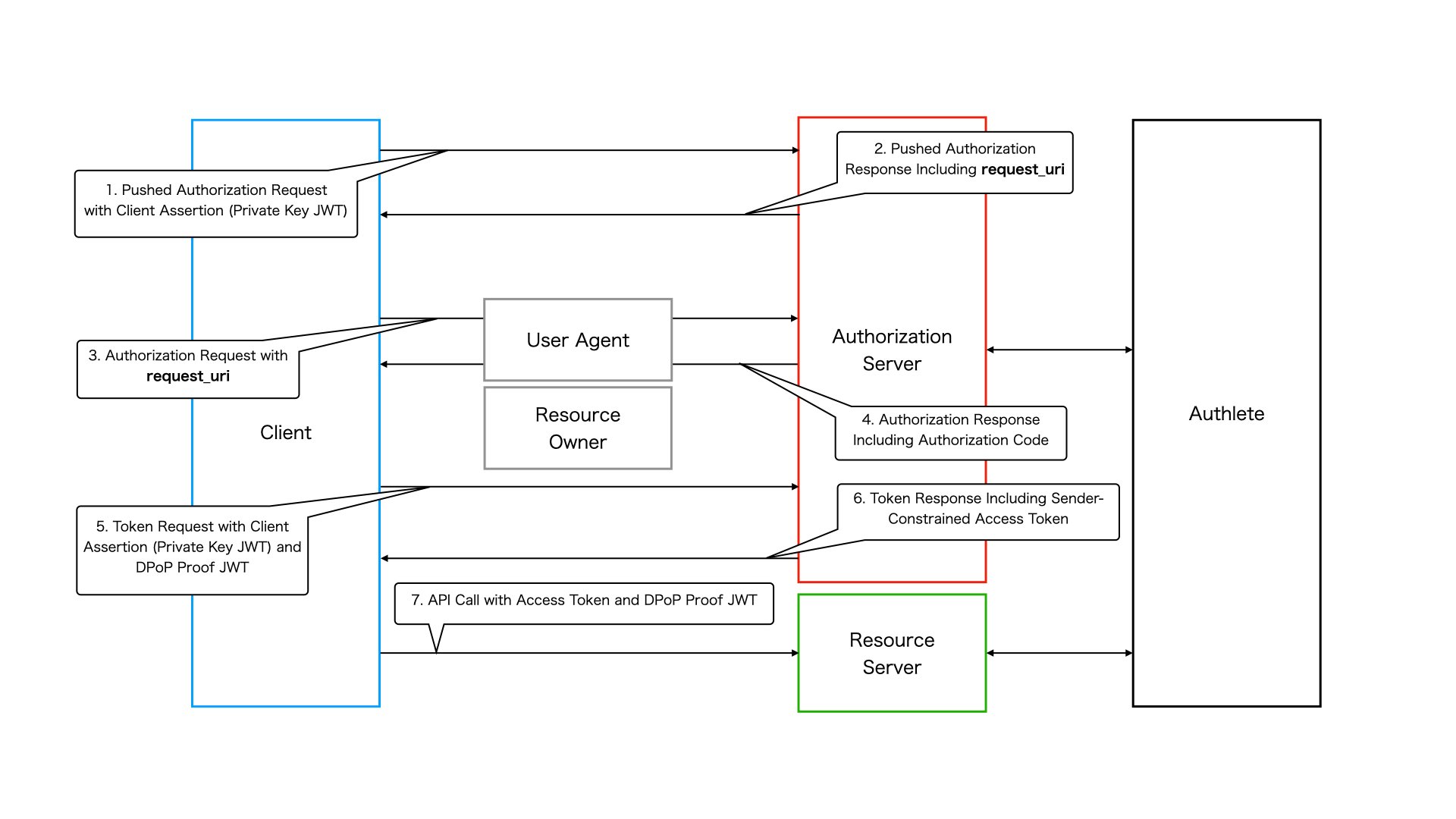 *Authorization Code Flow in FAPI 2.0 Security Profile*
### 1. Pushed Authorization Request
A client sends a request to the pushed authorization request endpoint of the authorization server to register authorization request parameters. FAPI 2.0 Security Profile imposes some requirements on authorization request parameters such as **response\_type**. It also requires the client to be authenticated with [**mutual TLS authentication**](https://www.rfc-editor.org/rfc/rfc8705.html#name-mutual-tls-for-oauth-client)
or [**private\_key\_jwt**](https://openid.net/specs/openid-connect-core-1_0.html#ClientAuthentication)
. In this document, we use `private_key_jwt` for client authentication.
### 2. Pushed Authorization Response
If the request is processed successfully, the pushed authorization request endpoint makes a response that contains a **request\_uri**.
### 3. Authorization Request
The client sends an authorization request including the `request_uri` to the authorization endpoint of the authorization server. This is done via the user agent.
### 4. Authorization Response
If the request is processed successfully, the authorization endpoint makes a response that contains an authorization code and the user agent redirects to the client's redirect URI.
### 5. Token Request
The client sends a token request to the token endpoint of the authorization server with the authorization code. The token endpoint needs to issue an access token that is \*\*sender-constrained with mutual TLS or \*\*[**DPoP**](https://datatracker.ietf.org/doc/draft-ietf-oauth-dpop/)
based on FAPI 2.0 Security Profile. In this document, we use **DPoP** as a sender-constrained access token mechanism. Note that **private\_key\_jwt** is used for client authentication at the token endpoint as well as at the pushed authorization request endpoint.
### 6. Token Response
If the request is processed successfully, the token endpoint makes a response that contains a sender-constrained access token.
### 7. API Request
The client sends a request to a resource endpoint with the access token along with a proof-of-possession for the access token (a DPoP proof JWT in this document).
## Setting up a FAPI Service
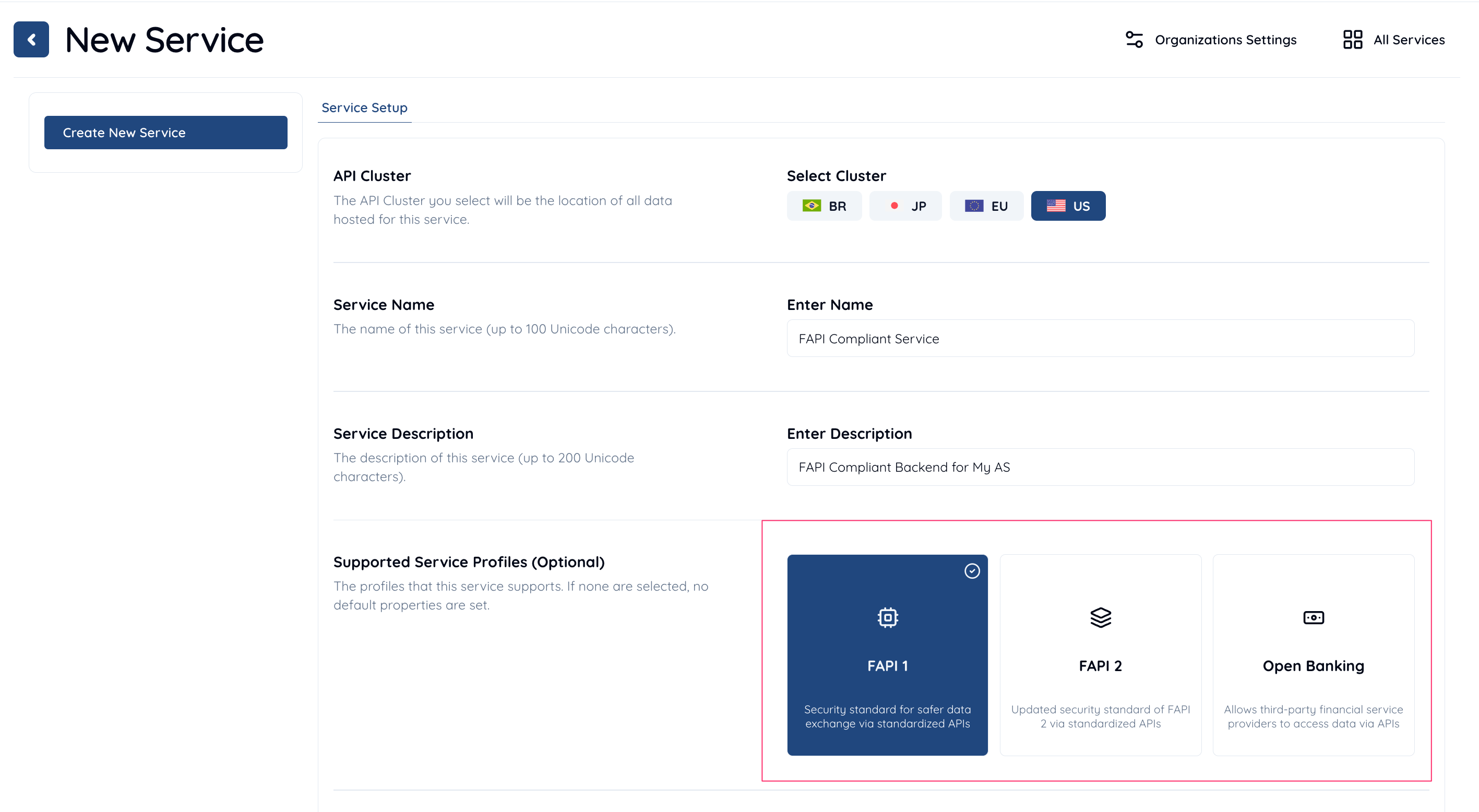
* Login to [Authlete Management Console](https://console.authlete.com).
* Create a new Service with FAPI Profile.
### Scope Attribute
Since Authlete 2.3, a new scope attribute has been introduced, specifically reserved for the FAPI 2.0 Security Profile. The attribute is defined as follows:
| Attribute Key | Attribute Value |
| ------------- | --------------- |
| `fapi2` | `sp` |
Scopes associated with this attribute are referred to as **"FAPI 2.0 Security Profile" scopes**.
To configure a FAPI 2.0 Security Profile scope for your service:
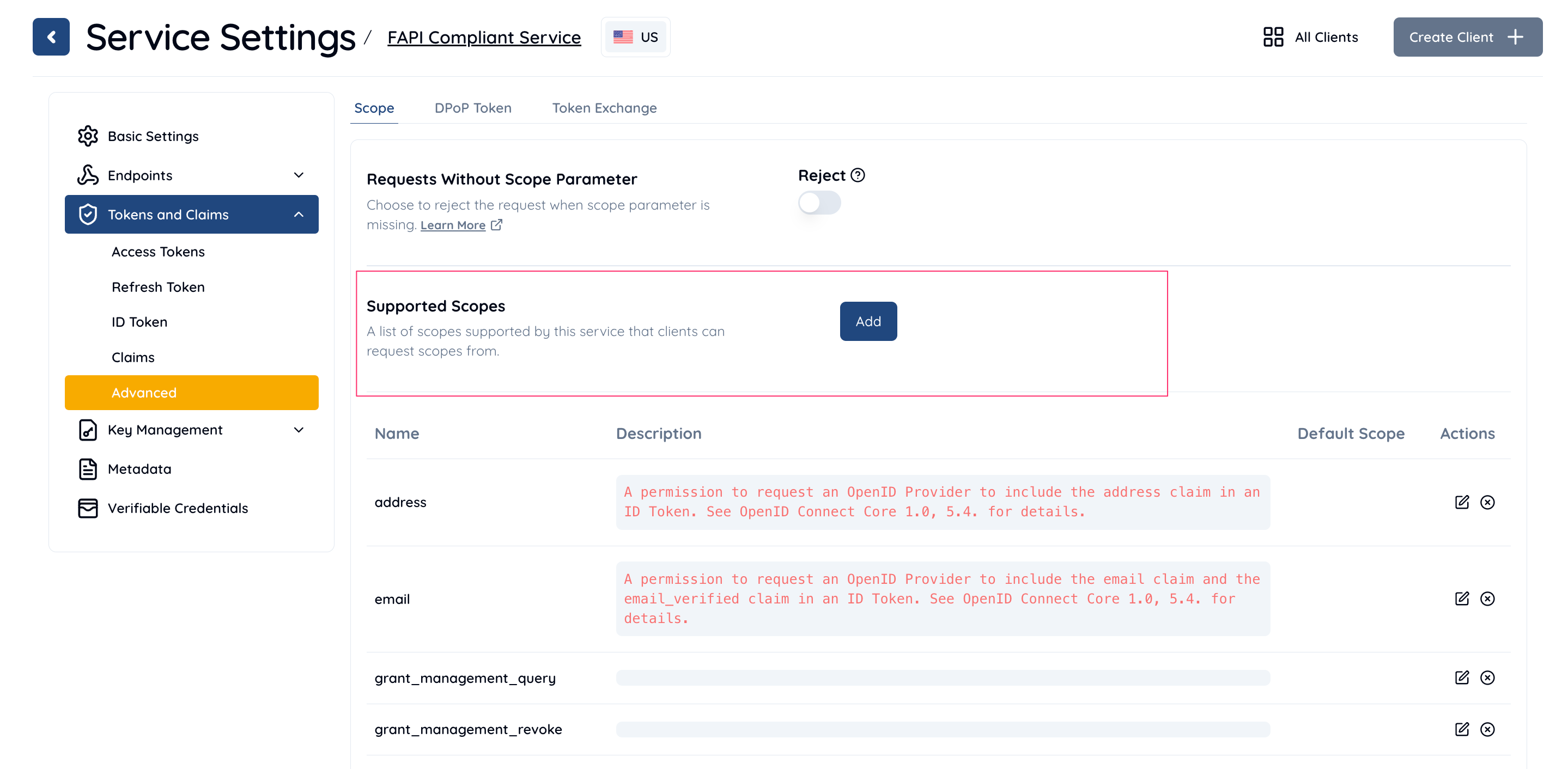
1. Open **Service Settings** in the [Management Console](https://console.authlete.com).
2. Navigate to **Tokens & Claims > Advanced > Scope**.
3. In the **Supported Scopes** section, click the **Add** button.
1. In the **Add/Edit Supported Scope** dialog:
* Enter a name and description for your custom scope.
* Under the **Scope Attributes** section, click **Add**.
* Set the following:
* **Key**: `fapi2`
* **Value**: `sp`
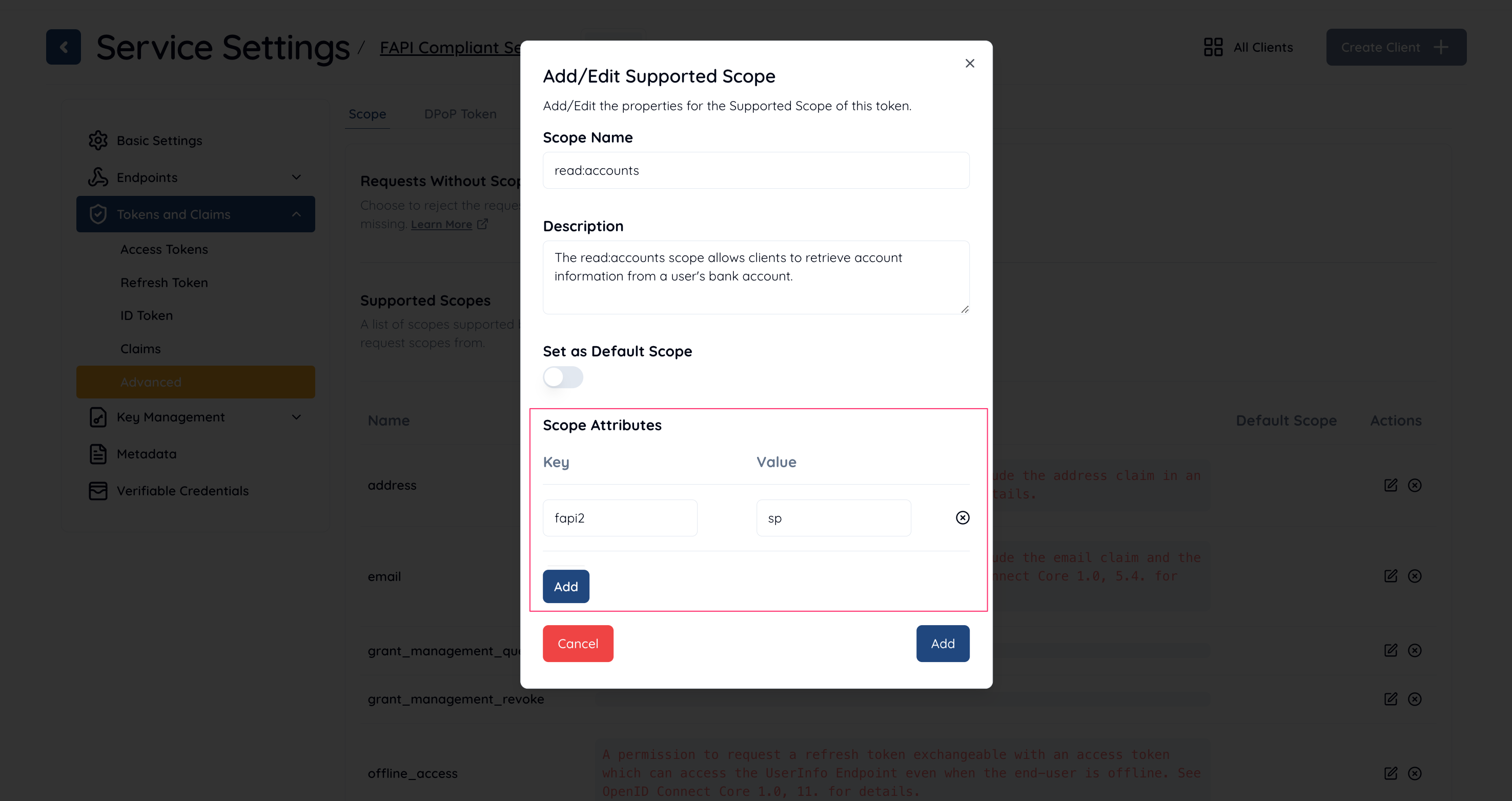
By following these steps, you can configure a scope that complies with the FAPI 2.0 Security Profile.
### Service Configuration
Configure your service as follows to make it comply with FAPI 2.0 Security Profile.
| Property | Description |
| --------------------------------------- | ---------------------------------------------------------------------------------------------------------------------------------------------------------------------------------------------------------------- |
| Supported Grant Types | Include **AUTHORIZATION\_CODE**. |
| Supported Response Types | Include **CODE**. |
| Supported Service Profiles | Include **FAPI**. |
| iss Response Parameter | Select **Included**. |
| Token Endpoint URI | Set your authorization server's token endpoint URI. |
| Supported Client Authentication Methods | Select **PRIVATE\_KEY\_JWT**. |
| nbf Claim | Select **Required**. |
| Audience Validation | Select **Perform**. |
| Access Token Signature Algorithm | NOTE: This configuration is only required if "JWT Access Token" is used.Select **PS256**, **ES256** or **EdDSA**. |
| Supported Scopes | Include a **FAPI 2.0 Security Profile** scope. |
| JWK Set | NOTE: This configuration is only required if "JWK Set" is used.Set a JWK set containing required JWKs (e.g. JWT access token sign key). |
| JWK Set Endpoint URI | NOTE: This configuration is only required if "JWK Set Endpoint URI" is used.Set a URI that starts with **https**. The URI needs to point to a JWK set containing required JWKs (e.g. JWT access token sign key). |
## Client Configuration
Configure your service as follows to make it comply with FAPI 2.0 Security Profile.
| Property | Description |
| ----------------------------- | ------------------------------------------------------------------------------------------------------------------------------------------------------------------------------------------------------- |
| Client Type | Select **CONFIDENTIAL**. |
| Grant Types | Include **AUTHORIZATION\_CODE**. |
| Response Types | Include **CODE**. |
| Redirect URIs | Create at least one redirect URI. |
| Client Authentication Method | Select **PRIVATE\_KEY\_JWT**. |
| Assertion Signature Algorithm | Select **PS256**, **ES256** or **EdDSA**. |
| ID Token Signature Algorithm | Note: This configuration is only required if ID tokens are issued and signed.Select an encryption algorithm other than **NONE**. |
| ID Token Encryption Algorithm | Note: This configuration is only required if ID tokens are issued and encrypted.Select an encryption algorithm other than **RSA1\_5**. |
| JWK Set Content | NOTE: This configuration is only required if "JWK Set Content" is used.Set a JWK set containing required JWKs (e.g. client assertion sign key). |
| JWK Set URI | NOTE: This configuration is only required if "JWK Set URI" is used.Set a URI that starts with **https**. The URI needs to point to a JWK set containing required JWKs (e.g. client assertion sign key). |
## API call test
In this section, we simulate API calls that the authorization server makes against Authlete APIs in the context of Authorization Code Flow in FAPI 2.0 Security Profile.
### 1. /pushed\_auth\_req API
Let's assume the client sends a valid request to the pushed authorization request endpoint of authorization server in the context of Authorization Code Flow in FAPI 2.0 Security Profile. According to [FAPI 2.0 Security Profile, Requirements for Clients](https://bitbucket.org/openid/fapi/src/master/FAPI_2_0_Security_Profile.md#markdown-header-requirements-for-clients)
, the request would be like below.
```
POST /par HTTP/1.1
Host: server.example.com
Content-Type: application/x-www-form-urlencoded
client_assertion_type=urn%3Aietf%3Aparams%3Aoauth%3Aclient-assertion-type%3Ajwt-bearer&
client_assertion=eyJraWQiOiJjbGllbnQtYXNzZXJ0aW9uLWtleSIsImFsZyI6IkVTMjU2In0.eyJqdGkiOiIyZTQ3MzhkMjNjOWM5YjYyZGNjZCIsInN1YiI6IjEzNDQ2NzM2NDE4IiwiaXNzIjoiMTM0NDY3MzY0MTgiLCJhdWQiOiJodHRwczovL2F1dGhsZXRlLmNvbSIsImlhdCI6MTY1OTk1MDIwNywiZXhwIjoxNjU5OTUzMjA3fQ.VdPzRZ42v62Q2gUfZ-r6aGUL27pY4y5uUkJZRWU9taDHN8z7GtqyyhmmDLfmSuGKglvhmuQvQuv6nJeuQZk5wQ&
client_id=13446736418&
response_type=code&
redirect_uri=https%3A%2F%2Fclient.example.org%2Fcb&
scope=read:accounts&
code_challenge=E9Melhoa2OwvFrEMTJguCHaoeK1t8URWbuGJSstw-cM&
code_challenge_method=S256
```
Note that
* the scope parameter is assigned to "read:accounts", which is a FAPI 2.0 Security Profile scope and
* the client is authenticated with private\_key\_jwt.
After the authorization server receives the request from the client, the authorization server calls Authlete **/pushed\_auth\_req** API. The following is a curl command that simulates a request from the authorization server to Authlete **/pushed\_auth\_req** API.
```
curl -s -X POST https://us.authlete.com/api/${your_service_id}/pushed_auth_req \
-H 'Authorization: Bearer ${SERVICE_ACCESS_TOKEN}' \
-H 'Content-type: application/json' \
-d '{
"parameters": "client_assertion_type=urn:ietf:params:oauth:client-assertion-type:jwt-bearer&\
client_assertion=eyJraWQiOiJjbGllbnQtYXNzZXJ0aW9uLWtleSIsImFsZyI6IkVTMjU2In0.eyJqdGkiOiJmNDE2ODVlZWY0ZWYzOGJjMzkwNiIsInN1YiI6IjEzNDQ2NzM2NDE4IiwiaXNzIjoiMTM0NDY3MzY0MTgiLCJhdWQiOiJodHRwczovL2F1dGhsZXRlLmNvbSIsImlhdCI6MTY2MDE0Mjc2NCwiZXhwIjoxNjYwMTQ1NzY0fQ.vagMXCXtrM9cai6ZID6Y3SyCw6FixAY2MGWkzx2-inwKcxpP1KHDX9iSiDiK75vF0cItwxGAALtcdfyoxWaw3A&\
client_id=13446736418&response_type=code&redirect_uri=https%3A%2F%2Fclient.example.com%2Fcb&\
scope=read:accounts&code_challenge=E9Melhoa2OwvFrEMTJguCHaoeK1t8URWbuGJSstw-cM&\
code_challenge_method=S256"
}'
```
A successful response from the API would be like below.
```
{
"resultCode": "A245001",
"resultMessage": "[A245001] Successfully registered a request object for client (13446736418),
URI is urn:ietf:params:oauth:request_uri:QbGjdHSfZi_m6W_ldrqjZhmYjQo3QcQOd3Hx2RcGODg.",
"action": "CREATED",
"requestUri": "urn:ietf:params:oauth:request_uri:QbGjdHSfZi_m6W_ldrqjZhmYjQo3QcQOd3Hx2RcGODg",
"responseContent": "{\"expires_in\":600,\"request_uri\":\"urn:ietf:params:oauth:request_uri:QbGjdHSfZi_m6W_ldrqjZhmYjQo3QcQOd3Hx2RcGODg\"}"
}
```
### 2. /auth/authorization API
After obtaining a request URI from the pushed authorization request endpoint, the client sends an authorization request including the request URI to the authorization endpoint of the authorization server like below.
```
GET /authorization?client_id=13446736418&
request_uri=urn%3Aietf%3Aparams%3Aoauth%3Arequest_uri%3AQbGjdHSfZi_m6W_ldrqjZhmYjQo3QcQOd3Hx2RcGODg HTTP/1.1
Host: server.example.com
```
After the authorization server receives the request from the client, the authorization sever calls Authlete **/auth/authorization** API. The following is a curl command that simulates a request from the authorization server to Authlete /auth/authorization API.
```
curl -s -X POST https://us.authlete.com/api/${your_service_id}/auth/authorization \
-H 'Authorization: Bearer ${SERVICE_ACCESS_TOKEN}' \
-H 'Content-type: application/json' \
-d '{"parameters":"client_id=13446736418
&request_uri=urn%3Aietf%3Aparams%3Aoauth%3Arequest_uri%3AQbGjdHSfZi_m6W_ldrqjZhmYjQo3QcQOd3Hx2RcGODg"}'
```
A successful response from the API would be like below.
```
{
"resultCode": "A004001",
"resultMessage": "[A004001] Authlete has successfully issued a ticket to the service (API Key = 20699248885) for the authorization request from the client (ID = 13446736418). [response_type=code, openid=false]",
"ticket": "CBKnPeMOf9xfv0sV-srVzbZv_dtFh01Zc0VkQ2nQKFg"
}
```
### 3. /auth/authorization/issue API
After the authorization server receives a successful response from /auth/authorization API, the end-user authorizes/denies the client on the browser, the authorization result is conveyed to the authorization server and the authorization server calls Authlete **/auth/authorization/issue** API with the result. The following is a curl command that simulates a request from the authorization server to Authlete /auth/authorization/issue API.
```
curl -s -X POST https://us.authlete.com/api/${your_service_id}/auth/authorization/issue \
-H 'Authorization: Bearer ${SERVICE_ACCESS_TOKEN}' \
-H 'Content-type: application/json' \
-d '{"ticket":"CBKnPeMOf9xfv0sV-srVzbZv_dtFh01Zc0VkQ2nQKFg",
"subject":"john",
"result":"AUTHORIZED"
}'
```
A successful response from the API would be like below.
```
{
"resultCode": "A040001",
"resultMessage": "[A040001] The authorization request was processed successfully.",
"authorizationCode": "xY1Vd-rjb-Yj84sXGgkr424VR9JbVGQw2wgVbudSXGU",
...
}
```
### 4. /auth/token API
After the client receives a successful response containing an authorization code from the authorization endpoint, the client sends a token request to the token endpoint of the authorization server as below.
```
POST /token HTTP/1.1
Host: server.example.com
Content-Type: application/x-www-form-urlencoded
DPoP: eyJ0eXAiOiJkcG9wK2p3dCIsImFsZyI6IkVTMjU2IiwiandrIjp7Imt0eSI6IkVDIiwidXNlIjoic2lnIiwiY3J2IjoiUC0yNTYiLCJ4IjoiRk4xYk81cnBVY0ZNeU9ncE9iQ1BTaGZkcldJ
TFN1RVBBTmZKUWl4cU16ayIsInkiOiJYY3RYc0xXY1YzMkJMVVZCMDhqVjJ4d2VFU2FTY0xULVNKUEl6TlVoSHRvIiwiYWxnIjoiRVMyNTYifX0.eyJqdGkiOiI0OWE1YWU0ZTA5NTZiNDJkMjEwMyIsImh0bSI6IlBPU1QiLCJodHUiOiJodHRwczovL3NlcnZlci5leGFtcGxlLmNvbS90b2tlbiIsImlhdCI6MTY2MDE0Mjk2N30.codEOIUYuytFacobXDn4-Jx7xr6oRaw83lorgPbOS1y5pMyDCfUf08SA9tCUWMMUctgGdt7D9wf7hDCip6lgTA
client_assertion_type=urn%3Aietf%3Aparams%3Aoauth%3Aclient-assertion-type%3Ajwt-bearer
&client_assertion=eyJraWQiOiJjbGllbnQtYXNzZXJ0aW9uLWtleSIsImFsZyI6IkVTMjU2In0.eyJqdGkiOiJmYzRkMDRlMTI0MTRjNzU5OGNlNyIsInN1YiI6IjEzNDQ2NzM2NDE4IiwiaXNzIjoiMTM0NDY3MzY0MTgiLCJhdWQiOiJodHRwczovL2F1dGhsZXRlLmNvbSIsImlhdCI6MTY2MDE0Mjk2NCwiZXhwIjoxNjYwMTQ1OTY0fQ.-Gn4X3d_ymujjhSh8ZLWdtOzq2-TcgvwGzU-NEjVDaJSLN8kpOVHguOytSDXqJW5QJcsH8J_bkTaVZV7Nyl2IA
&client_id=13446736418
&code=xY1Vd-rjb-Yj84sXGgkr424VR9JbVGQw2wgVbudSXGU
&redirect_uri=https%3A%2F%2Fclient.example.org%2Fcb
&grant_type=authorization_code
&code_verifier=dBjftJeZ4CVP-mB92K27uhbUJU1p1r_wW1gFWFOEjXk
```
Note that the client has to
* be authenticated with private key JWT and
* present a DPoP proof JWT for the authorization server to issue a sender-constrained access token. (DPoP proof JWT must be signed with PS256, ES256 or EdDSA.)
After the token endpoint receives a request from the client, the authorization server calls Authlete **/auth/token** API. The following is a curl command that simulates a request from the authorization server to Authlete /auth/token API.
```
curl -s -X POST https://api.authlete.com/auth/token \
-H 'Authorization: Bearer ${SERVICE_ACCESS_TOKEN}' \
-H 'Content-type: application/json' \
-d {"parameters":"client_assertion_type=urn:ietf:params:oauth:client-assertion-type:jwt-bearer
&client_assertion=eyJraWQiOiJjbGllbnQtYXNzZXJ0aW9uLWtleSIsImFsZyI6IkVTMjU2In0.eyJqdGkiOiJmYzRkMDRlMTI0MTRjNzU5OGNlNyIsInN1YiI6IjEzNDQ2NzM2NDE4IiwiaXNzIjoiMTM0NDY3MzY0MTgiLCJhdWQiOiJodHRwczovL2F1dGhsZXRlLmNvbSIsImlhdCI6MTY2MDE0Mjk2NCwiZXhwIjoxNjYwMTQ1OTY0fQ.-Gn4X3d_ymujjhSh8ZLWdtOzq2-TcgvwGzU-NEjVDaJSLN8kpOVHguOytSDXqJW5QJcsH8J_bkTaVZV7Nyl2IA
&client_id=13446736418
&code=xY1Vd-rjb-Yj84sXGgkr424VR9JbVGQw2wgVbudSXGU
&redirect_uri=h...
```
A successful response from the API would be like below.
```
{
"resultCode": "A050001",
"resultMessage": "[A050001] The token request (grant_type=authorization_code) was processed successfully.",
"accessToken": "7i9xPkbkKCmcmkZIvSGci5PKf4HO9TUAefwsABMrbTQ",
...
}
```
### 5. /auth/introspection API
Through all the steps above, the client gets an access token and it can access a resource server's endpoint with the access token like below.
```
GET /api/sample HTTP/1.1
Authorization: DPoP 7i9xPkbkKCmcmkZIvSGci5PKf4HO9TUAefwsABMrbTQ
DPoP: eyJ0eXAiOiJkcG9wK2p3dCIsImFsZyI6IkVTMjU2IiwiandrIjp7Imt0eSI6IkVDIiwidXNlIjoic2lnIiwiY3J2IjoiUC0yNTYiLCJ4IjoiRk4xYk81cnBVY0ZNeU9ncE9iQ1BTaGZkcldJTFN1RVBBTmZKUWl4cU16ayIsInkiOiJYY3RYc0xXY1YzMkJMVVZCMDhqVjJ4d2VFU2FTY0xULVNKUEl6TlVoSHRvIiwiYWxnIjoiRVMyNTYifX0.eyJqdGkiOiI5YWMwYTRjYWM1ODA4MmZlYzQxOSIsImh0bSI6IkdFVCIsImh0dSI6Imh0dHBzOi8vcmVzb3VyY2UuZXhhbXBsZS5jb20vYXBpL3NhbXBsZSIsImlhdCI6MTY2MDE0MzAzMiwiYXRoIjoiaDdacFQ2VnJCU3JpaGdYSDA1ZE5tM3VvQ0x5TmVXYWNfZHFkOUhOOUktbyJ9.avJW2u8Gasm2wpXi4XlxJ2Z4A4WsgXm5jFscbN893vRzcxqZU4AwK0J5Tosk4T1d9WmL5wnZKnAEy2Gb9L2_pQ
Host: resource.example.com
```
Note that the client needs to present a DPoP proof JWT to the resource server's endpoint along with the access token.
After the resource server receives the request from the client, the resource server calls Authlete **/auth/introspection** API to verify the access token. The following is a curl command that simulates a request from the resource server to Authlete /auth/introspection API.
```
curl -s -X POST https://us.authlete.com/api/${your_service_id}/auth/introspection \
-H 'Authorization: Bearer ${SERVICE_ACCESS_TOKEN}' \
-H 'Content-type: application/json' \
-d {"token":"7i9xPkbkKCmcmkZIvSGci5PKf4HO9TUAefwsABMrbTQ",
"dpop":"eyJ0eXAiOiJkcG9wK2p3dCIsImFsZyI6IkVTMjU2IiwiandrIjp7Imt0eSI6IkVDIiwidXNlIjoic2lnIiwiY3J2IjoiUC0yNTYiLCJ4IjoiRk4xYk81cnBVY0ZNeU9ncE9iQ1BTaGZkcldJTFN1RVBBTmZKUWl4cU16ayIsInkiOiJYY3RYc0xXY1YzMkJMVVZCMDhqVjJ4d2VFU2FTY0xULVNKUEl6TlVoSHRvIiwiYWxnIjoiRVMyNTYifX0.eyJqdGkiOiI5NmYzNDc4OWFjNWFmZDNkMzhhNiIsImh0bSI6IkdFVCIsImh0dSI6Imh0dHBzOi8vcmVzb3VyY2UuZXhhbXBsZS5jb20vYXBpL3NhbXBsZSIsImlhdCI6MTY1OTk1MDUyNywiYXRoIjoidmdDa3JDWEhIYTQ3VVpVazdJNVk4QmFKdWxWek9KMFhEMVNzZGdWdHVKSSJ9.ysI4w__vdqVPOjjVhUidhHoletEOmvSMJD6TdqUIM49KIGcjxjgVpaVA-D5yKnEs_4aRGkt_tsRiSsHUNam9KA",
"htm":"GET",
"htu":"https://resource.example.com/api/sample"
}'
```
A successful response from the API would be like below.
```
{
"resultCode": "A056001",
"resultMessage": "[A056001] The access token is valid.",
"action": "OK",
...
}
```
*Authorization Code Flow in FAPI 2.0 Security Profile*
### 1. Pushed Authorization Request
A client sends a request to the pushed authorization request endpoint of the authorization server to register authorization request parameters. FAPI 2.0 Security Profile imposes some requirements on authorization request parameters such as **response\_type**. It also requires the client to be authenticated with [**mutual TLS authentication**](https://www.rfc-editor.org/rfc/rfc8705.html#name-mutual-tls-for-oauth-client)
or [**private\_key\_jwt**](https://openid.net/specs/openid-connect-core-1_0.html#ClientAuthentication)
. In this document, we use `private_key_jwt` for client authentication.
### 2. Pushed Authorization Response
If the request is processed successfully, the pushed authorization request endpoint makes a response that contains a **request\_uri**.
### 3. Authorization Request
The client sends an authorization request including the `request_uri` to the authorization endpoint of the authorization server. This is done via the user agent.
### 4. Authorization Response
If the request is processed successfully, the authorization endpoint makes a response that contains an authorization code and the user agent redirects to the client's redirect URI.
### 5. Token Request
The client sends a token request to the token endpoint of the authorization server with the authorization code. The token endpoint needs to issue an access token that is \*\*sender-constrained with mutual TLS or \*\*[**DPoP**](https://datatracker.ietf.org/doc/draft-ietf-oauth-dpop/)
based on FAPI 2.0 Security Profile. In this document, we use **DPoP** as a sender-constrained access token mechanism. Note that **private\_key\_jwt** is used for client authentication at the token endpoint as well as at the pushed authorization request endpoint.
### 6. Token Response
If the request is processed successfully, the token endpoint makes a response that contains a sender-constrained access token.
### 7. API Request
The client sends a request to a resource endpoint with the access token along with a proof-of-possession for the access token (a DPoP proof JWT in this document).
## Setting up a FAPI Service
* Login to [Authlete Management Console](https://console.authlete.com).
* Create a new Service with FAPI Profile.

### Scope Attribute
Since Authlete 2.3, a new scope attribute has been introduced, specifically reserved for the FAPI 2.0 Security Profile. The attribute is defined as follows:
| Attribute Key | Attribute Value |
| ------------- | --------------- |
| `fapi2` | `sp` |
Scopes associated with this attribute are referred to as **"FAPI 2.0 Security Profile" scopes**.
To configure a FAPI 2.0 Security Profile scope for your service:
1. Open **Service Settings** in the [Management Console](https://console.authlete.com).
2. Navigate to **Tokens & Claims > Advanced > Scope**.
3. In the **Supported Scopes** section, click the **Add** button.

1. In the **Add/Edit Supported Scope** dialog:
* Enter a name and description for your custom scope.
* Under the **Scope Attributes** section, click **Add**.
* Set the following:
* **Key**: `fapi2`
* **Value**: `sp`

By following these steps, you can configure a scope that complies with the FAPI 2.0 Security Profile.
### Service Configuration
Configure your service as follows to make it comply with FAPI 2.0 Security Profile.
| Property | Description |
| --------------------------------------- | ---------------------------------------------------------------------------------------------------------------------------------------------------------------------------------------------------------------- |
| Supported Grant Types | Include **AUTHORIZATION\_CODE**. |
| Supported Response Types | Include **CODE**. |
| Supported Service Profiles | Include **FAPI**. |
| iss Response Parameter | Select **Included**. |
| Token Endpoint URI | Set your authorization server's token endpoint URI. |
| Supported Client Authentication Methods | Select **PRIVATE\_KEY\_JWT**. |
| nbf Claim | Select **Required**. |
| Audience Validation | Select **Perform**. |
| Access Token Signature Algorithm | NOTE: This configuration is only required if "JWT Access Token" is used.Select **PS256**, **ES256** or **EdDSA**. |
| Supported Scopes | Include a **FAPI 2.0 Security Profile** scope. |
| JWK Set | NOTE: This configuration is only required if "JWK Set" is used.Set a JWK set containing required JWKs (e.g. JWT access token sign key). |
| JWK Set Endpoint URI | NOTE: This configuration is only required if "JWK Set Endpoint URI" is used.Set a URI that starts with **https**. The URI needs to point to a JWK set containing required JWKs (e.g. JWT access token sign key). |
## Client Configuration
Configure your service as follows to make it comply with FAPI 2.0 Security Profile.
| Property | Description |
| ----------------------------- | ------------------------------------------------------------------------------------------------------------------------------------------------------------------------------------------------------- |
| Client Type | Select **CONFIDENTIAL**. |
| Grant Types | Include **AUTHORIZATION\_CODE**. |
| Response Types | Include **CODE**. |
| Redirect URIs | Create at least one redirect URI. |
| Client Authentication Method | Select **PRIVATE\_KEY\_JWT**. |
| Assertion Signature Algorithm | Select **PS256**, **ES256** or **EdDSA**. |
| ID Token Signature Algorithm | Note: This configuration is only required if ID tokens are issued and signed.Select an encryption algorithm other than **NONE**. |
| ID Token Encryption Algorithm | Note: This configuration is only required if ID tokens are issued and encrypted.Select an encryption algorithm other than **RSA1\_5**. |
| JWK Set Content | NOTE: This configuration is only required if "JWK Set Content" is used.Set a JWK set containing required JWKs (e.g. client assertion sign key). |
| JWK Set URI | NOTE: This configuration is only required if "JWK Set URI" is used.Set a URI that starts with **https**. The URI needs to point to a JWK set containing required JWKs (e.g. client assertion sign key). |
## API call test
In this section, we simulate API calls that the authorization server makes against Authlete APIs in the context of Authorization Code Flow in FAPI 2.0 Security Profile.
### 1. /pushed\_auth\_req API
Let's assume the client sends a valid request to the pushed authorization request endpoint of authorization server in the context of Authorization Code Flow in FAPI 2.0 Security Profile. According to [FAPI 2.0 Security Profile, Requirements for Clients](https://bitbucket.org/openid/fapi/src/master/FAPI_2_0_Security_Profile.md#markdown-header-requirements-for-clients)
, the request would be like below.
```
POST /par HTTP/1.1
Host: server.example.com
Content-Type: application/x-www-form-urlencoded
client_assertion_type=urn%3Aietf%3Aparams%3Aoauth%3Aclient-assertion-type%3Ajwt-bearer&
client_assertion=eyJraWQiOiJjbGllbnQtYXNzZXJ0aW9uLWtleSIsImFsZyI6IkVTMjU2In0.eyJqdGkiOiIyZTQ3MzhkMjNjOWM5YjYyZGNjZCIsInN1YiI6IjEzNDQ2NzM2NDE4IiwiaXNzIjoiMTM0NDY3MzY0MTgiLCJhdWQiOiJodHRwczovL2F1dGhsZXRlLmNvbSIsImlhdCI6MTY1OTk1MDIwNywiZXhwIjoxNjU5OTUzMjA3fQ.VdPzRZ42v62Q2gUfZ-r6aGUL27pY4y5uUkJZRWU9taDHN8z7GtqyyhmmDLfmSuGKglvhmuQvQuv6nJeuQZk5wQ&
client_id=13446736418&
response_type=code&
redirect_uri=https%3A%2F%2Fclient.example.org%2Fcb&
scope=read:accounts&
code_challenge=E9Melhoa2OwvFrEMTJguCHaoeK1t8URWbuGJSstw-cM&
code_challenge_method=S256
```
Note that
* the scope parameter is assigned to "read:accounts", which is a FAPI 2.0 Security Profile scope and
* the client is authenticated with private\_key\_jwt.
After the authorization server receives the request from the client, the authorization server calls Authlete **/pushed\_auth\_req** API. The following is a curl command that simulates a request from the authorization server to Authlete **/pushed\_auth\_req** API.
```
curl -s -X POST https://us.authlete.com/api/${your_service_id}/pushed_auth_req \
-H 'Authorization: Bearer ${SERVICE_ACCESS_TOKEN}' \
-H 'Content-type: application/json' \
-d '{
"parameters": "client_assertion_type=urn:ietf:params:oauth:client-assertion-type:jwt-bearer&\
client_assertion=eyJraWQiOiJjbGllbnQtYXNzZXJ0aW9uLWtleSIsImFsZyI6IkVTMjU2In0.eyJqdGkiOiJmNDE2ODVlZWY0ZWYzOGJjMzkwNiIsInN1YiI6IjEzNDQ2NzM2NDE4IiwiaXNzIjoiMTM0NDY3MzY0MTgiLCJhdWQiOiJodHRwczovL2F1dGhsZXRlLmNvbSIsImlhdCI6MTY2MDE0Mjc2NCwiZXhwIjoxNjYwMTQ1NzY0fQ.vagMXCXtrM9cai6ZID6Y3SyCw6FixAY2MGWkzx2-inwKcxpP1KHDX9iSiDiK75vF0cItwxGAALtcdfyoxWaw3A&\
client_id=13446736418&response_type=code&redirect_uri=https%3A%2F%2Fclient.example.com%2Fcb&\
scope=read:accounts&code_challenge=E9Melhoa2OwvFrEMTJguCHaoeK1t8URWbuGJSstw-cM&\
code_challenge_method=S256"
}'
```
A successful response from the API would be like below.
```
{
"resultCode": "A245001",
"resultMessage": "[A245001] Successfully registered a request object for client (13446736418),
URI is urn:ietf:params:oauth:request_uri:QbGjdHSfZi_m6W_ldrqjZhmYjQo3QcQOd3Hx2RcGODg.",
"action": "CREATED",
"requestUri": "urn:ietf:params:oauth:request_uri:QbGjdHSfZi_m6W_ldrqjZhmYjQo3QcQOd3Hx2RcGODg",
"responseContent": "{\"expires_in\":600,\"request_uri\":\"urn:ietf:params:oauth:request_uri:QbGjdHSfZi_m6W_ldrqjZhmYjQo3QcQOd3Hx2RcGODg\"}"
}
```
### 2. /auth/authorization API
After obtaining a request URI from the pushed authorization request endpoint, the client sends an authorization request including the request URI to the authorization endpoint of the authorization server like below.
```
GET /authorization?client_id=13446736418&
request_uri=urn%3Aietf%3Aparams%3Aoauth%3Arequest_uri%3AQbGjdHSfZi_m6W_ldrqjZhmYjQo3QcQOd3Hx2RcGODg HTTP/1.1
Host: server.example.com
```
After the authorization server receives the request from the client, the authorization sever calls Authlete **/auth/authorization** API. The following is a curl command that simulates a request from the authorization server to Authlete /auth/authorization API.
```
curl -s -X POST https://us.authlete.com/api/${your_service_id}/auth/authorization \
-H 'Authorization: Bearer ${SERVICE_ACCESS_TOKEN}' \
-H 'Content-type: application/json' \
-d '{"parameters":"client_id=13446736418
&request_uri=urn%3Aietf%3Aparams%3Aoauth%3Arequest_uri%3AQbGjdHSfZi_m6W_ldrqjZhmYjQo3QcQOd3Hx2RcGODg"}'
```
A successful response from the API would be like below.
```
{
"resultCode": "A004001",
"resultMessage": "[A004001] Authlete has successfully issued a ticket to the service (API Key = 20699248885) for the authorization request from the client (ID = 13446736418). [response_type=code, openid=false]",
"ticket": "CBKnPeMOf9xfv0sV-srVzbZv_dtFh01Zc0VkQ2nQKFg"
}
```
### 3. /auth/authorization/issue API
After the authorization server receives a successful response from /auth/authorization API, the end-user authorizes/denies the client on the browser, the authorization result is conveyed to the authorization server and the authorization server calls Authlete **/auth/authorization/issue** API with the result. The following is a curl command that simulates a request from the authorization server to Authlete /auth/authorization/issue API.
```
curl -s -X POST https://us.authlete.com/api/${your_service_id}/auth/authorization/issue \
-H 'Authorization: Bearer ${SERVICE_ACCESS_TOKEN}' \
-H 'Content-type: application/json' \
-d '{"ticket":"CBKnPeMOf9xfv0sV-srVzbZv_dtFh01Zc0VkQ2nQKFg",
"subject":"john",
"result":"AUTHORIZED"
}'
```
A successful response from the API would be like below.
```
{
"resultCode": "A040001",
"resultMessage": "[A040001] The authorization request was processed successfully.",
"authorizationCode": "xY1Vd-rjb-Yj84sXGgkr424VR9JbVGQw2wgVbudSXGU",
...
}
```
### 4. /auth/token API
After the client receives a successful response containing an authorization code from the authorization endpoint, the client sends a token request to the token endpoint of the authorization server as below.
```
POST /token HTTP/1.1
Host: server.example.com
Content-Type: application/x-www-form-urlencoded
DPoP: eyJ0eXAiOiJkcG9wK2p3dCIsImFsZyI6IkVTMjU2IiwiandrIjp7Imt0eSI6IkVDIiwidXNlIjoic2lnIiwiY3J2IjoiUC0yNTYiLCJ4IjoiRk4xYk81cnBVY0ZNeU9ncE9iQ1BTaGZkcldJ
TFN1RVBBTmZKUWl4cU16ayIsInkiOiJYY3RYc0xXY1YzMkJMVVZCMDhqVjJ4d2VFU2FTY0xULVNKUEl6TlVoSHRvIiwiYWxnIjoiRVMyNTYifX0.eyJqdGkiOiI0OWE1YWU0ZTA5NTZiNDJkMjEwMyIsImh0bSI6IlBPU1QiLCJodHUiOiJodHRwczovL3NlcnZlci5leGFtcGxlLmNvbS90b2tlbiIsImlhdCI6MTY2MDE0Mjk2N30.codEOIUYuytFacobXDn4-Jx7xr6oRaw83lorgPbOS1y5pMyDCfUf08SA9tCUWMMUctgGdt7D9wf7hDCip6lgTA
client_assertion_type=urn%3Aietf%3Aparams%3Aoauth%3Aclient-assertion-type%3Ajwt-bearer
&client_assertion=eyJraWQiOiJjbGllbnQtYXNzZXJ0aW9uLWtleSIsImFsZyI6IkVTMjU2In0.eyJqdGkiOiJmYzRkMDRlMTI0MTRjNzU5OGNlNyIsInN1YiI6IjEzNDQ2NzM2NDE4IiwiaXNzIjoiMTM0NDY3MzY0MTgiLCJhdWQiOiJodHRwczovL2F1dGhsZXRlLmNvbSIsImlhdCI6MTY2MDE0Mjk2NCwiZXhwIjoxNjYwMTQ1OTY0fQ.-Gn4X3d_ymujjhSh8ZLWdtOzq2-TcgvwGzU-NEjVDaJSLN8kpOVHguOytSDXqJW5QJcsH8J_bkTaVZV7Nyl2IA
&client_id=13446736418
&code=xY1Vd-rjb-Yj84sXGgkr424VR9JbVGQw2wgVbudSXGU
&redirect_uri=https%3A%2F%2Fclient.example.org%2Fcb
&grant_type=authorization_code
&code_verifier=dBjftJeZ4CVP-mB92K27uhbUJU1p1r_wW1gFWFOEjXk
```
Note that the client has to
* be authenticated with private key JWT and
* present a DPoP proof JWT for the authorization server to issue a sender-constrained access token. (DPoP proof JWT must be signed with PS256, ES256 or EdDSA.)
After the token endpoint receives a request from the client, the authorization server calls Authlete **/auth/token** API. The following is a curl command that simulates a request from the authorization server to Authlete /auth/token API.
```
curl -s -X POST https://api.authlete.com/auth/token \
-H 'Authorization: Bearer ${SERVICE_ACCESS_TOKEN}' \
-H 'Content-type: application/json' \
-d {"parameters":"client_assertion_type=urn:ietf:params:oauth:client-assertion-type:jwt-bearer
&client_assertion=eyJraWQiOiJjbGllbnQtYXNzZXJ0aW9uLWtleSIsImFsZyI6IkVTMjU2In0.eyJqdGkiOiJmYzRkMDRlMTI0MTRjNzU5OGNlNyIsInN1YiI6IjEzNDQ2NzM2NDE4IiwiaXNzIjoiMTM0NDY3MzY0MTgiLCJhdWQiOiJodHRwczovL2F1dGhsZXRlLmNvbSIsImlhdCI6MTY2MDE0Mjk2NCwiZXhwIjoxNjYwMTQ1OTY0fQ.-Gn4X3d_ymujjhSh8ZLWdtOzq2-TcgvwGzU-NEjVDaJSLN8kpOVHguOytSDXqJW5QJcsH8J_bkTaVZV7Nyl2IA
&client_id=13446736418
&code=xY1Vd-rjb-Yj84sXGgkr424VR9JbVGQw2wgVbudSXGU
&redirect_uri=h...
```
A successful response from the API would be like below.
```
{
"resultCode": "A050001",
"resultMessage": "[A050001] The token request (grant_type=authorization_code) was processed successfully.",
"accessToken": "7i9xPkbkKCmcmkZIvSGci5PKf4HO9TUAefwsABMrbTQ",
...
}
```
### 5. /auth/introspection API
Through all the steps above, the client gets an access token and it can access a resource server's endpoint with the access token like below.
```
GET /api/sample HTTP/1.1
Authorization: DPoP 7i9xPkbkKCmcmkZIvSGci5PKf4HO9TUAefwsABMrbTQ
DPoP: eyJ0eXAiOiJkcG9wK2p3dCIsImFsZyI6IkVTMjU2IiwiandrIjp7Imt0eSI6IkVDIiwidXNlIjoic2lnIiwiY3J2IjoiUC0yNTYiLCJ4IjoiRk4xYk81cnBVY0ZNeU9ncE9iQ1BTaGZkcldJTFN1RVBBTmZKUWl4cU16ayIsInkiOiJYY3RYc0xXY1YzMkJMVVZCMDhqVjJ4d2VFU2FTY0xULVNKUEl6TlVoSHRvIiwiYWxnIjoiRVMyNTYifX0.eyJqdGkiOiI5YWMwYTRjYWM1ODA4MmZlYzQxOSIsImh0bSI6IkdFVCIsImh0dSI6Imh0dHBzOi8vcmVzb3VyY2UuZXhhbXBsZS5jb20vYXBpL3NhbXBsZSIsImlhdCI6MTY2MDE0MzAzMiwiYXRoIjoiaDdacFQ2VnJCU3JpaGdYSDA1ZE5tM3VvQ0x5TmVXYWNfZHFkOUhOOUktbyJ9.avJW2u8Gasm2wpXi4XlxJ2Z4A4WsgXm5jFscbN893vRzcxqZU4AwK0J5Tosk4T1d9WmL5wnZKnAEy2Gb9L2_pQ
Host: resource.example.com
```
Note that the client needs to present a DPoP proof JWT to the resource server's endpoint along with the access token.
After the resource server receives the request from the client, the resource server calls Authlete **/auth/introspection** API to verify the access token. The following is a curl command that simulates a request from the resource server to Authlete /auth/introspection API.
```
curl -s -X POST https://us.authlete.com/api/${your_service_id}/auth/introspection \
-H 'Authorization: Bearer ${SERVICE_ACCESS_TOKEN}' \
-H 'Content-type: application/json' \
-d {"token":"7i9xPkbkKCmcmkZIvSGci5PKf4HO9TUAefwsABMrbTQ",
"dpop":"eyJ0eXAiOiJkcG9wK2p3dCIsImFsZyI6IkVTMjU2IiwiandrIjp7Imt0eSI6IkVDIiwidXNlIjoic2lnIiwiY3J2IjoiUC0yNTYiLCJ4IjoiRk4xYk81cnBVY0ZNeU9ncE9iQ1BTaGZkcldJTFN1RVBBTmZKUWl4cU16ayIsInkiOiJYY3RYc0xXY1YzMkJMVVZCMDhqVjJ4d2VFU2FTY0xULVNKUEl6TlVoSHRvIiwiYWxnIjoiRVMyNTYifX0.eyJqdGkiOiI5NmYzNDc4OWFjNWFmZDNkMzhhNiIsImh0bSI6IkdFVCIsImh0dSI6Imh0dHBzOi8vcmVzb3VyY2UuZXhhbXBsZS5jb20vYXBpL3NhbXBsZSIsImlhdCI6MTY1OTk1MDUyNywiYXRoIjoidmdDa3JDWEhIYTQ3VVpVazdJNVk4QmFKdWxWek9KMFhEMVNzZGdWdHVKSSJ9.ysI4w__vdqVPOjjVhUidhHoletEOmvSMJD6TdqUIM49KIGcjxjgVpaVA-D5yKnEs_4aRGkt_tsRiSsHUNam9KA",
"htm":"GET",
"htu":"https://resource.example.com/api/sample"
}'
```
A successful response from the API would be like below.
```
{
"resultCode": "A056001",
"resultMessage": "[A056001] The access token is valid.",
"action": "OK",
...
}
```