> ## Documentation Index
> Fetch the complete documentation index at: https://developers.authlete.com/llms.txt
> Use this file to discover all available pages before exploring further.
# Native SSO
> Explanation about "OpenID Connect Native SSO for Mobile Apps 1.0" specification and Authlete's implementation.
## Concept
**[OpenID Connect Native SSO for Mobile Apps 1.0](https://openid.net/specs/openid-connect-native-sso-1_0.html)**
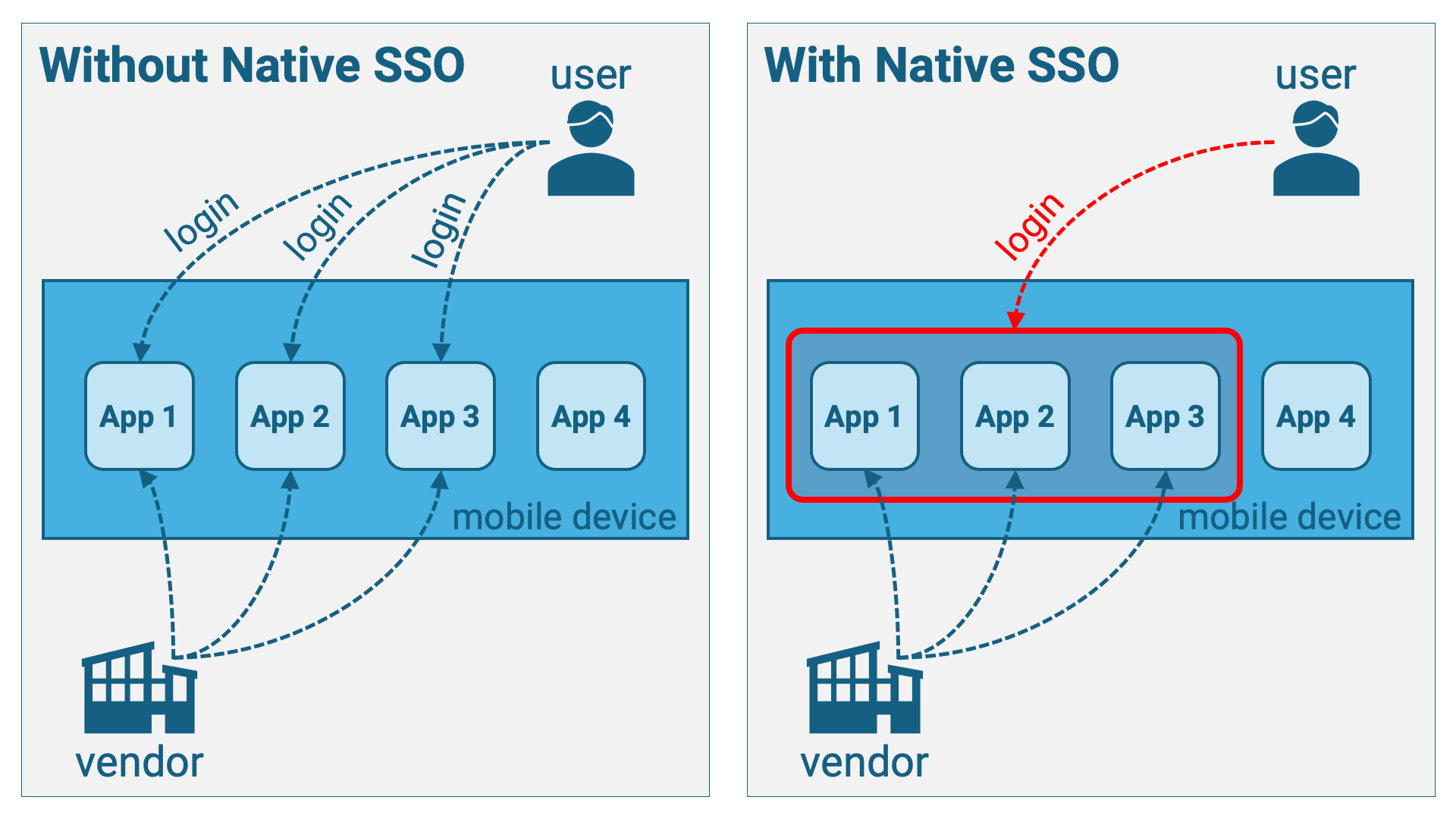
(hereafter referred to as "**Native SSO**") is a standard specification that
defines a mechanism for achieving single sign-on (SSO) across multiple mobile
applications under the control of the same vendor. If this specification is
implemented, users are not required to authenticate individually for each
mobile application; instead, a single authentication suffices for all
applications integrated via Native SSO.
## Specification Overview
Before diving into the details, let's start with an overview of the specification.
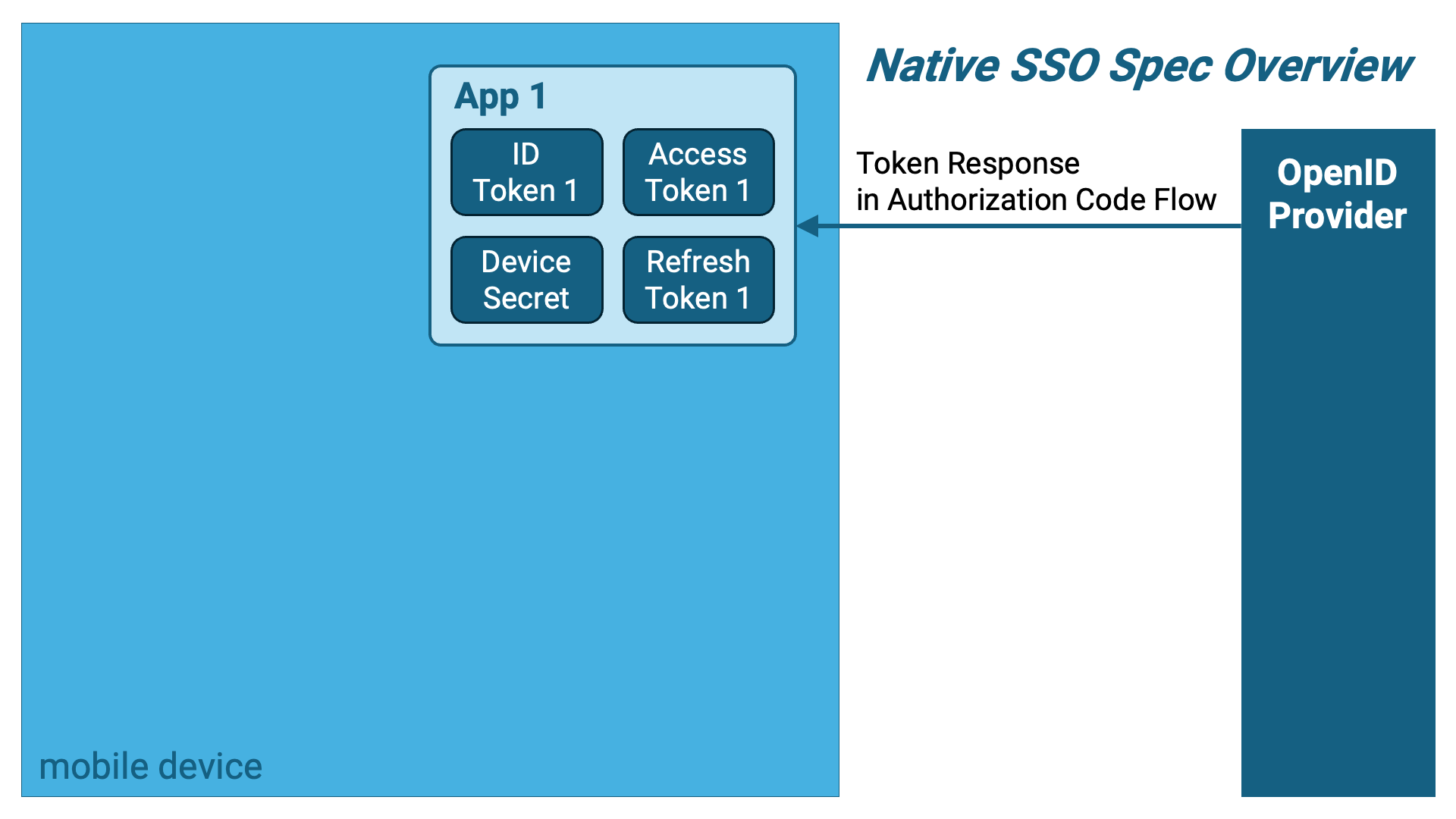
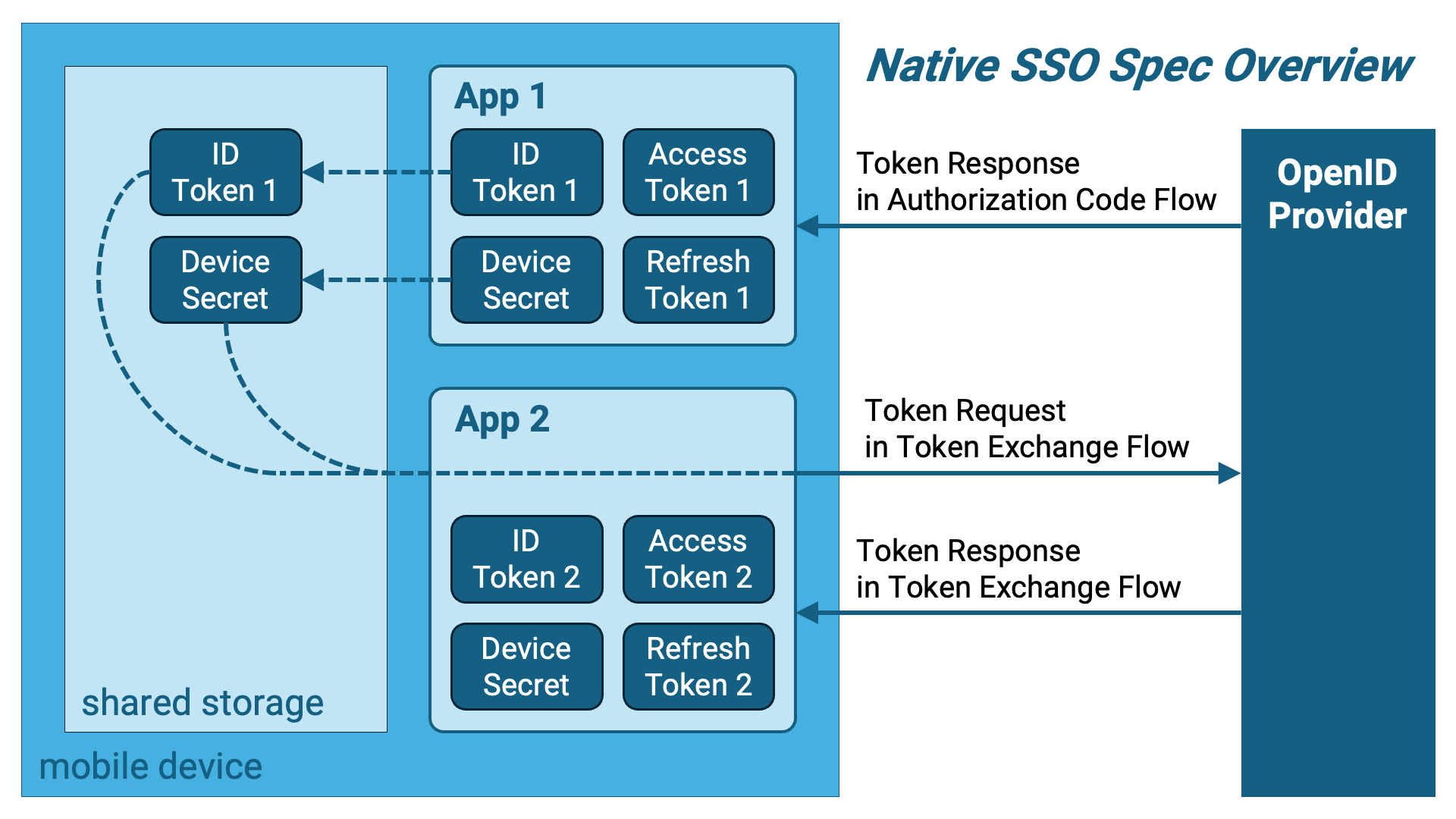
The first application (hereafter referred to as "App 1") obtains the following
set of tokens using the authorization code flow. Notably, the ID token conforms
to the Native SSO specification, and a new type of token called a
**device secret** is included.
1. Access Token
2. Refresh Token (optional)
3. ID Token (Native SSO-compliant)
4. Device Secret
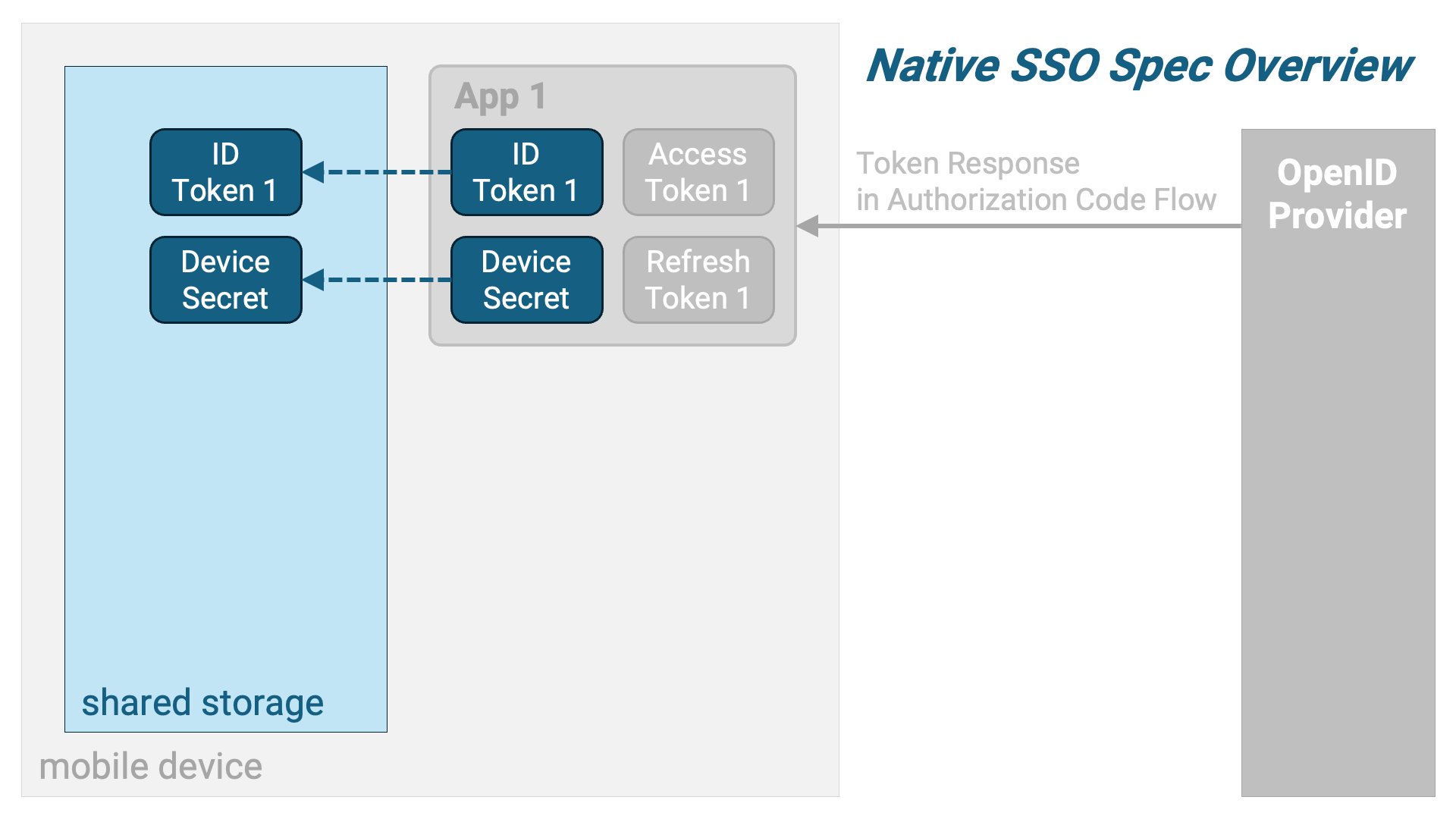
 App 1 stores the ID token and the device secret in shared storage that the
second application (hereafter referred to as "App 2") can access.
App 1 stores the ID token and the device secret in shared storage that the
second application (hereafter referred to as "App 2") can access.
 Next, App 2 retrieves the ID token and device secret from the shared storage
and sends a token exchange request using them as parameters.
Next, App 2 retrieves the ID token and device secret from the shared storage
and sends a token exchange request using them as parameters.
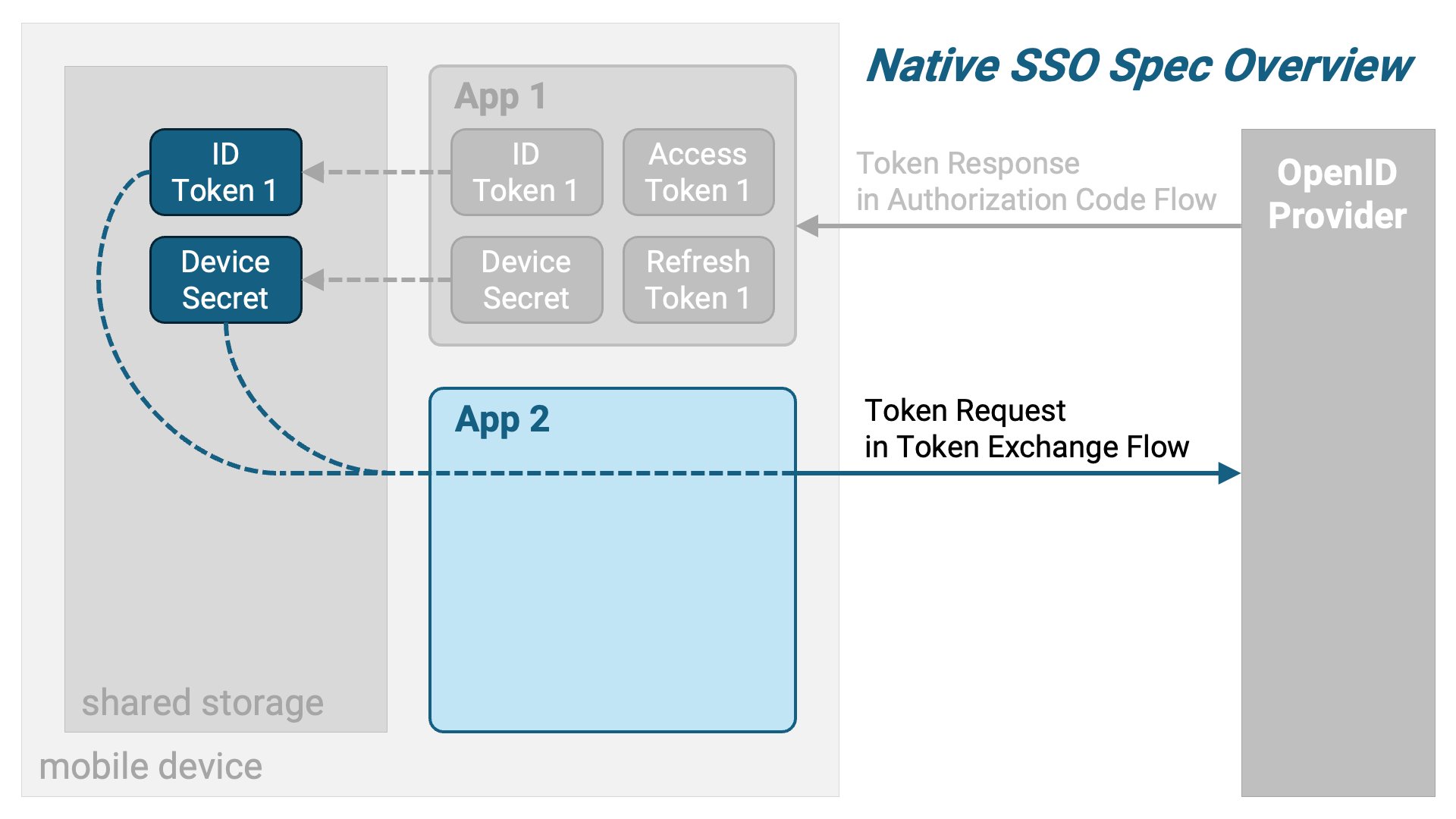 In response, a token exchange response containing a new set of tokens for App 2
is returned.
In response, a token exchange response containing a new set of tokens for App 2
is returned.
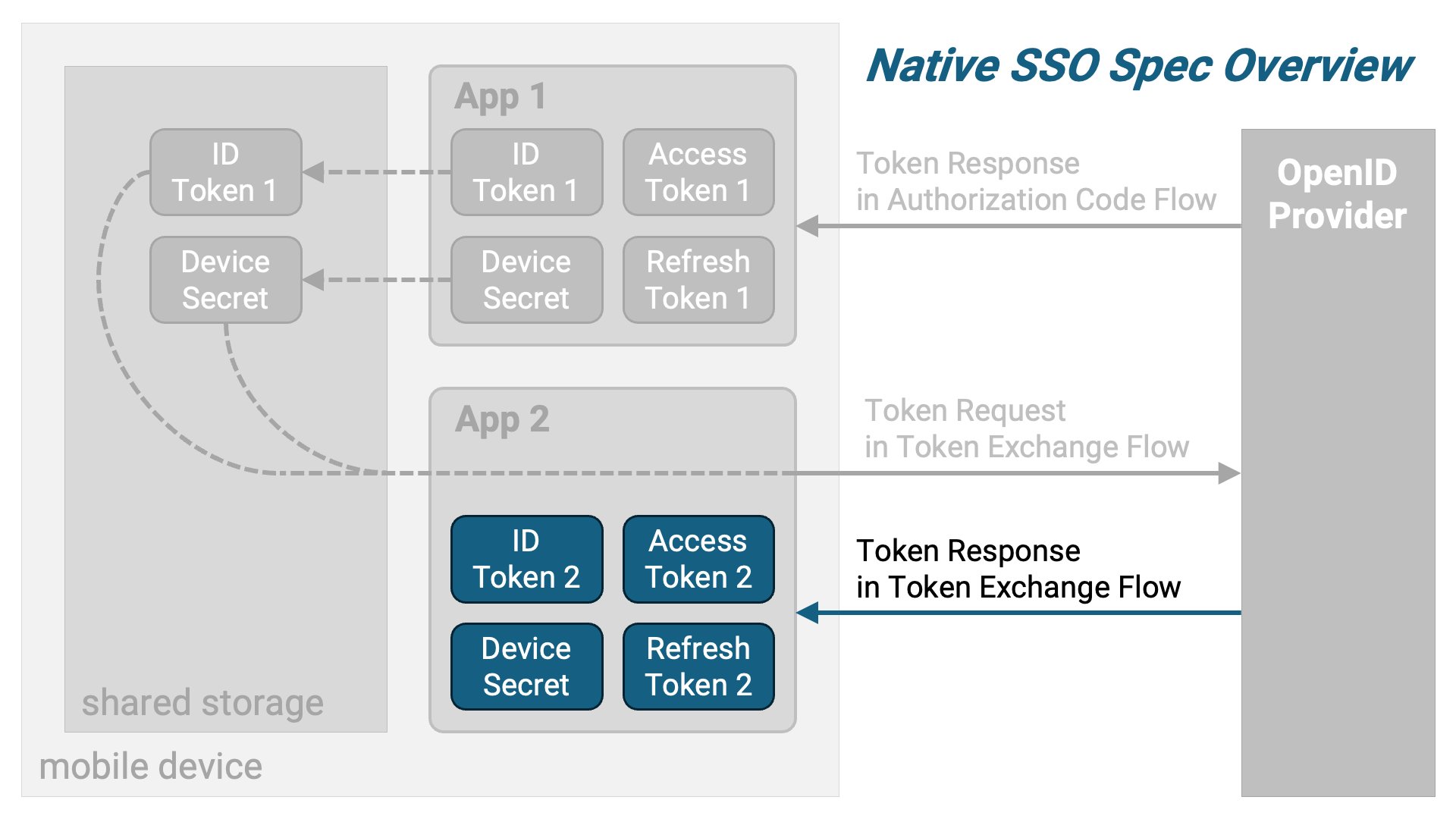 To summarize, the following diagram illustrates the overview.
### Device Secret
The device secret is described in the Native SSO specification as follows.
> The device secret contains relevant data to the device and the current users
> authenticated with the device. The device secret is completely opaque to the
> client and as such the AS MUST adequately protect the value such as using a
> JWE if the AS is not maintaining state on the backend.
When issuing a device secret, the OpenID Provider obtains some form of
information about the device and associates it with the device secret. Then,
upon receiving a token exchange request, it verifies whether the device
associated with the device secret in the request matches the device from
which the request was sent.
## Specification Details
### App 1 Authorization Request
App 1 sends an authorization request based on the authorization code flow to
the OpenID Provider via a web browser. A Native SSO-specific requirement is
that the `scope` parameter must include both the `openid` scope and the
`device_sso` scope. The `device_sso` scope is defined by the Native SSO
specification.
The minimum required request parameters for an authorization request compliant
with Native SSO are as follows:
| Parameter | Description |
| :-------------- | :-------------------------------------------------------------------------------------------------------------------------------------------------- |
| `client_id` | The client identifier, such as `app_1`. |
| `response_type` | A space-separated list of the tokens being requested. When requesting an authorization code, it includes `code`. |
| `scope` | A space-separated list of the scopes being requested. To comply with the Native SSO specification, both `openid` and `device_sso` must be included. |
| `redirect_uri` | The redirect URI. According to the OpenID Connect specification, the `redirect_uri` parameter is required when requesting the `openid` scope. |
Here is an example of an authorization request:
```text theme={null}
https://trial.authlete.net/api/authorization?client_id=app_1&response_type=code&scope=openid+device_sso&redirect_uri=https://nextdev-api.authlete.net/api/mock/redirection
```
This example actually works. When the authorization page is displayed, please
enter `inga` and `inga` as the login ID and password,
respectively. If you are already logged in and would like to display the login
ID field and password field again, add `&prompt=login`
at the end of the authorization request.
### App 1 Token Request
A token request is constructed using the authorization code obtained from the
above authorization request. The request parameters required are as follows:
| Parameter | Description |
| :------------- | :------------------------------------------------------------------------------------------------------------------------------------------------------------------------------------------------------------------------------------- |
| `grant_type` | This is the grant type. It is a mandatory parameter regardless of the flow used. For the authorization code flow, the value should be specified as `authorization_code`. |
| `code` | This is a mandatory parameter in the authorization code flow. It specifies the authorization code obtained from the authorization request. |
| `redirect_uri` | This is the redirect URI. If the `redirect_uri` parameter was included in the preceding authorization request, it is also required in the token request. Its value must be the same as the one specified in the authorization request. |
In addition to the above, depending on the application’s client type
([RFC 6749 Section 2.1](https://www.rfc-editor.org/rfc/rfc6749.html#section-2.1)),
whether it is confidential or public, and which client authentication method is
used in the case of a confidential client, additional parameters may be required.
For example, if the client type is public, the `client_id` request parameter is
mandatory. On the other hand, if the client type is confidential and the
`private_key_jwt` client authentication method is used, the
`client_assertion` and `client_assertion_type`
request parameters are required. For more details on client authentication methods,
refer to
"[OAuth 2.0 Client Authentication](https://medium.com/@darutk/oauth-2-0-client-authentication-4b5f929305d4)".
The following is an example of a token request by a public client:
```text theme={null}
POST https://trial.authlete.net/api/token HTTP/1.1
Content-Type: application/x-www-form-urlencoded
client_id=app_1&grant_type=authorization_code&code={{authorization_code}}&redirect_uri=https://nextdev-api.authlete.net/api/mock/redirection
```
If you try this example in practice, replace `{{authorization_code}}`
with the actual value (the authorization code obtained as a result of the
authorization request).
### App 1 Token Response
The token response that conforms to Native SSO includes, in addition to the
access token and refresh token (optional), an ID token and a device secret
that comply with Native SSO. The device secret is returned as the value of
the `device_secret` property.
```json theme={null}
{
"access_token": "R28TIqhCydVvH2x2a3XsOzJykFEs7yFotO4ip-a2MbY",
"token_type": "Bearer",
"expires_in": 86400,
"scope": "openid device_sso",
"refresh_token": "lmlNXafSApRDAq7gZvy40ojya9bplgFSHczms46mTms",
"id_token": "eyJraWQiOiJaWUdJT0hZdUE5SXBVaWpWd1FOdWwzbkU1MzZ4MUpTV0hpT2ZkUzdzYWRnIiwiYWxnIjoiRVMyNTYifQ.eyJpc3MiOiJodHRwczovL3RyaWFsLmF1dGhsZXRlLm5ldCIsInN1YiI6IjEwMDQiLCJhdWQiOlsiYXBwXzEiXSwiZXhwIjoxNzQ2NDM3MTE5LCJpYXQiOjE3NDYzNTA3MTksImF1dGhfdGltZSI6MTc0NjM1MDY3MiwiZHNfaGFzaCI6IlhrYmdHQ1JKUTFOQUhuS25NbjhKMFhIS25fOEVNenhCOWFRdUZITk0ycDQiLCJzaWQiOiJub2RlMDM4Y2F0N2ozMDhzZzE4MjhtMXNnMmRleGwzIn0.JAYlCEbGhjJwpgSZ4lUNaXkWD2ICeDs6FCBd3bKRvKPhrrGZKUAZDRij_Bmn_AF7DyTQS5ALHl82cJqjaLCcIw",
"device_secret": "b81d5ae9-9f85-4c6d-8658-1a36ffa42c83"
}
```
The value of the `id_token` property included in the token response is the
ID token:
```text theme={null}
eyJraWQiOiJaWUdJT0hZdUE5SXBVaWpWd1FOdWwzbkU1MzZ4MUpTV0hpT2ZkUzdzYWRnIiwiYWxnIjoiRVMyNTYifQ.eyJpc3MiOiJodHRwczovL3RyaWFsLmF1dGhsZXRlLm5ldCIsInN1YiI6IjEwMDQiLCJhdWQiOlsiYXBwXzEiXSwiZXhwIjoxNzQ2NDM3MTE5LCJpYXQiOjE3NDYzNTA3MTksImF1dGhfdGltZSI6MTc0NjM1MDY3MiwiZHNfaGFzaCI6IlhrYmdHQ1JKUTFOQUhuS25NbjhKMFhIS25fOEVNenhCOWFRdUZITk0ycDQiLCJzaWQiOiJub2RlMDM4Y2F0N2ozMDhzZzE4MjhtMXNnMmRleGwzIn0.JAYlCEbGhjJwpgSZ4lUNaXkWD2ICeDs6FCBd3bKRvKPhrrGZKUAZDRij_Bmn_AF7DyTQS5ALHl82cJqjaLCcIw
```
The payload of this ID token, when decoded using base64url, is as follows.
The ID token compliant with Native SSO specification includes the `ds_hash`
claim and the `sid` claim.
```json theme={null}
{
"iss": "https://trial.authlete.net",
"sub": "1004",
"aud": [
"app_1"
],
"exp": 1746437119,
"iat": 1746350719,
"auth_time": 1746350672,
"ds_hash": "XkbgGCRJQ1NAHnKnMn8J0XHKn_8EMzxB9aQuFHNM2p4",
"sid": "node038cat7j308sg1828m1sg2dexl3"
}
```
The `ds_hash` claim is the hash value of the device secret. How this hash value
is calculated depends on the implementation, but the `ds_hash` claim allows the
ID token to be associated with the device secret.
The `sid` claim is a string that uniquely identifies the user's authentication
session, essentially the session ID.
App 1 stores the obtained ID token and device secret in a location accessible
to other applications that are integrated with Native SSO.
### App 2 Token Request
The Native SSO specification extends the
[RFC 8693: OAuth 2.0 Token Exchange](https://www.rfc-editor.org/rfc/rfc8693.html)
specification by adding requirements to achieve Native SSO. App 2 retrieves the
ID token and device secret stored by App 1 and uses them to construct a token
exchange request that complies with the Native SSO specification.
For an explanation of RFC 8693, please refer to the article
"RFC 8693 OAuth
2.0 Token Exchange".
The request parameters for a token exchange request compliant with the Native
SSO specification are as follows:
| Parameter | Description |
| :------------------- | :----------------------------------------------------------------------------------------------------------------------------------------------------------------------------------------------------------------------------------------------------------------------------------- |
| `grant_type` | The grant type. In a token exchange request, specify `urn:ietf:params:oauth:grant-type:token-exchange`. |
| `audience` | The intended recipient of the token issued by the token exchange request. In a Native SSO token exchange request, specify the identifier of the OpenID Provider. |
| `subject_token` | The token that indicates on whose behalf the token exchange is being performed. In a Native SSO token exchange request, this is the ID token. |
| `subject_token_type` | The identifier indicating the type of the `subject_token`. In a Native SSO token exchange request, the `subject_token` is always an ID token, so the value must be `urn:ietf:params:oauth:token-type:id_token`. |
| `actor_token` | The token that represents the actor executing the token exchange. In a Native SSO token exchange request, this is the device secret. |
| `actor_token_type` | The identifier indicating the type of the `actor_token`. In a Native SSO token exchange request, the `actor_token` is always a device secret, so the value must be `urn:openid:params:token-type:device-secret`. This is a token type newly defined by the Native SSO specification. |
| `scope` | The scopes to associate with the access token issued as a result of the token exchange request. This parameter is optional. |
In addition to the above, depending on the application’s client type
([RFC 6749 Section 2.1](https://www.rfc-editor.org/rfc/rfc6749.html#section-2.1)),
whether it is confidential or public, and which client authentication method is
used in the case of a confidential client, additional parameters may be required.
For example, if the client type is public, the `client_id` request parameter is
mandatory. On the other hand, if the client type is confidential and the
`private_key_jwt` client authentication method is used, the
`client_assertion` and `client_assertion_type`
request parameters are required. For more details on client authentication methods,
refer to
"[OAuth 2.0 Client Authentication](https://medium.com/@darutk/oauth-2-0-client-authentication-4b5f929305d4)".
The following is an example of a token exchange request by a public client:
```text theme={null}
POST https://trial.authlete.net/api/token HTTP/1.1
Content-Type: application/x-www-form-urlencoded
client_id=app_2&grant_type=urn:ietf:params:oauth:grant-type:token-exchange&audience=https://trial.authlete.net&subject_token={{id_token}}&subject_token_type=urn:ietf:params:oauth:token-type:id_token&actor_token={{device_secret}}&actor_token_type=urn:openid:params:token-type:device-secret&scope=openid
```
If you want to try this example in practice, replace `{{id_token}}`
and `{{device_secret}}` with actual values.
### App 2 Token Response
The response to the token exchange request is almost identical to the token
response of the authorization code flow. The only difference is that it
includes the `issued_token_type` property. In the case
of Native SSO, the value of `issued_token_type` is
`urn:ietf:params:oauth:token-type:access_token`.
```json theme={null}
{
"access_token": "rH9115-g83z9zIiCJ1mzIe8mza3bX4NaBTWmGs5qqow",
"token_type": "Bearer",
"expires_in": 86400,
"scope": "openid",
"refresh_token": "_F7NMCU1ny8DQ-3Pru_owgII52gIew0T6wuWKeIrfL4",
"id_token": "eyJraWQiOiJaWUdJT0hZdUE5SXBVaWpWd1FOdWwzbkU1MzZ4MUpTV0hpT2ZkUzdzYWRnIiwiYWxnIjoiRVMyNTYifQ.eyJpc3MiOiJodHRwczovL3RyaWFsLmF1dGhsZXRlLm5ldCIsInN1YiI6IjEwMDQiLCJhdWQiOlsiYXBwXzIiXSwiZXhwIjoxNzQ2NDM4MzUxLCJpYXQiOjE3NDYzNTE5NTEsImRzX2hhc2giOiJYa2JnR0NSSlExTkFIbktuTW44SjBYSEtuXzhFTXp4QjlhUXVGSE5NMnA0Iiwic2lkIjoibm9kZTAzOGNhdDdqMzA4c2cxODI4bTFzZzJkZXhsMyJ9.8jNNF5mpeHnbqp1FTK_1adR8FlgPmHK9_rwUzaz-o5P7RMyaelBaSj74IhxHY6wbCJeD0n_N14h8vD8zWYh-8w",
"device_secret": "b81d5ae9-9f85-4c6d-8658-1a36ffa42c83",
"issued_token_type": "urn:ietf:params:oauth:token-type:access_token"
}
```
Extracting the ID token from the above response example:
```text theme={null}
eyJraWQiOiJaWUdJT0hZdUE5SXBVaWpWd1FOdWwzbkU1MzZ4MUpTV0hpT2ZkUzdzYWRnIiwiYWxnIjoiRVMyNTYifQ.eyJpc3MiOiJodHRwczovL3RyaWFsLmF1dGhsZXRlLm5ldCIsInN1YiI6IjEwMDQiLCJhdWQiOlsiYXBwXzIiXSwiZXhwIjoxNzQ2NDM4MzUxLCJpYXQiOjE3NDYzNTE5NTEsImRzX2hhc2giOiJYa2JnR0NSSlExTkFIbktuTW44SjBYSEtuXzhFTXp4QjlhUXVGSE5NMnA0Iiwic2lkIjoibm9kZTAzOGNhdDdqMzA4c2cxODI4bTFzZzJkZXhsMyJ9.8jNNF5mpeHnbqp1FTK_1adR8FlgPmHK9_rwUzaz-o5P7RMyaelBaSj74IhxHY6wbCJeD0n_N14h8vD8zWYh-8w
```
and decoding its payload part using base64url will show this result:
```json theme={null}
{
"iss": "https://trial.authlete.net",
"sub": "1004",
"aud": [
"app_2"
],
"exp": 1746438351,
"iat": 1746351951,
"ds_hash": "XkbgGCRJQ1NAHnKnMn8J0XHKn_8EMzxB9aQuFHNM2p4",
"sid": "node038cat7j308sg1828m1sg2dexl3"
}
```
The values of the `ds_hash` and `sid` claims are the same as those in the ID
token received by App 1, but the value of the `aud` claim is different. In this
ID token, the identifier of App 2, `app_2`, is included in the `aud` array.
## Settings
Authlete supports Native SSO starting from version 3.0.
### Service Settings
#### nativeSsoSupported Property
A new boolean property, `nativeSsoSupported`, has been added to the service to
indicate whether Native SSO is supported. The default value of this property is
`false`, so if you want to enable Native SSO, you must explicitly set it to `true`.
The `nativeSsoSupported` property corresponds to the
`native_sso_supported` server metadata defined by the
Native SSO specification. When `nativeSsoSupported` is set
to `true`, the discovery document generated by Authlete’s
`/service/configuration` API (as defined in
[OpenID Connect Discovery 1.0](https://openid.net/specs/openid-connect-discovery-1_0.html))
will include the following entry:
```json theme={null}
"native_sso_supported": true
```
If `nativeSsoSupported` is set to `false`, Authlete behaves as if it has no
knowledge of Native SSO. For example, the `device_sso` scope no longer has any
special meaning, and the token type
`urn:openid:params:token-type:device-secret`
is treated as an unknown token type (which results in an error if specified as
the value of `actor_token_type`).
#### device\_sso Scope
For Native SSO, the authorization server must support the `device_sso` scope.
Be sure to explicitly register the `device_sso` scope.
Due to requirements in the OAuth 2.0 specification, an authorization server
does not treat unknown scopes as errors; it simply ignores them. As a result,
if the `device_sso` scope is not registered, including it in an authorization
request will not trigger any warning, and processing specific to Native SSO
will silently be skipped.
#### Service Grant Type
Please add `TOKEN_EXCHANGE` to the list of supported grant types of the service.
Additionally, Authlete has several configuration items related to Token Exchange,
so please verify that they are set correctly. Pay special attention to the
following two items:
| Property | Description |
| :--------------------------------------- | :---------------------------------------------------------------------------------------------------------------------------------------------------------------------------------------------------------------------------- |
| `tokenExchangeByConfidentialClientsOnly` | This boolean property indicates whether token exchange requests are limited to confidential clients only. If set to `true`, token exchange requests from public clients will not be accepted. |
| `tokenExchangeByPermittedClientsOnly` | This boolean property indicates whether token exchange requests are restricted to pre-approved clients. If set to `true`, token exchange requests from clients that have not been explicitly authorized will not be accepted. |
#### Console Configuration
To configure `Native SSO` in the Authlete Management Console:
1. Login to the [Authlete Management Console](https://console.authlete.com/)
2. Navigate to `Service Settings > Tokens and Claims > Advanced > Token Exchange`
3. Go to the `Native SSO` section and toggle `Allow` to enable.
4. Click `Save Changes` to apply the update.
 To register the `device_sso` scope:
1. Login to the [Authlete Management Console](https://console.authlete.com/)
2. Navigate to `Service Settings > Tokens and Claims > Advanced > Scope`
3. Go to the `Supported Scopes` and click the `Add` button.
4. Enter `device_sso` for the scope name and click add.
5. Once back in the scope page, click `Save Changes` to apply the update.
To register the `device_sso` scope:
1. Login to the [Authlete Management Console](https://console.authlete.com/)
2. Navigate to `Service Settings > Tokens and Claims > Advanced > Scope`
3. Go to the `Supported Scopes` and click the `Add` button.
4. Enter `device_sso` for the scope name and click add.
5. Once back in the scope page, click `Save Changes` to apply the update.
 To add the `Token_Exchange` Grant Type:
1. Navigate to `Service Settings > Endpoints > Global Settings > General`
2. Go to `Supported Grant Types`, and select the `Token_Exchange` option.
3. Click `Save Changes` to apply the update.
To add the `Token_Exchange` Grant Type:
1. Navigate to `Service Settings > Endpoints > Global Settings > General`
2. Go to `Supported Grant Types`, and select the `Token_Exchange` option.
3. Click `Save Changes` to apply the update.
 > **Note:** When using the `Token_Exchange` Grant Type, make sure to enable additional settings in the client. Go to `client settings > Tokens and claims > Advanced > Token Exchange` and enable the `Explicit Permission for Token Exchange` option.

### Client Settings
#### device\_sso Scope
Depending on the settings, the scopes that a client can request may be
restricted. In such cases, ensure that the `device_sso` scope is added
to the list of allowed scopes that can be requested.
#### Client Grant Type
Add `TOKEN_EXCHANGE` to the list of grant types that the client can use.
Also, if the service's `tokenExchangeByPermittedClientsOnly`
property is set to `true`, token exchange requests from clients that are not
explicitly permitted will be rejected. In such cases, you need to set the
`extension.tokenExchangePermitted` property of
the client to `true` in the client's settings.
#### Console Configuration
To add the `Token_Exchange` Grant Type:
1. Navigate to `Client Settings > Endpoints > Global Settings > General`
2. Go to `Supported Grant Types`, and select the `Token_Exchange` option.
3. Click `Save Changes` to apply the update.
 To register the `device_sso` scope:
1. Login to the [Authlete Management Console](https://console.authlete.com/)
2. Navigate to `Client Settings > Tokens and Claims > Advanced > Scope`
3. Go to the `Add Requestable scope` and enter `device_sso`for the scope name.
4. Once back in the scope page, click `Save Changes` to apply the update.
To register the `device_sso` scope:
1. Login to the [Authlete Management Console](https://console.authlete.com/)
2. Navigate to `Client Settings > Tokens and Claims > Advanced > Scope`
3. Go to the `Add Requestable scope` and enter `device_sso`for the scope name.
4. Once back in the scope page, click `Save Changes` to apply the update.

## OpenID Provider Implementation
### Authentication Session and Device Secret Management
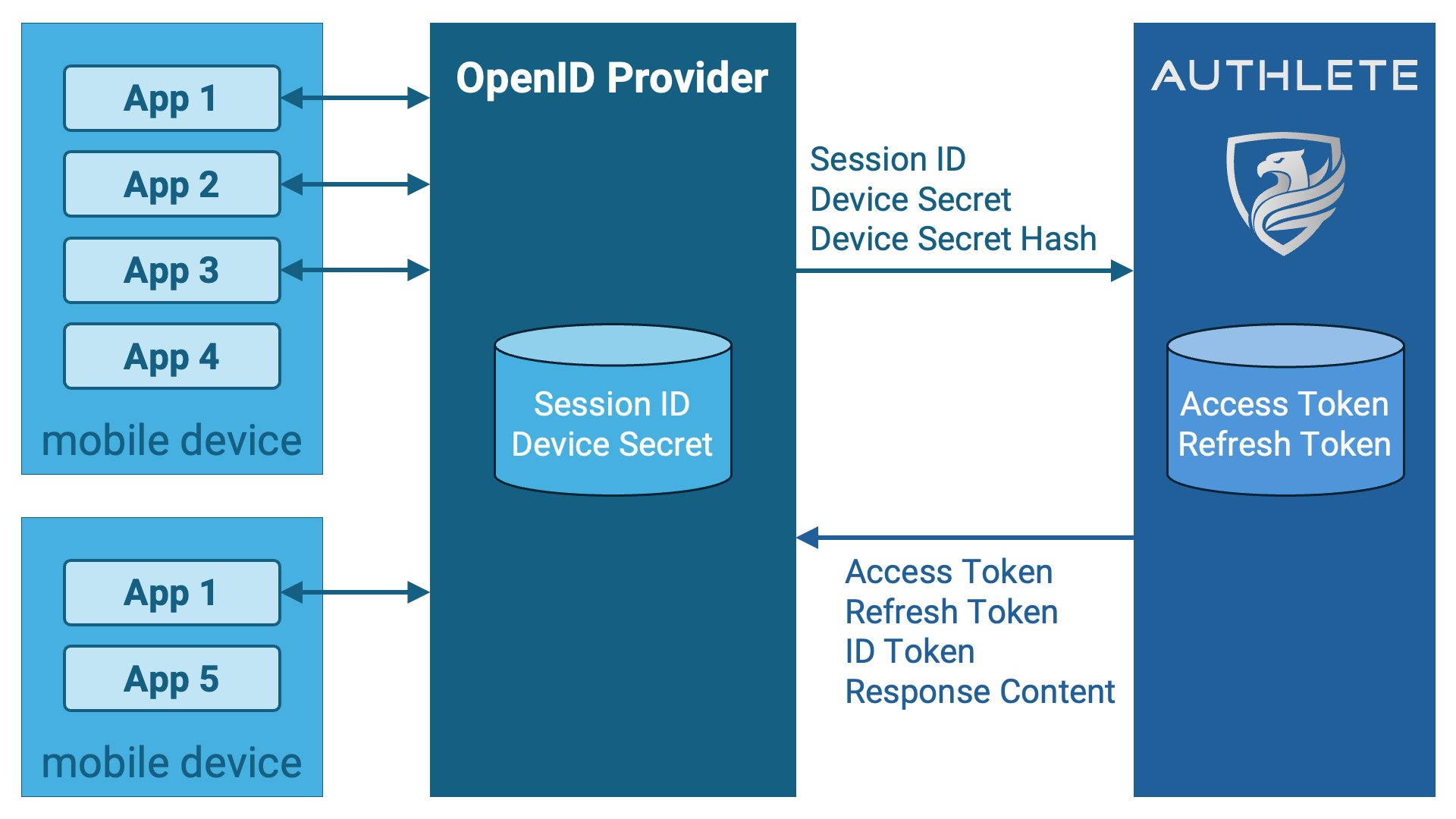
A key feature of Authlete is the complete separation of user authentication and
management from OAuth 2.0/OpenID Connect protocol processing, focusing only on
the latter, which has gained significant market support. Due to this unique
architecture, Authlete does not manage user authentication sessions.
Consequently, the management of authentication sessions is the responsibility
of the Authlete users (OpenID Provider implementers).
For ID tokens conforming to Native SSO, the session ID value must be embedded
as the `sid` claim, and this value will be managed by the OpenID Provider.
Another characteristic of the Authlete architecture is that it operates in the
backend and does not communicate directly with client applications. As a result,
Authlete cannot directly access information about the device on which the
client application is running. The OpenID Provider conforming to Native SSO
must issue a device secret associated with the device information, but Authlete
cannot do this. The generation and management of device secrets are also the
responsibility of the OpenID Provider.
On the other hand, Authlete generates ID tokens and token responses conforming
to Native SSO. The necessary session ID, device secret (and device secret hash)
for generating these must be passed from the OpenID Provider to Authlete
through the request parameters of Authlete APIs.
### Authorization Endpoint Implementation
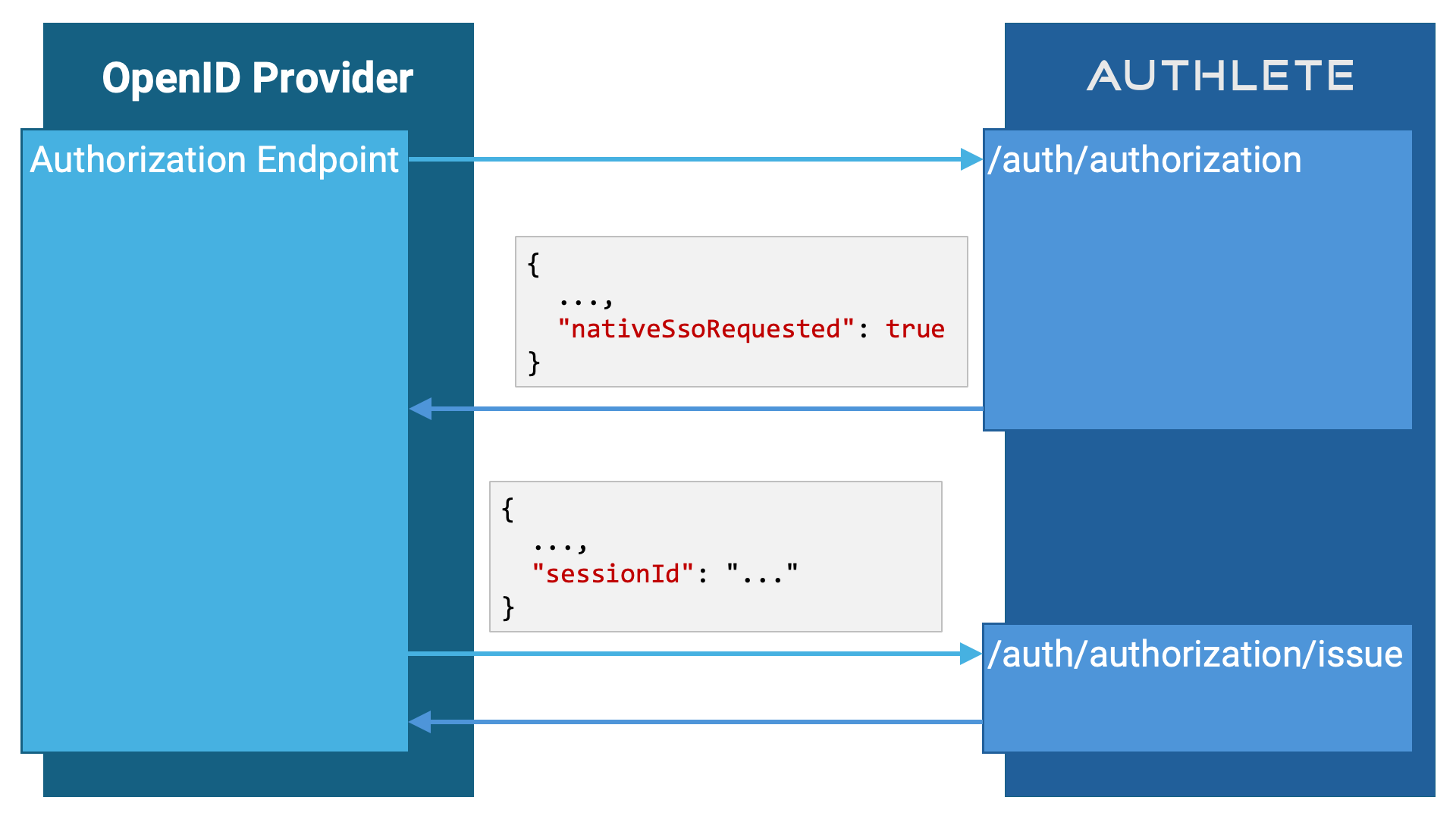
When an authorization request is determined to be requesting Native SSO,
specifically when all of the following conditions are met, the response from
Authlete's `/auth/authorization` API will include a boolean
property `nativeSsoRequested` with the value `true`.
| | Condition |
| :- | :----------------------------------------------------------------------------------------------------------------------------------------- |
| 1 | The service supports Native SSO. (The value of `Service.nativeSsoSupported` is set to `true`.) |
| 2 | The service supports the `openid` and `device_sso` scopes. |
| 3 | The client is permitted to request the `openid` and `device_sso` scopes. (The client is not restricted by the Requestable Scopes feature.) |
| 4 | The `scope` of the authorization request includes both `openid` and `device_sso`. |
| 5 | The service supports the authorization code flow. (`Service.supportedGrantTypes` includes `AUTHORIZATION_CODE`.) |
| 6 | The client declares that it uses the authorization code flow. (`Client.grantTypes` includes `AUTHORIZATION_CODE`.) |
| 7 | The `response_type` of the authorization request includes `code`. |
| 8 | The service supports this response type. (`Service.supportedResponseTypes` includes the corresponding response type.) |
| 9 | The client declares that it uses this response type. (`Client.responseTypes` includes the corresponding response type.) |
The conditions in this table may seem complex, but if we focus only on the
conditions of the authorization request, excluding the service and client
settings, it can be simplified: *"If the `scope` includes `openid` and
`device_sso` and the `response_type` includes `code`"*, it is considered
a request for Native SSO.
When the value of the `nativeSsoRequested` property is `true`, the
implementation of the authorization endpoint must include the `sessionId`
request parameter when calling the `/auth/authorization/issue`
API. The value should represent an identifier for the current user's
authentication session (i.e., the session ID). The value provided here will
be used as the value for the `sid` claim in the ID token.
 The implementation of the authorization endpoint may pass the actual session
ID value as the `sessionId` parameter to Authlete, or it may pass a transformed
version of it. However, the string should not be too long. Generally, the upper
limit is around 150 characters. If the length of the string resulting from
encrypting the `sessionId` and base64url encoding it exceeds 255 characters, an
error will occur (the encryption logic is not publicly disclosed).
It is also acceptable to always pass the `sessionId` parameter to the
`/auth/authorization/issue` API, regardless of whether the
value of `nativeSsoRequested` in the
`/auth/authorization` API response is `true` or `false`. If the
authorization request does not request Native SSO, even if the `sessionId`
parameter is provided, Authlete will not embed the `sid` claim in the ID token.
The implementation of the authorization endpoint may pass the actual session
ID value as the `sessionId` parameter to Authlete, or it may pass a transformed
version of it. However, the string should not be too long. Generally, the upper
limit is around 150 characters. If the length of the string resulting from
encrypting the `sessionId` and base64url encoding it exceeds 255 characters, an
error will occur (the encryption logic is not publicly disclosed).
It is also acceptable to always pass the `sessionId` parameter to the
`/auth/authorization/issue` API, regardless of whether the
value of `nativeSsoRequested` in the
`/auth/authorization` API response is `true` or `false`. If the
authorization request does not request Native SSO, even if the `sessionId`
parameter is provided, Authlete will not embed the `sid` claim in the ID token.
### Token Endpoint Implementation (Verification)
If a token request is determined to be for Native SSO — specifically, if one of
the following sets of conditions is satisfied — then the value of the `action`
property in the response from Authlete's `/auth/token` API will
be `NATIVE_SSO`.
| | Conditions Set 1: Authorization Code Flow |
| :-: | :--------------------------------------------------------------------------------------------------------------------------------------- |
| 1 | The service supports Native SSO. (The value of `Service.nativeSsoSupported` is set to true.) |
| 2 | The service supports the `openid` and `device_sso` scopes. |
| 3 | The client is allowed to request the `openid` and `device_sso` scopes. (The client is not restricted by the Requestable Scopes feature.) |
| 4 | The corresponding authorization request's `scope` contains both `openid` and `device_sso`. |
| 5 | The service supports the authorization code flow. (`Service.supportedGrantTypes` includes `AUTHORIZATION_CODE`.) |
| 6 | The client declares the use of the authorization code flow. (`Client.grantTypes` includes `AUTHORIZATION_CODE`.) |
| 7 | The value of the `grant_type` parameter is `authorization_code`. |
| | Conditions Set 2: Refresh Token Flow |
| :-: | :------------------------------------------------------------------------------------------------------------------------------------------------------------------------------------------------ |
| 1 | The service supports Native SSO. (The value of `Service.nativeSsoSupported` is set to true.) |
| 2 | The service supports the `device_sso` scope. |
| 3 | The client is allowed to request the `device_sso` scope. (The client is not restricted by the Requestable Scopes feature.) |
| 4 | The service supports the refresh token flow. (`Service.supportedGrantTypes` includes `REFRESH_TOKEN`.) |
| 5 | The client declares the use of the refresh token flow. (`Client.grantTypes` includes `REFRESH_TOKEN`.) |
| 6 | The value of the `grant_type` parameter is `refresh_token`. |
| 7 | Even if the scope range is narrowed by the `scope` parameter in the token request, the `device_sso` scope is still covered. |
| 8 | The presented refresh token is associated with the user authentication session. (Effectively, only refresh tokens generated by an authorization code flow compliant with Native SSO can be used.) |
| | Conditions Set 3: Token Exchange Flow |
| :-: | :--------------------------------------------------------------------------------------------------------------------------------------------------------- |
| 1 | The service supports Native SSO. (The value of `Service.nativeSsoSupported` is set to true.) |
| 2 | The service supports the token exchange flow. (`Service.supportedGrantTypes` includes `TOKEN_EXCHANGE`.) |
| 3 | The client declares the use of the token exchange flow. (`Client.grantTypes` includes `TOKEN_EXCHANGE`.) |
| 4 | Various settings for the service's token exchange flow (e.g., `tokenExchangeByConfidentialClientsOnly`) do not reject the client's token exchange request. |
| 5 | The value of the `grant_type` parameter is `urn:ietf:params:oauth:grant-type:token-exchange`. |
| 6 | The value of the `actor_token_type` parameter is `urn:openid:params:token-type:device-secret`. |
The conditions listed above may seem complex, but essentially, if Authlete
determines that it needs to generate an ID token and token response compliant
with Native SSO, the value of `action` will be `NATIVE_SSO`.
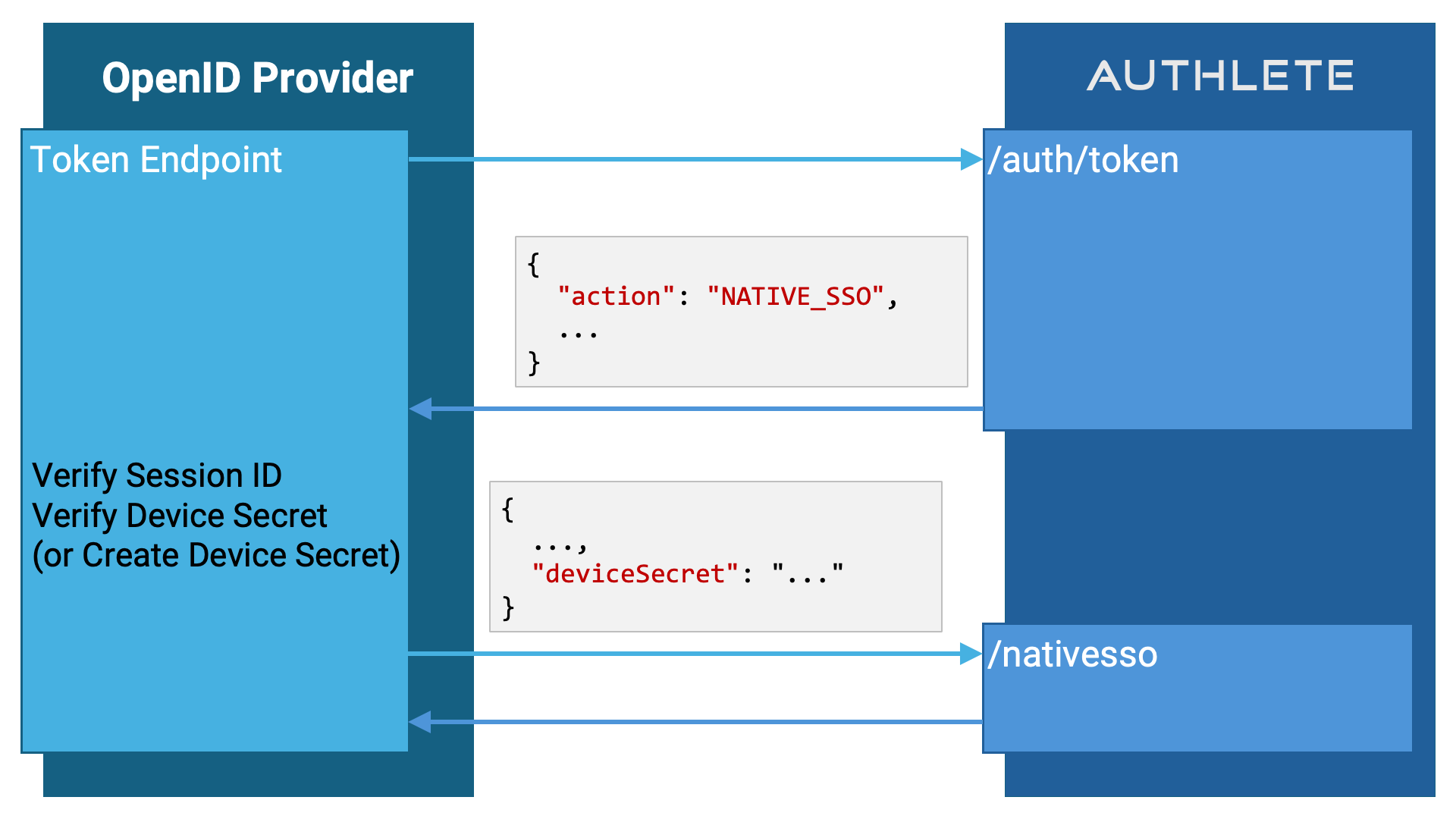
When the `action` is set to `NATIVE_SSO`, the implementation of the token
endpoint must call the `/nativesso` API to complete the token request process.
However, prior to that, it must validate the session ID and device secret and,
if necessary, generate the device secret.
If the `/auth/token` API response includes an `additionalClaims` field containing a JSON string with the `nonce` and `s_hash` claims, pass that value directly to the `/nativesso` API via the `claims` parameter:
```json theme={null}
{
"accessToken": "{{accessToken}}",
"deviceSecret": "{{deviceSecret}}",
"claims": "{{additionalClaims}}"
}
```
When `additionalClaims` is provided, the `claims` parameter must contain that exact JSON string. These claims are essential for ID token validation and will be embedded in the generated ID token by the `/nativesso` API.
#### Session ID Verification
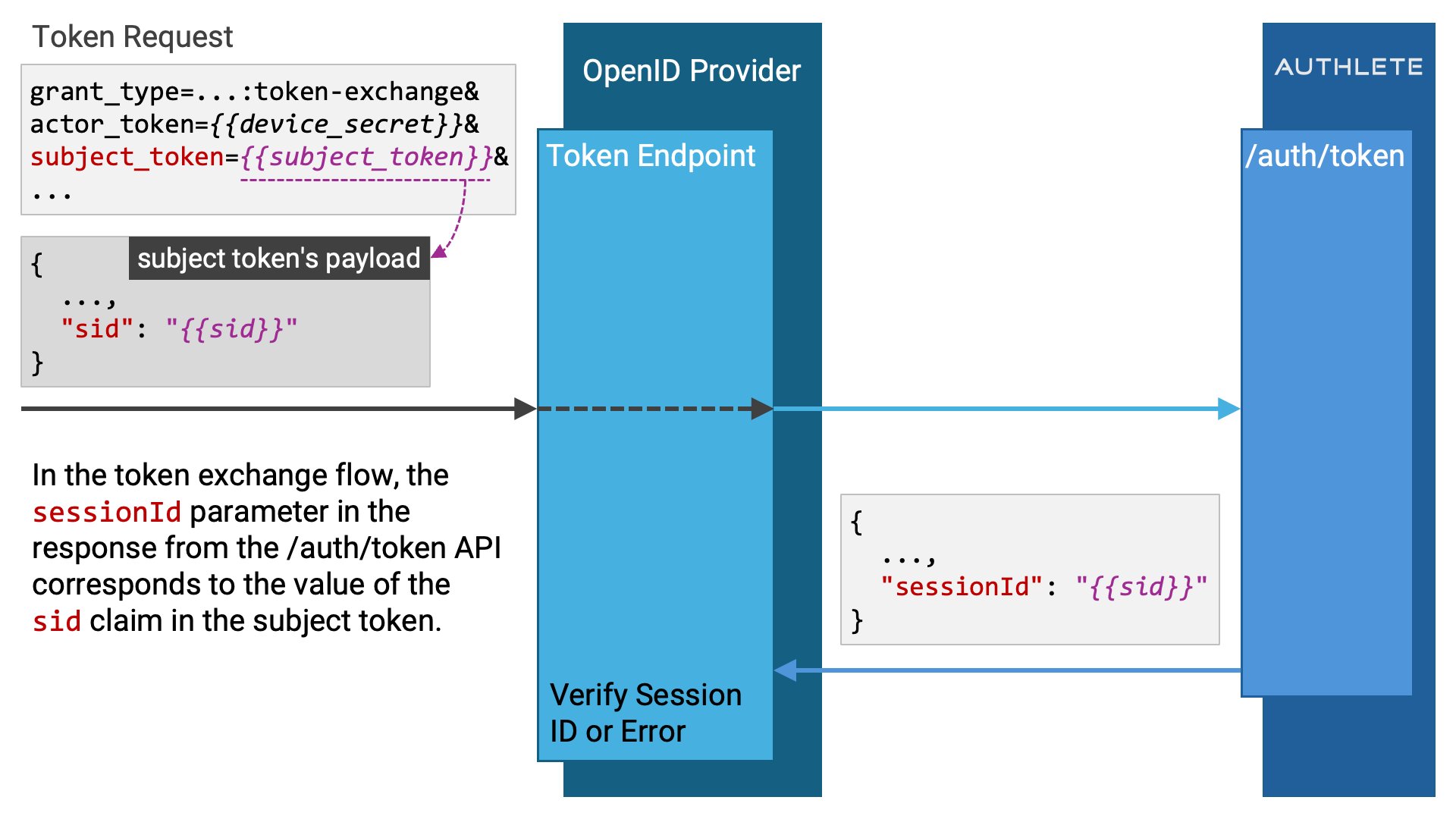
When the value of `action` in the response from the `/auth/token`
API is `NATIVE_SSO`, the response will include a `sessionId` parameter, which
represents the user's authentication session, i.e., the session ID. The token
endpoint implementation must verify whether this session ID is still valid.
If it is invalid, the implementation should not call the `/nativesso` API.
Instead, it should generate a token response indicating the `invalid_grant`
error and return it to the client.
```http theme={null}
HTTP/1.1 400 Bad Request
Content-Type: application/json
Cache-Control: no-store
{
"error": "invalid_grant",
"error_description": "The session ID is no longer valid."
}
```
The `sessionId` value in the response from the `/auth/token` API is originally
passed from the OpenID Provider to Authlete as the `sessionId` request parameter
in the `/auth/authorization/issue` API. Authlete does not
determine whether the session ID is valid (since it cannot), so the validation
of the session ID must be performed by the OpenID Provider.
If the token request is for the authorization code flow or refresh token flow,
the `sessionId` value is the session ID associated with the authorization code
or refresh token.
In the case of a token request for token exchange, the `sessionId` value is the
`sid` claim value from the ID token presented as the
`subject_token` parameter.
#### Device Secret Verification (in Authorization Code and Refresh Token Flows)
When the `action` value is `NATIVE_SSO` and the token request is for either the
authorization code flow or refresh token flow (i.e., when the `grantType` is
`AUTHORIZATION_CODE` or `REFRESH_TOKEN`), the
response from the `/auth/token` API may include the
`deviceSecret` parameter.
The value of this parameter will be the value of the `device_secret`
request parameter from the token request. However, note that this
`device_secret` request parameter is optional, meaning that it
may or may not be included in the request.
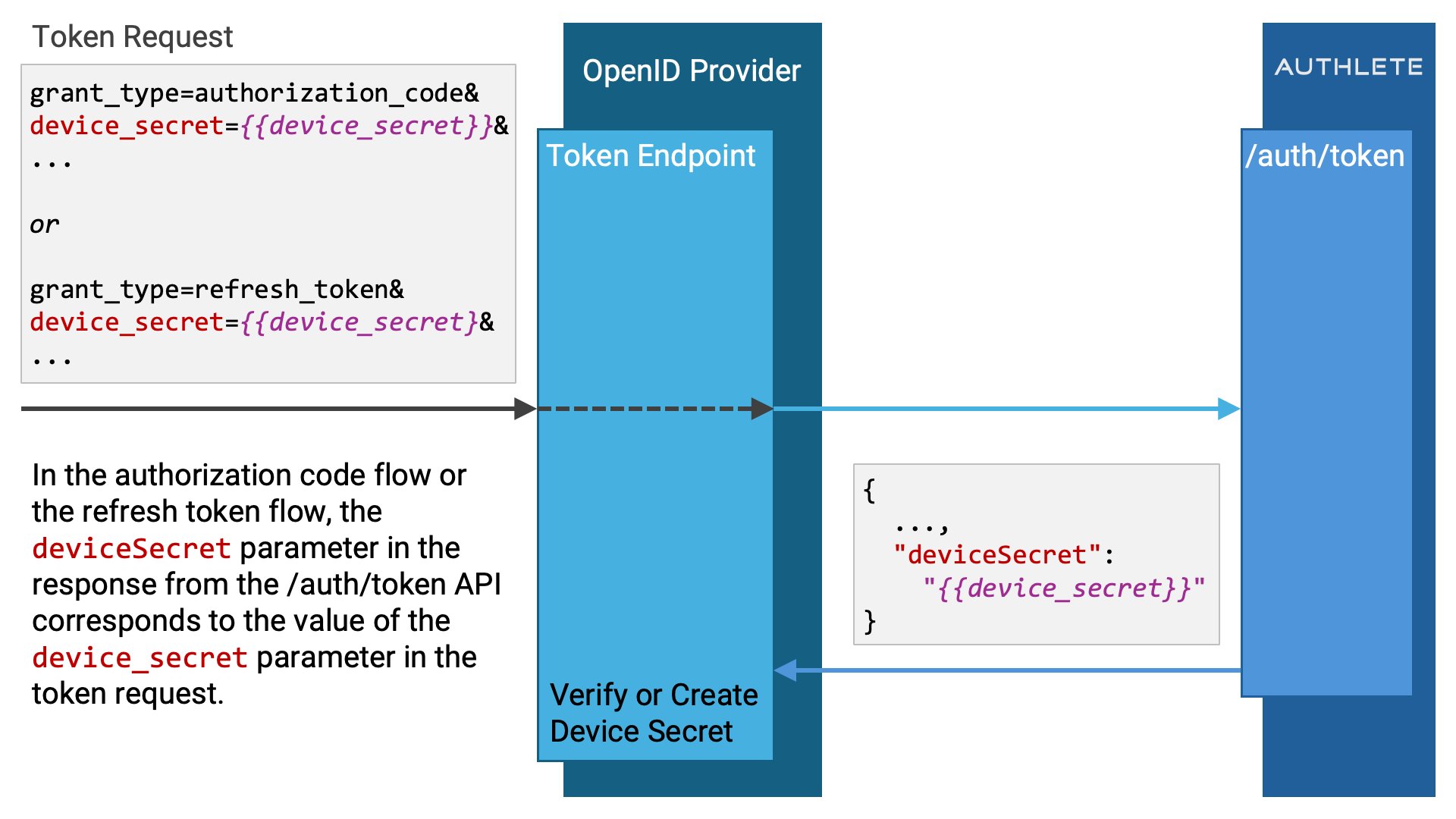 If the value of `deviceSecret` is not `null`, it must be
verified. If it is valid, the same value should be passed to the `/nativesso`
API later.
If the value of `deviceSecret` is either missing or invalid,
a new device secret must be generated and that value must be passed to the
`/nativesso` API.
If the value of `deviceSecret` is not `null`, it must be
verified. If it is valid, the same value should be passed to the `/nativesso`
API later.
If the value of `deviceSecret` is either missing or invalid,
a new device secret must be generated and that value must be passed to the
`/nativesso` API.
#### Device Secret Verification (in Token Exchange Flow)
When the `action` value is `NATIVE_SSO` and the token request is for a token
exchange flow (i.e., `grantType` is `TOKEN_EXCHANGE`), the
response from the `/auth/token` API will always include both
the `deviceSecret` and `deviceSecretHash`
parameters.
The `deviceSecret` value corresponds to the device secret
specified in the `actor_token` parameter of the token request.
The `deviceSecretHash` value corresponds to the `ds_hash`
claim included in the ID token specified in the `subject_token`
parameter of the token request.
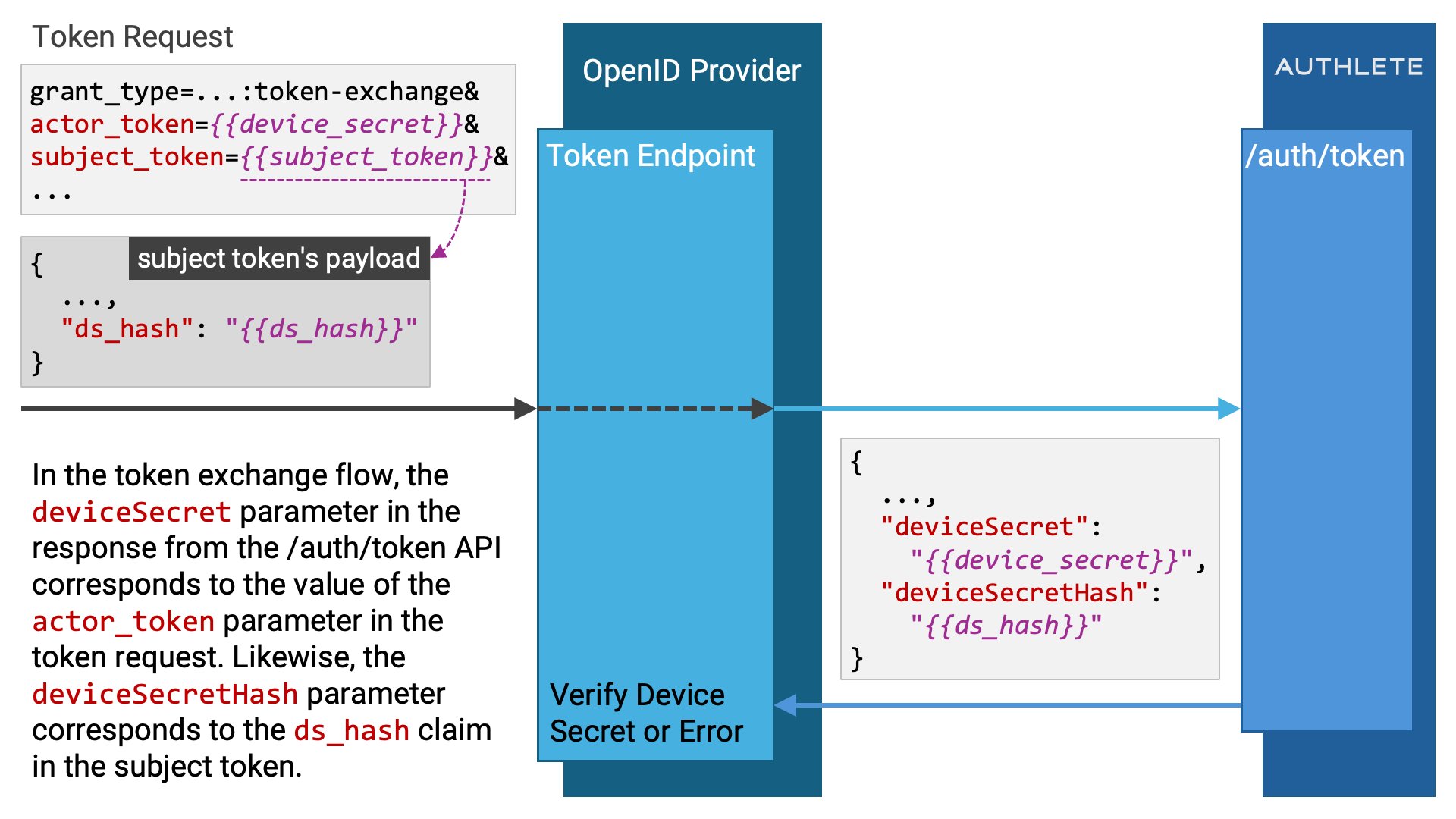 In the token endpoint implementation, the device secret hash must be verified
to ensure it corresponds to the correct device secret. If it does not match,
the `/nativesso` API should not be called. Instead, a token response indicating
the `invalid_grant` error should be generated and returned to the client.
```http theme={null}
HTTP/1.1 400 Bad Request
Content-Type: application/json
Cache-Control: no-store
{
"error": "invalid_grant",
"error_description": "The device secret hash in the subject token does not correspond to the device secret."
}
```
In the token endpoint implementation, the device secret hash must be verified
to ensure it corresponds to the correct device secret. If it does not match,
the `/nativesso` API should not be called. Instead, a token response indicating
the `invalid_grant` error should be generated and returned to the client.
```http theme={null}
HTTP/1.1 400 Bad Request
Content-Type: application/json
Cache-Control: no-store
{
"error": "invalid_grant",
"error_description": "The device secret hash in the subject token does not correspond to the device secret."
}
```
### Token Endpoint Implementation (nativesso API call)
After the verification of the session ID and the verification or generation of
the device secret, the `/nativesso` API should be called to generate the ID
token and token response that comply with Native SSO.
#### nativesso Request
The `/nativesso` API accepts HTTP POST requests in either
`application/json` or
`application/x-www-form-urlencoded` formats.
The request parameters are as follows:
| Parameter | Necessity | Description |
| :----------------- | :---------: | :------------------------------------------------------------------------------------------------------------------------------------------------------------------------------------------------------------------------------------------------------------------------------------------------------------------------------------------------------------------------------------------------------------------------------------------------------------------------------------------------------------------------------------------------------------------------------------------------------------------------------------------------------------------------------------------------------------------------------------------------------------------------------------------------------------------------------------------------------------------------------------------------------------------------------------------------------------------------------------------------------------------------------------------------------------------------------------------------------------------------------------------------------------------------------------------------- |
| `accessToken` | Required | If the `jwtAccessToken` is included in the `/auth/token` API response, specify its value. If not, specify the value of `accessToken`. The provided value will be used as the `access_token` property in the token response prepared by the `/nativesso` API. |
| `refreshToken` | Optional | Specify the value of `refreshToken` included in the `/auth/token` API response. The specified value will be used as the `refresh_token` property in the token response prepared by the `/nativesso` API. |
| `deviceSecret` | Required | If the `deviceSecret` is included in the `/auth/token` API response, specify its value. If not, generate a new device secret and specify its value. The provided value will be used as the `device_secret` property in the token response prepared by the `/nativesso` API. |
| `deviceSecretHash` | Recommended | Specify the hash value of the device secret. The logic to derive the hash value from the device secret depends on the implementation of the OpenID Provider. If this parameter is omitted, the implementation of the `/nativesso` API will compute the SHA-256 hash of the `deviceSecret` value and use the base64url encoded version of the hash as the device secret hash. The value specified in the `deviceSecretHash` parameter, or the value generated by the `/nativesso` API, will be embedded as the `ds_hash` claim in the ID token generated by the `/nativesso` API. |
| `sub` | Optional | This is the `sub` claim value of the ID token generated by the `/nativesso` API. If this parameter is omitted, the subject linked to the access token specified in the `accessToken` parameter will be used as the `sub` claim value.
Since Authlete APIs that generate ID tokens accept a `sub` request parameter, the `/nativesso` API also accepts this parameter. However, using a different value from the subject of the access token as the `sub` claim may cause unintended inconsistencies, so please use this `sub` parameter carefully.
Regardless of the value of this `sub` parameter, when generating a new access token in the Native SSO token exchange flow, Authlete will set the `sub` claim from the subject token (the ID token generated from a previous `/nativesso` API call) as the subject of the new access token. Once the `/auth/token` API has returned the response, the access token has already been created, and the `sub` parameter in the `/nativesso` API cannot change the subject of the access token. |
| `claims` | Optional | Specify claims to be embedded in the ID token. The value must be a JSON object represented as a string.
For Native SSO, this parameter serves two purposes:
1. **Propagating required protocol claims:** When the `/auth/token` API response includes an `additionalClaims` field (containing `nonce` and `s_hash`), its value must be passed unchanged to the `claims` parameter. These claims are required for ID token validation.
2. **Adding custom claims:** If the implementation needs to embed additional custom claims, merge them with the `additionalClaims` JSON before sending it in this parameter.
In summary:
- If `additionalClaims` is present and no custom claims are needed, set `claims` to that value directly.
- If `additionalClaims` is present and custom claims are also needed, merge both JSON objects and send the result as `claims` parameter.
- If `additionalClaims` is not returned and no custom claims are needed, you can omit the `claims` parameter or send an empty JSON object.
- If `additionalClaims` is not returned but you need to add custom claims, set `claims` to the custom claims JSON. |
| `idtHeaderParams` | Optional | Specify additional parameters to be embedded in the JWS header of the ID token. The format must be a string representing a JSON object. |
| `idTokenAudType` | Optional | Specify the format of the `aud` claim in the ID token. If `array` is specified, the value of the `aud` claim will be a JSON array. If `string` is specified, the value will be a JSON string. If this `idTokenAudType` parameter is omitted, the `idTokenAudType` property of the service will be referenced. If this property is not set in the service, the value of the `aud` claim will be a JSON array. |
#### nativesso Response
The response message body from the `/nativesso` API is in JSON format. As with
many other Authlete APIs, the `/nativesso` API response also includes an
`action` property. The token endpoint implementation constructs the token
response according to the value of this `action`.
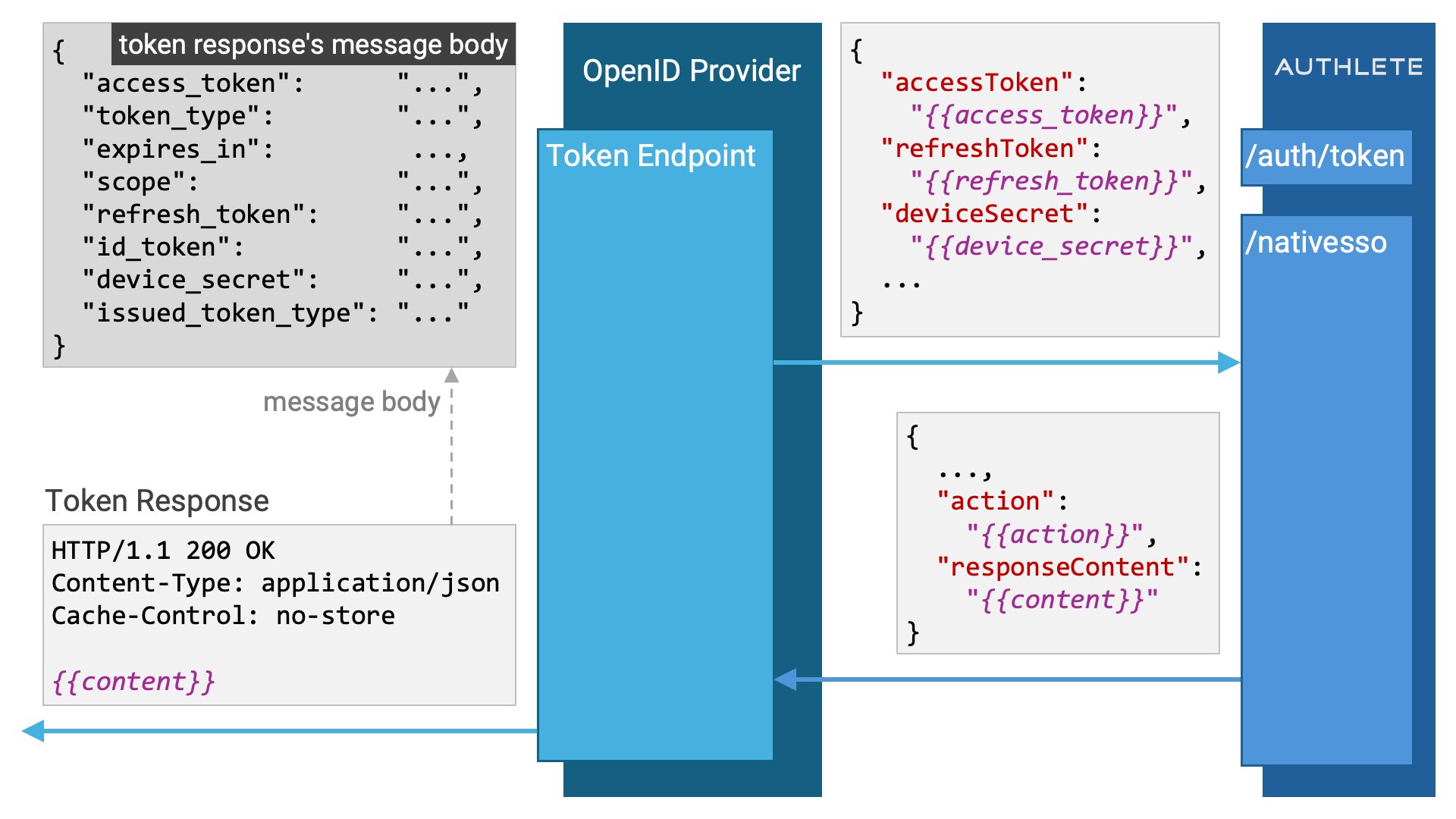
When the `action` is `OK`, it indicates that the `/nativesso` API processing
has successfully completed. In this case, the token endpoint implementation
should return a successful response (`200 OK`) to the client. The value of
the `responseContent` property in the `/nativesso` API response can be used
directly as the message body of the token response. Therefore, the success
response can be constructed as follows:
```http theme={null}
HTTP/1.1 200 OK
Content-Type: application/json
Cache-Control: no-store
(Embed the value of responseContent here.)
```
 When the `action` is `INTERNAL_SERVER_ERROR`, it indicates
that something has gone wrong on the Authlete side. For example, an issue such
as a database error might have occurred when retrieving the access token
specified by the `accessToken` parameter from the database.
In such cases, the token endpoint implementation should return an error
response to the client. The simplest implementation would be to return a
`500 Internal Server Error`.
```http theme={null}
HTTP/1.1 500 Internal Server Error
Content-Type: application/json
Cache-Control: no-store
(Embed the value of responseContent here.)
```
However, in a production environment, it may be better to return a more abstract
error (one that does not directly describe the nature of the issue), rather
than a `500` error.
When the `action` is `CALLER_ERROR`, it indicates that the issue lies with the
caller of the API (i.e., the implementation of the OpenID Provider).
For example, this could be due to missing a required parameter such as
`accessToken`.
If `CALLER_ERROR` is returned, please review the implementation of your OpenID
Provider.
When the `action` is `INTERNAL_SERVER_ERROR`, it indicates
that something has gone wrong on the Authlete side. For example, an issue such
as a database error might have occurred when retrieving the access token
specified by the `accessToken` parameter from the database.
In such cases, the token endpoint implementation should return an error
response to the client. The simplest implementation would be to return a
`500 Internal Server Error`.
```http theme={null}
HTTP/1.1 500 Internal Server Error
Content-Type: application/json
Cache-Control: no-store
(Embed the value of responseContent here.)
```
However, in a production environment, it may be better to return a more abstract
error (one that does not directly describe the nature of the issue), rather
than a `500` error.
When the `action` is `CALLER_ERROR`, it indicates that the issue lies with the
caller of the API (i.e., the implementation of the OpenID Provider).
For example, this could be due to missing a required parameter such as
`accessToken`.
If `CALLER_ERROR` is returned, please review the implementation of your OpenID
Provider.
### Single Logout
The process of logging out from multiple applications in a single operation is
called Single Logout (SLO). It complements Single Sign-On (SSO).
The Native SSO specification does not define a specific protocol to achieve
Single Logout. However, Single Logout can be realized by collectively deleting
the access tokens and refresh tokens associated with a particular session ID.
Authlete provides a Single Logout feature via the `/nativesso/logout`
API. This API accepts HTTP POST requests in either `application/json`
or `application/x-www-form-urlencoded` format.
It takes a single request parameter: `sessionId`.
When the `/nativesso/logout` API is called with the target
session ID specified in the `sessionId` parameter, all access tokens and
refresh tokens associated with that session ID will be deleted.
```http theme={null}
POST https://{{authlete_api_server}}/api/{{service_id}}/nativesso/logout HTTP/1.1
Authorization: Bearer {{authlete_access_token}}
Content-Type: application/json
{
"sessionId": "{{session_id}}"
}
```
```json theme={null}
{
"action": "OK",
"count": 2,
"resultCode": "A503001",
"resultMessage": "[A503001] The /nativesso/logout API call successfully deleted 2 access/refresh token record(s)."
}
```
Even if there are no access tokens or refresh tokens associated with the
specified session ID — and as a result, the number of deleted tokens is
zero — the `/nativesso/logout` API does not return an error.
```json theme={null}
{
"action": "OK",
"count": 0,
"resultCode": "A503002",
"resultMessage": "[A503002] The /nativesso/logout API call completed without deleting any access/refresh token records."
}
```
### Sample Implementation
The sample implementation of Native SSO on the OpenID Provider side is included
in the [java-oauth-server](https://github.com/authlete/java-oauth-server) and
[authlete-java-jaxrs](https://github.com/authlete/authlete-java-jaxrs) library.
Both are open-source implementations written in Java.
Below are some tips for reading through the sample implementation:
* The session ID passed to the `/auth/authorization/issue` API is obtained in the AuthorizationDecisionEndpoint by executing `HttpServletRequest.getSession(false).getId()`. However, since this session is the HTTP session between the web server and browser, a different mechanism would likely be used in a production-ready Native SSO implementation.
* The obtained session ID is passed to the AuthorizationDecisionHandler via the AuthorizationDecisionHandlerSpi interface.
* The AuthorizationDecisionHandler calls the Authlete `/auth/authorization/issue` API through the `callAuthorizationIssue` method of AuthleteApiCaller.
* The dispatch logic based on the `action` in the `/auth/token` API response is written in the TokenRequestHandler.
* If the `action` is `NATIVE_SSO`, TokenRequestHandler invokes the `nativeSso` method of the TokenRequestHandlerSpi interface.
* The implementation of TokenRequestHandlerSpi, TokenRequestHandlerSpiImpl, calls the `process` method of the NativeSsoProcessor from within its `nativeSso` method.
* The NativeSsoProcessor extracts the session ID, device secret, and device secret hash from the instance of the TokenResponse class, which represents the response from the `/auth/token` API.
* NativeSsoProcessor obtains the device identifier of the accessing device in the `retrieveDeviceId()` method. **Note: in the sample implementation, this method is empty.**
* The `validateParameters` method in NativeSsoProcessor performs validation on the session ID, device secret, device secret hash, and device identifier.
* The check for whether a session ID is valid is done by calling the `isActiveSessionId(String)` method of the SessionTracker. SessionTracker implements the HttpSessionListener interface and monitors session creation and deletion. It is registered as a listener in [web.xml](https://github.com/authlete/java-oauth-server/blob/master/src/main/webapp/WEB-INF/web.xml).
* The relationship between device secret, session ID, device secret hash, and device identifier is represented by the DeviceSecret class.
* Instances of DeviceSecret are managed by the DeviceSecretManager.
## Authlete Implementation
### Authlete Version
Authlete supports Native SSO starting from version 3.0.
### Native SSO Version
The first version of Authlete Native SSO was implemented based on draft 07 of
[OpenID Connect Native SSO for Mobile Apps 1.0](https://openid.net/specs/openid-connect-native-sso-1_0.html)
specification. Therefore, `urn:openid:params:\*`
identifiers are used instead of `urn:openid:params:\*`
identifiers, which were used in earlier drafts.
### Token Exchange Verification
If the token exchange request contains the `actor_token_type`
parameter, and its value is
`urn:openid:params:token-type:device-secret`,
Authlete will perform the following validation for the request parameters
specific to the token exchange request. Only if all validations pass, will
the `action` in the `/auth/token` API response be
`NATIVE_SSO`.
1. The `audience` parameter is specified and its value matches the service's OpenID Provider identifier (the value set in `Service.issuer`). Note that multiple `audience` values can be specified, and as long as one of them matches, it is sufficient.
2. The `requested_token_type` parameter is specified, and its value is a known token type.
3. The `subject_token_type` parameter is specified, and its value is `urn:ietf:params:oauth:token-type:id_token`.
4. The `subject_token` parameter is specified, and its value (ID token) passes all the following validation checks:
* It can be parsed as a JWT.
* It includes the `exp` claim, and its value is numeric. Note: In the context of Native SSO, it is not checked that the `exp` value is in the future relative to the current time. This means that an expired ID token can be specified as a subject token. (see: [id\_token usage](https://openid.net/specs/openid-connect-native-sso-1_0.html#name-id_token-usage))
* It includes the `iat` claim, and its value indicates the current time or a time in the past.
* If the `nbf` claim is included, its value indicates the current time or a time in the past.
* It includes the `iss` claim, and its value matches the service's OpenID Provider identifier (the value set in `Service.issuer`).
* It includes the `sub` claim, and its value is a string.
* It includes the `aud` claim, and its value is either a string or an array. If an array is used, it must contain at least one element, and all elements must be strings.
* If the `nonce` claim is included, its value is a string.
* It includes the `sid` claim, and its value is a string.
* It includes the `ds_hash` claim, and its value is a string.
* It is not a JWE.
* It is signed.
* The signature verification is successful.
5. The `actor_token` parameter is specified.
In draft 07 of the Native SSO specification, it is stipulated that if the
`scope` parameter is included in the token exchange request,
the scope list must include `openid`.
However, due to the reasons described in AB/Connect ISSUE 2178:
Native SSO the openid scope on token exchange, Authlete’s current
implementation does not check whether `openid` is included.
## References
* Specification: [OpenID Connect Native SSO for Mobile Apps 1.0](https://openid.net/specs/openid-connect-native-sso-1_0.html)
* Specification: [RFC 8693: OAuth 2.0 Token Exchange](https://www.rfc-editor.org/rfc/rfc8693.html)
* Native SSO Specification Source Code: [openid-connect-native-sso-1\_0.xml](https://bitbucket.org/openid/connect/src/master/openid-connect-native-sso-1_0.xml)
* Native SSO Specification Issue Tracker: [bitbucket.org/openid/connect/issues](https://bitbucket.org/openid/connect/issues?status=new\&status=open\&status=submitted\&component=Native%20SSO%20for%20Apps)
* Documentation: [RFC 8693 OAuth 2.0 Token Exchange](https://www.authlete.com/ja/developers/token_exchange/)