> ## Documentation Index
> Fetch the complete documentation index at: https://developers.authlete.com/llms.txt
> Use this file to discover all available pages before exploring further.
# RFC 9470 OAuth 2.0 Step Up Authentication Challenge Protocol
> RFC 9470 OAuth 2.0 Step Up Authentication Challenge Protocol 仕様および Authlete がどのように当仕様をサポートするかに関する説明です。
For **Authlete 2.x** documentation, see [2.x version](/ja/v2/protocols-and-flows/grant-types/stepup-authn).
# 概要
**[RFC 9470: OAuth 2.0 Step Up Authentication Challenge Protocol](https://www.rfc-editor.org/rfc/rfc9470.html)** は「リクエストのアクセストークンに紐付く認証イベントが認証要求事項を満たさないこと及びその満たし方をリソースサーバーがクライアントに伝える仕組みを導入します。」 (*"introduces a mechanism for a resource server to signal to a client that the authentication event associated with the access token of the current request doesn't meet its authentication requirements and specify how to meet them."* 「Abstract」より抜粋)
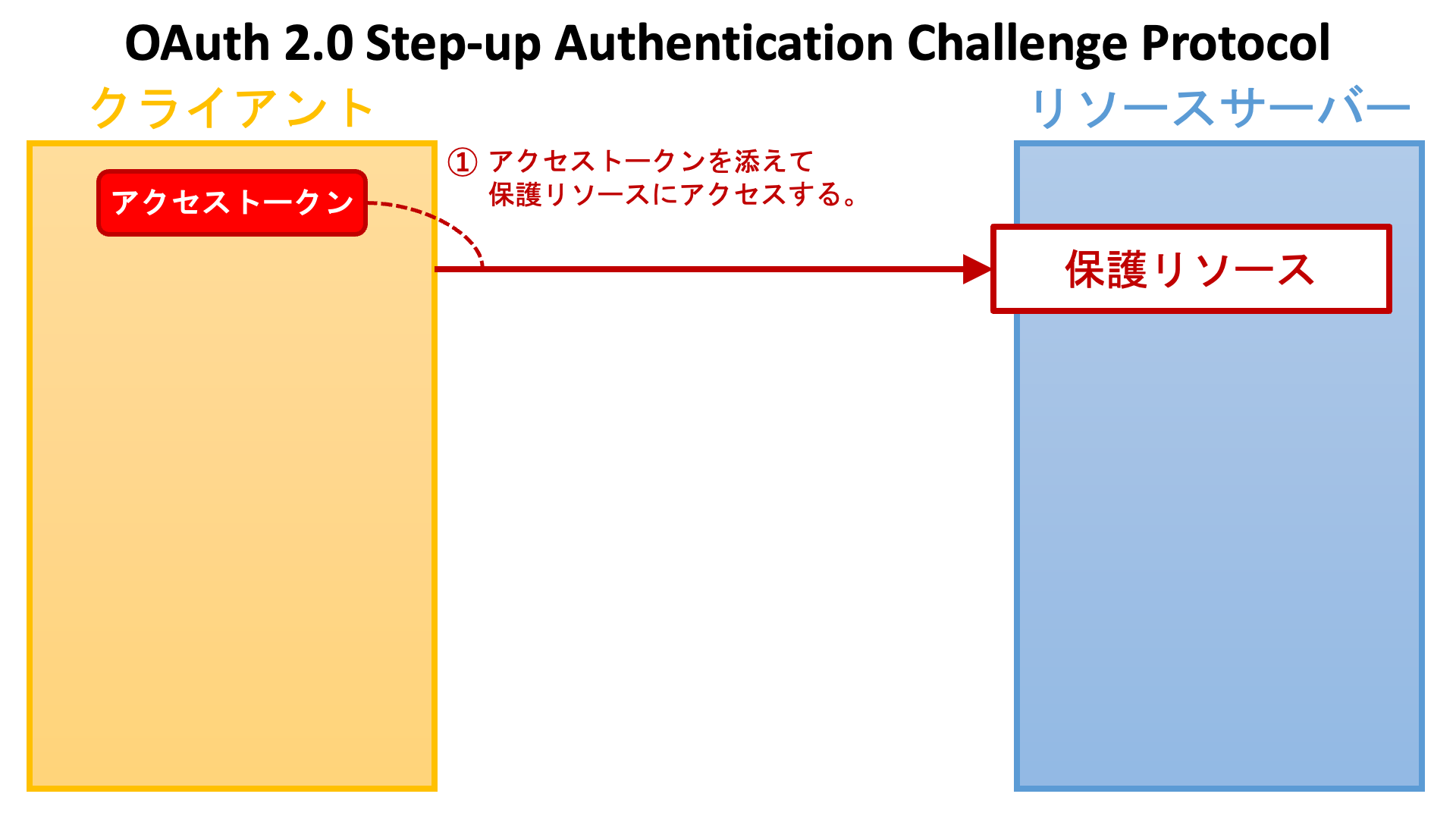
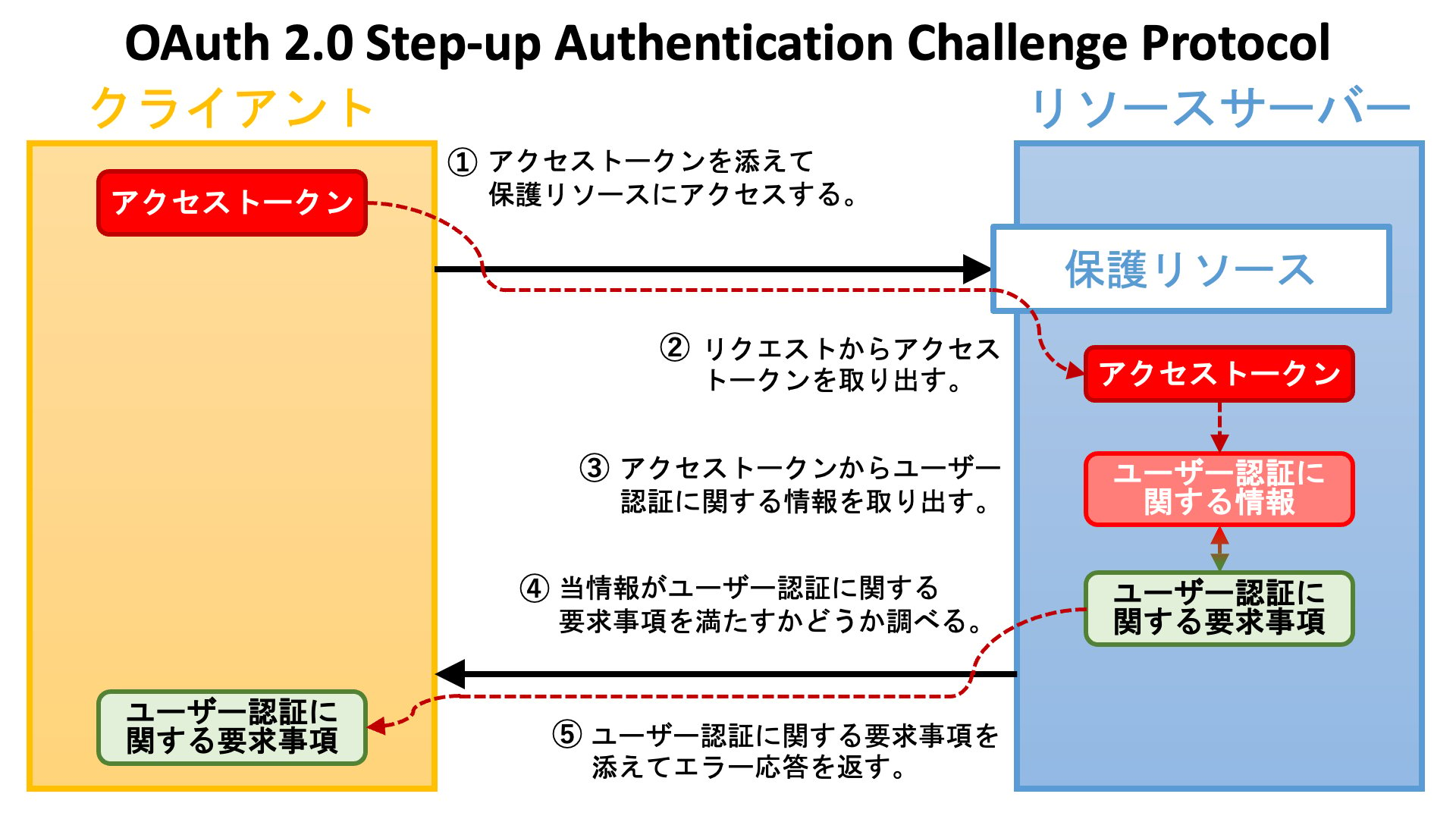
まず初めに、**クライアントアプリケーション** (**リライングパーティー**) が**アクセストークン**を添えて**保護リソース**エンドポイントにアクセスします。
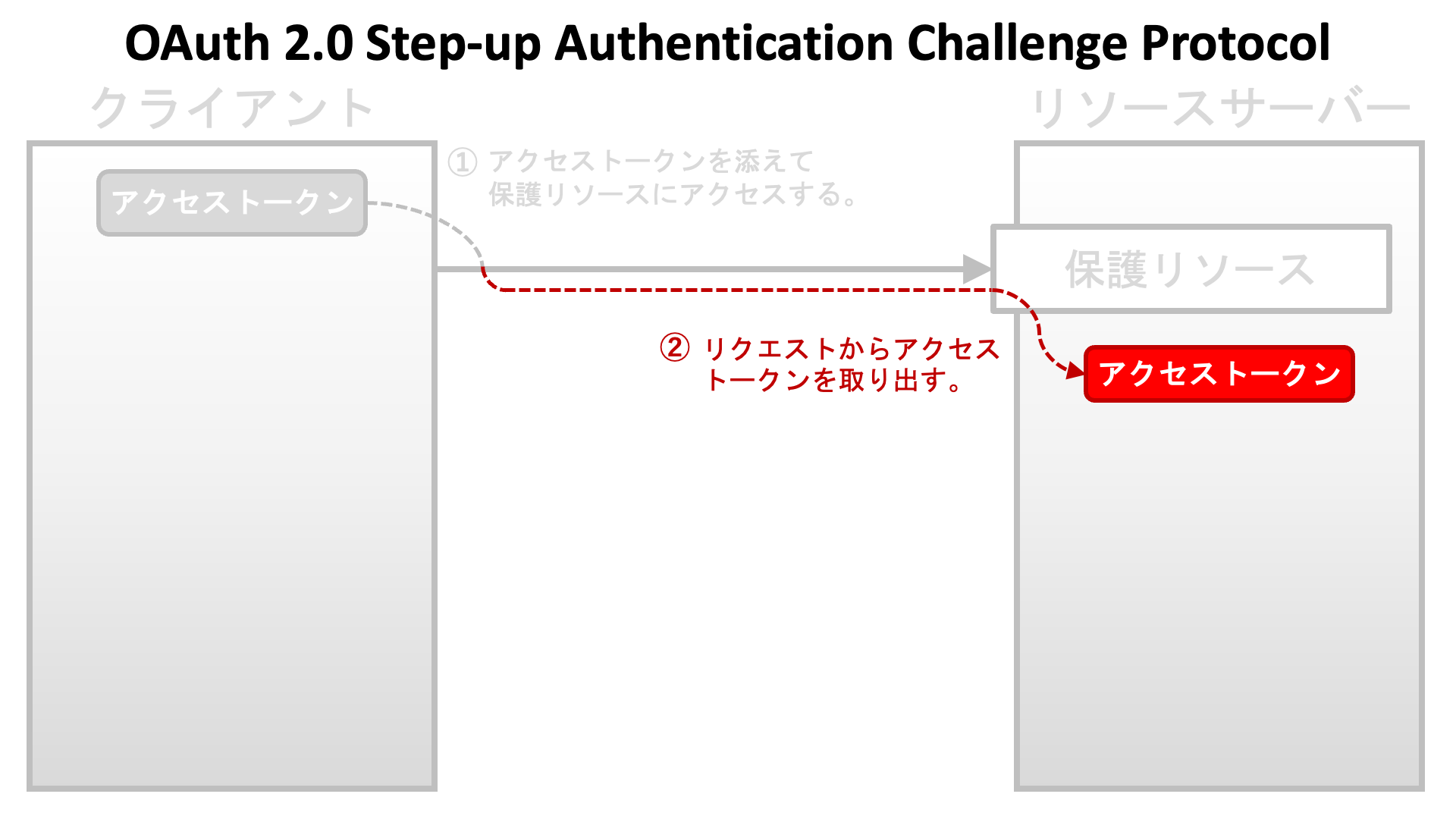
 エンドポイントの実装はリクエストからアクセストークンを取り出します。
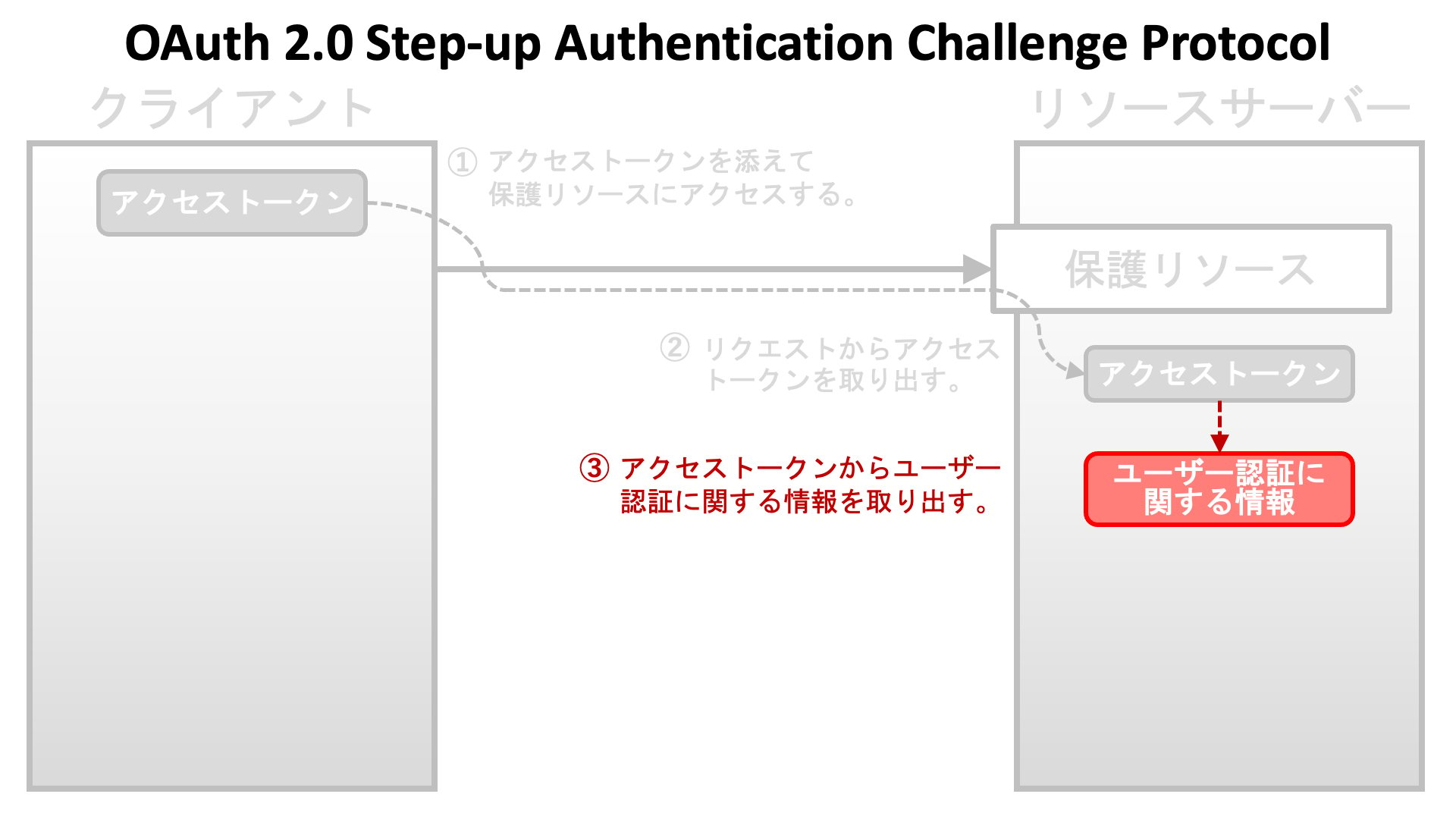
 次に、エンドポイントの実装はアクセストークンから (当該アクセストークンを発行する過程で**認可サーバー**が実行した) **ユーザー認証**に関する情報を取り出します。
 そして、エンドポイントの実装は、当情報が自身の課す**ユーザー認証に関する要求事項**を満たすかどうかを調べます。
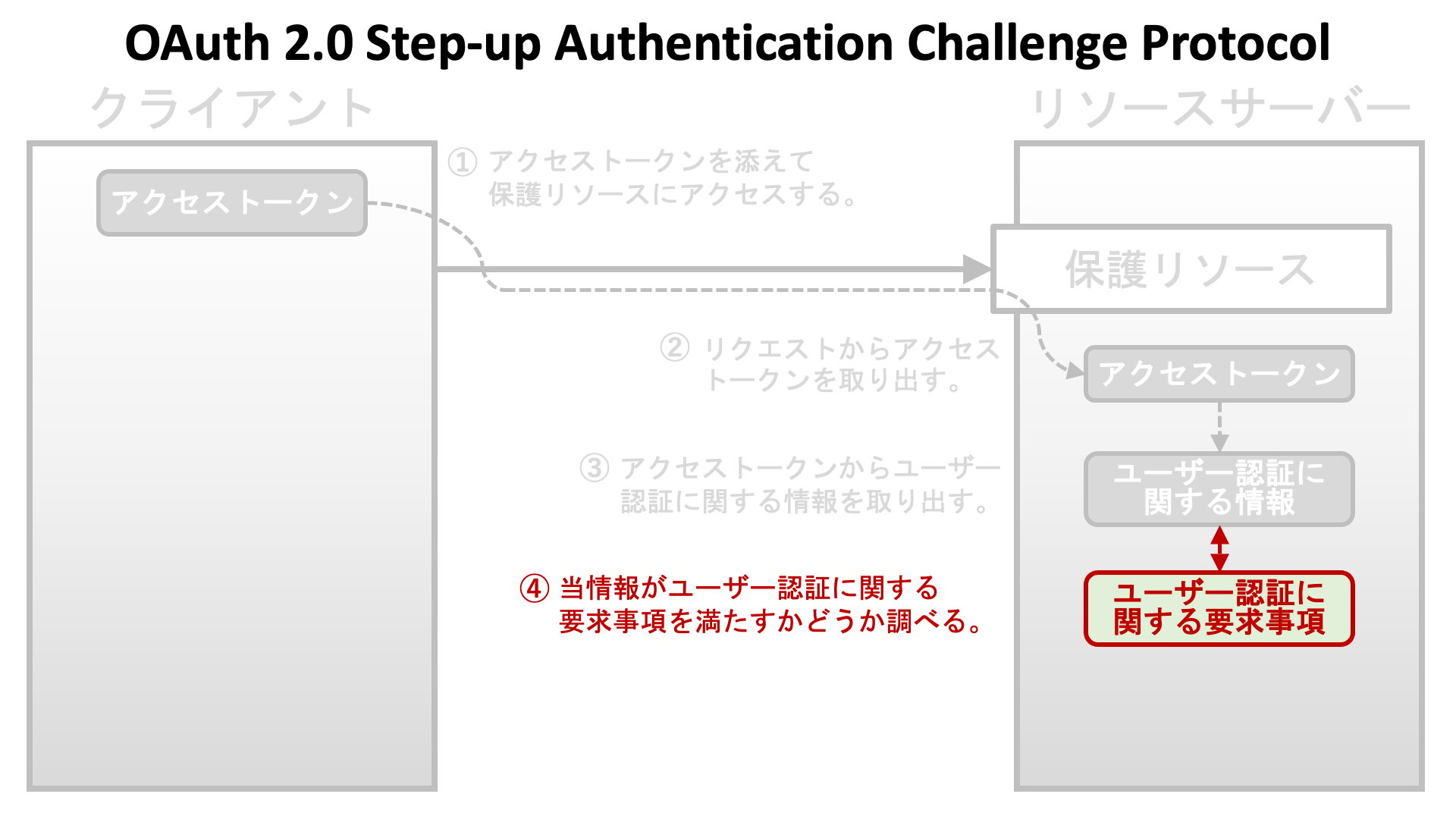 もし要求事項が満たされていなければ、エンドポイントの実装は、ユーザー認証に関する要求事項を添えたエラー応答をクライアントアプリケーションに返します。
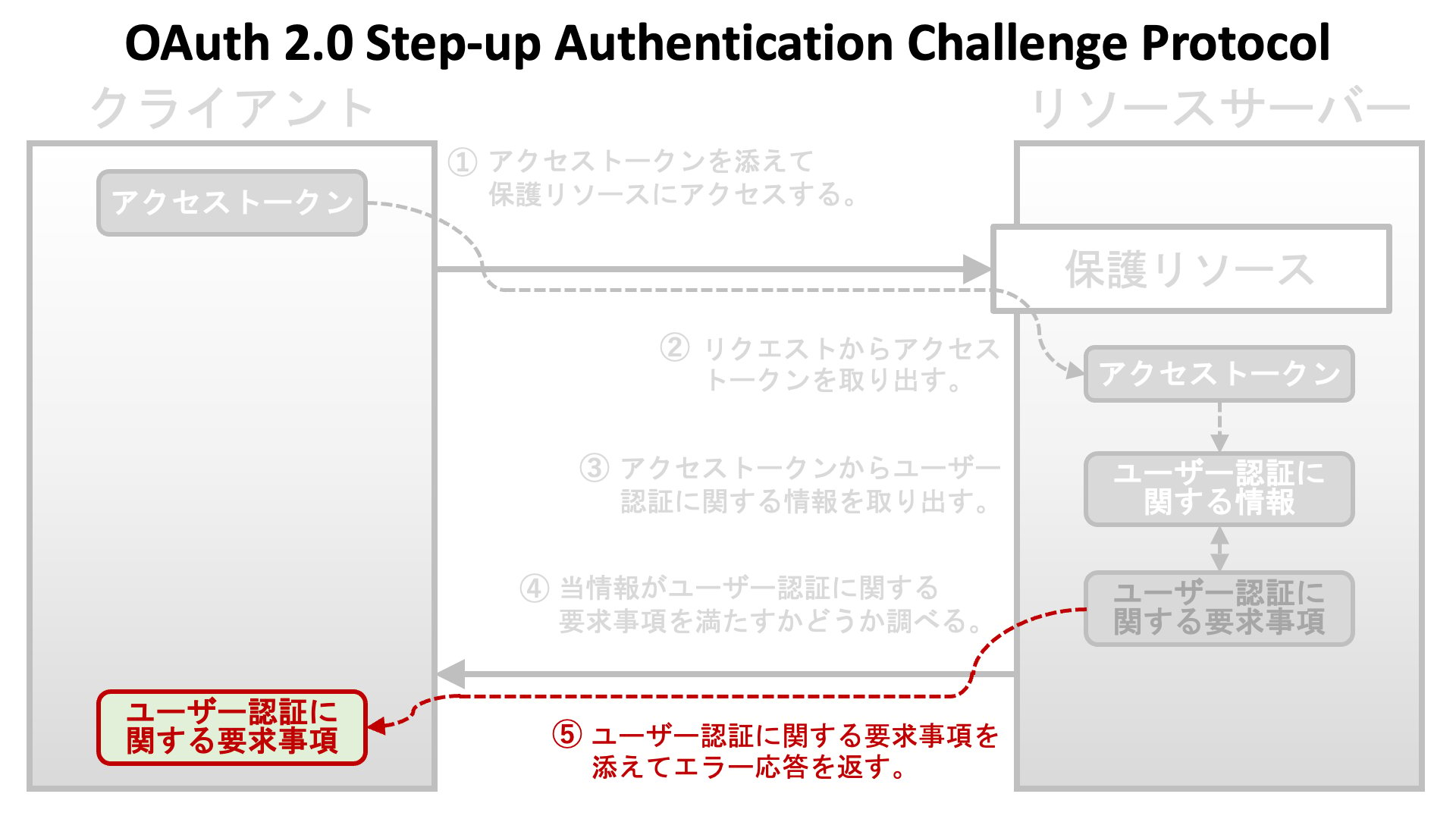 次の図は、アクセストークンを伴うリクエストを投げてからユーザー認証に関する要求事項を伴うエラー応答を返却するまでの流れを示しています。
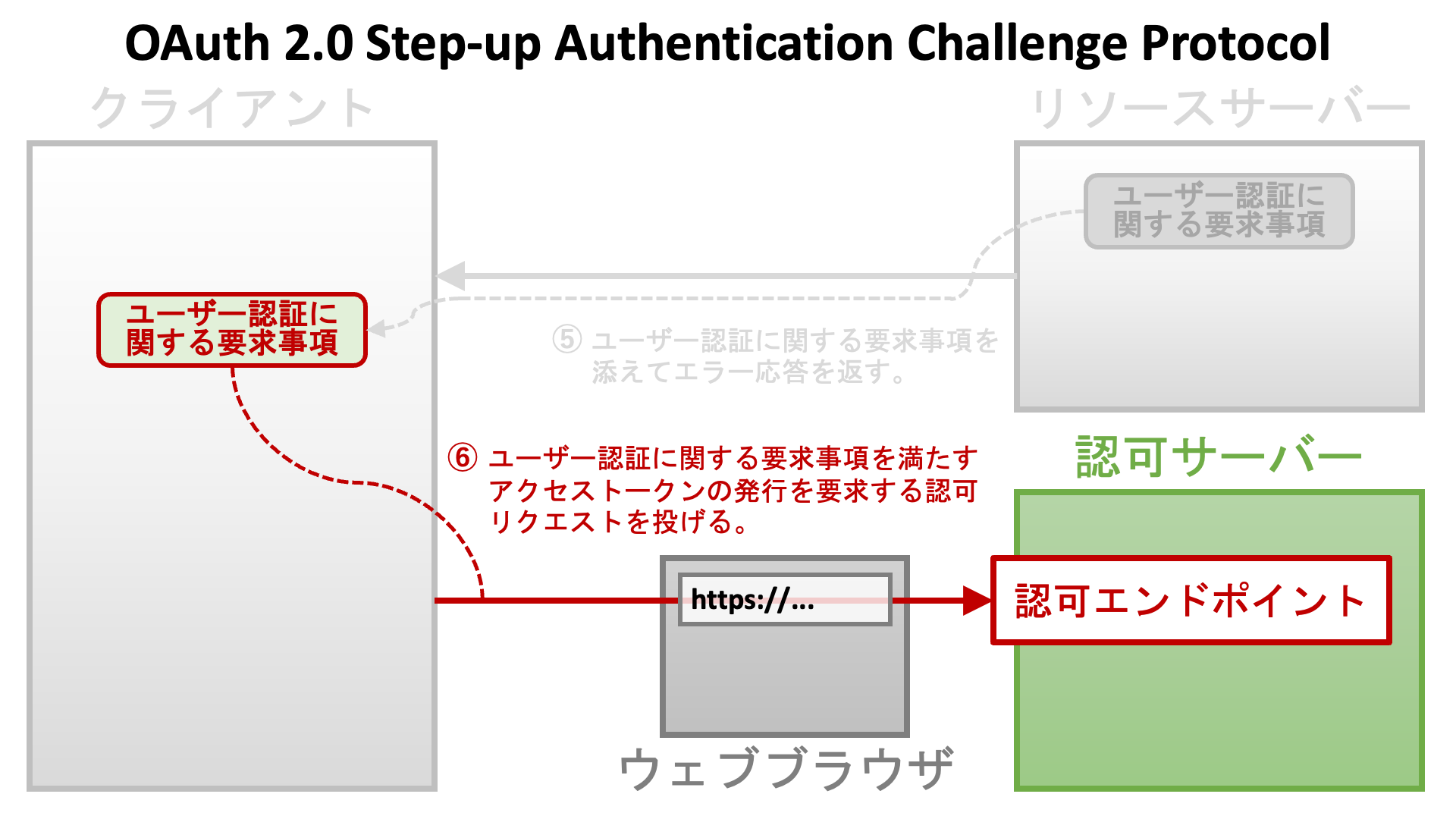
 ユーザー認証に関する要求事項を伴うエラー応答を受け取った後、クライアントは再び**認可リクエスト**を投げます。ここでクライアントは、ユーザー認証に関する要求事項を満たすアクセストークンの発行を認可サーバーに依頼する必要があります。
 # ユーザー認証に関する要求事項
OAuth 2.0 Step Up Authentication Challenge Protocol 仕様は、ユーザー認証に関する要求事項について、二つのものを想定しています。
一つは、ユーザー認証の**認証コンテキストクラスリファレンス** (**Authentication Context Class Reference**) で、**ACR** と呼ばれるものです。もう一方は、**最大認証時間** (**Maximum Authentication Age**) で、**Max Age** と呼ばれるものです。
## 認証コンテキストクラスリファレンス (ACR)
認可フローのどこかの時点でユーザー認証が行われます。OAuth 2.0 と OpenID Connect はユーザー認証方法の詳細を定義していませんが、クライアントアプリケーションは ACR のリストを認可リクエストに含めることにより、ユーザー認証の基準を指定することができます。
認可サーバーは、指定された ACR 群のうち少なくとも一つを満たすユーザー認証を試みます。しかし、`acr` クレームが必須 (essential) として要求されていない限り (後述)、条件を満たすユーザー認証を実行できなくても認可サーバーはエラーを返しません。
### `acr_values` リクエストパラメーター
ACR のリストを指定する方法は三つあります。一番目は `acr_values` リクエストパラメーターを使う方法です。このパラメーターは、[OpenID Connect Core 1.0](https://openid.net/specs/openid-connect-core-1_0.html) の [Section 3.1.2.1](https://openid.net/specs/openid-connect-core-1_0.html#AuthRequest) で次のように定義されています。
* `acr_values`: OPTIONAL. Requested Authentication Context Class Reference values. Space-separated string that specifies the `acr` values that the Authorization Server is being requested to use for processing this Authentication Request, with the values appearing in order of preference. The Authentication Context Class satisfied by the authentication performed is returned as the `acr` Claim Value, as specified in Section 2. The `acr` Claim is requested as a Voluntary Claim by this parameter.
`acr_values` リクエストパラメーターの値は、ACR 群をスペース区切りで列挙したものです。認可リクエストでは次のように使われます。
```text theme={null}
https://as.example.com/authorize?acr_values=acr1+acr2+acr3&...
```
### `claims` リクエストパラメーター
ACR リストを指定する二番目の方法は `claims` リクエストパラメーターを使うものです。このパラメーターは [OpenID Connect Core 1.0](https://openid.net/specs/openid-connect-core-1_0.html) の [Section 5.5](https://openid.net/specs/openid-connect-core-1_0.html#ClaimsParameter) で定義されています。このパラメーターは値として JSON オブジェクトを取り、その構文は複雑です。
次の JSON は、OpenID Connect Core 1.0 から抜粋した `claims` リクエストパラメーターの値の例です。
```json theme={null}
{
"userinfo":
{
"given_name": {"essential": true},
"nickname": null,
"email": {"essential": true},
"email_verified": {"essential": true},
"picture": null,
"http://example.info/claims/groups": null
},
"id_token":
{
"auth_time": {"essential": true},
"acr": {"values": ["urn:mace:incommon:iap:silver"] }
}
}
```
この例では、`urn:mace:incommon:iap:silver` という要素を一つだけ持つ ACR リストが指定されています。この JSON を値として持つ `claims` リクエストパラメーターを認可リクエストが含んでいれば、認可サーバーは `urn:mace:incommon:iap:silver` の基準を満たすユーザー認証を試みます。
指定された ACR 群の一つも満たすことができない場合に認可サーバーにエラーを返させるようにするには、クライアントアプリケーションは `acr` を**必須** (**essential**) として要求しなければなりません。クレーム名に続く JSON に `"essential":true` を追加することにより、クライアントはそのクレームを必須として要求することができます。次の例では、`auth_time` クレームと `acr` クレームが必須として要求されています。
```json theme={null}
{
"id_token":
{
"auth_time": {
"essential": true
},
"acr": {
"values": ["urn:mace:incommon:iap:silver"],
"essential": true
}
}
}
```
`acr_values` リクエストパラメーターでは `acr` クレームを必須として要求できません。
### `default_acr_values` クライアントメタデータ
最後は `default_acr_values` クライアントメタデータを使う方法です。このメタデータは [OpenID Connect Dynamic Client Registration 1.0](https://openid.net/specs/openid-connect-registration-1_0.html) の [Section 2](https://openid.net/specs/openid-connect-registration-1_0.html#ClientMetadata) で次のように定義されています。
* `default_acr_values`: OPTIONAL. Default requested Authentication Context Class Reference values. Array of strings that specifies the default `acr` values that the OP is being requested to use for processing requests from this Client, with the values appearing in order of preference. The Authentication Context Class satisfied by the authentication performed is returned as the `acr` Claim Value in the issued ID Token. The `acr` Claim is requested as a Voluntary Claim by this parameter. The `acr_values_supported` discovery element contains a list of the supported `acr` values supported by this server. Values specified in the `acr_values` request parameter or an individual `acr` Claim request override these default values.
認可リクエストが ACR リストを明示的に指定していない場合、`default_acr_values` の値が、もしセットされていれば、ACR リストとして使われます。
`default_acr_values` クライアントメタデータでは `acr` クレームを必須として要求できません。
### 未達認証要求事項
`acr` クレームが必須クレームとして要求されている場合、指定された ACR のいずれも満たせなければ認可サーバーはエラー応答を返します。認可サーバーが [OpenID Connect Core Error Code unmet\_authentication\_requirements](https://openid.net/specs/openid-connect-unmet-authentication-requirements-1_0.html) をサポートしていれば、`error` レスポンスパラメーターの値として `unmet_authentication_requirements` が使用されます。
# ユーザー認証に関する要求事項
OAuth 2.0 Step Up Authentication Challenge Protocol 仕様は、ユーザー認証に関する要求事項について、二つのものを想定しています。
一つは、ユーザー認証の**認証コンテキストクラスリファレンス** (**Authentication Context Class Reference**) で、**ACR** と呼ばれるものです。もう一方は、**最大認証時間** (**Maximum Authentication Age**) で、**Max Age** と呼ばれるものです。
## 認証コンテキストクラスリファレンス (ACR)
認可フローのどこかの時点でユーザー認証が行われます。OAuth 2.0 と OpenID Connect はユーザー認証方法の詳細を定義していませんが、クライアントアプリケーションは ACR のリストを認可リクエストに含めることにより、ユーザー認証の基準を指定することができます。
認可サーバーは、指定された ACR 群のうち少なくとも一つを満たすユーザー認証を試みます。しかし、`acr` クレームが必須 (essential) として要求されていない限り (後述)、条件を満たすユーザー認証を実行できなくても認可サーバーはエラーを返しません。
### `acr_values` リクエストパラメーター
ACR のリストを指定する方法は三つあります。一番目は `acr_values` リクエストパラメーターを使う方法です。このパラメーターは、[OpenID Connect Core 1.0](https://openid.net/specs/openid-connect-core-1_0.html) の [Section 3.1.2.1](https://openid.net/specs/openid-connect-core-1_0.html#AuthRequest) で次のように定義されています。
* `acr_values`: OPTIONAL. Requested Authentication Context Class Reference values. Space-separated string that specifies the `acr` values that the Authorization Server is being requested to use for processing this Authentication Request, with the values appearing in order of preference. The Authentication Context Class satisfied by the authentication performed is returned as the `acr` Claim Value, as specified in Section 2. The `acr` Claim is requested as a Voluntary Claim by this parameter.
`acr_values` リクエストパラメーターの値は、ACR 群をスペース区切りで列挙したものです。認可リクエストでは次のように使われます。
```text theme={null}
https://as.example.com/authorize?acr_values=acr1+acr2+acr3&...
```
### `claims` リクエストパラメーター
ACR リストを指定する二番目の方法は `claims` リクエストパラメーターを使うものです。このパラメーターは [OpenID Connect Core 1.0](https://openid.net/specs/openid-connect-core-1_0.html) の [Section 5.5](https://openid.net/specs/openid-connect-core-1_0.html#ClaimsParameter) で定義されています。このパラメーターは値として JSON オブジェクトを取り、その構文は複雑です。
次の JSON は、OpenID Connect Core 1.0 から抜粋した `claims` リクエストパラメーターの値の例です。
```json theme={null}
{
"userinfo":
{
"given_name": {"essential": true},
"nickname": null,
"email": {"essential": true},
"email_verified": {"essential": true},
"picture": null,
"http://example.info/claims/groups": null
},
"id_token":
{
"auth_time": {"essential": true},
"acr": {"values": ["urn:mace:incommon:iap:silver"] }
}
}
```
この例では、`urn:mace:incommon:iap:silver` という要素を一つだけ持つ ACR リストが指定されています。この JSON を値として持つ `claims` リクエストパラメーターを認可リクエストが含んでいれば、認可サーバーは `urn:mace:incommon:iap:silver` の基準を満たすユーザー認証を試みます。
指定された ACR 群の一つも満たすことができない場合に認可サーバーにエラーを返させるようにするには、クライアントアプリケーションは `acr` を**必須** (**essential**) として要求しなければなりません。クレーム名に続く JSON に `"essential":true` を追加することにより、クライアントはそのクレームを必須として要求することができます。次の例では、`auth_time` クレームと `acr` クレームが必須として要求されています。
```json theme={null}
{
"id_token":
{
"auth_time": {
"essential": true
},
"acr": {
"values": ["urn:mace:incommon:iap:silver"],
"essential": true
}
}
}
```
`acr_values` リクエストパラメーターでは `acr` クレームを必須として要求できません。
### `default_acr_values` クライアントメタデータ
最後は `default_acr_values` クライアントメタデータを使う方法です。このメタデータは [OpenID Connect Dynamic Client Registration 1.0](https://openid.net/specs/openid-connect-registration-1_0.html) の [Section 2](https://openid.net/specs/openid-connect-registration-1_0.html#ClientMetadata) で次のように定義されています。
* `default_acr_values`: OPTIONAL. Default requested Authentication Context Class Reference values. Array of strings that specifies the default `acr` values that the OP is being requested to use for processing requests from this Client, with the values appearing in order of preference. The Authentication Context Class satisfied by the authentication performed is returned as the `acr` Claim Value in the issued ID Token. The `acr` Claim is requested as a Voluntary Claim by this parameter. The `acr_values_supported` discovery element contains a list of the supported `acr` values supported by this server. Values specified in the `acr_values` request parameter or an individual `acr` Claim request override these default values.
認可リクエストが ACR リストを明示的に指定していない場合、`default_acr_values` の値が、もしセットされていれば、ACR リストとして使われます。
`default_acr_values` クライアントメタデータでは `acr` クレームを必須として要求できません。
### 未達認証要求事項
`acr` クレームが必須クレームとして要求されている場合、指定された ACR のいずれも満たせなければ認可サーバーはエラー応答を返します。認可サーバーが [OpenID Connect Core Error Code unmet\_authentication\_requirements](https://openid.net/specs/openid-connect-unmet-authentication-requirements-1_0.html) をサポートしていれば、`error` レスポンスパラメーターの値として `unmet_authentication_requirements` が使用されます。
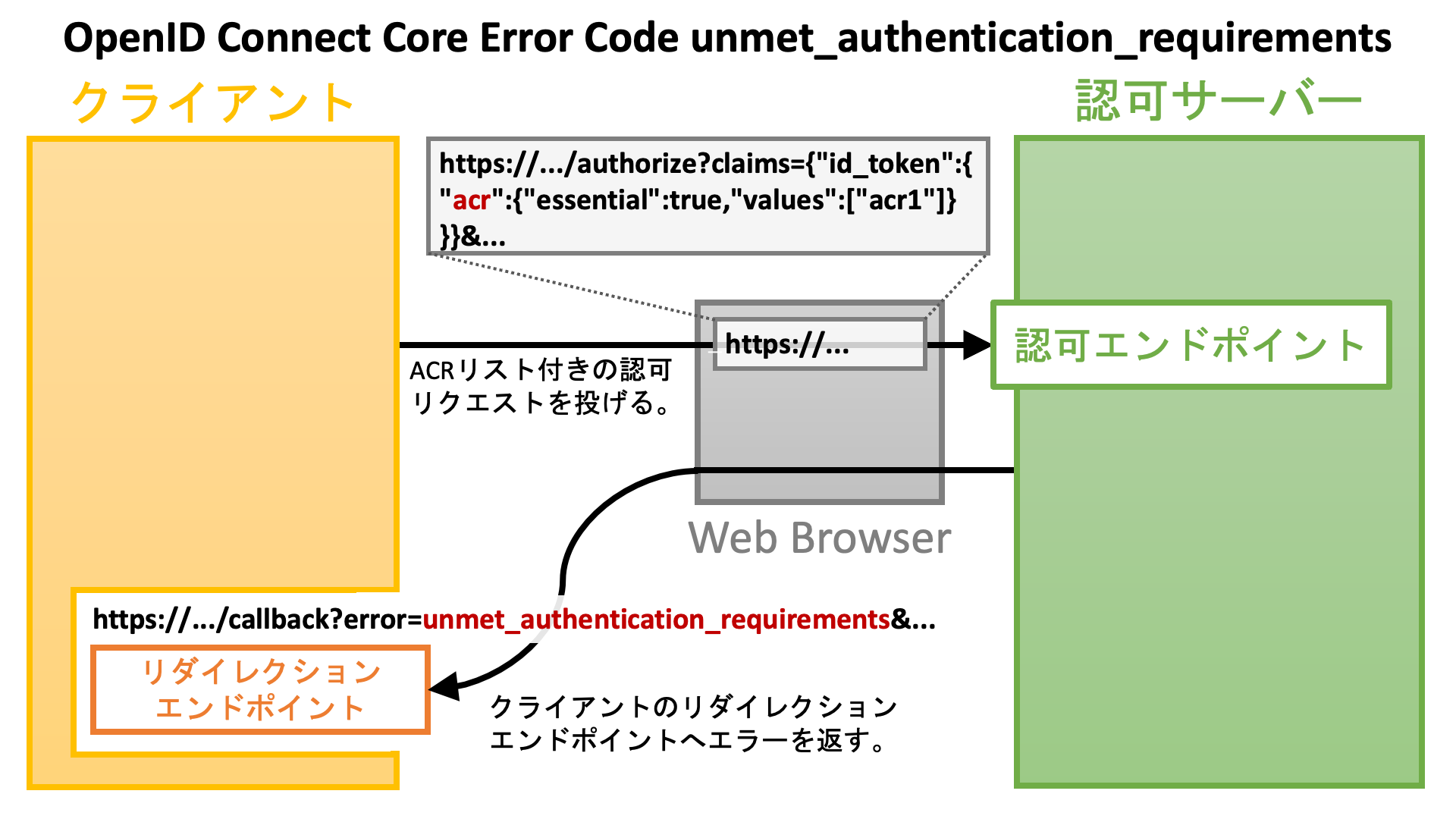 次のものは、仕様から抜粋した当エラーコードに関する説明です。
* `unmet_authentication_requirements`: The Authorization Server is unable to meet the requirements of the Relying Party for the authentication of the End-User. This error code SHALL be used if the Relying Party wants the OP to conform to a certain Authentication Context Class Reference value using an essential claim `acr` claim as specified in Section 5.5.1.1. of OpenID Connect Core \[OpenID.Core] and the OP is unable to meet this requirement and MAY be used in other cases, if appropriate.
認可サーバーがこの仕様をサポートしていなければ、どのエラーコードが使われるかは認可サーバー次第です。
### ステップアップ認証用の未達認証要求事項
[OpenID Connect Core 1.0](https://openid.net/specs/openid-connect-core-1_0.html) の文脈では、`acr` クレームが必須クレームとして要求されていない限り、条件を満たすユーザー認証を実行できなくても認可サーバーはエラーを返しません。
しかし、[OAuth 2.0 Step Up Authentication Challenge Protocol](https://www.rfc-editor.org/rfc/rfc9470.html) は、(`acr` クレームを**任意**クレームとして要求する) `acr_values` リクエストパラメーターによる ACR リクエストを**必須として扱い** (***"treated as required"***)、指定された ACR のいずれも満たせない場合に認可サーバーが `unmet_authentication_requirements` エラーを返すことを勧めています。
この推奨は、OpenID Connect Core 1.0 から抜粋した下記の文とやや衝突します。
> Note that even if the Claims are not available because the End-User did not authorize their release or they are not present, the Authorization Server **MUST NOT generate an error** when Claims are not returned, whether they are Essential or Voluntary, unless otherwise specified in the description of the specific claim.
しかし、現実的には、このわずかな衝突が大きな問題となることはないでしょう。
### 実際の ACR 値
OpenID Connect Core 1.0 は実際の ACR 値を定義していません。そのため、ACR を活用するには、運用毎にそれぞれ実際の ACR 値を定義する必要があります。次の表は実際の ACR 値の例を示しています。
| 運用 | ACR 値 |
| :------------- | :----------------------------------------------------------------- |
| 英国オープンバンキング | `urn:openbanking:psd2:ca`
次のものは、仕様から抜粋した当エラーコードに関する説明です。
* `unmet_authentication_requirements`: The Authorization Server is unable to meet the requirements of the Relying Party for the authentication of the End-User. This error code SHALL be used if the Relying Party wants the OP to conform to a certain Authentication Context Class Reference value using an essential claim `acr` claim as specified in Section 5.5.1.1. of OpenID Connect Core \[OpenID.Core] and the OP is unable to meet this requirement and MAY be used in other cases, if appropriate.
認可サーバーがこの仕様をサポートしていなければ、どのエラーコードが使われるかは認可サーバー次第です。
### ステップアップ認証用の未達認証要求事項
[OpenID Connect Core 1.0](https://openid.net/specs/openid-connect-core-1_0.html) の文脈では、`acr` クレームが必須クレームとして要求されていない限り、条件を満たすユーザー認証を実行できなくても認可サーバーはエラーを返しません。
しかし、[OAuth 2.0 Step Up Authentication Challenge Protocol](https://www.rfc-editor.org/rfc/rfc9470.html) は、(`acr` クレームを**任意**クレームとして要求する) `acr_values` リクエストパラメーターによる ACR リクエストを**必須として扱い** (***"treated as required"***)、指定された ACR のいずれも満たせない場合に認可サーバーが `unmet_authentication_requirements` エラーを返すことを勧めています。
この推奨は、OpenID Connect Core 1.0 から抜粋した下記の文とやや衝突します。
> Note that even if the Claims are not available because the End-User did not authorize their release or they are not present, the Authorization Server **MUST NOT generate an error** when Claims are not returned, whether they are Essential or Voluntary, unless otherwise specified in the description of the specific claim.
しかし、現実的には、このわずかな衝突が大きな問題となることはないでしょう。
### 実際の ACR 値
OpenID Connect Core 1.0 は実際の ACR 値を定義していません。そのため、ACR を活用するには、運用毎にそれぞれ実際の ACR 値を定義する必要があります。次の表は実際の ACR 値の例を示しています。
| 運用 | ACR 値 |
| :------------- | :----------------------------------------------------------------- |
| 英国オープンバンキング | `urn:openbanking:psd2:ca`
`urn:openbanking:psd2:sca` |
| オーストラリア消費者データ権 | `urn:cds:au:cdr:2`
`urn:cds:au:cdr:3` |
| ブラジルオープンバンキング | `urn:brasil:openbanking:loa2`
`urn:brasil:openbanking:loa3` |
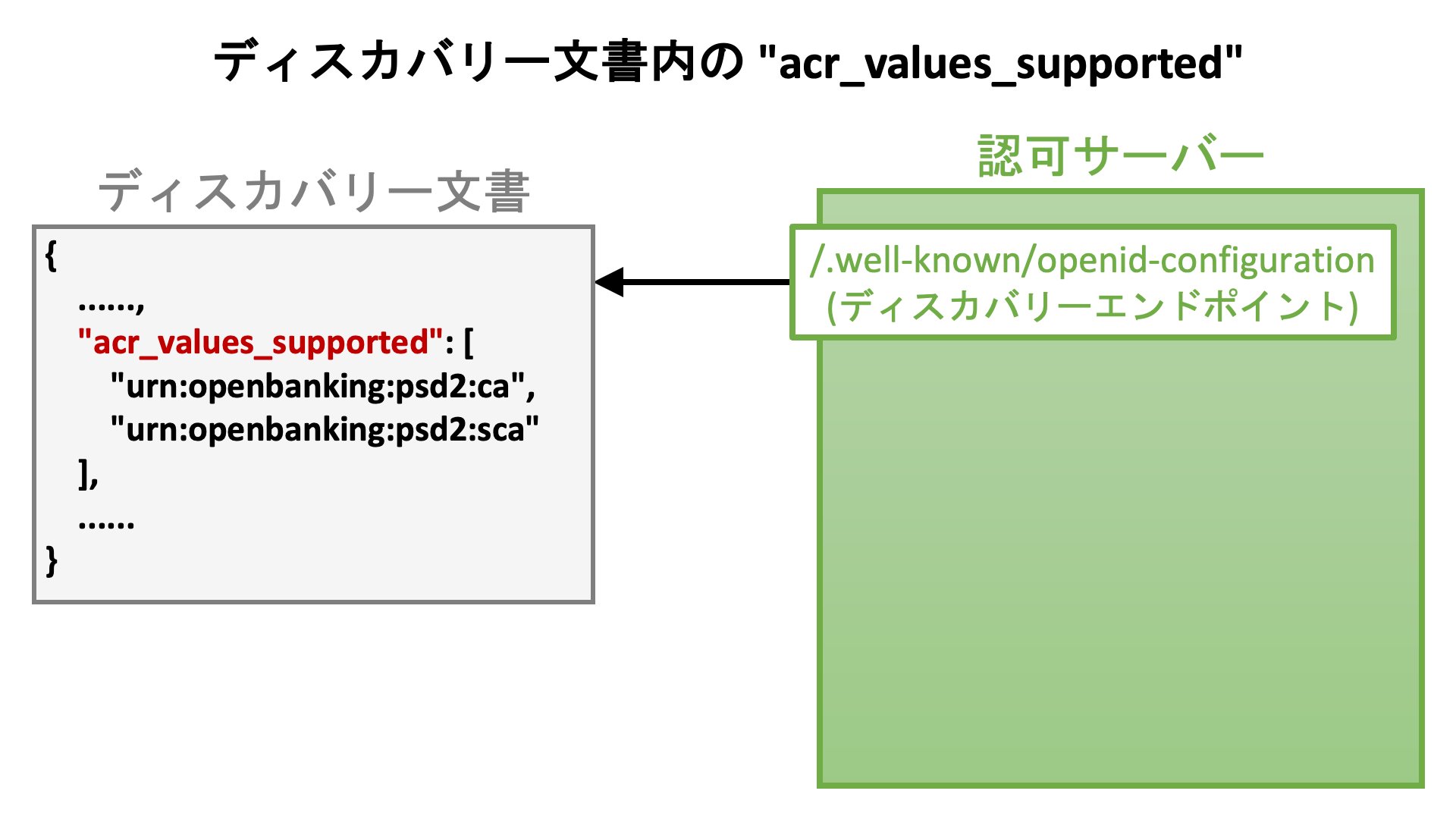
認可サーバーはディスカバリー文書を通じてサポートする ACR 値の情報を公開すべきです。この用途のため、[OpenID Connect Discovery 1.0](https://openid.net/specs/openid-connect-discovery-1_0.html) は `acr_values_supported` サーバーメタデータを次のように定義しています。
* `acr_values_supported`: OPTIONAL. JSON array containing a list of the Authentication Context Class References that this OP supports.
 ## 最大認証時間 (Max Age)
先の節の冒頭で *「認可フローのどこかの時点でユーザー認証が行われます」* と述べました。しかし実際には、ユーザーが既に認証済み (= ユーザーが既にログイン済み) であることを検出した場合、認可サーバーはユーザー認証処理を省略するかもしれません。そのため、認可リクエストが行われた時刻と、その認可リクエスト用のユーザー認証が行われた時刻は、必ずしも一致しません。
最後のユーザー認証から経過した時間は**認証時間** (**authentication age**) と呼ばれます。クライアントアプリケーションは、認証時間が特定の閾値を超えた際に認可フローの過程でユーザー認証を行うよう、認可サーバーに依頼することができます。この閾値は**最大認証時間** (**maximum authentication age**) と呼ばれます。
### `max_age` リクエストパラメーター
[OpenID Connect Core 1.0](https://openid.net/specs/openid-connect-core-1_0.html) の [Section 3.1.2.1](https://openid.net/specs/openid-connect-core-1_0.html#AuthRequest) は、クライアントアプリケーションが最大認証時間を指定することを可能とするため、次のように `max_age` リクエストパラメーターを定義しています。
* `max_age`: OPTIONAL. Maximum Authentication Age. Specifies the allowable elapsed time in seconds since the last time the End-User was actively authenticated by the OP. If the elapsed time is greater than this value, the OP MUST attempt to actively re-authenticate the End-User. (The `max_age` request parameter corresponds to the OpenID 2.0 PAPE \[OpenID.PAPE] `max_auth_age` request parameter.) When `max_age` is used, the ID Token returned MUST include an `auth_time` Claim Value.
`max_age` の値は、秒単位での最大認証時間です。認可リクエスト内では次のように使われます。
```text theme={null}
https://as.example.com/authorize?max_age=600&...
```
### `default_max_age` クライアントメタデータ
認可リクエストが `max_age` リクエストパラメーターを含んでいなくても、クライアントの `default_max_age` クライアントメタデータが設定されていれば、そのメタデータの値が最大認証時間として使用されます。[OpenID Connect Dynamic Client Registration 1.0](https://openid.net/specs/openid-connect-registration-1_0.html) の [Section 2](https://openid.net/specs/openid-connect-registration-1_0.html#ClientMetadata) は当メタデータを次のように定義しています。
* `default_max_age`: OPTIONAL. Default Maximum Authentication Age. Specifies that the End-User MUST be actively authenticated if the End-User was authenticated longer ago than the specified number of seconds. The `max_age` request parameter overrides this default value. If omitted, no default Maximum Authentication Age is specified.
### `prompt` リクエストパラメーター
認可フローの過程で (最大認証時間が経過したかどうかに関わらず) 無条件でユーザー認証を実行するように認可サーバーに依頼したい場合、クライアントアプリケーションは、`login` を含めた `prompt` リクエストパラメーターを使うことができます。次のように使います。
```text theme={null}
https://as.example.com/authorize?prompt=login&...
```
`prompt` パラメーターの詳細については [OpenID Connect Core 1.0](https://openid.net/specs/openid-connect-core-1_0.html) の [Section 3.1.2.1](https://openid.net/specs/openid-connect-core-1_0.html#AuthRequest) を参照してください。
# 認証要求事項チャレンジ
OAuth 2.0 Step Up Authentication Challenge Protocol 仕様を利用する保護リソースエンドポイントは、提示されたアクセストークンが認証要求事項 (つまり ACR と Max Age) のどちらかもしくは両方を満たさない場合、エラー応答を返します。
次の図は、エラー応答を返すところから、認証要求事項を満たすアクセストークンを要求する認可リクエストを投げるまでの流れを示しています。
## 最大認証時間 (Max Age)
先の節の冒頭で *「認可フローのどこかの時点でユーザー認証が行われます」* と述べました。しかし実際には、ユーザーが既に認証済み (= ユーザーが既にログイン済み) であることを検出した場合、認可サーバーはユーザー認証処理を省略するかもしれません。そのため、認可リクエストが行われた時刻と、その認可リクエスト用のユーザー認証が行われた時刻は、必ずしも一致しません。
最後のユーザー認証から経過した時間は**認証時間** (**authentication age**) と呼ばれます。クライアントアプリケーションは、認証時間が特定の閾値を超えた際に認可フローの過程でユーザー認証を行うよう、認可サーバーに依頼することができます。この閾値は**最大認証時間** (**maximum authentication age**) と呼ばれます。
### `max_age` リクエストパラメーター
[OpenID Connect Core 1.0](https://openid.net/specs/openid-connect-core-1_0.html) の [Section 3.1.2.1](https://openid.net/specs/openid-connect-core-1_0.html#AuthRequest) は、クライアントアプリケーションが最大認証時間を指定することを可能とするため、次のように `max_age` リクエストパラメーターを定義しています。
* `max_age`: OPTIONAL. Maximum Authentication Age. Specifies the allowable elapsed time in seconds since the last time the End-User was actively authenticated by the OP. If the elapsed time is greater than this value, the OP MUST attempt to actively re-authenticate the End-User. (The `max_age` request parameter corresponds to the OpenID 2.0 PAPE \[OpenID.PAPE] `max_auth_age` request parameter.) When `max_age` is used, the ID Token returned MUST include an `auth_time` Claim Value.
`max_age` の値は、秒単位での最大認証時間です。認可リクエスト内では次のように使われます。
```text theme={null}
https://as.example.com/authorize?max_age=600&...
```
### `default_max_age` クライアントメタデータ
認可リクエストが `max_age` リクエストパラメーターを含んでいなくても、クライアントの `default_max_age` クライアントメタデータが設定されていれば、そのメタデータの値が最大認証時間として使用されます。[OpenID Connect Dynamic Client Registration 1.0](https://openid.net/specs/openid-connect-registration-1_0.html) の [Section 2](https://openid.net/specs/openid-connect-registration-1_0.html#ClientMetadata) は当メタデータを次のように定義しています。
* `default_max_age`: OPTIONAL. Default Maximum Authentication Age. Specifies that the End-User MUST be actively authenticated if the End-User was authenticated longer ago than the specified number of seconds. The `max_age` request parameter overrides this default value. If omitted, no default Maximum Authentication Age is specified.
### `prompt` リクエストパラメーター
認可フローの過程で (最大認証時間が経過したかどうかに関わらず) 無条件でユーザー認証を実行するように認可サーバーに依頼したい場合、クライアントアプリケーションは、`login` を含めた `prompt` リクエストパラメーターを使うことができます。次のように使います。
```text theme={null}
https://as.example.com/authorize?prompt=login&...
```
`prompt` パラメーターの詳細については [OpenID Connect Core 1.0](https://openid.net/specs/openid-connect-core-1_0.html) の [Section 3.1.2.1](https://openid.net/specs/openid-connect-core-1_0.html#AuthRequest) を参照してください。
# 認証要求事項チャレンジ
OAuth 2.0 Step Up Authentication Challenge Protocol 仕様を利用する保護リソースエンドポイントは、提示されたアクセストークンが認証要求事項 (つまり ACR と Max Age) のどちらかもしくは両方を満たさない場合、エラー応答を返します。
次の図は、エラー応答を返すところから、認証要求事項を満たすアクセストークンを要求する認可リクエストを投げるまでの流れを示しています。
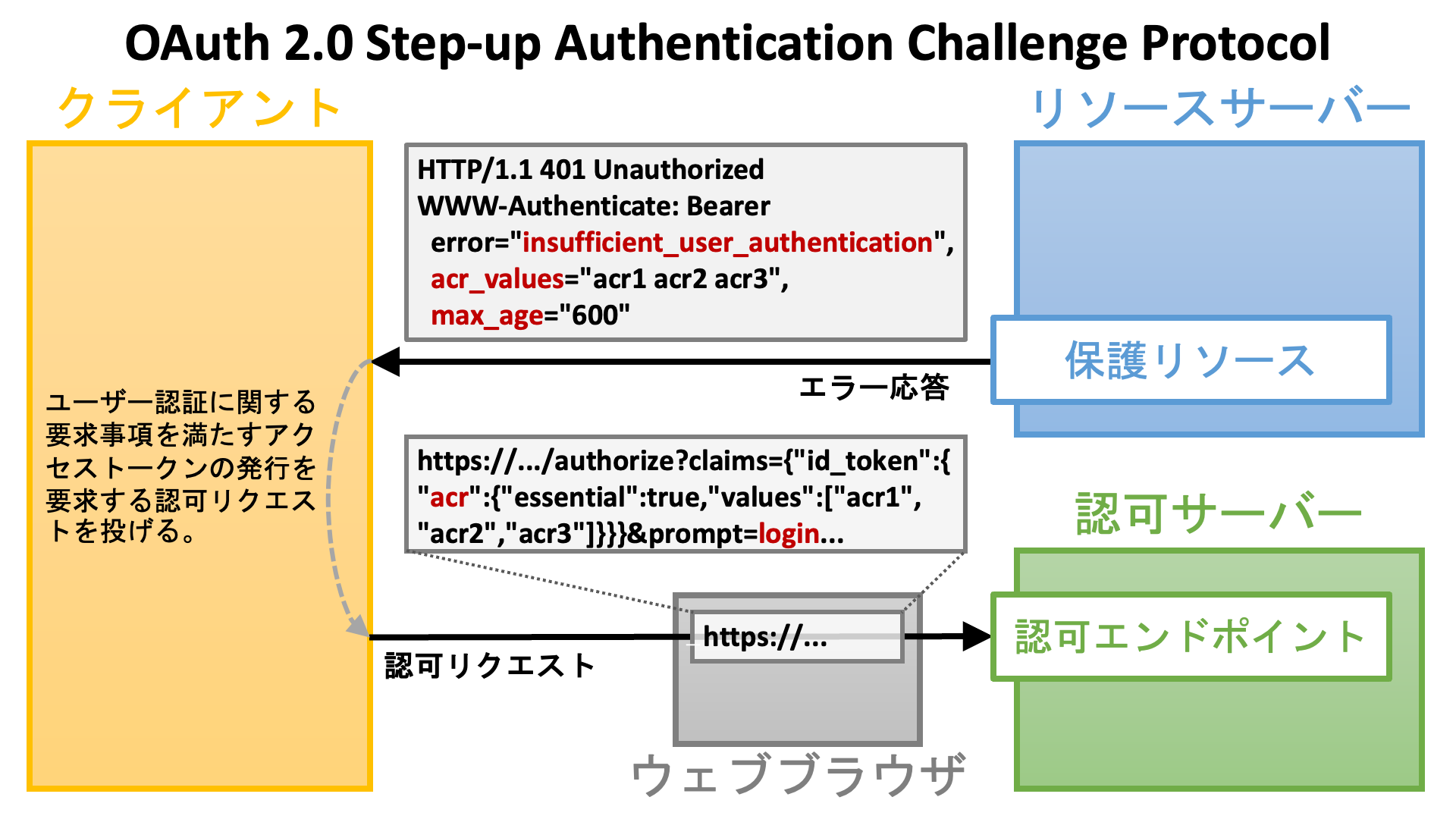 エラー応答内のパラメーター群については以降の節で説明します。
## `insufficient_user_authentication` エラーコード
認証要求事項が満たされないことがエラー応答の理由であることを示すため、仕様はエラコード `insufficient_user_authentication` を次のように定義しています。
* `insufficient_user_authentication`: The authentication event associated with the access token presented with the request doesn't meet the authentication requirements of the protected resource.
このエラーコードは、エラー応答内の `WWW-Authenticate` HTTP ヘッダーで次のように用いられます。
```text theme={null}
WWW-Authenticate: Bearer error="insufficient_user_authentication",...
```
## `acr_values` パラメーター
アクセストークンが満たさなければならない ACR を推奨順で並べるため、仕様はパラメーター `acr_values` を次のように定義しています。
* `acr_values`: A space-separated string listing the authentication context class reference values, in order of preference, one of which the protected resource requires for the authentication event associated with the access token.
このパラメーターはエラーコード `insufficent_user_authentication` と併せて次のように用いられます (仕様書から抜粋):
```text theme={null}
HTTP/1.1 401 Unauthorized
WWW-Authenticate: Bearer error="insufficient_user_authentication",
error_description="A different authentication level is required",
acr_values="myACR"
```
クライアントアプリケーションが上記のエラー応答を受け取った場合、次の例が示すように、`values` に `myACR` を含めて `acr` クレームを必須クレームとして要求する必要があります。例内の改行は見やすくするためだけに使っています。実際のリクエストは改行を含みません。
```text theme={null}
https://as.example.com/authorize?claims={
"id_token": {
"acr": {
"essential": true,
"values": [ "myACR" ]
}
}
}&...
```
認可サーバーが OAuth 2.0 Step Up Authentication Challenge Protocol 仕様が推奨する方法で `acr_values` リクエストパラメーターを処理する場合、`acr_values=myACR` で十分です。
## `max_age` パラメーター
アクセストークンが満たさなければならない最大認証時間を示すため、仕様はパラメーター `max_age` を次のように定義しています。
* `max_age`: Indicates the allowable elapsed time in seconds since the last active authentication event associated with the access token.
このパラメーターはエラーコード `insufficent_user_authentication` と併せて次のように用いられます (仕様書から抜粋):
```text theme={null}
HTTP/1.1 401 Unauthorized
WWW-Authenticate: Bearer error="insufficient_user_authentication",
error_description="More recent authentication is required",
max_age="5"
```
クライアントアプリケーションが上記のエラー応答を受け取った場合、次の例が示すように、`login` を含む `prompt` リクエストパラメーターを添えて認可リクエストを行う必要があります。
# アクセストークンに紐付く認証情報
提示されたアクセストークンが認証要求事項を満たすかどうかを保護リソースエンドポイントがチェックすることを可能とするためには、アクセストークンの発行過程で実行されたユーザー認証に関する情報をアクセストークンが保持していなければなりません。
OAuth 2.0 Step Up Authentication Challenge Protocol 仕様は、JWT 型アクセストークンのペイロード部やイントロスペクションレスポンス ([RFC 7662](https://www.rfc-editor.org/rfc/rfc7662.html) 参照) のメッセージボディーに埋め込まれるアクセストークンの属性として、次の二つを定義しています。
| 属性 | 説明 (仕様から抜粋) |
| :---------- | :------------------------------------------------------------------------------------------------------------------------------------------------------------------------------------------------------------ |
| `acr` | Authentication Context Class Reference. String specifying an Authentication Context Class Reference value that identifies the Authentication Context Class that the user authentication performed satisfied. |
| `auth_time` | Time when the user authentication occurred. A JSON numeric value representing the number of seconds from 1970-01-01T00:00:00Z UTC until the time of date/time of the authentication event. |
次の JSON は仕様からの抜粋で、JWT 型アクセストークンのペイロード部で `acr` 属性と `auth_time` 属性がどのように使われるかを示しています。
```json theme={null}
{
"active": true,
"client_id": "s6BhdRkqt3",
"scope": "purchase",
"sub": "someone@example.net",
"aud": "https://rs.example.com",
"iss": "https://as.example.net",
"exp": 1639528912,
"iat": 1618354090,
"auth_time": 1646340198,
"acr": "myACR"
}
```
# Authlete の実装
Authlete はバージョン 2.3 以降で OAuth 2.0 Step Up Authentication Challenge Protocol 仕様をサポートします。
## 認証情報の紐付け
`/auth/authorization/issue` API ([AuthorizationIssueRequest](https://authlete.github.io/authlete-java-common/com/authlete/common/dto/AuthorizationIssueRequest.html) 参照) など、いくつかの Authlete API は `acr` リクエストパラメーターと `authTime` リクエストパラメーターを受け取り、生成する **ID トークン**のペイロード部に埋め込む `acr` クレームと `auth_time` クレームの値として用います。Authlete 2.3 以降では、これらのリクエストパラメーターで渡された情報は、アクセストークンにも紐付けられます。
以下のシェルコマンド群は、ACR (`acr`) と認証時刻 (`auth_time`) に関する情報を保持するアクセストークンを発行する認可コードフロー ([RFC 6749](https://www.rfc-editor.org/rfc/rfc6749.html) [Section 4.1](https://www.rfc-editor.org/rfc/rfc6749.html#section-4.1)) を擬似的に実行するものです。
(1) `/auth/authorization` API を呼びます。この API は、認可リクエストを `parameters` として受け取り、当リクエストに関する情報を JSON フォーマット ([AuthorizationResponse](https://authlete.github.io/authlete-java-common/com/authlete/common/dto/AuthorizationResponse.html) 参照) で返します。
```shell theme={null}
$ curl -u ${API_KEY}:${API_SECRET} ${BASE_URL}/api/auth/authorization --data-urlencode parameters="response_type=code&scope=openid&client_id=${CLIENT_ID}&redirect_uri=${REDIRECT_URI}&state=${STATE}&claims={\"id_token\":{\"acr\":{\"essential\":true,\"values\":[\"${ACR}\"]}}}" > authorization_response.json
```
上記のコマンドライン内の `${ACR}` の値は、(`acr_values_supported` サーバーメタデータに相当する)「サポートする認証コンテキスト」の値の一つとしてあらかじめ登録しておく必要があります。登録されていない場合、指定された ACR は無視されます。
認可リクエストの ACR 群は、その出所がどこであるかに関わらず (`acr_values`、`claims`、または `default_acr_values`)、`/auth/authorization` API のレスポンス内に `acrs` パラメーターとして列挙されます。
加えて、`acr` クレームが必須として要求されている場合、`/auth/authorization` API のレスポンス内の真偽値パラメーター `acrEssential` の値は `true` になります。
(2) `/auth/authorization/issue` API を呼びます。この API は、`/auth/authorization` API が発行したチケットを受け取り、トークン群 (認可コード、アクセストークン、ID トークン等) を生成し、関連仕様に準拠する認可レスポンスを用意し、JSON ([AuthorizationIssueResponse](https://authlete.github.io/authlete-java-common/com/authlete/common/dto/AuthorizationIssueResponse.html) 参照) を返します。
```shell theme={null}
$ TICKET=`jq -r .ticket authorization_response.json`
$ AUTH_TIME=`date +%s`
$ curl -u ${API_KEY}:${API_SECRET} ${BASE_URL}/api/auth/authorization/issue -d ticket=$TICKET -d subject=$SUBJECT -d authTime=$AUTH_TIME -d acr=$ACR > authorization_issue_response.json
```
(3) `/auth/token` API を呼びます。この API は、トークンリクエストを `parameters` として受け取り、トークン群 (アクセストークンや ID トークン) を生成し、関連仕様に準拠するトークンレスポンスを用意し、JSON ([TokenResponse](https://authlete.github.io/authlete-java-common/com/authlete/common/dto/TokenResponse.html) 参照) を返します。
```shell theme={null}
$ AUTHORIZATION_CODE=`jq -r .authorizationCode authorization_issue_response.json`
$ curl -u ${API_KEY}:${API_SECRET} ${BASE_URL}/api/auth/token --data-urlencode parameters="client_id=${CLIENT_ID}&grant_type=authorization_code&code=${AUTHORIZATION_CODE}&redirect_uri=${REDIRECT_URI}" -d clientId=${CLIENT_ID} -d clientSecret=${CLIENT_SECRET} > token_response.json
```
上記の API コールでは、クライアントのクライアントタイプが confidential で、トークンエンドポイントにおける[クライアント認証](https://darutk.medium.com/oauth-2-0-client-authentication-4b5f929305d4)方式 (`token_endpoint_auth_method`) が `client_secret_basic` であると想定しています。`/auth/token` API ([TokenRequest](https://authlete.github.io/authlete-java-common/com/authlete/common/dto/TokenRequest.html) 参照) の `clientId` リクエストパラメーターと `clientSecret` リクエストパラメーターが使用されているため、クライアント認証方式が `client_secret_basic` であることが示唆されています。
## 未達認証要求事項
認可エンドポイントの実装は、`/auth/authorization/issue` API ではなく `/auth/authorization/fail` API を呼ぶことで、認可リクエストが失敗したことを示すことができます。
`/auth/authorization/fail` API ([AuthorizationFailRequest](https://authlete.github.io/authlete-java-common/com/authlete/common/dto/AuthorizationFailRequest.html) 参照) は、エラーの理由を示す `reason` リクエストパラメーターを要求します。`reason` リクエストパラメーターの値として `[ACR_NOT_SATISFIED](https://authlete.github.io/authlete-java-common/com/authlete/common/dto/AuthorizationFailRequest.Reason.html#ACR_NOT_SATISFIED)` が指定された場合、Authlete 2.3 以降では、[OpenID Connect Core Error Code unmet\_authentication\_requirements](https://openid.net/specs/openid-connect-unmet-authentication-requirements-1_0.html) に準拠するため、`error` が `unmet_authentication_requirements` のエラー応答を用意します。
```shell theme={null}
$ curl -u ${API_KEY}:${API_SECRET} ${BASE_URL}/api/auth/authorization/fail -d ticket=$TICKET -d reason=ACR_NOT_SATISFIED > authorization_fail_response.json
```
`/auth/authorization/fail` API のレスポンス ([AuthorizationFailResponse](https://authlete.github.io/authlete-java-common/com/authlete/common/dto/AuthorizationFailResponse.html) 参照) に含まれる `responseContent` パラメーターは、クライアントアプリケーションの**リダイレクションエンドポイント**を指す URL で、`error` や他のパラメーターを伴っています。
```shell theme={null}
$ jq -r .responseContent authorization_fail_response.json
http://localhost:4000/api/mock/redirection/4803170471?error=unmet_authentication_requirements&error_description=%5BA060305%5D+The+authorization+request+requests+%27acr%27+as+essential%2C+but+the+authentication+performed+for+the+end-user+satisfies+none+of+the+requested+ACRs.&error_uri=https%3A%2F%2Fdocs.authlete.com%2F%23A060305&state=917bdc1ef38ba6f6c297b4e31ac84007&iss=https%3A%2F%2Fauthlete.com
```
`Service` の `errorDescriptionOmitted` プロパティー (`Service.[isErrorDescriptionOmitted()](https://authlete.github.io/authlete-java-common/com/authlete/common/dto/Service.html#isErrorDescriptionOmitted--)` 参照) が `true` でない限り、URL には `error_description` が含まれます。次のものは、`error_description` の値を URL デコードした結果得られる文字列です。
> \[A060305] The authorization request requests 'acr' as essential, but the authentication performed for the end-user satisfies none of the requested ACRs.
認可リクエストが `response_mode=form_post` または `response_mode=form_post.jwt` を含む場合、`/auth/authorization/fail` API レスポンスの `responseContent` パラメーターの値は URL ではなく HTML になります。
## JWT 型アクセストークン
Authlete が発行するアクセストークンのフォーマットは設定で変更可能です。`Service` の `accessTokenSignAlg` プロパティー (`Service.[getAccessTokenSignAlg()](https://authlete.github.io/authlete-java-common/com/authlete/common/dto/Service.html#getAccessTokenSignAlg--)` 参照) がセットされている場合、アクセストークンのフォーマットは JWT になります ([「JWT ベースのアクセストークン」の有効化](/v2/configuration-reference/token-issuance-formats/jwt-based-access-token))。バージョン 2.3 以降の Authlete は、仕様で定義されているように、`acr` と `auth_time` を JWT 型アクセストークンのペイロードに埋め込みます。
サービスが JWT 型アクセストークンを生成するように設定されている場合、`/auth/token` API レスポンス ([TokenResponse](https://authlete.github.io/authlete-java-common/com/authlete/common/dto/TokenResponse.html) 参照) の `jwtAccessToken` レスポンスパラメーターに JWT 型アクセストークンがセットされています。
```shell theme={null}
$ JWT_AT=`jq -r .jwtAccessToken token_response.json`
```
JWT 型アクセストークンのペイロード部をデコードすると、
```shell theme={null}
$ echo $JWT_AT | ruby -paF\\. -rbase64 -e '$_=Base64.urlsafe_decode64 $F[1]' | jq .
```
`acr` クレームと `auth_time` クレームが埋め込まれていることが分かります。
```json theme={null}
{
"sub": "taka",
"acr": "acr1",
"scope": "openid",
"auth_time": 1667321595,
"iss": "https://authlete.com",
"exp": 1667408271,
"iat": 1667321871,
"client_id": "5575687621",
"jti": "A1pURs-TMuyvueCoP2mSsntQX4-0IvYxlvectI4E2h8"
}
```
## トークンレスポンス (標準)
Authlete を用いる認可サーバーは、Authlete の `/auth/introspection/standard` API を用いて、[RFC 7662](https://www.rfc-editor.org/rfc/rfc7662.html) に準拠するトークンイントロスペクションエンドポイントを実装することができます。保護リソースエンドポイントの実装は、アクセストークンの詳細情報を取得するために、そのトークンイントロスペクションエンドポイントを使うことができます。
`/auth/introspection/standard` API はトークンイントロスペクションリクエストを `parameters` として受け取り、JSON ( [StandardIntrospectionResponse](https://authlete.github.io/authlete-java-common/com/authlete/common/dto/StandardIntrospectionResponse.html) 参照) を返します。
```shell theme={null}
$ AT=`jq -r .accessToken token_response.json`
$ curl -u ${API_KEY}:${API_SECRET} ${BASE_URL}/api/auth/introspection/standard --data-urlencode parameters="token=${AT}" > introspection_standard_response.json
```
その JSON には `responseContent` パラメーターが含まれています。パラメーターの値は [RFC 7662](https://www.rfc-editor.org/rfc/rfc7662.html) に準拠する JSON です。
次のコマンドラインは `responseContent` の値を取り出し、JSON として解釈しています。
```shell theme={null}
$ jq -r .responseContent introspection_standard_response.json | jq .
```
上記のコマンドラインの結果は次のようになります。`acr` プロパティーと `auth_time` プロパティーがあることを確認できます。
```json theme={null}
{
"sub": "taka",
"acr": "acr1",
"scope": "openid",
"auth_time": 1667321595,
"iss": "https://authlete.com",
"active": true,
"token_type": "Bearer",
"exp": 1667408271,
"client_id": "5575687621"
}
```
## トークンイントロスペクション (Authlete)
Authlete は `/auth/introspection` API を提供します。この API もアクセストークンのイントロスペクションのためのものですが、標準のイントロスペクションエンドポイントとは異なります。
標準のイントロスペクションエンドポイントと比べた際の `/auth/introspection` API の主な利点は次の通りです。
1. 標準のイントロスペクションエンドポイントでは実行不可能なバリデーションを実行できる。
2. [RFC 6750](https://www.rfc-editor.org/rfc/rfc6750.html) に準拠するエラーメッセージを用意できる。
この文書を書いている時点では、`/auth/introspection` API ([IntrospectionRequest](https://authlete.github.io/authlete-java-common/com/authlete/common/dto/IntrospectionRequest.html) 参照) は次のリクエストパラメーター群を受け取ります。
| パラメーター | 分類 | バージョン | 説明 |
| :--------------------- | :---------------------------------------------------------- | :---: | :------------------------------------------------------- |
| `token` | 共通 | 1.1 | イントロスペクションの対象とするアクセストークン。 |
| `scopes` | 共通 | 1.1 | アクセストークンに付与されているべきスコープ群。 |
| `subject` | 共通 | 1.1 | アクセストークンに関連付けられているべきサブジェクト (ユーザー識別子)。 |
| `clientCertificate` | [RFC 8705](https://www.rfc-editor.org/rfc/rfc8705.html) | 2.0 | クライアントアプリケーションと保護リソースエンドポイント間の相互 TLS 接続で使われているクライアント証明書。 |
| `dpop` | [DPoP](https://www.rfc-editor.org/rfc/rfc9449.html) | 2.2 | `DPoP` HTTP ヘッダーの値。 |
| `htm` | [DPoP](https://www.rfc-editor.org/rfc/rfc9449.html) | 2.2 | 保護リソースエンドポイントに対するリクエストの HTTP メソッド。 |
| `htu` | [DPoP](https://www.rfc-editor.org/rfc/rfc9449.html) | 2.2 | 保護リソースエンドポイントの URL。 |
| `resources` | [RFC 8707](https://www.rfc-editor.org/rfc/rfc8707.html) | 2.2 | アクセストークンが対象としているべきリソース群。 |
| `targetUri` | [HTTP Msg Sig](https://www.rfc-editor.org/rfc/rfc9421.html) | 2.3 | リクエストの完全 URL。 |
| `headers` | [HTTP Msg Sig](https://www.rfc-editor.org/rfc/rfc9421.html) | 2.3 | リクエストの HTTP ヘッダー群。 |
| `requestBodyContained` | [HTTP Msg Sig](https://www.rfc-editor.org/rfc/rfc9421.html) | 2.3 | リクエストがメッセージボディーを含んでいるかどうか。 |
| `acrValues` | [Step Up Auth](https://www.rfc-editor.org/rfc/rfc9470.html) | 2.3 | アクセストークン発行過程で実行されたユーザー認証が満たすべき認証コンテキストクラス群。 |
| `maxAge` | [Step Up Auth](https://www.rfc-editor.org/rfc/rfc9470.html) | 2.3 | アクセストークン発行過程で実行されたユーザー認証の実行時刻からの経過時間の最大許容値。 |
`token` 以外のリクエストパラメーターはアクセストークンのバリデーションに関連しています。ここで注目すべきは、`acrValues` リクエストパラメーターと `maxAge` リクエストパラメーターです。
### ACR バリデーション
`acrValues` リクエストパラメーターが与えられた場合、`/auth/introspection` API はアクセストークンに紐付く ACR が `acrValues` 配列内に含まれているかどうかを調べます。もし ACR が含まれていなかった場合、API は OAuth 2.0 Step Up Authentication Challenge Protocol に準拠するエラー応答を用意します。
次のコマンドラインは `/auth/introspection` API に ACR のバリデーションを実行させます。
```shell theme={null}
$ curl -u ${API_KEY}:${API_SECRET} ${BASE_URL}/api/auth/introspection -d token=$AT -d acrValues="acrX acrY" > introspection_response-acrValues.json
```
API レスポンス ([IntrospectionResponse](https://authlete.github.io/authlete-java-common/com/authlete/common/dto/IntrospectionResponse.html) 参照) 内の `responseContent` パラメーターは `WWW-Authenticate` HTTP ヘッダーの値として用いるべき文字列を保持しています。`error` が `insufficient_user_authentication` であること、`acr_values` が含まれていることを確認できます。
```shell theme={null}
$ jq -r .responseContent introspection_response-acrValues.json
Bearer error="insufficient_user_authentication",error_description="[A341302] The authentication context class 'acr1' of the user authentication that the authorization server performed during the course of issuing the access token is insufficient. User authentication of an access token must satisfy one of [acrX acrY] to access the protected resource.",error_uri="https://docs.authlete.com/#A341302",acr_values="acrX acrY"
```
### Max Age バリデーション
`maxAge` リクエストパラメーターが与えられた場合、`/auth/introspection` API はアクセストークンに紐付くユーザー認証時刻から指定された時間が経過済みであるかどうかを調べます。もし経過済みであれば、API は OAuth 2.0 Step Up Authentication Challenge Protocol に準拠するエラー応答を用意します。
次のコマンドラインは `/auth/introspection` API に認証時刻のバリデーションを実行させます。
```shell theme={null}
$ curl -u ${API_KEY}:${API_SECRET} ${BASE_URL}/api/auth/introspection -d token=$AT -d maxAge=600 > introspection_response-maxAge.json
```
この場合、`WWW-Authenticate` HTTP ヘッダー用の文字列は `max_age` を含みます。
```shell theme={null}
$ jq -r .responseContent introspection_response-maxAge.json
Bearer error="insufficient_user_authentication",error_description="[A340301] The time of the user authentication that the authorization server performed during the course of issuing the access token is too old, so re-authentication is needed. The maximum authentication age (max_age) required by the protected resource is 600.",error_uri="https://docs.authlete.com/#A340301",max_age="600"
```
# 最後に
2024 年 11 月に Authlete 3.0 をリリースしました ([発表文書](https://www.authlete.com/ja/news/20241106_authlete3/))。OAuth 2.0 Step Up Authentication Challenge Protocol はもちろんサポートされています。ぜひご活用ください!
エラー応答内のパラメーター群については以降の節で説明します。
## `insufficient_user_authentication` エラーコード
認証要求事項が満たされないことがエラー応答の理由であることを示すため、仕様はエラコード `insufficient_user_authentication` を次のように定義しています。
* `insufficient_user_authentication`: The authentication event associated with the access token presented with the request doesn't meet the authentication requirements of the protected resource.
このエラーコードは、エラー応答内の `WWW-Authenticate` HTTP ヘッダーで次のように用いられます。
```text theme={null}
WWW-Authenticate: Bearer error="insufficient_user_authentication",...
```
## `acr_values` パラメーター
アクセストークンが満たさなければならない ACR を推奨順で並べるため、仕様はパラメーター `acr_values` を次のように定義しています。
* `acr_values`: A space-separated string listing the authentication context class reference values, in order of preference, one of which the protected resource requires for the authentication event associated with the access token.
このパラメーターはエラーコード `insufficent_user_authentication` と併せて次のように用いられます (仕様書から抜粋):
```text theme={null}
HTTP/1.1 401 Unauthorized
WWW-Authenticate: Bearer error="insufficient_user_authentication",
error_description="A different authentication level is required",
acr_values="myACR"
```
クライアントアプリケーションが上記のエラー応答を受け取った場合、次の例が示すように、`values` に `myACR` を含めて `acr` クレームを必須クレームとして要求する必要があります。例内の改行は見やすくするためだけに使っています。実際のリクエストは改行を含みません。
```text theme={null}
https://as.example.com/authorize?claims={
"id_token": {
"acr": {
"essential": true,
"values": [ "myACR" ]
}
}
}&...
```
認可サーバーが OAuth 2.0 Step Up Authentication Challenge Protocol 仕様が推奨する方法で `acr_values` リクエストパラメーターを処理する場合、`acr_values=myACR` で十分です。
## `max_age` パラメーター
アクセストークンが満たさなければならない最大認証時間を示すため、仕様はパラメーター `max_age` を次のように定義しています。
* `max_age`: Indicates the allowable elapsed time in seconds since the last active authentication event associated with the access token.
このパラメーターはエラーコード `insufficent_user_authentication` と併せて次のように用いられます (仕様書から抜粋):
```text theme={null}
HTTP/1.1 401 Unauthorized
WWW-Authenticate: Bearer error="insufficient_user_authentication",
error_description="More recent authentication is required",
max_age="5"
```
クライアントアプリケーションが上記のエラー応答を受け取った場合、次の例が示すように、`login` を含む `prompt` リクエストパラメーターを添えて認可リクエストを行う必要があります。
# アクセストークンに紐付く認証情報
提示されたアクセストークンが認証要求事項を満たすかどうかを保護リソースエンドポイントがチェックすることを可能とするためには、アクセストークンの発行過程で実行されたユーザー認証に関する情報をアクセストークンが保持していなければなりません。
OAuth 2.0 Step Up Authentication Challenge Protocol 仕様は、JWT 型アクセストークンのペイロード部やイントロスペクションレスポンス ([RFC 7662](https://www.rfc-editor.org/rfc/rfc7662.html) 参照) のメッセージボディーに埋め込まれるアクセストークンの属性として、次の二つを定義しています。
| 属性 | 説明 (仕様から抜粋) |
| :---------- | :------------------------------------------------------------------------------------------------------------------------------------------------------------------------------------------------------------ |
| `acr` | Authentication Context Class Reference. String specifying an Authentication Context Class Reference value that identifies the Authentication Context Class that the user authentication performed satisfied. |
| `auth_time` | Time when the user authentication occurred. A JSON numeric value representing the number of seconds from 1970-01-01T00:00:00Z UTC until the time of date/time of the authentication event. |
次の JSON は仕様からの抜粋で、JWT 型アクセストークンのペイロード部で `acr` 属性と `auth_time` 属性がどのように使われるかを示しています。
```json theme={null}
{
"active": true,
"client_id": "s6BhdRkqt3",
"scope": "purchase",
"sub": "someone@example.net",
"aud": "https://rs.example.com",
"iss": "https://as.example.net",
"exp": 1639528912,
"iat": 1618354090,
"auth_time": 1646340198,
"acr": "myACR"
}
```
# Authlete の実装
Authlete はバージョン 2.3 以降で OAuth 2.0 Step Up Authentication Challenge Protocol 仕様をサポートします。
## 認証情報の紐付け
`/auth/authorization/issue` API ([AuthorizationIssueRequest](https://authlete.github.io/authlete-java-common/com/authlete/common/dto/AuthorizationIssueRequest.html) 参照) など、いくつかの Authlete API は `acr` リクエストパラメーターと `authTime` リクエストパラメーターを受け取り、生成する **ID トークン**のペイロード部に埋め込む `acr` クレームと `auth_time` クレームの値として用います。Authlete 2.3 以降では、これらのリクエストパラメーターで渡された情報は、アクセストークンにも紐付けられます。
以下のシェルコマンド群は、ACR (`acr`) と認証時刻 (`auth_time`) に関する情報を保持するアクセストークンを発行する認可コードフロー ([RFC 6749](https://www.rfc-editor.org/rfc/rfc6749.html) [Section 4.1](https://www.rfc-editor.org/rfc/rfc6749.html#section-4.1)) を擬似的に実行するものです。
(1) `/auth/authorization` API を呼びます。この API は、認可リクエストを `parameters` として受け取り、当リクエストに関する情報を JSON フォーマット ([AuthorizationResponse](https://authlete.github.io/authlete-java-common/com/authlete/common/dto/AuthorizationResponse.html) 参照) で返します。
```shell theme={null}
$ curl -u ${API_KEY}:${API_SECRET} ${BASE_URL}/api/auth/authorization --data-urlencode parameters="response_type=code&scope=openid&client_id=${CLIENT_ID}&redirect_uri=${REDIRECT_URI}&state=${STATE}&claims={\"id_token\":{\"acr\":{\"essential\":true,\"values\":[\"${ACR}\"]}}}" > authorization_response.json
```
上記のコマンドライン内の `${ACR}` の値は、(`acr_values_supported` サーバーメタデータに相当する)「サポートする認証コンテキスト」の値の一つとしてあらかじめ登録しておく必要があります。登録されていない場合、指定された ACR は無視されます。
認可リクエストの ACR 群は、その出所がどこであるかに関わらず (`acr_values`、`claims`、または `default_acr_values`)、`/auth/authorization` API のレスポンス内に `acrs` パラメーターとして列挙されます。
加えて、`acr` クレームが必須として要求されている場合、`/auth/authorization` API のレスポンス内の真偽値パラメーター `acrEssential` の値は `true` になります。
(2) `/auth/authorization/issue` API を呼びます。この API は、`/auth/authorization` API が発行したチケットを受け取り、トークン群 (認可コード、アクセストークン、ID トークン等) を生成し、関連仕様に準拠する認可レスポンスを用意し、JSON ([AuthorizationIssueResponse](https://authlete.github.io/authlete-java-common/com/authlete/common/dto/AuthorizationIssueResponse.html) 参照) を返します。
```shell theme={null}
$ TICKET=`jq -r .ticket authorization_response.json`
$ AUTH_TIME=`date +%s`
$ curl -u ${API_KEY}:${API_SECRET} ${BASE_URL}/api/auth/authorization/issue -d ticket=$TICKET -d subject=$SUBJECT -d authTime=$AUTH_TIME -d acr=$ACR > authorization_issue_response.json
```
(3) `/auth/token` API を呼びます。この API は、トークンリクエストを `parameters` として受け取り、トークン群 (アクセストークンや ID トークン) を生成し、関連仕様に準拠するトークンレスポンスを用意し、JSON ([TokenResponse](https://authlete.github.io/authlete-java-common/com/authlete/common/dto/TokenResponse.html) 参照) を返します。
```shell theme={null}
$ AUTHORIZATION_CODE=`jq -r .authorizationCode authorization_issue_response.json`
$ curl -u ${API_KEY}:${API_SECRET} ${BASE_URL}/api/auth/token --data-urlencode parameters="client_id=${CLIENT_ID}&grant_type=authorization_code&code=${AUTHORIZATION_CODE}&redirect_uri=${REDIRECT_URI}" -d clientId=${CLIENT_ID} -d clientSecret=${CLIENT_SECRET} > token_response.json
```
上記の API コールでは、クライアントのクライアントタイプが confidential で、トークンエンドポイントにおける[クライアント認証](https://darutk.medium.com/oauth-2-0-client-authentication-4b5f929305d4)方式 (`token_endpoint_auth_method`) が `client_secret_basic` であると想定しています。`/auth/token` API ([TokenRequest](https://authlete.github.io/authlete-java-common/com/authlete/common/dto/TokenRequest.html) 参照) の `clientId` リクエストパラメーターと `clientSecret` リクエストパラメーターが使用されているため、クライアント認証方式が `client_secret_basic` であることが示唆されています。
## 未達認証要求事項
認可エンドポイントの実装は、`/auth/authorization/issue` API ではなく `/auth/authorization/fail` API を呼ぶことで、認可リクエストが失敗したことを示すことができます。
`/auth/authorization/fail` API ([AuthorizationFailRequest](https://authlete.github.io/authlete-java-common/com/authlete/common/dto/AuthorizationFailRequest.html) 参照) は、エラーの理由を示す `reason` リクエストパラメーターを要求します。`reason` リクエストパラメーターの値として `[ACR_NOT_SATISFIED](https://authlete.github.io/authlete-java-common/com/authlete/common/dto/AuthorizationFailRequest.Reason.html#ACR_NOT_SATISFIED)` が指定された場合、Authlete 2.3 以降では、[OpenID Connect Core Error Code unmet\_authentication\_requirements](https://openid.net/specs/openid-connect-unmet-authentication-requirements-1_0.html) に準拠するため、`error` が `unmet_authentication_requirements` のエラー応答を用意します。
```shell theme={null}
$ curl -u ${API_KEY}:${API_SECRET} ${BASE_URL}/api/auth/authorization/fail -d ticket=$TICKET -d reason=ACR_NOT_SATISFIED > authorization_fail_response.json
```
`/auth/authorization/fail` API のレスポンス ([AuthorizationFailResponse](https://authlete.github.io/authlete-java-common/com/authlete/common/dto/AuthorizationFailResponse.html) 参照) に含まれる `responseContent` パラメーターは、クライアントアプリケーションの**リダイレクションエンドポイント**を指す URL で、`error` や他のパラメーターを伴っています。
```shell theme={null}
$ jq -r .responseContent authorization_fail_response.json
http://localhost:4000/api/mock/redirection/4803170471?error=unmet_authentication_requirements&error_description=%5BA060305%5D+The+authorization+request+requests+%27acr%27+as+essential%2C+but+the+authentication+performed+for+the+end-user+satisfies+none+of+the+requested+ACRs.&error_uri=https%3A%2F%2Fdocs.authlete.com%2F%23A060305&state=917bdc1ef38ba6f6c297b4e31ac84007&iss=https%3A%2F%2Fauthlete.com
```
`Service` の `errorDescriptionOmitted` プロパティー (`Service.[isErrorDescriptionOmitted()](https://authlete.github.io/authlete-java-common/com/authlete/common/dto/Service.html#isErrorDescriptionOmitted--)` 参照) が `true` でない限り、URL には `error_description` が含まれます。次のものは、`error_description` の値を URL デコードした結果得られる文字列です。
> \[A060305] The authorization request requests 'acr' as essential, but the authentication performed for the end-user satisfies none of the requested ACRs.
認可リクエストが `response_mode=form_post` または `response_mode=form_post.jwt` を含む場合、`/auth/authorization/fail` API レスポンスの `responseContent` パラメーターの値は URL ではなく HTML になります。
## JWT 型アクセストークン
Authlete が発行するアクセストークンのフォーマットは設定で変更可能です。`Service` の `accessTokenSignAlg` プロパティー (`Service.[getAccessTokenSignAlg()](https://authlete.github.io/authlete-java-common/com/authlete/common/dto/Service.html#getAccessTokenSignAlg--)` 参照) がセットされている場合、アクセストークンのフォーマットは JWT になります ([「JWT ベースのアクセストークン」の有効化](/v2/configuration-reference/token-issuance-formats/jwt-based-access-token))。バージョン 2.3 以降の Authlete は、仕様で定義されているように、`acr` と `auth_time` を JWT 型アクセストークンのペイロードに埋め込みます。
サービスが JWT 型アクセストークンを生成するように設定されている場合、`/auth/token` API レスポンス ([TokenResponse](https://authlete.github.io/authlete-java-common/com/authlete/common/dto/TokenResponse.html) 参照) の `jwtAccessToken` レスポンスパラメーターに JWT 型アクセストークンがセットされています。
```shell theme={null}
$ JWT_AT=`jq -r .jwtAccessToken token_response.json`
```
JWT 型アクセストークンのペイロード部をデコードすると、
```shell theme={null}
$ echo $JWT_AT | ruby -paF\\. -rbase64 -e '$_=Base64.urlsafe_decode64 $F[1]' | jq .
```
`acr` クレームと `auth_time` クレームが埋め込まれていることが分かります。
```json theme={null}
{
"sub": "taka",
"acr": "acr1",
"scope": "openid",
"auth_time": 1667321595,
"iss": "https://authlete.com",
"exp": 1667408271,
"iat": 1667321871,
"client_id": "5575687621",
"jti": "A1pURs-TMuyvueCoP2mSsntQX4-0IvYxlvectI4E2h8"
}
```
## トークンレスポンス (標準)
Authlete を用いる認可サーバーは、Authlete の `/auth/introspection/standard` API を用いて、[RFC 7662](https://www.rfc-editor.org/rfc/rfc7662.html) に準拠するトークンイントロスペクションエンドポイントを実装することができます。保護リソースエンドポイントの実装は、アクセストークンの詳細情報を取得するために、そのトークンイントロスペクションエンドポイントを使うことができます。
`/auth/introspection/standard` API はトークンイントロスペクションリクエストを `parameters` として受け取り、JSON ( [StandardIntrospectionResponse](https://authlete.github.io/authlete-java-common/com/authlete/common/dto/StandardIntrospectionResponse.html) 参照) を返します。
```shell theme={null}
$ AT=`jq -r .accessToken token_response.json`
$ curl -u ${API_KEY}:${API_SECRET} ${BASE_URL}/api/auth/introspection/standard --data-urlencode parameters="token=${AT}" > introspection_standard_response.json
```
その JSON には `responseContent` パラメーターが含まれています。パラメーターの値は [RFC 7662](https://www.rfc-editor.org/rfc/rfc7662.html) に準拠する JSON です。
次のコマンドラインは `responseContent` の値を取り出し、JSON として解釈しています。
```shell theme={null}
$ jq -r .responseContent introspection_standard_response.json | jq .
```
上記のコマンドラインの結果は次のようになります。`acr` プロパティーと `auth_time` プロパティーがあることを確認できます。
```json theme={null}
{
"sub": "taka",
"acr": "acr1",
"scope": "openid",
"auth_time": 1667321595,
"iss": "https://authlete.com",
"active": true,
"token_type": "Bearer",
"exp": 1667408271,
"client_id": "5575687621"
}
```
## トークンイントロスペクション (Authlete)
Authlete は `/auth/introspection` API を提供します。この API もアクセストークンのイントロスペクションのためのものですが、標準のイントロスペクションエンドポイントとは異なります。
標準のイントロスペクションエンドポイントと比べた際の `/auth/introspection` API の主な利点は次の通りです。
1. 標準のイントロスペクションエンドポイントでは実行不可能なバリデーションを実行できる。
2. [RFC 6750](https://www.rfc-editor.org/rfc/rfc6750.html) に準拠するエラーメッセージを用意できる。
この文書を書いている時点では、`/auth/introspection` API ([IntrospectionRequest](https://authlete.github.io/authlete-java-common/com/authlete/common/dto/IntrospectionRequest.html) 参照) は次のリクエストパラメーター群を受け取ります。
| パラメーター | 分類 | バージョン | 説明 |
| :--------------------- | :---------------------------------------------------------- | :---: | :------------------------------------------------------- |
| `token` | 共通 | 1.1 | イントロスペクションの対象とするアクセストークン。 |
| `scopes` | 共通 | 1.1 | アクセストークンに付与されているべきスコープ群。 |
| `subject` | 共通 | 1.1 | アクセストークンに関連付けられているべきサブジェクト (ユーザー識別子)。 |
| `clientCertificate` | [RFC 8705](https://www.rfc-editor.org/rfc/rfc8705.html) | 2.0 | クライアントアプリケーションと保護リソースエンドポイント間の相互 TLS 接続で使われているクライアント証明書。 |
| `dpop` | [DPoP](https://www.rfc-editor.org/rfc/rfc9449.html) | 2.2 | `DPoP` HTTP ヘッダーの値。 |
| `htm` | [DPoP](https://www.rfc-editor.org/rfc/rfc9449.html) | 2.2 | 保護リソースエンドポイントに対するリクエストの HTTP メソッド。 |
| `htu` | [DPoP](https://www.rfc-editor.org/rfc/rfc9449.html) | 2.2 | 保護リソースエンドポイントの URL。 |
| `resources` | [RFC 8707](https://www.rfc-editor.org/rfc/rfc8707.html) | 2.2 | アクセストークンが対象としているべきリソース群。 |
| `targetUri` | [HTTP Msg Sig](https://www.rfc-editor.org/rfc/rfc9421.html) | 2.3 | リクエストの完全 URL。 |
| `headers` | [HTTP Msg Sig](https://www.rfc-editor.org/rfc/rfc9421.html) | 2.3 | リクエストの HTTP ヘッダー群。 |
| `requestBodyContained` | [HTTP Msg Sig](https://www.rfc-editor.org/rfc/rfc9421.html) | 2.3 | リクエストがメッセージボディーを含んでいるかどうか。 |
| `acrValues` | [Step Up Auth](https://www.rfc-editor.org/rfc/rfc9470.html) | 2.3 | アクセストークン発行過程で実行されたユーザー認証が満たすべき認証コンテキストクラス群。 |
| `maxAge` | [Step Up Auth](https://www.rfc-editor.org/rfc/rfc9470.html) | 2.3 | アクセストークン発行過程で実行されたユーザー認証の実行時刻からの経過時間の最大許容値。 |
`token` 以外のリクエストパラメーターはアクセストークンのバリデーションに関連しています。ここで注目すべきは、`acrValues` リクエストパラメーターと `maxAge` リクエストパラメーターです。
### ACR バリデーション
`acrValues` リクエストパラメーターが与えられた場合、`/auth/introspection` API はアクセストークンに紐付く ACR が `acrValues` 配列内に含まれているかどうかを調べます。もし ACR が含まれていなかった場合、API は OAuth 2.0 Step Up Authentication Challenge Protocol に準拠するエラー応答を用意します。
次のコマンドラインは `/auth/introspection` API に ACR のバリデーションを実行させます。
```shell theme={null}
$ curl -u ${API_KEY}:${API_SECRET} ${BASE_URL}/api/auth/introspection -d token=$AT -d acrValues="acrX acrY" > introspection_response-acrValues.json
```
API レスポンス ([IntrospectionResponse](https://authlete.github.io/authlete-java-common/com/authlete/common/dto/IntrospectionResponse.html) 参照) 内の `responseContent` パラメーターは `WWW-Authenticate` HTTP ヘッダーの値として用いるべき文字列を保持しています。`error` が `insufficient_user_authentication` であること、`acr_values` が含まれていることを確認できます。
```shell theme={null}
$ jq -r .responseContent introspection_response-acrValues.json
Bearer error="insufficient_user_authentication",error_description="[A341302] The authentication context class 'acr1' of the user authentication that the authorization server performed during the course of issuing the access token is insufficient. User authentication of an access token must satisfy one of [acrX acrY] to access the protected resource.",error_uri="https://docs.authlete.com/#A341302",acr_values="acrX acrY"
```
### Max Age バリデーション
`maxAge` リクエストパラメーターが与えられた場合、`/auth/introspection` API はアクセストークンに紐付くユーザー認証時刻から指定された時間が経過済みであるかどうかを調べます。もし経過済みであれば、API は OAuth 2.0 Step Up Authentication Challenge Protocol に準拠するエラー応答を用意します。
次のコマンドラインは `/auth/introspection` API に認証時刻のバリデーションを実行させます。
```shell theme={null}
$ curl -u ${API_KEY}:${API_SECRET} ${BASE_URL}/api/auth/introspection -d token=$AT -d maxAge=600 > introspection_response-maxAge.json
```
この場合、`WWW-Authenticate` HTTP ヘッダー用の文字列は `max_age` を含みます。
```shell theme={null}
$ jq -r .responseContent introspection_response-maxAge.json
Bearer error="insufficient_user_authentication",error_description="[A340301] The time of the user authentication that the authorization server performed during the course of issuing the access token is too old, so re-authentication is needed. The maximum authentication age (max_age) required by the protected resource is 600.",error_uri="https://docs.authlete.com/#A340301",max_age="600"
```
# 最後に
2024 年 11 月に Authlete 3.0 をリリースしました ([発表文書](https://www.authlete.com/ja/news/20241106_authlete3/))。OAuth 2.0 Step Up Authentication Challenge Protocol はもちろんサポートされています。ぜひご活用ください!