> ## Documentation Index
> Fetch the complete documentation index at: https://developers.authlete.com/llms.txt
> Use this file to discover all available pages before exploring further.
# 認可リクエストにおける PKCE 利用の強制化
> Authlete の機能を使用して、クライアントアプリケーションからの認可リクエストについて PKCE(Proof Key for Code Exchange)の使用を強制するための設定手順を説明します。
For **Authlete 2.x** documentation, see [2.x version](/ja/v2/configuration-reference/endpoints/requiring-clients-to-use-pkce-for-their-authorization-requests).
Authlete には、OAuth 2.0 クライアントに対して、認可リクエストで [PKCE (RFC 7636)](/ja/protocols-and-flows/protocol-extensions/proof-key-for-code-exchange-pkce) の利用を強制する機能があります。
クライアントに対して PKCE を強制化するには、次の手順を実施します。
1. 「クライアント設定」>「エンドポイント」>「認可」>「一般」に移動します。
2. 「認可コード交換用証明キー(PKCE)」の下にある「PKCEを必須にする」オプションを有効にします。デフォルトでは「PKCEを必須にする」オプションは無効です。
3. 「変更を保存」をクリックして更新を適用します。
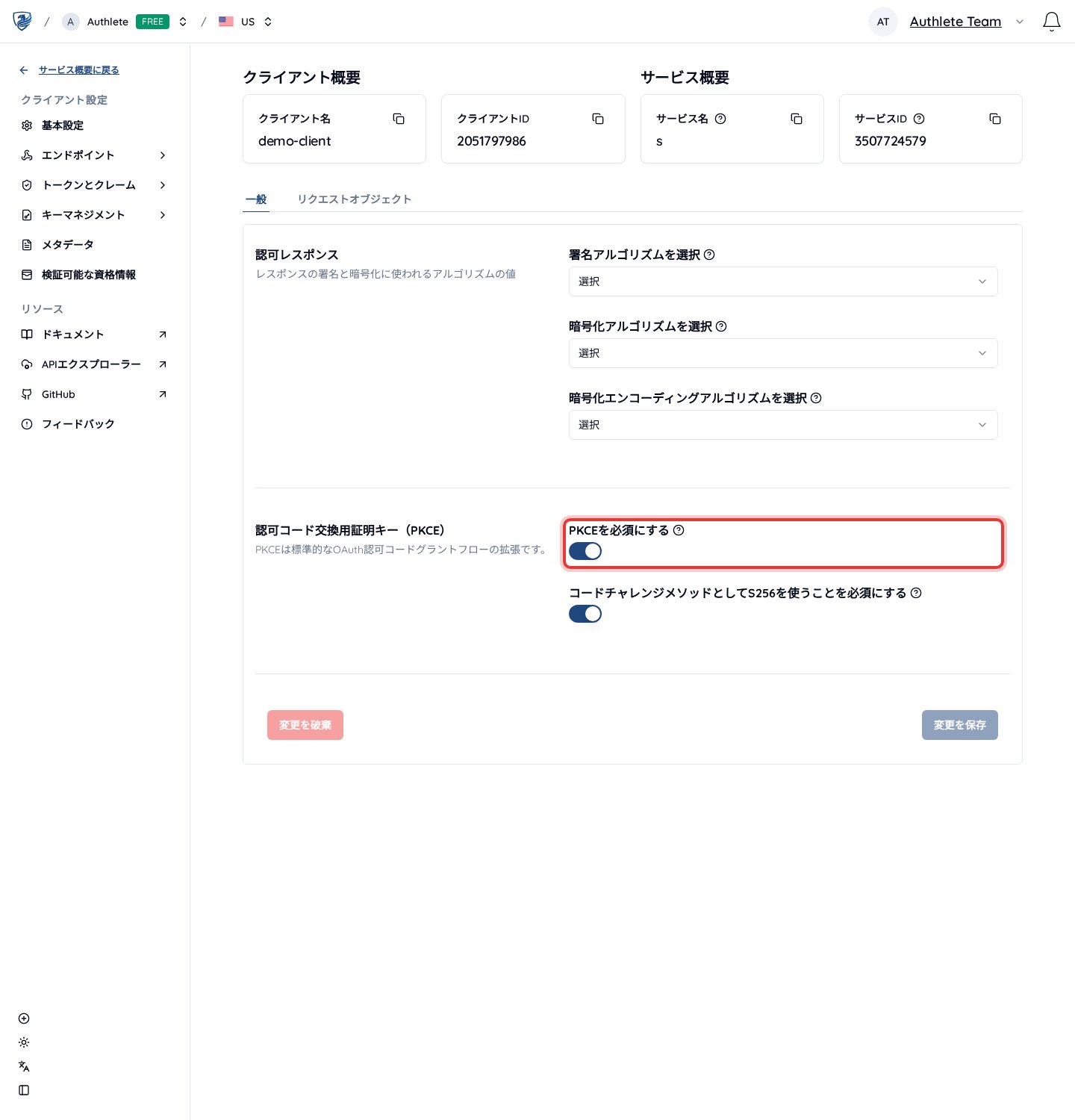 *「認可コード交換用証明キー(PKCE)」の設定*
この設定を有効にすると、対象の Authlete サービスの [/auth/authorization API](/api-reference/authorization-endpoint/process-authorization-request) は、`code_challenge` パラメーターを含まない認可リクエストをすべて拒否するようになります。
次の例は、`code_challenge` パラメーターを含まない認可リクエストが処理される様子を示しています(読みやすさのため折り返しています)。
**code\_challenge を含まない認可リクエスト**
```
curl -v -X POST .../auth/authorization \
-H "Authorization: Bearer ' \
-H 'Content-Type: application/json' \
-d '{"parameters": "redirect_uri=...&response_type=code&client_id=...&scope=..."}'
```
***
**レスポンス(code\_challenge が欠落している旨)**
```
{
"resultCode": "A124301",
"resultMessage": "[A124301] The authorization request does not contain 'code_challenge' parameter. See RFC 7636 for details.",
...
}
```
*「認可コード交換用証明キー(PKCE)」の設定*
この設定を有効にすると、対象の Authlete サービスの [/auth/authorization API](/api-reference/authorization-endpoint/process-authorization-request) は、`code_challenge` パラメーターを含まない認可リクエストをすべて拒否するようになります。
次の例は、`code_challenge` パラメーターを含まない認可リクエストが処理される様子を示しています(読みやすさのため折り返しています)。
**code\_challenge を含まない認可リクエスト**
```
curl -v -X POST .../auth/authorization \
-H "Authorization: Bearer ' \
-H 'Content-Type: application/json' \
-d '{"parameters": "redirect_uri=...&response_type=code&client_id=...&scope=..."}'
```
***
**レスポンス(code\_challenge が欠落している旨)**
```
{
"resultCode": "A124301",
"resultMessage": "[A124301] The authorization request does not contain 'code_challenge' parameter. See RFC 7636 for details.",
...
}
```