> ## Documentation Index
> Fetch the complete documentation index at: https://developers.authlete.com/llms.txt
> Use this file to discover all available pages before exploring further.
# API Authentication
> How to authenticate with Authlete APIs: bearer tokens, Service Access Tokens, and Organization Access Tokens, and how to obtain them.
This page is for Authlete 3.0. For 2.x, see [API Authentication (2.x)](/v2/get-started/quickstarts/authentication) — 2.x uses API key and API secret (HTTP Basic auth) rather than Bearer tokens.
# API Authentication
All API endpoints are secured using **Bearer token** authentication. You must include an access token in every request:
```http theme={null}
Authorization: Bearer YOUR_ACCESS_TOKEN
```
Authlete supports two types of access tokens: **Service Access Token** (scoped to a single service) and **Organization Token** (scoped to your entire organization). The sections below explain how to get each and when to use them.
***
## Getting your access token
### Service Access Token
Scoped to a **single service** (one authorization server instance). Use it for the [Core API](/get-started/concepts/request-and-response) (authorization, token, introspection) and for managing that service’s clients and settings.
**How to get a Service Access Token**
1. Log in to the [Authlete Console](https://console.authlete.com/).
2. Open the **Organization** that owns the service, then open the **Service** to view its **Service Overview**.
3. Click **Service Settings** (next to **Create Client**).
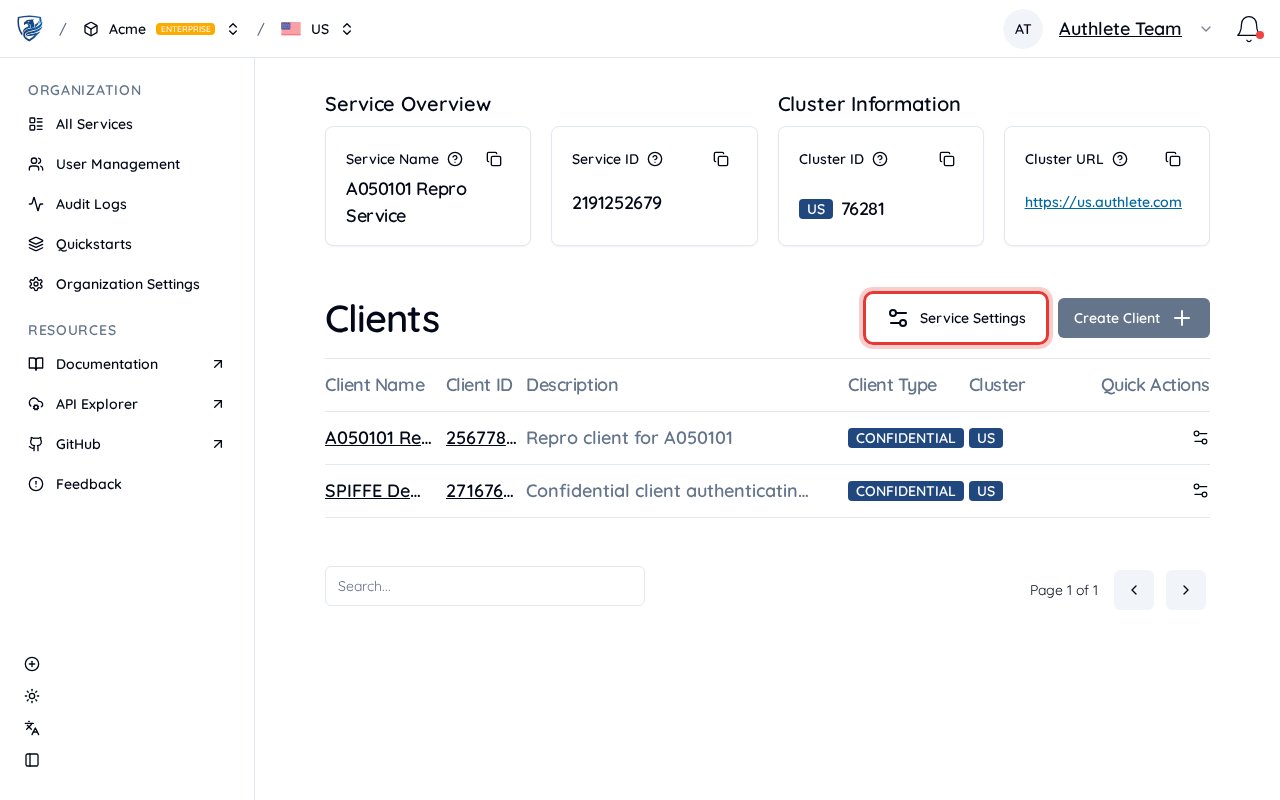 4. On the **General** tab, scroll to **Service Access Tokens**, then click **Create Token**.
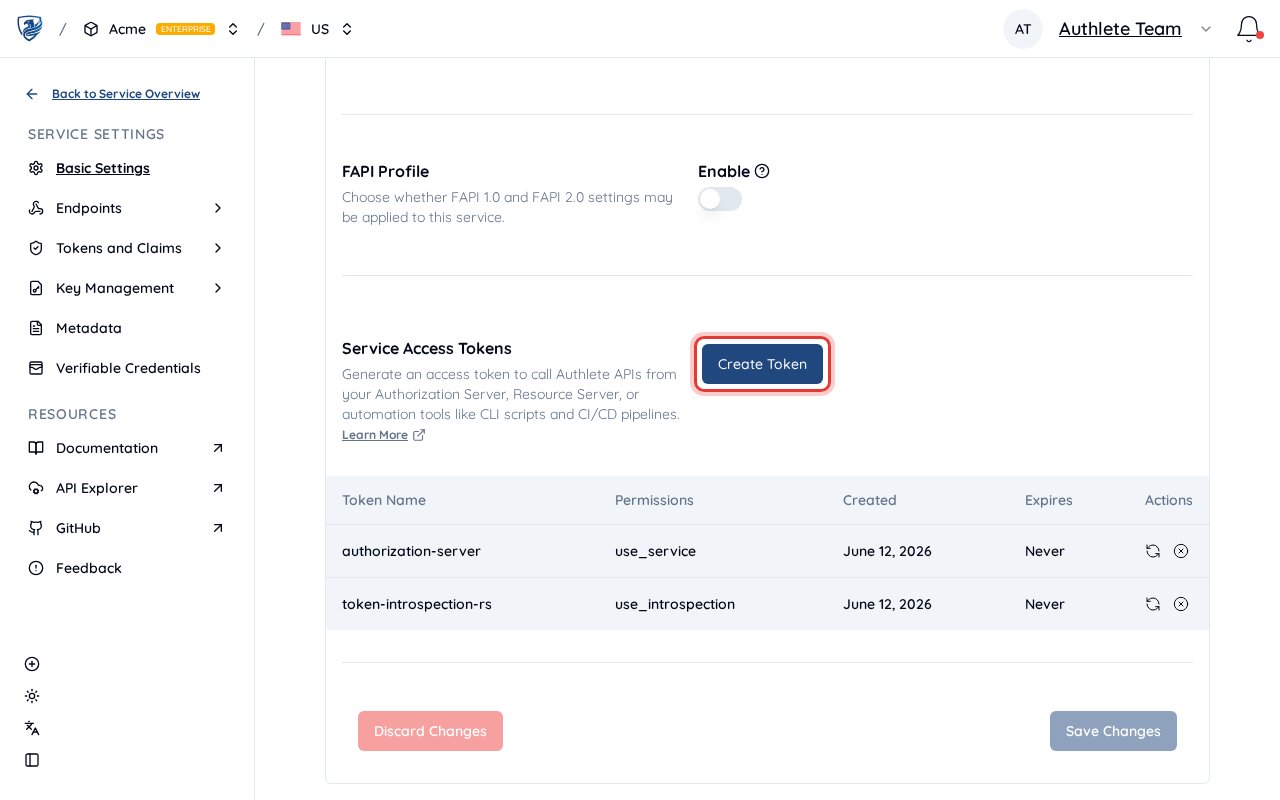 5. In the dialog, set a **token name** and choose permissions — either a preset (Authorization Server for `use_service`, Resource Server for `use_introspection`, …) or individual permissions. See [Permissions](#permissions) below.
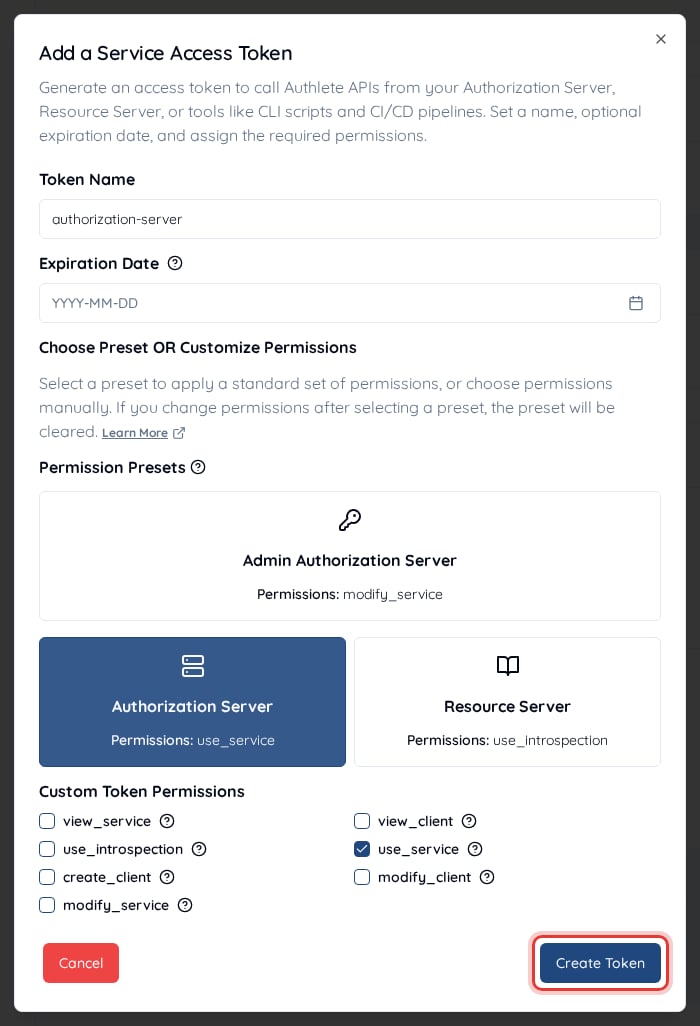 6. Click **Create Token** to generate it, then **copy the token immediately** — it is shown only once. Store it in a secure place (e.g. environment variables or a secret manager).
Use this token in the `Authorization: Bearer ` header when calling Authlete APIs for that service.
***
### Organization Token
Scoped to your **entire organization**. An Organization Token carries the broadest access: with the right permissions it can call any API on **any service** in the organization — including the Core API — plus organization-level operations such as creating services and reading the organization audit log. It is typically used for organization-wide management and for automation that spans multiple services (e.g. CI/CD, Terraform).
**How to get an Organization Token**
1. Log in to the [Authlete Console](https://console.authlete.com/).
2. Open the **Organization** you want a token for (or create one first).
3. In the sidebar, open **Organization Settings**.
4. On the **General** tab, scroll to **Organization Access Tokens**, then click **Create Token**.
6. Click **Create Token** to generate it, then **copy the token immediately** — it is shown only once. Store it in a secure place (e.g. environment variables or a secret manager).
Use this token in the `Authorization: Bearer ` header when calling Authlete APIs for that service.
***
### Organization Token
Scoped to your **entire organization**. An Organization Token carries the broadest access: with the right permissions it can call any API on **any service** in the organization — including the Core API — plus organization-level operations such as creating services and reading the organization audit log. It is typically used for organization-wide management and for automation that spans multiple services (e.g. CI/CD, Terraform).
**How to get an Organization Token**
1. Log in to the [Authlete Console](https://console.authlete.com/).
2. Open the **Organization** you want a token for (or create one first).
3. In the sidebar, open **Organization Settings**.
4. On the **General** tab, scroll to **Organization Access Tokens**, then click **Create Token**.
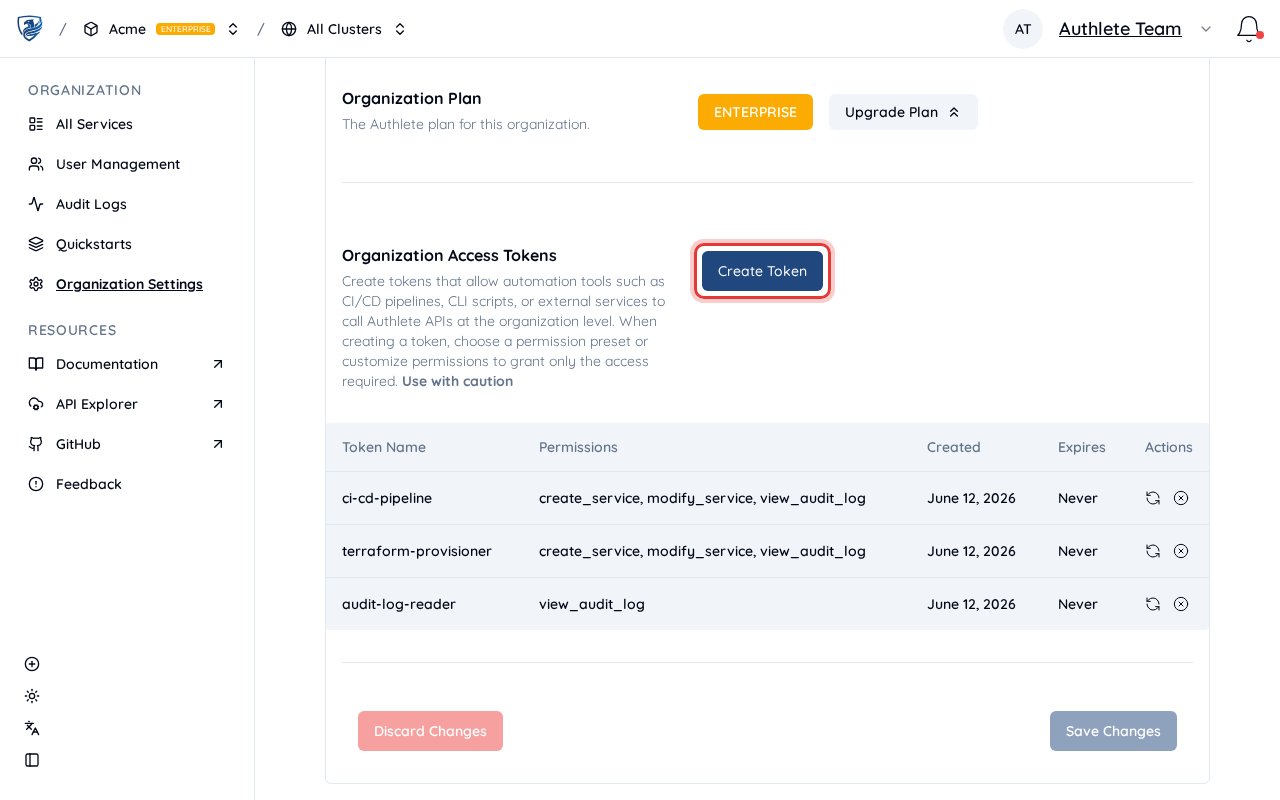 5. In the dialog, set a **token name** and choose the org-level permissions you need — for example the **Administrator** preset (`create_service`, `modify_service`, `view_audit_log`) for CI/CD provisioning, or `view_audit_log` for read-only audit access. See [Permissions](#permissions) below.
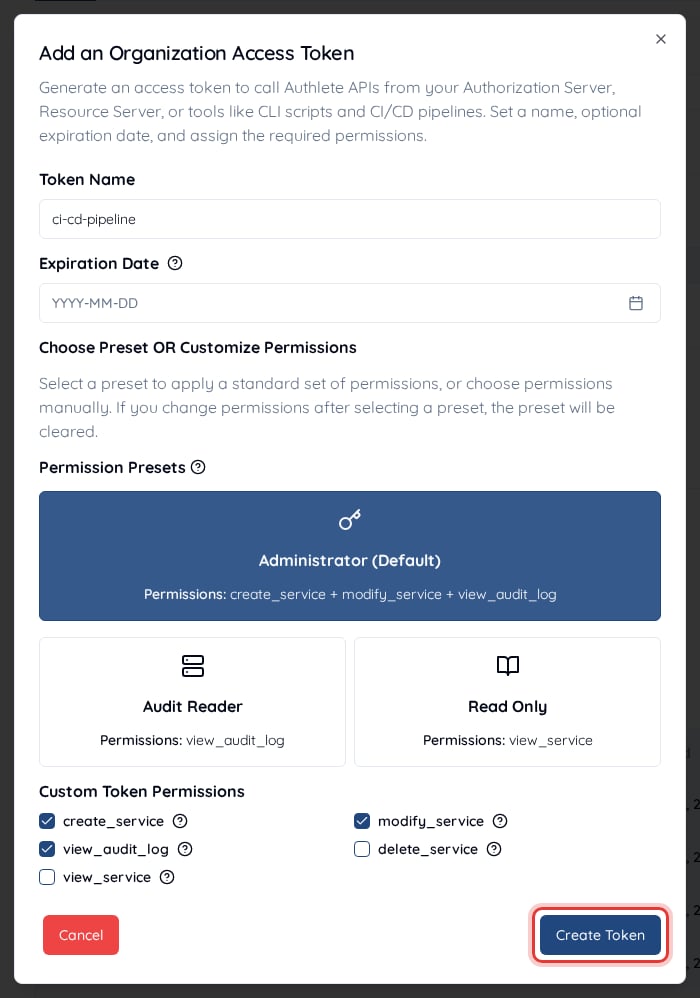 6. Click **Create Token** to generate it, then **copy the token immediately** — it is shown only once. Store it securely.
Use this token in the `Authorization: Bearer ` header when calling Authlete APIs that require organization-level access.
***
**Important:** Tokens inherit the permissions of the account that creates them. **Service tokens** can only access their specific service. **Organization tokens** can access all services within your organization. Choose the token type and permissions that match what your application needs.
***
## Which token to use
Based on the principle of **least privilege**, here is the recommended token type for each use case — pick the narrowest one that covers the job:
| Use case | Token type |
| ------------------------------------------------------ | ------------------------ |
| Core API (authorization, token, introspection) | **Service Access Token** |
| Managing a single service (clients, endpoints, config) | **Service Access Token** |
| Managing the organization or multiple services | **Organization Token** |
| Automation / CI/CD that creates or updates services | **Organization Token** |
For Core API calls, prefer a Service Access Token: it confines access to a single service, whereas an Organization Token would expose every service if it leaked. Reach for an Organization Token when the work genuinely spans multiple services or needs organization-level operations.
***
## Permissions
Whichever token type you choose, the token carries **fine-grained permissions** that decide which Authlete APIs it can call — for example `use_service` for an authorization server that calls the Core API, `use_introspection` for a resource server, or `create_client` for provisioning. You pick these when you create the token, so grant only what the workload needs (**least privilege**).
For the full list of permissions and the APIs each one allows, see [Service Access Tokens](/deployment-and-operations/access-control/service-access-tokens) in the developer guide.
***
## Token security best practices
* **Never commit tokens to version control** — Store them in environment variables or a secure secret manager (e.g. AWS Secrets Manager, HashiCorp Vault).
* **Rotate regularly** — Generate new tokens periodically and revoke old ones from the console.
* **Scope appropriately** — Request only the permissions your application needs when creating a token.
* **Revoke unused tokens** — Delete tokens you are no longer using from the console.
***
## Quick test
Verify your token works with a simple API call:
```bash theme={null}
curl -X GET "https://us.authlete.com/api/service/get/list" \
-H "Authorization: Bearer YOUR_ACCESS_TOKEN"
```
Use a **Service Access Token** for service-scoped endpoints or an **Organization Token** for org-scoped endpoints. Replace `us.authlete.com` with your cluster host (e.g. `eu.authlete.com`, `jp.authlete.com`) if you use a different region.
***
## Next steps
* [Getting Started](/get-started/quickstarts/getting-started) — Create an account, organization, and service.
* [Using Demo Authorization Server](/get-started/quickstarts/using-demo-authorization-server) — Create a service, generate a Service Access Token, and run a demo authorization server.
* [OAuth 2.0 Basics](/get-started/quickstarts/oauth-2-0-basics) — A tutorial on how an authorization server leverages Authlete APIs.
6. Click **Create Token** to generate it, then **copy the token immediately** — it is shown only once. Store it securely.
Use this token in the `Authorization: Bearer ` header when calling Authlete APIs that require organization-level access.
***
**Important:** Tokens inherit the permissions of the account that creates them. **Service tokens** can only access their specific service. **Organization tokens** can access all services within your organization. Choose the token type and permissions that match what your application needs.
***
## Which token to use
Based on the principle of **least privilege**, here is the recommended token type for each use case — pick the narrowest one that covers the job:
| Use case | Token type |
| ------------------------------------------------------ | ------------------------ |
| Core API (authorization, token, introspection) | **Service Access Token** |
| Managing a single service (clients, endpoints, config) | **Service Access Token** |
| Managing the organization or multiple services | **Organization Token** |
| Automation / CI/CD that creates or updates services | **Organization Token** |
For Core API calls, prefer a Service Access Token: it confines access to a single service, whereas an Organization Token would expose every service if it leaked. Reach for an Organization Token when the work genuinely spans multiple services or needs organization-level operations.
***
## Permissions
Whichever token type you choose, the token carries **fine-grained permissions** that decide which Authlete APIs it can call — for example `use_service` for an authorization server that calls the Core API, `use_introspection` for a resource server, or `create_client` for provisioning. You pick these when you create the token, so grant only what the workload needs (**least privilege**).
For the full list of permissions and the APIs each one allows, see [Service Access Tokens](/deployment-and-operations/access-control/service-access-tokens) in the developer guide.
***
## Token security best practices
* **Never commit tokens to version control** — Store them in environment variables or a secure secret manager (e.g. AWS Secrets Manager, HashiCorp Vault).
* **Rotate regularly** — Generate new tokens periodically and revoke old ones from the console.
* **Scope appropriately** — Request only the permissions your application needs when creating a token.
* **Revoke unused tokens** — Delete tokens you are no longer using from the console.
***
## Quick test
Verify your token works with a simple API call:
```bash theme={null}
curl -X GET "https://us.authlete.com/api/service/get/list" \
-H "Authorization: Bearer YOUR_ACCESS_TOKEN"
```
Use a **Service Access Token** for service-scoped endpoints or an **Organization Token** for org-scoped endpoints. Replace `us.authlete.com` with your cluster host (e.g. `eu.authlete.com`, `jp.authlete.com`) if you use a different region.
***
## Next steps
* [Getting Started](/get-started/quickstarts/getting-started) — Create an account, organization, and service.
* [Using Demo Authorization Server](/get-started/quickstarts/using-demo-authorization-server) — Create a service, generate a Service Access Token, and run a demo authorization server.
* [OAuth 2.0 Basics](/get-started/quickstarts/oauth-2-0-basics) — A tutorial on how an authorization server leverages Authlete APIs.