> ## Documentation Index
> Fetch the complete documentation index at: https://developers.authlete.com/llms.txt
> Use this file to discover all available pages before exploring further.
# Understanding Service Access Tokens
> Learn how Authlete Service Access Tokens work, including permissions, presets, inheritance, API usage, and security best practices.
## Introduction
This article describes Authlete's **Service Access Tokens** (SATs).
A SAT is a bearer credential issued for a single Authlete service. It is the
credential your Authorization Server, Resource Server, CLI scripts, or CI/CD
pipelines present when calling Authlete's runtime and service-administration
APIs.
Permission customization, either via a preset or by selecting individual permissions,
lets you scope a token to exactly what its caller needs, so a Resource Server only gets
introspection rights, an administrative tool only gets the client-management
rights it requires, and so on.
SATs are the right credential for service-level runtime workloads. For
management-plane operations that span every service in an organization such
as creating services, reading the organization audit log, or driving Terraform
/ CI-CD provisioning, use an Organization Access Token instead.
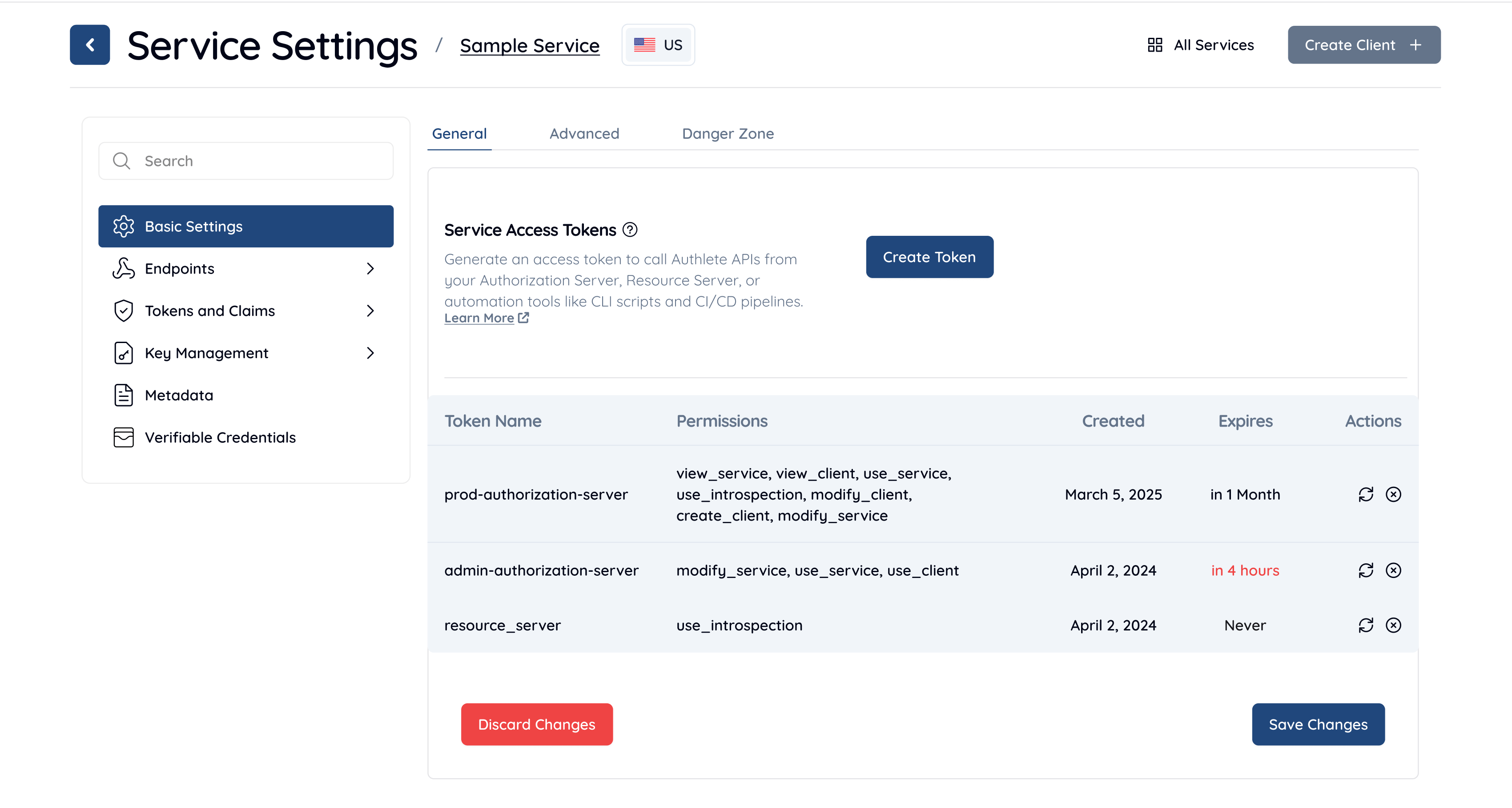
## Token Properties
#### Token Name
A human-readable identifier used to distinguish tokens in the Service Access
Tokens list. The name has no effect on token behavior or permissions.
#### Expiration Date
Specifies when the token will expire and become invalid.
* If set, the token cannot be used after the specified date.
* If not set, the token does not expire.
For tokens used by automation, an explicit expiration date is strongly
recommended. The console renders any token expiring within one month in red.
#### Token Value
The token value is displayed only once, when the token is created or rotated.
* It must be copied and stored securely at creation time.
* The plain token value cannot be retrieved again after this step.
#### Rotation
Tokens can be rotated to generate a new value.
* Rotation invalidates the previous token value immediately.
* The new token value is displayed once and must be copied and saved.
* Permissions and metadata (name, expiration) are preserved across rotation
unless explicitly updated.
#### Token List
All Service Access Tokens are listed in a table with the following columns:
* **Token Name**: User-defined identifier.
* **Permissions**: Assigned permissions for the token.
* **Created**: Date the token was created.
* **Expires**: Expiration date, or no expiry if not set.
* **Actions**: Available operations such as rotation or deletion.
## Permission Presets
Pre-configured permission sets aligned to [standard OAuth 2.0 roles][RFC6749-1.1]. Selecting
a preset applies a fixed combination of permissions; if you then add or remove
permissions manually, the preset is cleared.
| Preset | Description | Permissions |
| :------------------------- | :----------------------------------------------------------------------------------------------------------------------------------------- | :------------------ |
| Authorization Server | Grants access to all runtime OAuth/OIDC endpoints required by a standard Authorization Server. | `use_service` |
| Admin Authorization Server | Default selection. Full administrative control over the service. Includes runtime endpoints, client management, and service configuration. | `modify_service` |
| Resource Server | Minimal access required to validate access tokens at a Resource Server. | `use_introspection` |
## Custom Permissions
Permissions can be selected individually when a preset does not match your use
case. Permissions follow the inheritance rules described in
[Permission Inheritance](#permission-inheritance) and selecting a higher-level
permission implicitly grants the lower-level ones.
If both `preset` and `permissions` are omitted, the **Create** button is
disabled. You must select a preset or at least one permission before the
token can be issued. If a preset is selected and the caller then adds or
removes individual permissions, the preset is cleared.
#### `use_service`
Runtime OAuth/OIDC operations. The standard permission for an Authorization
Server deployment. Allows calling:
* `/auth/authorization`
* `/auth/token`
* `/auth/userinfo`
* `/auth/introspection`
* `/auth/revocation`
* `/pushed_auth_req`
* `/service/configuration`
* `/service/jwks/get`
* `/backchannel/authentication`
* `/device/authorization`
* `/device/verification`
* `/device/complete`
* `/federation/*`
* `/vci/*` (Verifiable Credentials)
* `/jose/verify`
* `/idtoken/reissue`
* `/token/create`
* `/token/update`
* `/token/delete`
* `/token/revoke`
* `/token/get/list`
* `/rs/sign`
* `/hsk/get`
* `/client/authorization/get/list`
* `/client/registration` (Dynamic Client Registration)
Also implicitly grants `use_introspection`,
`view_service`, and `view_client`.
#### `use_introspection`
Token introspection only. The minimum permission a Resource Server needs to
validate access tokens. Allows calling:
* `/auth/introspection`
* `/auth/introspection/standard`
Does not grant access to authorization, token, or other runtime endpoints.
#### `view_service`
Read service configuration. Allows calling:
* `/service/get`
* `/service/get/list`
Also implicitly grants `view_client`. Use this for monitoring
dashboards or read-only integrations.
#### `view_client`
Read client details. Allows calling:
* `/client/get`
* `/client/get/list`
* `/client/granted_scopes/get`
* `/client/extension/requestable_scopes/get`
Does not allow creating, modifying, or deleting clients. Use this for audit
tools or dashboards that inspect client registrations.
#### `modify_client`
Update and delete clients, including the endpoints required to perform user
logout via authorization deletion. Allows calling:
* `/client/update`
* `/client/delete`
* `/client/secret/update`
* `/client/secret/refresh`
* `/client/lock_flag/update`
* `/client/extension/requestable_scopes/update`
* `/client/granted_scopes/delete`
* `/client/authorization/delete` (user session revocation / logout)
* `/client/authorization/update`
Also implicitly grants `view_client`.
#### `create_client`
Register new OAuth clients programmatically. Allows calling:
* `/client/create`
* `/client/get/default`
Also implicitly grants `use_service`,
`modify_client`, `view_service`, and
`view_client`. Use this for platforms that dynamically
provision OAuth clients.
#### `modify_service`
Full service administration. Allows calling:
* `/service/update`
* `/hsk/create`
* `/hsk/delete`
* `/client/extension/requestable_scopes/delete`
Subsumes all other SAT permissions. Use this for admin tools or CI/CD
pipelines that need complete control over the service.
Known issue: `modify_service`
does not currently grant `use_introspection` implicitly.
See Troubleshooting 403 Errors for the
workaround.
## Permission Inheritance
Higher-level permissions implicitly grant the lower-level permissions they
depend on. The inheritance chain is:
* `modify_service` → all permissions
* `create_client` → `use_service`, `modify_client`, `view_service`, `view_client`
* `use_service` → `use_introspection`, `view_service`, `view_client`
* `modify_client` → `view_client`
* `view_service` → `view_client`
When building a custom permission set, select only the highest-level
permission your caller requires; lower-level permissions in its inheritance
chain are granted implicitly.
## Using a Service Access Token
Send the token as a bearer credential on the `Authorization` header of any
Authlete service-level API call. Pair it with your Service ID and the
appropriate API server URL.
The following is an example token-endpoint call from an Authorization Server
using a SAT that holds the `use_service` permission.
```shell theme={null}
curl --oauth2-bearer ${SERVICE_ACCESS_TOKEN} \
https://${AUTHLETE_SERVER}/api/${SERVICE_ID}/auth/token \
--data-urlencode "parameters=grant_type=authorization_code&code=…&redirect_uri=…" \
--data-urlencode "clientId=client001" \
--data-urlencode "clientSecret=${CLIENT_SECRET}"
```
The following is an example introspection call from a Resource Server using a
SAT that holds only `use_introspection`.
```shell theme={null}
curl --oauth2-bearer ${SERVICE_ACCESS_TOKEN} \
https://${AUTHLETE_SERVER}/api/${SERVICE_ID}/auth/introspection \
--json '{
"token": "${ACCESS_TOKEN_TO_VALIDATE}"
}'
```
The API server checks the token's permissions on every call. If the token does
not hold the permission required by the endpoint, the response is
`403 Forbidden`. For example, a token holding only
`use_introspection` cannot call `/auth/token`.
## How the Console Issues a Token
Service Access Tokens are issued by the Authlete IdP's
`/api/servicetoken/create` endpoint. The Management
Console calls this endpoint on your behalf when an administrator clicks
**Create Token**; the endpoint authenticates the caller as an IdP user
(via session or user access token) and requires the
MODIFY\_SERVICE privilege on the target service. Service
Access Tokens and Organization Access Tokens are not accepted as the bearer
credential for this endpoint.
The request body the console submits has the following shape.
| Request Parameter | Necessity | Description |
| :---------------- | :---------: | :------------------------------------------------------------------------------------------------------------------------------------------------------------------------------------------------------------------------------------------------- |
| `serviceId` | REQUIRED | The ID of the service the token is scoped to. |
| `organizationId` | REQUIRED | The ID of the organization that owns the service. |
| `apiServerId` | REQUIRED | The ID of the API server (cluster) hosting the service. |
| `description` | REQUIRED | Human-readable name shown in the console and used to distinguish tokens. |
| `preset` | REQUIRED | One of `standard_as`, `admin_as`, `resource_server`, or `custom`. |
| `permissions` | CONDITIONAL | Explicit permission list. Required when `preset` is `custom`; rejected for any other preset. Permissions must be drawn from `use_service`, `use_introspection`, `view_service`, `view_client`, `create_client`, `modify_client`, `modify_service`. |
| `durationSeconds` | OPTIONAL | Lifetime of the token, in **seconds** from creation. Omit (or set to `null`) for a token that never expires. |
The response body shape is as follows.
```json theme={null}
{
"serviceId": 12345,
"organizationId": 67890,
"apiServerId": 111,
"accessToken": "sat_3Yq9bP0u1NiqU6Pz_uIH7n3Z2bP7Sg5K…",
"tokenId": "01HW…",
"description": "prod-as",
"permissions": ["use_service"],
"createdAt": "2026-05-12T07:34:22Z",
"expiresAt": "2026-06-11T07:34:22Z"
}
```
The `accessToken` field is returned only once. It cannot be
retrieved again afterwards; copy it to a secrets manager immediately. The
same single-display rule applies to the value returned by token rotation.
## Troubleshooting 403 Errors
If an Authlete API call fails with HTTP `403 Forbidden`, the response body
includes a `resultMessage` that names the exact permission the endpoint
requires.
```
[A457101] (/client/create) Function requires access rights ([CREATE_CLIENT])
for service (233044842478), access token does not have sufficient access.
```
```
[A456101] (/client/delete/{clientIdentifier}) Function requires access rights
([MODIFY_CLIENT]) for service (1495709902) and client (4140464843).
```
Map the bracketed access right (for example `[CREATE_CLIENT]`,
`[MODIFY_CLIENT]`) to a permission in [Custom Permissions](#custom-permissions)
and reissue the token with that permission. Two options:
1. **Recreate the token with a preset that covers the operation.** For
client-management calls, the **Admin Authorization Server** preset
(`modify_service`) covers every client-management and
service-management endpoint.
2. **Recreate the token with custom permissions.** Select only the access
right the error message named (or its lowest-level ancestor in
[Permission Inheritance](#permission-inheritance)). For example, a workload
that only needs to provision and update clients should hold
`create_client`; that single permission implicitly grants
`use_service`, `modify_client`,
`view_service`, and `view_client`.
The `use_service` permission (applied by the
Authorization Server preset) grants the runtime OAuth/OIDC
endpoints required by a standard Authorization Server, but it does
not grant `/client/create` or
`/client/delete`. Workloads that need to register or remove
clients (for example a CI pipeline that provisions test clients, or a
self-service developer portal) must be issued a token with
`create_client` or `modify_client`, or use
the Admin Authorization Server preset
(`modify_service`, which is the default selection).
Known issue: The introspection endpoints
(`/auth/introspection` and
`/auth/introspection/standard`) currently require an
explicit `use_introspection` permission on the token. The
`modify_service` and `create_client`
permissions do not implicitly grant
`use_introspection` (inheritance in the underlying
`AccessRight` enum is direct, not transitive), so a token
issued with the Admin Authorization Server preset, or a
custom token holding only `modify_service` or
`create_client`, will fail
`/auth/introspection` with HTTP `403` /
`A457101`.
Workaround: Issue introspection-calling tokens with the
Custom preset and include
`use_introspection` explicitly alongside the higher-level
permission — for example
`["modify_service", "use_introspection"]` or
`["create_client", "use_introspection"]`. Tokens
issued with this combination will continue to function unchanged once the
underlying bug is fixed, so the workaround is forward-compatible. The
Authorization Server preset (`use_service`)
and Resource Server preset
(`use_introspection`) are not affected.
#### Common 403s and what to switch to
| `resultMessage` access right | Endpoint(s) | Minimum permission to fix |
| :--------------------------- | :---------------------------------------------------------------------------------------- | :------------------------------------------------------ |
| `[CREATE_CLIENT]` | `/client/create`, `/client/get/default` | `create_client` (or `modify_service`) |
| `[MODIFY_CLIENT]` | `/client/update`, `/client/delete`, `/client/secret/*`, `/client/authorization/delete`, … | `modify_client` (or `create_client` / `modify_service`) |
| `[MODIFY_SERVICE]` | `/service/update`, `/hsk/create`, `/hsk/delete` | `modify_service` |
| `[USE_INTROSPECTION]` | `/auth/introspection`, `/auth/introspection/standard` | `use_introspection` (or `use_service`) |
| `[VIEW_CLIENT]` | `/client/get`, `/client/get/list`, `/client/granted_scopes/get` | `view_client` (or any higher-level permission) |
| `[VIEW_SERVICE]` | `/service/get`, `/service/get/list` | `view_service` (or any higher-level permission) |
## Common Use Cases
| Use case | Recommended preset | Key permission |
| :----------------------------------- | :------------------- | :------------------ |
| Standard Authorization Server | Authorization Server | `use_service` |
| Resource Server (introspection only) | Resource Server | `use_introspection` |
| User logout / session management | Custom | `modify_client` |
| Dynamic client provisioning | Custom | `create_client` |
| Monitoring / inventory dashboards | Custom | `view_service` |
| Client audit / configuration review | Custom | `view_client` |
## Security Best Practices
* **Use least privilege.** A Resource Server should hold only
`use_introspection`; a read-only dashboard should hold only
`view_service`. Reserve `modify_service` for
trusted admin tooling.
* **Use a separate token per workload.** Do not share a single SAT across the
Authorization Server, the Resource Server, and your CI pipeline; each should
have its own token with its own permission set and its own rotation cadence.
* **Set an expiration date** on every SAT used by automation, and rotate them
as part of your secret-rotation policy.
* **Never commit SATs to source control.** Store them in a secrets manager
(AWS Secrets Manager, GCP Secret Manager, HashiCorp Vault, 1Password, etc.) and
inject them at runtime.
* **Rotate immediately** on suspected compromise, on personnel change, or on
any change to the workload that consumes the token.
## Conclusion
Service Access Tokens give Authlete deployments a single, scoped credential
for each runtime workload that calls Authlete APIs. The preset model covers
the standard Authorization Server, Resource Server, and admin use cases out
of the box, while custom permissions and the inheritance rules make it
straightforward to mint a least-privilege token for any other integration.
For more information, please contact us via the [contact form][CONTACT].
[CONTACT]: https://www.authlete.com/contact
[RFC6749-1.1]: https://datatracker.ietf.org/doc/html/rfc6749#section-1.1