> ## Documentation Index
> Fetch the complete documentation index at: https://developers.authlete.com/llms.txt
> Use this file to discover all available pages before exploring further.
# Generating Encrypted ID Tokens
> Generating encrypted ID tokens for a particular client using Authlete and registering a JWK set for encryption.
## Preface
This article describes an example on how to configure Authlete to generate encrypted ID tokens for a particular client.
***
## Preparing and registering a JWK set
Prepare and register a JWK set to be used for encrypting ID tokens. See the following article for instructions.
* [JWK Set Settings for OAuth / OIDC Client](/configuration-reference/key-management/jwk-set-settings-for-an-oauth-oidc-client)
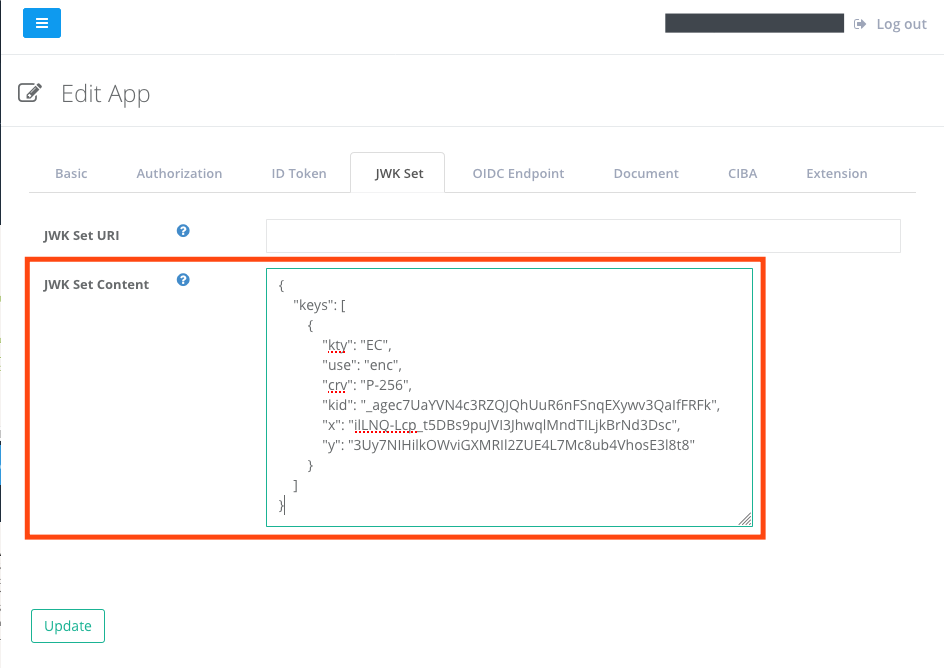
In this example, the following JWK set is registered.
```
{
"keys": [
{
"kty": "EC",
"use": "enc",
"crv": "P-256",
"kid": "_agec7UaYVN4c3RZQJQhUuR6nFSnqEXywv3QaIfFRFk",
"x": "ilLNQ-Lcp_t5DBs9puJVI3JhwqlMndTILjkBrNd3Dsc",
"y": "3Uy7NIHilkOWviGXMRIl2ZUE4L7Mc8ub4VhosE3l8t8"
}
]
}
```
***
## Configuring ID token encryption
Choose encryption algorithm of ID token for the client. See [Client Settings - JWK Set](/configuration-reference/key-management/jwk-set-settings-for-an-oauth-oidc-client)
for details.
In this example, the following settings in accordance with the registered public key are specified:
| Item | Value |
| -------------------------------------- | ------------------ |
| ID Token Encryption Algorithm | **ECDH\_ES** |
| ID Token Encryption Encoding Algorithm | **A128CBC\_HS256** |
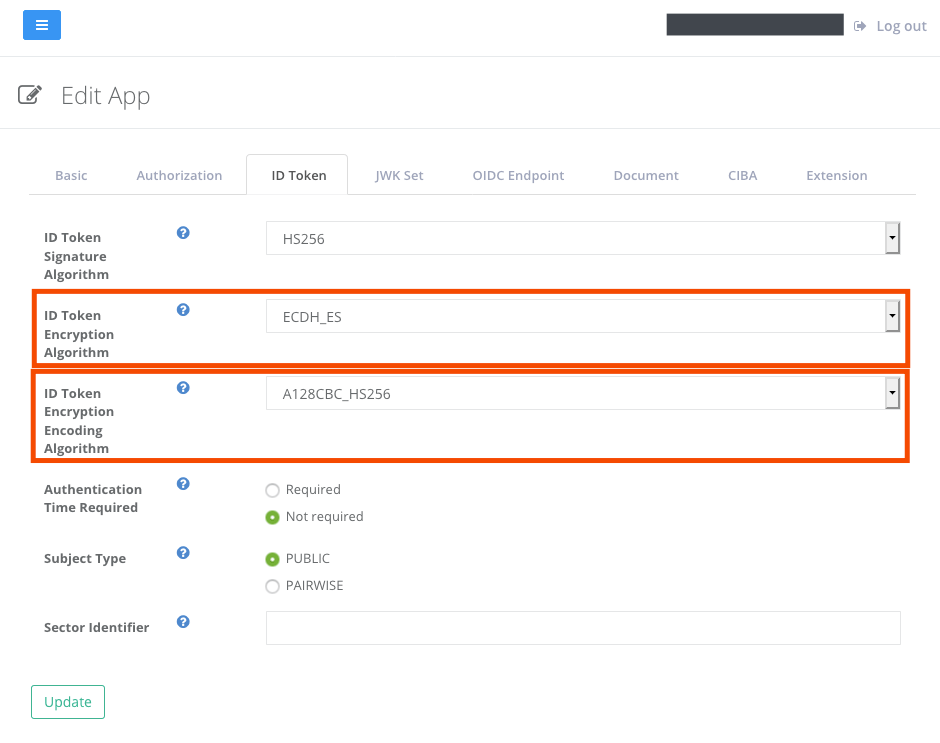 *Settings for ID token encryption*
***
## Generating an encrypted ID token
With the settings above, Authlete will be encrypting ID tokens for the client, like the following value:
```
eyJlcGsiOnsia3R5IjoiRUMiLCJjcnYiOiJQLTI1NiIsIngiOiJDeVU3XzdMNlRaeHdmZzhBNkRUNUxMSz
1ZWlBSE1yTzJyYWt5WEY0TUFZIiwieSI6InZ6MkJZd1k1WmJFUkV2OGxTcWNuREpQVkdQMExyWXpUS2NiZUR2aTVKQlUifSw
ia2lkIjoiX2FnZWM3VWFZVk40YzNSWlFKUWhVdVI2bkZTbnFFWHl3djNRYUlmRlJGayIsImVuYyI6IkExMjhDQkMtSFMyNTY
iLCJhbGciOiJFQ0RILUVTIn0..e9rmLbmTkuaUL7AdUB9umw.-o4aia0O6FUarqN3Owssu6ko4v9YqjMJXm00Sj-w7oH7YjmgZDR
j7omoXSnmU19wYFhC70yzv8U2B0pXNxLqVZOv4vQchwslP6Ms55cmgvenCHcIbsXFirb8we-6Z0EfKiKmLCy0NU8kFE0fQ-6y9
n91WI9hGPVbw968FtA2y7x2JXGv93nPryshCp4HJz2HXQeb5F18RSsCAkY5nE7-GqD81DnmG6-rdVoOBAGM7LK_lc8gIhSozmNn7
8cFtfQrNn6S0VFWM2e8SyukQtdGk3um3mZAjRdDNtsACkztQJo.5S7YimrpLKuWnRM0hwdJzweyJlcGsiOnsia3R5IjoiRUMiLCJj
cnYiOiJQLTI1NiIsIngiOiIzUHNVT0lj
```
***
## Decrypting the ID token
On receiving the ID token above, the client will be decrypting it using the client's private key. The following is a sample JWK set for the decryption:
```
{
"Keys": [
{
"kty": "EC",
"d": "4AEnTq3H8gcIutIoJCCZuv9GgWdKRaoJIXQkdM8r0UA",
"use": "enc",
"crv": "P-256",
"kid": "_agec7UaYVN4c3RZQJQhUuR6nFSnqEXywv3QaIfFRFk",
"x": "ilLNQ-Lcp_t5DBs9puJVI3JhwqlMndTILjkBrNd3Dsc",
"y": "3Uy7NIHilkOWviGXMRIl2ZUE4L7Mc8ub4VhosE3l8t8",
"typ": "ECDH_ES"
}
]
}
```
Here is an example using [José](https://github.com/latchset/jose) to decrypt and other commands to extract a payload part:
```
jose jwe dec -i -k \
| cut -d"." -f2 \
| base64 --decode \
| jq
{
"sub": "testuser01",
"aud": [
"17201083166161"
],
"iss": "https://authlete.com",
"exp": 1595921860,
"iat": 1595835460
}
```
*Settings for ID token encryption*
***
## Generating an encrypted ID token
With the settings above, Authlete will be encrypting ID tokens for the client, like the following value:
```
eyJlcGsiOnsia3R5IjoiRUMiLCJjcnYiOiJQLTI1NiIsIngiOiJDeVU3XzdMNlRaeHdmZzhBNkRUNUxMSz
1ZWlBSE1yTzJyYWt5WEY0TUFZIiwieSI6InZ6MkJZd1k1WmJFUkV2OGxTcWNuREpQVkdQMExyWXpUS2NiZUR2aTVKQlUifSw
ia2lkIjoiX2FnZWM3VWFZVk40YzNSWlFKUWhVdVI2bkZTbnFFWHl3djNRYUlmRlJGayIsImVuYyI6IkExMjhDQkMtSFMyNTY
iLCJhbGciOiJFQ0RILUVTIn0..e9rmLbmTkuaUL7AdUB9umw.-o4aia0O6FUarqN3Owssu6ko4v9YqjMJXm00Sj-w7oH7YjmgZDR
j7omoXSnmU19wYFhC70yzv8U2B0pXNxLqVZOv4vQchwslP6Ms55cmgvenCHcIbsXFirb8we-6Z0EfKiKmLCy0NU8kFE0fQ-6y9
n91WI9hGPVbw968FtA2y7x2JXGv93nPryshCp4HJz2HXQeb5F18RSsCAkY5nE7-GqD81DnmG6-rdVoOBAGM7LK_lc8gIhSozmNn7
8cFtfQrNn6S0VFWM2e8SyukQtdGk3um3mZAjRdDNtsACkztQJo.5S7YimrpLKuWnRM0hwdJzweyJlcGsiOnsia3R5IjoiRUMiLCJj
cnYiOiJQLTI1NiIsIngiOiIzUHNVT0lj
```
***
## Decrypting the ID token
On receiving the ID token above, the client will be decrypting it using the client's private key. The following is a sample JWK set for the decryption:
```
{
"Keys": [
{
"kty": "EC",
"d": "4AEnTq3H8gcIutIoJCCZuv9GgWdKRaoJIXQkdM8r0UA",
"use": "enc",
"crv": "P-256",
"kid": "_agec7UaYVN4c3RZQJQhUuR6nFSnqEXywv3QaIfFRFk",
"x": "ilLNQ-Lcp_t5DBs9puJVI3JhwqlMndTILjkBrNd3Dsc",
"y": "3Uy7NIHilkOWviGXMRIl2ZUE4L7Mc8ub4VhosE3l8t8",
"typ": "ECDH_ES"
}
]
}
```
Here is an example using [José](https://github.com/latchset/jose) to decrypt and other commands to extract a payload part:
```
jose jwe dec -i -k \
| cut -d"." -f2 \
| base64 --decode \
| jq
{
"sub": "testuser01",
"aud": [
"17201083166161"
],
"iss": "https://authlete.com",
"exp": 1595921860,
"iat": 1595835460
}
```