> ## Documentation Index
> Fetch the complete documentation index at: https://developers.authlete.com/llms.txt
> Use this file to discover all available pages before exploring further.
# Enabling Single Access Token
> Technical information on enabling a single access token per subject in Authlete to ensure that only the newest access token is valid for each user.
For **Authlete 2.x** documentation, see [2.x version](/v2/configuration-reference/token-issuance-formats/single-access-token-per-subject).
# Single Access Token Per Subject
By default, Authlete issues a new access token each time the same user grants an authorization request from a client. This happens when the authorization server calls Authlete's [/auth/authorization/issue](/api-reference/authorization-endpoint/issue-authorization-response) API with the same `subject` value.
However, by default, Authlete does not invalidate previously issued access tokens associated with the same user. As a result, the client may hold multiple valid access tokens for the same user at the same time.
## Runtime Behavior
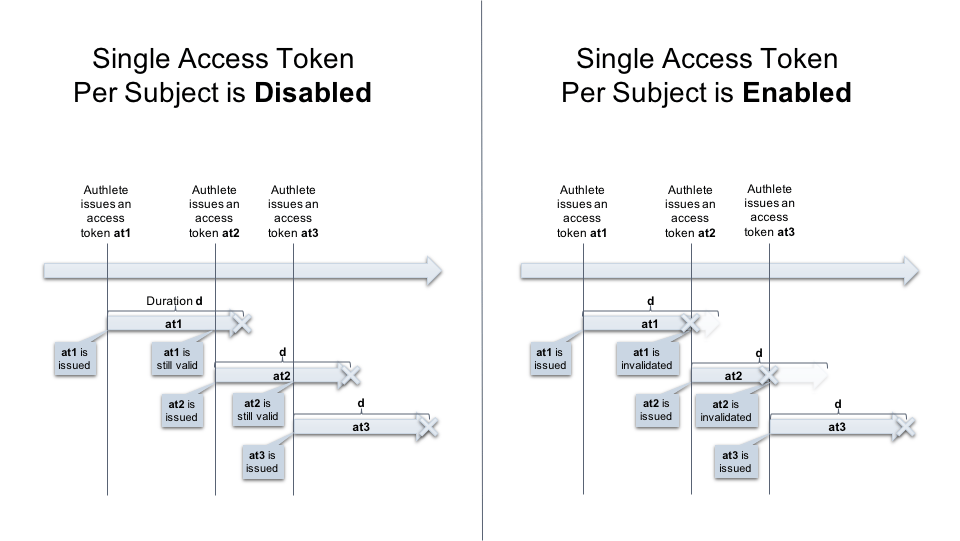 In some environment, authorization server is required not to issue multiple valid access tokens in such a way. For Authlete to achieve this, it provides **Single Access Token Per Subject** option.
## Authlete Configuration
To enable **Single Access Token Per Subject**, follow these steps:
1. Log in to the [Authlete Management Console](https://console.authlete.com).
2. Navigate to **Service Settings > Tokens and Claims > Access Tokens**.
3. Locate the **Enable Single Token Per Subject** option under the **General** section.
4. Toggle the switch to enable this option (as shown in the screenshot below).
5. Click **Save Changes** to apply the configuration.

Once enabled, Authlete will automatically invalidate any previously issued access tokens and their associated refresh tokens for the same subject when issuing a new access token.
In some environment, authorization server is required not to issue multiple valid access tokens in such a way. For Authlete to achieve this, it provides **Single Access Token Per Subject** option.
## Authlete Configuration
To enable **Single Access Token Per Subject**, follow these steps:
1. Log in to the [Authlete Management Console](https://console.authlete.com).
2. Navigate to **Service Settings > Tokens and Claims > Access Tokens**.
3. Locate the **Enable Single Token Per Subject** option under the **General** section.
4. Toggle the switch to enable this option (as shown in the screenshot below).
5. Click **Save Changes** to apply the configuration.

Once enabled, Authlete will automatically invalidate any previously issued access tokens and their associated refresh tokens for the same subject when issuing a new access token.