> ## Documentation Index
> Fetch the complete documentation index at: https://developers.authlete.com/llms.txt
> Use this file to discover all available pages before exploring further.
# Changing Token Duration
> Explanation on how changing token duration settings in Authlete affects access tokens and refresh tokens.
For **Authlete 2.x** documentation, see [2.x version](/v2/configuration-reference/token-lifecycle-policies/changing-token-durations).
## Overview
When you update the "token duration" settings on an Authlete service that has already been issuing tokens, Authlete will:
* Retain the original duration settings for tokens issued before the change.
* Apply the new duration settings to tokens issued after the update.
This article explains how the "token duration" settings affect access tokens and refresh tokens.
## Access Tokens
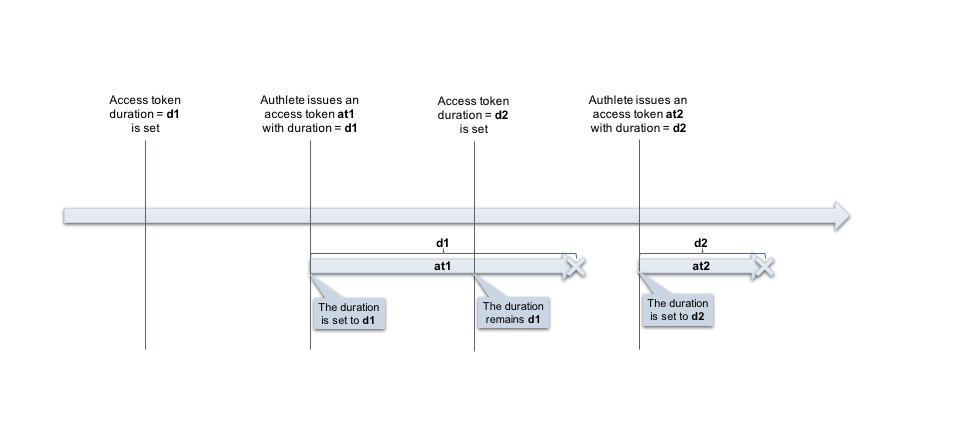
The new duration settings are to be applied on (re)issuing access tokens on token requests with various grant types including refresh token grant.\\
 ## Refresh Tokens
The duration change may affect refresh tokens based on "\*\*Refresh Token Rotation
\*\*" settings.
To configure Refresh Tokens settings:
1. Navigate to **Service Settings > Tokens and Claims > Refresh Tokens**
2. Enable your desired Refresh Token Rotation options.
3. Click `Save Changes` to apply the updates.

### Enable Token Rotation
***
The `Enable Token Rotation `Configuration item controls whether to keep a refresh token valid after its use or invalidate the used refresh token and issue a new one.
* If "**Enable Token Rotation**" is `enabled`
* The new duration won't be effective until the existing refresh token is expired and reissued.\\
## Refresh Tokens
The duration change may affect refresh tokens based on "\*\*Refresh Token Rotation
\*\*" settings.
To configure Refresh Tokens settings:
1. Navigate to **Service Settings > Tokens and Claims > Refresh Tokens**
2. Enable your desired Refresh Token Rotation options.
3. Click `Save Changes` to apply the updates.

### Enable Token Rotation
***
The `Enable Token Rotation `Configuration item controls whether to keep a refresh token valid after its use or invalidate the used refresh token and issue a new one.
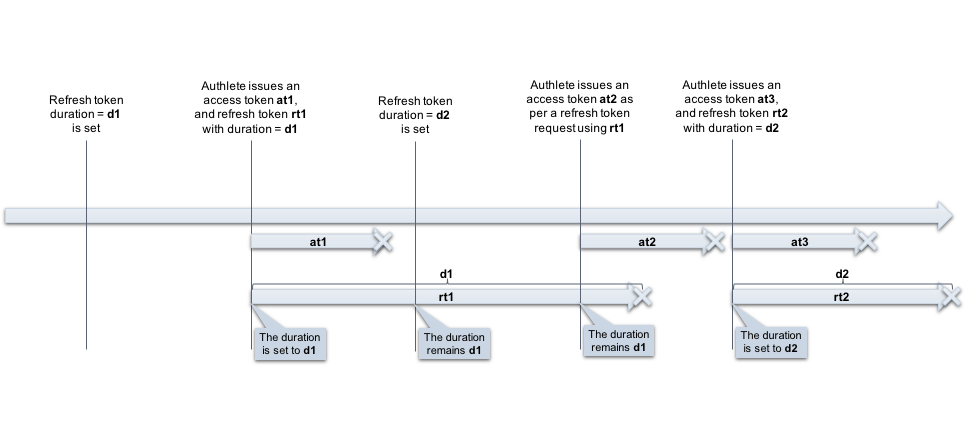
* If "**Enable Token Rotation**" is `enabled`
* The new duration won't be effective until the existing refresh token is expired and reissued.\\
 * If "**Enable Token Rotation**" is `disabled`
* The new duration is effective for a new refresh token that is to be issued along with a new access token on refresh token grant (using the old refresh token).
* If "**Enable Token Rotation**" is `disabled`
* The new duration is effective for a new refresh token that is to be issued along with a new access token on refresh token grant (using the old refresh token).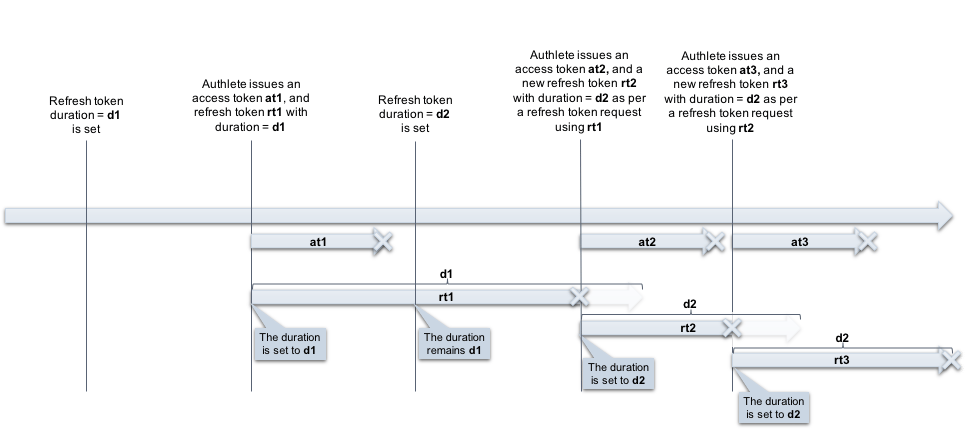 ### Enable Duration Takeover
* If "**Enable Duration Takeover**" is `enabled`
* The remaining duration of a used refresh token is transferred to the newly issued one. This setting has no effect when Enable Token Rotation is on.
### See Also
[Refresh tokens after being used](/configuration-reference/tokens-and-claims/refresh-tokens-after-being-used)
### Enable Duration Takeover
* If "**Enable Duration Takeover**" is `enabled`
* The remaining duration of a used refresh token is transferred to the newly issued one. This setting has no effect when Enable Token Rotation is on.
### See Also
[Refresh tokens after being used](/configuration-reference/tokens-and-claims/refresh-tokens-after-being-used)