> ## Documentation Index
> Fetch the complete documentation index at: https://developers.authlete.com/llms.txt
> Use this file to discover all available pages before exploring further.
# Using Request Object
> Instructions on configuring Authlete to support authorization requests with request objects for enhanced security.
## Preface
[Request Object](https://openid.net/specs/openid-connect-core-1_0.html#JWTRequests)
is a JWT that contains a set of request parameters as its [Claims](https://tools.ietf.org/html/rfc7519#section-4).
The request object is capable to be signed as well as encrypted to protect against tampering and/or unintended data exposure. It can be passed by reference instead of value, to make a size of an authorization request (via browser redirect) smaller.
This article describes instructions for Authlete to support authorization requests with request objects.
## Configuration
In order for an Authlete service to process authorization requests that employ a request object, you have to configure these two properties so that the service can verify a signature of the object.
1. A signing algorithm used for request objects
2. A public key that corresponds to the specified signing algorithm
Optionally, you can configure Authlete to allow clients to:
* Encrypt requests objects, and/or
* Use “request\_uri.”
These settings are specified for each client through [Authlete's Developer Console](https://www.authlete.com/developers/cd_console/)
.
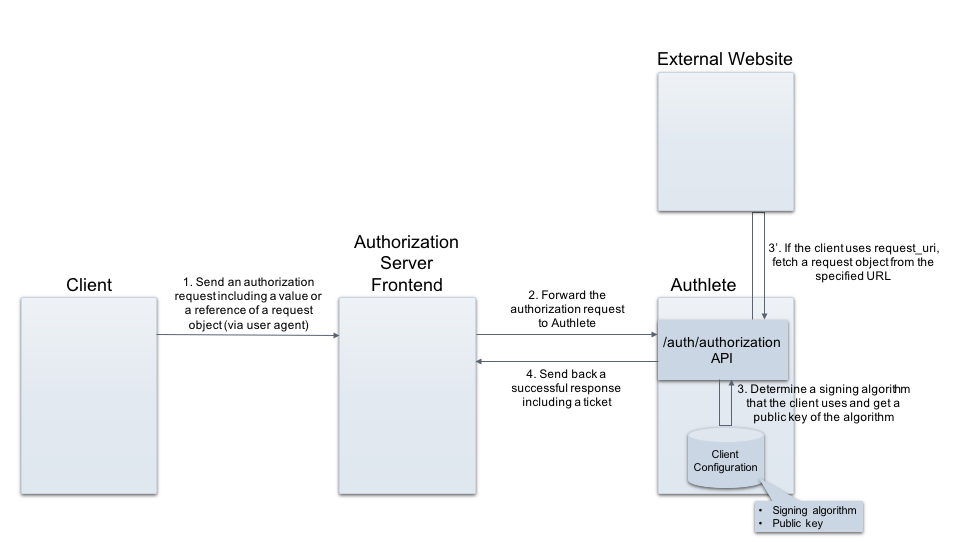 *Processing request objects*
## 1. Specifying a signing algorithm
Enter a value representing a signing algorithm, for Request Object Signature Algorithm section in Authorization tab. The following example shows a result when “ES256” has been registered.
*Processing request objects*
## 1. Specifying a signing algorithm
Enter a value representing a signing algorithm, for Request Object Signature Algorithm section in Authorization tab. The following example shows a result when “ES256” has been registered.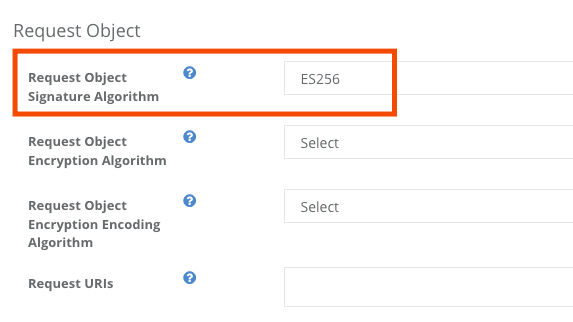 *Request Object Signature Algorithm*
## 2. Registering a public key
Register a JWK formatted public key for “JWK Set Content” section, or specify a URL for “JWK Set URL” in JWK Set tab. The following example shows a result when an ES256 public key has been registered.
*Request Object Signature Algorithm*
## 2. Registering a public key
Register a JWK formatted public key for “JWK Set Content” section, or specify a URL for “JWK Set URL” in JWK Set tab. The following example shows a result when an ES256 public key has been registered.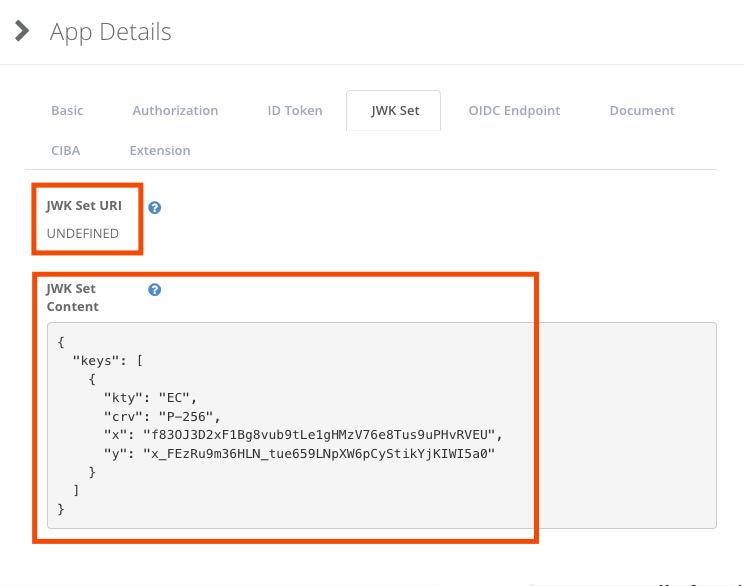 *JWK Set Content*
With the settings above, when the configured client makes a authorization request that contains a request object, the Authlete service verifies a signature of the object using the public key determined by the signing algorithm, and proceeds further.
## Option: Specifying an encryption algorithm
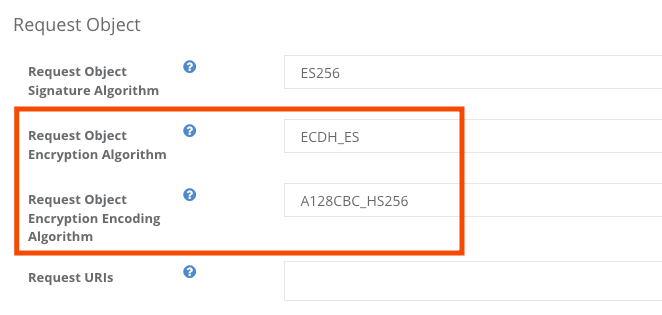
Specify appropriate values for “Encryption Algorithm” and “Encryption Encoding Algorithm” in Authorization tab, if you want to use encrypted request objects.\\
*JWK Set Content*
With the settings above, when the configured client makes a authorization request that contains a request object, the Authlete service verifies a signature of the object using the public key determined by the signing algorithm, and proceeds further.
## Option: Specifying an encryption algorithm
Specify appropriate values for “Encryption Algorithm” and “Encryption Encoding Algorithm” in Authorization tab, if you want to use encrypted request objects.\\
 ## Option: Registering values for request\_uri
Enter appropriate values for “Request URIs” in Authorization tab so that the client make an authorization request with request\_uri (pass-by-reference) instead of request (pass-by-value).
## Option: Registering values for request\_uri
Enter appropriate values for “Request URIs” in Authorization tab so that the client make an authorization request with request\_uri (pass-by-reference) instead of request (pass-by-value).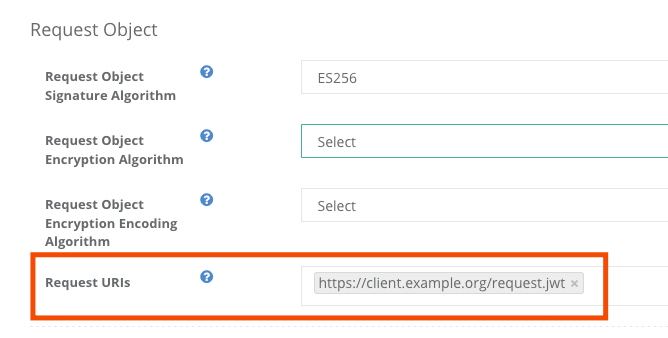 ***
## Examples
API request / response examples are as follows. (folded for readability)
## Request
### Client: Creating a request object
Assume a client creates a signed JWT (a request object) that contains the following payload:
```
{
"exp": 1597130002,
"iss": "17201083166161",
"aud": "https://as.example.com",
"scope": "openid profile",
"response_type": "code",
"client_id": "17201083166161",
"redirect_uri": "https://client.example.org/cb/example.com",
"nonce": "lvzxcjkb78643ki5kigsysigyb",
"foo": "bar"
}
```
The resulting JWT would be as follows:
```
eyJhbGciOiJFUzI1NiJ9.
ewogICJleHAiOiAxNTk3MTMwMDAyLAogICJpc3MiOiAiMTcyMDE
wODMxNjYxNjEiLAogICJhdWQiOiAiaHR0cHM6Ly9hcy5leGFtcG
xlLmNvbSIsCiAgInNjb3BlIjogIm9wZW5pZCBwcm9maWxlIiwKI
CAicmVzcG9uc2VfdHlwZSI6ICJjb2RlIiwKICAiY2xpZW50X2lk
IjogIjE3MjAxMDgzMTY2MTYxIiwKICAicmVkaXJlY3RfdXJpIjo
gImh0dHBzOi8vY2xpZW50LmV4YW1wbGUub3JnL2NiL2V4YW1wbG
UuY29tIiwKICAibm9uY2UiOiAibHZ6eGNqa2I3ODY0M2tpNWtpZ
3N5c2lneWIiLAogICJmb28iOiAiYmFyIgp9.
JnuCpEL1mRKPBUfXIO5mPtusY2lnz1w6oS6QQdYai7VUXUxfPA7
elMIWdsExc7tsSovTTAMK8mSxz9COAciY-Q
```
### Client: Making an authorization request
Then the client crafts an authorization request with the request object above. The request will include it either as a value (request) or a reference (request\_uri).
* Passing the object by value
```
GET /cb/example.com
&client_id=...
&scope=openid
&response_type=code
&**request=eyJhbGciOiJFUzI1NiJ9.
ewogICJleHAiOiAxNTk3MTMwMDAyLAogICJpc3MiOiAiMTcyMDE
wODMxNjYxNjEiLAogICJhdWQiOiAiaHR0cHM6Ly9hcy5leGFtcG
xlLmNvbSIsCiAgInNjb3BlIjogIm9wZW5pZCBwcm9maWxlIiwKI
CAicmVzcG9uc2VfdHlwZSI6ICJjb2RlIiwKICAiY2xpZW50X2lk
IjogIjE3MjAxMDgzMTY2MTYxIiwKICAicmVkaXJlY3RfdXJpIjo
gImh0dHBzOi8vY2xpZW50LmV4YW1wbGUub3JnL2NiL2V4YW1wbG
UuY29tIiwKICAibm9uY2UiOiAibHZ6eGNqa2I3ODY0M2tpNWtpZ
3N5c2lneWIiLAogICJmb28iOiAiYmFyIgp9.
JnuCpEL1mRKPBUfXIO5mPtusY2lnz1w6oS6QQdYai7VUXUxfPA7
elMIWdsExc7tsSovTTAMK8mSxz9COAciY-Q HTTP/1.1**Host: as.example.com
...
```
* Passing the object by reference
The client have to put the request object to the request\_uri location e.g. [https://client.example.org/request.jwt](https://client.example.org/request.jwt) and make it accessible to Authlete.
```
GET /cb/example.com
&client_id=...
&scope=openid
&response_type=code
&**request\_uri=https://client.example.org/request.jwt**
HTTP/1.1
Host: as.example.com
...
```
### Authorization Server: Making a request to Authlete API
On receiving the authorization request, the authorization server makes a request to Authlete's [/auth/authorization API](/api-reference/authorization-endpoint/process-authorization-request)
. The request contains the authorization request from the client as a value of "parameters".
```
curl -s -X POST https://api.authlete.com/api/auth/authorization
-u $apiKey:$apiSecret
-H 'Content-type: application/json'
-d '{"parameters":
"redirect_uri=https://client.example.org/cb/example.com
&client_id=...
&scope=openid
&response_type=code
&**request=eyJhbGciOiJFUzI1NiJ9.
ewogICJleHAiOiAxNTk3MTMwMDAyLAogICJpc3MiOiAiMTcyMDE
wODMxNjYxNjEiLAogICJhdWQiOiAiaHR0cHM6Ly9hcy5leGFtcG
xlLmNvbSIsCiAgInNjb3BlIjogIm9wZW5pZCBwcm9maWxlIiwKI
CAicmVzcG9uc2VfdHlwZSI6ICJjb2RlIiwKICAiY2xpZW50X2lk
IjogIjE3MjAxMDgzMTY2MTYxIiwKICAicmVkaXJlY3RfdXJpIjo
gImh0dHBzOi8vY2xpZW50LmV4YW1wbGUub3JnL2NiL2V4YW1wbG
UuY29tIiwKICAibm9uY2UiOiAibHZ6eGNqa2I3ODY0M2tpNWtpZ
3N5c2lneWIiLAogICJmb28iOiAiYmFyIgp9.
JnuCpEL1mRKPBUfXIO5mPtusY2lnz1w6oS6QQdYai7VUXUxfPA7
elMIWdsExc7tsSovTTAMK8mSxz9COAciY-Q"}**'
```
## Response
If Authlete has been properly configured, it sends back a response like this.
```
{
"type": "authorizationResponse",
"resultCode": "A004001",
"resultMessage":
"[A004001] Authlete has successfully issued a ticket
to the service (API Key = 14156727624613) for the
authorization request from the client (ID = ...).
[response_type=code, openid=true]",
"requestObjectPayload":
"{\"exp\":1597130002,
\"iss\":\"17201083166161\",
\"aud\":\"https://as.example.com\",
\"scope\":\"openid profile\",
\"response_type\":\"code\",
\"client_id\":\"17201083166161\",
\"redirect_uri\":
\"https://client.example.org/cb/example.com\",
\"nonce\":\"lvzxcjkb78643ki5kigsysigyb\",
\"foo\":\"bar\"}",** "ticket": "rja...GiE"
[...]
```
Note that there is a key "requestObjectPayload" that includes content of the payload. The authorization server can utilize them for further authorization process.
***
## Examples
API request / response examples are as follows. (folded for readability)
## Request
### Client: Creating a request object
Assume a client creates a signed JWT (a request object) that contains the following payload:
```
{
"exp": 1597130002,
"iss": "17201083166161",
"aud": "https://as.example.com",
"scope": "openid profile",
"response_type": "code",
"client_id": "17201083166161",
"redirect_uri": "https://client.example.org/cb/example.com",
"nonce": "lvzxcjkb78643ki5kigsysigyb",
"foo": "bar"
}
```
The resulting JWT would be as follows:
```
eyJhbGciOiJFUzI1NiJ9.
ewogICJleHAiOiAxNTk3MTMwMDAyLAogICJpc3MiOiAiMTcyMDE
wODMxNjYxNjEiLAogICJhdWQiOiAiaHR0cHM6Ly9hcy5leGFtcG
xlLmNvbSIsCiAgInNjb3BlIjogIm9wZW5pZCBwcm9maWxlIiwKI
CAicmVzcG9uc2VfdHlwZSI6ICJjb2RlIiwKICAiY2xpZW50X2lk
IjogIjE3MjAxMDgzMTY2MTYxIiwKICAicmVkaXJlY3RfdXJpIjo
gImh0dHBzOi8vY2xpZW50LmV4YW1wbGUub3JnL2NiL2V4YW1wbG
UuY29tIiwKICAibm9uY2UiOiAibHZ6eGNqa2I3ODY0M2tpNWtpZ
3N5c2lneWIiLAogICJmb28iOiAiYmFyIgp9.
JnuCpEL1mRKPBUfXIO5mPtusY2lnz1w6oS6QQdYai7VUXUxfPA7
elMIWdsExc7tsSovTTAMK8mSxz9COAciY-Q
```
### Client: Making an authorization request
Then the client crafts an authorization request with the request object above. The request will include it either as a value (request) or a reference (request\_uri).
* Passing the object by value
```
GET /cb/example.com
&client_id=...
&scope=openid
&response_type=code
&**request=eyJhbGciOiJFUzI1NiJ9.
ewogICJleHAiOiAxNTk3MTMwMDAyLAogICJpc3MiOiAiMTcyMDE
wODMxNjYxNjEiLAogICJhdWQiOiAiaHR0cHM6Ly9hcy5leGFtcG
xlLmNvbSIsCiAgInNjb3BlIjogIm9wZW5pZCBwcm9maWxlIiwKI
CAicmVzcG9uc2VfdHlwZSI6ICJjb2RlIiwKICAiY2xpZW50X2lk
IjogIjE3MjAxMDgzMTY2MTYxIiwKICAicmVkaXJlY3RfdXJpIjo
gImh0dHBzOi8vY2xpZW50LmV4YW1wbGUub3JnL2NiL2V4YW1wbG
UuY29tIiwKICAibm9uY2UiOiAibHZ6eGNqa2I3ODY0M2tpNWtpZ
3N5c2lneWIiLAogICJmb28iOiAiYmFyIgp9.
JnuCpEL1mRKPBUfXIO5mPtusY2lnz1w6oS6QQdYai7VUXUxfPA7
elMIWdsExc7tsSovTTAMK8mSxz9COAciY-Q HTTP/1.1**Host: as.example.com
...
```
* Passing the object by reference
The client have to put the request object to the request\_uri location e.g. [https://client.example.org/request.jwt](https://client.example.org/request.jwt) and make it accessible to Authlete.
```
GET /cb/example.com
&client_id=...
&scope=openid
&response_type=code
&**request\_uri=https://client.example.org/request.jwt**
HTTP/1.1
Host: as.example.com
...
```
### Authorization Server: Making a request to Authlete API
On receiving the authorization request, the authorization server makes a request to Authlete's [/auth/authorization API](/api-reference/authorization-endpoint/process-authorization-request)
. The request contains the authorization request from the client as a value of "parameters".
```
curl -s -X POST https://api.authlete.com/api/auth/authorization
-u $apiKey:$apiSecret
-H 'Content-type: application/json'
-d '{"parameters":
"redirect_uri=https://client.example.org/cb/example.com
&client_id=...
&scope=openid
&response_type=code
&**request=eyJhbGciOiJFUzI1NiJ9.
ewogICJleHAiOiAxNTk3MTMwMDAyLAogICJpc3MiOiAiMTcyMDE
wODMxNjYxNjEiLAogICJhdWQiOiAiaHR0cHM6Ly9hcy5leGFtcG
xlLmNvbSIsCiAgInNjb3BlIjogIm9wZW5pZCBwcm9maWxlIiwKI
CAicmVzcG9uc2VfdHlwZSI6ICJjb2RlIiwKICAiY2xpZW50X2lk
IjogIjE3MjAxMDgzMTY2MTYxIiwKICAicmVkaXJlY3RfdXJpIjo
gImh0dHBzOi8vY2xpZW50LmV4YW1wbGUub3JnL2NiL2V4YW1wbG
UuY29tIiwKICAibm9uY2UiOiAibHZ6eGNqa2I3ODY0M2tpNWtpZ
3N5c2lneWIiLAogICJmb28iOiAiYmFyIgp9.
JnuCpEL1mRKPBUfXIO5mPtusY2lnz1w6oS6QQdYai7VUXUxfPA7
elMIWdsExc7tsSovTTAMK8mSxz9COAciY-Q"}**'
```
## Response
If Authlete has been properly configured, it sends back a response like this.
```
{
"type": "authorizationResponse",
"resultCode": "A004001",
"resultMessage":
"[A004001] Authlete has successfully issued a ticket
to the service (API Key = 14156727624613) for the
authorization request from the client (ID = ...).
[response_type=code, openid=true]",
"requestObjectPayload":
"{\"exp\":1597130002,
\"iss\":\"17201083166161\",
\"aud\":\"https://as.example.com\",
\"scope\":\"openid profile\",
\"response_type\":\"code\",
\"client_id\":\"17201083166161\",
\"redirect_uri\":
\"https://client.example.org/cb/example.com\",
\"nonce\":\"lvzxcjkb78643ki5kigsysigyb\",
\"foo\":\"bar\"}",** "ticket": "rja...GiE"
[...]
```
Note that there is a key "requestObjectPayload" that includes content of the payload. The authorization server can utilize them for further authorization process.