> ## Documentation Index
> Fetch the complete documentation index at: https://developers.authlete.com/llms.txt
> Use this file to discover all available pages before exploring further.
# Client authentication using tls_client_auth method
> Overview and instructions on enabling client authentication using TLS client authentication method in Authlete.
For **Authlete 2.x** documentation, see [2.x version](/v2/protocols-and-flows/client-authentication/tls-client-auth).
# Client Authentication Using the tls\_client\_auth Method
## Preface
[A section of RFC 8705, “2. Mutual TLS for OAuth Client Authentication”](https://www.rfc-editor.org/rfc/rfc8705.html#name-mutual-tls-for-oauth-client)
defines how authorization servers authenticate clients using mutual TLS.
Authlete offers a feature that enables authorization servers to authenticate clients using TLS client certificates. This article describes an overview of the feature and instructions to enable it.
## How TLS Client Authentication Works in Authlete
The TLS client authentication feature of Authlete employs `client ID` and `subject name` (subject distinguished name / subject alternative name) to authenticate clients.
When processing token requests, an authorization server is responsible for providing the `client ID` and `subject name` properties to Authlete. Client ID is included in content of a token request by a client, so an authorization server doesn't have to care. “Subject name” is not in the content but in a client certificate, that can be obtained from a mutual TLS connection between a client and an authorization server.
On Authlete's side, you have to enable `TLS_CLIENT_AUTH` client authentication method and register the client's `subject name`. 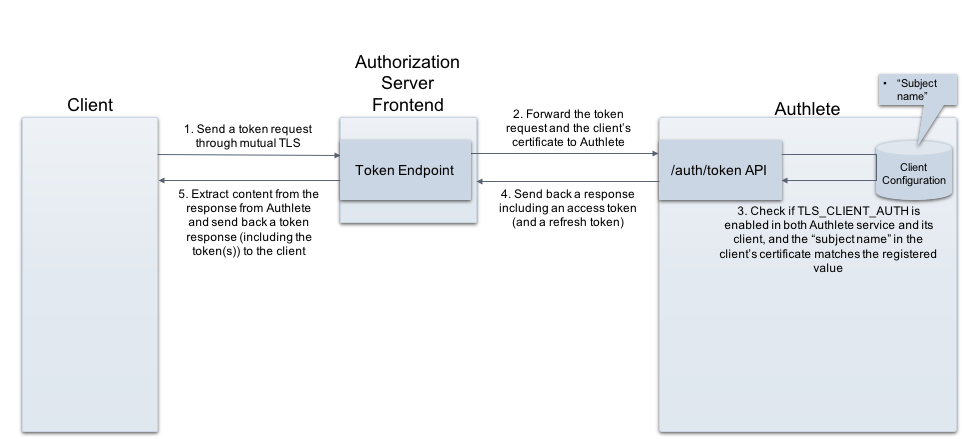 ## Service settings
| Tab | Item | Value |
| ------------------------------------ | --------------------------------------- | ----------------- |
| Service Settings > Endpoints > Token | Supported Client Authentication Methods | TLS\_CLIENT\_AUTH |
To enable the TLS Client Authentication feature of Authlete for your service:
1. Log in to the [Authlete Management Console](https://console.authlete.com/).
2. Click on your Organization name and choose your Service.
3. Navigate to **Service Settings > Endpoints > Token > General**
4. Under `Client Authentication Method`, select the `TLS_CLIENT_AUTH` method.
5. Click Save Changes to update your service settings.

## Client settings
> This example uses Subject Distinguished Name (Subject DN) as a type of “subject name” though, Authlete in fact supports other various types of Subject Alternative Name (SAN) in addition to Subject DN.
>
> | Tab | Item | Value |
> | ----------------------------------- | ---------------------------- | -------------------------------------------------------------------- |
> | Client Settings > Endpoints > Token | Client Authentication Method | TLS\_CLIENT\_AUTH |
> | Client Settings > Endpoints > Token | Subject Distinguished Name | (e.g. CN=client.example.org, O=Client, L=Chiyoda-ku, ST=Tokyo, C=JP) |
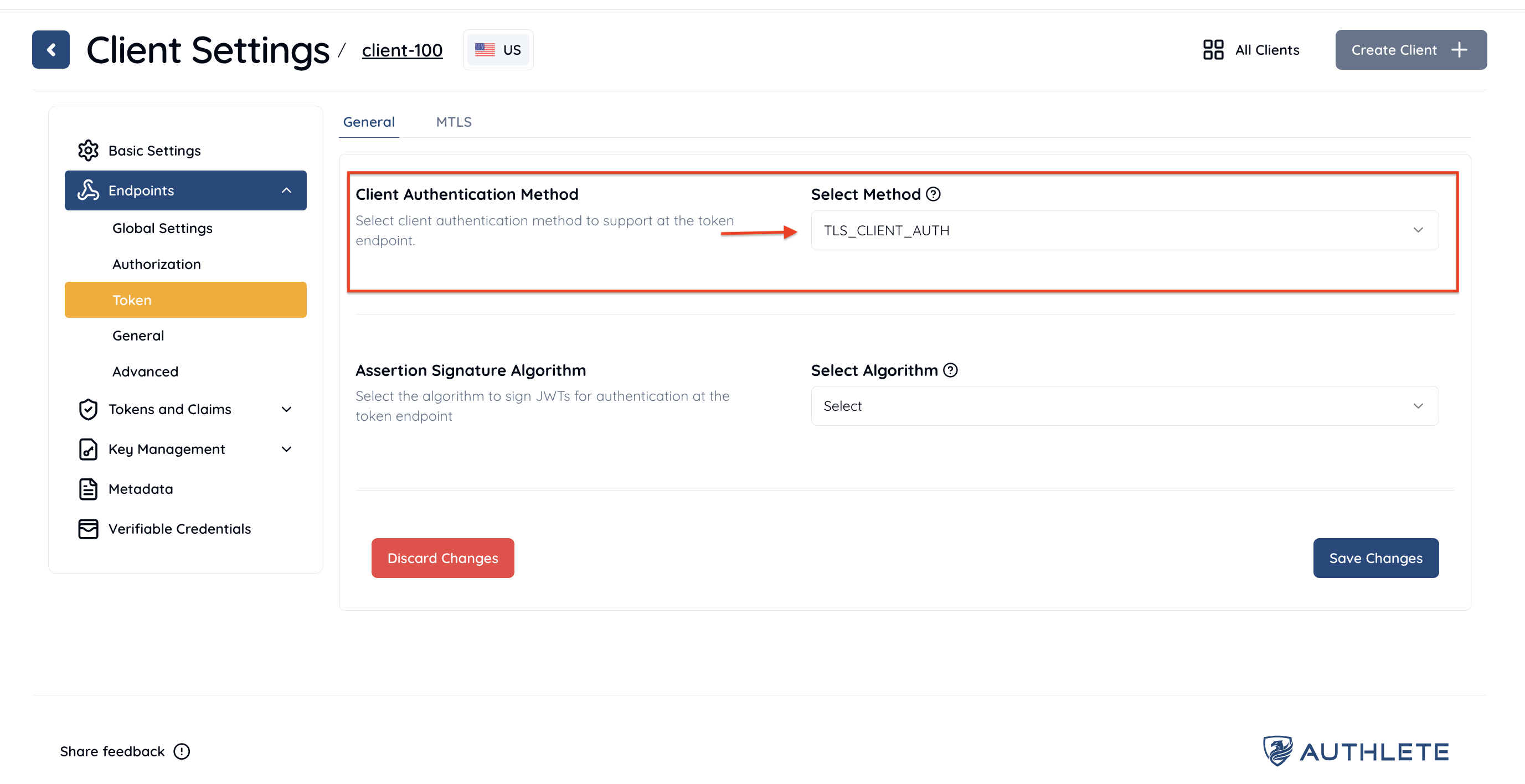
To enable the `TLS_CLIENT_AUTH` method for your client:
1. Log in to the [Authlete Management Console](https://console.authlete.com/).
2. Click on your Organization name and choose your Service.
3. Navigate to **Client Settings > Endpoints > Token > General**
4. Under `Client Authentication Method`, open the dropdown menu and select the `TLS_CLIENT_AUTH` method.
5. Click Save Changes to apply the updates.
To register the `subject name` for your client:
1. Navigate to **Client Settings > Endpoints > Token > MTLS**
2. Enter a desired value for `Subject Distinguished Name`. You can also specify other name values used for client authentication, including:
* Subject Alternative Name DNS
* Subject Alternative Name IP Address
* Subject Alternative Name URI
* Subject Alternative Name Email
* Self Signed Certificate Key ID
3. Click Save Changes to apply the updates.

With the settings above, Authlete will support mutual TLS authentication as a client authentication method and apply the method to process token requests from the client above. Subject DN CN=client.example.org, ... is used as the identifier of the client.
## Example
The following is an example of a request to [/auth/token](/api-reference/token-endpoint/process-token-request) (folded for readability). An authorization server establishes a mutual TLS connection with a client, obtains the client's certificate from the connection, and makes the request to the API.
Content of a token request, that includes a client ID (client\_id), is specified as a value of "parameters," and a client certificate as a value of "clientCertificate".
```
curl -v -X POST https://us.authlete.com/api/21653835348762/auth/token \
-H 'Content-Type: application/json' \
-H "Authorization: Bearer ' \
-d '{
"parameters": "grant_type=authorization_code&redirect_uri=https://client.example.org/cb/example.com&client_id=591205987816490&code=HVIza0dGG9nDKGStAzMObYH9GkXME0aRSaLEcToHEI8",
"clientCertificate":"-----BEGIN CERTIFICATE-----
MIIDPDCCAiQCCQDWNMOIuzwDfzANBgkqhkiG9w0BAQUFADBgMQswCQYDVQQGEwJK
UDEOMAwGA1UECAwFVG9reW8xEzARBgNVBAcMCkNoaXlvZGEta3UxDzANBgNVBAoM
BkNsaWVudDEbMBkGA1UEAwwSY2xpZW50LmV4YW1wbGUub3JnMB4XDTE5MTAyODA3
MjczMFoXDTIwMTAyNzA3MjczMFowYDELMAkGA1UEBhMCSlAxDjAMBgNVBAgMBVRv
a3lvMRMwEQYDVQQHDApDaGl5b2RhLWt1MQ8wDQYDVQQKDAZDbGllbnQxGzAZBgNV
BAMMEmNsaWVudC5leGFtcGxlLm9yZzCCASIwDQYJKoZIhvcNAQEBBQADggEPADCC
AQoCggEBAK2Oyc+BV4N5pYcp47opUwsb2NaJq4X+d5Itq8whpFlZ9uCCHzF5TWSF
XrpYscOp95veGPF42eT1grfxYyvjFotE76caHhBLCkIbBh6Vf222IGMwwBbSZfO9
J3eURtEADBvsZ117HkPVdjYqvt3Pr4RxdR12zG1TcBAoTLGchyr8nBqRADFhUTCL
msYaz1ADiQ/xbJN7VUNQpKhzRWHCdYS03HpbGjYCtAbl9dJnH2EepNF0emGiSPFq
df6taToyCr7oZjM7ufmKPjiiEDbeSYTf6kbPNmmjtoPNNLeejHjP9p0IYx7l0Gkj
mx4kSMLp4vSDftrFgGfcxzaMmKBsosMCAwEAATANBgkqhkiG9w0BAQUFAAOCAQEA
qzdDYbntFLPBlbwAQlpwIjvmvwzvkQt6qgZ9Y0oMAf7pxq3i9q7W1bDol0UF4pIM
z3urEJCHO8w18JRlfOnOENkcLLLntrjOUXuNkaCDLrnv8pnp0yeTQHkSpsyMtJi9
R6r6JT9V57EJ/pWQBgKlN6qMiBkIvX7U2hEMmhZ00h/E5xMmiKbySBiJV9fBzDRf
mAy1p9YEgLsEMLnGjKHTok+hd0BLvcmXVejdUsKCg84F0zqtXEDXLCiKcpXCeeWv
lmmXxC5PH/GEMkSPiGSR7+b1i0sSotsq+M3hbdwabpJ6nQLLbKkFSGcsQ87yL+gr
So6zun26vAUJTu1o9CIjxw==
-----END CERTIFICATE-----"}'
```
## See Also
* [Configuring Client Authentication](/configuration-reference/endpoints/configuring-client-authentication)
> This article describes basics of client authentication configuration in Authlete.
* [Issuing mutual-TLS Certificate-bound Access Tokens](/configuration-reference/tokens-and-claims/issuing-mutual-tls-certificate-bound-access-tokens)
> This article describes setup instructions for Authlete to use “Mutual-TLS certificate-bound access tokens,” defined in “RFC 8705 OAuth 2.0 Mutual-TLS Client Authentication and Certificate-Bound Access Tokens.”
* [Authlete FAPI Enhancements](https://www.authlete.com/resources/videos/20180724/authlete-fapi-enhancements/)
> This video is one of the sessions at “[Financial APIs Workshop 2018](https://financial-api.net/)
> ”, held on July 24th, 2018 in Tokyo. Justin Richer from Authlete talks about comparison of Authlete’s unique semi-hosted approach and traditional approaches for deploying OAuth infrastructure, and how Authlete has extended its client authentication functions and supported mutual TLS to implement Financial-grade API (FAPI).
## Service settings
| Tab | Item | Value |
| ------------------------------------ | --------------------------------------- | ----------------- |
| Service Settings > Endpoints > Token | Supported Client Authentication Methods | TLS\_CLIENT\_AUTH |
To enable the TLS Client Authentication feature of Authlete for your service:
1. Log in to the [Authlete Management Console](https://console.authlete.com/).
2. Click on your Organization name and choose your Service.
3. Navigate to **Service Settings > Endpoints > Token > General**
4. Under `Client Authentication Method`, select the `TLS_CLIENT_AUTH` method.
5. Click Save Changes to update your service settings.

## Client settings
> This example uses Subject Distinguished Name (Subject DN) as a type of “subject name” though, Authlete in fact supports other various types of Subject Alternative Name (SAN) in addition to Subject DN.
>
> | Tab | Item | Value |
> | ----------------------------------- | ---------------------------- | -------------------------------------------------------------------- |
> | Client Settings > Endpoints > Token | Client Authentication Method | TLS\_CLIENT\_AUTH |
> | Client Settings > Endpoints > Token | Subject Distinguished Name | (e.g. CN=client.example.org, O=Client, L=Chiyoda-ku, ST=Tokyo, C=JP) |
To enable the `TLS_CLIENT_AUTH` method for your client:
1. Log in to the [Authlete Management Console](https://console.authlete.com/).
2. Click on your Organization name and choose your Service.
3. Navigate to **Client Settings > Endpoints > Token > General**
4. Under `Client Authentication Method`, open the dropdown menu and select the `TLS_CLIENT_AUTH` method.
5. Click Save Changes to apply the updates.

To register the `subject name` for your client:
1. Navigate to **Client Settings > Endpoints > Token > MTLS**
2. Enter a desired value for `Subject Distinguished Name`. You can also specify other name values used for client authentication, including:
* Subject Alternative Name DNS
* Subject Alternative Name IP Address
* Subject Alternative Name URI
* Subject Alternative Name Email
* Self Signed Certificate Key ID
3. Click Save Changes to apply the updates.

With the settings above, Authlete will support mutual TLS authentication as a client authentication method and apply the method to process token requests from the client above. Subject DN CN=client.example.org, ... is used as the identifier of the client.
## Example
The following is an example of a request to [/auth/token](/api-reference/token-endpoint/process-token-request) (folded for readability). An authorization server establishes a mutual TLS connection with a client, obtains the client's certificate from the connection, and makes the request to the API.
Content of a token request, that includes a client ID (client\_id), is specified as a value of "parameters," and a client certificate as a value of "clientCertificate".
```
curl -v -X POST https://us.authlete.com/api/21653835348762/auth/token \
-H 'Content-Type: application/json' \
-H "Authorization: Bearer ' \
-d '{
"parameters": "grant_type=authorization_code&redirect_uri=https://client.example.org/cb/example.com&client_id=591205987816490&code=HVIza0dGG9nDKGStAzMObYH9GkXME0aRSaLEcToHEI8",
"clientCertificate":"-----BEGIN CERTIFICATE-----
MIIDPDCCAiQCCQDWNMOIuzwDfzANBgkqhkiG9w0BAQUFADBgMQswCQYDVQQGEwJK
UDEOMAwGA1UECAwFVG9reW8xEzARBgNVBAcMCkNoaXlvZGEta3UxDzANBgNVBAoM
BkNsaWVudDEbMBkGA1UEAwwSY2xpZW50LmV4YW1wbGUub3JnMB4XDTE5MTAyODA3
MjczMFoXDTIwMTAyNzA3MjczMFowYDELMAkGA1UEBhMCSlAxDjAMBgNVBAgMBVRv
a3lvMRMwEQYDVQQHDApDaGl5b2RhLWt1MQ8wDQYDVQQKDAZDbGllbnQxGzAZBgNV
BAMMEmNsaWVudC5leGFtcGxlLm9yZzCCASIwDQYJKoZIhvcNAQEBBQADggEPADCC
AQoCggEBAK2Oyc+BV4N5pYcp47opUwsb2NaJq4X+d5Itq8whpFlZ9uCCHzF5TWSF
XrpYscOp95veGPF42eT1grfxYyvjFotE76caHhBLCkIbBh6Vf222IGMwwBbSZfO9
J3eURtEADBvsZ117HkPVdjYqvt3Pr4RxdR12zG1TcBAoTLGchyr8nBqRADFhUTCL
msYaz1ADiQ/xbJN7VUNQpKhzRWHCdYS03HpbGjYCtAbl9dJnH2EepNF0emGiSPFq
df6taToyCr7oZjM7ufmKPjiiEDbeSYTf6kbPNmmjtoPNNLeejHjP9p0IYx7l0Gkj
mx4kSMLp4vSDftrFgGfcxzaMmKBsosMCAwEAATANBgkqhkiG9w0BAQUFAAOCAQEA
qzdDYbntFLPBlbwAQlpwIjvmvwzvkQt6qgZ9Y0oMAf7pxq3i9q7W1bDol0UF4pIM
z3urEJCHO8w18JRlfOnOENkcLLLntrjOUXuNkaCDLrnv8pnp0yeTQHkSpsyMtJi9
R6r6JT9V57EJ/pWQBgKlN6qMiBkIvX7U2hEMmhZ00h/E5xMmiKbySBiJV9fBzDRf
mAy1p9YEgLsEMLnGjKHTok+hd0BLvcmXVejdUsKCg84F0zqtXEDXLCiKcpXCeeWv
lmmXxC5PH/GEMkSPiGSR7+b1i0sSotsq+M3hbdwabpJ6nQLLbKkFSGcsQ87yL+gr
So6zun26vAUJTu1o9CIjxw==
-----END CERTIFICATE-----"}'
```
## See Also
* [Configuring Client Authentication](/configuration-reference/endpoints/configuring-client-authentication)
> This article describes basics of client authentication configuration in Authlete.
* [Issuing mutual-TLS Certificate-bound Access Tokens](/configuration-reference/tokens-and-claims/issuing-mutual-tls-certificate-bound-access-tokens)
> This article describes setup instructions for Authlete to use “Mutual-TLS certificate-bound access tokens,” defined in “RFC 8705 OAuth 2.0 Mutual-TLS Client Authentication and Certificate-Bound Access Tokens.”
* [Authlete FAPI Enhancements](https://www.authlete.com/resources/videos/20180724/authlete-fapi-enhancements/)
> This video is one of the sessions at “[Financial APIs Workshop 2018](https://financial-api.net/)
> ”, held on July 24th, 2018 in Tokyo. Justin Richer from Authlete talks about comparison of Authlete’s unique semi-hosted approach and traditional approaches for deploying OAuth infrastructure, and how Authlete has extended its client authentication functions and supported mutual TLS to implement Financial-grade API (FAPI).