> ## Documentation Index
> Fetch the complete documentation index at: https://developers.authlete.com/llms.txt
> Use this file to discover all available pages before exploring further.
# Client authentication using client_secret_jwt method
> Technical information about client authentication using the client_secret_jwt method in OAuth 2.0 and OpenID Connect.
For **Authlete 2.x** documentation, see [2.x version](/v2/protocols-and-flows/client-authentication/client-secret-jwt).
## Preface
**client\_secret\_jwt** is one of client authentication methods defined in [OpenID Connect Core 1.0, 9. Client Authentication](http://openid.net/specs/openid-connect-core-1_0.html#ClientAuthentication) .
On a token request, a client crafts a JWT assertion that contains a message authentication code (MAC) in its signature part, and includes it to the request. Then an authorization server authenticates the client by verifying the signature and payload of the assertion.
Authlete supports client\_secret\_jwt as a client authentication method so that authorization servers can enable it. This article describes overview of the method and setup instructions with Authlete.
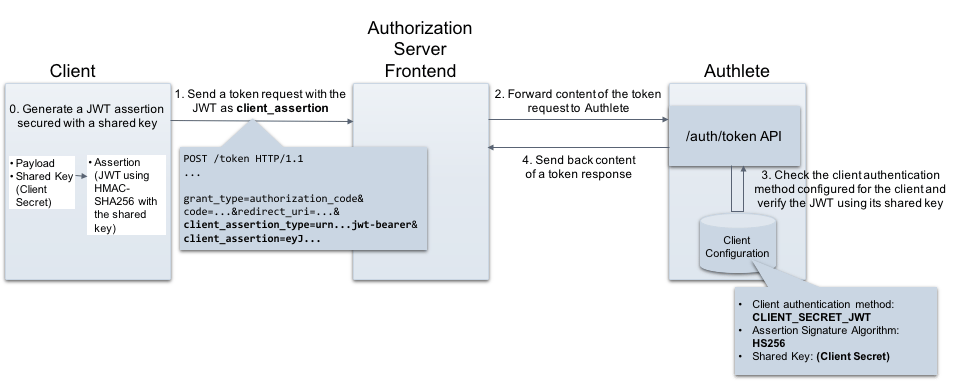 ## Requirements for client\_secret\_jwt
The following section describes details on both client and authorization server side.
## Client
A client must include the following parameters in a token request when using the client\_secret\_jwt method.
| Parameter | Description |
| ----------------------- | ----------------------------------------------------------------------------------------------------------------------------------- |
| client\_assertion\_type | A type of client\_assertion. Its value must be "**urn:ietf:params:oauth:client-assertion-type:jwt-bearer**". |
| client\_assertion | A JWT that contains information for client authentication. It must contain\*\* a MAC using a shared key\*\*. See below for details. |
The value of **client\_assertion** must satisfy the following requirements on its JWT payload and JWT signature. You can find an example JWT in the "[Generating a JWT assertion](#example) " section.
### Payload
A JWT assertion must contain the REQUIRED claims listed below.
| Claim | Description |
| ----- | ---------------------------------------------------------------------------------------------------------------------------------------------------------------------------------------------------------------------------------------------------------------------------- |
| iss | \[REQUIRED] Issuer. This must contain the client\_id of the OAuth client. |
| sub | \[REQUIRED] Subject. This must contain the client\_id of the OAuth client. |
| aud | \[REQUIRED] Audience. A value that identifies the authorization server as an intended audience. The authorization server must verify that it is an intended audience for the token. The audience should be the URL of the authorization server's token endpoint. |
| jti | \[REQUIRED] JWT ID. A unique identifier for the token, which can be used to prevent reuse of the token. These tokens must only be used once unless conditions for reuse were negotiated between the parties; any such negotiation is beyond the scope of this specification. |
| exp | \[REQUIRED] Expiration time on or after which the JWT must not be accepted for processing. |
| iat | \[OPTIONAL] Time at which the JWT was issued. |
### Signature
* The signature of the JWT must be calculated using **HMAC-SHA algorithm** e.g. HS256.
* Client secret must be used as a shared key on calculating the signature.
## Authorization server
An authorization server must process a token request as per the specifications listed below. The details are omitted here because **you can offload these operations from your authorization server to Authlete**.
* [JSON Web Token (JWT) Profile for OAuth 2.0 Client Authentication and Authorization Grants (RFC7523)](https://tools.ietf.org/html/rfc7523)
* [Assertion Framework for OAuth 2.0 Client Authentication and Authorization Grants (RFC7521)](https://tools.ietf.org/html/rfc7521)
***
## Configuration settings
This section explains settings for enabling the client\_secret\_jwt method. You have to configure both Authlete service and its client to be authenticated with the method.
## Service Settings
Configure the following setting in Service Owner Console.
| Tab | Key | Value |
| ------------------------------------ | --------------------------------------- | -------------------------------- |
| Service Settings > Endpoints > Token | Supported Client Authentication Methods | Enable "**CLIENT\_SECRET\_JWT**" |
To configure Authlete's Service Settings:
1. Log in to the [Authlete Management Console](https://console.authlete.com/)
2. Click on your Organization name and choose your Service.
3. Navigate to **Service Settings > Endpoints > Token**
4. Under the **Supported Client Authentication Methods** section, select the `CLIENT_SECRET_JWT` checkbox.
5. Click Save Changes to update your service settings.

## Client Settings
Configure the following setting in the Authlete Management Console.
| Tab | Key | Value |
| ----------------- | ----------------------------- | ------------------------------------- |
| Basic | Client Type | **CONFIDENTIAL** |
| Endpoints > Token | Client Authentication Method | **CLIENT\_SECRET\_JWT** |
| Endpoints > Token | Assertion Signature Algorithm | **HS256**, \*\*HS384 \*\*or **HS256** |
Configure Basic Settings:
1. Navigate to **Client Settings > Basic Settings > General**
2. For Client Type, choose the `CONFIDENTIAL` radio button.
3. Click Save Changes to apply the updates.

Configure Endpoints:
1. Navigate to **Client Settings > Endpoints > Token > General**
2. Under the **Client Authentication Method** section, open the dropdown menu and select `CLIENT_SECRET_JWT`
3. Under the **Assertion Signature Algorithm** section, open the dropdown menu and select `HS256`
4. Click Save Changes to apply the updates.

***
## Example
This example shows how to use the `client_secret_jwt` method for client authentication at the token endpoint of the authorization server.
## Generating a JWT assertion
Let's generate a JWT that will be used as a value of the **client\_assertion** in a token request.
### Preparing a JWT payload
First, create a JSON formatted payload and save it as "payload.json".
```
{
"jti": "myJWTId001",
"sub": "38174623762",
"iss": "38174623762",
"aud": "http://localhost:4000/api/auth/token/direct/24523138205",
"exp": 1536165540,
"iat": 1536132708
}
```
### Generating a JWT
Generate a JWT assertion including the payload, and a MAC using the client's shared key (client secret). The example below is an instruction using an [authlete-jose library](https://github.com/authlete/authlete-jose) . Or you can use [mkjose.org](https://mkjose.org/) website to do that.
```
$ bin/jose-generator \
--payload-file payload.json \
--sign \
--signing-alg HS256 \
--signing-alg-key TzPTZDtcw9ek41H1VmofRoXQddP5cWCXPWidZHSA2spU6gZN9eIFUiXaHD7OfxtBhTxJsg_I1tdFI_CkKl8t8Q
```
The generated JWT will look like this (with line breaks for display purposes only):
```
eyJhbGciOiJIUzI1NiJ9.
ewogICJqdGkiOiJteUpXVElkMDAxIiwKICAic3ViIjoiMzgxNzQ2MjM3NjIiLAogIC
Jpc3MiOiIzODE3NDYyMzc2MiIsCiAgImF1ZCI6Imh0dHA6Ly9sb2NhbGhvc3Q6NDAw
MC9hcGkvYXV0aC90b2tlbi9kaXJlY3QvMjQ1MjMxMzgyMDUiLAogICJleHAiOjE1Mz
YxNjU1NDAsCiAgImlhdCI6MTUzNjEzMjcwOAp9Cg.
Vin3IxRPMLQ0SKNJ8Ba_59dYHBGLb4Ft-JLbJVKFd3E
```
This JWT serves as the value for `client_assertion`, which the client includes when making a token request.
## Token request and response
### Token request from the client to the authorization server
Assume the client that has the assertion makes a token request to the authorization server. (folded for readability)
```
POST /token HTTP/1.1
Host: as.example.com
Content-Type: application/x-www-form-urlencoded
grant_type=authorization_code&
code=Gw30fMKJBHkcOBSde5awLrMm4ahvgCNM2cFSTUOUflY&
redirect_uri=https://example.com/redirection&
**client_assertion_type=
urn%3Aietf%3Aparams%3Aoauth%3Aclient-assertion-type%3Ajwt-bearer&
client_assertion=
eyJhbGciOiJIUzI1NiJ9.
ewogICJqdGkiOiJteUpXVElkMDAxIiwKICAic3ViIjoiMzgxNzQ2MjM3NjIiLAogIC
Jpc3MiOiIzODE3NDYyMzc2MiIsCiAgImF1ZCI6Imh0dHA6Ly9sb2NhbGhvc3Q6NDAw
MC9hcGkvYXV0aC90b2tlbi9kaXJlY3QvMjQ1MjMxMzgyMDUiLAogICJleHAiOjE1Mz
YxNjU1NDAsCiAgImlhdCI6MTUzNjEzMjcwOAp9Cg.
Vin3IxRPMLQ0SKNJ8Ba_59dYHBGLb4Ft-JLbJVKFd3E**
```
### API request from the authorization server to Authlete
The authorization server forwards the request content to Authlete's [/auth/token API](/api-reference/token-endpoint/process-token-request). Make sure the `` in the token request matches your Authlete Service ID. (folded for readability)
```
curl -v -X POST https://us.authlete.com/api//auth/token \
-H 'Content-Type: application/json' \
-H "Authorization: Bearer ' \
-d '{
"parameters":"grant_type=authorization_code&
code=Gw30fMKJBHkcOBSde5awLrMm4ahvgCNM2cFSTUOUflY&
redirect_uri=https://example.com/redirection&
**client_assertion_type=
urn%3Aietf%3Aparams%3Aoauth%3Aclient-assertion-type%3Ajwt-bearer&
client_assertion=
eyJhbGciOiJIUzI1NiJ9.
ewogICJqdGkiOiJteUpXVElkMDAxIiwKICAic3ViIjoiMzgxNzQ2MjM3NjIiLAogIC
Jpc3MiOiIzODE3NDYyMzc2MiIsCiAgImF1ZCI6Imh0dHA6Ly9sb2NhbGhvc3Q6NDAw
MC9hcGkvYXV0aC90b2tlbi9kaXJlY3QvMjQ1MjMxMzgyMDUiLAogICJleHAiOjE1Mz
YxNjU1NDAsCiAgImlhdCI6MTUzNjEzMjcwOAp9Cg.
Vin3IxRPMLQ0SKNJ8Ba_59dYHBGLb4Ft-JLbJVKFd3E}'
```
### API response from Authlete to the authorization server
Authlete processes the request and send back an API response to the authorization server as follows. (folded for readability)
```
{
"type": "tokenResponse",
"resultCode": "A050001",
"resultMessage": "[A050001] The token request (grant_type=authorization_code) was processed successfully.",
"accessToken": "kwXY57oN4nBOqxk57vW2fo-WzgezrwSl2h1N_xW8aKI",
"responseContent": {
"access_token": "kwXY57oN4nBOqxk57vW2fo-WzgezrwSl2h1N_xW8aKI",
"refresh_token": "5zBNsdrlMojcMH3wCrfaXpmAY6vKqOqeV3q1ebRJzGM",
"scope": null,
"token_type": "Bearer",
"expires_in": 3600
},
...
}
```
### Token response from the authorization server to the client
The authorization server extracts the value of "responseContent" and send it back to the client as a token response (details omitted).
***
## See Also
* [Configuring Client Authentication](/configuration-reference/endpoints/configuring-client-authentication)
> This article describes basics of client authentication configuration in Authlete.
* [Client authentication using private\_key\_jwt method](/configuration-reference/endpoints/client-authentication-using-private-key-jwt-method)
> Authlete supports **client\_secret\_jwt** as a client authentication method so authorization servers can enable it. This article describes overview of the method and setup instructions with Authlete.
* [OAuth 2.0 Client Authentication - Takahiko Kawasaki - Medium](https://medium.com/@darutk/oauth-2-0-client-authentication-4b5f929305d4)
> This article explains “**OAuth 2.0 client authentication**”. In addition to the client authentication methods described in [RFC 6749](https://tools.ietf.org/html/rfc6749) , this article explains methods that utilize a client assertion and a client certificate.
## Requirements for client\_secret\_jwt
The following section describes details on both client and authorization server side.
## Client
A client must include the following parameters in a token request when using the client\_secret\_jwt method.
| Parameter | Description |
| ----------------------- | ----------------------------------------------------------------------------------------------------------------------------------- |
| client\_assertion\_type | A type of client\_assertion. Its value must be "**urn:ietf:params:oauth:client-assertion-type:jwt-bearer**". |
| client\_assertion | A JWT that contains information for client authentication. It must contain\*\* a MAC using a shared key\*\*. See below for details. |
The value of **client\_assertion** must satisfy the following requirements on its JWT payload and JWT signature. You can find an example JWT in the "[Generating a JWT assertion](#example) " section.
### Payload
A JWT assertion must contain the REQUIRED claims listed below.
| Claim | Description |
| ----- | ---------------------------------------------------------------------------------------------------------------------------------------------------------------------------------------------------------------------------------------------------------------------------- |
| iss | \[REQUIRED] Issuer. This must contain the client\_id of the OAuth client. |
| sub | \[REQUIRED] Subject. This must contain the client\_id of the OAuth client. |
| aud | \[REQUIRED] Audience. A value that identifies the authorization server as an intended audience. The authorization server must verify that it is an intended audience for the token. The audience should be the URL of the authorization server's token endpoint. |
| jti | \[REQUIRED] JWT ID. A unique identifier for the token, which can be used to prevent reuse of the token. These tokens must only be used once unless conditions for reuse were negotiated between the parties; any such negotiation is beyond the scope of this specification. |
| exp | \[REQUIRED] Expiration time on or after which the JWT must not be accepted for processing. |
| iat | \[OPTIONAL] Time at which the JWT was issued. |
### Signature
* The signature of the JWT must be calculated using **HMAC-SHA algorithm** e.g. HS256.
* Client secret must be used as a shared key on calculating the signature.
## Authorization server
An authorization server must process a token request as per the specifications listed below. The details are omitted here because **you can offload these operations from your authorization server to Authlete**.
* [JSON Web Token (JWT) Profile for OAuth 2.0 Client Authentication and Authorization Grants (RFC7523)](https://tools.ietf.org/html/rfc7523)
* [Assertion Framework for OAuth 2.0 Client Authentication and Authorization Grants (RFC7521)](https://tools.ietf.org/html/rfc7521)
***
## Configuration settings
This section explains settings for enabling the client\_secret\_jwt method. You have to configure both Authlete service and its client to be authenticated with the method.
## Service Settings
Configure the following setting in Service Owner Console.
| Tab | Key | Value |
| ------------------------------------ | --------------------------------------- | -------------------------------- |
| Service Settings > Endpoints > Token | Supported Client Authentication Methods | Enable "**CLIENT\_SECRET\_JWT**" |
To configure Authlete's Service Settings:
1. Log in to the [Authlete Management Console](https://console.authlete.com/)
2. Click on your Organization name and choose your Service.
3. Navigate to **Service Settings > Endpoints > Token**
4. Under the **Supported Client Authentication Methods** section, select the `CLIENT_SECRET_JWT` checkbox.
5. Click Save Changes to update your service settings.

## Client Settings
Configure the following setting in the Authlete Management Console.
| Tab | Key | Value |
| ----------------- | ----------------------------- | ------------------------------------- |
| Basic | Client Type | **CONFIDENTIAL** |
| Endpoints > Token | Client Authentication Method | **CLIENT\_SECRET\_JWT** |
| Endpoints > Token | Assertion Signature Algorithm | **HS256**, \*\*HS384 \*\*or **HS256** |
Configure Basic Settings:
1. Navigate to **Client Settings > Basic Settings > General**
2. For Client Type, choose the `CONFIDENTIAL` radio button.
3. Click Save Changes to apply the updates.

Configure Endpoints:
1. Navigate to **Client Settings > Endpoints > Token > General**
2. Under the **Client Authentication Method** section, open the dropdown menu and select `CLIENT_SECRET_JWT`
3. Under the **Assertion Signature Algorithm** section, open the dropdown menu and select `HS256`
4. Click Save Changes to apply the updates.

***
## Example
This example shows how to use the `client_secret_jwt` method for client authentication at the token endpoint of the authorization server.
## Generating a JWT assertion
Let's generate a JWT that will be used as a value of the **client\_assertion** in a token request.
### Preparing a JWT payload
First, create a JSON formatted payload and save it as "payload.json".
```
{
"jti": "myJWTId001",
"sub": "38174623762",
"iss": "38174623762",
"aud": "http://localhost:4000/api/auth/token/direct/24523138205",
"exp": 1536165540,
"iat": 1536132708
}
```
### Generating a JWT
Generate a JWT assertion including the payload, and a MAC using the client's shared key (client secret). The example below is an instruction using an [authlete-jose library](https://github.com/authlete/authlete-jose) . Or you can use [mkjose.org](https://mkjose.org/) website to do that.
```
$ bin/jose-generator \
--payload-file payload.json \
--sign \
--signing-alg HS256 \
--signing-alg-key TzPTZDtcw9ek41H1VmofRoXQddP5cWCXPWidZHSA2spU6gZN9eIFUiXaHD7OfxtBhTxJsg_I1tdFI_CkKl8t8Q
```
The generated JWT will look like this (with line breaks for display purposes only):
```
eyJhbGciOiJIUzI1NiJ9.
ewogICJqdGkiOiJteUpXVElkMDAxIiwKICAic3ViIjoiMzgxNzQ2MjM3NjIiLAogIC
Jpc3MiOiIzODE3NDYyMzc2MiIsCiAgImF1ZCI6Imh0dHA6Ly9sb2NhbGhvc3Q6NDAw
MC9hcGkvYXV0aC90b2tlbi9kaXJlY3QvMjQ1MjMxMzgyMDUiLAogICJleHAiOjE1Mz
YxNjU1NDAsCiAgImlhdCI6MTUzNjEzMjcwOAp9Cg.
Vin3IxRPMLQ0SKNJ8Ba_59dYHBGLb4Ft-JLbJVKFd3E
```
This JWT serves as the value for `client_assertion`, which the client includes when making a token request.
## Token request and response
### Token request from the client to the authorization server
Assume the client that has the assertion makes a token request to the authorization server. (folded for readability)
```
POST /token HTTP/1.1
Host: as.example.com
Content-Type: application/x-www-form-urlencoded
grant_type=authorization_code&
code=Gw30fMKJBHkcOBSde5awLrMm4ahvgCNM2cFSTUOUflY&
redirect_uri=https://example.com/redirection&
**client_assertion_type=
urn%3Aietf%3Aparams%3Aoauth%3Aclient-assertion-type%3Ajwt-bearer&
client_assertion=
eyJhbGciOiJIUzI1NiJ9.
ewogICJqdGkiOiJteUpXVElkMDAxIiwKICAic3ViIjoiMzgxNzQ2MjM3NjIiLAogIC
Jpc3MiOiIzODE3NDYyMzc2MiIsCiAgImF1ZCI6Imh0dHA6Ly9sb2NhbGhvc3Q6NDAw
MC9hcGkvYXV0aC90b2tlbi9kaXJlY3QvMjQ1MjMxMzgyMDUiLAogICJleHAiOjE1Mz
YxNjU1NDAsCiAgImlhdCI6MTUzNjEzMjcwOAp9Cg.
Vin3IxRPMLQ0SKNJ8Ba_59dYHBGLb4Ft-JLbJVKFd3E**
```
### API request from the authorization server to Authlete
The authorization server forwards the request content to Authlete's [/auth/token API](/api-reference/token-endpoint/process-token-request). Make sure the `` in the token request matches your Authlete Service ID. (folded for readability)
```
curl -v -X POST https://us.authlete.com/api//auth/token \
-H 'Content-Type: application/json' \
-H "Authorization: Bearer ' \
-d '{
"parameters":"grant_type=authorization_code&
code=Gw30fMKJBHkcOBSde5awLrMm4ahvgCNM2cFSTUOUflY&
redirect_uri=https://example.com/redirection&
**client_assertion_type=
urn%3Aietf%3Aparams%3Aoauth%3Aclient-assertion-type%3Ajwt-bearer&
client_assertion=
eyJhbGciOiJIUzI1NiJ9.
ewogICJqdGkiOiJteUpXVElkMDAxIiwKICAic3ViIjoiMzgxNzQ2MjM3NjIiLAogIC
Jpc3MiOiIzODE3NDYyMzc2MiIsCiAgImF1ZCI6Imh0dHA6Ly9sb2NhbGhvc3Q6NDAw
MC9hcGkvYXV0aC90b2tlbi9kaXJlY3QvMjQ1MjMxMzgyMDUiLAogICJleHAiOjE1Mz
YxNjU1NDAsCiAgImlhdCI6MTUzNjEzMjcwOAp9Cg.
Vin3IxRPMLQ0SKNJ8Ba_59dYHBGLb4Ft-JLbJVKFd3E}'
```
### API response from Authlete to the authorization server
Authlete processes the request and send back an API response to the authorization server as follows. (folded for readability)
```
{
"type": "tokenResponse",
"resultCode": "A050001",
"resultMessage": "[A050001] The token request (grant_type=authorization_code) was processed successfully.",
"accessToken": "kwXY57oN4nBOqxk57vW2fo-WzgezrwSl2h1N_xW8aKI",
"responseContent": {
"access_token": "kwXY57oN4nBOqxk57vW2fo-WzgezrwSl2h1N_xW8aKI",
"refresh_token": "5zBNsdrlMojcMH3wCrfaXpmAY6vKqOqeV3q1ebRJzGM",
"scope": null,
"token_type": "Bearer",
"expires_in": 3600
},
...
}
```
### Token response from the authorization server to the client
The authorization server extracts the value of "responseContent" and send it back to the client as a token response (details omitted).
***
## See Also
* [Configuring Client Authentication](/configuration-reference/endpoints/configuring-client-authentication)
> This article describes basics of client authentication configuration in Authlete.
* [Client authentication using private\_key\_jwt method](/configuration-reference/endpoints/client-authentication-using-private-key-jwt-method)
> Authlete supports **client\_secret\_jwt** as a client authentication method so authorization servers can enable it. This article describes overview of the method and setup instructions with Authlete.
* [OAuth 2.0 Client Authentication - Takahiko Kawasaki - Medium](https://medium.com/@darutk/oauth-2-0-client-authentication-4b5f929305d4)
> This article explains “**OAuth 2.0 client authentication**”. In addition to the client authentication methods described in [RFC 6749](https://tools.ietf.org/html/rfc6749) , this article explains methods that utilize a client assertion and a client certificate.